

Page 1

Pictorial index
For safety
1
and security
Search by illustration
Make sure to read through them
2
Instrument cluster
Operation of each
3
component
4
Driving
Lexus Display
5
Audio system
6
Interior features
Maintenance
7
and care
When trouble
8
arises
Vehicle
9
specifications
How to read the gauges and meters, the variety of
warning lights and indicators, etc.
Opening and closing the doors and windows,
adjustment before driving, etc.
Operations and advice which are necessary for driving
Operating the Lexus Display Audio system
Usage of the interior features, etc.
Caring for your vehicle and maintenance procedures
What to do in case of malfunction or emergency
Vehicle specifications, customizable features, etc.
10
For owners
Reporting safety defects for U.S. owners, and seat belt
and SRS airbag instructions for Canadian owners
Search by symptom
Index
Search alphabetically
IS350 AWD/IS350/IS300 AWD/IS300_U
Page 2

TABLE OF CONTENTS2
For your information................................... 8
Reading this manual...................................12
How to search..............................................13
Pictorial index...............................................14
1
For safety and security
1-1. For safe use
Before driving ................................ 26
For safe driving ..............................28
Seat belts.......................................... 30
SRS airbags..................................... 36
Front passenger occupant
classification system ................. 46
Safety information
for children ................................... 52
Child restraint systems............... 53
Installing child restraints............. 57
Exhaust gas precautions.............67
1-2. Lexus Enform
LEXUS Enform Safety
Connect......................................... 68
LEXUS Enform Remote.............74
LEXUS Enform Service
Connect......................................... 75
1-3. Theft deterrent system
Engine immobilizer system........76
Alarm................................................. 78
Theft prevention labels.................81
2
Instrument cluster
2. Instrument cluster
Warning lights and
indicators....................................... 84
Gauges and meters.....................89
Multi-information display ..........94
Fuel consumption
information .....................................111
Operation of each
3
component
3-1. Key information
Keys.................................................... 118
3-2. Opening, closing and
locking the doors and
trunk
Doors................................................124
Trunk................................................ 130
Smart access system with
push-button start.......................135
3-3. Adjusting the seats
Front seats ......................................143
Rear seats .......................................145
Driving position memory.......... 147
Head restraints.............................152
3-4. Adjusting the steering
wheel and mirrors
Steering wheel............................. 155
Inside rear view mirror ..............157
Outside rear view mirrors .......159
IS350 AWD/IS350/IS300 AWD/IS300_U
Page 3

3
3-5. Opening, closing the
windows and moon roof
Power windows............................162
Moon roof.......................................166
4
Driving
4-1. Before driving
Driving the vehicle ......................172
Cargo and luggage ...................180
Vehicle load limits ...................... 183
Trailer towing ............................... 184
Dinghy towing.............................. 185
4-2. Driving procedures
Engine (ignition) switch............ 186
Automatic transmission .............191
Turn signal lever.......................... 198
Parking brake..............................200
ASC
(Active Sound Control) ........ 201
4-3. Operating the lights and
wipers
Headlight switch ........................ 202
Automatic High Beam............. 206
Windshield wipers and
washer.......................................... 210
4-4. Refueling
Opening the fuel tank
cap ................................................. 218
4-5. Using the driving
support systems
Lexus Safety System +............. 222
PCS
(Pre-Collision System)......... 229
LDA (Lane Departure
Alert with steering
control)........................................ 240
Dynamic radar cruise
control .........................................248
Intuitive parking assist.............. 260
Lexus parking assist
monitor........................................ 269
BSM
(Blind Spot Monitor) .............285
• BSM function.........................289
• RCTA function...................... 292
Driving mode select
switch........................................... 297
Driving assist systems ...............301
4-6. Driving tips
Winter driving tips..................... 306
1
2
3
4
5
6
7
8
9
IS350 AWD/IS350/IS300 AWD/IS300_U
10
Page 4

TABLE OF CONTENTS4
Lexus Display Audio
5
system
5-1. Basic Operations
Lexus Display Audio
system............................................312
Steering wheel audio
switches ....................................... 318
Mobile Assistant ..........................319
USB/AUX ports..........................321
5-2. Setup
Setup menu ..................................324
General settings......................... 325
Voice settings.............................. 328
Display settings........................... 329
5-3. Using the audio system
Selecting the audio
source..........................................330
Optimal use of the audio
system............................................331
Audio settings .............................332
Audio menu screen
operation....................................335
5-4. Using the radio
Radio operation..........................338
5-5. Playing an audio CD and
MP3/WMA/AAC discs
CD player operation................ 344
5-6. Using an external device
Listening to an iPod ....................351
Using USB memory
device ..........................................355
Using the AUX port.................359
5-7. Connecting Bluetooth
®
Steps for using Bluetooth®
devices ........................................360
Registering a Bluetooth
device .......................................... 362
®
Selecting a Bluetooth
device ..........................................363
Connecting a Bluetooth
audio player .............................. 364
Connecting a Bluetooth
phone........................................... 365
Displaying a Bluetooth
®
device details............................ 366
Detailed Bluetooth
®
settings ........................................ 367
5-8. Bluetooth® Audio
Listening to Bluetooth®
Audio ...........................................370
®
®
®
IS350 AWD/IS350/IS300 AWD/IS300_U
Page 5

5
5-9. Bluetooth® Phone
Using a Bluetooth
®
Phone.............................................371
Making a call................................ 374
Receiving a call............................377
Speaking on the phone ...........378
Using a Bluetooth
®
phone message .......................380
Using the steering wheel
switches ......................................382
Bluetooth
®
phone
settings ........................................383
5-10. Phonebook
Contact settings.........................385
Messaging setting .....................388
5-11. Bluetooth
®
What to do if...
(Troubleshooting)...................389
®
Bluetooth
...................................393
5-12. Other function
“Information” screen ................400
USB photo.................................... 402
Weather information................404
Voice command system .........405
6
Interior features
6-1. Basic operation of the
Remote Touch screen
Remote Touch ..............................412
10.3-inch display..........................415
6-2. Using the air conditioning
system
Automatic air conditioning
system............................................417
Heated steering wheel/
seat heaters/
seat ventilators......................... 426
6-3. Using the interior lights
Interior lights list .........................428
• Interior lights.......................... 429
• Personal lights....................... 429
6-4. Using the storage features
List of storage features..............431
• Glove box............................... 432
• Console box .......................... 432
•Cup holders/
bottle holders ........................433
Trunk features............................. 435
6-5. Using the other interior
features
Other interior features............ 437
• Sun visors................................ 437
• Vanity mirrors ....................... 437
• Clock ........................................ 437
• Power outlet ..........................438
• Armrest.................................... 439
• Rear sunshade ......................439
• Assist grips ...............................441
• Coat hooks...............................441
Garage door opener ...............442
Compass....................................... 449
1
2
3
4
5
6
7
8
9
10
IS350 AWD/IS350/IS300 AWD/IS300_U
Page 6

TABLE OF CONTENTS6
7
Maintenance and care
7-1. Maintenance and care
Cleaning and protecting
the vehicle exterior ................454
Cleaning and protecting
the vehicle interior..................458
7-2. Maintenance
Maintenance
requirements ..............................461
General maintenance.............. 464
Emission inspection and
maintenance (I/M)
programs.................................... 467
7-3. Do-it-yourself
maintenance
Do-it-yourself service
precautions................................468
Hood............................................... 470
Positioning a floor jack ..............471
Engine compartment ...............473
Tires................................................. 485
Tire inflation pressure ..............495
Wheels...........................................498
Air conditioning filter ...............500
Electronic key battery..............502
Checking and replacing
fuses..............................................504
Light bulbs .................................... 507
8
When trouble arises
8-1. Essential information
Emergency flashers....................514
If your vehicle has to be
stopped in an
emergency ................................. 515
If the vehicle is trapped in
rising water..................................516
8-2. Steps to take in an
emergency
If your vehicle needs to be
towed.............................................517
If you think something is
wrong........................................... 523
Fuel pump shut off
system.......................................... 524
If a warning light turns
on or a warning buzzer
sounds .........................................525
If a warning message is
displayed ....................................532
If you have a flat tire ..................559
If the engine will not start........ 570
If the electronic key does
not operate properly............. 572
If the vehicle battery is
discharged................................. 575
If your vehicle overheats......... 579
If the vehicle becomes
stuck.............................................583
IS350 AWD/IS350/IS300 AWD/IS300_U
Page 7

7
For vehicles with a navigation system, refer to the “NAVIGATION SYSTEM
OWNER’S MANUAL” for information regarding the equipment listed below.
• Navigation system
• Audio/video system
•Lexus Enform
9
Vehicle specifications
9-1. Specifications
Maintenance data
(fuel, oil level, etc.)..................586
Fuel information .........................598
Tire information........................... 601
9-2. Customization
Customizable features..............613
9-3. Initialization
Items to initialize......................... 622
10
For owners
Reporting safety defects
for U.S. owners .................................... 624
Seat belt instructions
for Canadian owners
(in French).............................................. 625
SRS airbag instructions
for Canadian owners
(in French).............................................. 626
Index
What to do if...
(Troubleshooting)............................... 636
Alphabetical index ................................640
1
2
3
4
5
6
7
IS350 AWD/IS350/IS300 AWD/IS300_U
8
9
10
Page 8

8
For your information
Main Owner’s Manual
Please note that this manual applies to all models and explains all equipment, including
options. Therefore, you may find some explanations for equipment not installed on your
vehicle.
All specifications provided in this manual are current at the time of printing. However,
because of the Lexus policy of continual product improvement, we reserve the right to
make changes at any time without notice.
Depending on specifications, the vehicle shown in the illustrations may differ from your
vehicle in terms of color and equipment.
Noise from under vehicle after turning off the engine
Approximately five hours after the engine is turned off, you may hear sound coming from
under the vehicle for several minutes. This is the sound of a fuel evaporation leakage
check and, it does not indicate a malfunction.
Accessories, spare parts and modification of your Lexus
A wide variety of non-genuine spare parts and accessories for Lexus vehicles are currently available in the market. You should know that Toyota does not warrant these products and is not responsible for their performance, repair, or replacement, or for any
damage they may cause to, or adverse effect they may have on, your Lexus vehicle.
This vehicle should not be modified with non-genuine Lexus products. Modification with
non-genuine Lexus products could affect its performance, safety or durability, and may
even violate governmental regulations. In addition, damage or performance problems
resulting from the modification may not be covered under warranty.
Installation of a mobile two-way radio system
The installation of a mobile two-way radio system in your vehicle could affect electronic
systems such as:
● Multiport fuel injection system/sequential multiport fuel injection system
● Lexus Safety System +
● Anti-lock brake system
● Vehicle dynamics integrated management
● SRS airbag system
● Seat belt pretensioner system
Be sure to check with your Lexus dealer for precautionary measures or special instructions regarding installation of a mobile two-way radio system.
IS350 AWD/IS350/IS300 AWD/IS300_U
Page 9

Vehicle data recording
The vehicle is equipped with sophisticated computers that will record certain data, such
as:
• Engine speed/Electric motor speed (traction motor speed)
• Accelerator status
•Brake status
• Vehicle speed
• Operation status of the driving assist systems
• Images from the cameras
Your vehicle is equipped with cameras. Contact your Lexus dealer for the location
of recording cameras.
The recorded data varies according to the vehicle grade level and options with which it is
equipped. These computers do not record conversations or sounds, and only record
images outside of the vehicle in certain situations.
● Data Transmission
Your vehicle may transmit the data recorded in these computers to Lexus without notification to you.
● Data usage
Lexus may use the data recorded in this computer to diagnose malfunctions, conduct
research and development, and improve quality.
Lexus will not disclose the recorded data to a third party except:
• With the consent of the vehicle owner or with the consent of the lessee if the vehicle
is leased
• In response to an official request by the police, a court of law or a government
agency
• For use by Lexus in a lawsuit.
• For research purposes where the data is not tied to a specific vehicle or vehicle
owner
● Recorded image information can be erased by your Lexus dealer.
The image recording function can be disabled. However, if the function is disabled,
data from when the system operates will not be available.
● To learn more about the vehicle data collected, used and shared by Lexus, please visit
www.lexus.com/privacyvts/
.
9
Usage of data collected through Lexus Enform (U.S. mainland only)
If your Lexus has Lexus Enform and if you have subscribed to those services, please
refer to the Lexus Enform Telematics Subscription Service Agreement for information
on data collected and its usage.
To learn more about the vehicle data collected, used and shared by Lexus, please visit
www.lexus.com/privacyvts/
IS350 AWD/IS350/IS300 AWD/IS300_U
.
Page 10

10
Event data recorder
This vehicle is equipped with an event data recorder (EDR). The main purpose of an EDR
is to record, in certain crash or near crash-like situations, such as an air bag deployment
or hitting a road obstacle, data that will assist in understanding how a vehicle’s systems
performed. The EDR is designed to record data related to vehicle dynamics and safety
systems for a short period of time, typically 30 seconds or less.
The EDR in this vehicle is designed to record such data as:
• How various systems in your vehicle were operating;
• Whether or not the driver and passenger safety belts were buckled/fastened;
• How far (if at all) the driver was depressing the accelerator and/or brake pedal; and,
• How fast the vehicle was traveling.
These data can help provide a better understanding of the circumstances in which
crashes and injuries occur.
NOTE: EDR data are recorded by your vehicle only if a non-trivial crash situation occurs;
no data are recorded by the EDR under normal driving conditions and no personal data
(e.g., name, gender, age, and crash location) are recorded. However, other parties, such
as law enforcement, could combine the EDR data with the type of personally identifying
data routinely acquired during a crash investigation.
To read data recorded by an EDR, special equipment is required, and access to the vehicle or the EDR is needed. In addition to the vehicle manufacturer, other parties, such as
law enforcement, that have the special equipment, can read the information if they have
access to the vehicle or the EDR.
● Disclosure of the EDR data
Lexus will not disclose the data recorded in an EDR to a third party except when:
• An agreement from the vehicle’s owner (or the lessee for a leased vehicle) is
obtained
• In response to an official request by the police, a court of law or a government
agency
• For use by Lexus in a lawsuit
However, if necessary, Lexus may:
• Use the data for research on vehicle safety performance
• Disclose the data to a third party for research purposes without disclosing information about the specific vehicle or vehicle owner
IS350 AWD/IS350/IS300 AWD/IS300_U
Page 11

Scrapping of your Lexus
The SRS airbag and seat belt pretensioner devices in your Lexus contain explosive
chemicals. If the vehicle is scrapped with the airbags and seat belt pretensioners left as
they are, this may cause an accident such as fire. Be sure to have the systems of the SRS
airbag and seat belt pretensioner removed and disposed of by a qualified service shop or
by your Lexus dealer before you scrap your vehicle.
Perchlorate Material
Special handling may apply, See www.dtsc.ca.gov/hazardouswaste/perchlorate.
Your vehicle has components that may contain perchlorate. These components may
include airbag, seat belt pretensioners, and wireless remote control batteries.
WARNING
■ General precautions while driving
Driving under the influence: Never drive your vehicle when under the influence of
alcohol or drugs that have impaired your ability to operate your vehicle. Alcohol and
certain drugs delay reaction time, impair judgment and reduce coordination, which
could lead to an accident that could result in death or serious injury.
Defensive driving: Always drive defensively. Anticipate mistakes that other drivers or
pedestrians might make and be ready to avoid accidents.
Driver distraction: Always give your full attention to driving. Anything that distracts the
driver, such as adjusting controls, talking on a cellular phone or reading can result in a
collision with resulting death or serious injury to you, your occupants or others.
■ General precaution regarding children’s safety
Never leave children unattended in the vehicle, and never allow children to have or use
the key.
Children may be able to start the vehicle or shift the vehicle into neutral. There is also a
danger that children may injure themselves by playing with the windows, the moon
roof, or other features of the vehicle. In addition, heat build-up or extremely cold temperatures inside the vehicle can be fatal to children.
11
IS350 AWD/IS350/IS300 AWD/IS300_U
Page 12
12
Reading this manual
WARNING:
Explains something that, if not obeyed, could cause death or serious injury
to people.
NOTICE:
Explains something that, if not obeyed, could cause damage to or a malfunction in the vehicle or its equipment.
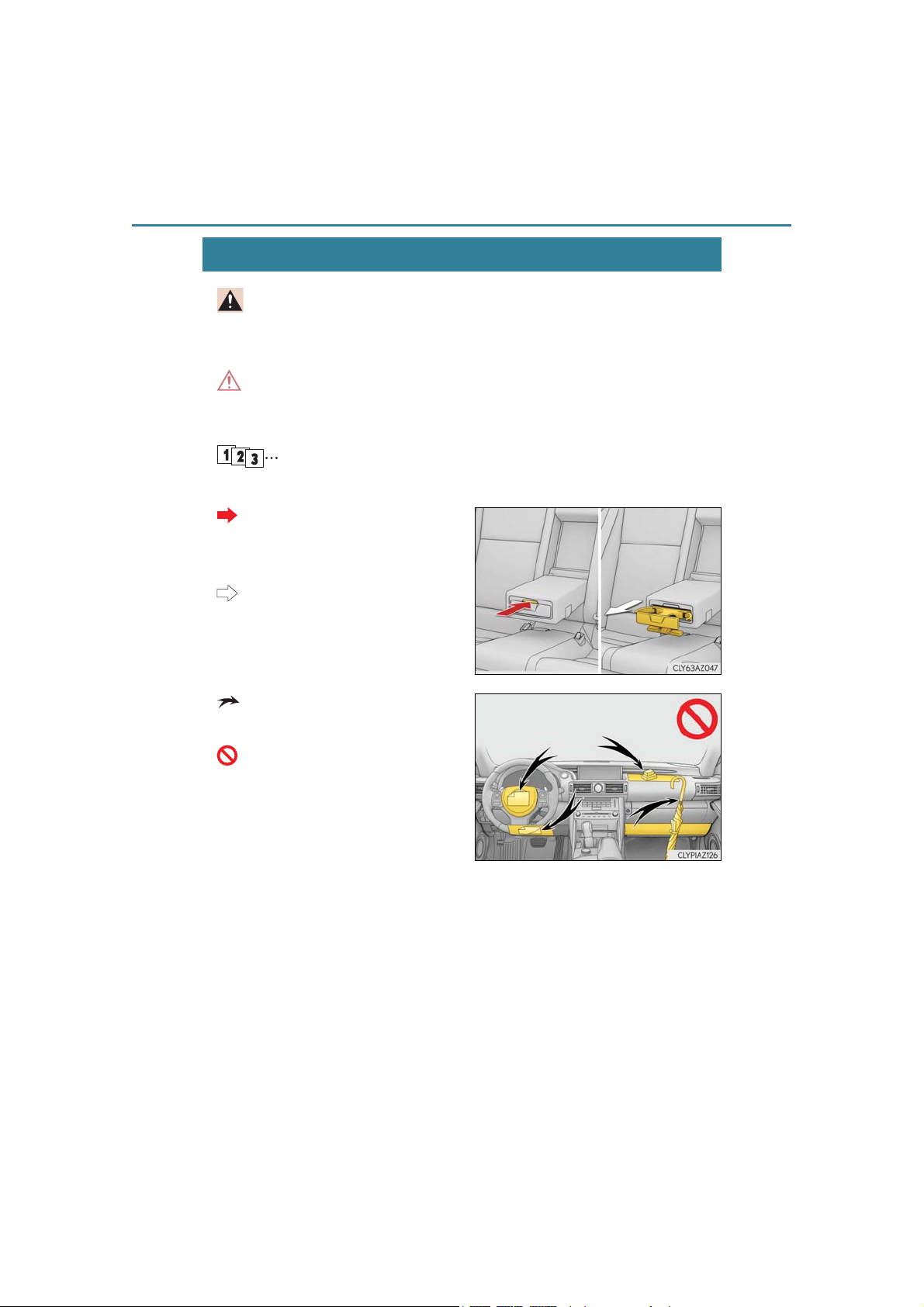
Indicates operating or working procedures. Follow the steps in
numerical order.
Indicates the action (pushing,
turning, etc.) used to operate
switches and other devices.
Indicates the outcome of an
operation (e.g. a lid opens).
Indicates the component or position being explained.
Means “Do not”, “Do not do this”,
or “Do not let this happen”.
IS350 AWD/IS350/IS300 AWD/IS300_U
Page 13
How to search
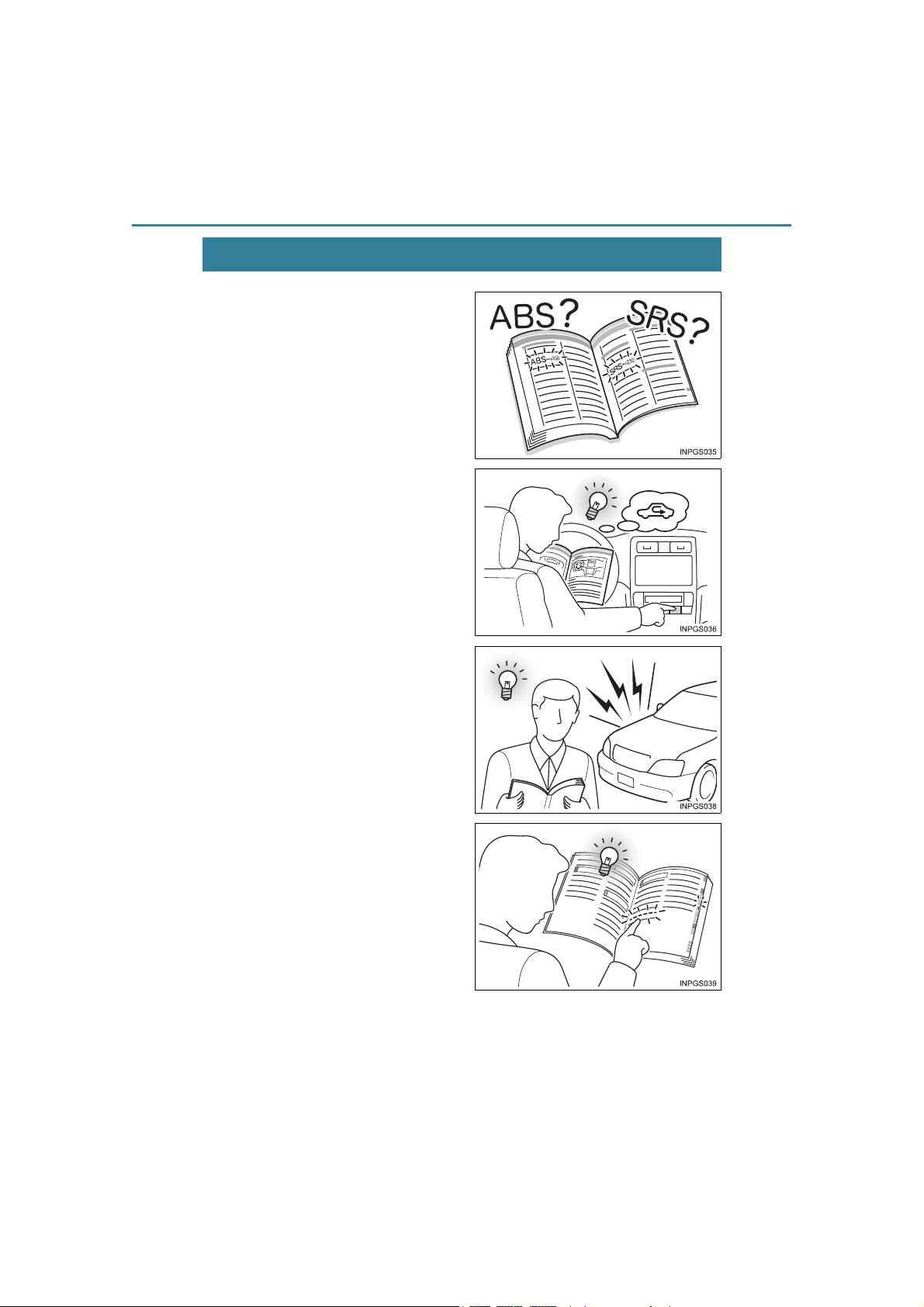
■ Searching by name
• Alphabetical index............... P. 640
■ Searching by installation position
• Pictorial index.............................P. 14
■ Searching by symptom or sound
• What to do if...
(Troubleshooting)................ P. 636
13
■ Searching by title
• Table of contents.........................P. 2
IS350 AWD/IS350/IS300 AWD/IS300_U
Page 14
14
2
Pictorial index
Pictorial index
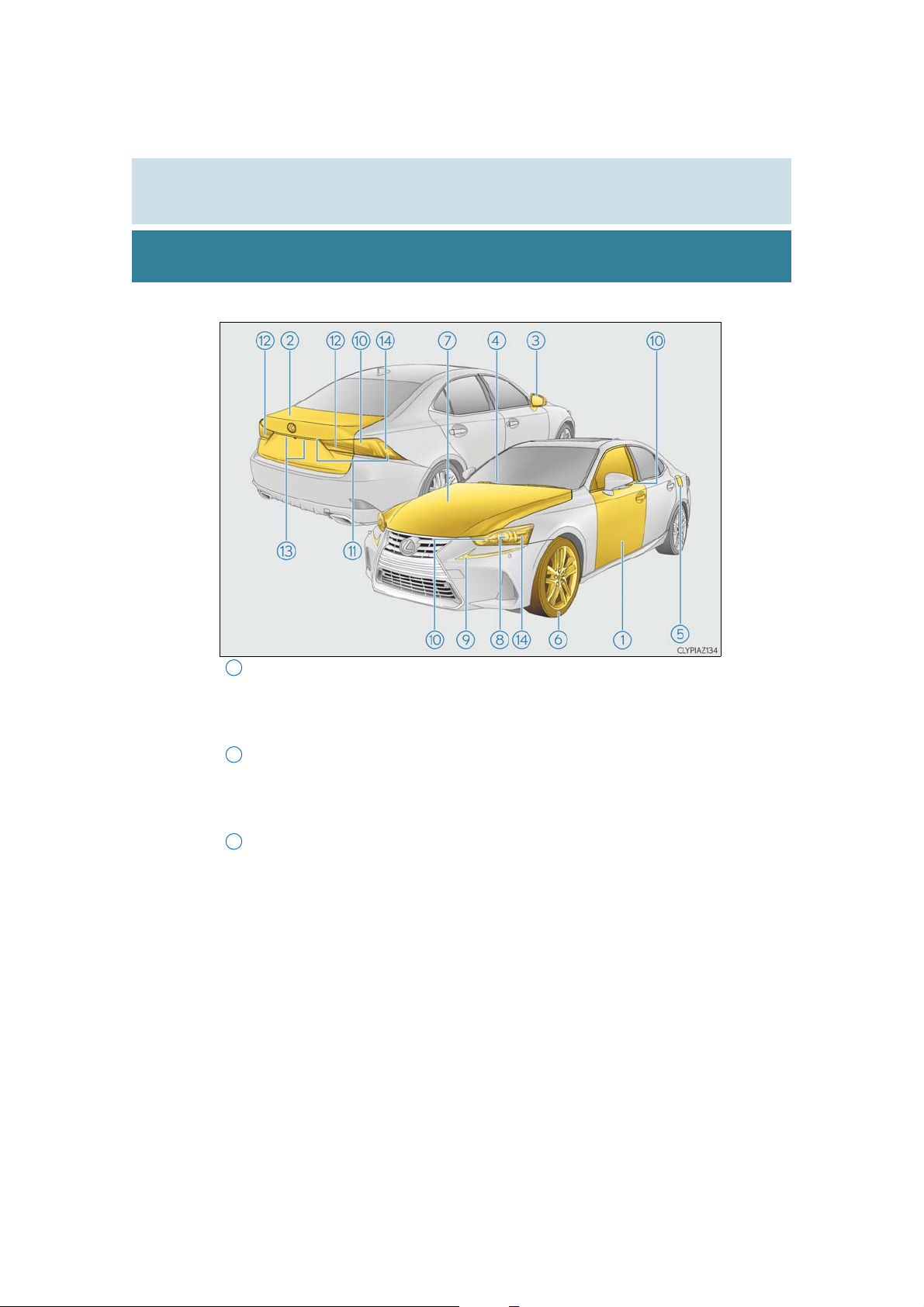
■ Exterior
1
Doors . . . . . . . . . . . . . . . . . . . . . . . . . . . . . . . . . . . . . . . . . . . . . . . . . . . . . . . . . . . . . . . . P. 124
Locking/unlocking. . . . . . . . . . . . . . . . . . . . . . . . . . . . . . . . . . . . . . . . . . . . . . . . . . . . . . P. 124
Opening/closing the side windows . . . . . . . . . . . . . . . . . . . . . . . . . . . . . . . . . . . . . P. 162
Locking/unlocking by using the mechanical key . . . . . . . . . . . . . . . . . . . . . . . P. 572
Warning lights/warning messages. . . . . . . . . . . . . . . . . . . . . . . . . . . . . . . .P. 527, 534
Trunk. . . . . . . . . . . . . . . . . . . . . . . . . . . . . . . . . . . . . . . . . . . . . . . . . . . . . . . . . . . . . . . . . P. 130
Opening from inside. . . . . . . . . . . . . . . . . . . . . . . . . . . . . . . . . . . . . . . . . . . . . . . . . . . .P. 130
Opening from outside . . . . . . . . . . . . . . . . . . . . . . . . . . . . . . . . . . . . . . . . . . . . . . . . . .P. 130
Opening by using the mechanical key . . . . . . . . . . . . . . . . . . . . . . . . . . . . . . . . . P. 572
Warning lights/warning messages. . . . . . . . . . . . . . . . . . . . . . . . . . . . . . . .P. 527, 535
3
Outside rear view mirrors. . . . . . . . . . . . . . . . . . . . . . . . . . . . . . . . . . . . . . . . . . . P. 159
Adjusting the mirror angle . . . . . . . . . . . . . . . . . . . . . . . . . . . . . . . . . . . . . . . . . . . . . .P. 159
Folding the mirrors . . . . . . . . . . . . . . . . . . . . . . . . . . . . . . . . . . . . . . . . . . . . . . . . . . . . . P. 159
Driving position memory
Defogging the mirrors . . . . . . . . . . . . . . . . . . . . . . . . . . . . . . . . . . . . . . . . . . . . . . . . . P. 422
* . . . . . . . . . . . . . . . . . . . . . . . . . . . . . . . . . . . . . . . . . . . . . . P. 147
IS350 AWD/IS350/IS300 AWD/IS300_U
Page 15

Pictorial index
9
12
14
4
Windshield wipers . . . . . . . . . . . . . . . . . . . . . . . . . . . . . . . . . . . . . . . . . . . . . . . . . . . P. 210
Precautions against winter season . . . . . . . . . . . . . . . . . . . . . . . . . . . . . . . . . . . . . P. 306
To prevent freezing (windshield wiper de-icer)
Precautions against car wash . . . . . . . . . . . . . . . . . . . . . . . . . . . . . . . . . . . . . . . . . . P. 456
5
Fuel filler door . . . . . . . . . . . . . . . . . . . . . . . . . . . . . . . . . . . . . . . . . . . . . . . . . . . . . . . P. 218
Refueling method. . . . . . . . . . . . . . . . . . . . . . . . . . . . . . . . . . . . . . . . . . . . . . . . . . . . . . .P. 218
Fuel type/fuel tank capacity. . . . . . . . . . . . . . . . . . . . . . . . . . . . . . . . . . . . . . . . . . . . P. 589
6
Tires . . . . . . . . . . . . . . . . . . . . . . . . . . . . . . . . . . . . . . . . . . . . . . . . . . . . . . . . . . . . . . . . . P. 485
Tire size/inflation pressure. . . . . . . . . . . . . . . . . . . . . . . . . . . . . . . . . . . . . . . . . . . . . P. 595
Winter tires/tire chain . . . . . . . . . . . . . . . . . . . . . . . . . . . . . . . . . . . . . . . . . . . . . . . . . P. 306
Checking/rotation/tire pressure warning system . . . . . . . . . . . . . . . . . . . . . . P. 485
Coping with flat tires. . . . . . . . . . . . . . . . . . . . . . . . . . . . . . . . . . . . . . . . . . . . . . . . . . . P. 559
7
Hood . . . . . . . . . . . . . . . . . . . . . . . . . . . . . . . . . . . . . . . . . . . . . . . . . . . . . . . . . . . . . . . . .P. 470
Opening. . . . . . . . . . . . . . . . . . . . . . . . . . . . . . . . . . . . . . . . . . . . . . . . . . . . . . . . . . . . . . . P. 470
Engine oil . . . . . . . . . . . . . . . . . . . . . . . . . . . . . . . . . . . . . . . . . . . . . . . . . . . . . . . . . . . . . . P. 590
Coping with overheat. . . . . . . . . . . . . . . . . . . . . . . . . . . . . . . . . . . . . . . . . . . . . . . . . . P. 579
Warning messages . . . . . . . . . . . . . . . . . . . . . . . . . . . . . . . . . . . . . . . . . . . . . . . . . . . . P. 535
*. . . . . . . . . . . . . . . . . . . . . . . P. 422
Light bulbs of the exterior lights for driving
(Replacing method: P. 507, Watts: P. 597)
8
Headlights . . . . . . . . . . . . . . . . . . . . . . . . . . . . . . . . . . . . . . . . . . . . . . . . . . . . . . . . . . P. 202
Parking lights/daytime running lights. . . . . . . . . . . . . . . . . . . . . . . . . . . . . . P. 202
10
Turn signal lights . . . . . . . . . . . . . . . . . . . . . . . . . . . . . . . . . . . . . . . . . . . . . . . . . . . . . P. 198
11
Tail lights . . . . . . . . . . . . . . . . . . . . . . . . . . . . . . . . . . . . . . . . . . . . . . . . . . . . . . . . . . . . P. 202
Stop lights. . . . . . . . . . . . . . . . . . . . . . . . . . . . . . . . . . . . . . . . . . . . . . . . . . . . . . . . . . . . P. 172
Back-up lights
Shifting the shift lever to R . . . . . . . . . . . . . . . . . . . . . . . . . . . . . . . . . . . . . . . . . . . . . . P. 191
13
License plate lights . . . . . . . . . . . . . . . . . . . . . . . . . . . . . . . . . . . . . . . . . . . . . . . . . P. 202
Side marker lights . . . . . . . . . . . . . . . . . . . . . . . . . . . . . . . . . . . . . . . . . . . . . . . . . . P. 202
15
*: If equipped
IS350 AWD/IS350/IS300 AWD/IS300_U
Page 16
16
Pictorial index
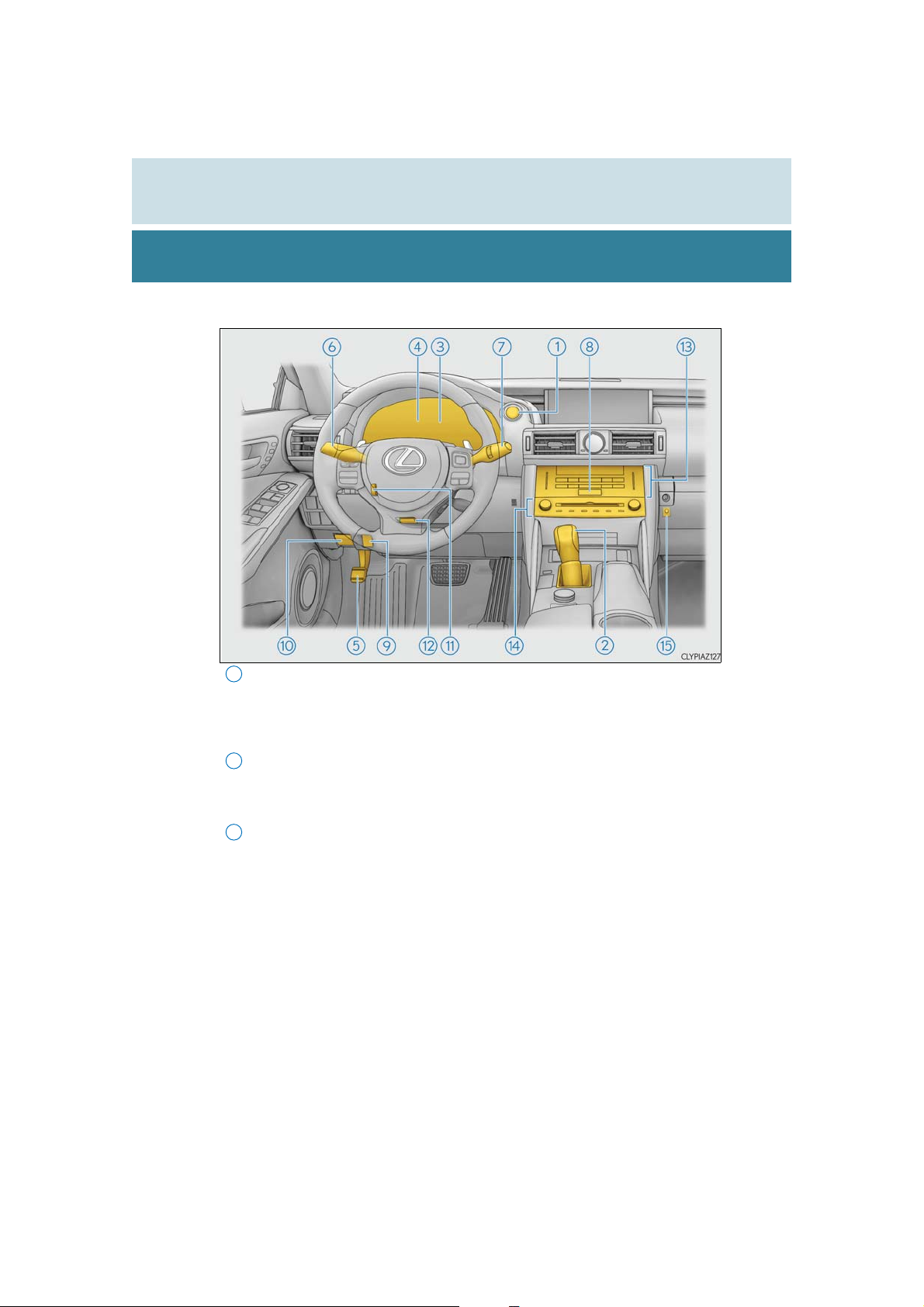
■ Instrument panel
1
Engine switch . . . . . . . . . . . . . . . . . . . . . . . . . . . . . . . . . . . . . . . . . . . . . . . . . . . . . . . . P. 186
Starting the engine/changing the modes. . . . . . . . . . . . . . . . . . . . . . . . . . . . . . . .P. 186
Emergency stop of the engine . . . . . . . . . . . . . . . . . . . . . . . . . . . . . . . . . . . . . . . . . .P. 515
When the engine will not start . . . . . . . . . . . . . . . . . . . . . . . . . . . . . . . . . . . . . . . . . P. 570
Warning messages . . . . . . . . . . . . . . . . . . . . . . . . . . . . . . . . . . . . . . . . . . . . . . . . . . . . P. 553
2
Shift lever . . . . . . . . . . . . . . . . . . . . . . . . . . . . . . . . . . . . . . . . . . . . . . . . . . . . . . . . . . . . . P. 191
Changing the shift position. . . . . . . . . . . . . . . . . . . . . . . . . . . . . . . . . . . . . . . . . . . . . . .P. 191
Precautions against towing . . . . . . . . . . . . . . . . . . . . . . . . . . . . . . . . . . . . . . . . . . . . . P. 517
When the shift lever does not move. . . . . . . . . . . . . . . . . . . . . . . . . . . . . . . . . . . . .P. 196
3
Meters . . . . . . . . . . . . . . . . . . . . . . . . . . . . . . . . . . . . . . . . . . . . . . . . . . . . . . . . . . . . . . . . P. 89
Reading the meters/adjusting the instrument panel light . . . . . . . . . . . . . . . . .P. 89
Warning lights/indicator lights. . . . . . . . . . . . . . . . . . . . . . . . . . . . . . . . . . . . . . . . . . .P. 84
When the warning lights come on . . . . . . . . . . . . . . . . . . . . . . . . . . . . . . . . . . . . . P. 525
IS350 AWD/IS350/IS300 AWD/IS300_U
Page 17

Pictorial index
8
11
12
4
Multi-information display . . . . . . . . . . . . . . . . . . . . . . . . . . . . . . . . . . . . . . . . . . . . P. 94
Display . . . . . . . . . . . . . . . . . . . . . . . . . . . . . . . . . . . . . . . . . . . . . . . . . . . . . . . . . . . . . . . . . .P. 94
When the warning messages are displayed . . . . . . . . . . . . . . . . . . . . . . . . . . . . P. 532
5
Parking brake . . . . . . . . . . . . . . . . . . . . . . . . . . . . . . . . . . . . . . . . . . . . . . . . . . . . . . P. 200
Applying/releasing . . . . . . . . . . . . . . . . . . . . . . . . . . . . . . . . . . . . . . . . . . . . . . . . . . . . P. 200
Precautions against winter season . . . . . . . . . . . . . . . . . . . . . . . . . . . . . . . . . . . . . P. 307
Warning buzzer/message . . . . . . . . . . . . . . . . . . . . . . . . . . . . . . . . . . . . . . . . . . . . . P. 532
6
Turn signal lever . . . . . . . . . . . . . . . . . . . . . . . . . . . . . . . . . . . . . . . . . . . . . . . . . . . . . P. 198
Headlight switch . . . . . . . . . . . . . . . . . . . . . . . . . . . . . . . . . . . . . . . . . . . . . . . . . . . . . . . . P. 202
Headlights/parking lights/tail lights/daytime running lights . . . . . . . . . . . . P. 202
7
Windshield wiper and washer switch . . . . . . . . . . . . . . . . . . . . . . . . . . . . . . . P. 210
Usage . . . . . . . . . . . . . . . . . . . . . . . . . . . . . . . . . . . . . . . . . . . . . . . . . . . . . . . . . . . . . . . . . .P. 210
Adding washer fluid . . . . . . . . . . . . . . . . . . . . . . . . . . . . . . . . . . . . . . . . . . . . . . . . . . . P. 484
Warning messages . . . . . . . . . . . . . . . . . . . . . . . . . . . . . . . . . . . . . . . . . . . . . . . . . . . . P. 548
Emergency flasher switch . . . . . . . . . . . . . . . . . . . . . . . . . . . . . . . . . . . . . . . . . . . P. 514
9
Trunk opener . . . . . . . . . . . . . . . . . . . . . . . . . . . . . . . . . . . . . . . . . . . . . . . . . . . . . . . . P. 130
10
Hood lock release lever . . . . . . . . . . . . . . . . . . . . . . . . . . . . . . . . . . . . . . . . . . . . .P. 470
1
*
Tilt and telescopic steering control switch
Adjustment . . . . . . . . . . . . . . . . . . . . . . . . . . . . . . . . . . . . . . . . . . . . . . . . . . . . . . . . . . . . .P. 155
Driving position memory*1 . . . . . . . . . . . . . . . . . . . . . . . . . . . . . . . . . . . . . . . . . . . . . P. 147
. . . . . . . . . . . . . . . . . . . . . . . P. 155
Tilt and telescopic steering lock release lever*1 . . . . . . . . . . . . . . . . . . . P. 155
Adjustment . . . . . . . . . . . . . . . . . . . . . . . . . . . . . . . . . . . . . . . . . . . . . . . . . . . . . . . . . . . . .P. 155
13
Air conditioning system . . . . . . . . . . . . . . . . . . . . . . . . . . . . . . . . . . . . . . . . . . . . . P. 417
Usage . . . . . . . . . . . . . . . . . . . . . . . . . . . . . . . . . . . . . . . . . . . . . . . . . . . . . . . . . . . . . . . . . . P. 417
Rear window defogger . . . . . . . . . . . . . . . . . . . . . . . . . . . . . . . . . . . . . . . . . . . . . . . . P. 422
14
Audio system*2. . . . . . . . . . . . . . . . . . . . . . . . . . . . . . . . . . . . . . . . . . . . . . . . . . . . . . P. 312
Audio system . . . . . . . . . . . . . . . . . . . . . . . . . . . . . . . . . . . . . . . . . . . . . . . . . . . . . . . . . . .P. 312
Hands-free system. . . . . . . . . . . . . . . . . . . . . . . . . . . . . . . . . . . . . . . . . . . . . . . . . . . . . . P. 371
15
Trunk opener main switch . . . . . . . . . . . . . . . . . . . . . . . . . . . . . . . . . . . . . . . . . . . . P. 131
17
1
*
2
*
: For vehicles with a navigation system, refer to “NAVIGATION SYSTEM OWNER’S
IS350 AWD/IS350/IS300 AWD/IS300_U
: If equipped
MANUAL”.
Page 18
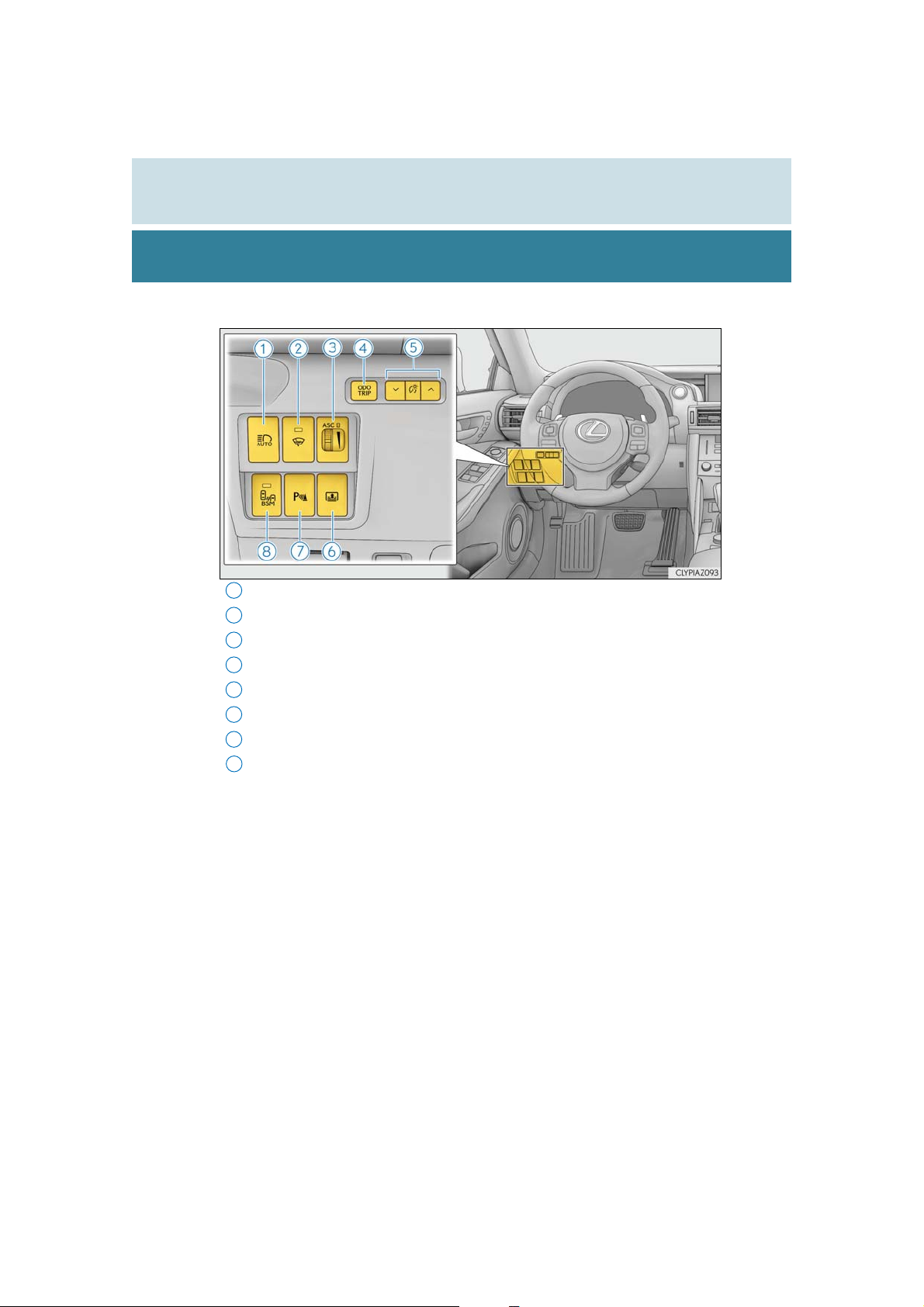
18
7
■ Switches
1
2
3
4
5
6
8
Pictorial index
Automatic High Beam switch . . . . . . . . . . . . . . . . . . . . . . . . . . . . . . . . . . . . . . .P. 206
Windshield wiper de-icer switch
ASC (Active Sound Control) switch
Odometer/trip meter and trip meter reset button . . . . . . . . . . . . . . . . . . P. 98
Instrument panel light control switches. . . . . . . . . . . . . . . . . . . . . . . . . . . . . . P. 92
Rear sunshade switch
Intuitive parking assist switch*. . . . . . . . . . . . . . . . . . . . . . . . . . . . . . . . . . . . . .P. 260
BSM (Blind Spot Monitor) main switch
* . . . . . . . . . . . . . . . . . . . . . . . . . . . . . . . . . . . . . . . . . . . . . .P. 439
* . . . . . . . . . . . . . . . . . . . . . . . . . . . . . . . . . .P. 422
* . . . . . . . . . . . . . . . . . . . . . . . . . . . . . . P. 201
*. . . . . . . . . . . . . . . . . . . . . . . . . . . P. 285
IS350 AWD/IS350/IS300 AWD/IS300_U
Page 19
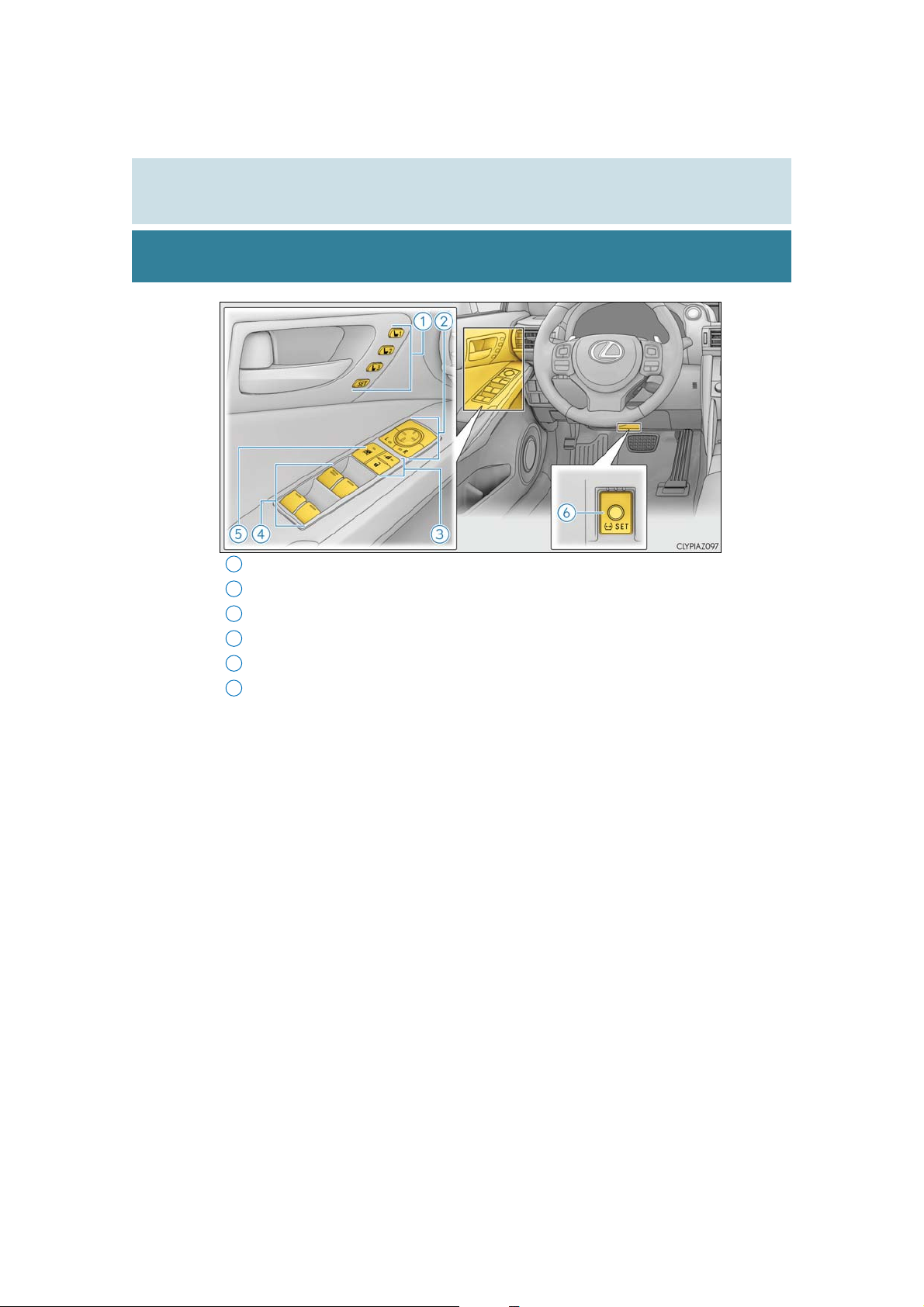
Pictorial index
1
Driving position memory switches*. . . . . . . . . . . . . . . . . . . . . . . . . . . . . . . . . P. 147
2
Outside rear view mirror switches. . . . . . . . . . . . . . . . . . . . . . . . . . . . . . . . . . P. 159
3
Door lock switches . . . . . . . . . . . . . . . . . . . . . . . . . . . . . . . . . . . . . . . . . . . . . . . . . . P. 126
4
Power window switches . . . . . . . . . . . . . . . . . . . . . . . . . . . . . . . . . . . . . . . . . . . . . P. 162
5
Window lock switch . . . . . . . . . . . . . . . . . . . . . . . . . . . . . . . . . . . . . . . . . . . . . . . . . P. 162
6
Tire pressure warning reset switch . . . . . . . . . . . . . . . . . . . . . . . . . . . . . . . . .P. 487
19
IS350 AWD/IS350/IS300 AWD/IS300_U
*: If equipped
Page 20
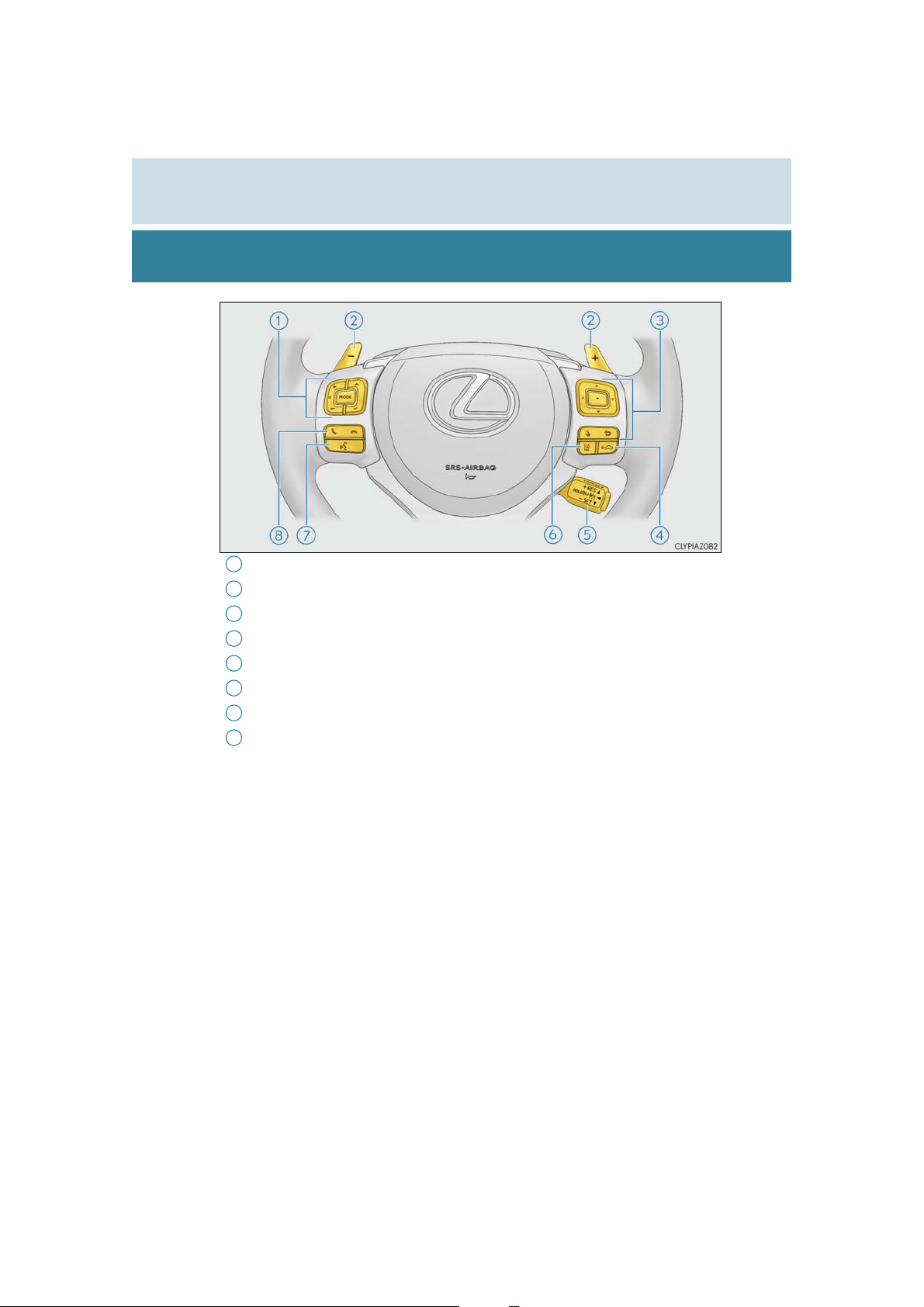
20
Pictorial index
1
Audio remote control switches*1 . . . . . . . . . . . . . . . . . . . . . . . . . . . . . . . . . . . P. 318
2
Paddle shift switches . . . . . . . . . . . . . . . . . . . . . . . . . . . . . . . . . . . . . . . . . . . . . . . . P. 193
3
Meter control switches. . . . . . . . . . . . . . . . . . . . . . . . . . . . . . . . . . . . . . . . . . . . . . . P. 97
4
Vehicle-to-vehicle distance switch . . . . . . . . . . . . . . . . . . . . . . . . . . . . . . . . .P. 254
5
Cruise control switch. . . . . . . . . . . . . . . . . . . . . . . . . . . . . . . . . . . . . . . . . . . . . . . P. 248
6
LDA (Lane Departure Alert with steering control) switch . . . . . . . . P. 240
7
Talk switch
8
Telephone switches
1
*
. . . . . . . . . . . . . . . . . . . . . . . . . . . . . . . . . . . . . . . . . . . . . . . . . . . . . . . . P. 382
1
*
. . . . . . . . . . . . . . . . . . . . . . . . . . . . . . . . . . . . . . . . . . . . . . P. 382
IS350 AWD/IS350/IS300 AWD/IS300_U
Page 21
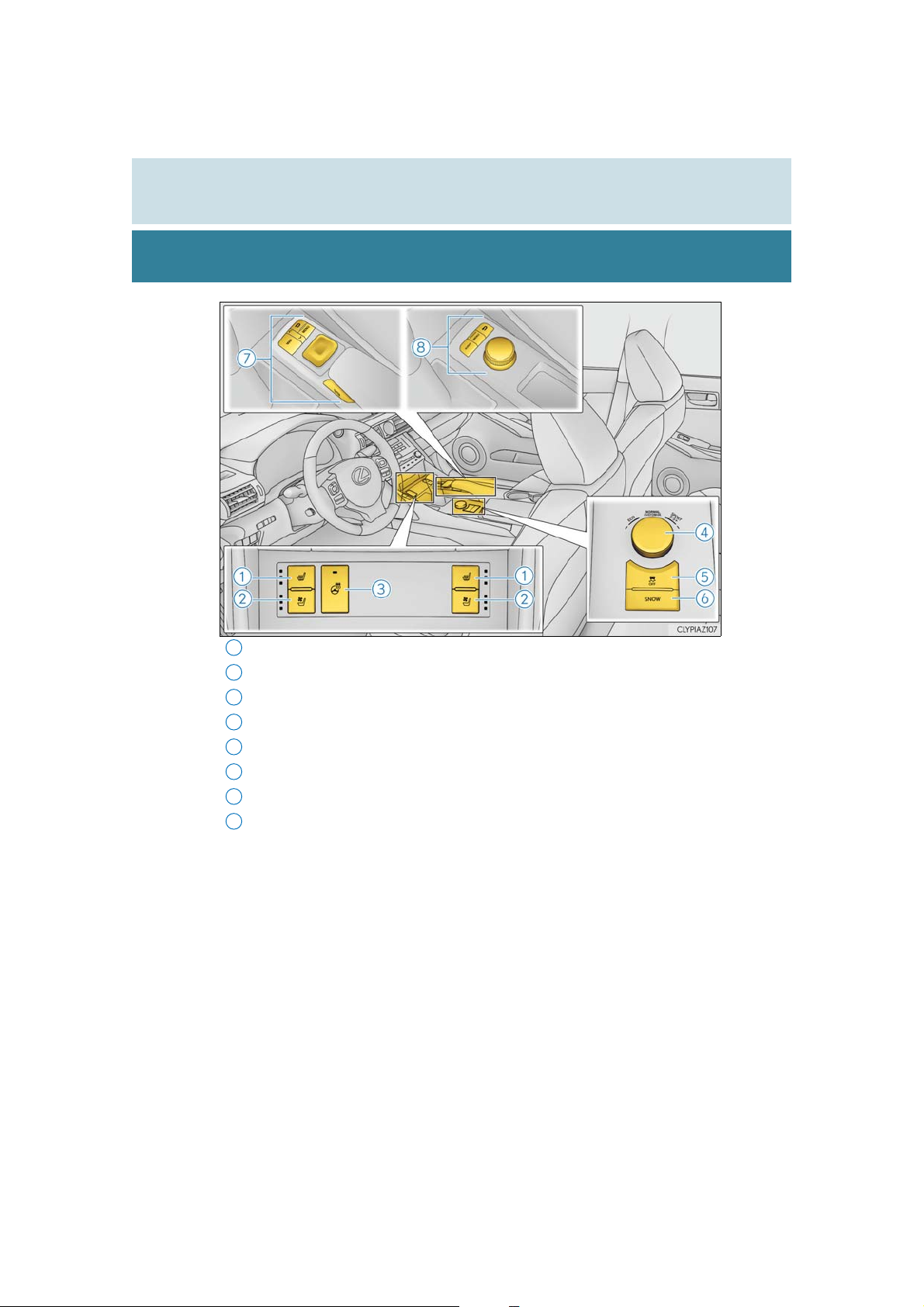
Pictorial index
8
1
Seat heater switches*2. . . . . . . . . . . . . . . . . . . . . . . . . . . . . . . . . . . . . . . . . . . . . . P. 427
2
Seat ventilator switches*2 . . . . . . . . . . . . . . . . . . . . . . . . . . . . . . . . . . . . . . . . . . P. 427
3
Heated steering wheel switch
4
Driving mode select switch. . . . . . . . . . . . . . . . . . . . . . . . . . . . . . . . . . . . . . . . . . P. 297
5
VSC OFF switch. . . . . . . . . . . . . . . . . . . . . . . . . . . . . . . . . . . . . . . . . . . . . . . . . . . . P. 303
6
Snow mode switch . . . . . . . . . . . . . . . . . . . . . . . . . . . . . . . . . . . . . . . . . . . . . . . . . . . P. 192
7
Remote Touch
2, 3
*
. . . . . . . . . . . . . . . . . . . . . . . . . . . . . . . . . . . . . . . . . . . . . . . . . . P. 412
Lexus Display Audio controller
2
*
. . . . . . . . . . . . . . . . . . . . . . . . . . . . . . . . . . . .P. 426
2
*
. . . . . . . . . . . . . . . . . . . . . . . . . . . . . . . . . . P. 314
21
1
*
: For vehicles with a navigation system, refer to “NAVIGATION SYSTEM OWNER’S
MANUAL”.
2
*
3
*
: Refer to “NAVIGATION SYSTEM OWNER’S MANUAL”.
IS350 AWD/IS350/IS300 AWD/IS300_U
: If equipped
Page 22
22
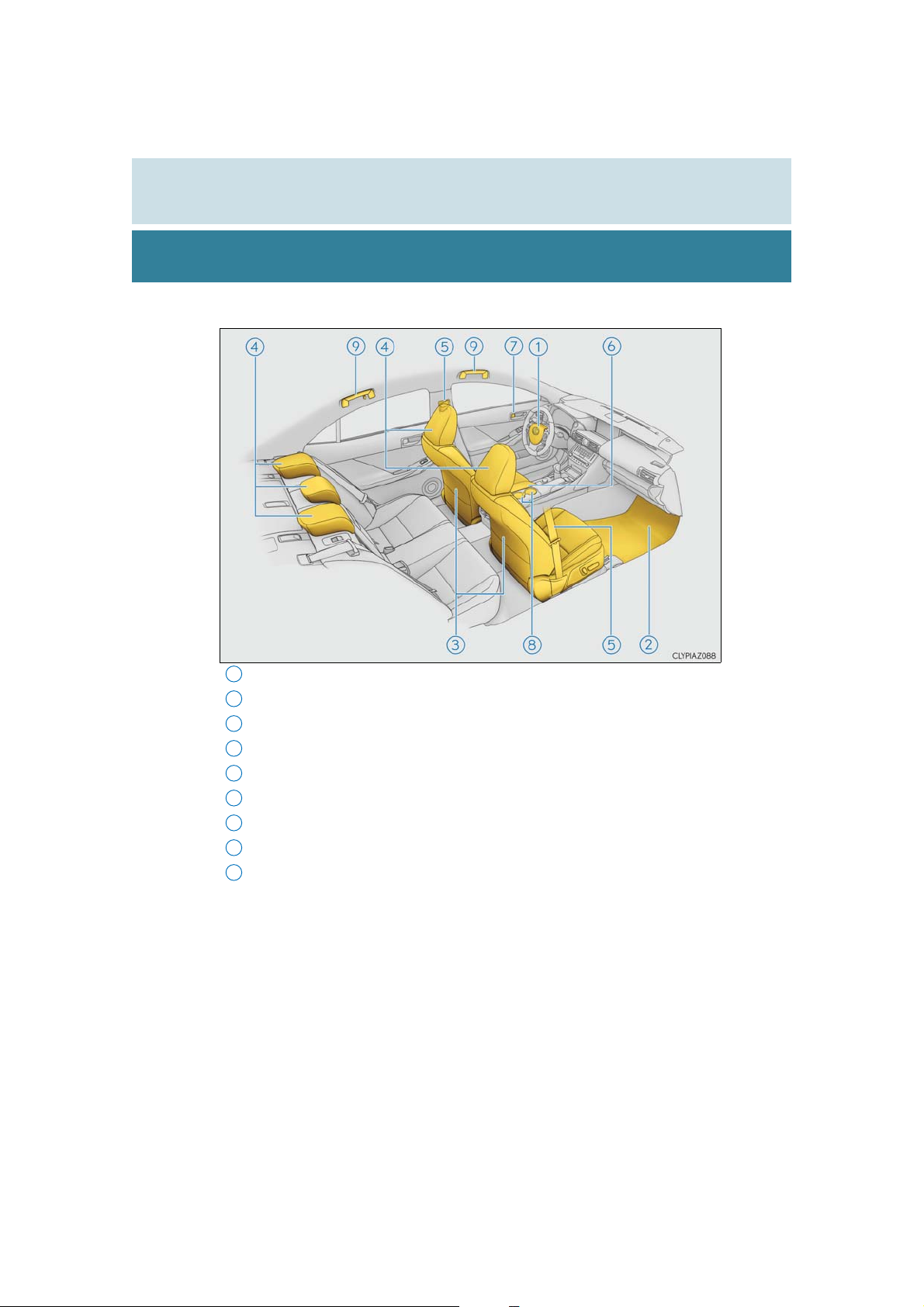
9
■ Interior
Pictorial index
1
SRS airbags . . . . . . . . . . . . . . . . . . . . . . . . . . . . . . . . . . . . . . . . . . . . . . . . . . . . . . . . . . . P. 36
2
Floor mats. . . . . . . . . . . . . . . . . . . . . . . . . . . . . . . . . . . . . . . . . . . . . . . . . . . . . . . . . . . . . P. 26
3
Front seats . . . . . . . . . . . . . . . . . . . . . . . . . . . . . . . . . . . . . . . . . . . . . . . . . . . . . . . . . . . P. 143
4
Head restraints . . . . . . . . . . . . . . . . . . . . . . . . . . . . . . . . . . . . . . . . . . . . . . . . . . . . . . P. 152
5
Seat belts . . . . . . . . . . . . . . . . . . . . . . . . . . . . . . . . . . . . . . . . . . . . . . . . . . . . . . . . . . . . . P. 30
6
Console box . . . . . . . . . . . . . . . . . . . . . . . . . . . . . . . . . . . . . . . . . . . . . . . . . . . . . . . . P. 432
7
Inside lock buttons. . . . . . . . . . . . . . . . . . . . . . . . . . . . . . . . . . . . . . . . . . . . . . . . . . . P. 126
8
Cup holders. . . . . . . . . . . . . . . . . . . . . . . . . . . . . . . . . . . . . . . . . . . . . . . . . . . . . . . . . P. 433
Assist grips. . . . . . . . . . . . . . . . . . . . . . . . . . . . . . . . . . . . . . . . . . . . . . . . . . . . . . . . . . . P. 441
IS350 AWD/IS350/IS300 AWD/IS300_U
Page 23
Pictorial index
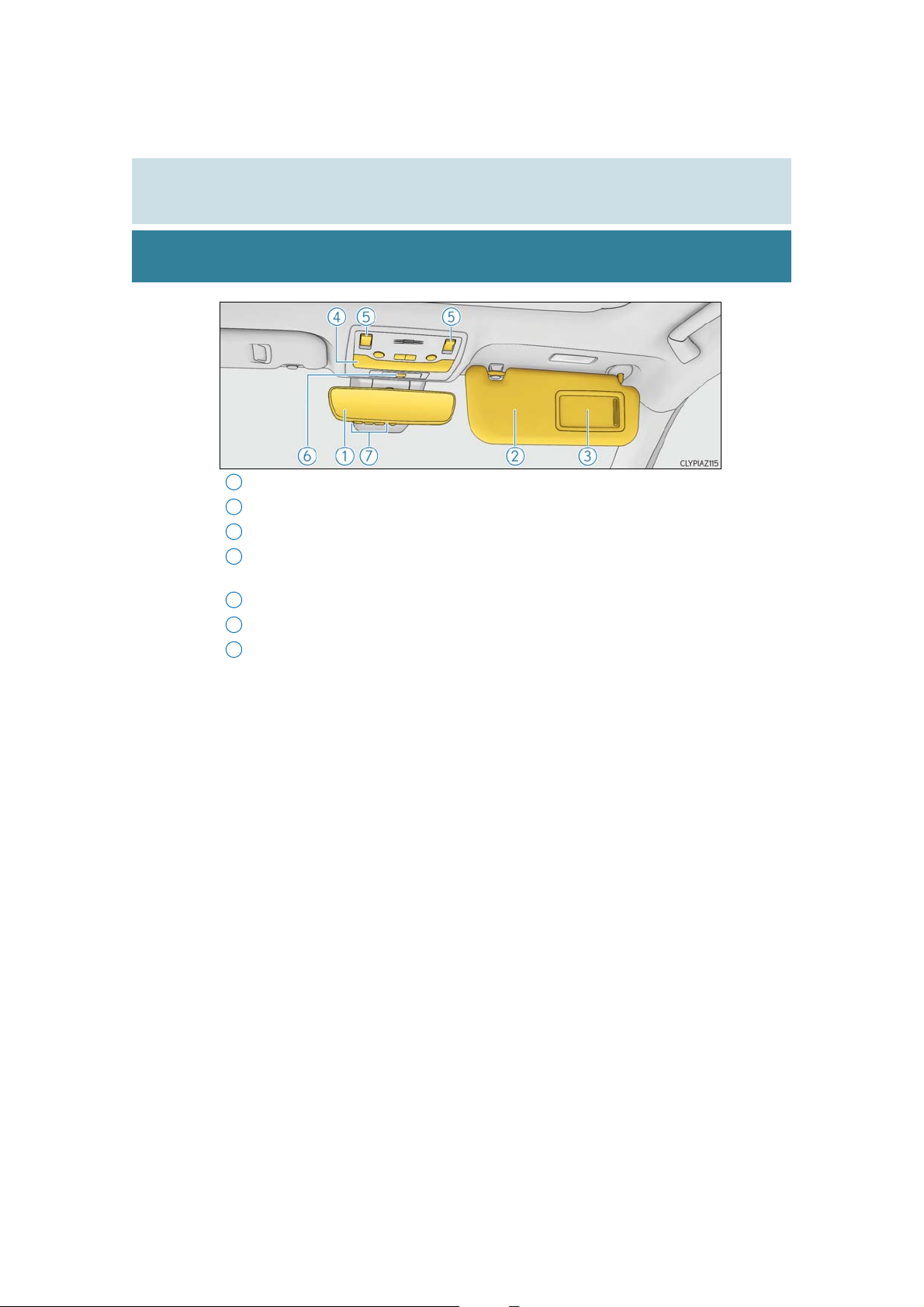
1
Inside rear view mirror . . . . . . . . . . . . . . . . . . . . . . . . . . . . . . . . . . . . . . . . . . . . . . P. 157
2
Sun visors . . . . . . . . . . . . . . . . . . . . . . . . . . . . . . . . . . . . . . . . . . . . . . . . . . . . . . . . . . . .P. 437
3
Vanity mirrors . . . . . . . . . . . . . . . . . . . . . . . . . . . . . . . . . . . . . . . . . . . . . . . . . . . . . . . P. 437
4
Interior light . . . . . . . . . . . . . . . . . . . . . . . . . . . . . . . . . . . . . . . . . . . . . . . . . . . . . . . . .P. 429
Personal lights
5
Moon roof switches
6
“SOS” button*2 . . . . . . . . . . . . . . . . . . . . . . . . . . . . . . . . . . . . . . . . . . . . . . . . . . . . . . P. 68
7
Garage door opener switches . . . . . . . . . . . . . . . . . . . . . . . . . . . . . . . . . . . . . .P. 442
1
*
. . . . . . . . . . . . . . . . . . . . . . . . . . . . . . . . . . . . . . . . . . . . . . . . . . . . .P. 429
2
*
. . . . . . . . . . . . . . . . . . . . . . . . . . . . . . . . . . . . . . . . . . . . . . . P. 166
23
1
*
: The illustration shows the front, but they are also equipped in the rear.
IS350 AWD/IS350/IS300 AWD/IS300_U
2
*
: If equipped
Page 24

24
Pictorial index
IS350 AWD/IS350/IS300 AWD/IS300_U
Page 25

25
For safety and security
1
1-1. For safe use
Before driving................................. 26
For safe driving ..............................28
Seat belts ..........................................30
SRS airbags .....................................36
Front passenger occupant
classification system.................. 46
Safety information
for children ...................................52
Child restraint systems ...............53
Installing child restraints............. 57
Exhaust gas precautions............ 67
1-2. Lexus Enform
LEXUS Enform Safety
Connect.........................................68
LEXUS Enform Remote............ 74
LEXUS Enform Service
Connect......................................... 75
1-3. Theft deterrent system
Engine immobilizer system....... 76
Alarm .................................................78
Theft prevention labels................ 81
IS350 AWD/IS350/IS300 AWD/IS300_U
Page 26
26
1
*
2
1-1. For safe use
Before driving
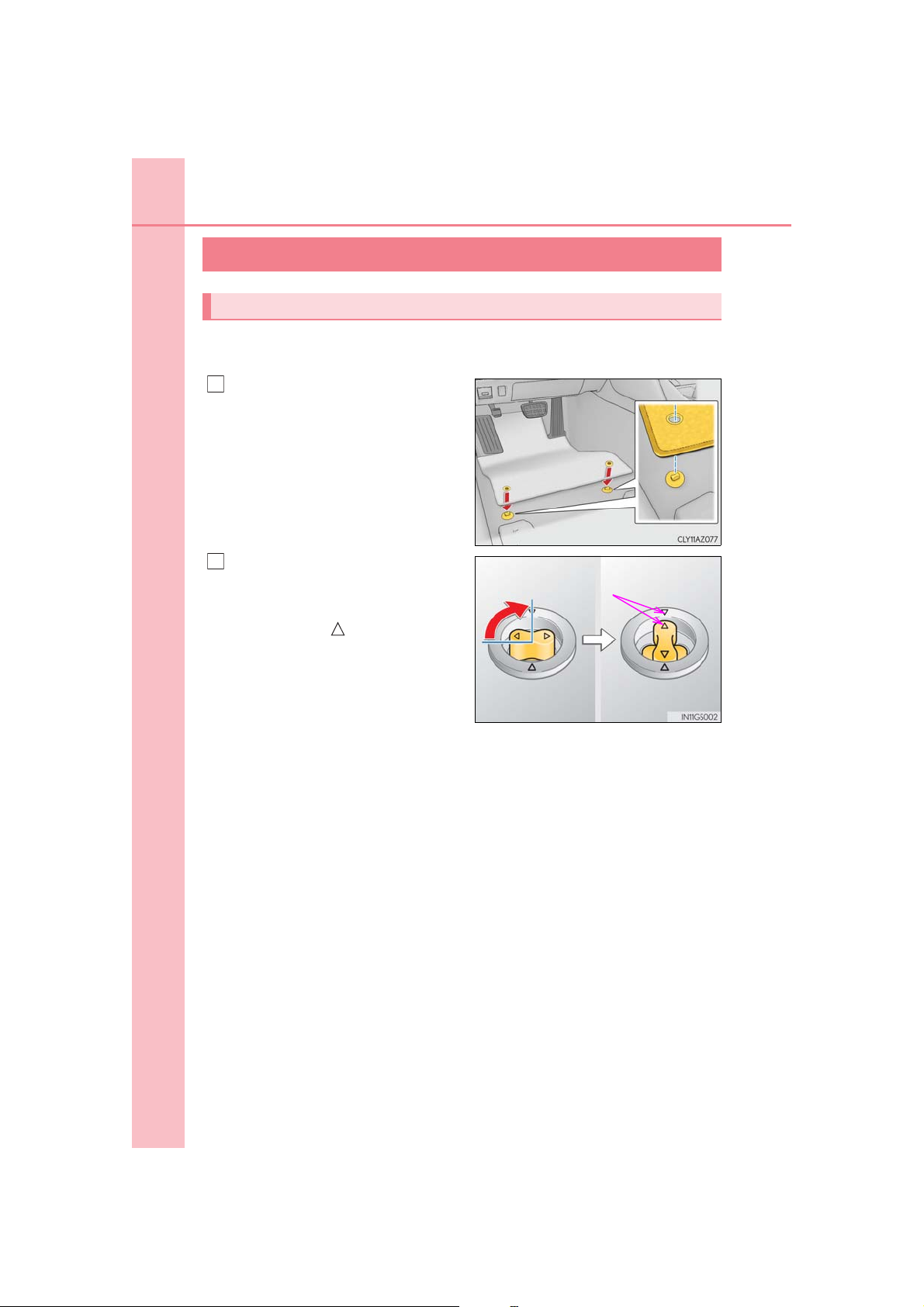
Floor mat
Use only floor mats designed specifically for vehicles of the same model and
model year as your vehicle. Fix them securely in place onto the carpet.
Insert the retaining hooks (clips) into
the floor mat eyelets.
Turn the upper knob of each retaining hook (clip) to secure the floor
mats in place.
*: Always align the marks.
The shape of the retaining hooks (clips) may differ from that shown in the illustration.
IS350 AWD/IS350/IS300 AWD/IS300_U
Page 27
1-1. For safe use
Check that the floor mat is securely fixed in
WARNING
Observe the following precautions.
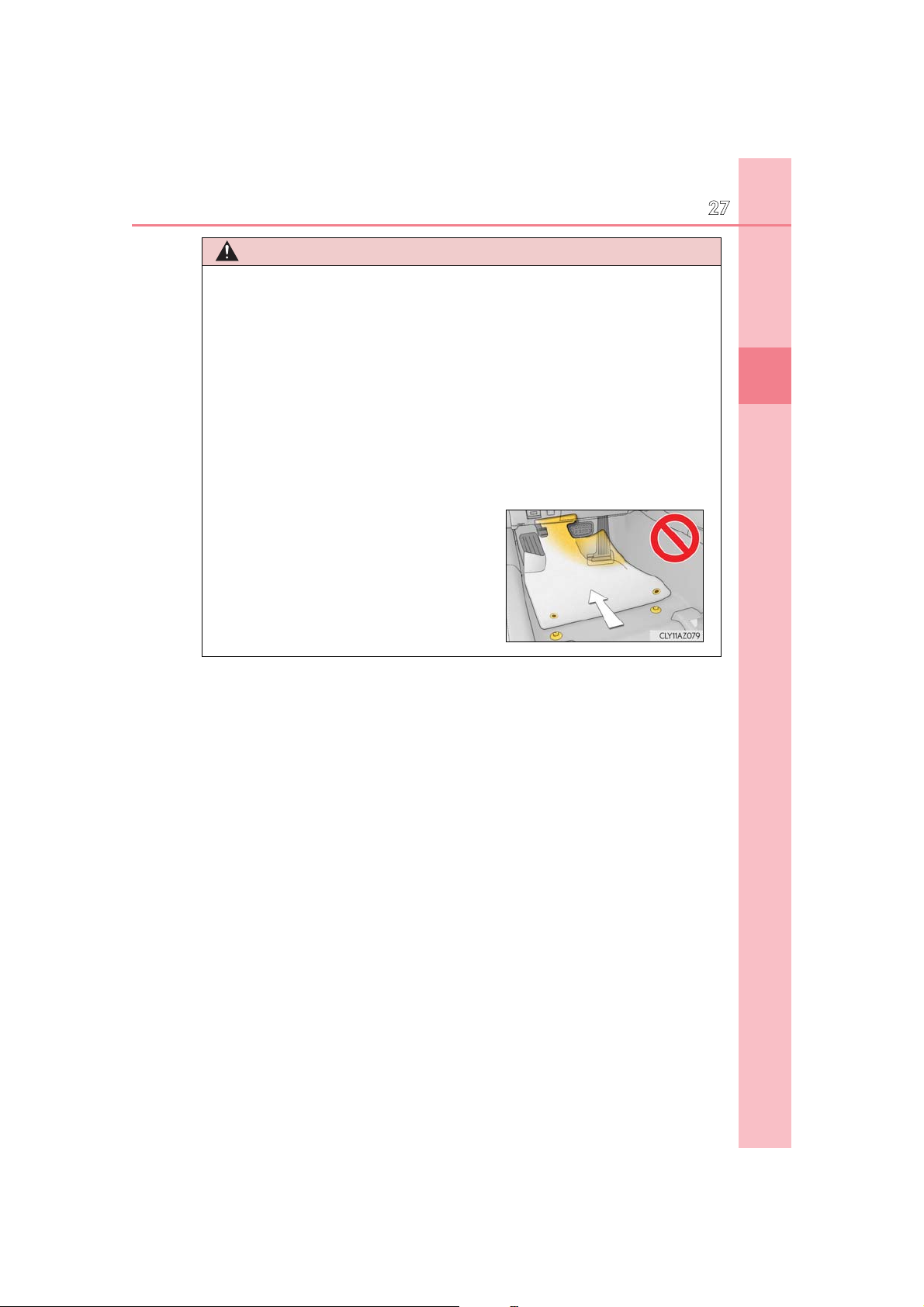
Failure to do so may cause the driver's floor mat to slip, possibly interfering with the pedals while driving. An unexpectedly high speed may result or it may become difficult to
stop the vehicle. This could lead to an accident, resulting in death or serious injury.
■ When installing the driver’s floor mat
● Do not use floor mats designed for other models or different model year vehicles,
even if they are Lexus Genuine floor mats.
● Only use floor mats designed for the driver’s seat.
● Always install the floor mat securely using the retaining hooks (clips) provided.
● Do not use two or more floor mats on top of each other.
● Do not place the floor mat bottom-side up or upside-down.
■ Before driving
●
the correct place with all the provided retaining hooks (clips). Be especially careful to perform this check after cleaning the floor.
● With the engine stopped and the shift lever in
P, fully depress each pedal to the floor to
make sure it does not interfere with the floor
mat.
27
1
For safety and security
IS350 AWD/IS350/IS300 AWD/IS300_U
Page 28
28
1
2
1-1. For safe use
For safe driving
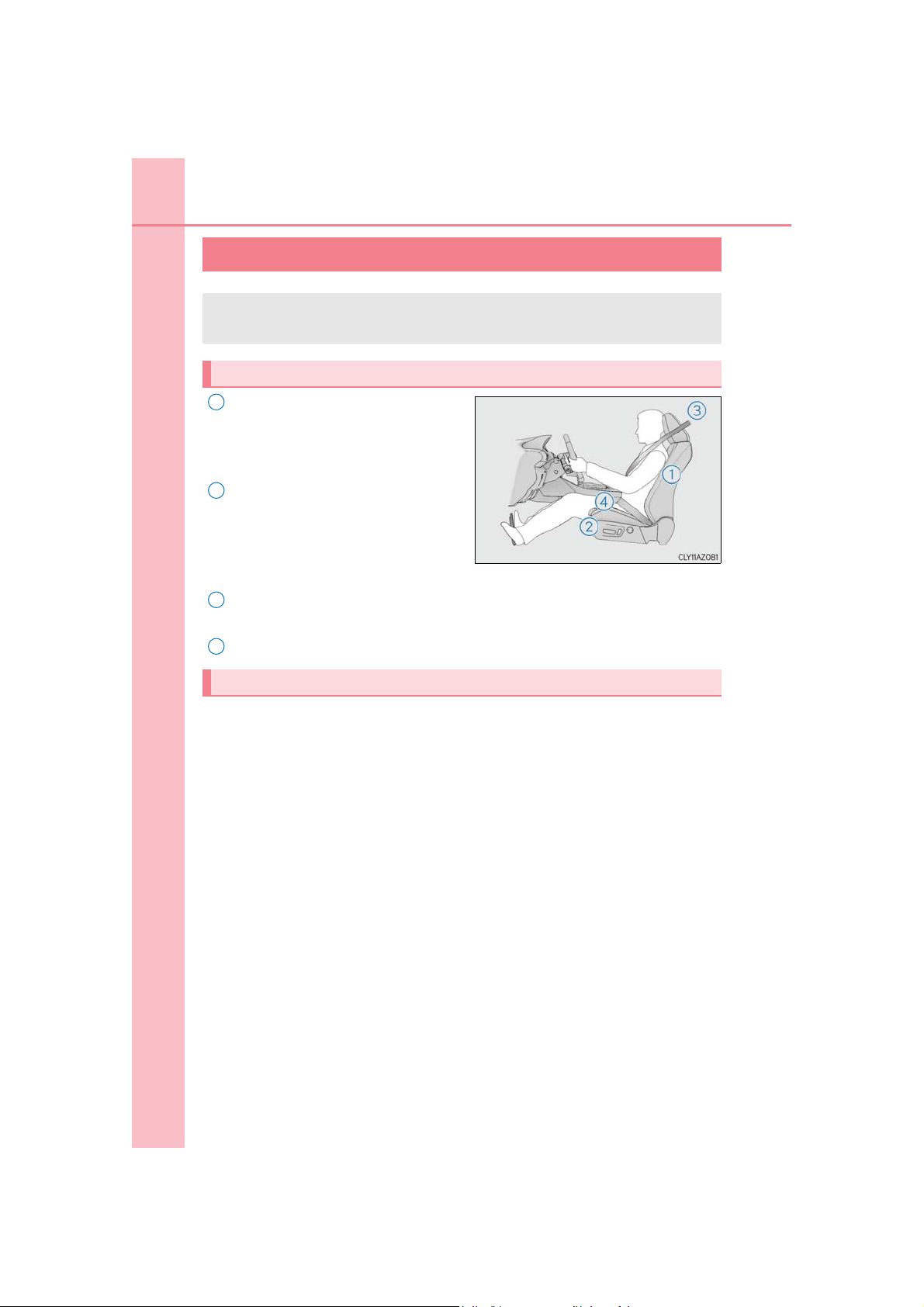
For safe driving, adjust the seat and mirror to an appropriate position before
driving.
Correct driving posture
Adjust the angle of the seatback so
that you are sitting straight up and so
that you do not have to lean forward
to steer. (P. 143)
Adjust the seat so that you can
depress the pedals fully and so that
your arms bend slightly at the elbow
when gripping the steering wheel.
(P. 143)
3
Lock the head restraint in place with the center of the head restraint closest to
the top of your ears. (P. 152)
4
Wear the seat belt correctly. (P. 30)
Correct use of the seat belts
Make sure that all occupants are wearing their seat belts before driving the vehicle. (P. 30)
Use a child restraint system appropriate for the child until the child becomes
large enough to properly wear the vehicle’s seat belt. (P. 53)
IS350 AWD/IS350/IS300 AWD/IS300_U
Page 29

1-1. For safe use
Adjusting the mirrors
Make sure that you can see backward clearly by adjusting the inside and outside
rear view mirrors properly. (P. 157, 159)
WARNING
29
Observe the following precautions.
Failure to do so may result in death or serious injury.
● Do not adjust the position of the driver’s seat while driving.
Doing so could cause the driver to lose control of the vehicle.
● Do not place a cushion between the driver or passenger and the seatback.
A cushion may prevent correct posture from being achieved, and reduce the effectiveness of the seat belt and head restraint.
● Do not place anything under the front seats.
Objects placed under the front seats may become jammed in the seat tracks and stop
the seat from locking in place. This may lead to an accident and the adjustment mechanism may also be damaged.
● Always observe the legal speed limit when driving on public roads.
● When driving over long distances, take regular breaks before you start to feel tired.
Also, if you feel tired or sleepy while driving, do not force yourself to continue driving
and take a break immediately.
1
For safety and security
IS350 AWD/IS350/IS300 AWD/IS300_U
Page 30
30
Release button
1-1. For safe use
Seat belts
Make sure that all occupants are wearing their seat belts before driving the
vehicle.
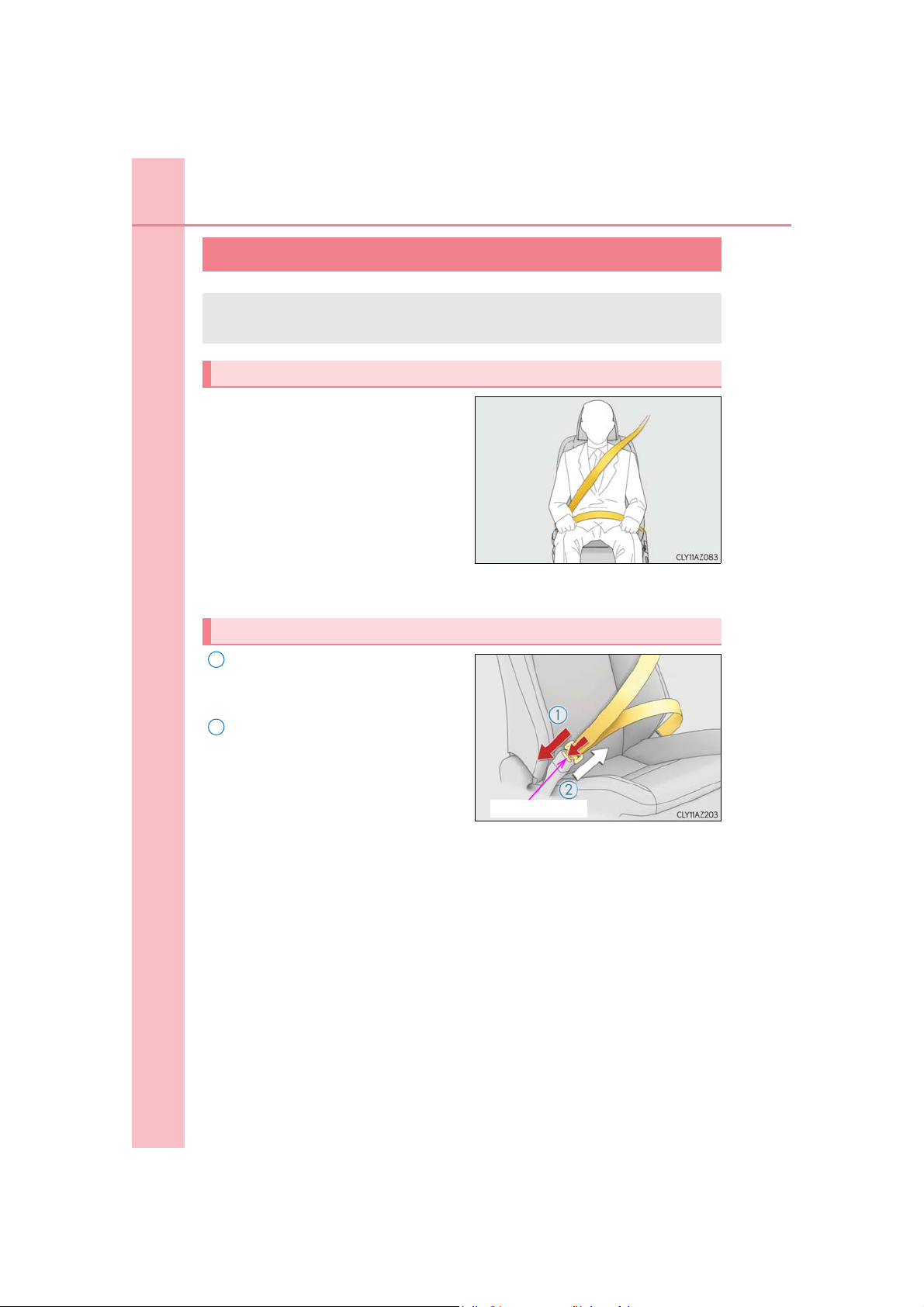
Correct use of the seat belts
● Extend the shoulder belt so that it
comes fully over the shoulder, but
does not come into contact with the
neck or slide off the shoulder.
● Position the lap belt as low as possi-
ble over the hips.
● Adjust the position of the seatback.
Sit up straight and well back in the
seat.
● Do not twist the seat belt.
Fastening and releasing the seat belt
1
To fasten the seat belt, push the plate
into the buckle until a click sound is
heard.
2
To release the seat belt, press the
release button.
IS350 AWD/IS350/IS300 AWD/IS300_U
Page 31
1-1. For safe use
1
2
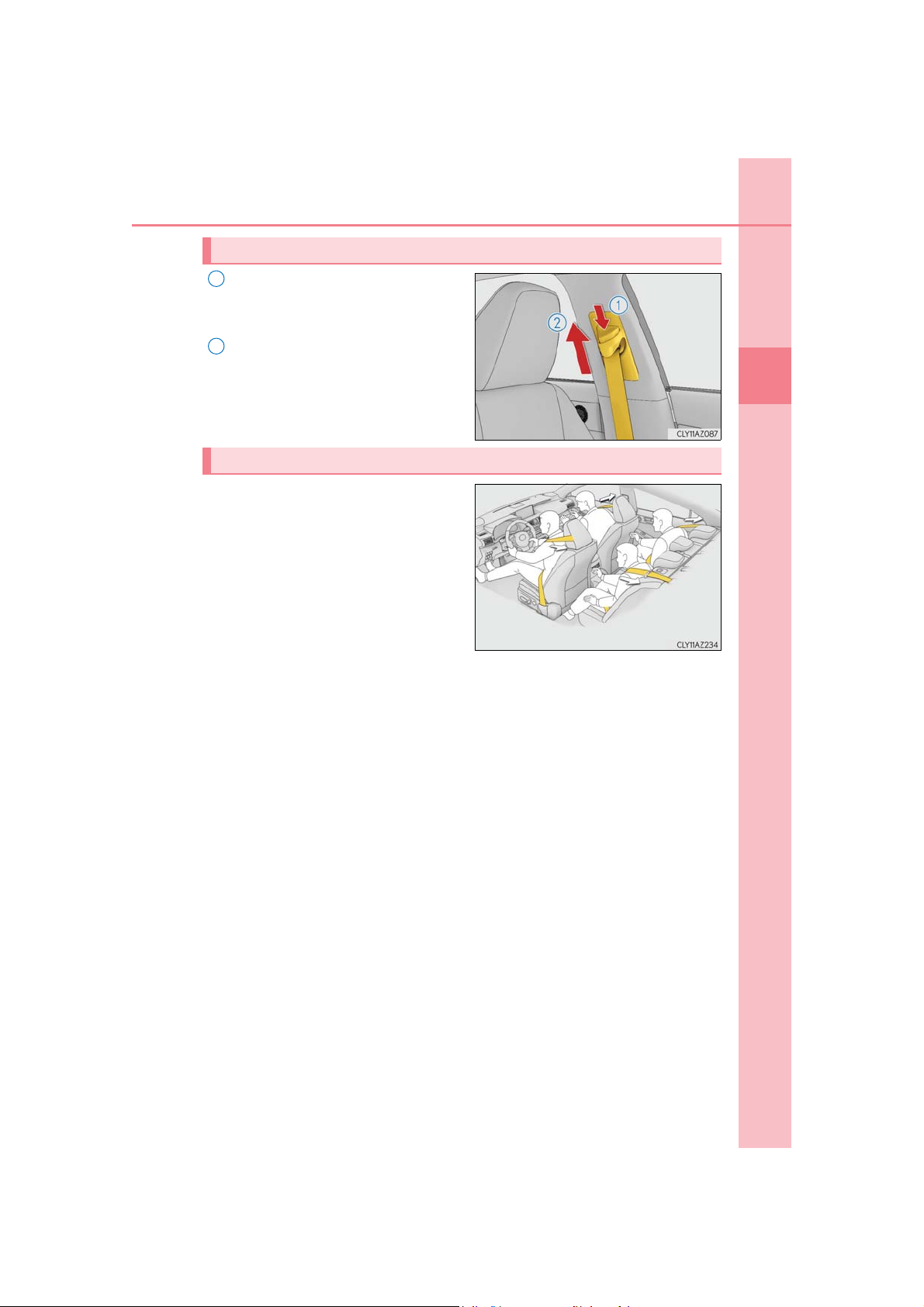
Adjusting the seat belt shoulder anchor height (front seats)
Push the seat belt shoulder anchor
down while pressing the release button.
Push the seat belt shoulder anchor
up.
Move the height adjuster up and down
as needed until you hear a click.
Seat belt pretensioners (front seats and outboard rear seats)
The pretensioners help the seat belts to
quickly restrain the occupants by
retracting the seat belts when the vehicle is subjected to certain types of
severe frontal collision or a vehicle rollover.
The front seat belt pretensioners also
activate when the vehicle is subjected to
certain types of severe side collision.
The pretensioners do not activate in the event of a minor frontal impact, a minor side
impact or a rear impact.
31
1
For safety and security
IS350 AWD/IS350/IS300 AWD/IS300_U
Page 32
32
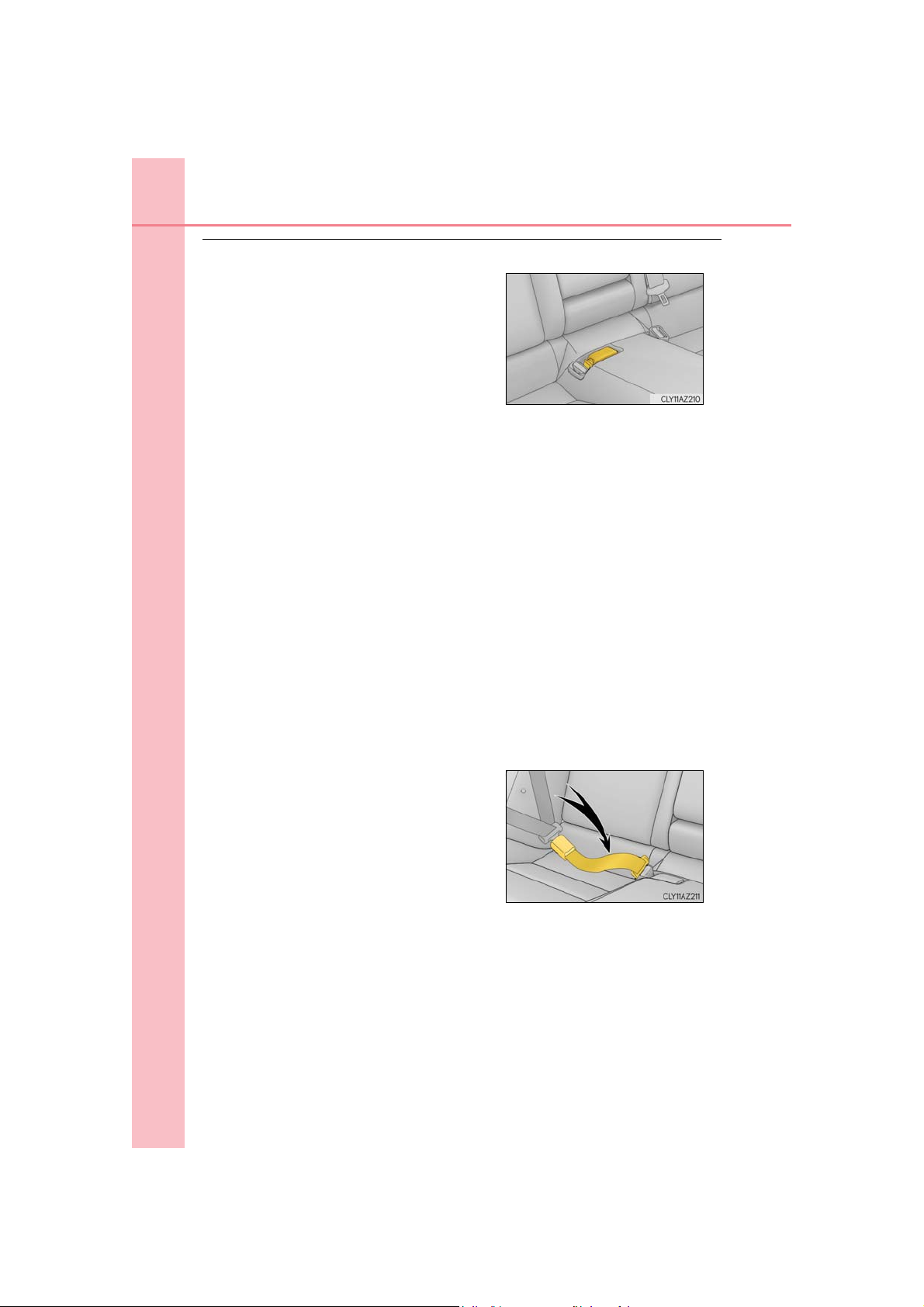
■ After the rear center seat belt has been used
1-1. For safe use
Stow the buckle as shown.
■ Emergency locking retractor (ELR)
The retractor will lock the belt during a sudden stop or on impact. It may also lock if you
lean forward too quickly. A slow, easy motion will allow the belt to extend so that you can
move around fully.
■ Automatic locking retractor (ALR)
When a passenger’s shoulder belt is completely extended and then retracted even
slightly, the belt is locked in that position and cannot be extended. This feature is used to
hold a child restraint system (CRS) firmly. To free the belt again, fully retract the belt and
then pull the belt out once more. (P. 57)
■ Child seat belt usage
The seat belts of your vehicle were principally designed for persons of adult size.
● Use a child restraint system appropriate for the child, until the child becomes large
enough to properly wear the vehicle’s seat belt. (P. 53)
● When the child becomes large enough to properly wear the vehicle’s seat belt, follow
the instructions regarding seat belt usage. (P. 30)
■ Replacing the belt after the pretensioner has been activated
If the vehicle is involved in multiple collisions, the pretensioner will activate for the first
collision, but will not activate for the second or subsequent collisions.
■ Seat belt extender
If your seat belts cannot be fastened securely
because they are not long enough, a personalized seat belt extender is available from your
Lexus dealer free of charge.
IS350 AWD/IS350/IS300 AWD/IS300_U
Page 33
1-1. For safe use
Obtain medical advice and wear the seat belt
WARNING
Observe the following precautions to reduce the risk of injury in the event of sudden
braking, sudden swerving or an accident.
Failure to do so may cause death or serious injury.
■ Wearing a seat belt
● Ensure that all passengers wear a seat belt.
● Always wear a seat belt properly.
● Each seat belt should be used by one person only. Do not use a seat belt for more
than one person at once, including children.
● Lexus recommends that children be seated in the rear seat and always use a seat belt
and/or an appropriate child restraint system.
● To achieve a proper seating position, do not recline the seat more than necessary. The
seat belt is most effective when the occupants are sitting up straight and well back in
the seats.
● Do not wear the shoulder belt under your arm.
● Always wear your seat belt low and snug across your hips.
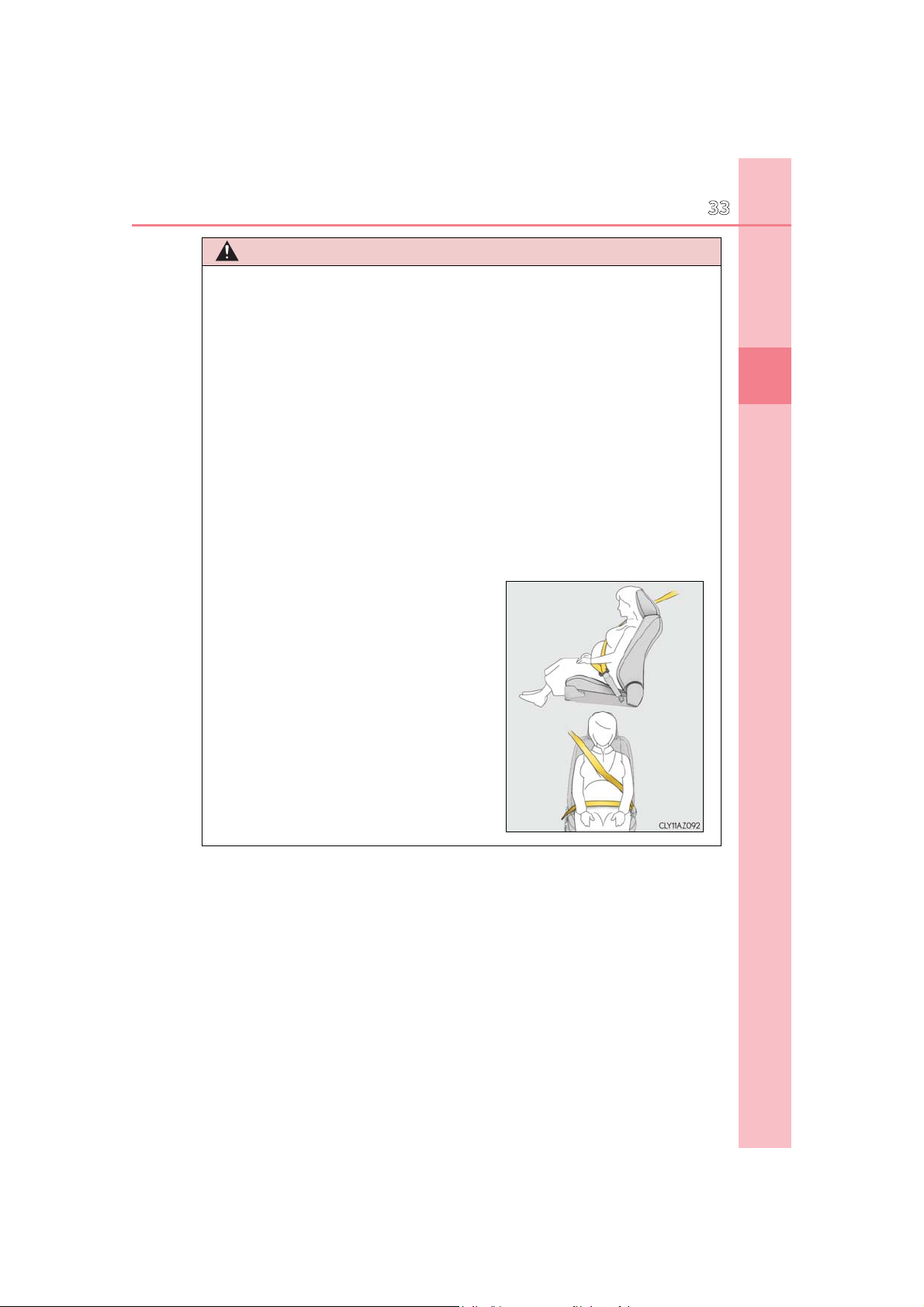
■ Pregnant women
in the proper way. (P. 30)
Women who are pregnant should position the
lap belt as low as possible over the hips in the
same manner as other occupants, extending
the shoulder belt completely over the shoulder
and avoiding belt contact with the rounding of
the abdominal area.
If the seat belt is not worn properly, not only the
pregnant woman, but also the fetus could suffer
death or serious injury as a result of sudden
braking or a collision.
33
1
For safety and security
IS350 AWD/IS350/IS300 AWD/IS300_U
Page 34

34
1-1. For safe use
WARNING
■ People suffering illness
Obtain medical advice and wear the seat belt in the proper way. (P. 30)
■ When children are in the vehicle
Do not allow children to play with the seat belt. If the seat belt becomes twisted around
a child’s neck, it may lead to choking or other serious injuries that could result in death.
If this occurs and the buckle cannot be unfastened, scissors should be used to cut the
belt.
■ Seat belt pretensioners
● Do not place anything, such as a cushion, on the front passenger’s seat. Doing so will
disperse the passenger’s weight, which prevents the sensor from detecting the passenger’s weight properly. As a result, the seat belt pretensioner for the front passenger’s seat may not activate in the event of a collision.
● If the pretensioner has activated, the SRS warning light will come on. In that case, the
seat belt cannot be used again and must be replaced at your Lexus dealer.
■ Adjustable shoulder anchor
Always make sure the shoulder belt is positioned across the center of your shoulder.
The belt should be kept away from your neck, but not falling off your shoulder. Failure to
do so could reduce the amount of protection in an accident and cause death or serious
injuries in the event of a sudden stop, sudden swerve or accident. (P. 31)
■ Seat belt damage and wear
● Do not damage the seat belts by allowing the belt, plate, or buckle to be jammed in
the door.
● Inspect the seat belt system periodically. Check for cuts, fraying, and loose parts. Do
not use a damaged seat belt until it is replaced. Damaged seat belts cannot protect an
occupant from death or serious injury.
● Ensure that the belt and plate are locked and the belt is not twisted.
If the seat belt does not function correctly, immediately contact your Lexus dealer.
● Replace the seat assembly, including the belts, if your vehicle has been involved in a
serious accident, even if there is no obvious damage.
● Do not attempt to install, remove, modify, disassemble or dispose of the seat belts.
Have any necessary repairs carried out by your Lexus dealer. Inappropriate handling
may lead to incorrect operation.
IS350 AWD/IS350/IS300 AWD/IS300_U
Page 35
1-1. For safe use
WARNING
■ Using a seat belt extender
● Do not wear the seat belt extender if you can fasten the seat belt without the extender.
● Do not use the seat belt extender when installing a child restraint system because the
belt will not securely hold the child restraint system, increasing the risk of death or
serious injury in the event of an accident.
● The personalized extender may not be safe on another vehicle, when used by another
person, or at a different seating position other than the one originally intended.
NOTICE
■ When using a seat belt extender
When releasing the seat belt, press on the buckle release button on the extender, not
on the seat belt.
This helps prevent damage to the vehicle interior and the extender itself.
35
1
For safety and security
IS350 AWD/IS350/IS300 AWD/IS300_U
Page 36
36
1
2
1-1. For safe use
SRS airbags
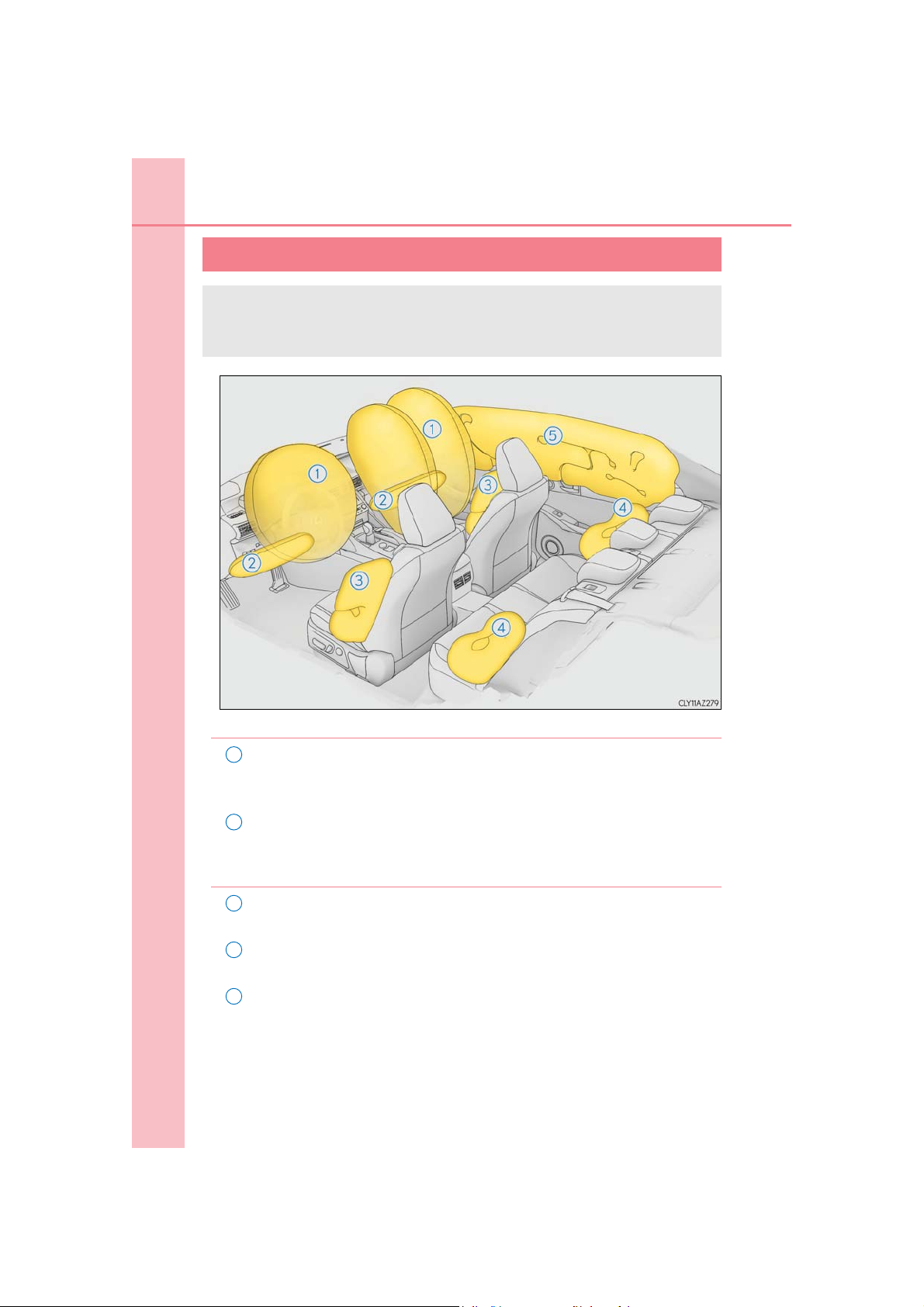
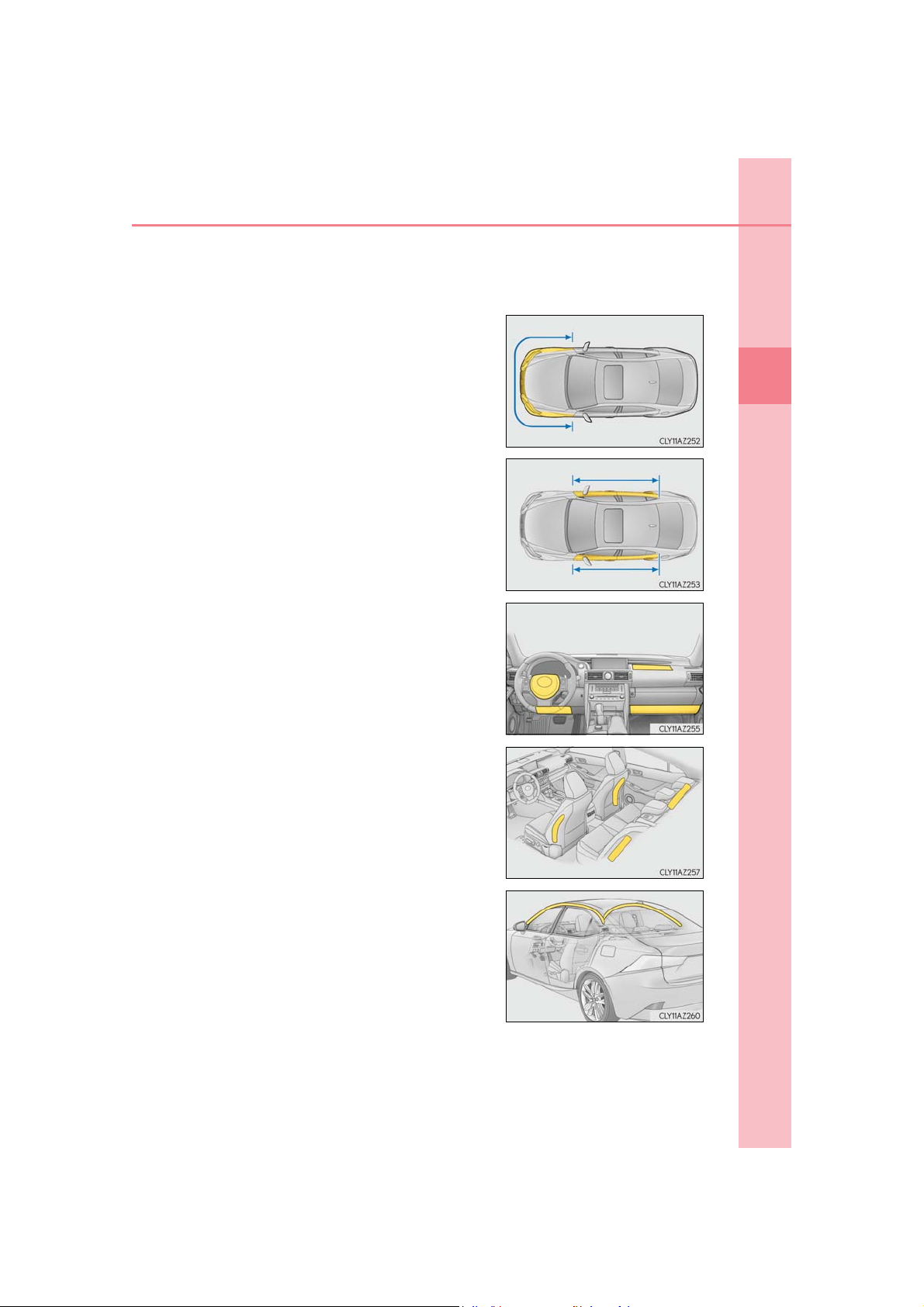
The SRS airbags inflate when the vehicle is subjected to certain types of
severe impacts that may cause significant injury to the occupants. They work
together with the seat belts to help reduce the risk of death or serious injury.
◆ SRS front airbags
SRS driver airbag/front passenger airbag
Can help protect the head and chest of the driver and front passenger from
impact with interior components
SRS knee airbags
Can help provide driver and front passenger protection
◆ SRS side and curtain shield airbags
3
SRS front side airbags
Can help protect the torso of the front seat occupants
4
SRS rear side airbags
Can help protect the torso of occupants in the rear outer seats
5
SRS curtain shield airbags
● Can help protect primarily the head of occupants in the outer seats
● Can help prevent the occupants from being thrown from the vehicle in
the event of vehicle rollover
IS350 AWD/IS350/IS300 AWD/IS300_U
Page 37
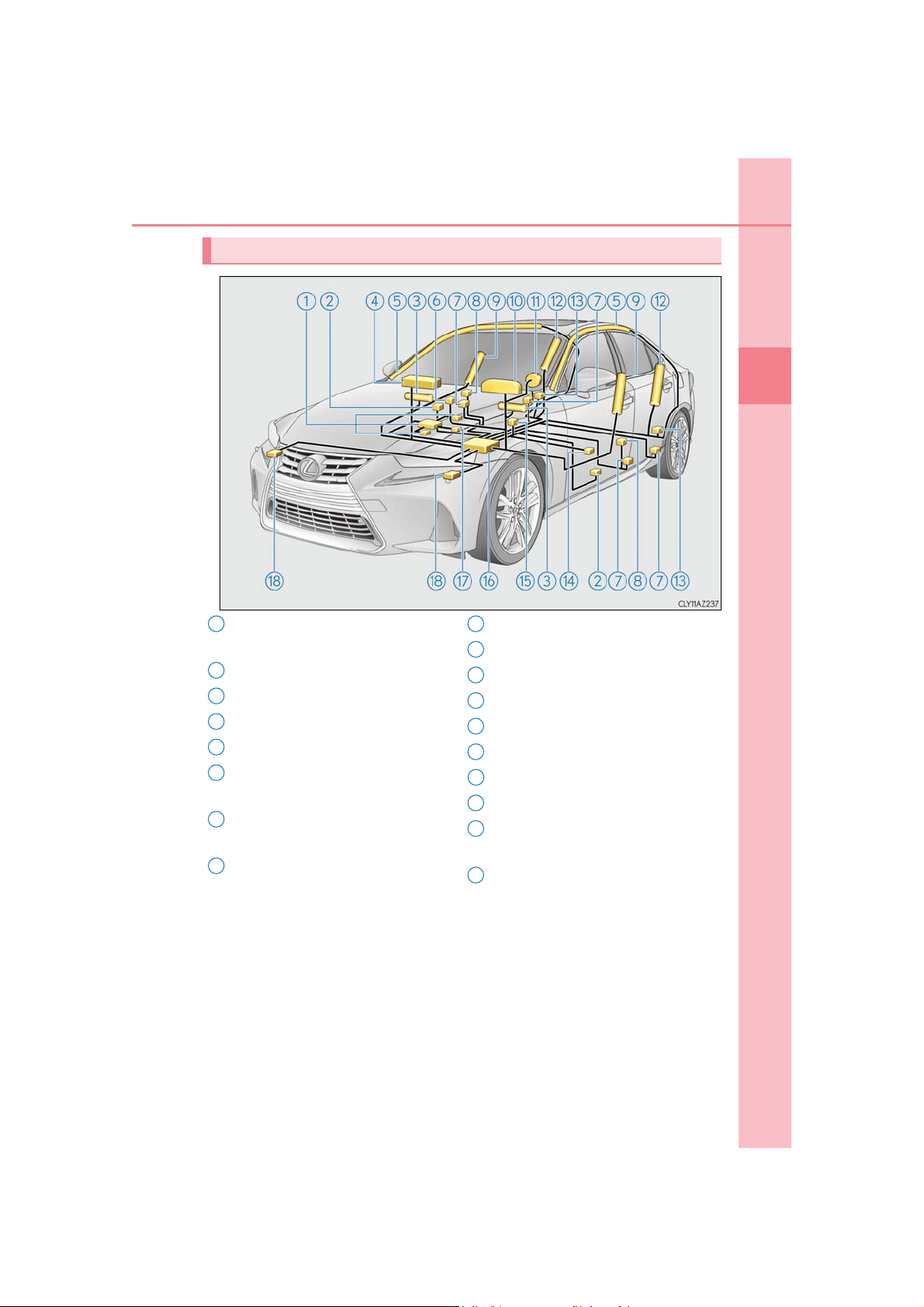
SRS airbag system components
9
10
11
12
13
14
15
16
17
18
1
Front passenger occupant classification system (ECU and sensors)
2
Side impact sensors (front doors)
3
Knee airbags
4
Front passenger airbag
5
Curtain shield airbags
6
“AIR BAG ON” and “AIR BAG
OFF” indicator lights
7
Seat belt pretensioners and force
limiters
8
Side impact sensors (front)
1-1. For safe use
Front side airbags
SRS warning light
Driver airbag
Rear side airbags
Side impact sensors (rear)
Driver’s seat position sensor
Driver’s seat belt buckle switch
Airbag sensor assembly
Front passenger’s seat belt buckle
switch
Front impact sensors
37
1
For safety and security
Your vehicle is equipped with ADVANCED AIRBAGS designed based on the
US motor vehicle safety standards (FMVSS208). The airbag sensor assembly
(ECU) controls airbag deployment based on information obtained from the sensors etc. shown in the system components diagram above. This information
includes crash severity and occupant information. As the airbags deploy, a
chemical reaction in the inflators quickly fills the airbags with non-toxic gas to
help restrain the motion of the occupants.
IS350 AWD/IS350/IS300 AWD/IS300_U
Page 38

38
1-1. For safe use
WARNING
■ SRS airbag precautions
Observe the following precautions regarding the SRS airbags.
Failure to do so may cause death or serious injury.
● The driver and all passengers in the vehicle must wear their seat belts properly.
The SRS airbags are supplemental devices to be used with the seat belts.
● The SRS driver airbag deploys with considerable force, and can cause death or seri-
ous injury especially if the driver is very close to the airbag. The National Highway
Traffic Safety Administration (NHTSA) advises:
Since the risk zone for the driver’s airbag is the first 2 - 3 in. (50 - 75 mm) of inflation,
placing yourself 10 in. (250 mm) from your driver airbag provides you with a clear
margin of safety. This distance is measured from the center of the steering wheel to
your breastbone. If you sit less than 10 in. (250 mm) away now, you can change your
driving position in several ways:
• Move your seat to the rear as far as you can while still reaching the pedals comfortably.
• Slightly recline the back of the seat.
Although vehicle designs vary, many drivers can achieve the 10 in. (250 mm) distance, even with the driver seat all the way forward, simply by reclining the back of
the seat somewhat. If reclining the back of your seat makes it hard to see the road,
raise yourself by using a firm, non-slippery cushion, or raise the seat if your vehicle
has that feature.
• If your steering wheel is adjustable, tilt it downward. This points the airbag toward
your chest instead of your head and neck.
The seat should be adjusted as recommended by NHTSA above, while still maintaining control of the foot pedals, steering wheel, and your view of the instrument panel
controls.
IS350 AWD/IS350/IS300 AWD/IS300_U
Page 39
1-1. For safe use
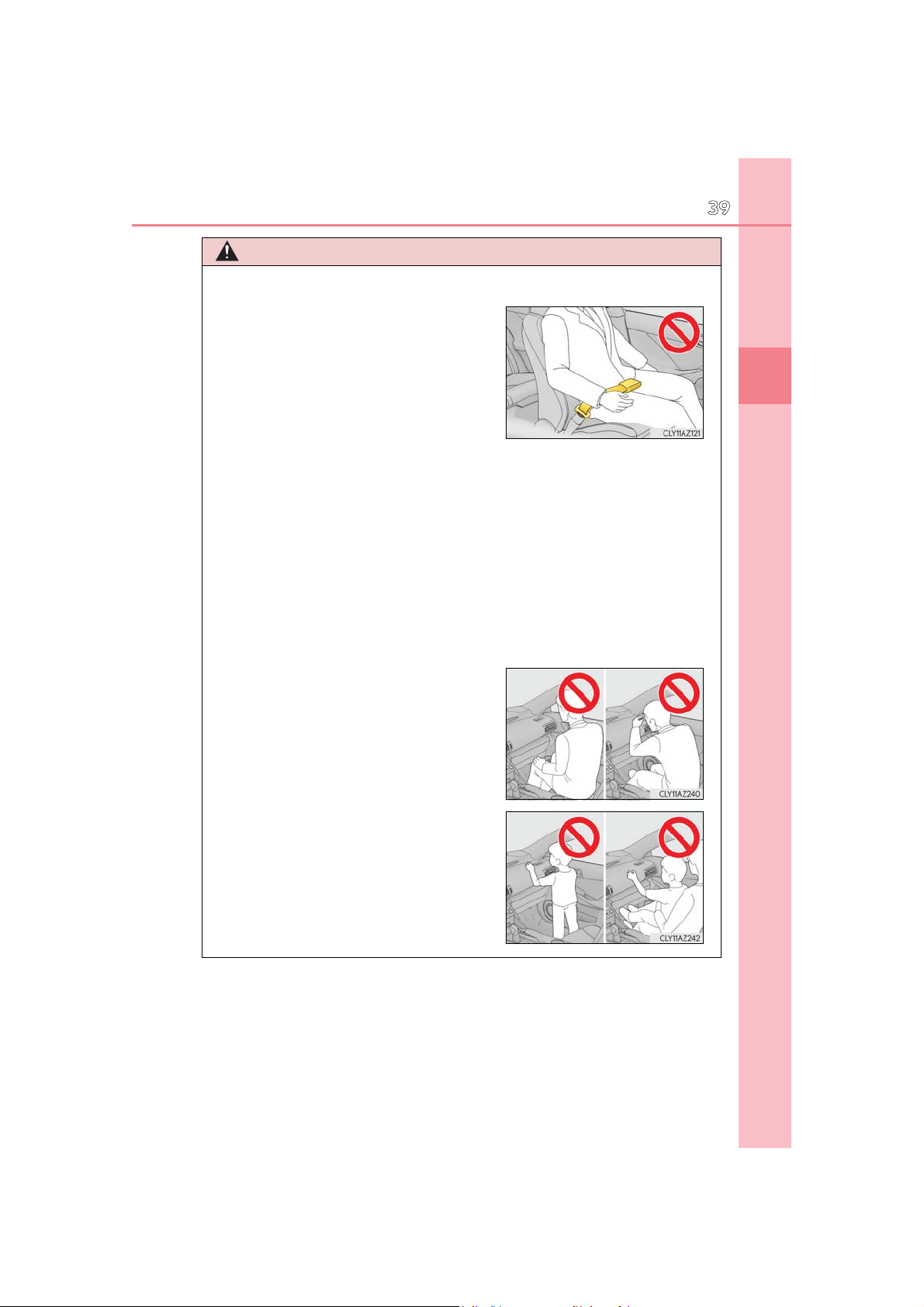
If the seat belt extender has been connected
Do not sit on the edge of the seat or lean
WARNING
■ SRS airbag precautions
●
to the driver’s seat belt buckle but the seat
belt extender has not also been fastened to
the latch plate of the driver’s seat belt, the SRS
front airbags for the driver will judge that the
driver is wearing the seat belt even though the
seat belt has not been connected. In this case,
the SRS front airbags for the driver may not
activate correctly in a collision, resulting in
death or serious injury in the event of a collision. Be sure to wear the seat belt with the
seat belt extender.
● The SRS front passenger airbag also deploys with considerable force, and can cause
death or serious injury especially if the front passenger is very close to the airbag. The
front passenger seat should be as far from the airbag as possible with the seatback
adjusted, so the front passenger sits upright.
● Improperly seated and/or restrained infants and children can be killed or seriously
injured by a deploying airbag. An infant or child who is too small to use a seat belt
should be properly secured using a child restraint system. Lexus strongly recommends that all infants and children be placed in the rear seats of the vehicle and properly restrained. The rear seats are safer for infants and children than the front
passenger seat. (P. 53)
39
1
For safety and security
●
against the dashboard.
● Do not allow a child to stand in front of the
SRS front passenger airbag unit or sit on the
knees of a front passenger.
● Do not allow the front seat occupants to hold
items on their knees.
IS350 AWD/IS350/IS300 AWD/IS300_U
Page 40
40
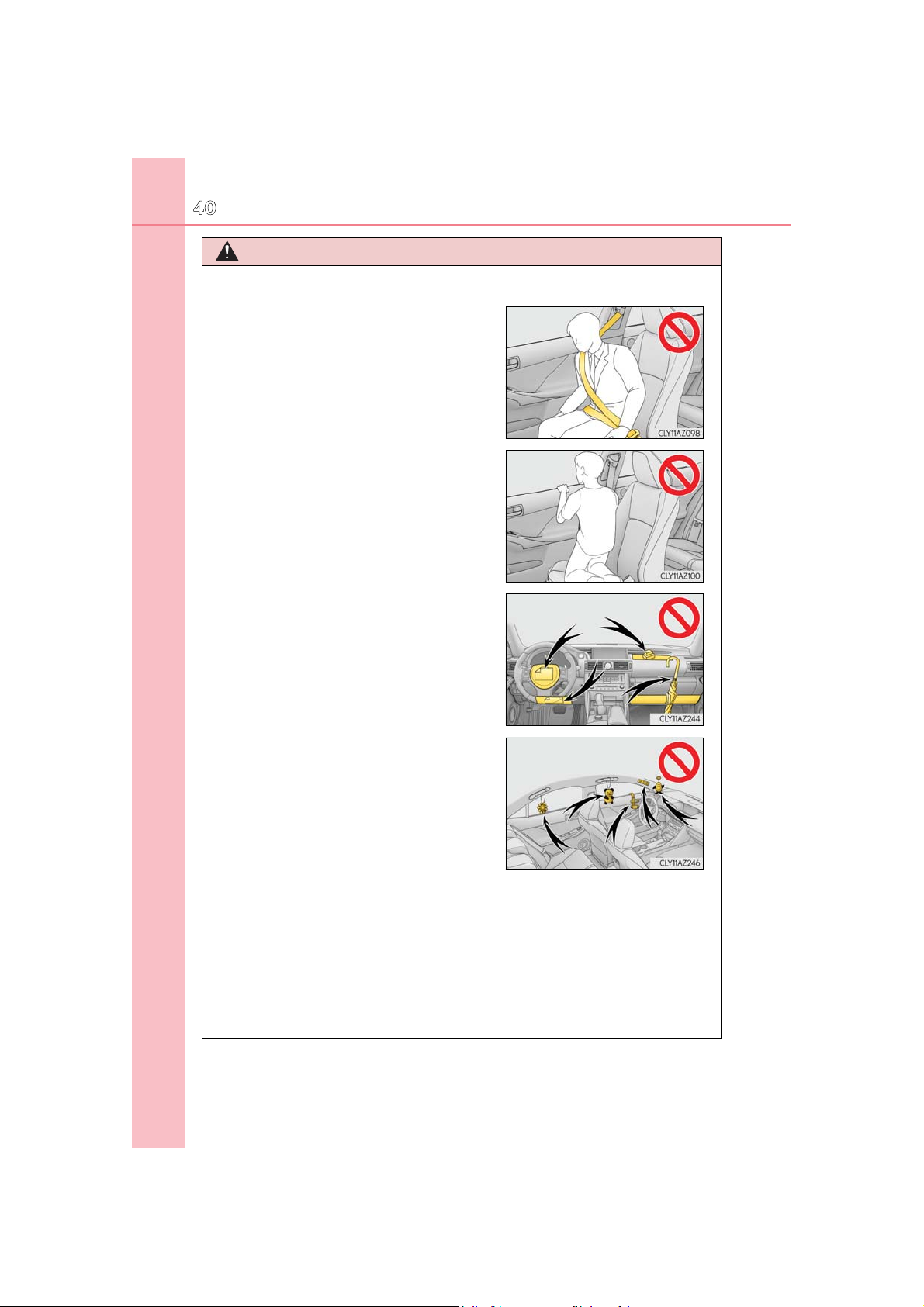
Do not lean against the door, the roof side rail
1-1. For safe use
WARNING
■ SRS airbag precautions
●
or the front, side and rear pillars.
● Do not allow anyone to kneel on the passen-
ger seat toward the door or put their head or
hands outside the vehicle.
● Do not attach anything to or lean anything
against areas such as the dashboard, steering
wheel pad and lower portion of the instrument panel.
These items can become projectiles when the
SRS driver, front passenger and knee airbags
deploy.
● Do not attach anything to areas such as a
door, windshield glass, side door glass, front
or rear pillar, roof side rail and assist grip.
● Do not hang coat hangers or other hard objects on the coat hooks. All of these items
could become projectiles and may cause death or serious injury, should the SRS curtain shield airbags deploy.
● If a vinyl cover is put on the area where the SRS knee airbag will deploy, be sure to
remove it.
● Do not use seat accessories which cover the parts where the SRS side airbags inflate
as they may interfere with inflation of the SRS airbags. Such accessories may prevent
the side airbags from activating correctly, disable the system or cause the side airbags
to inflate accidentally, resulting in death or serious injury.
IS350 AWD/IS350/IS300 AWD/IS300_U
Page 41

1-1. For safe use
WARNING
■ SRS airbag precautions
● Do not strike or apply significant levels of force to the area of the SRS airbag compo-
nents.
Doing so can cause the SRS airbags to malfunction.
● Do not touch any of the component parts immediately after the SRS airbags have
deployed (inflated) as they may be hot.
● If breathing becomes difficult after the SRS airbags have deployed, open a door or
window to allow fresh air in, or leave the vehicle if it is safe to do so. Wash off any residue as soon as possible to prevent skin irritation.
● If the areas where the SRS airbags are stored, such as the steering wheel pad and
front and rear pillar garnishes, are damaged or cracked, have them replaced by your
Lexus dealer.
● Do not place anything, such as a cushion, on the front passenger’s seat. Doing so will
disperse the passenger’s weight, which prevents the sensor from detecting the passenger’s weight properly. As a result, the SRS front airbags for the front passenger
may not deploy in the event of a collision.
■ Modification and disposal of SRS airbag system components
Do not dispose of your vehicle or perform any of the following modifications without
consulting your Lexus dealer. The SRS airbags may malfunction or deploy (inflate)
accidentally, causing death or serious injury.
● Installation, removal, disassembly and repair of the SRS airbags
● Repairs, modifications, removal or replacement of the steering wheel, instrument
panel, dashboard, seats or seat upholstery, front, side and rear pillars or roof side rails
● Repairs or modifications of the front fender, front bumper, or side of the occupant
compartment
● Installation of a grille guard (bull bars, kangaroo bar, etc.), snow plows, winches or
roof luggage carrier
● Modifications to the vehicle’s suspension system
● Installation of electronic devices such as mobile two-way radios and CD players
● Modifications to your vehicle for a person with a physical disability
41
1
For safety and security
IS350 AWD/IS350/IS300 AWD/IS300_U
Page 42

42
■ If the SRS airbags deploy (inflate)
● Slight abrasions, burns, bruising etc., may be sustained from SRS airbags, due to the
1-1. For safe use
extremely high speed deployment (inflation) by hot gases.
● A loud noise and white powder will be emitted.
● Parts of the airbag module (steering wheel hub, airbag cover and inflator) as well as the
seats, parts of the front and rear pillars, and roof side rails may be hot for several minutes. The airbag itself may also be hot.
● The windshield may crack.
● All of the doors will be unlocked. (P. 129)
● Fuel supply to the engine will be stopped. (P. 524)
● For Lexus Enform Safety Connect subscribers, if any of the following situations occur,
the system is designed to send an emergency call to the response center, notifying
them of the vehicle’s location (without needing to push the “SOS” button) and an agent
will attempt to speak with the occupants to ascertain the level of emergency and assistance required. If the occupants are unable to communicate, the agent automatically
treats the call as an emergency and helps to dispatch the necessary emergency services. (P. 68)
• An SRS airbag is deployed.
• A seat belt pretensioner is activated.
• The vehicle is involved in a severe rear-end collision.
■ SRS airbag deployment conditions (SRS front airbags)
● The SRS front airbags will deploy in the event of an impact that exceeds the set thresh-
old level (the level of force corresponding to an approximately 12 - 18 mph [20 - 30
km/h] frontal collision with a fixed wall that does not move or deform).
However, this threshold velocity will be considerably higher in the following situations:
• If the vehicle strikes an object, such as a parked vehicle or sign pole, which can move
or deform on impact
• If the vehicle is involved in an underride collision, such as a collision in which the
front of the vehicle “underrides”, or goes under, the bed of a truck
● Depending on the type of collision, it is possible that only the seat belt pretensioners will
activate.
● The SRS front airbags for the front passenger will not activate if there is no passenger
sitting in the front passenger seat. However, the SRS front airbags for the front passenger may deploy if luggage is put in the seat, even if the seat is unoccupied. (P. 46)
■ SRS airbag deployment conditions (SRS side and curtain shield airbags)
● The SRS side and curtain shield airbags will deploy in the event of an impact that
exceeds the set threshold level (the level of force corresponding to the impact force
produced by an approximately 3300 lb. [1500 kg] vehicle colliding with the vehicle
cabin from a direction perpendicular to the vehicle orientation at an approximate
spe ed of 12 - 18 mph [20 - 30 km/h]).
● Both SRS curtain shield airbags will deploy in the event of vehicle rollover.
● Both SRS curtain shield airbags will deploy in the event of a severe frontal collision.
IS350 AWD/IS350/IS300 AWD/IS300_U
Page 43
1-1. For safe use
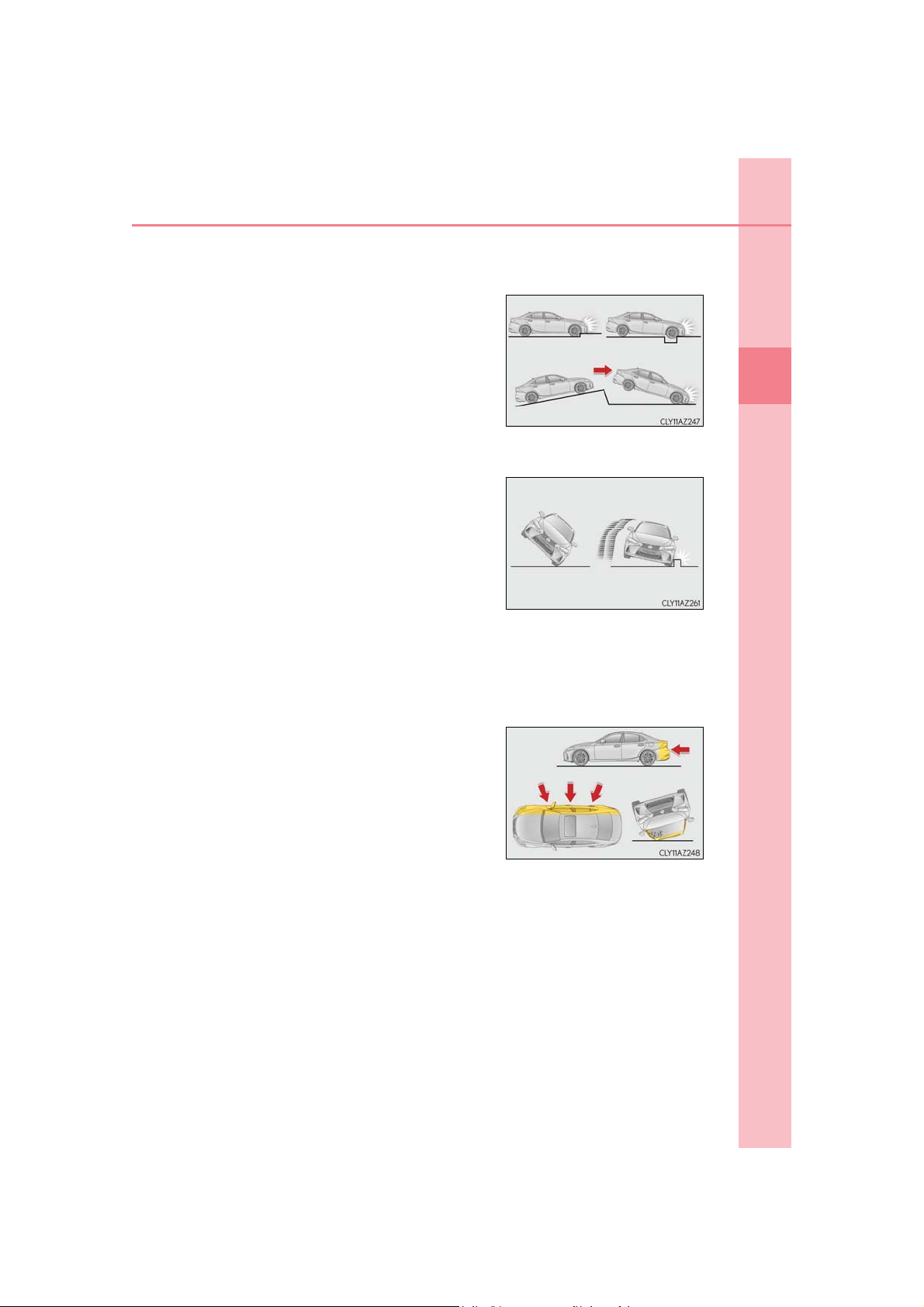
■ Conditions under which the SRS airbags may deploy (inflate), other than a collision
The SRS front airbags and SRS curtain shield airbags may also deploy if a serious impact
occurs to the underside of your vehicle. Some examples are shown in the illustration.
● Hitting a curb, edge of pavement or hard sur-
face
● Falling into or jumping over a deep hole
● Landing hard or falling
The SRS curtain shield airbags may also deploy under the situations shown in the illustration.
● The angle of vehicle tip-up is marginal.
● The vehicle skids and hits a curb stone.
■ Types of collisions that may not deploy the SRS airbags (SRS front airbags)
The SRS front airbags do not generally inflate if the vehicle is involved in a side or rear
collision, if it rolls over, or if it is involved in a low-speed frontal collision. But, whenever a
collision of any type causes sufficient forward deceleration of the vehicle, deployment of
the SRS front airbags may occur.
● Collision from the side
● Collision from the rear
● Vehicle rollover
43
1
For safety and security
IS350 AWD/IS350/IS300 AWD/IS300_U
Page 44
44
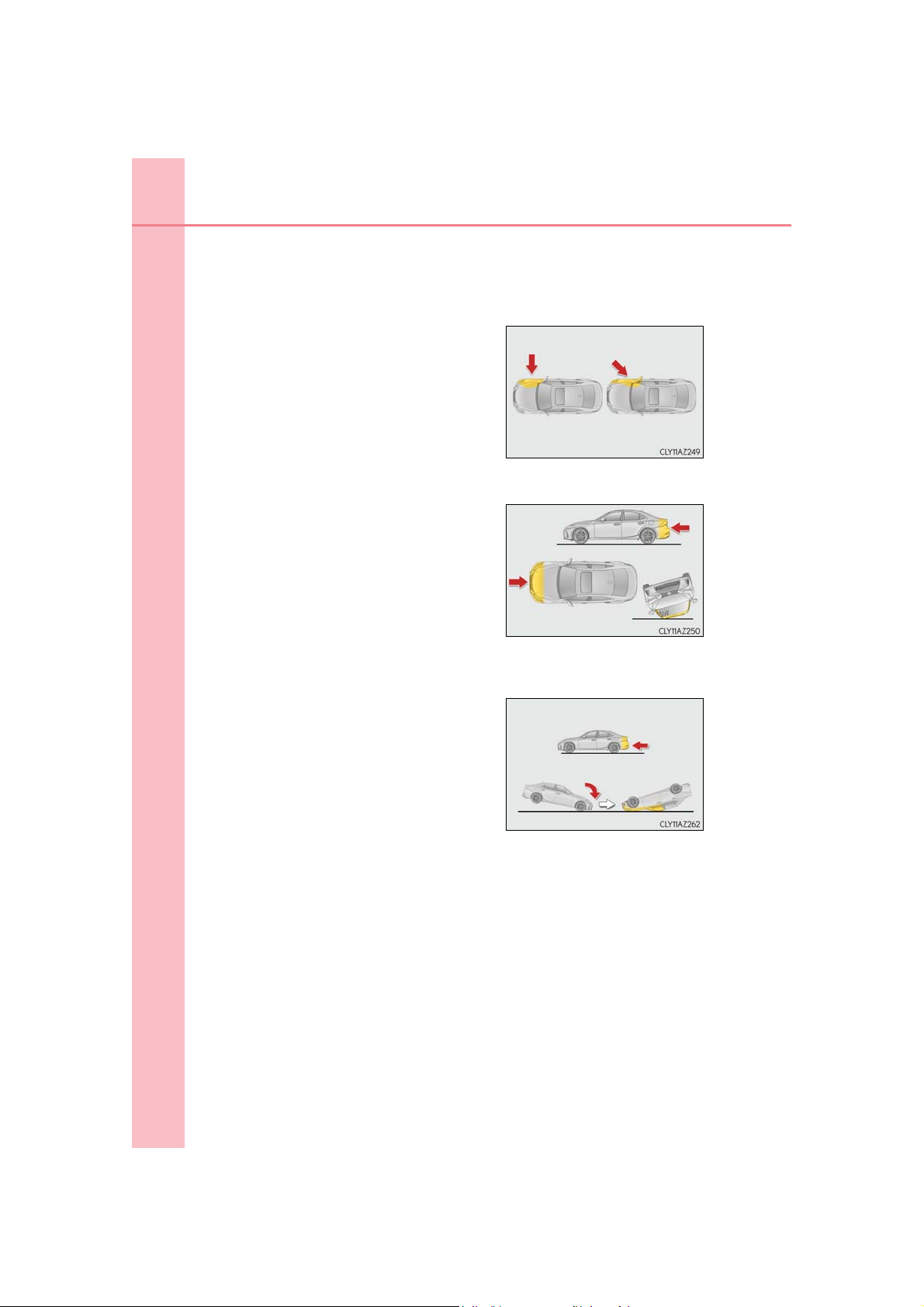
■ Types of collisions that may not deploy the SRS airbags (SRS side and curtain shield air-
1-1. For safe use
bags)
The SRS side and curtain shield airbags may not activate if the vehicle is subjected to a
collision from the side at certain angles, or a collision to the side of the vehicle body other
than the passenger compartment.
● Collision from the side to the vehicle body
other than the passenger compartment
● Collision from the side at an angle
The SRS side airbags do not generally inflate if the vehicle is involved in a frontal or rear
collision, if it rolls over, or if it is involved in a low-speed side collision.
● Collision from the front
● Collision from the rear
● Vehicle rollover
The SRS curtain shield airbags do not generally inflate if the vehicle is involved in a rear
collision, if it pitches end over end, or if it is involved in a low-speed side or low-speed
frontal collision.
● Collision from the rear
● Pitching end over end
IS350 AWD/IS350/IS300 AWD/IS300_U
Page 45
1-1. For safe use
■ When to contact your Lexus dealer
In the following cases, the vehicle will require inspection and/or repair. Contact your
Lexus dealer as soon as possible.
● Any of the SRS airbags have been inflated.
● The front of the vehicle is damaged or
deformed, or was involved in an accident that
was not severe enough to cause the SRS front
airbags to inflate.
● A portion of a door or its surrounding area is
damaged or deformed, or the vehicle was
involved in an accident that was not severe
enough to cause the SRS side and curtain
shield airbags to inflate.
● The pad section of the steering wheel, dash-
board near the front passenger airbag or
lower portion of the instrument panel is
scratched, cracked, or otherwise damaged.
45
1
For safety and security
● The surface of the seats with the SRS side air-
bag is scratched, cracked, or otherwise damaged.
● The portion of the front pillars, rear pillars or
roof side rail garnishes (padding) containing
the SRS curtain shield airbags inside is
scratched, cracked, or otherwise damaged.
IS350 AWD/IS350/IS300 AWD/IS300_U
Page 46
46
U.S.A. Canada
1-1. For safe use
Front passenger occupant classification system
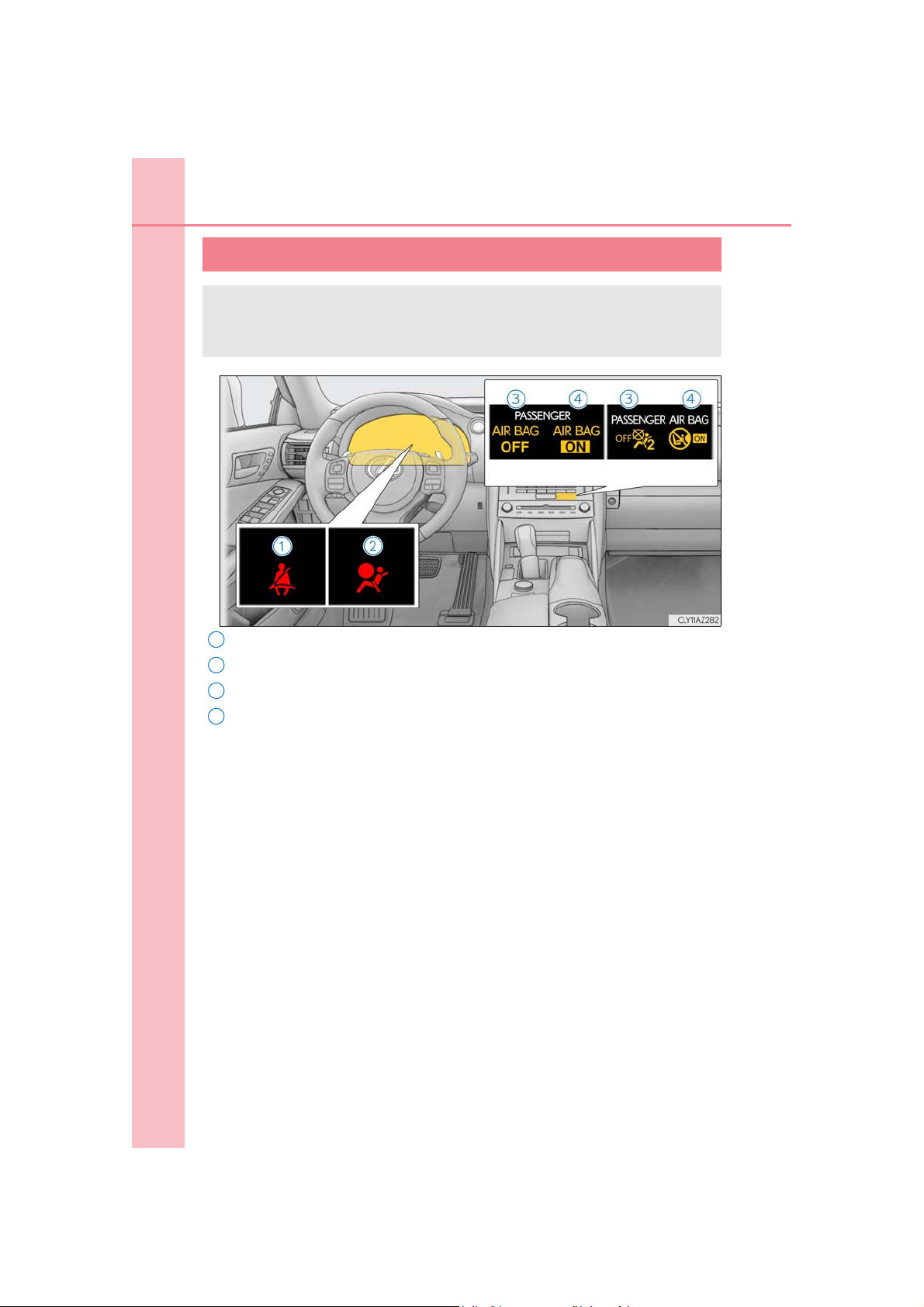
Your vehicle is equipped with a front passenger occupant classification system. This system detects the conditions of the front passenger seat and activates or deactivates the devices for the front passenger.
1
Seat belt reminder light
2
SRS warning light
3
“AIR BAG OFF” indicator light
4
“AIR BAG ON” indicator light
IS350 AWD/IS350/IS300 AWD/IS300_U
Page 47
1-1. For safe use
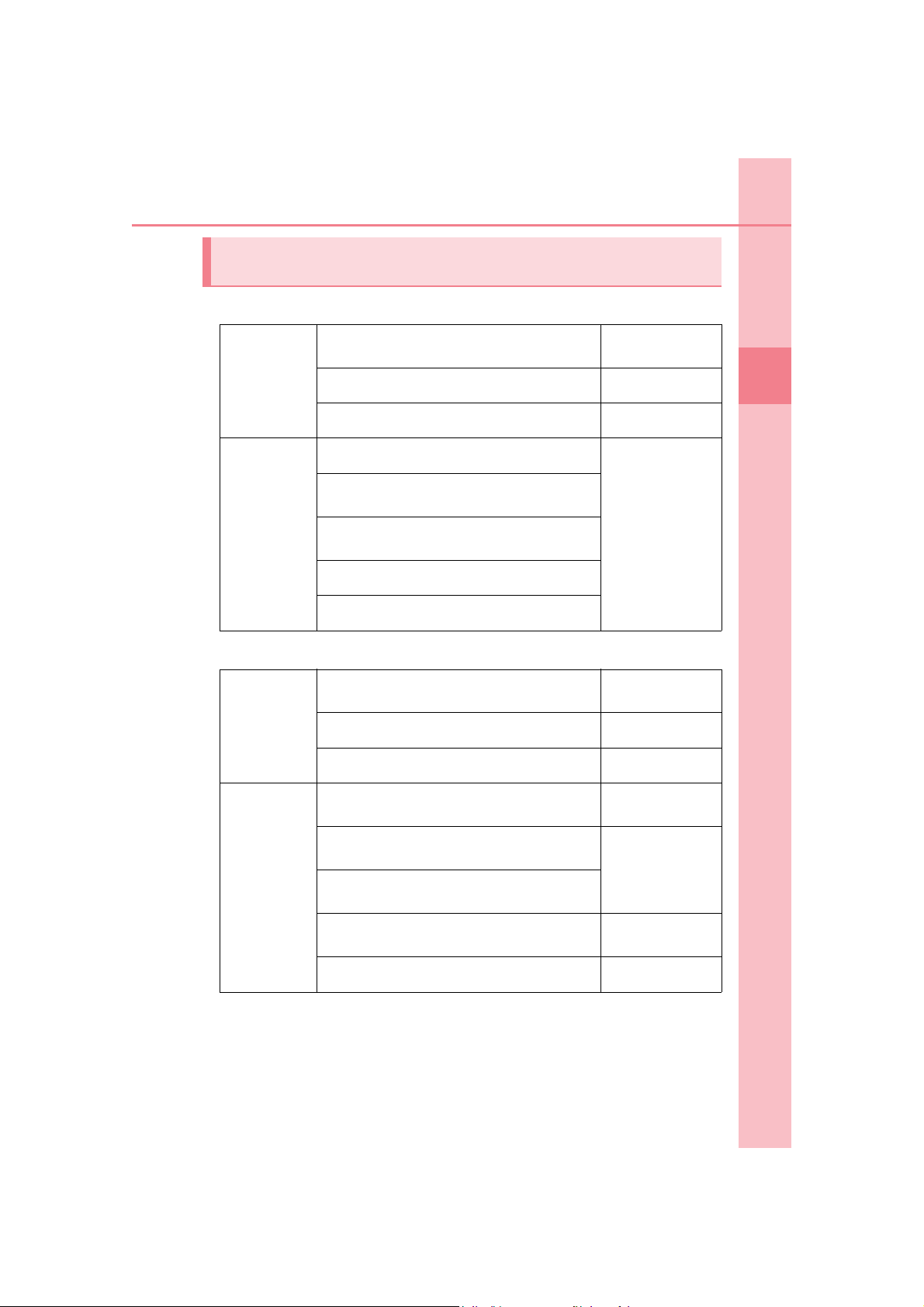
Condition and operation in the front passenger occupant classification
system
■ Adult*
1
47
Indicator/
warning light
Devices
■ Child*
Indicator/
warning light
“AIR BAG ON” and “AIR BAG OFF”
indicator lights
SRS warning light Off
Seat belt reminder light Off*2 or flashing*
Front passenger airbag
Side airbag
on the front passenger seat
Curtain shield airbag
in the front passenger side
Front passenger knee airbag
Front passenger’s seat belt pretensioner
4
“AIR BAG ON” and “AIR BAG OFF”
indicator lights
SRS warning light Off
Seat belt reminder light Off*2 or flashing*
“AIR BAG ON”
Activated
“AIR BAG OFF” or
“AIR BAG ON”
*
3
4
3
1
For safety and security
Front passenger airbag
on the front passenger seat
Devices
Front passenger’s seat belt pretensioner Activated
IS350 AWD/IS350/IS300 AWD/IS300_U
Curtain shield airbag
in the front passenger side
Front passenger knee airbag
Side airbag
Deactivated or
activated
Activated
Deactivated or
activated
4
*
4
*
Page 48

48
■ Child restraint system with infant*
1-1. For safe use
5
Indicator/
warning light
Devices
■ Unoccupied
Indicator/
warning light
“AIR BAG ON” and “AIR BAG OFF”
indicator lights
“AIR BAG OFF”*
SRS warning light Off
Seat belt reminder light Off*2 or flashing*
Front passenger airbag Deactivated
Side airbag
on the front passenger seat
Activated
Curtain shield airbag
in the front passenger side
Front passenger knee airbag Deactivated
Front passenger’s seat belt pretensioner Activated
“AIR BAG ON” and “AIR BAG OFF”
indicator lights
“AIR BAG OFF”
SRS warning light
Off
Seat belt reminder light
6
3
Devices
Front passenger airbag Deactivated
Side airbag
on the front passenger seat
Curtain shield airbag
in the front passenger side
Front passenger knee airbag Deactivated
Front passenger’s seat belt pretensioner
Activated
Activated
IS350 AWD/IS350/IS300 AWD/IS300_U
Page 49

■ There is a malfunction in the system
1-1. For safe use
49
“AIR BAG ON” and “AIR BAG OFF”
indicator lights
Indicator/
warning light
Devices
Front passenger’s seat belt pretensioner Activated
1
*
: The system judges a person of adult size as an adult. When a smaller adult sits in
the front passenger seat, the system may not recognize him/her as an adult
depending on his/her physique and posture.
2
*
: In the event the front passenger is wearing a seat belt.
3
*
: In the event the front passenger does not wear a seat belt
4
*
: For some children, child in seat, child in booster seat or child in convertible seat,
the system may not recognize him/her as a child. Factors which may affect this can
be the physique or posture.
5
*
: Never install a rear-facing child restraint system on the front passenger seat. A for-
ward-facing child restraint system should only be installed on the front passenger
seat when it is unavoidable. (P. 53)
6
*
: In case the indicator light is not illuminated, consult this manual on how to install the
child restraint system properly. (P. 57)
SRS warning light
Seat belt reminder light
Front passenger airbag Deactivated
Side airbag
on the front passenger seat
Curtain shield airbag
in the front passenger side
Front passenger knee airbag Deactivated
“AIR BAG OFF”
On
Activated
1
For safety and security
IS350 AWD/IS350/IS300 AWD/IS300_U
Page 50

50
1-1. For safe use
WARNING
■ Front passenger occupant classification system precautions
Observe the following precautions regarding the front passenger occupant classification system.
Failure to do so may cause death or serious injury.
● Wear the seat belt properly.
● Make sure the front passenger’s seat belt plate has not been left inserted into the
buckle before someone sits in the front passenger seat.
● Make sure the “AIR BAG OFF” indicator light is not illuminated when using the seat
belt extender for the front passenger seat. If the “AIR BAG OFF” indicator light is illuminated, disconnect the extender tongue from the seat belt buckle, and reconnect
the seat belt. Reconnect the seat belt extender after making sure the “AIR BAG ON”
indicator light is illuminated. If you use the seat belt extender while the “AIR BAG
OFF” indicator light is illuminated, the SRS airbags for the front passenger may not
activate, which could cause death or serious injury in the event of a collision.
● Do not apply a heavy load to the front passenger seat or equipment (e.g. seatback
pocket).
● Do not put weight on the front passenger seat by putting your hands or feet on the
front passenger seat seatback from the rear passenger seat.
● Do not let a rear passenger lift the front passenger seat with their feet or press on the
seatback with their legs.
● Do not put objects under the front passenger seat.
IS350 AWD/IS350/IS300 AWD/IS300_U
Page 51

1-1. For safe use
WARNING
■ Front passenger occupant classification system precautions
● Do not recline the front passenger seatback so far that it touches the rear seat. This
may cause the “AIR BAG OFF” indicator light to be illuminated, which indicates that
the SRS airbags for the front passenger will not deploy in the event of a severe accident. If the seatback touches the rear seat, return the seatback to a position where it
does not touch the rear seat. Keep the front passenger seatback as upright as possible when the vehicle is moving. Reclining the seatback excessively may lessen the
effectiveness of the seat belt system.
● If an adult sits in the front passenger seat, the “AIR BAG ON” indicator light is illumi-
nated. If the “AIR BAG OFF” indicator is illuminated, ask the passenger to sit up
straight, well back in the seat, feet on the floor, and with the seat belt worn correctly. If
the “AIR BAG OFF” indicator still remains illuminated, either ask the passenger to
move to the rear seat, or if that is not possible, move the front passenger seat fully
rearward.
● When it is unavoidable to install a forward-facing child restraint system on the front
passenger seat, install the child restraint system on the front passenger seat in the
proper order. (P. 57)
● Do not modify or remove the front seats.
● Do not kick the front passenger seat or subject it to severe impact. Otherwise, the
SRS warning light may come on to indicate a malfunction of the front passenger
occupant classification system. In this case, contact your Lexus dealer immediately.
● Child restraint systems installed on the rear seat should not contact the front seat-
backs.
● Do not use a seat accessory, such as a cushion and seat cover, that covers the seat
cushion surface.
● Do not modify or replace the upholstery of the front seat.
● Do not place anything between the console box and front passenger seat. Other-
wise, the system may not detect the front passenger properly, leading to improper
operation of the airbags.
● Adjust the front passenger seat so that the head restraint does not touch the ceiling. If
the head restraint is left in contact with the ceiling, the system may not detect the front
passenger properly, leading to improper operation of the airbags.
51
1
For safety and security
IS350 AWD/IS350/IS300 AWD/IS300_U
Page 52
52
1-1. For safe use
Safety information for children
Observe the following precautions when children are in the vehicle.
Use a child restraint system appropriate for the child, until the child becomes
large enough to properly wear the vehicle’s seat belt.
● It is recommended that children sit in the rear seats to avoid accidental con-
tact with the shift lever, wiper switch etc.
● Use the rear door child-protector lock or the window lock switch to avoid
children opening the door while driving or operating the power window accidentally.
● Do not let small children operate equipment which may catch or pinch body
parts, such as the power window, hood, trunk, seats etc.
WARNING
Never leave children unattended in the vehicle, and never allow children to have or use
the key.
Children may be able to start the vehicle or shift the vehicle into neutral. There is also a
danger that children may injure themselves by playing with the windows, the moon roof
or other features of the vehicle. In addition, heat build-up or extremely cold temperatures inside the vehicle can be fatal to children.
IS350 AWD/IS350/IS300 AWD/IS300_U
Page 53

1-1. For safe use
Child restraint systems
A child restraint system for a small child or baby must itself be properly
restrained on the seat with the LATCH anchors or the lap portion of the lap/
shoulder belt.
The laws of all 50 states of the U.S.A. and Canada now require the use of child
restraint systems.
Points to remember
Studies have shown that installing a child restraint on a rear seat is much safer
than installing one on the front passenger seat.
● Choose a child restraint system that suits your vehicle and is appropriate to
the age and size of the child.
● For installation details, follow the instructions provided with the child restraint
system.
General installation instructions are provided in this manual. (P. 57)
53
1
For safety and security
IS350 AWD/IS350/IS300 AWD/IS300_U
Page 54
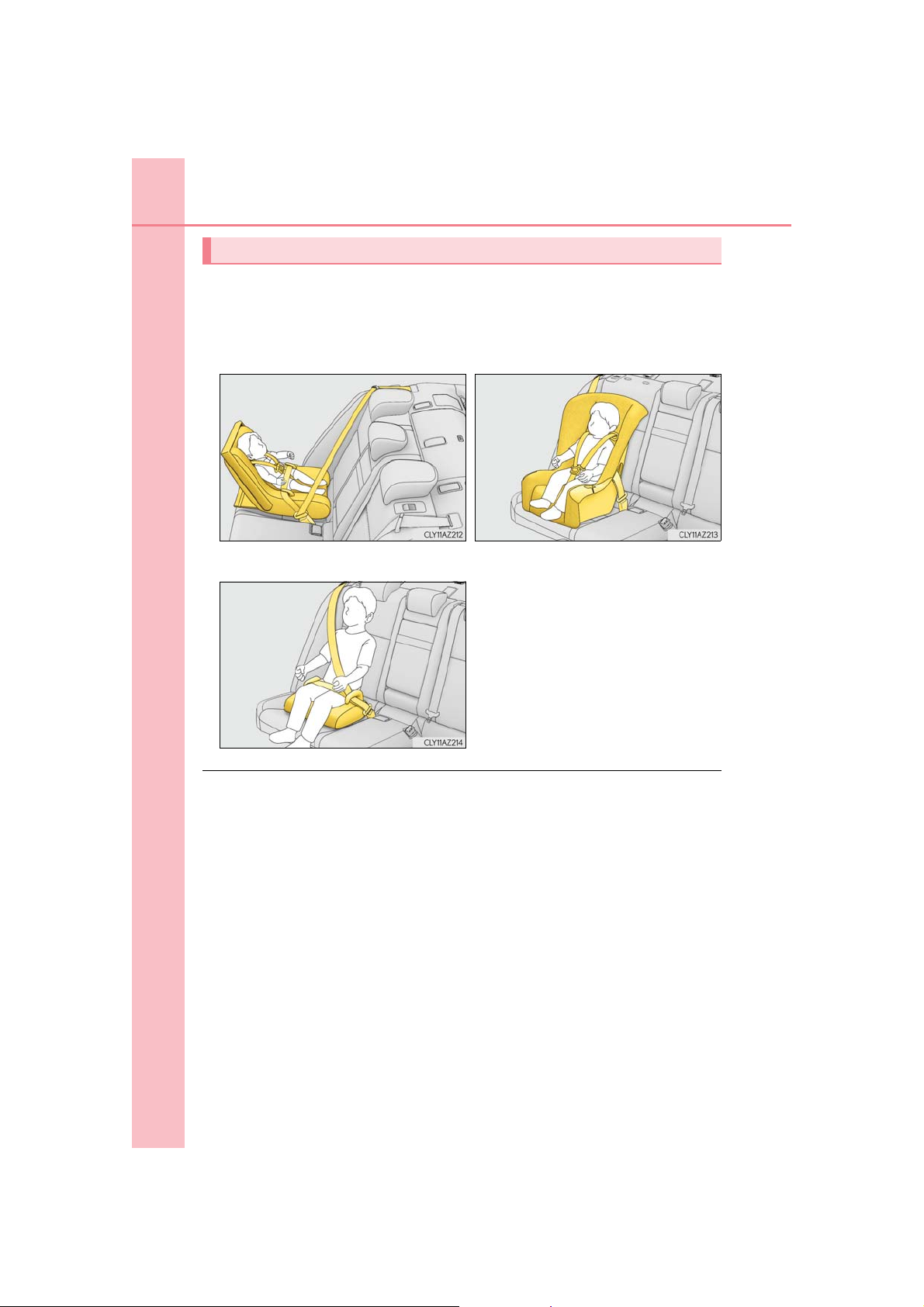
54
1-1. For safe use
Types of child restraints
Child restraint systems are classified into the following 3 types according to the
age and size of the child:
Rear facing Infant seat/convert-
ible seat
Booster seat
Forward facing Convertible
seat
■ Selecting an appropriate child restraint system
● Use a child restraint system appropriate for the child until the child becomes large
enough to properly wear the vehicle’s seat belt.
● If the child is too large for a child restraint system, sit the child on a rear seat and use the
vehicle’s seat belt. (P. 30)
IS350 AWD/IS350/IS300 AWD/IS300_U
Page 55

1-1. For safe use
WARNING
■ Child restraint precautions
● For effective protection in automobile accidents and sudden stops, a child must be
properly restrained, using a seat belt or child restraint system depending on the age
and size of the child. Holding a child in your arms is not a substitute for a child restraint
system. In an accident, the child can be crushed against the windshield, or between
you and the vehicle’s interior. This may cause death or serious injury to the child in the
event of a sudden stop, sudden swerve or an accident.
● Lexus strongly urges the use of a proper child restraint system that conforms to the
size of the child, installed on the rear seat. According to accident statistics, the child is
safer when properly restrained in the rear seat than in the front seat.
● Never install a rear-facing child restraint system on the front passenger seat even if
the “AIR BAG OFF” indicator light is illuminated.
In the event of an accident, the force of the rapid inflation of the front passenger airbag can cause death or serious injury to the child if the rear-facing child restraint system is installed on the front passenger seat.
● A forward-facing child restraint system may be installed on the front passenger seat
only when it is unavoidable. A child restraint system that requires a top tether strap
should not be used in the front passenger seat since there is no top tether strap
anchor for the front passenger seat. Adjust the seatback as upright as possible and
always move the seat as far back as possible even if the “AIR BAG OFF” indicator
light is illuminated, because the front passenger airbag could inflate with considerable
speed and force. Otherwise, the child may be killed or seriously injured.
● Do not use the seat belt extender when installing a child restraint system on the front
or rear passenger seat. If installing a child restraint system with the seat belt extender
connected to the seat belt, the seat belt will not securely hold the child restraint system, which could cause death or serious injury to the child or other passengers in the
event of a sudden stop, sudden swerve or accident.
● Do not allow the child to lean his/her head or any part of his/her body against the
door or the area of the seat, front, center and rear pillars or roof side rails from which
the SRS side airbags or SRS curtain shield airbags deploy even if the child is seated in
the child restraint system. It is dangerous if the SRS side airbags and curtain shield airbags inflate, and the impact could cause death or serious injury to the child.
● Make sure you have complied with all installation instructions provided by the child
restraint manufacturer and that the system is properly secured. If it is not secured
properly, it may cause death or serious injury to the child in the event of a sudden
stop, sudden swerve or an accident.
55
1
For safety and security
IS350 AWD/IS350/IS300 AWD/IS300_U
Page 56

56
1-1. For safe use
WARNING
■ When children are in the vehicle
Do not allow children to play with the seat belt. If the seat belt becomes twisted around
a child’s neck, it may lead to choking or other serious injuries that could result in death.
If this occurs and the buckle cannot be unfastened, scissors should be used to cut the
belt.
■ When the child restraint system is not in use
● Keep the child restraint system properly secured on the seat even if it is not in use. Do
not store the child restraint system unsecured in the passenger compartment.
● If it is necessary to detach the child restraint system, remove it from the vehicle or
store it securely in the trunk. This will prevent it from injuring passengers in the event
of a sudden stop, sudden swerve or accident.
IS350 AWD/IS350/IS300 AWD/IS300_U
Page 57
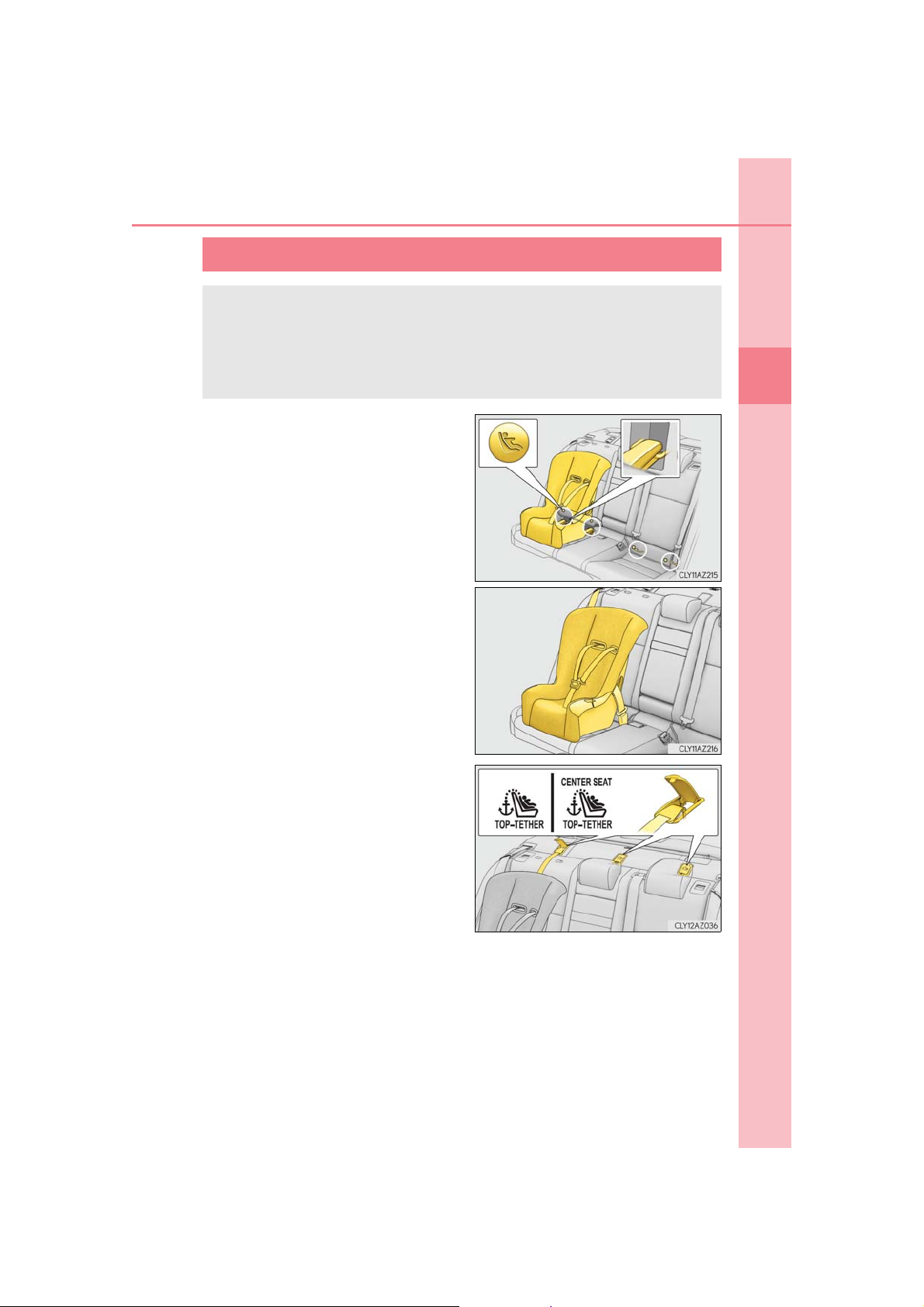
1-1. For safe use
Installing child restraints
Follow the child restraint system manufacturer’s instructions. Firmly secure
child restraints to the seats using the LATCH anchors or a seat belt. Attach the
top tether strap when installing a child restraint.
The lap/shoulder belt can be used if your child restraint system is not compatible with the LATCH (Lower Anchors and Tethers for Children) system.
Child restraint LATCH anchors
LATCH anchors are provided for the
outboard rear seats, behind the anchor
covers. (Buttons displaying the location
of the anchors are attached to the
seats.)
Seat belts equipped with a child
restraint locking mechanism (ALR/
ELR belts except driver’s seat belt)
(P. 32)
57
1
For safety and security
Anchor brackets (for top tether strap)
An anchor bracket is provided for each
rear seat.
IS350 AWD/IS350/IS300 AWD/IS300_U
Page 58
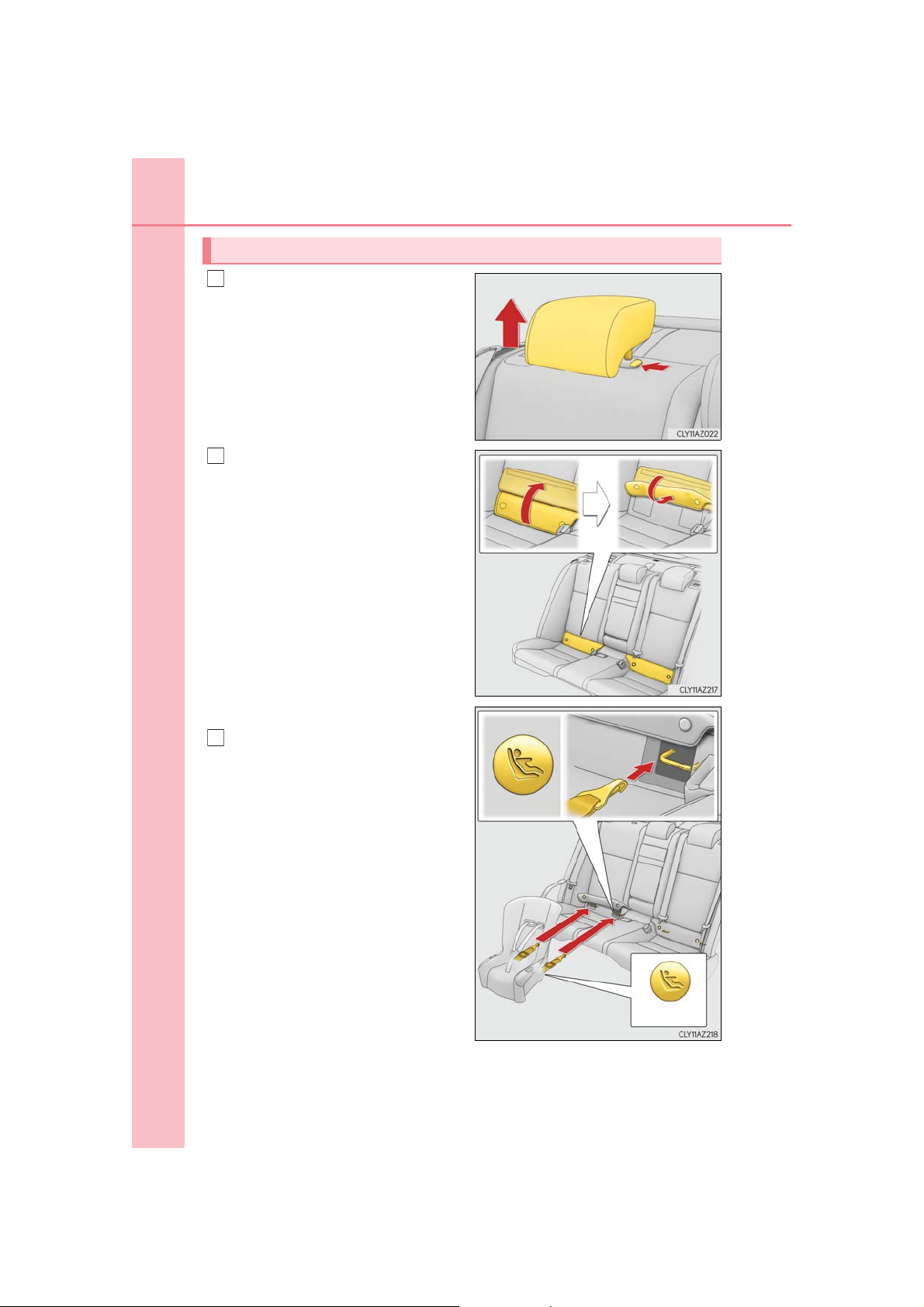
58
1
2
Canada only
3
1-1. For safe use
Installation with LATCH system
Remove the head restraint if it interferes with your child restraint system.
Flip up and fold the cover, and fix it
with the hook-and-loop fastener.
Type A
Latch the hooks of the lower straps
onto the LATCH anchors. If the child
restraint has a top tether strap, the
top tether strap should be latched
onto the top tether strap anchor.
For owners in Canada:
The symbol on a child restraint system indicates the presence of a
lower connector system.
IS350 AWD/IS350/IS300 AWD/IS300_U
Page 59
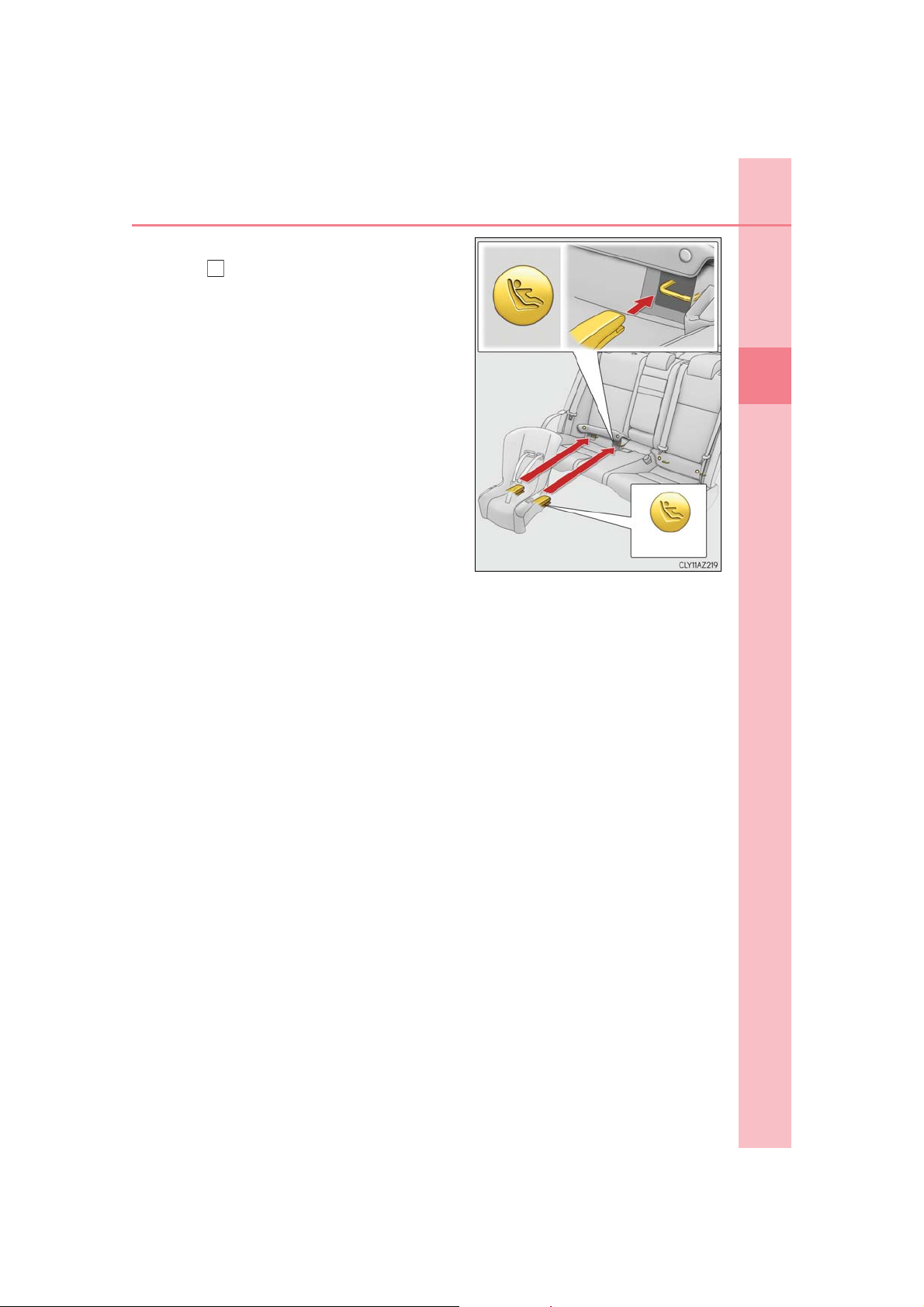
Type B
Canada only
3
Latch the buckles onto the LATCH
anchors. If the child restraint has a
top tether strap, the top tether strap
should be latched onto the top
tether strap anchor.
For owners in Canada:
The symbol on a child restraint system indicates the presence of a
lower connector system.
1-1. For safe use
59
1
For safety and security
IS350 AWD/IS350/IS300 AWD/IS300_U
Page 60
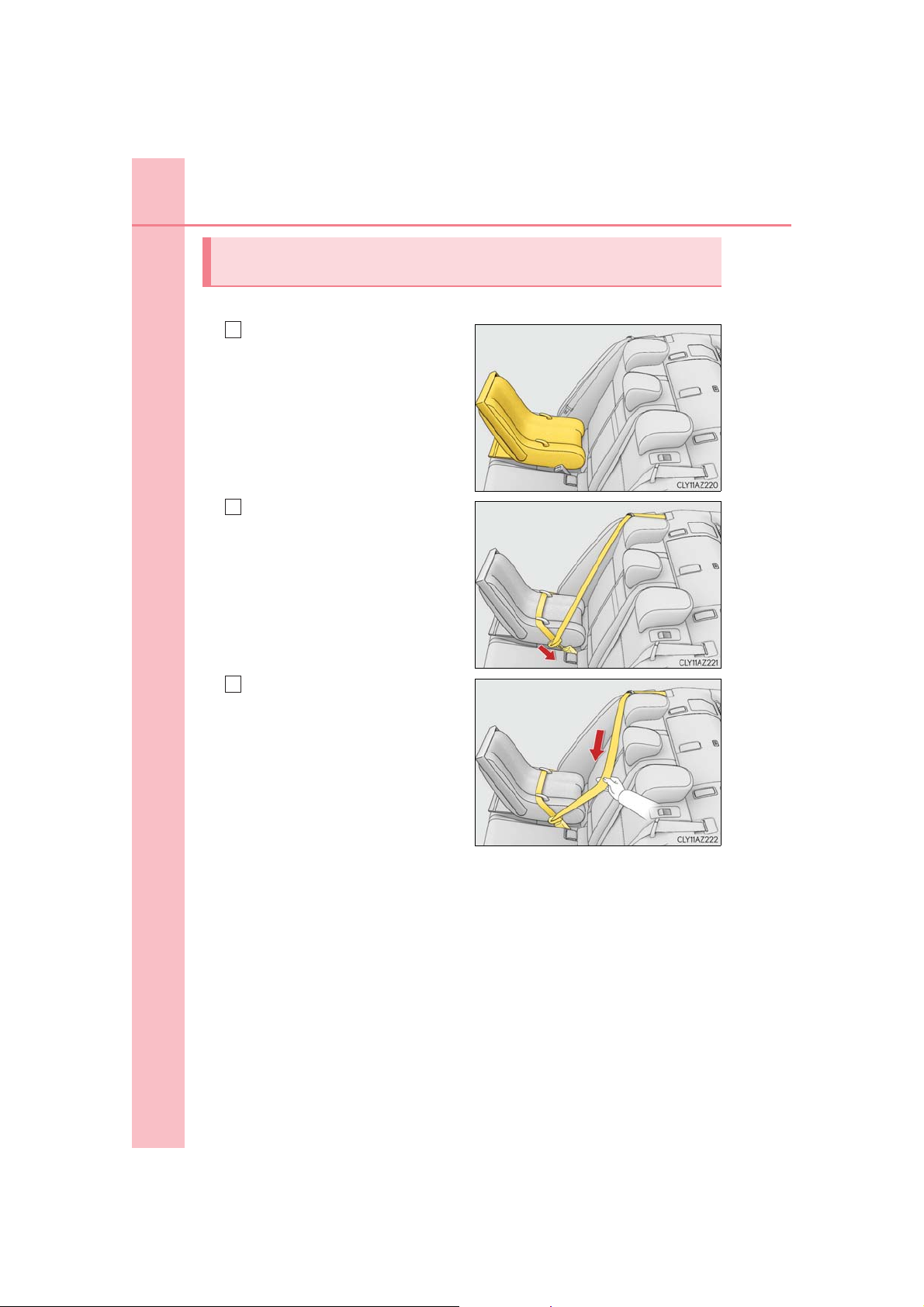
60
1
2
3
1-1. For safe use
Installing child restraints using a seat belt (child restraint lock function
belt)
■ Rear-facing Infant seat/convertible seat
Place the child restraint system
on the rear seat facing the rear of
the vehicle.
Run the seat belt through the
child restraint system and insert
the plate into the buckle. Make
sure that the belt is not twisted.
Fully extend the shoulder belt and
allow it to retract to put it in lock
mode. In lock mode, the belt cannot be extended.
IS350 AWD/IS350/IS300 AWD/IS300_U
Page 61
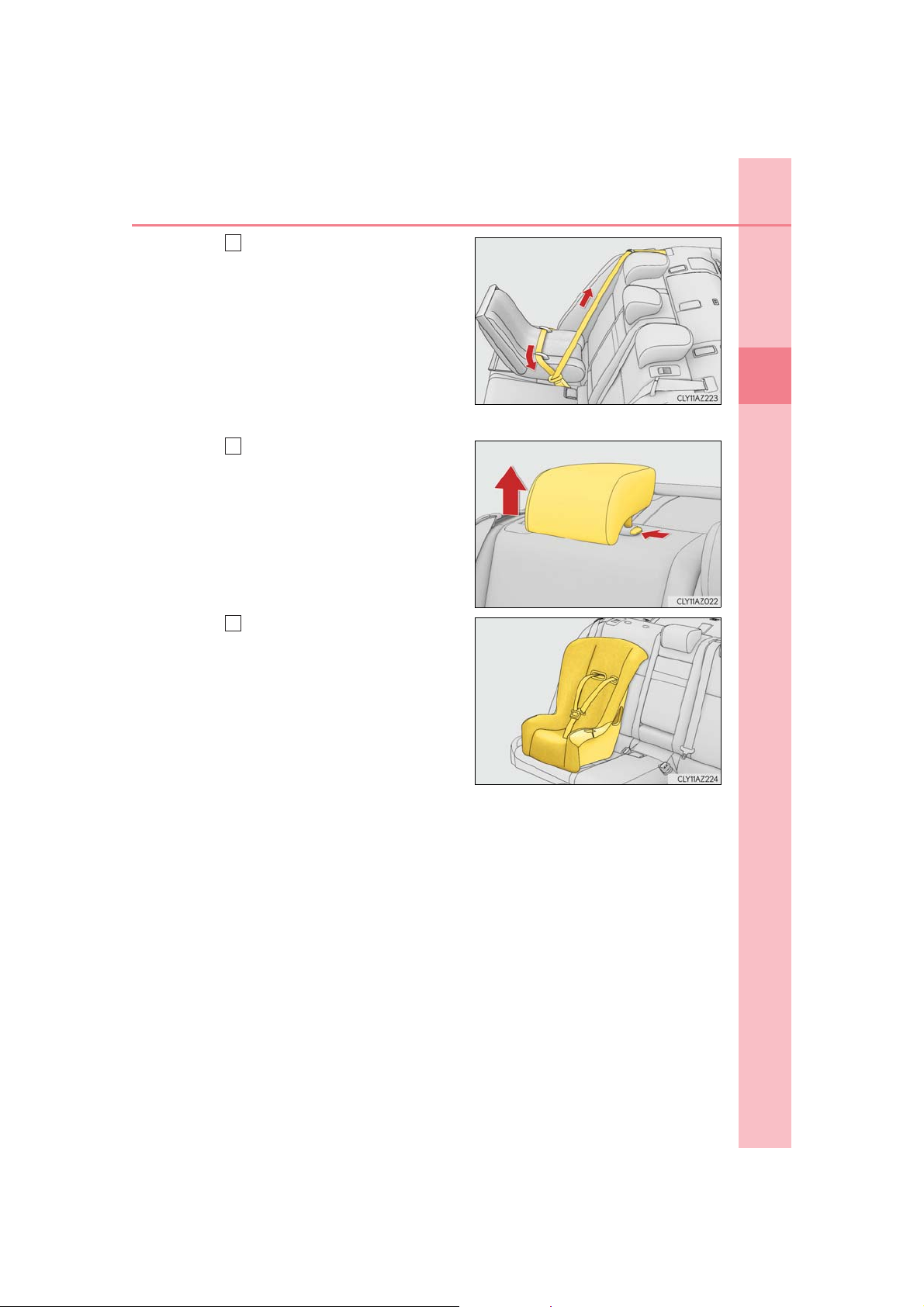
While pushing the child restraint
412
system down into the rear seat,
allow the shoulder belt to retract
until the child restraint system is
securely in place.
After the shoulder belt has retracted
to a point where there is no slack in
the belt, pull the belt to check that it
cannot be extended.
■ Forward-facing Convertible seat
Remove the head restraint if it
interferes with your child restraint
system.
Place the child restraint system
on the seat facing the front of the
vehicle.
1-1. For safe use
61
1
For safety and security
IS350 AWD/IS350/IS300 AWD/IS300_U
Page 62
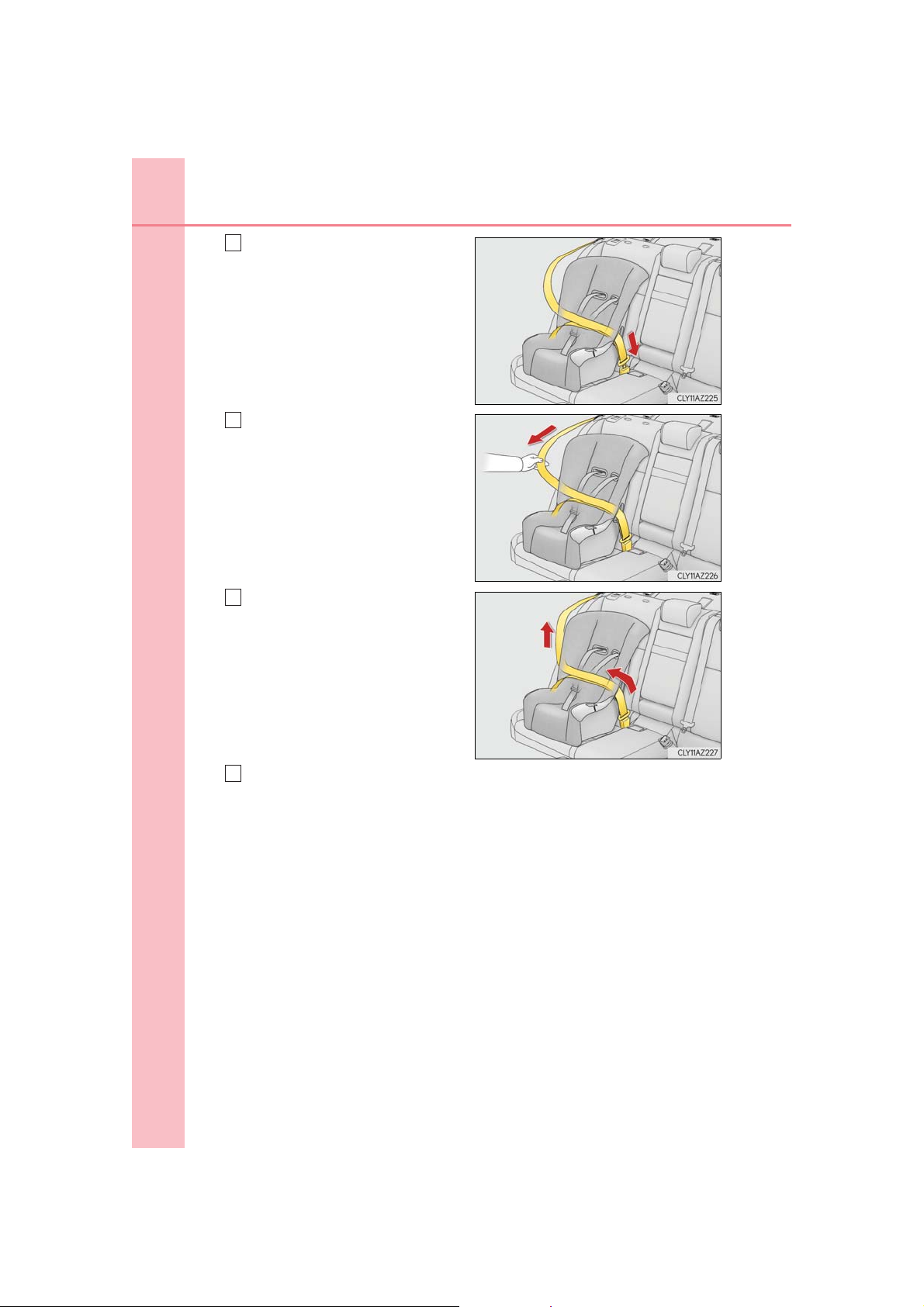
62
3
4
5
6
1-1. For safe use
Run the seat belt through the
child restraint system and insert
the plate into the buckle. Make
sure that the belt is not twisted.
Fully extend the shoulder belt and
allow it to retract to put it in lock
mode. In lock mode, the belt cannot be extended.
While pushing the child restraint
system into the rear seat, allow
the shoulder belt to retract until
the child restraint system is
securely in place.
After the shoulder belt has retracted
to a point where there is no slack in
the belt, pull the belt to check that it
cannot be extended.
If the child restraint has a top tether strap, the top tether strap should be
latched onto the top tether strap anchor. (P. 64)
IS350 AWD/IS350/IS300 AWD/IS300_U
Page 63
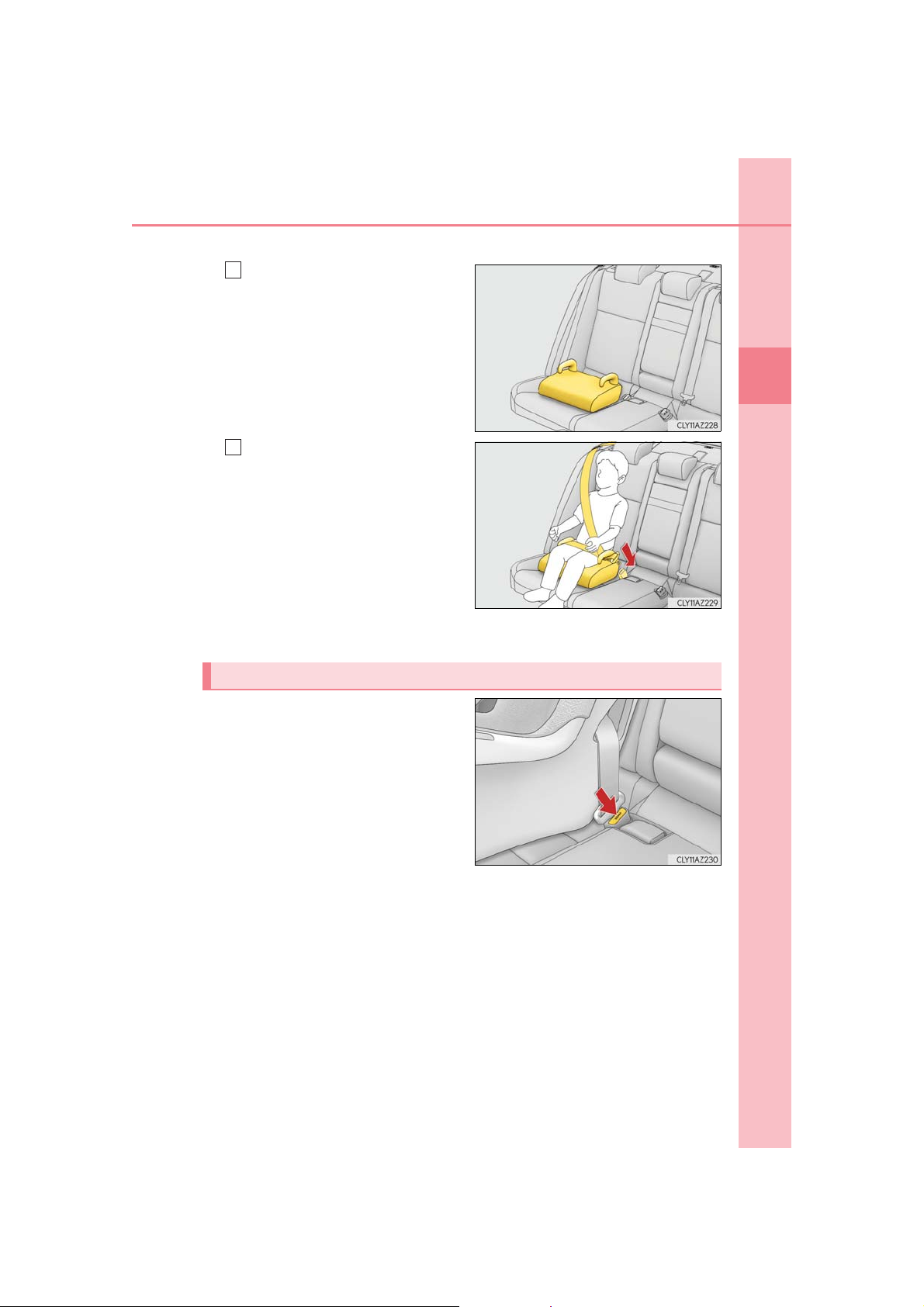
■ Booster seat
1
2
Place the child restraint system
on the seat facing the front of the
vehicle.
Sit the child in the child restraint
system. Fit the seat belt to the
child restraint system according
to the manufacturer’s instructions
and insert the plate into the
buckle. Make sure that the belt is
not twisted.
Check that the shoulder belt is correctly positioned over the child’s
shoulder and that the lap belt is as
low as possible. (P. 30)
1-1. For safe use
63
1
For safety and security
Removing a child restraint installed with a seat belt
Push the buckle release button and fully
retract the seat belt.
IS350 AWD/IS350/IS300 AWD/IS300_U
Page 64
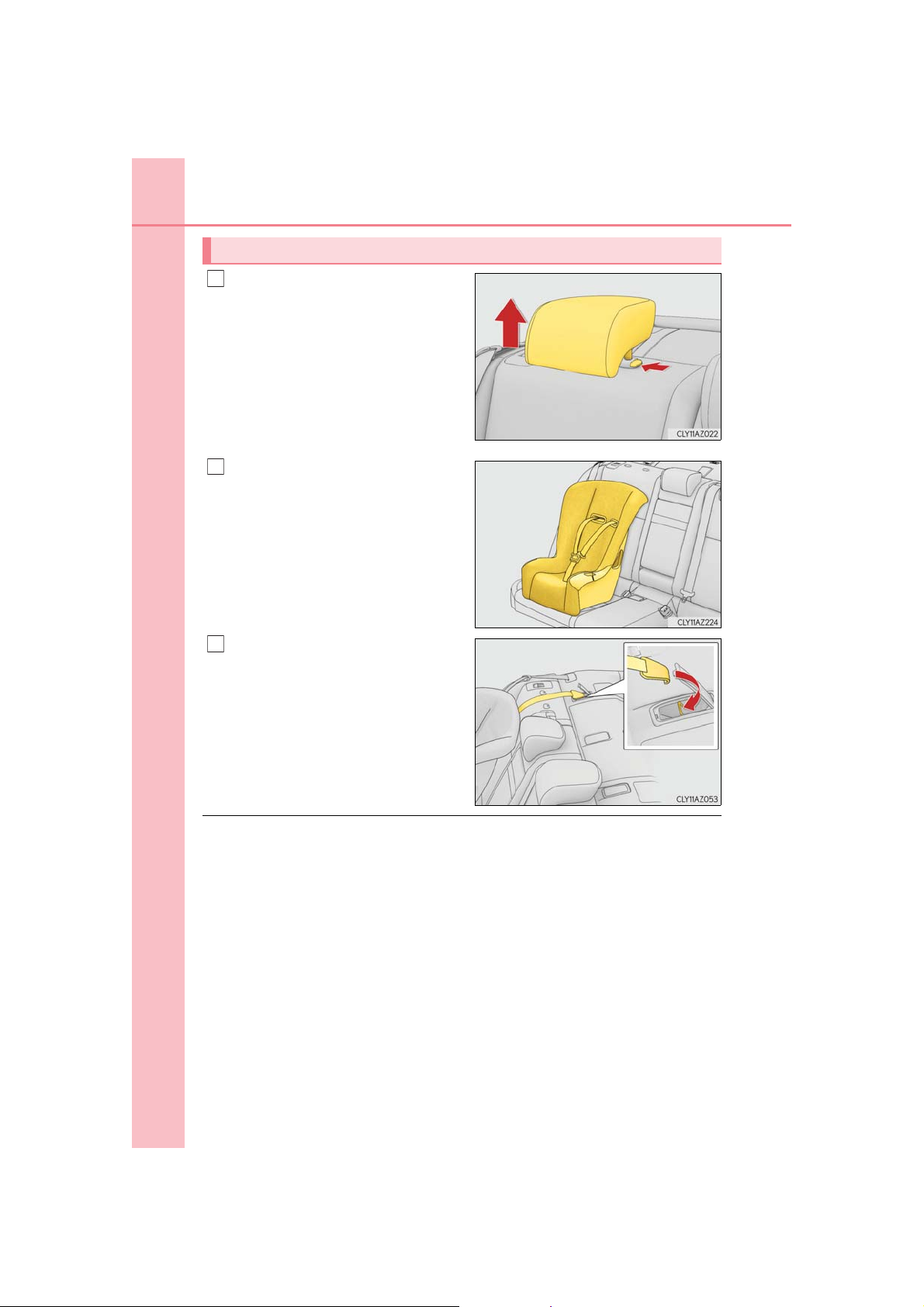
64
1
2
3
1-1. For safe use
Child restraint systems with a top tether strap
Remove the head restraint if it interferes with your child restraint system.
Secure the child restraint system
using the seat belt or LATCH
anchors.
Open the anchor bracket cover,
latch the hook onto the anchor
bracket and tighten the top tether
strap.
Make sure the top tether strap is
securely latched.
■ Laws and regulations pertaining to anchorages
The LATCH system conforms to FMVSS225 or CMVSS210.2.
Child restraint systems conforming to FMVSS213 or CMVSS213 specifications can be
used.
This vehicle is designed to conform to the SAE J1819.
IS350 AWD/IS350/IS300 AWD/IS300_U
Page 65
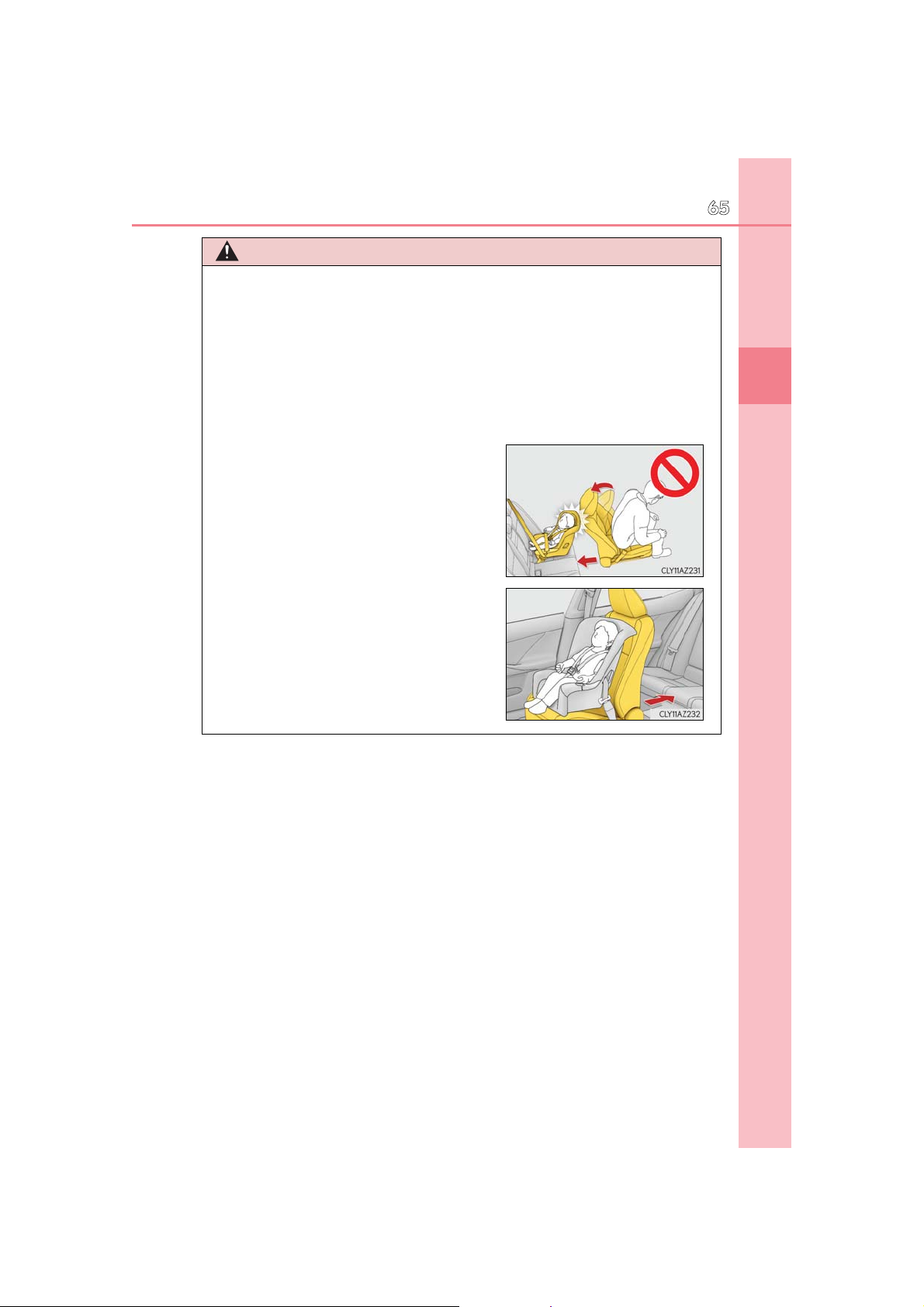
1-1. For safe use
If the driver’s seat interferes with the child
WARNING
■ When installing a booster seat
To prevent the belt from going into ALR lock mode, do not fully extend the shoulder
belt. ALR mode causes the belt to tighten only. This could cause injury or discomfort to
the child. (P. 32)
■ When installing a child restraint system
Follow the directions given in the child restraint system installation manual and fix the
child restraint system securely in place.
If the child restraint system is not correctly fixed in place, the child or other passengers
may be seriously injured or even killed in the event of a sudden braking or an accident.
●
restraint system and prevents it from being
attached correctly, attach the child restraint
system to the right-hand rear seat.
● Adjust the front passenger seat so that it does
not interfere with the child restraint system.
● Only put a forward-facing child restraint sys-
tem on the front seat when unavoidable.
When installing a forward-facing child
restraint system on the front passenger seat,
move the seat as far back as possible even if
the “AIR BAG OFF” indicator light is illuminated. Failure to do so may result in death or
serious injury if the airbags deploy (inflate).
65
1
For safety and security
IS350 AWD/IS350/IS300 AWD/IS300_U
Page 66

66
1-1. For safe use
WARNING
■ When installing a child restraint system
● When using the LATCH anchors for a child restraint system, move the seat as far
back as possible, with the seatback close to the child restraint system.
● When a booster seat is installed, always ensure that the shoulder belt is positioned
across the center of the child’s shoulder. The belt should be kept away from the child’s
neck, but not so that it could fall off the child’s shoulder. Failing to do so may result in
death or serious injury in the event of sudden braking, sudden swerving or an accident.
● Ensure that the belt and plate are securely locked and the seat belt is not twisted.
● Shake the child restraint system left and right, and forward and backward to ensure
that it has been securely installed.
● After securing a child restraint system, never adjust the seat.
● Follow all installation instructions provided by the child restraint system manufacturer.
● When securing some types of child restraint systems in rear seats, it may not be possi-
ble to properly use the seat belts in positions next to the child restraint without interfering with it or affecting seat belt effectiveness. Be sure your seat belt fits snugly
across your shoulder and low on your hips. If it does not, or if it interferes with the child
restraint, move to a different position. Failure to do so may result in death or serious
injury.
■ Do not use a seat belt extender
If a seat belt extender is used when installing a child restraint system, the seat belt will
not securely hold the child restraint system, which could cause death or serious injury
to the child or other passengers in the event of a sudden braking, sudden swerving or
an accident.
■ To correctly attach a child restraint system to the anchors
When using the LATCH anchors, be sure that there are no foreign objects around the
anchors and that the seat belt is not caught behind the child restraint system. Make sure
the child restraint system is securely attached, or it may cause death or serious injury to
the child or other passengers in the event of a sudden braking, sudden swerve or an
accident.
IS350 AWD/IS350/IS300 AWD/IS300_U
Page 67

1-1. For safe use
Exhaust gas precautions
Harmful substance to the human body is included in exhaust gases if inhaled.
WARNING
67
Exhaust gases include harmful carbon monoxide (CO), which is colorless and odorless.
Observe the following precautions.
Failure to do so may cause exhaust gases enter the vehicle and may lead to an accident
caused by light-headedness, or may lead to death or a serious health hazard.
■ Important points while driving
● Keep the trunk lid closed.
● If you smell exhaust gases in the vehicle even when the trunk lid is closed, open the
windows and have the vehicle inspected at your Lexus dealer as soon as possible.
■ When parking
● If the vehicle is in a poorly ventilated area or a closed area, such as a garage, stop the
engine.
● Do not leave the vehicle with the engine on for a long time.
If such a situation cannot be avoided, park the vehicle in an open space and ensure
that exhaust fumes do not enter the vehicle interior.
● Do not leave the engine running in an area with snow build-up, or where it is snowing.
If snowbanks build up around the vehicle while the engine is running, exhaust gases
may collect and enter the vehicle.
■ Exhaust pipe
The exhaust system needs to be checked periodically. If there is a hole or crack caused
by corrosion, damage to a joint or abnormal exhaust noise, be sure to have the vehicle
inspected and repaired by your Lexus dealer.
1
For safety and security
IS350 AWD/IS350/IS300 AWD/IS300_U
Page 68
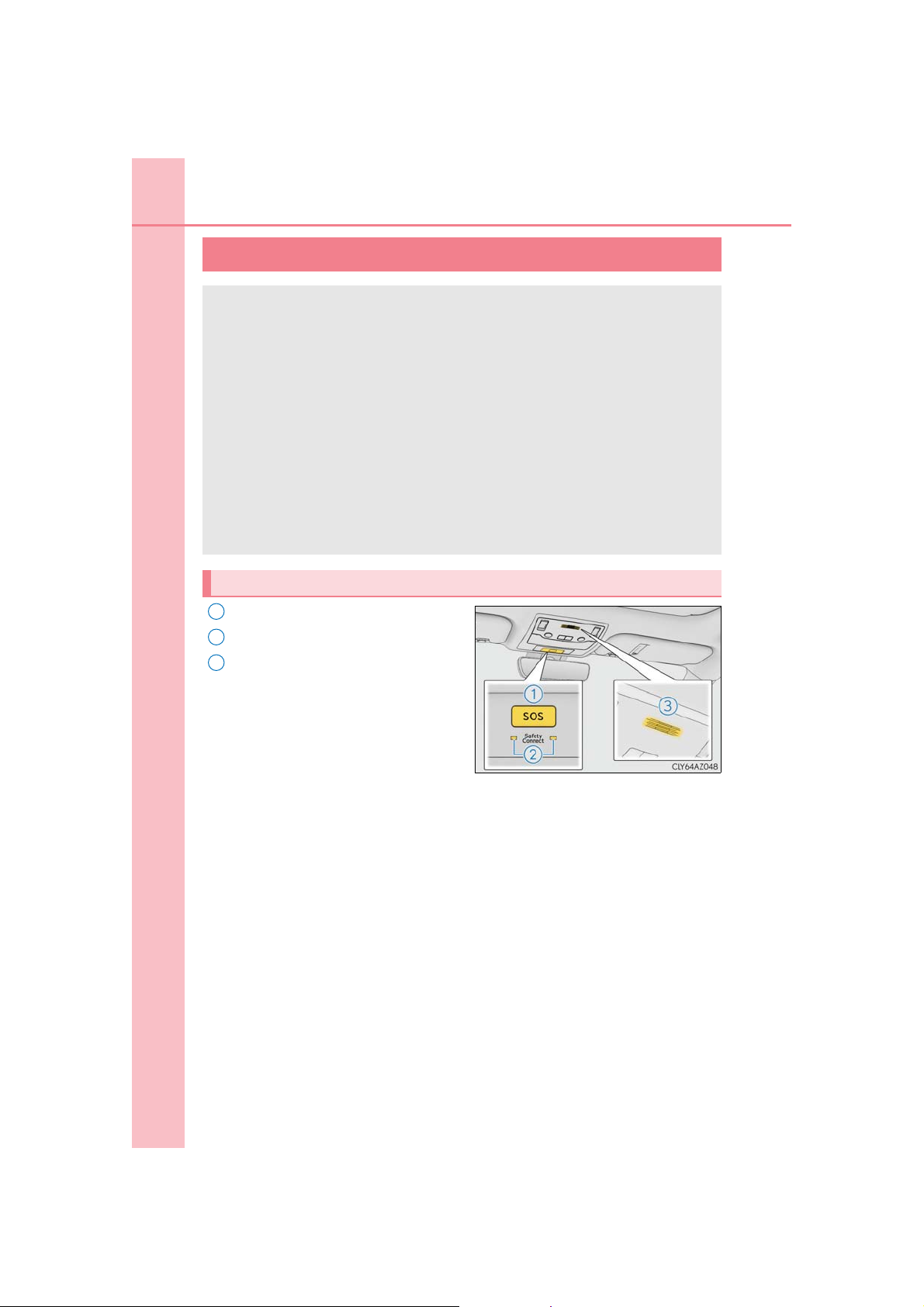
68
1-2. Lexus Enform
LEXUS Enform Safety Connect
Safety Connect is a subscription-based telematics service that uses Global
Positioning System (GPS) data and embedded cellular technology to provide
safety and security features to subscribers. Safety Connect is supported by
Lexus’ designated response center, which operates 24 hours per day, 7 days
per week.
Safety Connect service is available by subscription on select, telematics hardware-equipped vehicles.
By using the Safety Connect service, you are agreeing to be bound by the
Telematics Subscription Service Agreement and its Terms and Conditions, as
in effect and amended from time to time, a current copy of which is available
at Lexus.com. All use of the Safety Connect service is subject to such thenapplicable Terms and Conditions.
System components
1
“SOS” button
2
LED light indicators
3
Microphone
IS350 AWD/IS350/IS300 AWD/IS300_U
: If equipped
Page 69

1-2. Lexus Enform
Services
Subscribers have the following Safety Connect services available:
● Automatic Collision Notification*
Helps drivers receive necessary response from emergency service providers.
(P. 71)
*: U.S. Patent No. 7,508,298 B2
● Stolen Vehicle Location
Helps drivers in the event of vehicle theft. (P. 71)
● Emergency Assistance Button (“SOS”)
Connects drivers to response-center support. (P. 71)
● Enhanced Roadside Assistance
Provides drivers various on-road assistance. (P. 72)
Subscription
After you have signed the Telematics Subscription Service Agreement and are
enrolled, you can begin receiving services.
A variety of subscription terms is available for purchase. Contact your Lexus
dealer, call the following or push the “SOS” button in your vehicle for further subscription details.
•The United States
1-800-25-LEXUS (1-800-255-3987)
• Canada
1-800-26-LEXUS (1-800-265-3987)
•Puerto Rico
1-877-539-8777
69
1
For safety and security
IS350 AWD/IS350/IS300 AWD/IS300_U
Page 70

70
1-2. Lexus Enform
■ Safety Connect Services Information
● Phone calls using the vehicles Bluetooth
®
technology will not be possible during Safety
Connect.
● Safety Connect is available beginning Fall 2009 on select Lexus models (in the contig-
uous United States only). Contact with the Safety Connect response center is dependent upon the telematics device being in operative condition, cellular connection
availability, and GPS satellite signal reception, which can limit the ability to reach the
response center or receive emergency service support. Enrollment and Telematics
Subscription Service Agreement required. A variety of subscription terms is available;
charges vary by subscription term selected and location.
● Automatic Collision Notification, Emergency Assistance and Stolen Vehicle Location
will function in the United States, including Hawaii and Alaska, Puerto Rico and in Canada, and Enhanced Roadside Assistance will function in the United States, Puerto Rico
and in Canada.
● Automatic Collision Notification, Emergency Assistance, Stolen Vehicle and Enhanced
Road Assistance will not function in the United States Virgin Islands.
For vehicles first sold in the USVI, no Safety Connect services will function in and outside the United States Virgin Islands.
● Safety Connect services are not subject to section 255 of the Telecommunications Act
and the device is not TTY compatible.
■ Languages
The Safety Connect response center will offer support in multiple languages. The Safety
Connect system will offer voice prompts in English, Spanish, and French. Please indicate
your language of choice when enrolling.
■ When contacting the response center
You may be unable to contact the response center if the network is busy.
IS350 AWD/IS350/IS300 AWD/IS300_U
Page 71

1-2. Lexus Enform
Safety Connect LED light Indicators
When the engine switch is turned to IGNITION ON mode, the red indicator
light comes on for 2 seconds then turns off. Afterward, the green indicator light
comes on, indicating that the service is active.
The following indicator light patterns indicate specific system usage conditions:
● Green indicator light on = Active service
● Green indicator light flashing = Safety Connect call in process
● Red indicator light (except at vehicle start-up) = System malfunction (contact
your Lexus dealer)
● No indicator light (off) = Safety Connect service not active
Safety Connect services
■ Automatic Collision Notification
In case of either airbag deployment or severe rear-end collision, the system is
designed to automatically call the response center. The responding agent
receives the vehicle’s location and attempts to speak with the vehicle occupants to assess the level of emergency. If the occupants are unable to communicate, the agent automatically treats the call as an emergency, contacts the
nearest emergency services provider to describe the situation, and requests
that assistance be sent to the location.
■ Stolen Vehicle Location
If your vehicle is stolen, Safety Connect can work with local authorities to
assist them in locating and recovering the vehicle. After filing a police report,
call the Safety Connect response center at 1-800-25-LEXUS (1-800-255-
3987) in the United States, 1-877-539-8777 in Puerto Rico or 1-800-2653987 in Canada, and follow the prompts for Safety Connect to initiate this
service.
In addition to assisting law enforcement with recovery of a stolen vehicle,
Safety-Connect-equipped vehicle location data may, under certain circumstances, be shared with third parties to locate your vehicle. Further information is available at Lexus.com.
■ Emergency Assistance Button (“SOS”)
In the event of an emergency on the road, push the “SOS” button to reach the
Safety Connect response center. The answering agent will determine your
vehicle’s location, assess the emergency, and dispatch the necessary assistance required.
If you accidentally press the “SOS” button, tell the response-center agent that you
are not experiencing an emergency.
71
1
For safety and security
IS350 AWD/IS350/IS300 AWD/IS300_U
Page 72

72
■ Enhanced Roadside Assistance
1-2. Lexus Enform
Enhanced Roadside Assistance adds GPS data to the already included warranty-based Lexus roadside service.
Subscribers can press the “SOS” button to reach a Safety Connect responsecenter agent, who can help with a wide range of needs, such as: towing, flat
tire, fuel delivery, etc. For a description of the Roadside Assistance services
and their limitations, please see the Safety Connect Terms and Conditions,
which are available at Lexus.com.
Safety information for Safety Connect
Important! Read this information before using Safety Connect.
■ Exposure to radio frequency signals
The Safety Connect system installed in your vehicle is a low-power radio
transmitter and receiver. It receives and also sends out radio frequency (RF)
signals.
In August 1996, the Federal Communications Commission (FCC) adopted
RF exposure guidelines with safety levels for mobile wireless phones. Those
guidelines are consistent with the safety standards previously set by the following U.S. and international standards bodies.
● ANSI (American National Standards Institute) C95.1 [1992]
● NCRP (National Council on Radiation Protection and Measurement)
Report 86 [1986]
● ICNIRP (International Commission on Non-Ionizing Radiation Protection)
[1996]
Those standards were based on comprehensive and periodic evaluations of
the relevant scientific literature. Over 120 scientists, engineers, and physicians from universities, and government health agencies and industries
reviewed the available body of research to develop the ANSI Standard
(C95.1).
The design of Safety Connect complies with the FCC guidelines in addition to
those standards.
IS350 AWD/IS350/IS300 AWD/IS300_U
Page 73
■ Certification for Lexus Enform with Safety Connect
1-2. Lexus Enform
73
1
For safety and security
IS350 AWD/IS350/IS300 AWD/IS300_U
Page 74

74
1-2. Lexus Enform
LEXUS Enform Remote
Lexus Enform Remote is a cellular phone application that lets you view and
remotely control certain aspects of your vehicle.
For details about the functions and services of this application, refer to
http://www.lexus.com/enform/
.
Function of the Lexus Enform Remote is achieved by using an embedded cellular device in the vehicle (DCM: Data Communication Module).
Subscription
After you sign the Telematics Subscription Service Agreement, download the
Lexus Enform Remote app from your cellular phone’s app store, and register
within the app (or enroll and complete registration at the dealer), you can begin
using these services. (P. 68)
A variety of subscription terms are available. Contact your Lexus dealer, or call 1800-25-LEXUS (1-800-255-3987) for further subscription details.
■ Availability of service
Lexus Enform Remote is available in the contiguous United States, Washington D.C. and
Alaska.
Lexus Enform Remote is not available in some countries or areas.
■ Lexus Enform Remote Information
● Lexus Enform Remote should only be used by authorized users.
● Laws in some communities may require that the vehicle be within view of the user when
operating Lexus Enform Remote.
In some states, use of Lexus Enform Remote may violate state or local laws. Before
using Lexus Enform Remote, check your state and local laws.
● Any malfunction of the Lexus should be repaired by your Lexus dealer.
● Lexus Enform Remote is designed to work at temperatures above -22F (-30C). This
specification is related to the Lexus Enform Remote operation, but is dependent on the
vehicle’s operating temperature range which may be different.
● Content is subject to change without notice.
● Some features of the Lexus Enform Remote may not be available on some models.
● Additional information can be found at www.lexus.com/enform/.
● Availability of functions of the Lexus Enform service is dependent on network reception
level.
■ Safety information for Lexus Enform Remote
Refer to the safety information for Safety Connect: P. 72
IS350 AWD/IS350/IS300 AWD/IS300_U
: If equipped
Page 75

1-2. Lexus Enform
75
LEXUS Enform Service Connect
Lexus Enform Service Connect uses embedded telematics hardware to collect and transmit vehicle data that allows Lexus to provide:
● Vehicle Health Report (VHR)
(Safety Recalls, Service Campaigns, Current Vehicle Alerts, Required
Maintenance, and Vehicle Condition Status)
● Maintenance Notifications
● Vehicle Alert Notifications
For details about this service and how to register, refer to
http://www.lexus.com/enform/
.
The Lexus Enform Service Connect is achieved by using a Data Communication Module (DCM) built in the vehicle.
■ Availability of service
Lexus Enform Service Connect is not available in some countries or areas.
■ Lexus Enform Service Connect Information
Availability of functions of the Lexus Enform Service Connect is dependent on network
reception level.
■ Safety information for Lexus Enform Service Connect
Refer to the safety information for Safety Connect: P. 72
1
For safety and security
IS350 AWD/IS350/IS300 AWD/IS300_U
: If equipped
Page 76
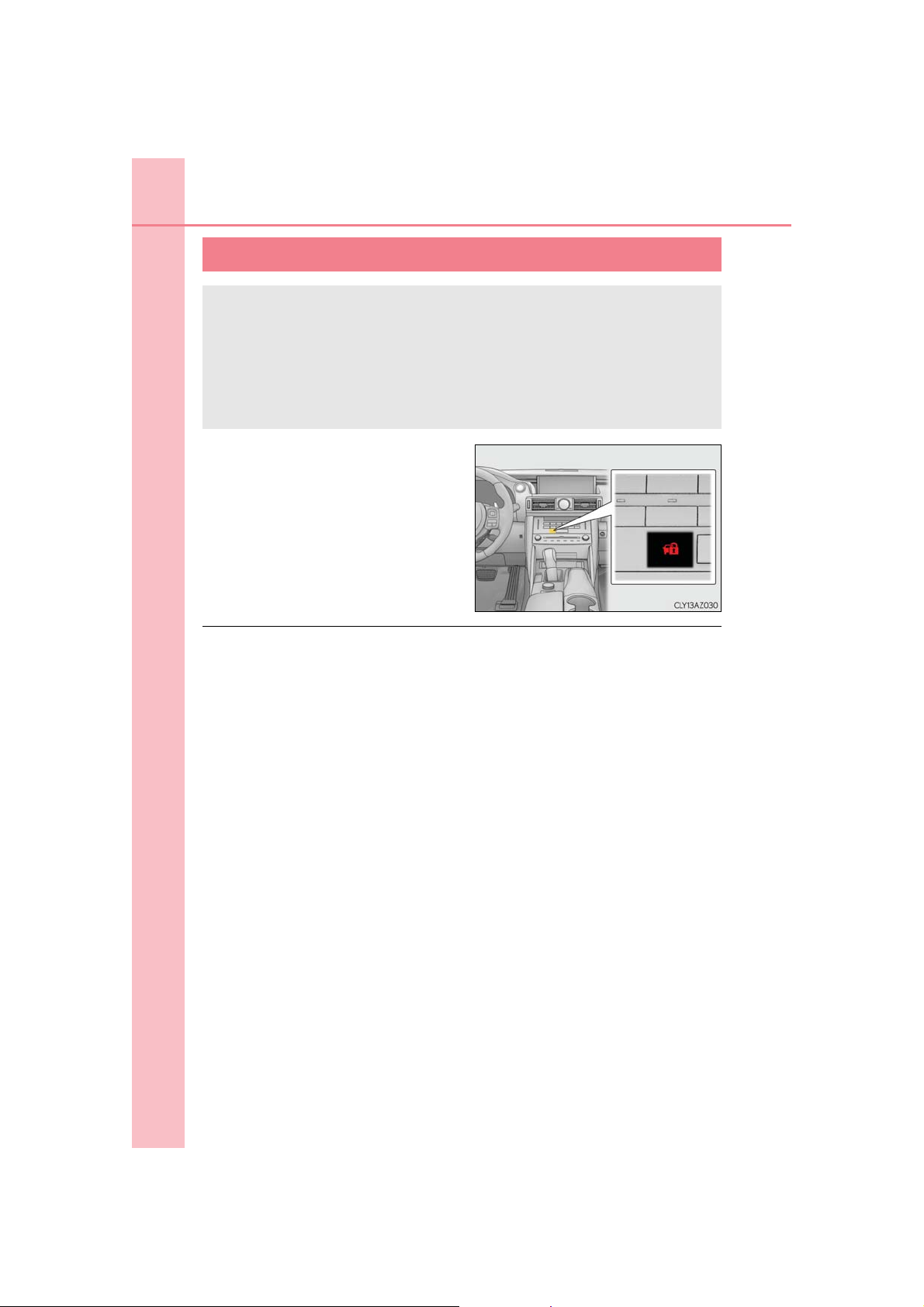
76
1-3. Theft deterrent system
Engine immobilizer system
The vehicle’s keys have built-in transponder chips that prevent the engine
from starting if a key has not been previously registered in the vehicle’s onboard computer.
Never leave the keys inside the vehicle when you leave the vehicle.
This system is designed to help prevent vehicle theft but does not guarantee
absolute security against all vehicle thefts.
The indicator light flashes after the
engine switch has been turned off to
indicate that the system is operating.
The indicator light stops flashing after
the engine switch has been turned to
ACCESSORY or IGNITION ON
mode to indicate that the system has
been canceled.
■ System maintenance
The vehicle has a maintenance-free type engine immobilizer system.
■ Conditions that may cause the system to malfunction
● If the grip portion of the key is in contact with a metallic object
● If the key is in close proximity to or touching a key registered to the security system (key
with a built-in transponder chip) of another vehicle
IS350 AWD/IS350/IS300 AWD/IS300_U
Page 77
1-3. Theft deterrent system
■ Certifications for the engine immobilizer system
For vehicles sold in the U.S.A.
For vehicles sold in Canada
77
1
For safety and security
NOTICE
■ To ensure the system operates correctly
Do not modify or remove the system. If modified or removed, the proper operation of
the system cannot be guaranteed.
IS350 AWD/IS350/IS300 AWD/IS300_U
Page 78
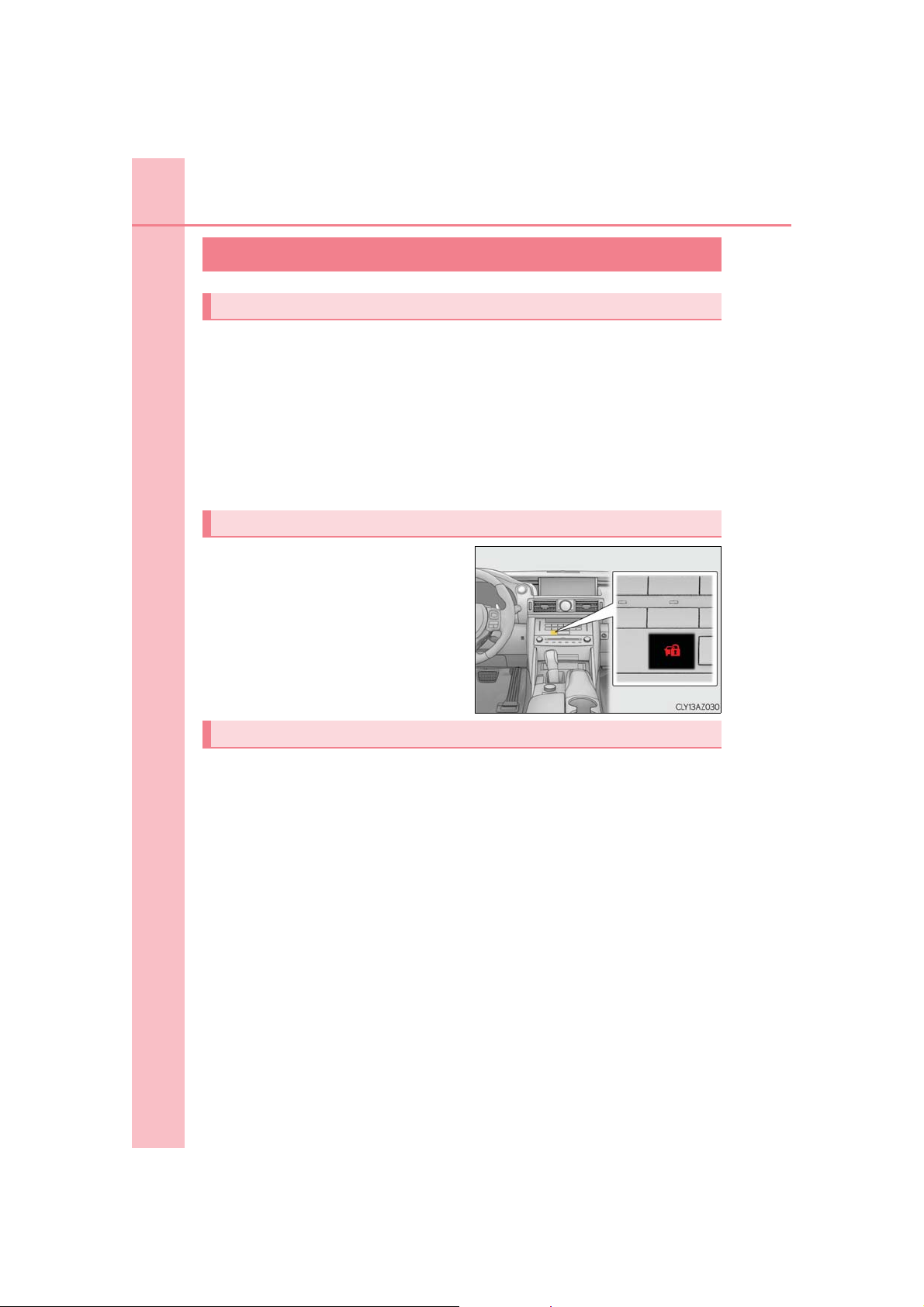
78
1-3. Theft deterrent system
Alarm
The alarm
The alarm uses light and sound to give an alert when an intrusion is detected.
The alarm is triggered in the following situations when the alarm is set:
● A locked door is unlocked or opened in any way other than using the entry
function, wireless remote control or mechanical key. (The doors will lock again
automatically.)
● The trunk is opened in any way other than using the entry function or wireless
remote control.
● The hood is opened.
Setting the alarm system
Close the doors, trunk and hood, and
lock all the doors. The system will be set
automatically after 30 seconds.
The indicator light changes from being
on to flashing when the system is set.
Deactivating or stopping the alarm
Do one of the following to deactivate or stop the alarm:
● Unlock the doors.
● Open the trunk using the entry function or wireless remote control.
● Turn the engine switch to ACCESSORY or IGNITION ON mode, or start
the engine. (The alarm will be deactivated or stopped after a few seconds.)
IS350 AWD/IS350/IS300 AWD/IS300_U
Page 79
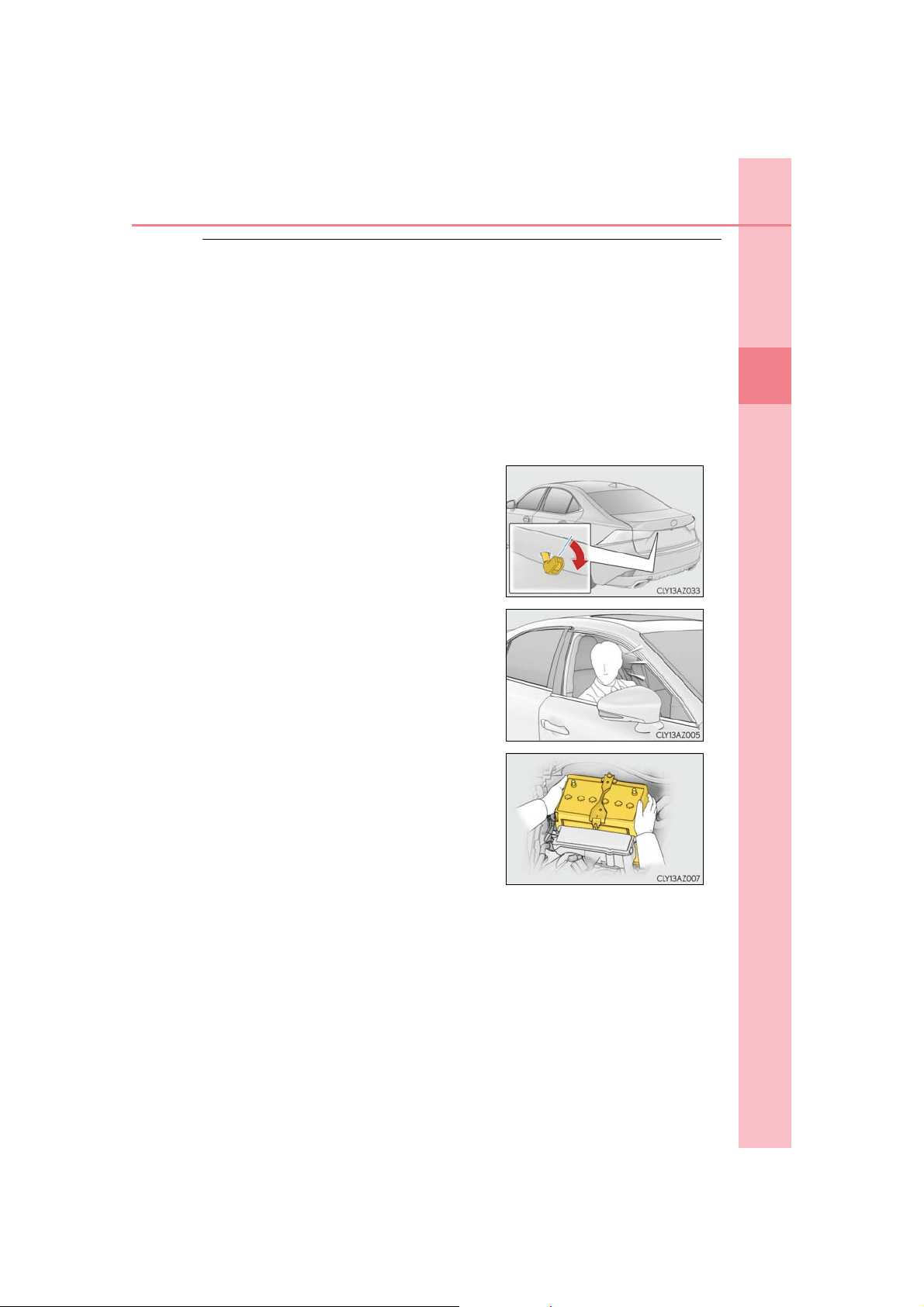
1-3. Theft deterrent system
■ System maintenance
The vehicle has a maintenance-free type alarm system.
■ Items to check before locking the vehicle
To prevent unexpected triggering of the alarm and vehicle theft, make sure of the following:
● Nobody is in the vehicle.
● The windows and moon roof are closed before the alarm is set.
● No valuables or other personal items are left in the vehicle.
■ Triggering of the alarm
The alarm may be triggered in the following situations:
(Stopping the alarm deactivates the alarm system.)
● The trunk is opened using the mechanical key.
● A person inside the vehicle opens a door or
the trunk or hood, or unlocks the vehicle.
79
1
For safety and security
● The battery is recharged or replaced when the
vehicle is locked. (P. 577)
■ Alarm-operated door lock
In the following cases, depending on the situation, the door may automatically lock to
prevent improper entry into the vehicle:
● When a person remaining in the vehicle unlocks the door and the alarm is activated.
● While the alarm is activated, a person remaining in the vehicle unlocks the door.
● When recharging or replacing the battery
IS350 AWD/IS350/IS300 AWD/IS300_U
Page 80

80
■ To ensure the system operates correctly
1-3. Theft deterrent system
NOTICE
Do not modify or remove the system. If modified or removed, the proper operation of
the system cannot be guaranteed.
IS350 AWD/IS350/IS300 AWD/IS300_U
Page 81
1-3. Theft deterrent system
Theft prevention labels (for U.S.A.)
These labels are attached to the vehicle
to reduce vehicle theft by facilitating
the tracing and recovery of parts from
stolen vehicles. Do not remove under
penalty of law.
81
1
For safety and security
IS350 AWD/IS350/IS300 AWD/IS300_U
Page 82

82
1-3. Theft deterrent system
IS350 AWD/IS350/IS300 AWD/IS300_U
Page 83

83
Instrument cluster
2
2. Instrument cluster
Warning lights and
indicators.......................................84
Gauges and meters.....................89
Multi-information display ..........94
Fuel consumption
information .................................... 111
IS350 AWD/IS350/IS300 AWD/IS300_U
Page 84
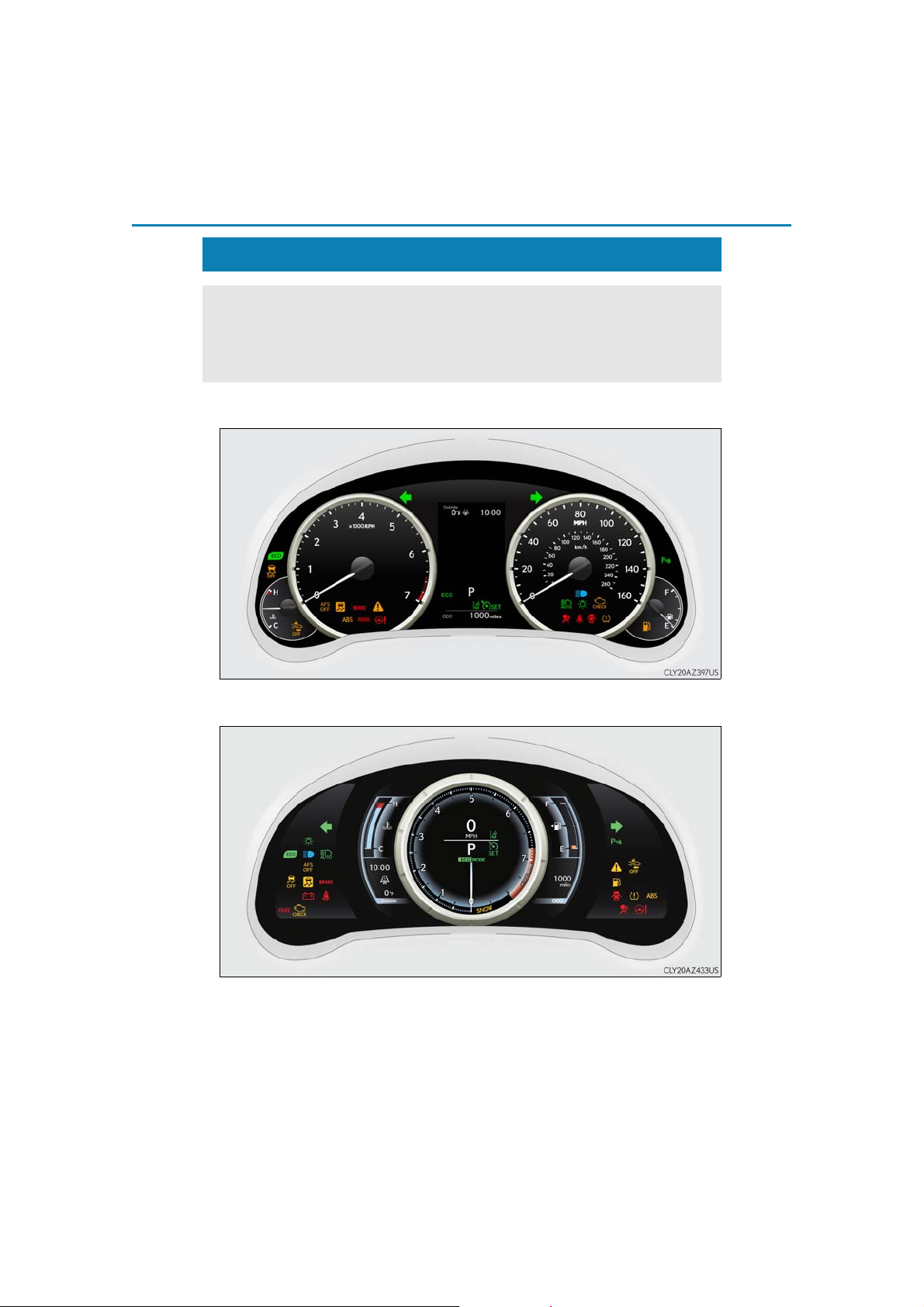
84
2. Instrument cluster
Warning lights and indicators
The warning lights and indicators on the instrument cluster and center panel
inform the driver of the status of the vehicle’s various systems.
For the purpose of explanation, the following illustrations display all warning
lights and indicators illuminated.
Except F SPORT models
F SPORT models
The units used on the meters and some indicators may differ depending on the target
region.
IS350 AWD/IS350/IS300 AWD/IS300_U
Page 85
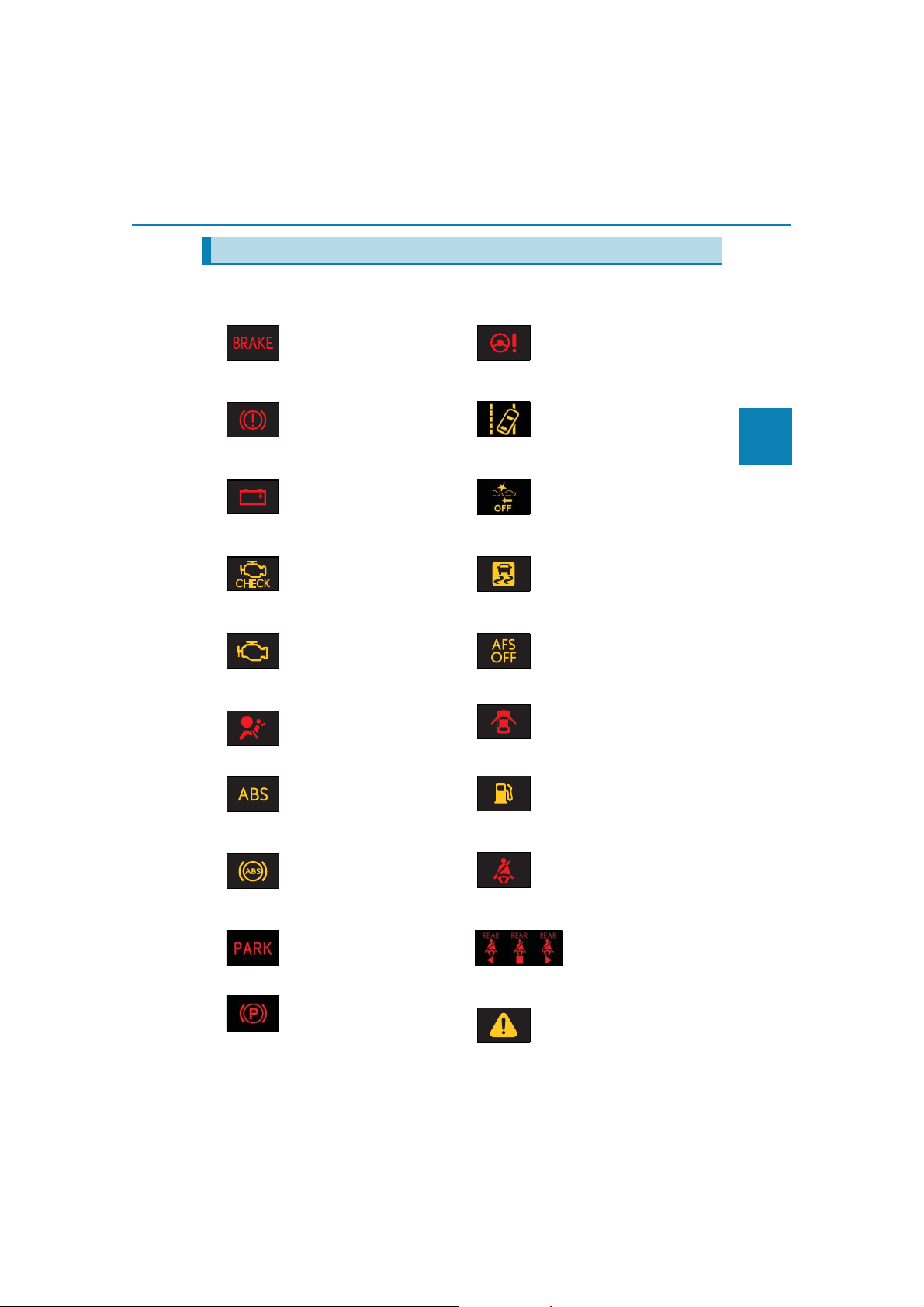
2. Instrument cluster
Warning lights
Warning lights inform the driver of malfunctions in the indicated vehicle systems.
85
(U.S.A.)
(Canada)
(if equipped)
(U.S.A.)
(Canada)
1
*
Brake system warning light
(P. 525)
1
*
Brake system warning light
(P. 525)
1
*
Charging system warning
light (P. 525)
1
*
Malfunction indicator lamp
(P. 525)
1
*
Malfunction indicator lamp
(P. 525)
1
*
SRS warning light
(P. 525)
1, 2
*
(if equipped)
1
*
Electric power steering system warning light
(P. 526)
LDA (Lane Departure
Alert) indicator (P. 526)
1
*
PCS warning light
(P. 526)
1
*
Slip indicator (P. 526)
“AFS OFF” indicator
(P. 527)
Open door warning light
(P. 527)
2
Instrument cluster
1
*
ABS warning light
(P. 525)
(U.S.A.)
1
*
ABS warning light
(P. 525)
(Canada)
Parking brake warning light
(P. 526)
(U.S.A.)
Parking brake warning light
(P. 526)
(Canada)
IS350 AWD/IS350/IS300 AWD/IS300_U
Low fuel level warning light
(P. 527)
Driver’s and front passenger’s seat belt reminder light
(P. 527)
3
*
Rear passengers’ seat
belt reminder lights
(P. 527)
1
*
Master warning light
(P. 527)
Page 86
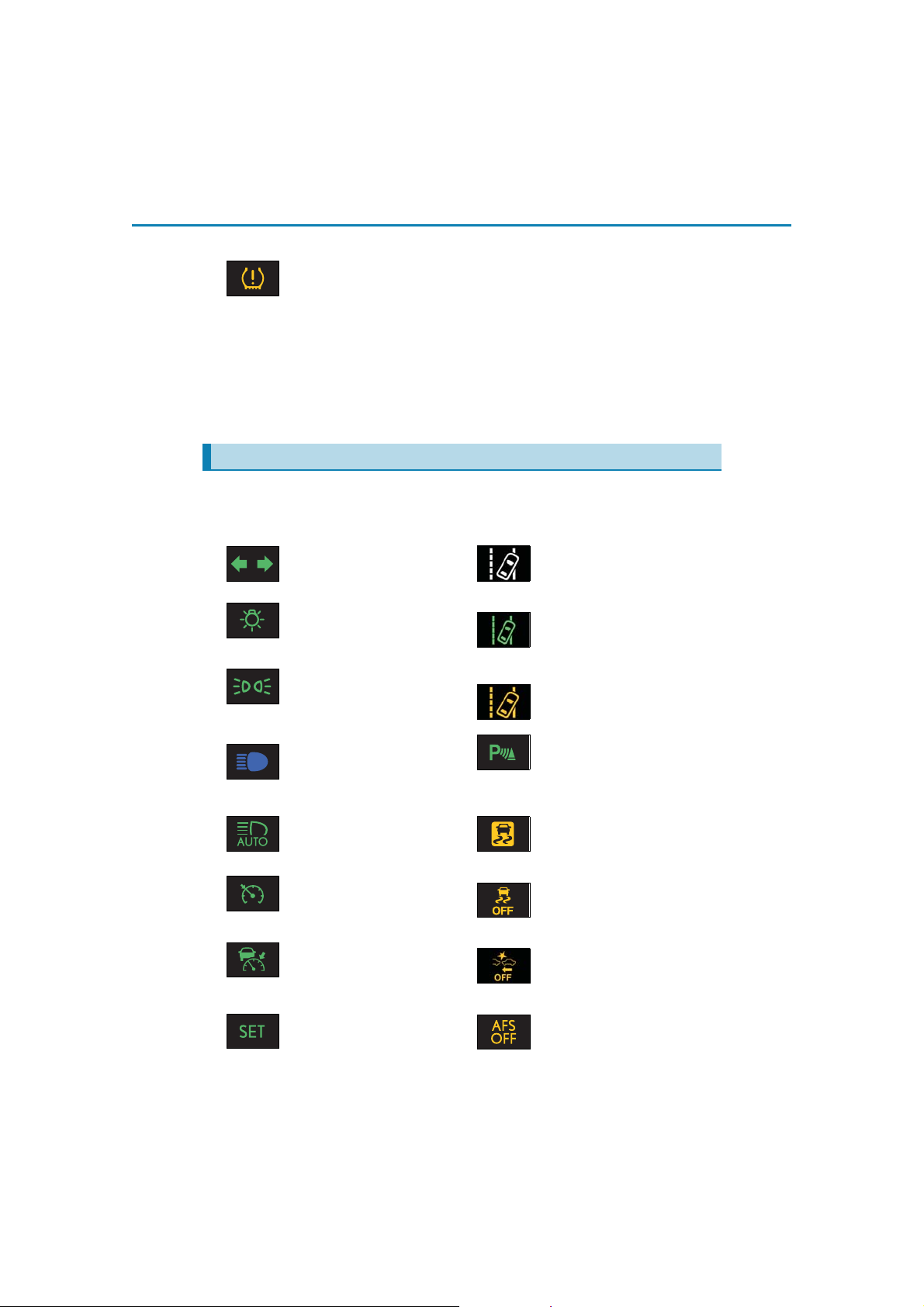
86
2. Instrument cluster
1
*
Tire pressure warning light
(P. 527)
1
*
: These lights turn on when the engine switch is turned to IGNITION ON mode to
indicate that a system check is being performed. They will turn off after the engine is
started, or after a few seconds. There may be a malfunction in a system if a light does
not come on, or turn off. Have the vehicle inspected by your Lexus dealer.
2
*
: The light flashes to indicate a malfunction.
3
*
: This light illuminates on the center panel.
Indicators
The indicators inform the driver of the operating state of the vehicle’s various systems.
(U.S.A.)
(Canada)
Turn signal indicator
(P. 198)
Headlight indicator
(P. 202)
Tail light indicator
(P. 202)
Headlight high beam indicator (P. 203)
1
*
Automatic High Beam indicator (P. 206)
Cruise control indicator
(P. 248)
Dynamic radar cruise control indicator (P. 248)
*
(if equipped)
1, 2
*
1, 3
*
LDA (Lane Departure
Alert) indicator (P. 240)
LDA (Lane Departure
Alert) indicator (P. 240)
2
LDA (Lane Departure
Alert) indicator (P. 240)
Intuitive parking assist indicator (P. 260)
Slip indicator (P. 302)
1
*
VSC OFF indicator
(P. 303)
PCS warning light
(P. 233)
Cruise control “SET” indicator (P. 248)
IS350 AWD/IS350/IS300 AWD/IS300_U
(if equipped)
1
*
“AFS OFF” indicator
(P. 203)
Page 87
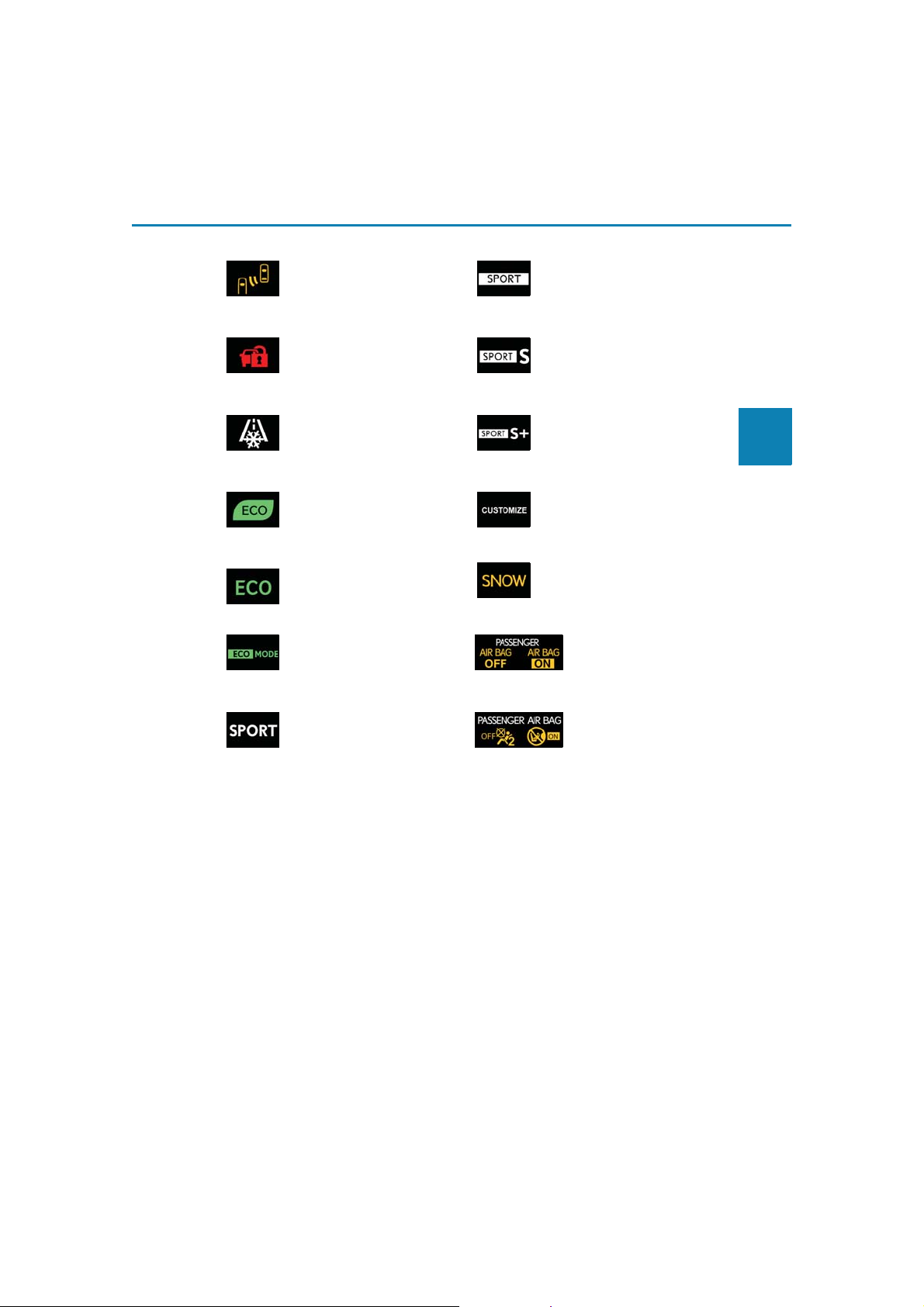
2. Instrument cluster
87
4, 5
*
BSM (Blind Spot Monitor)
outside rear view mirror
indicators (P. 285)
(if equipped)
*
6
(if equipped)
Security indicator
(P. 76, 78)
(if equipped)
7
*
Low outside temperature
indicator (P. 89)
(if equipped)
1
*
Eco Driving Indicator Light
(P. 109)
(if equipped)
8
*
Eco drive mode indicator
(P. 297)
9
*
Eco drive mode indicator
(P. 297)
8
*
“SPORT” indicator
(P. 297)
1
*
: These lights turn on when the engine switch is turned to IGNITION ON mode to
9
*
9
*
9
*
9
*
(U.S.A.)
(Canada)
“SPORT” indicator
(P. 297)
“SPORT S” indicator
(P. 297)
“SPORT S+” indicator
(P. 297)
“CUSTOMIZE” indicator
(P. 297)
Snow mode indicator
(P. 192)
1, 6
*
“AIR BAG ON/OFF”
indicator (P. 46)
1, 6
*
“AIR BAG ON/OFF”
indicator (P. 46)
indicate that a system check is being performed. They will turn off after the engine is
started, or after a few seconds. There may be a malfunction in a system if a light does
not come on, or turn off. Have the vehicle inspected by your Lexus dealer.
2
*
: The light flashes to indicate that the system is operating.
3
*
: The light comes on when the system is turned off.
2
Instrument cluster
IS350 AWD/IS350/IS300 AWD/IS300_U
Page 88
88
*
*
*
*
*
*
■ If a safety system warning light does not come on
2. Instrument cluster
4
: In order to confirm operation, the BSM outside rear view mirror indicators illuminate
in the following situations:
• When the engine switch is turned to IGNITION ON mode while the BSM main
switch is set to ON.
• When the BSM main switch is set to ON while the engine switch is in IGNITION
ON mode.
If the system is functioning correctly, the BSM outside rear view mirror indicators will
turn off after a few seconds.
If the BSM outside rear view mirror indicators do not illuminate or do not turn off,
there may be a malfunction in the system.
If this occurs, have the vehicle inspected by your Lexus dealer.
5
: This light illuminates on the outside rear view mirrors.
6
: This light illuminates on the center panel.
7
: When the outside temperature is approximately 37F (3C) or lower, the indicator
will flash for approximately 10 seconds, then stay on.
8
: Except F SPORT models
9
: F SPORT models
WARNING
Should a safety system light such as the ABS and SRS warning light not come on when
you start the engine, this could mean that these systems are not available to help protect you in an accident, which could result in death or serious injury. Have the vehicle
inspected by your Lexus dealer immediately if this occurs.
IS350 AWD/IS350/IS300 AWD/IS300_U
Page 89
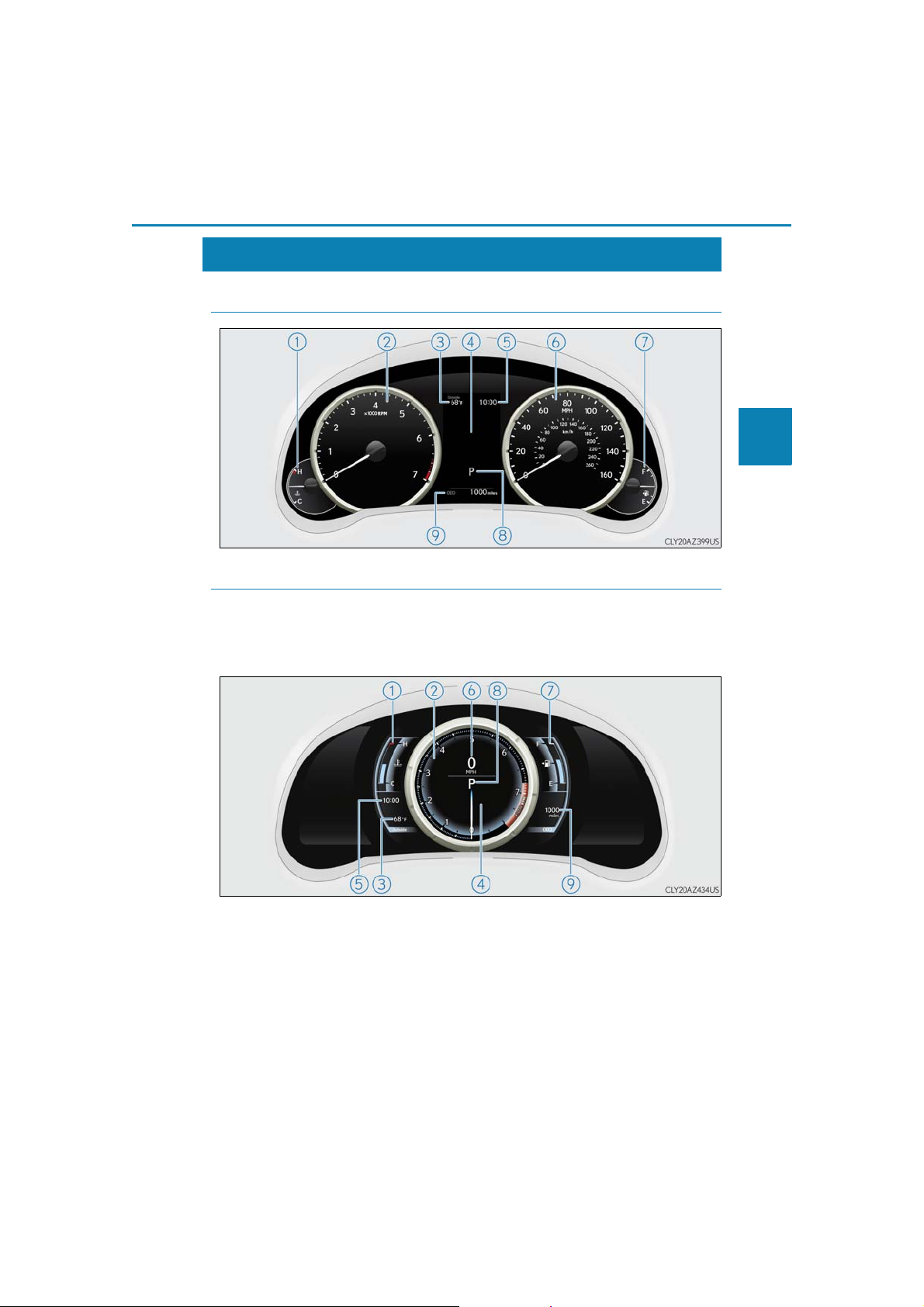
2. Instrument cluster
Gauges and meters
◆ Except F SPORT models
◆ F SPORT models
When the main meter is moved to the right, some of the meter displays and
the gauge layout will change.
Main meter in center position
89
2
Instrument cluster
IS350 AWD/IS350/IS300 AWD/IS300_U
Page 90
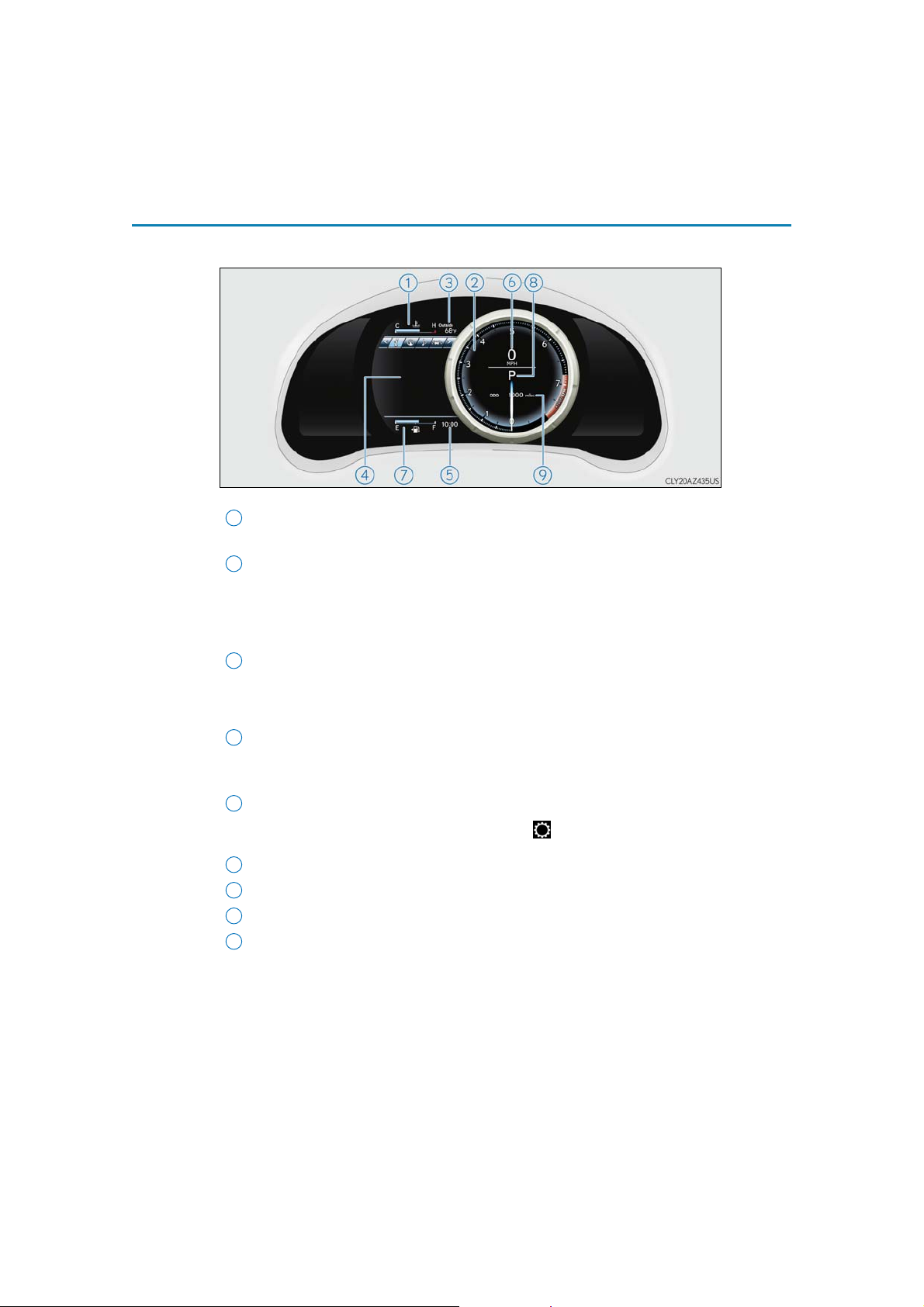
90
3
4
2. Instrument cluster
Main meter moved to the right
The units used on the meters may differ depending on the target region.
1
Engine coolant temperature gauge
Displays the engine coolant temperature
2
Tachometer
Displays the engine speed in revolutions per minute
F SPORT models: When sport mode is selected for the driving mode, the periph-
ery of the tachometer will change color and the scale of the tachometer will be
emphasized.
Outside temperature
Displays the outside temperature within the range of -40°F (-40°C) to 122°F
(50°C). Low outside temperature indicator comes on when the ambient temperature is 37°F (3°C) or lower.
Multi-information display
Presents the driver with a variety of vehicle data (P. 94)
Displays warning messages in case of a malfunction (P. 532)
5
Clock
Time displayed on the clock can be adjusted on of the multi-information display. (P. 103)
6
Speedometer
7
Fuel gauge
8
Shift position and gear position
9
Odometer and trip meter display (P. 108)
(P. 191)
IS350 AWD/IS350/IS300 AWD/IS300_U
Page 91
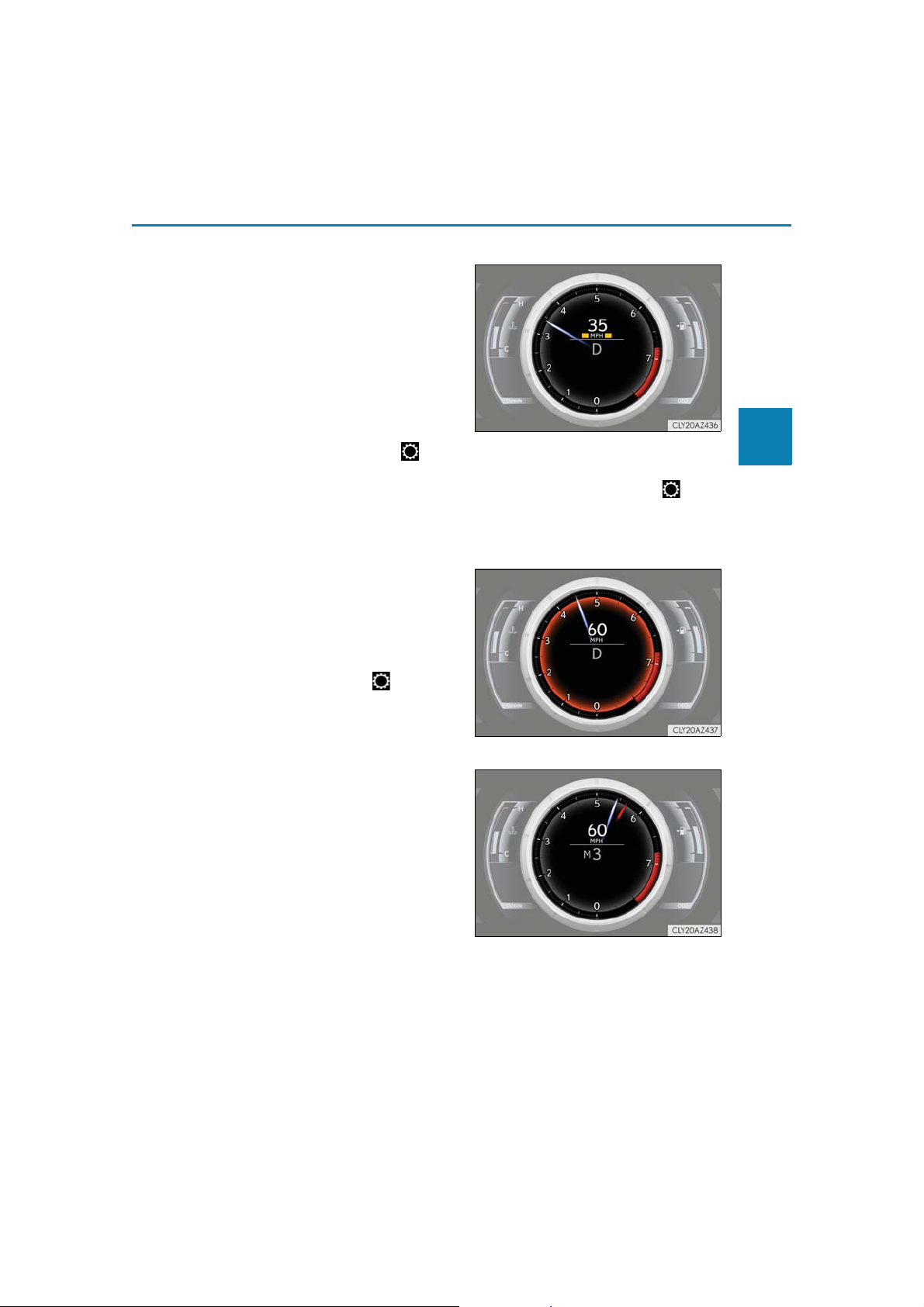
2. Instrument cluster
■ Speed indicator (F SPORT models)
When the vehicle reaches a set
speed, indicators will be displayed
on both sides of the displayed speed
unit.
• The indicators will be displayed in
yellow (corresponding to a speed set
by a user) or red (fixed at 100 mph
[160 km/h])
• The desired vehicle speed at which
the speed indicator will begin to be
displayed can be set in of the
multi-information display. (P. 103)
• The default setting of the indicator is off. This setting can be changed in of the
multi-information display. (P. 103)
*.
*: Always observe the legal speed limit when driving on public roads.
■ Rev indicator (F SPORT models)
When the engine speed reaches a
set speed, a ring-shaped indicator
will be displayed on the tachometer.
The desired engine speed at which
the Rev indicator will begin to be dis-
played can be set on of the multiinformation display. (
P. 103)
91
2
Instrument cluster
■ Rev peak (F SPORT models)
The engine speed reaches or
exceeds 5000 rpm, an afterimage
of the tachometer will be displayed
at the highest engine speed for
approximately 0.5 seconds.
IS350 AWD/IS350/IS300 AWD/IS300_U
Page 92
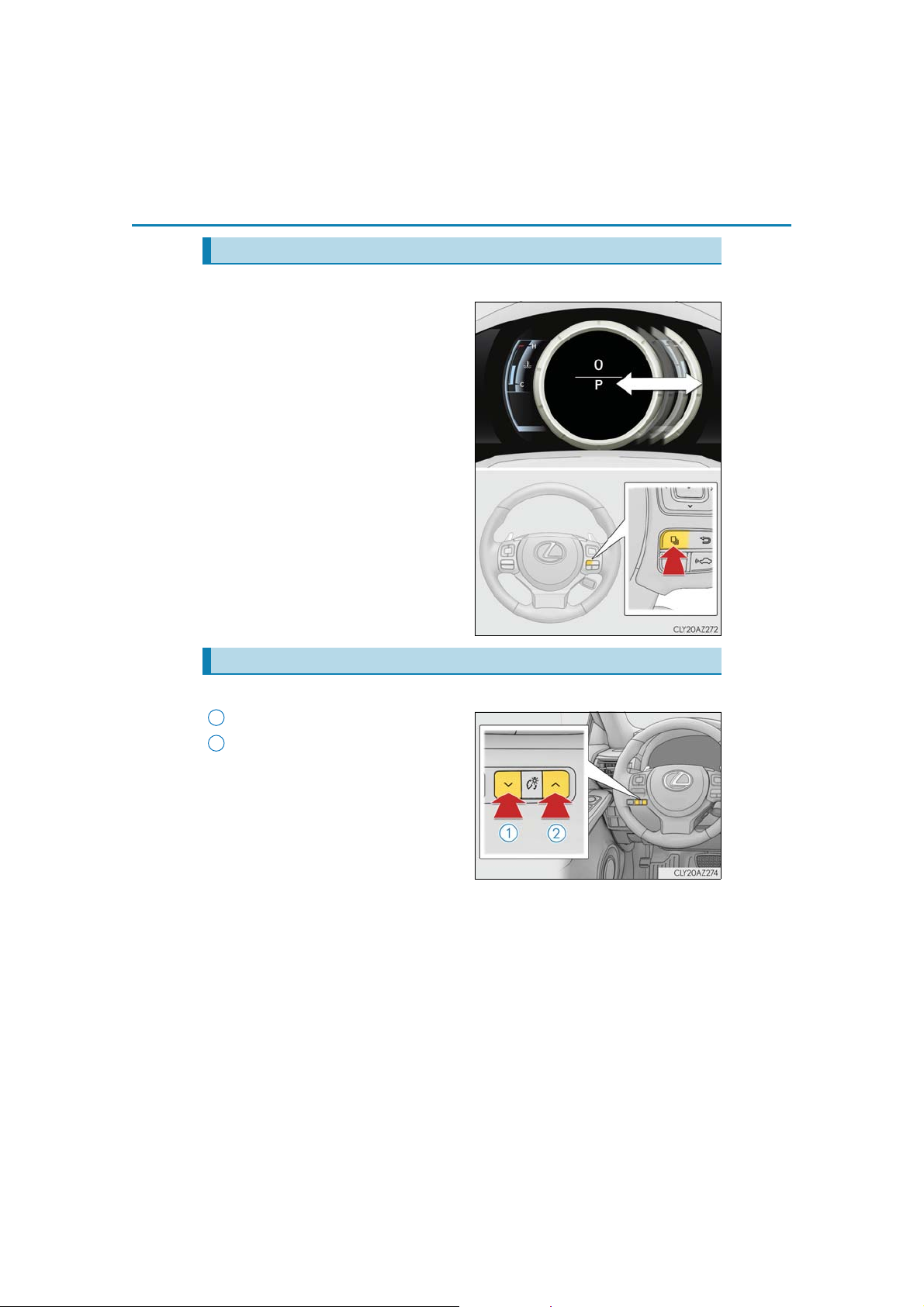
92
2. Instrument cluster
Changing the display
■ Main meter (F SPORT models)
Moves between center and rightside positions.
Instrument panel light control
The brightness of the instrument panel lights can be adjusted.
1
Darker
2
Brighter
IS350 AWD/IS350/IS300 AWD/IS300_U
Page 93
2. Instrument cluster
■ The meters and display illuminate when
The engine switch is in IGNITION ON mode.
■ Instrument panel brightness adjustment
The instrument panel brightness levels when the tail lights are on and off can be adjusted
individually. However, when the surroundings are bright (daytime, etc.), turning on the tail
lights will not change the instrument panel brightness. At this time, any adjustments made
to the instrument panel brightness levels will be applied to both settings at once.
■ Outside temperature display
● In the following situations, the correct outside temperature may not be displayed, or the
display may take longer than normal to change.
• When stopped, or driving at low speeds (less than 12 mph [20 km/h])
• When the outside temperature has changed suddenly (at the entrance/exit of a
garage, tunnel, etc.)
● When “” or “E” is displayed, the system may be malfunctioning.
Take your vehicle to your Lexus dealer.
■ Pop-up display
● In some situations, such as when a switch operation is performed, a pop-up display will
be temporarily displayed on the multi-information display or the odometer/trip meter
screen (F SPORT models).
● Some pop-up displays can be set on/off. (P. 103)
■ Customization
The meter display can be customized on the multi-information display. (P. 103)
93
2
Instrument cluster
NOTICE
■ To prevent damage to the engine and its components
● Do not let the indicator needle of the tachometer enter the red zone, which indicates
the maximum engine speed.
● The engine may be overheating if the engine coolant temperature gauge is in the red
zone (H). In this case, immediately stop the vehicle in a safe place, and check the
engine after it has cooled completely. (P. 579)
IS350 AWD/IS350/IS300 AWD/IS300_U
Page 94
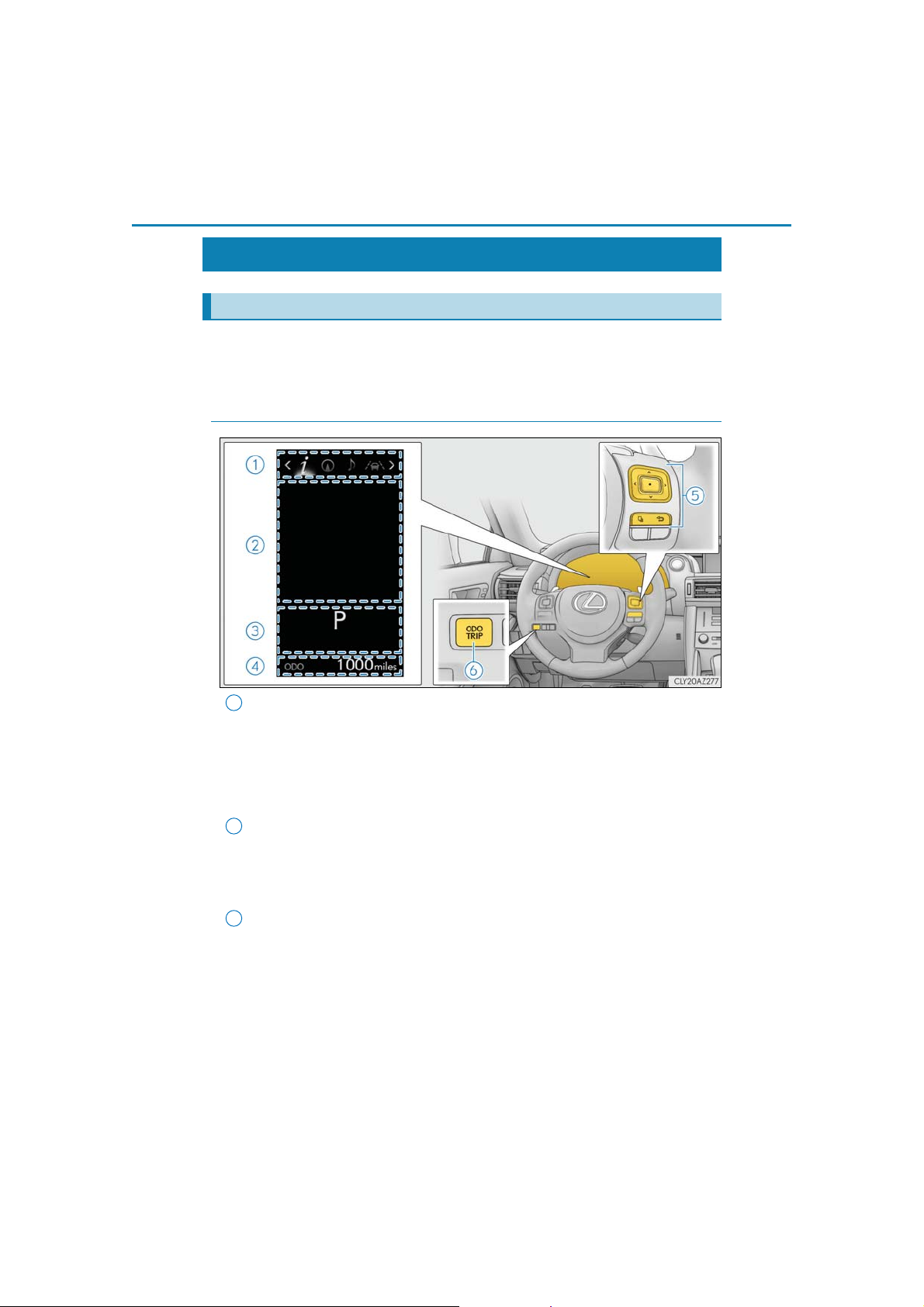
94
2. Instrument cluster
Multi-information display
Summary of functions
The multi-information display presents the driver with a variety of driving-related
data, such as the current outside temperature. The multi-information display can
also be used to change the display settings and other settings.
◆ Except F SPORT models
1
Menu icon display area
Displays the following items.
When a menu icon is not selected, the outside temperature and clock are displayed.
•Menu icons (P. 99)
• Outside temperature (P. 89)
•Clock (P. 89)
2
Content display area
A variety of information can be displayed by selecting a menu icon. Additionally,
warning or advice pop-up displays will be displayed in some situations.
• Menu icon content (P. 99)
• Warning message (P. 532)
3
Indicator/shift position display area
Displays the following items:
•Indicators (P. 84)
• Shift position display (P. 191)
IS350 AWD/IS350/IS300 AWD/IS300_U
Page 95
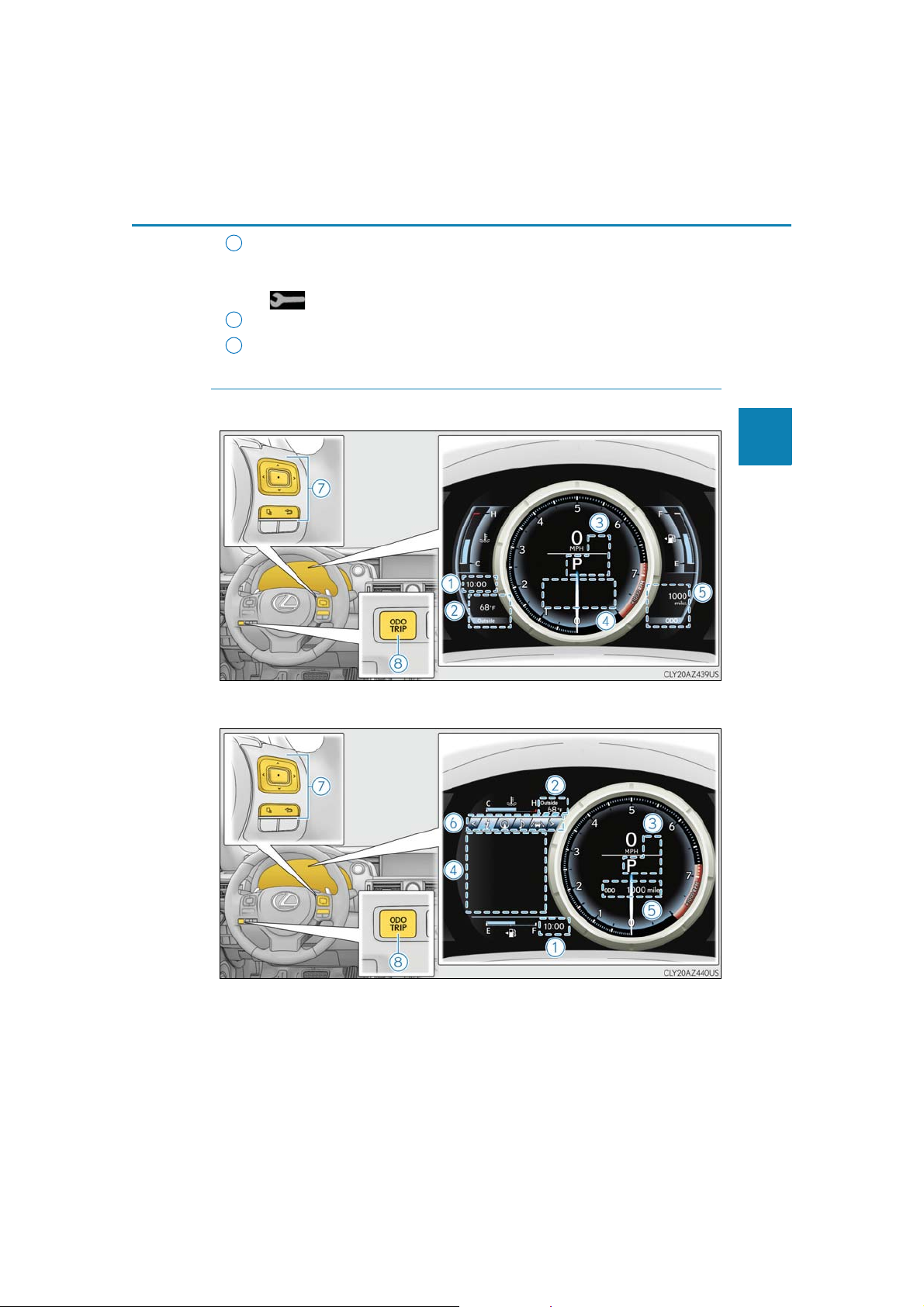
2. Instrument cluster
4
Odometer/trip meter display area (P. 108)
Displays the following items:
• Odometer/trip meter
• Distance until next engine oil change
5
Meter control switches (P. 97)
6
Odometer/trip meter and trip meter reset button (P. 98)
◆ F SPORT models
Main meter in center position
95
2
Instrument cluster
Main meter moved to the right
IS350 AWD/IS350/IS300 AWD/IS300_U
Page 96

96
2. Instrument cluster
1
Clock (P. 89)
2
Outside temperature (P. 89)
3
Indicator/shift position display area
Displays the following items:
•Indicators (P. 84)
• Shift position display (P. 191)
4
Content display area
Main meter in center position:
Displays various drive information on the main meter. Additionally, warning or
advice pop-up displays will be displayed in some situations.
• Drive information (P. 100)
• Warning message (P. 532)
Main meter moved to the right:
A variety of information can be displayed by selecting a menu icon. Additionally,
warning or advice pop-up displays will be displayed in some situations.
• Menu icon content (P. 99)
• Warning message (P. 532)
5
Odometer/trip meter display area (P. 108)
Displays the following items:
• Odometer/trip meter
• Distance until next engine oil change
6
Menu icons (P. 99)
7
Meter control switches (P. 97)
8
Odometer/trip meter and trip meter reset button (P. 98)
IS350 AWD/IS350/IS300 AWD/IS300_U
Page 97
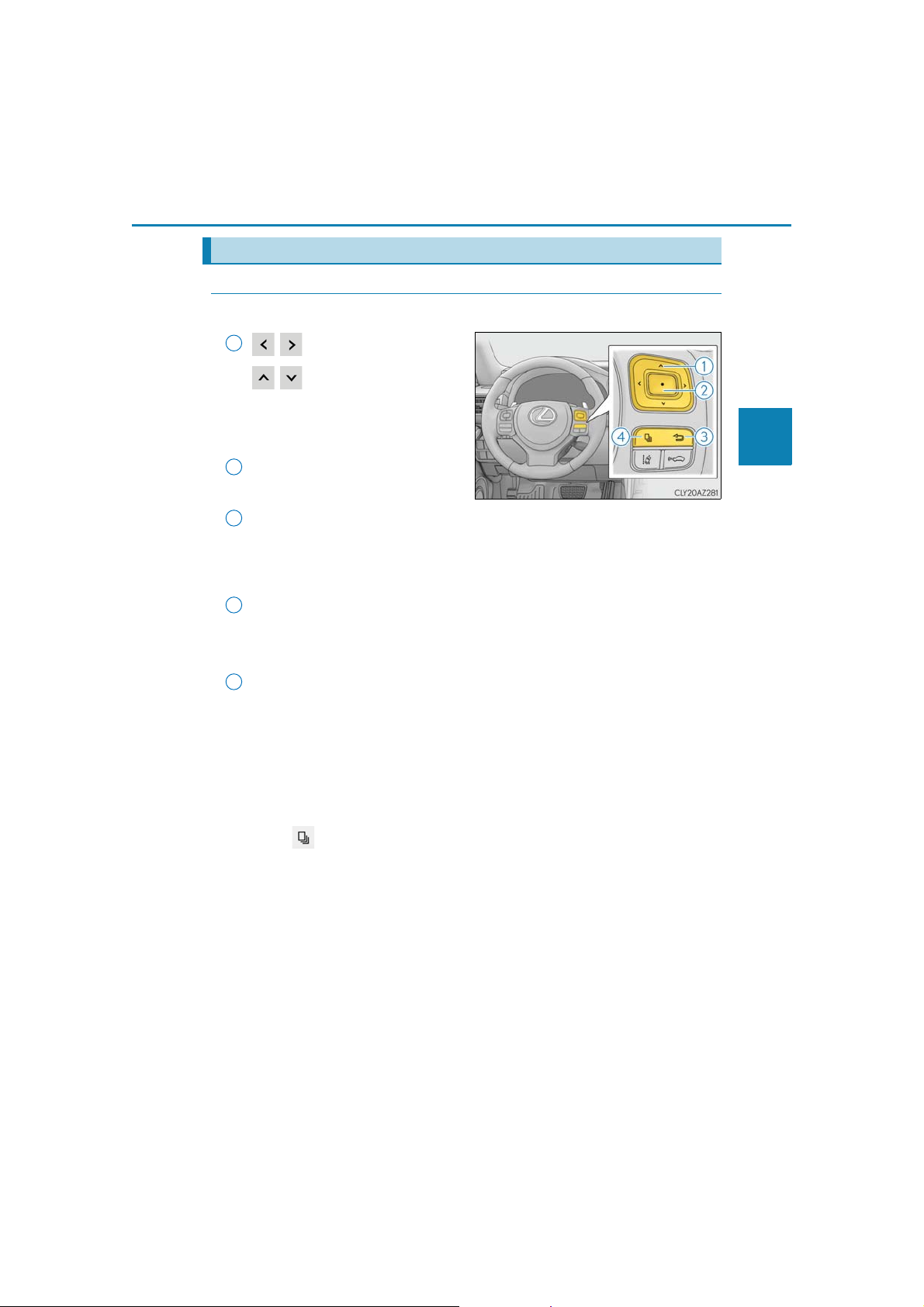
2. Instrument cluster
Using the multi-information display
◆ Using the content display area
The content display area is operated using the meter control switches.
1
:Select menu icons
:Change displayed con-
tent, scroll up/down the
screen and move the
cursor
2
Press: Enter/Set
Press and hold: Reset
3
Return to the previous screen
Pressing and holding the switch will display the first screen of the selected menu
icon.
Except F SPORT models
4
Press: Display the top screen
Press and hold: Register current screen as the top screen
F SPORT models
4
Move the main meter
When the main meter moves to the right, the menu icons will be displayed on the
left side.
■ Registering a top screen (except F SPORT models)
The displayed top screen can be changed to a registered screen of your
choice.
To register a screen as the top screen, display the desired screen and press
and hold .
• A message asking to confirm if registration is desired will be displayed. If the
selected screen cannot be registered, a registration failure message will be displayed.
• When no screen has been registered, the drive information screen will be displayed.
97
2
Instrument cluster
IS350 AWD/IS350/IS300 AWD/IS300_U
Page 98
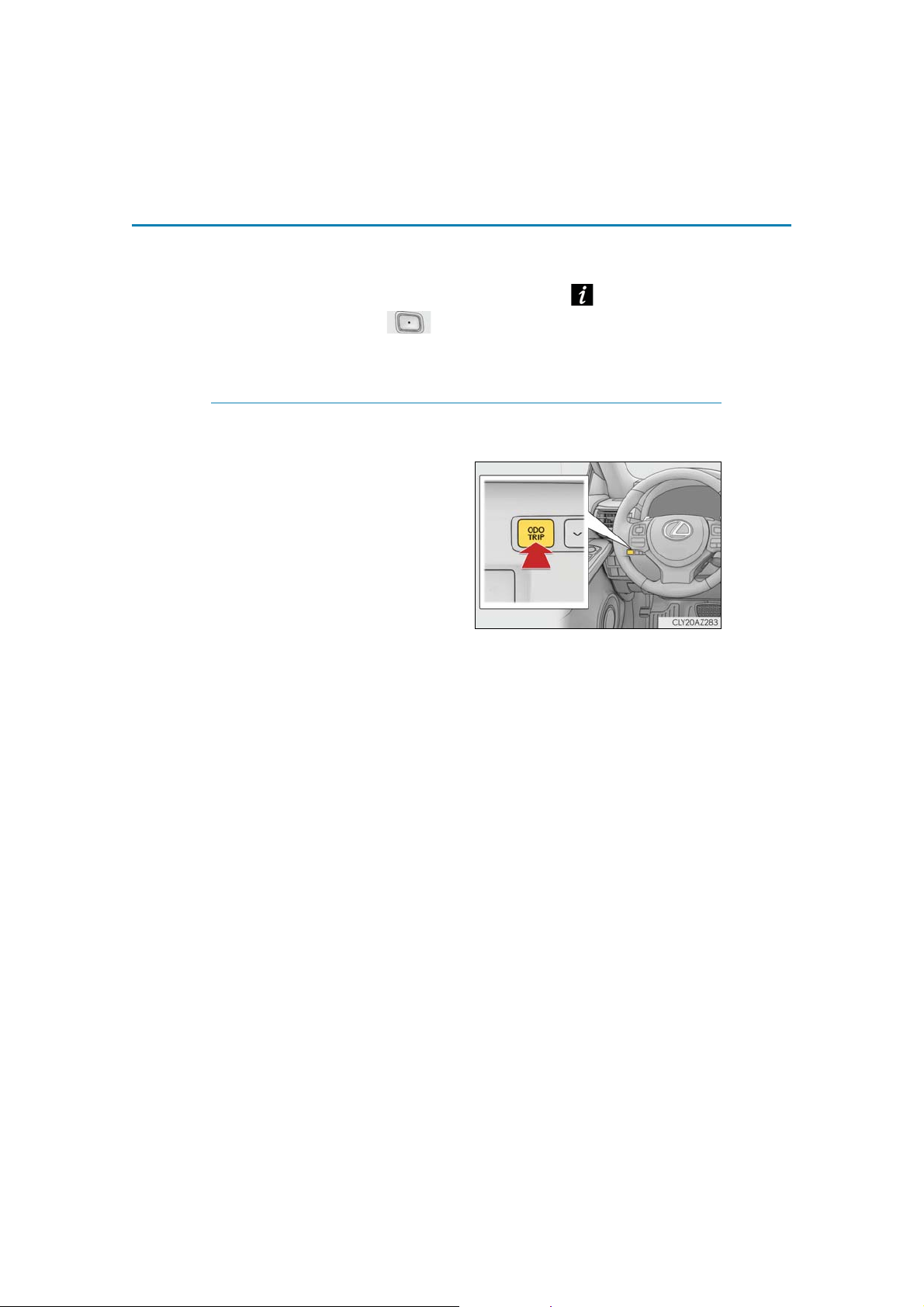
98
■ Resetting drive information
2. Instrument cluster
To reset the average fuel economy (after reset)/average vehicle speed (after
reset)/elapsed time (after reset) that are displayed on , display the desired
item and press and hold .
If both of the displayed items are resettable, a message will be displayed asking
which item(s) to reset.
◆ Using the odometer/trip meter display area
Items in this area are operated using the odometer/trip meter and trip meter
reset button.
Press: Change displayed item
Each time the button is pressed, the
displayed item will be changed.
Press and hold: Reset
Display the desired trip meter and
press and hold the button to reset the
trip meter.
IS350 AWD/IS350/IS300 AWD/IS300_U
Page 99
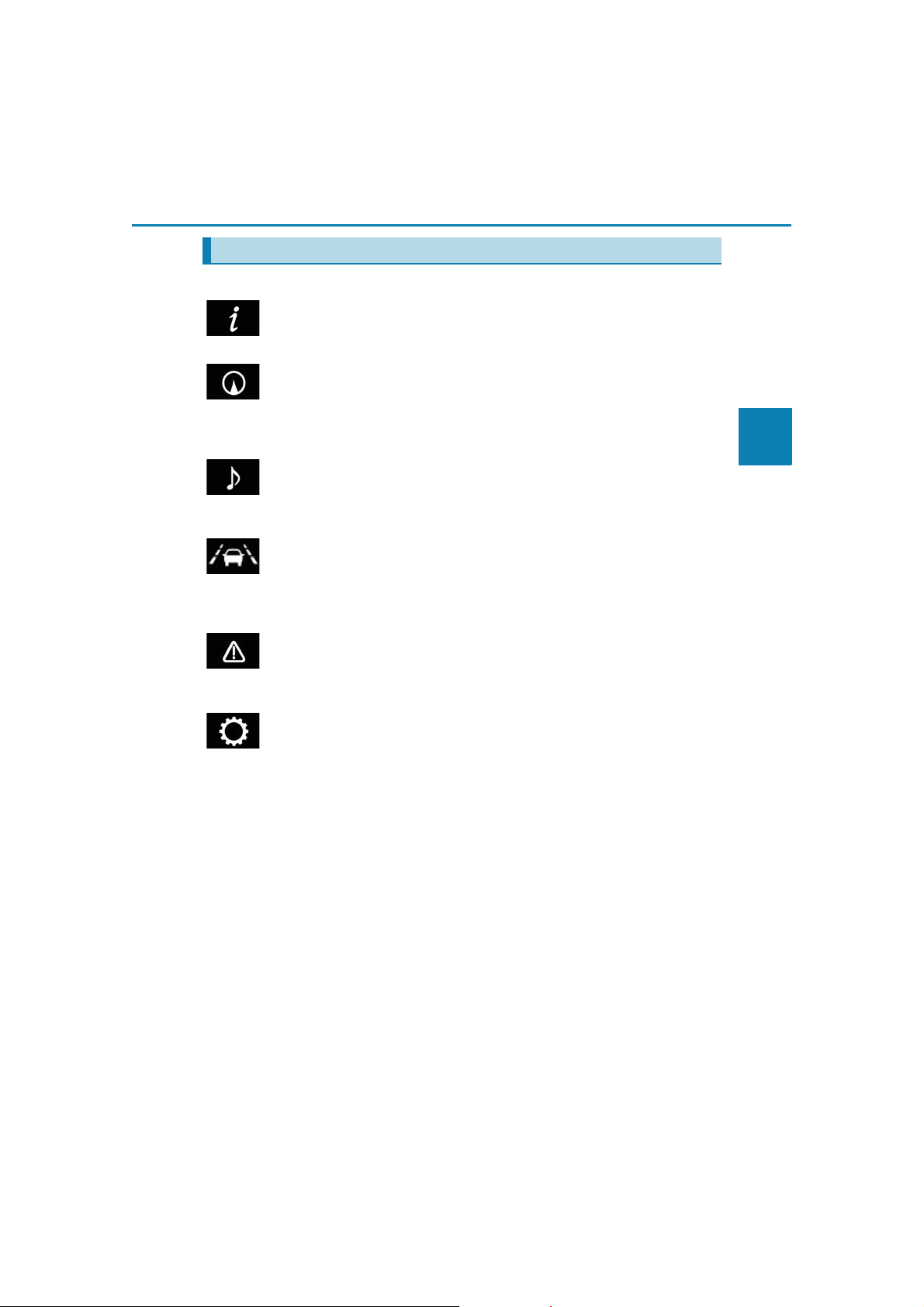
2. Instrument cluster
Menu icons
Select a menu icon to display its content.
Drive information (P. 100)
Select to display various drive data.
Navigation system-linked display (if equipped)
Select to display the following navigation system-linked information.
•Route guidance
• Compass display (heading-up display)
Audio system-linked display
Select to enable selection of an audio source or track on the meter using the meter
control switches.
Driving assist system information
Select to display the operational status of the following systems:
• Dynamic radar cruise control (P. 248)
• LDA (Lane Departure Alert with steering control) (P. 240)
Warning message display (P. 532)
99
2
Instrument cluster
Select to display warning messages and measures to be taken if a malfunction is
detected.
Settings display (P. 103)
Select to change the meter display settings and other settings.
IS350 AWD/IS350/IS300 AWD/IS300_U
Page 100
100
2. Instrument cluster
Drive information ( )
F SPORT models: Some drive information items can only be displayed when the
main meter is in the center position or when it is moved to the right.
■ Drive information 1/Drive information 2/Drive information 3
Displays drive information such as the following.
F SPORT models (when the main meter is in the center position): Each item is displayed separately.
● Drive information 1
• Current fuel consumption
• Average fuel economy (after reset)
● Drive information 2
• Distance (driving range)
• Average vehicle speed (after reset)
● Drive information 3
• Average fuel economy (after refuel)
• Elapsed time (after start)
Displayed items (listed below) can be changed on . (P. 103)
Item Content
Current fuel consumption Displays instantaneous current fuel consumption
After reset
Average fuel
economy
Average
vehicle
speed
Elapsed time
Distance
Other Blank No item
After start
After refuel Displays average fuel consumption since refuel*
After reset
After start Displays average vehicle speed since engine start
After reset Displays elapsed time since display reset*
After start Displays elapsed time since engine start
Driving range Displays driving range with remaining fuel*
After start Displays drive distance since vehicle start
Displays average fuel consumption since display
1, 2
reset
*
Displays average fuel consumption since engine
2
start
*
Displays average vehicle speed since display
1
reset
*
1
3, 4
2, 3
IS350 AWD/IS350/IS300 AWD/IS300_U
 Loading...