

Page 1
LEXUS GENUINE DASH CAMERA
QUICK START GUIDE
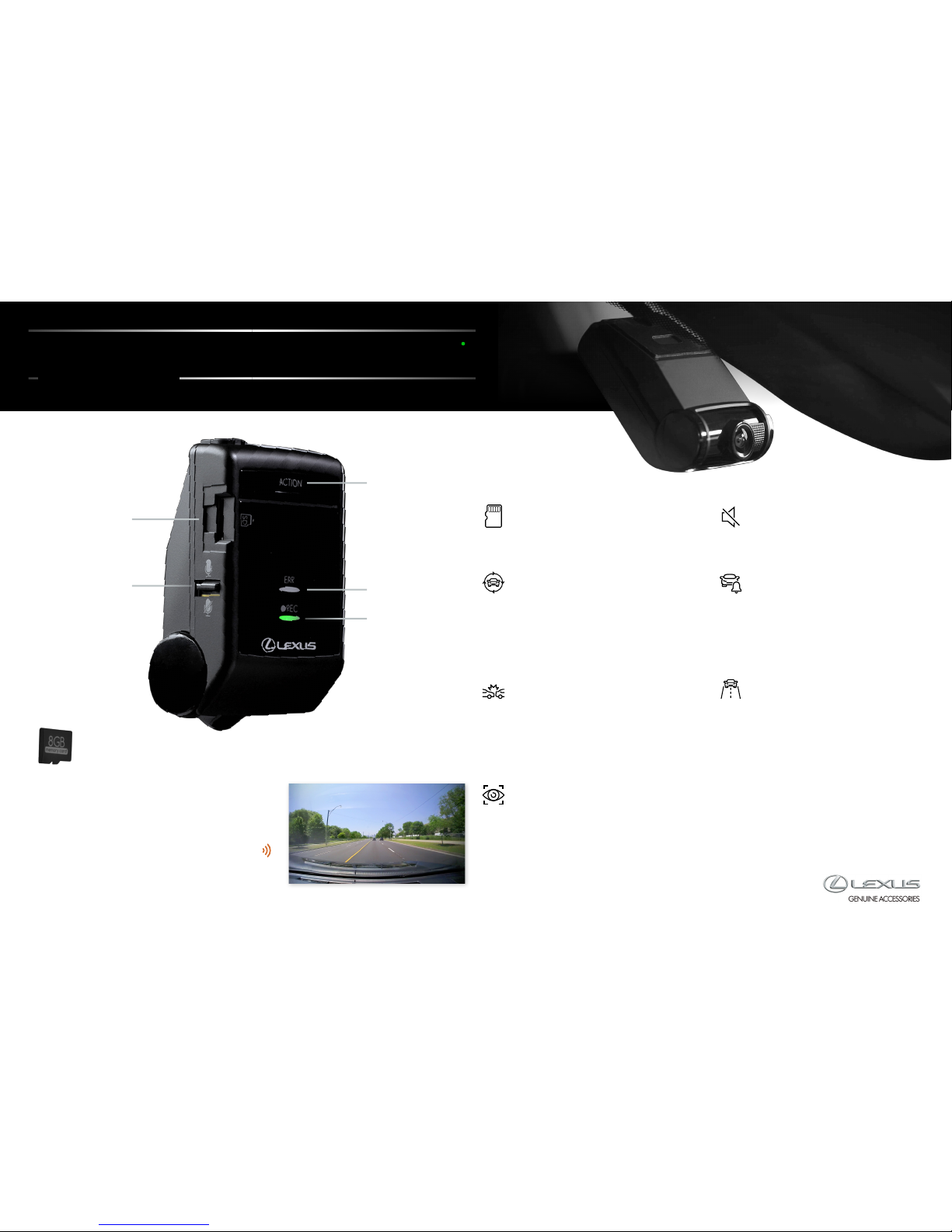
Audio On/Off
switch
Action
button
Error Light
Micro SD
memory
card slot
Recording Light
MICRO SD MEMORY CARD
Note that the included micro SD card
must be inserted into the camera for it
to function.
AUTOMATIC RECORDING
Once activated, video and audio are
continuously recorded until the ignition
is turned off and the footage is saved on
the micro SD card. When the micro SD
card is full, the oldest video les are
then overwritten.
INCIDENT RECORDING
In the event of an abnormal shock when
driving, Incident Recording mode is activated
automatically, protecting the video footage for
the 12 seconds before impact and the 8 seconds
immediately after on the camera’s micro SD card.
No driver action is required.
PARKING SURVEILLANCE
If the vehicle is struck while parked, even if it
is powered off, Parking Surveillance mode will
automatically record for up to 60 seconds
following the impact and the le will be
protected on the micro SD card. No driver
action is required.
AUDIO SWITCH
Audio recording can be disabled or enabled
using the Audio On/Off switch.
INTERESTING EVENT
RECORDING
To capture interesting events during
your travels, quickly push the Action
button on the camera. The camera will
automatically protect the past 12 seconds
and the following 8 seconds to the
micro SD card.
ADVENTURE MODE
To capture and protect long stretches of
video/audio while driving, push and hold
the Action button on the camera until the
camera emits three short, high-tone beeps
(typically 1 second). Up to 87 approximate
minutes of footage will be automatically
protected.
To turn Adventure mode off, push and hold
the Action button again until three short,
high-tone beeps are emitted.
Industrial Grade
Memory Card
Your Lexus Dash Camera automatically
begins recording when the vehicle’s ignition
power is turned on, so no other action is
required. When the green light stays on,
the system is activated. A short, high-tone
beep indicates that startup is complete.
Page 2
GENUINE
ACCESSORIES
LEXUS GENUINE DASH CAMERA
QUICK START GUIDE
COMPUTER SOFTWARE
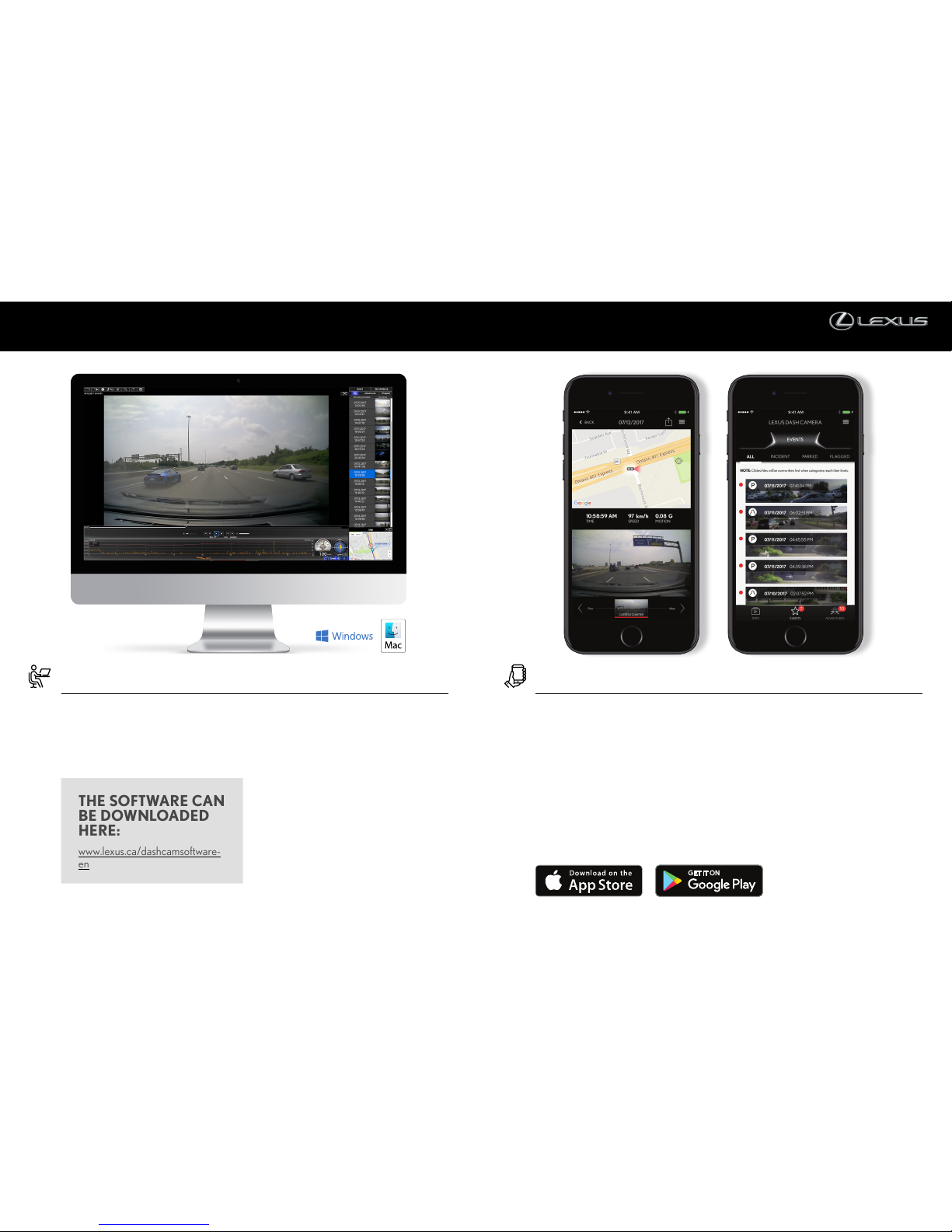
Video and audio recordings from the
dash camera’s micro SD card can be played
back and saved on a computer. Various
settings for the dash camera can be changed
on the computer using the viewer software.
Follow the instructions on the screen to
perform the installation. When it is complete,
a shortcut icon for DASH CAM VIEWER
will be created on the Desktop. Insert the
micro SD card from the dash camera into the
card reader device provided and connect the
device to the computer.
To change settings for the dash camera
and save them on the micro SD card, select
Settings-Camera Settings from the Menu on
the main screen. When the micro SD card
is reinserted into the dash camera and the
ignition key is turned on, the new settings
will take effect.
THE SOFTWARE CAN
BE DOWNLOADED
HERE:
www.lexus.ca/dashcamsoftware-
en
LEXUS GENUINE DASH CAMERA MOBILE APP
The Lexus Dash Camera can be paired
wirelessly to any smartphone via a Wi-Fi
connection. The video and audio recorded
by the dash camera can then be played back
on your smartphone. Various dash camera
settings can be changed using the mobile app.
To make use of this feature, download the
application, called LEXUS DASH CAMERA,
from Google Play Store or Apple App Store.
It is important to note that the viewer app
can only be used if the phone is connected
to the dash camera’s Wi-Fi network.
For Android phones, connection must be
made using the Wi-Fi DIRECT connection
method, not normal Wi-Fi network
connection. Consult your smartphone’s
instruction manual for the appropriate
Wi-Fi/Wi-Fi DIRECT connection procedure.
For a detailed overview of the Lexus Genuine
Dash Camera, please refer to the Owner’s
Manual.
 Loading...