

Page 1
Lenovo VIBE P1
Quick Start Guide
Lenovo P1a42
Page 2
English
Read thi s guide c areful ly before using you r smartphone.
Read first — regulatory information
Be sure to read the Regulatory Notice for your country or region
before using the wireless devices contained in your Lenovo Mobile
Phone. To obtain a PDF version of the Regulatory Notice, see the
“Downloading publications” section. Some regulatory information is
also available in Settings > About phone > Regulatory information
on your smartphone.
Getting support
To get support on network service and billing, contact your wireless
network operator. To learn how to use your smartphone and view its
technical specifications, go to http://support.lenovo.com/.
Downloading publications
To obtain the latest smartphone manuals, go to:
http://support.lenovo.com/
Accessing your User Guide
Your User Guide contains detailed information about your
smartphone. To access your User Guide, use one of the following
methods:
Go to http://support.lenovo.com and follow the instructions on
the screen.
Turn on your smartphone, and then open the User Guide app.
Legal notices
Lenovo and the Lenovo logo are trademarks of Lenovo in the United
States, other countries, or both.
Other company, product, or service names may be trademarks or
service marks of others.
Page 3

Contents
First glance....................................................................... 1
Installing the Nano-SIM card......
Charging the battery......................................................... 3
Important safety and handling information.........................4
Service, support, and warranty information....................... 7
Recycling and environmental information ..........................8
European Union Compliance Statement.......................... 11
Specific Absorption Rate information................................12
.......................................2
Page 4
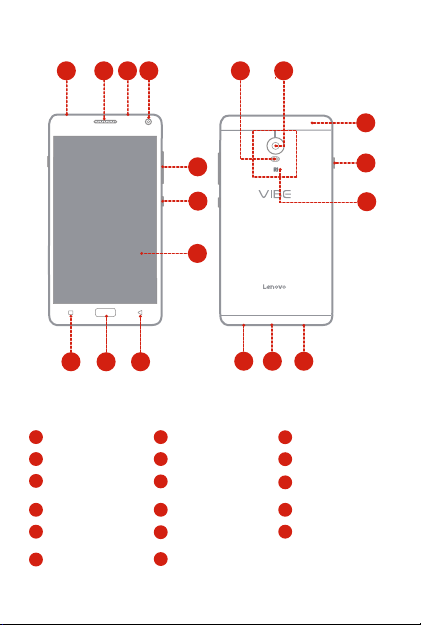
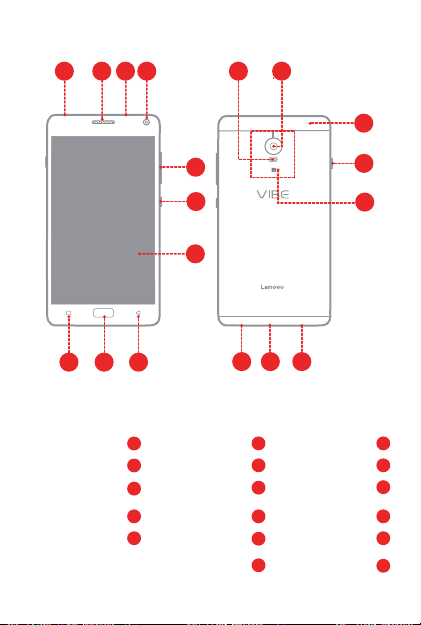
First glance
1
342
11
12
13
5
6
7
9
10
Headset connector1Receiver
Front-facing camera4Volume buttons
7
Touch screen
10
Multitask button
13
Card slot cover
16
8
2
5
8
Back button
11
Flashlight
Power saving switch
14
Speaker
17Micro USB connector
14
15
3
1617
3
Microphone
Power button
6
Fingerprint & Home
9
button
12
Rear-facing camera
15
NFC antenna area
1
Page 5
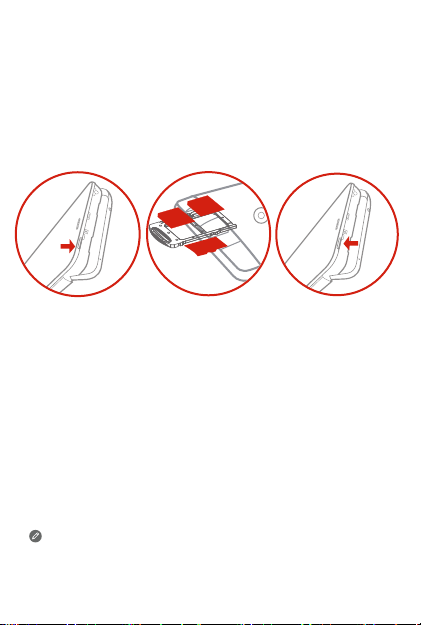
Installing the Nano-SIM card
micro
SD
Nano
SIM
Nano
SIM
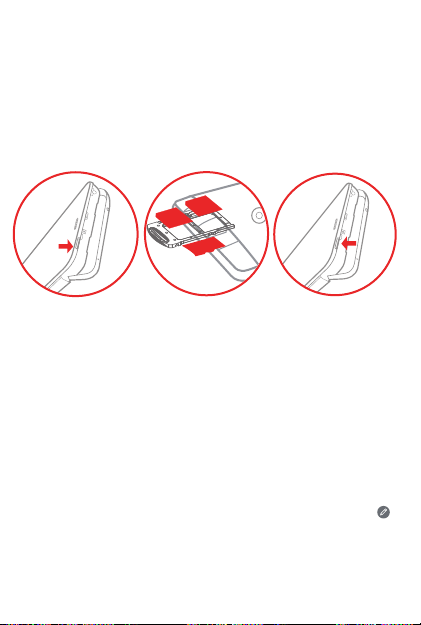
A Nano-SIM card provided by your carrier is required in order to use
cellular services. A microSD card is required to store data.
Install the Nano-SIM card and the microSD card as shown.
Card slot
open
Step 1.
Open the card slot cover.
Step 2.
Pull out the Nano-SIM card tray and position the Nano-SIM
card into the tray in correct orientation.
Carefully insert the tray with the installed cards back into the
slot.
Insert the microSD card into the slot.
Install the card slot cover back.
Step 3.
Only Nano-SIM card works with your smartphone.
Always turn off your smartphone first before you insert or remove a
Nano-SIM card. Insert or remove a Nano-SIM card with your
smartphone on may damage your Nano-SIM card or smartphone
permanently.
2
Page 6
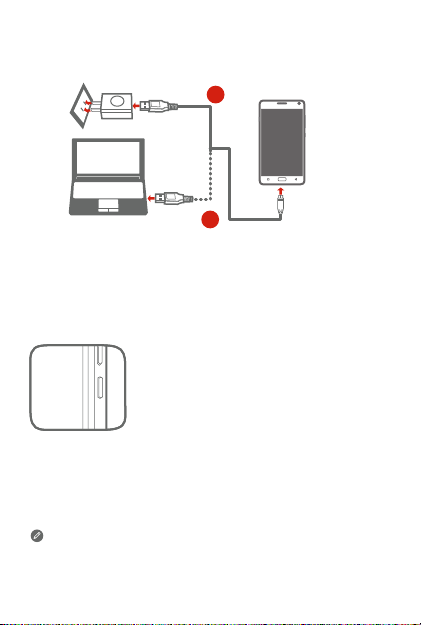
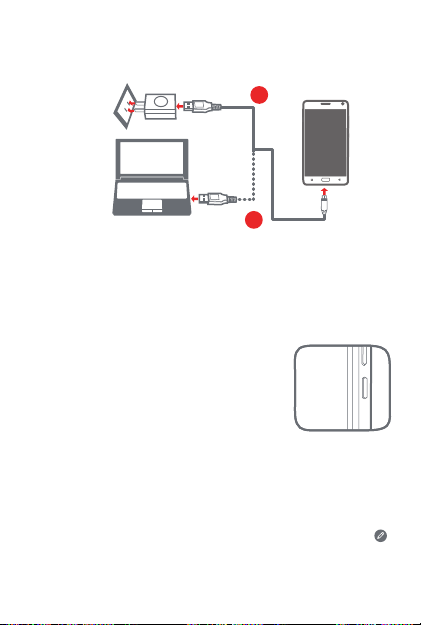
Charging the battery
Charge the battery as shown.
1
2
Method 1.
Method 2.
New features
Your phone has some new features, such as Fingerprint, NFC, etc. To
learn more about these features, see “New features” section in User
Guide.
Connect your smartphone to a power outlet using the
cable and USB power adapter that come with your
smartphone.
Connect your smartphone to a computer using the cable
that comes with your smartphone.
Turning on or turning off your smartphone
Tur n o n: Pres s and hol d the power but ton until
the Lenovo logo ap pears.
Tur n of f: Pre ss and hold the power but ton for a
few seco nds, the n tap Power off.
Your smartphone has a built-in rechargeab le batte ry. For more
information about battery safety, see the “Built-in rechargeable
battery notice” section. The batter y in this pro duct can not be eas ily
replaced by yourself.
3
Page 7
Important safety and handling information
This section contains important safety and handling information for
Lenovo smartphones. Additional safety and handling information is
provided in the User Guide. See the “Accessing your User Guide”
section for details.
Operating temperature
Use the Lenovo Phone only in the temperature range of -10°C (14 °F)
— 35°C ( 95 °F) to avoid damage.
Plastic bag notice
DANGER: Plastic bags can be dangerous. Keep plastic bags away
from babies and children to avoid danger of suffocation.
General battery notice
Batteries supplied by Lenovo for use with your product have been
tested for compatibility and should only be replaced with approved
parts. Risk of explosion if the battery is replaced with an incorrect
type. Dispose of used batteries according to the instructions.
Rechargeable battery notice
CAUTION: Risk of explosion if the battery is replaced with an
incorrect type.
When replacing the lithium battery, use only the same or an equivalent
type that is recommended by the manufacturer. The battery contains
lithium and can explode if not properly used, handled, or disposed of.
Dispose of used batteries according to the instructions.
Do not:
Throw or immerse into water
Heat to more than 100°C (212°F)
Repair or disassemble
Built-in rechargeable battery notice
CAUTION: Do not attempt to replace the internal rechargeable
lithium ion battery. Contact Lenovo Support for factory
replacement.
4
Page 8

Charging
Lenovo is not responsible for the performance or safety of products
not manufactured or approved by Lenovo. Use only approved Lenovo
ac adapters and batteries. Adapter shall be installed near the
equipment and shall be easily accessible.
Prevent hearing damage
The Lenovo Phone has a headphone connector. Always use the
headphone connector for headphones (also called a headset) or
earphones.
CAUTION: Excessive sound pressure from earphones and
headphones can cause hearing loss. Adjustment of the equalizer to
maximum increases the earphone and headphone output voltage
and the sound pressure level. Therefore, to protect your hearing,
adjust the equalizer to an appropriate level.
Excessive use of headphones or earphones for a long period of time
at high volume can be dangerous if the output of the headphone or
earphone connectors do not comply with specifications of EN
50332-2.
The headphone output connector of the Lenovo Phone complies with
EN 50332-2 Sub clause 7. This specification limits the Lenovo
Phone's maximum wide band true RMS output voltage to 150 mV. To
help protect against hearing loss, ensure that the headphones or
earphones you use also comply with EN 50332-2 (Clause 7 limits) for
a wide band characteristic voltage of 75 mV. Using headphones that
do not comply with EN 50332-2 can be dangerous due to excessive
sound pressure levels.
If the Lenovo Phone came with headphones or earphones in the
package, as a set, the combination of the headphones or earphones
and the Lenovo Phone already complies with the specifications of EN
50332-1. If different headphones or earphones are used, ensure that
they comply with EN 50332-1 (Clause 6.5 Limitation Values). Using
headphones that do not comply with EN 50332-1 can be dangerous
due to excessive sound pressure levels.
5
Page 9
Sound pressure warning statement
For the device that is tested in accordance with EN 60950-1:
2006+A11:2009+A1:2010+A12:2011+A2:2013, it is mandatory to
perform audio tests for EN50332.
This device has been tested to comply with the Sound Pressure Level
requirement in the applicable EN 50332-1 and/or EN 50332-2
standards. Permanent hearing loss may occur if earphones or
headphones are used at high volume for prolonged periods of time.
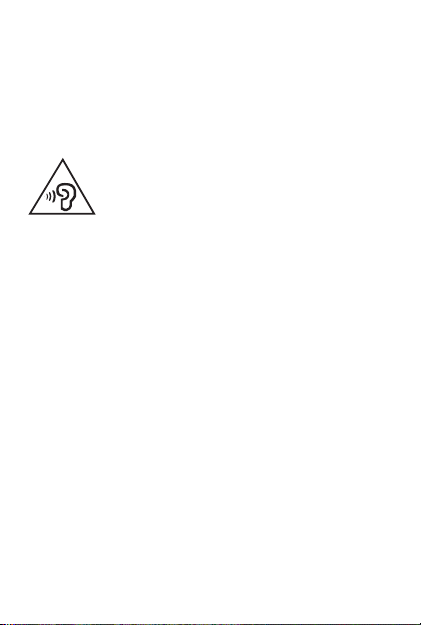
Warning statement: To prevent possible hearing damage, do not listen
at high volume levels for long periods.
Polyvinyl Chloride (PVC) cable and cord notice
WARNING: Handling the cord on this product or cords associated
with accessories sold with this product will expose you to lead, a
chemical known to the State of California to cause cancer, and
birth defects or other reproductive harm. Wash hands after
handling.
Disposing according to local laws and regulations
When the Lenovo Phone reaches the end of its useful life, do not
crush, incinerate, immerse in water, or dispose of the Lenovo Phone
in any manner contrary to local laws and regulations. Some internal
parts contain substances that can explode, leak, or have an adverse
environmental effect if disposed of incorrectly. See “Recycling and
environmental information” for additional information.
6
Page 10

Service, support, and warranty information
The following information describes the technical support that is
available for your product, during the warranty period or throughout
the life of your product. Refer to the Lenovo Limited Warranty for a full
explanation of Lenovo warranty terms.
Online technical support
Online technical support is available during the lifetime of a product at:
http://www.lenovo.com/support
Telephone technical support
Where applicable, you can get help and information from the
Customer Support Center by telephone. Before contacting a Lenovo
technical support representative, please have the following
information available: model and serial number, the exact wording of
any error message, and a description of the problem.
Your technical support representative might want to walk you through
the problem while you are at your phone during the call.
Worldwide Lenovo Support telephone list
IMPORTANT: Telephone numbers are subject to change without
notice. The most up-to-date telephone list for the Customer
Support Center is always available at:
http://support.lenovo.com/supportphonelist
The Customer Support Center phone number is subject to change.
For the latest phone number, go to the e-support website.If the
telephone number for your country or region is not listed, contact
your Lenovo reseller or Lenovo marketing representative.
Lenovo Limited Warranty LLW notice
Read the full LLW at http://support.lenovo.com/smartphone-llw. You
can view the LLW in a number of languages from this Web site. If you
cannot view the LLW either from the Web site or from your phone,
contact your local Lenovo office or reseller to obtain a printed version
of the full LLW.
IMPORTANT: Lenovo Smartphone Products do not have
International Warranty Services.
7
Page 11
Recycling and environmental information
General recycling statement
Lenovo encourages owners of information technology (IT) equipment
to responsibly recycle their equipment when it is no longer needed.
Lenovo offers a variety of programs and services to assist equipment
owners in recycling their IT products. For information on recycling
Lenovo products, go to http://www.lenovo.com/recycling.
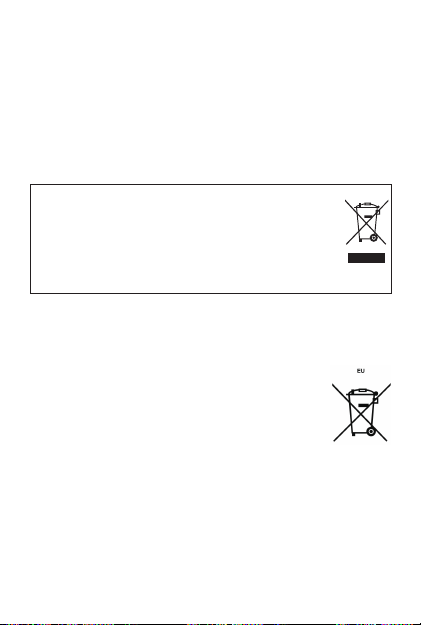
Important WEEE information
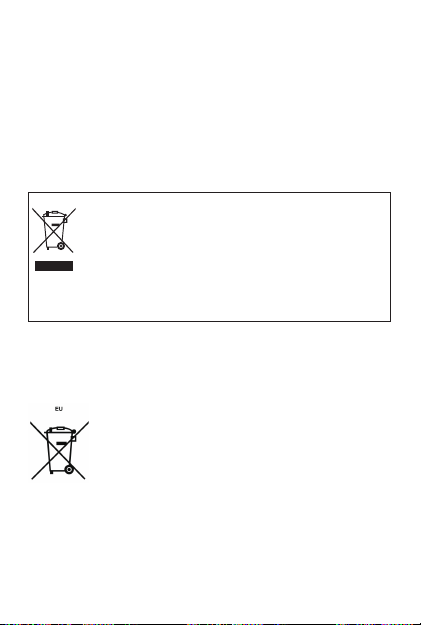
Electrical and electronic equipment marked with the symbol
of a crossed-out wheeled bin may not be disposed as
unsorted municipal waste. Waste of electrical and electronic
equipment (WEEE) shall be treated separately using the
collection framework available to customers for the return,
recycling, and treatment of WEEE.
Country-specific information is available at:
http://www.lenovo.com/recycling
Recycling information for India
Recycling and disposal information for India is available at:
http://www.lenovo.com/social_responsibility/us/en/sustainability/ptb_india.html
Battery recycling information for the European Union
Batteries or packaging for batteries are labeled in accordance with
European Directive 2006/66/EC concerning batteries and
accumulators and waste batteries and accumulators. The Directive
determines the framework for the return and recycling of used
batteries and accumulators as applicable throughout the European
Union. This label is applied to various batteries to indicate that the
8
Page 12

battery is not to be thrown away, but rather reclaimed upon end of life
per this Directive.
In accordance with the European Directive 2006/66/EC, batteries and
accumulators are labeled to indicate that they are to be collected
separately and recycled at end of life. The label on the battery may
also include a chemical symbol for the metal concerned in the battery
(Pb for lead, Hg for mercury, and Cd for cadmium). Users of batteries
and accumulators must not dispose of batteries and accumulators as
unsorted municipal waste, but use the collection framework available
to customers for the return, recycling, and treatment of batteries and
accumulators. Customer participation is important to minimize any
potential effects of batteries and accumulators on the environment
and human health due to the potential presence of hazardous
substances. For proper collection and treatment, go to:
http://www.lenovo.com/recycling
Restriction of Hazardous Substances Directive (RoHS)
European Union
Lenovo products sold in the European Union, on or after 3 January
2013 meet the requirements of Directive 2011/65/EU on the restriction
of the use of certain hazardous substances in electrical and electronic
equipment (“RoHS recast” or “RoHS 2”).
For more information about Lenovo progress on RoHS, go to:
http://www.lenovo.com/social_responsibility/us/en/RoHS_Communication.pdf
India
RoHS compliant as per E-Waste (Management & Handling) Rules,
2011.
Vietnam
Lenovo products sold in Vietnam, on or after September 23, 2011,
meet the requirements of the Vietnam Circular 30/2011/TT-BCT
(“Vietnam RoHS”).
Ukraine
Цим підтверджуємо, що продукція Леново відповідає вимогам
нормативних актів України, які обмежують вміст небезпечних
речовин
9
Page 13

Turkish
The Lenovo product meets the requirements of the Republic of Turkey
Directive on the Restriction of the Use of Certain Hazardous
Substances in Waste Electrical and Electronic Equipment (WEEE).
Türkiye AEEE Yönetmeliğine Uygunluk Beyanı
Bu Lenovo ürünü, T.C. Çevre ve Orman Bakanlığı’nın “Atık Elektrikli ve
Elektronik Eşya Bazı Zararlı Maddelerin Kullanımının Sınırlandırılmasına
Dair Yönetmelik (AEEE)” direktierine uygundur.
AEEE Yönetmeliğine Uygundur.
10
Page 14
European Union Compliance Statement
Radio and Telecommunications Terminal Equipment
Directive
0560
Lenovo declares that this product is in compliance with:
The essential requirements and other relevant provisions of the
Radio and Telecommunications Terminal Equipment Directive,
1999/5/EC
All other relevant EU directives
This device is restricted to indoor use when operating in the 5.15 to
5.35 GHz frequency band.
The Declaration of Conformity information is located in the Regulatory
Notice. To obtain a PDF version of the Regulatory Notice, see the
“Downloading publications” section.
European Union contact
Lenovo, Einsteinova 21, 851 01 Bratislava, Slovakia
11
Page 15
Specific Absorption Rate information
This mobile device meets the government’s requirements for exposure
to radio waves. Your mobile device is a radio transmitter and receiver.
The exposure standard for mobile devices employs a unit of
measurement known as the Specific Absorption Rate, or SAR.
The SAR limit adopted by Europe is 2.0 W/kg averaged over 10
grams of tissue. The India SAR limit for mobile devices is 1.6 W/kg
averaged over 1 grams of tissue. Tests for SAR are conducted using
standard operating positions with the device transmitting at its highest
certified power level in all tested frequency bands.
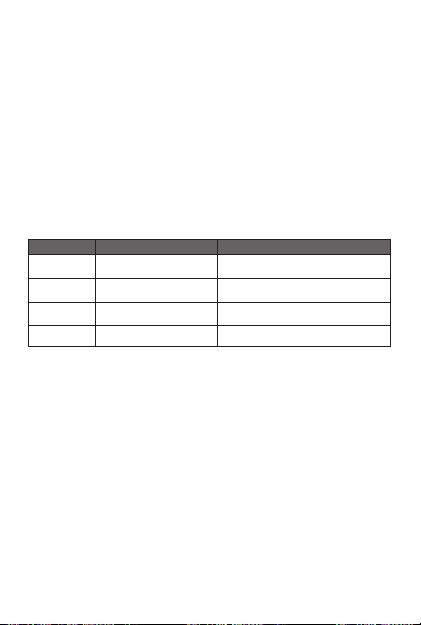
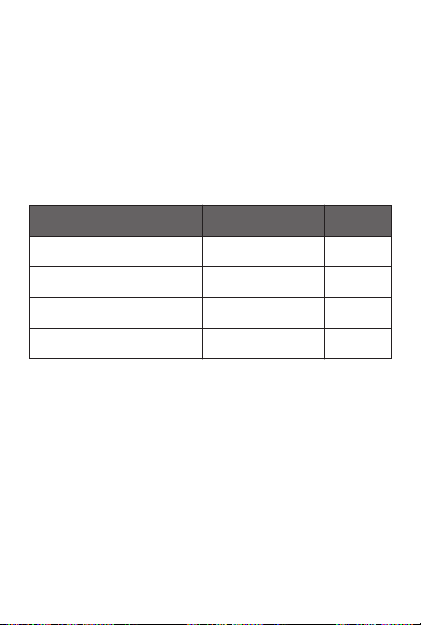
The highest SAR value for your Lenovo device when tested for use at
the head and body is outlined as follows:
Position Regulation
Head
Body-wor n
Head
Body-wor n
During use, the actual SAR values for this device are usually well
below the values stated above. This is because, for purposes of
system efficiency and to minimize interference on the network, the
operating power of your mobile devices is automatically decreased
when full power is not needed for the call. The lower the power output
of the device, the lower its SAR value.
To meet RF exposure guidelines during body-worn operation, the
device must be positioned at least 1.5cm away from your body.
The hig hest SAR va lue
0.92
0.579
0.670
0.671
Europe 10g SA R Limit (2.0 W/kg)
Europe 10g SA R Limit (2.0 W/kg)
India 1g SAR Li mit (1.6 W/kg)
India 1g SAR Li mit (1.6 W/kg)
12
Page 16
ﺹﺎﺻﺗﻣﻻﺍ ﻝﺩﻌﻣﺑ ﺔﺻﺎﺧ ﺕﺎﻣﻭﻠﻌﻣ
.ﺔﻳﻛﻠﺳﻼﻟﺍ ﺕﺎﺟﻭﻣﻠﻟ ﺽﺭﻌﺗﻟﺎﺑ ﺔﻘﻠﻌﺗﻣﻟﺍ ﺔﻣﻭﻛﺣﻟﺍ ﺕﺎﺑﻠﻁﺗﻣ ﻊﻣ ﻑﺗﺎﻬﻟﺍ ﺍﺫﻫ ﻕﻓﺍﻭﺗﻳ
ﺹﺎﺻﺗﻣﻻ ﻝﺩﻌﻣﺑ ﻡﺳﺎﺑ ﺔﻓﻭﺭﻌﻣ ﺱﺎﻳﻗ ﺓﺩﺣﻭ ﺔﻟﻭﻣﺣﻣﻟﺍ ﺓﺯﻬﺟﻷﺎﺑ ﺔﻘﻠﻌﺗﻣﻟﺍ ﺽﺭﻌﺗﻟﺍ ﺭﻳﻳﺎﻌﻣ ﻡﺩﺧﺗﺳﺗ
۱٫٦ ﺩﻧﻬﻟﺍ ﻝﺧﺍﺩ ﺔﻟﻭﻣﺣﻣﻟﺍ ﺓﺯﻬﺟﻸﻟ ﺩﺩﺣﻣﻟﺍ ﺹﺎﺻﺗﻣﻻﺍ ﻝﺩﻌﻣ ﺩﺣ ﻎﻠﺑﻳﻭ .
ﺹﺎﺻﺗﻣﻻﺍ ﻝﺩﻌﻣ ﺕﺍﺭﺎﺑﺗﺧﺍ ءﺍﺭﺟﺇ ﻡﺗﻳﻭ .ﺞﻳﺳﻧﻟﺍ ﻥﻣ ﻡﺍﺭﺟ ۱ ﻰﻠﻋ ﻁﺳﻭﺗﻣ ﻝﺩﻌﻣﺑ ﻡﺟﻛ/ﻁﺍﻭ
ﺔﻗﺎﻁ ﻯﻭﺗﺳﻣ ﻰﻠﻋﺃ ﺩﻧﻋ ﻝﺎﺳﺭﻹﺎﺑ ﻡﻭﻘﻳ ﺯﺎﻬﺟ ﻕﻳﺭﻁ ﻥﻋ ﺔﻳﺳﺎﻳﻗ ﻝﻳﻐﺷﺗ ﻊﺿﺍﻭﻣ ﻡﺍﺩﺧﺗﺳﺎﺑ ﻲﻋﻭﻧﻟﺍ
ﻰﻠﻋ ﻡﺍﺩﺧﺗﺳﻼﻟ ﻩﺭﺎﺑﺗﺧﺍ ﺩﻧﻋ
ﻝﻛﻟ ﻁﺍﻭ ۲٫۰) ﻡﺟ ۱۰ ﺎﺑﻭﺭﻭﺃ ﻲﻓ SAR ﺩﺣ
ﻝﻛﻟ ﻁﺍﻭ ۲٫۰) ﻡﺟ ۱۰ ﺎﺑﻭﺭﻭﺃ ﻲﻓ SAR ﺩﺣ
ﺩﻧﻬﻠﻟ ﺎًﻘﻓﻭ SAR ﺩﺩﺣﻣﻟﺍ ﺹﺎﺻﺗﻣﻻﺍ ﻝﺩﻌﻣ ﺩﺣ
ﺩﻧﻬﻠﻟ ﺎًﻘﻓﻭ SAR ﺩﺩﺣﻣﻟﺍ ﺹﺎﺻﺗﻣﻻﺍ ﻝﺩﻌﻣ ﺩﺣ
ﻡﻳﻘﻟﺍ ﻥﻣ ﺭﻳﺛﻛﺑ ﻰﻧﺩﺃ ﺯﺎﻬﺟﻟﺍ ﺍﺫﻬﻟ ﺔﻳﻠﻌﻔﻟﺍ ﺹﺎﺻﺗﻣﻻﺍ ﻝﺩﻌﻣ ﻡﻳﻗ ﻥﻭﻛﺗ ﺎﻣ ًﺓﺩﺎﻋ ،ﻡﺍﺩﺧﺗﺳﻻﺍ ءﺎﻧﺛﺃ
ﻪﻧﺃ ﻰﻟﺇ ،ﺔﻛﺑﺷﻟﺍ ﻲﻓ ﻝﺧﺍﺩﺗﻟﺍ ﻝﻳﻠﻘﺗﻟﻭ ﻡﺎﻅﻧﻟﺍ ﺓءﺎﻔﻛ ﺽﺍﺭﻏﻷ ﺔﺑﺳﻧﻟﺎﺑ ،ﺍﺫﻫ ﻊﺟﺭﻳﻭ .ﻩﻼﻋﺃ ﺓﺭﻭﻛﺫﻣﻟﺍ
ءﺍﺭﺟﻹ ﺔﻠﻣﺎﻛﻟﺍ ﺔﻗﺎﻁﻟﺍ ﻰﻟﺇ ﺔﺟﺎﺣﻟﺍ ﻡﺩﻋ ﺩﻧﻋ ﺎًﻳﺋﺎﻘﻠﺗ ﻝﻭﻣﺣﻣﻟﺍ ﻑﺗﺎﻬﻟﺍ ﺓﺯﻬﺟﺃ ﻝﻳﻐﺷﺗ ﺔﻗﺎﻁ ﻝﻳﻠﻘﺗ ﻡﺗﻳ
ﻊﺿﻭ ﺏﺟﻳ ،ﻡﺳﺟﻟﺍ ﻰﻠﻋ ءﺍﺩﺗﺭﻻﺎﺑ ﻝﻳﻐﺷﺗﻟﺍ ءﺎﻧﺛﺃ ﺔﻳﻛﻠﺳﻼﻟﺍ ﺕﺍﺩﺩﺭﺗﻠﻟ ﺽﺭﻌﺗﻟﺍ ﺕﺎﻬﻳﺟﻭﺗﺑ ءﺎﻓﻭﻠﻟ
Lenovo
(ﻡﺟﻛ/ ﺕﺍﻭ ۱٫٦) ﻡﺟ ۱
(ﻡﺟﻛ/ ﺕﺍﻭ ۱٫٦) ﻡﺟ ۱
.
SAR
.ﻲﻛﻠﺳﻻ ﻝﺑﻘﺗﺳﻣﻭ ﻝﺳﺭﻣ ﻭﻫ ﻝﻭﻣﺣﻣﻟﺍ ﺯﺎﻬﺟﻟﺍ
SAR
ﻭﺃ ،ﻲﻋﻭﻧﻟﺍ
.ﺓﺭﺑﺗﺧﻣﻟﺍ ﺩﺩﺭﺗﻟﺍ ﺕﺎﻗﺎﻁﻧ ﻊﻳﻣﺟ ﻲﻓ ﻪﺑ ﺡﻭﻣﺳﻣ
ﺯﺎﻬﺟﻟ ﻲﻋﻭﻧﻟﺍ ﺹﺎﺻﺗﻣﻻﺍ ﻝﺩﻌﻣﻟ ﺔﻣﻳﻗ ﻰﻠﻋﺃ ﻝﺛﻣﺗﺗ
ﺔﺣﺋﻼﻟﺍ
ﺹﺎﺻﺗﻣﻻﺍ ﻝﺩﻌﻣﻟ ﺔﻣﻳﻗ ﻰﻠﻋﺃ
(ﻡﺟﻛ
(ﻡﺟﻛ
:ﻲﻠﻳ ﺎﻣﻳﻓ ﻡﺳﺟﻟﺍﻭ ﺱﺃﺭﻟﺍ
ﻲﻋﻭﻧﻟﺍ
۰٫۹۲
ﻰﻠﻋ ءﺍﺩﺗﺭﻻﺍ
۰٫٥۷۹
۰٫٦۷۰
ﻰﻠﻋ ءﺍﺩﺗﺭﻻﺍ
۰٫٦۷۱
ﻊﺿﻭﻣﻟﺍ
ﺱﺃﺭ
ﻡﺳﺟﻟﺍ
ﺱﺃﺭ
ﻡﺳﺟﻟﺍ
ﺔﻣﻳﻗ ﺕﺿﻔﺧﻧﺍ ،ﺯﺎﻬﺟﻟﺍ ﺔﻗﺎﻁ ﺝﺭﺧ ﺽﻔﺧﻧﺍ ﺎﻣﻠﻛ .ﻝﺎﺻﺗﻻﺍ
.ﻡﺳﺟﻟﺍ ﻥﻋ ﺍًﺩﻳﻌﺑ ﻝﻗﻷﺍ ﻰﻠﻋ ﺭﺗﻣ ۱٫٥ ﺔﻓﺎﺳﻣ ﻰﻠﻋ ﺯﺎﻬﺟﻟﺍ
11
Page 17
ﻲﺑﻭﺭﻭﻷﺍ ﺩﺎﺣﺗﻻﺍ ﻕﻓﺍﻭﺗ ﻥﺎﻳﺑ
ﺩﻌُﺑ ﻥﻋ ﻝﺎﺻﺗﻻﺍﻭ ﺔﻳﻛﻠﺳﻼﻟﺍ ﺕﻻﺎﺻﺗﻼﻟ ﺔﻳﻓﺭﻁﻟﺍ ﺕﺍﺩﻌﻣﻟﺍ ﻪﻳﺟﻭﺗ
0560
ﺔﻳﻓﺭﻁﻟﺍ ﺕﺍﺩﻌﻣﻟﺍ ﻪﻳﺟﻭﺗ ﻲﻓ ﺓﺩﺭﺍﻭﻟﺍ ﺔﻠﺻﻟﺍ ﺕﺍﺫ ﻯﺭﺧﻷﺍ ﻡﺎﻛﺣﻷﺍﻭ ﺔﻳﺳﺎﺳﻷﺍ ﺕﺎﺑﻠﻁﺗﻣﻟﺍ
ﺎﻐﻳﻏ ٥٫۳٥ ﻰﻟﺇ ٥٫۱٥ ﻥﻣ ﺩﺩﺭﺗ ﻕﺎﻁﻧ ﻲﻓ ﻝﻳﻐﺷﺗﻟﺍ ﺩﻧﻋ ﻲﻠﺧﺍﺩﻟﺍ ﻡﺍﺩﺧﺗﺳﻼﻟ ﺩﻳﻘﻣ ﺯﺎﻬﺟﻟﺍ ﺍﺫﻫ
ﺭﺎﻌﺷﻹﺍ ﻥﻣ
PDF
ﺔﺧﺳﻧ ﻰﻠﻋ ﻝﻭﺻﺣﻠﻟ ﻲﻣﻳﻅﻧﺗﻟﺍ ﺭﺎﻌﺷﻹﺍ ﻲﻓ ﺩﻭﺟﻭﻣ ﻕﻓﺍﻭﺗﻟﺍ ﻥﻼﻋﺇ ﺕﺎﻣﻭﻠﻌﻣ
:ﻊﻣ ﻕﻓﺍﻭﺗﻣ ﺞﺗﻧﻣﻟﺍ ﺍﺫﻫ ﻥﺃ Lenovo ﺔﻛﺭﺷ ﻥﻠﻌﺗ
.EC/1999/5 ،ﺩﻌﺑ ﻥﻋ ﻝﺎﺻﺗﻻﺍﻭ ﺔﻳﻛﻠﺳﻼﻟﺍ ﺕﻻﺎﺻﺗﻼﻟ
ﺔﻠﺻﻟﺍ ﺕﺍﺫ ﻯﺭﺧﻷﺍ ﻲﺑﻭﺭﻭﻷﺍ ﺩﺎﺣﺗﻻﺍ ﺕﺎﻬﻳﺟﻭﺗ ﻊﻳﻣﺟ
."ﺕﺎﻋﻭﺑﻁﻣﻟﺍ ﻝﻳﺯﻧﺗ" ﻡﺳﻘﻟﺍ ﻊﺟﺍﺭ ،ﻲﻣﻳﻅﻧﺗﻟﺍ
ﺎﻳﻛﺎﻓﻭﻠﺳ ،ﺎﻓﻼﺳﻳﺗﺍﺭﺑ
10
ﻲﺑﻭﺭﻭﻷﺍ ﺩﺎﺣﺗﻻﺍ ﻝﺧﺍﺩ ﻝﺎﺻﺗﻻﺍ
851 01 ،21
ﺎﻓﻭﻧﻳﺗﺳﻧﺇ ،
.ﺯﺗﺭﻫ
Lenovo
Page 18
ﺕﺎﻘﺻﻠﻣ ﺔﻧﺯﺧﻣﻟﺍ ﺕﺎﻳﺭﺎﻁﺑﻟﺍﻭ ﺕﺎﻳﺭﺎﻁﺑﻟﺍ ﻝﻣﺣﺗ ،
ﺩﻗ ﺎﻣﻛ .ﻲﺿﺍﺭﺗﻓﻻﺍ ﺎﻫﺭﻣﻋ ءﺎﻬﺗﻧﺍ ﺩﻧﻋ ﺎﻫﺭﻳﻭﺩﺗ ﺓﺩﺎﻋﺇﻭ ﻝﺻﻔﻧﻣ ﻝﻛﺷﺑ ﺎﻬﻌﻣﺟ ﻡﺗﻳ ﻪﻧﺃ ﻰﻟﺇ ﺭﻳﺷﺗ
Pb
) ﺔﻳﺭﺎﻁﺑﻟﺍ ﻲﻓ ﻥﻣﺿﺗﻣﻟﺍ ﻥﺩﻌﻣﻠﻟ ﺎًﻳﺋﺎﻳﻣﻳﻛ ﺍًﺯﻣﺭ ﺔﻳﺭﺎﻁﺑﻟﺍ ﻰﻠﻋ ﺩﻭﺟﻭﻣﻟﺍ ﻕﺻﻠﻣﻟﺍ ﻥﻣﺿﺗﻳ
ﺔﻧﺯﺧﻣﻟﺍ ﺕﺎﻳﺭﺎﻁﺑﻟﺍﻭ ﺕﺎﻳﺭﺎﻁﺑﻟﺍ ﻲﻣﺩﺧﺗﺳﻣ ﻰﻠﻋ ﺏﺟﻳ .(ﻡﻭﻳﻣﺩﺎﻛﻠﻟ
ﻥﺃ ﺏﺟﻳ ﻥﻛﻟ ،ﺔﻔﻧﺻﻣ ﺭﻳﻏ ﺔﻳﺩﻠﺑ ﺔﻳﺎﻔﻧ ﺎﻬﻔﺻﻭﺑ ﺔﻧﺯﺧﻣﻟﺍ ﺕﺎﻳﺭﺎﻁﺑﻟﺍﻭ ﺕﺎﻳﺭﺎﻁﺑﻟﺍ ﻥﻣ ﺹﻠﺧﺗﻟﺍ ﻡﺩﻋ
ﺓﺩﺎﻋﺇﻭ ﺔﻧﺯﺧﻣﻟﺍ ﺕﺎﻳﺭﺎﻁﺑﻟﺍﻭ ﺕﺎﻳﺭﺎﻁﺑﻟﺍ ﻉﺎﺟﺭﻹ ءﻼﻣﻌﻠﻟ ﺭﻓﻭﺗﻣﻟﺍ ﻊﻳﻣﺟﺗﻟﺍ ﻝﻣﻋ ﺭﺎﻁﺇ ﺍﻭﻣﺩﺧﺗﺳﻳ
ﺕﺎﻳﺭﺎﻁﺑﻠﻟ ﺔﻠﻣﺗﺣﻣ ﺕﺍﺭﻳﺛﺄﺗ ﻱﺃ ﻝﻳﻠﻘﺗﻟ ﺎًﻣﻬﻣ ﺍًﺭﺻﻧﻋ ﻝﻳﻣﻌﻟﺍ ﺔﻛﺭﺎﺷﻣ ﻝﺛﻣﺗ .ﺎﻬﺗﺟﻟﺎﻌﻣﻭ ﺎﻫﺭﻳﻭﺩﺗ
ﺔﻘﻳﺭﻁ ﺔﻓﺭﻌﻣﻟ .ﺓﺭﻁﺧ ﺩﺍﻭﻣ ﺩﻭﺟﻭ ﻝﺎﻣﺗﺣﺍ ﺏﺑﺳﺑ ﻥﺎﺳﻧﻹﺍ ﺔﺣﺻﻭ ﺔﺋﻳﺑﻟﺍ ﻰﻠﻋ ﺔﻧﺯﺧﻣﻟﺍ ﺕﺎﻳﺭﺎﻁﺑﻟﺍﻭ
.
http://www.lenovo.com/recycling
EC/2006/66
ﻲﺑﻭﺭﻭﻷﺍ ﻪﻳﺟﻭﺗﻟﺍ ﺏﺟﻭﻣﺑ
Cd
ﻭ ﻕﺑﺋﺯﻠﻟ Hgﻭ ﺹﺎﺻﺭﻠﻟ
:ﻊﻗﻭﻣﻟﺍ ﺓﺭﺎﻳﺯﺑ ﻡﻗ ،ﺔﺑﺳﺎﻧﻣﻟﺍ ﺔﺟﻟﺎﻌﻣﻟﺍﻭ ﻊﻣﺟﻟﺍ
(RoHS) ﺓﺭﻁﺧﻟﺍ ﺩﺍﻭﻣﻟﺍ ﻡﺍﺩﺧﺗﺳﺍ ﺭﻅﺣ ﻪﻳﺟﻭﺗ
ﻭﺃ ۲۰۱۳ ﺭﻳﺎﻧﻳ ۳ ﻥﻣ ﺍًﺭﺎﺑﺗﻋﺍ ،ﻲﺑﻭﺭﻭﻷﺍ ﺩﺎﺣﺗﻻﺍ ﻥﺍﺩﻠﺑ ﻲﻓ ﺎﻬﻌﻳﺑ ﻡﺗ ﻲﺗﻟﺍ Lenovo ﺕﺎﺟﺗﻧﻣ ﻲﻔﺗ
ﺓﺭﻁﺧﻟﺍ ﺩﺍﻭﻣﻟﺍ ﺽﻌﺑ ﻡﺍﺩﺧﺗﺳﺍ ﺩﻳﻳﻘﺗ ﻥﺄﺷﺑ EU/2011/65 ﻪﻳﺟﻭﺗﻟﺎﺑ ﺔﻘﻠﻌﺗﻣﻟﺍ ﺕﺎﺑﻠﻁﺗﻣﻟﺎﺑ ،ٍﺫﺋﺩﻌﺑ
ﺩﺍﻭﻣ ﻝﺎﻣﻌﺗﺳﺍ ﻰﻠﻋ ﺩﻭﻳﻘﻟﺎﺑ ﻕﻠﻌﺗﻣﻟﺍ ﻪﻳﺟﻭﺗﻟﺍ ﺔﻏﺎﻳﺻ ﺓﺩﺎﻋﺇ") ﺔﻳﻧﻭﺭﺗﻛﻟﻹﺍﻭ ﺔﻳﺑﺭﻬﻛﻟﺍ ﺓﺯﻬﺟﻷﺍ ﻲﻓ
(RoHS) ﺔﻧﻳﻌﻣ ﺓﺭﻁﺧ ﺩﺍﻭﻣ ﻝﺎﻣﻌﺗﺳﺍ ﻰﻠﻋ ﺩﻭﻳﻘﻟﺎﺑ ﻕﻠﻌﺗﻣﻟﺍ ﻪﻳﺟﻭﺗﻟﺍ" ﻭﺃ "(RoHS) ﺔﻧﻳﻌﻣ ﺓﺭﻁﺧ
ﻰﻠﻋ ﺩﻭﻳﻘﻟﺎﺑ ﻕﻠﻌﺗﻣﻟﺍ ﻪﻳﺟﻭﺗﻟﺍ ﻥﺄﺷﺑ Lenovo ﻪﺗﺯﺭﺣﺃ ﻱﺫﻟﺍ ﻡﺩﻘﺗﻟﺍ ﻝﻭﺣ ﺕﺎﻣﻭﻠﻌﻣﻟﺍ ﻥﻣ ﺩﻳﺯﻣﻟ
:ﻊﻗﻭﻣﻟﺍ ﺓﺭﺎﻳﺯﺑ ﻡﻗ ،ﺔﻧﻳﻌﻣ ﺓﺭﻁﺧ ﺩﺍﻭﻣ ﻝﺎﻣﻌﺗﺳﺍ
ﻲﺑﻭﺭﻭﻷﺍ ﺩﺎﺣﺗﻻﺍ
.("۲ ﻡﻗﺭ
http://www.lenovo.com/social_responsibility/us/en/RoHS_Communication.pdf.
ﺩﻧﻬﻟﺍ
RoHS compliant as per E-Waste (Management & Handling) Rules, 2011.
ﻡﺎﻧﺗﻳﻓ ﺭﻭﺷﻧﻣ ﺕﺎﺑﻠﻁﺗﻣ ﻊﻣ ﺩﻌﺑ ﺎﻣﻭ 2011 ﺭﺑﻣﺗﺑﺳ 23 ﻲﻓ ﺎﻬﻌﻳﺑ ﻡﺗ ﻲﺗﻟﺍ Lenovo ﺕﺎﺟﺗﻧﻣ ﻕﻓﺍﻭﺗﺗ
Цим підтверджуємо, що продукція Леново відповідає вимогам
нормативних актів України, які обмежують вміст небезпечних
речовин
ﺩﺍﻭﻣﻟﺍ ﺽﻌﺑ ﻡﺍﺩﺧﺗﺳﺍ ﺭﻅﺣ ﻝﻭﺣ ﺔﻳﻛﺭﺗﻟﺍ ﺔﻳﺭﻭﻬﻣﺟﻟﺍ ﻪﻳﺟﻭﺗ ﺕﺎﺑﻠﻁﺗﻣ ﻊﻣ Lenovo ﺞﺗﻧﻣ ﻕﻓﺍﻭﺗﻳ
Türkiye AEEE Yönetmeliğine Uygunluk Beyanı
Bu Lenovo ürünü, T.C. Çevre ve Orman Bakanlığı’nın “Atık Elektrikli ve
Elektronik Eşya Bazı Zararlı Maddelerin Kullanımının Sınırlandırılmasına
.("ﻡﺎﻧﺗﻳﻓ ﻲﻓ ﺓﺭﻁﺧﻟﺍ ﺩﺍﻭﻣﻟﺍ ﻡﺍﺩﺧﺗﺳﺍ ﺭﻅﺣ") TT-BCT/30/2011
.(WEEE) ﺔﻳﻧﻭﺭﺗﻛﻟﻹﺍﻭ ﺔﻳﺋﺎﺑﺭﻬﻛﻟﺍ ﺓﺯﻬﺟﻷﺍ ﺕﺎﻳﺎﻔﻧ ﻲﻓ ﺓﺭﻁﺧﻟﺍ
ﻡﺎﻧﺗﻳﻓ
ﺎﻳﻧﺍﺭﻛﻭﺃ
ﺔﻳﻛﺭﺗﻟﺍ
AEEE Yönetmeliğine Uygundur.
9
Page 19
ﺔﻳﺋﻳﺑﻟﺍ ﺕﺎﻣﻭﻠﻌﻣﻟﺍﻭ ﻡﺍﺩﺧﺗﺳﻻﺍ ﺓﺩﺎﻋﺇ ﺕﺎﻣﻭﻠﻌﻣ
ﺕﺍﺩﻌﻣﻟﺍ ﻥﻣ ﺏﺳﺎﻧﻣ ﻝﻛﺷﺑ ﺹﻠﺧﺗﻟﺍ ﻰﻠﻋ
ﻲﻛﻟﺎﻣ ﺓﺩﻋﺎﺳﻣﻟ ﺔﻋﻭﻧﺗﻣ ﺕﺎﻣﺩﺧﻭ ﺞﻣﺍﺭﺑ
ﺕﺎﻣﻭﻠﻌﻣ ﻰﻠﻋ ﻝﻭﺻﺣﻠﻟ .ﻡﻬﺑ ﺔﺻﺎﺧﻟﺍ ﺕﺎﻣﻭﻠﻌﻣﻟﺍ ﺎﻳﺟﻭﻟﻭﻧﻛﺗ ﺕﺎﺟﺗﻧﻣ ﺭﻳﻭﺩﺗ ﺓﺩﺎﻋﺇ ﻰﻠﻋ ﺕﺍﺩﻌﻣﻟﺍ
:ﺏﻳﻭﻟﺍ ﻊﻗﻭﻣ ﻰﻟﺇ ﻪﺟﻭﺗﻟﺍ ﻰﺟﺭﻳ ،
(IT)
ﺕﺎﻣﻭﻠﻌﻣﻟﺍ ﺔﻳﻧﻘﺗ ﺕﺍﺩﻌﻣ ﻲﻛﻟﺎﻣ
Lenovo
ﺽﺭﻌﺗﻭ .ﺎﻬﻳﻟﺇ ﺔﺟﺎﺣﻟﺍ ﻡﺩﻋ ﺩﻧﻋ ﻡﻬﺑ ﺔﺻﺎﺧﻟﺍ
.
http://www.lenovo.com/recycling
ﺔﻳﻧﻭﺭﺗﻛﻟﻹﺍﻭ ﺔﻳﺋﺎﺑﺭﻬﻛﻟﺍ ﺕﺍﺩﻌﻣﻟﺍ ﺕﺎﻳﺎﻔﻧ ﻥﻋ ﺔﻣﻬﻣ ﺕﺎﻣﻭﻠﻌﻣ
ﺔﻳﻭﺎﺣ ﺯﻣﺭ ﻝﻣﺣﺗ ﻲﺗﻟﺍ ﺔﻳﻧﻭﺭﺗﻛﻟﻹﺍﻭ ﺔﻳﺑﺭﻬﻛﻟﺍ ﺕﺍﺩﻌﻣﻟﺍ ﻥﻣ ﺹﻠﺧﺗﻟﺍ ﻥﻛﻣﻳ ﻻ
ﻡﻟ ﺔﻳﻠﺣﻣ ﺕﺎﻳﺎﻔﻧ ﺎﻫﺭﺎﺑﺗﻋﺎﺑ ﻥﺎﻌﻁﺎﻘﺗﻣ ﻥﺎﻁﺧ ﺎﻬﻳﻠﻋ ﻡﻭﺳﺭﻣﻟﺍ ﺕﻼﺟﻌﻟﺍ ﺕﺍﺫ ﺕﺎﻳﺎﻔﻧﻟﺍ
(WEEE)
ﺔﻳﻧﻭﺭﺗﻛﻟﻹﺍﻭ ﺔﻳﺋﺎﺑﺭﻬﻛﻟﺍ ﺕﺍّﺩﻌﻣﻟﺍ ﺕﺎﻔﻠﺧﻣ ﺞﻟﺎﻌﺗ ﻥﺃ ﺏﺟﻳ .ﺎﻫﺯﺭﻓ ﻡﺗﻳ
WEEE
ﻉﺎﺟﺭﻹ ءﻼﻣﻌﻠﻟ ﺓﺭﻓﻭﺗﻣﻟﺍ ﻝﻣﻌﻟﺍ ﺭﺎﻁﺇ ﺔﻋﻭﻣﺟﻣ ﻡﺍﺩﺧﺗﺳﺎﺑ ﻝﺻﻔﻧﻣ ﻝﻛﺷﺑ
:ﻊﻗﻭﻣﻟﺍ ﻰﻠﻋ ﺩﻠﺑ ﻝﻛﺑ ﺔﺻﺎﺧ ﺕﺎﻣﻭﻠﻌﻣ ﺭﻓﻭﺗﺗ
http://www.lenovo.com/recycling
:ﻊﻗﻭﻣﻟﺍ ﻰﻠﻋ ﺩﻧﻬﻟﺍ ﺔﻟﻭﺩ ﻲﻓ ﺕﺎﻳﺎﻔﻧﻟﺍ ﻥﻣ ﺹﻠﺧﺗﻟﺍﻭ ﺭﻳﻭﺩﺗﻟﺍ ﺓﺩﺎﻋﺈﺑ ﺔﺻﺎﺧﻟﺍ ﺕﺎﻣﻭﻠﻌﻣﻟﺍ ﺭﻓﺍﻭﺗﺗ
http://www.lenovo.com/social_responsibility/us/en/sustainability/ptb_india.html
ﻲﺑﻭﺭﻭﻷﺍ ﺩﺎﺣﺗﻻﺍ ﻲﻓ ﺔﻳﺭﺎﻁﺑﻟﺍ ﻡﺍﺩﺧﺗﺳﺍ ﺓﺩﺎﻋﺇ ﺕﺎﻣﻭﻠﻌﻣ
ﻡﻗﺭ ﻲﺑﻭﺭﻭﻷﺍ ﻪﻳﺟﻭﺗﻠﻟ ﺎًﻘﻓﻭ ﺕﺎﻳﺭﺎﻁﺑﻟﺍ ﺔﻔﻠﻏﺃ ﻭﺃ ﺕﺎﻳﺭﺎﻁﺑﻟﺍ ﻰﻠﻋ ﺕﺎﻘﺻﻠﻣ ﻊﺿﻭ ﻡﺗ
ﺕﺎﻳﺭﺎﻁﺑﻟﺍﻭ ﺕﺎﻳﺭﺎﻁﺑﻟﺍ ﺕﺎﻳﺎﻔﻧﻭ ﺔﻧﺯﺧﻣﻟﺍ ﺕﺎﻳﺭﺎﻁﺑﻟﺍﻭ ﺕﺎﻳﺭﺎﻁﺑﻟﺎﺑ ﻕﻠﻌﺗﻣﻟﺍ
ﺔﻧﺯﺧﻣﻟﺍ ﺕﺎﻳﺭﺎﻁﺑﻟﺍﻭ ﺕﺎﻳﺭﺎﻁﺑﻟﺍ ﻉﺎﺟﺭﺇ ﻪﻟﻼﺧ ﻥﻣ ﻡﺗﻳ ﻱﺫﻟﺍ ﻝﻣﻌﻟﺍ ﺭﺎﻁﺇ ﻪﻳﺟﻭﺗﻟﺍ ﺩﺩﺣُﻳ .ﺔﻧﺯﺧﻣﻟﺍ
ﺍﺫﻫ ﻊﺿﻭ ﻡﺗﻳ .ﻲﺑﻭﺭﻭﻷﺍ ﺩﺎﺣﺗﻻﺍ ﻝﻭﺩ ﻊﻳﻣﺟ ﻲﻓ ﻪﺑ ﻝﻭﻣﻌﻣ ﻭﻫ ﺎﻣﻟ ﺎًﻘﻓﻭ ﺎﻫﺭﻳﻭﺩﺗ ﺓﺩﺎﻋﺇﻭ ﺔﻠﻣﻌﺗﺳﻣﻟﺍ
،ﺎﻬﺋﺎﻘﻟﺈﺑ ﺔﻳﺭﺎﻁﺑﻟﺍ ﻥﻣ ﺹﻠﺧﺗﻟﺍ ﻡﺗﻳ ﻻﺃ ﺏﺟﻳ ﻪﻧﺃ ﻰﻟﺇ ﺓﺭﺎﺷﻺﻟ ﺕﺎﻳﺭﺎﻁﺑﻟﺍ ﻥﻣ ﺩﻳﺩﻌﻟﺍ ﻰﻠﻋ ﻕﺻﻠﻣﻟﺍ
.ﻪﻳﺟﻭﺗﻟﺍ ﺍﺫﻫ ﺏﺳﺣﺑ ﻲﺿﺍﺭﺗﻓﻻﺍ ﺎﻫﺭﻣﻋ ءﺎﻬﺗﻧﺍ ﺩﻧﻋ ﺎﻬﺗﺩﺎﻋﺇ ﺏﺟﺗ ﻝﺑ
8
ﻝﻣﺎﻌﻟﺍ ﺭﻳﻭﺩﺗﻟﺍ ﺓﺩﺎﻋﺇ ﻥﺎﻳﺑ
Lenovo
Lenovo
ﺕﺎﺟﺗﻧﻣ ﺭﻳﻭﺩﺗ ﺓﺩﺎﻋﺇ ﻝﻭﺣ
.ﺎﻬﺗﺟﻟﺎﻌﻣﻭ ﺎﻫﺭﻳﻭﺩﺗ ﺓﺩﺎﻋﺇﻭ
ﺩﻧﻬﻟﺍ ﻲﻓ ﺭﻳﻭﺩﺗﻟﺍ ﺓﺩﺎﻋﺇ ﺕﺎﻣﻭﻠﻌﻣ
EC/2006/66
ﻊﺟﺷﺗ
Page 20

ﻥﺎﻣﺿﻟﺍﻭ ﻡﻋﺩﻟﺍﻭ ﺔﻣﺩﺧﻟﺍ ﻝﻭﺣ ﺕﺎﻣﻭﻠﻌﻣ
ﻝﺍﻭﻁ ﻭﺃ ﻥﺎﻣﺿﻟﺍ ﺓﺭﺗﻓ ﻝﻼﺧ ،ﻙﺑ ﺹﺎﺧﻟﺍ ﺞﺗﻧﻣﻠﻟ ﺡﺎﺗﻣﻟﺍ ﻲﻧﻔﻟﺍ ﻡﻋﺩﻟﺍ ﺔﻳﻟﺎﺗﻟﺍ ﺕﺎﻣﻭﻠﻌﻣﻟﺍ ﺢﺿﻭﺗ
ﻝﻭﺻﺣﻠﻟ ﺩﻭﺩﺣﻣﻟﺍ ﻥﺎﻣﺿﻟﺎﺑ ﺹﺎﺧﻟﺍ
ﻝﺑﻗ .ءﻼﻣﻌﻟﺍ ﻡﻋﺩ ﺯﻛﺭﻣ ﻝﻼﺧ ﻥﻣ ﻑﺗﺎﻬﻟﺍ ﻕﻳﺭﻁ ﻥﻋ ﺕﺎﻣﻭﻠﻌﻣﻭ ﺓﺩﻋﺎﺳﻣ ﻰﻠﻋ ﻝﻭﺻﺣﻟﺍ ﻙﻧﻛﻣﻳ
ﻡﻗﺭﻟﺍﻭ ﺯﺍﺭﻁﻟﺍ :ﺔﻳﻟﺎﺗﻟﺍ ﺕﺎﻣﻭﻠﻌﻣﻟﺍ ﺭﻳﻓﻭﺗ ﻰﺟﺭﻳ ،
ﻑﺗﺎﻬﻠﻟ ﻙﻣﺍﺩﺧﺗﺳﺍ ءﺎﻧﺛﺃ ﺔﻠﻛﺷﻣﻟﺍ ﻝﺣ ﺕﺍﻭﻁﺧ ﻰﻟﺇ ﻙﺩﺎﺷﺭﺇ ﻲﻓ ﻲﻧﻔﻟﺍ ﻡﻋﺩﻟﺍ ﻡﺳﻗ ﻝﺛﻣﻣ ﺏﻏﺭﻳ ﺩﻗ
ﻡﻋﺩ ﺯﻛﺍﺭﻣ ﻑﺗﺍﻭﻫ ﻡﺎﻗﺭﺄﺑ ﺔﻣﺋﺎﻗ ﺙﺩﺣﺃ ﺭﻓﻭﺗﺗ .ﺭﺎﻌﺷﺇ ﻥﻭﺩ ﺭﻳﻳﻐﺗﻠﻟ ﺔﺿﺭﻋ ﻑﺗﺍﻭﻬﻟﺍ ﻡﺎﻗﺭﺃ :ﻡﻬﻣ
.
http://support.lenovo.com/supportphonelist
ﺓﺭﺎﻳﺯﺑ ﻝﺿﻔﺗ ،ﻑﺗﺎﻫ ﻡﻗﺭ ﺙﺩﺣﺃ ﻰﻠﻋ ﻝﻭﺻﺣﻠﻟﻭ .ﺭﻳﻳﻐﺗﻠﻟ ﺔﺿﺭﻋ ءﻼﻣﻌﻟﺍ ﻡﻋﺩ ﺯﻛﺭﻣ ﻑﺗﺎﻫ ﻡﻗﺭ
،ﺔﻣﺋﺎﻘﻟﺍ ﻩﺫﻫ ﻲﻓ ﺎًﺟﺭﺩﻣ ﻙﺗﻘﻁﻧﻣ ﻭﺃ ﻙﺗﻟﻭﺩ ﻑﺗﺎﻫ ﻡﻗﺭ ﻥﻛﻳ ﻡﻟ ﺍﺫﺇ .ﻲﻧﻭﺭﺗﻛﻟﻹﺍ ﻡﻋﺩﻟﺍ ﺏﻳﻭ ﻊﻗﻭﻣ
.
http://support.lenovo.com/smartphone-llw
ﺭﺫﻌﺗ ﺔﻟﺎﺣ ﻲﻓ .ﺍﺫﻫ ﺏﻳﻭﻟﺍ ﻊﻗﻭﻣ ﻥﻣ ﺕﺎﻐﻠﻟﺍ ﻥﻣ ﺩﺩﻌﺑ ﺩﻭﺩﺣﻣﻟﺍ
ﻉﺯﻭﻣ ﻭﺃ ﺏﺗﻛﻣﺑ ﻝﺻﺗﺍ ،ﻑﺗﺎﻬﻟﺍ ﻭﺃ ﺏﻳﻭﻟﺍ ﻊﻗﻭﻣ ﻝﻼﺧ ﻥﻣ ﺩﻭﺩﺣﻣﻟﺍ
ﺩﻭﺩﺣﻣﻟﺍ
ﻡﻟﺎﻌﻟﺍ ءﺎﺣﻧﺃ ﻊﻳﻣﺟ ﻲﻓ Lenovo ﺔﻛﺭﺷﻟ ﻡﻋﺩﻟﺍ ﻑﺗﺍﻭﻫ ﻡﺎﻗﺭﺃ ﺔﻣﺋﺎﻗ
Lenovo
.ﺔﻳﻛﺫﻟﺍ
Lenovo
ﻥﺎﻳﺑ ﻰﻟﺇ ﻉﻭﺟﺭﻟﺍ ﻙﻧﻛﻣﻳ .ﺞﺗﻧﻣﻟﺍ ﻡﺍﺩﺧﺗﺳﺍ ﺓﺭﺗﻓ
.
Lenovo
ﻥﺎﻣﺿ ﻁﻭﺭﺷﺑ ﺹﺎﺧ ﻝﻣﺎﻛ ﺡﺭﺷ ﻰﻠﻋ
ﺕﻧﺭﺗﻧﻹﺍ ﺭﺑﻋ ﻲﻧﻔﻟﺍ ﻡﻋﺩﻟﺍ
:ﻰﻠﻋ ﺞﺗﻧﻣﻟﺍ ﻡﺍﺩﺧﺗﺳﺍ ﺓﺭﺗﻓ ﻝﺍﻭﻁ ﺕﻧﺭﺗﻧﻹﺍ ﺭﺑﻋ ﻲﻧﻔﻟﺍ ﻡﻋﺩﻟﺍ ﺭﻓﻭﺗﻳ
.
http://www.lenovo.com/support
ﻑﺗﺎﻬﻟﺍ ﺭﺑﻋ ﻲﻧﻔﻟﺍ ﻡﻋﺩﻟﺍ
Lenovo
.ﺔﻠﻛﺷﻣﻠﻟ ﻑﺻﻭﻭ ،ﺄﻁﺧ ﺔﻟﺎﺳﺭ ﻱﻷ ﺔﻘﻳﻗﺩﻟﺍ ﺕﺍﺭﺎﺑﻌﻟﺍﻭ ،ﻲﻠﺳﻠﺳﺗﻟﺍ
.ﻙﻳﺩﻟ
Lenovo
ﻯﺩﻟ ﻲﻧﻔﻟﺍ ﻡﻋﺩﻟﺍ ﻝﺛﻣﻣﺑ ﻝﺎﺻﺗﻻﺍ
:ﻊﻗﻭﻣﻟﺍ ﻰﻠﻋ ﺎًﻣﺋﺍﺩ ءﻼﻣﻌﻟﺍ
ﻕﻳﻭﺳﺗ ﻝﺛﻣﻣ ﻭﺃ
Lenovo
.ﺔﻣﻟﺎﻛﻣﻟﺍ ﻝﻼﺧ
ﻉﺯﻭﻣﺑ ﻝﺻﺗﺎﻓ
(LLW) ﺩﻭﺩﺣﻣﻟﺍ Lenovo ﻥﺎﻣﺿ ﺭﺎﻌﺷﺇ
ﻊﻗﻭﻣﻟﺍ ﻰﻠﻋ ﻝﻣﺎﻛﻟﺎﺑ
Lenovo
ﻥﺎﻣﺿ ﺽﺭﻋ ﻥﻛﻣﻳ
Lenovo
ﻥﺎﻣﺿ ﻥﻣ ﺔﻋﻭﺑﻁﻣ ﺔﺧﺳﻧ ﻰﻠﻋ ﻝﻭﺻﺣﻠﻟ ﻙﺑ ﺹﺎﺧﻟﺍ ﻲﻠﺣﻣﻟﺍ
Lenovo
ﻑﺗﺍﻭﻫ ﺕﺎﺟﺗﻧﻣﻟ ﺔﻳﻟﻭﺩﻟﺍ ﻥﺎﻣﺿﻟﺍ ﺕﺎﻣﺩﺧ ﺭﻓﻭﺗﺗ ﻻ :ﻡﻬﻣ
7
ﻥﺎﻣﺿ ﺽﺭﻋ
LLW
Lenovo
ﺃﺭﻗﺍ
.ﻝﻣﺎﻛﻟﺍ
Page 21
EN 60950-1
ﺕﺍﺭﺎﺑﺗﺧﺍ ءﺍﺭﺟﺇ ﻡﺯﻠﻳ ،
ﺭﻳﻳﺎﻌﻣ ﻲﻓ ﺎﻬﻳﻠﻋ ﺹﻭﺻﻧﻣﻟﺍ ﺕﻭﺻﻟﺍ ﻁﻐﺿ ﻯﻭﺗﺳﻣ ﺕﺎﺑﻠﻁﺗﻣ ﻊﻣ ﺯﺎﻬﺟﻟﺍ ﺍﺫﻫ ﻕﻓﺍﻭﺗ ﺭﺎﺑﺗﺧﺍ ﻡﺗ
ﺕﺎﻋﺎﻣﺳ ﻭﺃ ﻥﺫﻷﺍ ﺕﺎﻋﺎﻣﺳ ﻡﺍﺩﺧﺗﺳﺍ ﻱﺩﺅﻳ ﺩﻗ .ﺔﻘﺑﻁﻣﻟﺍ
.ﺔﻣﺋﺍﺩ ﺔﻔﺻﺑ ﻊﻣﺳﻟﺍ ﺩﻘﻓ ﻰﻟﺇ ﺔﻠﻳﻭﻁ ﺔﻳﻧﻣﺯ ﺕﺍﺭﺗﻔﻟ ﺔﻳﻟﺎﻋ ﺕﻭﺻ ﺕﺎﻳﻭﺗﺳﻣ ﺩﻧﻋ ﺱﺃﺭﻟﺍ
2006+A11:2009:+A1:2010+A12:2011+A2:2013
: ﺭﺎﻳﻌﻣﻟ ﺎًﻘﻓﻭ ﻩﺭﺎﺑﺗﺧﺍ ﻡﺗﻳ ﻱﺫﻟﺍ ﺯﺎﻬﺟﻠﻟ ﺔﺑﺳﻧﻟﺎﺑ
.
EN50332
ﺏ ﺔﺻﺎﺧﻟﺍ ﺕﻭﺻﻟﺍ
EN 50332-2
ﻭﺃ/ﻭ
EN 50332-1
ﺕﻭﺻﻟﺍ ﻁﻐﺿ ﻥﻣ ﺭﻳﺫﺣﺗﻟﺍ ﻥﺎﻳﺑ
ﺕﻭﺻﻟﺍ ﺕﺎﻳﻭﺗﺳﻣ ﻰﻟﺇ ﻊﻣﺗﺳﺗ ﻻ ،ﻙﻳﺩﻟ ﻊﻣﺳﻟﺍ ﺔﺳﺎﺣﻟ ﻝﻣﺗﺣﻣﻟﺍ ﻑﻠﺗﻟﺍ ﺏﻧﺟﺗﻟ :ﺭﻳﺫﺣﺗﻟﺍ ﻥﺎﻳﺑ
ﻲﺗﻟﺍ ﺕﺎﻘﺣﻠﻣﻟﺎﺑ ﺔﺻﺎﺧﻟﺍ ﻙﻼﺳﻷﺍ ﻭﺃ ﺞﺗﻧﻣﻟﺍ ﺍﺫﻫ ﻲﻓ ﺩﻭﺟﻭﻣﻟﺍ ﻙﻠﺳﻟﺍ ﻊﻣ ﻝﻣﺎﻌﺗﻟﺍ ﻱﺩﺅﻳﺳ :ﺭﻳﺫﺣﺗ
ﺎﻳﻧﺭﻭﻔﻳﻟﺎﻛ ﺔﻳﻻﻭ ﻲﻓ ﺔﻓﻭﺭﻌﻣ ﺔﻳﺋﺎﻳﻣﻳﻛ ﺓﺩﺎﻣ ﻲﻫﻭ ،ﺹﺎﺻﺭﻠﻟ ﻙﺿﺭﻌﺗ ﻰﻟﺇ ﺞﺗﻧﻣﻟﺍ ﺍﺫﻫ ﻊﻣ ﻉﺎﺑﺗ
ﺩﻌﺑ ﻙﻳﺩﻳ ﻝﺳﻏﺍ .ﻯﺭﺧﺃ ﺔﻳﻠﺳﺎﻧﺗ ﺽﺍﺭﻣﺃ ﻭﺃ ﺔﻧﺟﻷﺍ ﺕﺎﻫﻭﺷﺗ ﻭﺃ ،ﻥﺎﻁﺭﺳﻟﺎﺑ ﺔﺑﺎﺻﻹﺍ ﻲﻓ ﺎﻬﺑﺑﺳﺗﺑ
(PVC) ﻝﻳﻧﻳﻔﻟﺍ ﺩﻳﺭﻭﻠﻛ ﻥﻣ ﺔﻋﻭﻧﺻﻣﻟﺍ ﻙﻼﺳﻷﺍﻭ ﺕﻼﺑﻛﻟﺍ ﺭﺎﻌﺷﺇ
:ﺔﻳﻠﺣﻣﻟﺍ ﺔﻣﻅﻧﻷﺍﻭ ﻥﻳﻧﺍﻭﻘﻠﻟ ﺎ
ﻩﺭﻣﻐﺗ ﻭﺃ ﻪﻗﺭﺣﺗ ﻭﺃ ﻪﻣﻁﺣﺗ ﻻ ،ﺔﻳﺿﺍﺭﺗﻓﻻﺍ ﻪﻣﺍﺩﺧﺗﺳﺍ ﺓﺭﺗﻓ ﺔﻳﺎﻬﻧﻟ
ﺽﻌﺑ ﻱﻭﺗﺣﺗ .ﺔﻳﻠﺣﻣﻟﺍ ﺔﻳﻣﻳﻅﻧﺗﻟﺍ ﺢﺋﺍﻭﻠﻟﺍﻭ ﻥﻳﻧﺍﻭﻘﻟﺍ ﻑﻟﺎﺧﺗ ﺔﻘﻳﺭﻁ ﻱﺄﺑ ﻪﻧﻣ ﺹﻠﺧﺗﺗ ﻭﺃ ءﺎﻣﻟﺍ ﻲﻓ
ﻲﻓ ﺔﺋﻳﺑﻟﺍ ﻰﻠﻋ ﺭﺎﺿ ﺭﻳﺛﺄﺗ ﺎﻬﻟ ﻥﻭﻛﻳ ﺩﻗ ﻭﺃ ﺏﺭﺳﺗﺗ ﻭﺃ ﺭﺟﻔﻧﺗ ﻥﺃ ﻥﻛﻣﻳ ﺩﺍﻭﻣ ﻰﻠﻋ ﺔﻳﻠﺧﺍﺩﻟﺍ ءﺍﺯﺟﻷﺍ
.ﺕﺎﻣﻭﻠﻌﻣﻟﺍ ﻥﻣ ﺩﻳﺯﻣﻟ "ﺔﻳﺋﻳﺑﻟﺍ ﺕﺎﻣﻭﻠﻌﻣﻟﺍﻭ ﻡﺍﺩﺧﺗﺳﻻﺍ ﺓﺩﺎﻋﺇ ﺕﺎﻣﻭﻠﻌﻣ" ﻊﺟﺍﺭ
6
.ﺔﻠﻳﻭﻁ ﺕﺍﺭﺗﻔﻟ ﺔﻳﺎﻐﻠﻟ ﺔﻌﻔﺗﺭﻣﻟﺍ
Lenovo
.ﺞﺗﻧﻣﻟﺍ ﻊﻣ ﻝﻣﺎﻌﺗﻟﺍ
ﻑﺗﺎﻫ ﻝﻭﺻﻭ ﺩﻧﻋ
ً
ﻘﺑﻁ ﻲﺣﻭﻠﻟﺍ ﺭﺗﻭﻳﺑﻣﻛﻟﺍ ﻥﻣ ﺹﻠﺧﺗﻟﺍ
.ﺔﺣﻳﺣﺻ ﺭﻳﻏ ﺔﻘﻳﺭﻁﺑ ﺎﻬﻧﻣ ﺹﻠﺧﺗﻟﺍ ﺔﻟﺎﺣ
Page 22

Lenovo
ﺔﻁﺳﺍﻭﺑ ﺔﻌﻧﺻﻣﻟﺍ ﺭﻳﻏ ﺕﺎﺟﺗﻧﻣﻟﺍ ﺔﻣﻼﺳ ﻭﺃ ءﺍﺩﺃ ﻥﻋ ﺔﻳﻟﻭﺅﺳﻣﻟﺍ
.ﻁﻘﻓ
Lenovo
ﻥﻣ ﺓﺩﻣﺗﻌﻣﻟﺍ ﺕﺎﻳﺭﺎﻁﺑﻟﺍﻭ ﺩﺩﺭﺗﻣﻟﺍ ﺭﺎﻳﺗﻟﺍ ﺕﻻﻭﺣﻣ ﻡﺩﺧﺗﺳﺍ .ﺎﻬﻧﻣ ﺓﺩﻣﺗﻌﻣﻟﺍ ﺭﻳﻏ ﻭﺃ
.ﻪﻳﻟﺇ ﻝﻭﺻﻭﻟﺍ ﻝﻬﺳﻳ ﻥﺃ ﺏﺟﻳﻭ ﺯﺎﻬﺟﻟﺍ ﻥﻣ ﺏﺭﻘﻟﺎﺑ ﻝﻭﺣﻣﻟﺍ ﺕﻳﺑﺛﺗ ﺏﺟﻳ
Lenovo
ﻝﻣﺣﺗﺗ ﻻ
ﻊﻣﺳﻟﺍ ﺔﺑﺎﺻﺇ ﻥﻣ ﺔﻳﺎﻗﻭﻟﺍ
Lenovo
ﻥﺣﺷﻟﺍ ﺩﻳﻗ
ﺩﻧﻋ ﺱﺃﺭﻟﺍ ﺔﻋﺎﻣﺳ ﻝﺻﻭﻣ ﺎًﻣﺋﺍﺩ ﻡﺍﺩﺧﺗﺳﺍ .ﺱﺃﺭ ﺔﻋﺎﻣﺳ ﻝﺻﻭﻣ ﻰﻠﻋ
ﻥﺍﺩﻘﻓ ﻲﻓ ﺱﺃﺭﻟﺍ ﺕﺎﻋﺎﻣﺳﻭ ﻥﺫﻷﺍ ﺕﺎﻋﺎﻣﺳ ﻥﻣ ﺩﺋﺍﺯﻟﺍ ﺕﻭﺻﻟﺍ ﻁﻐﺿ ﺏﺑﺳﺗﻳ ﻥﺃ ﻥﻛﻣﻳ :ﺭﻳﺫﺣﺗ
ﺔﻋﺎﻣﺳﻭ ﻥﺫﻷﺍ ﺔﻋﺎﻣﺳ ﺝﺭﺧ ﺩﻬﺟ ﺓﺩﺎﻳﺯ ﻰﻟﺇ ﻰﺻﻗﻷﺍ ﺩﺣﻟﺍ ﻰﻠﻋ ﻝﺩﺎﻌﻣﻟﺍ ﻁﺑﺿ ﻱﺩﺅﻳ .ﻊﻣﺳﻟﺍ
ﻡﻏﺎﻧﺗ ﺓﺩﺣﻭ ﻁﺑﺿﺍ ،ﻙﻳﺩﻟ ﻊﻣﺳﻟﺍ ﺔﺳﺎﺣ ﺔﻳﺎﻣﺣﻟ ،ﻙﻟﺫﻟﻭ .ﺕﻭﺻﻟﺍ ﻁﻐﺿ ﻯﻭﺗﺳﻣ ﻙﻟﺫﻛﻭ ﺱﺃﺭﻟﺍ
ﺕﻭﺻ ﺕﺎﻳﻭﺗﺳﻣﺑﻭ ﺔﻠﻳﻭﻁ ﺓﺭﺗﻔﻟ ﻥﺫﻷﺍ ﺕﺎﻋﺎﻣﺳ ﻭﺃ ﺱﺃﺭﻟﺍ ﺕﺎﻋﺎﻣﺳ ﻡﺍﺩﺧﺗﺳﺍ ﻲﻓ ﻁﺍﺭﻓﻹﺍ ﻝﺛﻣﻳ ﺩﻗ
ﺕﺎﻔﺻﺍﻭﻣ ﻊﻣ ﻕﻓﺍﻭﺗﺗ ﻻ ﻥﺫﻷﺍ ﻭﺃ ﺱﺃﺭﻟﺍ ﺕﺎﻋﺎﻣﺳ ﺕﻼﺻﻭﻣ ﺕﺎﺟﺭﺧﻣ ﺕﻧﺎﻛ ﺍﺫﺇ ﺍًﺭﻁﺧ ﺔﻌﻔﺗﺭﻣ
EN 50332-2
ﻊﺑﺭﻣﻟﺍ ﺭﺫﺟﻟﺍ ﻁﺳﻭﺗﻣﻟ ﺝﺭﺧﻟﺍ ﺩﻬﺟﻟ ﻰﺻﻗﻷﺍ ﺩﺣﻟﺍ ﺕﺎﻔﺻﺍﻭﻣﻟﺍ ﻩﺫﻫ ﺩﺩﺣﺗﻭ .۷ ﻡﻗﺭ ﻲﻋﺭﻔﻟﺍ ﺩﻧﺑﻟﺍ
ﺔﻳﺎﻣﺣﻟﺍ ﻲﻓ ﺓﺩﻋﺎﺳﻣﻠﻟ .ﺕﻟﻭﻓ ﻲﻠﻠﻣ ۱٥۰ ﺔﻣﻳﻘﺑ
ﻊﻣ ﺎﻬﻣﺩﺧﺗﺳﺗ ﻲﺗﻟﺍ ﻥﺫﻷﺍ ﺕﺎﻋﺎﻣﺳﻭ ﺱﺃﺭﻟﺍ ﺕﺎﻋﺎﻣﺳ ﻕﻓﺍﻭﺗ ﻥﻣ ﺩﻛﺄﺗ ،ﻊﻣﺳﻟﺍ ﻥﺍﺩﻘﻔﻟ ﺽﺭﻌﺗﻟﺍ ﻥﻣ
ﻯﺩﻣﻟﺍ ﻕﺎﻁﻧﻟ ﻲﺋﺎﺑﺭﻬﻛﻟﺍ ﺩﻬﺟﻟﺍ ﻝﺻﻳ ﺙﻳﺣﺑ ﻙﻟﺫﻭ (۷ ﺓﺭﻘﻔﻟﺍ ﺩﻭﺩﺣ ﻥﻣﺿ)
EN
ﺭﻳﻳﺎﻌﻣ ﻊﻣ ﻕﻓﺍﻭﺗﺗ ﻻ ﻲﺗﻟﺍ ﺱﺃﺭﻟﺍ ﺕﺎﻋﺎﻣﺳ ﻡﺍﺩﺧﺗﺳﺍ ﻱﺩﺅﻳ ﺩﻗ .ﺕﻟﻭﻓ ﻲﻠﻠﻣ ۷٥ ﻰﻟﺇ ﻊﺳﺍﻭﻟﺍ
ﻙﻠﺗ ﻥﻣ ﺭﺩﺻﺗ ﻲﺗﻟﺍ ﺕﻭﺻﻟﺍ ﺓﺩﺷﻟ ﺔﺟﻳﺗﻧ ﻙﻟﺫﻭ ﺭﻁﺎﺧﻣﻟ ﺽﺭﻌﺗﻟﺍ ﺔﻳﻟﺎﻣﺗﺣﺍ ﻰﻟﺇ
،ﻪﺗﻭﺑﻋ ﻲﻓ
ﻕﻓﺍﻭﺗﺗ
Lenovo
،ﺔﻔﻠﺗﺧﻣ ﻥﺫﺃ ﺕﺎﻋﺎﻣﺳ ﻭﺃ ﺱﺃﺭ ﺕﺎﻋﺎﻣﺳ ﻡﺍﺩﺧﺗﺳﺍ ﻡﺗ ﺍﺫﺇﻭ .
ﺕﺎﻋﺎﻣﺳ ﻡﺍﺩﺧﺗﺳﺍ ﻱﺩﺅﻳ ﺩﻗ .(ﺩﻭﺩﺣﻟﺍ ﻡﻳﻗ ٦٫٥ ﺓﺭﻘﻔﻟﺍ)
ﺔﺟﻳﺗﻧ ﻙﻟﺫﻭ ﺭﻁﺎﺧﻣﻟ ﺽﺭﻌﺗﻟﺍ ﺔﻳﻟﺎﻣﺗﺣﺍ ﻰﻟﺇ
.ﻥﺫﻷﺍ ﺕﺎﻋﺎﻣﺳ ﻭﺃ (ﺔﻋﺎﻣﺳ ﺎًﺿﻳﺃ ﻰﻣﺳﺗ) ﺱﺃﺭﻟﺍ ﺕﺎﻋﺎﻣﺳ ﻝﺎﻣﻌﺗﺳﺍ
.ﺏﺳﺎﻧﻣ ﻯﻭﺗﺳﻣ ﻰﻠﻋ ﺕﺍﻭﺻﻷﺍ
ﺕﺎﻔﺻﺍﻭﻣ ﻊﻣ
Lenovo
ﻑﺗﺎﻬﺑ ﺹﺎﺧﻟﺍ ﺱﺃﺭﻟﺍ ﺔﻋﺎﻣﺳ ﺝﺭﺧ ﻝﺻﻭﻣ ﻕﻓﺍﻭﺗﻳ
Lenovo
ﻑﺗﺎﻬﻟ ﻕﺎﻁﻧﻟﺍ ﺽﻳﺭﻋ ﻲﻠﻌﻔﻟﺍ (RMS)
Lenovo
ﻑﺗﺎﻫ ﻊﻣ ﺔﻘﻓﺭﻣ ﻥﺫﺃ ﺕﺎﻋﺎﻣﺳ ﻭﺃ ﺱﺃﺭ ﺕﺎﻋﺎﻣﺳ ﻙﺎﻧﻫ ﺕﻧﺎﻛ ﺍﺫﺇ
ﻑﺗﺎﻫﻭ ﻥﺫﻷﺍ ﺕﺎﻋﺎﻣﺳ ﻭﺃ ﺱﺃﺭﻟﺍ ﺕﺎﻋﺎﻣﺳ ﺔﻋﻭﻣﺟﻣ ﻥﺃ ﻙﻟﺫ ﻲﻧﻌﻳ ،ﺔﻋﻭﻣﺟﻣﻛ
EN 50332-1
EN 50332-1
EN 50332-1
5
ﺭﻳﻳﺎﻌﻣ ﻊﻣ ﻕﻓﺍﻭﺗﺗ ﻻ ﻲﺗﻟﺍ ﺱﺃﺭﻟﺍ
.ﺔﻋﺎﻣﺳﻟﺍ ﻙﻠﺗ ﻥﻣ ﺭﺩﺻﺗ ﻲﺗﻟﺍ ﺕﻭﺻﻟﺍ ﺓﺩﺷﻟ
ﻑﺗﺎﻫ ﻱﻭﺗﺣﻳ
.
EN 50332-2
EN 50332-2
50332-2
ﺕﺎﻔﺻﺍﻭﻣ ﻊﻣ ﻝﻌﻔﻟﺎﺑ
ﻊﻣ ﺎﻬﻘﻓﺍﻭﺗ ﻥﻣ ﺩﻛﺄﺗﻓ
.ﺔﻋﺎﻣﺳﻟﺍ
ﺭﺎﻳﻌﻣ
Page 23
ﻡﺍﺩﺧﺗﺳﻻﺍﻭ ﻥﺎﻣﻷﺍ ﻥﻋ ﺔﻣﺎﻫ ﺕﺎﻣﻭﻠﻌﻣ
ﺔﺻﺎﺧ ﻡﺍﺩﺧﺗﺳﻻﺍﻭ ﻥﺎﻣﻷﺍﻭ ﺔﻳﻣﻳﻅﻧﺗﻟﺍ ﻥﻭﺅﺷﻟﺍ ﻝﻭﺣ ﺔﻣﺎﻫ ﺕﺎﻣﻭﻠﻌﻣ ﻰﻠﻋ ﻡﺳﻘﻟﺍ ﺍﺫﻫ ﻱﻭﺗﺣﻳ
ﻝﻳﻟﺩ
ﻲﻓ ﻡﺍﺩﺧﺗﺳﻻﺍﻭ ﺔﻣﻼﺳﻟﺍ ﻝﻭﺣ ﺔﻳﻓﺎﺿﺇ ﺕﺎﻣﻭﻠﻌﻣ ﺭﻓﻭﺗﺗ .ﺔﻳﻛﺫﻟﺍ
.ﻝﻳﺻﺎﻔﺗ ﻰﻠﻋ ﻝﻭﺻﺣﻠﻟ "
ﺔﻳﻭﺋﻣ ﺔﺟﺭﺩ ۱۰ ﻥﻳﺑ ﺓﺭﺍﺭﺣ ﺔﺟﺭﺩ ﻕﺎﻁﻧ ﻲﻓ ﻁﻘﻓ
ﺍًﺩﻳﻌﺑ ﺔﻳﻛﻳﺗﺳﻼﺑﻟﺍ ﺱﺎﻳﻛﻷﺎﺑ ﻅﻔﺗﺣﺍ .ﺭﻁﺧ ﺭﺩﺻﻣ ﺔﻳﻛﻳﺗﺳﻼﺑﻟﺍ ﺱﺎﻳﻛﻷﺍ ﻥﻭﻛﺗ ﻥﺃ ﻥﻛﻣﻳ :ﺭﻁﺧ
ﻕﻘﺣﺗﻠﻟ ﺎﻫﺭﺎﺑﺗﺧﺍ ﻡﺗ ﺩﻗ ﻙﺑ ﺹﺎﺧﻟﺍ ﺞﺗﻧﻣﻟﺍ ﻊﻣ ﻡﺍﺩﺧﺗﺳﻼﻟ Lenovo ﺎﻫﺭﻓﻭﺗ ﻲﺗﻟﺍ ﺕﺎﻳﺭﺎﻁﺑﻟﺍﻭ
ﻝﺍﺩﺑﺗﺳﺍ ﺔﻟﺎﺣ ﻲﻓ ﺭﺎﺟﻔﻧﻻﺍ ﺭﻁﺧ .ﺓﺩﻣﺗﻌﻣﻟﺍ ءﺍﺯﺟﻷﺎﺑ ﻻﺇ ﺎﻬﻟﺍﺩﺑﺗﺳﺍ ﻡﺗﻳ ﻻﺃ ﻲﻐﺑﻧﻳﻭ ﺎﻬﻘﻓﺍﻭﺗ ﻥﻣ
.ﺕﺍﺩﺎﺷﺭﻺﻟ ﺎًﻘﻓﻭ ﺔﻛﻠﻬﺗﺳﻣﻟﺍ ﺕﺎﻳﺭﺎﻁﺑﻟﺍ ﻥﻣ ﺹﻠﺧﺗ .ﺢﻳﺣﺻ ﺭﻳﻏ ﻉﻭﻧ ﻥﻣ ﻯﺭﺧﺄﺑ ﺔﻳﺭﺎﻁﺑﻟﺍ
.ﺢﻳﺣﺻ ﺭﻳﻏ ﻉﻭﻧ ﻥﻣ ﻯﺭﺧﺄﺑ ﺔﻳﺭﺎﻁﺑﻟﺍ ﻝﺍﺩﺑﺗﺳﺍ ﻝﺎﺣ ﻲﻓ ﺭﺎﺟﻔﻧﻻﺍ ﺭﻁﺧ :ﻪﻳﺑﻧﺗ
ﺔﻬﺟﻟﺍ ﻪﺑ ﻲﺻﻭﺗ ٍﻭﺎﺳﻣ ﻉﻭﻧ ﻥﻣ ﻭﺃ ﻉﻭﻧﻟﺍ ﺱﻔﻧ ﻥﻣ ﺔﻳﺭﺎﻁﺑ ﻡﺩﺧﺗﺳﺍ ،ﻡﻭﻳﺛﻳﻠﻟﺍ ﺔﻳﺭﺎﻁﺑ ﺭﻳﻳﻐﺗ ﺩﻧﻋ
ﻭﺃ ﺎﻬﻌﻣ ﻝﻣﺎﻌﺗﻟﺍ ﻭﺃ ﺎﻬﻣﺍﺩﺧﺗﺳﺍ ﺔﻟﺎﺣ ﻲﻓ ﺭﺟﻔﻧﺗ ﺩﻗﻭ ﻡﻭﻳﺛﻳﻠﻟﺍ ﺓﺩﺎﻣ ﻰﻠﻋ ﺔﻳﺭﺎﻁﺑﻟﺍ ﻱﻭﺗﺣﺗ .ﺔﻌﻧﺻﻣﻟﺍ
ﻰﻟﺇ ﻝﻭﺻﻭﻟﺍ" ﻡﺳﻘﻟﺍ ﻊﺟﺍﺭ .
ﻡﺩﺧﺗﺳﻣﻟﺍ ﻝﻳﻟﺩ
.ﻑﻠﺗﻟﺍ ﺏﻧﺟﺗﻟ (ﺕﻳﺎﻬﻧﺭﻬﻓ ۹٥) ﺔﻳﻭﺋﻣ ﺔﺟﺭﺩ ٤٥ -(ﺕﻳﺎﻬﻧﺭﻬﻓ ۱٤)
.ﻕﺎﻧﺗﺧﻻﺍ ﺭﻁﺎﺧﻣ ﻱﺩﺎﻔﺗﻟ ﻝﺎﻔﻁﻷﺍﻭ ﻊﺿﺭﻟﺍ ﻝﻭﺎﻧﺗﻣ ﻥﻋ
ﻥﺣﺷﻟﺍ ﺓﺩﺎﻋﻹ ﺔﻠﺑﺎﻘﻟﺍ ﺕﺎﻳﺭﺎﻁﺑﻟﺍ ﺭﺎﻌﺷﺇ
.ﺕﺍﺩﺎﺷﺭﻺﻟ ﺎًﻘﻓﻭ ﺔﻛﻠﻬﺗﺳﻣﻟﺍ ﺕﺎﻳﺭﺎﻁﺑﻟﺍ ﻥﻣ ﺹﻠﺧﺗ
(ﺕﻳﺎﻬﻧﺭﻬﻓ ﺔﺟﺭﺩ
ءﺎﻣﻟﺍ ﻲﻓ ﺎﻫﺭﻣﻏ ﻭﺃ ﺔﻳﺭﺎﻁﺑﻟﺍ ءﺎﻘﻟﺇ
۲۱۲) ﺔﻳﻭﺋﻣ ﺔﺟﺭﺩ ۱۰۰ ﻥﻣ ﺭﺛﻛﻷ ﻥﻳﺧﺳﺗﻟﺍ
ﻥﺣﺷﻟﺍ ﺓﺩﺎﻋﻹ ﺔﻠﺑﺎﻘﻟﺍ ﺔﺟﻣﺩﻣﻟﺍ ﺔﻳﺭﺎﻁﺑﻟﺎﺑ ﺹﺎﺧﻟﺍ ﺭﺎﻌﺷﻹﺍ
ﻡﻋﺩﺑ ﻝﺻﺗﺍ .ﻥﺣﺷﻟﺍ ﺓﺩﺎﻋﻹ ﺔﻠﺑﺎﻘﻟﺍ ﺔﻳﻠﺧﺍﺩﻟﺍ ﻥﻭﻳﺃ ﻡﻭﻳﺛﻳﻠﻟﺍ ﺔﻳﺭﺎﻁﺑﻟﺍ ﻝﺍﺩﺑﺗﺳﺍ ﻝﻭﺎﺣﺗ ﻻ :ﻪﻳﺑﻧﺗ
.ﻊﻧﺻﻣﻟﺍ ﻝﺍﺩﺑﺗﺳﺍ ﺕﺍﺩﺎﺷﺭﺇ ﻰﻠﻋ ﻝﻭﺻﺣﻠﻟ
4
Lenovo
ﻑﺗﺍﻭﻬﺑ
ﻝﻳﻐﺷﺗﻟﺍ ءﺎﻧﺛﺃ ﺓﺭﺍﺭﺣﻟﺍ ﺔﺟﺭﺩ
Lenovo
ﻡﺩﺧﺗﺳﻣﻟﺍ
ﻑﺗﺎﻫ ﻡﺍﺩﺧﺗﺳﺎﺑ ﻡﻗ
ﺔﻳﻛﻳﺗﺳﻼﺑﻟﺍ ﺱﺎﻳﻛﻷﺍ ﺭﺎﻌﺷﺇ
ﻡﺎﻌﻟﺍ ﺔﻳﺭﺎﻁﺑﻟﺍ ﺭﺎﻌﺷﺇ
.ﺔﻣﻳﻠﺳ ﺭﻳﻏ ﺔﻘﻳﺭﻁﺑ ﺎﻬﻧﻣ ﺹﻠﺧﺗﻟﺍ
:ﻲﻠﻳ ﺎﻣﺑ ﻡﻘﺗ ﻻ
ﺎﻬﻛﻓ ﻭﺃ ﺎﻬﺣﻼﺻﺇ
Lenovo
Page 24
.ﺢﺿﻭﻣﻟﺍ ﻝﻛﺷﻟﺎﺑ ﺔﻳﺭﺎﻁﺑﻟﺍ ﻥﺣﺷﺍ
1
2
USB ﺔﻗﺎﻁﻟﺍ ﻝﻭﺣﻣﻭ ﻝﺑﺎﻛﻟﺍ ﻡﺍﺩﺧﺗﺳﺎﺑ ﺔﻗﺎﻁﻟﺍ ﺱﺑﻘﻣﺑ ﻲﻛﺫﻟﺍ ﻙﻔﺗﺎﻫ ﻝﻳﺻﻭﺗﺑ ﻡﻗ
.ﻲﻛﺫﻟﺍ ﻑﺗﺎﻬﻟﺍ ﻊﻣ ﺭﻓﻭﺗﻣﻟﺍ ﻝﺑﺎﻛﻟﺍ ﻡﺍﺩﺧﺗﺳﺎﺑ ﺭﺗﻭﻳﺑﻣﻛﻟﺎﺑ ﻲﻛﺫﻟﺍ ﻙﻔﺗﺎﻫ ﻝﻳﺻﻭﺗﺑ ﻡﻗ
ﺭﺎﻌﺷ ﺭﻬﻅﻳ ﻰﺗﺣ ﺔﻗﺎﻁﻟﺍ ﺭﺯ ﻰﻠﻋ ﺭﺍﺭﻣﺗﺳﺎﺑ ﻁﻐﺿﺍ :ﻝﻳﻐﺷﺗﻟﺍ
ﻡﺛ ،ٍﻥﺍﻭﺛ ﻊﺿﺑﻟ ﺔﻗﺎﻁﻟﺍ ﺭﺯ ﻰﻠﻋ ﺭﺍﺭﻣﺗﺳﺎﺑ ﻁﻐﺿﺍ :ﻝﻳﻐﺷﺗﻟﺍ ﻑﺎﻘﻳﺇ
.ﻲﻛﺫﻟﺍ ﻑﺗﺎﻬﻟﺍ ﻊﻣ ﺭﻓﻭﺗﻣﻟﺍ
ﻲﻛﺫﻟﺍ ﻙﻔﺗﺎﻫ ﻝﻳﻐﺷﺗ ﻑﺎﻘﻳﺇ ﻭﺃ ﻝﻳﻐﺷﺗ
.Lenovo
.ﻝﻳﻐﺷﺗﻟﺍ ﻑﺎﻘﻳﺇ ﻕﻭﻓ ﺭﻘﻧﺍ
ﺔﻳﺭﺎﻁﺑﻟﺍ ﻥﺣﺷ
.1
ﺏﻭﻠﺳﻷﺍ
.2
ﺏﻭﻠﺳﻷﺍ
ﺩﻳﻌﺑﻟﺍ ﻝﻘﺣﻟﺎﺑ ﻝﺎﺻﺗﻻﺍﻭ ﻊﺑﺻﻹﺍ ﺔﻣﺻﺑ ﻝﺛﻣ ،ﺓﺩﻳﺩﺟﻟﺍ ﺕﺍﺯﻳﻣﻟﺍ ﺽﻌﺑ ﻰﻠﻋ ﻙﻔﺗﺎﻫ ﻯﻭﺗﺣﻳ
ﺕﺍﺯﻳﻣﻟﺍ" ﻡﺳﻗ ﻊﺟﺍﺭ ،ﺕﺍﺯﻳﻣﻟﺍ ﻩﺫﻫ ﻥﻋ ﺕﺎﻣﻭﻠﻌﻣﻟﺍ ﻥﻣ ﺩﻳﺯﻣﻟﺍ ﺔﻓﺭﻌﻣﻟ .ﻙﻟﺫ ﻰﻟﺇ ﺎﻣﻭ (NFC)
ﺔﻣﻼﺳ ﻝﻭﺣ ﺕﺎﻣﻭﻠﻌﻣﻟﺍ ﻥﻣ ﺩﻳﺯﻣﻟ .ﻥﺣﺷﻟﺍ ﺓﺩﺎﻋﻹ ﺔﻠﺑﺎﻗ ﺔﻧﻣﺿﻣ ﺔﻳﺭﺎﻁﺑ ﻰﻠﻋ ﻙﺯﺎﻬﺟ ﻱﻭﺗﺣﻳ
ﻝﺍﺩﺑﺗﺳﺍ ﻙﻧﻛﻣﻳ ﻻ ."ﻥﺣﺷﻟﺍ ﺓﺩﺎﻋﻹ ﺔﻠﺑﺎﻘﻟﺍ ﺔﻧﻣﺿﻣﻟﺍ ﺔﻳﺭﺎﻁﺑﻟﺍ ﺭﺎﻌﺷﺇ" ﻡﺳﻘﻟﺍ ﻊﺟﺍﺭ ،ﺔﻳﺭﺎﻁﺑﻟﺍ
.ﺔﻟﻭﻬﺳﺑ ﻙﺳﻔﻧﺑ ﺞﺗﻧﻣﻟﺍ ﺍﺫﻫ ﺔﻳﺭﺎﻁﺑ
3
ﺓﺩﻳﺩﺟﻟﺍ ﺕﺍﺯﻳﻣﻟﺍ
.ﻡﺩﺧﺗﺳﻣﻟﺍ ﻝﻳﻟﺩ ﻲﻓ "ﺓﺩﻳﺩﺟﻟﺍ
Page 25
Nano-SIM ﺔﻗﺎﻁﺑ ﺏﻳﻛﺭﺗ
micro
SD
Nano
SIM
Nano
SIM
ﺕﺎﻣﺩﺧﻟﺍ ﻡﺍﺩﺧﺗﺳﺍ ﻝﺟﺃ ﻥﻣ ﻙﺑ ﺔﺻﺎﺧﻟﺍ ﻝﺍّﻭﺟﻟﺍ ﺔﻛﺭﺷ ﺎﻫﺭﻓﻭﺗ Nano-SIM ﺔﻗﺎﻁﺑ ﺩﻭﺟﻭ ﻡﺯﻠﻳ
.ﺢﺿﻭﻣﻟﺍ ﻭﺣﻧﻟﺍ ﻰﻠﻋ microSD ﺔﻗﺎﻁﺑﻭ Nano-SIM ﺔﻗﺎﻁﺑ ﺏﻳﻛﺭﺗﺑ ﻡﻗ
ﺔﺣﺗﻓ ﺢﺗﻓ
ﺔﻗﺎﻁﺑﻟﺍ
ﻩﺎﺟﺗﻻﺎﺑ ﺔﺑﻠﻌﻟﺍ ﻲﻓ Nano-SIM ﺔﻗﺎﻁﺑ ﻊﺿﻭ Nano-SIM ﺔﻗﺎﻁﺑ ﺔﺑﻠﻋ ﺏﺣﺳﺍ
.ﺔﺣﺗﻔﻟﺍ ﻲﻓ ﻯﺭﺧﺃ ﺓﺭﻣ ﺔﻳﺎﻧﻌﺑ ﺔﺑّﻛﺭﻣﻟﺍ ﺕﺎﻗﺎﻁﺑﻟﺍ ﻝﺎﺧﺩﺇ ﻊﻣ ﺔﺑﻠﻌﻟﺍ ﻝﺧﺩﺃ
.ﺕﺎﻧﺎﻳﺑﻟﺍ ﻥﻳﺯﺧﺗﻟ microSD ﺔﻗﺎﻁﺑ ﺏﻳﻛﺭﺗ ﻡﺯﻠﻳ .ﺔﻳﻭﻠﺧﻟﺍ
.ﺔﻗﺎﻁﺑﻟﺍ ﺔﺣﺗﻓ ءﺎﻁﻏ ﺢﺗﻓﺍ
.ﺢﻳﺣﺻﻟﺍ
.ﺔﺣﺗﻔﻟﺍ ﻲﻓ micr
oSD ﺔﻗﺎﻁﺑ ﻝﺎﺧﺩﺈﺑ ﻡﻗ
.ﺔﻗﺎﻁﺑﻟﺍ ﺔﺣﺗﻓ ءﺎﻁﻏ ﺏﻳﻛﺭﺗ ﺓﺩﺎﻋﺇ
.1
.2
.3
ﺓﻭﻁﺧﻟﺍ
ﺓﻭﻁﺧﻟﺍ
ﺓﻭﻁﺧﻟﺍ
ﻱﺩﺅﻳ ﺩﻘﻓ .ﺎﻬﺟﺍﺭﺧﺇ ﻭﺃ Nano-SIM ﺔﻗﺎﻁﺑ ﻝﺎﺧﺩﺇ ﻝﺑﻗ ﺎ
ﻭﺃ Nano-SIM ﺔﻗﺎﻁﺑ ﻑﻠﺗ ﻰﻟﺇ ﻲﻛﺫﻟﺍ ﻙﻔﺗﺎﻫ ﻝﻳﻐﺷﺗ ءﺎﻧﺛﺃ Nano-SIM ﺔﻗﺎﻁﺑ ﺏﻳﻛﺭﺗ
.ﻲﻛﺫﻟﺍ ﻙﻔﺗﺎﻫ ﻊﻣ ﻁﻘﻓ Nano-SIM ﺔﻗﺎﻁﺑ ﻝﻣﻌﺗ
ً
ﻣﺋﺍﺩ ﻲﻛﺫﻟﺍ ﻙﻔﺗﺎﻫ ﻝﻳﻐﺷﺗ ﻑﺎﻘﻳﺈﺑ ﻡﻗ
2
.ﺩﺑﻸﻟ ﻲﻛﺫﻟﺍ ﻑﺗﺎﻬﻟﺍ
Page 26
ﻰﻟﻭﻷﺍ ﺔﺣﻣﻠﻟﺍ
1
342
11
12
13
5
6
7
9
10
ﺭﺯﻭ ﻊﺑﺻﻹﺍ ﺔﻣﺻﺑ
ﺔﻳﺳﻳﺋﺭﻟﺍ ﺔﺷﺎﺷﻟﺍ
ﻑﻠﺧﻠﻟ ﺔﻬﺟﺍﻭﻣ ﺍﺭﻳﻣﺎﻛ
ﻝﺎﺻﺗﻻﺍ ﻲﺋﺍﻭﻫ ﺔﻘﻁﻧﻣ
8
3
ﻥﻭﻓﻭﺭﻛﻳﻣﻟﺍ ﺱﺃﺭﻟﺍ ﺔﻋﺎﻣﺳ ﻝﺻﻭﻣ
ﻝﻳﻐﺷﺗﻟﺍ ﺡﺎﺗﻔﻣ
6
9
12 1011
15 13
ﺩﻳﻌﺑﻟﺍ ﻝﻘﺣﻟﺎﺑ
ﻝﺎﺑﻘﺗﺳﻻﺍ ﺯﺎﻬﺟ
ﺕﻭﺻﻟﺍ ﻯﻭﺗﺳﻣ ﻥﻳﻳﻌﺗ ﺭﺍﺭﺯﺃ
ﺔﻗﺎﻁﻟﺍ ﺭﻳﻓﻭﺗ ﺡﺎﺗﻔﻣ
1617 3
8
ﻕﺑﺎﺳﻟﺍ ﺭﺯ
ﺽﻣﺍﻭ ءﻭﺿ ﺓﺩﺩﻌﺗﻣﻟﺍ ﻡﺎﻬﻣﻟﺍ ﺭﺯ
14
17
ﺔﻋﺎﻣﺳﻟﺍ
1
ﻡﺎﻣﻸﻟ ﺔﻬﺟﺍﻭﻣ ﺍﺭﻳﻣﺎﻛ
ﺱﻣﻠﻟﺎﺑ ﺔﺷﺎﺷ
ﺔﻗﺎﻁﺑﻟﺍ ﺔﺣﺗﻓ ءﺎﻁﻏ
USB ﻝﺻﻭﻣ
14
15
12
45
7
16
Page 27

ﻯﻭﺗﺣﻣﻟﺍ
1..........................................................................ﻰﻟﻭﻷﺍ ﺔﺣﻣﻠﻟﺍ
2........................................................ Nano-SIM ﺔﻗﺎﻁﺑ ﺏﻳﻛﺭﺗ
3.........................................................................ﺔﻳﺭﺎﻁﺑﻟﺍ ﻥﺣﺷ
4...............................................ﻡﺍﺩﺧﺗﺳﻻﺍﻭ ﻥﺎﻣﻷﺍ ﻥﻋ ﺔﻣﺎﻫ ﺕﺎﻣﻭﻠﻌﻣ
7............................................ﻥﺎﻣﺿﻟﺍﻭ ﻡﻋﺩﻟﺍﻭ ﺔﻣﺩﺧﻟﺍ ﻝﻭﺣ ﺕﺎﻣﻭﻠﻌﻣ
8.......................................ﺔﻳﺋﻳﺑﻟﺍ ﺕﺎﻣﻭﻠﻌﻣﻟﺍﻭ ﻡﺍﺩﺧﺗﺳﻻﺍ ﺓﺩﺎﻋﺇ ﺕﺎﻣﻭﻠﻌﻣ
10.......................................................ﻲﺑﻭﺭﻭﻷﺍ ﺩﺎﺣﺗﻻﺍ ﻕﻓﺍﻭﺗ ﻥﺎﻳﺑ
11...............................................ﺹﺎﺻﺗﻣﻻﺍ ﻝﺩﻌﻣﺑ ﺔﺻﺎﺧ ﺕﺎﻣﻭﻠﻌﻣ
Page 28
ﺔﻳﺑﺭﻌﻟﺍ
.ﻲﻛﺫﻟﺍ ﻙﻔﺗﺎﻫ ﻡﺍﺩﺧﺗﺳﺍ ﻝﺑﻗ ﺔﻳﺎﻧﻌﺑ ﻝﻳﻟﺩﻟﺍ ﺍﺫﻫ ﺃﺭﻗﺍ
ﺔﻳﻛﻠﺳﻼﻟﺍ ﺓﺯﻬﺟﻷﺍ ﻡﺍﺩﺧﺗﺳﺍ ﻝﺑﻗ ﻙﺗﻘﻁﻧﻣ ﻭﺃ ﻙﺩﻠﺑﺑ ﺹﺎﺧﻟﺍ
،ﻲﻣﻳﻅﻧﺗﻟﺍ ﺭﺎﻌﺷﻹﺍ ﻥﻣ PDF ﺔﺧﺳﻧ ﻰﻠﻋ ﻝﻭﺻﺣﻠﻟ .ﻝﻭﻣﺣﻣﻟﺍ
< ﻑﺗﺎﻬﻟﺍ ﻝﻭﺣ < ﺕﺍﺩﺍﺩﻋﻹﺍ ﻲﻓ ﺕﺎﻣﻭﻠﻌﻣﻟﺍ ﺎًﺿﻳﺃ ﺭﻓﻭﺗﺗ ."ﺕﺎﻋﻭﺑﻁﻣﻟﺍ ﻝﻳﺯﻧﺗ" ﻡﺳﻘﻟﺍ ﻊﺟﺍﺭ
.ﻙﻳﺩﻟ ﺔﻳﻛﻠﺳﻼﻟﺍ ﺔﻛﺑﺷﻟﺍ ﻝﻐﺷﻣﺑ ﻝﺻﺗﺍ ،ﺭﻳﺗﺍﻭﻔﻟﺍﻭ ﺔﻛﺑﺷﻟﺍ ﺔﻣﺩﺧ ﻝﻭﺣ ﻡﻋﺩﻟﺍ ﻰﻠﻋ ﻝﻭﺻﺣﻠﻟ
ﻰﻟﺇ ﻝﻘﺗﻧﺍ ،ﺔﻳﻧﻔﻟﺍ ﻪﺗﺎﻔﺻﺍﻭﻣ ﺽﺭﻋﻭ ﻲﻛﺫﻟﺍ ﻙﻔﺗﺎﻫ ﻡﺍﺩﺧﺗﺳﺍ ﺔﻳﻔﻳﻛ ﻰﻠﻋ ﻑﺭﻌﺗﻠﻟ
http://support.lenovo.com/
.
:ﻰﻟﺇ ﻝﻘﺗﻧﺍ ، ﺔﻳﻛﺫﻟﺍ ﻑﺗﺍﻭﻬﻟﺍ ﺔﻟﺩﺃ ﺙﺩﺣﺃ ﻰﻠﻋ ﻝﻭﺻﺣﻠﻟ
ﻝﻳﻟﺩ
ﻰﻠﻋ ﺭﻬﻅﺗ ﻲﺗﻟﺍ ﺕﺍﺩﺎﺷﺭﻹﺍ ﻊﺑﺗﺍﻭ
ﻲﻓ
Lenovo
ﺔﻛﺭﺷﻟ ﻥﺎﺗﻛﻭﻠﻣﻣ ﻥﺎﺗﻳﺭﺎﺟﺗ ﻥﺎﺗﻣﻼﻋ ﺎﻣﻫ
ﺔﻣﺩﺧ ﺕﺎﻣﻼﻋ ﻭﺃ ﺔﻳﺭﺎﺟﺗ ﺕﺎﻣﻼﻋ ﻯﺭﺧﻷﺍ ﺕﺎﻣﺩﺧﻟﺍ ﻭﺃ ﺕﺎﺟﺗﻧﻣﻟﺍ ﻭﺃ ﺕﺎﻛﺭﺷﻟﺍ ءﺎﻣﺳﺃ ﻥﻭﻛﺗ ﺩﻗ
http://support.lenovo.com
.ﻡﺩﺧﺗﺳﻣﻟﺍ ﻝﻳﻟﺩ ﻕﻳﺑﻁﺗﻟﺍ ﺢﺗﻓﺍ ﻡﺛ ،ﻲﻛﺫﻟﺍ ﻙﻔﺗﺎﻫ ﻝﻳﻐﺷﺗﺑ ﻡﻗ
ﻰﻟﻭﻷﺍ ﺔﻳﻣﻳﻅﻧﺗﻟﺍ ﺕﺎﻣﻭﻠﻌﻣﻟﺍ ﺃﺭﻗﺍ
ﻲﻣﻳﻅﻧﺗﻟﺍ ﺭﺎﻌﺷﻹﺍ
.ﻲﻛﺫﻟﺍ ﻑﺗﺎﻬﻟﺍ ﻰﻠﻋ ﺔﻳﻣﻳﻅﻧﺗﻟﺍ ﺕﺎﻣﻭﻠﻌﻣﻟﺍ
Lenovo
ﺓءﺍﺭﻗ ﻥﻣ ﺩﻛﺄﺗ
ﻑﺗﺎﻫ ﻲﻓ ﺔﻧﻣﺿﻣﻟﺍ
ﻡﻋﺩﻟﺍ ﻰﻠﻋ ﻝﻭﺻﺣﻟﺍ
.
http://support.lenovo.com/
ﺕﺎﻋﻭﺑﻁﻣﻟﺍ ﻝﻳﺯﻧﺗ
ﻡﺩﺧﺗﺳﻣﻟﺍ ﻝﻳﻟﺩ
:ﺔﻳﻟﺎﺗﻟﺍ ﻕﺭﻁﻟﺍ ﻯﺩﺣﺇ ﻡﺩﺧﺗﺳﺍ ،
Lenovo
.ﺎًﻌﻣ ﺎﻣﻬﻳﻓ ﻭﺃ ﻯﺭﺧﺃ ﻥﺍﺩﻠﺑ ﻭﺃ ،ﺓﺩﺣﺗﻣﻟﺍ ﺕﺎﻳﻻﻭﻟﺍ
ﻰﻟﺇ ﻝﻭﺻﻭﻟﺍ
ﻡﺩﺧﺗﺳﻣﻟﺍ ﻝﻳﻟﺩ
ﻡﺩﺧﺗﺳﻣﻟﺍ ﻝﻳﻟﺩ
:ﻰﻟﺇ ﻝﻘﺗﻧﺍ
.ﺔﺷﺎﺷﻟﺍ
ﺔﻳﻧﻭﻧﺎﻗ ﺕﺎﻅﺣﻼﻣ
ﺭﺎﻌﺷﻭ
Lenovo
ﻱﻭﺗﺣﻳﻰﻟﺇ ﻝﻭﺻﻭﻠﻟ .ﻲﻛﺫﻟﺍ ﻙﻔﺗﺎﻫ ﻝﻭﺣ ﺔﻳﻠﻳﺻﻔﺗ ﺕﺎﻣﻭﻠﻌﻣ ﻰﻠﻋ
ﻡﺩﺧﺗﺳﻣﻟﺍ
.ﻥﻳﺭﺧﻶﻟ
ﻥﺇ
Page 29
Lenovo VIBE P1
ﻊﻳﺭﺳﻟﺍ ءﺩﺑﻟﺍ ﻝﻳﻟﺩ
Lenovo P1a42
© Copyright Lenovo 2015.
.
2015
ﻡﺎﻌﻟ
Lenovo
ﺔﻛﺭﺷﻟ ﺔﻅﻭﻔﺣﻣ ﺭﺷﻧﻟﺍ ﻕﻭﻘﺣ ©
V1.1_20150921
SSC8C04399
Printed in China
 Loading...