

Page 1
Lenovo S90-A
Quick Start Guide
English/Tiếng Việt
Page 2
English
Read thi s guide c areful ly before using you r smartphone.
Getting support
For support on network service and billing, contact your wireless
network operator. For instructions on how to use Lenovo
smartphone, go to: http://support.lenovo.com/.
Downloading publications
To obtain the latest smartphone manuals, go to:
http://support.lenovo.com/
Accessing your User Guide
Your User Guide contains detailed information about your
smartphone. To access your User Guide, use one of the following
methods:
Go to: http://support.lenovo.com and follow the instructions
on the screen.
Turn on your smartphone, and then open the User Guide
Legal notices
Lenovo and the Lenovo logo are trademarks of Lenovo in the
United States, other countries, or both.
Other company, product, or service names may be trademarks or
service marks of others.
app.
Page 3

Contents
First glance....................................................................... 1
Installing the Micro SIM card............................................. 2
Charging the battery......................................................... 3
Technical specifications ....................................................4
Important regulatory, safety, and handling information.......5
Service, support, and warranty information....................... 8
Recycling and environmental information ..........................9
Specific Absorption Rate information ...............................10
Page 4
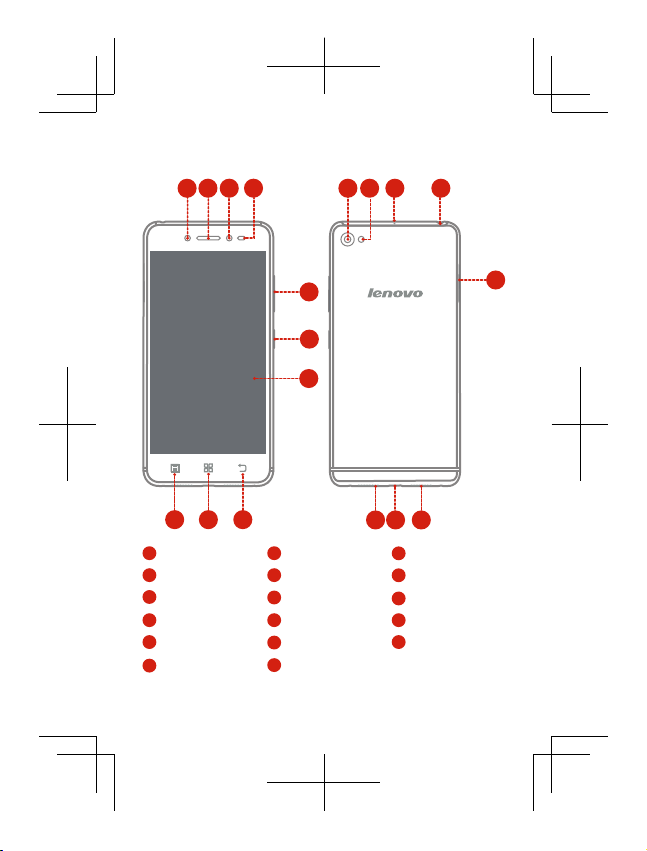
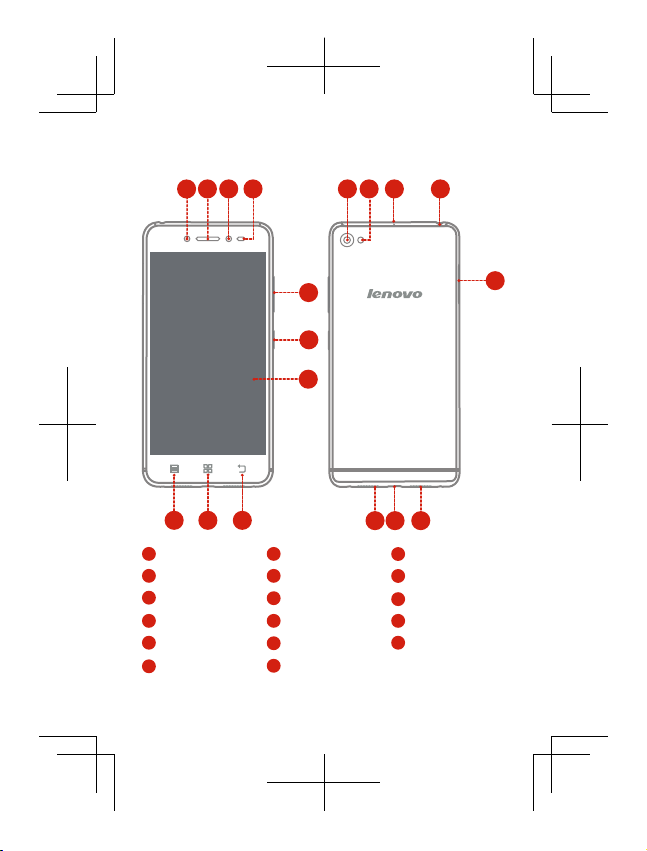
First glance
3
2
1
4
11 12 13 14
5
6
7
9
10
1
Fill Light
Light/Proximity sensor4Volume buttons
7
Touch screen
10
Menu button
13
Microphone
Speaker
16
8
2
5
8
11
14
17
Receiver
Back button
Rear-facing camera
Headset connector
Micro USB connector
15
16
1713
3
Front-facing camera
On/Off button
6
Home button
9
12
Flashlight
15
Micro-SIM-card tray
1
Page 5
Installing the Micro SIM card
SIM2
SIM1
SIM2
SIM1
SIM2
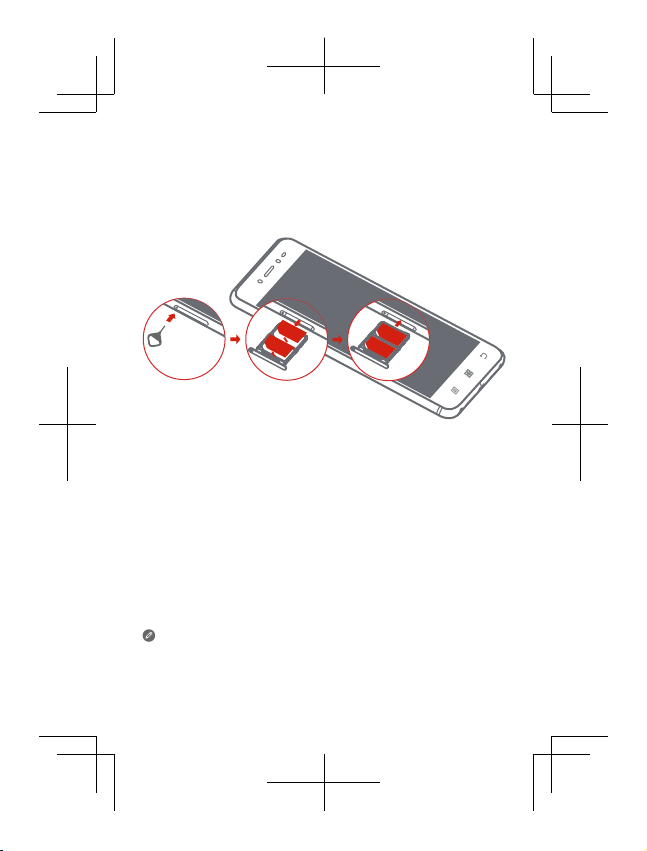
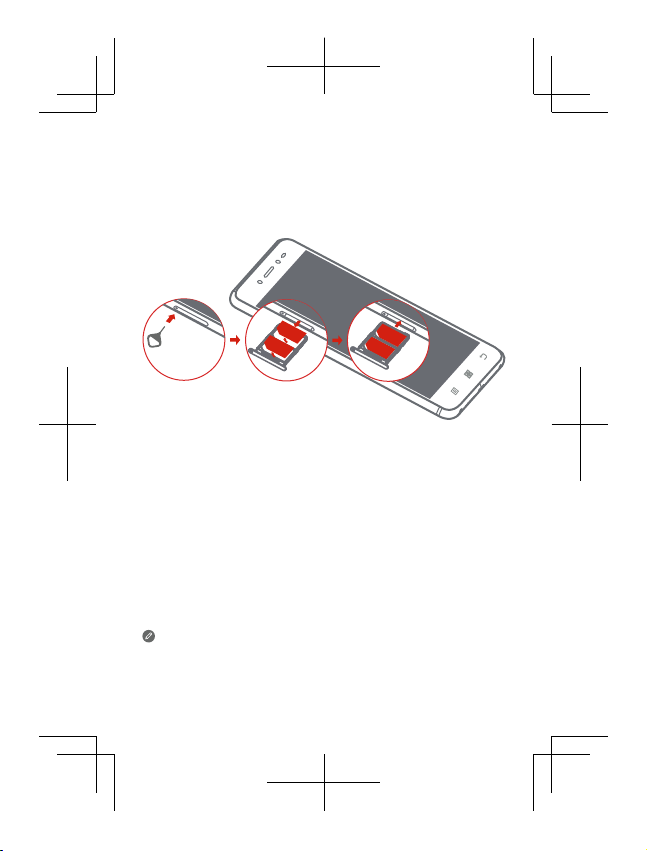
A Micro SIM card provided by your carrier is required in order to use
cellular services. Install the Micro SIM card as shown.
Step 1.
Insert the SIM eject tool that comes with your smartphone
into the hole in the Micro-SIM-card tray.
Step 2.
Pull out the Micro-SIM-card tray and position the Micro SIM
card into the tray in correct orientation.
Carefully insert the tray with the installed Micro SIM card
Step 3.
back into the slot.
Only Micro SIM cards work with your smartphone.
Always turn off your smartphone first before you insert or remove a
Micro SIM card. Insert or remove a Micro SIM card with your
smartphone on may damage your Micro SIM card or smartphone
permanently.
2
Page 6
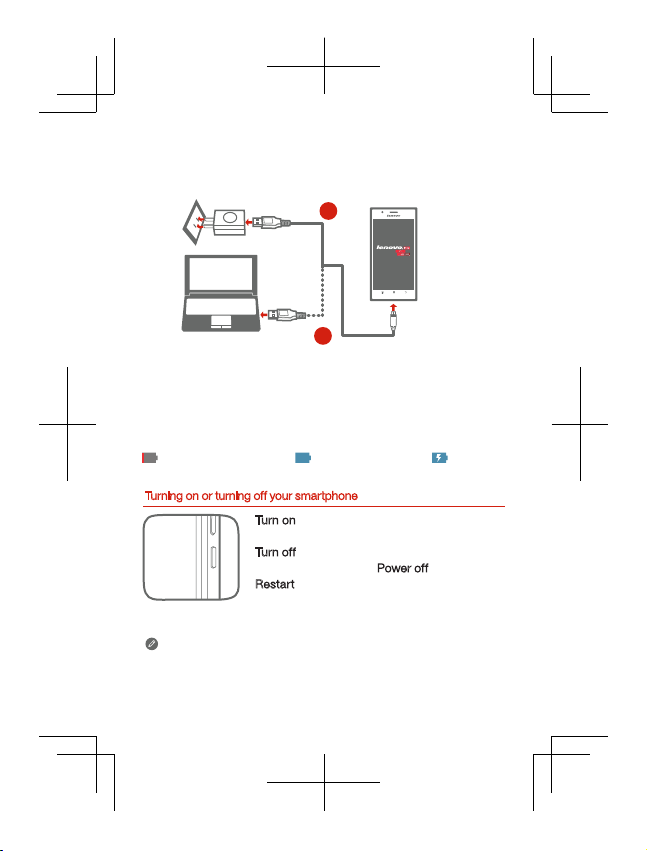
Charging the battery
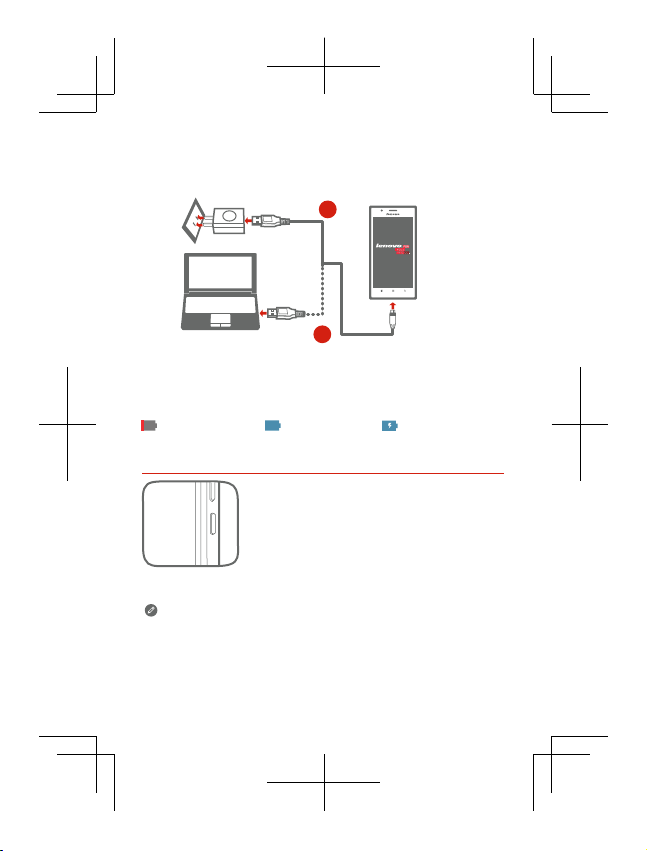
Charge the battery as shown.
1
2
Method 1.
Method 2.
Connect your smartphone to a power outlet using the
cable and USB power adapter that come with your
smartphone.
Connect your smartphone to a computer using the cable
that comes with your smartphone.
Low battery power Fully charged Charging
Turning on or turning off your smartphone
Turn on: Press a nd hold the On/Off button until
the Lenovo logo ap pears.
Tur n of f
: Press and hold the On/Off button fo r a
few seco nds, the n tap Power
Res
tart: Press a nd hold th e On/Off button f or
about 10 seconds.
Your smartphone has a built-in rechargeab le batte ry. For more
information about battery safety, see the “Built-in rechargeable
battery notice” section. The batter y in this pro duct can not be eas ily
replaced by users themselves.
3
off.
Page 7
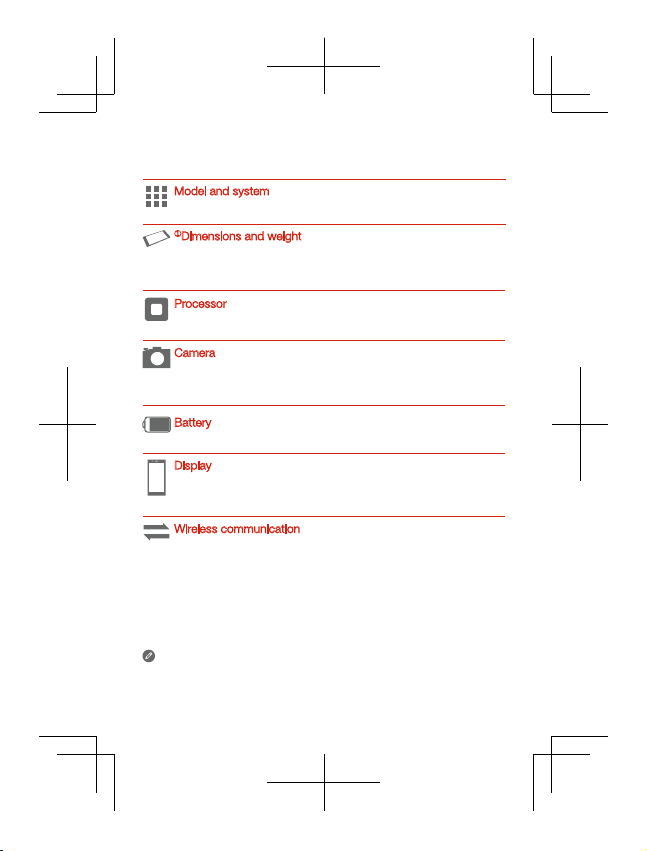
Technical specifications
Model and system
Model: Lenovo S90-A
①
Dimensions and weight
Height: 146 mm (5.75 inches)
Depth: 6.9 mm (0.27 inch)
System: Android
Width: 71.7 mm (2.82 inches)
Weight: 129 g (0.28 lb)
Processor
,
Processor: Qualcomm 8916
quad-core, 1.2 GHz
Camera
Type: CMOS
Pixels: 13 megapixels (back) + 8 megapixels (front)
Battery
Battery: 2300 mAh
Display
Size: 5.0 inches
Resolution: 1280 × 720 pixels
Screen: multi-touch
LCD type: S-AMOLED
Wireless communication
Bluetooth 4.0; WLAN 802.11 b/g/n;
②
FDD-LTE/WCDMA/GSM; GPS
① Depen ding on the m easur ing metho d, the dime nsions a nd weigh t
might vary slightly.
② In some countries, LTE is not su pporte d. To know if your
smartphone works with LTE networks in your country, contact
your carrier.
4
Page 8
Important regulatory, safety, and handling
information
This section contains important regulatory, safety, and handling
information for Lenovo smartphones. Additional safety and handling
information is provided in the User Guide. See the “Accessing your
User Guide” section for details.
Read rst — regulatory information
Be sure to read the Regulatory Notice for your country or region
before using the wireless devices contained in your Lenovo Mobile
Phone. To obtain a PDF version of the Regulatory Notice, see the
“Downloading publications” section.
Plastic bag notice
DANGER: Plastic bags can be dangerous. Keep plastic bags away
from babies and children to avoid danger of suffocation.
General battery notice
Batteries supplied by Lenovo for use with your product have been
tested for compatibility and should only be replaced with approved
parts. Risk of explosion if the battery is replaced with an incorrect
type. Dispose of used batteries according to the instructions.
Rechargeable battery notice
CAUTION: Risk of explosion if the battery is replaced with an incorrect
type.
When replacing the lithium battery, use only the same or an equivalent
type that is recommended by the manufacturer. The battery contains
lithium and can explode if not properly used, handled, or disposed of.
Dispose of used batteries according to the instructions.
Do not:
Throw or immerse into water
Heat to more than 100°C (212°F)
Repair or disassemble
Built-in rechargeable battery notice
CAUTION: Do not attempt to replace the internal rechargeable lithium
ion battery. Contact Lenovo Support for factory replacement.
5
Page 9
Charging
Lenovo is not responsible for the performance or safety of products
not manufactured or approved by Lenovo. Use only approved
Lenovo ac adapters and batteries. Adapter shall be installed near the
equipment and shall be easily accessible.
Prevent hearing damage
Lenovo Phone has a headphone connector. Always use the
headphone connector for headphones (also called a headset) or
earphones.
CAUTION: Excessive sound pressure from earphones and
headphones can cause hearing loss. Adjustment of the equalizer to
maximum increases the earphone and headphone output voltage and
the sound pressure level. Therefore, to protect your hearing, adjust
the equalizer to an appropriate level.
Excessive use of headphones or earphones for a long period of time
at high volume can be dangerous if the output of the headphone or
earphone connectors do not comply with specifications of EN
50332-2.
The headphone output connector of Lenovo Phone complies with EN
50332-2 Sub clause 7. This specification limits Lenovo Phone's
maximum wide band true RMS output voltage to 150 mV. To help
protect against hearing loss, ensure that the headphones or
earphones you use also comply with EN 50332-2 (Clause 7 limits) for
a wide band characteristic voltage of 75 mV. Using headphones that
do not comply with EN 50332-2 can be dangerous due to excessive
sound pressure levels.
If Lenovo Phone came with headphones or earphones in the
package, as a set, the combination of the headphones or earphones
and Lenovo Phone already complies with the specifications of EN
50332-1. If different headphones or earphones are used, ensure that
they comply with EN 50332-1 (Clause 6.5 Limitation Values). Using
headphones that do not comply with EN 50332-1 can be dangerous
due to excessive sound pressure levels.
6
Page 10
Sound pressure warning statement
For the device that is tested in accordance with EN 60950-1:
2006+A11:2009:+A1:2010+A12:2011, it is mandatory to perform
audio tests for EN50332.
This device has been tested to comply with the Sound Pressure Level
requirement in the applicable EN 50332-1 and/or EN 50332-2
standards. Permanent hearing loss may occur if earphones or
headphones are used at high volume for prolonged periods of time.
Warning statement: To prevent possible hearing damage, do not listen
at high volume levels for long periods.
Operating temperature
Use Lenovo Phone only in the temperature range of -10°C (14 °F) —
40°C (104 °F) to avoid damage.
Polyvinyl Chloride (PVC) cable and cord notice
WARNING: Handling the cord on this product or cords associated
with accessories sold with this product will expose you to lead, a
chemical known to the State of California to cause cancer, and birth
defects or other reproductive harm. Wash hands after handling.
Disposing according to local laws and regulations
When Lenovo Phone reaches the end of its useful life, do not crush,
incinerate, immerse in water, or dispose of Lenovo Phone in any
manner contrary to local laws and regulations. Some internal parts
contain substances that can explode, leak, or have an adverse
environmental effect if disposed of incorrectly. See “
environmental information
” for additional information.
Recycling and
Eurasian compliance mark
7
Page 11
Service, support, and warranty information
The following information describes the technical support that is
available for your product, during the warranty period or throughout
the life of your product. Refer to the Lenovo Limited Warranty for a full
explanation of Lenovo warranty terms.
Online technical support
Online technical support is available during the lifetime of a product at
http://www.lenovo.com/support.
Telephone technical support
Where applicable, you can get help and information from the
Customer Support Center by telephone. Before contacting a Lenovo
technical support representative, please have the following
information available: model and serial number, the exact wording of
any error message, and a description of the problem.
Your technical support representative might want to walk you through
the problem while you are at your phone during the call.
Worldwide Lenovo Support telephone list
IMPORTANT: Telephone numbers are subject to change without
notice. The most up-to-date telephone list for the Customer Support
Center is always available at
The Customer Support Center phone number is subjected to be
change, and please go to the e-support website for the latest phone
number. If the telephone number for your country or region is not
listed, contact your Lenovo reseller or Lenovo marketing
representative.
Lenovo Limited Warranty notice
Read the full Lenovo Limited Warranty (LLW) at
http://support.lenovo.com/smartphone-llw. You can view the LLW in
a number of languages from this Web site. If you cannot view the
LLW either from the Web site or from your phone, contact your local
Lenovo office or reseller to obtain a printed version of the full LLW.
IMPORTANT: Lenovo Smartphone Products do not have International
Warranty Services.
http://support.lenovo.com/serviceproviders
8
.
Page 12
Recycling and environmental information
General recycling statement
Lenovo encourages owners of information technology (IT) equipment
to responsibly recycle their equipment when it is no longer needed.
Lenovo offers a variety of programs and services to assist equipment
owners in recycling their IT products. For information on recycling
Lenovo products, go to: http://www.lenovo.com/recycling.
Recycling information for India
Recycling and disposal information for India is available at:
http://www.lenovo.com/social_responsibility/us/en/sustainability/ptb_india.html
Important WEEE information
Electrical and electronic equipment marked with the
symbol of a crossed-out wheeled bin may not be disposed
as unsorted municipal waste. Waste of electrical and
electronic equipment (WEEE) shall be treated separately
using the collection framework available to customers for
the return, recycling, and treatment of WEEE.
Country-specific information is available at:
http://www.lenovo.com/recycling
Restriction of Hazardous Substances Directive (RoHS)
Turkish
The Lenovo product meets the requirements of the Republic of
Turkey Directive on the Restriction of the Use of Certain Hazardous
Substances in Waste Electrical and Electronic Equipment (WEEE).
AEEE
Elektronik Eşya
AEEE
AEEE
Ukraine
India
RoHS compliant as per E-Waste (Management & Handling) Rules, 2011.
Atık Elektrikli ve
9
Page 13
Specic Absorption Rate information
This mobile device meets the government’s requirements for
exposure to radio waves. Your mobile device is a radio transmitter
and receiver. The exposure standard for mobile devices employs a
unit of measurement known as the Specific Absorption Rate, or SAR.
The India SAR limit for mobile devices is 1.6 W/kg averaged over 1
grams of tissue. Tests for SAR are conducted using standard
operating positions with the device transmitting at its highest certified
power level in all tested frequency bands.
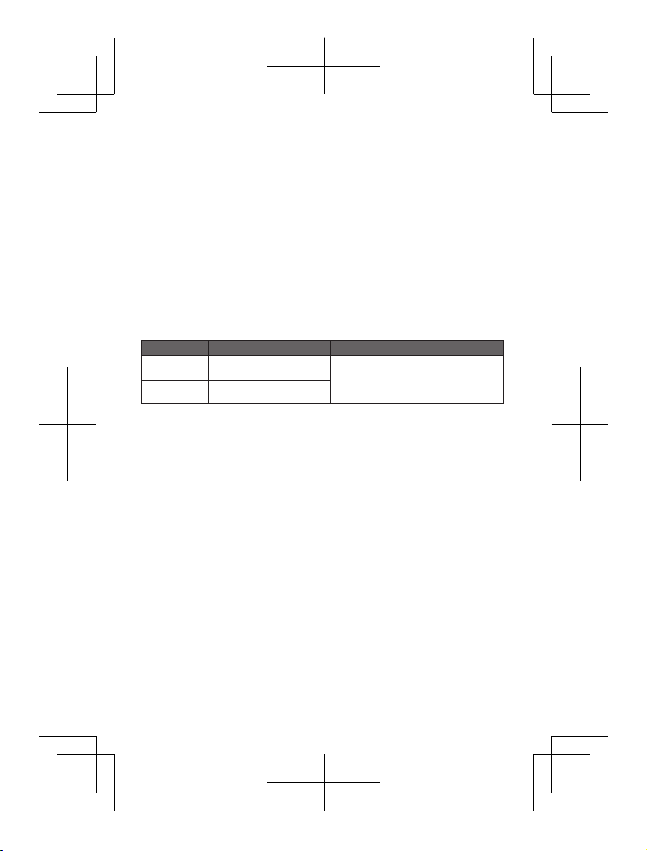
The highest SAR value for your Lenovo device when tested for use at
the head and body is outlined as follows:
Position Regulation
Head
Body-wor n
During use, the actual SAR values for this device are usually well
below the values stated above. This is because, for purposes of
system efficiency and to minimize interference on the network, the
operating power of your mobile devices is automatically decreased
when full power is not needed for the call. The lower the power
output of the device, the lower its SAR value.
To meet RF exposure guidelines during body-worn operation, the
device must be positioned at least 1.5cm away from your body.
The hig hest SAR va lue
0.543
0.448
India 1g SAR Li mit (1.6 W/kg)
10
Page 14
Tiếng Việt
Đọc kỹ hướng dẫn này trước khi sử dụng điện thoại thông
minh của bạn.
Nhận hỗ trợ
Để nhận hỗ trợ về dịch vụ mạng và hóa đơn, hãy liên hệ nhà mạng
của bạn. Để biết hướng dẫn về cách sử dụng điện thoại Lenovo, hãy
truy cập: http://support.lenovo.com/.
Tải xuống ấn bản
Để có H.dẫn s.dụng điện thoại mới nhất, hãy truy cập:
http://support.lenovo.com/
Truy cập H.dẫn s.dụng của bạn
H.dẫn s.dụng chứa thông tin chi tiết về điện thoại của bạn. Để truy
cập H.dẫn s.dụng của bạn, sử dụng một trong các phương pháp
sau:
Truy cập http://support.lenovo.com và thực hiện theo hướng
dẫn trên màn hình.
Bật điện thoại của bạn, rồi mở ứng dụng H.dẫn s.dụng.
Thông báo pháp lý
Lenovo và biểu tượng Lenovo là nhãn hiệu thương mại của
Lenovo tại Hoa Kỳ, các quốc gia khác hoặc cả hai.
Các tên công ty, sản phẩm hoặc dịch vụ khác có thể là nhãn hiệu
thương mại hoặc nhãn hiệu dịch vụ của các bên khác.
Page 15

Nội dung
Tổng quan .......................................................................1
Lắp thẻ Micro SIM ...........................................................
Sạc pin ............................................................................
Thông số kỹ thuật ............................................................4
Thông tin pháp lý, an toàn và xử lý quan trọng ...............5
Thông tin dịch vụ, hỗ trợ và bảo hành .............................8
Thông tin tái chế và môi trường .......................................9
Thông tin Tỷ lệ Bức xạ Điện thoại ...................................10
2
3
Page 16
Tổng quan
1
10
1
Đèn khử bóng
Cảm biến Ánh
4
sáng/Tiệm cận
7
Màn hình cảm ứng
10
Nút Menu
Micrô
Loa
16
3 4
2
11 12 13 14
5
15
6
7
9
8
2
Thiết bị thu
5
Nút âm lượng
8
Nút Quay lại
11
Camera sau
Giắc cắm tai nghe13Khay Micro SIM
14
17
Giắc cắm micro USB
1
16
1713
3
Camera trước
Nút Bật/Tắt
6
Nút Trang chủ
9
12
Đèn flash
15
Page 17
Lắp thẻ Micro SIM
SIM2
SIM1
SIM2
SIM1
SIM2
Phải có một thẻ Micro SIM do nhà mạng của bạn cung cấp để sử
dụng các dịch vụ điện thoại di động. Lắp thẻ Micro SIM như minh
họa.
Bước 1.
Ấn dụng cụ tháo SIM đi kèm với điện thoại của bạn vào lỗ
trên khay Micro-SIM.
Kéo khay Micro-SIM ra và đặt thẻ Micro SIM vào khay
Bước 2.
theo đúng mặt của SIM.
Cẩn thận đẩy khay SIM với thẻ Micro SIM đã đặt trở lại
Bước 3.
vào khe.
Điện thoại của bạn chỉ có thể sử dụng thẻ Micro SIM.
Luôn tắt điện thoại của bạn trước khi tháo hoặc lắp thẻ Micro SIM.
Tháo hoặc lắp thẻ Micro SIM khi điện thoại đang bật có thể làm hư
hại thẻ Micro SIM hoặc điện thoại vĩnh viễn.
2
Page 18
Sạc pin
Sạc pin như minh họa.
1
2
Phương pháp 1.
Phương pháp 2.
Mức pin yếu
Bật hoặc tắt điện thoại thông minh của bạn
Điện thoại thông minh của bạn có một pin sạc tích hợp. Để biết
thêm thông tin về an toàn pin, hãy xem phần “Thông báo về pin s ạc
tích hợp”. Người dùng không thể dễ dàng tự thay thế pin trong sản
phẩm này.
Kết nối điện thoại của bạn với nguồn điện bằng
cáp và sạc USB đi kèm với thiết bị.
Kết nối điện thoại với máy tính bằng cáp đi kèm.
Đã sạc đầy
Bật: Nhấn và giữ nút Bật /Tắt đến khi biểu
tượng Lenovo xuất hiện.
Tắt: Nhấn và giữ nút Bật/Tắt trong vài giây,
sau đó nhấn Tắt nguồn.
Khởi động lại: Nhấn và giữ nút Bật/Tắt
khoảng 10 giây.
3
Đang sạc
Page 19
Thông số kỹ thuật
Kiểu và hệ thống
Kiểu: Lenovo S90-A
①
Kích cỡ và trọng lượng
Cao: 146 mm (5,75 inches)
Dày: 6,9 mm (0,27 inch)
Bộ xử lý
Bộ xử lý: Qualcomm 8916, quad-core, 1,2 GHz
Máy ảnh
Loại: CMOS
Điểm ảnh: 13 megapixel (sau) + 8 megapixel (trước)
Pin
Pin: 2.300 mAh
Hiển thị
Kích cỡ: 5,0 inches
Độ phân giải: 1280 × 720 pixel
Liên lạc không dây
Bluetooth 4.0; WLAN 802.11 b/g/n;
②
FDD-LTE/WCDMA/GSM; GPS
① Tùy vào cách đo đạc, kích thước và trọng lượng có thể chênh
lệch đôi chút.
② Ở một số quốc gia, LTE không được hỗ trợ. Để biết liệu điện
thoại của bạn có hoạt động với mạng LTE tại qu ốc gia của bạn
không, hãy liên hệ với nhà mạng.
Hệ thống: Android
Rộng: 71,7 mm (2,82 inches)
Nặng: 129 g (0,28 lb)
Màn hình: cảm ứng đa điểm
Loại LCD: S-AMOLED
4
Page 20
Thông tin pháp lý, an toàn và xử lý
quan trọng
Phần này chứa thông tin pháp lý, an toàn và xử lý quan trọng cho
điện thoại Lenovo. Thông tin an toàn và xử lý bổ sung được cung
cấp trong H.dẫn s.dụng. Xem phần “Truy cập H.dẫn s.dụng của
bạn” để biết chi tiết.
Đọc trước - Thông báo pháp lý
Đảm bảo đọc Thông báo pháp lý cho quốc gia hoặc khu vực của
bạn trước khi sử dụng các thiết bị không dây có trong Điện thoại Di
động Lenovo. Để có phiên bản PDF của Thông báo pháp lý, hãy
xem phần “Tải xuống ấn bản”.
Chú ý về túi nhựa
NGUY HIỂM: Túi nhựa có thể gây nguy hiểm. Để tránh nguy cơ
nghẹt thở, giữ túi nhựa xa trẻ sơ sinh và trẻ nhỏ.
Thông báo pin chung
Pin do Lenovo cung cấp để sử dụng với sản phẩm của bạn đã
được kiểm tra tính tương thích và chỉ nên được thay thế bằng các
bộ phận đã được chấp thuận. Rủi ro cháy nổ nếu thay pin bằng loại
pin không đúng. Thải bỏ pin đã sử dụng theo hướng dẫn.
Thông báo về pin có thể sạc lại
THẬN TRỌNG: Rủi ro cháy nổ nếu thay pin bằng loại pin không đúng.
Khi thay thế pin lithium, chỉ sử dụng loại tương tự hoặc tương đương
theo khuyến nghị của nhà sản xuất. Pin có chứa chất lithium và có
thể nổ nếu không được sử dụng, xử lý hoặc thải bỏ đúng cách.
Thải bỏ pin đã sử dụng theo hướng dẫn
Không được:
Ném hoặc nhúng vào nước
Làm nóng đến trên 100°C (212°F)
Sửa chữa hoặc tháo rời
Thông báo về pin sạc tích hợp
THẬN TRỌNG: Không được tìm cách thay thế pin lithium ion có thể
sạc lại ở bên trong máy. Liên hệ với bộ phận Lenovo Support để
được thay thế bởi linh kiện gốc.
5
Page 21
Đang sạc
Lenovo không chịu trách nhiệm về hiệu suất hoặc sự an toàn của
các sản phẩm không được sản xuất hoặc chấp thuận bởi Lenovo.
Chỉ sử dụng bộ sạc ac và pin được Lenovo chấp thuận. Bộ sạc
phải được lắp đặt gần thiết bị và phải dễ dàng truy cập.
Tránh tổn thương thính giác
Điện thoại Lenovo có một giắc cắm tai nghe. Luôn sử dụng bộ kết
nối tai nghe dành cho tai nghe.
THẬN TRỌNG: Áp suất âm quá mức từ tai nghe có thể gây mất
thính giác. Điều chỉnh bộ chỉnh âm để tăng tối đa điện áp đầu ra
của tai nghe cũng như mức áp suất âm. Do đó, để bảo vệ thính
giác của bạn, hãy điều chỉnh bộ chỉnh âm đến mức thích hợp.
Sử dụng tai nghe quá nhiều trong một thời gian dài ở mức âm
lượng cao có thể nguy hiểm nếu bộ kết nối đầu ra của tai nghe
không tuân thủ các thông số kỹ thuật EN 50332-2.
Đầu nối ra của tai nghe điện thoại Lenovo theo chuẩn EN 50332-2
Điều khoản phụ số 7. Thông số này giới hạn điện áp đầu ra RMS
thực băng tần rộng của điện thoại Lenovo tối đa là 150 mV. Để
giúp bảo vệ chống mất thính giác, đảm bảo rằng tai nghe bạn sử
dụng cũng phải tuân thủ EN 50332-2 (giới hạn của Điều khoản 7)
về điện áp đặc trưng của dải tần rộng là 75 mV. Việc sử dụng tai
nghe không tuân thủ EN 50332-2 có thể gây nguy hiểm do mức áp
suất âm quá mức.
Nếu Điện thoại Lenovo có kèm theo tai nghe trong gói sản phẩm,
như một bộ, thì bộ sản phẩm gồm tai nghe và Điện thoại Lenovo
đã tuân thủ các thông số kỹ thuật của EN 50332-1. Nếu sử dụng
tai nghe khác, đảm bảo rằng các phụ kiện này tuân thủ EN
50332-1 (Giá trị giới hạn của Điều khoản 6.5). Việc sử dụng tai
nghe không tuân thủ EN 50332-1 có thể gây nguy hiểm do mức áp
suất âm quá mức.
6
Page 22
Thông báo cảnh báo áp suất âm
Đối với thiết bị được thử nghiệm tuân thủ EN 60950-1:
2006+A11:2009:+A1:2010+A12:2011, bắt buộc thử nghiệm âm
thanh theo EN50332.
Thiết bị này đã được thử nghiệm để tuân thủ các yêu cầu Mức Áp
suất Âm trong các tiêu chuẩn EN 50332-1 và/hoặc EN 50332-2 hiện
hành. Có thể gây mất thính giác vĩnh viễn nếu sử dụng tai nghe
hoặc tai nghe trong ở mức âm lượng cao trong thời gian dài.
Cảnh báo: Để tránh xảy ra tổn thương thính giác, không được nghe
ở mức âm lượng cao trong thời gian dài.
Nhiệt độ vận hành
Chỉ sử dụng Điện thoại Lenovo trong khoảng nhiệt độ -10°C
(14 °F)— 40°C (104 °F) để tránh hư hỏng.
Chú ý về dây và cáp bằng nhựa tổng hợp (PVC)
CẢNH BÁO: Việc xử lý dây trên sản phẩm này hoặc dây đi kèm với
các phụ kiện được bán cùng sản phẩm sẽ khiến bạn phơi nhiễm
với chì, chất hóa học được Bang California đánh giá là chất gây
ung thư và khuyết tật bẩm sinh hoặc tổn hại khác với cơ quan sinh
sản. Rửa tay sau khi xử lý.
Thải bỏ theo luật pháp và quy định địa phương
Khi Điện thoại Lenovo hết hạn sử dụng, không được nghiền nát,
đốt, ngâm trong nước hoặc thải bỏ Điện thoại Lenovo theo bất kỳ
phương pháp nào trái với luật pháp và quy định của địa phương.
Một số bộ phận bên trong điện thoại có chứa các chất có thể phát
nổ, rò rỉ hoặc có ảnh hưởng tiêu cực đến môi trường nếu được
thải bỏ không đúng cách. Xem “Thông tin tái chế và môi trường” để
biết thêm thông tin.
Dấu hiệu tuân thủ Eurasian
7
Page 23
Thông tin dịch vụ, hỗ trợ và bảo hành
Các thông tin sau đây mô tả về hỗ trợ kỹ thuật có sẵn cho sản
phẩm của bạn, trong thời gian bảo hành hoặc trong suốt vòng đời
sản phẩm của bạn. Tham khảo Giới hạn bảo hành của Lenovo để
hiểu rõ về các điều khoản bảo hành của Lenovo.
Hỗ trợ kỹ thuật trực tuyến
Sản phẩm được hỗ trợ kỹ thuật trọn đời tại
http://www.lenovo.com/support.
Hỗ trợ kỹ thuật qua điện thoại
Nếu áp dụng, bạn có thể yêu cầu được trợ giúp và cung cấp thông
tin từ Trung tâm Hỗ trợ Khách hàng qua điện thoại. Trước khi liên
hệ với một đại diện hỗ trợ kỹ thuật của Lenovo, vui lòng chuẩn bị
sẵn các thông tin sau đây: kiểu và số sê-ri máy, thông báo lỗi chính
xác và mô tả về sự cố.
Đại diện hỗ trợ kỹ thuật có thể sẽ hướng dẫn khắc phục sự cố
trong khi bạn đang sử dụng điện thoại trong suốt cuộc gọi.
Danh sách số điện thoại Lenovo Support trên toàn thế giới
QUAN TRỌNG: Các số điện thoại có thể thay đổi mà không cần thông
báo. Danh sách số điện thoại mới nhất của Trung tâm Hỗ trợ Khách
hàng luôn có sẵn tại địa chỉ http://support.lenovo.com/serviceproviders.
Số điện thoại của Trung tâm hỗ trợ khách hàng có thể thay đổi, vui
lòng truy cập vào các trang web hỗ trợ điện tử để biết số điện thoại
mới nhất. Nếu số điện thoại cho quốc gia hoặc khu vực của bạn
không có trong danh sách, hãy liên hệ với nhà phân phối Lenovo
hoặc đại diện thị trường Lenovo.
Thông báo về Giới hạn Bảo hành của Lenovo
Đọc thông tin bảo hành đầy đủ - Lenovo Limited Warranty (LLW) tại
http://support.lenovo.com/smartphone-llw. Bạn có thể xem bản LLW
bằng các ngôn ngữ khác trên trang Web này. Nếu không thể xem được
bản LLW này trên trang Web hoặc trên điện thoại của mình, hãy liên hệ
văn phòng Lenovo địa phương hoặc nhà phân phối để lấy bản in LLW.
QUAN TRỌNG: Các sản phẩm điện thoại thông minh Lenovo
không có các Dịch vụ Bảo hành Toàn cầu.
8
Page 24
Thông tin tái chế và môi trường
Nguyên tắc tái chế chung
Lenovo khuyến khích chủ sở hữu thiết bị công nghệ thông tin (CNTT)
có trách nhiệm tái chế thiết bị của mình khi không còn cần dùng thiết
bị. Lenovo cung cấp nhiều chương tŕnh và dịch vụ để hỗ trợ tái chế
sản phẩm CNTT cho chủ sở hữu thiết bị. Để biết thông tin về việc tái
chế sản phẩm Lenovo, truy cập: http://www.lenovo.com/recycling.
Thông tin về tái chế dành cho Ấn Độ
Thông tin tái chế và xử lý dành cho Ấn Độ có sẵn tại:
http://www.lenovo.com/social_responsibility/us/en/sustainability/ptb_india.html.
Thông tin WEEE quan trọng
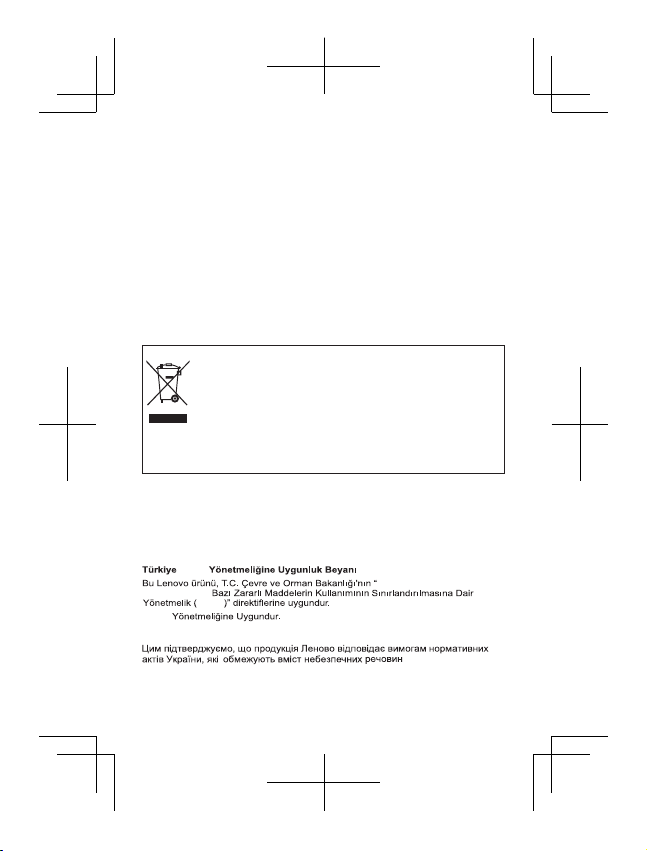
Các thiết bị điện và điện tử được đánh dấu bằng biểu
tượng thùng rác bị gạch chéo thì không thể thải bỏ như
rác thải đô thị chưa phân loại. Rác thải từ các thiết bị
điện và điện tử (WEEE) phải được xử lý riêng bằng cơ
chế thu thập dành cho khách hàng để hoàn trả, tái chế
và xử lý loại rác này.
Thông tin cụ thể cho từng quốc gia có tại:
http://www.lenovo.com/recycling
Chỉ thị về hạn chế các chất nguy hiểm độc hại (RoHS)
Thổ Nhĩ Kỳ
Sản phẩm của Lenovo đáp ứng các yêu cầu của Sắc lệnh về Hạn
chế sử dụng một số chất độc hại nhất định trong thiết bị điện và
điện tử thải (WEEE) của Cộng hòa Thổ Nhĩ Kỳ.
AEEE
Elektronik Eşya
AEEE
AEEE
Ukraine
Ấn Độ
Tuân thủ RoHS theo quy định về Chất thải điện tử (Kiểm soát & Xử lý), 2011.
Atık Elektrikli ve
9
Page 25
Thông tin Tỷ lệ Bức xạ Điện thoại
Thiết bị di động này đáp ứng các yêu cầu của chính phủ về phơi
nhiễm sóng vô tuyến.
Thiết bị di động là thiết bị thu phát sóng vô tuyến.
Tiêu chuẩn phơi nhiễm đối với thiết bị di động sử dụng một đơn vị đo
lường được gọi là Tỷ lệ bức xạ điện thoại (Specific Absorption Rate
hay SAR). Gi ới hạn về Tỷ lệ Bức xạ Điện thoại (SAR) của Ấn Độ cho
các thiết bị di động là 1,6 W/kg được tính trung bình cho 1 gram mô.
Các thử nghiệm đối với SAR được thực hiện bằng cách sử dụng các
tư thế vận hành chuẩn với thiết bị truyền ở mức công suất cao nhất
được chứng nhận của thiết bị trên t ất cả các dải tần được thử nghiệm.
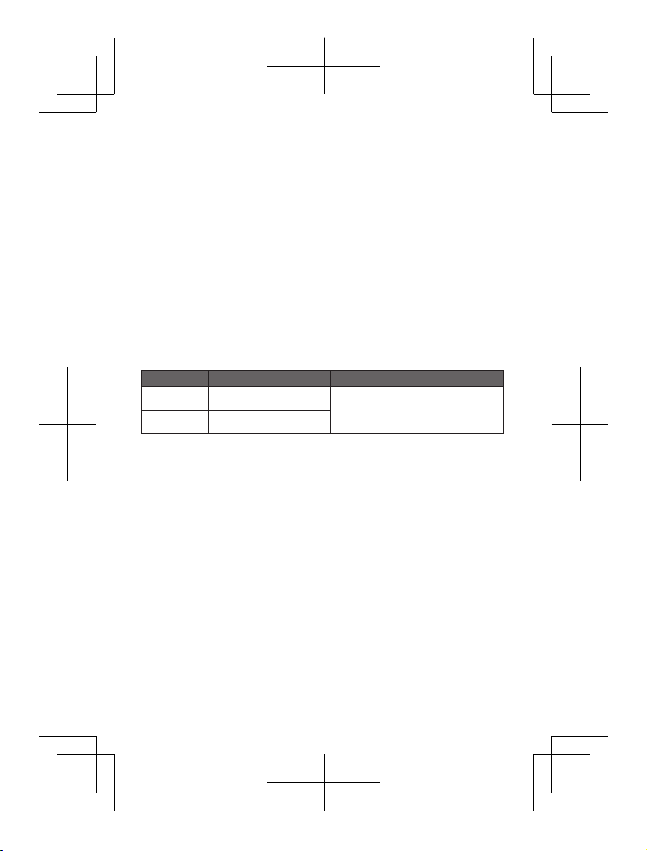
Giá trị SAR cao nhất cho thiết bị Lenovo khi được thử nghiệm để
sử dụng ở đầu và cơ thể được trình bày như sau:
Vị trí Quy định
Đầu
Trên cơ thể
Trong khi sử dụng, giá trị SAR thực tế đối với thiết bị này thường
thấp hơn khá nhiều giá trị nêu trên. Điều này là do, vì mục đích
đảm bảo hiệu suất hệ thống và giảm thiểu can nhiễu đối với
mạng, công suất hoạt động của thiết bị di động này tự động được
giảm đi khi không cần toàn bộ công suất cho cuộc gọi. Công suất
đầu ra của thiết bị càng thấp, giá trị SAR của nó càng nhỏ.
Để đáp ứng c ác nguyên tắc về phơi nhiễm RF trong khi hoạt động
với thiết bị trên cơ thể, thiết bị phải được đặt cách người ít nhất
1,5 cm.
Giá trị SAR cao nhất
0,543
0,448
Giới hạn SAR 1g của Ấn Độ
(1,6 W/kg)
10
Page 26
First Edition (December 2014) © Copyright Lenovo 2014.
Ấn bản Đầu tiên (Tháng 12 năm 2014) © Bản quyền Lenovo 2014.
SSC9A6N4RG
Printed in China
 Loading...