

Page 1
IdeaPad L3i (15″, 6)
Setup Guide
Page 2
See User Guide for USB transfer rate.
*
Access
User Guide
The illustrations are for your referenc e.
For selected models
Page 3
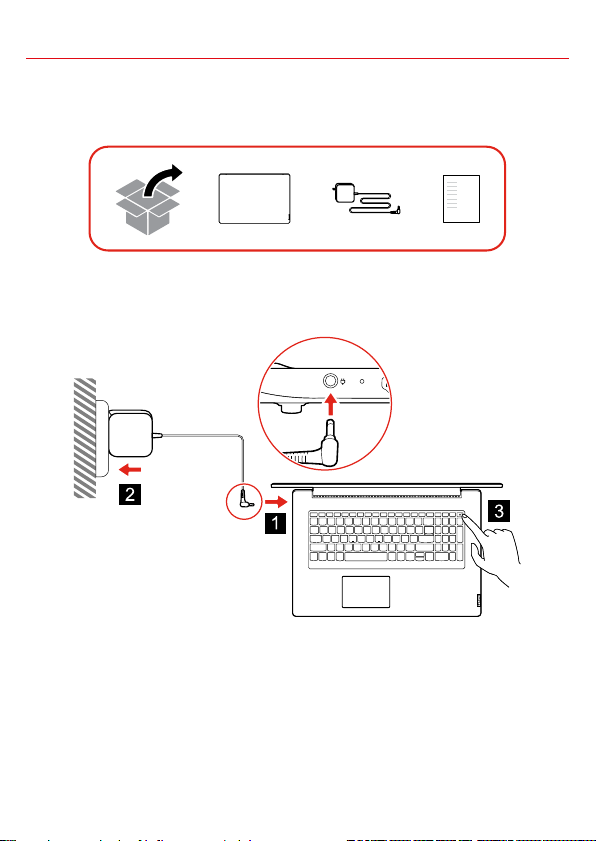
Initial Setup
Page 4
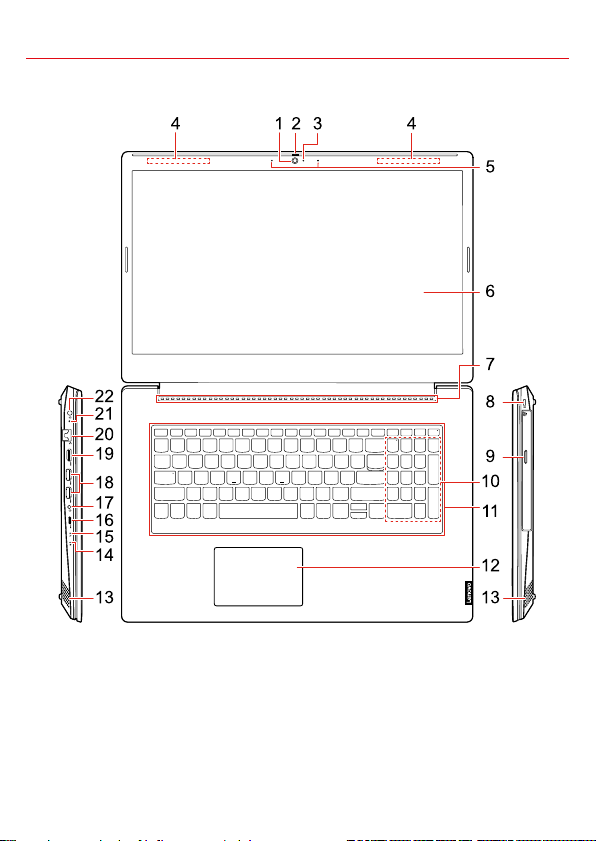
Overview
Page 5

1. Camera
12. Touch pad
2. Camera cover slider
3. Camera light
4. Wireless antennas
5. Microphones
6. Screen
7. Ventilation slots
8. Mini security-lock slot
* 9. Optical drive
10. Numeric keypad
11. Keyboard
13. Speakers
14. Power light
15. Novo button hole
16. USB-C
TM
connector (USB 3.2
Gen 1)
17. Combo audio jack
18. USB (3.2 Gen 1) Type-A connectors (2)
19. HDMI
TM
connector
20. Ethernet connector
21. Charging light
22. Power connector
Page 6
Additional information
Body-worn
10g SAR limit
2 W/kg
4 W/kg
Maximum
power
WLAN
802.11b/g/n
WLAN
802.11a/n/ac
WLAN
802.11a/n/ac
Bluetooth
BR/EDR/LE
First Edition (September 2020)
or disclosure is subject to restrictions set forth in Contract No. GS-35F-05925.
Specific absorption rate (SAR)
YOUR DEVICE MEETS INT ERNATIONAL GUIDELINES
FOR EXPOSURE TO RADIO W AVES.
Your device is a radio transmitter and r eceiver. It is
designed not to exceed the limits f or exposure to radio
waves (radio frequency electromagnetic f ields)
recommended by international guideli nes. The guidelines
were developed by an independent scient ific organization
(ICNIRP) and include a substantial safet y margin
designed to assure the safety of all persons , regardless of
age and health.
The radio wave exposure guidelines use a unit of
measurement known as the Specific Absorp tion Rate, or
SAR. Refer to the following for 10g SAR lim it and
maximum reported SAR values:
Item
Where possible, your radio device shoul d be used on a
table, desk or tray, which also assist s ventilation. To limit
exposure from radio waves, use the devic e under good
radio signal conditions and keep the a ntennas furthest
from your body and that of other people. Refer to the
User Guide of your product to view the loc ations of the
antennas. Pregnant women should keep th e antennas
away from their stomach and adolescenc es away from
their lower abdomen.
Wearers of electronic implant devices (pacemakers,
insulin pumps, neurostimulators, etc.) should maintain a
distance greater than 15 centimeters between the radio
device and the implant device.
SAR
Limb SAR
Obey all local restrictions when using your device in
public areas, such as hospitals, airplanes , or schools.
European Union — compliance with the Radio Equipment Directive
Hereby, Lenovo (Singapore) Pte. Ltd., dec lares that the
radio equipment type IdeaPad L3 15IT L6 is in compliance
with Directive 2014/53/EU.
The full text of the system EU declarat ion of conformity is
available at the following Internet address :
https://www.lenovo.com/us/en/compliance/ eu-doc
This radio equipment operates with the f ollowing
frequency bands and maximum radio-f requency power:
Technology
Usage of all the radio devices is lim ited to indoor in the
band 5150 MHz to 5350 MHz (channels 36, 40, 44, 48,
52, 56, 60, 64).
Frequency band
[MHz]
2400 - 2483.5 < 20 dBm
5150 - 5725 < 23 dBm
5725 - 5875 < 13.98 dBm
2400 - 2483.5 < 20 dBm
transmit
© Copyright Lenovo 2020
LIMITED AND RESTRICTED RIGHTS NOTICE: If data or software is delivere d
pursuant to a General Services Administration “G SA” contract, use, reproduction,
Reduce I Reuse I Recycle
 Loading...