

Page 1

Lenovo A6000
Quick Start Guide v1.0
English/繁體中文
Page 2

English
Read this guide carefully before using your smartphone.
Learning more
Getting support
Legal notices
To learn more information about your
Lenovo smartphone and obtain the latest
smartphone manuals, go to:
http://support.lenovo.com/.
For support on network service and billing,
contact your wireless network operator.
For instructions on how to use your
device, go to:
http://support.lenovo.com/.
Lenovo and the Lenovo logo are
trademarks of Lenovo in the United States,
other countries, or both.
Other company, product, or service names
may be trademarks or service marks of
others.
Manufactured under license from Dolby
Laboratories. Dolby and the double-D
symbol are trademarks of Dolby
Laboratories.
Page 3
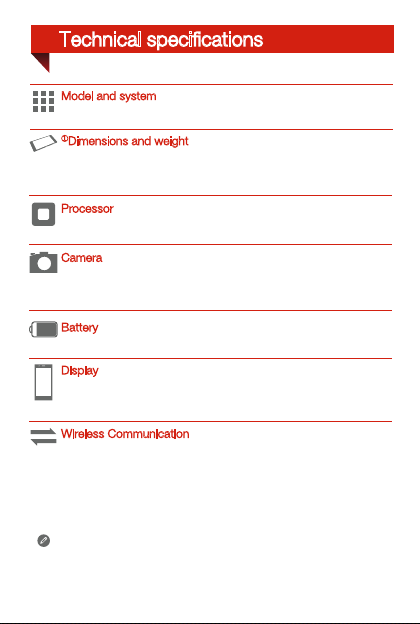
Technical specifications
Model and system
Model: Lenovo A6000 System: Android
①
Dimensions and weight
Height: 140.9 mm (5.547 inches) Width: 70.55 mm (2.778 inches)
Depth: 8.2 mm (0.323 inch) Weight: 129.6 g (0.286 lb)
Processor
Processor: Qualcomm MSM8916, Quad Core, 1.2 GHz
Camera
Type: CMOS
Pixels: 8.0 megapixels (back) + 2.0 megapixels (front)
Battery
Battery: 2300 mAh
Display
Size: 5.0 inches Screen: multi-touch
Resolution: 1280 × 720 pixels LCD type: IPS
Wireless Communication
Bluetooth 4.0; WLAN 802.11 b/g/n; ②LTE, WCDMA, GSM; GPS
① Depen ding on th e measu ring meth od, the dim ensio ns and wei ght
might vary slightly.
② In some countries, LTE is not su pporte d. To know if your
smartphone works with LTE networks in your country, contact
your carrier.
Page 4
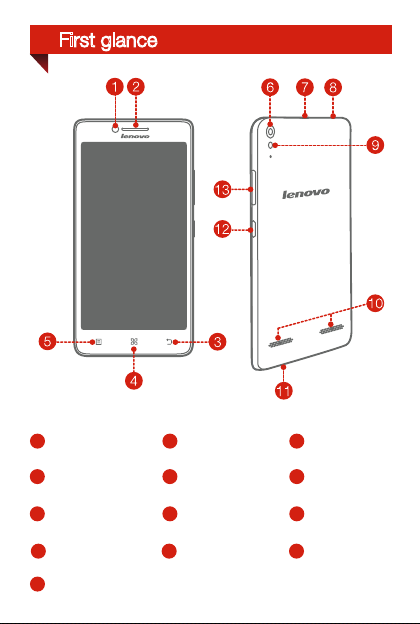
First glance
Front-facing
1 2
camera
Home key
Micro USB
7
connector
Speaker On/Off button
10
13
Volume buttons
Receiver
Menu key
Headset
8
connector
11
Microphone
3
Back key
Rear-facing
654
camera
Flashlight
9
12
Page 5

SIM1
SIM2
SIM1
SIM2
Preparing your smartphone
You must insert the SIM card provided by your carrier to use cellular
services. Set up your smartphone as shown.
Step 1. Open the back cover.
Step 2. Insert the SIM cards and
the memory card.
Tip: Insert the (U)SIM card into
SIM1 slot and SIM card
into SIM2 slot.
a
b
Step 3. Install the battery.
a. Align the battery
connectors on the battery
with the pins in the
battery compartment.
b. Push the battery down
into place.
Step 4. Install the back cover.
Always turn off your smartphone first before you insert or remove a
SIM card. Insert or remove a SIM card with your smartphone on may
damage your SIM card or smartphone permanently.
Page 6

Charging the battery
Charge the battery as shown.
1
2
Method 1.
Method 2.
Turning on or turning off your smartphone
Connect your smartphone to a power outlet using the
cable and USB power adapter that come with your
smartphone.
Connect your smartphone to a computer using the cable
that comes with your smartphone.
Low battery power Fully charged Charging
Turn on: Press a nd hold the On/Off butto n until
the Lenovo logo ap pears.
Tur n of f
: Press and hold th e On/Off button for a
few seco nds, the n tap Power
Reboot
: Press and hold th e On/Off button f or a
few seco nds, the n tap Reboot
Your smartphone has a rechargeable battery. For more information
about ba tter y safety, see t he “Rech argea ble bat tery not ice” in the
Important Product Information Guide shipped with your smartphone.
off.
.
Page 7

中國香港
使用智能手機前,請仔細閱讀本手冊。
更多資訊
支援資訊
法律聲明
如需 Lenovo 智能手機的更多相關資訊,
以及獲取最新的智能手機使用手冊,請瀏
覽:http://support.lenovo.com/ 。
如需網絡服務和計費方式的支援資訊,請
洽詢您的無線網絡業者。如需裝置的使用
指示,請瀏覽:
http://support.lenovo.com/ 。
Lenovo 和 Lenovo 標誌是 Lenovo 在美國
及/或其他國家/地區的商標。
其他公司、產品或服務名稱,可能是該公
司的商標或服務標誌。
Manufactured under license from Dolby
Laboratories. Dolby and the double-D
symbol are trademarks of Dolby
Laboratories.
Page 8

技術規格
型號與系統
型號:Lenovo A6000 系統: Android
尺寸與重量
高度:140.9 mm(5.547 英吋)
厚度:8.2 mm(0.323 英吋)
處理器
處理器:Qualcomm MSM8916, Quad Core, 1.2 GHz
相機
類型:CMOS
像素:800 萬像素(後攝像鏡頭)+ 200 萬像素(前攝像鏡頭)
電池
電池:2300 mAh
顯示
大小:5.0 英吋 螢幕:多點觸控
解析度:1280 × 720 像素 LCD 類型:IPS
無線通訊
Bluetooth 4.0; WLAN 802.11 b/g/n;
① 依測量方式的不同,尺寸與重量可能稍微存有差異。
LTE
在部分國家/地區並不受支援。如需了解您的智能手機是否可用
②
於您國內的
LTE
網絡,請聯絡相關電訊商。
寬度:70.55 mm(2.778 英吋)
重量:129.6 g (0.286 lb)
②
LTE, WCDMA, GSM; GPS
Page 9

認識手機
1 2 3
前攝影頭
主螢幕鍵
7
微型 USB 接頭
喇叭
10
13
音量按鈕
8
11
聽筒
功能表鍵
耳機接頭
麥克風
654
9
12
返回鍵
後攝影頭
閃光燈
開關按鈕
Page 10

使用智能手機前的準備工作
SIM1
SIM2
SIM1
SIM2
您須插入電信業者所提供的 SIM 卡才能使用流動電話服務。如圖所
示,安裝您的智能手機。
第 1 步. 打開背蓋。
第 2 步.
插入 SIM 卡和記憶卡。
提示:請將 (U)SIM 卡插入 SIM1
插槽並將 SIM 卡插入
SIM2 插槽。
a
b
第 3 步. 安裝電池。
a. 將電池上的電池連接點與
電池艙中的插腳對準。
b.
將電池向下推至電池艙中。
第 4 步. 安裝背蓋。
插入或取出 SIM 卡前,請務必先關閉智能手機。開機狀態下插入或取
出 SIM 卡,可能會對 SIM 卡或智能手機造成永久性的損壞。
Page 11

為電池充電
重要產品資訊手冊
如圖所示,為電池充電。
1
2
方法 1.
使用隨附的纜線和 USB 電源適配器將智能手機連接到電源插座。
方法 2.
使用隨附的纜線將智能手機連接到電腦。
電量偏低 充電完成 正在充電
開啟或關閉您的智能手機
開機:按住開/關按鈕直到顯示 Lenovo 標誌。
關機:按住開/關按鈕數秒,然後點一下關機。
重新啟動:按住開/關按鈕數秒,然後輕按重新
啟動。
智能手機內置可充電電池。如需有關電池安全性的詳細資訊,請參閱智能
手機隨附的 中的「可充電電池的注意事項」。
Page 12

First Ed ition (January 2015) © Co pyright L enovo 2015.
第一版(2015 年 1 月)© Lenovo 2015 版權所有。
711608000521
Printed in China
 Loading...