

Page 1
KNX
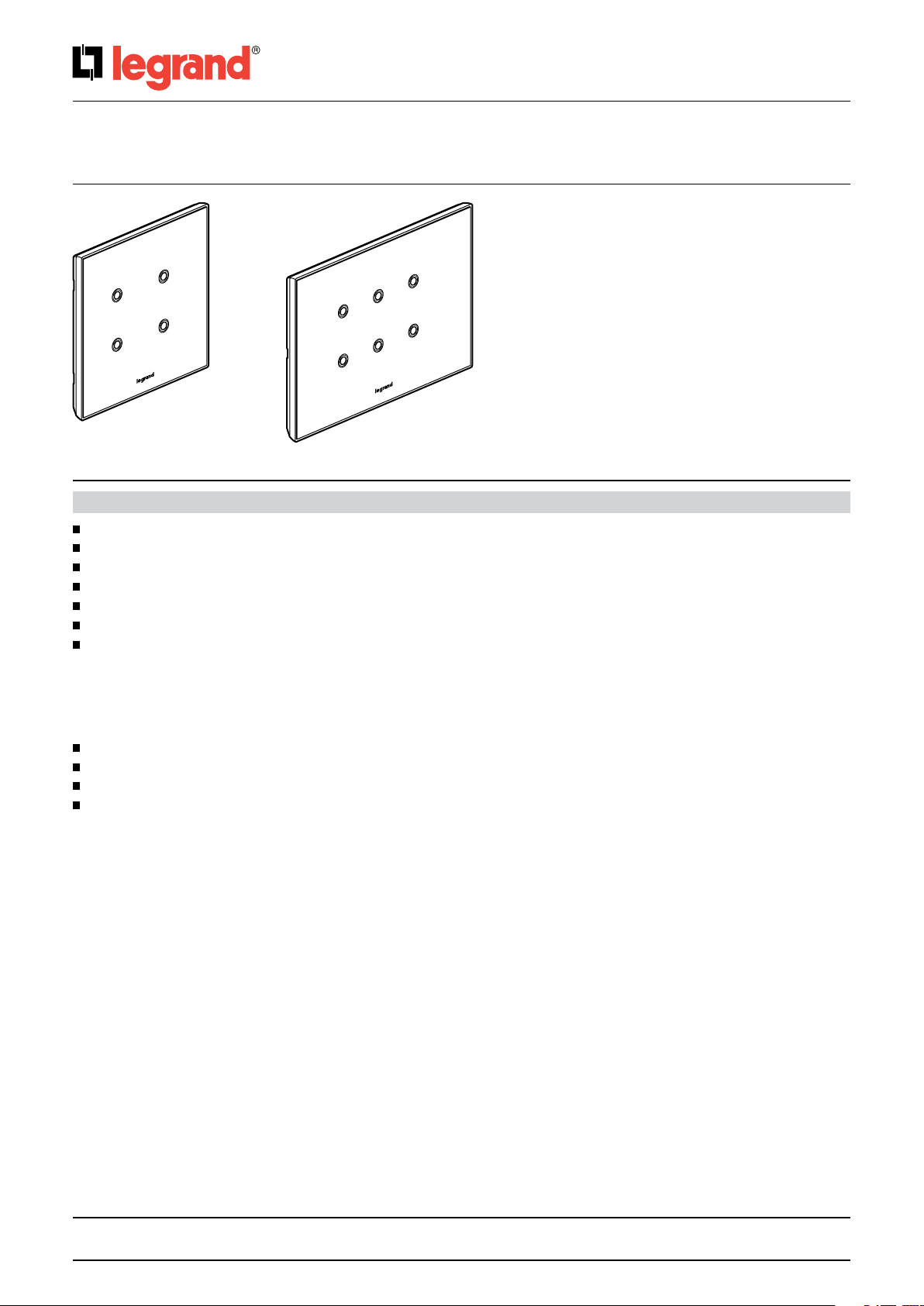
Arteor 4 and 6 touches glass controls
5 735 04/05 5 735 12/13
Cat. No(s).: 5 735 04/05
5 735 12/13
CONTENT PAGE
1. Use ............................................................................................................................. 2
2. Range ........................................................................................................................... 2
3. Technical features ...............................................................................................................2
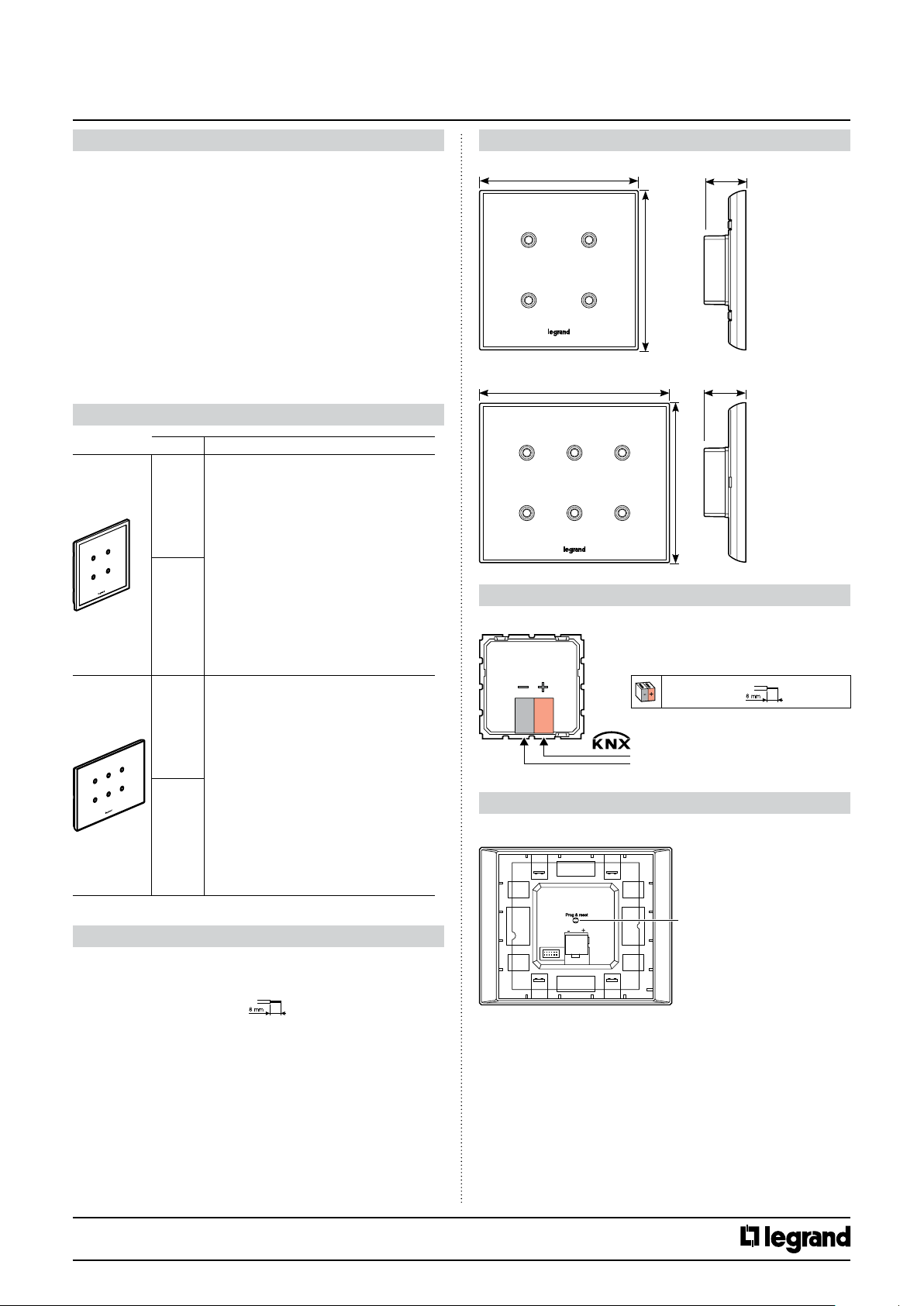
4. Overall dimensions (mm) .........................................................................................................2
5. Connection ......................................................................................................................2
6. Description of the mechanisms ...................................................................................................2
7. Operation .......................................................................................................................3
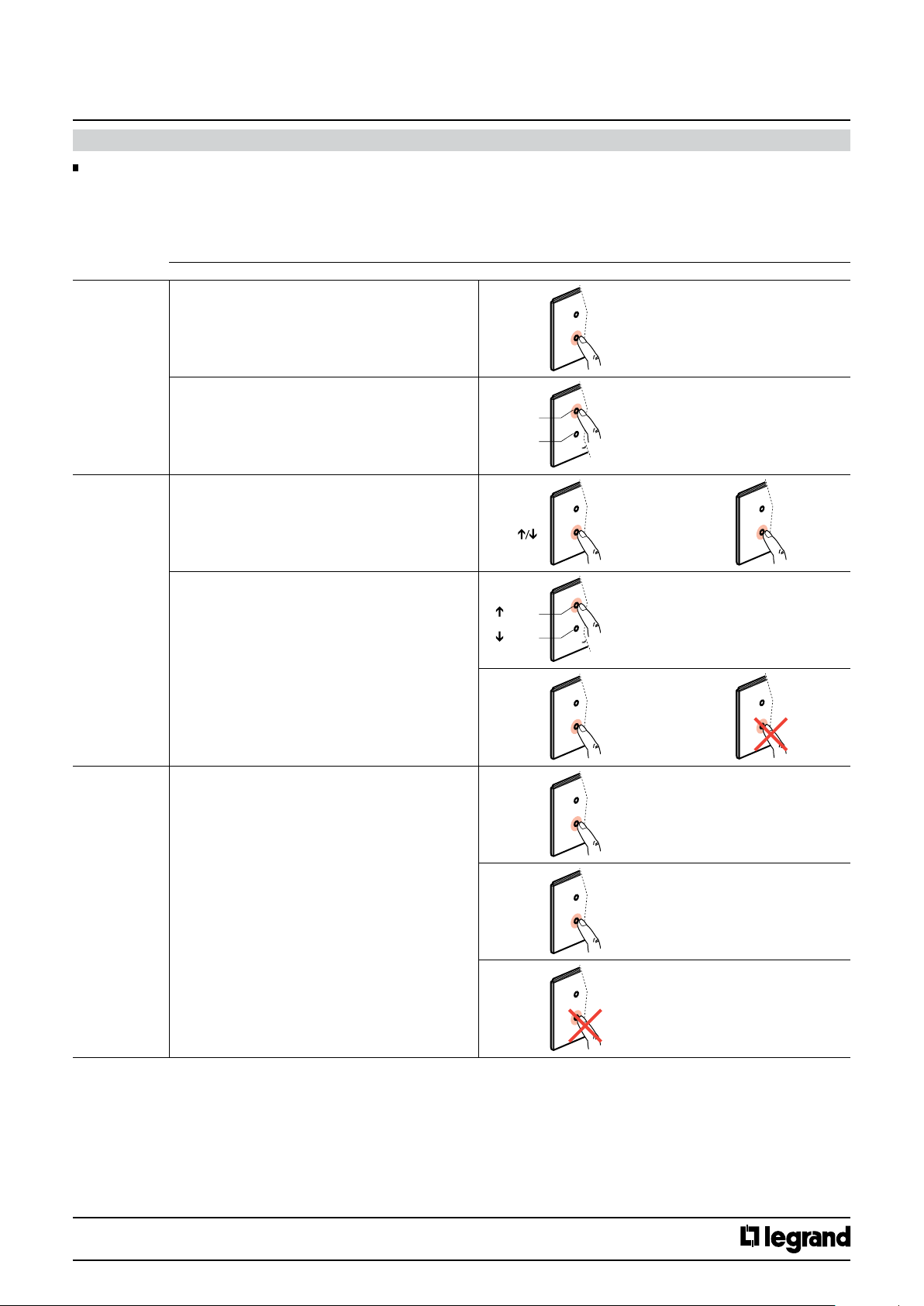
7.1 Actuation points ............................................................................................................................3
7.1.1 Main functions ............................................................................................................................3
7.1.2 Additional functions .......................................................................................................................4
7.2 Operation of the LEDs .......................................................................................................................5
7.2.1 Setting the brightness .....................................................................................................................5
7.2.2 Setting the colour and behaviour ..........................................................................................................5
8. NFC setting ......................................................................................................................6
9. Standards and approvals .........................................................................................................6
10. Maintenance ...................................................................................................................6
11. Communication objects description .............................................................................................7
11.1 General configuration .....................................................................................................................7
11.1.1 Leds configuration .......................................................................................................................7
11.1.2 Normal intensity General Parameters. . . . . . . . . . . . . . . . . . . . . . . . . . . . . . . . . . . . . . . . . . . . . . . . . . . . . . . . . . . . . . . . . . . . . . . . . . . . . . . . . . . . . . . . . . . . . . . . . . . . . . 8
11.1.3 Use additionnal Eco intensity .............................................................................................................8
11.1.4 Use standby ..............................................................................................................................8
11.1.5 Use context information ..................................................................................................................9
11.1.6 Long push configuration. . . . . . . . . . . . . . . . . . . . . . . . . . . . . . . . . . . . . . . . . . . . . . . . . . . . . . . . . . . . . . . . . . . . . . . . . . . . . . . . . . . . . . . . . . . . . . . . . . . . . . . . . . . . . . . . .10
11.1.7 Set maximum intensity after push during ................................................................................................10
11.1.8 Led behavior on Disable status ...........................................................................................................10
11.1.9 Use Alarm ...............................................................................................................................11
11.2 Channels configuration (1,2,3,4,5,6) .......................................................................................................12
11.2.1 Use separately ...........................................................................................................................12
11.2.2 Use Jointly ..............................................................................................................................29
11.3 Leds configuration ........................................................................................................................35
11.4 LEDs color and behaviour updating flowchart .............................................................................................37
11.5 LED intensity update flowchart ...........................................................................................................38
11.6 No configuration status and reset procedure ..............................................................................................38
Technical data sheet: S000090563EN-2 Updated: 07/06/2016 Created : 27/07/2015
1/38
Page 2
KNX
Arteor 4 and 6 touches glass controls
Cat. No(s).: 5 735 04/05
5 735 12/13
1. USE
The KNX 4, 6 channels touch controls are wiring devices suitable to
control lights, shutters or other kind of loads.
They are equipped with 4 or 6 completely independent and
configurable channels able to perform a wide range of functions.
Main configurable functions:
• 1/2 buttons switching/dimming
• 1/2 buttons shutters and blinds management
• value sending (shutter position, dimming %...)
• sequential value sending
• multiple commands
• conditional commands
• 1/8 bit scenario saving and recall
Each device is also equipped with 4 or 6 RGB LEDs fully configurable
in term of colors and blinking mode and can switch operating profiles
according to defined events or conditions.
2. RANGE
Cat. No(s) Description
573504 - 4 pushes - White
573505 - 4 pushes - Black
The KNX 4 channels touch controls are wiring devices
suitable to control lights, shutters or other kind of loads.
5 735 04
5 735 05
5 735 12
5 735 13
They are equipped with 4 completely independent and
configurable channels able to perform a wide range
of functions.
Main configurable functions:
• 1/2 buttons switching/dimming
• 1/2 buttons shutters and blinds management
• value sending (shutter position, dimming %...)
• sequential value sending
• multiple commands
• conditional commands
• 1/8 bit scenario saving and recall
Each device is also equipped with 4 RGB LEDs fully
configurable in term of colors and blinking mode and
can switch operating profiles according to defined
events or conditions
573512 - 6 pushes - White
573512 - 6 pushes - Black
The KNX 6 channels touch controls are wiring devices
suitable to control lights, shutters or other kind of loads.
They are equipped with 4 completely independent and
configurable channels able to perform a wide range
of functions.
Main configurable functions:
• 1/2 buttons switching/dimming
• 1/2 buttons shutters and blinds management
• value sending (shutter position, dimming %...)
• sequential value sending
• multiple commands
• conditional commands
• 1/8 bit scenario saving and recall
Each device is also equipped with 6 RGB LEDs fully
configurable in term of colors and blinking mode and
can switch operating profiles according to defined
events or conditions
4. OVERALL DIMENSIONS (mm)
5 735 04/05
5 735 12/13
93
93
130
24,5
93
5. CONNECTION
For 4 or 6 channels touchs controls
4 x (Ø 0,6 mm < < Ø 0,8 mm)
=
29 V
6. DESCRIPTION OF THE MECHANISMS
For 4 or 6 channels touchs controls
24,5
3. TECHNICAL FEATURES
Prog & Reset
• Supply voltage: 29 V
• KNX connector: red/black
• Automatic clamp
• Terminal capacity: 4 x (Ø 0,6 mm < < Ø 0,8 mm)
• KNX BUS absorption: 4 pushes 8.8 mA
• Usage temperature: -5°C/+45°C
• Storage temperature: -25°C/+30°C
• IP40: assembled product
• IP20: without rocker plate
• IK02
Compliant with installation and manufacturing standards, see E-catalogue
Technical data sheet: S000090563EN-2 Updated: 07/06/2016 Created : 27/07/2015
=
6 pushes 9.5mA
CONTENTS
2/38
Page 3
KNX
Arteor 4 and 6 touches glass controls
Cat. No(s).: 5 735 04/05
5 735 12/13
7. OPERATION
7.1 Actuation points
Each actuation point can be configured independently or in pairs, for a short and a long press (time can be configured in the ETS software), for on/off
control, dimming, roller blinds, scenario, lock, incremented scenarios, send value, double action send, etc.:
Non-exhaustive list of the possible functions.
7.1.1 Main functions
Possible action
Switch On/Off • Pushbutton or remote switch
Cyclical ON/Off: short press
• Switch
ON: short press at top
Off: short press at bottom
Roller blinds • 1 actuation point
Raise/lower: cyclical mode, long press
Stop blind: short press
• 2 actuation points (pair)
Cyclical raise/stop: short press at top
Cyclical lower/stop: short press at bottom
Orientation of slats: long press at top or bottom
Stop slats: release
Dim • 1 actuation point
Cyclical ON/Off: short press
Cyclical dim +, dim -: press and hold down
Stop dimming: release
ON/OFF
ON
OFF
/ STOP
/ STOP
Orientation
of slats
ON/OFF
short press
short press
long press
short press
Press and hold
short press
STOP
STOP
short press
Release
+/-
STOP
Technical data sheet: S000090563EN-2 Updated: 07/06/2016 Created : 27/07/2015
Press and hold down
Release
CONTENTS
3/38
Page 4
KNX
Arteor 4 and 6 touches glass controls
7. OPERATION (continued)
7.1.1 Main functions (continued)
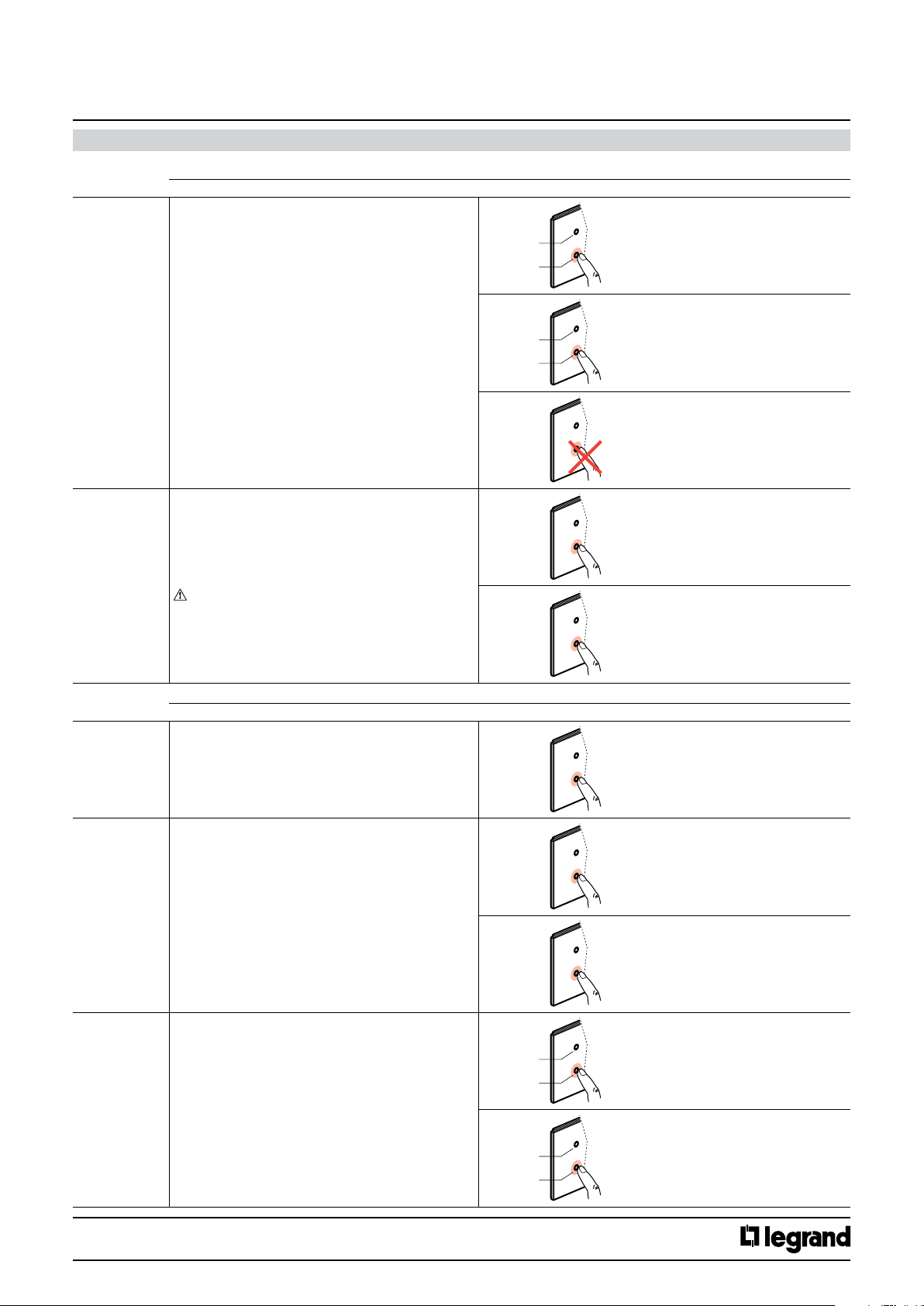
Dim (cont.) • 2 actuation points (pair)
ON/Off: short press at top and bottom
Dim +: press at top and hold
Dim –: press at bottom and hold
Stop dimming: release
Possible action
ON
OFF
+
-
Cat. No(s).: 5 735 04/05
5 735 12/13
Short press
Press and hold down
Scenario • Short press: send a scenario number that is in the
• Long press (10 seconds): save scenario.
All actuators with this scenario number will save their
status at this moment
The length of this press cannot be configured in the
ETS software
7.1.2 Additional functions
Send a value
(lighting level,
position of
blinds, slats,
etc.)
Send 2 values
(lighting level,
position of
blinds, slats,
etc.)
• Short press: send a value between 0 and 255.
Example: Lighting 33% (value 85)
• Short press: send 1st value between 0 and 255.
Example : Lighting 10% (value 25)
• Long press: send 2nd value between 0 and 255.
Example : Lighting 50% (value 127)
actuator configuration
STOP
Send
scenario
Save
scenario
Possible action
Send
value
Send
value 1
Release
Short press
Long press (10 s)
Short press
Short press
Send
value 2
Send priority
(lock)
Technical data sheet: S000090563EN-2 Updated: 07/06/2016 Created : 27/07/2015
• Long press: lock "ON" or lock "Off"
• Short press (10 seconds): unlock "ON" or unlock "Off"
Example: on a long press, "lock ON", the output of the
actuator will remain locked at "ON" until a short press
to unlock it ("unlock ON", output at "ON", "unlock Off",
output at "Off")
Lock
ON
OFF
Unlock
ON
OFF
Long press
Short press
Long press
CONTENTS
4/38
Page 5
KNX
Arteor 4 and 6 touches glass controls
7. OPERATION (continued)
7.1.2 Additional functions (continued)
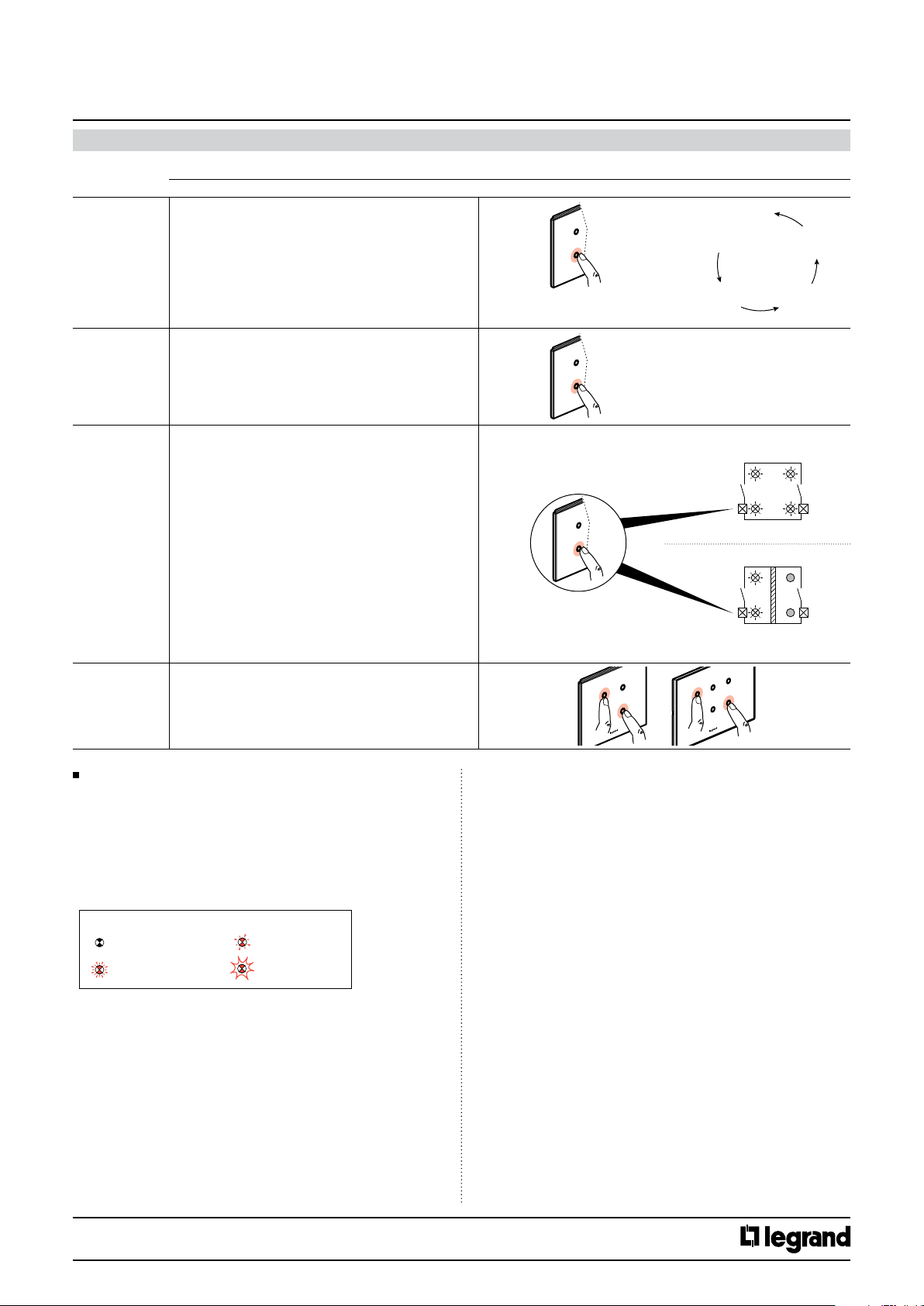
Send
incremented
commands
(by scrolling)
Double action
send (send
2 commands)
• Successive short presses: send incremented
commands.
The chosen commands are sent one after the other
(incrementation or decrementation between a min. and
max. value, between 0 and 255)
Example: 1st press: comfort (command 1), 2nd press:
standby (command 2), 3rd press: eco (command 3), 4th
press: comfort (command 1)
This function is used to associate products that do not
have the scenario function with a scenario
Possible action
Send
commands
Send
double
action
Press short
Short press
Cat. No(s).: 5 735 04/05
5 735 12/13
…
Press 1:
comfort
Press 2:
standby
Press 4:
comfort
Press 3:
eco
Conditional send
Mode 1/Mode 2
Clean mode This function allows to disable the touch plate during
7.2 Operation of the LEDs
Each control has a number of configurable RGB LEDs (4 to 6 depending
on the Cat. No.) which indicate, for each press, the status of the system
using the colours, flashing and brightness of the LEDs.
When the control has not yet been programmed, all the LEDs change
colour quickly.
• Choice of 12 colours: green, blue, white, orange, gold, yellow,
turquoise, cyan, light blue, purple, magenta, crimson
• Choice of LED behaviour: on continuously or various types of flashing
Key:
LED goes off LED blinks slowly
LED blinks quickly
When pressed, sends a command or a second different
command, according to a condition.
The control can manage different circuits according to
an event.
Example: in a meeting room, one press activates the
switch-on of the 4 luminaires (mode 1).
When a mobile partition is used in this meeting room,
one press activates the 2 luminaires on the corridor side
of the room.
cleaning (10").
LED flashes
Send conditional
Mode 1 or Mode 2
Short
press
7.2.1 Setting the brightness
- Normal brightness: adjustable value
- Eco brightness: adjustable value
- Standby brightness: value cannot be adjusted (off)
The LED's lights up at maximum brightness level for 30s after pressing
any push button.
The brightness setting will be the same for all the LEDs on the control
7.2.2 Setting the colour and behaviour
• Actuator status feedback: ON or OFF
• System status feedback: contextual information indicated via the BUS
Example: over-consumption, broken lamp, too much wind for roller
blinds.
It is also possible to use the control in pilot light mode.
Meeting room
Mode 1
Without partition
Mode 2
With mobile partition
• Choice of the brightness of the LEDs (0 to 100%)
• Default modes:
ON = steady green
Off = steady blue
Alarm = blinking red (cannot be modified)
Control deactivated = steady orange
• Physical address programming mode: steady red LEDs
Technical data sheet: S000090563EN-2 Updated: 07/06/2016 Created : 27/07/2015
CONTENTS
5/38
Page 6
KNX
Arteor 4 and 6 touches glass controls
Cat. No(s).: 5 735 04/05
5 735 12/13
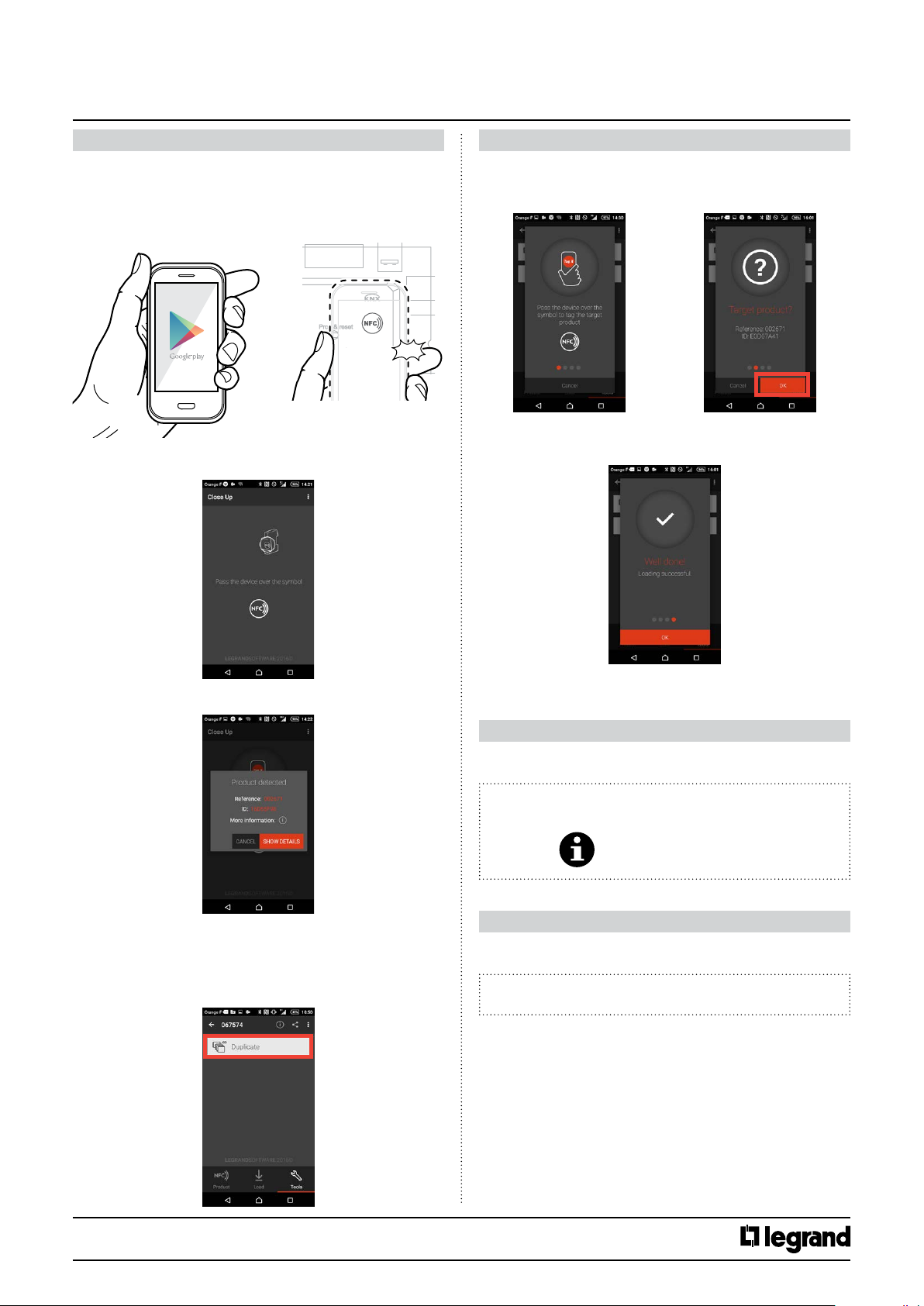
8. NFC SETTING
The different function parameters can be set using NFC after
downloading the “Close Up” app from Google Play or legrandoc.com
with an NFC compatible Android mobile device.
The device does not need be connected to the mains during parameter
setting.
BEEP
1. Hold the mobile device close to the NFC symbol.
8. NFC SETTING continued
• Copying a device (not connected to the mains) (continued)
2. Then tag the target device (where the configuration is to be imported)
and confirm the target device with OK.
3. Hold the mobile away from the device and then bring it closer to load
the configuration, which completes the action.
2. The scanned device's data is displayed.
• Copying a device (not connected to the mains)
This function is used to copy the configuration from one device to another.
1. After selecting “Tools”, choose “Duplicate”.
9. STANDARDS AND APPROVALS
• Complies with standard IEC 60 669.2.1
• Marking: KNX EIB, CE
Note:
All technical information is available at
www.legrandoc.com
10. MAINTENANCE
Clean the surface with a cloth.
Do not use acetone, tar-removing cleaning agents or trichloroethylene.
Caution:
Always test before using other special cleaning products.
Technical data sheet: S000090563EN-2 Updated: 07/06/2016 Created : 27/07/2015
CONTENTS
6/38
Page 7
KNX
Arteor 4 and 6 touches glass controls
11. COMMUNICATION OBJECTS DESCRIPTION
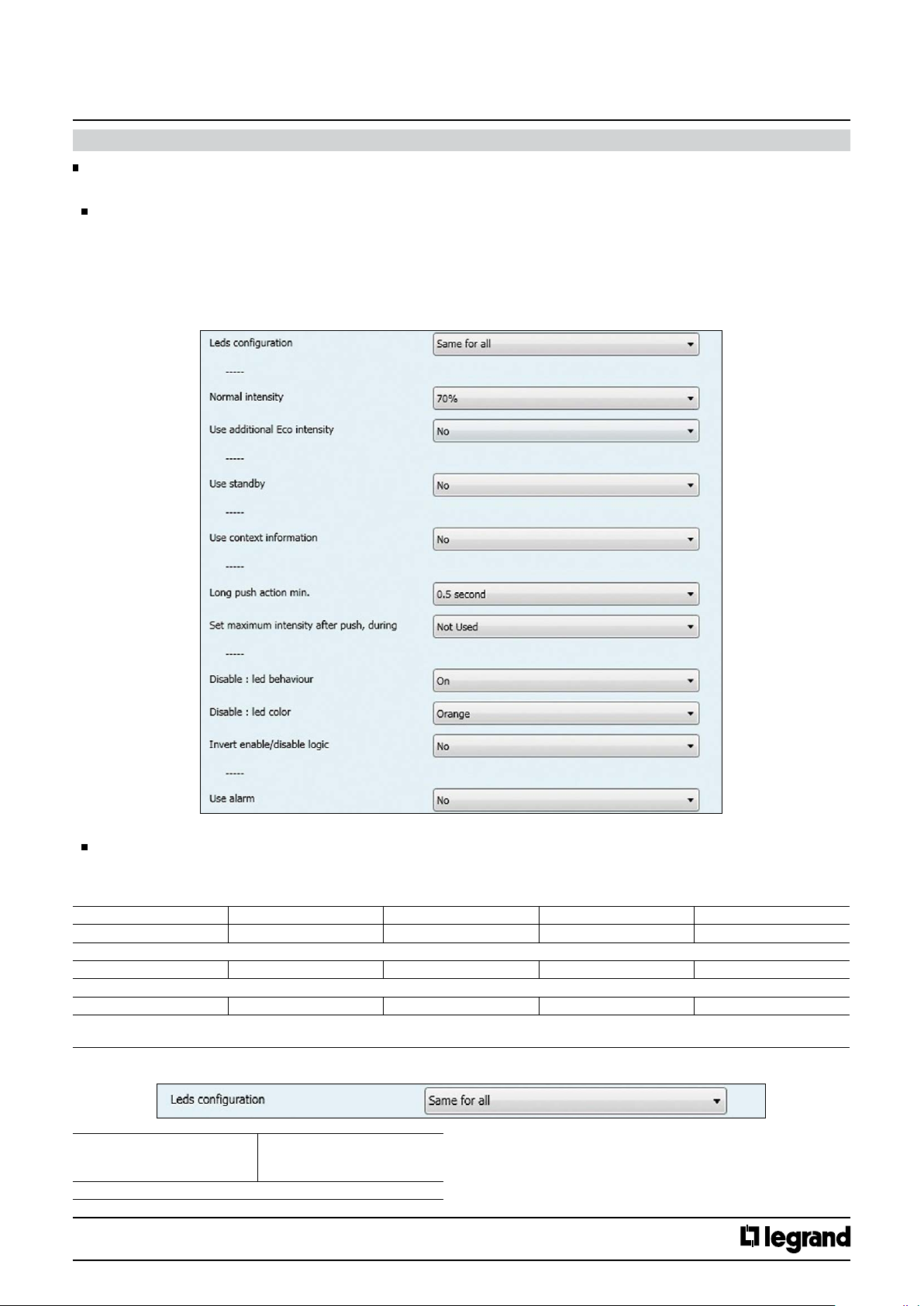
11.1 General configuration
KNX controls can be configured via ETS software (versions ETS 3 and 4).
General Parameters
This screen contains the main command parameters, common to all the channels:
• LED settings
• Standby mode settings
• Contextual information settings
• Long push settings
• Disable object settings
• Alarm settings
Cat. No(s).: 5 735 04/05
5 735 12/13
Communication Objects
Activation mode 1, 2.
Mode 1 : default operation
Mode 2 : conditional operation
No. Object name Function Size Flags
87 Mode Active mode 1 1.010 DP_Start (1 bit ) CW
Mode 1 activation telegrams are sent via the group address linked with this object
88 Mode Active mode 2 1.010 DP_Start (1 bit ) CW
Mode 2 activation telegrams are sent via the group address linked with this object
89 Mode Mode 1 (False) / 2 (True) 1.002 DP_Bool (1 bit ) CW
False : Mode 1 activation telegrams are sent via the group address linked with this object
True : Mode 2 activation telegrams are sent via the group address linked with this object
11.1.1 Leds configuration
Leds conguration Same for all
Independently
Pilot light
This parameter determines the type of conguration for the LEDs
Technical data sheet: S000090563EN-2 Updated: 07/06/2016 Created : 27/07/2015
CONTENTS
7/38
Page 8
KNX
Arteor 4 and 6 touches glass controls
11. COMMUNICATION OBJECTS DESCRIPTION (continued)
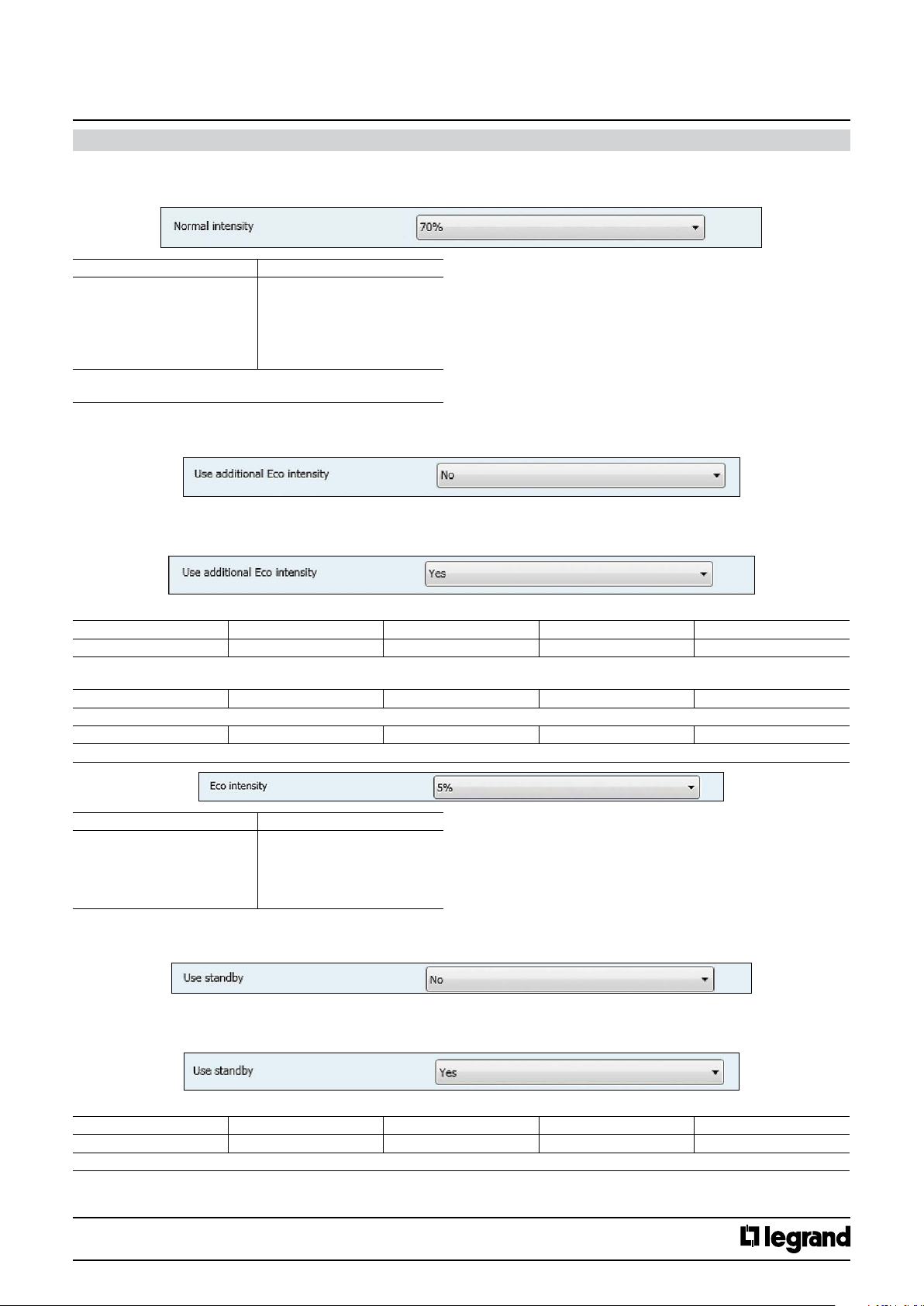
11.1.2 Normal intensity General Parameters
(Mode 1 parameters)
Parameters Setting
Normal intensity 0 %
5 %
20 %
50%
70 %
100 %
This parameter determines the level in Normal intensity.
(This value is felt not measured)
11.1.3 Use additionnal Eco intensity
Controlled by group address.
Cat. No(s).: 5 735 04/05
5 735 12/13
No
Eco is not usable, no accessible communication objects.
Yes (makes available mode eco object)
No. Object name Function Size Flags
81 Leds Eco/normal Eco (1)/normal (0) 1.002 DP_Bool (1 bit ) CW
False : Normal mode activation telegrams are sent via the group address linked with this object
True : Eco mode activation telegrams are sent via the group address linked with this object
82 Leds Eco Eco intensity 1.010 DP_Start (1 bit ) CW
Eco mode activation telegrams are sent via the group address linked with this object
83 Leds Normal Normal intensity 1.010 DP_Start (1 bit ) CW
Normal mode activation telegrams are sent via the group address linked with this object
Parameters Setting
Eco intensity 0 %
11.1.4 Use standby
Controlled by communication object.
5 %
20 %
50%
70 %
No
Standby is not usable, no accessible communication objects.
Yes (makes available the standby object)
No. Object name Function Size Flags
84 Leds standby Standby 1.010 DP_Start (1 bit ) CW
Standby mode activation telegrams are sent via the group address linked with this object
Technical data sheet: S000090563EN-2 Updated: 07/06/2016 Created : 27/07/2015
CONTENTS
8/38
Page 9
KNX
Arteor 4 and 6 touches glass controls
11. COMMUNICATION OBJECTS DESCRIPTION (continued)
When standby is active the leds intensity is set to 0% (not adjustable)
Cat. No(s).: 5 735 04/05
5 735 12/13
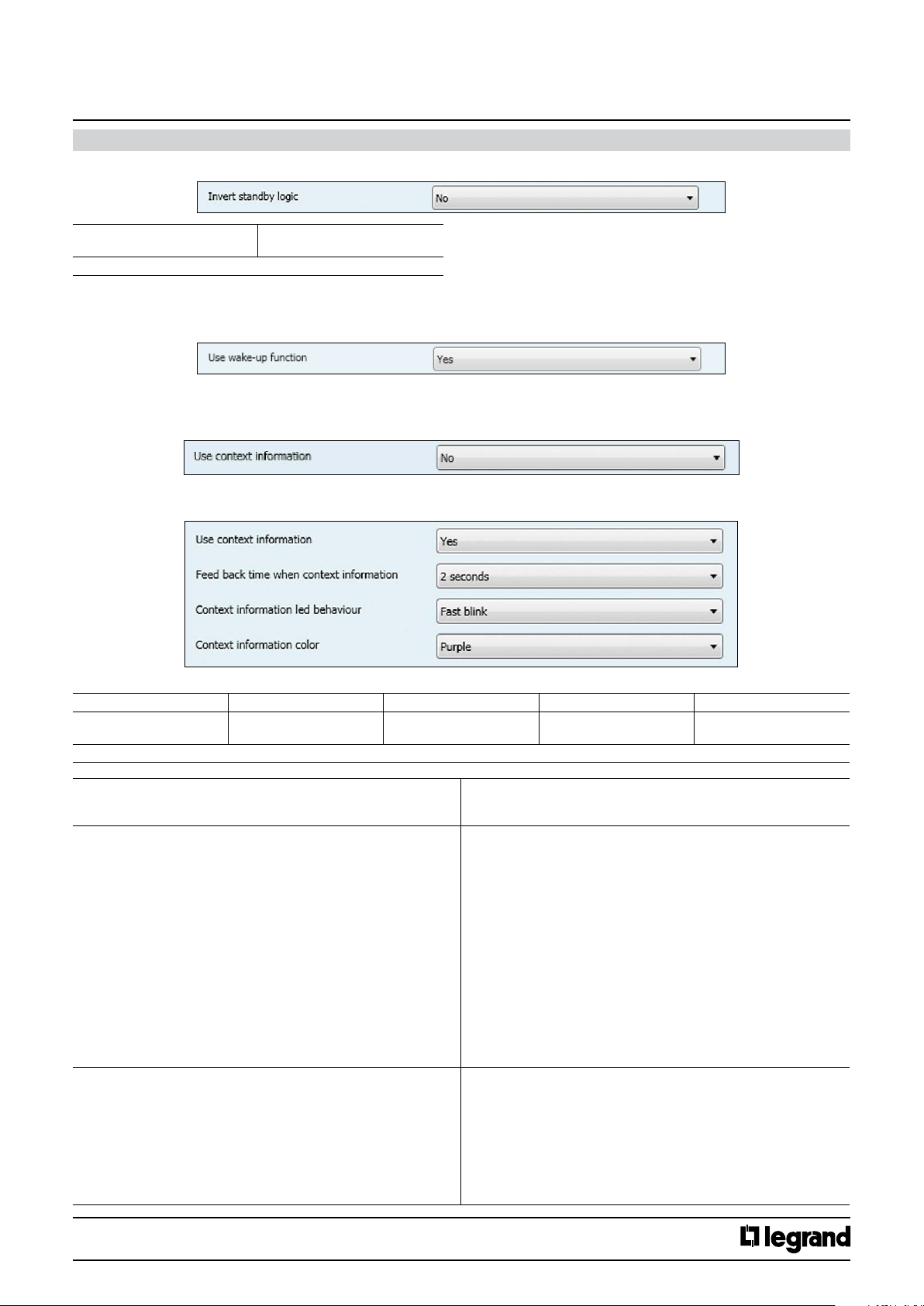
Invert standby logic No
This parameter determines the type of logic for active standby
Wake-up
With the "Wake-up" function enabled, when the product is on standby, the first press on any button will light up the LEDs. However, the action will be
sent only after the second press.
11.1.5 Use context information
The contextual information are all the feedback the system provide via the bus and displayed through the LEDs.
The contextual information are displayed each time a push-button is pressed
No
Context information is not usable, no accessible communication object.
Yes (makes available the contextual information object)
No. Object name Function Size Flags
4 pushes 73,74,75,76
6 pushes 73,74,75,76,77,78
Context info telegram are received via the group address linked with this object. They are used to inform on event when you push on channel linked.
Channel 1(2,3,4) ContextInfo 1.010 DP_Start (1 bit ) CW
Yes
These parameters determine the behaviour of the led after a push when
Parameters
the “context info is used”.
Feed back time when Context Info 500 ms
1 second
2 seconds
5 seconds
10 seconds
30 seconds
1 minute
1 min. 30s
2 min.
10 min.
15 min.
30 min.
45 min
1 h
1 h 30
Innite
Context information led behaviour O
On
Slow blink
Fast blink
Soft blink
Flash 1
Flash 2
Flash 3
Pulse
Setting
Technical data sheet: S000090563EN-2 Updated: 07/06/2016 Created : 27/07/2015
CONTENTS
9/38
Page 10
KNX
Arteor 4 and 6 touches glass controls
11. COMMUNICATION OBJECTS DESCRIPTION (continued)
Cat. No(s).: 5 735 04/05
5 735 12/13
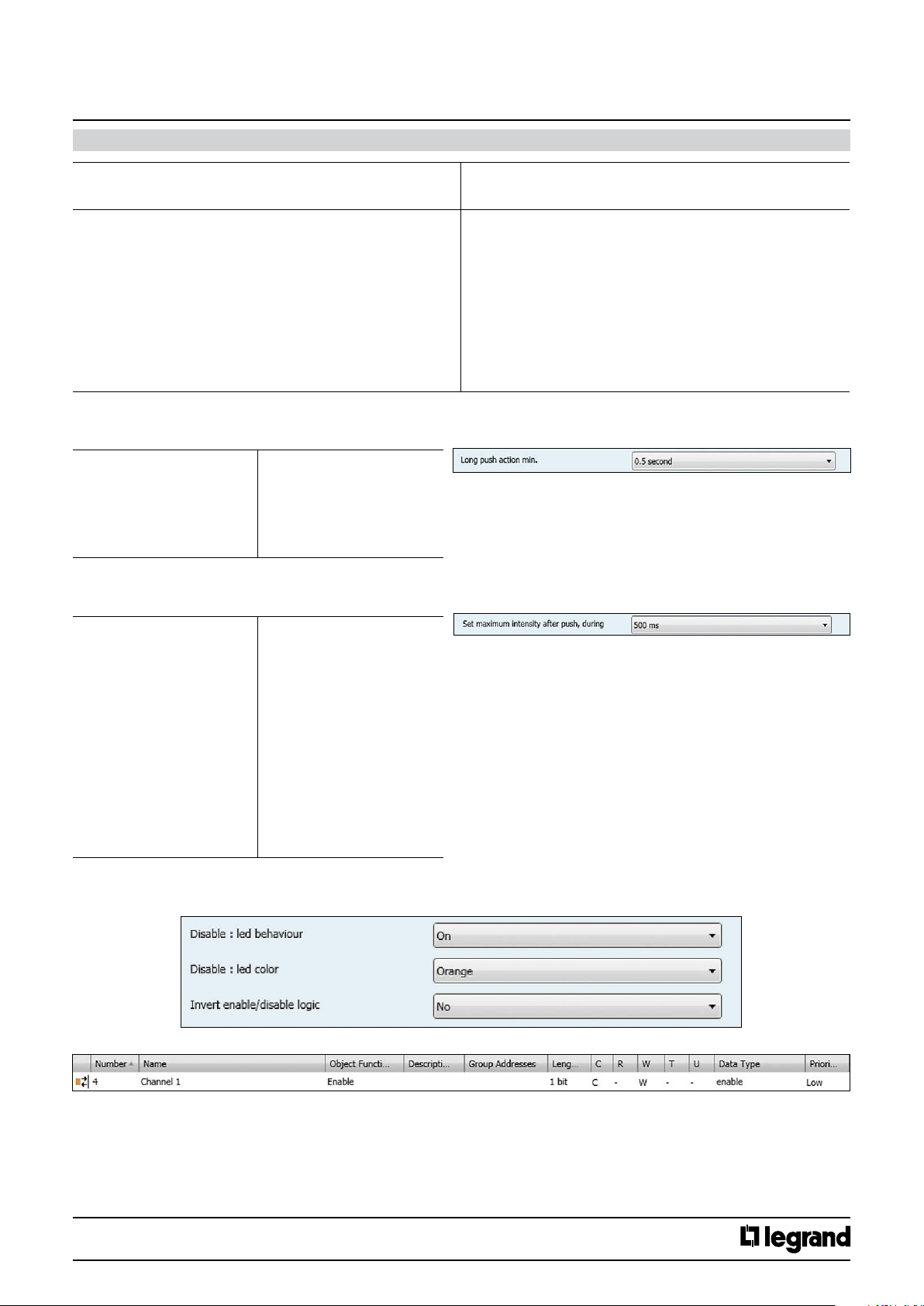
These parameters determine the behaviour of the led after a push when
the “context info is used”.
Context information color ( if Feed back time ContextInfo is used) Green (Vert)
11.1.6 Long push configuration
This parameter determines the minimum time for detecting a long push action.
Long push action min. 0.5 second
11.1.7 Set maximum intensity after push during
If selected, after a push, the intensity of the led is raised to 100% during the set time. Return to the initial value at the end of time.
Set maximum intensity after
push during :
Parameters
Blue (Bleu)
White (Blanc)
Orange
Gold (Or)
Yellow (Jaune)
Turquoise
Cyan
Light blue (Bleu)
Violet
Pink (Rose)
Purple (Pourpre)
1 second
2 seconds
3 seconds
4 seconds
5 seconds
10 seconds
Not Used
500 ms
1 second
2 seconds
5 seconds
10 seconds
30 seconds
1 minute
1 min. 30s
2 min.
10 min.
15 min.
30 min.
45 min
1 h
1 h 30
Setting
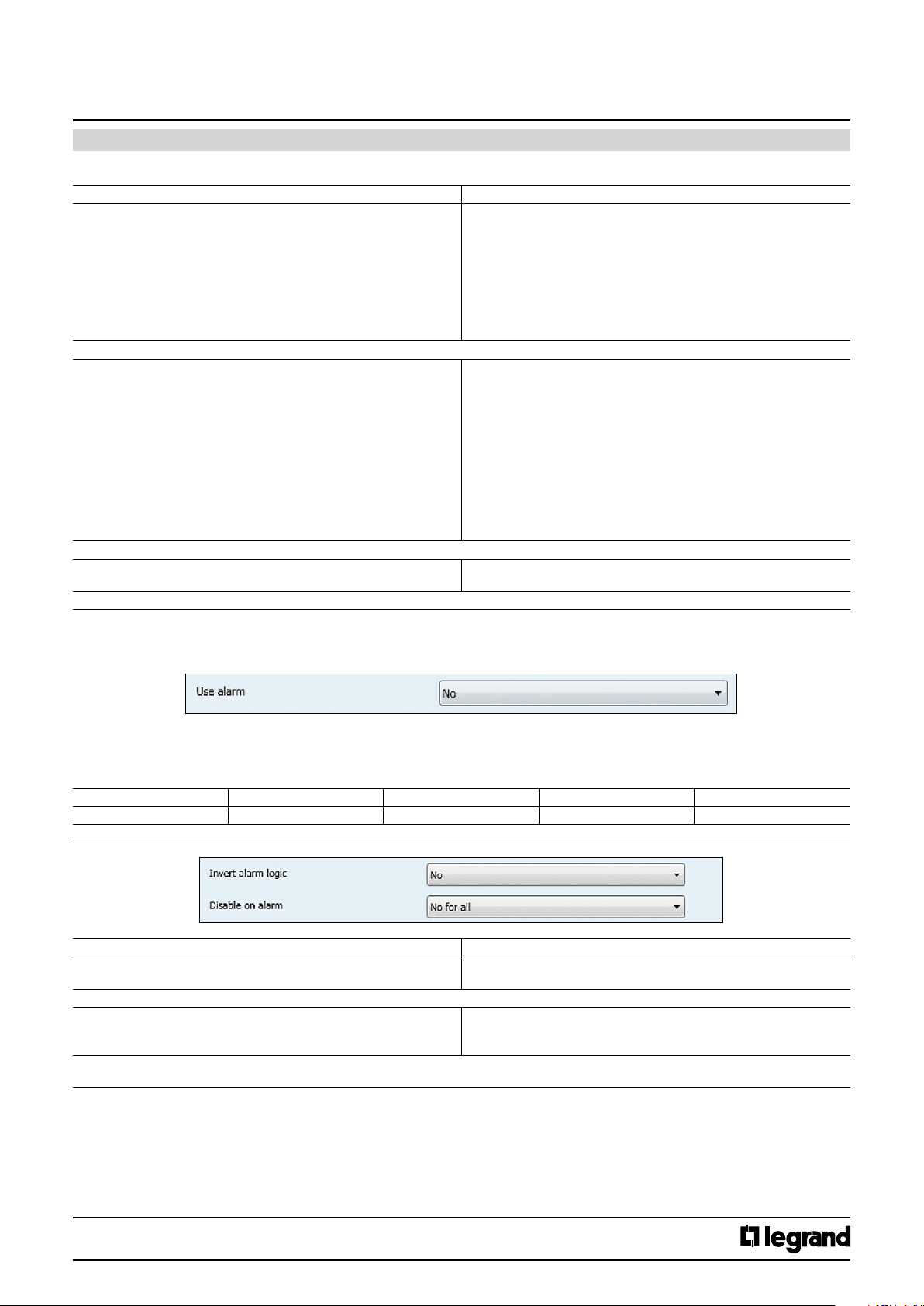
11.1.8 Led behavior on Disable status
Determine the behaviour of leds when the commands receive disable telegram.
Technical data sheet: S000090563EN-2 Updated: 07/06/2016 Created : 27/07/2015
CONTENTS
10/38
Page 11
KNX
Arteor 4 and 6 touches glass controls
11. COMMUNICATION OBJECTS DESCRIPTION (continued)
11.1.8 Led behavior on Disable status (continued)
Parameters Setting
Disable : led behaviour O
On
Slow blink
Fast blink
Soft blink
Flash 1
Flash 2
Flash 3
Pulse
The parameter determines the state of Led when a Disable telegram on Channel x is disabled.
Disable : led color Green
Blue
White
Orange
Gold
Yellow
Turquoise
Cyan
Light blue
Violet
Pink
Purple
The parameter determines the color of Led when a Disable telegram on Channel x is disabled.
Invert enable/disable logic No
Yes
This parameter determines the type of logic to active/deactive a Disable status.
Cat. No(s).: 5 735 04/05
5 735 12/13
11.1.9 Use Alarm
A message can activate in red blinking the 4 leds.
No
Alarm is not usable, no accessible communication object.
Yes (makes available the alarm communication object)
When alarm object is active all the LED blinks and the instensity is set to 100%
No. Object name Function Size Flags
86 Alarm Alarm 1.010 DP_Start (1 bit ) CW
Alarm activation telegrams are sent via the group address linked with this object
Parameters Setting
Invert alarm logic No
This parameter determines the type of logic to active/deactive an alarm
Disable on Alarm Yes for all
The parameter determines if the channels are disabled on alarm. If is it chosen “Congure
independently” it is possible to choose one by one the channel behaviour.
Yes
No for all
Congure Independatly
Technical data sheet: S000090563EN-2 Updated: 07/06/2016 Created : 27/07/2015
CONTENTS
11/38
Page 12
KNX
Arteor 4 and 6 touches glass controls
11. COMMUNICATION OBJECTS DESCRIPTION (continued)
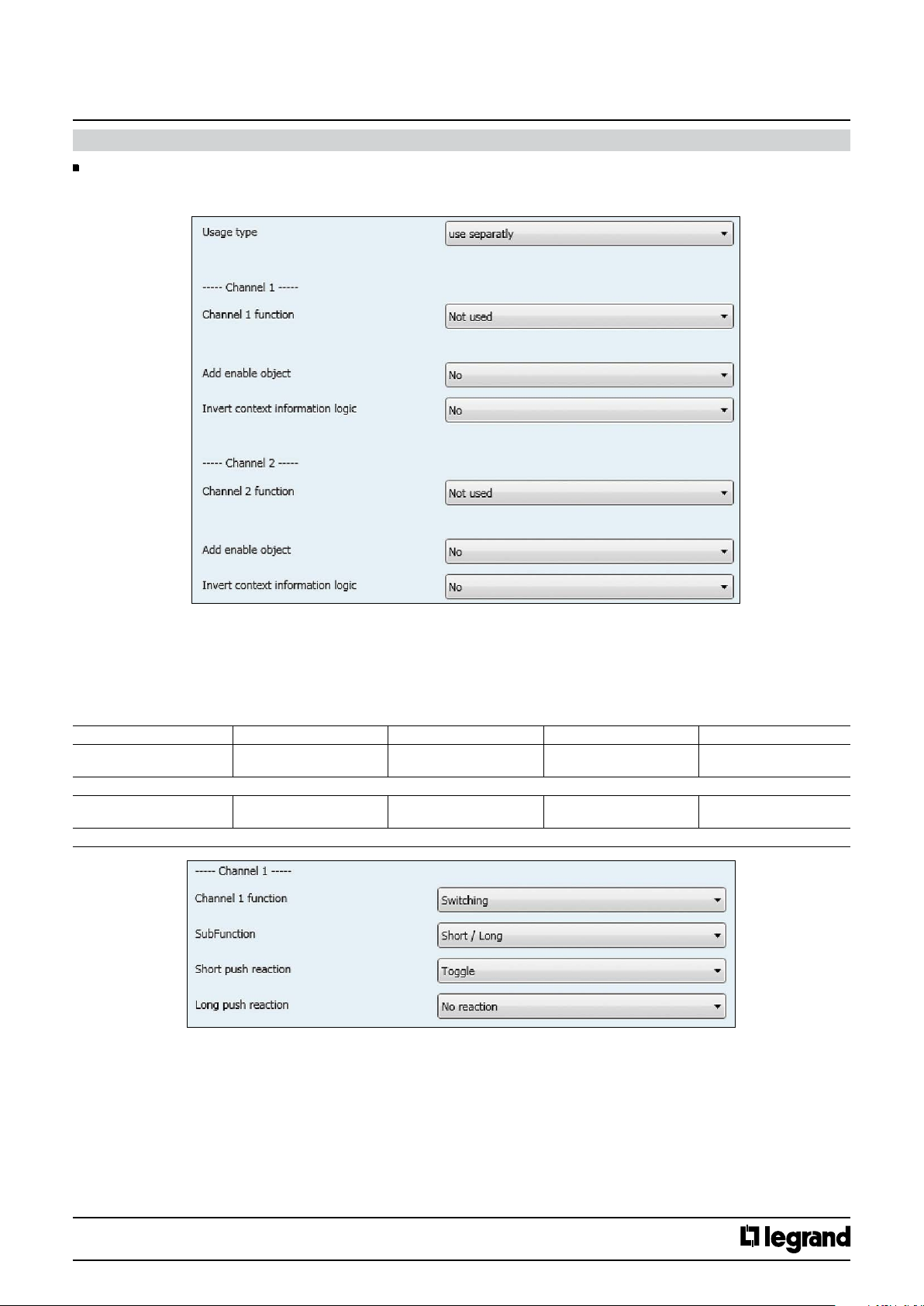
11.2 Channels configuration (1,2,3,4,5,6)
This screen allows to chose how to manage the channels and to configure their settings
Cat. No(s).: 5 735 04/05
5 735 12/13
11.2.1 Use separately
Channel X function
Not used
Channel is not usable, no accessible communication objects
11.2.1.1 Switching
No. Object name Function Size Flags
1 (10, 19, 28)
1 (10, 19, 28, 37, 46)
Switching telegrams are sent via the group address linked with this object
2 (11,20,29)
2 (11, 20, 29, 38, 47)
Switching status are received via the group address linked with this object.
Channel 1 (2,3,4)
Channel 1 (2,3,4,5,6)
Channel 1 (2,3,4)
Channel 1 (2,3,4,5,6)
Switching Status 1.01 DP_Switch (1 bit ) CW
Switching 1.001 DP_Switch (1 bit ) CWT
Technical data sheet: S000090563EN-2 Updated: 07/06/2016 Created : 27/07/2015
CONTENTS
12/38
Page 13
KNX
Arteor 4 and 6 touches glass controls
Cat. No(s).: 5 735 04/05
5 735 12/13
11. COMMUNICATION OBJECTS DESCRIPTION (continued)
11.2.1.1 Switching (cont.)
SubFunction
Short/long
Parameters Setting
Short push reaction No reaction
Here an adjustment is made to dene which switching value is written into the storage cell of the communication object and sent after short pressing
the push button related to the channel.
“No reaction”: A short push does not change the object value and also does not send a telegram.
“On”: After short push, the switching value “ON” (binary value, “1”) is transferred into the communication object and sent.
“O”: After short push, the switching value “OFF” (binary value,”0”) is transferred into the communication object and sent.
“Toggle” : After short push, the switching value stored in the communication object is inverted and the new value is sent
Long push reaction No reaction
Here an adjustment is made to dene which switching value is written into the storage cell of the communication object and sent after long pressing
the push button related to the channel.
“No reaction”: A long push does not change the object value and also does not send a telegram.
“On”: After long push, the switching value “ON” (binary value, “1”) is transferred into the communication object and sent.
“O” : After long push, the switching value “OFF” (binary value,”0”) is transferred into the communication object and sent.
“Toggle” : After long push, the switching value stored in the communication object is inverted and the new value is sent
On
O
Toggle
On
O
Toggle
Push/Release
Parameters Setting
Push reaction No reaction
Here an adjustment is made to dene which switching value is written into the storage cell of the communication object and sent after pressing the
push button related to the channel.
“No reaction”: Pushing a button action does not change the object value and also does not send a telegram.
“On”: Pressing a push-button, the switching value “ON” (binary value, “1”) is transferred into the communication object and sent.
“O”: Pressing a push-button, the switching value “OFF” (binary value,”0”) is transferred into the communication object and sent.
“Toggle” : Pressing a push-button, the switching value stored in the communication object is inverted and the new value is sent
Release reaction No reaction
Here an adjustment is made to dene which switching value is written into the storage cell of the communication object and sent after releasing the
push button related to the channel.
“No reaction”: A release of the push-button does not change the object value and also does not send a telegram.
“On”: After releasing a push-button, the switching value “ON” (binary value, “1”) is transferred into the communication object and sent.
“O” : After releasing a push-button, the switching value “OFF” (binary value,”0”) is transferred into the communication object and sent.
“Toggle” : Releasing a push-button, the switching value stored in the communication object is inverted and the new value is sent
On
O
Toggle
On
O
Toggle
Technical data sheet: S000090563EN-2 Updated: 07/06/2016 Created : 27/07/2015
CONTENTS
13/38
Page 14
KNX
Cat. No(s).: 5 735 04/05
Arteor 4 and 6 touches glass controls
11. COMMUNICATION OBJECTS DESCRIPTION (continued)
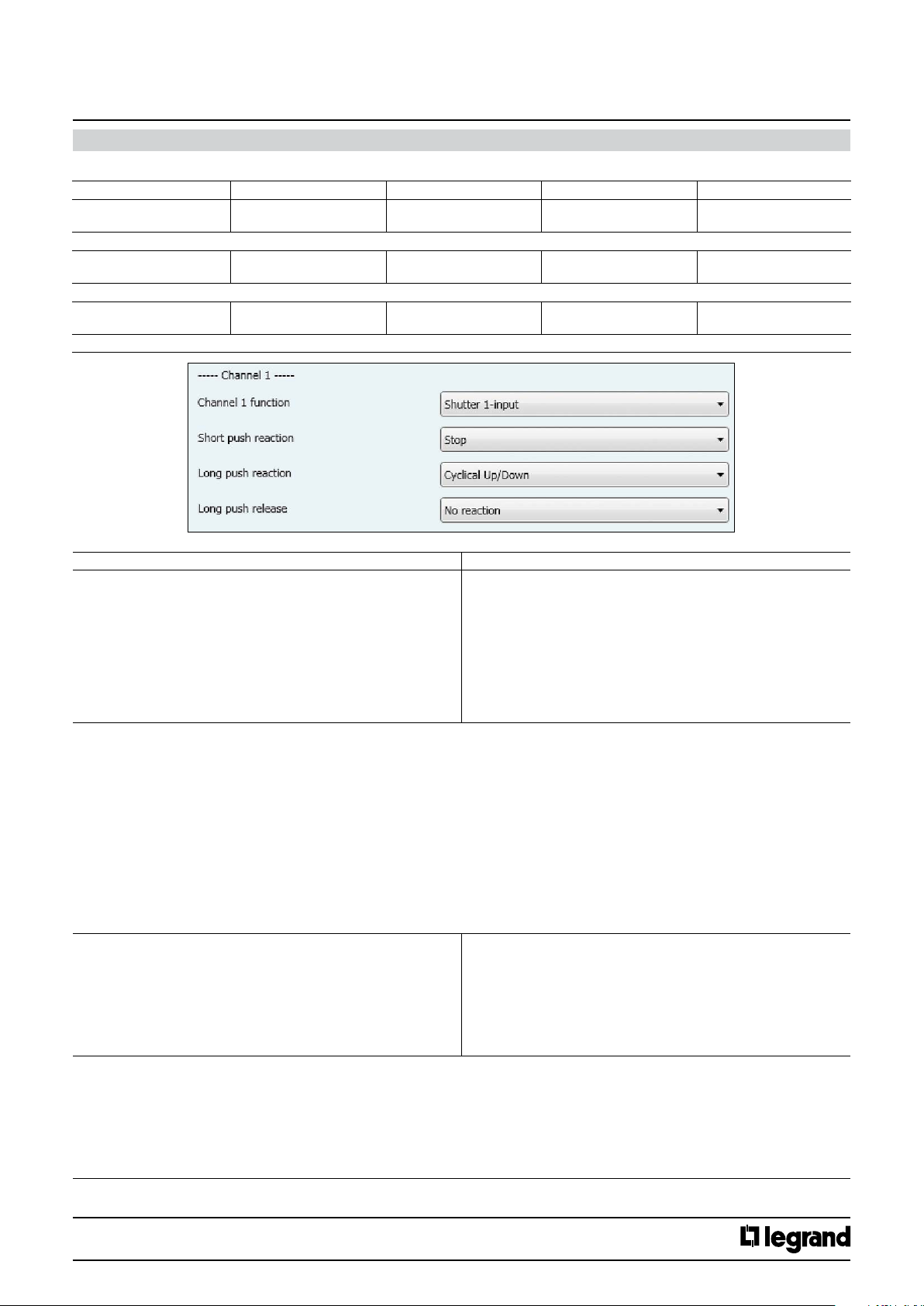
11.2.1.2 Shutter 1- input
No. Object name Function Size Flags
1 (10, 19, 28)
1 (10, 19, 28, 37, 46)
The movement commands Up/Down are sent via the address linked with this object in order to raise/lower the solar protection.
7 (16, 25, 34)
7 (16, 25, 34, 43, 52)
The command “STOP” or “Slats OPEN/CLOSE” are sent via the group address linked with this object.
6 (15, 24, 33 )
6 (15, 24, 33, 42, 51)
The shutter status telegrams are received from the shutter actuator via the group address linked with this object.
Channel 1 (2,3,4)
Channel 1 (2,3,4,5,6)
Channel 1 (2,3,4)
Channel 1 (2,3,4,5,6)
Channel 1 (2,3,4)
Channel 1 (2,3,4,5,6)
Shutter Up/Down 1.008 DP_UpDown (1 bit ) CWT
Shutter Stop - slats 1.009 DP_OpenClose (1 bit ) CWT
Shutter Status 5.001 DP_Scaling (1 Byte) CW
5 735 12/13
Parameters Setting
Short push reaction No reaction
Here an adjustment is made to dene which movement command is written into the storage cell of the communication object and sent after short
pressing the push button related to the channel.
“No reaction”: a short push does not change the object value and also does not send a telegram.
Cyclical Up / Down + stop : each short push transfers the following sequence command values into the communication object: Up, Stop, Down, Stop,
Up, Stop, Down, Stop,etc.
Up + stop : each short push transfers the following sequence command values into the communication object: Up, Stop, Up, Stop,,etc.
Down + stop : each short push transfers the following sequence command values into the communication object: Down, Stop, Down, Stop, etc.
Cyclical Up / Down: each short push transfers the following sequence command values into the communication object : Up, Down, Up,
Down,,etc.
Stop : a short push transfers into the communication object the stop command value (“1” or “0”)
Open slats: a short push transfers into the communication object the stop (open slats) command value (“0”)
Close slats: a short push transfers into the communication object the stop (close slats) command value (“1”)
Up: a short push transfers into the communication object the Up command (value “0”)
Down: a short push transfers into the communication object the Down command (value “1”)
Long push reaction No reaction
Here an adjustment is made to dene which movement command is written into the storage cell of the communication object and sent after long
pressing the push button related to the channel.
“No reaction”: a long push does not change the object value and also does not send a telegram.
Up: a long push send the Up command (value “0”)
Down: a long push sends the Down command (value “1”)
Cyclical Up / Down: each long push sends the following sequence commands: Up, Down, Up, Down,,etc.
Stop : a long push sends the stop command (value “1” or “0”)
Cyclical Open /Close slats : each long push sends the following sequence commands : Open slats, Close slats, Open slats, Close slats.
Cyclical Up / Down + stop
Up + stop
Down + stop
Cyclical Up / Down
Stop
Open slats
Close slats
Up
Down
Up
Down
Cyclical Up/Down
Stop
Cyclical Open/Close slats
Open slats
Close slats
Technical data sheet: S000090563EN-2 Updated: 07/06/2016 Created : 27/07/2015
CONTENTS
14/38
Page 15
KNX
Arteor 4 and 6 touches glass controls
Cat. No(s).: 5 735 04/05
5 735 12/13
11. COMMUNICATION OBJECTS DESCRIPTION (continued)
11.2.1.2 Shutter 1- input (continued)
Parameters Setting
Open slats: a long push action sends the (open slats) command (value “0”)
Close slats: a long push action sends the (close slats) command (value “1”)
Long push release No reaction
Here an adjustment is made to dene which value is written into the storage cell of the communication object and sent when releasing the pushbutton releated to the input after a long push.
“No reaction”: a release does not change the object value and also does not lead to the sending of a telegram.
Stop : the stop command (value “1” or “0”) is transferred into the communication object and sent
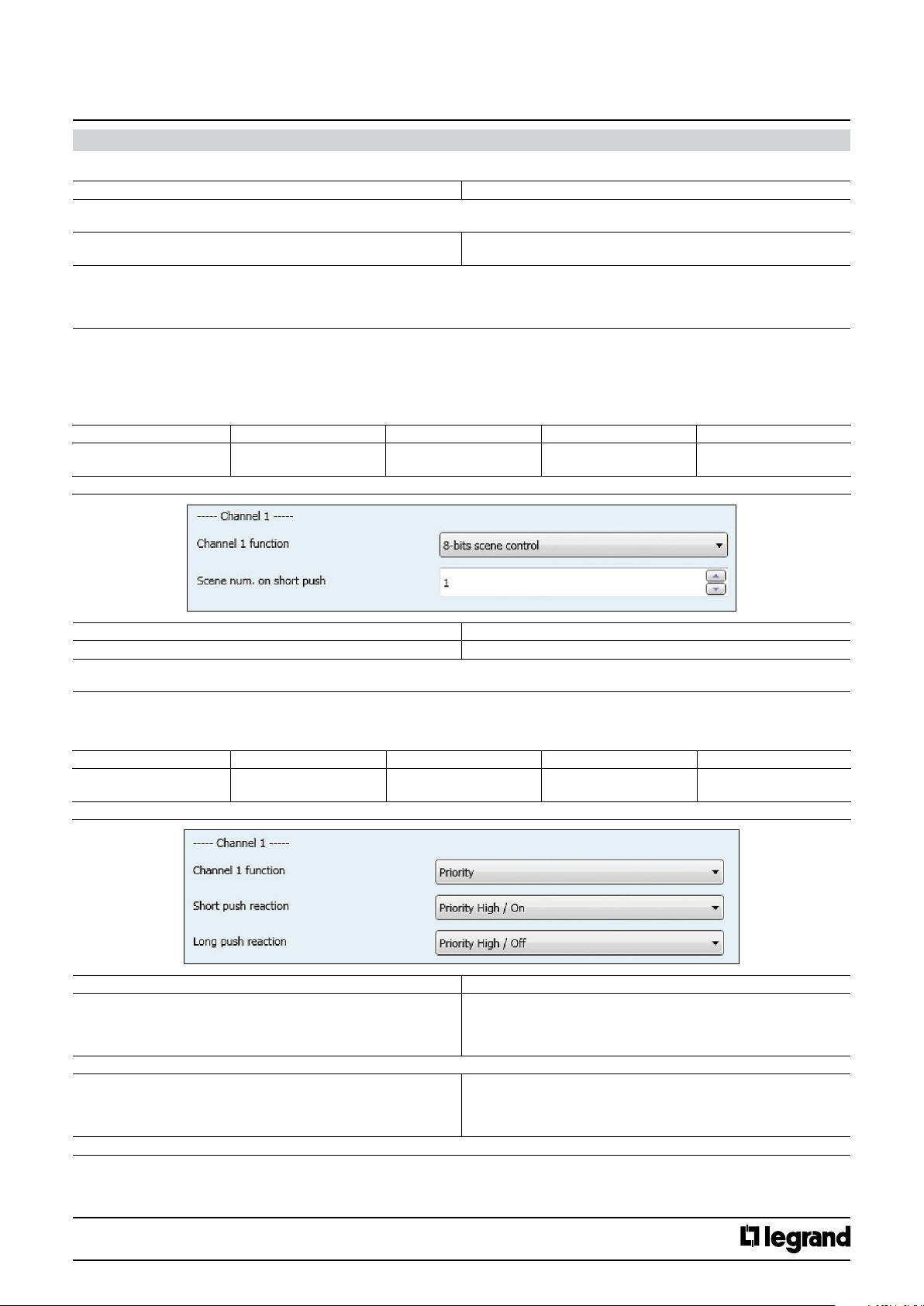
11.2.1.3 8- bits scene control
This function allows to recall/save up to 64 scene.
A short push recalls the scene and a special long push (10s) allows to save a scene; for the defined scene number all the involved actuators statuses
are saved.
No. Object name Function Size Flags
4 (13, 22, 31)
4 (13, 22, 31, 40, 49)
The telegrams to recall the scene with the congured number (1..64) are sent via the group address link with this object.
Channel 1 (2,3,4)
Channel 1 (2,3,4,5,6)
Stop
8-bits scene 17.001 DP_SceneNumber
(1 Byte)
CT
Parameters Setting
Scene num. on short push 0..64
This parameters determines which scene (1..64) has to be recalled on rising edge.
If value “0” is set, no scene is going to be recalled
11.2.1.4 Priority
This function allows to send lock/unlock commands.
No. Object name Function Size Flags
4 (13, 22, 31)
4 (13, 22, 31, 40, 49)
The telegrams with the override commands are sent via the address linked with this object
Short push reaction Priority High / On (lock On)
Here it is chosen the desired value to be sent upon a short press of the push-button related to the channel.
Long push reaction Priority High / On
Here it is chosen the desired value to be sent upon a long press of the push-button related to the channel.
Channel 1 (2,3,4)
Channel 1 (2,3,4,5,6)
Parameters Setting
Override 2bits 2.001 DP_Switch_Control
(2 bits )
Priority High / O (lock O )
Priority Low / On (Unlock On)
Priority Low / O (Unlock O)
Priority High / O
Priority Low / On
Priority Low / O
CT
Technical data sheet: S000090563EN-2 Updated: 07/06/2016 Created : 27/07/2015
CONTENTS
15/38
Page 16
KNX
Cat. No(s).: 5 735 04/05
Arteor 4 and 6 touches glass controls
11. COMMUNICATION OBJECTS DESCRIPTION (continued)
11.2.1.4 Priority (continued)
Value Behaviour
00b Low Priority , O-State
01b Low Priority, On-State
10b High Priority , O-State
11b High Priority , On-State
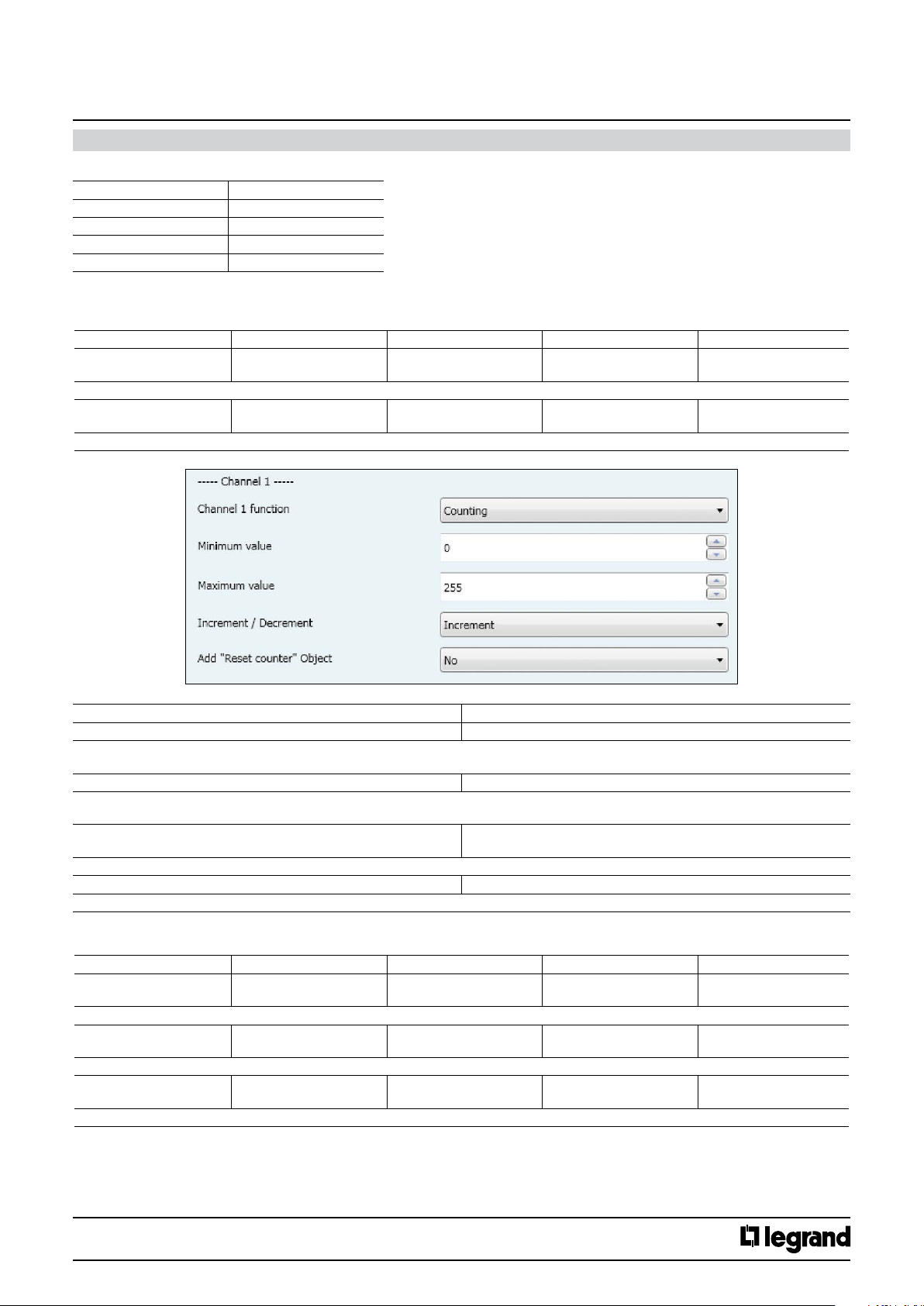
11.2.1.5 Counting
This function allows to send incremental values at each pressure.
No. Object name Function Size Flags
4 (13, 22, 31)
4 (13, 22, 31, 40, 49)
The telegrams to recall the scene with the congured number (1..64) are sent via the group address link with this object.
2 (11, 20, 29)
2 (11, 20, 29, 38, 47)
If a telegram linked with this object is received, then the counter value is reset to the minimum value set by the “minimum value” parameter.
Channel 1 (2,3,4)
Channel 1 (2,3,4,5,6)
Channel 1 (2,3,4)
Channel 1 (2,3,4,5,6)
Counting 17.001 DP_SceneNumber
(1 Byte)
Reset Counter 1.015 DP_Reset
(1 bit )
CT
CW
5 735 12/13
Parameters Setting
Minimum value 0..255, 0
An adjustment is made via this parameter to dene the minimum counter value.
In case of “decrement” value of “Increment decrement” parameter, the next counter value is set to the maximum.
Maximum value 0..255, 255
An adjustment is made via this parameter to dene the maximum counter value
In case of “increment” value of “Increment decrement” parameter, the next counter value is set to the minimum.
Increment / Decrement Increment
Here an adjustment is made as to whether the counter value is to be increased by value 1 or decreased by the value 1 after each rising edge.
Add “Reset counter” Object Yes / No
This parameter determines if the “Reset Counter” object is enabled or not.
11.2.1.6 Dimming
No. Object name Function Size Flags
1 (10, 19, 28)
6 pushes 1 (10, 19, 28, 37, 46)
Switching telegrams are sent via the group address linked with this object.
2 (11, 20, 29)
2 (11, 20, 29, 38, 47)
Dimming telegrams are sent via the group address linked with this object.
6 (15, 24, 33)
6 (15, 24, 33, 42, 51)
Dimming status telegrams are received via the group address linked with this object.
Channel 1 (2,3,4)
Channel 1 (2,3,4,5,6)
Channel 1 (2,3,4)
Channel 1 (2,3,4,5,6)
Channel 1 (2,3,4)
Channel 1 (2,3,4,5,6)
Decrement
Switching 1.01 DP_Switch (1bit) CWT
Dimming 3.007 DP_Control_Dimming
(4 bit)
Value Status 5.001 DP_Scaling (1 Byte) CW
CT
Technical data sheet: S000090563EN-2 Updated: 07/06/2016 Created : 27/07/2015
CONTENTS
16/38
Page 17
KNX
Arteor 4 and 6 touches glass controls
Cat. No(s).: 5 735 04/05
5 735 12/13
11. COMMUNICATION OBJECTS DESCRIPTION (continued)
11.2.1.6 Dimming (continued)
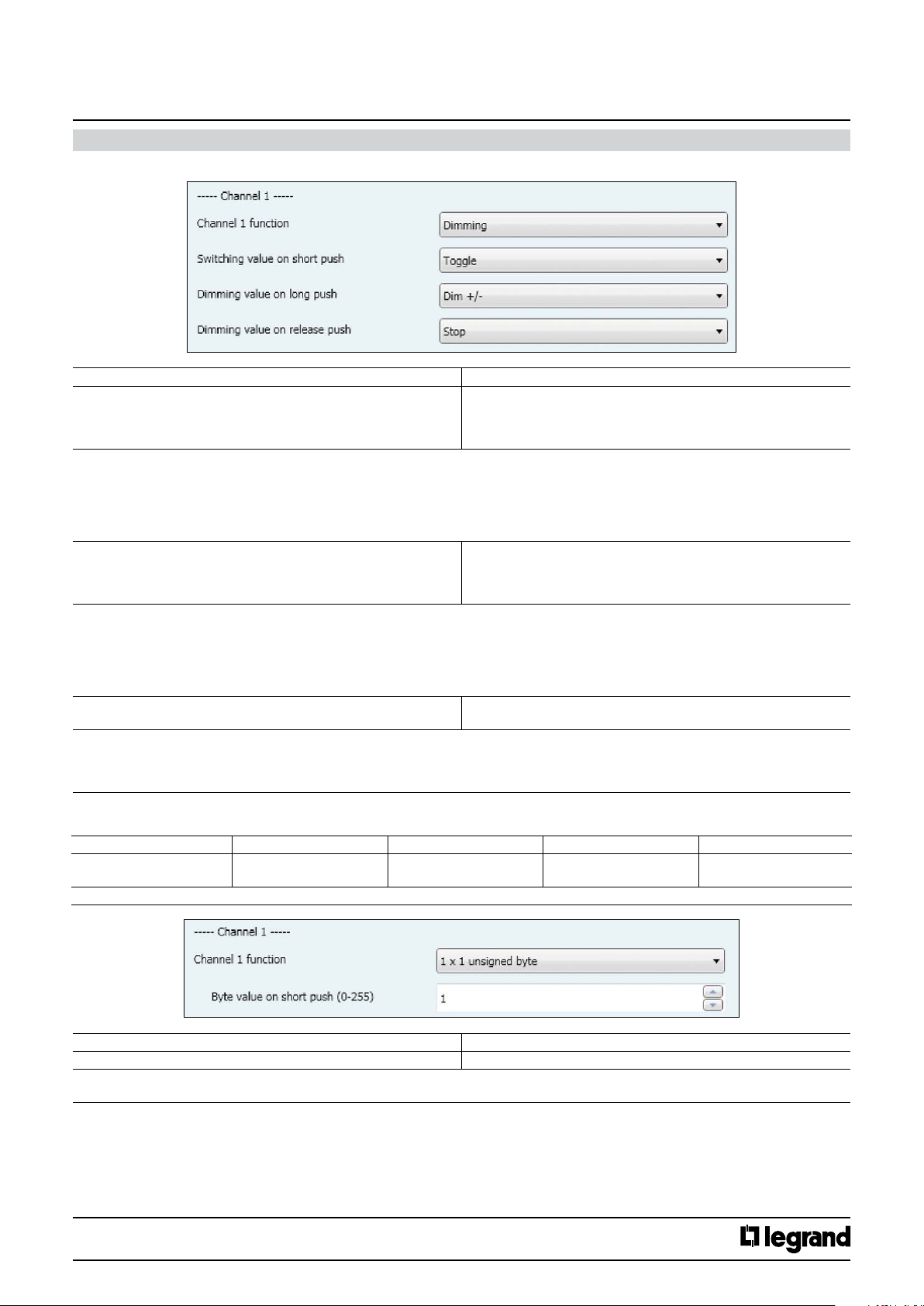
Parameters Setting
Switching value on short push No reaction
Here an adjustment is made to dene which switching value is written into the storage cell of the communication object and sent after short
pressing the push button related to the channel.
“No reaction”: A short push button action does not change the object value and also does not send a telegram.
“On”: After a short push, the switching value “ON” (binary value, “1”) is transferred into the communication object and sent.
“O”: After a short push, the switching value “OFF” (binary value,”0”) is transferred into the communication object and sent.
“Toggle” : After a short push, the switching value stored in the communication object is inverted and the new value is sent.
Dimming value on long push Dim +/-
Here an adjustment is made to dene which dimming value is written into the storage cell of the communication object and sent after long
pressing the push button related to the channel.
“No reaction”: A long push button action does not change the object value and also does send a telegram.
“Dim+/-”: After a long push, the dimming value stored in the communication object is inverted and the new value is sent
“Dim +” After a long push, the dimming value “Increase 100%” is transferred into the communication object and sent.
“Dim -” : After a long push, the dimming value “Decrease 100%” is transferred into the communication object and sent.
Dimming value on release push No reaction
Here an adjustment is made to dene which dimming value is written into the storage cell of the communication object and sent after a long push
release of the push button related to the Channel.
“No reaction”: a release after a long push does not change the object value and also does not send a telegram.
“Stop”: When the push button is released after a long push, the dimming value “Stop” is transferred into the communication object and sent.
On
O
Toggle
Dim +
Dim –
No reaction
Stop
11.2.1.7 1 x 1 unsigned byte
No. Object name Function Size Flags
4 (13, 22, 31)
4 (13, 22, 31, 40, 49)
The telegrams with the unsigned value are sent via the group address linked with this object
Byte value on short push (0-255) 0..255, 1
Here an adjustment is made to dene which unsigned 8 bits value is written into the storage cell of the communication object and sent after a rising
edge in the signal status at the channel (input). The rising edge corresponds to a change in the signal status at the Channel from logical “0” to “1”.
Technical data sheet: S000090563EN-2 Updated: 07/06/2016 Created : 27/07/2015
Channel 1 (2,3,4)
Channel 1 (2,3,4,5,6)
Parameters Setting
Unsigned Value 5.010 DP_Value_1_Ucount
(1 Byte)
CT
CONTENTS
17/38
Page 18
KNX
Arteor 4 and 6 touches glass controls
Cat. No(s).: 5 735 04/05
5 735 12/13
11. COMMUNICATION OBJECTS DESCRIPTION (continued)
11.2.1.8 2 x 1 unsigned byte
No. Object name Function Size Flags
4 (13, 22, 31)
4 (13, 22, 31, 40, 49)
The telegrams with the unsigned value are sent via the group address linked with this object
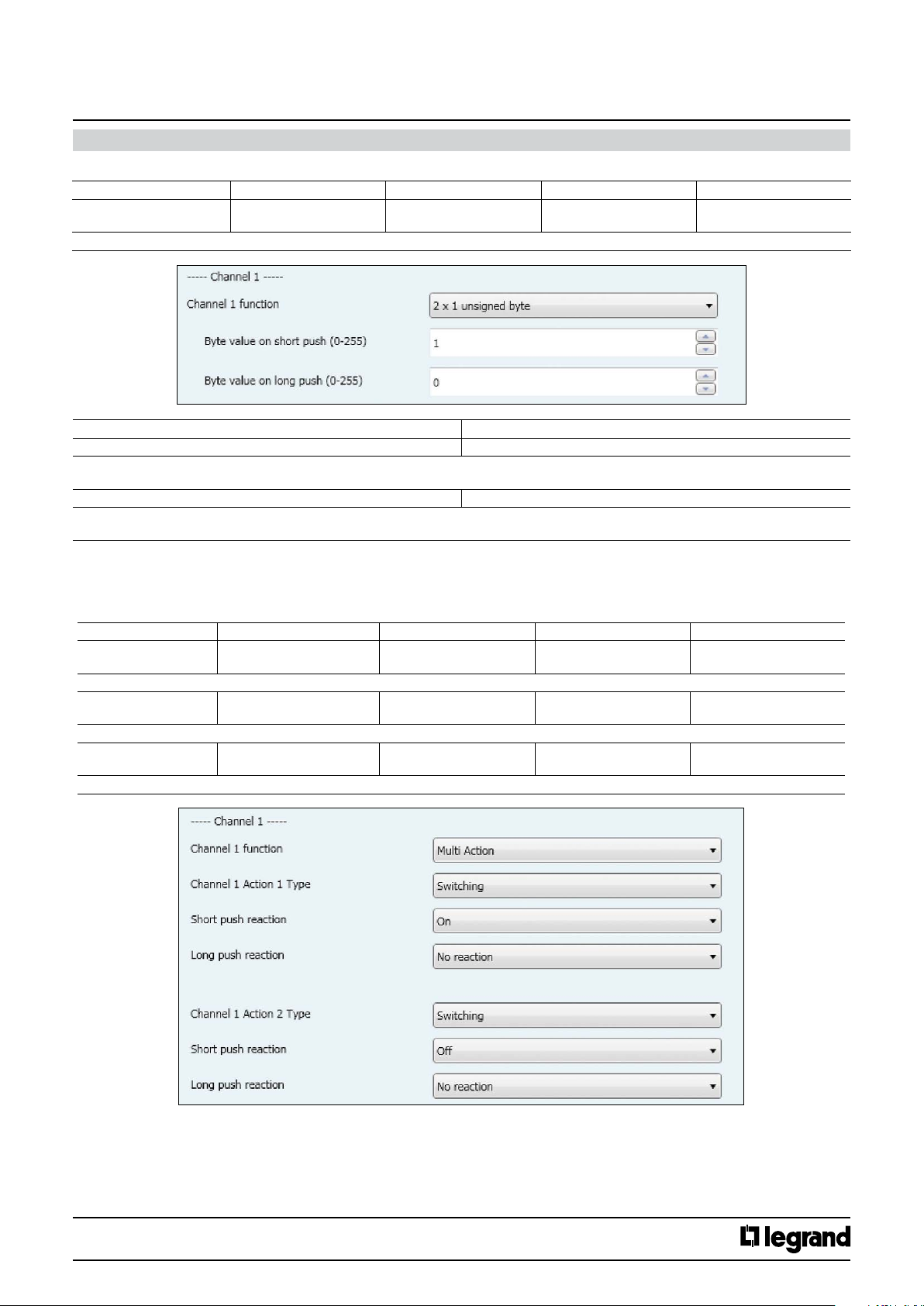
Byte value on short push (0-255) 0..255, 1
Here an adjustment is made to dene which unsigned-8 bits value is written into the storage cell of the communication object and sent after short
pressing of the push button attached to the channel.
Byte value on short push (0-255) 0..255, 0
Here an adjustment is made to dene which unsigned-8 value is written into the storage cell of the communication object and sent after long
pressing of the push button attached to the input.
Channel 1 (2,3,4)
Channel 1 (2,3,4,5,6)
Parameters Setting
Unsigned Value 5.010 DP_Value_1_Ucount
(1 Byte)
CT
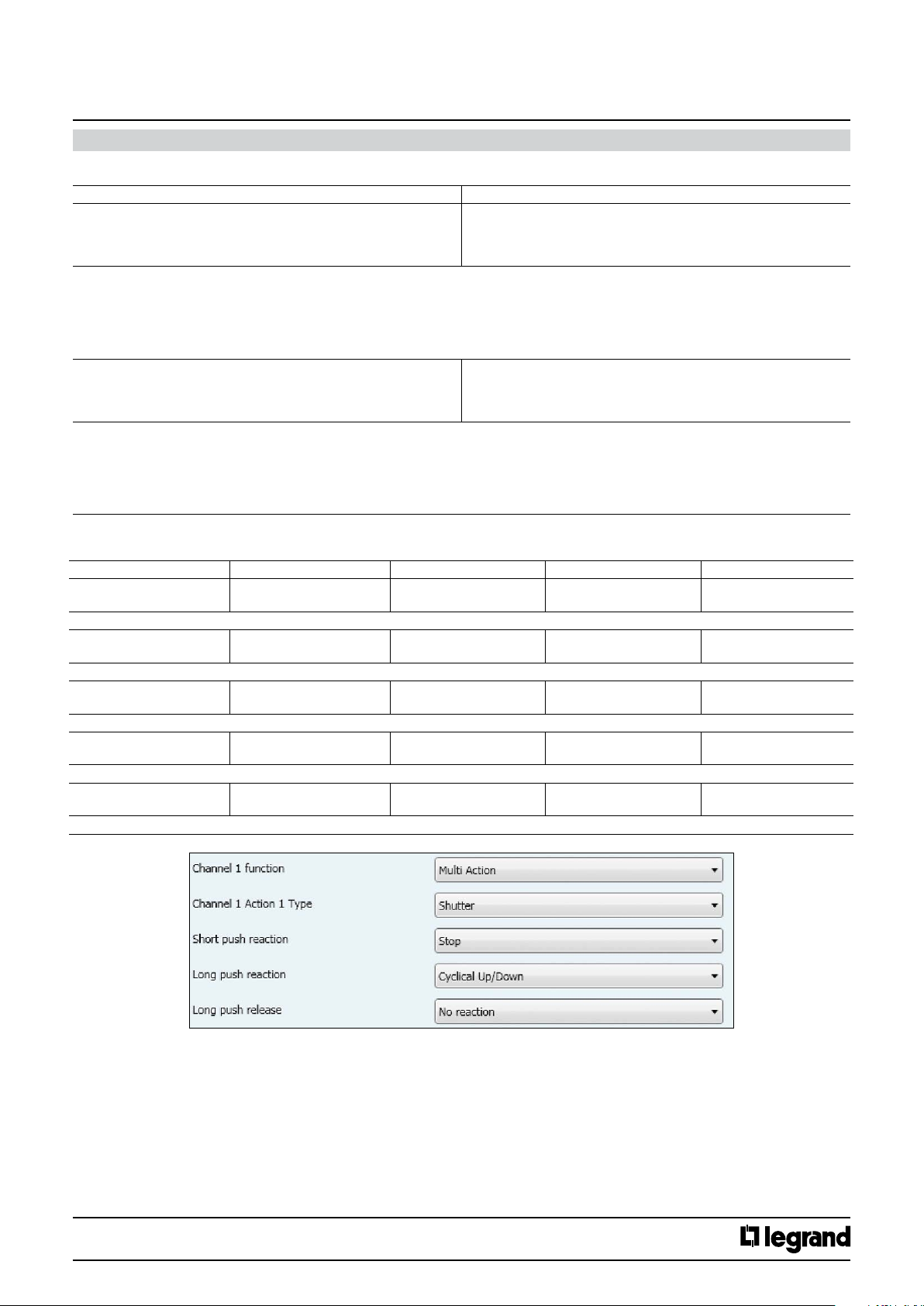
11.2.1.9 Multi action
This function allows to send two telegrams with a single pressure (Channel X and Channel X Action 2).
Switching:
No. Object name Function Size Flags
1 (10, 19, 28)
1 (10, 19, 28, 37, 46)
Switching telegrams are sent via the group address linked with this object
2 (11, 20, 29)
2 (11, 20, 29, 38, 47)
Switching status are received via the group address linked with this object.
8 (17, 26, 35)
8 (17, 26, 35, 44, 53)
Switching telegrams are sent via the group address linked with this object
Channel 1 (2,3,4) Action 1
Channel 1 (2,3,4,5,6) Action 1
Channel 1 (2,3,4) Action 1
Channel 1 (2,3,4,5,6) Action 1
Channel 1 (2,3,4) Action 2
Channel 1 (2,3,4,5,6) Action 2
Switching 1.01 DP_Switch (1 bit) CWT
Switching Status 1.01 DP_Switch (1 bit) CW
Switching 1.01 DP_Switch (1 bit) CWT
Technical data sheet: S000090563EN-2 Updated: 07/06/2016 Created : 27/07/2015
CONTENTS
18/38
Page 19
KNX
Arteor 4 and 6 touches glass controls
Cat. No(s).: 5 735 04/05
5 735 12/13
11. COMMUNICATION OBJECTS DESCRIPTION (continued)
11.2.1.9 Multi action (continued)
Parameters Setting
Short push reaction No reaction
Here an adjustment is made to dene which switching value is written into the storage cell of the communication object and sent after short pressing
the push button related to the channel.
“No reaction”: A short push does not change the object value and also does not send a telegram.
“On”: After a short push, the switching value “ON” (binary value, “1”) is transferred into the communication object and sent.
“O”: After a short push, the switching value “OFF” (binary value,”0”) is transferred into the communication object and sent.
“Toggle” : After a short push, the switching value stored in the communication object is inverted and the new value is sent
Long push reaction No reaction
Here an adjustment is made to dene which switching value is written into the storage cell of the communication object and sent after a long pressing the push button related to the channel.
“No reaction”: A long push does not change the object value and also does not send a telegram.
“On”: After a long push, the switching value “ON” (binary value, “1”) is transferred into the communication object and sent.
“O” : After a long push, the switching value “OFF” (binary value,”0”) is transferred into the communication object and sent.
“Toggle” : After a long push, the switching value stored in the communication object is inverted and the new value is sent
On
O
Toggle
On
O
Toggle
Shutter:
No. Object name Function Size Flags
1 (10, 19, 28)
1 (10, 19, 28, 37, 46)
The movement commands Up/Down are sent via the address linked with this object in order to raise/lower the solar protection.
7 (16, 25, 34)
7 (16, 25, 34, 43, 52)
The command “STOP” or “Slats OPEN/CLOSE” are sent via the group address linked with this object.
6 (15, 24, 33 )
6 (15, 24, 33, 42, 51)
The shutter status telegrams are received from the shutter actuator via the group address linked with this object.
8 (17, 26, 35 )
8 (17, 26, 35, 44, 53)
The movement commands Up/Down are sent via the address linked with this object in order to raise/lower the solar protection.
9 (18, 27, 36)
9 (18, 27, 36, 45, 54)
The command “STOP” or “Slats OPEN/CLOSE” are sent via the group address linked with this object.
Channel 1 (2,3,4) Action 1
Channel 1 (2,3,4,5,6) Action 1
Channel 1 (2,3,4) Action 1
Channel 1 (2,3,4,5,6) Action 1
Channel 1 (2,3,4) Action 1
Channel 1 (2,3,4,5,6) Action 1
Channel 1 (2,3,4) Action 2
Channel 1 (2,3,4,5,6) Action 2
Channel 1 (2,3,4) Action2
Channel 1 (2,3,4,5,6) Action 2
Shutter Up/Down 1.008 DP_UpDown (1 bit) CWT
Shutter Stop - slats 1.009 DP_OpenClose (1 bit) CWT
Shutter Status 5.001 DP_Scaling (1 Byte) CW
Shutter Up/Down 1.008 DP_UpDown (1 bit) CWT
Shutter Stop - slats 1.009 DP_OpenClose (1 bit) CWT
Technical data sheet: S000090563EN-2 Updated: 07/06/2016 Created : 27/07/2015
CONTENTS
19/38
Page 20
KNX
Arteor 4 and 6 touches glass controls
Cat. No(s).: 5 735 04/05
5 735 12/13
11. COMMUNICATION OBJECTS DESCRIPTION (continued)
11.2.1.9 Multi action (continued)
Shutter (continued)
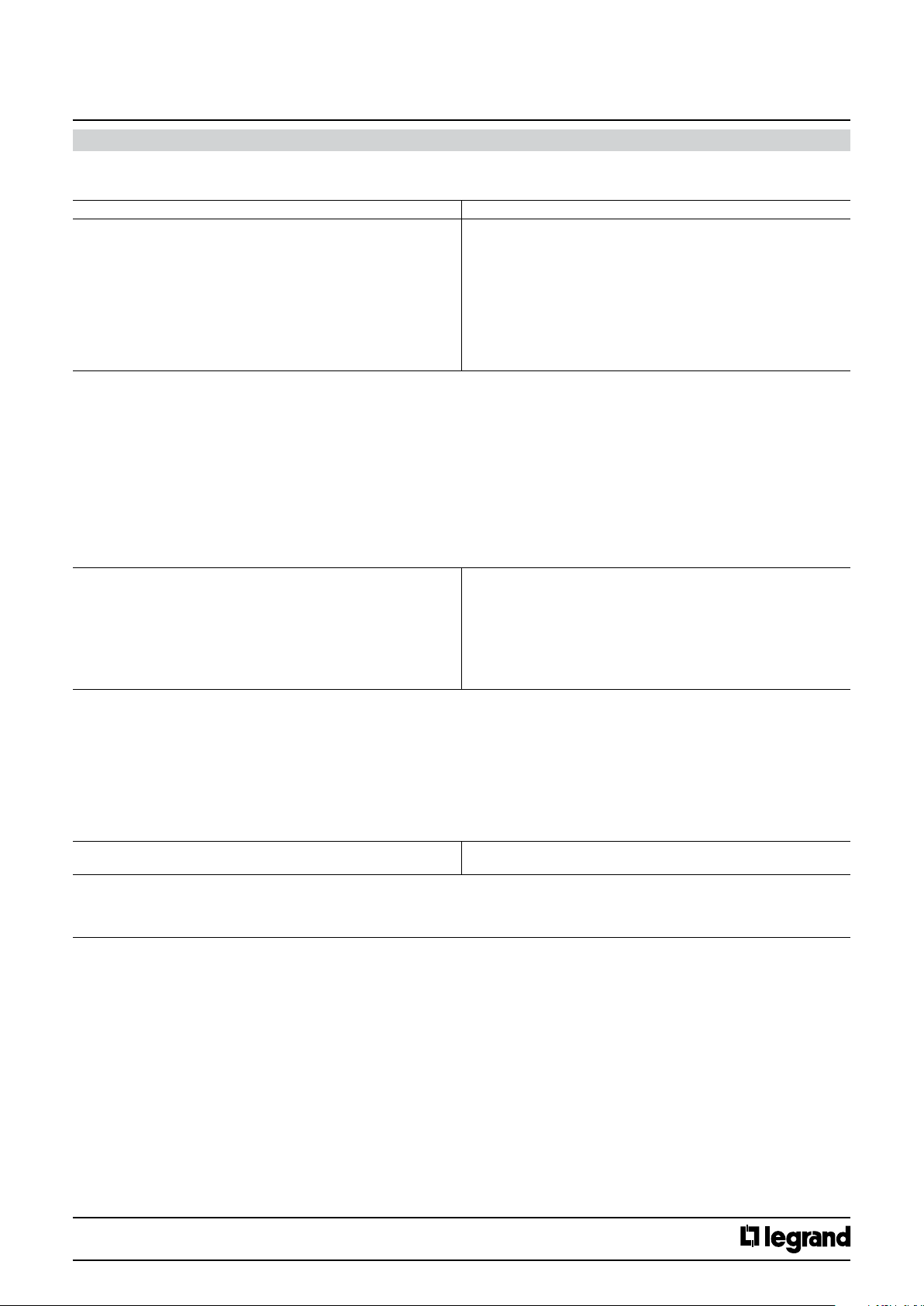
Parameters Setting
Short push reaction No reaction
Here an adjustment is made to dene which movement command is written into the storage cell of the communication object and sent after short
pressing the push button related to the channel.
“No reaction”: action does not change the object value and also does not send a telegram.
Cyclical Up / Down + stop : each short push transfers the following sequence command values into the communication object: Up, Stop, Down, Stop,
Up, Stop, Down, Stop,etc.
Up + stop : each short push transfers the following sequence command values into the communication object: Up, Stop, Up, Stop,,etc.
Down + stop : each short push transfers the following sequence command values into the communication object: Down, Stop, Down, Stop,,etc.
Cyclical Up / Down: each short push transfers the following sequence command values into the communication object : Up, Down, Up, Down,,etc.
Stop : a short push transfers into the communication object the stop command value (“1” or “0”)
Open slats: a short push transfers into the communication object the stop (open slats) command value (“0”)
Close slats: a short push transfers into the communication object the stop (close slats) command value (“1”)
Up: a short push transfers into the communication object the Up command (value “0”)
Down: a short push transfers into the communication object the Down command (value “1”)
Long push reaction No reaction
Here an adjustment is made to dene which movement command is written into the storage cell of the communication object and sent after long
pressing the push button related to the channel.
“No reaction”: action does not change the object value and also does not send a telegram.
Up: a long push action send is transferred into the communication object the Up command (value “0”)
Down: a long push action send the Down command (value “1”)
Cyclical Up / Down: each short push send the following sequence commands: Up, Down, Up, Down,,etc.
Stop : a long push action send the stop command (value “1” or “0”)
Cyclical Open /Close slats : each short push send the following sequence commands : Open slats, Close slats, Open slats, Close slats
Open slats: a long push action send is transferred into the communication object the stop (open slats) command (value “0”)
Close slats: a long push action send is transferred into the communication object the stop (close slats) command (value “1”)
Long push release No reaction
Here an adjustment is made to dene which value is written into the storage cell of the communication object and sent after a long press release of
the push button related to the Channel.
“No reaction”: action does not change the object value and also does not send a telegram.
Stop : the stop command (value “1” or “0”) is transferred into the communication object and sent.
Cyclical Up / Down + stop
Up + stop
Down + stop
Cyclical Up / Down
Stop
Open slats
Close slats
Up
Down
Up
Down
Cyclical Up/Down
Stop
Cyclical Open/Close slats
Open slats
Close slats
Stop
Technical data sheet: S000090563EN-2 Updated: 07/06/2016 Created : 27/07/2015
CONTENTS
20/38
Page 21
KNX
Arteor 4 and 6 touches glass controls
Cat. No(s).: 5 735 04/05
5 735 12/13
11. COMMUNICATION OBJECTS DESCRIPTION (continued)
11.2.1.9 Multi action (continued)
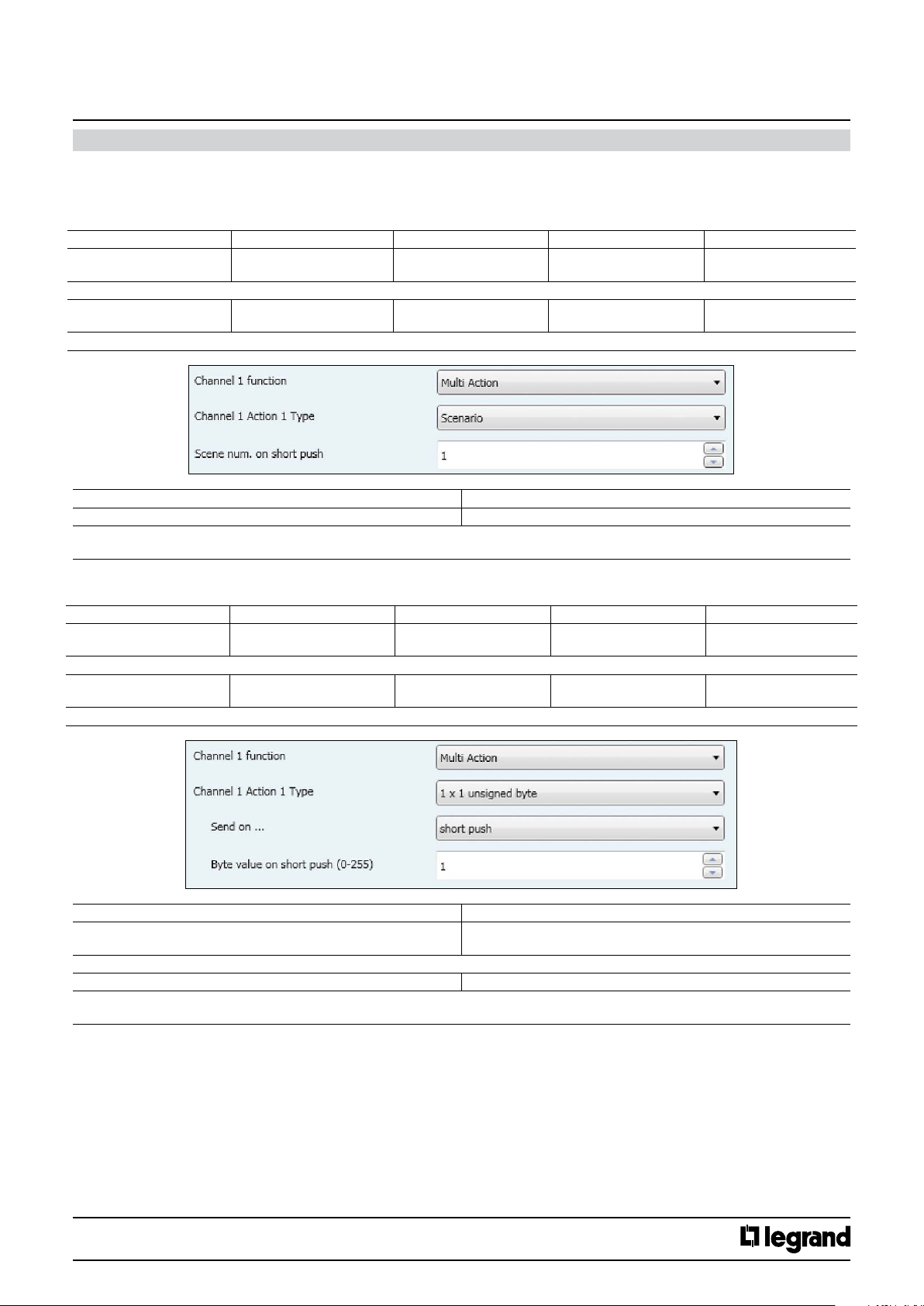
Scenario:
This function allows to recall/save up to 64 scene.
A short push recalls the scene and a special long push (10s) allows to save a scene; for the dened scene number all the involved actuators statuses are saved.
No. Object name Function Size Flags
4 (8,13, 17)
4 (8, 13, 17, 22, 26)
The telegrams to recall the scene with the congured number (1..64) are sent via the group address link with this object.
31 (35, 40, 44)
31 (35, 40, 44, 49, 53)
The telegrams to recall the scene with the congured number (1..64) are sent via the group address link with this object.
Scene num. on short push (0:none) 0..64
This parameters determines which scene (1..64) has to be recalled on rising edge.
If value “0” is set, no scene is going to be recalled
Channel 1 (2,3,4) Action 1
Channel 1 (2,3,4,5,6) Action 1
Channel 1 (2,3,4) Action 2
Channel 1 (2,3,4,5,6) Action 2
Parameters Setting
8-bits scene 17.001 DP_SceneNumber
(1 Byte)
8-bits scene 17.001 DP_SceneNumber
(1 Byte)
CT
CT
1x1 unsigned byte:
No. Object name Function Size Flags
4 (8, 13, 17)
4 (8, 13, 17, 22, 26)
The telegrams with the unsigned value are sent via the group address linked with this object
31 (35, 40, 44)
31 (35, 40 ,44, 49, 53)
The telegrams with the unsigned value are sent via the group address linked with this object
Send on… Short push
Here an adjustment is made to dene the lenght of the push to send the byte value.
Byte value on short push (0-255) 0..255, 1
Here an adjustment is made to dene which unsigned value is written into the storage cell of the communication object and sent after a rising edge
in the signal status of the channel (input). The rising edge corresponds to a change in the signal status of the Channel from logical “0” to “1”.
Channel 1 (2,3,4) Action 1
Channel 1 (2,3,4,5,6) Action 1
Channel 1 (2,3,4) Action 2
Channel 1 (2,3,4,5,6) Action 2
Parameters Setting
Unsigned Value 5.010 DP_Value_1_Ucount
(1 Byte)
Unsigned Value 5.010 DP_Value_1_Ucount
(1 Byte)
Long push
CT
CT
Technical data sheet: S000090563EN-2 Updated: 07/06/2016 Created : 27/07/2015
CONTENTS
21/38
Page 22
KNX
Arteor 4 and 6 touches glass controls
11. COMMUNICATION OBJECTS DESCRIPTION (continued)
11.2.1.9 Multi action (continued)
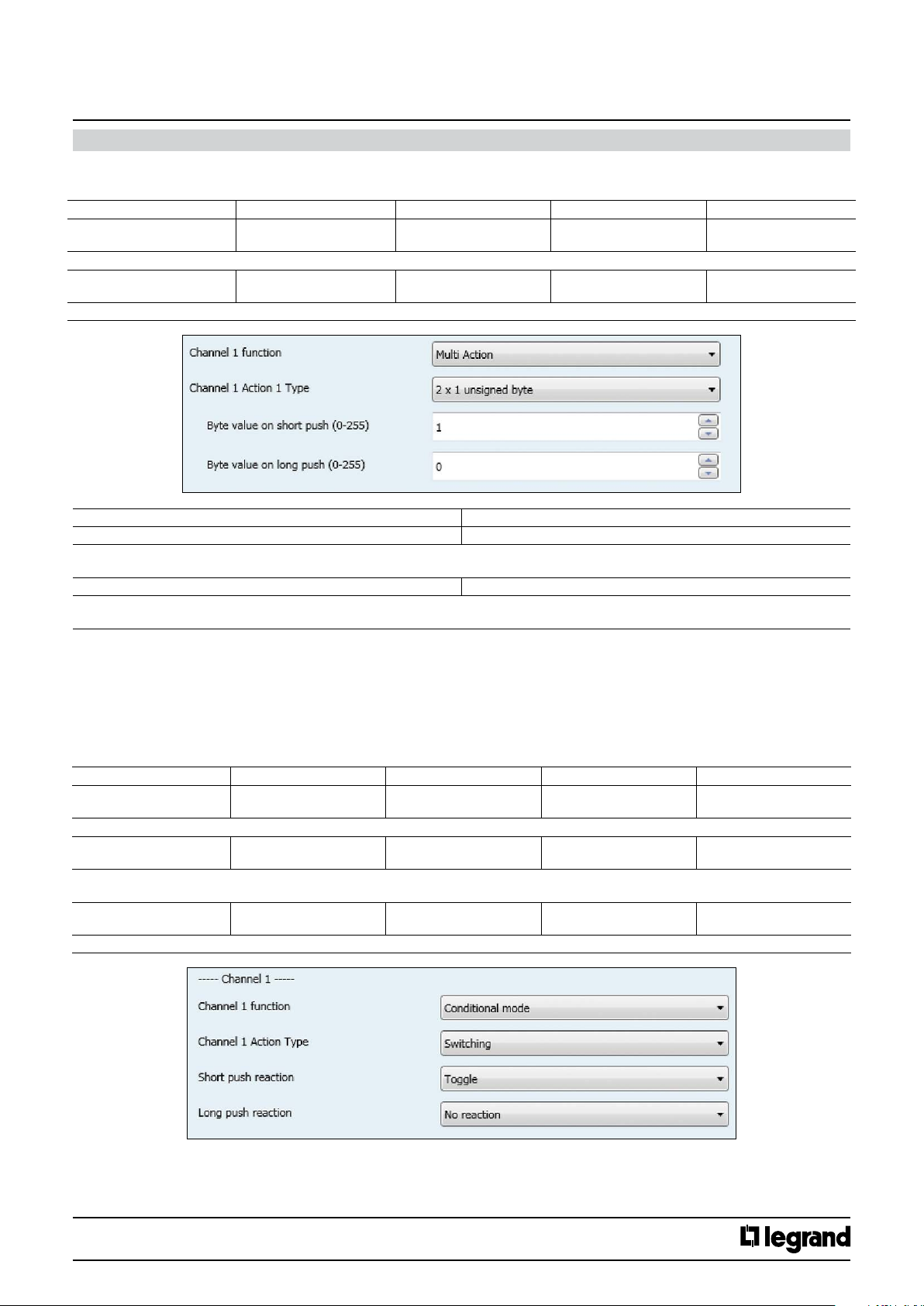
2x1 unsigned byte:
No. Object name Function Size Flags
4 (8, 13, 17)
4 (8, 13, 17, 22, 26)
The telegrams with the unsigned value are sent via the group address linked with this object
31 (35, 40, 44)
31 (35, 40, 44, 49, 53)
The telegrams with the unsigned value are sent via the group address linked with this object
Channel 1 (2,3,4) Action 1
Channel 1 (2,3,4,5,6) ACtion 1
Channel 1 (2,3,4) Action 2
Channel 1 (2,3,4,5,6) Action 2
Unsigned Value 5.010 DP_Value_1_Ucount
Unsigned Value 5.010 DP_Value_1_Ucount
Cat. No(s).: 5 735 04/05
5 735 12/13
CT
(1 Byte)
CT
(1 Byte)
Parameters Setting
Byte value on short push (0-255) 0..255, 1
Here an adjustment is made to dene which unsigned value is written into the storage cell of the communication object and sent after short pressing
the push button related to the channel.
Byte value on long push (0-255) 0..255, 0
Here an adjustment is made to dene which unsigned value is written into the storage cell of the communication object and sent after long pressing
the push button related to the channel.
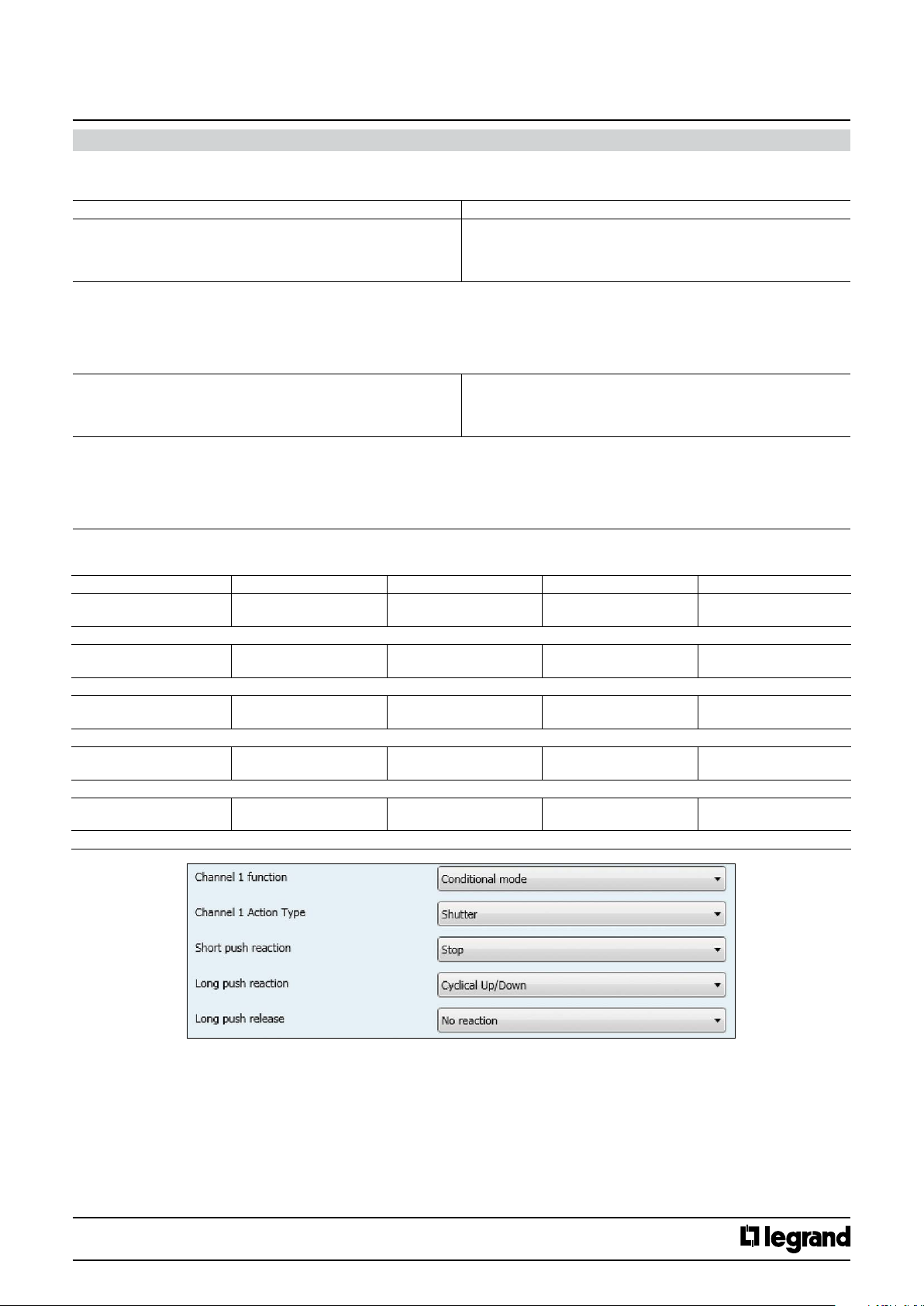
11.2.1.10 Conditional mode
This function allows to send a telegram of the same type in two groups according to Mode 1 or 2 :
- When mode 1 is active, is sent Channel X.
- When mode 2 is active, is sent Channel X Action 2.
Switching:
No. Object name Function Size Flags
1 (10, 19, 28)
1 (10, 19, 28, 37, 46)
Switching telegrams are sent via the group address linked with this object
2 (11, 20, 29)
2 (11, 20, 29, 38, 47)
Switching status are received via the group address linked with this object.
They are only visible if “Add status object” parameter value is set to “yes”.
8 (17, 26, 35)
8 (17, 26, 35, 44, 53)
Switching telegrams are sent via the group address linked with this object .
Channel 1 (2,3,4) Mode 1
Channel 1 (2,3,4,5,6) Mode 1
Channel 1 (2,3,4) Mode 1
Channel 1 (2,3,4,5,6) Mode 1
Channel 1 (2,3,4) Mode 2
Channel 1 (2,3,4,5,6) Mode 2
Switching 1.01 DP_Switch (1 bit) CWT
Switching Status 1.01 DP_Switch (1 bit) CW
Switching 1.01 DP_Switch (1 bit) CWT
Technical data sheet: S000090563EN-2 Updated: 07/06/2016 Created : 27/07/2015
CONTENTS
22/38
Page 23
KNX
Arteor 4 and 6 touches glass controls
Cat. No(s).: 5 735 04/05
5 735 12/13
11. COMMUNICATION OBJECTS DESCRIPTION (continued)
11.2.1.10 Conditional mode (continued)
Switching (continued):
Parameters Setting
Short push reaction No reaction
Here an adjustment is made to dene which switching value is written into the storage cell of the communication object and sent after short pressing
the push button related to the channel.
“No reaction”: A short push button action does not change the object value and also does not send a telegram.
“On”: After a short push, the switching value “ON” (binary value, “1”) is transferred into the communication object and sent.
“O”: After a short push, the switching value “OFF” (binary value,”0”) is transferred into the communication object and sent.
“Toggle” : After a short push, the switching value stored in the communication object is inverted and the new value is sent,
Long push reaction No reaction
Here an adjustment is made to dene which switching value is written into the storage cell of the communication object and sent after long pressing
the push button related to the channel.
“No reaction”: A long push button action does not change the object value and also does not send a telegram.
“On”: After a long push, the switching value “ON” (binary value, “1”) is transferred into the communication object and sent.
“O” : After a long push, the switching value “OFF” (binary value,”0”) is transferred into the communication object and sent.
“Toggle” : After a long push, the switching value stored in the communication object is inverted and the new value is sent
On
O
Toggle
On
O
Toggle
Shutter:
No. Object name Function Size Flags
1 (10,19, 28)
1 (10, 19, 28, 37, 46)
The movement commands Up/Down are sent via the address linked with this object in order to raise/lower the solar protection.
7 (16, 25, 34)
7 (16, 25, 34, 42, 52)
The command “STOP” or “Slats OPEN/CLOSE” are sent via the group address linked with this object.
6 (15, 24, 33)
6 (15, 24, 33, 43, 51)
The shutter status telegrams are received from the shutter actuator via the group address linked with this object.
8 (17, 26, 35)
8 (17, 26, 35, 44, 53)
The movement commands Up/Down are sent via the address linked with this object in order to raise/lower the solar protection.
9 (18, 27, 36)
9 (18, 27, 36, 45, 54)
The command “STOP” or “Slats OPEN/CLOSE” are sent via the group address linked with this object.
Channel 1 (2,3,4) Mode 1
Channel 1 (2,3,4,5,6) Mode 1
Channel 1 (2,3,4) Mode 1
Channel 1 (2,3,4,5,6) Mode 1
Channel 1 (2,3,4) Mode 1
Channel 1 (2,3,4,5,6) Mode 1
Channel 1 (2,3,4) Mode 2
Channel 1 (2,3,4,5,6) Mode 2
Channel 1 (2,3,4) Mode 2
Channel 1 (2,3,4,5,6) Mode 2
Shutter Up/Down 1.008 DP_UpDown (1 bit) CWT
Shutter Stop - slats 1.009 DP_OpenClose (1 bit) CWT
Shutter Status 5.001 DP_Scaling (1 Byte) CW
Shutter Up/Down 1.008 DP_UpDown (1 bit) CWT
Shutter Stop - slats 1.009 DP_OpenClose (1 bit) CWT
Technical data sheet: S000090563EN-2 Updated: 07/06/2016 Created : 27/07/2015
CONTENTS
23/38
Page 24
KNX
Arteor 4 and 6 touches glass controls
Cat. No(s).: 5 735 04/05
5 735 12/13
11. COMMUNICATION OBJECTS DESCRIPTION (continued)
11.2.1.10 Conditional mode (continued)
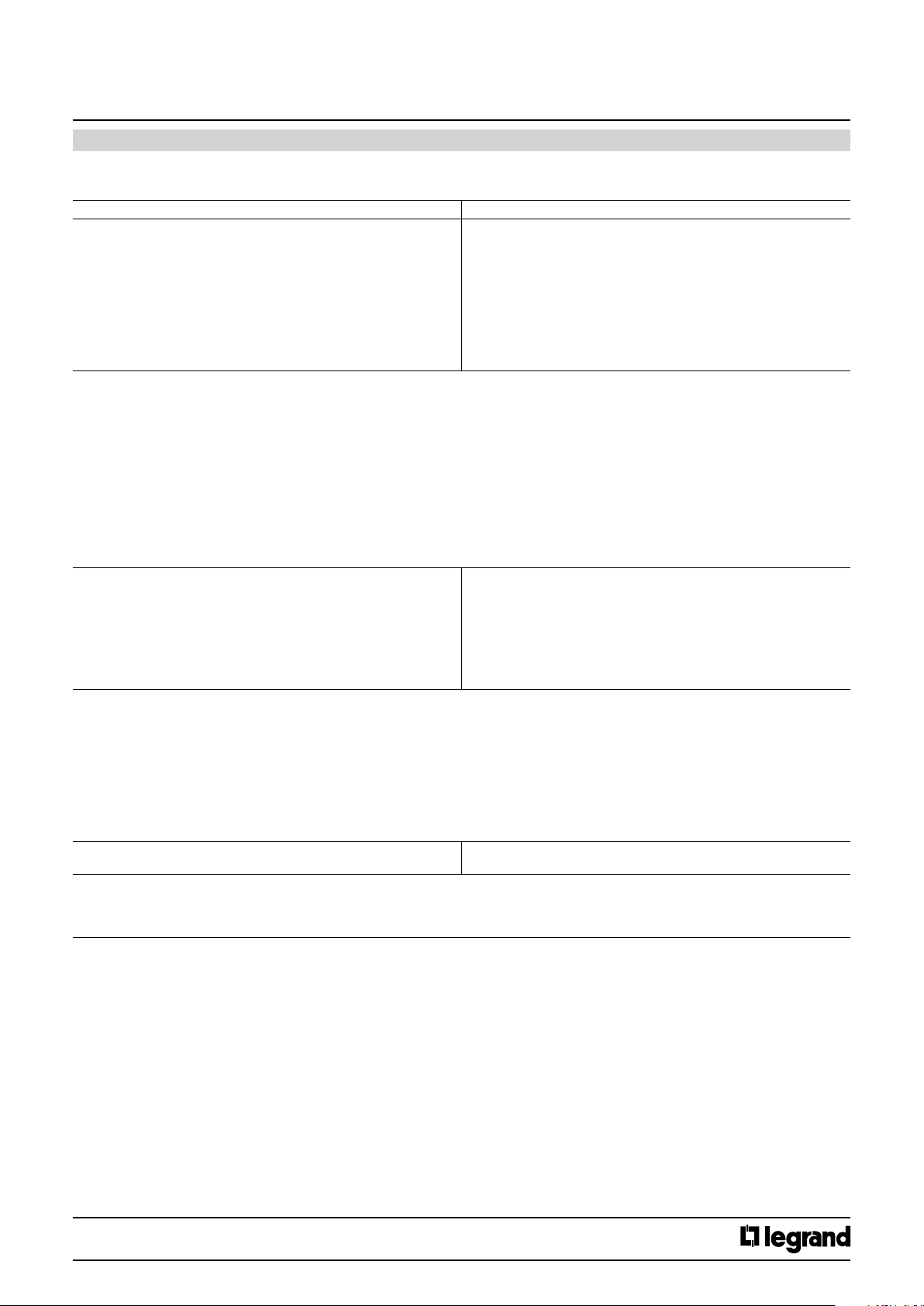
Shutter (continued):
Parameters Setting
Short push reaction No reaction
Here an adjustment is made to dene which movement command is written into the storage cell of the communication object and sent after short
pressing the push button related to the channel.
“No reaction”: action does not change the object value and also does not send a telegram.
Cyclical Up / Down + stop : each short push transfers the following sequence command values into the communication object: Up, Stop, Down, Stop,
Up, Stop, Down, Stop,etc.
Up + stop : each short push transfers the following sequence command values into the communication object: Up, Stop, Up, Stop,,etc.
Down + stop : each short push transfers the following sequence command values into the communication object: Down, Stop, Down, Stop,,etc.
Cyclical Up / Down: each short push transfers the following sequence command values into the communication object : Up, Down, Up, Down,,etc.
Stop : a short push transfers into the communication object the stop command value (“1” or “0”)
Open slats: a short push transfers into the communication object the stop (open slats) command value (“0”)
Close slats: a short push transfers into the communication object the stop (close slats) command value (“1”)
Up: a short push transfers into the communication object the Up command (value “0”)
Down: a short push transfers into the communication object the Down command (value “1”)
Long push reaction No reaction
Here an adjustment is made to dene which movement command is written into the storage cell of the communication object and sent after long
pressing the push button related to the channel.
“No reaction”: action does not change the object value and also does not send a telegram.
Up: a long push action send is transferred into the communication object the Up command (value “0”)
Down: a long push action send the Down command (value “1”)
Cyclical Up / Down: each short push send the following sequence commands: Up, Down, Up, Down,,etc.
Stop : a long push action send the stop command (value “1” or “0”)
Cyclical Open /Close slats : each short push send the following sequence commands : Open slats, Close slats, Open slats, Close slats
Open slats: a long push action send is transferred into the communication object the stop (open slats) command (value “0”)
Close slats: a long push action send is transferred into the communication object the stop (close slats) command (value “1”)
Long push release No reaction
Here an adjustment is made to dene which value is written into the storage cell of the communication object and sent after releasing a long press
on the push button related to the Channel.
“No reaction”: action does not change the object value and also does not send a telegram.
Stop : the stop command (value “1” or “0”) is transferred into the communication object and sent
Cyclical Up / Down + stop
Up + stop
Down + stop
Cyclical Up / Down
Stop
Open slats
Close slats
Up
Down
Up
Down
Cyclical Up/Down
Stop
Cyclical Open/Close slats
Open slats
Close slats
Stop
Technical data sheet: S000090563EN-2 Updated: 07/06/2016 Created : 27/07/2015
CONTENTS
24/38
Page 25
KNX
Arteor 4 and 6 touches glass controls
Cat. No(s).: 5 735 04/05
5 735 12/13
11. COMMUNICATION OBJECTS DESCRIPTION (continued)
11.2.1.10 Conditional mode (continued)
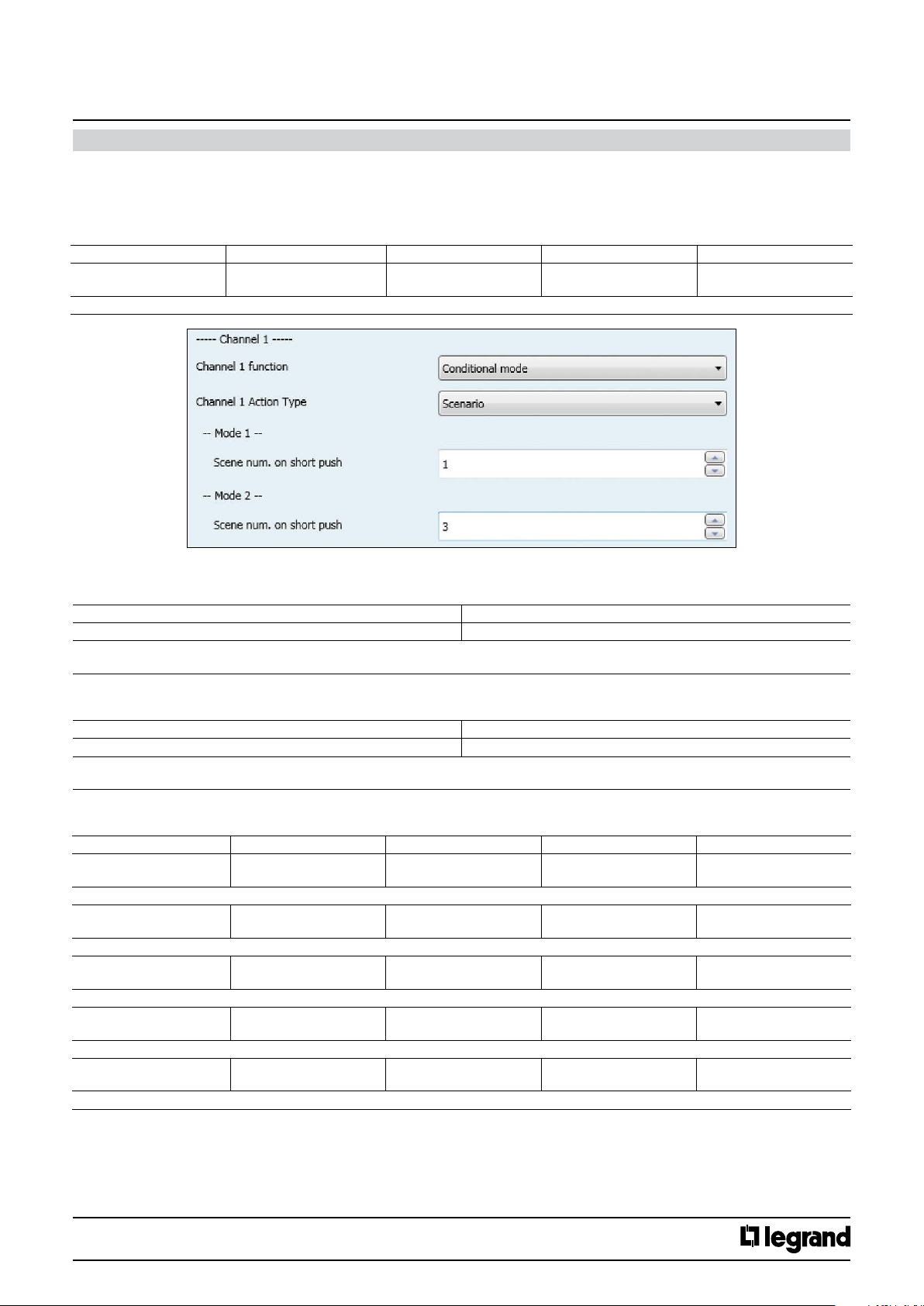
Scenario :
This function allows to recall/save up to 64 scene.
A short push recalls the scene and a special long push (10s) allows to save a scene; for the defined scene number all the involved actuators statuses are
saved.
No. Object name Function Size Flags
4 (13,22,31)
4 (13,22,31,40,49)
The telegrams to recall the scene with the congured number (1..64) are sent via the group address link with this object.
Channel 1 (2,3,4) Action 1
Channel 1 (2,3,4,5,6) Action 1
8-bits scene 17.001 DP_SceneNumber
(1 Byte)
CT
Mode 1
Parameters Setting
Scene num. on short push 0..64
This parameters determines which scene (1..64) has to be recalled on rising edge when mode 1 is active
If value “0” is set, no scene is going to be recalled
Mode 2
Parameters Setting
Scene num. on short push 0..64
This parameters determines which scene (1..64) has to be recalled on rising edge when mode 2 is active
If value “0” is set, no scene is going to be recalled
Dimming :
No. Object name Function DP Flags
1 (10, 19, 28)
1 (10, 19, 28, 37, 46)
Switching telegrams are sent via the group address linked with this object.
6 (15, 24, 33)
6 (15, 24, 33, 42, 51)
The dimming status telegrams are received from the dimming actuator via the group address linked with this object.
8 (17, 26, 35)
8 (17, 26, 35, 44, 53)
Switching telegrams are sent via the group address linked with this object.
5 (14, 23, 32)
5 (14, 23, 32, 41, 50)
The dimming telegrams are sent to the dimming actuator via the group address linked with this object.
9 (18, 27, 36)
9 (18, 27, 36, 45, 54)
The dimming telegrams are sent to the dimming actuator via the group address linked with this object.
Channel 1 (2,3,4) Mode 1
Channel 1 (2,3,4,5,6) Mode 1
Channel 1 (2,3,4) Mode 1
Channel 1 (2,3,4,5,6) Mode 1
Channel 1 (2,3,4) Mode 2
Channel 1 (2,3,4,5,6) Mode 2
Channel 1 (2,3,4) Mode 1
Channel 1 (2,3,4,5,6) Mode 1
Channel 1 (2,3,4) Mode 2
Channel 1 (2,3,4,5,6) Mode 2
Switching 1.01 DP_Switch ( 1 bit) CWT
Value Status 5.001 DP_Scaling (1 Byte ) CW
Switching 1.01 DP_Switch ( 1 bit) CWT
Dimming 3.007 DP_Control_Dimming
( 4 bit)
Dimming 3.007 DP_Control_Dimming
( 4 bit)
CT
CT
Technical data sheet: S000090563EN-2 Updated: 07/06/2016 Created : 27/07/2015
CONTENTS
25/38
Page 26
KNX
Arteor 4 and 6 touches glass controls
Cat. No(s).: 5 735 04/05
5 735 12/13
11. COMMUNICATION OBJECTS DESCRIPTION (continued)
11.2.1.10 Conditional mode (continued)
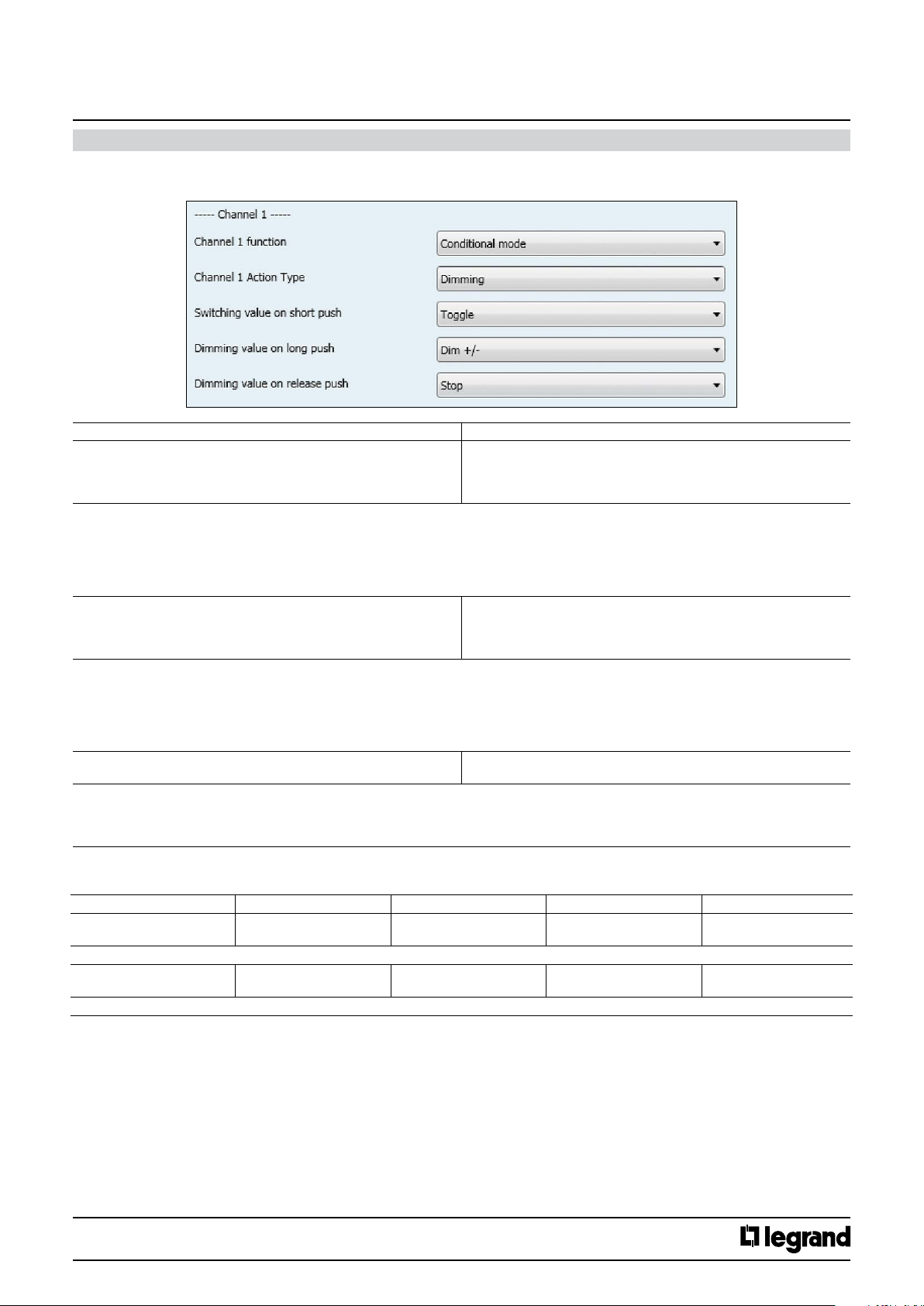
Dimming (continued):
Parameters Setting
Switching value on short push No reaction
Here an adjustment is made to dene which switching value is written into the storage cell of the communication object and sent after short pressing
the push button related to the channel.
“No reaction”: A short push does not change the object value and also does not send a telegram.
“On”: After a short press, the switching value “ON” (binary value, “1”) is transferred into the communication object and sent.
“O”: After a short press, the switching value “OFF” (binary value,”0”) is transferred into the communication object and sent.
“Toggle” : After a short press, the switching value stored in the communication object is inverted and the new value is sent
Dimming value on long push Dim +/-
Here an adjustment is made to dene which dimming value is written into the storage cell of the communication object and sent after long pressing
the push button related to the channel.
“No reaction”: A long push does not change the object value and also does not send a telegram.
“Dim+/-”: After a long press, the dimming value stored in the communication object is inverted and the new value is sent
“Dim +” After a long press, the dimming value “Increase 100%” is transferred into the communication object and sent.
“Dim -” : After a long press, the dimming value “Decrease 100%” is transferred into the communication object and sent.
Dimming value on release push No reaction
Here an adjustment is made to dene which dimming value is written into the storage cell of the communication object and sent after releasing a
long press of the push button related to the Channel.
“No reaction”: A long push button action does not change the object value and also does not send a telegram.
“Stop”: When the push button is released after a long push, the dimming value “Stop” is transferred into the communication object and sent.
On
O
Toggle
Dim +
Dim –
No reaction
Stop
1x1 unsigned byte :
No. Object name Function Size Flags
4 (8, 13, 17)
4 (8, 13, 17, 22, 26)
The telegrams with the unsigned value are sent via the group address linked with this object
31 (35, 40, 44)
31 (35, 40, 44, 49, 53)
The telegrams with the unsigned value are sent via the group address linked with this object
Technical data sheet: S000090563EN-2 Updated: 07/06/2016 Created : 27/07/2015
Channel 1 (2,3,4) Mode 1
Channel 1 (2,3,4,5,6) Mode 1
Channel 1 (2,3,4) Mode 2
Channel 1 (2,3,4,5,6) Mode 2
Unsigned Value 5.010 DP_Value_1_Ucount
(1 Byte)
Unsigned Value 5.010 DP_Value_1_Ucount
(1 Byte)
CONTENTS
CT
CT
26/38
Page 27
KNX
Arteor 4 and 6 touches glass controls
11. COMMUNICATION OBJECTS DESCRIPTION (continued)
11.2.1.10 Conditional mode (continued)
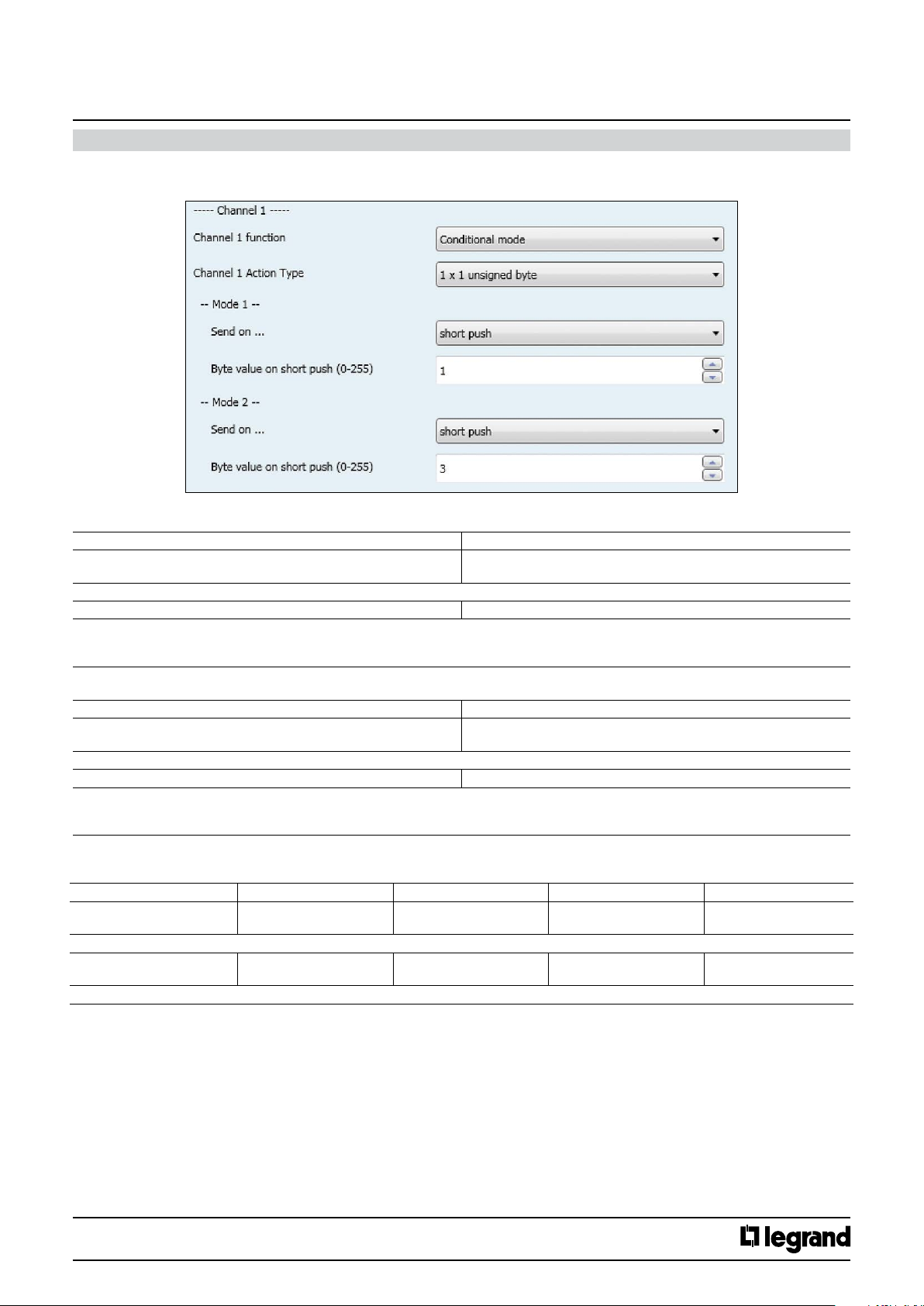
1x1 unsigned byte (continued):
Cat. No(s).: 5 735 04/05
5 735 12/13
Mode 1
Parameters Setting
Send on… Short push
Here an adjustment is made to dene the length of push to send the byte value.
Byte value on short push (0-255) 0..255, 1
Here an adjustment is made to dene which unsigned-8 bits value is written into the storage cell of the communication object and sent after a rising
edge in the signal status of the channel (input). The rising edge corresponds to a change in the signal status of the Channel from logical “0” to “1”,
when the mode 1 is active.
Mode 2
Parameters Setting
Send on… Short push
Here an adjustment is made to dene the length of push to send the byte value.
Byte value on short push (0-255) 0..255, 1
Here an adjustment is made to dene which unsigned-8 bits value is written into the storage cell of the communication object and sent after a rising
edge in the signal status of the channel (input). The rising edge corresponds to a change in the signal status of the Channel from logical “0” to “1”,
when the mode 2 is active.
2x1 unsigned byte:
No. Object name Function Size Flags
4 (8, 13, 17)
4 (8, 13, 17, 22, 26)
The telegrams with the unsigned value are sent via the group address linked with this object
31 (35, 40, 44)
31 (35, 40, 44, 49, 53)
The telegrams with the unsigned value are sent via the group address linked with this object
Channel 1 (2,3,4) Mode 1
Channel 1 (2,3,4,5,6) Mode 1
Channel 1 (2,3,4) Mode 2
Channel 1 (2,3,4,5,6) Mode 1
Long push
Long push
Unsigned Value 5.010 DP_Value_1_Ucount
(1 Byte)
Unsigned Value 5.010 DP_Value_1_Ucount
(1 Byte)
CT
CT
Technical data sheet: S000090563EN-2 Updated: 07/06/2016 Created : 27/07/2015
CONTENTS
27/38
Page 28
KNX
Arteor 4 and 6 touches glass controls
11. COMMUNICATION OBJECTS DESCRIPTION (continued)
11.2.1.10 Conditional mode (continued)
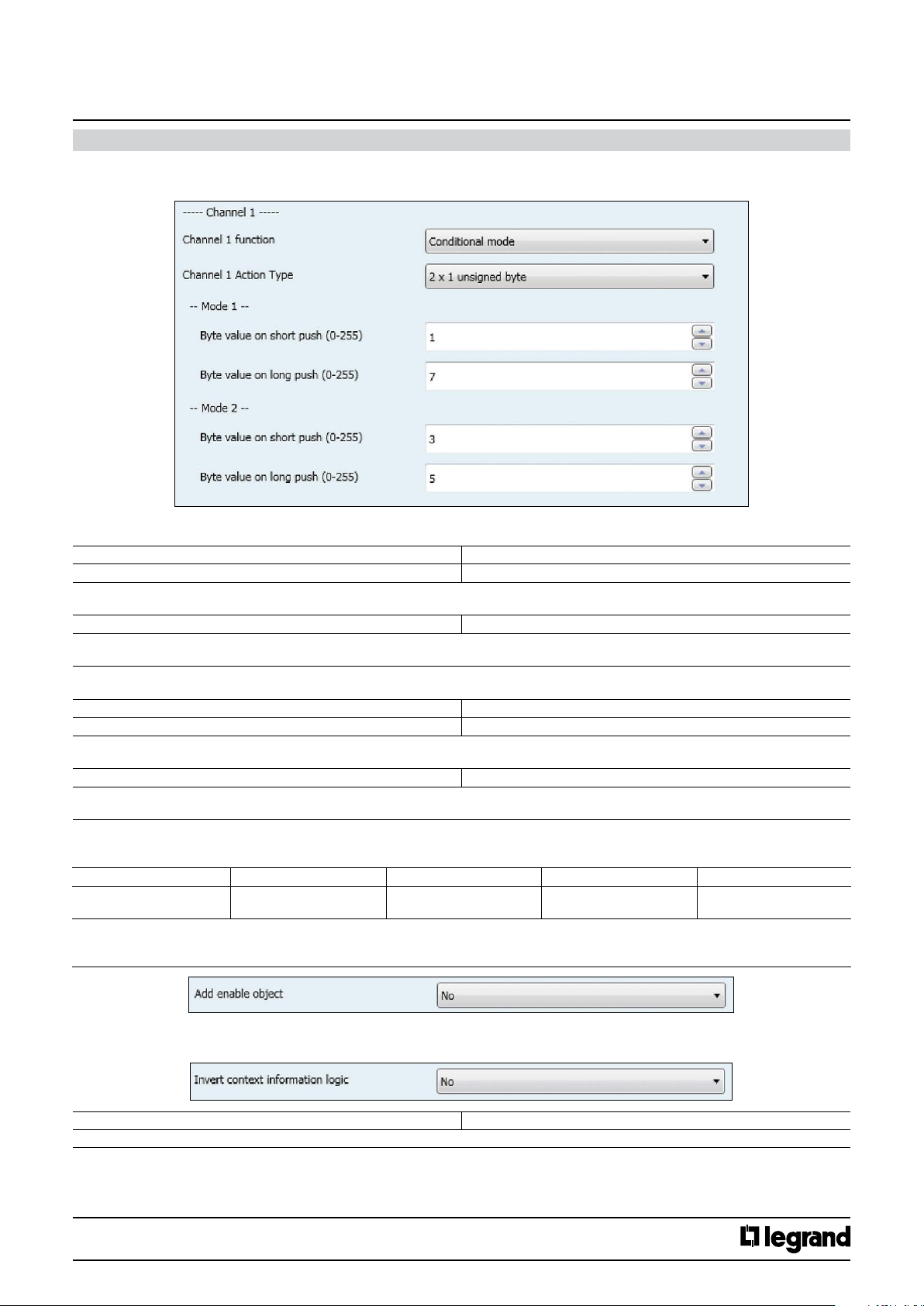
2x1 unsigned byte (continued):
Cat. No(s).: 5 735 04/05
5 735 12/13
Mode 1
Parameters Setting
Byte value on short push (0-255) 0..255, 1
Here an adjustment is made to dene which unsigned 8 bits value is written into the storage cell of the communication object and sent after short
pressing of the push button related to the channel, when the mode 1 is active.
Byte value on long push (0-255) 0..255, 0
Here an adjustment is made to dene which unsigned value is written into the storage cell of the communication object and sent after long pressing
the push button related to the channel, when the mode 1 is active.
Mode 2
Parameters Setting
Byte value on short push (0-255) 0..255, 1
Here an adjustment is made to dene which unsigned value is written into the storage cell of the communication object and sent after short pressing
the push button related to the channel, when the mode 2 is active.
Byte value on long push (0-255) 0..255, 0
Here an adjustment is made to dene which unsigned value is written into the storage cell of the communication object and sent after long pressing
the push button related to the channel, when the mode 2 is active.
11.2.1.11 Add Enable object
No. Object name Function Size Flags
3 (12, 21, 30)
3 (12, 21, 30, 39, 48)
Enable telegrams are received via the group address linked with this object. They are used to lock (disable) or unlock (enable) the corresponding
channel.
They are only visible if “Add Enable object” parameter value is set to “yes”.
Channel 1 (2,3,4)
Channel 1 (2,3,4,5,6)
Enable 1.02 DP_Enable ( 1 bit) CW
11.2.1.12 Invert context information logic
Invert context information logic Yes / No
This parameter determines the type of logic of context information.
Technical data sheet: S000090563EN-2 Updated: 07/06/2016 Created : 27/07/2015
CONTENTS
28/38
Page 29
KNX
Arteor 4 and 6 touches glass controls
Cat. No(s).: 5 735 04/05
5 735 12/13
11. COMMUNICATION OBJECTS DESCRIPTION (continued)
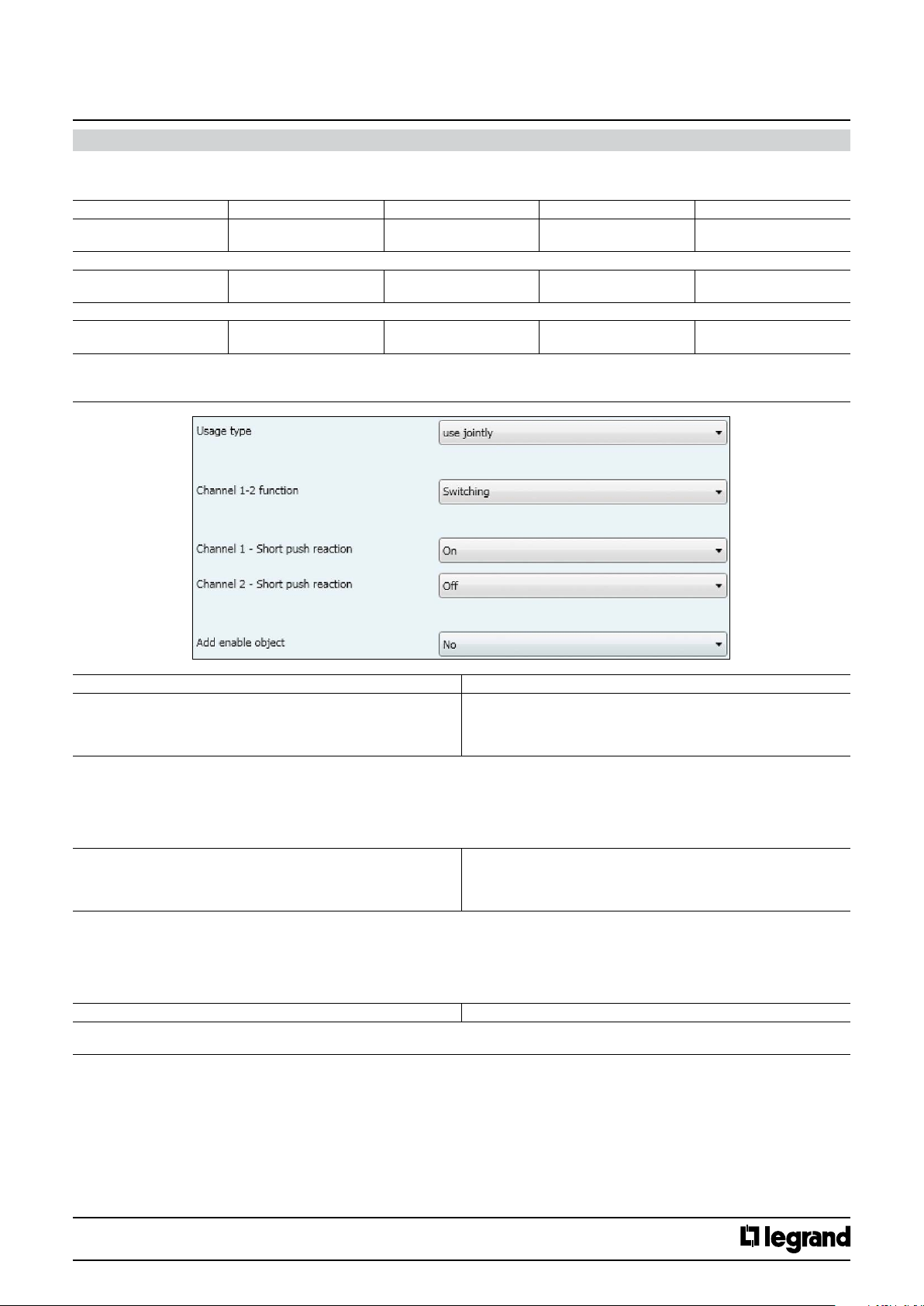
11.2.2 Use Jointly
11.2.2.1 Switching
No. Object name Function Size Flags
4 pushes 1 (19 )
6 pushes 1 (19, 37)
Switching telegrams are sent via the group address linked with this object
4 pushes 2 (20)
6 pushes 2 (20, 38)
Switching status are received via the group address linked with this object.
4 pushes 3 (21)
6 pushes 3 (21, 39)
Enable telegrams are received via the group address linked with this object. They are used to lock (disable) or unlock(enable) the corresponding
channels.
They are only visible if “Add enable object” parameter value is set to yes.
Channel 1-2 (3-4) (5-6) Switching 1.01 DP_Switch ( 1 bit) CWT
Channel 1-2 (3-4) (5-6) Switching Status 1.01 DP_Switch ( 1 bit) CW
Channel 1-2 (3-4) (5-6) Enable 1.02 DP_Enable ( 1 bit) CW
Parameters Setting
Channel Xn - Short push reaction No reaction
Here an adjustment is made to dene which switching value is written into the storage cell of the communication object and sent after short pressing
the push button related to the channel.
“No reaction”: A short push does not change the object value and also does not lead to the sending of a telegram.
“On”: After a short push, the switching value “ON” (binary value, “1”) is transferred into the communication object and sent.
“O”: After a short push, the switching value “OFF” (binary value,”0”) is transferred into the communication object and sent.
“Toggle” : After a short push, the switching value stored in the communication object is inverted and the new value is sent
Channel Xn+1 - Short push reaction No reaction
Here an adjustment is made to dene which switching value is written into the storage cell of the communication object and sent after short pressing
the push button related to the channel.
“No reaction”: A short push does not change the object value and also does not send a telegram.
“On”: After a short push, the switching value “ON” (binary value, “1”) is transferred into the communication object and sent.
“O”: After a short push, the switching value “OFF” (binary value,”0”) is transferred into the communication object and sent.
“Toggle” : After a short push, the switching value stored in the communication object is inverted and the new value is sent
Add Enable object Yes / No
The parameter determines if the Channels (1-2 or 3-4) can be blocked via an additional Enable object or not. If the Channels are blocked (Enable value
= 1) the status changes of these channels are not transmitted.
On
O
Toggle
On
O
Toggle
Technical data sheet: S000090563EN-2 Updated: 07/06/2016 Created : 27/07/2015
CONTENTS
29/38
Page 30
KNX
Arteor 4 and 6 touches glass controls
Cat. No(s).: 5 735 04/05
5 735 12/13
11. COMMUNICATION OBJECTS DESCRIPTION (continued)
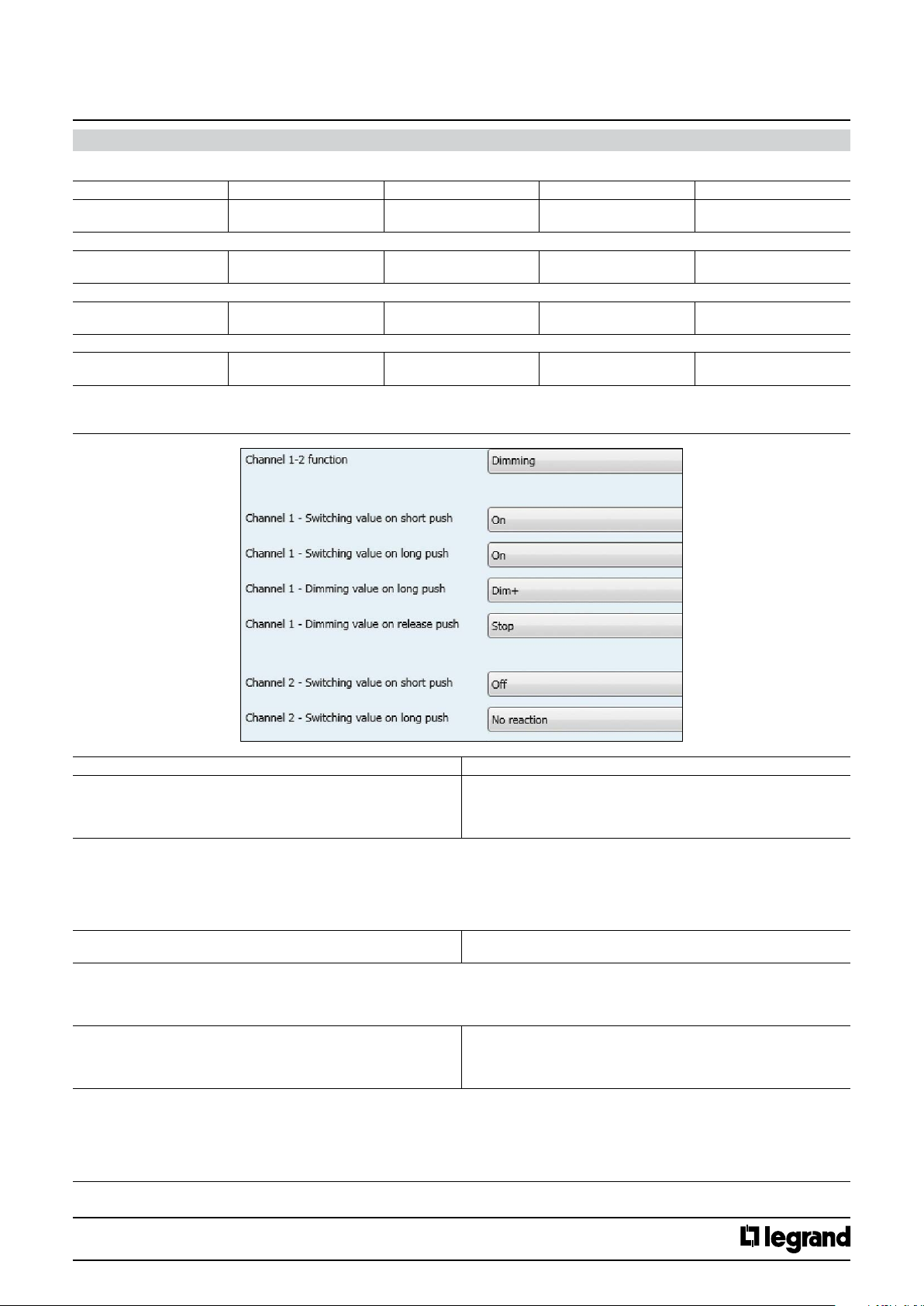
11.2.2.2 Dimming
No. Object name Function Size Flags
4 pushes 1 (19 )
6 pushes 1 (19, 37)
Switching telegrams are sent via the group address linked with this object
4 pushes 5 (23 )
6 pushes 5 (23, 41)
Dimming telegrams are sent via the group address linked with this object
4 pushes 6 (24)
6 pushes 6 (24, 42)
The dimming status telegrams are received from the dimming actuator via the group address linked with this object.
4 pushes 3 (21)
6 pushes 3 (21, 39)
Enable telegrams are received via the group address linked with this object. They are used to lock (disable) or unlock(enable) the corresponding
channels.
They are only visible if “Add Enable object” parameter value is set to “yes”.
Channel 1-2 (3-4) (5-6) Switching 1.01 DP_Switch ( 1 bit) CWT
Channel 1-2 (3-4) (5-6) Dimming 3.007 DP_Control_Dimming
( 4 bit)
Channel 1-2 (3-4) (5-6) Value Status 5.001 DP_Scaling ( 1 byte) CW
Channel 1-2 (3-4) (5-6) Enable 1.02 DP_Enable ( 1 bit) CW
CT
Parameters Setting
Channel X - Switching value on short push No reaction
Here an adjustment is made to dene which switching value is written into the storage cell of the communication object and sent after short pressing
the push button related to the channel.
“No reaction”: A short push does not change the object value and also does not send a telegram.
“On”: After a short push, the switching value “ON” (binary value, “1”) is transferred into the communication object and sent.
“O”: After a short push, the switching value “OFF” (binary value,”0”) is transferred into the communication object and sent.
“Toggle” : After a short push, the switching value stored in the communication object is inverted and the new value is sent.
Channel X - Switching value on long push No reaction
Here an adjustment is made to dene which switching value is written into the storage cell of the communication object and sent after long pressing
the push button related to the channel.
“No reaction”: A long push does not change the object value and also does not send a telegram.
“On”: After long push, the switching value “ON” (binary value, “1”) is transferred into the communication object and sent.
Channel X - Dimming value on long push Dim +/-
Here an adjustment is made to dene which dimming value is written into the storage cell of the communication object and sent after long pressing
of the push button related to the channel.
“No reaction”: A long push does not change the object value and also does not send a telegram.
“Dim+/-”: After a long push, the dimming value stored in the communication object is inverted and the new value is sent
“Dim +” After a short push, the dimming value “Increase 100%” is transferred into the communication object and sent.
“Dim -” : After a short push, the dimming value “Decrease 100%” is transferred into the communication object and sent.
On
O
Toggle
On
Dim +
Dim –
No reaction
Technical data sheet: S000090563EN-2 Updated: 07/06/2016 Created : 27/07/2015
CONTENTS
30/38
Page 31
KNX
Arteor 4 and 6 touches glass controls
Cat. No(s).: 5 735 04/05
5 735 12/13
11. COMMUNICATION OBJECTS DESCRIPTION (continued)
11.2.2.2 Dimming (continued)
Parameters Setting
Channel X - Dimming value on release push No reaction
Here an adjustment is made to dene which dimming value is written into the storage cell of the communication object and sent when long pressing
the push button related to the Channel.
“No reaction”: A long push button action does not change the object value and also does not send a telegram.
“Stop”: When the push button is released after a long push, the dimming value “Stop” is transferred into the communication object and sent.
Channel X +1 - Switching value on short push No reaction
Here an adjustment is made to dene which switching value is written into the storage cell of the communication object and sent after short pressing
the push button related to the channel.
“No reaction”: A short push does not change the object value and also does send a telegram.
“On”: After a short push, the switching value “ON” (binary value, “1”) is transferred into the communication object and sent.
“O”: After a short push, the switching value “OFF” (binary value,”0”) is transferred into the communication object and sent.
“Toggle” : After a short push, the switching value stored in the communication object is inverted and the new value is sent
Channel X +1 - Switching value on long push No reaction
Here an adjustment is made to dene which switching value is written into the storage cell of the communication object and sent after long pressing
the push button related to the channel.
“No reaction”: A long push does not change the object value and also does not lead to the sending of a telegram.
“On”: An long push button action, the switching value “ON” (binary value, “1”) is transferred into the communication object and sent.
Channel X +1 - Dimming value on long push Dim +/-
Here an adjustment is made to dene which dimming value is written into the storage cell of the communication object and sent after long pressing
of the push button related to the channel.
“No reaction”: A long push does not change the object value and also does not send a telegram.
“Dim+/-”: After a long push, the dimming value stored in the communication object is inverted and the new value is sent
“Dim +” After a short push, the dimming value “Increase 100%” is transferred into the communication object and sent.
“Dim -” : After a short push, the dimming value “Decrease 100%” is transferred into the communication object and sent.
Channel X +1 - Dimming value on release push No reaction
Here an adjustment is made to dene which dimming value is written into the storage cell of the communication object and sent when long pressing
the push button related to the Channel.
“No reaction”: A long push button action does not change the object value and also does not send a telegram.
“Stop”: When the push button is released after a long push, the dimming value “Stop” is transferred into the communication object and sent.
Add Enable object Yes / No
The parameter determines if the channels can be blocked via an additional Enable object or not. If the channels are blocked (Enable value = 1) the
status changes of these channels are not transmitted.
Stop
On
O
Toggle
On
Dim +
Dim –
No reaction
Stop
Technical data sheet: S000090563EN-2 Updated: 07/06/2016 Created : 27/07/2015
CONTENTS
31/38
Page 32
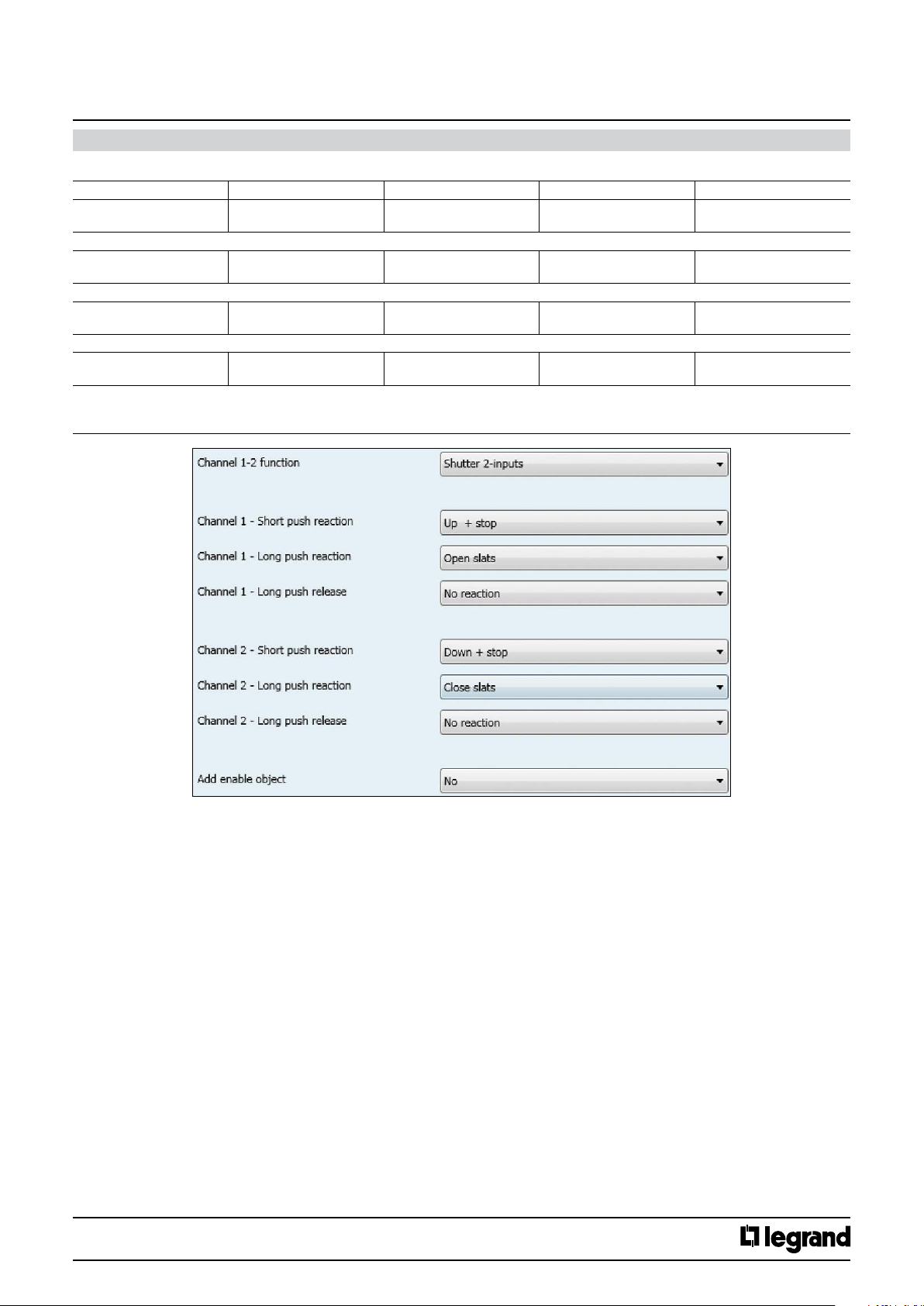
KNX
Arteor 4 and 6 touches glass controls
Cat. No(s).: 5 735 04/05
5 735 12/13
11. COMMUNICATION OBJECTS DESCRIPTION (continued)
11.2.2.3 Shutter 2- input
No. Object name Function Size Flags
4 pushes 1 (19 )
6 pushes 1 (19, 37)
The movement commands Up/Down are sent via the address linked with this object in order to raise/lower the solar protection.
4 pushes 7 (25)
7 (25, 43)
The command “STOP” or “Slats OPEN/CLOSE” are sent via the group address linked with this object.
4 pushes 6 (24)
6 pushes 6 (24, 42)
The shutter status telegrams are received from the shutter actuator via the group address linked with this object.
4 pushes 3 (21)
6 pushes 3 (21, 39)
Enable telegrams are received via the group address linked with this object. They are used to lock (disable) or unlock(enable) the corresponding
channels.
They are only visible if “Add Enable object ” parameter value is set to yes.
Channel 1-2 (3-4) (5-6) Shutter Up/Down 1.008 DP_UpDown ( 1 bit) CWT
Channel 1-2 (3-4) (5-6) Shutter Stop - slats 1.009 DP_OpenClose ( 1 bit) CWT
Channel 1-2 (3-4) (5-6) Shutter Status 5.001 DP_Scaling ( 1 Byte) CW
Channel 1-2 (3-4) (5-6) Enable 1.03 DP_Enable ( 1 bit) CW
Technical data sheet: S000090563EN-2 Updated: 07/06/2016 Created : 27/07/2015
CONTENTS
32/38
Page 33
KNX
Arteor 4 and 6 touches glass controls
Cat. No(s).: 5 735 04/05
5 735 12/13
11. COMMUNICATION OBJECTS DESCRIPTION (continued)
11.2.2.3 Shutter 2- input (continued)
Parameters Setting
Channel X - Short push reaction No reaction
Here an adjustment is made to dene which movement command is written into the storage cell of the communication object and sent after short
pressing the push button related to the channel.
“No reaction”: actions do not change the object value and also does not send a telegram.
Cyclical Up / Down + stop : each short push transfers the following sequence command values into the communication object: Up, Stop, Down, Stop,
Up, Stop, Down, Stop,etc.
Up + stop : each short push transfers the following sequence command values into the communication object: Up, Stop, Up, Stop,,etc.
Down + stop : each short push transfers the following sequence command values into the communication object: Up, Stop, Up, Stop,,etc.
Cyclical Up / Down: each short push transfers the following sequence command values into the communication object : Up, Down, Up, Down,,etc.
Stop : a short push transfers into the communication object the stop command value (“1” or “0”)
Open slats: a short push transfers into the communication object the stop (open slats) command value (“0”)
Close slats: a short push transfers into the communication object the stop (close slats) command value (“1”)
Up: a short push transfers into the communication object the Up command (value “0”)
Down: a short push transfers into the communication object the Down command (value “1”)
Channel X - Long push reaction No reaction
Here an adjustment is made to dene which movement command is written into the storage cell of the communication object and sent after long
pressing the push button related to the channel.
“No reaction”: actions do not change the object value and also do not send a telegram.
Up: a long push action send is transferred into the communication object the Up command (value “0”)
Down: a long push action send the Down command (value “1”)
Cyclical Up / Down: each short push send the following sequence commands: Up, Down, Up, Down,,etc.
Stop : a long push action send the stop command (value “1” or “0”)
Cyclical Open /Close slats : each short push send the following sequence commands : Open slats, Close slats, Open slats, Close slats
Open slats: a long push action send is transferred into the communication object the stop (open slats) command (value “0”)
Close slats: a long push action send is transferred into the communication object the stop (close slats) command (value “1”)
Channel X - Long push release No reaction
Here an adjustment is made to dene which value is written into the storage cell of the communication object and sent a long press release of the
push button related to the channel.
“No reaction”: actions do not change the object value and also do not send a telegram.
Stop : the stop command (value “1” or “0”) is transferred into the communication object and sent
Cyclical Up / Down + stop
Up + stop
Down + stop
Cyclical Up / Down
Stop
Open slats
Close slats
Up
Down
Up
Down
Cyclical Up/Down
Stop
Cyclical Open/Close slats
Open slats
Close slats
Stop
Technical data sheet: S000090563EN-2 Updated: 07/06/2016 Created : 27/07/2015
CONTENTS
33/38
Page 34
KNX
Arteor 4 and 6 touches glass controls
Cat. No(s).: 5 735 04/05
5 735 12/13
11. COMMUNICATION OBJECTS DESCRIPTION (continued)
11.2.2.3 Shutter 2- input (continued)
Parameters Setting
Channel X +1 - Short push reaction No reaction
Here an adjustment is made to dene which movement command is written into the storage cell of the communication object and sent after short
pressing the push button related to the channel.
“No reaction”: actions do not change the object value and also do not send a telegram.
Cyclical Up / Down + stop : each short push transfers the following sequence command values into the communication object: Up, Stop, Down, Stop,
Up, Stop, Down, Stop,etc.
Up + stop : each short push transfers the following sequence command values into the communication object: Up, Stop, Up, Stop,,etc.
Down + stop : each short push transfers the following sequence command values into the communication object: Up, Stop, Up, Stop,,etc.
Cyclical Up / Down: each short push transfers the following sequence command values into the communication object : Up, Down, Up, Down,,etc.
Stop : a short push transfers into the communication object the stop command value (“1” or “0”)
Open slats: a short push transfers into the communication object the stop (open slats) command value (“0”)
Close slats: a short push transfers into the communication object the stop (close slats) command value (“1”)
Up: a short push transfers into the communication object the Up command (value “0”)
Down: a short push transfers into the communication object the Down command (value “1”)
Channel X +1 - Long push reaction No reaction
Here an adjustment is made to dene which movement command is written into the storage cell of the communication object and sent after long
pressing the push button related to the Channel.
“No reaction”: actions do not change the object value and also do not send a telegram.
Up: a long push action send is transferred into the communication object the Up command (value “0”)
Down: a long push action send the Down command (value “1”)
Cyclical Up / Down: each short push send the following sequence commands: Up, Down, Up, Down,,etc.
Stop : a long push action send the stop command (value “1” or “0”)
Cyclical Open /Close slats : each short push send the following sequence commands : Open slats, Close slats, Open slats, Close slats
Open slats: a long push action send is transferred into the communication object the stop (open slats) command (value “0”)
Close slats: a long push action send is transferred into the communication object the stop (close slats) command (value “1”)
Channel X - Long push release No reaction / Stop
Here an adjustment is made to dene which value is written into the storage cell of the communication object and sent a long press release of the
push button related to the channel.
“No reaction”: actions do not change the object value and also do not send a telegram.
Stop : the stop command (value “1” or “0”) is transferred into the communication object and sent
Add Enable object Yes / No
The parameter determines if the Channels (1-2 or 3-4) can be blocked via an additional Enable object or not. If the Channels are (1-2 or 3-4) is blocked
(Enable value = 1) the status changes of these channels are not transmitted.
Cyclical Up / Down + stop
Up + stop
Down + stop
Cyclical Up / Down
Stop
Open slats
Close slats
Up
Down
Up
Down
Cyclical Up/Down
Stop
Cyclical Open/Close slats
Open slats
Close slats
Technical data sheet: S000090563EN-2 Updated: 07/06/2016 Created : 27/07/2015
CONTENTS
34/38
Page 35
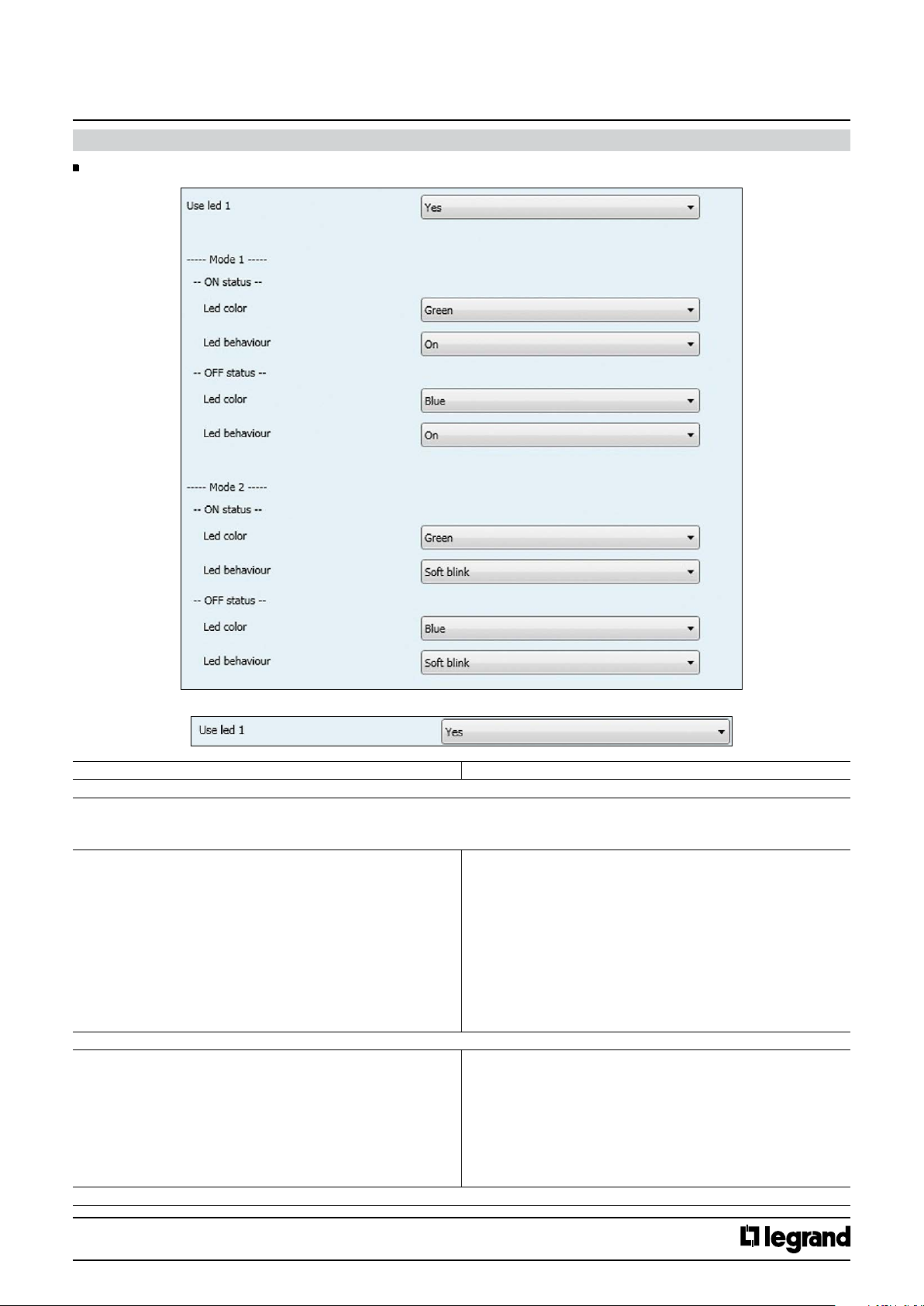
KNX
Arteor 4 and 6 touches glass controls
11. COMMUNICATION OBJECTS DESCRIPTION (continued)
11.3 Leds configuration
Cat. No(s).: 5 735 04/05
5 735 12/13
Use led X
Use led X Yes / No
The parameter determines if the led X is used or not (it depend if the rockers has light diuser).
Mode1
ON status
Led color Green
The parameter determines the color of led X for ON status in Mode 1
Led behaviour O
The parameter determines the behaviour of led X for ON status in Mode 1
Blue
White
Orange
Gold
Yellow
Turquoise
Cyan
Light blue
Violet
Pink
Purple
On
Slow blink
Fast blink
Soft blink
Flash 1
Flash 2
Flash 3
Pulse
Technical data sheet: S000090563EN-2 Updated: 07/06/2016 Created : 27/07/2015
CONTENTS
35/38
Page 36
KNX
Arteor 4 and 6 touches glass controls
11. COMMUNICATION OBJECTS DESCRIPTION (continued)
11.3 Leds configuration (continued)
Mode1 (continued)
OFF status
Led color Green
Blue
White
Orange
Gold
Yellow
Turquoise
Cyan
Light blue
Violet
Pink
Purple
The parameter determines the color of led X for OFF status in Mode 1
Led behaviour O
On
Slow blink
Fast blink
Soft blink
Flash 1
Flash 2
Flash 3
Pulse
The parameter determines the behaviour of led X for OFF status in Mode 1
Cat. No(s).: 5 735 04/05
5 735 12/13
Mode2
ON status
Led color Green
The parameter determines the color of led X for ON status in Mode 2
Led behaviour O
The parameter determines the behaviour of Led X for ON status in Mode 2
Blue
White
Orange
Gold
Yellow
Turquoise
Cyan
Light blue
Violet
Pink
Purple
On
Slow blink
Fast blink
Soft blink
Flash 1
Flash 2
Flash 3
Pulse
Technical data sheet: S000090563EN-2 Updated: 07/06/2016 Created : 27/07/2015
CONTENTS
36/38
Page 37
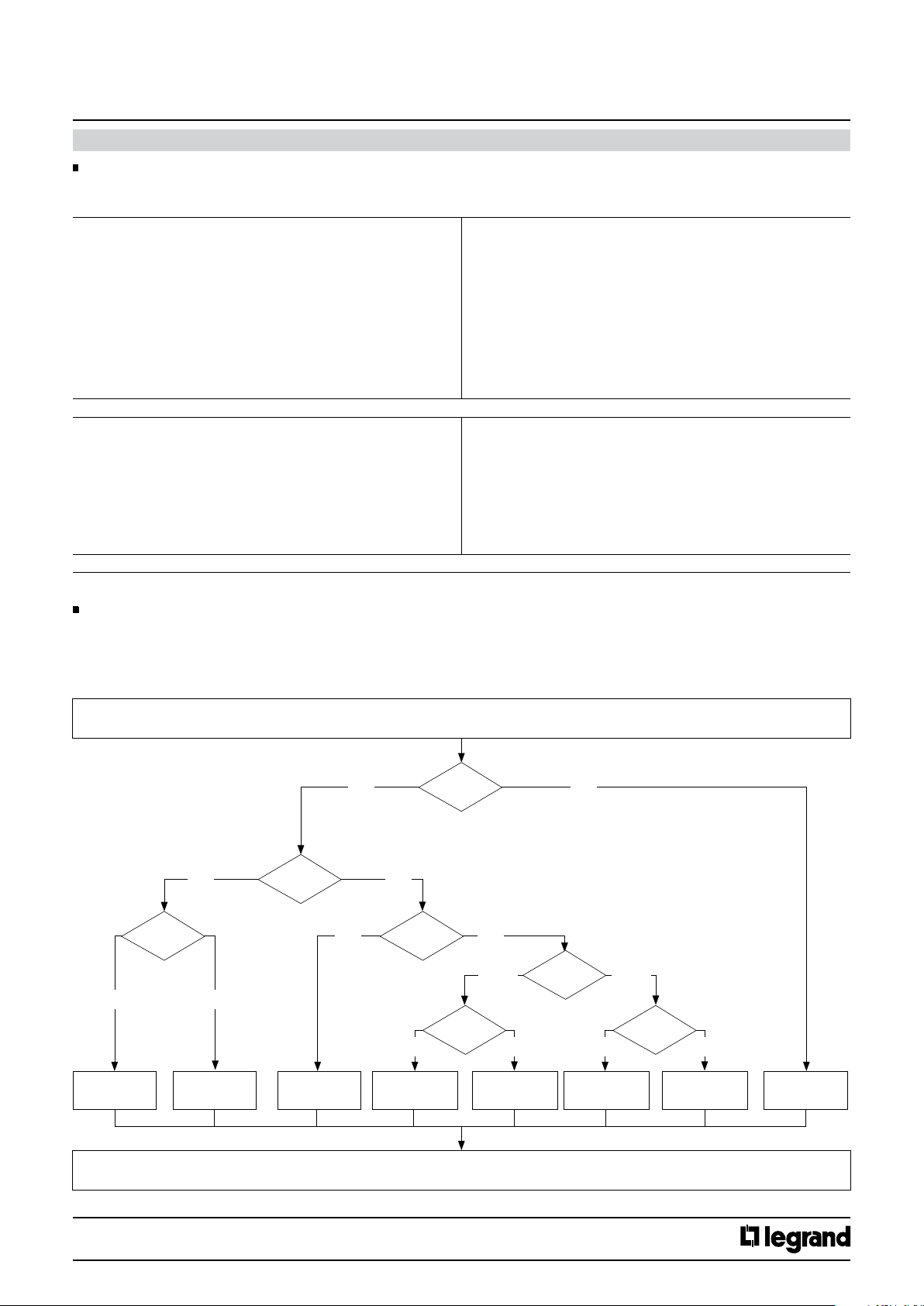
KNX
Arteor 4 and 6 touches glass controls
11. COMMUNICATION OBJECTS DESCRIPTION (continued)
11.3 Leds configuration (continued)
Mode2 (continued)
OFF status
Led color Green
Blue
White
Orange
Gold
Yellow
Turquoise
Cyan
Light blue
Violet
Pink
Purple
The parameter determines the color of led X for OFF status in Mode 2
Led behaviour O
On
Slow blink
Fast blink
Soft blink
Flash 1
Flash 2
Flash 3
Pulse
The parameter determines the behaviour of Led X for OFF status in Mode 2
Cat. No(s).: 5 735 04/05
5 735 12/13
11.4 LEDs color and behaviour updating flowchart
The led color and behaviour changings are performed when :
- Is received an object of : Status, Alarm, Function, Enable.
- Is pushed a button : in shutter mode, 8-bits scene control, priority, counting, 1x1unsigned byte, 2x1 unsigned byte or if context information are
active.
Request for leds status and color update
Mode 1
Mode 1||2?
Yes
Mode 2
Beginning?
Yes
No
Alarm?
No
Command
disabled?
ON ON
No
Mode 1
ON / OFF? ON / OFF?
OFF OFF
Yes
Mode 1||2?
Mode 2
Set initial led color
and behaviour in
Mode 1
Set initial led color
and behaviour in
Mode 1
Set the chosen
Disable status’ led
color and behaviour
Set the chosen
Mode 1 ON status’ led
color and behaviour
Set the chosen
Mode 1 OFF status’ led
color and behaviour
Set the chosen
Mode 2 ON status’ led
color and behaviour
Set the chosen
Mode 2 OFF status’ led
color and behaviour
Leds status and color update
Technical data sheet: S000090563EN-2 Updated: 07/06/2016 Created : 27/07/2015
CONTENTS
Set led color RED
and fast blinking
behaviour
37/38
Page 38
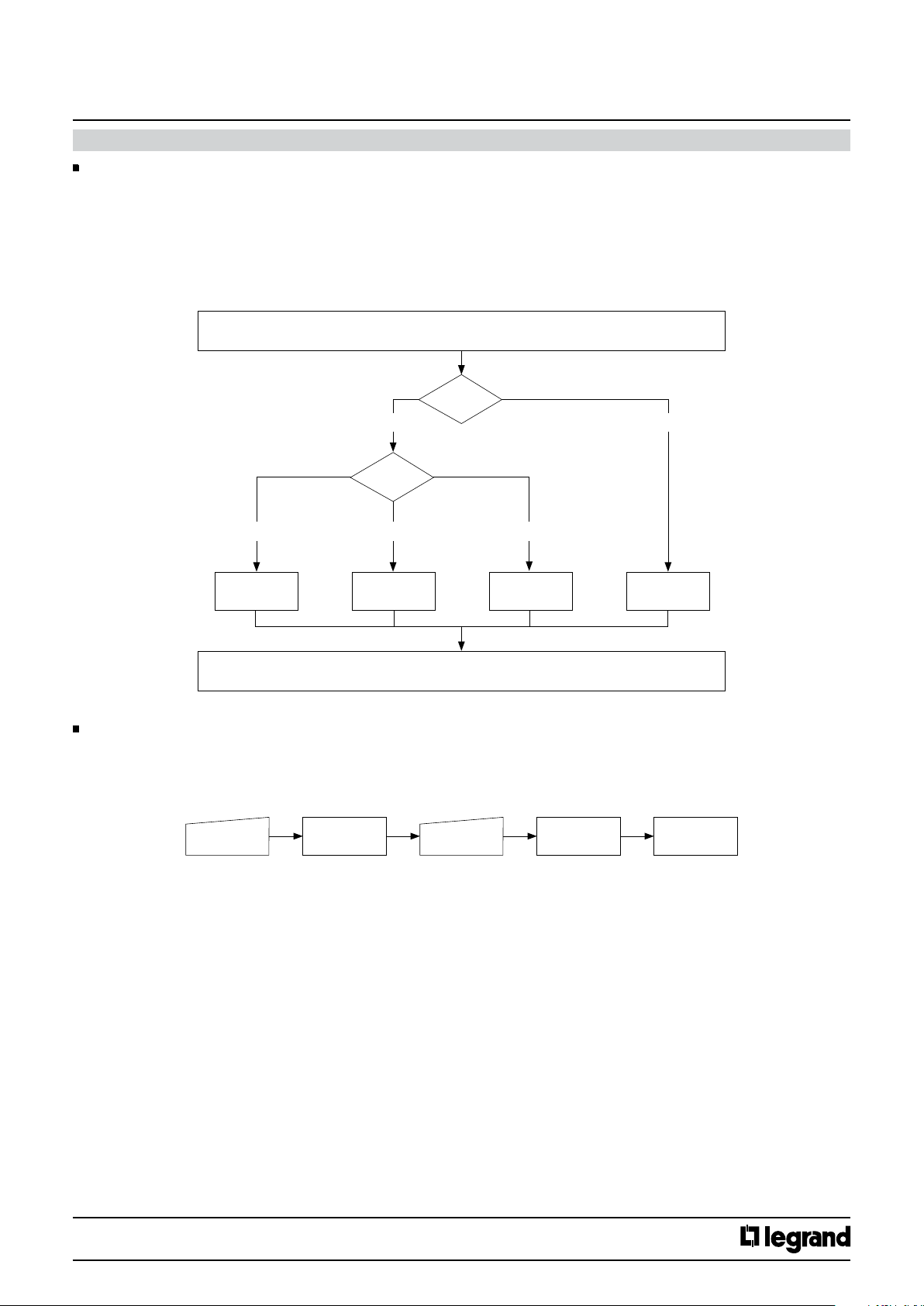
KNX
Arteor 4 and 6 touches glass controls
11. COMMUNICATION OBJECTS DESCRIPTION (continued)
11.5 LED intensity update flowchart
The leds intensity changings are perfomed when :
- Is received an object of : Standby, Eco mode, Normal mode, Eco/Normal, Alarm
- Is pressed a push-button.
After Standby or Alarm mode the level is set to the previous level (Normal/Eco).
Standby mode is disables if any button is pressed.
Request for leds intensity update
Alarm?
No Yes
Mode?
Cat. No(s).: 5 735 04/05
5 735 12/13
Normal Eco Standby
Set leds intensity
to the chosen
Normal level
Set leds intensity
to the chosen
Eco level
Set leds intensity
to OFF
Leds intensity update
11.6 No configuration status and reset procedure
Product not yet configured
The product has no physical address and no group addresses associated.
The leds change colors randomly every 200ms.
Reset procedure
Short press PB
Prog/reset PB
All leds become
RED and fixed
Keep Prog/Reset
PB pressed for 10s
Nota : when in programming mode (RED and fixed leds) there are 30min before timing out.
During reset all
leds are RED
and fast blinking
Set leds intensity
to100%
Short press
Technical data sheet: S000090563EN-2 Updated: 07/06/2016 Created : 27/07/2015
CONTENTS
38/38
 Loading...