

Page 1

LightLaser
Model:SC-500
20K
User Guide
Page 2

Thank you for purchasing the of Laser Show product. The
product integrate optics, electron, digital graphics disposal, and other
multinomial advanced technology, design for disco, KTV, and stage
show technically. It can from beam program according to music
rhythm, and it can bring space channels, light wall & other
dimensional effect combine with fog. It can generate a mutative dream
world for you.
Features of the product:
1. The adopt laser show, the major laser parameter as followed:
Green: All Solid State lasers up to 80mW @532nm
Red: All Solid State lasers up to 200mW @650nm
Blue: All Solid State lasers up to 200mW @403nm
2. Adopt original high-capability optics multicolor lens technology,
implement polychrome laser effect.
3. Cartoon laser show adopt large capacitance step motor control system
and excellent optics scanning lens to produce vivid and wonderful laser
character ,design and cartoon effect.
4. Multiple play mode optional: sound activation, manual control,DMX512
signal control, so it can be use in multifarious occasion.
5. Compatible with the International standard DMX512 signal with 11 control
channel can be agile controlled.
6. Through principal and subordinate setting, realize several machines run
synchronou
7.Input power: AC 200V~240V 50/60Hz. Power: 60w.
Page 3

Installation
1. Carefully inspect your Laser Show equipment as you unpack it. If any
damage is evident, such as dents or scratches on the covers or broken
knobs, etc., immediately notify your carrier and your local sales
distributor.
2. Hang up the equipment in a safe place. Ensure that there are no
barriers before the laser aperture.
3. Choose the operation mode.
The rear panel view:
Let us look at the function of the DIP switch:
1st-9
th
bit: Start address (from 1-255).
The 10
th
bit: Sound/ DMX512 mode
Page 4
OFF: Sound/auto/activation mode
ON: DMX512 mode
z Sound /auto Mode/cartoon
1. set 10th
[OFF]
2. set 1th & 2th
1th 2th Run pattern
OFF OFF sound(master)
ON OFF AUTO
ON ON Animation show
OFF ON Slave
DMX512 console control means:
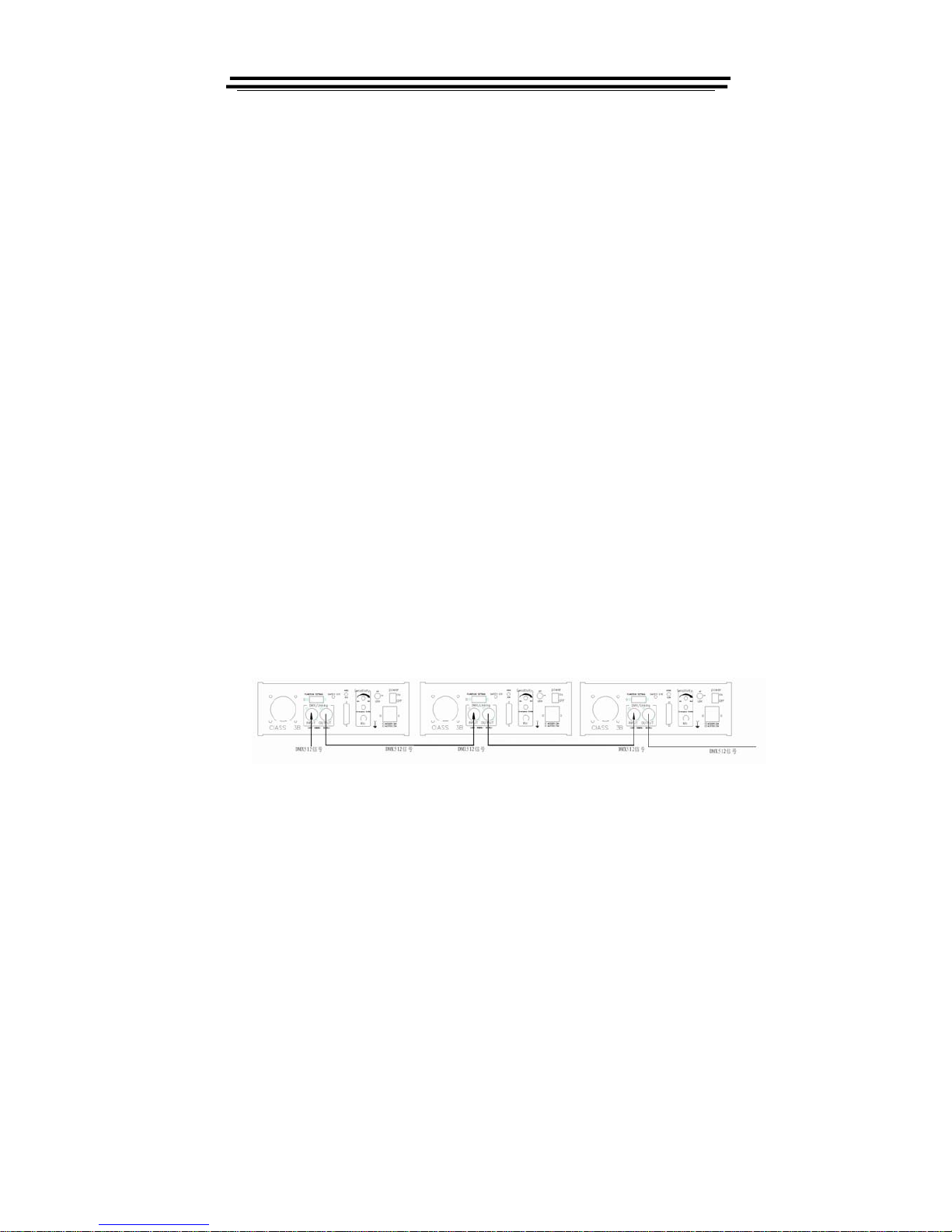
1. the laser light controlled by international DMX512.Please connect
the console and laser as below. It can control one or several lasers
synchronously.
2. .Turn on the 10th position of address code switch.
Page 5

3. when using DMX512,you should setup address code switch of
laser(1th-9th of address code switch).This laser use 12channel
calculation of address code: ADDR=16*N-15,for example:
The first loop: ADDR=1
The second loop: ADDR=12
The third loop: ADDR=23
The fourth loop: ADDR=34
● In binary system, it has “0” and “1” numerical value, corresponding
address code switch “OFF” and “ON” position, As below:
LOOP ADDR BINARY USAGE OF DIP SWITCH
1 1 000000001
2 12 000001010
3 23 000010111
4 34 000100010
NOTICE: please make sure the output signal of last laser connect to loop
socket. this loop socket connect a resistance between pin 2&3 of canon
socket, in order to avoid signal echo when in transmitting signal.
Page 6
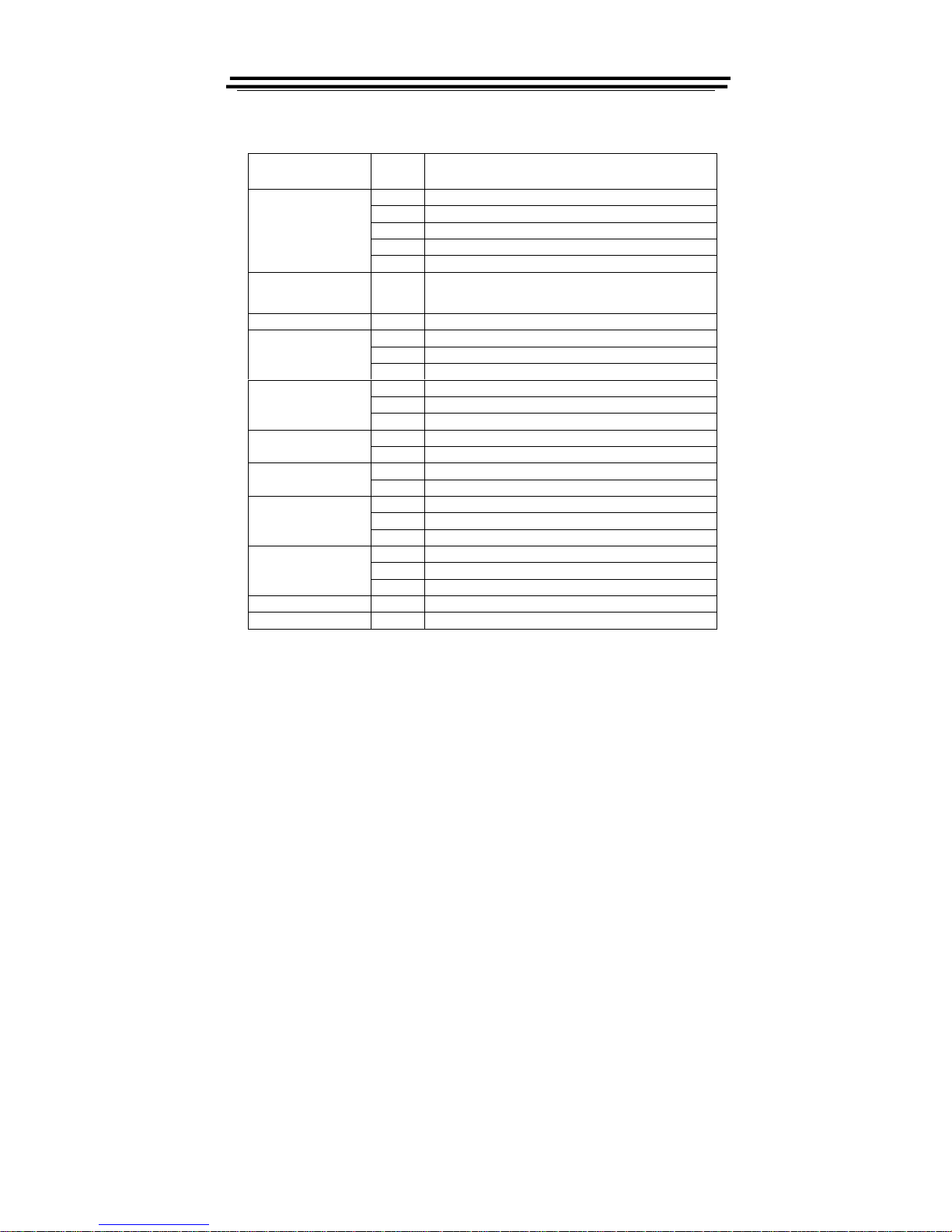
5.The system only accepts the DMX512 signal of international standard to control the system
mode, the laser pattern ON /OFF, the size, the position, the speed, etc.
Channel
DMX512
Function
0-49, Sound activation group ,3-11 invalid
50-99 automobile group,3-11 invalid
100-149 cartoon
150-199 manual(sound activation)
1.Laser control mode
200-255 manual
(
automobile activation)
2. disconnected & Shut up 0-255
Shut up, White-Red-Yellow–Green-blue-purple, Be on the move, Frequency
sprains, disconnected with pattern online
3.design 0~255 128Pattern(0~255)
0-127 Vertical .move by Manual control
128~191 Auto Vertical .move down,speed with value
4. vertical move
192~255
A
uto Vertical .move up,speed with value
0-127 Horizontal .move by Manual control
128~191 Auto Horizontal move down,speed with value
5. Horizontal move
192~255 Auto Horizontal move u
p,sp
eed with value
0~127 Vertical .Overturn by Manual control
6. Vertical Overturn
128~255
A
uto Vertical Overturn ,speed with value
0~127 Horizontal Overturn by Manual control
7. Horizontal Overturn
128~255
A
uto Horizontal Overturn ,speed with value
0-127 Rotate by Manual control
128~191 Clockwise Rotate, speed with value
8. Rotate
192~255 Counterclockwise Rotate
, sp
eed with value
0~85 small to bi
g
, sp
eed with value
86~170 Big to small,speed with value
9. zoom
171~255 Size of the turn zoom
,sp
eed with value
10..picture size 0~255 0: Original Size,1:small;255:bi
g
11. view point 0~255 0: none,1: Minimum brightness;255: Brightness of the largest
Page 7

WARNINGS
z Visible and invisible laser-light, direct beam can damage the human
eye and the eyes of animals. Do not look at any Laser light directly.
z Do not touch the laser aperture with the hand. When cleaning the laser
aperture, please use tampon with alcohol or camera lens paper.
z Do not take apart or modify the equipment. Fire or electrical shock may
result.
z If you hear unusual noise, see smoke, feel excessive heat or smell
anything unusual, immediately unplug the power source and contact
your retailer. Continued use may result in fires or electrical shock.
z Do not use flammable sprays near this equipment. Also do not spill
water, liquids, or flammable liquids on the equipment. If these fluids
enter this equipment and contact the electrical parts, fires or electrical
shock may result. If anything enters the equipment, immediately unplug
the power supply and contact your retailer.
Page 8

Service and repair
The Laser Show equipment has no major serviceable parts. Repair of
electronic- components (transistors, IC´s) or changing other parts are not
allowed by untrained persons. If there is a problem with the Laser Show
equipment, your local service engineer will help you with repair or
replacement. We recommend to ship the Laser Show equipment to the
manufacturer for reparation.
Attachments:
1. Laser Light: 1PCS
2. Power Cable: 1PCS
3. User Guide: 1PCS
 Loading...