

Page 1

User's Manual
Digital Audio Matrix
Model: LDA ZES-22 S02
Page 2

Page 3

TABLE OF CONTENT
WARNINGS............................................................................................................................8
1 TECHNICAL DESCRIPTION.............................................................................................1
2 FUNCTIONING DESCRIPTION........................................................................................1
2.1 CONNECTION............................................................................................................3
2.1.1 ANALOG CONNECTION ...................................................................................4
2.1.1.1 UNBALANCED SOURCE INPUT....................................................................5
2.1.1.2 BALANCED SOURCE INPUT..........................................................................5
2.1.1.3 BALANCED OUTPUT TO DESTINATION.......................................................6
2.1.1.4 UNBALANCED OUTPUT TO DESTINATION..................................................6
3 FIRMWARE UPDATE........................................................................................................6
3. 1 ACCESS TO THE DEVICE.........................................................................................6
3.2 LOADING THE FIRMWARE.......................................................................................7
4 TECHINCAL SPECIFICATIONS........................................................................................8
Page 4

Page 5

MANUAL DE USUARIO – LDA ZES-22
WARNINGS
1. Read this user's manual before using the device.
2. Preserve this user's manual for further readings.
3. The device should not be exposed to any dripping or splashing of water and no objects
filled with liquids such as vases or glasses should be placed next to the device.
4. Do not block the ventilation gaps of the device.
5. Do not install the device close to heat sources.
6. In case the device is installed on a rack or case, make sure to provide a proper ventilation.
7. Only use original accessories provided by the manufacturer of this device.
8. Unplug the device if it is not to be used during long periods of time.
9. Clean with a wet cloth. Do not use any chemical products.
DA Audio Tech - Severo Ochoa Nº 31- 29590 MÁLAGA, ESPAÑA. www.lda-audiotech.com 1
Page 6

Page 7
MANUAL DE USUARIO – LDA ZES-22
1 TECHNICAL DESCRIPTION
LDA ZES-22 is an audio DSP matrix based on the COBRANET Audio over Ethernet
standard.
ZES-22 has 4 channels of audio input and 4 channels of audio output being these
configured by software as channel input or output. It may have up to four channels of input
or output so be able to send the audio over Ethernet using the COBRANET. Standard.
2 FUNCTIONING DESCRIPTION
ZES-22 allows both, the injection and extraction of analog audio channel in a network of
Ethernet COBRANET.
COBRANET allows up to 65536 “bundles” (where a ´bundle´ is a package with up to 8
channels of digital audio). A ZES-22 can get up to 4 input channels and 4 output channels
within the COBRANET network. These channels can be connected to any of the analog
channels using the internal array. Also, it has a digital system integrated with the signals
(DSP) being able to make signal gain adjustments, equalization, filtering, limitations, etc.
DA Audio Tech - Severo Ochoa Nº 31- 29590 MÁLAGA, ESPAÑA. www.lda-audiotech.com 3
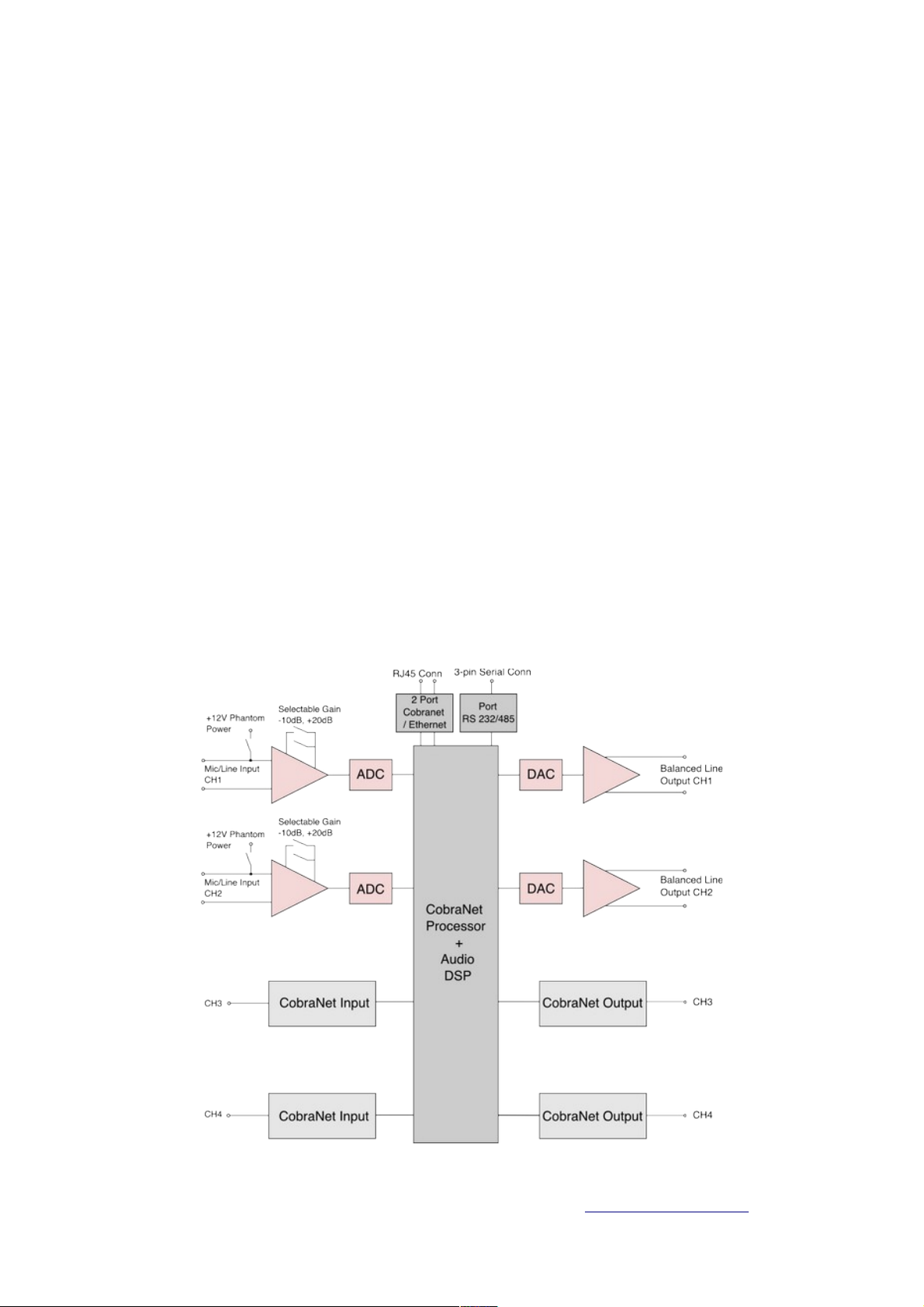
Picture 1: Internal Diagram (Default)
Page 8
Picture 1 shows a ZES-22 configured as 2 analog inputs + 2 COBRANET digital inputs
and 2 analog outputs + COBRANET digital outputs.
Analog inputs may be microphone inputs with Phantom 12V power supply as well as
Balanced Audio Inputs. A selectionable gain of -10dB to +20dB can be applied to these
analog inputs. Analog outputs are Balanced Audio.
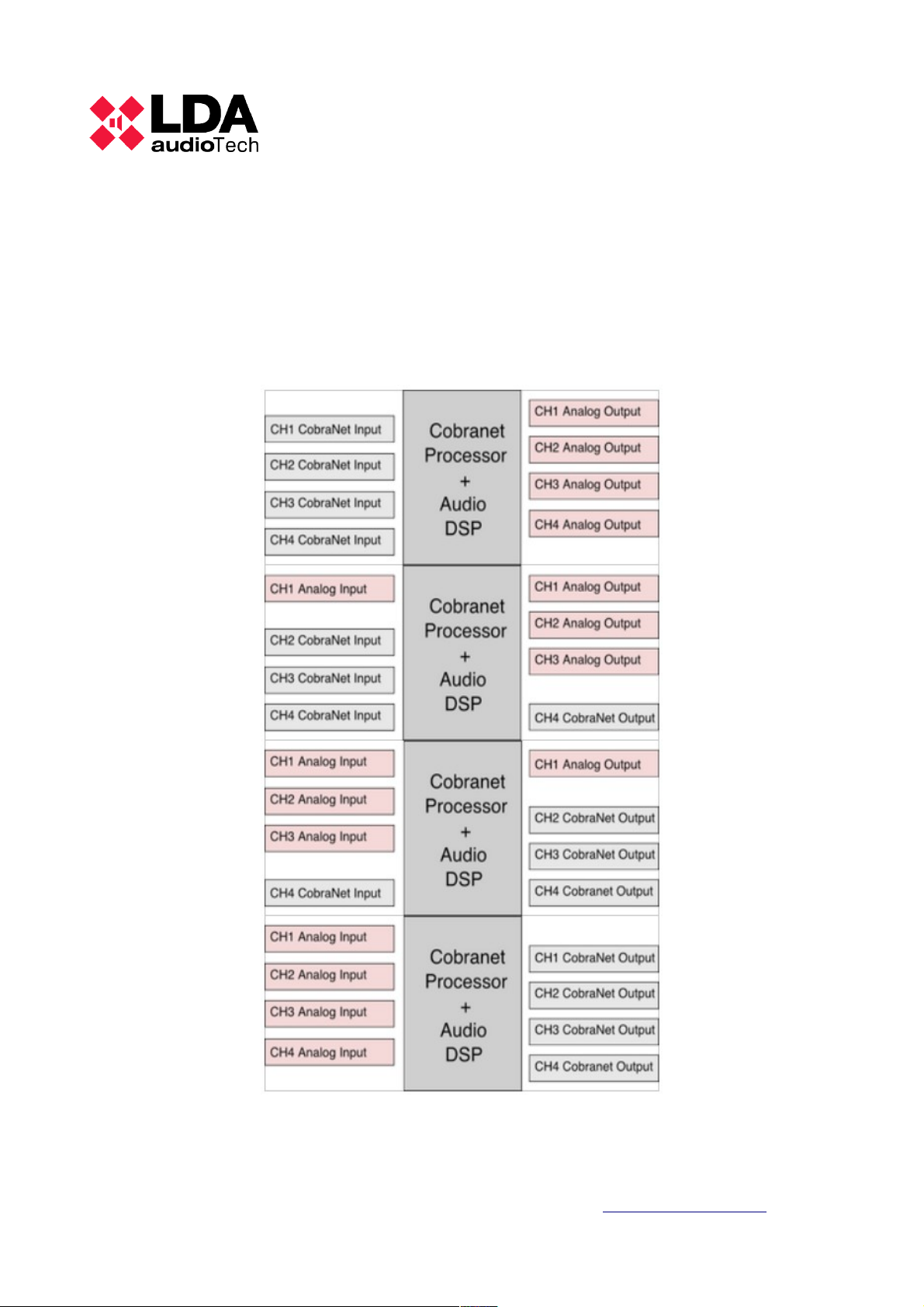
The rest of all possible configurations are shown below:
LDA Audio Tech - Severo Ochoa Nº 31- 29590 MÁLAGA, ESPAÑA. www.lda-audiotech.com 4
Picture 2: Possible configurations
Page 9
MANUAL DE USUARIO – LDA ZES-22
2.1 CONNECTION
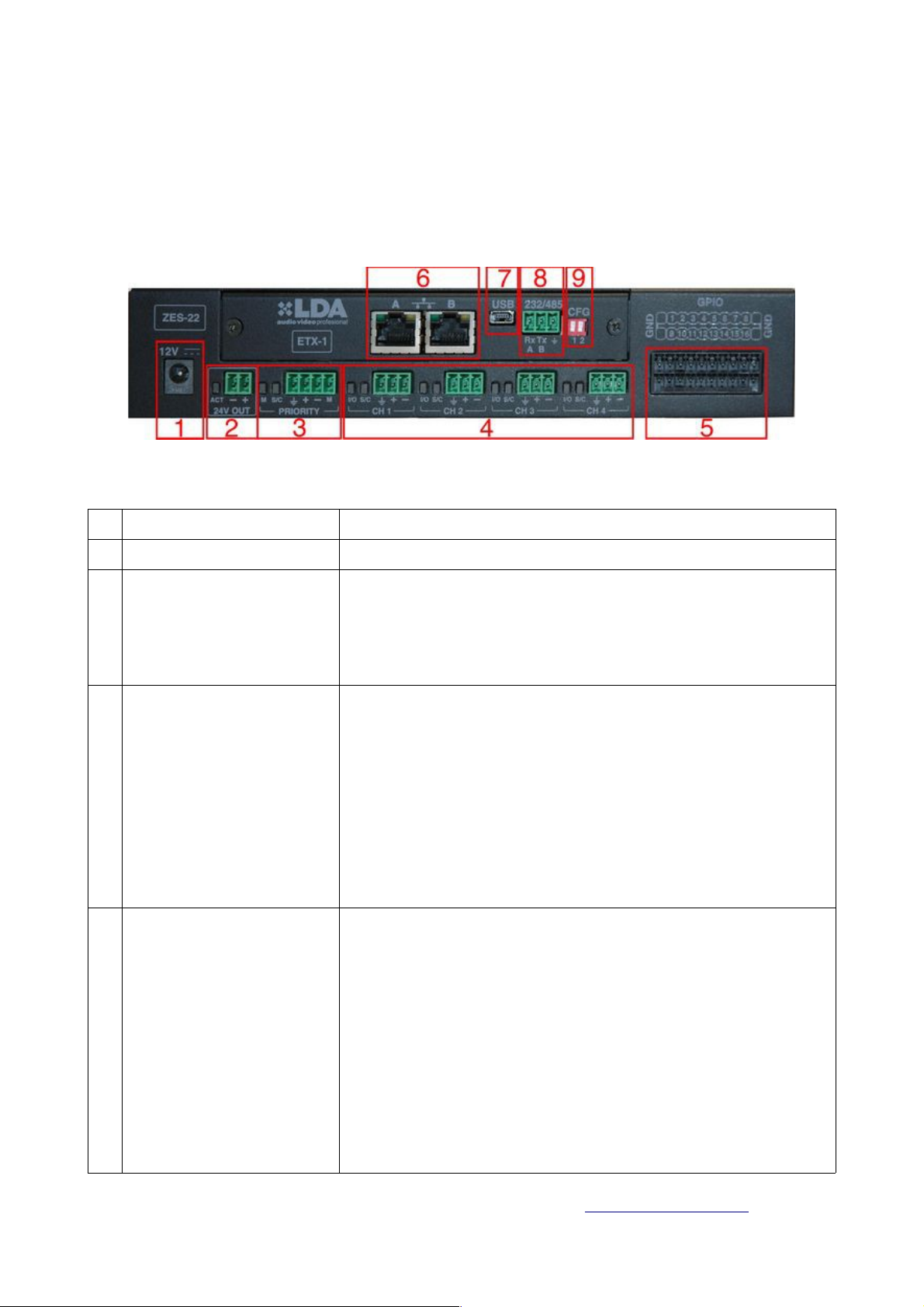
The picture below shows the rear of the device and its different connections.
Nº ELEMENT DESCRIPTION
1 Power Connector Power Connector 12VDC
2 Maneuver for attenuators
and sirens
Output caused by software to control the atenuators or
sirens powered at 24V max 1A:
Description of the output led:
Orange- Open Circuit / Short Circuit
Green- Line Ok.
3
Priority Input
Input of priority
Description of the pins:
1- GND
2- Audio+
3- Audio 4- Maneuver (C.C. or 5V TTL)
Description of the led indicators:
Led M- active maneuver Led in Orange→
Led S/C- Maneuver Input VU meter
(Orange/Green/Red) (O/G/R).
4 Audio Channels 4 configurable audio channels through the software as
audio inputs or audio outputs.
Description of the pins:
1- GND
2- Audio+
3- AudioDescription of the led indicators:
Led I/O Blue Channel selected as audio Input→ →
Led I/O Orange Channel selected as audio → →
output.
Led S/C VU meter of input signal or of output signal →
(O/G/R)
DA Audio Tech - Severo Ochoa Nº 31- 29590 MÁLAGA, ESPAÑA. www.lda-audiotech.com 5
Picture 3: Rear of the device
Page 10
5 GPIO Interface E/S configurable through software for signal interface TTL
(0-5V) with the system.
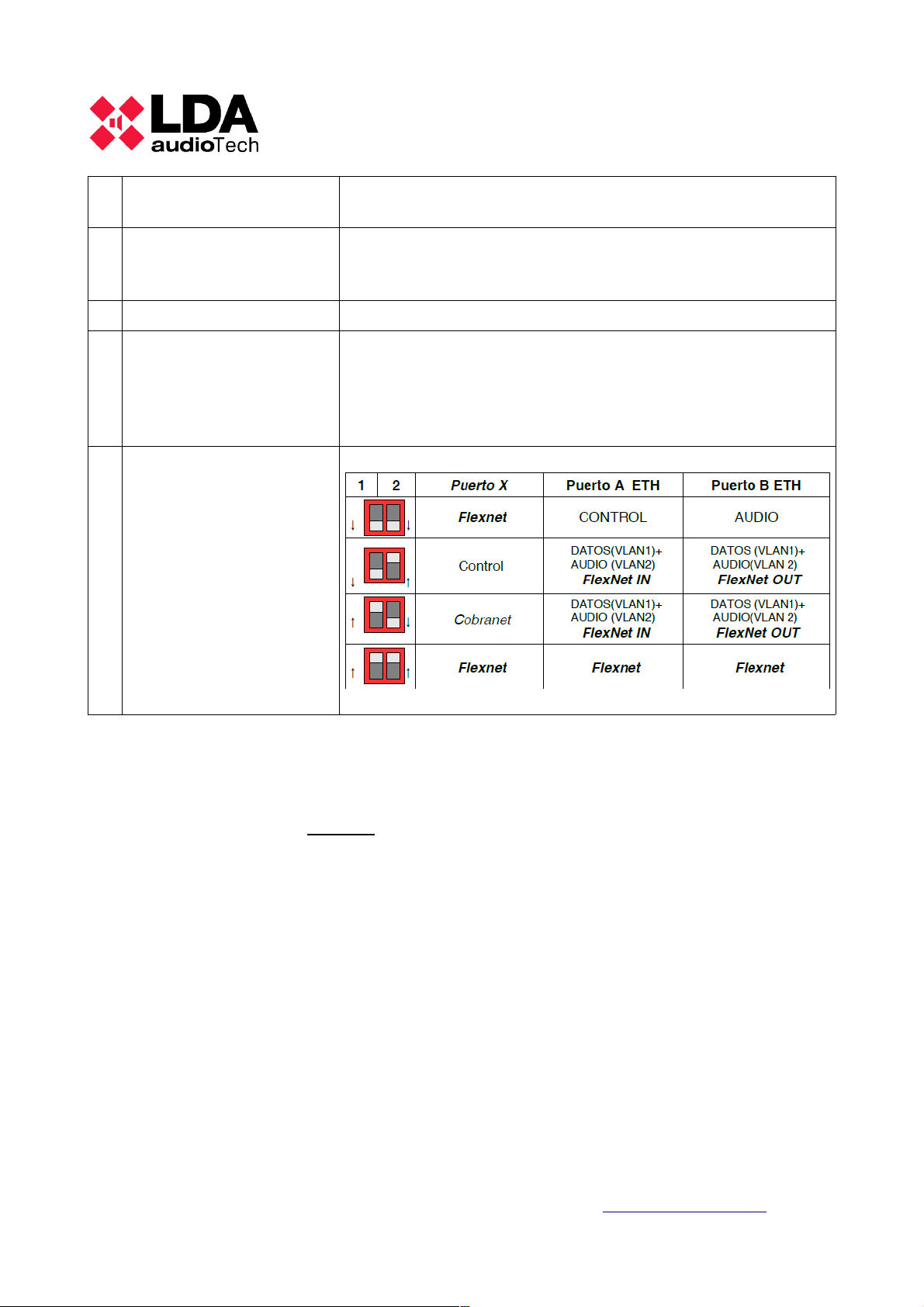
6 Cobranet/ Ethernet
Connectors
Cobranet or Ethernet configurable connectors. The
configuration is done through the selector switch. See
section 9.
7 Mini-USB Connector Mini-Usb Female Connector Type AB.
8 Interface 232/485 Interface 232/485
Description of the pins:
1- Rx-A
2- TX-B
3- GND
9 DIP-switch for Cobranet/
Ethernet selection.
Port X only available in
some models
This configuration is
applicable for Firmware
versions 1.0.4 or higher
and for ETX board v05.
(*)
Description of possible selections:
Table 1: Connection Description
(*) The ETX board version v05 can be identified with the MAC address. These versions
begin with a MAC number different than 00:50:c2: or 70:B3:D5:
2.1.1 ANALOG CONNECTION
The ZES22 accepts and manages the devices of balanced and unbalanced audio.
The following diagrams explain how to connect different types of audio devices.
LDA Audio Tech - Severo Ochoa Nº 31- 29590 MÁLAGA, ESPAÑA. www.lda-audiotech.com 6
Page 11
MANUAL DE USUARIO – LDA ZES-22
2.1.1.1 UNBALANCED SOURCE INPUT
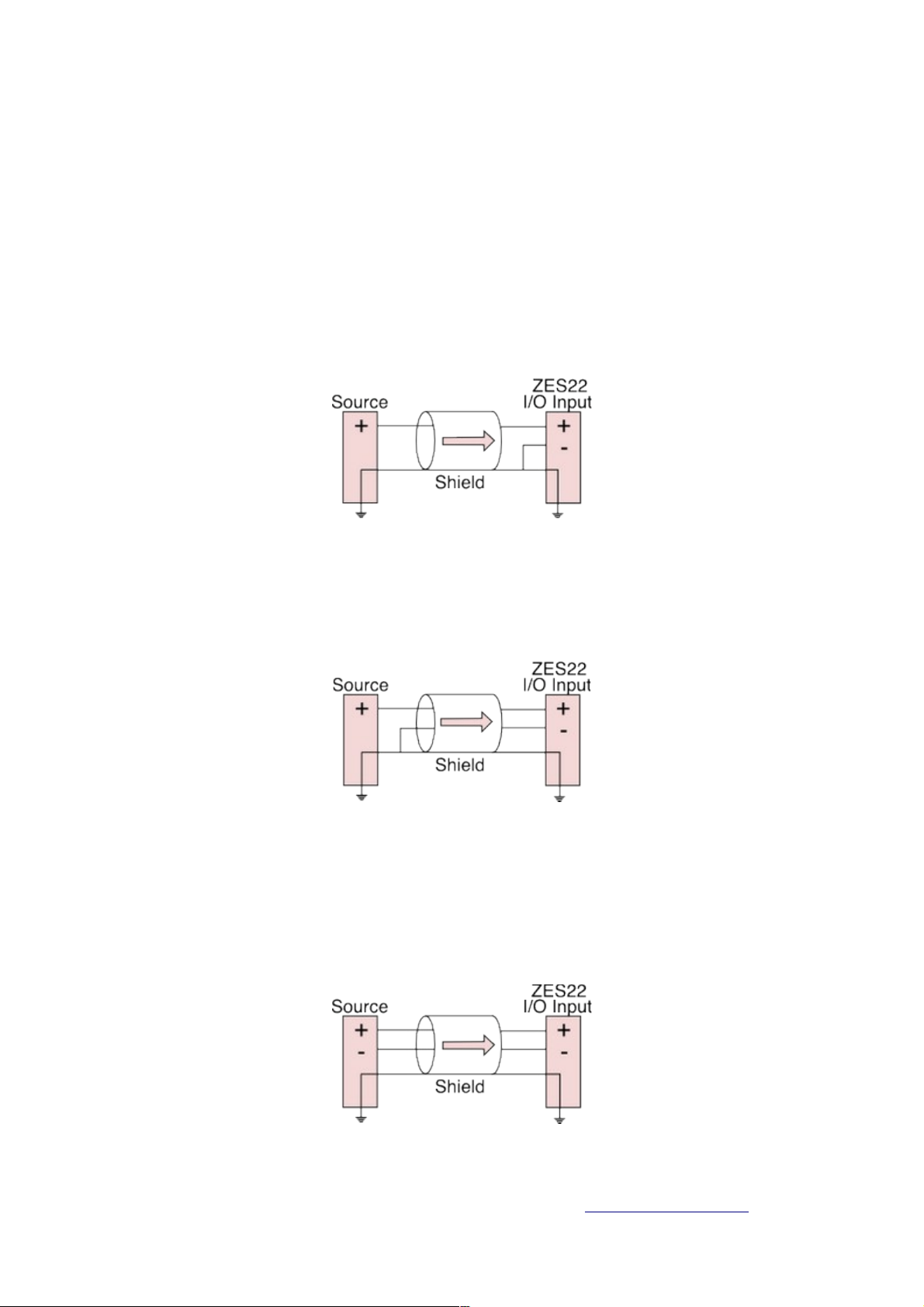
To be able to connect an unbalanced source of 2 wires to the ZES22, you have to
connect the positive output of the unbalanced source to the positive I/O input of the
ZES22. Connect the ground input source with ZES22 main source, and unite the negative
input with the ground source of the ZES22 input. See Picture 4.
Picture 4
To connect an unbalanced source with 3 wires to the ZES22, unite the negative conductor
and the shield of the source. See Picture 5:
Picture 5
2.1.1.2 BALANCED SOURCE INPUT
To connect a balanced source to ZES22 connect the positive power of the
source to the positive power of the ZES22 and unite the ground through the cable shield.
See Picture 6.
Picture 6
DA Audio Tech - Severo Ochoa Nº 31- 29590 MÁLAGA, ESPAÑA. www.lda-audiotech.com 7
Page 12

2.1.1.3 BALANCED OUTPUT TO DESTINATION
To connect to a balanced input from a destination device, connect the
positive, negative and ground connections of the ZES22 and the destination device. See
Picture 7.
Picture 7
2.1.1.4 UNBALANCED OUTPUT TO DESTINATION
To connect the output of the ZES22 to a unbalanced input of 2 wire, connect
the positive output to the positive input of the destination device. Unite the ground of the
ZES22 and the destination device through the shield cable. See Picture 8.
Picture 8
LDA Audio Tech - Severo Ochoa Nº 31- 29590 MÁLAGA, ESPAÑA. www.lda-audiotech.com 8
Page 13
MANUAL DE USUARIO – LDA ZES-22
3 FIRMWARE UPDATE
3. 1 ACCESS TO THE DEVICE
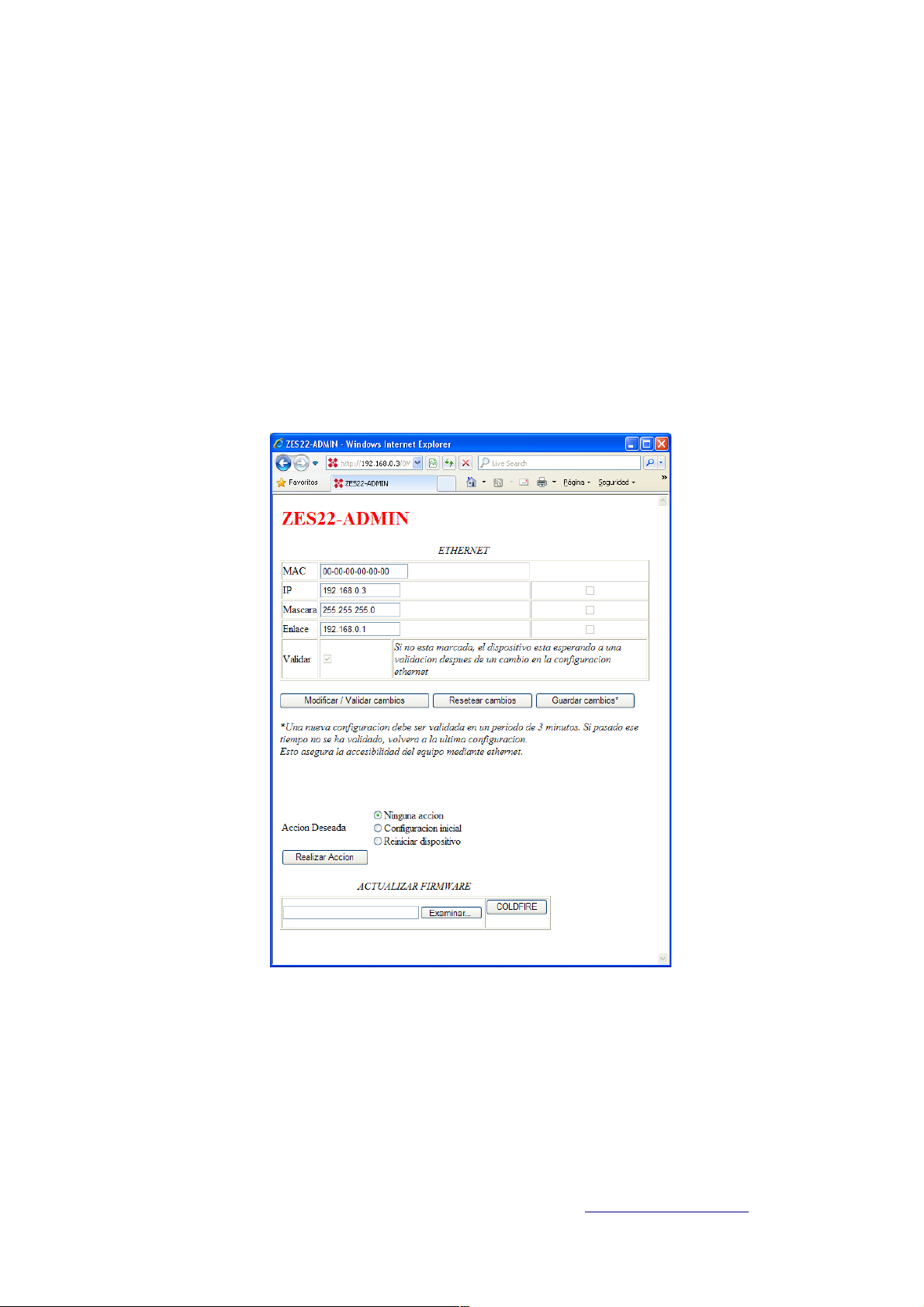
In order to establish a connection with the device, we need to know its IP address. By
default, the IP address is 192.168.0.3. In a web browser we introduce that IP address and
the following web page will appear:
3.2 LOADING THE FIRMWARE
In the lower part of the configuration screen (picture 9) is the field for the Firmware
Update. Proceed as follows:
DA Audio Tech - Severo Ochoa Nº 31- 29590 MÁLAGA, ESPAÑA. www.lda-audiotech.com 9
Picture 9
Page 14
1. Select the update file with the button “Browse...”
2. Start the update process pushing the button “COLDFIRE”;
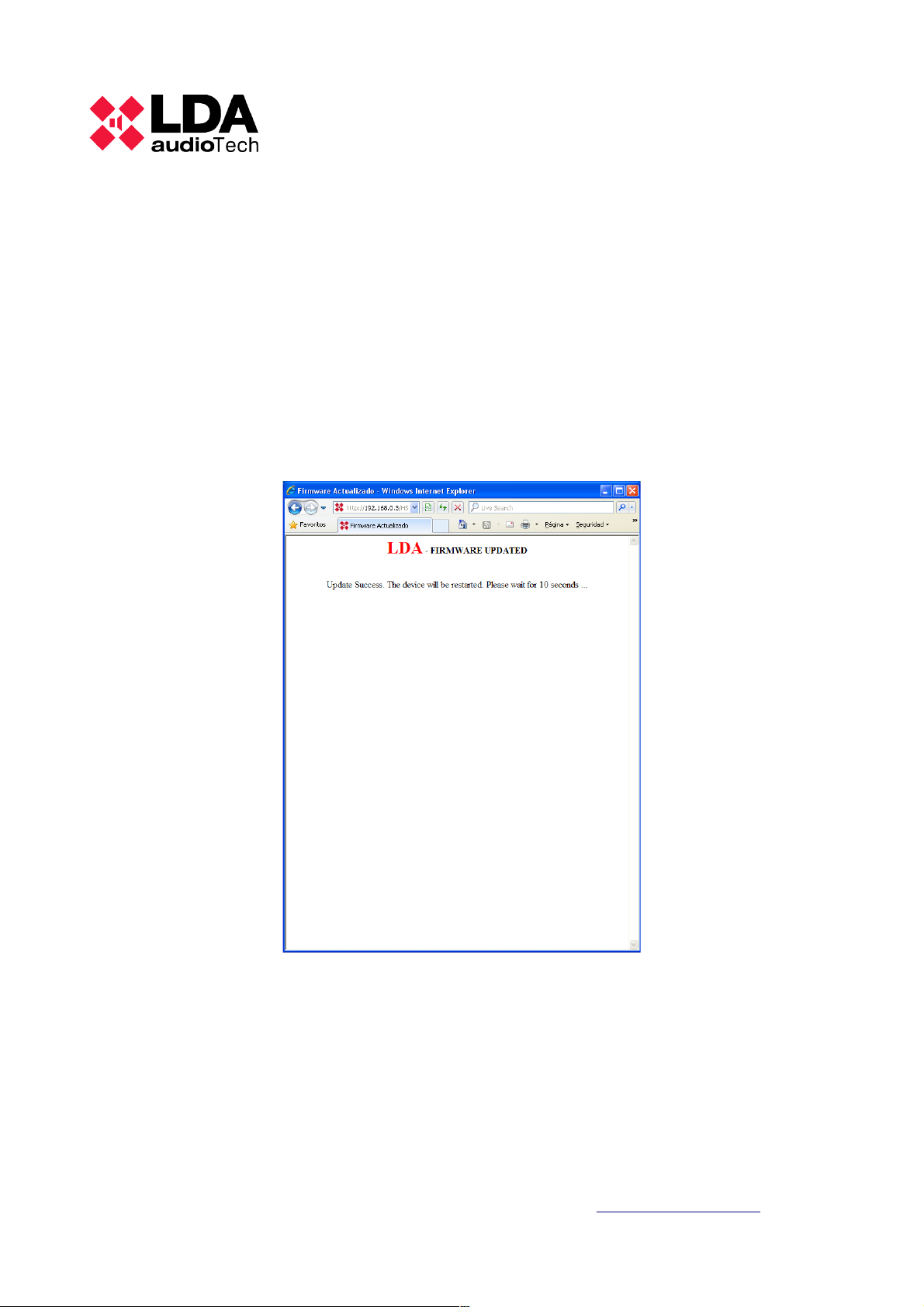
3. The confirmation screen shown in Picture 10 will appear and the device will
reboot automatically.
4. After the process is completed, the screen from Picture 9 will appear again with
the new firmware running.
LDA Audio Tech - Severo Ochoa Nº 31- 29590 MÁLAGA, ESPAÑA. www.lda-audiotech.com 10
Picture 10
Page 15

MANUAL DE USUARIO – LDA ZES-22
4 TECHINCAL SPECIFICATIONS
Model
LDAZES22S02
Power Supply 110 - 240V ~ 50/60 Hz
Consumption <20W
Phantom Power Supply 12V (at every input, configurable)
Frequency Response 20Hz-20kHz +/-0,05dB
Input Sensibility 1Vp, 0,707Vrms
Audio Inputs Analog, balanced
Sensibility Adjustments +20dB / 0dB / -10dB
S/N >94dB @1Vrms
Audio Connectiors Conector tipo Euroblock
DSP Resoluction 48kHz 24bits
GPIO 16 E/S configurable TTL 5V
Ethernet & Cobranet
Interface
2 x RJ-45. Redundant
Attenuators Override Output 24V 50mA, monitored and protected
Weight
1Kg
Dimensions (W x D x H) 218 x 153 x 42mm (1U height, width: ½ rack 19” unit)
DA Audio Tech - Severo Ochoa Nº 31- 29590 MÁLAGA, ESPAÑA. www.lda-audiotech.com 11
Page 16

 Loading...