

Page 1
Safety and Warranty Guide
Read this guide before you set up and use your product.
Lenovo support: https://support.lenovo.com
Lenovo user forums:
https://forums.lenovo.com
Page 2
danger of suffocation.
comply with local ordinances or regulations.
small amount of harmful substance.
local laws and regulations.
local laws and regulations.
beam.
Accessing your User Guide
Your User Guide contains detailed information about your
computer. To access your User Guide, do the following:
For models with Lenovo Vantage:
1. Open the Start menu and then click Lenovo Vantage.
2. Expand Health & Support and then click User
Guide.
For models with Lenovo Companion:
1. Open the Start menu and then click Lenovo
Companion.
2. Click SUPPORT → User Guide.
For models supporting Ubuntu
Go to the following directory:
/usr/share/doc/lenovo-doc
®
Lenovo
makes constant improvements to the User
Guide for your computer. See “Downloading publications”
for information about downloading the latest User Guide.
®
:
Downloading publications
Electronic versions of your computer publications are
available for download from the Lenov o Su pport Web site:
https://support.lenovo.com
Recovery information
Your computer might not come with a Windows recovery
disc set or USB key. To restore the Microsoft
operating system, see the recovery informat ion in the
User Guide.
®
Windows
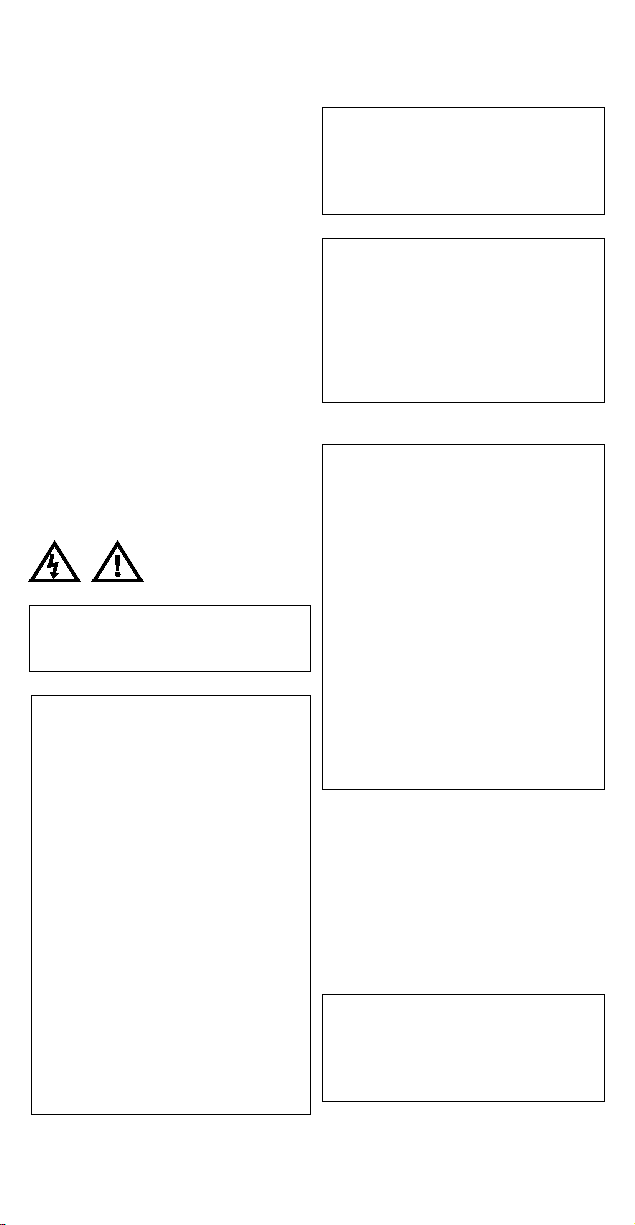
Safety information
Plasti c b ag notice
DANGER
Plastic bags can be dangerous. Keep plastic
bags away from babies and children to avoid
General battery notice
DANGER
Batteries supplied by Lenovo for use with your
product have been tested for compatibility and
should only be replaced with approved parts. A
battery other than the one specified by Lenovo,
or a disassembled or modified battery is not
covered by the warranty.
Battery abuse or mishandling can cause
overheat, liquid leakage, or an explosion. To
avoid possible injury, do the following:
• Do not open, dissemble, or service any battery.
• Do not crush or puncture the battery.
• Do not short-circuit the battery, or expose it to
water or other liquids.
• Keep the battery away from children.
• Keep the battery away from fire.
Stop using the battery if it is damaged, or if you
notice any discharge or the buildup of foreign
materials on the battery leads.
Store the rechargeable batteries or products
containing the rechargeable batteries at room
temperature, charged to approximately 30% to
50% of capacity. We recommend that the
batteries be charged about once per year to
prevent overdischarge.
Do not put the battery in trash that is disposed of
in landfills. When disposing of the battery,
Notice for removable rechargeable battery
DANGER
Only recharge the battery strictly according to
instructions included in the product
documentation.
If the battery is incorrectly replaced, there is
danger of an explosion. The battery contains a
Notice for built-in rechargeable battery
DANGER
Do not attempt to remove or replace the built-in
rechargeable battery. Replacement of the battery
must be done by a Lenovo-authorized repair facility
or technician.
Only recharge the battery strictly according to
instructions included in the product
documentation.
The Lenovo-authorized repair facilities or
technicians recycle Lenovo batteries according to
Notice for non-rechargeable coin-cell battery
DANGER
Use only the authorized battery specified for your
computer.
The battery contai n s a small amount of harmful
substances. If the coin-cell battery is incorrectly
replaced, there is danger of an explosion.
Do not heat to more than 100°C (212°F).
The following statement applies to users in the
state of California, U.S.A.
California Perchlorate Information:
Products containing manganese dioxide lithium
coin-cell batteries may contain perchlorate.
Perchlorate Material - special handling may apply,
See
www.dtsc.ca.gov/hazardouswaste/perchlorate
If the coin-cell battery is not a CRU, do not attempt
to replace the coin-cell battery. Replacement of the
battery must be done by a Lenovo-authorized
repair facility or technician.
The Lenovo-authorized repair facilities or
technicians recycle Lenovo batteries according to
Laser safety information (for products with optical drive)
CAUTION:
When laser products (such as CD-ROMs, DVD drives,
fiber optic devices, or transmitters) are installed, note
the following:
Do not remove the covers. Removing the covers of
the laser product could result in exposure to
hazardous laser radiation. There are no serviceable
parts inside the device.
Use of controls or adjustments or performance of
procedures other than those specified herein might
result in hazardous radiation exposure.
DANGER
Some laser products contain an embedded Class
3B laser diode. Note the following:
Laser radiation when open. Do not stare into the
beam, do not view directly with optical
instruments, and avoid direct exposure to the
Using headphones or earphones
CAUTION:
Page 3
Country or
region
Telephone number
Algeria
33-6-7348 1739 (French, Spanish)
Anguilla
1-800-426-7378 (English)
Antigua and
Barbuda
1-800-426-7378 (English)
Argentina
0800-666-0011
(Spanish, English)
Armenia
0-606-90-077
(Russian, English)
Australia
1-800-041-267 (English)
Austria
0810-100-654 (German)
Bahamas
1-800-426-7378 (English)
Bahrain
Kanoo IT: 00-973-1771-1722
(Arabic, English)
Bangladesh
AWSP Flora Limited:
Barbados
02-339-36-11 (Warranty service
1-800-426-7378 (English)
Belarus
8-256-400-184
(Russian, English)
Bermuda
1-800-426-7378 (English)
Bolivia
0800-10-0189 (Spanish )
Bosnia and
Herzegovina
387-3356-3170 (Bosnian)
Brazil
Calls made from within the Sao
(Portuguese)
Brunei
Dial 800-1111, and then dial
(Bahasa Melayu, En gl i s h)
Canada
1-800-565-3344 (English, French)
Cayman Islands
1-800-426-7378 (English)
Chile
800-361-213 (Spanish)
China
Tec h ni c al S u pp or t Li ne :
(Mandarin)
Colombia
01-800-912-3021
(Spanish)
Costa Rica
0-800-011-1029 (Spanish)
Croatia
385-1-3033-120 (Hrvatski)
Cyprus
800-92537 (Greek)
Czech Republic
800-353-637 (Czech)
Denmark
7010-5150 (Warranty service and
support) (Danish)
Dominican
Republic
1-866-434-2080 (Spanish)
Ecuador
1-800-426911-OPCION 4
(Spanish)
Egypt
Primary: 0800-0000-850
(Arabic, Englis h)
El Salvador
800-6264 (English)
Estonia
372-66-00-800
Excessive sound pressure from earphones and
headphones can cause hearing loss. Adjustment of
the equalizer to maximum increases the earphone
and headphone output voltage and the sound
pressure level. Therefore, to protect your hearing,
adjust the equalizer to an appropriate level.
Excessive use of headphones or ear p ho nes for a l on g
period of time at high volume can be dangerous if the
output of the headph on e or ear p ho ne c on nectors do not
comply with specifications of EN 50332-2. The
headphone output connector of your computer complies
with EN 50332-2 Sub clause 7. This specification limits
the computer’s maximum wide band true RMS output
voltage to 150 mV. To help protec t agai n s t he ar i n g loss,
ensure that the headphones or earphones you use also
comply with EN 50332-2 (Clause 7 Limits) or a wide band
characteristic voltage of 75 mV. Using head phones that
do not comply with EN 50332-2 can be dangerous due to
excessive sound pressure levels If your Lenovo computer
came with headphones or earphones in the package, as
a set, the combination of the headphones or earphones
and the computer already complies with the specifications
of EN 50332-1. If different headph on es or ear p ho nes ar e
used, ensure that they comply with EN 50332-1 (Clause
6.5 Limitation Values). Using headphones that do not
comply with EN 50332-1 can be dangerous due to
excessive sound pressure levels.
Service, support, and warranty information
The following information describes the technical support
that is available for your product during the warranty
period and throughout the life of your product. Online
technical support is available during the lifetime of a
product at https://support.lenovo.com.
If you purchased Lenovo services, refer to the following
terms and conditio ns for det ai l e d in for m ation:
• For Lenovo Warranty Service Upgrades or
Extensions, go to:
https://support.lenovo.com/lwsu
• For Lenovo Accidental Damage Protection Services,
go to:
https://support.lenovo.com/ladps
Warranty information
Lenovo provides a warranty period for your computer. To
check the warranty status of your computer, go to
https://www.lenovo.com/warranty-statusH, and then follow
the instructions on the screen.
Your computer is covered by the terms of the Lenovo
Limited Warranty (LLW), version L5 05-0010-02 08/2011.
The LLW is displayed on y our com puter during the initial
setup. If you cannot view the LLW either from your
computer or from the Web site
(https://www.lenovo.com/warranty/llw_02), contact your
local Lenovo office or reseller to obtain a pr inted version.
After the initial setup has been completed, you can view
the warranty information from your computer by doing the
following:
For models with Lenovo Vantage:
1. Open the Start menu and then click Lenovo Vantage.
2. Expand Health & Support and then click Warranty &
Service.
For models with Lenovo Companion:
1. Open the Start menu and then click Lenovo
Companion.
2. Click SUPPORT. The warranty information is listed in
the WARRANTY & SERVICES section.
For models supporting Ubuntu:
Go to the following directory:
/usr/share/doc/lenovo-doc
Customer Replaceable Units
Customer Replaceable Units (CRUs) are parts that can
be upgraded or replaced by the customer. To view the
CRU list and instructions on replacing the CRUs, s ee th e
respective section in the User Guide. See “Accessing
your User Guide” f or ad di ti on al in for m ation.
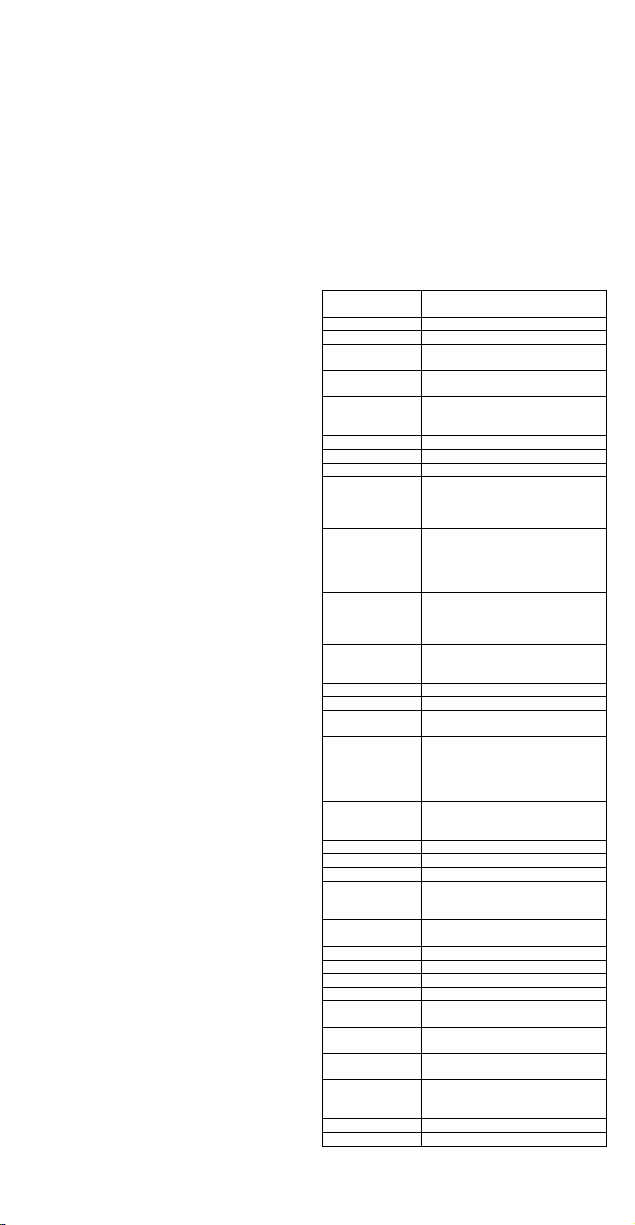
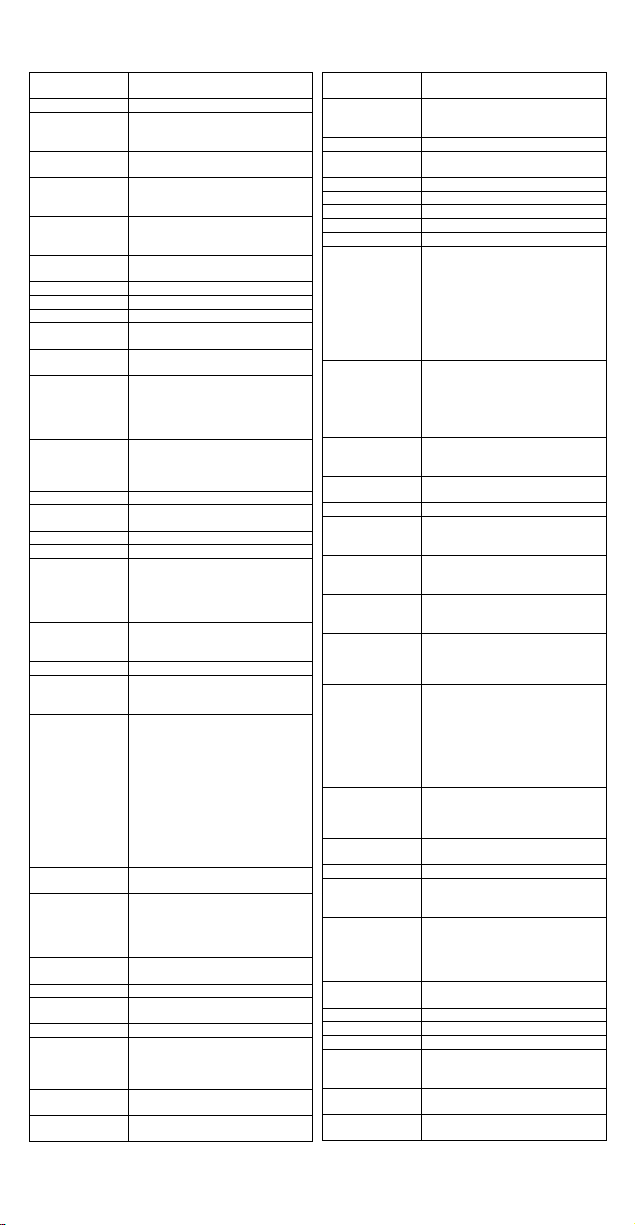
Worldwide telephone technical s upport
This section lists Lenovo Support telephone numbers. If
you cannot find the support teleph on e number for your
country or region, contact your Lenovo reseller or Lenovo
marketing representative. Before contacting a Lenovo
technical support representative, have the following
information available: model and serial number, the exact
wording of any error message, and a description of the
problem.
Important: Telephone numbers are subject to change
without notice. T he most up-to-date telephone list for the
Customer Support Center is always available at:
https://pcsupport.lenovo.com/supportphonelist
(Standard charg es apply)
Bahrain Business Machine LLC:
00-973-1758-4302
70-200-6853 88-0171-000-0000
(Mobile)
Email:
and support)
(Dutch, French)
(Standard charg es apply)
Paulo region: 11-3889-8986
Calls made from outside the Sao
Paulo region: 0800-701-4815
Darussalam
866-273-5446
400-100-6000
Secondary: 0800 -0000-744
Page 4
Country or
region
Telephone number
(Estonian, Russian, English)
Finland
358-800-1-4260
(Finnish)
France
33-243-166-035 (Warranty service
and support) (French)
Georgia
995-706-777-826
(Russian, English)
Germany
0800-500-4618 (Toll Free)
(German)
Greece
Lenovo authorized warranty
service provider (Greek)
Grenada
1-800-426-7378 (English)
Guatemala
999-9190 (Spanish)
Honduras
800-0123 (Spanish)
Hong Kong
(852) 3516-8977
(Cantonese, English, Mandarin)
Hungary
+36-13-825-716
(English, Hungarian)
India
(Primary) 1800-419-4666 (Tata)
(English, Hindi)
Indonesia
1-803-442-425
(English, Bahasa Indonesia)
Ireland
1-890-928-860 (English)
Italy
39-800-820-094 (Warranty service
and support) (Italian)
Jamaica
1-800-426-7378 (English)
Japan
0120-000-817 (Japanese, English)
Jordan
Jordan Business Systems:
(Arabic, Englis h)
Kazakhstan
77-273-231-427
(Russian, English)
Kenya
080-0733-256 (English)
Korea
1670-0088
(Korean)
Kuwait
Easa Hussain Al Yo usi fi:
(Arabic, Englis h)
Latvia
371-6707-0360
(Latvian, Russia n, En gl i sh)
Lebanon
Quantech: 00-961-1999-500
(Arabic, Englis h, French)
Lithuania
370 5278 6602 (Lithuanian,
Russian, English)
Luxembourg
352-360-385-222 (French)
Macao
0800-807 / (852) 3071-3559
(Cantonese, English, Mandarin)
Macedonia
389-2309-625 (Macedonian)
Malaysia
1-800-88-0013
(English)
Malta
356-21-445-566
(English, Italian, Maltese, Arabic)
Mexico
001-866-434-2080
(Spanish)
Country or
region
Telephone number
Moldova
0-602-23-433
(Russian, English)
Morocco
212-5-22-509-35 ( Arabic)
Nepal
977-1-423-3501 (Hunting), 977980-113-3667 (Mobile)
Netherlands
020-513-3939 (Dutch)
New Zealand
0508-770-506 (English)
Nicaragua
001-800-220-2282 (Spanish)
Nigeria
070-8060-1481 (English)
Norway
8152-1550 (Norwegian)
Oman
Khimji Ramdas Computer
00-968-2455-9831
Pakistan
International Office Products (pvt)
00-92-21-568-9823
Panama
001-866-434 (Lenovo Customer
(Spanish)
Paraguay
009-800-52-10026
(Spanish)
Peru
0-800-50-866 OPCION 2 (Spanish)
Philippines
+48-22-295-4950
(Tagalog, English)
Poland
+48-22-295-4950
(Polish, English)
Portugal
808-225-115
(Portuguese)
Qatar
Al Mana Computer Services:
00-9744-4441-212 (Arabic)
Romania
MB Distribution: +4021-231-79-88,
(Romanian)
Russia
7-499-705-6204
(Russian)
Saint Kitts and
Nevis
1-800-426-7378 (English)
Saint Lucia
1-800-426-7378 (English)
Saudi Arabia
800-84-451-28
(Arabic)
Singapore
6818-5315 (Standard charges
Malaysia)
Slovakia
00421-2-4974-8888
(Slovak)
Slovenia
386-1-2005-60 (Slovenian)
South Africa
0800-110-756 (English)
Spain
917-147-833 (Spanish)
Sri Lanka
9477-7357-123
(English)
Sweden
077-117-1040 (Warranty service
and support) (Swedish)
Switzerland
0800-55-54-54 (Warranty service
and support)
(Warranty service and support)
(Standard charg es apply)
(Warranty service and support)
(Secondary) 1800-3000-8465
(Reliance)
Email: [email protected]
62 213-002-1090
(Standard charg es apply)
00-962-6-500-0999 Ext 713/127
General Computer & Electronic
(GCE): 00-962-6-551-3879
(Standard charg es apply)
(Standard charg es apply)
00-965-2244-5280
AM. KHORAFI:
00-965-2200-11 00 1127
Khorafi Business Machines (KBM):
00-965-2259-4611
Diyar United Company:
00-965-4378-383
Redington Kuwai t:
00-965-2433-3203;
2545-6250 / 2545-6251
(Standard charg es apply)
Communication Systems:
00-968-2469-6255
Overseas Business Machines
(OBM):
00-968-2460-1072, 2460-5018
Gulf Business Machines Services
(GBMS):
Ltd.:
00-92-212-422-569
00-92-213-241-2023
Selling Business Systems:
Support Center- toll free)
+48-22-116-8656
+48-22-116-8656
(Standard charg es apply)
00-9744-4489-966 (ext. 1992)
Qatar Computer Services W.L.L:
MBL Computers: +4021-204-67-34,
Sysco: +4021-323-72-52,
Asseco See: +4021-206-45-00,
Net Brinel: +40264 -41-46-10,
Eta2U: +402 56-27-75-77,
S&T Romania: +4021-208-58-00
7-495-240-8558
(Standard charg es apply)
Computer Business Machine
(CBM): 00-961-1680-180
El Haceb S.A.L: 00-961-1771-300
03-7724-8023 (Standard charges
apply)
(Standard charg es apply)
apply)
1-800-415-5529
(English, Mandar i n, Bahasa
(Sumathi Information sy s te ms)
Page 5
Country or
region
Telephone number
(German, French, Italian)
Taiwan
0800-000-702 (Mandarin)
Thailand
001-800-4415-734
(Thai, English)
Tortola
1-800-426 7378 (English)
Turkey
444-04-26 (Turkish)
Turks and Caicos
1-800-426-7378 (English)
Ukraine
044-362-42-81 (Standard charges
(Ukraine, Russian, English)
United Arab
Emirates
8000-3570-2810 (Standard
charges apply) (Ar a bi c )
United Kingdom
0333-777-3991 (National Rate)
(English)
United States
1-800-426-7378 (English)
Uruguay
000-411-005-6649 (Spanish)
Venezuela
0-800-100-2011 (Spanish)
Vietnam
120-11072 (Toll Free)
apply)
Yemen
Al Khirbash and Agencies:
(Arabic)
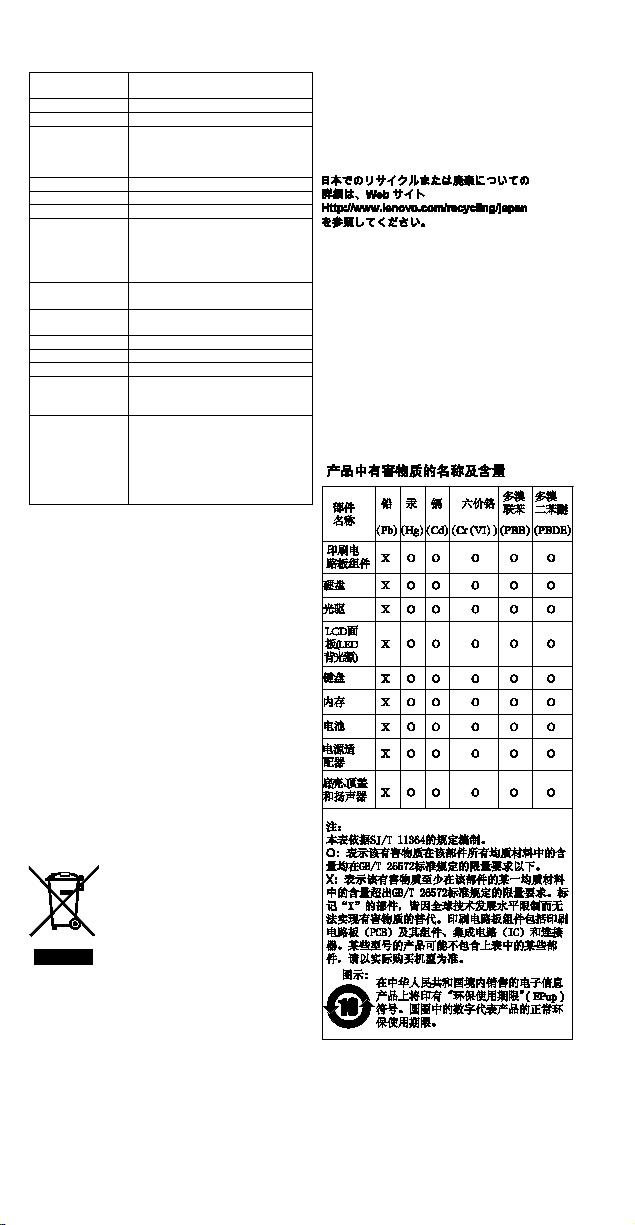
《废弃电器电子产品回收处理管理条例》提示性说明
WEEE information (Hungary)
A magyar törvények értelmében, a 197/2014 (VIII.1.)
kormányrendelet 12. szakaszának (1)-(5) cikkében
foglaltak szerint Lenovo mint gyártó állja a keletkező
(+662) 787-3067 (Standard
charges apply)
költségeket.
Recycling information for Japa n
apply)
089-320-24-92 (Standard charges
apply)
84-8-4458-1042 (Standard charges
00-967-1209-8278
Yemen Business Machines (YBM):
00-967-3-213324
00-967-3-214655
00-967-3-213909
Lenovo product service information f or Taiwan
委製商/進口商名稱: 荷蘭商聯想股份有限公司台灣分公司
進口商地址:台北市中山區北安路 780 號 7 樓
進口商電話: 0800-000-702 (代表號)
Recycling and environmental information
Lenovo encourages owners of information technology (IT)
equipment to responsibly recycle their equipment when it
is no longer needed. Lenovo offers a variety of programs
and services to assist equipment owners in recycling their
IT products.
For information on recycling Lenovo products, go to:
https://www.lenovo.com/recycling
For additional recycling and environmental statements,
refer to your User Guide. See “Accessing your User
Guide” for details.
The latest environmental information about our products
is available at https://www.lenovo.com/ecodeclaration.
Important battery and WEEE information
Recycling information for China
联想鼓励拥有联想品牌产品的用户当不再需要此类产品
时,遵守国家废弃电器电子产品回收处理相关法律法规,
将其交给当地具有国家认可的回收处理资质的厂商进行回
收处理。更多回收服务信息,请点击进
http://support.lenovo.com.cn/activity/551/htm。
入
Restriction of Hazardous Substanc e s (RoHS) Directive
China RoHS
The information in the following table is applicable for
products manufactured on or after January 1, 2015 for
sale in the People’s Republic of China.
Batteries and electr i c al and electronic equi pment marked
with the symbol of a crossed-out wheeled bin may not be
disposed as unsorted municipal waste. Batteries and
waste of electrical and electronic equipment (WEEE) shall
be treated separatel y using the collection framework
available to customers for the return, recycling, and
treatment of batteries and WEEE. When possible, remove
and isolate batter i es from WEEE prior to placing WEEE in
the waste collection stream. Batteries are to be collected
separately using t h e fr am ew or k av ai lable for the return,
recycling, and treatment of batteries and ac cumulators.
Country-specific information is available at:
https://www.lenovo.com/recycling
European Union RoHS
This Lenovo product, with included parts (cables, c or ds,
and so on) meets the requirements of Directive
2011/65/EU on the restriction of the use of certain
hazardous substances in electrical and electronic
equipment (“RoHS recast” or “RoHS 2”).
Page 6
Maximum
(less than)
WLAN
802.11b/g/n
WLAN
802.11a/n/ac
WLAN
802.11a/n/ac
Bluetooth
BR/EDR/LE
WWAN UMTS
1/3/8
24.5
WWAN LTE
1/3/7/8/20/28
24
NFC
13.56
-38.11
대상인 제품에 한함
For more information about Lenovo worldwide compliance
on RoHS, go to:
https://www.lenovo.com/rohs-communication
Turkish RoHS
The Lenovo product mee t s the requirements of th e
Republic of Turkey Directive on the Restriction of the Use
of Certain Hazardous Substances in Waste Electrical and
Electronic Equipment (WEEE).
Ukraine RoHS
India RoHS
RoHS compliant as per E-Waste (Handling) Rules.
Compliance information
The latest compliance information is available at:
https://www.lenovo.com/compliance
Electronic emission notices
This device has been tested and found to comply with the
limits for a Class B digital device. The User Guide for this
product provides the complete Class B compliance
statements that are applicable for this device. See
“Accessing your User Guide” for ad di ti o nal in for mation.
European Union conformity
The following information applies to products purchased
in European Union countries.
EU contact: Lenovo, Einsteinova 21, 85 1 01 Br ati slava,
Slovakia
Compliance to Directives for Information Technology
Equipment (ITE) and Radio Equipment
EMC Directive Statement:
This product is in conformity with the protection
requirements of EU Council Directive 2014/30/EU on the
approximation of the laws of the Member States relating
to electromagnetic compatibility. The full compliance
statement is located in the U s er G ui d e. See “Accessing
your User Guide” in this document for additional
information.
Models with a radio device:
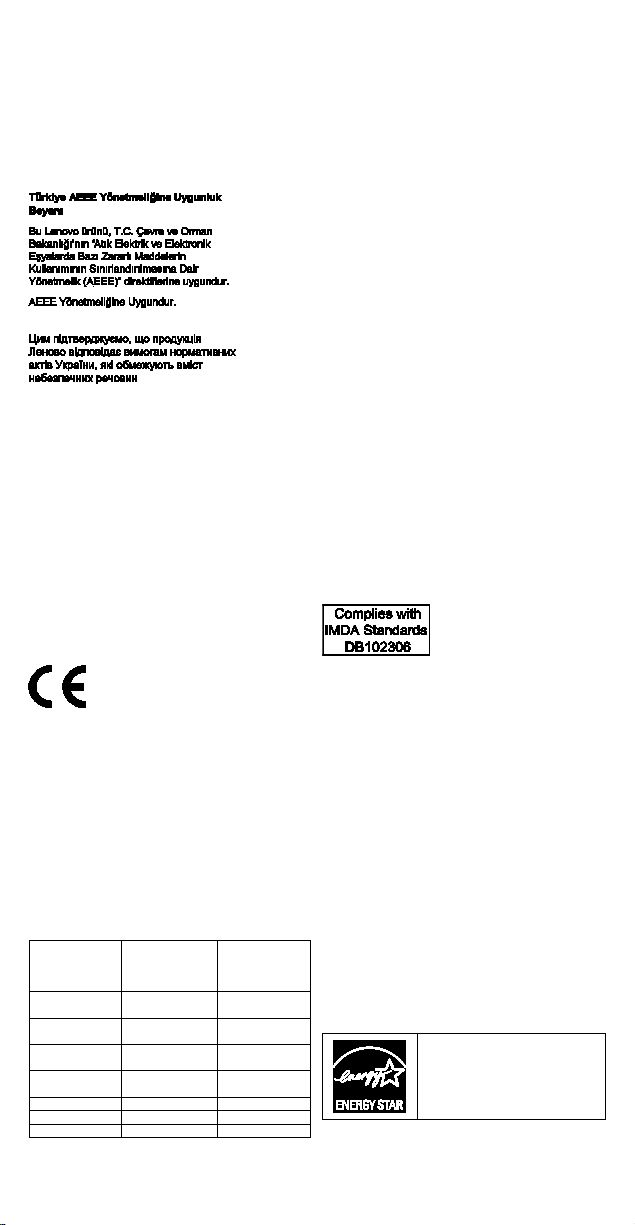
Compliance with the Radio Equipment Directive
This product is in compliance with Directive 2014/53/EU.
Below table shows the freque nc y bands and maximum
radio-frequenc y power of this radio equipment.
Technology
Frequency
band [MHz]
2400 - 2483.5 20
5150 - 5725 23
5725 - 5875 13.98
2400 - 2483.5 20
transmit
power [dBm]
The list of wireless modules used in your product is
available in the Regulatory Notice at Lenov o Web site:
https://support.lenovo.com
The full text of the system E U declaration of conformity
and the EU wireless module declarations are available at
the following Inter n et ad dr esses:
• For notebook computers:
https://www.lenovo.com/eu-doc-notebooks
• For tablets:
https://www.lenovo.com/eu-doc-tablets
Wireless-radio compliance i nf ormat ion
Computer models equipped with wireless
communications comply with the radio frequency and
safety standards of any country or region in which it has
been approved for wireless use.
Besides this document, ensure that you read the
Regulatory Notice for your country or region before using
the wireless devices contained in your computer. To
obtain a PDF version o f th e Regulatory Notice, see
“Downloading publications” in this docume nt .
Brazil wireless-radio compliance information
Este equipamento não tem direito à proteção contra
interferência prejudicial e não pode causar interferência
em sistemas devidamente autorizados.
This equipment is not protected against harmf ul
interference and may not cause interference with duly
authorized systems.
Mexico wireless-radio compliance information
Advertencia: En Mexico la operación de este equipo está
sujeta a las siguientes dos condiciones: (1) es posible
que este equipo o dispositivo no cause interferencia
perjudicial y (2) este equipo o dispositivo debe aceptar
cualquier interferencia, incluyendo la que pueda causar
su operación no deseada.
Singapore wireless-radio compliance inform ation
Korean wireless-radio compliance information
기기 준수 사항
무선설비 전파 혼신 (사용주파수 2400∼2483.5,
5725∼5825 무선제품해당)
해당 무선설비가 전파혼신 가능성이 있으므로 인명안전과
관련된 서비스는 할 수 없음
For SAR models (SAR
SAR 정보
본 장치는 전파 노출에 대한 가이드라인을 충족합니다.
본 장치는 무선 송수신기 입니다. 본 장치는 국제
가이드라인으로 권장되는 전파 노출에 대한 제한을
초과하지 않도록 설계되었습니다. 장치 액세서리 및 최신
부품을 사용할 경우 SAR 값이 달라질 수 있 습니다. SAR
값은 국가 보고 및 테스트 요구 사항과 네트워크 대역에
따라 다를 수 있습니다. 본 장치 는 사람의 신체에서
20mm 이상의 거리에서 사용할 수 있습니다.
)
Additional compliance inf ormat ion
Brazil audio notice
Ouvir sons com mais de 85 de cibéis por longos períodos
pode provocar danos ao sistema auditivo.
ENERGY STAR
Select models conform to
ENERGY STAR
Additional ENERGY STAR
information is in your User Guide.
See “Accessing your User Guide”.
®
requirements.
Page 7

Legal notices
Lenovo, the Lenovo logo, ThinkPad, the ThinkPad logo,
and TrackPoint are trademarks of Lenovo in the United
States, other countries, or both.
Microsoft and Win dow s ar e tr ademarks of the Micr os o ft
group of companies .
Ubuntu is a registered trademark of Canonical Ltd.
Other company, product, or service names may be
trademarks or service marks of others.
For additional legal notices, refer to the U s er Guide for
your computer. See “Accessing your User Guide” for
additional information.
Page 8

Second Edition (December 2017)
© Copyright Lenovo 2017.
LIMITED AN D RESTRICTED RIGHTS NOTICE: If data or software is delivered pursuant to a General Services
Administration “GSA” contract, use, reproduction, or disclosure is subject to restrictions set forth in Contract No. GS35F-05925.
Printed in China
PN: SP40G76552
 Loading...