

Page 1

Fitness Wristband
OLED Wrist Band
Operating Manual
D02J56
Page 2

Fitness Wristband General Information
Imprint / Editor of the Operating Manual
Krippl-Watches Warenhandels GmbH, Maria-Theresia-Straße
41, 4600 Wels
Phone: ++43/7242/52323, Email: [email protected],
www.krippl-watches.com
Product Name
Fitness Wristband
OLED Wrist Band
Model Number
D02J56
Importer
Krippl-Watches Warenhandels GmbH, Maria-Theresia-Straße
41, 4600 Wels
Product Parts / Scope of Delivery
1 Fitness W ristband
1 auxiliary wristband
1 clip
1 USB battery charger
1 operating manual
1 warranty card stating warranty conditions
AFTER SALES SUPPORT [email protected] / www.produktservice.info 1-800-493-9137
2
Page 3

Fitness Wristband General Information
TABLE OF CONTENTS
1 GENERAL INFORMATION ............................................... 4
2 SAFETY ............................................................................ 5
2.1 Safety Information ............................................................. 5
2.2 Battery .............................................................................. 5
2.3 Electromagnetic Compatibility ........................................... 6
3 MAINTENANCE ................................................................ 6
3.1 Conditions of the Operating Ambience ............................. 6
3.2 Ambient Temperature ....................................................... 7
3.3 Water resistance ............................................................... 7
3.4 Disposal ............................................................................ 8
3.5 Cleaning and Maintenance ............................................... 8
3.6 Information on this Operating Manual ............................... 9
4 FUNCTIONS AND OPTIONS FOR USE........................... 9
4.1 Features of the Device ...................................................... 9
4.2 Compatibility ................................................................... 10
4.3 Use Without the App ....................................................... 10
5 GETTING STARTED ...................................................... 11
5.1 Downloading the App ...................................................... 12
5.2 Creating a User Account ................................................. 12
5.3 Connection of the Fitness Wristband .............................. 13
6 MODES AND VIEWS ...................................................... 14
6.1 Time Mode ...................................................................... 14
6.2 Step Counter Mode ......................................................... 16
6.3 Distance Mode ................................................................ 16
6.4 Calorie Mode ................................................................... 16
6.5 Activity Mode ................................................................... 17
6.6 Sleep Mode ..................................................................... 17
7 FUNCTIONS ................................................................... 18
7.1 Goals .............................................................................. 18
7.2 Detailed View .................................................................. 18
AFTER SALES SUPPORT [email protected] / www.produktservice.info 1-800-493-9137
3
Page 4

Fitness Wristband General Information
7.3 Alarm .............................................................................. 18
8 CALCULATION AND MEASUREMENT ......................... 19
8.1 Steps ............................................................................... 19
8.2 Distance .......................................................................... 19
8.3 Calories Burned .............................................................. 19
8.4 Sleep Period ................................................................... 20
9 MEMORY AND DATA SYNCHRONISATION ................. 20
10 BATTERY AND CHARGING ........................................... 20
11 CONFORMITY ................................................................ 21
12 TROUBLESHOOTING .................................................... 22
13 CONTACT DATA ............................................................ 23
1 GENERAL INFORMATION
Prior to use of your Fitness Wristband, please read the operating manual carefully and comply with the instructions. Please
keep the operating manual in a safe place throughout the service life of the product. If you give the Fitness Wristband to
another user, please also include the operating manual.
Field of Application
The Fitness Wristband has been developed to record your
activity and your sleeping habits to help you achieve your fitness, activity, and sleeping goals. It has been designed for
private use and is not suitable for commercial purposes. The
Fitness Wristband is not a medical device. Please read this
operating manual to familiarize yourself with all features and
options of your Fitness Wristband and to ensure trouble-free
operation. Any use other than that described in this operating
manual is not permitted and may cause damage to the product
AFTER SALES SUPPORT [email protected] / www.produktservice.info 1-800-493-9137
4
Page 5
Fitness Wristband Safety
or bodily injuries to the user. The manufacturer shall not assume liability for any damage resulting from incorrect use.
More detailed information and explanations are provided in this
operating manual, below.
2 SAFETY
2.1 Safety Information
Please read this operating manual carefully and comply with
the information and warning notes.
Warning
• In case of an allergic reaction, please remove the wrist-
band from your arm and seek medical advice.
• Please to not attempt to replace the battery of the Fitness
Wristband. It is integrated and not replaceable.
• Please charge the Fitness Wristband using a certified
computer or by means of an external power supply source.
• Use only the supplied USB battery charger to charge the
wristband.
• Do not place any objects on the wristband and do not
apply pressure onto the display. It may crack or break.
• Never touch the display with sharp or pointed objects.
2.2 Battery
The chapter below provides information on handling batteries:
• The battery must not be replaced or removed.
AFTER SALES SUPPORT [email protected] / www.produktservice.info 1-800-493-9137
5
Page 6

Fitness Wristband Maintenance
• Keep the Fitness Wristband away from heat sources or
environments with high temperatures such as direct sunlight.
• Do not pierce or burn the Fitness Wristband.
• The battery must not be charged in close proximity of heat
sources or in excessive sunlight. High temperatures will
cause damage to the battery, as well as overheating, explosion or fire.
• Non-compliance with this information may cause reduction
of the service life of the integrated battery and/or damage
of the Fitness Wristband.
2.3 Electromagnetic Compatibility
Very strong magnetic fields (e.g. transformers) must be completely avoided, since they may cause distortions of the transmission signals. Non-compliance with this information may lead
to defects in or damage to your Fitness Wristband.
3 MAINTENANCE
The Fitness Wristband does not include any parts that require
maintenance. You must not open or repair the device under
any circumstances, since otherwise trouble-free operation can
no longer be guaranteed. Non-compliance of this information
shall result in forfeiture of the warranty.
3.1 Conditions of the Operating Ambience
• The Fitness Wristband is protected against shock or im-
pact occurring during normal use.
AFTER SALES SUPPORT [email protected] / www.produktservice.info 1-800-493-9137
6
Page 7

Fitness Wristband Maintenance
• The Fitness Wristband must not be immersed in water.
Never rinse the Fitness Wristband with running water.
• Protect the device from humidity, chemical substances,
large changes in temperature, heat sources (stoves, radiators) and excessive temperatures.
• Non-compliance with this information may lead to defects
in or damage to the Fitness Wristband.
3.2 Ambient Temperature
The Fitness Wristband is suitable for permanent operation at
an ambient temperature between -10 °C (14 °F) and 60 °C
(140 °F). The Fitness Wristband is suitable for storage at an
ambient temperature between -20 °C (-4 °F) and 70 °C (158
°F). Please make sure to keep the Fitness Wristband in a safe
place when not in use.
3.3 Water resistance
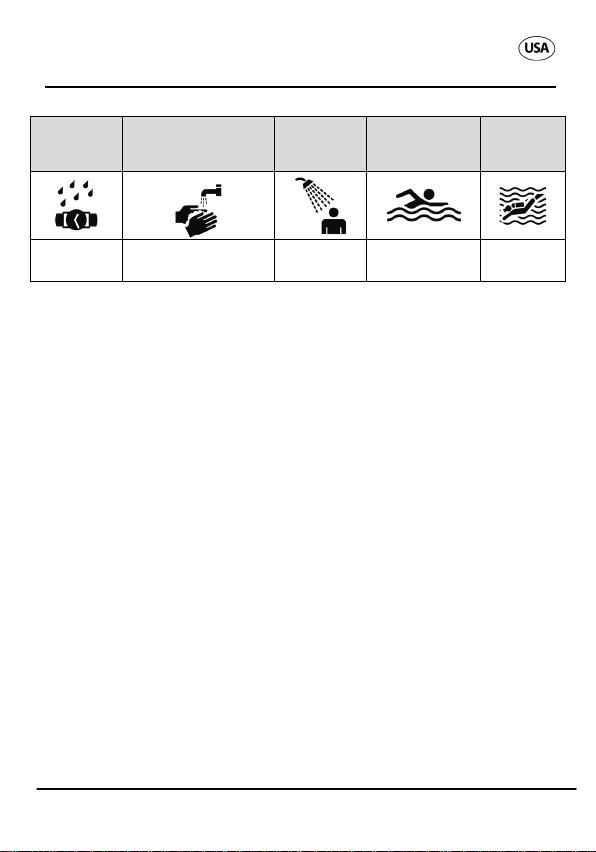
The Fitness Wristband is water resistant up to 30 m/95 ft. The
table below provides an overview of the activities and conditions for which the Fitness Wristband is suitable. The m/ft
value refers to the positive air pressure applied within the
scope of the water tightness test (DIN 8310).
AFTER SALES SUPPORT [email protected] / www.produktservice.info 1-800-493-9137
7
Page 8
Never immerse
into water
Fitness Wristband Maintenance
Rain,
splashes
Washing hands
Shower-
ing
Bathing,
swimming
Water
sports
Yes
No No No
3.4 Disposal
Dispose of the packaging in the proper manner. Batteries need
to be properly disposed of. For this purpose, shops selling
batteries provide special containers for environmentally-friendly
disposal. Furthermore, empty batteries will be taken back at
public waste collection points. Should you wish to dispose of
the article, do so in accordance with the latest provisions. Details are available from your local authority.
3.5 Cleaning and Maintenance
From time to time, your device requires cleaning. For cleaning,
use a damp cloth and, if required, a mild cleaning agent. We
recommend cleaning the wristband using a brush and soapy
water.
Caution
• Never use aggressive solvents or cleaning agents!
AFTER SALES SUPPORT [email protected] / www.produktservice.info 1-800-493-9137
8
Page 9
Fitness Wristband Functions and options for use
3.6 Information on this Operating Manual
The operating manual for this Fitness Wristband has been
structured in such a way that you can refer to the respective
chapters containing the topic-specific information required. For
auxiliary information and help with regard to your Fitness
Wristband, use the FAQs (frequently asked questions) that can
be found online at: www.cranesportsconnect.com/faq
4 FUNCTIONS AND OPTIONS FOR USE
4.1 Features of the Device
The Fitness Wristband has been developed to record your
activity and your sleeping habits to help you achieve your fitness, activity, and sleeping goals. It is intended for personal
use in private applications. The wristband provides support for
your day-to-day activities and contains the following features:
• Time
• Step counter and distance meter
• Activity period
• Calculation of calories burned
• Progress and goal control
• Setting daily goals (steps, distance and calories burned) -
only in connection with the available app.
• Somnography in the app (wake phase, light sleep, and
deep sleep phases)
• Alarm
AFTER SALES SUPPORT [email protected] / www.produktservice.info 1-800-493-9137
9
Page 10
Fitness Wristband Functions and options for use
4.2 Compatibility
AppleTM and AndroidTM smartphones with Bluetooth® Smart
and Bluetooth
Specifically, the following devices are suitable:
iPhone4s and higher versions, third generation iPad and later
versions, iPad Mini, as well as Bluetooth
®
Smart Ready devices (=Bluetooth 4.0) in connection
tooth
with Android
A comprehensive list of compatible phones and tablets is provided on-line at:
www.cranesportsconnect.com/compatibility
®
Smart Ready (= Bluetooth 4.0) are compatible.
®
Smart and Blue-
TM
4.3 and higher versions.
4.3 Use Without the App
We recommend using the Fitness Wristband in connection with
the app, as otherwise the values of an average user must be
used as personal data for recording of calorie and distance
values. This may lead to deviations from your actual values.
Please note that recorded data can only be displayed for the
current day of recording. Only when transferring data to the
app and (with an operable internet connection) automatically
uploading it to the website is it possible to permanently save
and display them.
The Fitness Wristband counts the steps taken, records the
distance walked and the time of activity, and calculates the
calories burned. The data is recorded per day (beginning at
AFTER SALES SUPPORT [email protected] / www.produktservice.info 1-800-493-9137
10
Page 11
Menu button
Fitness Wristband GETTING STARTED
12:00 a.m.). The default settings for your daily activity goal are
10,000 steps, a distance of 6 km and 3,000 kcal burned.
Without the use of the app, these settings cannot be changed.
5 GETTING STARTED
Notice: Please charge the Fitness Wristband prior to initial
use. For this purpose, please see chapter 10 "Battery and
charging".
Remove the protective plastic foil from the display and insert
the module into your preferred wristband or the clip.
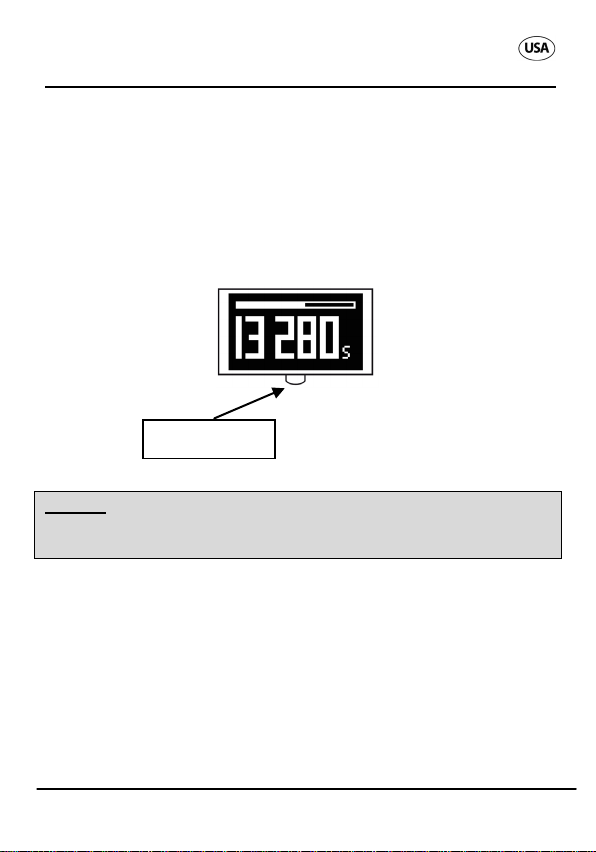
Switch the Fitness Wristband on by pressing and holding the
menu button for 2 seconds. In the display you will see the
message "How are you?".
We recommend not wearing the Fitness Wristband around the
arm of your dominant hand.
AFTER SALES SUPPORT [email protected] / www.produktservice.info 1-800-493-9137
11
Page 12
App Store
Google Play Store
Fitness Wristband GETTING STARTED
5.1 Downloading the App
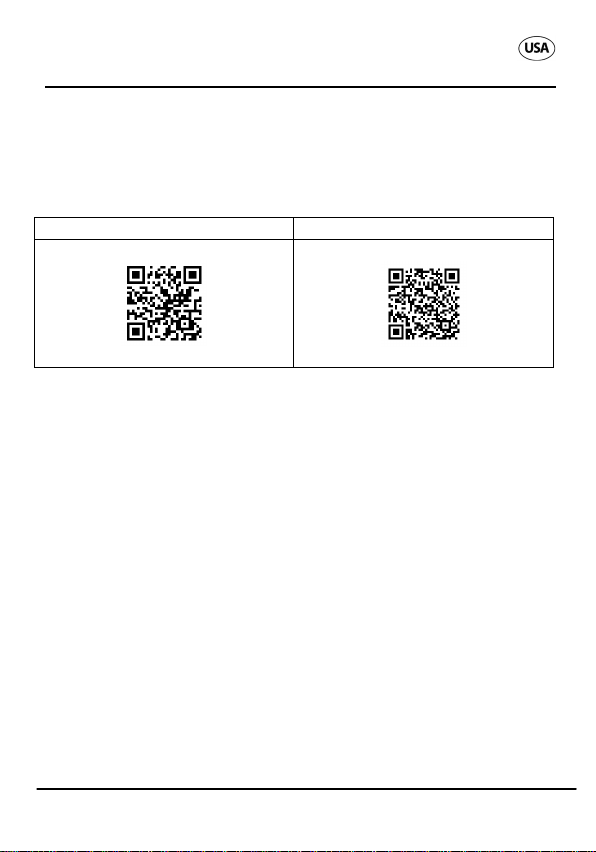
Download the free Crane Connect App from the App Store or
the Google Play Store.
Scan the QR code or enter the following URL:
www.cranesportsconnect.com/downloads
5.2 Creating a User Account
Open the Crane Connect App. This opens the "Home" menu
where you can access the sub-menus "Wristband", "Tutorials",
"All settings" and "FAQ".
As a first step, we recommend carrying out all user and product
settings. To do this, tap the "All settings" app icon. In this submenu a number of various icons are shown. For user settings,
tap the "User settings" icon to create a new user account or to
log onto an existing user account. Here, follow the instructions
of the app and perform the settings step by step.
Creation of a user account and implementation of user settings
can be performed online at: www.cranesportsconnect.com
AFTER SALES SUPPORT [email protected] / www.produktservice.info 1-800-493-9137
12
Page 13
Fitness Wristband GETTING STARTED
5.3 Connection of the Fitness Wristband
Upon completion of the user settings, go back to the "All settings" menu. Then, select the "Wristband" icon to access the
auxiliary settings for the Fitness Wristband.
Notice: Make sure that the Bluetooth function is activated on
your smartphone.
Connect the Fitness Wristband with your smartphone by pressing "Pairing" in the "Connection" field. You must also select
"Pair?" on your Fitness Wristband. To do this, please proceed
as follows:
Press and hold the menu button in time mode for approx. two
seconds.
After the battery icon is displayed, the prompt "Pair?" is shown.
Then, press the menu button again. The "Pairing..." message
is displayed for approx. 20 seconds. During this period, the
Fitness Wristband will try to find your smartphone. If pairing is
successful, the
icon is shown.
After connecting the wristband, go back to the "Home" menu.
From there, you can access all values and records by tapping
the "Wristband" icon.
If the Fitness Wristband is connected with the app, the recorded data is transmitted to the app and, as soon as an internet
connection is available, automatically uploaded to
www.cranesportsconnect.com and saved.
AFTER SALES SUPPORT [email protected] / www.produktservice.info 1-800-493-9137
icon is displayed; otherwise, the
13
Page 14
Fitness Wristband Modes and views
Notice: The Fitness Wristband saves all data at one-minute
intervals for seven days. From day 8 to day 30, only daily mean
values are saved. If no synchronization with the app is performed during this period, the first record will be overwritten by
the last.
6 MODES AND VIEWS
The Fitness Wristband provides six different operating
modes:
1. Time mode
2. Step counter mode
3. Distance mode
4. Calorie mode
5. Activity mode
6. Sleep mode
To browse the modes, press the menu button.
After three seconds without operation, the display is automatically switched off. It can be switched on at any time by pressing the menu button.
6.1 Time Mode
In the time mode, the current time is displayed.
The time is automatically applied from the app
and there are optional settings for 24 h or 12 h
time format.
AFTER SALES SUPPORT [email protected] / www.produktservice.info 1-800-493-9137
14
Page 15
Fitness Wristband Modes and views
When pressing and holding the menu button for approx two
seconds, the following prompts are shown in the display, at an
interval of two seconds:
• Battery icon
• Pair?
• Off?
Battery icon
The battery icon indicates the battery charge status of your
Fitness Wristband. For more detailed information, please see
chapter 10, "Battery and charging".
Pair?
The Fitness Wristband only requires pairing once prior to initial
use. To this end, see chapter 5.3, "Connection of the Fitness
Wristband"
Off?
If this prompt is shown in the display, the Fitness Wristband
can be switched off by pressing the menu button. To switch it
back on, press and hold the menu button for approx. 2 seconds.
Starting with the time mode, you can select the available
modes by pressing the menu button as indicated below:
• Press 1x for step counter mode
• Press 2x for distance mode
• Press 3x for calorie mode
• Press 4x for activity mode
• Press 5x for sleep mode
AFTER SALES SUPPORT [email protected] / www.produktservice.info 1-800-493-9137
15
Page 16
Fitness Wristband Modes and views
6.2 Step Counter Mode
The Fitness Wristband counts all your steps during
any activity, except in sleep mode. In the step
counter mode, you can view the steps taken so far.
At midnight, the step counter is automatically reset to zero.
In this mode, the current progress towards your set goal can be
viewed. The more steps you have walked, the longer the progress bar at the top of the display will become. When reaching
your set goal for the day, the progress bar will flash and the
wristband will sound an alarm. The factory setting is 10,000
steps; however, using your app, you can change the setting to
any optional value.
6.3 Distance Mode
The Fitness Wristband records your entire distance walked during any activity, except in sleep
mode. In the distance mode, you can view the
distance walked so far. At midnight, the distance value is automatically reset to zero.
In this mode, the current progress towards your set goal can be
viewed. The longer the distance you have walked, the longer
the progress bar at the top of the display will become. When
reaching your set goal for the day, the progress bar will flash
and the wristband will sound an alarm. The factory setting is
6.00 km; however, using your app, you can change the setting
to any optional value.
6.4 Calorie Mode
The Fitness Wristband calculates your calories
AFTER SALES SUPPORT [email protected] / www.produktservice.info 1-800-493-9137
burned on a daily basis. The calculation is based
16
Page 17
Fitness Wristband Modes and views
on your activity and your personal data (weight, height, age,
gender, ...), which the Fitness Wristband applies from the app.
At midnight, the calories value is automatically reset to zero.
In this mode, the current progress towards your set goal can be
viewed. The more calories you have burned, the longer the
progress bar at the top of the display will become. When reaching your set goal for the day, the progress bar will flash and the
wristband will sound an alarm. The factory setting is 3,000 kcal;
however, using your app, you can change the setting to any
optional value.
6.5 Activity Mode
The Fitness Wristband indicates the activity period
in hours and minutes. At midnight, the activity
period is automatically reset to zero.
6.6 Sleep Mode
Here, you can view the last sleep period displayed
in hours and minutes.
The Fitness Wristband automatically detects if you
are asleep. Wear the wristband even when going to bed; press
and hold the menu button for approx. two seconds. "SLEEP" is
shown in the display. When pressing the menu button again,
you access the sleep mode. The following icon is shown in the
display:
Now the Fitness Wristband is in sleep mode and your sleep
duration and quality is recorded. Subsequently, you can view
AFTER SALES SUPPORT [email protected] / www.produktservice.info 1-800-493-9137
17
Page 18
Fitness Wristband FUNCTIONS
the records in the app. By pressing the menu button you can
view the current time.
After waking up, press and hold the menu button for approx.
two seconds. Then, "WAKE?" is displayed on your wristband.
Press the menu button to terminate the sleep mode. The following icon is displayed:
7 FUNCTIONS
7.1 Goals
The Fitness Wristband indicates the current progress on your
way to your goals (steps, distance, and calories). When reaching your set goals for the day, the progress bar will flash and
the wristband will sound an alarm. You can adjust your goals in
the app. When you set your goals, the app will support you by
providing your personalized limit values. In this way, you can
find the optimum goals for yourself.
7.2 Detailed View
For every goal variable, the app provides a detailed view indicating and itemizing your data per day. In the detailed view for
sleep, the different sleep phases are indicated (wake phase,
light sleep phase, deep sleep phase).
7.3 Alarm
The alarm clock function and the alarm must be set in the app.
It is possible to set up to three different alarms. As soon as the
AFTER SALES SUPPORT [email protected] / www.produktservice.info 1-800-493-9137
18
Page 19
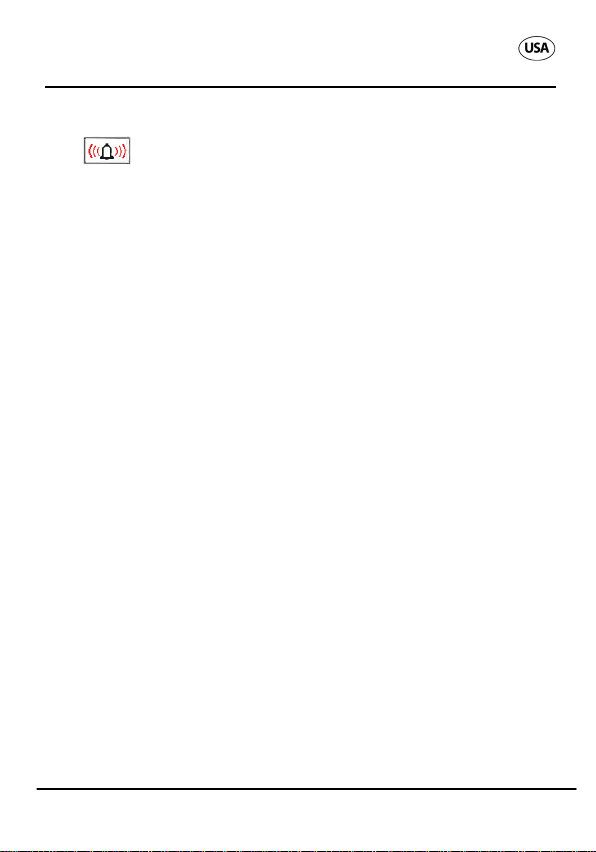
Fitness Wristband Calculation and measurement
alarm is triggered, the display alternates between the alarm
icon
seconds. It is possible to switch off the alarm at any time by
pressing the menu button.
and the time. Moreover, an alarm is sounded for 30
8 CALCULATION AND MEASUREMENT
8.1 Steps
Your steps are counted directly by the Fitness Wristband are
displayed both on the wristband itself and in the app (provided
that the synchronization was successful).
8.2 Distance
The distance walked is calculated in kilometers. The distance
is displayed both on the Fitness Wristband and in the app. To
do this, the steps recorded and personal data such as height
and gender are used as a basis.
8.3 Calories Burned
The calories burned are calculated from the steps recorded
and your personal data such as age, gender, height, and
weight. The sleep period also influences calculation of the
calorie consumption. The current calorie value is displayed
both in the app and on the Fitness Wristband. An appropriate
calorie goal depends on each individual person and their personal data.
AFTER SALES SUPPORT [email protected] / www.produktservice.info 1-800-493-9137
19
Page 20
Fitness Wristband Memory and data synchronisation
8.4 Sleep Period
The Fitness Wristband records your sleeping period and additional details. Your smartphone will then analyze the data and
indicate the sleep phases and sleep quality.
9 MEMORY AND DATA SYNCHRONISA-
TION
The Fitness Wristband automatically synchronizes the recorded data using your app, provided that your smartphone is within reach and Bluetooth is activated. The measured values are
updated in regular intervals.
The Fitness Wristband saves all data at one-minute intervals
for seven days. From day 8 to day 30, only daily mean values
are saved. If no synchronization with the app is performed
during this period, the first record will be overwritten by the last.
10 BATTERY AND CHARGING
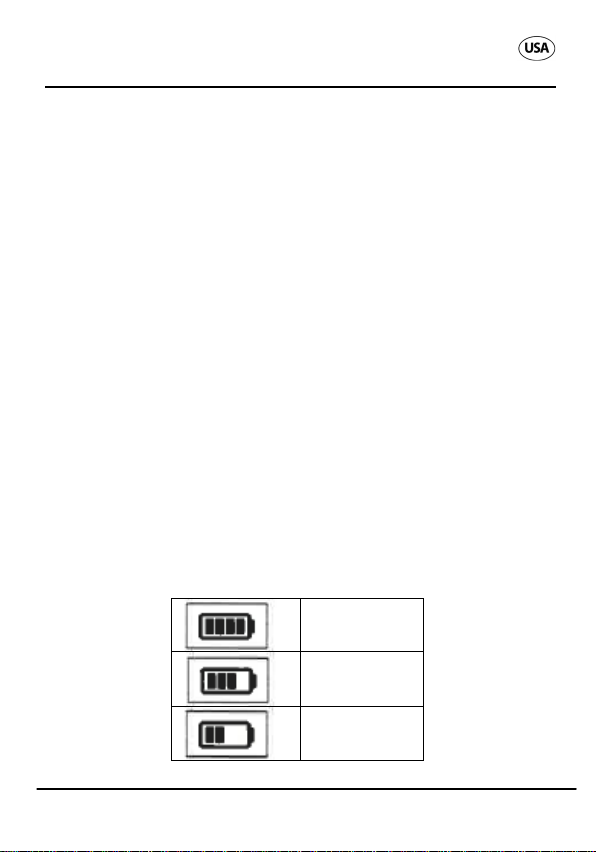
Please find below an illustration of the battery charge status:
78 – 100 %
56 – 77 %
31 – 55 %
AFTER SALES SUPPORT [email protected] / www.produktservice.info 1-800-493-9137
20
Page 21
Fitness Wristband CONFORMITY
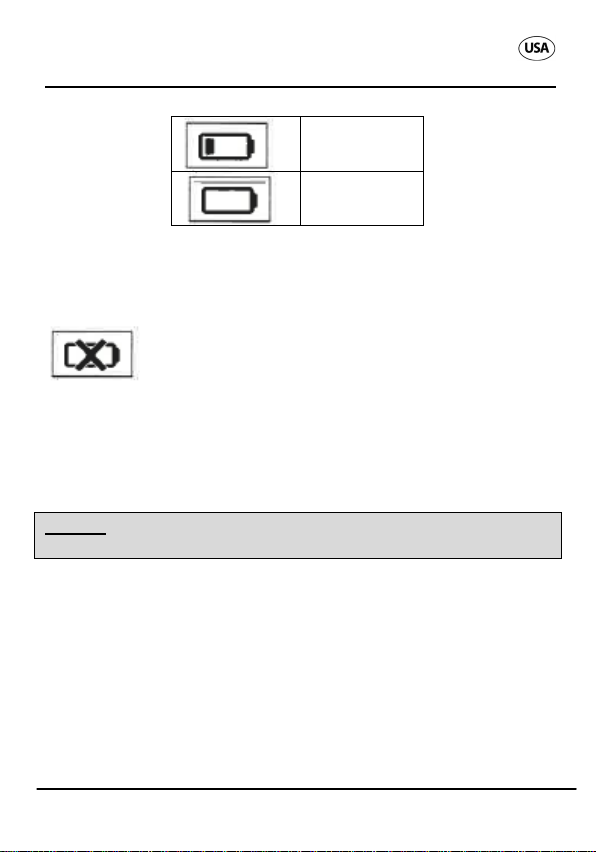
When the battery of the Fitness Wristband is completely empty,
the following icon is displayed for 3 seconds after pressing the
menu button:
11 – 32 %
0 – 10 %
Please charge the Fitness Wristband using the corresponding
USB battery charger. To do this, remove the module from the
wristband, insert it into the battery charger and charge it via a
USB connection.
Notice: For charging, you may also use a current adaptor with
a USB connection (not included in the scope of delivery).
11 CONFORMITY
This device complies with Part 15 of the FCC Rules. Operation is subject to the following two conditions: (1) this device
may not cause harmful interference, and (2) this device must
accept any interference received, including interference that
may cause undesired operation.
NOTE: This equipment has been tested and found to comply
with the limits of a Class B digital device, pursuant to Part 15
AFTER SALES SUPPORT [email protected] / www.produktservice.info 1-800-493-9137
21
Page 22
Fitness Wristband Troubleshooting
of the FCC Rules. These limits are designed to provide reasonable protection against harmful interference in a residential
installation. This equipment generates uses and can radiate
radio frequency energy and, if not installed and used in accordance with the instructions, may cause harmful interference to radio communications. However, there is no guarantee that interference will not occur in a particular installation. If
this equipment does cause harmful interference to radio or
television reception which can be determined by turning the
equipment off and on, the user is encouraged to try to correct
the interference by one or more of the following measures:
• Reorient or relocate the receiving antenna.
• Increase the separation between the equipment and re-
ceiver.
• Connect the equipment into an outlet on a circuit different
from that to which the receiver is connected.
• Consult the dealer or an experienced radio/TV technician
for help.
WARNING: changes or modifications to this unit not expressly
approved by the party responsible for compliance could void
user's authority to operate the equipment.
Company Krippl-Watches
Telephone number: please refer to the information given in the
warranty card.
This equipment complies with FCC radiation exposure limits
12 TROUBLESHOOTING
In case of a malfunction or defect, please check the following
criteria before returning the Fitness Wristband for repair.
The recorded values have not been transmitted.
AFTER SALES SUPPORT [email protected] / www.produktservice.info 1-800-493-9137
22
Page 23
Fitness Wristband Contact data
The Fitness Wristband saves all data at one-minute intervals
for seven days. From day 8 to day 30 only daily mean values
are saved. If no synchronization with the app is performed
during this period, the first record will be overwritten by the last.
Connection problems
If connection cannot be established between your smartphone
and your Fitness Wristband, please deactivate the Bluetooth
function on your phone and then re-activate it. Also restart the
connection process of your Fitness Wristband. This should
enable smooth establishment of the connection. Often, it helps
to re-install the app or to re-start the phone.
13 CONTACT DATA
AFTER SALES SUPPORT [email protected] / www.produktservice.info 1-800-493-9137
23
 Loading...