

Page 1
Keysight N2862B, N2863B,
N2889A, and N2890A Probes
User’s Guide
Page 2

Notices
CAUTION
WARNING
© Keysight Technologies, Inc. 2010, 2017,
2018
No part of this manual may be reproduced in
any form or by any means (including electronic storage and retrieval or translation into
a foreign language) without prior agreement
and written consent from Keysight Technologies, Inc. as governed by United States and
international copyright laws.
Manual Part Number
N2889-97001
Edition
Third Edition, November 2018
Published by:
Keysight Technologies, Inc.
1900 Garden of the Gods Road
Colorado Springs, CO 80907 USA
Warranty
The material contained in this document is
provided “as is,” and is subject to being
changed, without notice, in future editions.
Further, to the maximum extent permitted
by applicable law, Keysight disclaims all
warranties, either express or implied, with
regard to this manual and any information
contained herein, including but not limited
to the implied warranties of merchantability
and fitness for a particular purpose. Keysight shall not be liable for errors or for incidental or consequential damages in
connection with the furnishing, use, or performance of this document or of any information contained herein. Should Keysight
and the user have a separate written agreement with warranty terms covering the
material in this document that conflict with
these terms, the warranty terms in the separate agreement shall control.
Technology Licenses
The hardware and/or software described in
this document are furnished under a license
and may be used or copied only in accordance with the terms of such license.
U.S. Government Rights
The Software is "commercial computer software," as defined by Federal Acquisition Regulation ("FAR") 2.101. Pursuant to FAR
12.212 and 27.405-3 and Department of
Defense FAR Supplement ("DFARS")
227.7202, the U.S. government acquires
commercial computer software under the
same terms by which the software is customarily provided to the public. Accordingly,
Keysight provides the Software to U.S. government customers under its standard commercial license, which is embodied in its End
User License Agreement (EULA), a copy of
which can be found at
http://www.keysight.com/find/sweula. The
license set forth in the EULA represents the
exclusive authority by which the U.S. government may use, modify, distribute, or disclose
the Software. The EULA and the license set
forth therein, does not require or permit,
among other things, that Keysight: (1) Furnish technical information related to commercial computer software or commercial
computer software documentation that is not
customarily provided to the public; or (2)
Relinquish to, or otherwise provide, the government rights in excess of these rights customarily provided to the public to use,
modify, reproduce, release, perform, display,
or disclose commercial computer software or
commercial computer software documentation. No additional government requirements beyond those set forth in the EULA
shall apply, except to the extent that those
terms, rights, or licenses are explicitly
required from all providers of commercial
computer software pursuant to the FAR and
the DFARS and are set forth specifically in
writing elsewhere in the EULA. Keysight shall
be under no obligation to update, revise or
otherwise modify the Software. With respect
to any technical data as defined by FAR
2.101, pursuant to FAR 12.211 and 27.404.2
and DFARS 227.7102, the U.S. government
acquires no greater than Limited Rights as
defined in FAR 27.401 or DFAR 227.7103-5
(c), as applicable in any technical data.
52.227-14 (June 1987) or DFAR
252.227-7015 (b)(2) (November 1995), as
applicable in any technical data.
Safety Notices
A CAUTION notice denotes a hazard.
It calls attention to an operating
procedure, practice, or the like that,
if not correctly performed or
adhered to, could result in damage
to the product or loss of important
data. Do not proceed beyond a
CAUTION notice until the indicated
conditions are fully understood and
met.
A WARNING notice denotes a hazard. It calls attention to an operating procedure, practice, or the like
that, if not correctly performed or
adhered to, could result in personal
injury or death. Do not proceed
beyond a WARNING notice until the
indicated conditions are fully
understood and met.
2 N2862B, N2963B, N2889A, and N2890A User’s Guide
Page 3

Contents
Contents
Introduction 4
Inspecting the Probe Shipment 4
Oscilloscope Compatibility 4
Cleaning the Probe 4
Handling the Probe 4
Switching the Attenuation Ratio on the N2889A Probe 5
Typical Voltage Derating Curve 6
Characteristics 8
Accessories 9
Safety Information 11
Returning the Probe for Service 13
Contacting Keysight Technologies 14
N2862B, N2963B, N2889A, and N2890A User’s Guide 3
Page 4

Introduction
WARNING
Introduction
Inspecting the Probe Shipment
• Inspect the shipping container for any damage.
Keep the damaged shipping container or cushioning material until the contents
of the shipment have been checked for completeness and the probe has been
checked mechanically and electrically.
• Check the accessories.
• If the contents are incomplete or damaged, notify your Keysight Technologies
Sales Office.
• Inspect the probe. If there is mechanical damage or defect, or if the probe does
not operate properly, notify your Keysight Technologies Sales Office.
• If the shipping container is damaged, or the cushioning materials show signs of
stress, notify the carrier as well as your Keysight Technologies Sales Office.
Keep the shipping materials for the carrier’s inspection. The Keysight
Technologies office will arrange for repair or replacement at Keysight
Technologies’ option without waiting for claim settlement.
4 N2862B, N2963B, N2889A, and N2890A User’s Guide
Oscilloscope Compatibility
These probes are compatible with any Keysight real-time oscilloscope that has a 1
MΩ input resistance.
Cleaning the Probe
Disconnect the probe from the oscilloscope and clean it with a soft cloth
dampened with a mild soap/water solution. Do not allow any solution to enter the
probe. Make sure the probe is completely dry before reconnecting it to an
oscilloscope.
Handling the Probe
Before using the probe, refer to the safety notices (page 11) in this manual.
The probe tip and ground spring are sharp. Handle these items with
care to avoid personal injury.
Page 5
CAUTION
Note that the probe cable is a sensitive part of the probe and, therefore,
CAUTION
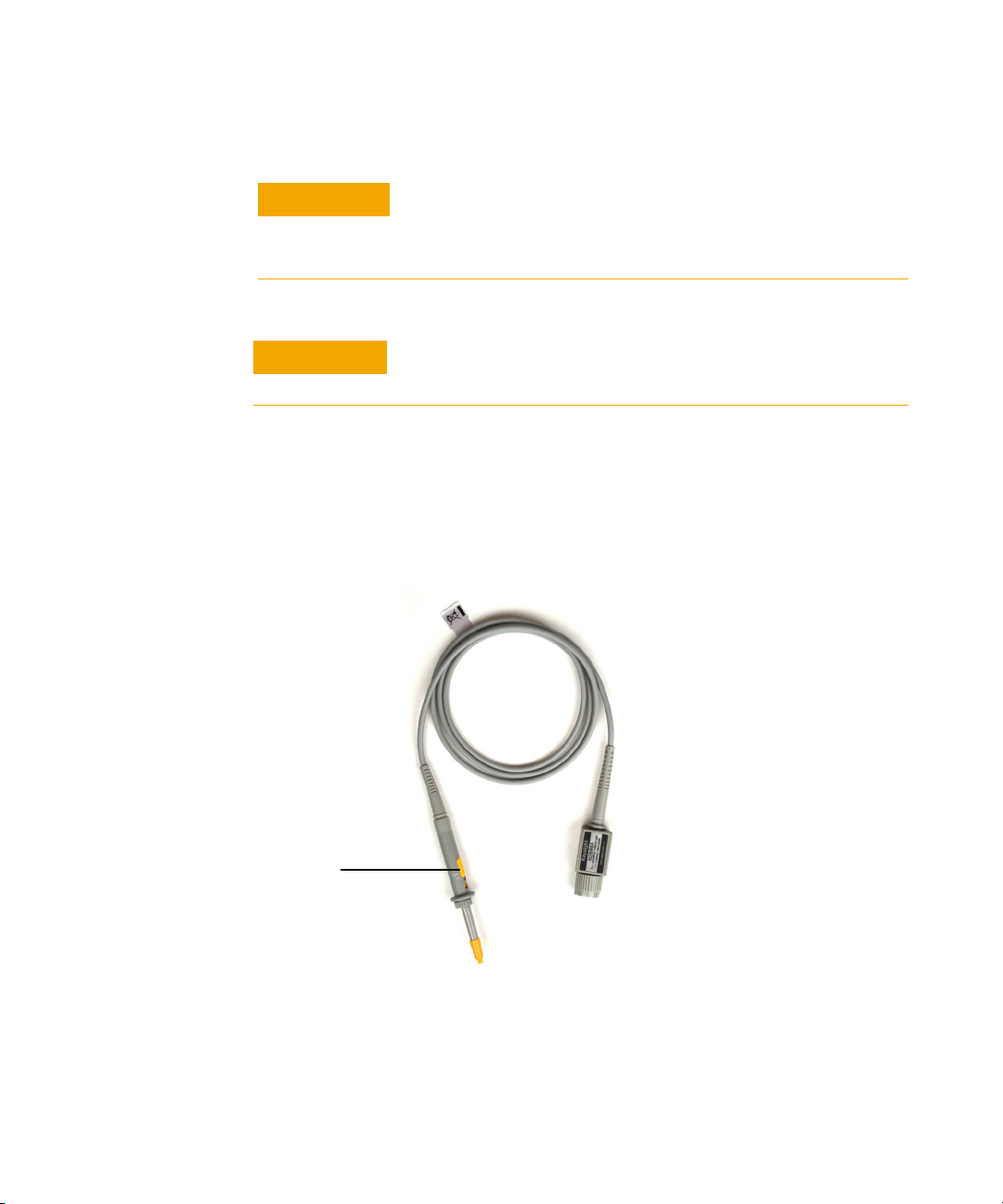
Yellow attenuation switch
you should be careful not to damage it through excessive bending or
pulling. You should also avoid any mechanical shocks to this product in
order to guarantee accurate performance and protection.
Always wear an ESD wrist strap when working with the probe. Not
doing so can result in the probe becoming permanently damaged.
Switching the Attenuation Ratio on the N2889A Probe
The N2889A has a switchable attenuation ratio (10:1/1:1). In order to adjust the
attenuation, use the yellow switch on the body of the probe as shown in the
picture below.
Introduction
N2862B, N2963B, N2889A, and N2890A User’s Guide 5
Page 6
Typical Voltage Derating Curve
Typical Voltage Derating Curve
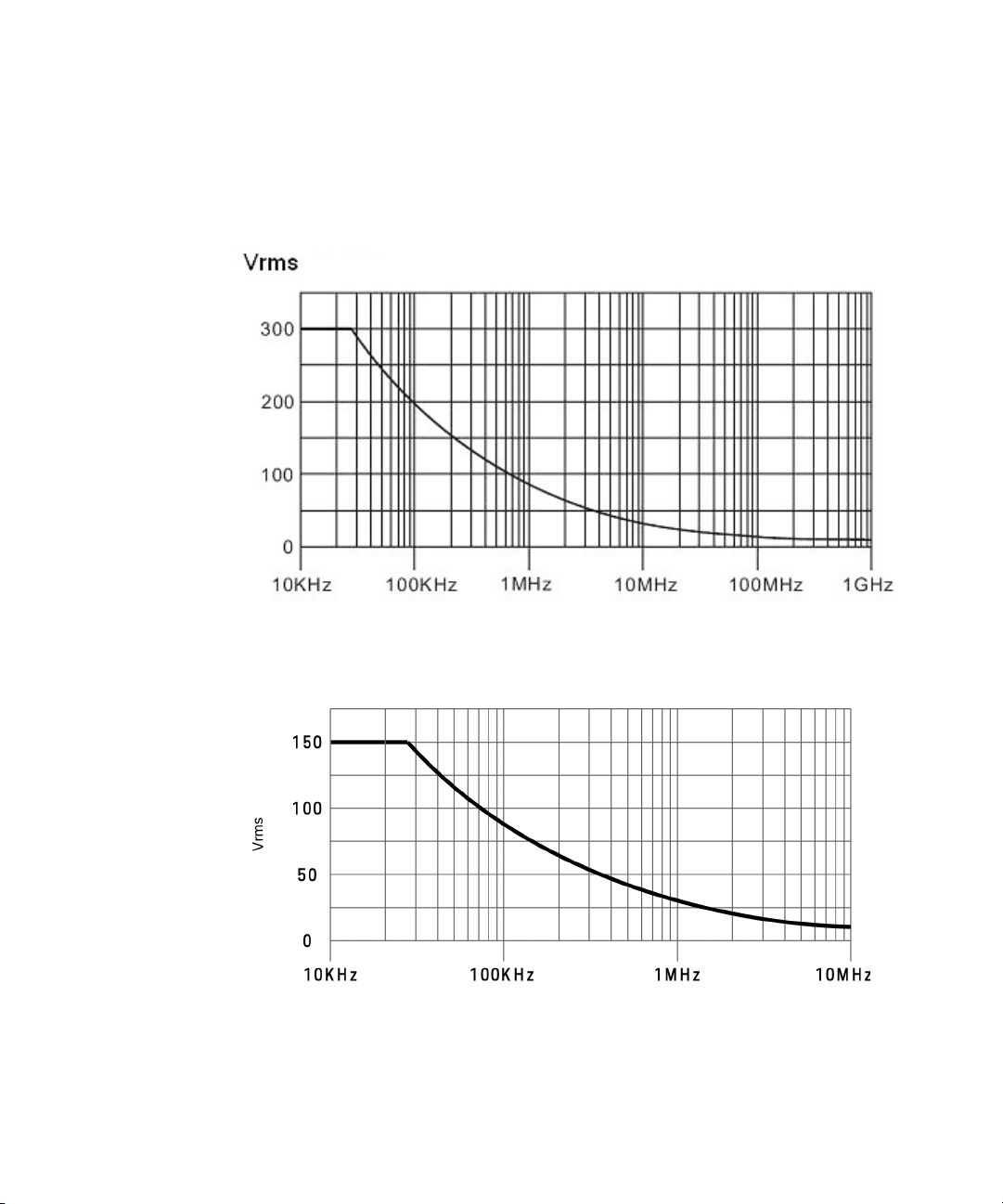
Figure 1 N2862B, N2863B, N2889A, & N2890A Voltage Derating Curve @300Vrms
Figure 2 N2889A Voltage Derating Curve @150Vrms (1:1)
6 N2862B, N2963B, N2889A, and N2890A User’s Guide
Page 7

Typical Voltage Derating Curve
Note that the maximum input voltage rating of the probe decreases as the
frequency of the applied signal increases.
N2862B, N2963B, N2889A, and N2890A User’s Guide 7
Page 8
Characteristics
Characteristics
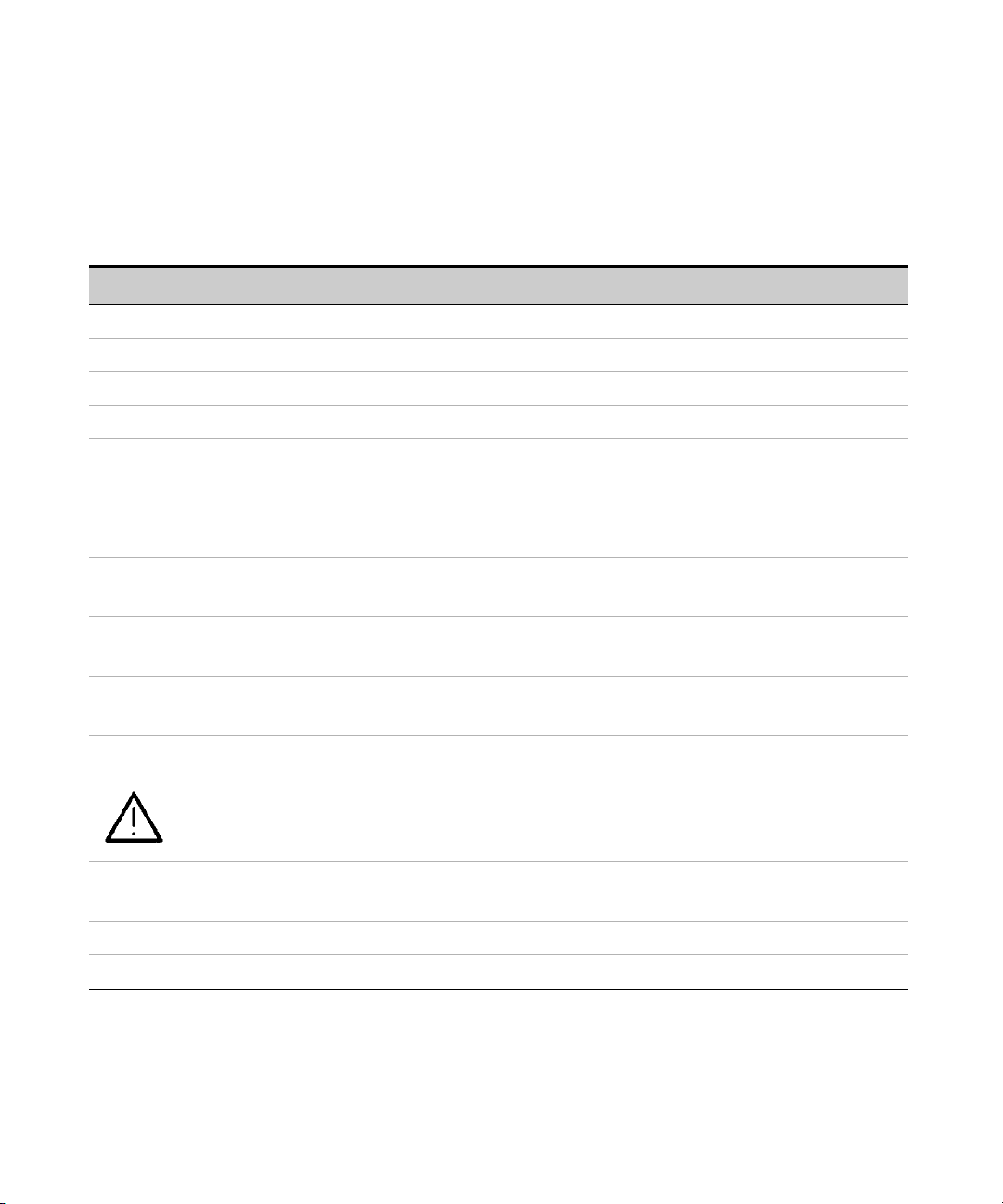
Characteristics for the N2862B, N2863B, N2889A, and N2890A probes are shown
below.
N2862B N2863B N2889A N2890A
Operating temperature 0o to 50o C, 80% RH (non-condensing)
Storage temperature 0o to 50o C, 80% RH (non-condensing)
Altitude 2000m (indoor use only)
Cable length 1.2 m 1.2 m 1.3 m 1.3 m
Bandwidth DC to 150 MHz DC to 300 MHz DC to 350 MHz (@10:1)
DC to 10 MHz (@1:1)
Risetime (10%-90%) 2.33 ns 1.16 ns 1 ns (@10:1)
35 ns (@1:1)
Attenuation ratio 10:1 10:1 1:1/10:1
(switchable)
Input resistance (when
terminated into 1 M
Input capacitance ~ 15 pF ~ 11 pF 11 pF (@10:1)
Maximum input (when
terminated into 1M Ω )
Compensation range (when
terminated into 1M
Safety Conformance to IEC-61010-031:2015
Probe ID readout Yes Yes No Yes
Ω)
Ω )
10 MΩ 10 MΩ 10 MΩ (@10:1)
1 M
Ω (@1:1)
60 pF (@1:1)
300 V RMS (or <
400 Vpk)
mains isolated and
CAT II
5-30 pF 5-30 pF 10-35 pF (@10:1) 5-30 pF
300 V RMS (or <
400 Vpk)
mains isolated and
CAT II
300 V RMS or < 400 Vpk
mains isolated and CAT II
(@ 10:1)
150 V RMS mains isolated
and CAT II (@ 1:1)
DC to 500 MHz
700 ps
10:1
10 M
~ 11 pF
300 V RMS or <400 Vpk
mains isolated & CAT II
Ω
*RH = relative humidity
8 N2862B, N2963B, N2889A, and N2890A User’s Guide
Page 9
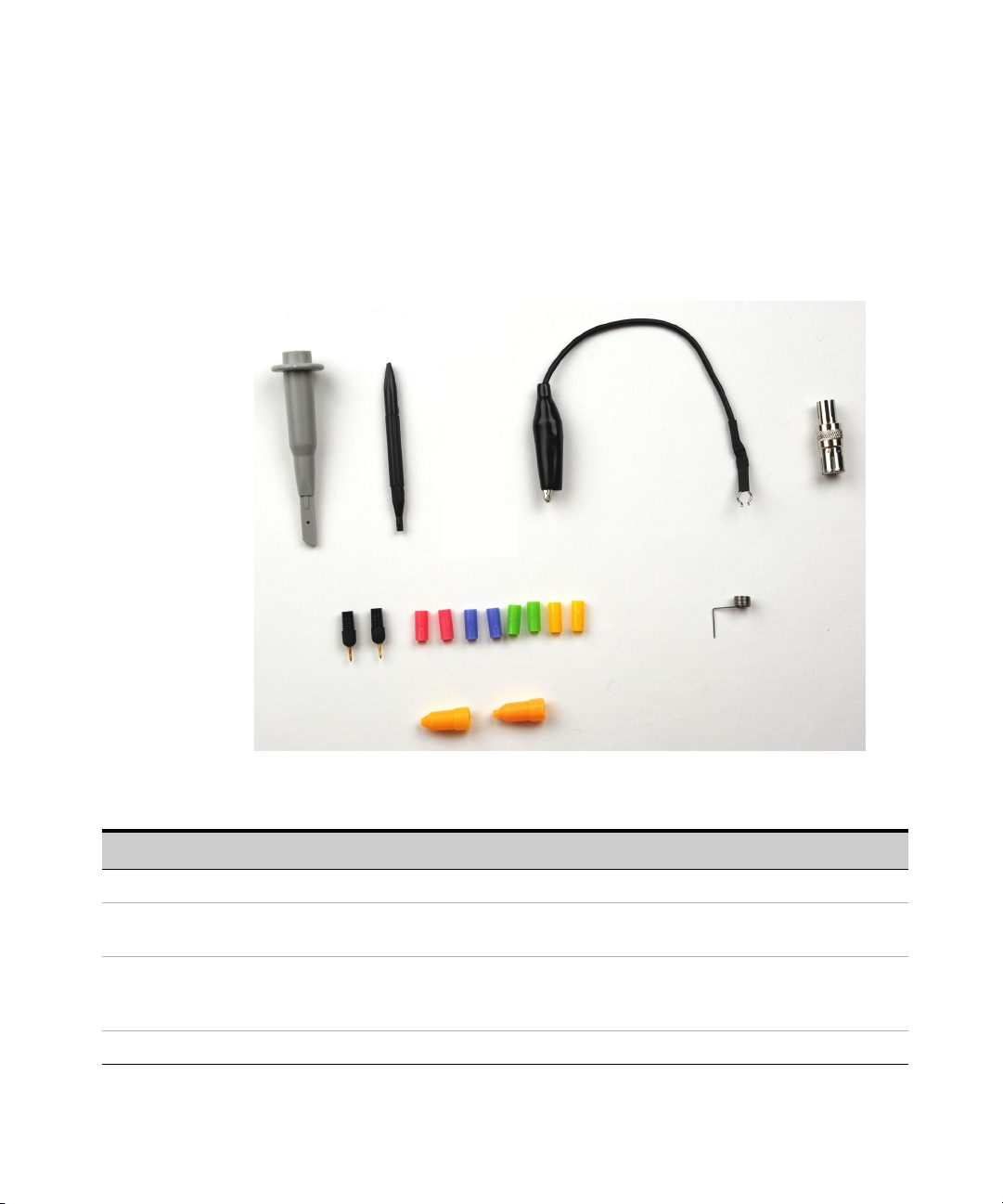
Accessories
1
2
3
5
6
4
7
8
9
Accessories
The following accessories are available with the N2862B, N2863B, N2889A, and
N2890A probes.
Item Description Usage Quantity
1 Retractable hook To make quick connections for hands-free probing. 1
2 Adjustment tool To adjust the LF compensation to an optimum square
wave response.
3 Ground lead (black 12 cm) To reach circuit grounding points that are farther
away from the probing location than can be reached
by the ground spring.
4 BNC adapter To connect the probe tip to a BNC (female) connector. 1
N2862B, N2963B, N2889A, and N2890A User’s Guide 9
1
1
Page 10
Accessories
NOTE
Item Description Usage Quantity
5 Probe tip To use as replacements to the probe tip screwed onto
the end of the probe barrel.
6 Identification tags (pink, purple, green,
and yellow)
2 of each color
7 Ground spring To improve measurement performance by providing a
8 Insulating cap To fit over the probe tip and cover the grounding band
9 IC insulating cap To fit over the probe tip and provide a convenient
To quickly identify a probe tip with the associated
channel input, use the colored channel ID tags.
short ground connection.
of the probe barrel.
self-aligning connection to an IC’s pins.
When using an accessory, the probe assembly-accessory combination is only
rated for measurements on mains isolated circuits, not CAT II, III, or IV circuits.
2
2 of each
color
1
1
1
10 N2862B, N2963B, N2889A, and N2890A User’s Guide
Page 11
Safety Information
WARNING
WARNING
WARNING
WARNING
WARNING
Safety Information
If the probe assembly is used in a manner not specified by the
manufacturer, the protection provided by the probe assembly may
be impaired.
This probe has a cable with a built-in wear indicator. When the
insulation of the cable deteriorates, the wear indicator becomes
visible. Do not use the probe, when the contrasting color is visible
through the cable jacket. Using a product with a worn cable may
result in electric shock, fire, or equipment failure.
Indoor Use Only. Do not operate in wet/damp environments. Keep
product surfaces dry and clean.
N2862B, N2963B, N2889A, and N2890A User’s Guide 11
Observe Probe Ratings. Do not apply any electrical potential to
the probe input which exceeds the maximum rating of the probe.
Make sure to comply with the voltage versus frequency derating
curve (Figure 1 and Figure 2).
Use Only Grounded Instruments. Do not connect the probe’s
ground lead to a potential other than earth ground. Always make
sure the probe and the oscilloscope are grounded properly.
Page 12
Safety Information
WARNING
CAUTION
Instrument Markings and Symbols
Connect and Disconnect Properly. Connect the probe to the
oscilloscope and connect the ground lead to earth ground before
connecting the probe to the circuit under test. Disconnect the
probe input and the probe ground lead from the circuit under test
before disconnecting the probe from the oscilloscope.
Inspect the probe regularly to check for any damage. Do Not
Operate With Suspected Failures. If you suspect there is damage to
this probe, have it inspected by a qualified service personnel.
The product is marked with this symbol when it is necessary for the user to refer
to the instructions in the documentation.
12 N2862B, N2963B, N2889A, and N2890A User’s Guide
Page 13

Returning the Probe for Service
For all repair, service, or calibration needs, you can send the probe to an
authorized service center. Visit http://www.keysight.com/find/assist to find a
service location.
Returning the Probe for Service
N2862B, N2963B, N2889A, and N2890A User’s Guide 13
Page 14

Contacting Keysight Technologies
Contacting Keysight Technologies
For technical assistance, contact your local Keysight Call Center.
• In the Americas, call 1 (800) 829-4444
• In other regions, visit http://www.keysight.com/find/assist
• Before returning an instrument for service, you must first call the Call Center at
1 (800) 829-4444.
14 N2862B, N2963B, N2889A, and N2890A User’s Guide
 Loading...