

Page 1
Owner’s Manual
Manual Del Propietano
Vacuum Cleaner
Aspiradora
Model, Modelo 116.34722
116.34723
CAUTION:
Read and follow all
safety and operating
instructions before first
use of this product.
CUIDADO:
Lea y sigua todas ¡as
instrucciones de operación
y seguridad antes del uso de
este producto.
Sears, Roebuck and Co., Hoffman Estates, IL 60179 U.S.A. www.sears.com
Part No. C01ZCGY10U00 - KC01ZCGYZ0U0
Impreso en Mexico
Printed in Mexico
Page 2

TABLE OF CONTENTS
Before Using Your New Vacuum
Kenmore Vacuum Cleaner Warranty ... 2
Important Safety Instructions
Parts and Features
Operating Instructions
Getting Started
Using Handle.................................................5
Storing Handle
Cord Assembly .............................................5
Using Cord Hook...........................................5
Pile Height Selection and Settings
On/Off Switch
Releasing the Handle ...................................6
Attachments
Attachment Use Chart...................................7
............................................
......................................
..............................................
.............................................
...............................................
..............;...................................
Vacuuming Tips..................................8
Performance Features
.......................
............
................
..............
2
3
4
5
5
5
6
6
7
Vacuum Cleaner Care
Vacuum Storage
Cleaning Exterior and Attachments ...........9
Dust Bin Cleaning ......................................10
Dust Bin Assembly
Dust Bin Filter Changing/Cleaning
Filter Replacement
Cleaning Secondary Filler Screen
Exhaust Filter Cleaning
Replacing Headlight Bulb
Belt Changing and Agitator Cleaning . .15,16
Cleaning Exterior .......................................17
Removing Clogs
Troubleshooting
Requesting service
..................................
..........................................
...................................
...........
....................................
............
.............................
.........................
........................................
...................................
.................
(back page)
9
9
11
12
13
13
13
14
17
18
8
BEFORE USING YOUR NEWVACUUM
Please read this guide. It will help you assemble and operate your new Kenmore vacuum in
the safest and most effective way.
For more information about vacuum cleaner care and operation, call your nearest Sears store.
You will need the complete model and serial numbers when requesting information. Your vacu
um’s model and serial numbers are located on the Model and Serial Number Plate,
Use the space below to record the model number and serial number of your new Kenmore
vacuum.
Model No._
Serial No.
Date of Purchase
Keep this book and your sales check (receipt) in a safe place for future reference.
KENMORE VACUUM CLEANER WARRANTY
LIMITED ONE YEAR WARRANTY ON KENMORE VACUUM CLEANER
This warranty is for one year from the date of purchase, and includes only private household
vacuum cleaner use. During the warranty year, when this vacuum cleaner is operated and
maintained according to the owner's manual instructions. Sears will repair any defects in
material or workmanship free of charge.
This warranty excludes vacuum bags, belts, light bulbs, and filters, which are expendable parts
and become worn during normal use.
For warranty service, return this vacuum cleaner to the nearest Sears Service Center in
the United States.
This warranty applies only while this product is in use in the United States. This warranty gives
you specific legal rights, and you may also have other rights which vary from state to state.
Sears, Roebuck and Co., D/817 WA, Hoffman Estates, IL 60179
Page 3

IMPORTANT SAFETY INSTRUCTIONS
WARNING
Your safety is important to us. To reduce the risk of fire, electrical shock, injury
to persons or damage when using your vacuum cleaner, follow basic safety pre
cautions including the foilowing:
Read this manual before assembling or
using your vacuum cleaner.
Use your cleaner only as described in
this manual. Use only with Sears recom
mended attachments.
To reduce the risk of electrical shock -
Do not use outdoors or on wet surfaces.
Disconnect electrical supply before any
servicing or cleaning. Failure to do so
could result in electrical shock or person
al injury.
Always turn cleaner off before unplug
ging.
Do not unplug by pulling on cord. To
unplug, grasp the plug, not the cord.
Do not use with damaged cord or plug.
If cleaner is not working as it should, has
been dropped, damaged, left outdoors,
or dropped into water, return it to a
Sears Service Center.
Do not pull or carry by cord, use cord as
a handle, close door on cord, or pull
cord around sharp edges or corners. Do
not run cleaner over cord. Keep cord
away from heated surfaces.
Do not leave cleaner when plugged in.
Unplug from outlet when not in use and
before servicing.
Do not allow to be used as a toy. Close
attention is necessary when used by or
near children.
Do not handle plug or cleaner with wet
hands.
Do not put any objects into openings.
Do not use with any opening blocked;
keep free of dust, lint, hair and anything
that may reduce air flow.
Keep hair, loose clothing, fingers, and all
parts of body away from openings and
moving parts.
Do not use cleaner without dust bin
and/or filters in place.
Always dean the dust bin after vacuum
ing carpet cleaners or freshener, pow
ders and fine dust. These products dog
the filters, reduce airflow and can cause
damage to the cleaner. Failure to clean
the dust bin could cause permanent
damage to the cleaner.
Do not use the cleaner to pick up sharp
hard objects, small toys, pins, paper
clips, etc. They may damage the cleaner
or dust bin.
Do not pick up anything that is burning
or smoking, such as cigarettes, matches,
or hot ashes.
Do not use cleaner to pick up flammable
or combustible liquids (gasoline, cleaning
fluids, perfumes, etc.), or use in areas
where they may be present. The fumes
from these substances can create a fire
hazard or explosion.
Use extra care when cleaning on stairs.
Do not put on chairs, tables, etc. Keep
on floor.
You are responsible for making sure that
your vacuum cleaner is not used by any
one unable to operate it properly.
SAVE THESE INSTRUCTIONS
Proper assembly and safe use of your vacuum cleaner are your responsibilities. Your cleaner
is intended only for household use. Read this Owner’s Manual carefully for important use and
safety information. This guide contains safety statements under warning and caution symbols.
Please pay special attention to these boxes and follow any instructions given. WARNING
statements alert you to such dangers as fire, electrical shock, burns and personal injury. CAU
TION statements alert you to such dangers as personal injury and/or property damage.
Page 4
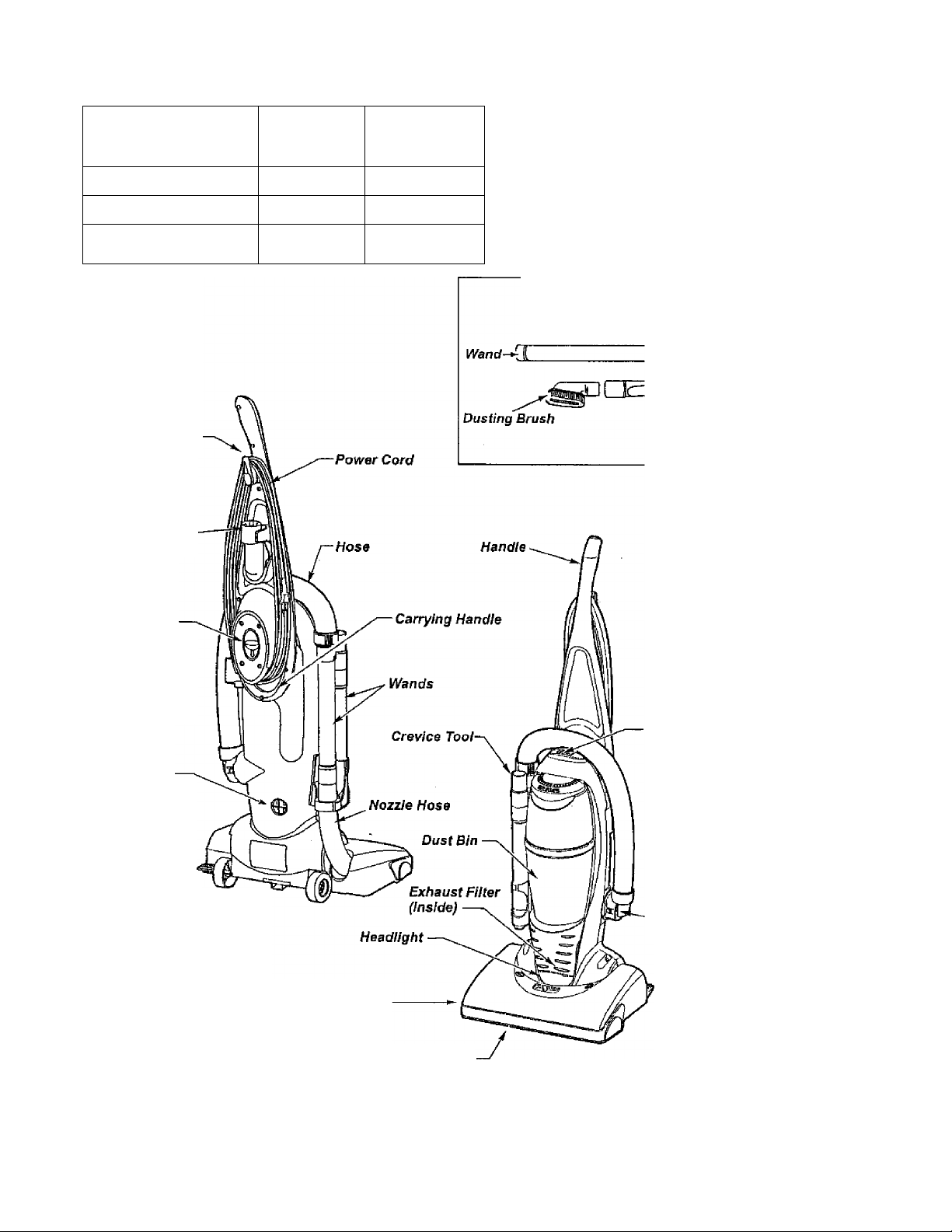
PARTS AND FEATURES
Item
Exhaust Filter
Fleadlight Bulb
Belt
Cord Hook
Dusting
Brush
Part No.
In U.S.
Part No.
In Canada
20-86880 20-86880
20-5248
20-5248C
20-5275 20-5275C
It is important to know your vacuum
cleaner’s parts and features to assure
its proper and safe use. Review these
before using your cleaner.
ATTACHMENTS
Crevice Tool
Handle
Release
Button
Motor
Protector
Handle
Release Pedal
On/Off Switch
Suction
Inlet
Nozzle
Furniture Guard ■
Page 5
OPERATING INSTRUCTIONS
GETTING STARTED
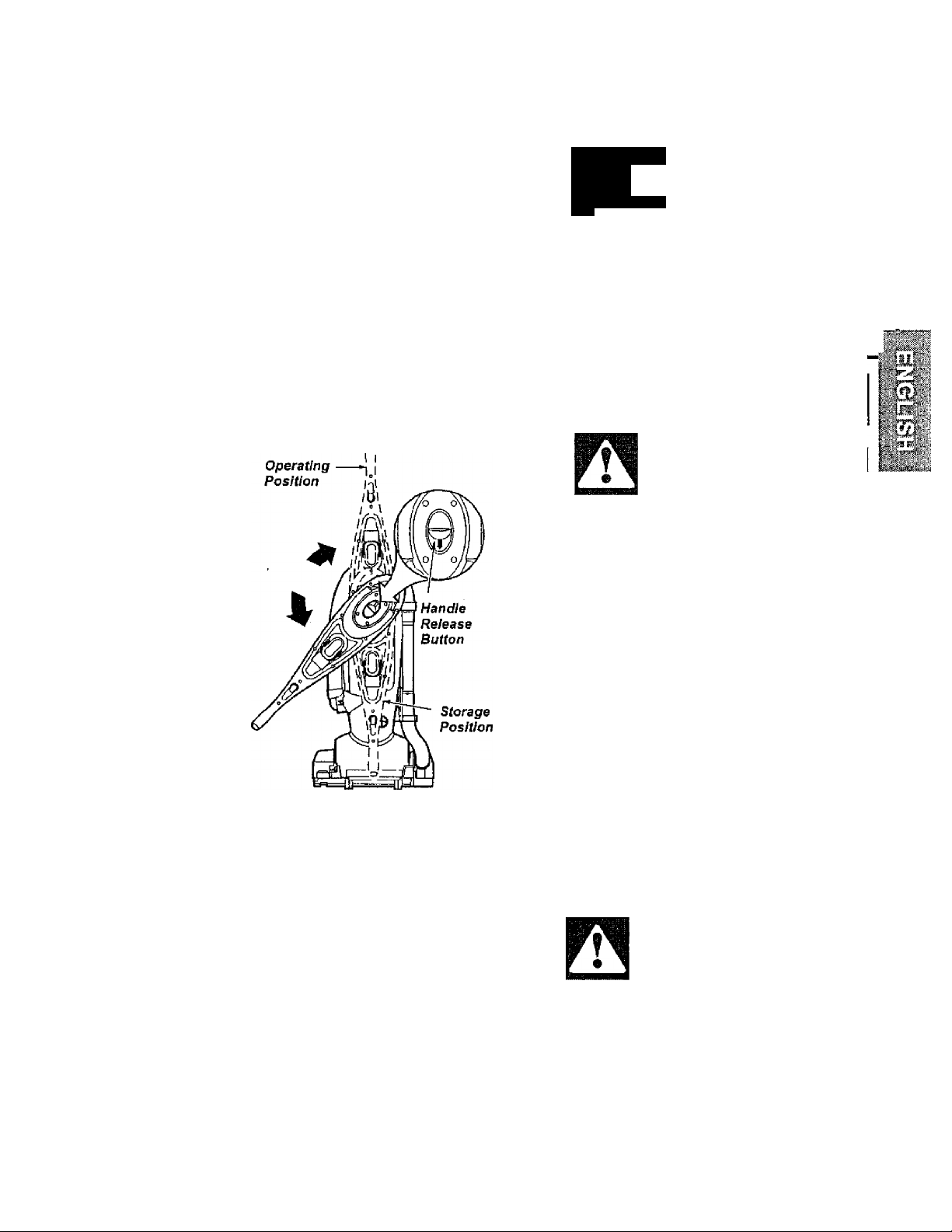
USING HANDLE
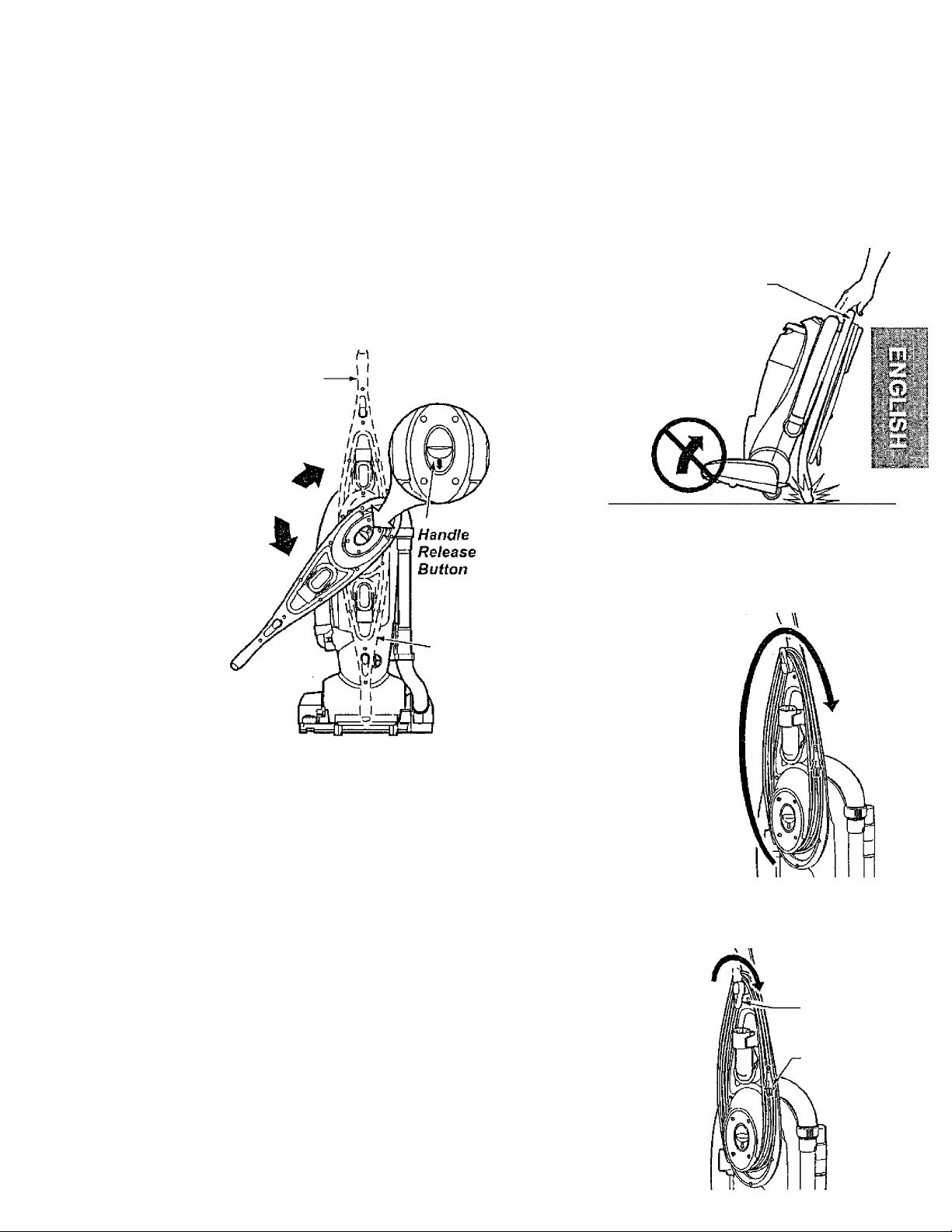
To release handle; press handle release
button as shown. With release button
depressed rotate handle clockwise to the
operating position. Once handle reaches
the operating position (up) the handle will
automatically lock into place.
Operating
Position
Storage
Position
NOTE: You should hear a noticeable "click"
sound when handle reaches the operating
position.
NOTE: Make sure the handle is locked in
the operating position before using
vacuum. DO NOT operate vacuum unless
handle Is locked.
STORING HANDLE
To rotate the handle to the storage position
when vacuum is not in use, press handle
release button and rotate handle counter
clockwise for easy storage,
NOTE: You should hear a noticeable “click"
sound when handle reaches the storage
position.
Never puli the vacuum cleaner with the
handle in the storage position, The handle
will drag on the floor.
Always lift the
vacuum by the
carrying handle when
transporting to storage.
Carrying
Handle
CORD ASSEMBLY
Make sure the quick release upper cord hook
is in the upright position. Remove the wire tie
from the power cord,
Make sure the power
cord is placed into the
locking notch. This
helps keep the power
cord out from under
the vacuum cleaner
agitator.
Wrap the power cord
around the upper and
lower cord hooks and
lock the power cord
plug onto the power
cord.
USING CORD HOOK
Detach plug
head from power
cord.
Rotate cord hook
down to release
cord. Return the
cord hook to the
upright position
before
attempting to
rewind the cord.
Quick Release
Cord Hook
Plug Head
Page 6
PILE HEIGHT SELECTION AND SETTING
SOME MODELS
To select a pile height setting:
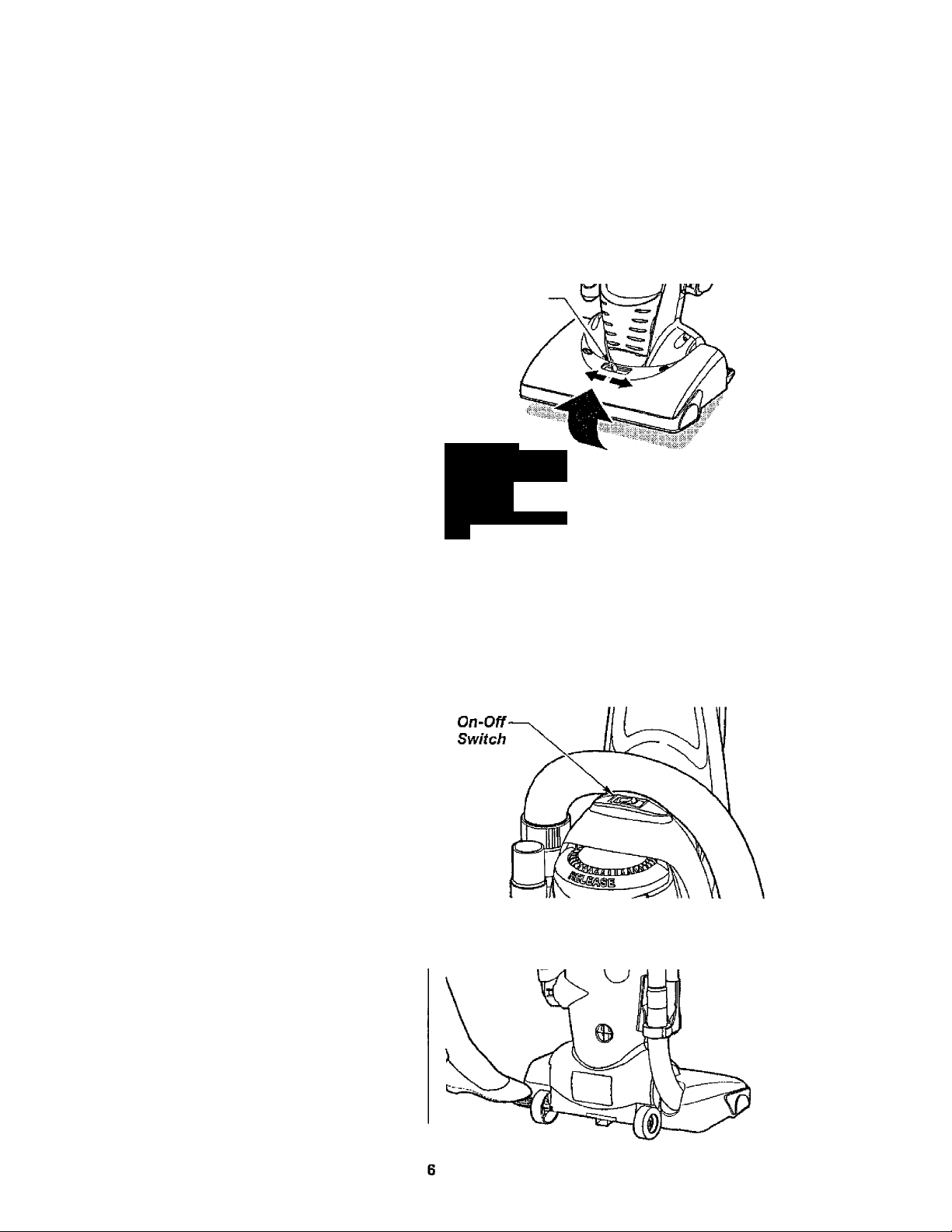
Turn off cleaner. Select a pile height setting
by tilting the cleaner back until front wheels
are lifted slightly off the floor as illustrated.
Slide the adjustment lever to the correct
setting.
Models with no selector adjust automatically
for varying carpet heights.
SUGGESTED PILE HEIGHT SETTINGS
You may need to raise the height to make
some jobs easier, such as scatter rugs and
longer pile carpets.
Suggested settings are:
HIGH: shag carpet, long pile, plush, scatter
rugs
MED: medium to long pile.
LOW: short to medium pile.
EX LOW: very low pile.
Place unit in “HiGH” when using attach
ments to prevent possible floor damage.
ATTENTION: Special care is required when
vacuuming certain types of carpet or floor
covering. Always check the carpet or floor
covering manufacturer’s recommended
cleaning instructions before vacuuming.
Pile Height
Adjustment
Lever
A
WARNING
Personal Injury Hazard
To avoid personal injury, DO NOT
place hands or feet underneath the
unit when changing height setting.
ON/OFF SWITCH
Ensure ON-OFF switch is OFF. Plug the
power cord into 120V outlet. ON position
turns vacuum on. OFF position turns
vacuum off.
RELEASING THE HANDLE
Release the handle by pressing down on
the handle release pedal with your foot and
pulling back and down on the handle with
your hand.
Page 7
ü
WARNING
Personal Injury Hazard
DO NOT place hands or feet under
neath the unit. When using the
attachments, the agitator rotates.
Do not allow the cleaner to remain
in just one place for a period of
time, as the agitator may damage
the floor surface. Avoid placing the
vacuum on furniture, the fringed
area of rugs, deep pile carpeting, or
carpeted stairs. The ideal position
for the cleaner when using attach
ments is for the unit to be on a level
area with the handle in the FULL
UPRIGHT position.
ATTACHMENTS
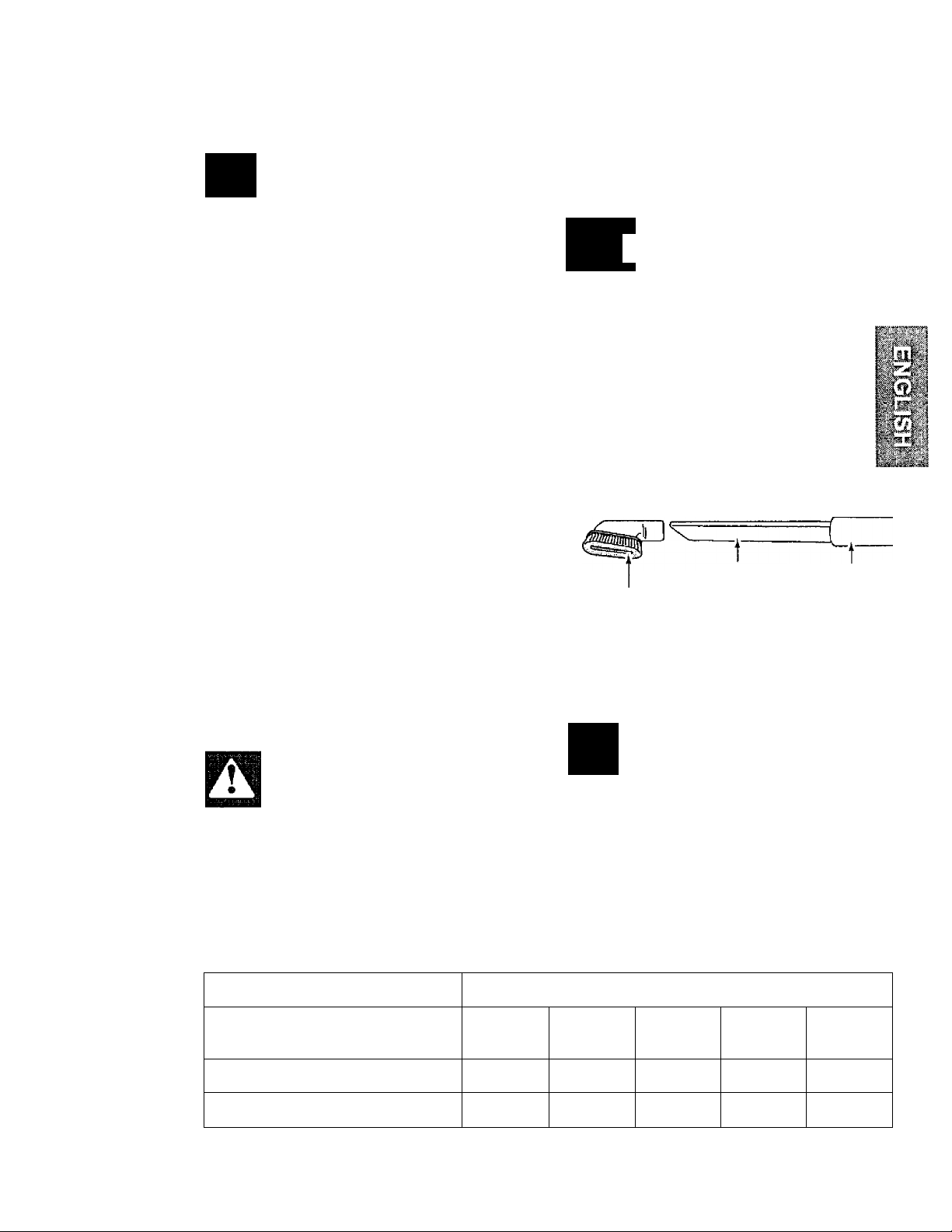
If more reach is needed, the wand can be
attached to the hose and the attachments
can be added to the wand.
A
When using attachments, be
careful not to overextend the
hose length when reaching.
Trying to reach beyond the hose
reach could cause the cleaner to
tip over.
If the dusting brush is being used and
more distance is needed, the crevice tool
can be added to the wand, then the dusting
brush can be added to the crevice tool.
CAUTION
TO USE ATTACHMENTS
Place the cleaner on a flat surface.
The hose can be pulled off the nozzle hose
by grasping the cuff and twisting while
pulling up.
The attachments can be added to the hose
if the item to be cleaned is not far from the
cleaner.
CAUTION
DO NOT pull the vacuum cleaner
around the room by the hose.
Property damage could result.
ATTACHMENT USE CHART
Crew'ce Tool
Dusting Brush
Wand
TO STORE ATTACHMENTS
Return the hose to its position on the nozzle
hose and the attachments to their holders.
A
CAUTION
Attachments used in dirty areas,
such as under a refrigerator, should
not be used on other surfaces until
they are washed. They could leave
marks.
CLEANING AREA
ATTACHMENT
DUSTING BRUSH
CREVICE TOOL
The motor protector may open when using attachments or when cleaning new carpet due to reduced air flow by the
attachments themseives or by new carpet fuzz filiing the bag quickly.
'Always clean attachments before using on fabrics.
Furniture*
X X X X
X X X
Between
Cushions* Drapes* Stairs Walls
7
Page 8
VACUUMING TIPS
Carpet edges
Guide either side or the front of the nozzle
along a baseboard. The full width agitator
brushes help remove dirt at carpet edges.
Note: When using attachments make
sure the cleaner is in the upright position.
VWVRNING
Personal Injury Hazard
Use care if vacuum cleaner is
placed on stairs. If it falls, personal
injury or property damage could
result.
A
WARNING
Electrical Shock And Personal Injury Hazard
Disconnect electrical supply before
servicing or cleaning the unit.
Failure to do so could result in elec
trical shock or personal injury from
cleaner suddenly starting.
PERFORMANCE FEATURES
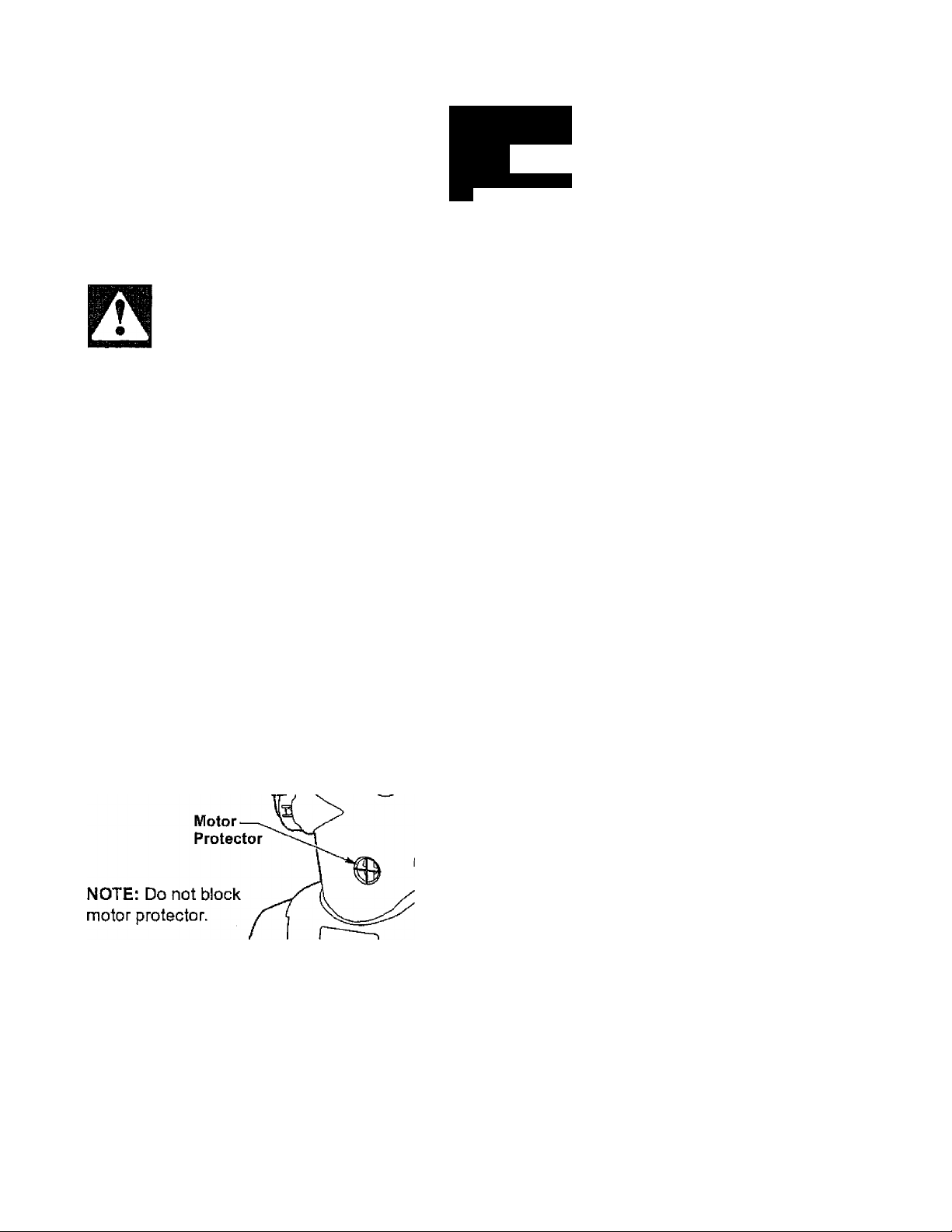
MOTOR PROTECTOR
This vacuum has a motor protector by
pass valve which automatically opens to
provide cooling air to the motor when a
clog prevents the normal flow of air to the
motor. If the by-pass valve opens to
prevent motor overheating and possible
damage to the vacuum, you will notice a
change of sound as air rushes through the
valve opening.
To correct problem; See the TROUBLE
SHOOTING chart.
NOTE; The motor protector may open
when using attachments or when cleaning
new carpet, due to reduced airflow by the
attachments themselves or by new carpet
fuzz ftiilng the dust bin quickly. See the
TROUBLESHOOTING section.
THERMAL PROTECTOR
This vacuum has a thermal protector which
automatically trips to protect the vacuum
from overheating. If a clog prevents the
normal flow of air to the motor, the thermal
protector turns the motor off automatically to
allow the motor to coo! in order to prevent
possible damage to the vacuum. During this
time the headlight remains on.
To correct problem: If this occurs, turn the
vacuum off and unplug the power cord from
the outlet to allow the vacuum to cool and
the thermal protector to reset.
and remove clogs, if necessary. Also
check and clean/replace any clogged
filters. Wail approximately thirty (30)
minutes and plug the vacuum in and turn
back on to see if the motor protector has
reset. The motor protector will not reset if
the vacuum is not turned off even if the
vacuum has cooled down.
Check for
Page 9
VACUUM CLEANER CARE
Always follow all safety precautions when
cleaning and servicing the vacuum
cleaner.
VACUUM STORAGE
A
|VW\RNING
Electrical Shock And Personal Injury
Hazard
Disconnect electrical supply before
servicing or cleaning the unit.
Failure to do so could result in elec
trical shock or personal injury from
cleaner suddenly starting. |
WARNING
Electrical Shock And Personal
Injury Hazard
Wrapping the cord too tightly
puts stress on the cord and can
cause cord damage. A damaged
cord is an electrical shock hazard
and could cause personal injury
or damage.
CLEANING EXTERIOR AND ATTACHMENTS
Unplug cord from wall outlet.
Clean exterior using a clean, soft cloth that
has been dipped in a solution of miid liquid
detergent and water, then wrung dry. Wipe
dry after cleaning. DO NOT drip water on
cleaner.
Wash attachments in warm soapy water,
rinse and air dry. Do not clean in dish
washer.
To rotate the handle to the storage
position when vacuum is not in use, press
handle release button and rotate handle
counter-clockwise for easy storage.
NOTE: You should hear a noticeable
"click" sound when handle reaches the
storage position.
CAUTION
Do not use attachments if they are
wet. Attachments used in dirty areas,
such as under a refrigerator, should
not be used on other surfaces until
they are washed.They could leave
marks.
Page 10
DUST BIN CLEANING
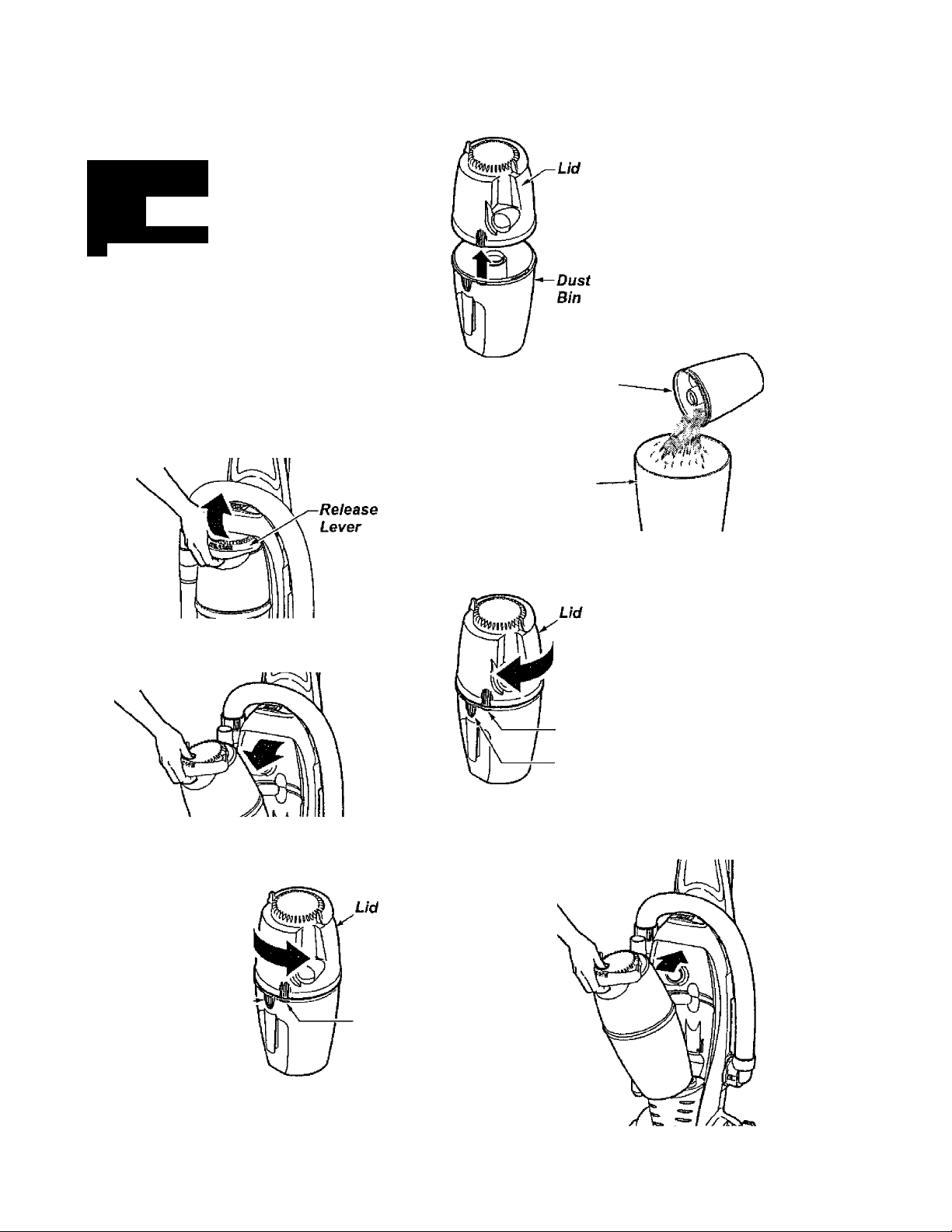
Always empty the dust bin when dirt level reaches the “MAX FILL" line.
WARNING
A
Electrical Shock And Personal Injury Hazard
Always unplug power cord from elec
trical outlet before performing any
service on vacuum.
Separate the lid from
the dust bin by lifting it
straight off.
TO REMOVE DUST BIN
Remove dust bin assembly from cleaner
by lifting the release lever as shown.
Remove dust bin from cleaner by tilting out
as shown.
Dust Bin
Empty con
tents into a
trash con
tainer.
Trash
Container
TO REPLACE DUST BIN LID
Place dust bin lid
assembly back
onto top of dust
bln. Align marks
with bin marks as
shown. Rotate lid
clockwise while
Unlock pressing downward
Locked
as shown.
TO EMPTY DUST BIN
Hold dust bin over a trash container.
Rotate lid
counter
clockwise
from the
locked
position to
the unlocked
position as
shown.
Locked
Unlock
TO REPLACE DUST BIN
First align
base of dust
bin with the
vacuum. Then
rotate dust bin
in place mak
ing sure dust
bin is securely
latched.
10
Page 11
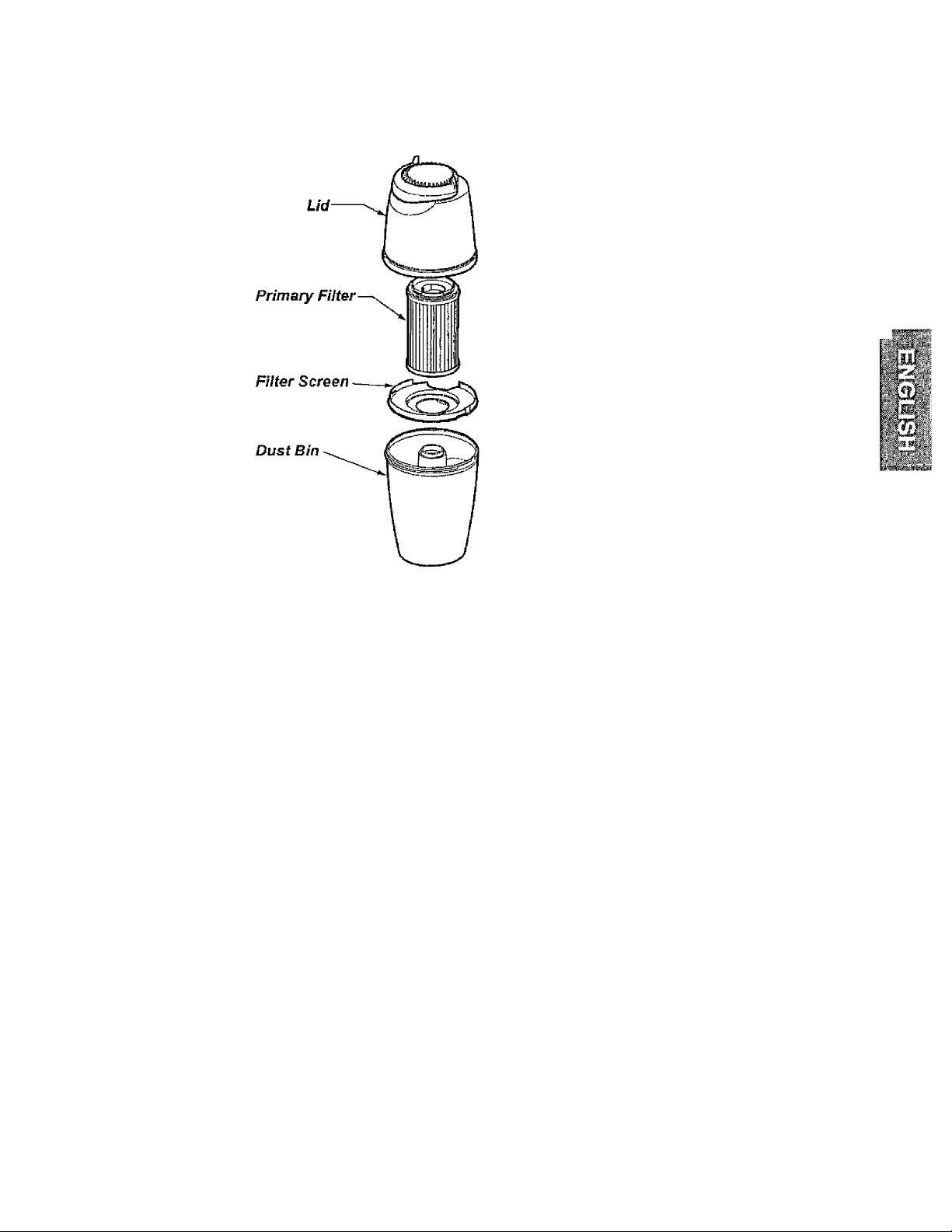
DUST BIN ASSEMBLY
Lid
The Lid houses the filter.
Filter
Filter traps dirt and debris that is picked
up by the suction motor.
Filter Screen
The filter screen traps larger particles
of dirt and debris from reaching the
filter.
Dust Bin
Captures dirt and debris picked up
from the suction motor.
11
Page 12
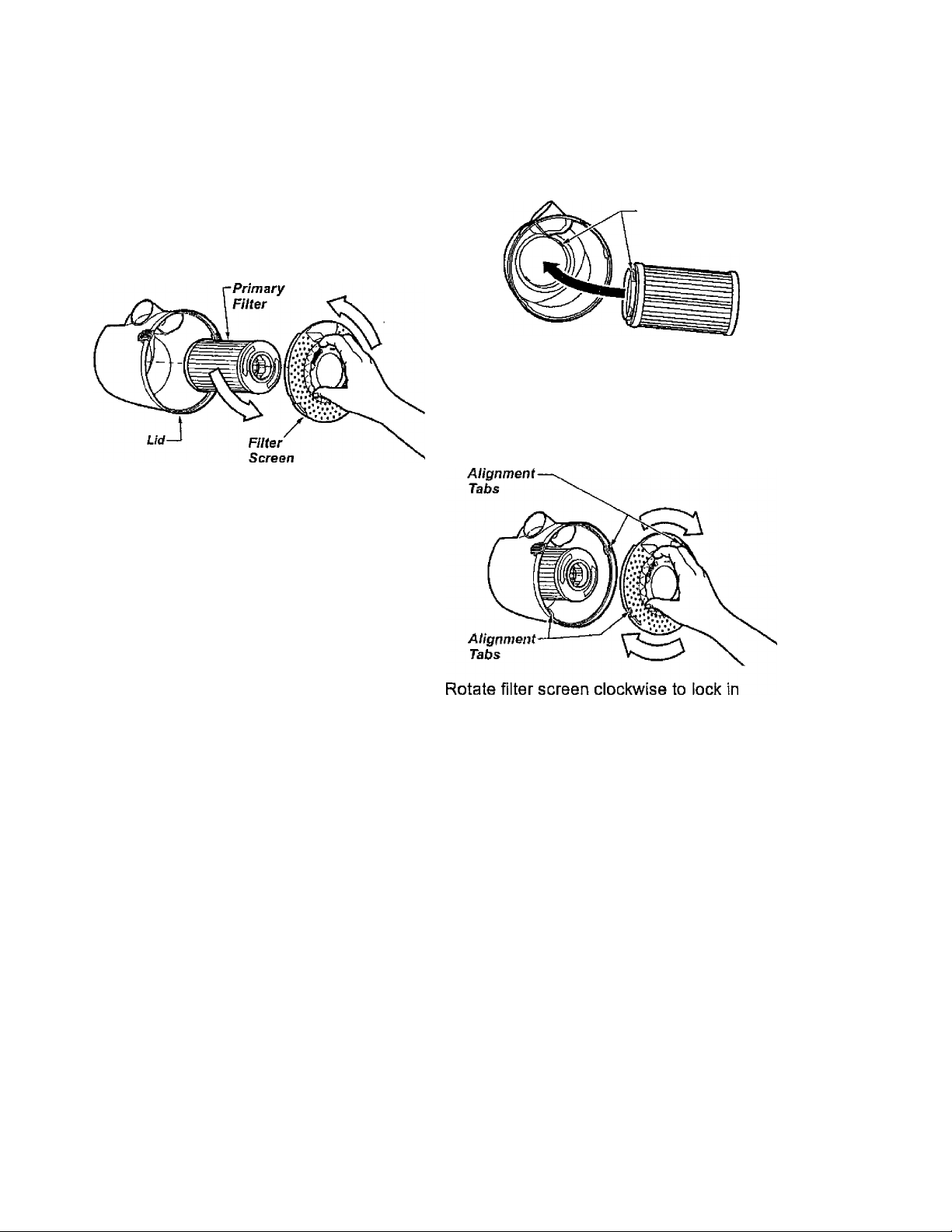
DUST BIN FILTER CHANGING / CLEANING
Check primary filter frequently and clean
when dirty. Remove the dust bin assembly
as outlined in the DUST BIN CLEANING
section and empty contents of dust bin.
Make sure dust bin is empty before filter is
removed. Grasp filter screen, rotate
counter-clockwise and lift out.
Grasp primary filter, rotate counter
clockwise and lift out. Clean primary filter
by gently tapping over a trash container.
Tap on several sides to ensure best
cleaning. (Rinse with water only as
needed) The filter may be cleaned by
tapping it on a firm surface or by rinsing it
under a faucet.
Before replacing the primary filter it is a good
idea to clean the inside of the dust bin and lid
area.
Alignment
Tabs
Rotate filter clockwise until slots lock onto
tabs in lid.
To re-instali the filter screen, align tabs on
filter screen with tabs on lid.
Rinse with water only, do not use detergent
or soap. Allow filter to dry 24 hours
before putting it back into the dust bin.
When the cleaning of the filter no longer
restores vacuum suction to full power you
need to replace the filter.
place.
12
Page 13
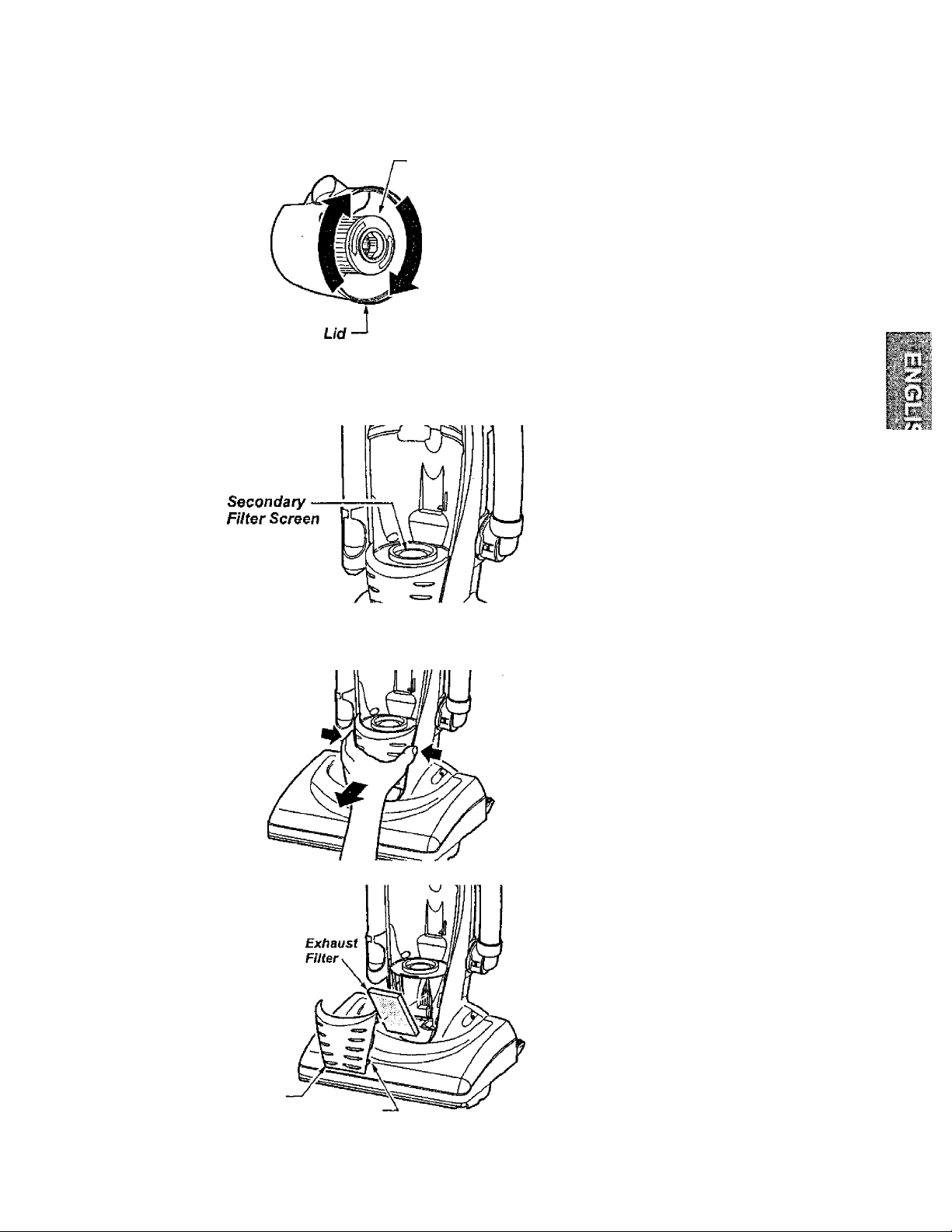
FILTER REPLACEMENT
Primary
Filter
Before replacing the filter it is a good idea to
clean the inside of the dust bin and lid area.
Rotate filter clockwise until slots lock onto
tabs in lid.
NOTE: Under normal use and care, your fil
ter can be expected to last up to 3 years,
NOTE: See Parts and Features for Filter
number.
CLEANING SECONDARY FILTER SCREEN
The secondary filter screen protects the
motor.
Always check filter screen when cleaning
dust bin.
If dirty or clogged, remove debris from filter
screen.
EXHAUST FILTER CLEANING
The exhaust filter removes dirt from
recirculated air.
Check filter after emptying dust bin.
Replace when dirty.
To remove, press and pull out on both
sides of the exhaust filter cover at arrows
as shown.
Grasp the exhaust filter and pull out to
remove.
Wash the exhaust filter in warm soapy
water; rinse and dry thoroughly by
squeezing the filter in your hand and letting
air dry.
DO NOT wash in the dishwasher.
Exhaust
Filter Cover Tabs
DO NOT instali damp.
Reinstall exhaust filter cover by snapping
firmiy into place.
13
Page 14
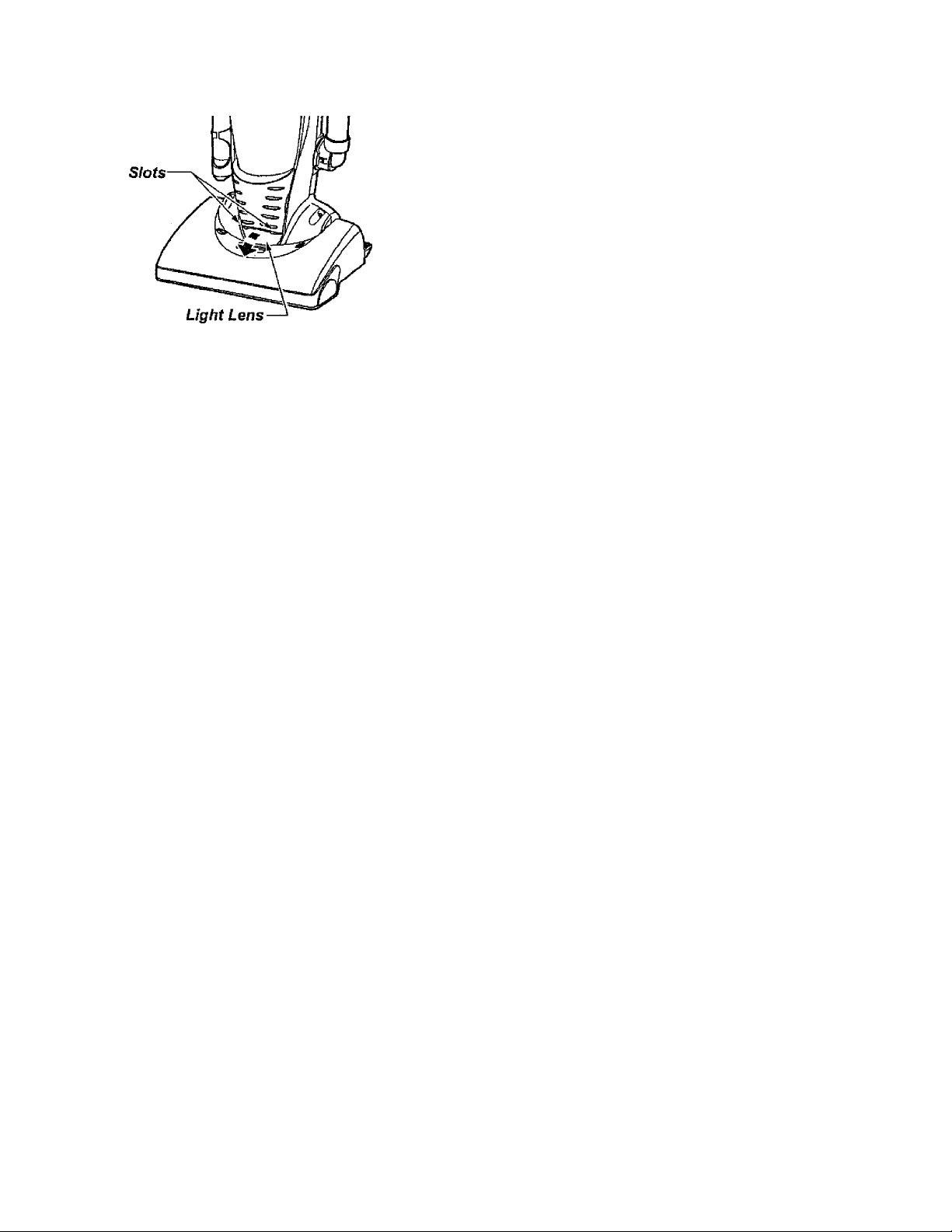
REPLACING HEADLIGHT BULB
Ensure ON-OFF switch is OFF.
Disconnect power cord from electrical outlet.
Press handle release pedal and rotate the
handle down so the cleaner is laying flat on
the floor.
Pry out light lens at slots. Remove old bulb
from the socket by pulling from socket.
Replace bulb by pressing into socket. Only
use a bulb rated 13 V AC-9 Watts.
Reinstall light lens by snapping into place.
Return the cleaner to the upright position.
14
Page 15
m
BELT CHANGING AND AGITATOR CLEANING
WARNING
Carefully remove any residue that may exist
in the belt area.
Electrical Shock Or Personal Injury Hazard
Disconnect electrical supply before
servicing or cleaning the unit.
Failure to do so could result in elec
trical shock or personal injury from
cleaner suddenly starting.
Frequently check and remove hair, string
and lint build-up in the brush area. If build
up becomes excessive, follow the steps
below. Should the belt become loose or
should it break, follow the Belt Removal
Instructions.
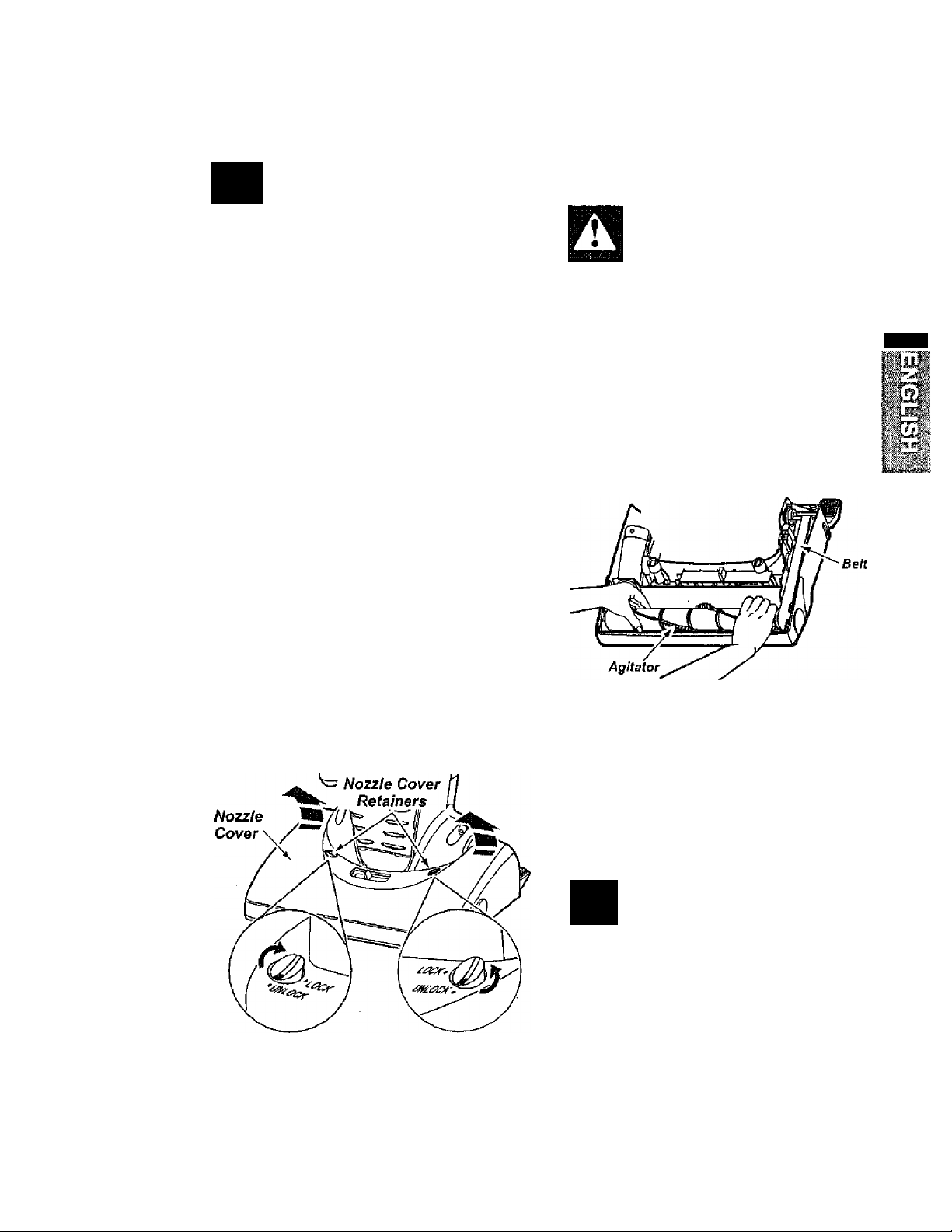
TO REMOVE NOZZLE COVER
Disconnect electrical supply. Press handle
release pedal and rotate the handle down
so the cleaner is laying flat on the floor.
To protect the floor surface, always place
paper under the nozzle any time the nozzle
cover is removed.
WARNING
Personal injury Hazard
Always unplug the vacuum cleaner
before cleaning the brush area as
agitator may suddenly restart.
Failure to do so can result in per
sonal injury.
TO REMOVE BELT/CLEAN AGITATOR
Release the nozzle cover by rotating the
nozzle cover retainers to the UNLOCK
position. Grasp back of nozzle on each side
and lift up to remove it from nozzle cover.
Position hands on the agitator. If the belt is
stilt attached to the agitator, there will be
tension on it.
Carefully lift the right end of the agitator and
then lift the left end.
Remove the worn or broken belt from the
motor drive shaft.
M
WARNING
Personal Injury Hazard
Be careful when removing the agita
tor as the belt tension is high.
Failure to do so could result in per
sonal injury from the agitator releas
ing quickly and snapping away.
15
Page 16
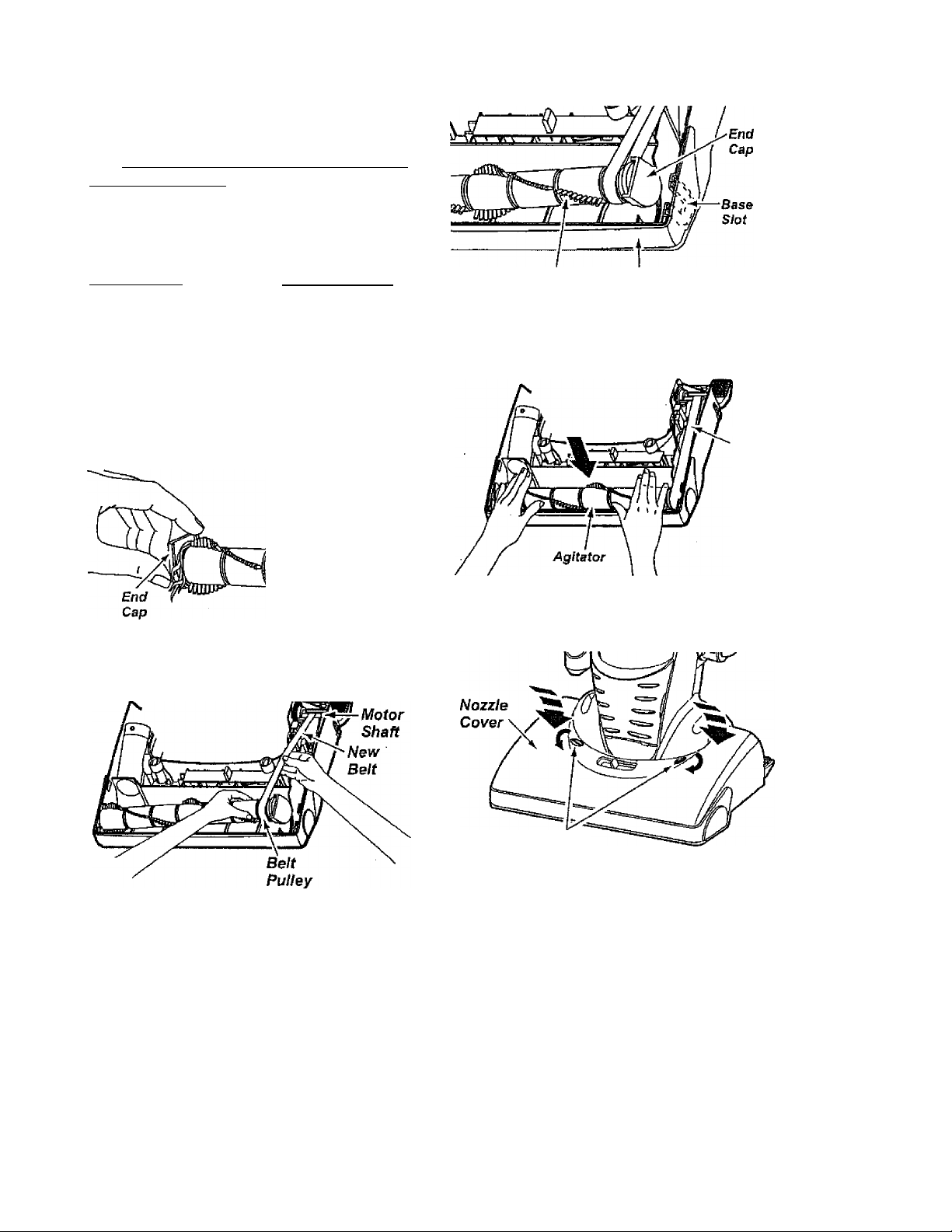
Remove the agitator to check for string and
hair build-up.
NOTE: In order to keep cleaning efficiency
high and to prevent damage to your vacu
um, the agitator must be cleaned every time
the belt is changed.
The agitator must also be cleaned accord
ing to the following schedule:
Pull right end of agitator forward and seat it
into nozzle base
Vacuum Use
HEAVY -
(used daily)
MODERATE -
(used 2-3 times/week)
LIGHT -
(used 1time/week)
TO REPLACE BELT
Clean Agitator
every week
every month
every 2 months
Cut off any carpet
pile, hair or lint
entangled around
the agitator and
remove any string
or debris located
near the end
caps.
Agitator
NozztB
Base
Press firmly, checking to see that each end
is completely inserted.
Belt
Check to see that the belt is centered on the
belt pulley and that the agitator turns freely.
Seat left end of agitator into nozzle base. To
seat agitator end, place rounded portion of agi
tator end cap down into slot in nozzle base.
Loop the new belt on the motor shaft.
NOTE; See Parts and Features for Belt
Number.
Loop the other end of belt onto the belt
pulley on the right end of agitator.
Nozzle Cover
Retainers
Make sure the nozzle cover retainers are in
the UNLOCK position. Hook the front of the
nozzle cover on to the nozzle base and
rotate downward. Once in place, rotate the
nozzle cover retainers to the LOCK position.
16
Page 17
CLEANING EXTERIOR
Unplug power cord from wall outlet. Clean
exterior using a ciean, soft cloth that has
been dipped in a solution of mild liquid
detergent and water and wrung dry.
DO NOT drip water on cleaner and wipe
dry after cleaning.
DO NOT clean tools in dishwasher or
clothes washer. Wash tools in warm soapy
water, rinse and air dry.
DO NOT use tools if they are wet.
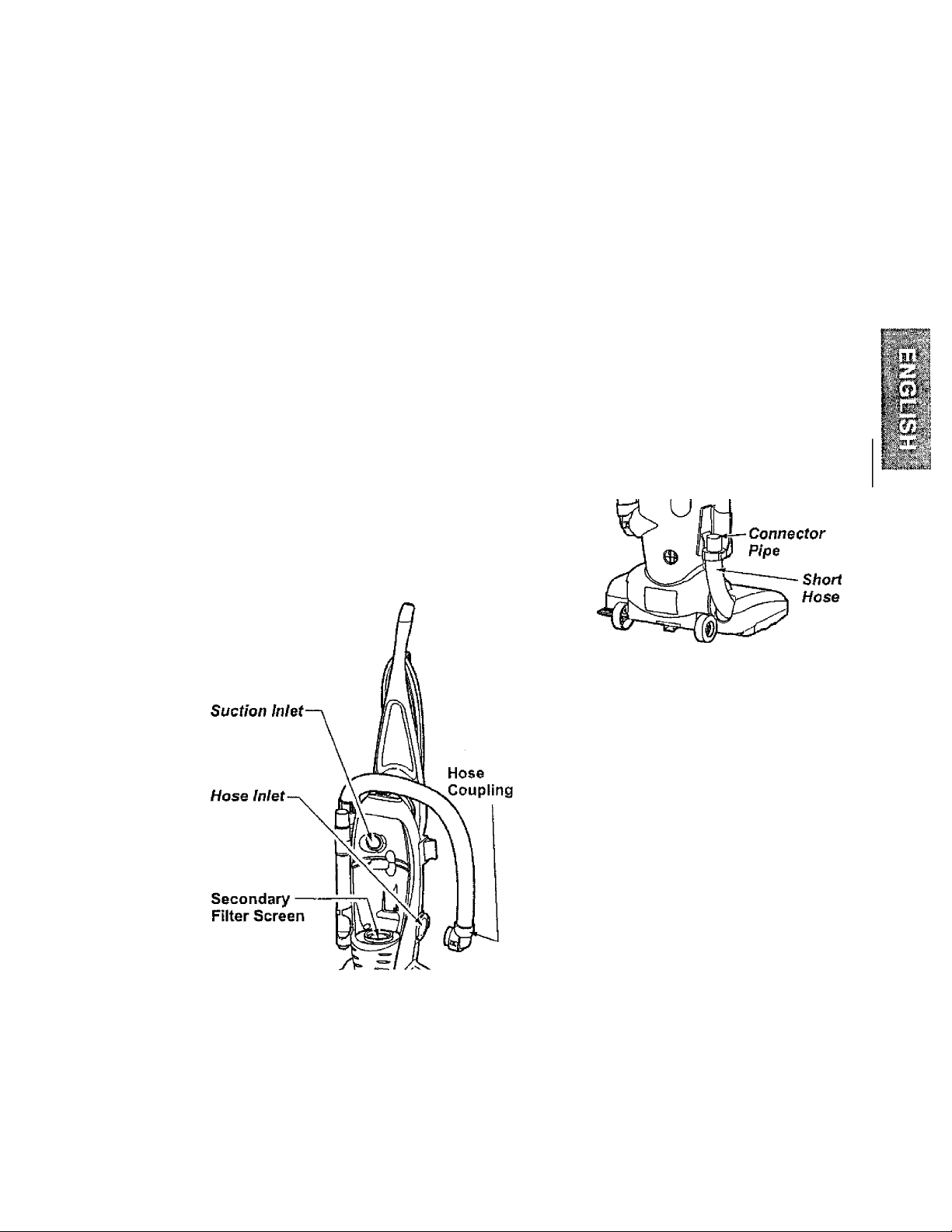
REMOVING CLOGS
The hose located on the vacuum cleaner
carries the dirt from the nozzle up to the
dustbin. If the hose should become
clogged:
Unplug vacuum. Remove hose coupling
and check hose coupling and hose inlet for
clogs. Check suction inlet and secondary
filter screen for clogs.
Disconnect wand from connector pipe and
nozzle hose, check the wand and hose.
Plug in vacuum cleaner and turn on.
Disconnect wand and stretch hose in and
out to remove clog. If clog still exists, turn
vacuum cleaner OFF and UNPLUG
POWER CORD. Turn vacuum over and
inspect agitator area for clogs.
17
Page 18
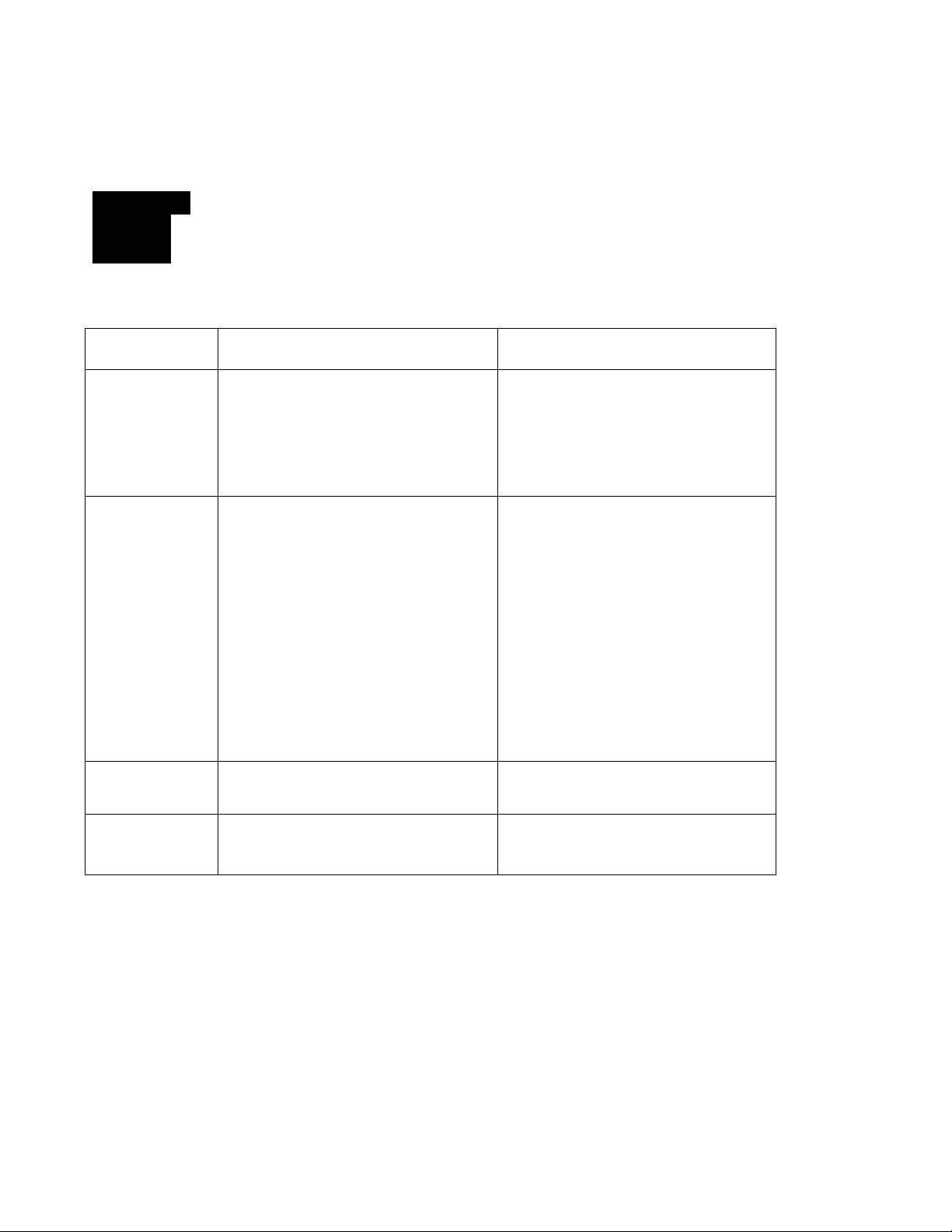
TROUBLESHOOTING
Review this chart to find do-ihyourseif solutions for minor performance problems. Any service
needed, other than those described in this owner’s manual, should be performed at a Sears
service center.
A
WARNING Electrical Shock Hazard
Disconnect electrical supply before servicing or cleaning the unit. Failure
to do so could result in eiectrical shock or personal injury.
PROBLEM
Cleaner will
not run.
Poor job of dirt
pickup.
POSSIBLE CAUSE
1. Unplugged at wall outlet.
2. ON-OFF switch not turned on.
3. Tripped circuit breaker/blown
fuse at household service panel.
1. Full or clogged dust bin.
2. Broken belt.
3. Clogged hose or nozzle.
4. Hose not inserted fully.
5. Worn agitator.
6. Hole in hose.
POSSIBLE SOLUTION
1. Plug in firmly. Push ON-OFF
switch to ON.
2. Push ON-OFF switch to ON.
3. Reset circuit breaker or replace
fuse.
1. Empty dust bin.
2. Replace belt.
3. Clean hose or nozzle area.
4. Insert hose.
5, Replace agitator.
6. Replace hose.
Dust escapes
the dust bin.
Light will
not work.
7. Dust bin assembly
improperly installed.
8. Belt not installed on motor shaft.
1. Dust bin assembly
improperly installed.
1. Burned out light bulb.
7. Properly install dust bin assembly.
8. Install belt on motor shaft.
1. Properly install bin.
1. Replace light bulb.
18
Page 19

Get it fixed, at your home or ours!
Your Home
For repair - in your home - of all major brand appliances,
lawn and garden equipment, or heating and cooling systems,
no matter who made it, no matter who sold iti
For the replacement parts, accessories and
owner’s manuals that you need to do-it-yourself.
For Sears professional installation of home appliances
and items like garage door openers and water heaters.
1-800-4-MY-HOME® Anytime, day or night
(1-800-469-4663) (U.S.A. and Canada)
www.sears.com
Our Home
www.sears.ca
For repair of carry-in products like vacuums, lawn equipment,
and electronics, cal! or go on-line for the nearest
Sears Parts and Repair Center.
1 -800-488-1222 Anytime, day or night (U.S.A. only)
www.sears.com
To purchase a protection agreement (U.S.A.)
or maintenance agreement (Canada) on a product serviced by Sears:
1-800-827-6655 (USA)
Рага pedir servicio de reparación
a domicilio, у para ordenar piezas:
l-SeB-SU-HOGAR®*"
(1-888-784-6427)
© Sears, Roebuck and Co,
® Registered Trademark / ™Trademark I Service Mark of Sears, Roebuck and Co.
® Marca Registrada / Marca de Fábrica / Marca de Servicio de Sears, Roebuck and Co.
Marque de commerce / Marque déposée de Sears, Roebuck and Co.
1 -800-361 -6665 (Canada )
Au Canada pour service en français:
1-800-LE-FOYER“^^
(1-800-533-6937)
www.sears.ca
 Loading...