

Page 1
Network Primer and Programming
Tutorial for the Model 2701 Ethernet-
Based DMM/Data Acquisition System
Introduction
Keithley’s Model 2701 is the industry’s first multipoint measurement and control system that fully integrates instrumentquality resolution and sensitivity with Ethernet long distance
networking capability. Its 61⁄2
-digit (22-bit) measurement
resolution is typically found on benchtop instruments that
have only GPIB and RS-232 interfaces. Now, engineers and
scientists can make sensitive measurements in a distributed
data acquisition environment where long distance, industrystandard communications are needed.
The Model 2701 can be used on a 10BaseT or 100BaseT
Ethernet network. As with other Ethernet devices, this
requires the installation and configuration of associated network interface cards (NICs) in a PC controller, installation of
the TCP/IP protocol, and setting up TCP/IP addresses. This
network primer is a short tutorial on how to accomplish these
steps. Appendix B provides a glossary of networking terminology.
Setting Up Network Configurations
Ethernet is a type of Local Area Network (LAN) that works
with a variety of transmission media. Some of the more popular variations are 10/100BaseT, 10Base2, and 10BaseF,
which use unshielded twisted pair (UTP), coaxial cable, and
optical fiber respectively.
The Model 2701 is designed for a 10/100 BaseT network
and uses a standard RJ45 connector. This is an eight-wire connector, but only four wires are used: one pair to transmit and
one pair to receive data. A 10BaseT network can accommodate transmission speeds up to 10Mbits/second; 100BaseT
operates at up to 100Mbits/second. Both types of networks
usually require Ethernet hubs to make connections. The
exception is a one-to-one connection using a crossover cable.
When using Ethernet to collect and distribute test data,
the first step is deciding which connection scheme is most
convenient. Unlike instruments with GPIB and RS-232 inter-
faces, the Model 2701 offers options other than simply connecting the instrument directly to a PC controller in a closed
loop. The Model 2701 can be connected to a TCP/IPnetwork
using its own subnetwork, or it can be connected directly to
an existing network, including a corporate intranet.
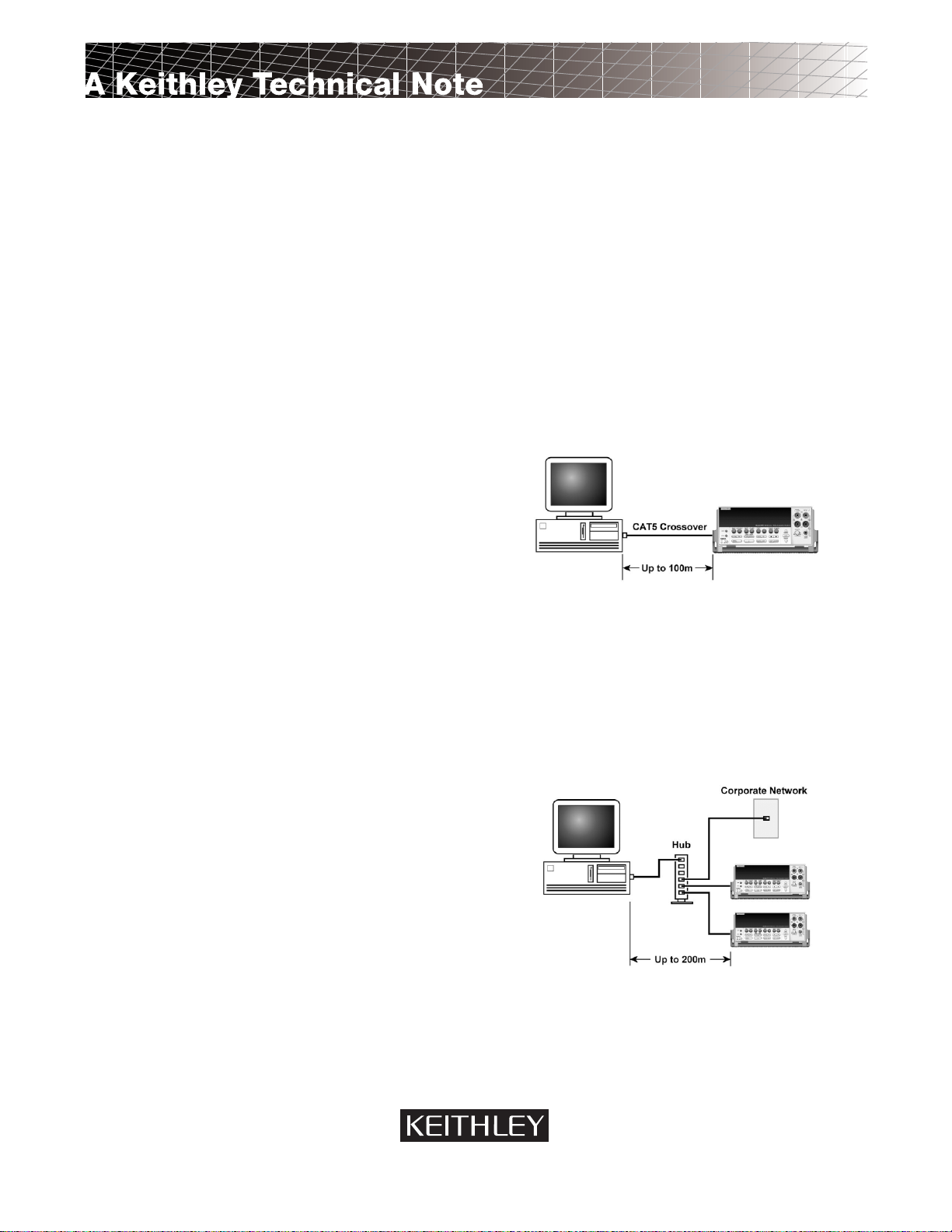
Figure 1. One-to-one connection with a crossover cable
One-to-One Connection—A network crossover cable
connection is similar to a typical RS-232 hookup using a null
modem cable. The crossover cable has its receive (RX) and
transmit (TX) lines crossed to allow the receive line input to
be connected to the transmit output on the network interfaces. With the Model 2701, this is only done when one
instrument is being connected to a single NIC.
Figure 2. One-to-many connection scheme using a network
hub
A GREATER MEASURE OF CONFIDENCE
Page 2
2
One-to-Many Instruments Connection—With an
Ethernet hub, a single NIC can be connected to as many
Model 2701s as the hub can support. This requires straightthrough network (non-crossover) cables for hub connections.
The advantage of this method is easy expansion of measurement channels when test requirements exceed the capacity of
a single instrument. With only Model 2701s connected to the
hub, this is an isolated instrumentation network. However,
with a corporate network attached to the hub, the Model
2701s become part of the larger network.
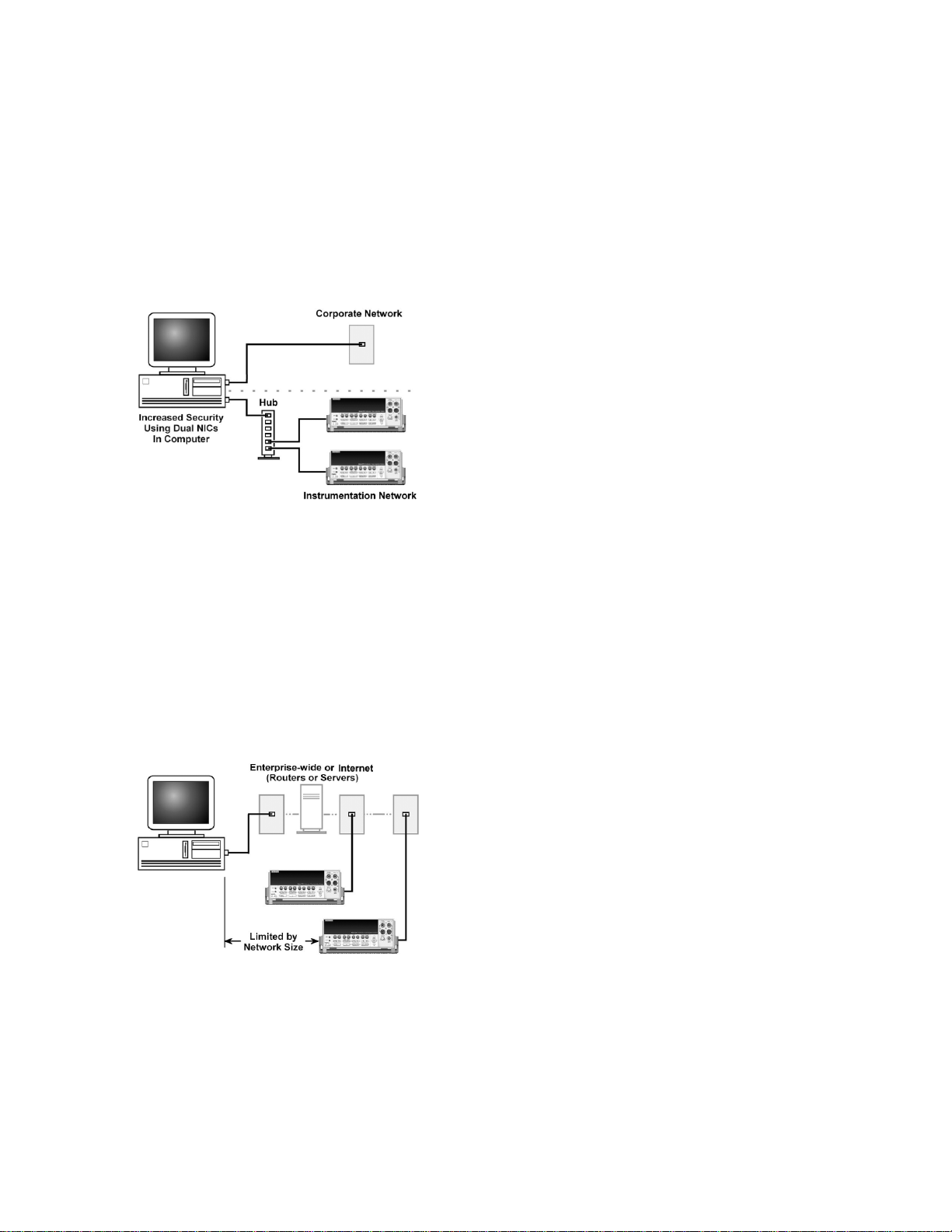
Figure 3. Use of two NICs for connections to a corporate network and instrumentation hub.
Dual NICs for Independent Networks—When it is
desirable to interconnect independent corporate and instrumentation networks, two NICs are required in the PC controller. While the two networks are independent, stations on
the corporate network can access the instrumentation, and
vice versa, using the same computer. This configuration
resembles a GPIB setup in which the computer is connected
to a corporate network, but also has a GPIB card in the PC to
communicate with instrumentation.
Figure 4. Instrumentation connection to enterprise routers or
servers.
Enterprise Network Connections—This connection
scheme uses an existing network infrastructure to connect
Model 2701s to the PC controller. In this case, the network
resources must be obtained from the network administrator.
Usually, the instruments are kept inside the corporate fire-
wall, but the network administrator could assign resources
that allow them to be outside the firewall. This would allow
a Model 2701 connection to the Internet using appropriate
security methods. Thus, data collection and distribution
could be controlled from virtually any location.
TCP/IP Protocol
The Basics—Regardless of the type of network connection
used, there must be a way to identify each instrument and its
location on a network. A software driver installed in the PC
provides the means of controlling the instrument. A data
communication protocol defines the method of exchanging
instructions and data between the PC and each instrument.
WARNING
When connecting to a corporate network, the
network administrator MUST provide all of the
network settings to the Model 2701. Failure to
use settings provided by the network administrator could result in failures at other locations
on the corporate network. Failure to work
through the network administrator could also
be considered a breach of company policy.
Always consult with the network administrator
before attempting to connect instrumentation
to the network.
The Model 2701 uses the TCP/IP protocol to communicate with other hosts on the network. Ahost is defined as any
device on the network that can transmit and receive IP packets. In addition to the Model 2701, this includes workstations, servers, and routers. Each host on a TCP/IP network is
assigned a 32-bit logical address that is unique to that host.
IP Addressing—No two hosts on a network can have the
same IP address. There are two ways of assigning an IP
address to a host. For a network server running Dynamic
Host Configuration Protocol (DHCP), a network resource
such as an IP address is assigned each time the host connects
to the network. Typically, this type of IP addressing is used
for corporate networks, and is supported by the Model 2701.
The other method is called static IP addressing and is used in
the majority of isolated networks. The Model 2701 also supports static addressing.
Static IP addressing means that network settings assigned
to a host stay the same each time it is connected to the network. When setting up Model 2701s on an isolated network,
it usually is the user’s responsibility to configure the network
settings for those hosts. Thus, the user assigns the unique
logical address for each instrument.
The IP address is 32 bits wide and is divided into two
main parts: a network ID number and a host ID number. The
address is expressed as four decimal numbers separated by
Page 3

3
periods. Valid addresses range from 0.0.0.0 to
255.255.255.255, for a total of about 4.3 billion unique
addresses. Each of the four numbers represents the decimal
value of the numbers’ 8-bit bytes. The way these four numbers are assigned for host ID and network ID depends on the
class of network being used.
The network ID must be unique among all network subnets that connect to the Internet (or corporate intranet). If the
subnet will in fact be connected to the public Internet, then
the network ID must be obtained from the Network Information Center, which assigns and preserves unique IDs. In any
case, each host ID must be unique among all the hosts on the
same network (which presumably has a unique network ID
number).
In the TCP/IP protocol, a Subnet Mask separates the network ID from the host ID. The Subnet Mask looks like an IP
address, but sets a data bit high for each position of the IP
address that makes up the network ID. Three different classes of network are defined with the IP address and subnet
mask, as shown in Table 1.
Table 1. Network classes defined by IP address and subnet
mask combinations.
Network IP Subnet Available Available
Class address Mask Subnets Hosts
A nnn.hhh.hhh.hhh 255.0.0.0 126 16777214
B nnn.nnn.hhh.hhh 255.255.0.0 16384 65534
C nnn.nnn.nnn.hhh 255.255.255.0 2097151 254
Note: In the IP address format, ‘n’ is a network ID position, and ‘h’
is a host ID position. For simplicity, the first byte definition has
been omitted from the table. Refer to the network manual for further details.
Class C networks are the most common and use the subnet mask 255.255.255.0. The first three bytes are the network
ID number and the last byte is the host ID on the network.
Host ID numbers 1 through 254 are available for assignment.
All hosts on the same isolated network must have the same
subnet mask. As a general rule, the top and bottom host numbers are reserved. The top one (nnn.nnn.nnn.255) is the
broadcast address and the bottom one (nnn.nnn.nnn.0) is
shorthand for the whole subnet.
Setting Up an Isolated Instrument Network
The following paragraphs describe how to set up a simple
isolated Class C network for communicating with two Model
2701s. This network example is similar to Figure 2, but
without the corporate network connection to the hub.
The standard Ethernet hub basically repeats anything it
receives from one port, making that data available to all its
other ports. Hub connections are made with straight-through
cables. The hub is connected to the network interface card in
the PC. The NIC and its driver must be properly installed on
the computer according to the manufacturer’s instructions.
The next step is to create IP addresses for the three hosts
(the NIC and two Model 2701s) on the network. This is a
Class C network, so the subnet mask will be 255.255.255.0.
From Table 1, note that the first three parts of the IP address
make up the network ID. For purposes of this example, a network ID of 192.68.1 is used, which is the default network ID
that is shipped with the Model 2701. (If a corporate network
is also connected to the same computer using dual NICs, the
instrumentation network ID must be different than the corporate network ID.) Next, the host ID portions of the three IP
addresses are assigned. In this example, a host number of 1
is assigned to the NIC; the first Model 2701 is assigned a
host number of 10; the second Model 2701 becomes host
number 20. The complete IP addresses are listed in Table 2.
Table 2. Host IP addresses for text example.
Host IP Address
NIC 192.68.1.1
First 2701 192.68.1.10
Second 2701 192.68.1.20
In a Windows operating system, install the NIC’s IP
address with the Windows Control Panel. The exact steps differ somewhat for each version of Windows. See Appendix A
for details. The final step is to assign the other two IPaddresses to the Model 2701s. Details are covered in the Model 2701
instruction manual*. It’s a good idea to record IPaddresses so
they can be easily found when needed. This is especially
important when changing the existing network settings on the
computer; otherwise, those settings will be lost.
Assign a unique IP address to each of the Model 2701s in
the network in turn. Next, verify that the Model 2701 and the
network have been set up and are working properly. The Web
page built into the Model 2701 allows verifying the system
setup quickly and easily. To access this page, start the computer’s web browser (Internet Explorer v5.0 or higher only)
and enter the IP address in the URL address line. In the example in Table 2, the IP address for the first Model 2701 is
192.68.1.10. Once the web page loads, click the “Take Readings” button and the Model 2701 data should also be displayed
on the Web page. If unable to establish communications,
double-check the network settings and try again.
* As part of the Model 2701 IPaddress installation process, the user is asked
for a default gateway. This is the IPaddress of the router used to connect
devices on a network. However, an isolated network does not use a router,
so a value of 0 is entered for the default gateway. When connecting Model
2701s to a company network, the network administrator may supply the
number that is used for the default gateway.
Page 4
Model 2701 Driver Choices
Once the Model 2701 is set up on a network and
its internal web page is accessible, it’s time to
determine the most appropriate method for writing the Visual Basic code for the application. This
note addresses two of the choices available for
use with the Model 2701—the IVI driver and the
Winsock control. There is also the option to use
the VISA driver with the Model 2701. Although
this application note does not cover the use of the
VISA driver without using the IVI driver, the
Model 2701 is compatible with VISA.
The IVI (Interchangeable V irtual Instruments)
driver uses the IVI Foundation IVIdmm instrument class driver. The IVI Foundation was chartered to define a set of interchangeable instrument
driver models. The IVI driver is built on the VISA
interface layer. The VISA layer manages the bus
interface and allows seamless interchangeability
between GPIB, RS-232, and Ethernet. IVI drivers provide
hardware independent programming syntax for products that
perform the same functions. The goal of the IVI drivers is to
reduce the overall cost of test by defining standard instrument driver programming interfaces to common instrument
classes. By standardizing on a set of fundamental functions,
settings, and permissible values, products based on the IVI
Foundation specifications can deliver significant savings to
test system developers. Standard interfaces offer a variety of
benefits:
• Reduced programming time and complexity by
providing a consistent programming approach for many
instruments.
• Reduced downtime and maintenance costs by allowing
instruments to be swapped with minimal or no test code
modifications.
• Accelerated introduction of new products to market by
facilitating the reuse of test code from R&D to
manufacturing, regardless of the instrumentation
hardware used.
The Keithley 2701 IVI driver is a superset of the IVI digital multimeter class, IviDMM. This driver class supports the
functionality of basic and complex digital multimeters that
can measure scalar quantities of an input signal. Typical
DMMs have a single measurement channel, but the Model
2701 is a scanning DMM that supports multiple measurement channels with integrated switches, as well as analog
and digital output channels. Keithley’s extensions to the
IviDMM class allow applications developers the option to
specify channel lists for the IviDMM instrument functions.
The IVI driver does have a few disadvantages, particular-
ly for those more familiar with programming in SCPI. For
example, the IVI driver has a steep initial learning curve. The
driver uses function calls, so the syntax is totally different than
programming using SCPI commands. This means that programmers will need to learn new commands to write their
code. The other disadvantage when using Visual Basic is that
the interface is not an ActiveX control. The advantage of programming with the IVI driver is that, once the programmer has
learned the syntax, the syntax remains consistent for programming different instrument models or instruments from different manufacturers, as long as the manufacturer uses the IVI
driver. The Model 2701 also allows using the same commands
with the RS-232 interface as with the Ethernet interface.
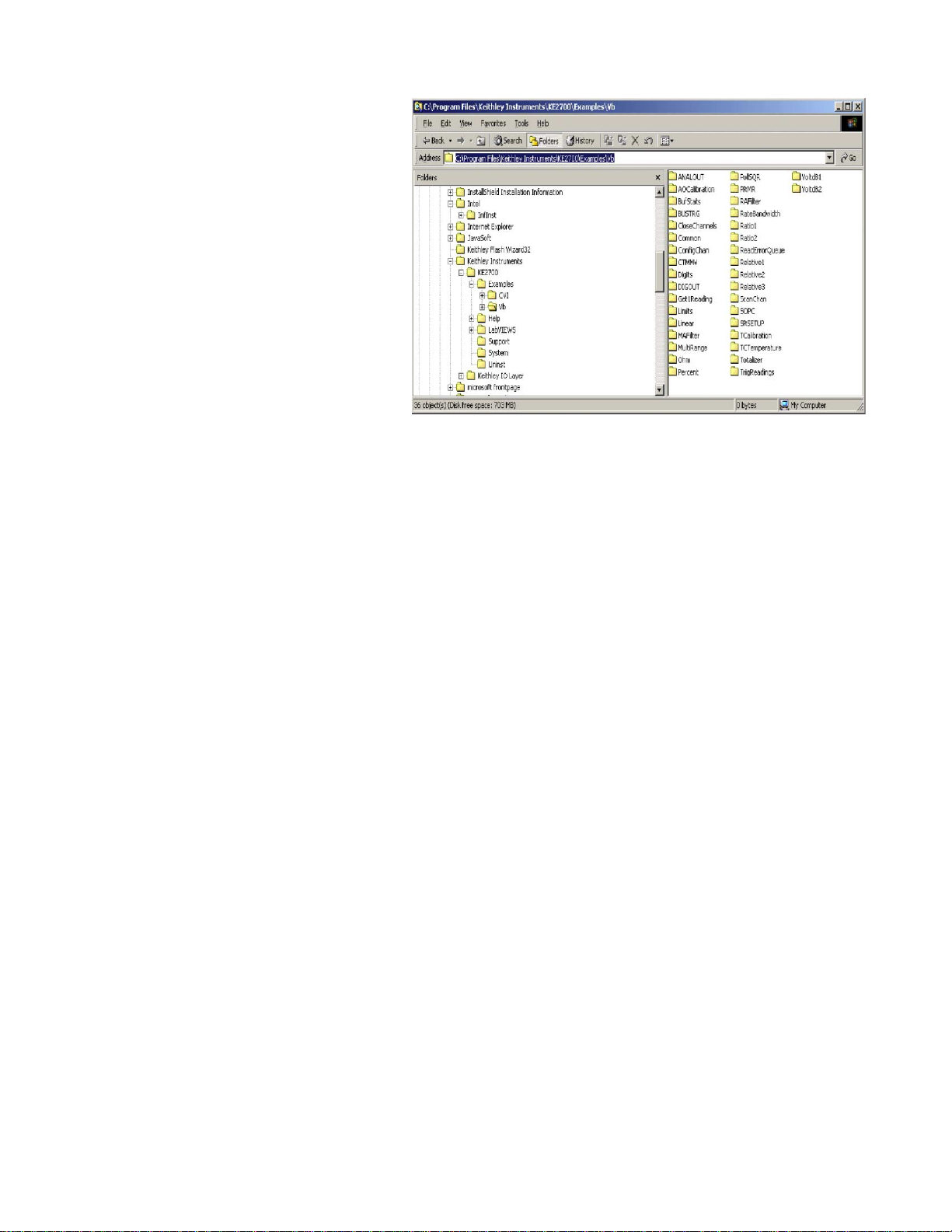
There are a few things to keep in mind when starting to
use the IVI driver. First, study the examples that come with
the IVI driver and build on them a little at a time. The default
install location of the example programs is shown in Figure
5. Also, consult the help file that installs with the driver. The
help file can be found in the Keithley program group pictured
in Figure 6.
The Winsock control, which operates much like the
MScomm object, is another method available for programming in Visual Basic. This technique employs SCPI commands to control the Model 2701 and the Winsock control to
communicate using Ethernet. This method has advantages
for those already familiar with using SCPI commands, in as
much as they don’t have to learn new programming syntax
for the Model 2701. However, the disadvantage of this
method is that it is not universal, so a program written with
SCPI commands can’t be used to control a different model or
to change to another method of communication, such as RS232 interface.
Figure 5. Location of installed example programs
Page 5
5
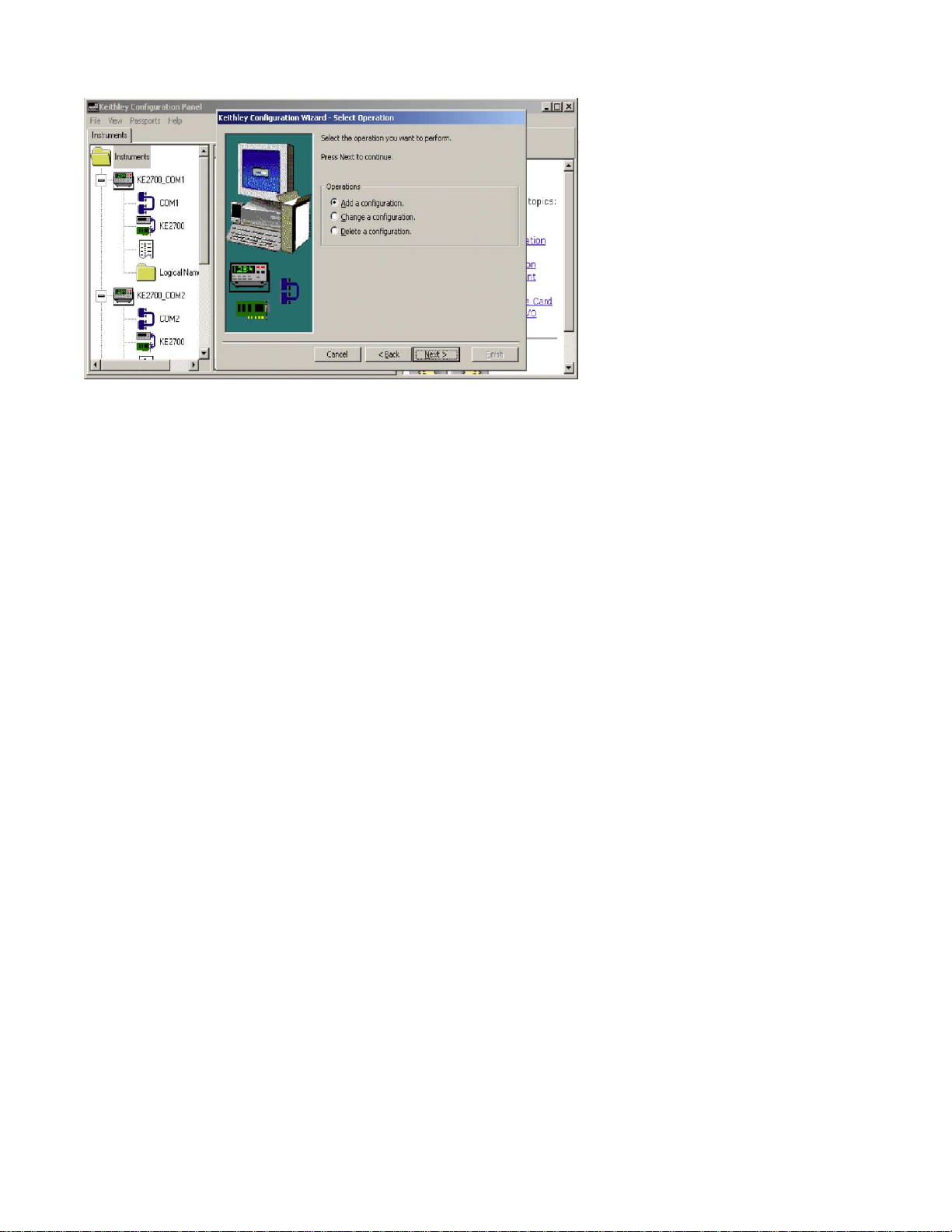
Let’s take a closer look at the IVI driver and begin to configure and communicate with the Model 2701. First, make
sure the IVI driver is installed and configured properly by
going to the Keithley Instruments program group shown in
Figure 6 and opening the Keithley Configuration Panel. Follow the instructions in the Keithley Configuration Wizard to
configure the Model 2701 and the resources it uses properly.
Refer to the Help file in the configuration panel for detailed
information on the Model 2701 setup.
Microsoft Visual Basic uses a COM type library to interface to the Keithley 2701 IVI Driver. To reference the type
library in Visual Basic:
1. Select Project/References… on the main VB menu.
2. Scroll through the Available References list to the entry,
“Keithley 2701 Multimeter” and check the selection
box at the left.
3. Click OK to close the dialog.
View the type library (KE2701) using VB’s Object
Browser (View/Object Browser on the main menu or F2).
The IviDMM specification (see Keithley 2701 IVI Driver Function Summary) divides DMM functionality into a
common base capability group and several optional extension groups for advanced functionality. The Keithley 2701
IVI Driver (KE2701) supports most of the IviDMM extension groups, including
• AC Measurements
• Frequency Measurements
•Temperature Measurements
• Thermocouples
•Thermistors
• MultiPoint
• Software Trigger
• Device Info
• Auto Range Value
• Auto Zero
The KE2701 does not support these
IviDMM extension groups:
• Resistance Temperature Devices (RTDs)
•Trigger/Slope
• Power Line Frequency
The KE2701 does support four-wire
RTDs through Keithley extensions to the
IviDMM attributes and functions. The
KE2701 also has complete support for
Model 2701 features that the IviDMM
specification does not define.
IVI drivers model the state of an instrument using attributes. Applications can read or write the attributes to modify
or query the current state of the instrument. By reading the
KE2701_ATTR_FUNCTION attribute, for instance, applications can determine the current measurement function of an
instrument or, by writing this attribute, applications can program the instrument to perform another type of measurement.
To make setting groups of related attributes more
convenient, IVI drivers define functions, such as
KE2701_ConfigureMeasurement. Each IVI driver class
defines a common set of attributes and functions that best
model the state and behavior of a broad subset of actual
instruments in the defined class. For a driver to belong to an
IVI class, it must comply fully with the syntax that IVI
defines for that class. Class compliance provides application
developers opportunities for both instrument interchangeability and a shorter learning curve when using new instruments with IVI drivers.
Actual instruments, however, may have more or fewer features than an IVI class defines. To support basic instruments,
IVI class specifications collect subsets of class attributes and
functions into optional “extension groups” that developers
may omit from an actual driver. To support advanced instruments, such as the Model 2701, IVI drivers may implement
vendor-specific attributes and functions that support features
that the IVI class specification does not address.
The IviDMM class functions assume a DMM with a single measurement channel. When the application either calls
the KE2701 using an IviDMM class driver or calls the
KE2701 functions directly, the KE2701 driver performs as a
high end, single-channel DMM. All signal measurements use
the front panel terminals. To use the additional features and
channels available on Series 7700 plug-in modules, the
application must supply a channel list with the standard
IviDMM functions and attributes.
Figure 6.
Page 6

6
The Keithley 2701 IVI Driver (KE2701) uses IVI and
VISA conventions to reference a specific instrument on
either the RS-232, GPIB, or Ethernet. Applications can
address an instrument using a:
• Logical Name—user-assigned alias, such as “Oven
Test” for a virtual instrument defined in the IVI
configuration files.
•Virtual Instrument—user-defined instrument, such as
“KE2701_GPIB16” or “vinstr->Oven Test” that binds
an IVI driver to a hardware resource.
• Hardware Resource—VISA I/O string, such as
“GPIB0::16::INSTR” that defines a hardware I/O
connection.
Next, let’s take a close look at the driver and some of the
functions and sample code. Note that the format that will be
followed is the same as the one provided with the sample
programs. We will use the syntax of calling the CheckError
subroutine that is located in the Util.bas module that is
included with all of the example programs. This will allow
for greater error checking as the program is developed. While
using the CheckError subroutine is not a requirement, we
will follow this method to stay consistent with the example
programs.
The first step in using the IVI driver is to open a connection with the Model 2701. This is done with the use of the
KE2701_init or the KE2701InitWithOptions function.
Review the following example of opening a session. Instru-
mentName is a variable that has been specified in the IVI
driver configuration.
CheckError vi, KE2701_init(InstrumentName,
VI_TRUE, VI_TRUE, vi)
If status = VI_SUCCESS Then
Label1.caption=”Driver Open”
Else
Label1.caption=”Driver NOT Open”
End If
This function performs these initialization actions:
• Creates a new IVI instrument driver session.
• Opens a session to the specified device using the
interface and address specified for the Resource Name
parameter.
• If the ID Query parameter (Parameter 2) is set to
VI_TRUE, this function queries the instrument ID and
checks that it is valid for this instrument driver.
• If the Reset parameter (Parameter 3) is set to VI_TRUE,
this function resets the instrument to a known state.
• Sends initialization commands to set the instrument to
the state necessary for the operation of the instrument
driver.
• Returns a ViSession handle that can be used to identify
the instrument in all subsequent instrument driver
function calls.
If the initialization call succeeds, the driver returns a
VISA session instrument handle in “vi.” Use this instrument
handle in all other KE2701 function calls to reference the
instrument the application opened. The function will return a
value when the function is completed. If the value is a zero,
then no error has occurred. The constant VI_SUCCESS has
a value of zero; therefore, the if…then statement is checking
to see if the function has succeeded. The general meaning of
error codes is that zero is a success, positive values mean
warning, and negative values mean errors.
Let’s compare the function without using the checkerror.
Error = KE2701_init (InstrumentName, VI_TRUE,
VI_TRUE, vi)
If Error=0 then Label1.caption=”Driver Open”
Else
Label1.caption=”Driver NOT Open”
End if
Note that the command will be the same, but the differ-
ence is how the error is read back. The advantage of using the
checkerror subroutine is that it will provide a description
along with the error number. Using it without the checkerror
will only bring back an error number.
Performing the init function opens a connection with the
Model 2701. Only one connection can be open with the unit
at a time. There is also a close function that is used in conjunction with the init to manage the connection with the
Model 2701.
KE2701_close vi
Example program using the IVI driver
The following example demonstrates how to control a Model
2701 using the IVI driver. The program will configure the
first five channels to read a thermocouple and store that reading into the internal memory of the Model 2701. These readings will be triggered by the Model 2701’s internal timer,
which can be set from the user form of the Visual Basic program. The program will offload the readings from the buffer
to the program. The following code fragments are pieces of
the program that are specific to the IVI driver on the Model
2701. Look for text and comments in the code that will give
explanations about the function calls, but refer to the Visual
Basic Reference in the IVI Help file for detailed information
on the syntax of the actual commands. The actual program
Page 7

7
is available for download from Keithley web site:
www.keithley.com
IVI Program
The following is the init command to use when connecting to the Model 2701 with the IVI Driver. When using multiple Model 2701s in the same program, each instrument
must be opened using a different instrument handle.
InstrumentName = “TCPIP::192.68.1.10::1394::
SOCKET”
‘Connect to the instrument
‘Open Session
CheckError vi, KE2700_init(InstrumentName,
VI_TRUE, VI_TRUE, vi)
The next step is to configure the instrument to make a
temperature measurement in degrees Fahrenheit and set up
the scan list.
‘ Configure for Fahrenheit
CheckError vi, KE2700_SetAttributeViInt32(vi,
VI_NULL, KE2700_ATTR_TEMP_UNIT, KE2700_
VAL_TEMP_FAHRENHEIT)
CheckError vi,
KE2700_ConfigureMeasurement(KE2700_
ChannelList(vi, “101:105”), KE2700_VAL_
TEMPERATURE, KE2700_VAL_TEMP_TC_K,
0.001)
‘ Configure buffer
‘ Select Buffer Elements: Readings, Channel#
CheckError vi, KE2700_SetAttributeViInt32(vi,
VI_NULL, KE2700_ATTR_BUF_ELEMENTS,
KE2700_VAL_ELEMENT_READING +
KE2700_VAL_ELEMENT_CHAN) ‘
‘Enable the auto buffer Clear
CheckError vi, KE2700_SetAttributeViBoolean(vi,
VI_NULL, KE2700_ATTR_BUF_AUTO_
CLR_ENABLED, VI_TRUE)
‘ Enable Buffer as Next
CheckError vi, KE2700_SetAttributeViInt32(vi,
VI_NULL, KE2700_ATTR_BUF_DATA_CONTROL,
KE2700_VAL_CONTROL_NEXT)
CheckError vi, KE2700_ConfigureTrigger(vi, KE2700_
VAL_TIMER, 0.001)
‘ Set internal Timer to 2 sec
CheckError vi, KE2700_SetAttributeViReal64(vi,
VI_NULL, KE2700_ATTR_TIMER_INTERVAL, 2)
The following commands will start the scan when executed. Notice the trigger count (100) and the sample count (5)
values in the second line. Those numbers mean that when the
scan is started, the scan will execute 100 times and each time
will take five samples, one sample for every channel in the
scan list. When determining the appropriate trigger count and
sample count values, be careful not to exceed the number of
samples the buffer can hold. When 100 triggers are multiplied
by the sample count, each completed scan represents 500
readings in the internal buffer . Also, when storing the channel
number with the readings, be aware that this doubles the
amount of buffer space each reading occupies. In this example, the number of readings in the buffer increases from 500
to 1000. The Model 2701 buffer can hold 450,000 readings.
‘ Start Scan
CheckError vi, KE2700_ConfigureMultiPoint(KE2700_
ChannelList(vi, “101:105”), 100, 5, KE2700_VAL_
IMMEDIATE, 0#)
CheckError vi, KE2700_Initiate(vi)
The following buffer commands will copy the data stored
in the internal buffer to the Array called Data. In the
FetchMultiReading command, note that 0 is the starting position of the buffer from which readings are to be copied. The
pointer value is the maximum number of readings that are to
be copied to the array. The pointer variable is used because
that is the value of the last reading as returned by the
KE2700_ATTR_BUF_POINTER_LOCATION. This is useful if it’s desirable to read the buf fer again and return only the
readings acquired since the last time the buffer was read. The
new start position will then be pointer +1.
‘ Get data from buffer
CheckError vi, KE2700_GetAttributeViInt32(vi,
VI_NULL, KE2700_ATTR_BUF_POINTER_
LOCATION, pointer)
‘ Get the buffer readings. Must have the starting index
in the array or program will bomb out
CheckError vi, KE2700_FetchMultiReading(vi, 0,
pointer, pointer, data(0), retSize)
Example using Winsock control
This example will use the Winsock control included in Visual Basic to send SCPI commands directly to the Model 2701
using the TCP/IP protocol. This type of programming doesn’t require installing any driver to use with the Model 2701.
The Winsock control acts much like the MSComm object in
Visual Basic, but it has added features like the data arrival
event. When using serial communications, it is common to
poll the data as it arrives in order to detect the end of line
character to identify the data transmission is complete.
Rather than polling the data as it comes back, the Winsock
control has the data arrival event, which fires when data is
Page 8

8
received from the Model 2701. Anyone who has written a
program with the MSComm object and SCPI commands
should have no problems using the Winsock control.
This example uses the Winsock control to communicate
with the Model 2701 and sample five channels of temperature and display them on the Visual Basic form. Look for
comments in the code that explain about the SCPI command,
but refer to the Model 2701 manual for detailed information
on the syntax of the actual commands.
Winsock Program
Before sending any commands, a connection must be established with the instrument. Use the connect method to establish
a connection to the Model 2701. When using multiple instruments, there are multiple Winsock controls on the form and it’s
necessary to connect each Winsock control to a unique instrument and IP address. The following code would be duplicated
for a second Model 2701; only the IP address would be
changed to match the setting of the second instrument.
With Win270101
RemoteHost = “192.68.1.10” ‘ IP address of 2701
.RemotePort = “1394” ‘ Port the 2701 uses for connection
.connect
End With
The following SCPI commands will configure the instrument for a scan of five temperature channels that are triggered by
the internal timer. The buf fer is set for continuous filling mode. This means that after the buf fer is filled, the readings will automatically begin to overwrite the buffer, beginning at location 0. The following commands just configure the Model 2701, but
do not actually start the scanning.
With Win270101
.SendData “*RST” & vbCr ‘Reset 2701
SendData “TRAC:CLE” & vbCr ‘ Clear Buffer
.SendData “UNIT:TEMP F” & vbCr ‘ Set for F Order is important. must be done first
.SendData “FUNC ‘TEMP’,(@101:105)” & vbCr ‘ Set up the channels for temp
.SendData “TEMP:TRAN TC,(@101:105)” & vbCr ‘ Config for Thermocouple
.SendData “TEMP:TC:TYPE K,(@101:105)” & vbCr ‘ Config for K thermocouple
.SendData “TRAC:CLE:AUTO OFF” & vbCr ‘ Turn auto clear off, Buffer size default 450000
.SendData “TRAC:FEED:CONT ALW” & vbCr ‘ set buffer to continuous filling mode
.SendData “TRIG:COUN 100” & vbCr ‘ Set number of scans
.SendData “SAMP:COUN 5” & vbCr ‘ Set number of channels
.SendData “ROUT:SCAN (@101:105)” & vbCr ‘ Set scan list
.SendData “ROUT:SCAN:LSEL INT” & vbCr ‘ Enable scan
.SendData “FORM:ELEM READ,CHAN,RNUM” & vbCr ‘ Set the element for reading and channel number
.SendData “TRIG:SOUR TIM” & vbCr ‘ Set Trigger to timer
SendData “TRIG:TIM 2.0” & vbCr ‘ Set Timer Time in sec
End With
This command will start the scan:
Win270101.SendData “INIT” & vbCr ‘ start scan
The following command will request data from the Model 2701’s buffer. The data sent is only the data that was not previously read from the last time the command was sent. In other words, the first time this command is sent, the beginning data
location is zero and the last location is the last stored reading(n). The next time the command is sent, the beginning location
is n+1, and the last location is the current last stored reading.
Win270101.SendData “TRAC:DATA?” & vbCr ‘Get data from last reading
Page 9

9
When the TRAC:DATAcommand is sent, the data will be
returned in the DataArrival event of the Winsock control. Next,
use the following code to put the data into a variable. The 2701
data is returned as a comma delimited string. Be aware that,
depending on the amount of data being returned, all the data
may not come back all at once. The DataArrival event may execute several times for a single TRAC:DATA command. To
determine when all the data has been sent, look for the addition
of a line feed to the end of the returned data. Refer to the V isual
Basic Program for an example of how this is done.
Dim strdata As String
Win270101.GetData strdata
The command to stop the scan is:
Win270101.SendData “INIT:CONT OFF” & vbCr
Disable Continuous initiation
When exiting the program, it’s important to close the
connection to the Model 2701. If the connection is not
closed, an error may occur when trying to open the connection the next time. This error may make it necessary to cycle
the power of the instrument to close the connection.
Win270101.Close
Example program summary
There are no set rules that dictate when to use the IVI driver
and when to use the Winsock control. Many variables must
go into that decision—it’s ultimately up to the programmer
to decide which method is more appropriate. Let’s examine a
couple of applications that will illustrate each type of programming.
Application Problem #1
A programmer is assigned the task of writing a program that
will monitor forty different temperature channels inside a
manufacturing plant’s temperature chamber at a scan rate of
once a minute. The chamber in this particular plant is in a different building than the monitoring station, so Ethernet communication would be perfect for this application. Once this
system is complete, it will replace existing systems at different manufacturing plants, some of which now use RS-232 and
some of which are GPIB. At these other locations, there is no
corporate network. To minimize downtime, the new system
installation must be completed as quickly as possible.
IVI Solution
The IVI driver will be communication platform independent.
That makes it possible to write a program now for the Step
using the Ethernet connection, but that can be easily changed
to the RS-232 platform, generally by just modifying one line
in the program. All that’s required is to change the instrument
name when invoking the init command to the RS-232. The
instrument name would be the ResourceDesc in the Keithley
configuration panel. It would even be possible to use anoth-
er Integra Series product that supports GPIB. When switching between platforms and instruments, other minor changes
can be expected, but these changes are very small compared
to the effort involved in re-writing the entire program.
Application Problem #2
A programmer is assigned the task of writing a program that
will monitor ten channels of temperature inside a temperature chamber. The application requires a temperature update
to the monitoring computer once every five seconds. As in
Application Problem #1, the chamber is in a different building than the monitoring station, so Ethernet communication
would be perfect for this application. The programmer
already has a background in GPIB and RS-232 communication methods and has already programmed several different
instruments using SCPI commands. The system will be
duplicated in another plant and will also use Ethernet as a
communication method.
Winsock Solution
In these circumstances, given that the programmer already
has a background with using SCPI and that the application
will not benefit from the platform independent features of the
IVI driver, the W insock control would be the best way to program the Model 2701. Using the Winsock control would be
very similar to using the MSComm object. Given that the
programmer already knows how to use SCPI commands,
there would be no need to learn the new IVI driver. The
Winsock control would also be able to send the reading back
to the monitoring computer faster. Refer to the next section
for further details.
Speed considerations
When choosing a driver, it’s important to take into account
the different speed requirements of the application. Both drivers will be able to scan and store the reading to the internal
buffer at the same speed. The IVI driver simplifies the buffer
management tasks involved in extracting that data and loading it into an array. If the concern about speed is related to
the speed at which the program triggers the scan and then
sends that information directly to the computer, the Winsock
control will allow faster updating through the Ethernet connection. This will also play a role in the choice of a driver.
A Final Note
Keithley has developed two Visual Basic example programs
to illustrate the principles in this document. They can be
downloaded from Keithley’s website at http://www.
keithley.com. Refer to the IVI help file for more information
on IVI commands and to the manual for more information on
SCPI commands. Before attempting to connect the Model
2701 to a corporate network, always contact the network
administrator for the settings required.
Page 10
10
To configure a network interface card, the TCP/IP protocol
must also be installed and configured. In each version of the
Windows operating systems, this is done differently. Also,
the procedures described here may differ slightly on computers made by different companies.
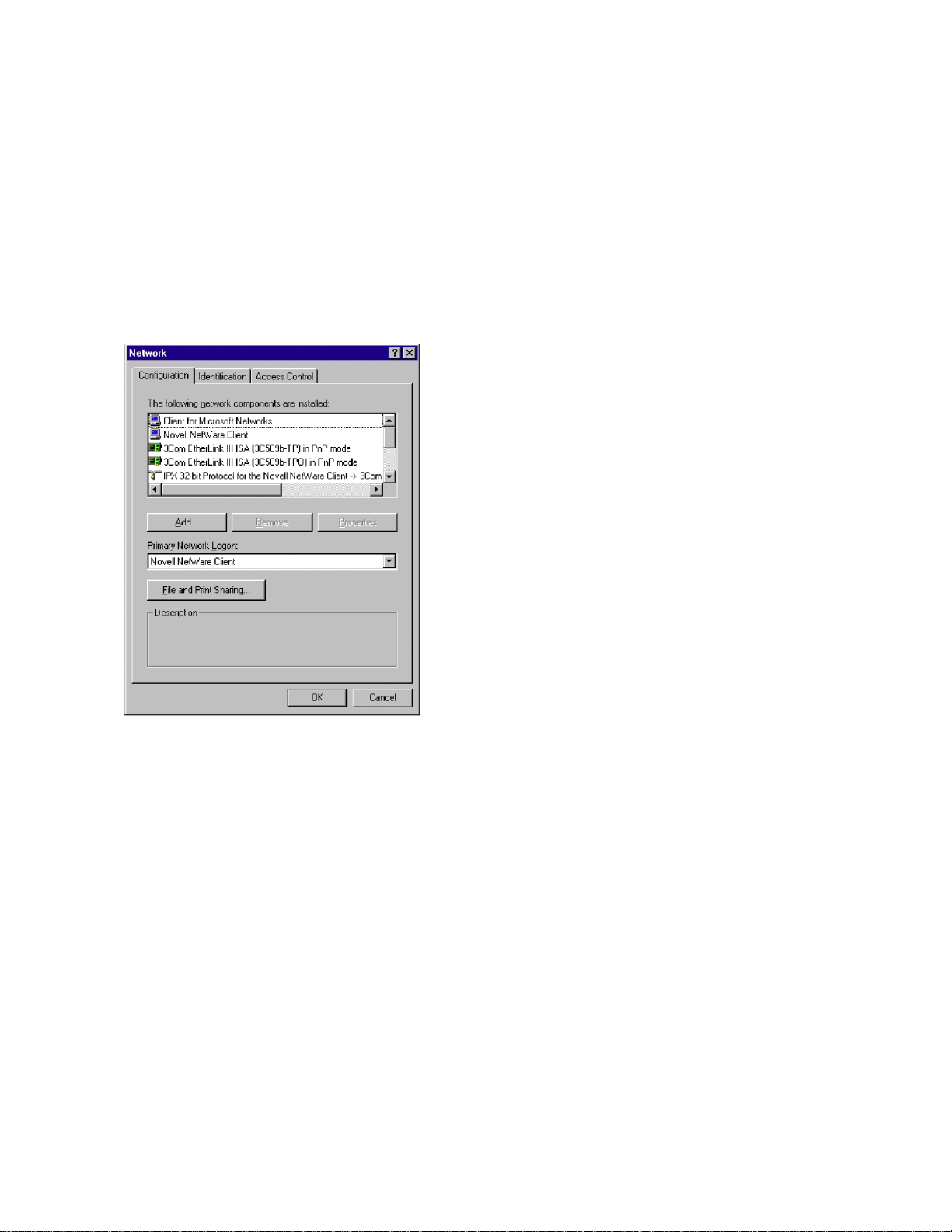
Configuration in Windows 95/98/ME
Figure 7
(Refer to the network configuration window shown in
Figure 7.)
1. Click on the Windows Start button.
2. Select Settings, then Control Panel.
3. Open the folder named Network.
4. Look for a TCP/IP entry. If configuring a computer with
two network cards, there should be two entries, one for
each card. It’s possible to tell the difference by the
listing; after the TCP/IP notation, there will be a
reference to the NIC card(s). If there is no TCP/IP
protocol listed, one must be added. This is done by
clicking the Add button. Then click on Protocol, select
Microsoft, and click TCP/IP.
5. After selecting the TCP/IP protocol, click the Properties
button. On the IP Address tab, select the method of
obtaining the IP address. For an isolated network, click
on Specify An IPAddress.
6. Complete the IPAddress and Subnet Mask according to
the network configuration.
7. The Default Gateway and the DNS settings could be
needed when connecting to a corporate network. For an
isolated network, these settings are not used.
8. Follow the instructions on the screen and reboot as
necessary.
Configuration in Windows NT4
1. Click on the Windows Start button.
2. Select Settings, then Control Panel.
3. Open the folder named Network.
4. Select on the Protocols Tab.
5. If there is no entry for TCP/IP, click Add, then select
TCP/IP and follow on-screen directions.
6. After TCP/IP protocol installation, click on Properties.
On the IP Address tab, select the proper adaptor (NIC),
then select the method of obtaining the IP address. For
an isolated network, click on Specify An IPAddress.
7. Complete the IPAddress and Subnet Mask according to
the network configuration.
8. The Default Gateway and the DNS settings could be
needed when connecting to a corporate network. For an
isolated network, these settings are not used.
9. Follow the instructions on the screen and reboot as
necessary.
APPENDIX A
Configuring a Network Interface Card (NIC) Card
Page 11
11
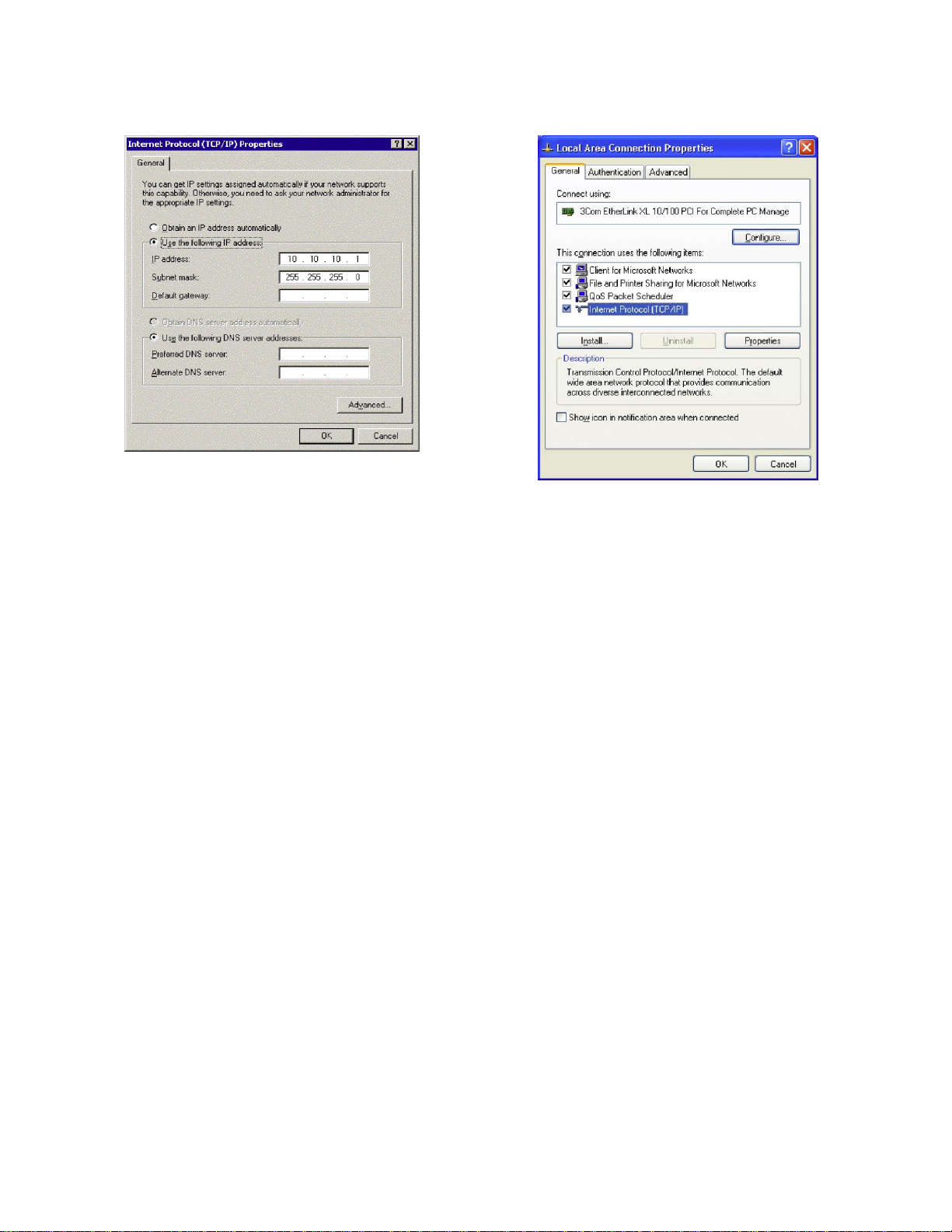
Configuration in Windows 2000
Figure 8
(Refer to the network configuration window shown in
Figure 8.)
1. Click on the Windows Start button.
2. Select Settings, then Control Panel.
3. Click on Network and select Dial-Up Connections.
4. Right click on Local area Connection, then select
Properties.
5. In the General tab window, the TCP/IP protocol should
be listed and selected. If not, click on Install, then select
Protocol, and click Add.
6. Select the TCP/IP protocol, then click Install.
7. Go back to the General tab window, select the TCP/IP
protocol and click on Properties.
8. Select Use the Following IPAddress, then enter the IP
address and subnet mask for the network.
9. The Default Gateway and the DNS settings could be
needed when connecting to a corporate network. For an
isolated network, these settings are not used.
10. Follow the instructions on the screen and reboot as
necessary.
Configuration in Windows XP
Figure 9
(Refer to the network configuration window shown in
Figure 9.)
1. Click on the Windows Start button.
2. Select Network and click Internet Connections
3. Under “or pick a control panel icon”, select Network
Connections
4. Right Click on “Local area connection” and select
Properties
5. In the General tab window, the TCP/IP protocol should
be listed and selected. If not, click on Install, then select
Protocol, and click Add.
6. Select the TCP/IP protocol, then click Install.
7. Go back to the General tab window, select the TCP/IP
protocol and click on Properties.
8. Select Use the Following IPAddress, then enter the IP
address and subnet mask for the network.
9. The Default Gateway and the DNS settings could be
needed when connecting to a corporate network. For an
isolated network, these settings are not used.
10. Follow the instructions on the screen and reboot as
necessary.
Page 12

API (Application Programming Interface): A set of
callable software functions that applications use to make
requests to the operating systems.
Default Gateway: The IP address of the computer that is
attached to the network running TCP/IP that knows how to
route data to other networks.
Dynamic Host Configuration Protocol (DHCP):Afea-
ture of Windows NT servers that automatically assigns IP
addresses to hosts on a TCP/IP network whenever the hosts
start up.
Bridge: A device that passes network data between two
segments of a network.
Ethernet: A network standard that uses either coaxial or
twisted pair cable. Ethernet is the most widely used form for
a LAN communication and is the IEEE standard 802.3.
Firewall: A hardware or software component in the data
path between the internet and an internal network. The firewall filters packets by examining them on one side and
deciding what to pass along to the other side.
Host: Defined as anything on the network that can trans-
mit and receive IP packets on a network. This would include
workstations, servers, and the Model 2701.
Hub:A passive hub is a device that split the received sig-
nals among other connected nodes. An active hub amplifies
or repeats incoming signals before distributing them.
INterNIC Internet Network Information Center: The
organization responsible for assigning Internet network
addresses and domain names to hosts that are connected to
the Internet.
IP Address: A unique 32-bit address assigned to each
host attached to the network. An IPaddress specifies both the
network and the host address.
IS/IT: Short for Information Services or Information
Technology, which encompass all aspects of managing information. Computer departments inside companies are commonly referred to as IS departments, as computers are the
main tools used in information management. Management
Information Services is an older term for the same subject.
Gateway:A computer that acts as a translator on the net-
work or as a router between two network technologies. It can
also act as a translator between two different network
protocols.
MAC Address: The Media Access Control Address is a
host’s unique identity. It is a six byte hexadecimal number
that can be represented in HEX or decimal. The Model 2701
uses a decimal number, much like an IP address structure, to
represent the MAC address. The MAC address is usually
assigned to the host at the factory. The host transmits its
address with each packet of data. It may also be referred to
as a hardware address, Ethernet address, node ID, or adapter
address. This is not required when using an isolated network.
A systems administrator may require a host’s MAC Address
when it is connected to a corporate network.
Network: Two or more computers connected together,
allowing them to communicate.
NIC: A network interface card is an electronic board
installed in a computer so the computer can communicate
with a network.
Packet: A chunk of information that contains both the
original data to be transmitted along with additional addressing information. If the packet is too large to be transmitted by
the data link layer, the network layer breaks into multiple
pieces, transmits them, then reassembles the packet at the
receiving end.
Peer-to-Peer Network: Atype of network in which no
two computers have more control over the network than
another. Each can act as both a server and a client. This means
that each can supply resources to the other peer computer.
Protocol: A formal set of communication conventions
used by two network nodes to communicate properly with
each other.
Repeater:A device that amplifies incoming transmission
signals before regenerating them on its output. This will
maintain signal integrity along a longer media run than is
normally possible.
Router: A device that forwards data packets from one
network to another.
Subnet Mask: A32-bit binary number expressed as four
three-digit segments, like an IP address. The Subnet Mask is
used in conjunction with an IP address to determine the network number and host number of the IP address.
TCP/IP: Transmission Control Protocol/Internet Proto-
col. Aset of network protocols and associated tools that originated in the UNIX and Internet environments. It has become
the standard protocol used when configuring networks.
10BaseT/100BaseTX: Unshielded twisted pair running
at 10/100 Mbps. Maximum cable length is 100m. 100BaseT
is often referred to as 100BaseT fast Ethernet.
APPENDIX B
Glossary
Keithley Instruments, Inc. 28775 Aurora Road • Cleveland, Ohio 44139 • 440-248-0400 • Fax: 440-248-6168
1-888-KEITHLEY (534-8453) www.keithley.com
© Copyright 2002 Keithley Instruments, Inc. No. 2393
Printed in the U.S.A. 602600DCI
 Loading...