

Page 1
3
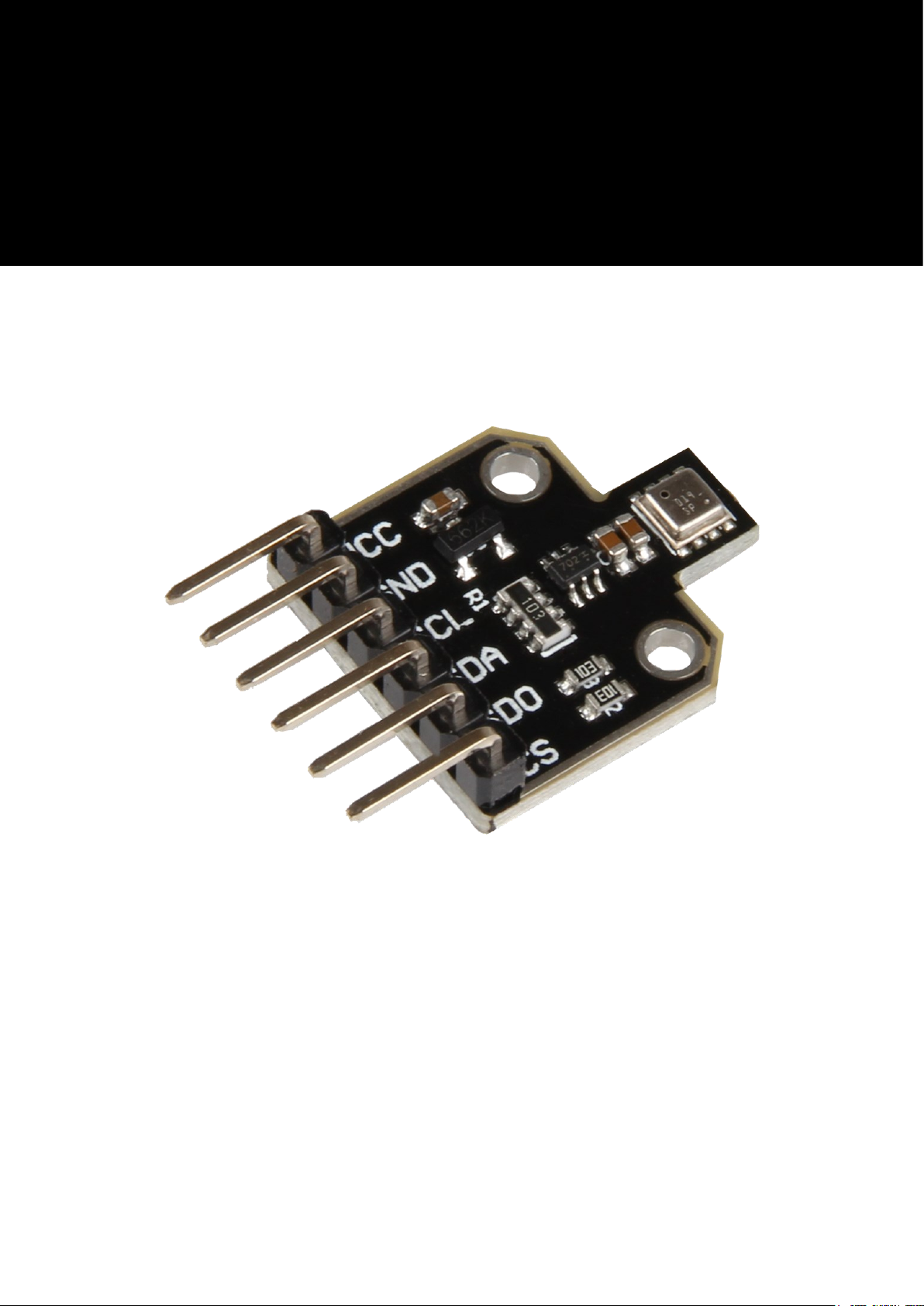
SEN-BME680
Temperature, air pressure, humidity
and air quality sensor
Page 2

Veröffentlicht: 20.05.2019 Copyright by Joy-IT 2
3
SEN-BME680
INHALTSVERZEICHNIS
1. Introducon
2. How to use with RaspberryPi
2.1 Wiring
2.2 Installaon
2.3 Code Example
3. How to use with Arduino
3.1 Wiring
3.2 Installaon
3.3 Code Example
4. Informaon and Take-back Obligaons
5. Support
Page 3

Veröffentlicht: 20.05.2019 Copyright by Joy-IT 3
3
SEN-BME680
1. Introduction
Dear customer,
thank you for choosing our product.
In the following, we will show you what to observe during the use.
If you encounter any unexpected problems during use, please do not hesitate to contact us.
Page 4
Veröffentlicht: 20.05.2019 Copyright by Joy-IT 4
3
SEN-BME680
2. How to use with RaspberryPi
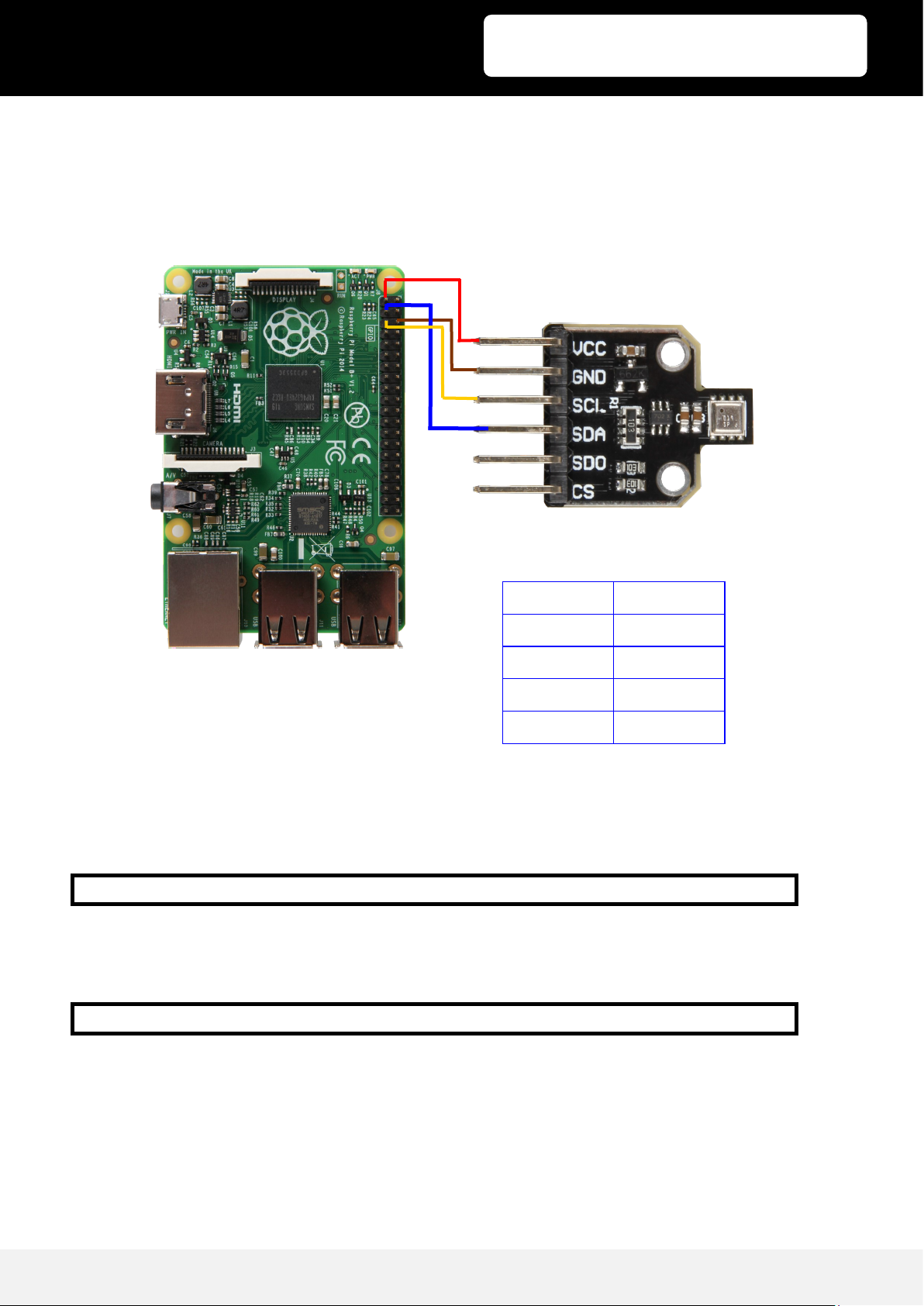
2.1 Wiring
2.2 Installation
Open the terminal and execute the following command:
The necessary librarys will be installed now.
Now you have to acvate I2C:
Choose Interfacing Opons -> and acvate I2C.
Raspberry Pi BME680
3v3 (Pin1) VCC
GND (Pin 6) GND
SCL (Pin 5) SCL
SDA (Pin 3) SDA
sudo pip3 install adafruit-circuitpython-bme680
sudo raspi-config
Page 5
Veröffentlicht: 20.05.2019 Copyright by Joy-IT 5
3
SEN-BME680
2.3 Code Example
Important!: the adafruit BME680 library will only work with Python3.
3. How to use with the Arduino
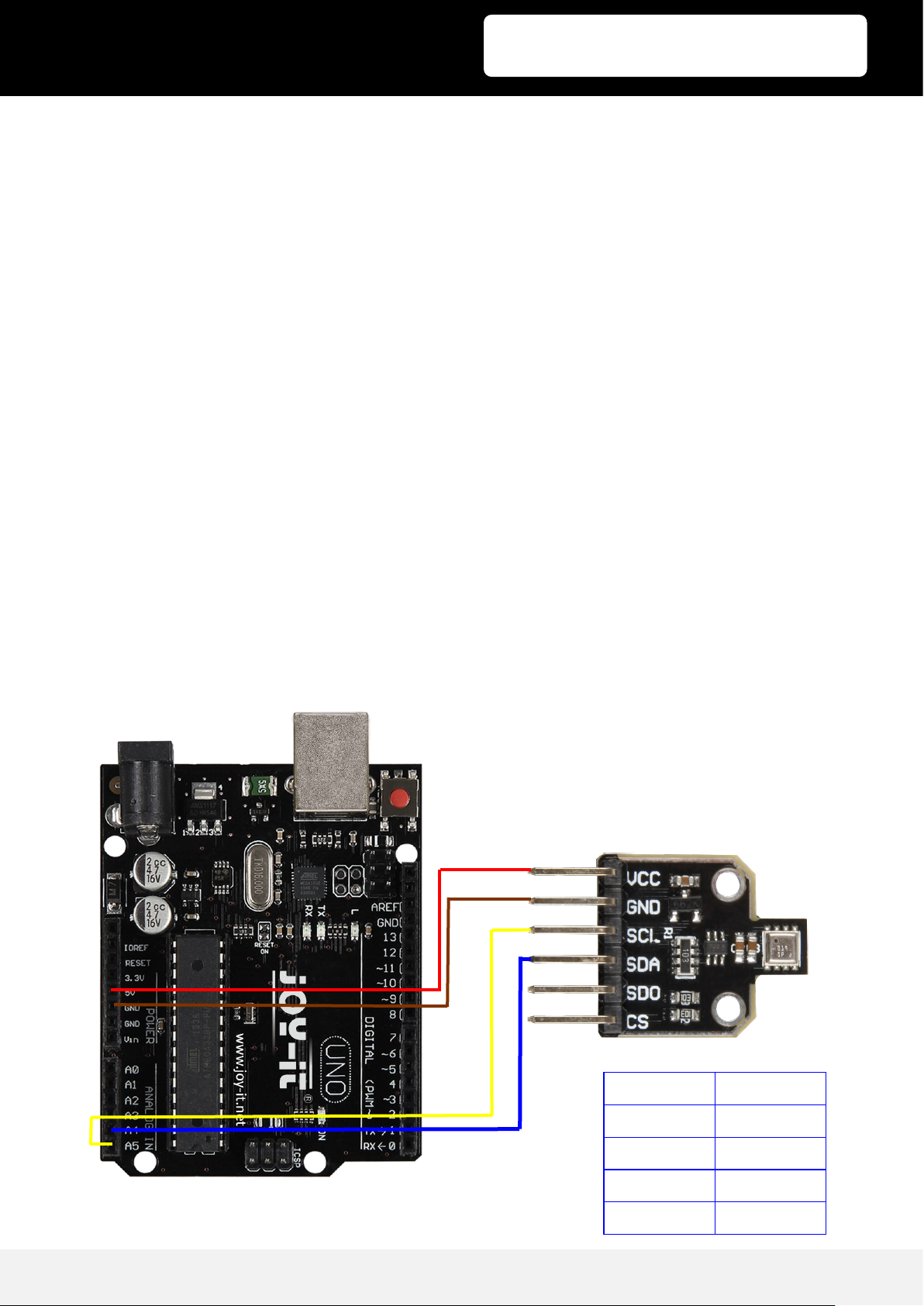
3.1 Wiring
import time
import board
from busio import I2C
import adafruit_bme680
# Create library object using our Bus I2C port
i2c = I2C(board.SCL, board.SDA)
bme680 = adafruit_bme680.Adafruit_BME680_I2C(i2c, debug=False)
# change this to match the location's pressure (hPa) at sea level
bme680.sea_level_pressure = 1013.25
while True:
print("\nTemperature: %0.1f C" % bme680.temperature)
print("Gas: %d ohm" % bme680.gas)
print("Humidity: %0.1f %%" % bme680.humidity)
print("Pressure: %0.3f hPa" % bme680.pressure)
print("Altitude = %0.2f meters" % bme680.altitude)
time.sleep(1)
Arduino BME680
5V VCC
GND GND
SCL (A5) SCL
SDA (A4) SDA
Page 6
Veröffentlicht: 20.05.2019 Copyright by Joy-IT 6
3
SEN-BME680
3.2 Installation
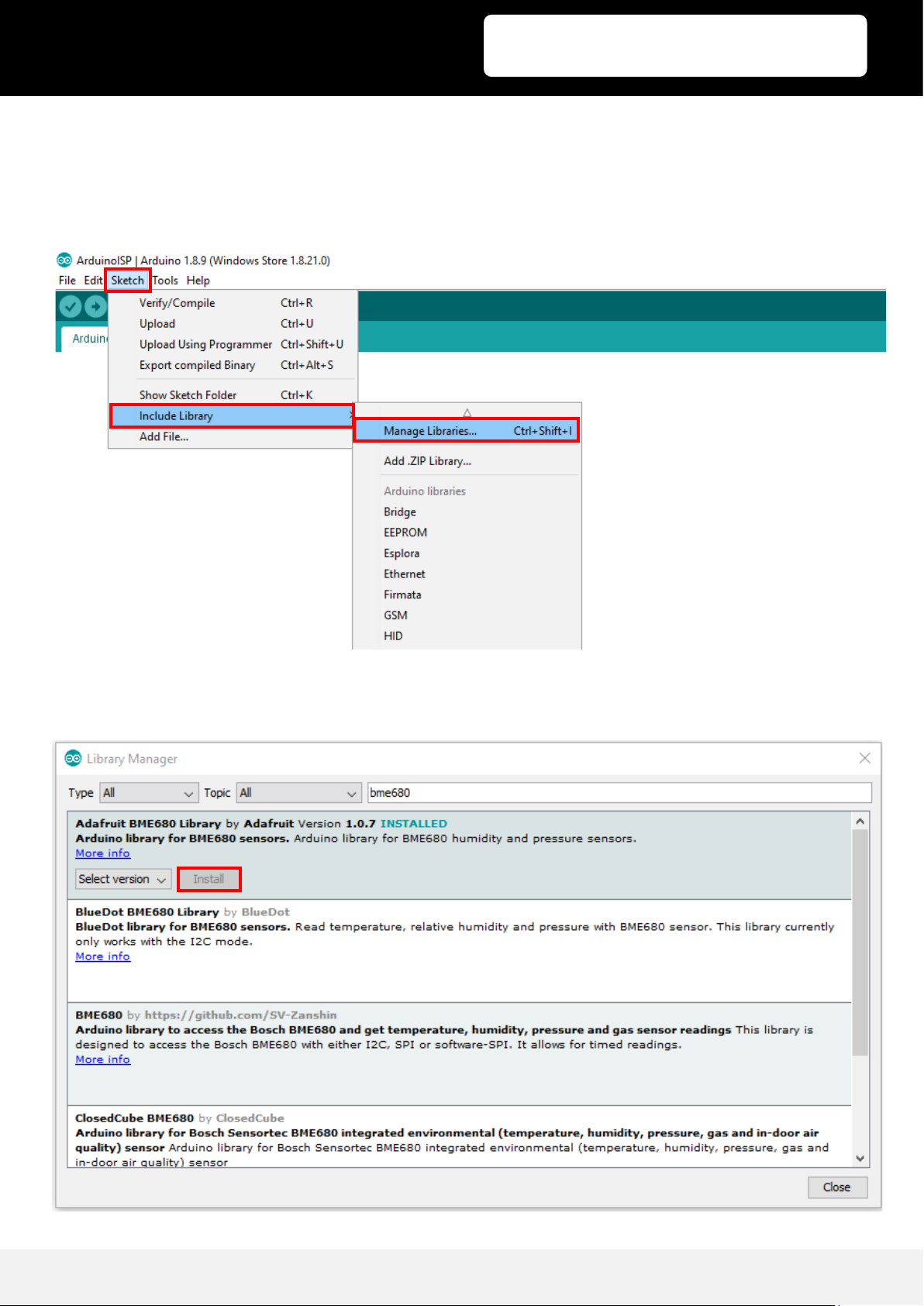
You need to install the necessary librarys for the sensor to work.
Click on Sketch -> Include Library -> Manage Libraries...
Tipe „bme680“ in the searchbar and install the Adafruit BME680 Library by Adafruit
Page 7

Veröffentlicht: 20.05.2019 Copyright by Joy-IT 7
3
SEN-BME680
3.3 Code Example
On the following 2 pages you can see the example code for the BME680 sensor.
/***************************************************************************
This is a library for the BME680 gas, humidity, temperature & pressure sensor
Designed specifically to work with the Adafruit BME680 Breakout
----> http://www.adafruit.com/products/3660
These sensors use I2C or SPI to communicate, 2 or 4 pins are required
to interface.
Adafruit invests time and resources providing this open source code,
please support Adafruit and open-source hardware by purchasing products
from Adafruit!
Written by Limor Fried & Kevin Townsend for Adafruit Industries.
BSD license, all text above must be included in any redistribution
***************************************************************************/
#include <Wire.h>
#include <SPI.h>
#include <Adafruit_Sensor.h>
#include "Adafruit_BME680.h"
#define BME_SCK 13
#define BME_MISO 12
#define BME_MOSI 11
#define BME_CS 10
#define SEALEVELPRESSURE_HPA (1013.25)
Adafruit_BME680 bme; // I2C
//Adafruit_BME680 bme(BME_CS); // hardware SPI
//Adafruit_BME680 bme(BME_CS, BME_MOSI, BME_MISO, BME_SCK);
void setup() {
Serial.begin(9600);
while (!Serial);
Serial.println(F("BME680 test"));
if (!bme.begin()) {
Serial.println("Could not find a valid BME680 sensor, check wiring!");
while (1);
}
// Set up oversampling and filter initialization
bme.setTemperatureOversampling(BME680_OS_8X);
bme.setHumidityOversampling(BME680_OS_2X);
bme.setPressureOversampling(BME680_OS_4X);
bme.setIIRFilterSize(BME680_FILTER_SIZE_3);
bme.setGasHeater(320, 150); // 320*C for 150 ms
}
Page 8

Veröffentlicht: 20.05.2019 Copyright by Joy-IT 8
3
SEN-BME680
3.3 Code Example
void loop() {
if (! bme.performReading()) {
Serial.println("Failed to perform reading :(");
return;
}
Serial.print("Temperature = ");
Serial.print(bme.temperature);
Serial.println(" *C");
Serial.print("Pressure = ");
Serial.print(bme.pressure / 100.0);
Serial.println(" hPa");
Serial.print("Humidity = ");
Serial.print(bme.humidity);
Serial.println(" %");
Serial.print("Gas = ");
Serial.print(bme.gas_resistance / 1000.0);
Serial.println(" KOhms");
Serial.print("Approx. Altitude = ");
Serial.print(bme.readAltitude(SEALEVELPRESSURE_HPA));
Serial.println(" m");
Serial.println();
delay(2000);
}
Page 9
Veröffentlicht: 20.05.2019 Copyright by Joy-IT 9
3
SEN-BME680
4. Information and Take-back Obligations
Symbol on electrical and electronic equipment
This crossed-out dustbin means that electrical and electronic equipment does not belong in the
household waste. You must return the old appliances to a collecon point. Before handing over waste
baeries and accumulators that are not enclosed by waste equipment must be separated from it.
Return opons
As an end user, you can return your old appliance (which essenally fulls the same funcon as the new
appliance purchased from us) free of charge for disposal when you purchase a new appliance. Small
appliances with no external dimensions greater than 25 cm can be disposed of in normal household
quanes independently of the purchase of a new appliance.
Possibility of return at our company locaon during opening hours
Simac GmbH, Pascalstr. 8, D-47506 Neukirchen-Vluyn
Possibility of return in your area
We will send you a parcel stamp with which you can return the device to us free of charge. Please contact
us by e-mail at [email protected] or by telephone.
Informaon on packaging
If you do not have suitable packaging material or do not wish to use your own, please contact us and we
will send you suitable packaging.
Page 10

Veröffentlicht: 20.05.2019 Copyright by Joy-IT 10
3
SEN-BME680
5. Support
We also support you after your purchase. If there are any questions left or if you encounter
any problems, please feel free to contact us by mail, phone, or by our ticket -support-
system on our website.
E-Mail: [email protected]
Ticket-System: http://support.joy-it.net
Phone: +49 (0)2845 98469 – 66 (11- 18 o‘clock)
For more information, please visit our website:
www.joy-it.net
 Loading...