

Page 1
3
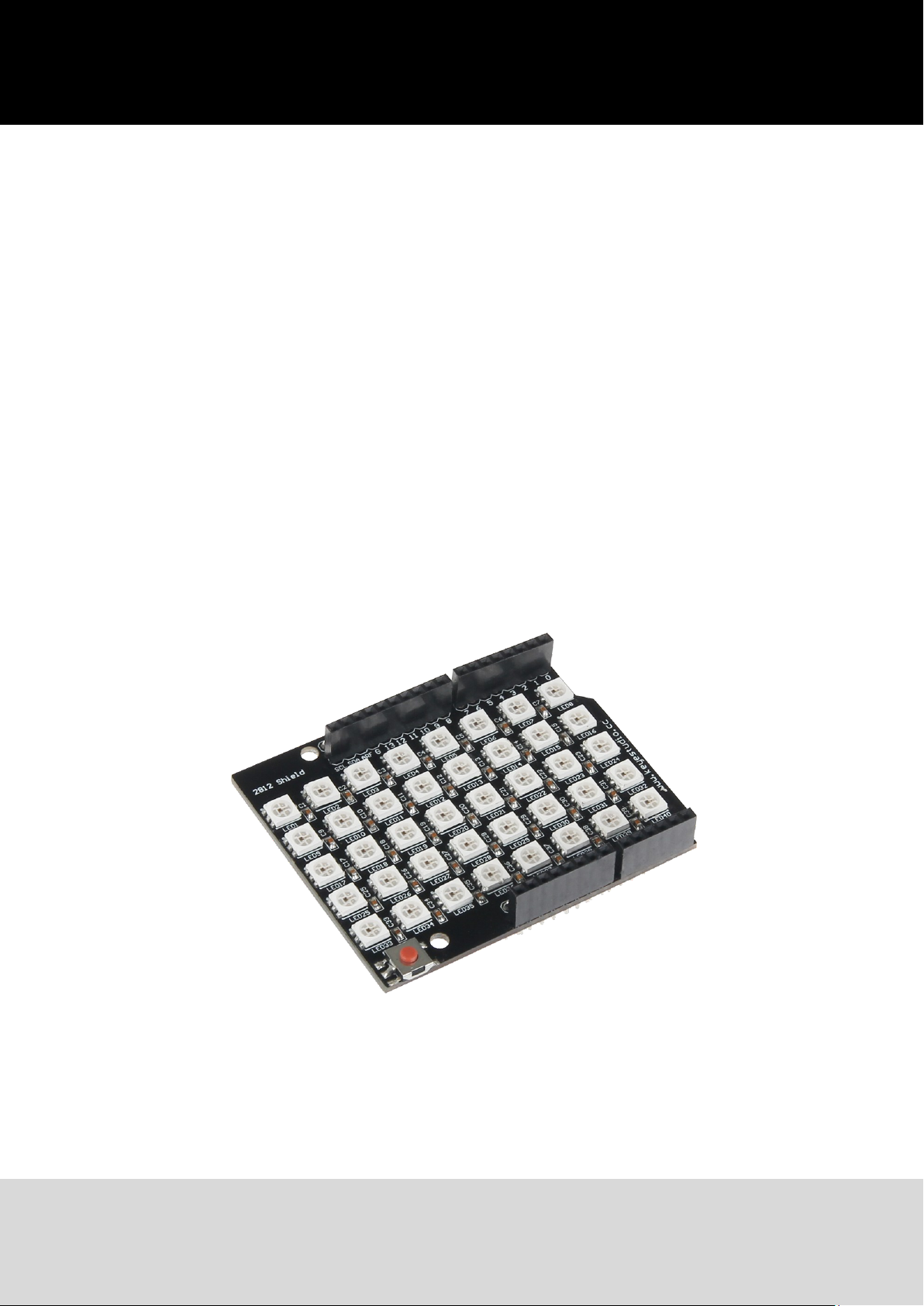
Joy-IT® RGB Shield
Ausgabe 29.09.2017 Copyright by Joy-IT 1
Page 2
3
Index
1. Connecng to an Arduino
2. Installing the libraries
3. Code-example
4. Support
Joy-IT® RGB Shield
Ausgabe 29.09.2017 Copyright by Joy-IT 2
Page 3
Joy-IT® RGB Shield
3
Dear customer,
thank you for purchasing our product.
Please nd our instrucons below.
1. Connecting to an Arduino
Plug the matrix on top of the Arduino so that all pins are plugged into the Arduino.
An addional connecon is not necessary.
2. Installation der Bibliotheken
You can nd a code-example in step 3 which you can transfer to your Arduino.
It already contains dierent lightning-styles.
Colors are specied in RGB with numbers from 0 to 255 (e.g. (255, 0, 0) for red).
Already exisng color modes are colorWipe, theaterChase, rainbow, rainbowCycle,
theaterChaseRainbow.
You can vary these inside of the void loop() funcon.
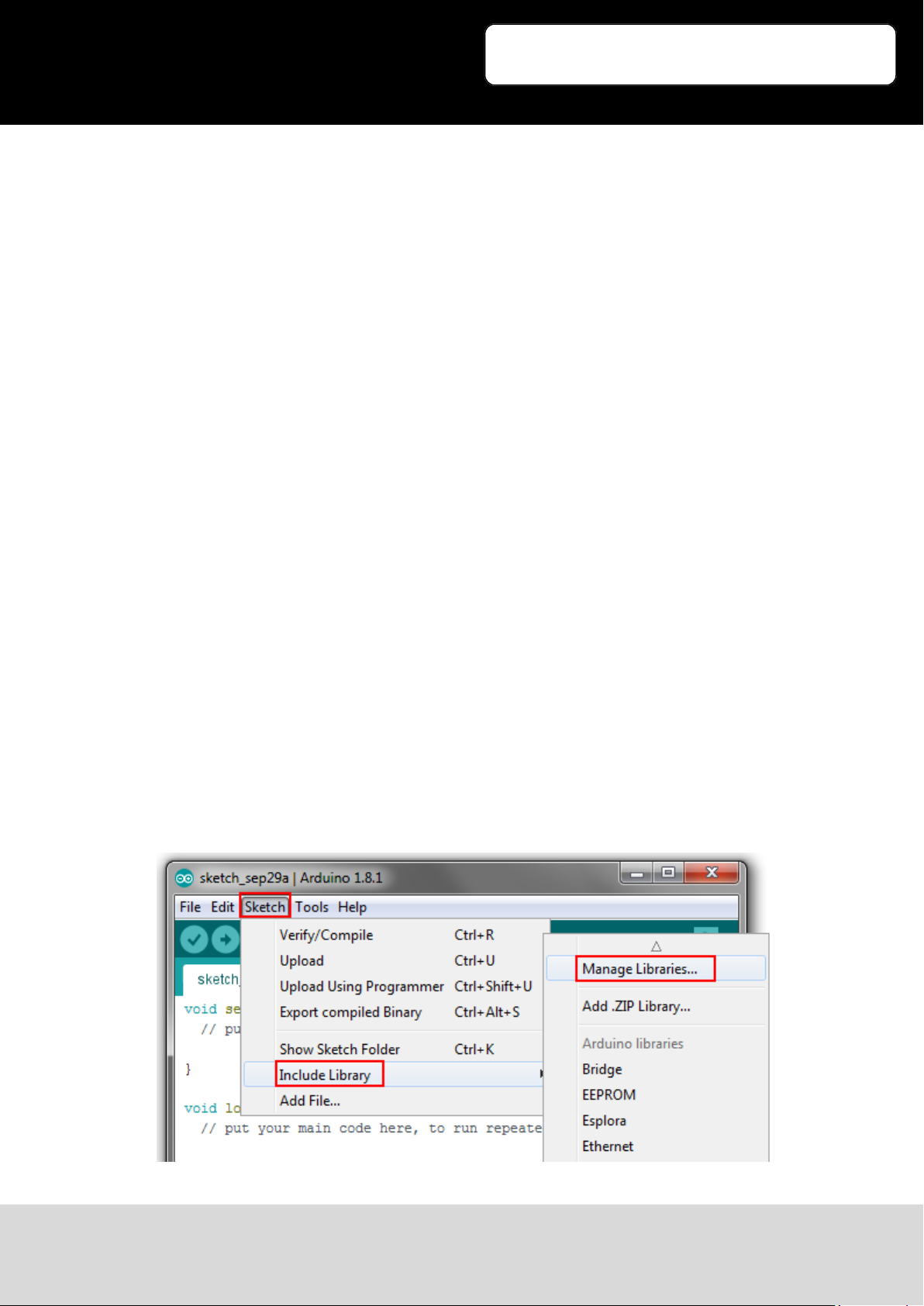
Before you transfer any code to your Arduino, you need to install the addional Adafruit NeoPixel library
rst. Therefore, please open up the Arduinos Library Manager. (Sketch -> Include Libary -> Manage
Libaries)
Ausgabe 29.09.2017 Copyright by Joy-IT 3
Page 4
Joy-IT® RGB Shield
3
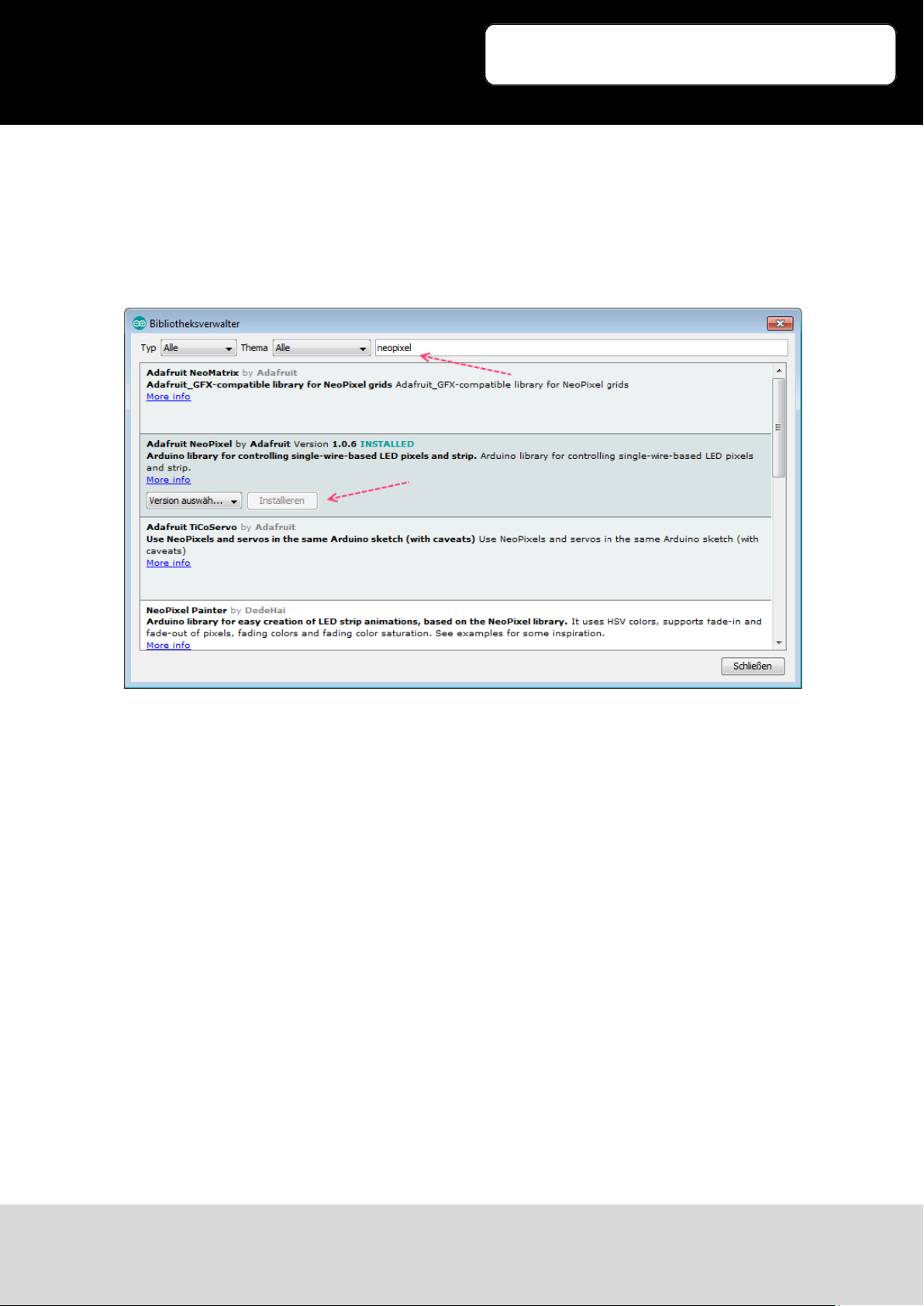
In the now opened library manager, search for the keyword Neopixel and install the Adafruit Neopixel library.
Ausgabe 29.09.2017 Copyright by Joy-IT 4
Page 5
Joy-IT® RGB Shield
3
3. Code-Example
#include <Adafruit_NeoPixel.h>
#ifdef __AVR__
#include <avr/power.h>
#endif
#define PIN 13
//Basic Setup (Number of LEDs etc.)
Adafruit_NeoPixel strip = Adafruit_NeoPixel(40, PIN, NEO_GRB + NEO_KHZ800);
void setup()
{
strip.begin();
strip.show(); // Initialise all LEDs
}
void loop() {
// Example Colorflow:
farbDurchlauf(strip.Color(255, 0, 0), 50); // Red
farbDurchlauf(strip.Color(0, 255, 0), 50); // Green
farbDurchlauf(strip.Color(0, 0, 255), 50); // Blue
// Theater-Lightning:
theaterBeleuchtung(strip.Color(127, 127, 127), 50); // White
theaterBeleuchtung(strip.Color(127, 0, 0), 50); // Red
theaterBeleuchtung(strip.Color(0, 0, 127), 50); // Blue
regenbogen(20);
regenbogenVerlauf(20);
theaterRegenbogen(50);
}
// Fill LEDs with color
void farbDurchlauf(uint32_t c, uint8_t wait) {
for(uint16_t i=0; i<strip.numPixels(); i++) {
strip.setPixelColor(i, c);
strip.show();
delay(wait);
}
}
Ausgabe 29.09.2017 Copyright by Joy-IT 5
Page 6
Joy-IT® RGB Shield
3
// Rainbow
void regenbogen(uint8_t wait) {
uint16_t i, j;
for(j=0; j<256; j++) {
for(i=0; i<strip.numPixels(); i++) {
strip.setPixelColor(i, Wheel((i+j) & 255));
}
strip.show();
delay(wait);
}
}
// different rainbow
void regenbogenVerlauf(uint8_t wait) {
uint16_t i, j;
for(j=0; j<256*5; j++) {
for(i=0; i< strip.numPixels(); i++) {
strip.setPixelColor(i, Wheel(((i * 256 / strip.numPixels()) + j) &
255));
}
strip.show();
delay(wait);
}
}
// Theater-Lightning
void theaterBeleuchtung(uint32_t c, uint8_t wait) {
for (int j=0; j<10; j++) {
//10 repeats
for (int q=0; q < 3; q++) {
for (int i=0; i < strip.numPixels(); i=i+3) {
strip.setPixelColor(i+q, c); //Activate every 3. LED
}
strip.show();
delay(wait);
for (int i=0; i < strip.numPixels(); i=i+3) {
strip.setPixelColor(i+q, 0); //deactivate every 3. LED
}
}
}
}
Ausgabe 29.09.2017 Copyright by Joy-IT 6
Page 7
Joy-IT® RGB Shield
3
// Theater-Lightning with Rainbow-Effect
void theaterRegenbogen(uint8_t wait) {
for (int j=0; j < 256; j++) {
// Alle 256 Farben durchlaufen
for (int q=0; q < 3; q++) {
for (int i=0; i < strip.numPixels(); i=i+3) {
strip.setPixelColor(i+q, Wheel( (i+j) % 255));
}
strip.show();
delay(wait);
for (int i=0; i < strip.numPixels(); i=i+3) {
strip.setPixelColor(i+q, 0);
}
}
}
}
uint32_t Wheel(byte WheelPos) {
WheelPos = 255 - WheelPos;
if(WheelPos < 85) {
return strip.Color(255 - WheelPos * 3, 0, WheelPos * 3);
}
if(WheelPos < 170) {
WheelPos -= 85;
return strip.Color(0, WheelPos * 3, 255 - WheelPos * 3);
}
WheelPos -= 170;
return strip.Color(WheelPos * 3, 255 - WheelPos * 3, 0);
}
Ausgabe 29.09.2017 Copyright by Joy-IT 7
Page 8
Joy-IT® RGB Shield
3
4. Support
We also support you aer your purchase.
If there are any quesons le or if you encounter any problems, please feel free to contact us by mail,
phone or by our cket-supportsystem on our website.
Mail: [email protected]
Ticket-System: hp://support.joy-it.net
Phone: +49 (0)2845 98469 – 66 (11- 18 Uhr)
For more informaons, please visit our website:
www.joy-it.net
Ausgabe 29.09.2017 Copyright by Joy-IT 8
 Loading...