

Page 1
Quick Start Guide
Page 2

Page 3

EN
Page 4
Thank You Letter
Thanks for the recognition of the JMGO projector, what is
presented to you is one of our proudest works. We believe that
when the product is on, you can also feel our passion for it.
This product is not just an audio-visual device, we hope it can
give ordinary walls more room for imagination and become
important companion in your life.
Over the past ten years, we have focused on core component
development and continuously improved product experience,
and have grown into a leading company in the smart projector
and laser TV industries.
If you like this product, welcome to share its using experience, so
that more people can join the big family of JMGO.
Founder of JMGO
Eric Hu
Chairman:
Safety Notice
• Read this product manual thoroughly before attempting to use
this product. Store the product manual in a safe location so it
may be referenced at any time.
• Do not look directly into the light lens of the device as your eyes
may be damaged by a strong laser.
• When the projector is working, do not block the projection lens
with any object.
• If you encounter an issue with the product, do not attempt to
disassemble it without authorization. Contact professional
after-sales personnel to resolve the issue.
Certificate of
Conformity
CERTIFICATE
INSPECTED
1-1
Page 5
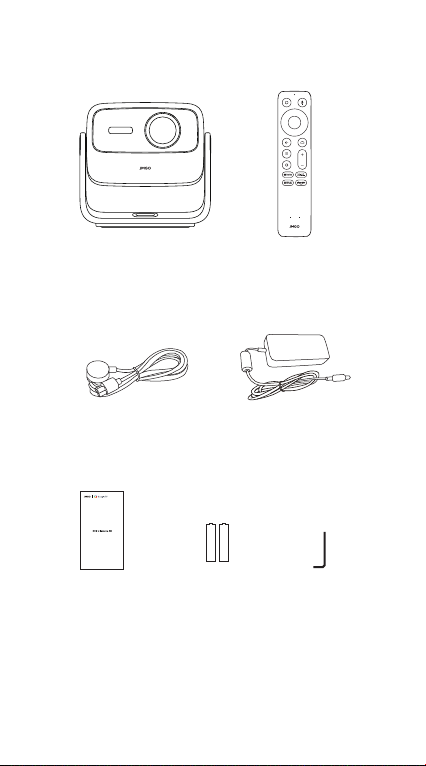
Scope of Delivery
Projector Body
Power Cable Power Adapter
Quick Start Guide
Quick Start
Guide
AAA Battery
x 2
1-2
Remote
Control
Allen Wrench
Page 6
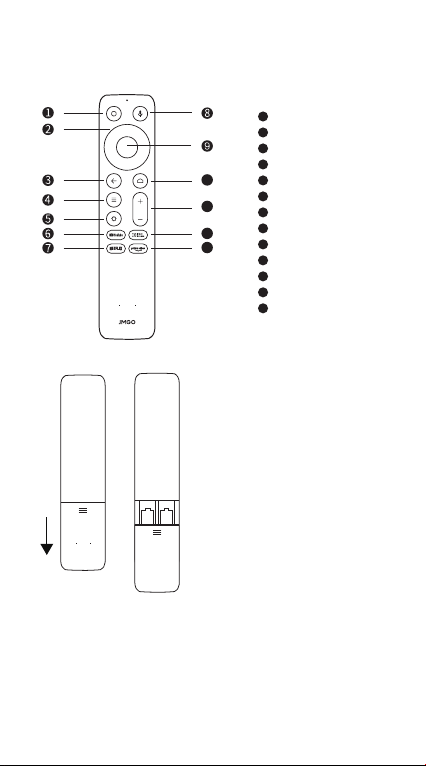
Remote Control
1
2
3
4
10
5
6
11
7
8
12
9
13
10
11
12
13
1. Slide down to open the
back cover, and then install
2 AAA batteries.
2. Insert new batteries
matching the polarity (+/-)
and close the battery
compartment.
Power On/Off
Direction Keys
Return
Menu
Settings
YouTube
Netflix
Google Assistant
Confirm
Home
Volume
Input Source
Prime Video
• After the projector is turned on, press and hold return button
and home button on the remote control for 3 seconds at the
same time to enter Bluetooth pairing.
1-3
Page 7
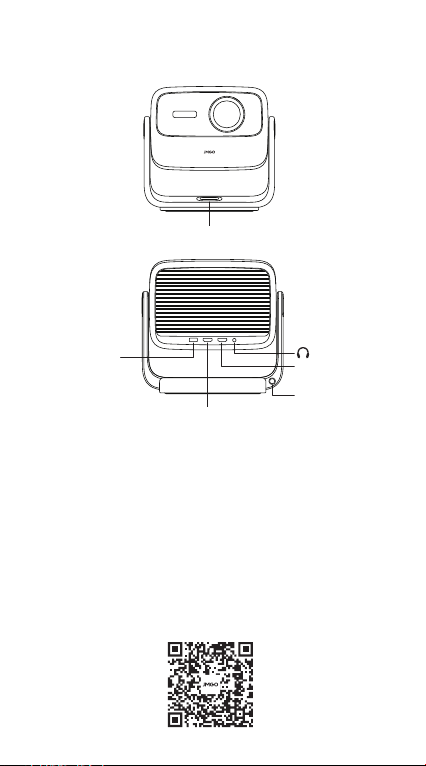
Product Manual
Power Button
USB
HDMI
Power on/off: The power button is a physical button, short press to
power on or off.
HDMI(eARC)
Power Port
Download and Install of "JMGO
App"
• JMGO App is a mobile application for multi-screen interaction
with JMGO projector. Using JMGO App can help you obtain better
projection experience.
• Mobile phone for remote control—the mobile phone is also a
remote control with JMGO App, and the projection remote
control is more convenient.
1-4
Page 8
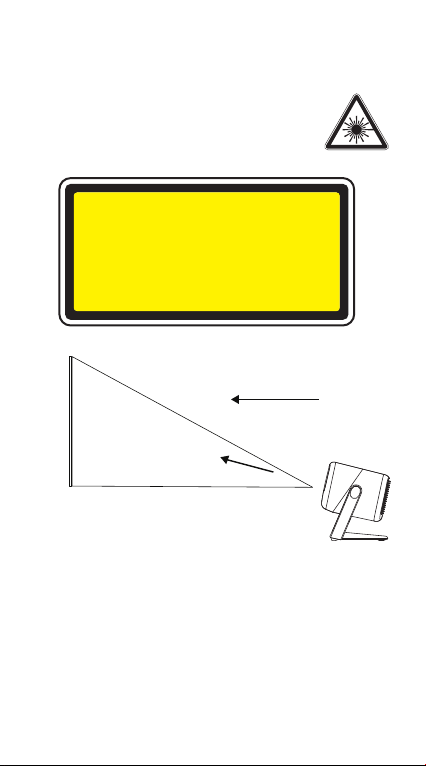
Product Laser Safety Parameters
Laser Safety Standard: Class 1 in compliance with the IEC
60825-1:2014.
The maximum output of laser radiation:0.39mW
Emission Wavelength:
Blue: 455~475nm
Red: 635~655nm
Green: 515~535nm
Caution
Class 1 Laser product
Do not stare into the beam
Complies with IEC 60825-1:2014 and IEC
Screen
Safety Warning:
This product contains a laser module. Do not disassemble or
modify this module in a manner not specified in the manual
without authorization. Failure to follow this guideline may result in
personal injury.
As with any bright source, do not stare into the direct beam, RG2
IEC 62471-5:2015.
Google TV is the name of this device's software experience and a
trademark of Google LLC.
Google and YouTube are trademarks of Google LLC.
Google Assistant is not available in certain languages and
countries. Availability of services varies by country and language.
RG2
62471-5:2015.
Viewing direction
Laser beam direction
1-5
Page 9
This device complies with Part 15 of the FCC Rules. Operation is subject to
the following two conditions:(1) this device may not cause harmful
interference, and (2) this device must accept any interference received,
including interference that may cause undesired operation.
Note: This equipment has been tested and found to comply with the limits
for a Class B digital device, pursuant to part 15 of the FCC Rules. These
limits are designed to provide reasonable protection against harmful
interference in a residential installation. This equipment generates, uses
and can radiate radio frequency energy and, if not installed and used in
accordance with the instructions, may cause harmful interference to
radio communications. However, there is no guarantee that interference
will not occur in a particular installation. If this equipment does cause
harmful interference to radio or television reception, which can be
determined by turning the equipment off and on, the user is encouraged
to try to correct the interference by one or more of the following
measures:
- Reorient or relocate the receiving antenna.
- Increase the separation between the equipment and receiver.
- Connect the equipment into an outlet on a circuit different from that to
which the receiver is connected.
- Consult the dealer or an experienced radio/TV technician for help.
FCC Radiation Exposure Statement
This projector complies with FCC RF radiation exposure limits set forth for
an uncontrolled environment. This device should be installed and
operated with a minimum distance of 20cm between the radiator and
user body. This transmitter must not be co-located or operating in
conjunction with any other antenna or transmitter.
FCC WARNING: This equipment may generate or use radio frequency
energy. Changes or modifications to this equipment may cause harmful
interference unless the modifications are expressly approved in the
instruction manual. The user could lose the authority to operate this
equipment if an unauthorized change or modification is made.
This remote has been evaluated to meet general RF exposure
requirement.
This remote can be used in portable exposure condition without
restriction.
Manufactured under license from Dolby Laboratories. Dolby,
Dolby Audio, and the double-D symbol are trademarks of Dolby
Laboratories Licensing Corporation.
The Bluetooth® word mark and logos are registered trademarks
owned by Bluetooth SIG, Inc. and any use of such marks by
[licensee name] is under license. Other trademarks and trade
names are those of their respective owners
For DTS patents, see http://patents.dts.com. Manufactured under
license from DTS, Inc. or DTS Licensing Limited. DTS, DTS-HD, and
the DTS-HD logo are registered trademarks or trademarks of DTS,
Inc. in the United States and other countries.
© 2021 DTS, Inc. ALL RIGHTS RESERVED.
1-6
Page 10
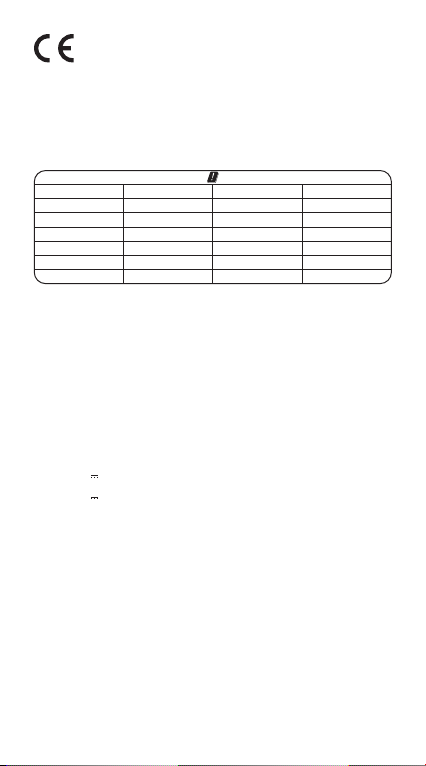
EU Declaration Conformity
Hereby, SHENZHEN HOLATEK CO., LTD. declares that this device is in
compliance with the essential requirements and other relevant
provisions of Directive 2014/53/EU. In accordance with Article10(2) and
Artical10(10), This product is allowed to use in all EU member states.
A complete declaration of conformity can be obtained at:
https://smart.jmgo.com/
The device can operate in EU Member State without restricted.
AT BE BG
CY
EE FI FR DE
EL
IT LV LT
MT NL
PT RO SK SI
The device is restricted to indoor use only when operating in the 5150 to
5250MHz frequency range.
Warnings
1. EUT operation temperature range: 0ºC to 40ºC.
2. Do not store the device in temperatures lower -20 ºC and higher than
60 ºC.
3. Adapter shall be installed near the equipment and shall be easily
accessible.
4. To power the device, Please use a matching power supply adapter
offered by the authorized producer, unauthorized adapter may cause
charger exploding or damage the machine.
5. Plug the adapter power socket in 100-240VAC socket, others may
cause charger exploding or damage the machine. The plug considered
as disconnect device of adapter.
Adapter:
Input: AC 100-240V 50/60Hz 2.5A
Output: 24V 10A 240W
Technical description:
Rating : 24V 10A
Frequency Range: Bluetooth:2402-2480 MHz
2.4G WiFi (20 MHz): 2412 - 2472 MHz
2.4G WiFi (40 MHz): 2422 - 2462 MHz
5G WiFi(H20): 5180 - 5240 MHz
5G WiFi(H40): 5190 - 5230 MHz
5G WiFi(H80): 5210 MHz
5G WiFi: 5745 - 5825 MHz
Transmit Power: Bluetooth: 4.15 dBm EIRP
2.4G WiFi: 12.63 dBm EIRP
5G WiFi: 14.25 dBm EIRP
Radiation Exposure Statement
This device complies with RF radiation exposure limits set forth for an
uncontrolled environment. This transmitter must not be co-located or
operating in conjunction with any other antenna or transmitter. This
device must operate with a minimum distance of 20 cm between the
radiator and user body.
CZ
HU
DK SE
IE
PL
HR
LI
LU
ES
1-7
Page 11

After-Sales Service Policy
Shenzhen Holatek Co., Ltd. (hereinafter "JMGO") formulates its after-sales
policies in strict accordance with relevant laws and regulations to provide
the "three guarantees" of repair, replacement and return.
Warranty Policy
Service Period: The validity period of "three guarantees" commences from
the date of purchase or the date of receipt of the package. If the product
experiences a performance failure, the package must be returned within
30 days. The projector is guaranteed for 1 year.
Scope of Warranty
Projector
Accessories
*Note: The warranty period shown in the table above is distributor
recommendation only. Specific local laws and regulations shall prevail. If
you encounter any problems or want to know more about the after-sales
information, you can email [email protected] for advice.
Non-Warranty Policy
This product is not covered by warranty in the following circumstances:
The validity period of "three guarantees" has been exceeded;
maintenance, misuse, collision, negligence, abuse, liquid ingress,
accident, alteration, disassembly, or improper use of accessories has
been carried out without authorization from JMGO; quality problems have
occurred due to the installation of unauthorized software; or labels,
device serial numbers, or anti-counterfeiting labels have been destroyed
or altered; the model of the "three guarantees" certificate does not
match or the model of the damaged product, or has otherwise been
altered; damage caused by force majeure; damage caused by use in
environments that do not conform to the specifications of the product
manual; damage caused by use in environments that do not conform to
the specifications of the product manual; failure or damage caused by
computer viruses, hacker intrusion, or other malicious intrusions; damage
caused by the use of software that is not authorized by JMGO.
Three Guarantees Policy
Return or replacement will not be provided in the following circumstances: Damage caused by human action; missing or damaged packaging;
or missing or damaged internal components. When seek for return or
replacement, please return all provided accessories as well (including
but not limited to product accessories, gifts, warranty cards, manual,
etc.). To ensure a smooth return or replacement process, we recommend
that you keep the outer packaging, accessories, and any free gifts
provided with the products for 30 days from the date of receipt. JMGO
has the right to refuse the return or replacement of products that do not
meet the replacement requirements or exceeded the warranty period.
Back up your personal data and applications before seeking
replacement or repair. The maintenance process may result in the loss of
your personal data and applications. JMGO will protect your personal
privacy but takes no responsibility for any damage or loss of personal
data and applications resulting from the repair or replacement process.
After-Sales Service Channels
If you encounter any problems while using the product, contact us
through one of the following channels:
After-Sales Website: https://smart.jmgo.com/
After-Sales service email: [email protected]
Warranty Content
The projector and its
constituent components
Separately sold accessories
and internal accessories
1-8
Warranty Period
1 year
1 year
 Loading...