

Page 1
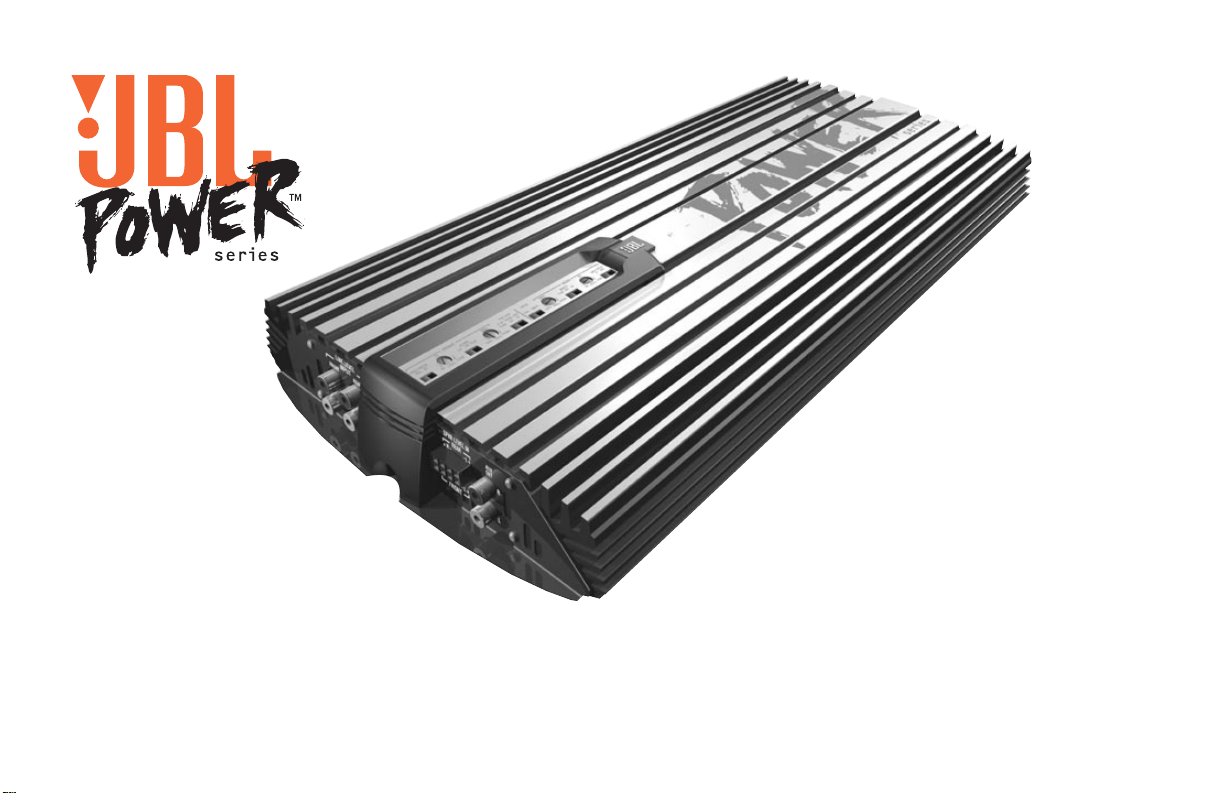
Power Series Amplifiers
P-4020, P-4040 Owner’s Manual
GENUINE JBL
Page 2

2
Thank you for purchasing your new
JBL Power Series™ amplifier. Power
Series amplifiers feature the latest
advances in discrete-circuit topology,
ensuring low distortion and superbly
clean and clear sound quality. In addition
to RCA-type pre-amp inputs, Power
Series amplifiers feature Universal
Interface™, designed to facilitate integration with factory-installed audio systems
for distortion-free performance that rivals
conventional pre-amp connections.
Included in the Universal Interface circuit
is Common Sense™ turn-on. Common
Sense turn-on senses the common-mode
voltage present on the speaker outputs of
factory and aftermarket radios, turning on
the amplifier without a separate remote
wire. All Power Series amplifiers feature
built-in electronic crossovers and pre-amp
outputs for easy system expansion without requiring outboard processors.
Amplifier Features
• 4-, 3- or 2-channel operation (P-4040)
2- or 1-channel operation (P-4020)
• Simultaneous stereo and mono
operation
• Built-in 12dB/oct electronic crossover
• Balanced differential input
• Pre-amp outputs (filtered on P-4040)
• Oversized Floating Rail Mosfet Power
Supply
• Universal Interface
• Common Sense turn-on
• Variable input sensitivity (250mV–4V)
• Fully complementary, direct coupled
discrete power amplifier circuitry
• Gold-plated power, input and output
connectors
• 2-Ohm stable (stereo)
• JBL badge lights when amp is operating and flashes when protection circuit
is activated
• Made in USA
About This Manual
To attain maximum amplifier performance, we encourage you to read the
remaining pages before installing and
operating your new JBL Power Series
amplifier. Especially review the
Applications section for ideas on designing and expanding your system. Also,
save these instructions for future reference. Important: Installation of automotive stereo components can require
extensive experience in performing a
variety of electrical and mechanical procedures. Although these instructions
explain how to install a JBL Power Series
amplifier in a general sense, they do not
show the exact installation methods for
your particular vehicle. If you do not
have the experience necessary, do not
attempt the installation yourself; instead
ask your Authorized JBL Car-Audio Dealer
about professional installation options.
Installation Precautions and Notes
• The JBL P-4020 (or P-4040) has five
levels of circuit protection that monitor
the amplifier and will shut it down if
the electrical system voltage drops
below 5Vdc or exceeds 18Vdc, temperatures are above 194° F (90° C), short
circuits occur, or current draw exceeds
product specifications. For best performance, check the intended mounting
site to make sure the operating environment does not create conditions
that will trigger the protection circuit.
• Prior to installation, turn off all audio
systems and other electrical devices.
Also disconnect the (–) negative lead
from the vehicle’s battery.
• At the installation site, locate and make
a note of all fuel lines, hydraulic brake
lines and electrical wiring. Use extreme
caution when cutting or drilling in and
around these areas.
• Check clearances on both sides of a
planned mounting surface before
drilling any holes or installing any
screws. Remember that mounting
screws can extend behind the mounting surface.
Page 3
LEVEL
INPUT MODE
MO ST
4V .250V
XOVER
FLATHPLP
2V
20
– R +– L ++BATT
REM GND
BRIDGE
SPEAKER OUTPUTS
POWER
FUSE
20A
MADE IN THE U.S.A.
R
L
LINE LEVEL
INPUT
SPEAKER LEVEL IN
R
+
–
L
+
–
AUX
OUT
R
L
+R–
+R–
–L+
–L+
AUX
OUT
R
L
R
L
FRONT
FRONT
REAR
LINE LEVEL
INPUT
SPKR LEVEL IN
REAR
ST MO
INPUT MODE
PRE OUT
LEVEL
INPUT MODE
MO ST
4V .250V
FRONT
F+R
FLAT
REARLPFRT
LP
FRT REAR
XOVER
FLAT HP LP
XOVER
FLATHPLP
LEVEL
4V .250V
2V2V
REAR
INPUT
FUSE
30A
BRIDGE
– R +– L +
MADE IN THE U.S.A.
+BATT REM GND
BRIDGE
SPEAKER OUTPUTS
POWER
FRONT
REAR
30
P-4020
P-4040
• Always wear protective eyewear when
using tools.
• When routing cables, keep input signal
cables away from power cables and
speaker wires.
• When making connections, make sure
that each connection is clean, insulated
and properly secured. Observe the
polarity markings on the rear panel.
Refer to the application drawings to set
up the amplifier for operation in stereo,
bridged-mono, bi-amp or tri-mode configurations.
• If the amplifier’s fuse must be replaced,
use only the same rating and type as a
replacement. Do not substitute another
kind.
Controls and Connectors
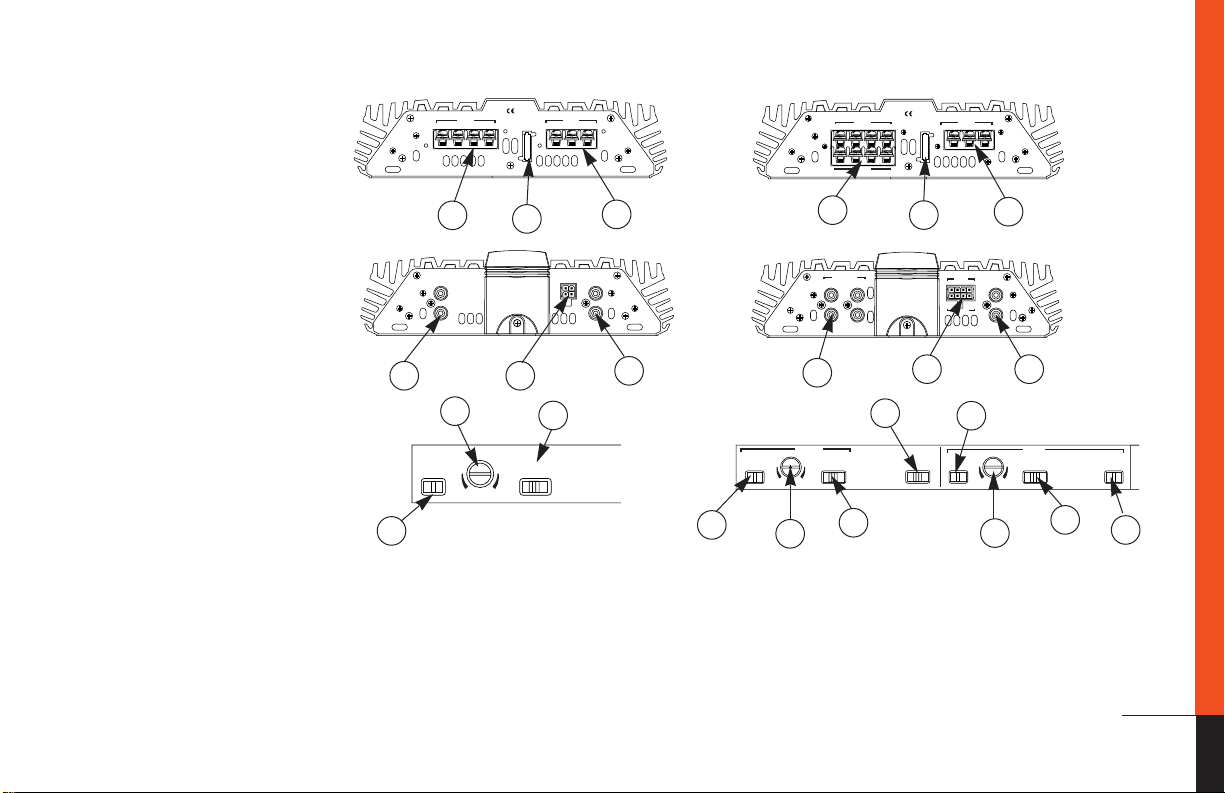
1. Pre-amp Level Input Connector –
Connects to line-level output from the
source unit.
2. Universal Interface Speaker-Level
Connector – Connects to speaker-level
output from the source unit. Provides
Common Sense amplifier turn-on
when used with factory radios
(2-channel on P-4020, 4-channel on
P-4040).
4
5
1 2
8
11
7
3. Pre-amp Level Output Connector –
Connects to other amps or processors
in the signal chain (flat on P-4020, flat
or filtered on P-4040).
4. Speaker-Output Connector – (2-channel on P-4020, 4-channel on P-4040).
5. Fuses – P-4020: 20A ATC type, P-4040:
30A ATC type.
6. Power Connector – Connection for
12V+, Gnd and Rem.
6
3
7
7. Input-Mode Switch – Sums left and
right inputs.
8. Input-Sensitivity Control – Adjusts
input sensitivity for pre-amp level and
speaker-level inputs.
9. Pre-amp Output Selector Switch –
Selects input path for pre-amp output.
Output can be summed from front and
rear inputs with no filter, or filtered by
the front or rear crossover.
4
1
5
2 3
9
8
11
10. Rear-Channel Input Selector – Selects
rear-channel input between front input
and rear input.
11. Crossover Selector – Determines
whether the crossover is a High-Pass
filter (HP), a Low-Pass filter (LP) or
unfiltered (Flat).
6
10
8
11
7
3
Page 4

4
Mounting the Amplifier
The JBL P-4020 (or P-4040) can be
mounted in virtually any location inside
the vehicle. However, make sure to keep
the amplifier away from heater vents or
ducts.
1. At the chosen site, use the amplifier as
a mounting template and mark the
locations of the four mounting holes.
2. Drill a small pilot hole at each marked
location.
3. Mount the amplifier and securely
tighten the mounting screws.
Wiring the Power Connections
Refer to diagrams on page 3 for connector locations.
1. For power, remote and speaker wires,
strip 1⁄4" off one end of each jacket to
reveal bare wire for insertion into the
barrier strip connectors.
2. Locate the 3-connection barrier strip
labeled +Batt, Rem and Gnd. Connect a
black wire (at least 12G) to the Gnd terminal and connect the other end to the
nearest bare-metal chassis component.
Then, connect a red wire (at least 12G)
from the vehicle’s +12-volt battery terminal to the +Batt terminal on the barrier strip. Finally, connect a blue wire
(16G) to the Rem terminal on the barrier strip and connect the other end to
the Rem output of the source unit. (If
you are using speaker-level inputs and
speaker-level outputs from the source,
disregard the previous instruction
regarding the Rem terminal.)
Wiring the Speaker Output
Connections
1. Connect the speakers, observing
proper polarity, to the speaker output
barrier strip on the amplifier using at
least 16G high-quality speaker wire.
(Note: The total impedance of the
speakers connected to the outputs,
when the amp is driven in stereo,
must be at least 2 ohms.)
2. If you are bridging the amplifier, connect the speaker wires to the terminals
marked “bridge,” observing proper
polarity. (Note: The total impedance of
the speaker system to be connected to
the amplifier must be at least 4 ohms
in bridge mode.)
FREQUENCY INDUCTOR CAPACITOR
Crossover 6dB/oct. LP 6dB/oct. HP
75Hz 8.0mH 530µF
100Hz 6.4mH 400µF
125Hz 5.0mH 318µF
150Hz 4.2mH 265µF
175Hz 3.6mH 227µF
200Hz 3.2mH 198µF
3. If you are running the amp in tri-mode
(stereo and mono simultaneously to
one or two pairs of satellite speakers
and a subwoofer), refer to the chart
above to determine the capacitor and
inductor values you’ll need to route
bass signals to the woofer, and
midrange and high frequencies to the
satellite speakers. These passive
crossover components will also ensure
that the impedance of the speaker system doesn’t drop below 2 ohms.
Wiring the Input Connections
1. If you are using conventional RCA
input connections and a source unit
with output voltage less than 4V, simply plug the RCA plugs into the RCA
jacks on the amplifier.
(4 ohm) (4 ohm)
(Fig. 7)
2. If you are connecting the amplifier to
a factory-installed source unit, or to a
source unit that only has speaker-level
outputs, connect the speaker outputs
of the source to the speaker inputs on
the amp, observing the following color
codes:
Front Left+: White
Front Left–: White with black stripe
Front Right+: Gray
Front Right–: Gray with black stripe
Rear Left+: Green
Rear Left–: Green with black stripe
Rear Right+: Purple
Rear Right–: Purple with black stripe
(Note: When using the Universal
Interface speaker-level inputs and linelevel outputs, the Rem terminal on the
amplifier may be used as a remote output connection, and will provide power
to turn on other amplifiers and processors in the system.)
3. If you are connecting your Power
Series amplifier to a source unit with
output voltage higher than 4V, connect
the output-signal wires of the source
unit to the Universal Interface speaker
inputs. Because the inputs have an
impedance of 10K ohms, this connection will provide the best noise-free
performance possible.
Page 5

From
Source
Unit
4. In some systems it may be desirable
to have two sources play simultaneously through the audio system. For
instance, if you have a factory-installed
radio in your car and you want to add
an aftermarket CD player, you may
connect the CD player to the RCA
inputs of the amp and the factory radio
to the Universal Interface speaker
inputs. (Note: Front and rear channels
of the CD and radio must be driven
into the front and rear inputs of the
amplifier. Use Y adapters if necessary.)
The Universal Interface circuitry will
isolate the two signals from each other
while allowing them to drive the amp
simultaneously. Therefore, switching
from one source to the other is as simple as turning the unused source off,
and the other on. (Note: you must connect the remote turn-on wire from the
CD player to the Rem terminal on the
amp. Install a diode in the remote line
from the CD player as shown in the
diagram above.)
IN4001 Diode
To
Amp
System Setup and Adjustment
Electronic Crossover
The electronic crossover in the P-4020 and
P-4040 should be used to route the appropriate signal to speakers intended to play
only bass, or only midrange and treble frequencies. The crossover slope is 12dB/oct
and the frequency is fixed at 80Hz.
Pre-amp Outputs
Connect these to the input connectors of
other amplifiers or processors in your
system. Refer to the “Applications” section for system expansion possibilities.
Setting Input Sensitivity
Proper input-sensitivity control settings
on Power Series amplifiers are critical to
ensure optimum performance, low noise
levels and maximum system reliability.
As a general rule, controls at the front
end of a system (source, equalizers and
other processors) should be set as high
as possible with the amplifier input sensitivity set as low as possible while still
providing adequate volume levels. Using
a high signal level and a low-sensitivity
setting will help keep background noise
in the system to a minimum.
Initially, turn the input sensitivity GAIN
control to its minimum (counterclockwise) position.
1. Reconnect the (–) negative lead to your
vehicle’s battery. Apply power to the
audio system and play a favorite music
track from CD or tape. (Note: After the
source unit is on, the JBL badge (on the
top panel) will illuminate, indicating the
amplifier is on. If not, check the wiring,
especially the remote connection from
the source unit. Also refer to “Troubleshooting” on page 7.)
2. On the source unit, increase the volume
control until it is approximately 3/4 of
its maximum output level. Slowly
increase the Input Sensitivity control
(clockwise) toward three o’clock and,
at the same time, listen to the quality
of the reproduced sound. At some
point, you’ll hear distortion on the
music peaks. Stop the adjustment and
turn it back slightly. This is the maximum undistorted output level of your
system, and it should not be exceeded
during use.
3. After adjusting the level of the main
speakers in your system, you should
adjust the remaining channels (if you
are using a P-4040 or a multi-amp
system) for the desired system balance. You’ll find this easiest to do by
adjusting the channels in the following
order: 1) front speakers, 2) rear speakers, 3) subwoofer. Elaborate, multichannel systems may be complex to
adjust. Your local JBL installation specialist is the best person to help with
such an adjustment.
Applications
For your convenience, we’ve included
several application diagrams to help you
plan your own system installation.
Figures 1 through 3 show how to configure the JBL P-4020 or P-4040 for stereo,
bridged-mono and tri-mode operation.
For system expansion ideas, see Figures
4 and 5 on the next page. (Note: For simplicity, Figures 1 through 5 do not show
power, remote and input connections.)
Many different system configurations are
possible using the crossovers and preamp outputs featured in Power Series
amplifiers. If you are considering expanding your system beyond what is shown
here, please consult your local JBL installation specialist, who is experienced in
designing complex mobile-audio systems.
5
Page 6

FUSE
30A
BRIDGE
– R +– L +
MADE IN THE U.S.A.
+BATT REM GND
BRIDGE
SPEAKER OUTPUTS
POWER
FRONT
REAR
30
MADE IN THE U.S.A.
ST MO
INPUT MODE
PRE OUT
LEVEL
INPUT MODE
MO ST
4V .250V
FRONT
F+R
FLAT
REARLPFRT
LP
FRT REAR
XOVER
FLAT HP LP
XOVER
FLATHPLP
LEVEL
4V .250V
2V2V
REAR
INPUT
+R–
+R–
–L+
–L+
AUX
OUT
R
L
R
L
FRONT
FRONT
REAR
LINE LEVEL
INPUT
SPKR LEVEL IN
REAR
R
L
LINE LEVEL
INPUT
SPEAKER LEVEL IN
R
+
–
L
+
–
AUX
OUT
R
L
ST MO
INPUT MODE
INPUT
PRE OUT
LEVEL
INPUT MODE
MO ST
4V .250V
FRONT
F+R
FLAT
REARLPFRT
LP
FRT REAR
REAR
XOVER
FLAT HP LP
XOVER
FLATHPLP
LEVEL
4V .250V
2V2V
20
– R +– L ++BATT
REM GND
BRIDGE
SPEAKER OUTPUTS
POWER
FUSE
20A
MADE IN THE U.S.A.
LEVEL
INPUT MODE
MO ST
4V .250V
XOVER
FLATHPLP
2V
LEVEL
INPUT MODE
MO ST
4V .250V
XOVER
FLATHPLP
2V
SPEAKER OUTPUTS
BRIDGE
– R +– L ++BATT
POWER
FUSE
REM GND
20A
20
2V
INPUT MODE
MO ST
4V .250V
LEVEL
Figure 1.This wiring diagram shows
a JBL P-4020 amplifier set to stereo
to drive a pair of full-range speakers.
XOVER
FLATHPLP
Figure 4. In this example system,
the front channels of a P-4040
drive a pair of 5-1/4" 2-way speakers, and the rear channels are
bridged to drive a single 12"
woofer.
6
SPEAKER OUTPUTS
BRIDGE
MADE IN THE U.S.A.
FUSE
– R +– L ++BATT
20A
20
POWER
REM GND
INPUT MODE
MO ST
2V
4V .250V
LEVEL
Figure 2.This wiring diagram shows a JBL P-4020
amplifier set to bridge
mode (mono) to drive a
single subwoofer.
Figure 3.This wiring diagram
shows a JBL P-4020 amplifier set
for tri-mode operation. For a
desired crossover frequency, use
the chart on page 4 to select an
inductor for the subwoofer, and
corresponding capacitors for left
and right speakers.
XOVER
FLATHPLP
MADE IN THE U.S.A.
SPEAKER OUTPUTS
BRIDGE
– R +– L ++BATT
SPEAKER OUTPUTS
BRIDGE
FRONT
– R +– L +
REAR
BRIDGE
Figure 5. In this expanded system, a JBL P-4040 drives two pairs of 6-1/2" 2-way speakers.
The JBL P-4040’s pre-amp outputs feed a JBL P-4020 to drive a single 12" subwoofer in
bridge mode.
MADE IN THE U.S.A.
POWER
FUSE
REM GND
20A
20
POWER
FUSE
+BATT REM GND
30A
30
Page 7

Troubleshooting
Declaration of Conformity
We, JBL Europe A/S
Kongevejen 194B
DK-3460 Birkerød
DENMARK
declare in own responsibility, that the products described
in this owner’s manual are in compliance with technical
standards:
EN
EN
55013/A12/8.1994
55020/12.1994
Steen Michaelsen
JBL Europe A/S
Birkerød. DENMARK. 3/98
Use the following guide to identify
symptoms and solve problems. Make
sure the vehicle’s electrical system is
working properly and power is reaching
the JBL P-4020 (or P-4040).
Symptom Likely Cause Solution
No audio Low/no remote on voltage Check connections; turn-test turn-on voltage
Speakers are not connected or are blown Check wiring; use VOM/DVM to measure speaker-coil
Distorted audio Input sensitivity is not set properly See Setting Input Sensitivity on page 5
Audio lacks “punch” Speakers are wired with wrong polarity Check polarity of connections; refer to Applications
Audio cycles off and on; A protection circuit is turning the Verify the following: off electrical system is
amber protection LED amplifier off and on between 5 ~ 18Vdc; temperature is not
(JBL badge on top panel) over 194°F (90°C); there are no short circuits; speaker
is flashing loads are not less than 2 ohms (4 ohms in mono)
Audio cycles off and on; GAIN is set too high Set Input Sensitivity
amber protection LED correctly (see page 5)
(on top panel) is flashing
Fuse blows Incorrect wiring or short circuit Check connections; refer to Applications
resistance
7
Page 8

Specifications
P-4020, P-4040
Specifications JBL P-4020 JBL P-4040
Power Output, 4 ohms: 2 x 40 watts 4 x 40 watts
Power Output, 2 ohms: 2 x 50 watts 4 x 50 watts
Power Output, Bridged 4 ohms: 100 watts 100 watts x 2
Frequency Response: 20Hz ~ 20kHz +0dB, –1dB 20Hz ~ 20kHz +0dB, –1dB
Input Sensitivity: 250mV ~ 4V 250mV ~ 4V
THD + Noise (4 ohms): 0.05 % 0.05 %
Signal-to-Noise: >100dB >100dB
Maximum Current Draw: 18A 40A
Dimensions (W x H x L): 7-5/8" x 2-1/4" x 8-3/4" 13-5/8" x 2-1/4" x 8-3/4"
JBL Consumer Products
250 Crossways Park Drive
Woodbury, NY 11797
194 x 58 x 223mm 347 x 58 x 223mm
Part No. SH1122
Made in USA
 Loading...