

Page 1
USER MANUAL
GATEWAY MINI
Ceruus Oy, ioLiving
Tekninen tuki:
1 (13)
ioliving.com
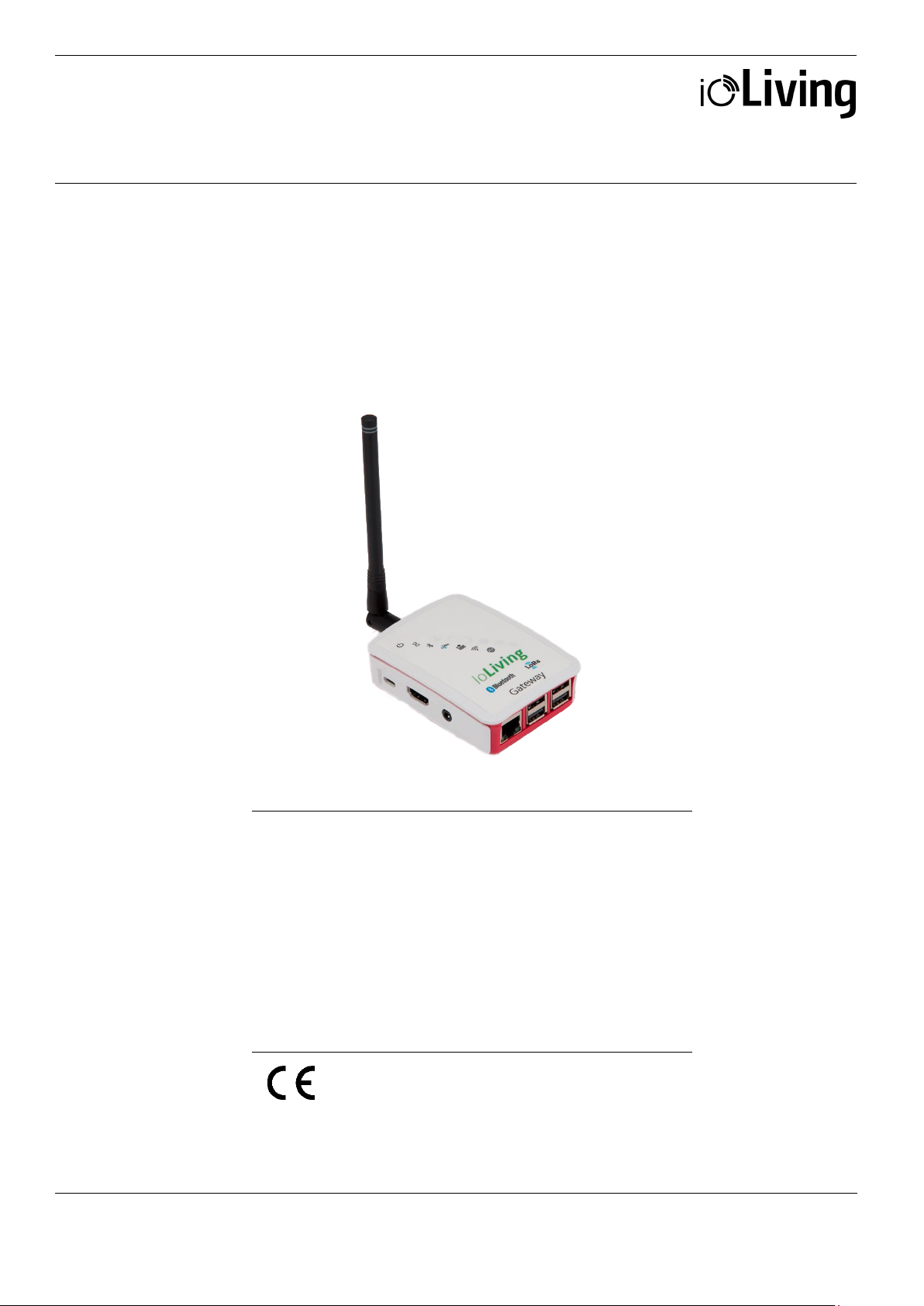
Data connector for indoor use. Connected to the Internet via
Data connector for indoor use
Gateway Mini
a network cable (included) or wireless network. In addition,
an HDMI display and a USB keyboard are required for
connecting to a wireless network. The device is used for
continuous transfer of measured data to the ioLiving cloud
service.
Protection: P20, no protection against water or dust
Temperature: 0 °C – +60 °C
LoRa frequency: 871.5 MHz
Page 2
USER MANUAL
GATEWAY MINI
Ceruus Oy, ioLiving
Tekninen tuki:
2 (13)
ioliving.com
Data connector for indoor use
Table of contents
Gateway Mini ..................................................................................................................................................................................... 1
CONNECTING GATEWAY TO THE INTERNET ..................................................................................................................... 3
WIRED NETWORK CONFIGURATION ................................................................................................................................ 3
Installation .................................................................................................................................................................................. 3
Establishing a connection ..................................................................................................................................................... 3
WIRELESS NETWORK CONFIGURATION (WLAN, WiFi) ............................................................................................ 4
Installation .................................................................................................................................................................................. 4
Establishing a connection ..................................................................................................................................................... 5
Verify the functionality of the wireless network ............................................................................................................ 7
Finally verify the server connection functionality. ......................................................................................................... 8
GATEWAY LED SIGNAL DESCRIPTION AND TROUBLESHOOTING ....................................................................... 10
LED symbol descriptions .................................................................................................................................................... 10
Possible wireless network configuration problems: .................................................................................................. 11
GATEWAY ACTIVATION IN IOLIVING SERVICE ............................................................................................................... 12
Page 3
USER MANUAL
GATEWAY MINI
Ceruus Oy, ioLiving
Tekninen tuki:
3 (13)
ioliving.com
Installation
Establishing a connection
USB
Network
Data connector for indoor use
CONNECTING GATEWAY TO THE INTERNET
WIRED NETWORK CONFIGURATION
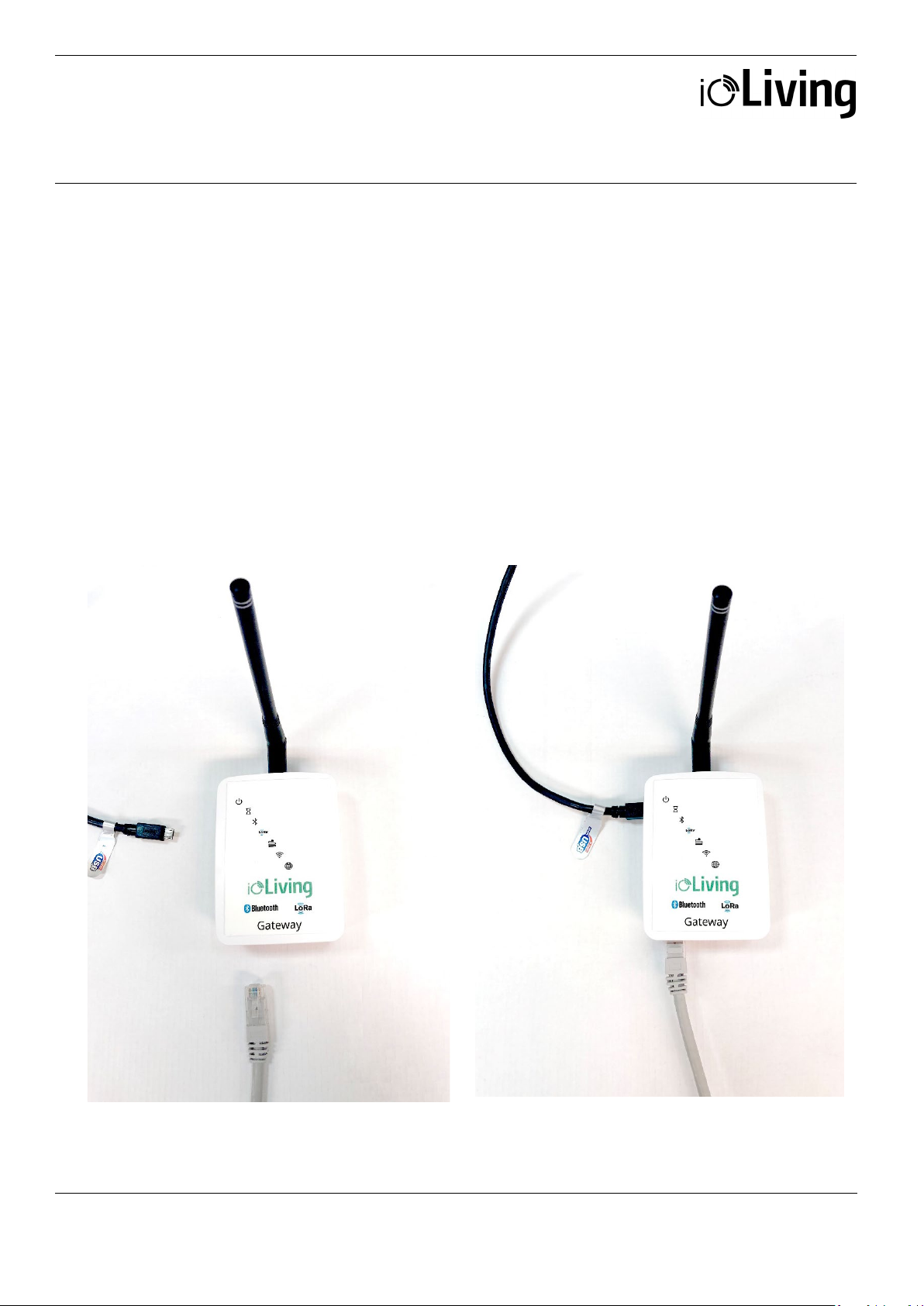
If a wired network (i.e. Ethernet, LAN) connection is
available, it can be used for Gateway’s data
transmission. Connect powered USB-C connector
and network cable to establish the wired connection
(see figure 1. and 2.)
Figure 1:
Gateway Mini and components for wired network
connection.
power cable
After installing the Gateway as described, it connects
automatically to the internet and ioLiving data server.
Ensure that the Gateway connects to the ioLiving
server by checking the signal LED’s status.
Figure 2:
Gateway Mini connected to wired network.
cable
Page 4

USER MANUAL
GATEWAY MINI
Ceruus Oy, ioLiving
Tekninen tuki:
4 (13)
ioliving.com
Installation
USB power
USB
HDMI display
Data connector for indoor use
WIRELESS NETWORK CONFIGURATION (WLAN, WiFi)
To configure the wireless network (i.e. WiFi, WLAN)
connection: Connect HDMI display, USB keyboard
and USB power cable as described following.
Kuva 1:
Gateway Mini and required components for
wireless network configuration.
cable
Kuva 2:
Gateway Mini ready for wireless network
configuration.
cable
keyboard
Page 5
USER MANUAL
GATEWAY MINI
Ceruus Oy, ioLiving
Tekninen tuki:
5 (13)
ioliving.com
Establishing a connection
Figure 4.
Figure 5.
Data connector for indoor use
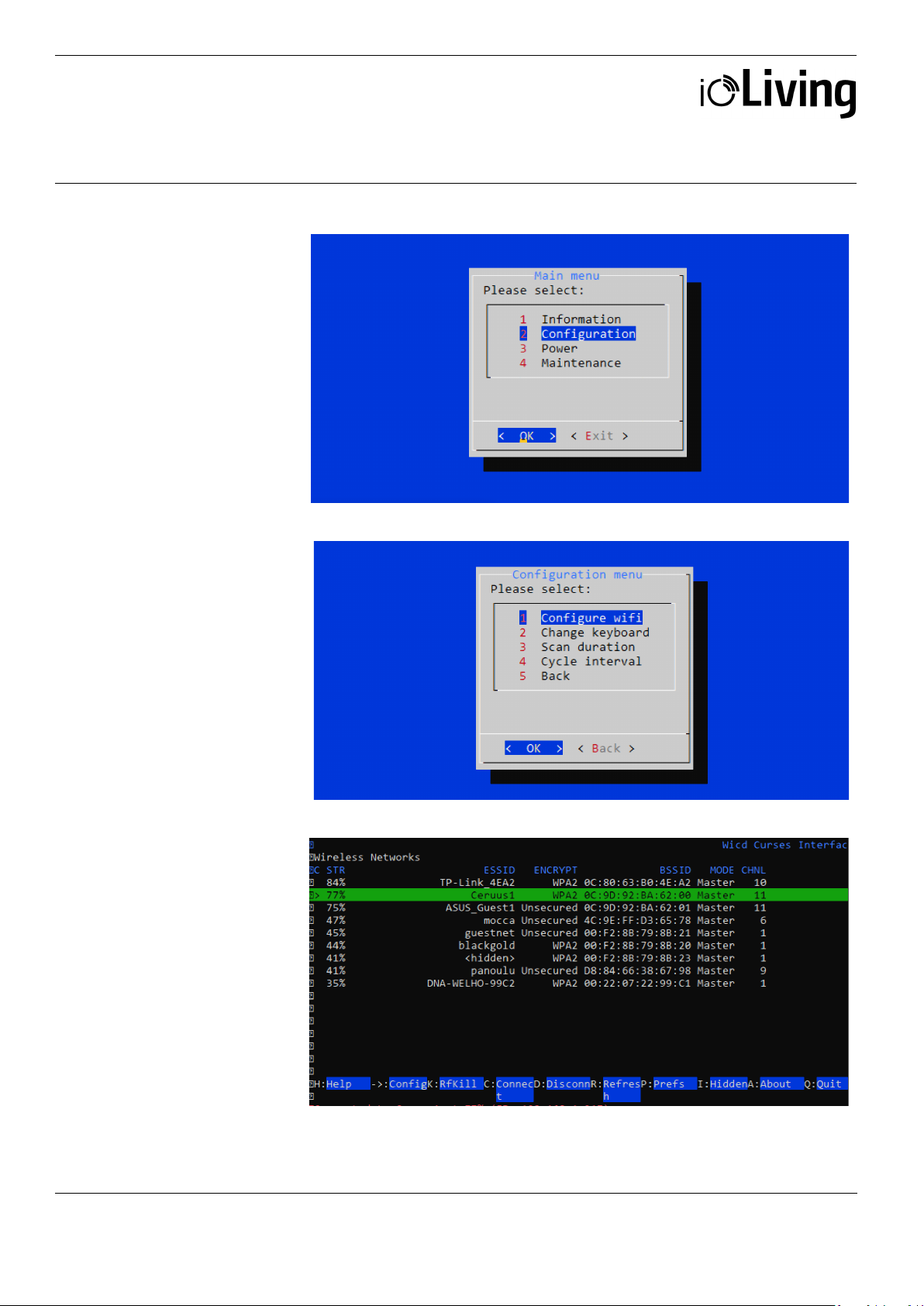
After connecting the
Gateway Mini as described
and powering it with USB
cable, the wireless network
configuration can be started.
Figure 3.
Select ”Configuration” and
”OK” with <arrow keys>
and press <Enter>.
Select “Configure wifi” and
“OK” with <arrow keys>
and press <Enter>.
A list of available wireless
networks.
Select the wanted network
with <arrow keys>. Pay
attention to network’s
encryption (third column),
which is usually ”WPA2”.
Enter the network setup with
<right arrow key>.
Page 6
USER MANUAL
GATEWAY MINI
Ceruus Oy, ioLiving
Tekninen tuki:
6 (13)
ioliving.com
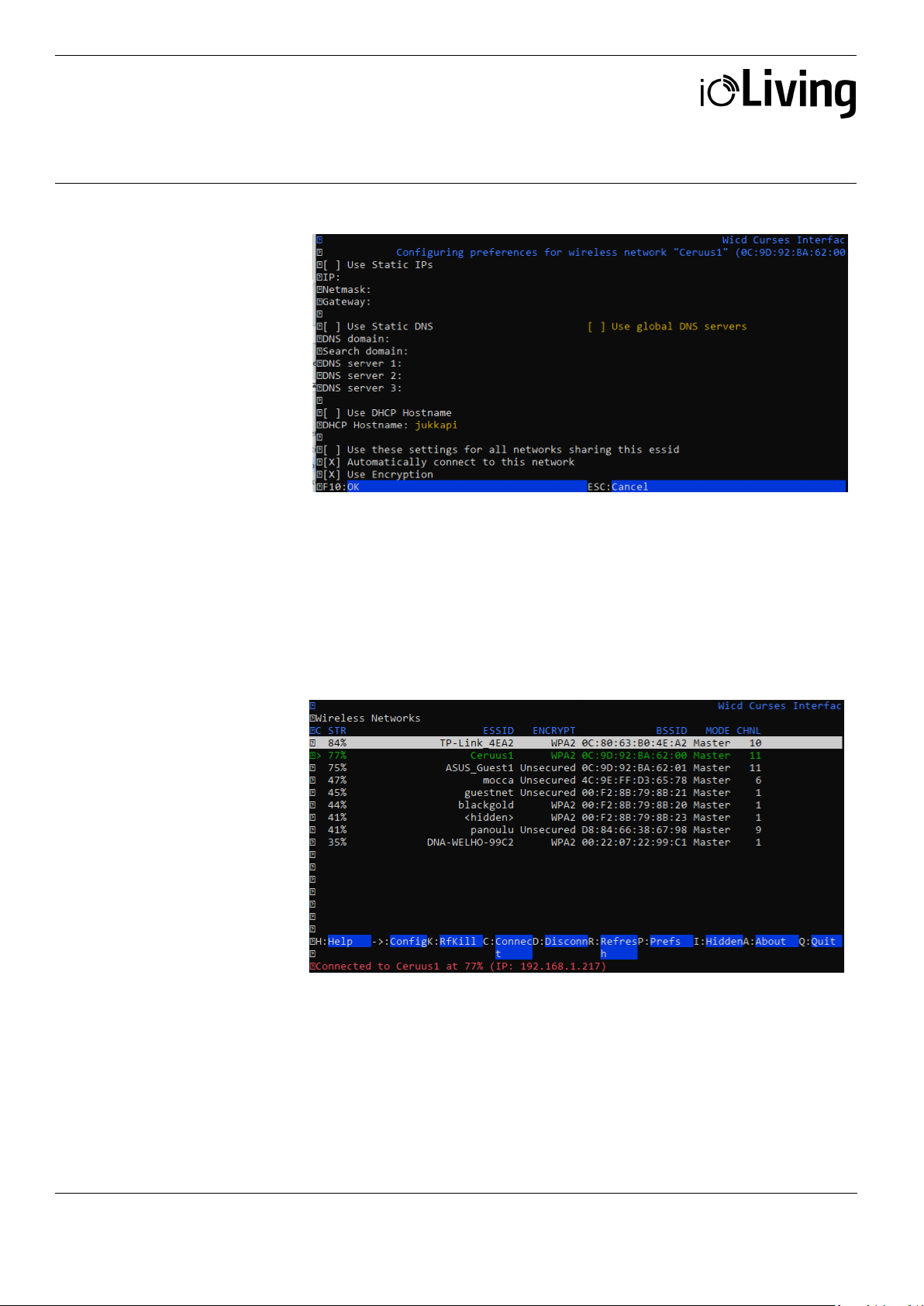
Figure 6.
Figure 7.
Exit the network setup by pressing <Q>.
Data connector for indoor use
Network setup window.
In the network setup, the
cursor can be moved with
<arrow keys>. Selections can
be made by pressing <Enter>
when the cursor is on wanted
setting. The selected setting
indicates ”X”.
Select “Automatically
connect to this network” to
ease the connection in the
future.
If the network requires encryption, select “Use encryption” and then press
<Enter> on the next line to open the selection. Usually the network
authentication requires a password and therefore the network encryption is
WPA 1/2 (Passphrase). Enter the password for the wireless network.
Save the settings by pressing <F10>. Note that the encryption of the wireless
network can be something else than “WPA 1/2 (Passphrase)”
After the successful
connection, network’s name
turns green on the list.
If the automatic connection doesn’t work for some reason, it is possible to
initiate the connection by pressing <shift> + <C> (there’s a couple seconds
delay in the software). The status of the connection appears at the bottom of
the window. While selecting the network, the first column shows the strength
of the signal in percentage (max signal strength is 100%). If the signal
strength is low, relocating the Gateway may improve the connection strength.
Page 7
USER MANUAL
GATEWAY MINI
Ceruus Oy, ioLiving
Tekninen tuki:
7 (13)
ioliving.com
Verify the functionality of
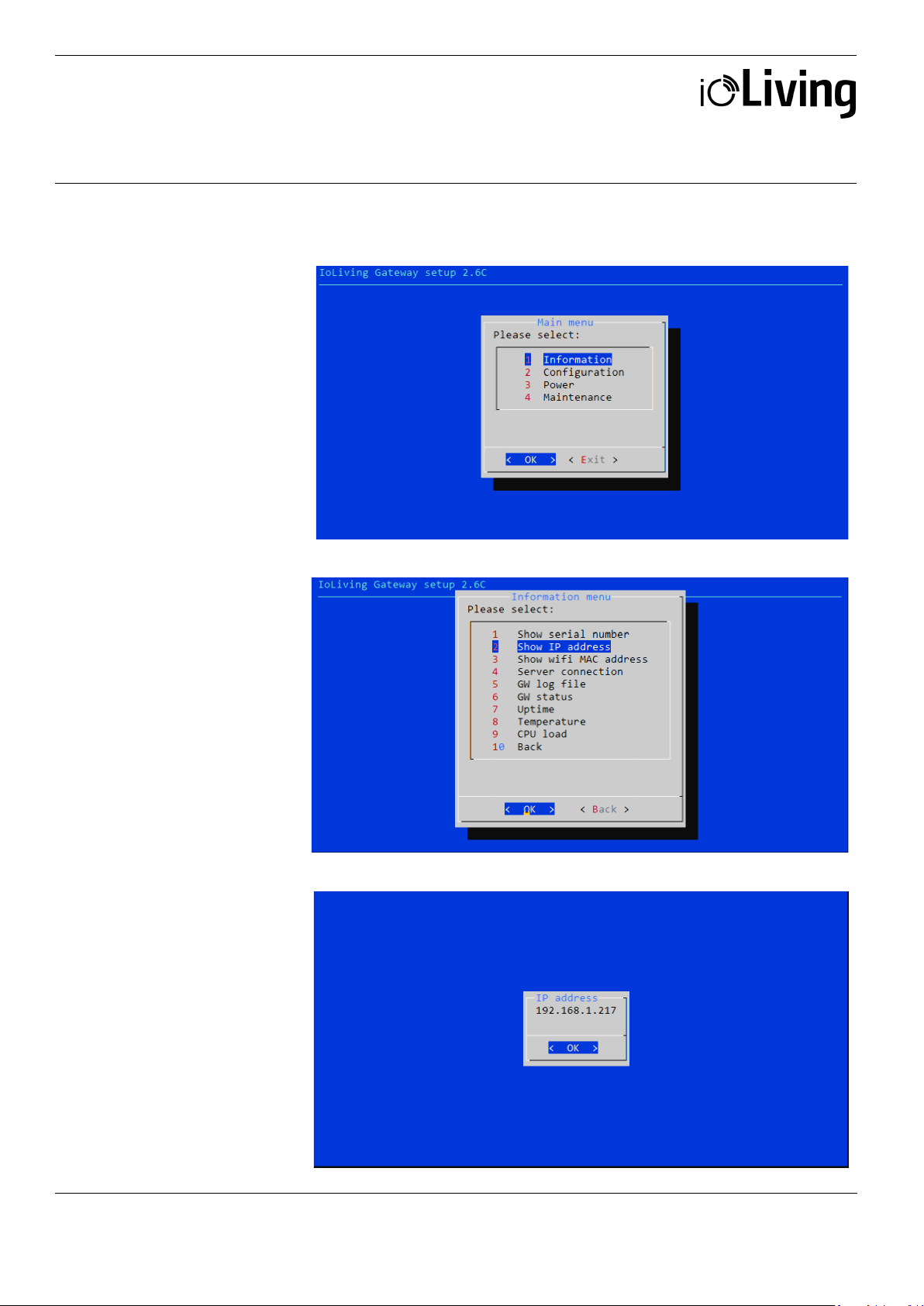
Figure 9.
Figure 10.
Data connector for indoor use
the wireless network
Figure 8.
In the main menu select
”Information” and ”OK”
with <arrow keys> and
press <Enter>.
Select ”Show IP address”
and ”OK” with <arrow keys>
and press <Enter>.
If the wireless network
connection is OK, the IP
address window appears.
Page 8
USER MANUAL
GATEWAY MINI
Ceruus Oy, ioLiving
Tekninen tuki:
8 (13)
ioliving.com
Finally verify the server
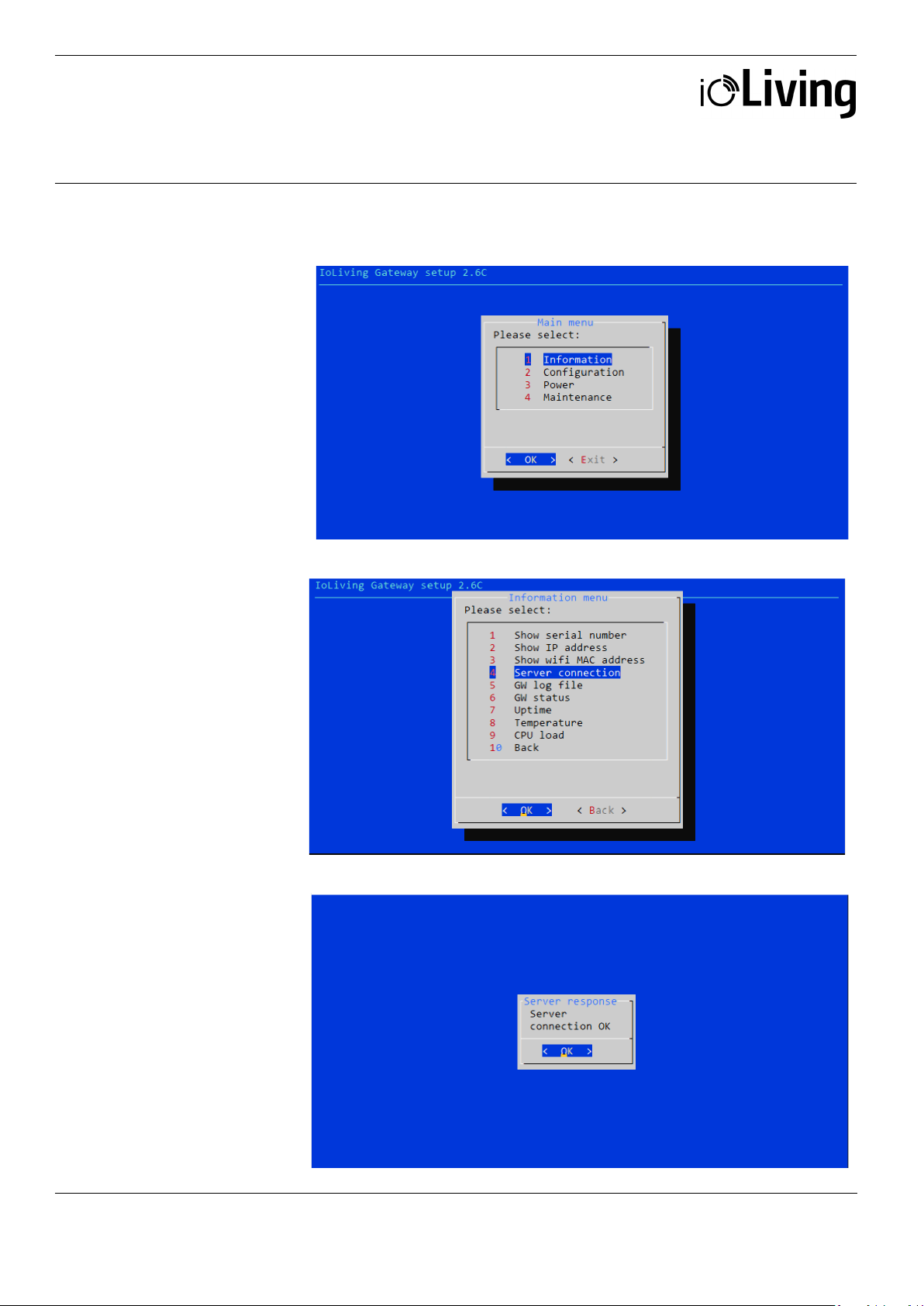
Figure 12.
Figure 13.
Data connector for indoor use
connection functionality.
Figure 11.
In the main menu select
”Information” and ”OK”
with <arrow keys> and
press <Enter>.
Select ”Server connection”
and ”OK” with <arrow keys>
and press <Enter>.
If the server connection is
OK, a notification window
with text “Server connection
OK” appears.
Page 9
USER MANUAL
GATEWAY MINI
Ceruus Oy, ioLiving
Tekninen tuki:
9 (13)
ioliving.com
After verifying the server connection, the display and keyboard can be disconnected from the Gateway. Since
Data connector for indoor use
the automated network connection is selected and stored in the settings, it is also possible to power off the
Gateway. It will connect automatically to the server when the power is on again and the configured wireless
network is available.
Page 10
USER MANUAL
GATEWAY MINI
Ceruus Oy, ioLiving
Tekninen tuki:
10 (13)
ioliving.com
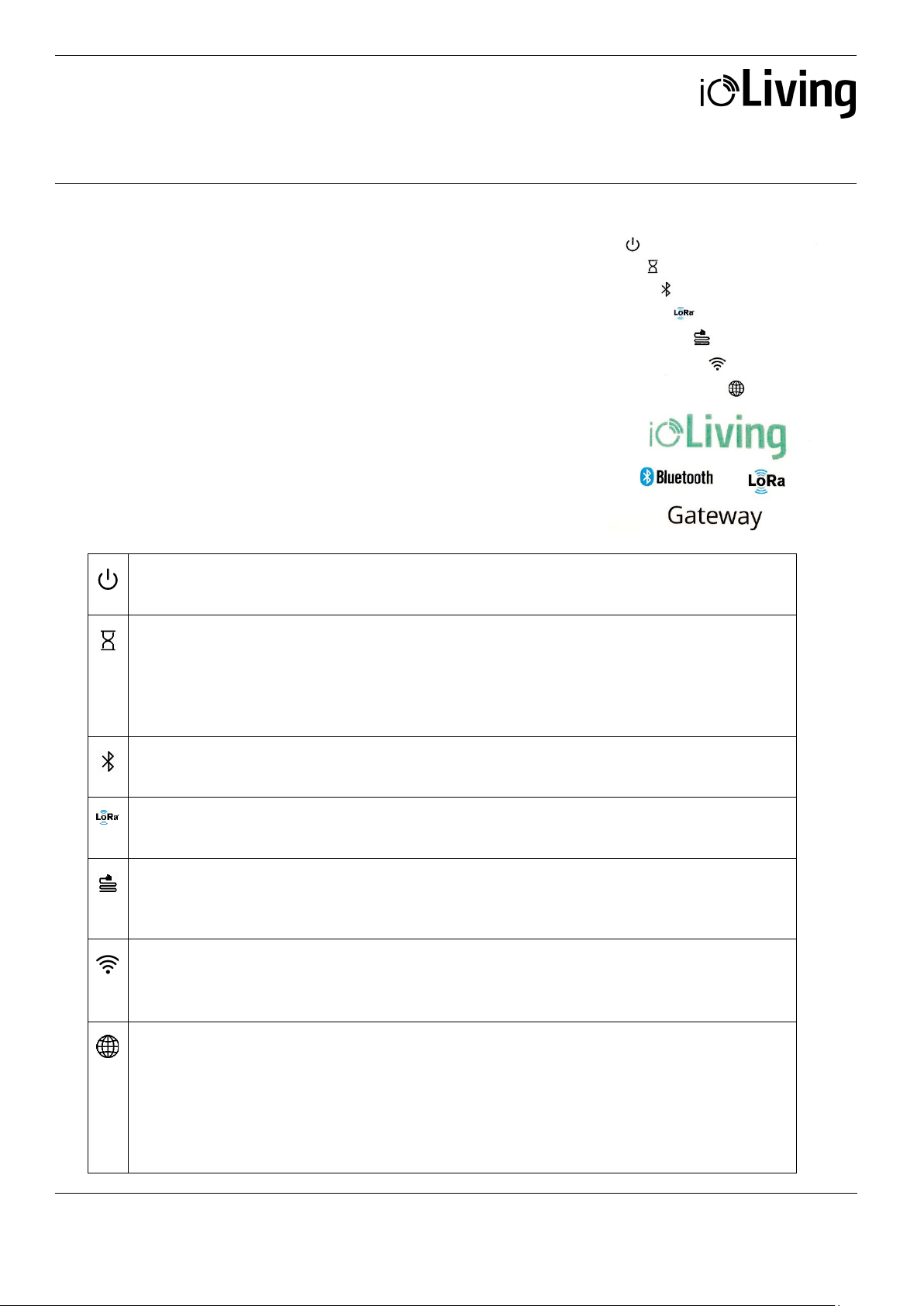
GATEWAY LED SIGNAL DESCRIPTION AND
Gateway status LED
Initializing LED
2. Check the selected network’s connection with another device.
Bluetooth LED
LoRa LED
Wired network connection LED
Wireless network connection LED
(Appears concurrently with wired red LED)
ioLiving server LED
Data connector for indoor use
TROUBLESHOOTING
Figure 1.
There are seven signal LEDs in the Gateway device.
Table 1.
LED symbol descriptions
• Green blinking: The power is on and the device is operational.
• Not blinking: The software has halted, reboot the device.
• Yellow blinking: The device has been recently turned on. When the device is ready (device
boot up and initialization may take few minutes) the LED turns off.
• Constant red:
1. Reboot the Gateway.
• Constant green: The device has detected Bluetooth devices within the range
• Constant green: The device has detected LoRa devices within the range.
• Occassionally blinking blue: The LoRa signal has been received.
• Constant green: Wired connection is OK.
• Constant red: No wired or wireless connection (Appears concurrently with wireless red
LED) *
• Constant green: Wireless connection is OK
• *Constant red: No wired or wireless connection
• Constant green: Connection to ioLiving server is OK.
• Constant red: No connection to ioLiving server:
1. Reboot the Gateway.
2. Check the network connection with another device.
3. Try again after longer period, the server may be down or overloaded.
4. Contact the device support..
Page 11
USER MANUAL
GATEWAY MINI
Ceruus Oy, ioLiving
Tekninen tuki:
11 (13)
ioliving.com
If the both network LEDs are red there’s no active network connection at all. Check the desired
Data connector for indoor use
network configuration from the user’s guide chapter XXX.
Notice that the network connection can be either wired or wireless, not the both at the same time.
It may take several minutes after the device boot up until the connection is established.
Possible wireless network configuration problems:
1. Black screen:
• Check the monitor is switched on.
• Check the monitor power cable is connected correctly.
• Check the monitor’s signal cable is connected correctly.
2. No setup window on the screen:
• Check the Gateway’s USB power cable is connected correctly.
• Check the USB power cable is active.
3. The keyboard is not working.
• Check the keyboard cable is connected correctly.
4. A command window appears:
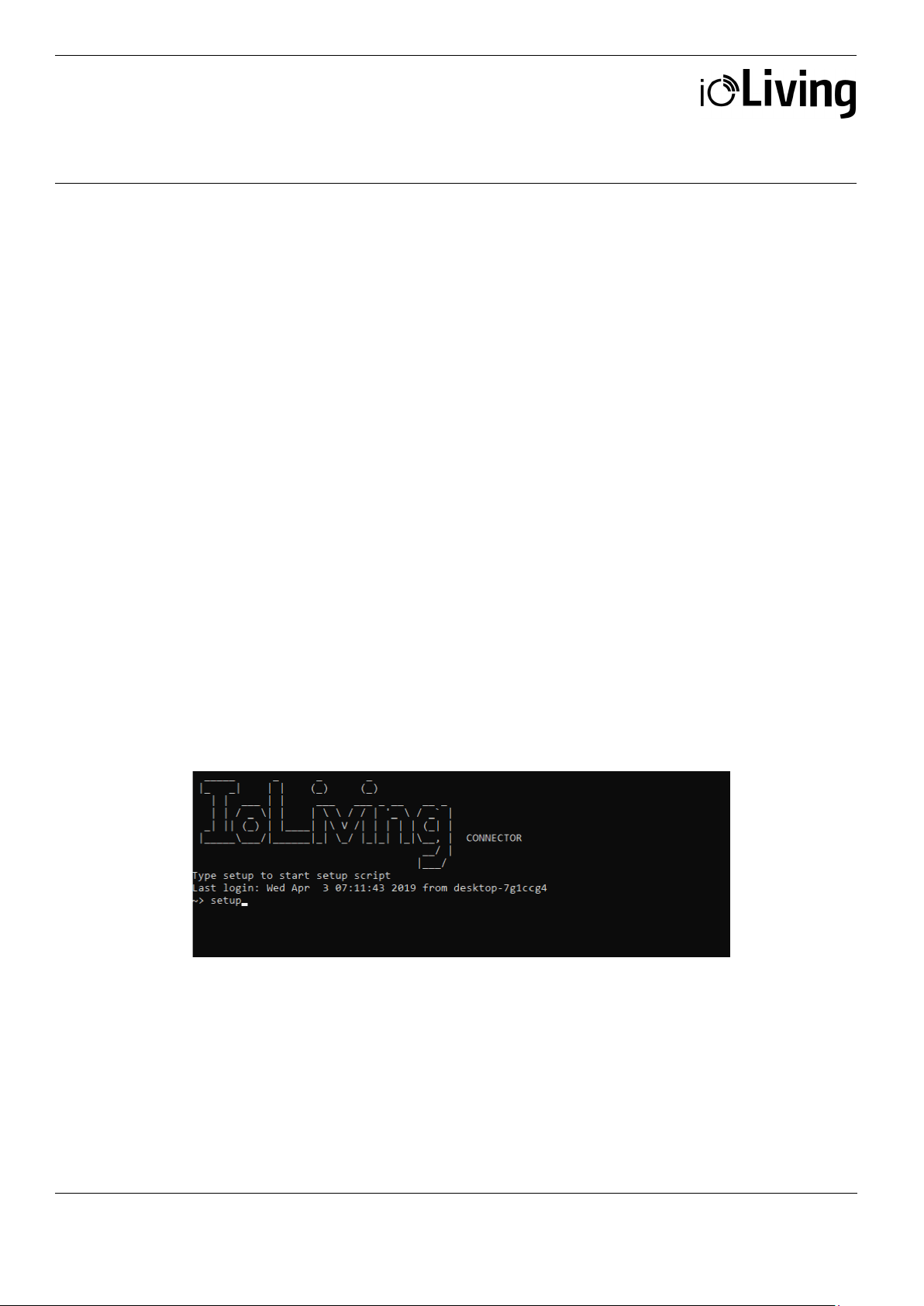
Write “setup” and press <Enter> to start the setup.
Page 12
USER MANUAL
GATEWAY MINI
Ceruus Oy, ioLiving
Tekninen tuki:
12 (13)
ioliving.com
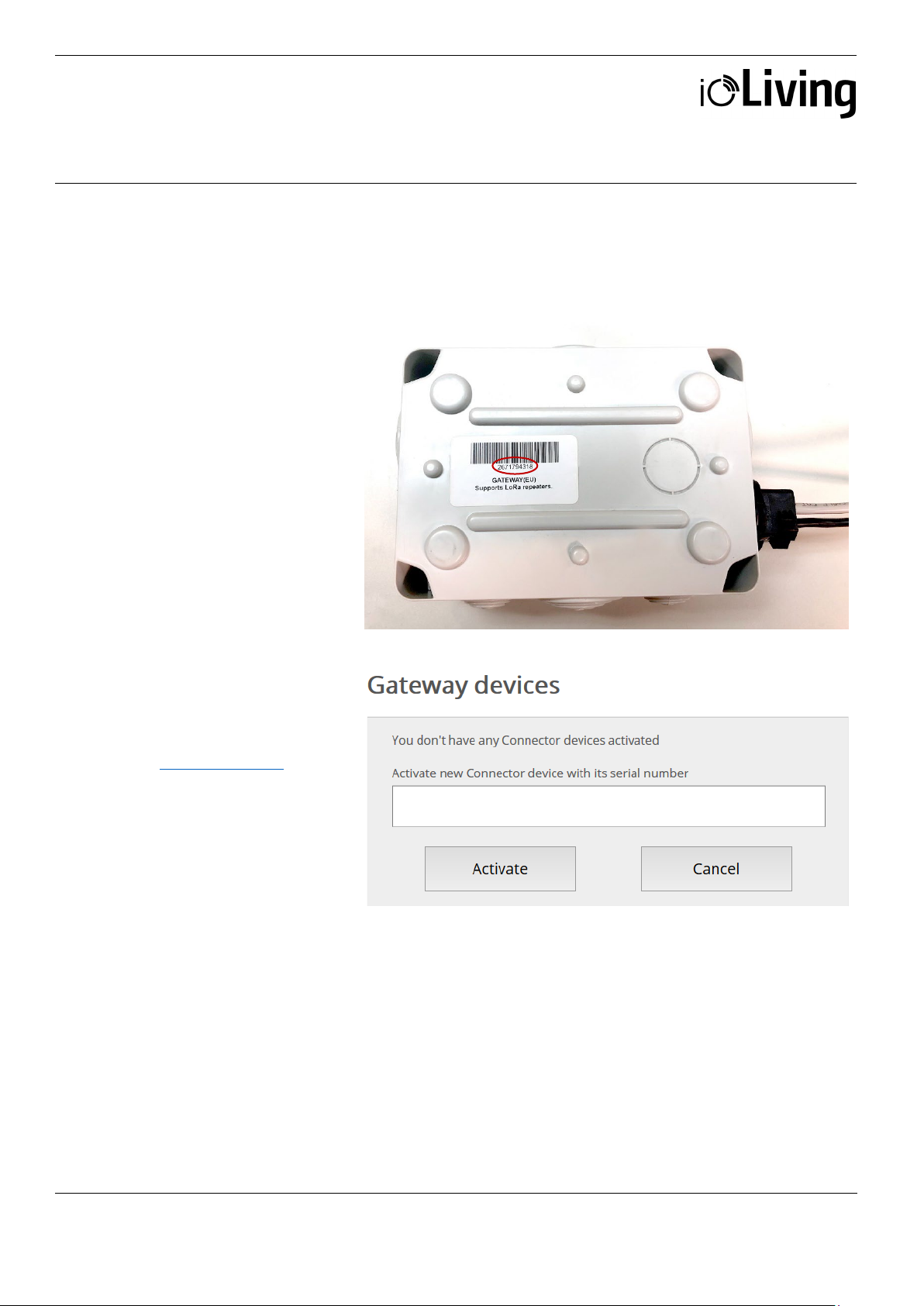
To monitor Gateway’s
1. Write down Gateway’s
Data connector for indoor use
GATEWAY ACTIVATION IN IOLIVING SERVICE
functionality and status, it must
be activated in the ioLiving
service.
Figure 1.
Gateway’s serial number can be
found in the sticker attached to
the casing.
serial number.
2. Sign in to the ioLiving service
portal www.ioliving.com
• Login with your
credentials
• Account
• Gateway devices
Activate the Gateway with its
serial number.
Figure 2.
Gateway’s activation window.
Page 13
USER MANUAL
GATEWAY MINI
Ceruus Oy, ioLiving
Tekninen tuki:
13 (13)
ioliving.com
Data connector for indoor use
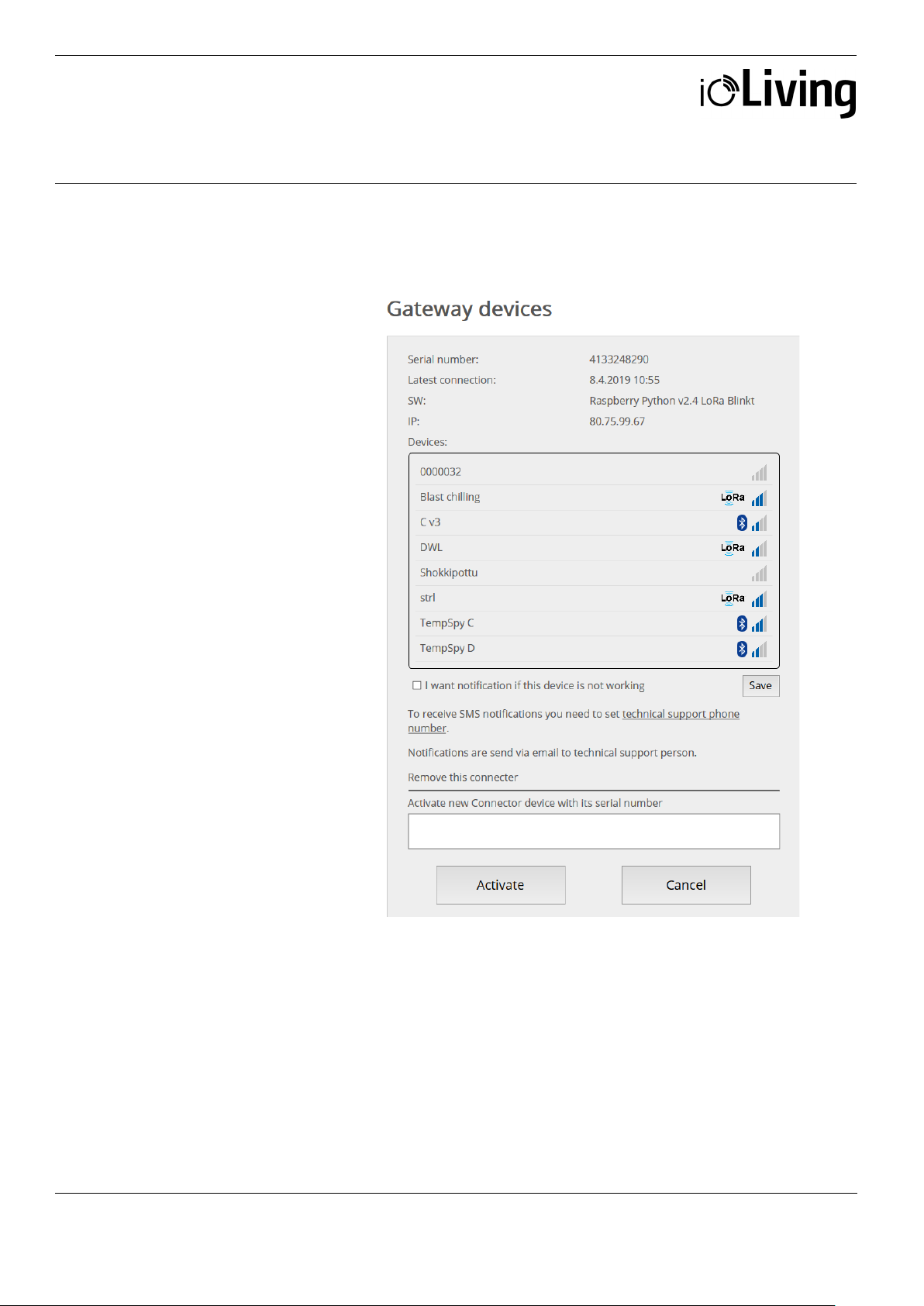
4. After the activation Gateway
status can be checked in the
ioLiving service by selecting:
Gateway devices
5. It is possible to activate
several Gateways under the
same account.
6. The notifications can be
turned on/off with just a click
of a mouse.
7. The device can be removed
from the account when
necessary.
Figure 3.
Gateway device’s status window.
 Loading...