

Page 1
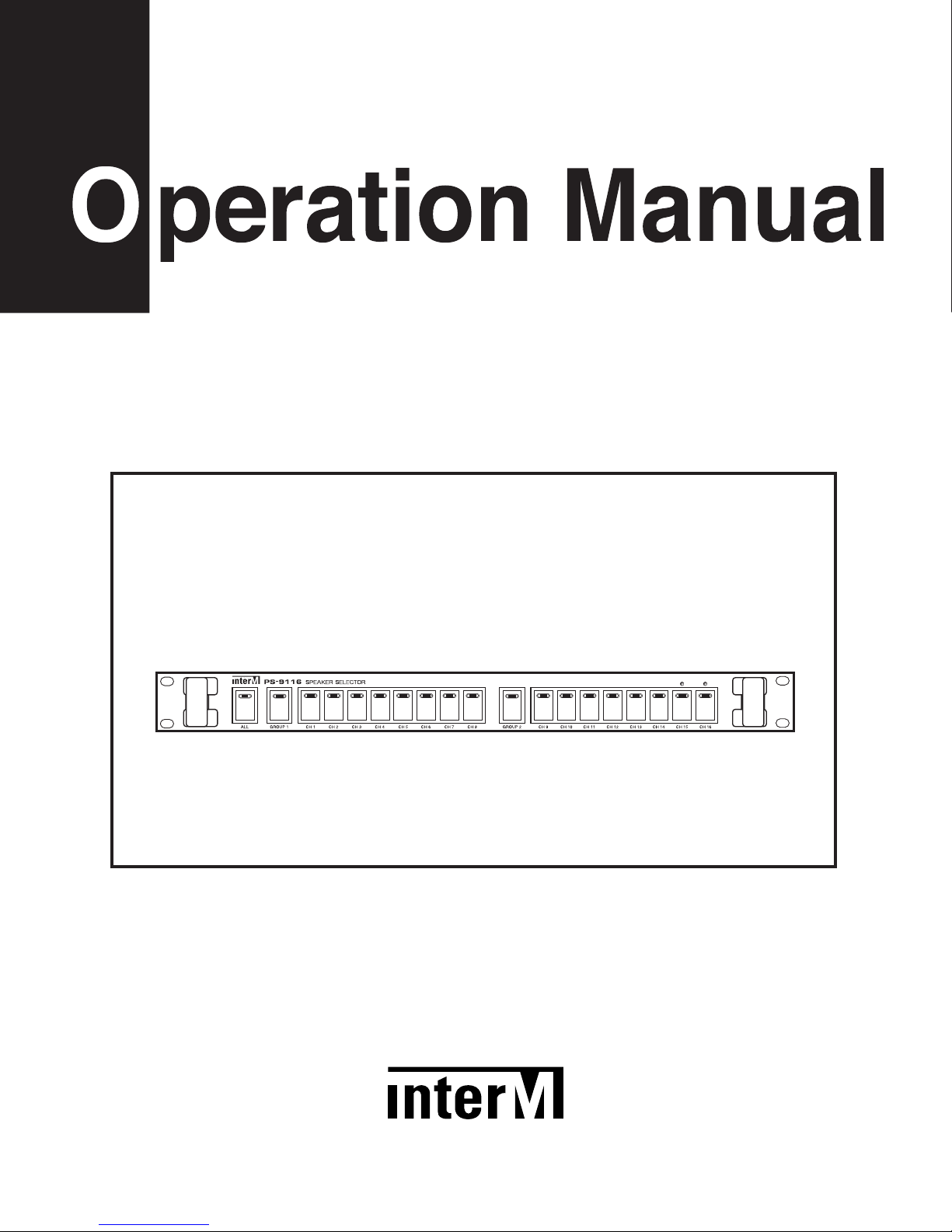
PS-9116 Speaker Selector
TIME R EMOTE
Page 2

Contents
Contents
Welcome
Warning.........................................................................................................................................1
Unpacking......................................................................................................................................2
Installation
Environment....................................................................................................................................2
Important Safety Instructions.............................................................................................................2
Features............................................................................................................................................3
Operation ........................................................................................................................................3
Front Panel ......................................................................................................................................4
Rear Panel .......................................................................................................................................5
Pinouts..............................................................................................................................................6
Applications ....................................................................................................................................7
Block Diagram ................................................................................................................................8
Specifications ..................................................................................................................................9
Service
Procedures....................................................................................................................................10
Schematic.....................................................................................................................................10
Parts List .......................................................................................................................................10
Variations and Options ...............................................................................................................10
Warranty .......................................................................................................................................10
Page 3
1
PS-9116I
SPEAKER SELECTOR
Welcome
Welcome
A personal welcome to you from the management and employees of Inter-M
All of the co-workers here at Inter-M are dedicated to providing excellent products with inherently good value,
and we are delighted you have purchased one of our products.
We sincerely trust this product will provide years of satisfactory service, but if anything is not to your complete
satisfaction, we will endeavor to make things right.
Welcome to Inter-M, and thank you for becoming part of our worldwide extended family!
RISK OF ELECTRIC SHOCK
DO NOT OPEN
CAUTION
CAUTION: TO REDUCE THE RISK OF ELECTRIC SHOCK.
DO NOT REMOVE COVER (OR BACK).
NO USER-SERVICEABLE PARTS INSIDE.
REFER SERVICING TO QUALIFIED SERVICE PERSONNEL.
WARNING
To prevent fire or shock hazard, do not
expose the unit to rain or moisture.
*Do not install this equipment in a confined space such as a book case or similar unit.
*The apparatus shall not be exposed to dripping or splashing and no objects filled with liquids, such vases, shall be placed on the apparatus.
*Worded: “WARNING FOR YOUR PROTECTION PLEASE READ THE FOLLOWING-WATER AND MOISTURE: Unit should not be used
near water(e.g. near a bathtub, washbowl, kitchen sink, laundry tub, in a wet basement, or near a swimming pool, etc). Care should be taken
so than objects do not fall and liquids are not spilled into the enclosure through openings.”
This symbol is intended to alert the user to the
presence of uninsulated “dangerous voltage” within
the product’s enclosure that may be of sufficient
magnitude to constitute a risk of electric shock to
persons.
This symbol is intended to alert the user to the
presence of important operation and maintenance
(servicing) instructions in the literature accompanying
the appliance.
Caution: To prevent electric shock do not use this (polarized) plug with
an extension cord, receptacle or other outlet unless the blades
can be fully inserted to prevent blade exposure.
Attentions: Pour prévenir les chocs électriques ne pas utiliser cette
fiche polarisée avec un prolongateur, une prise de courant
on une autre sortie de courant, sauf si les lames peuvent
étre insérées à fond sans en laisser aucune partie à
découvert.
Page 4

2
PS-9116
SPEAKER SELECTOR
Installation
Installation
Environment
Never place this product in an environment which could alter its performance or reduce its service life. Such
environments usually include high levels of heat, dust, moisture, and vibration.
Important Safety Instructions
1. Read these instructions.
2. Keep these instructions.
3. Heed all warnings.
4. Follow all instructions.
5. Do not use this apparatus near water.
6. Clean only with dry cloth.
7. Do not block any ventilation openings. Install in accordance with the manufacturer’s instructions.
8. Do not install near any heat sources such as radiators, heat registers, stoves, or other apparatus (including
amplifiers) that produce heat.
9. Do not defeat the safety purpose of the polarized or grounding-type plug. A polarized plug has two blades
with one wider than the other. A grounding type plug has two blades and a third grounding prong. The wide
blade or the third prong are provided for your safety. If the provided plug does not fit into your outlet, consult
an electrician for replacement of the obsolete outlet.
10. Protect the power cord from being walked on or pinched particularly at plugs, convenience receptacles, and
the point where they exit from the apparatus.
11. Only use attachments/accessories specified by the manufacturer.
12. Use only with the cart, stand, tripod, bracket, or table specified by the manufacturer, or sold with the apparatus.
When a cart is used, use caution when moving the cart/apparatus combination to avoid injury from tip-over.
13. Unplug this apparatus during lightning storms or when unused for long periods of time.
14. Refer all servicing to qualified service personnel. Servicing is required when the
apparatus has been damaged in any way, such as power-supply cord or plug is
damaged, liquid has been spilled or objects have fallen into the apparatus, the
apparatus has been exposed to rain or moisture, does not operate normally, or has
been dropped.
S3125A
S3125A
Unpacking
Although it is neither complicated to install nor difficult to operate your PA speaker selector, a few minutes of
your time is required to read this for a properly wired installation and becoming familiar with its many features
and how to use them.
lease take a great care in unpacking your speaker selector and do not discard the carton and other materials.
They may be needed when moving your set and are required if it ever becomes necessary to return your set for
service.
Page 5

3
PS-9116
SPEAKER SELECTOR
Features
Features
-16 ZONE SPEAKER SELECTOR (ALL CALL, GROUP 1, GROUP 2, CH1~16)
19 push type selector switches are provided to enable you to select 16 zone speakers individually or totally.
- EASY CONFIRMING
You can confirm selected zone and the operating mode of system by using label holder and indicating LED on
the front panel.
- ALL CALL SWITCH
You can select all zone speakers use by one switch.
- GROUP 1, GROUP 2 SWITCH
You can select group 1 speakers(CH1~8) or Group 2(CH9~16) by individual group switches.
Operation
Operation
Make certain that speakers and input sources are properly connected before switching the unit on.
Keep volume levels turned down before switching on.
NOTE: The system’s operation is delayed by approximately three seconds after pressing the power switch. This
is due to the built-in protection circuitry, designed to protect the speakers and other system components.
Page 6
4
PS-9116
SPEAKER SELECTOR
Front Panel
Front Panel
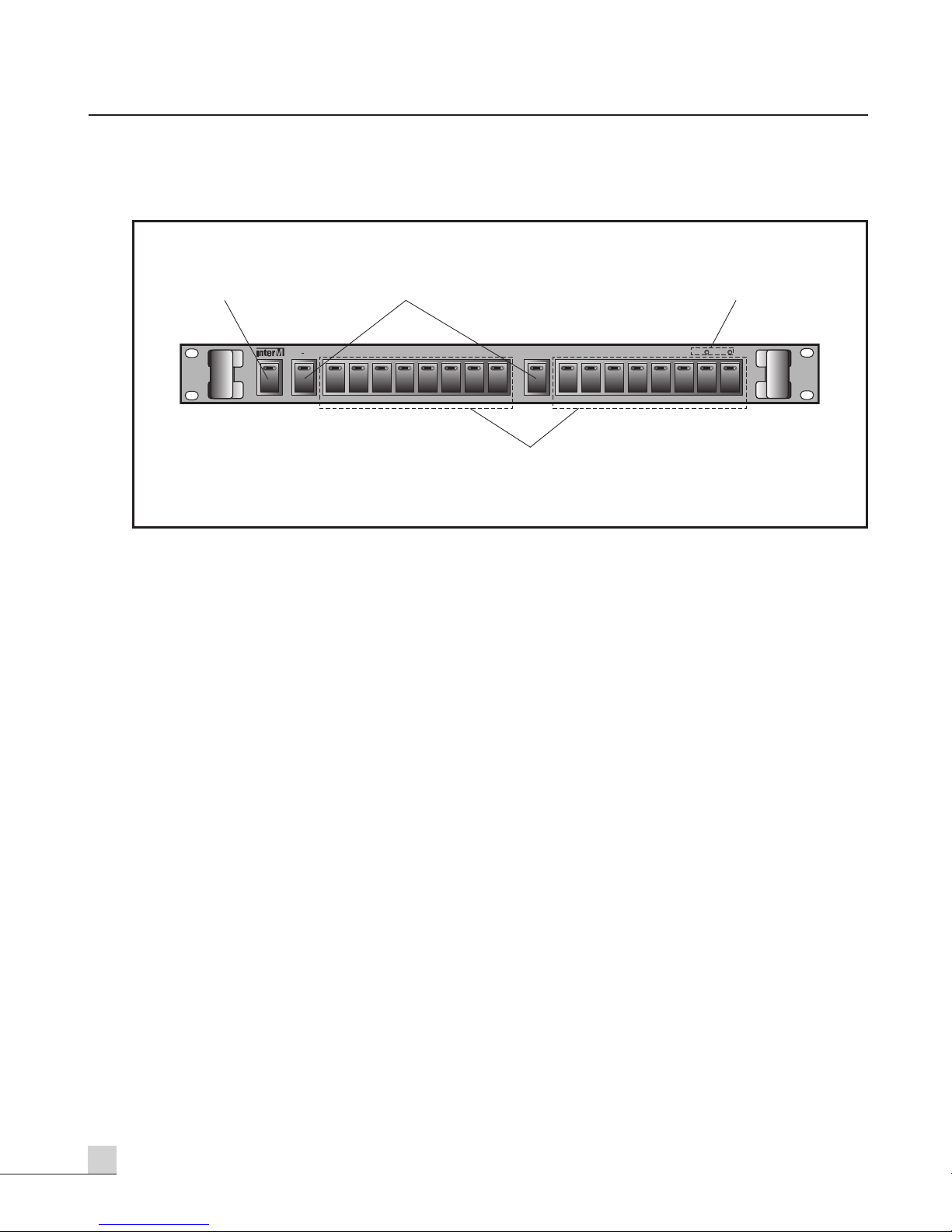
1. ALL CALL SWITCH
You can select the all speakers at a time by using this switch.
2. GROUP 1, GROUP 2 SWITCH
You can select the group 1 speakers or group 2 speakers at a time by using these switches.
3. OPERATING MODE INDICATORS
These indicators show operating modes of system.
TIMER: It shows that the system is operated by timer.
REMOTE: It shows that the system is operated by remote control equipment.
4. 1-16 SPEAKER SELECTOR SWITCH
You can select the group 1 speakers or group 2 speakers at a time by using these switches.
12 3
SPEAKER SELECTOR
9116
PS
ALL GROUP 1 CH1 CH2 CH3 CH4 CH5 CH6 CH7 CH8 GROUP 2 CH9 CH10 CH11 CH12 CH13 CH14 CH15 CH16
4
TIME R EMOTE
Page 7
5
PS-9116
SPEAKER SELECTOR
Rear Panel
Rear Panel
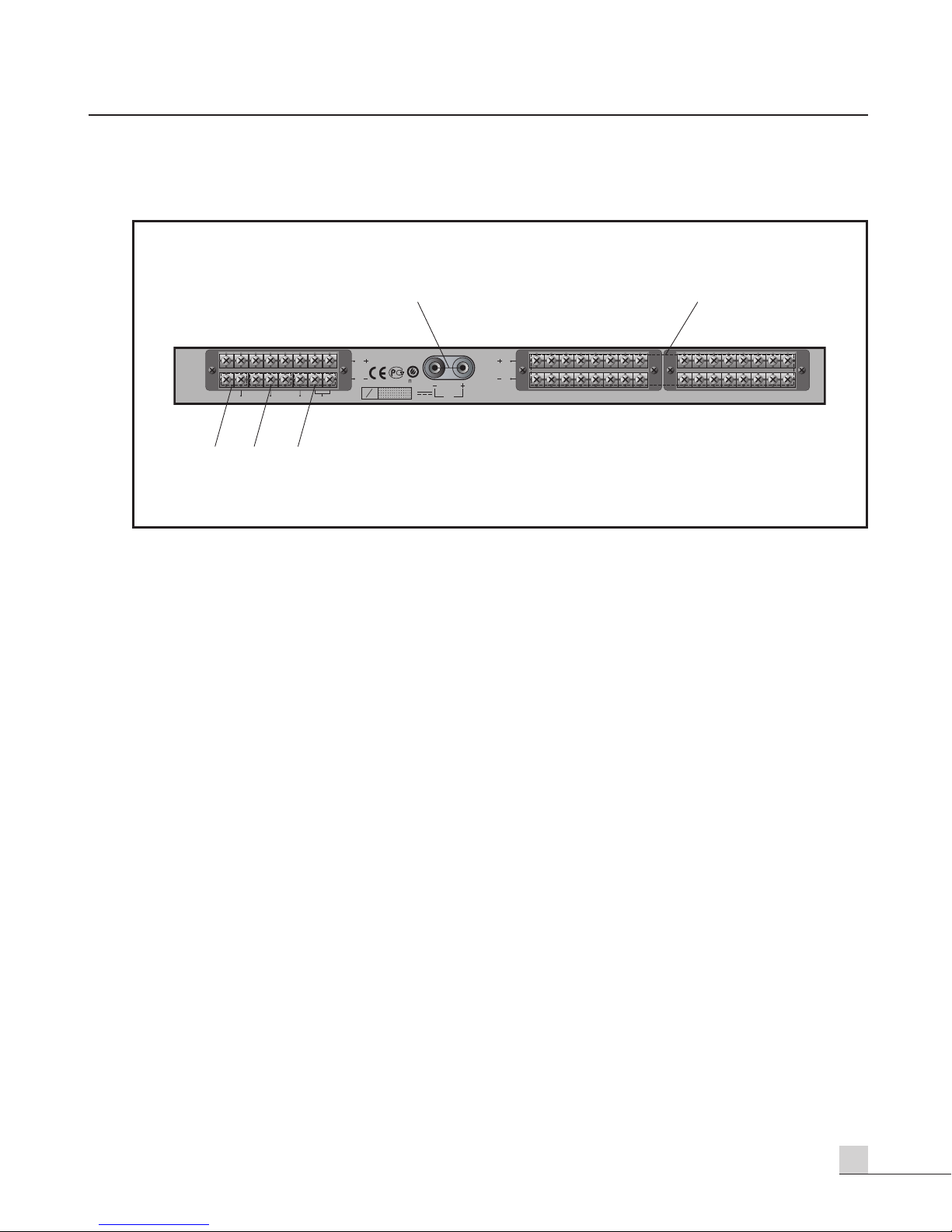
1. DC INPUT TERMINALS
These terminals are for connection to DC 24V power source which is used for indicating LED.
2. 16 SPEAKER OUTPUT TERMINALS
These terminals are for connection of speaker lines to deliver power output to speakers.
Be careful not to change the Hot and Common Lines.
3. AMP INPUT TERMINALS
These terminals are for connection to speaker output(100V Line) of power amplifier. Be careful not to change
the Hot and Common Lines.
4. REMOTE CONTROL TERMINALS(ALL, GROUP 1, GROUP 2)
You can select the the all speakers, Group 1 speakers or Group 2 speakers by these remote control terminals.
5. TIMER, REMOTE CONTROL INDICATOR TERMINALS
These terminal are for connection to indicator output terminals of timer or remote control equipment.
OC03
12
AMP IN 1
AMP IN 2
( )
( )
OC03
ALL
GROUP2
REMOTE
TIMER
GROUP1
S
0210
N
DC INPUT
24V
( )
( )
CH16 CH15 CH14 CH13 CH12 CH11 CH10 CH9 CH8 CH7 CH6 CH5 CH4 CH3 CH2 CH1
543
Page 8
6
PS-9116
SPEAKER SELECTOR
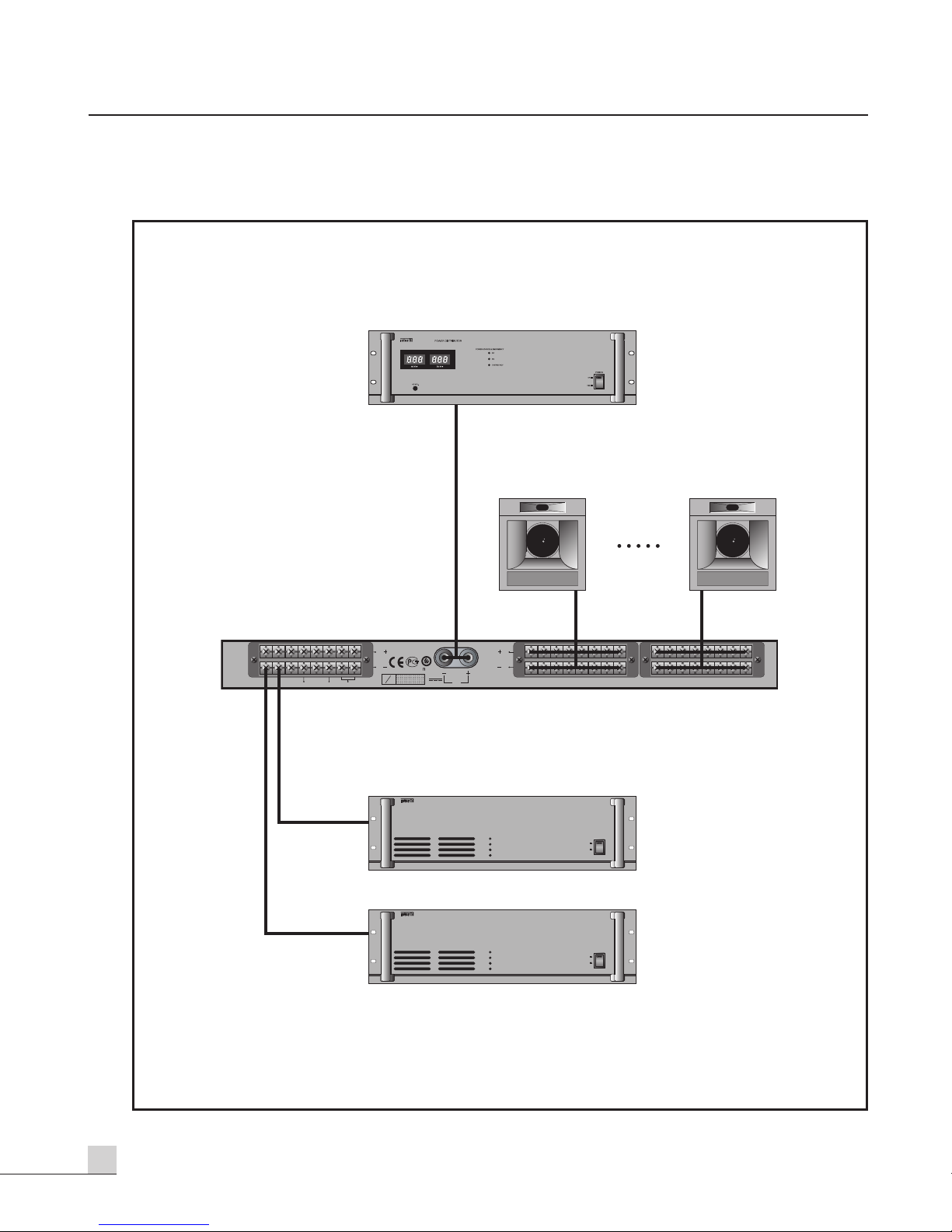
- DIRECT
Applications
Applications
OC03
PD-9359E
PD-9359E
PS-9116
AMP IN 1
AMP IN 2
SPEAKER 16
( )
( )
OC03
0210
ALL
GROUP2
TIMER
GROUP1
REMOTE
S
N
PA-2312
PUBLIC ADDRESS POWER AMPLIFIER
DC INPUT
( )
( )
24V
CH16 CH15 CH14 CH13 CH12 CH11 CH10 CH9 CH8 CH7 CH6 CH5 CH4 CH3 CH2 CH1
OUTPUT&PROTECTION
PROT
CLIP
-10dB
-40dB
POWER
ON
OFF
SPEAKER 1
PA-9312/9324
PA-2312
PUBLIC ADDRESS POWER AMPLIFIER
OUTPUT&PROTECTION
PROT
CLIP
-10dB
-40dB
POWER
ON
OFF
PA-9312/9324
Page 9
7
PS-9116
SPEAKER SELECTOR
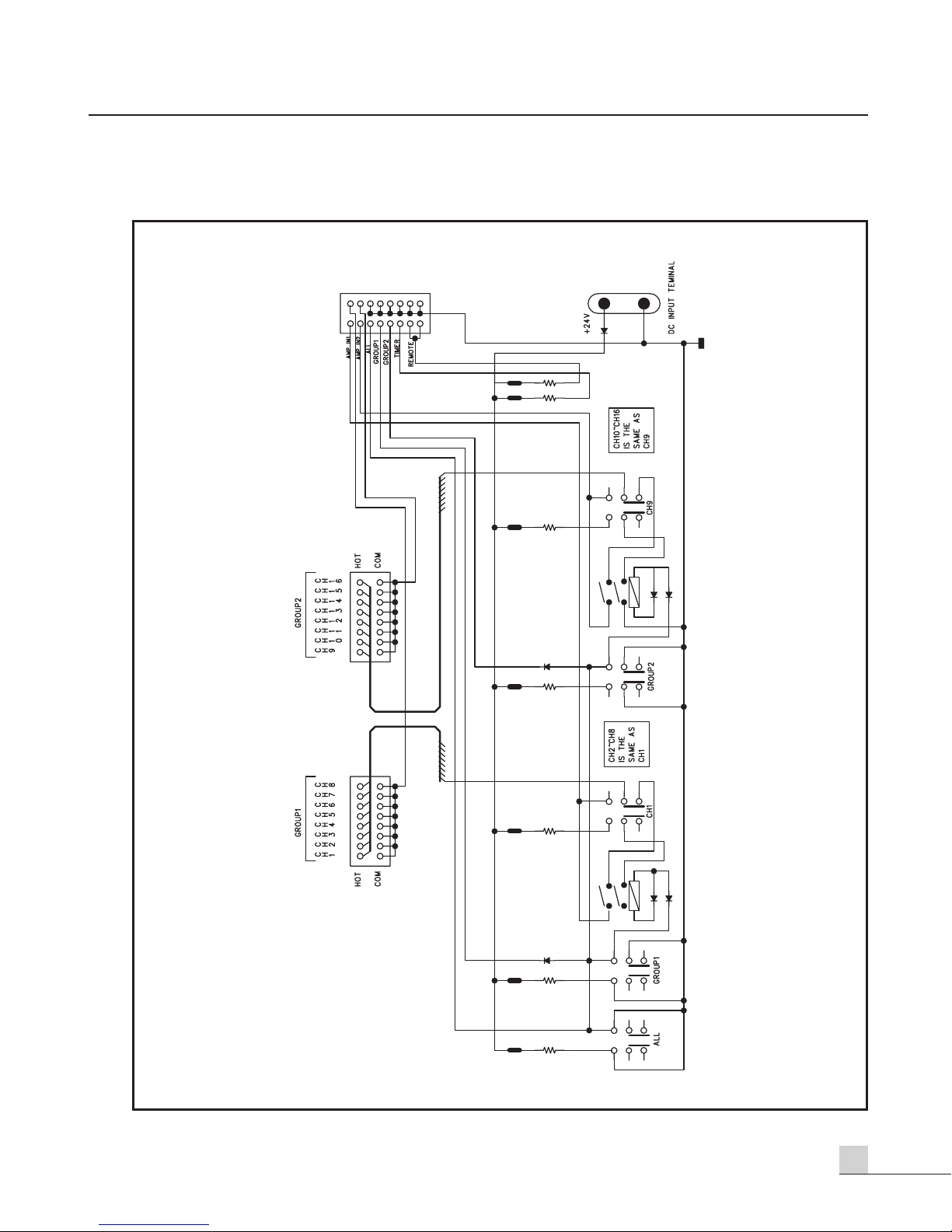
Block Diagram
Block Diagram
Page 10

Specifications
Specifications
- ELECTRICAL
Speaker Selection.............................................................................16 Channels, All Call, Group 1, Group 2
Indicators .........................................................................................16 Channels, All Cal, Group 1, Group 2
Current Rating ......................................................................................................Timer Mode, Remote Mode
- GENERAL
Power Source ...................................................................................................................................24V DC
Weight..................................................................................................................................... 3.6kg/7.9lb
Dimensions........................................................................482(W)x44(H)x280(D)mm/19(W)x1.7(H)x11(D)in
* Specifications and design subject to change without notice.
8
PS-9116
SPEAKER SELECTOR
Page 11

9
PS-9116
SPEAKER SELECTOR
Service
Service
Procedures
Take steps to insure the problem is not related to operator error or other products within the system. Information
provided in the troubleshooting portion of this manual may help with this process. Once it is certain that the
problem is related to the product contact your warranty provider as described in the warranty section of this
manual.
Schematic
A Schematic is available by contacting your warranty provider.
Parts List
A Parts List is available by contacting your warranty provider.
Variations and Options
Variations and Options
Variations
Products supplied through legitimate sources are compatible with local AC power requirements.
Options
No optional items are available for this product.
Warranty
Warranty
Warranty terms and conditions vary by country and may not be the same for all products. Terms and conditions
of warranty for a given product may be determined first by locating the appropriate country which the product
was purchased in, then by locating the product type.
To obtain specific warranty information and available service locations contact Inter-M directly or the authorized
Inter-M Distributor for your specific country or region.
Page 12

MADE IN CHINA
December 2005 9007104510 A
Inter-M, Ltd. (Korea) began operations in 1983.
Since then, Inter-M has grown to become one of the largest manufacturers
of professional audio and commercial sound electronics equipment in the world.
Inter-M has gained worldwide recognition for its own branded products,
as well as private label manufacturing of electronics sold under other names (OEM).
The company is no longer just a Korean company, but rather a global company
that is truly international in scope, with factories and offices in Korea and China,
and sales and marketing operations located in Japan, Europe, and the U.S.A.
With more than 850 employees around the globe,
Inter-M is well-poised for further growth and expansion.
INTER-M AMERICAS, INC.
1 EAST BEACON LIGHT LANE CHESTER, PA USA 19013-4409
TEL : 1-610-874-8870, FAX : 1-610-874-8890
Home Page : http://www.inter-m.net, E-mail : [email protected]
INTER-M Corporation
SEOUL OFFICE:653-5 BANGHAK-DONG, DOBONG-KU, SEOUL, KOREA
TEL : 82-2-2289-8140~8, FAX : 82-2-2289-8149
Home Page : http://www.inter-m.com, E-mail : [email protected]
 Loading...