

Page 1
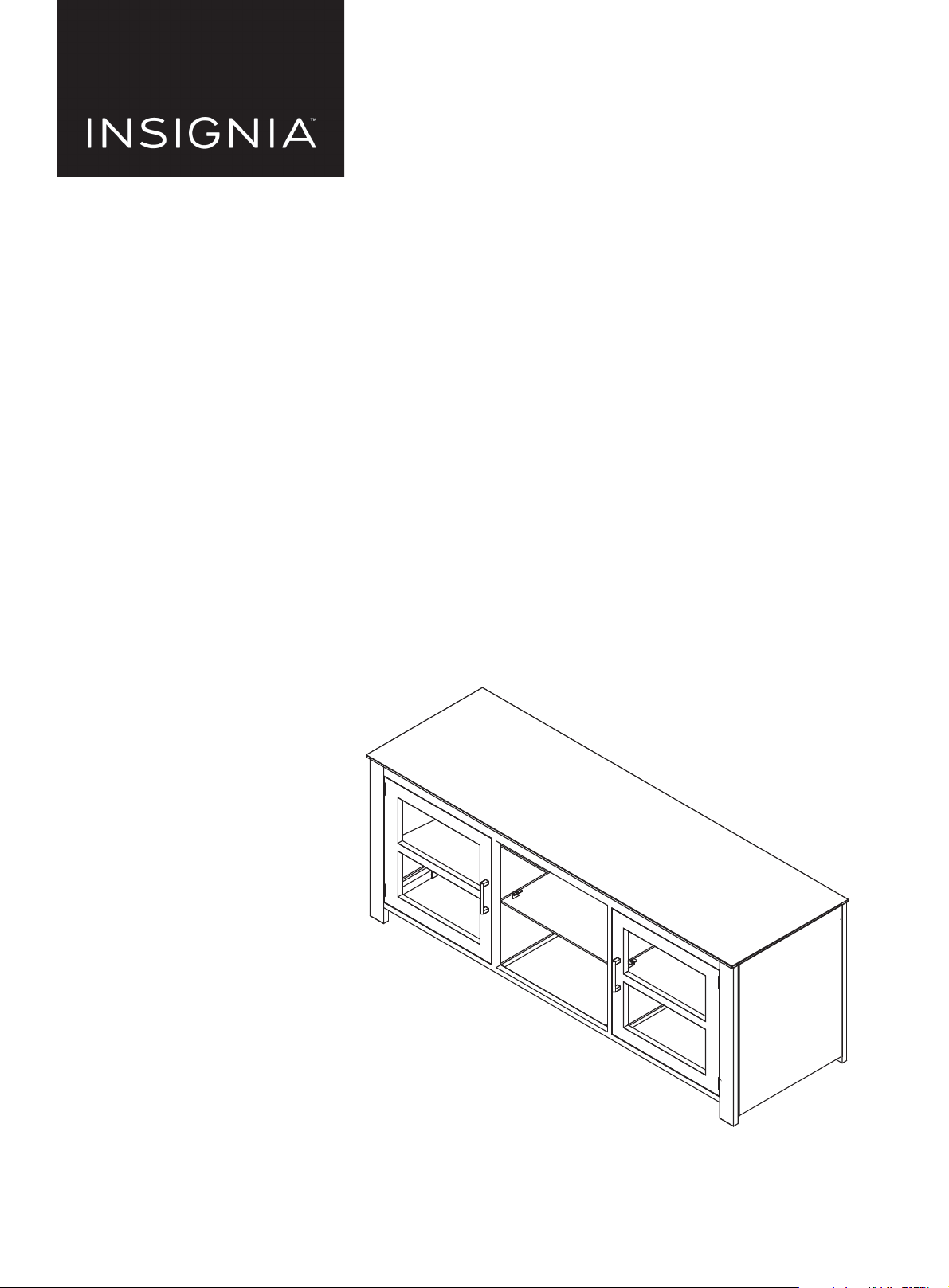
USER GUIDE
GUÍA DEL USUARIO
Metal, Glass, and Wood Finish TV
Stand
Metal, vidrio, y acabado de
madera Base para TV
NS-HWMG1663
ENGLISH.............................................................. 3
ESPAÑOL............................................................. 13
Before using your new product, please read these instructions to prevent any damage.
Antes de usar su producto nuevo, lea estas instrucciones para prevenir cualquier daño.
Page 2

CONTENTS
ENGLISH........................................................................................3
SAFETY INFORMATION AND SPECIFICATIONS....................................................... 3
PACKAGE CONTENTS: PARTS........................................................................................ 4
PACKAGE CONTENTS: HARDWARE ............................................................................ 5
ASSEMBLY INSTRUCTIONS............................................................................................ 6
CARE AND MAINTENANCE .........................................................................................11
ONE-YEAR LIMITED WARRANTY............................................................................................................................ 12
ESPAÑOL.................................................................................... 13
INFORMACIÓN DE SEGURIDAD Y ESPECIFICACIONES......................................13
CONTENIDO DEL PAQUETE: PIEZAS ........................................................................14
CONTENIDO DEL PAQUETE: FERRETERÍA...............................................................15
INSTRUCCIONES DE MONTAJE ..................................................................................16
CUIDADO Y MANTENIMIENTO...................................................................................21
GARANTÍA LIMITADA DE UN AÑO............................................................................22
2
www.insigniaproducts.com
Page 3
ENGLISH
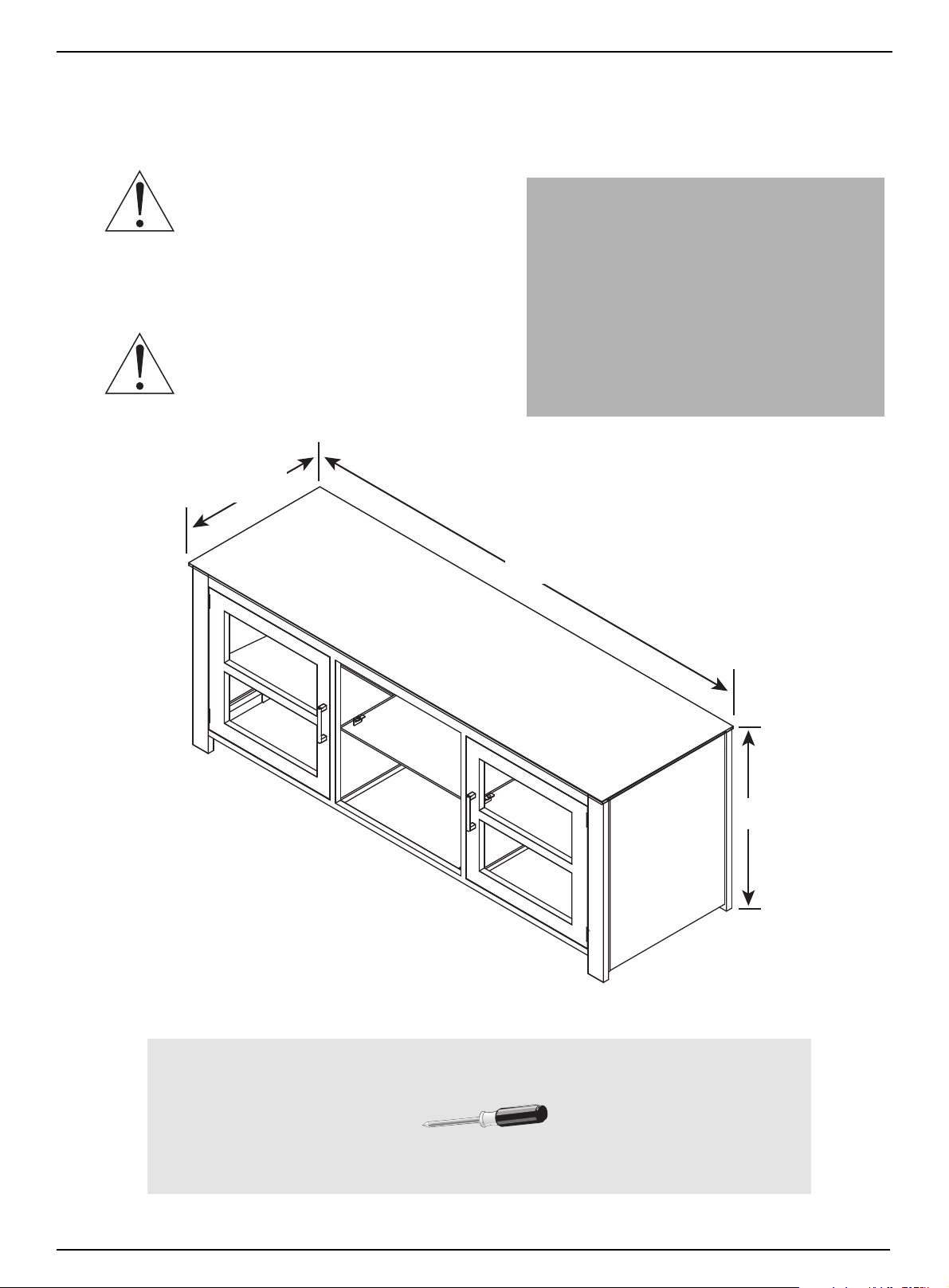
63 inch
(160 cm)
24 inch
(60.9 cm)
19 inch
(48.3 cm)
125 lbs.
35 lbs.
35 lbs.
Phillips screwdriver
SAFETY INFORMATION AND SPECIFICATIONS
NS-HWMG1663
CAUTION: The top surface of this stand is
designed for use with a product weighing no
more than
125 lbs. (56.7 kg) and having a width that permits
it to sit evenly on the stand with no more than a
one-inch overhang on each side of the shelf. Use with
products that weigh more than the maximum weight
allowed, or with dimensions that extend beyond the
maximum width may result in instability, which may result in
injury.
CAUTION: This product contains small items
that could be a choking hazard if swallowed.
Keep these items away from young children!
Model #: NS-HWMG1663
Maximum Supported Weights:
- Top shelf: 125 lbs. (56.7 kg)
- Middle shelf: 35 lbs. (15.9 kg)
- Bottom shelf: 35 lbs. (15.9 kg)
Maximum screen size: 70” diagonal
Overall dimensions (W × H × D):
63 x 24 x 19 in.
(160.0 x 60.9 x 48.3 cm)
Overall weight: 129 Lbs. (58.5 kg)
Tools needed:
www.insigniaproducts.com
3
Page 4
Metal, Glass, and Wood Finish TV Stand
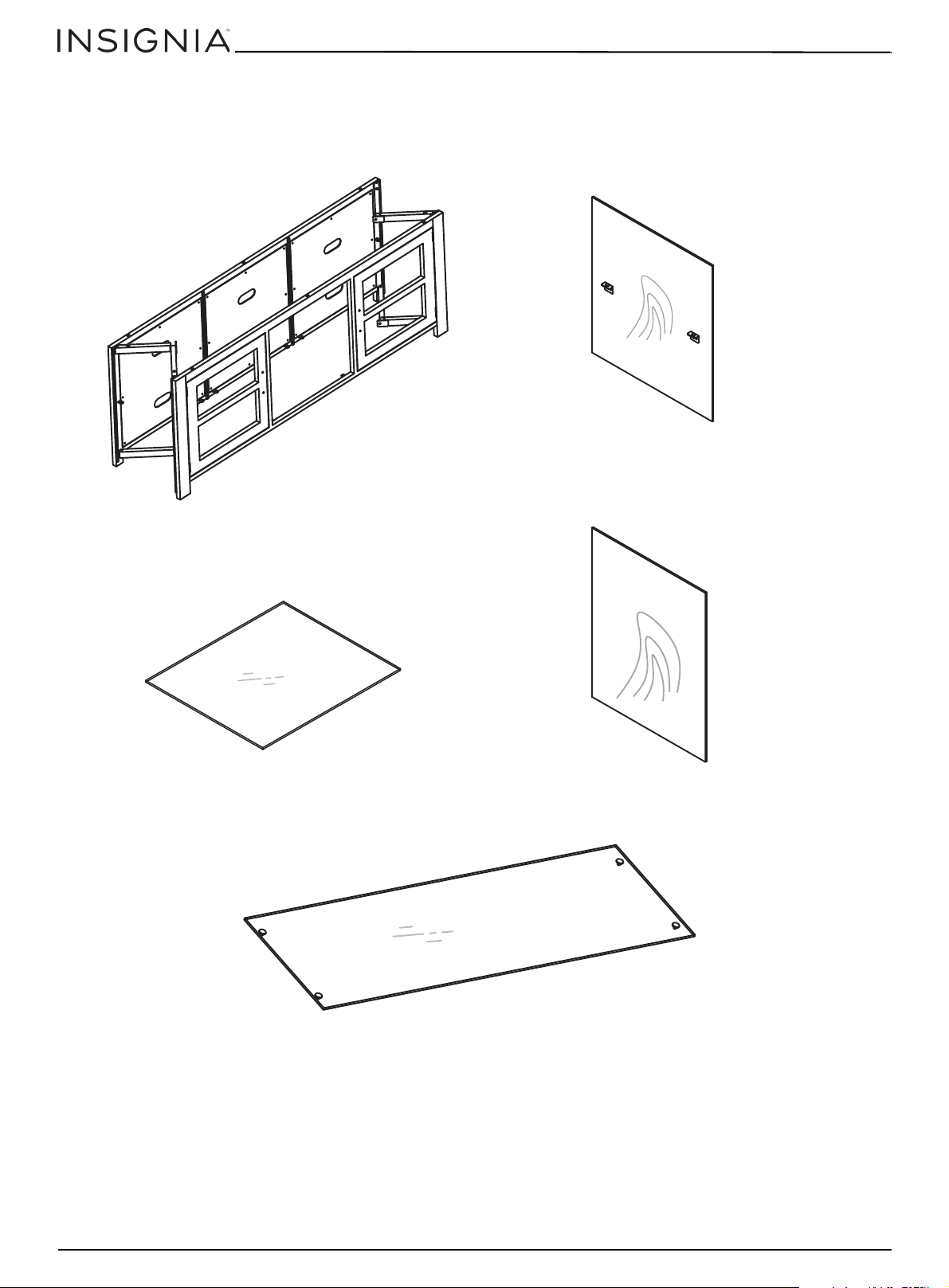
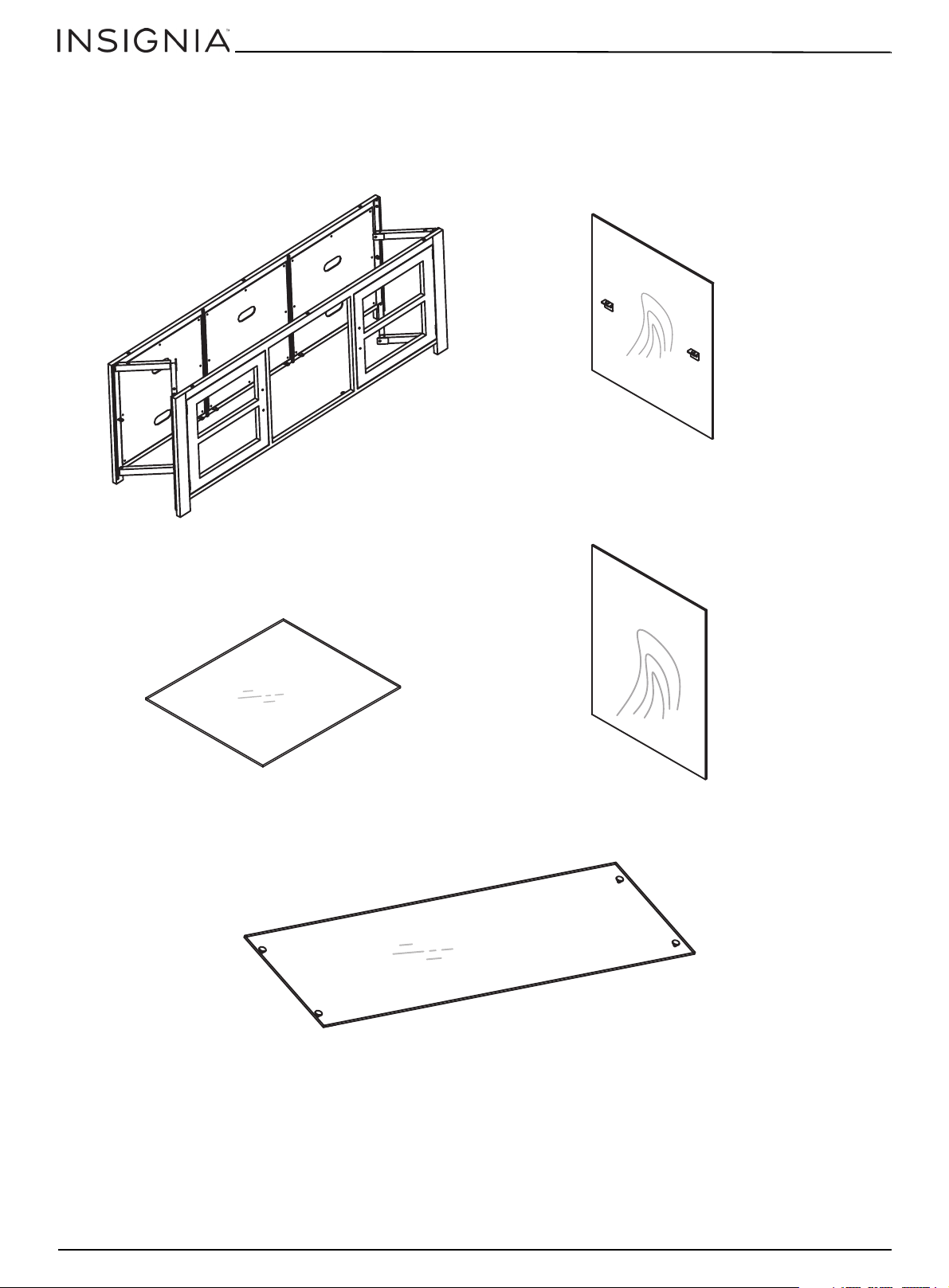
M1 - TV Stand Body (1)
M2 - Wood Interior Vertical Divider (2)
M3 - Glass Shelf (6)
M4 - Wood Side (2)
M5 - Glass Top (1)
Metal, vidrio, y acabado de madera Base para TV
PACKAGE CONTENTS: PARTS
Make sure that you have all the parts necessary to assemble your new TV stand. While not all parts are labeled,
some of the parts will have a label or an inked letter on the edge to help distinguish similar parts from each
other. Use this part identification to help identify similar parts.
4
www.insigniaproducts.com
Page 5
PACKAGE CONTENTS: HARDWARE
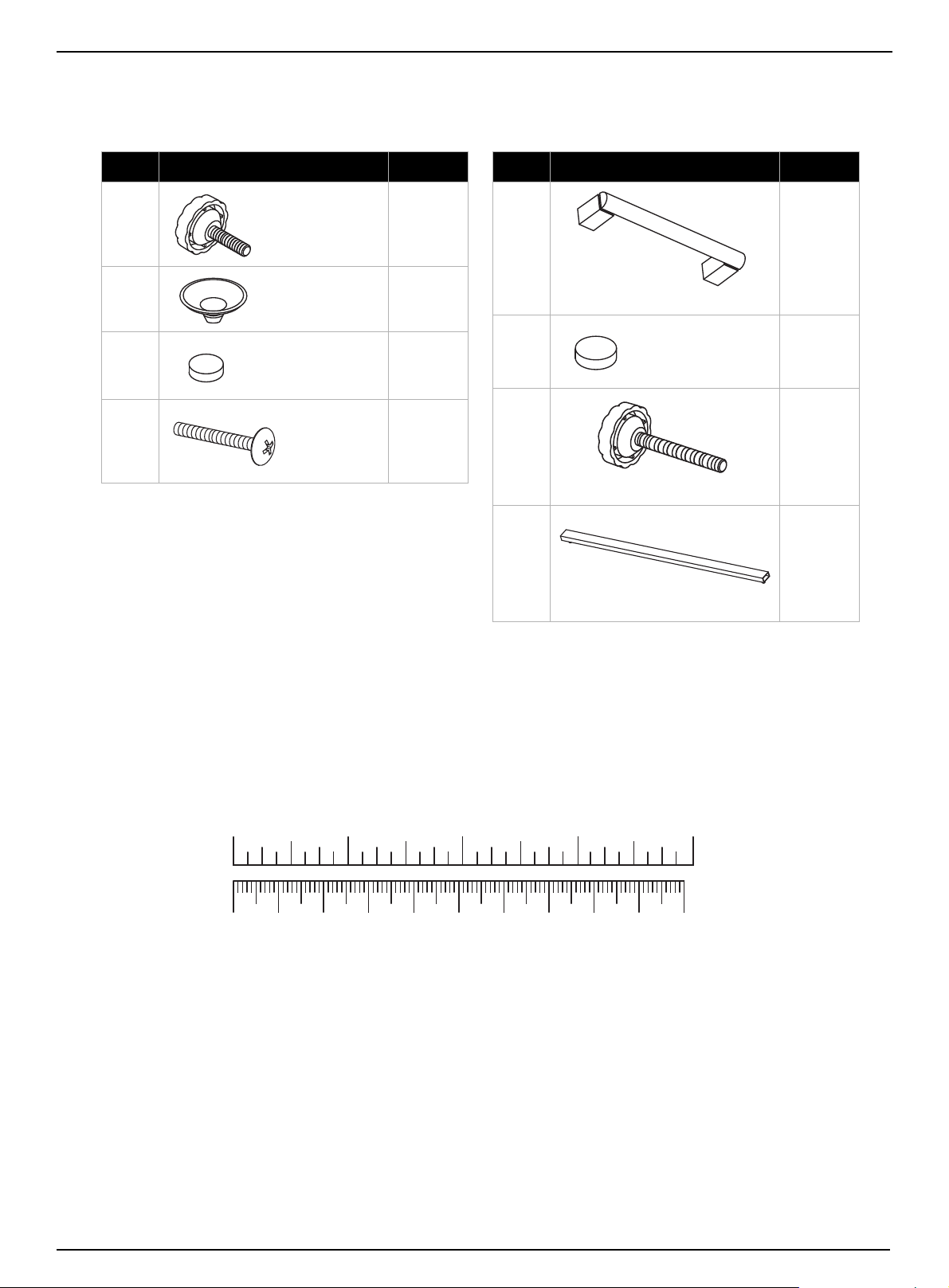
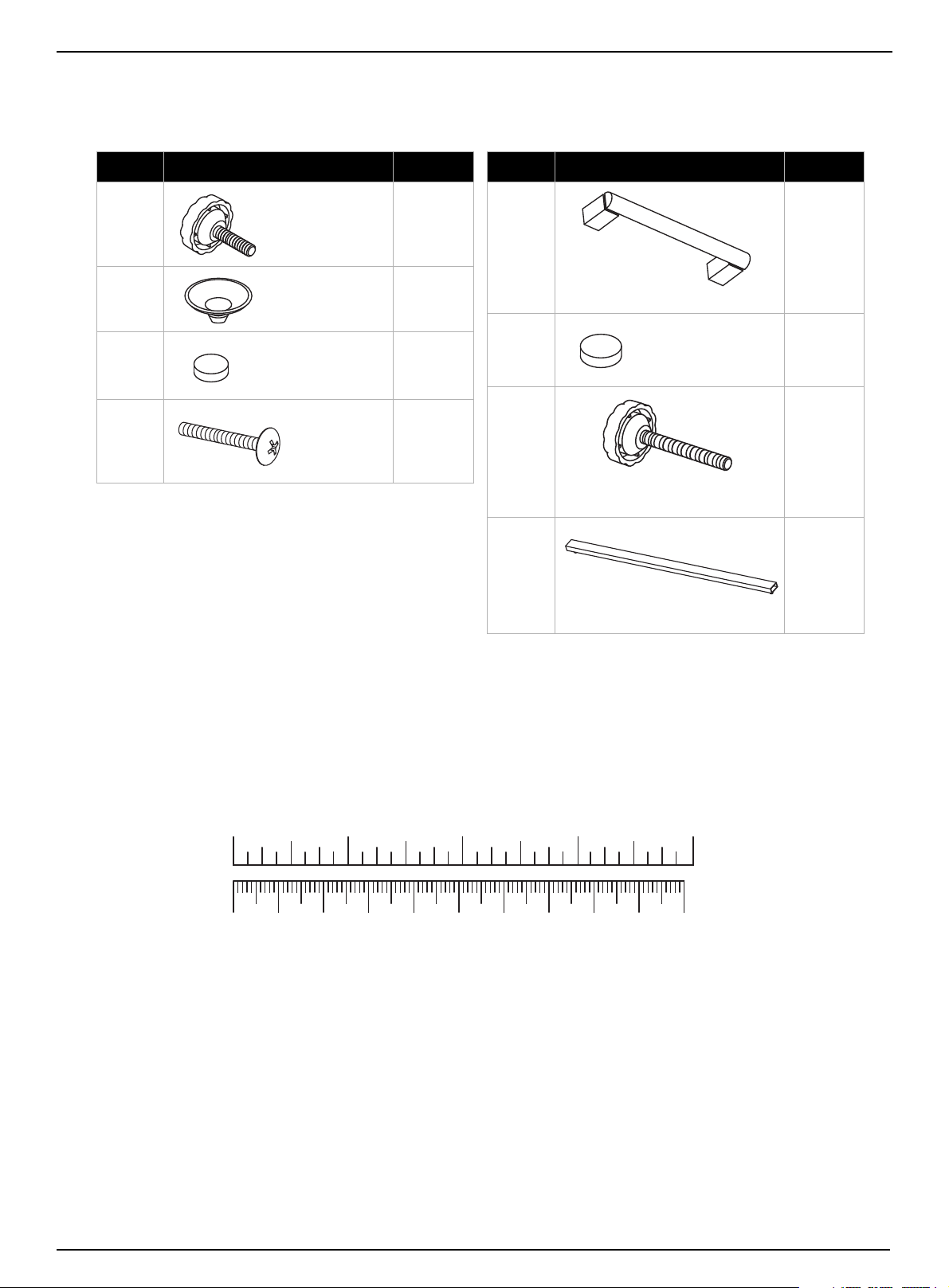
Label Hardware Qty.
M6 4
M7 12
M8 4
M9 4
15 mm
Body Screw
Rubber glass
support
Adhesive-backed
glass support
22mm screw
Label Hardware Qty.
M10 2
M11 8
M12 4
M13 1
Cabinet handle
Rubber shelf support
27 mm top support screw
Top brace
Note: The table below shows the required hardware. You may receive extra hardware.
Make sure that you have all the hardware necessary to assemble your new TV stand.
NS-HWMG1663
1234in
10 20 30 40 50 60 70 80 90 100mm
www.insigniaproducts.com
5
Page 6
ASSEMBLY INSTRUCTIONS
Front
Back
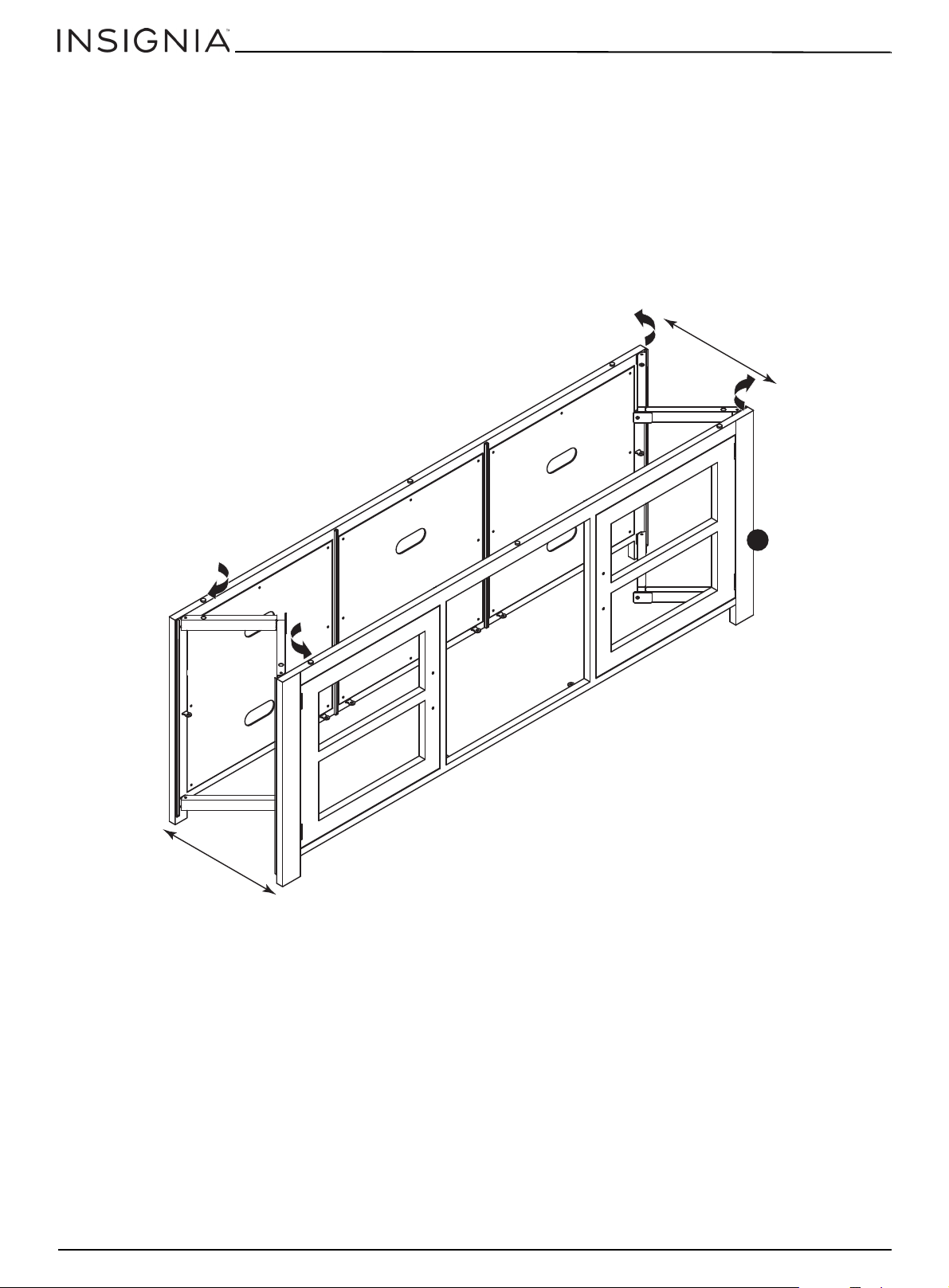
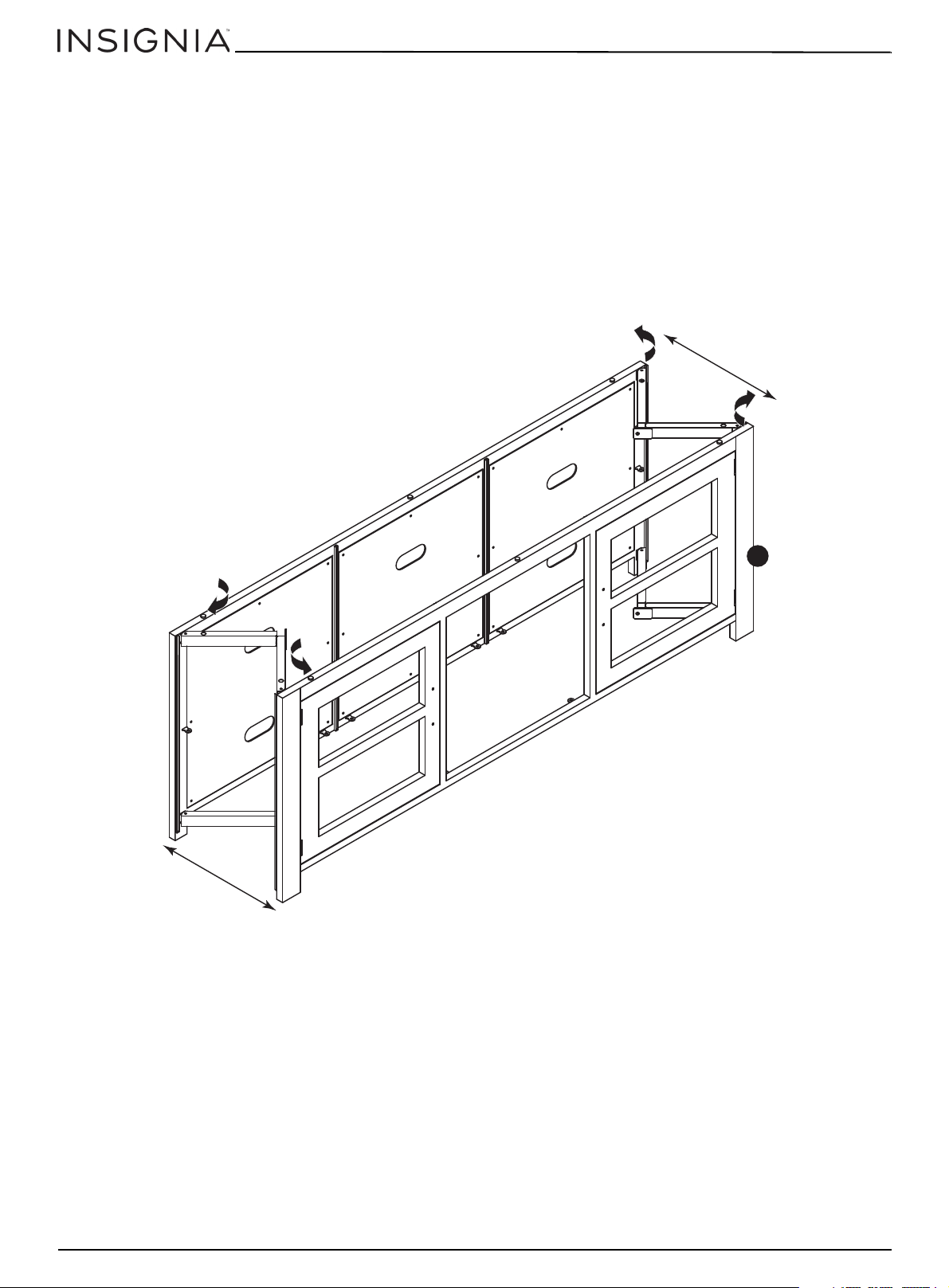
Step 1: Preparing the TV stand body
Caution: Assemble your stand on a carpeted floor or on the empty box to avoid scratching your stand.
1 Place the TV Stand Body (M1) upright on the floor.
2 Pull the front of the body away from the back of the body until the hinged sides are straight.
Note: We recommend having two people to assemble your TV stand.
Metal, Glass, and Wood Finish TV Stand
Metal, vidrio, y acabado de madera Base para TV
M1
6
www.insigniaproducts.com
Page 7
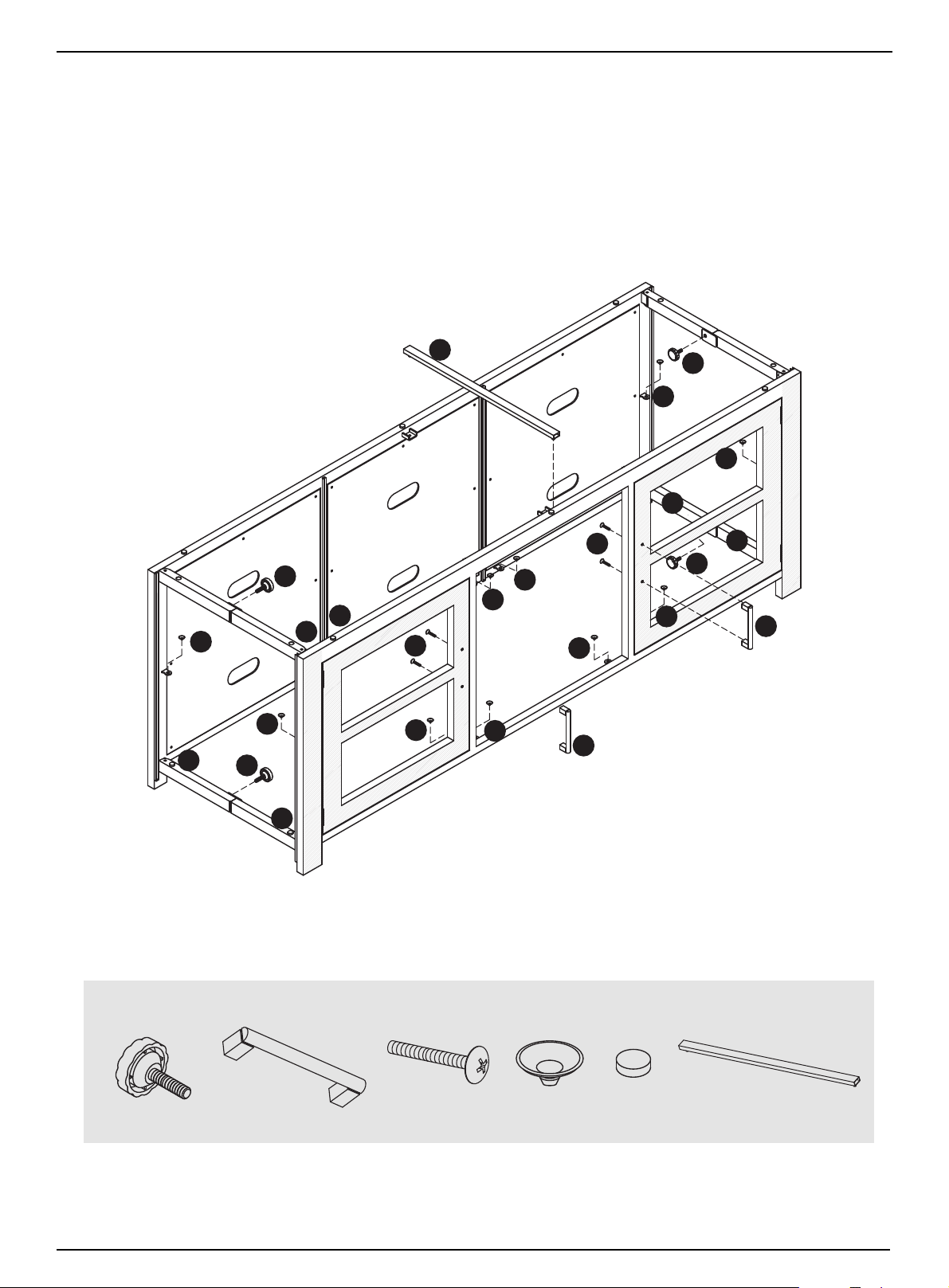
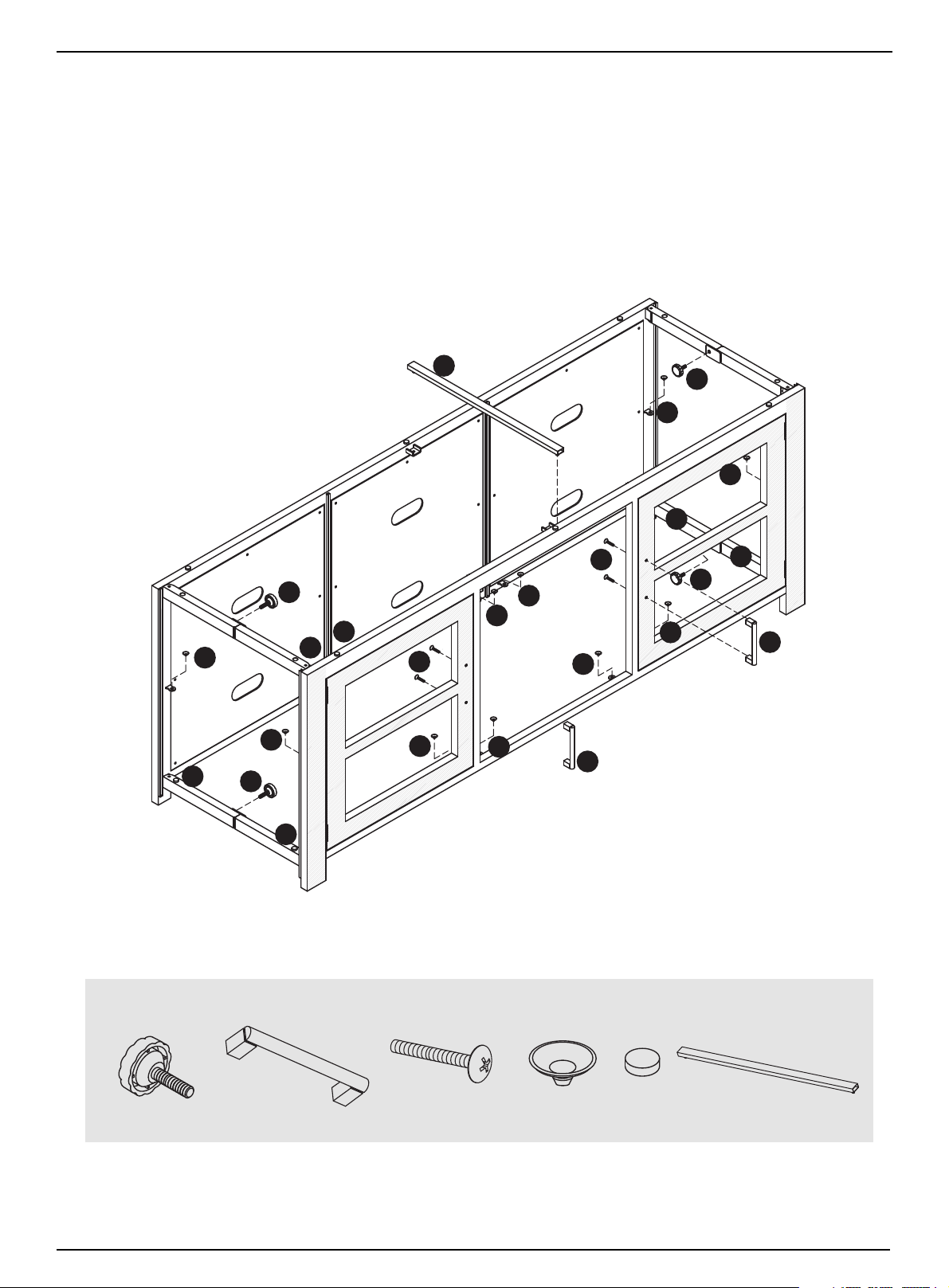
Step 2: Securing the hinged sides and installing the cabinet door handles
M6 (4)
M10 (2)
M9 (4)
M7 (12)
M8 (4)
M13 (1)
1 Using the four 15 mm body screws (M6) provided, secure the hinged sides into position.
2 Place the top brace (M13) into position in the brackets between the front and back.
3 Install the two cabinet door handles (M10) onto the cabinet doors with the four 22 mm screws (M9) provided.
4 Add rubber glass supports (M7 and M8) to the shelf brackets and the bottom, respectively.
NS-HWMG1663
M8
M7
M6
M7
M6
M7
M7
M9
M7
M13
M7
M7
M7
M7
M10
M9
M7
M7
M6
M7
M8
M8
M6
M10
You’ll need:
M8
www.insigniaproducts.com
7
Page 8
Metal, vidrio, y acabado de madera Base para TV
M2
M11
M3
M11
M11
M11
The other four M11s go
on the back sides of
these dividers in the
same locations.
M11 (8)
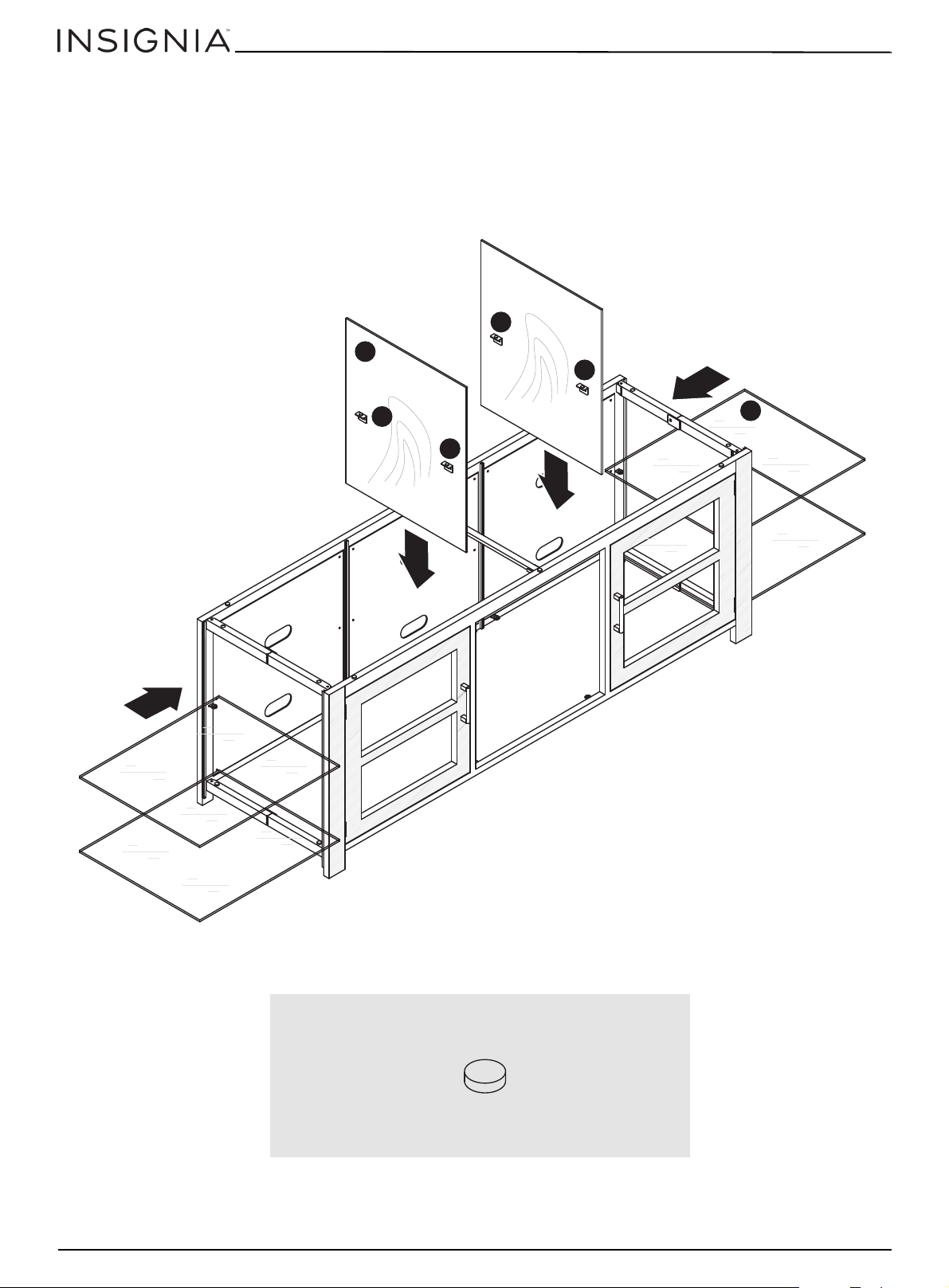
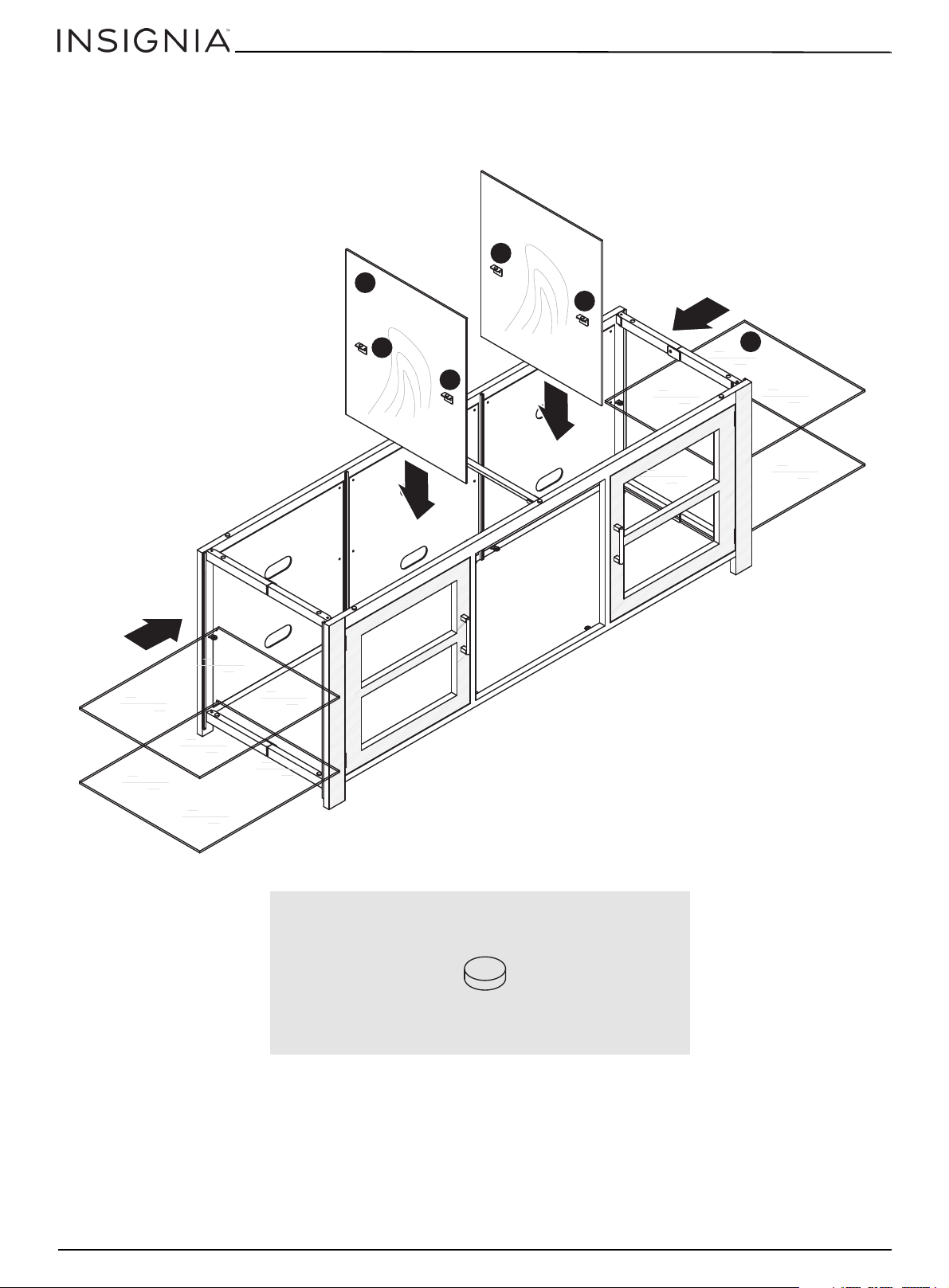
Step 3: Installing the interior dividers and glass side shelves
1 Install eight rubber shelf supports (M11) on the preinstalled shelf brackets of the interior dividers.
2 Slide the two interior dividers (M2) vertically into the grooves in the front and back of the TV stand body, as shown,
until they touch the bottom.
3 Slide four of the glass shelves (M3) into the TV stand body from the sides, as shown, until they touch the interior
dividers.
Metal, Glass, and Wood Finish TV Stand
You’ll need:
8
www.insigniaproducts.com
Page 9
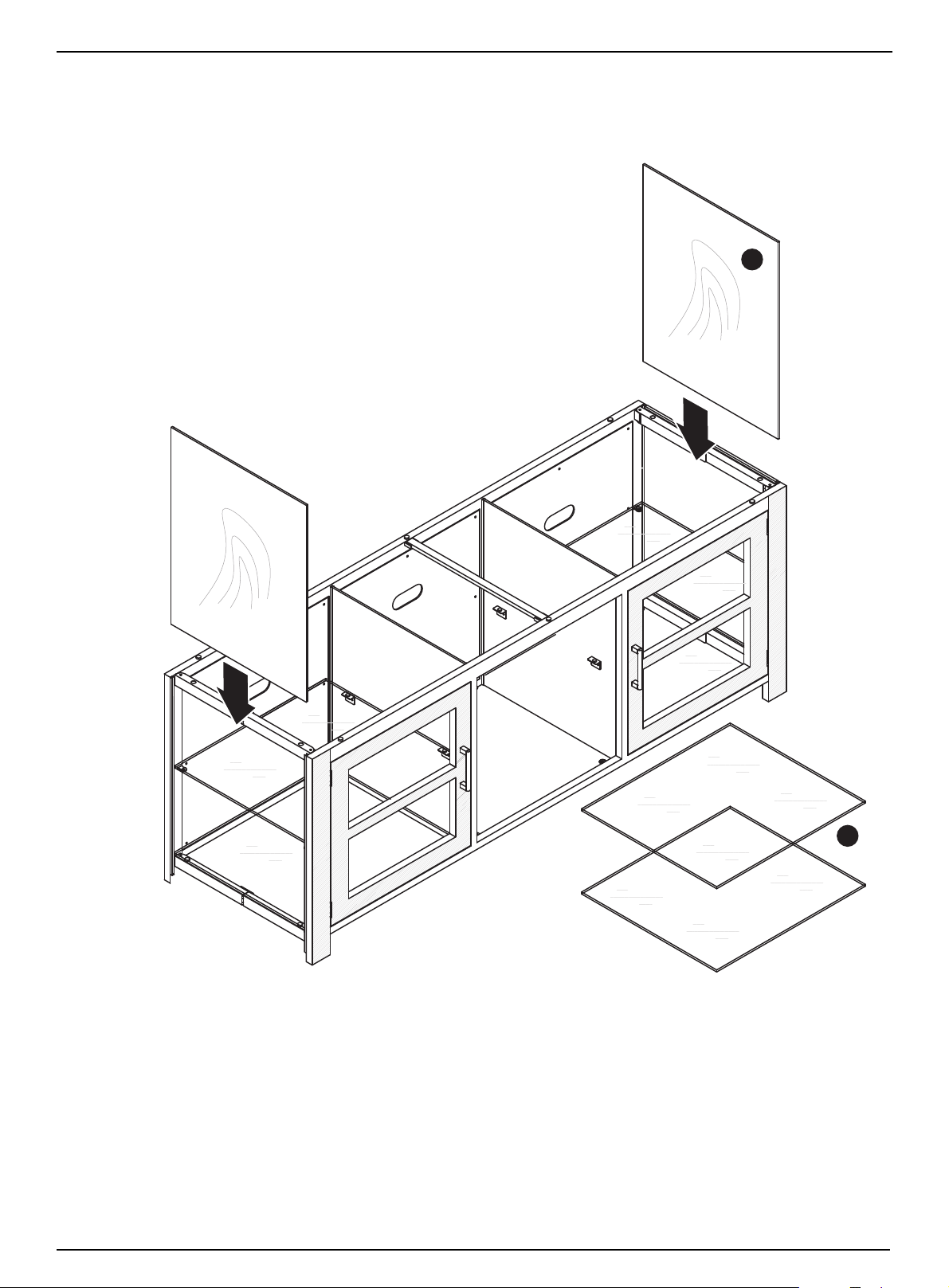
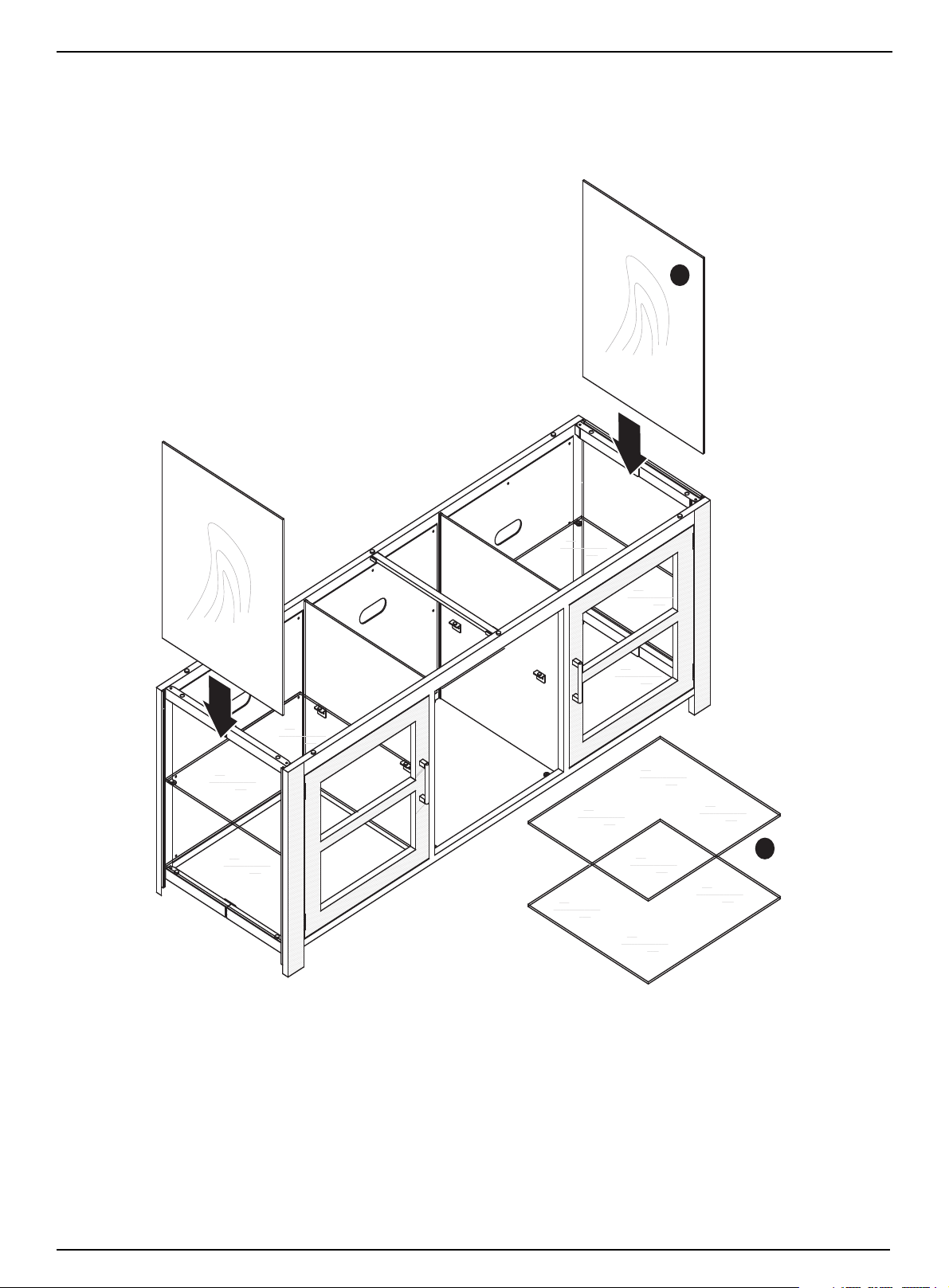
Step 4: Installing the wooden sides and glass interior shelves
1 Insert the two wooden sides (M4) into the grooves in the front and back of the TV stand body, as shown, until they
touch the bottom.
2 Install the remaining two interior glass shelves (M3) into the center of the TV stand body, as shown.
NS-HWMG1663
M4
www.insigniaproducts.com
M3
9
Page 10
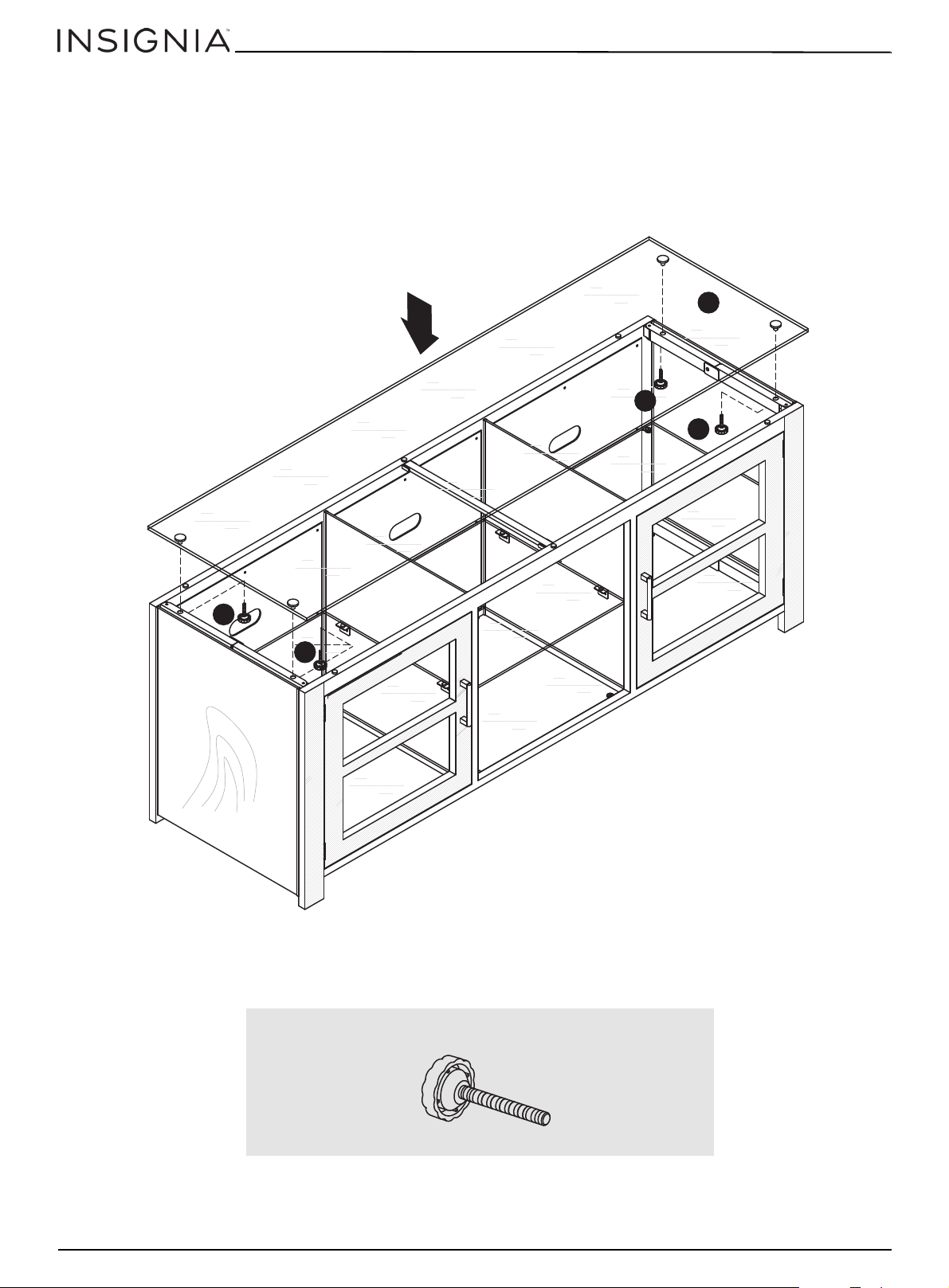
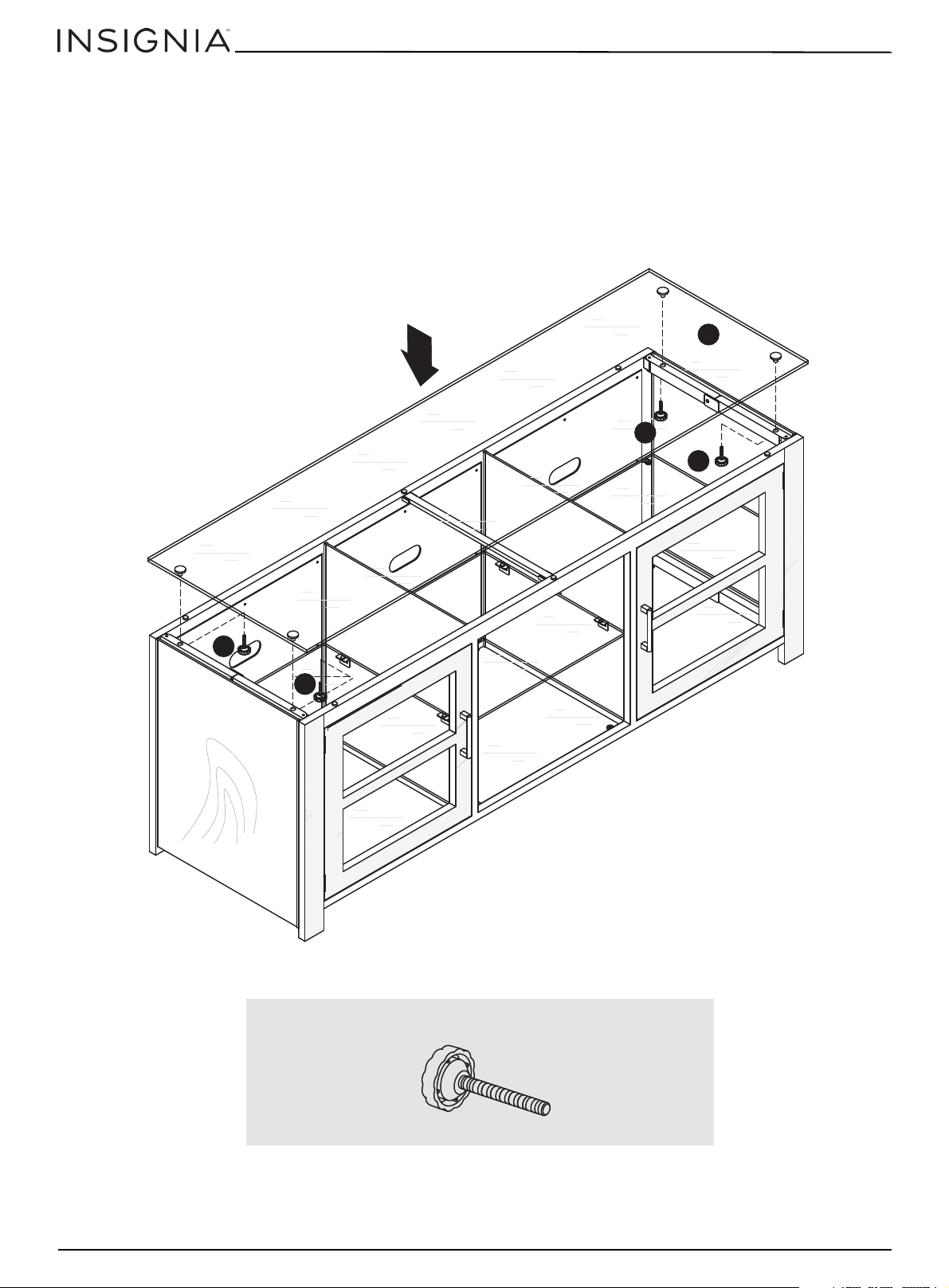
Step 5: Installing the top
M12 (4)
1 Install the four top support screws (M12) into the theaded holes in the top braces of the hinged sides.
2 With the help of another person, lift the glass top (M5) into position on the top of the TV stand body.
3 Screw the top support screws (M12) into the four pre-installed glass retention nuts on the glass top (M5) until the
top is secure.
Metal, Glass, and Wood Finish TV Stand
Metal, vidrio, y acabado de madera Base para TV
M5
M12
M12
M12
M12
You’ll need:
10
www.insigniaproducts.com
Page 11
NS-HWMG1663
CARE AND MAINTENANCE
Wood/Laminate
• Use your favorite type of furniture polish.
• Do not spray polish directly onto the stand. Spray onto a soft cloth then wipe the stand.
• Always test any polish in a discrete location first, such as the back of the stand, to make sure that there is no adverse
reaction.
• Dust frequently with a soft cloth.
• Never slide objects across surfaces. Lift objects from the top surface rather than dragging them across the finish when
moving them.
• Do not expose your stand to direct sunlight, drying heat sources, or dampness.
WARNING
Please use your stand correctly and safely. Improper use can cause safety hazards or damage to your furniture or household items. Carefully read
the following chart.
Look out for: What can happen: How to avoid the problem:
• Children climbing on the stand.
• Children will play and be active near the TV.
• Improper use of the stand to support TVs.
• TVs that are above the maximum specified weight and/or
size.
• Overloaded shelves • Risk of injury.
• Improperly moving the stand. • The stand can tip over or break if improperly moved.
• Risk of injury or death.
• A child playing with a TV can cause it to tip over.
• Risk of injury or death.
• TVs can be very heavy. Note, older CRT TVs tend to be
unbalanced and prone to tipping forward.
• Top-heavy furniture can tip over.
• Overloaded shelves can break.
•Risk of injury.
• Never allow children to climb on or play with the stand.
• Do not place toys or food on the top shelves. Children may
try to climb to reach them out of curiosity.
• A TV must only be set on furniture specifically designed to
support a television.
• Never use a TV that exceeds the weight ratings or size
guidelines specified for the stand.
• Never exceed the weight limits shown in the instructions.
• Work from the bottom to the top when loading shelves.
• The middle shelf can only support 25 lbs. and the bottom
shelf can only support 50 lbs. The top can support 125 lbs.
• Unload shelves from the top to the bottom before moving
the stand.
• Do not push the stand, especially on a carpeted floor. Have a
friend help you lift the item and set it in place.
• Do not lift the stand using the top shelf. Lift from the frame
or leg assembly.
• Remove the TV before moving the TV stand.
www.insigniaproducts.com
11
Page 12
Metal, Glass, and Wood Finish TV Stand
Metal, vidrio, y acabado de madera Base para TV
ONE-YEAR LIMITED WARRANTY
Definitions:
The Distributor* of Insignia branded products warrants to you, the original purchaser of this new Insignia-branded product (“Product”), that the
Product shall be free of defects in the original manufacturer of the material or workmanship for a period of one (1) year from the date of your purchase
of the Product (“Warranty Period”).
For this warranty to apply, your Product must be purchased in the United States or Canada from a Best Buy branded retail store or online at
www.bestbuy.com or www.bestbuy.ca and is packaged with this warranty statement.
How long does the coverage last?
The Warranty Period lasts for 1 year (365 days) from the date you purchased the Product. Your purchase date is printed on the receipt you received
with the Product.
What does this warranty cover?
During the Warranty Period, if the original manufacture of the material or workmanship of the Product is determined to be defective by an authorized
Insignia repair center or store personnel, Insignia will (at its sole option): (1) repair the Product with new or rebuilt parts; or (2) replace the Product at
no charge with new or rebuilt comparable products or parts. Products and parts replaced under this warranty become the property of Insignia and are
not returned to you. If service of Products or parts are required after the Warranty Period expires, you must pay all labor and parts charges. This
warranty lasts as long as you own your Insignia Product during the Warranty Period. Warranty coverage terminates if you sell or otherwise transfer the
Product.
How to obtain warranty service?
If you purchased the Product at a Best Buy retail store location or from a Best Buy online website (www.bestbuy.com or www.bestbuy.ca), please take
your original receipt and the Product to any Best Buy store. Make sure that you place the Product in its original packaging or packaging that provides
the same amount of protection as the original packaging.
To obtain warranty service, in the United States and Canada call 1-877-467-4289. Call agents may diagnose and correct the issue over the phone.
Where is the warranty valid?
This warranty is valid only in the United States and Canada at Best Buy branded retail stores or websites to the original purchaser of the product in the
country where the original purchase was made.
What does the warranty not cover?
This warranty does not cover:
• Customer instruction/education
• Installation
• Set up adjustments
• Cosmetic damage
• Damage due to weather, lightning, and other acts of God, such as power surges
• Accidental damage
•Misuse
•Abuse
•Negligence
• Commercial purposes/use, including but not limited to use in a place of business or in communal areas of a multiple dwelling condominium or
apartment complex, or otherwise used in a place of other than a private home.
• Modification of any part of the Product, including the antenna
• Display panel damaged by static (non-moving) images applied for lengthy periods (burn-in).
• Damage due to incorrect operation or maintenance
• Connection to an incorrect voltage or power supply
• Attempted repair by any person not authorized by Insignia to service the Product
• Products sold “as is” or “with all faults”
• Consumables, including but not limited to batteries (i.e. AA, AAA, C etc.)
• Products where the factory applied serial number has been altered or removed
• Loss or Theft of this product or any part of the product
• Display panels containing up to three (3) pixel failures (dots that are dark or incorrectly illuminated) grouped in an area smaller than one tenth
(1/10) of the display size or up to five (5) pixel failures throughout the display. (Pixel based displays may contain a limited number of pixels that
may not function normally.)
• Failures or Damage caused by any contact including but not limited to liquids, gels or pastes.
REPAIR REPLACEMENT AS PROVIDED UNDER THIS WARRANTY IS YOUR EXCLUSIVE REMEDY FOR BREACH OF WARRANTY. INSIGNIA SHALL NOT BE
LIABLE FOR ANY INCIDENTAL OR CONSEQUENTIAL DAMAGES FOR THE BREACH OF ANY EXPRESS OR IMPLIED WARRANTY ON THIS PRODUCT,
INCLUDING, BUT NOT LIMITED TO, LOST DATA, LOSS OF USE OF YOUR PRODUCT, LOST BUSINESS OR LOST PROFITS. INSIGNIA PRODUCTS MAKES NO
OTHER EXPRESS WARRANTIES WITH RESPECT TO THE PRODUCT, ALL EXPRESS AND IMPLIED WARRANTIES FOR THE PRODUCT, INCLUDING BUT NOT
LIMITED TO ANY IMPLIED WARRANTIES OF AND CONDITIONS OF MERCHANTABILITY AND FITNESS FOR A PARTICULAR PURPOSE, ARE LIMITED IN
DURATION TO THE WARRANTY PERIOD SET FORTH ABOVE AND NO WARRANTIES, WHETHER EXPRESS OR IMPLIED, WILL APPLY AFTER THE WARRANTY
PERIOD. SOME STATES, PROVINCES AND JURISDICTIONS DO NOT ALLOW LIMITATIONS ON HOW LONG AN IMPLIED WARRANTY LASTS, SO THE ABOVE
LIMITATION MAY NOT APPLY TO YOU. THIS WARRANTY GIVES YOU SPECIFIC LEGAL RIGHTS, AND YOU MAY ALSO HAVE OTHER RIGHTS, WHICH VARY
FROM STATE TO STATE OR PROVINCE TO PROVINCE.
Contact Insignia:
1-877-467-4289
www.insigniaproducts.com
INSIGNIA is a trademark of Best Buy and its affiliated companies.
*Distributed by Best Buy Purchasing, LLC
7601 Penn Ave South, Richfield, MN 55423 U.S.A.
©2020 Best Buy. All rights reserved.
12
www.insigniaproducts.com
Page 13
ESPAÑOL
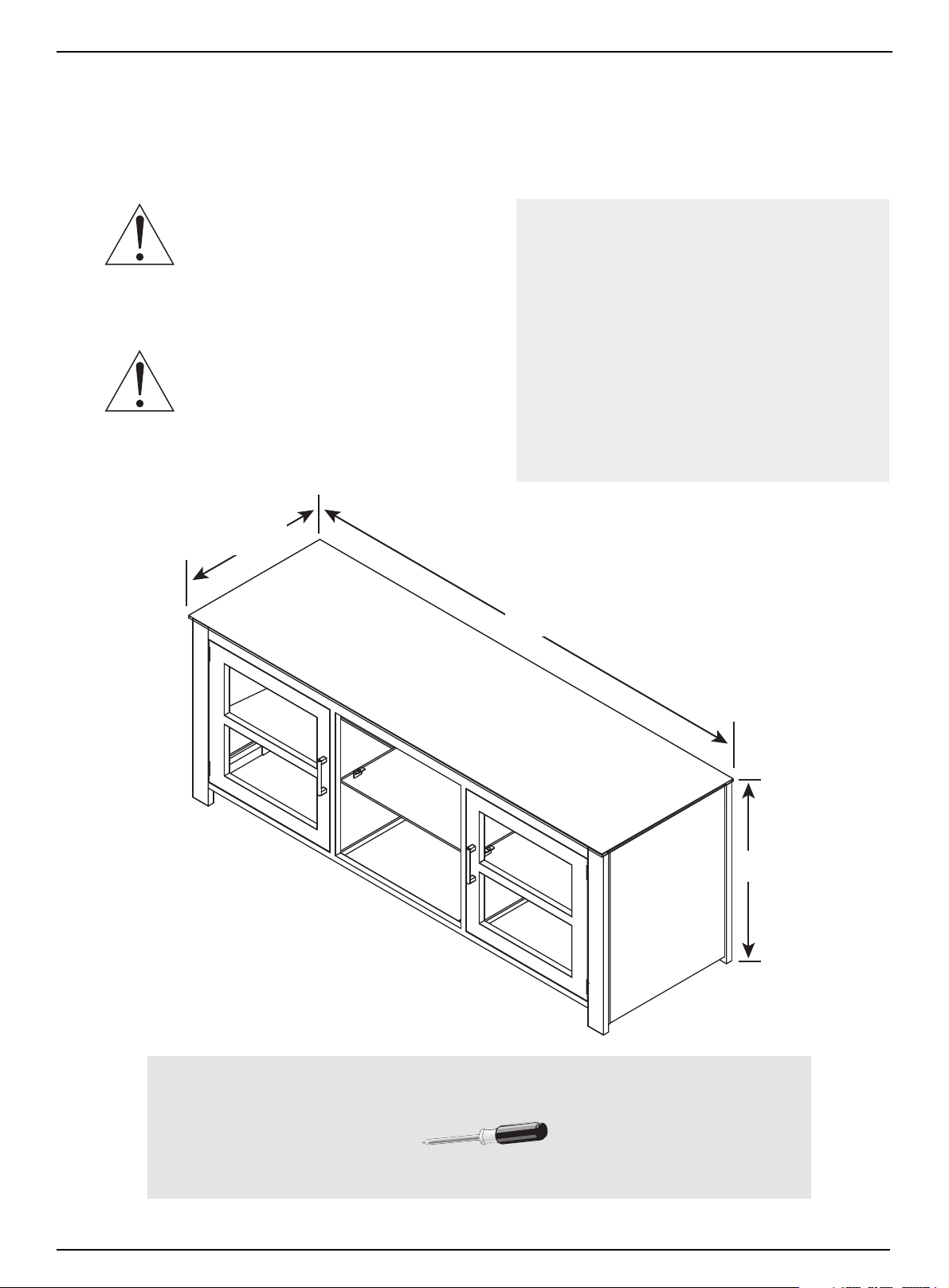
63 pulg.
(160 cm)
24 pulg.
(60.9 cm)
19 pulg.
(48.3 cm)
125 lb
35 lb
35 lb
Destornillador Phillips
INFORMACIÓN DE SEGURIDAD Y ESPECIFICACIONES
NS-HWMG1663
CUIDADO: la parte superior de esta base está
diseñada para utilizarse con productos de un
peso máximo de
125 lb (56.7 kg) y teniendo un ancho que le
permita asentarse de manera uniforme con un
saliente no mayor de una pulgada a cada lado de la repisa.
El uso con otros productos o con productos que pesen más
de lo especificado o que se sobrepasen del ancho máximo
puede crear inestabilidad y causar posibles lesiones.
CUIDADO: este producto contiene piezas
pequeñas que representan un peligro de
asfixia si se tragan. ¡Mantenga estas piezas
alejadas de los niños!
N.° de modelo: NS-HWMG1663
Pesos máximos admitidos:
- Repisa superior: 125 lb (56.7 kg)
- Repisa de en medio: 35 lb (15.9 kg)
- Repisa inferior: 35 lb (15.9 kg)
Tamaño máximo de pantalla: 70 pulg. en
diagonal
Dimensiones globales (Ancho × Alto ×
Profundidad):
63 x 24 x 19 pulg.
(160 x 60.9 x 48.3 cm)
Peso total: 129 lb (58.5 kg)
Herramientas requeridas:
www.insigniaproducts.com
13
Page 14
Metal, Glass, and Wood Finish TV Stand
M1 - Armazón de la base del televisor (1)
M2 - Separador interior vertical de madera (2)
M3 - Repisa de vidrio (6)
M4 - Lado de madera (2)
M5 - Repisa superior (1)
Metal, vidrio, y acabado de madera Base para TV
CONTENIDO DEL PAQUETE: PIEZAS
Asegúrese de que tenga todos los elementos necesarios para ensamblar su base nueva para televisor. Aunque
no todas las partes están marcadas, algunas de las partes tendrán una etiqueta o una letra marcada con tinta
en el borde para ayudar a distinguir las partes similares una de la otra. Use esta parte de identificación para
ayudarle a identificar las partes similares.
14
www.insigniaproducts.com
Page 15
CONTENIDO DEL PAQUETE: FERRETERÍA
Etiqueta Ferretería Cantidad
M6 4
M7 12
M8 4
M9 4
Tonillo del
armazón de
15 mm
Soporte de goma
para vidrio
Soporte de vidrio
con reverso
adhesivo
Tornillo de
22 mm
Etiqueta Ferretería Cantidad
M10 2
M11 8
M12 4
M13 1
Manija del gabinete
Soporte de goma
para la repisa
Tornillo del soporte
superior de 27 mm
Abrazadera superior
Nota: la tabla a continuación le muestra la ferretería requerida. Puede ser que reciba ferretería extra.
Asegúrese de que tenga todos los herrajes necesarios para el ensamblaje de la base de su televisor.
NS-HWMG1663
1234in
10 20 30 40 50 60 70 80 90 100mm
www.insigniaproducts.com
15
Page 16
INSTRUCCIONES DE MONTAJE
Parte frontal
Regresar
Paso 1: Preparación de la base del televisor
Cuidado: ensamble la base sobre una alfombra o sobre una caja de cartón vacía para evitar ralladuras en la base.
1 Coloque el armazón de la base del televisor (M1) verticalmente en el piso.
2 Tire de la parte delantera del armazón lejos de la parte posterior del armazón hasta que los lados con bisagras estén
derechos.
Nota: le recomendamos que dos personas ensamblen la base para televisor.
Metal, Glass, and Wood Finish TV Stand
Metal, vidrio, y acabado de madera Base para TV
M1
16
www.insigniaproducts.com
Page 17
NS-HWMG1663
M6 (4)
M10 (2)
M9 (4)
M7 (12)
M8 (4)
M13 (1)
Paso 2:Asegurado de los lados con bisagras e instalación de las manijas de la puerta
del gabinete
1 Fije los laterales con bisagra en su posición con los cuatro tornillos de 15 mm del armazón (M6) incluidos.
2 Coloque la abrazadera superior (M13) en su posición en los soportes entre en el panel frontal y posterior.
3 Instale las dos manijas de la puerta del gabinete (M10) en las puertas del gabinete con los cuatro tornillos de 22 mm
(M9) suministrados.
4 Agregue los soportes de goma para el vidrio (M7 y M8) de los soportes de la repisa y la parte inferior,
respectivamente.
M8
M7
M6
M7
M6
M7
M7
M9
M7
M13
M7
M7
M7
M7
M10
M9
M7
M7
M6
M7
M8
M8
M6
M10
M8
Necesitará:
Paso 3: Instalación de los separadores interiores y los laterales de vidrio de la repisa
1 Instale ocho soportes de goma para repisa (M11) en los soportes de las repisas preinstalados de los separadores
interiores.
www.insigniaproducts.com
17
Page 18
Metal, Glass, and Wood Finish TV Stand
Los otros cuatro M11 van en los
laterales posteriores de estos
separadores en las mismas
ubicaciones.
M11 (8)
Metal, vidrio, y acabado de madera Base para TV
2 Deslice los dos separadores interiores (M2) verticalmente en las ranuras en la parte delantera y posterior del
armazón de la base del televisor, como se muestra, hasta que toquen la parte inferior.
3 Deslice cuatro de las repisas de vidrio (M3) en el armazón de la base del televisor desde los lados, como se muestra,
hasta que toquen los separadores interiores.
M11
M2
M11
M11
M3
M11
18
Necesitará:
www.insigniaproducts.com
Page 19
NS-HWMG1663
Paso 4: Instalación de los laterales de madera y las repisas inferiores de vidrio
1 Inserte los dos lados de madera (M4) en las ranuras en la parte delantera y posterior del armazón de la base para
televisor, como se muestra, hasta que toquen la parte inferior.
2 Instale las dos repisas de vidrio interiores restantes (M3) en el centro del armazón de la base del televisor, como se
muestra.
M4
www.insigniaproducts.com
M3
19
Page 20
Paso 5: Instalación de la parte superior
M12 (4)
1 Instale los cuatro tornillos del soporte superior (M12) en los agujeros con rosca en los marcos superiores de los
laterales con bisagras.
2 Con la ayuda de otra persona, levante la repisa de vidrio superior (M5) en su posición en la parte superior del
armazón de la base del televisor.
3 Enrosque los tornillos superiores (M12) en las cuatro tuercas de retención de vidrio pre-instalada en la repisa (M5)
hasta que la parte superior esté segura.
Metal, Glass, and Wood Finish TV Stand
Metal, vidrio, y acabado de madera Base para TV
M5
M12
M12
M12
M12
Necesitará:
20
www.insigniaproducts.com
Page 21
NS-HWMG1663
CUIDADO Y MANTENIMIENTO
Madera y laminado
• Utilice su tipo de cera para muebles favorita.
• No vaporice directamente la cera en el mueble. Vaporice en un paño suave cuando limpie el mueble.
• Siempre pruebe la cera en un lugar discreto primero, tal como la parte posterior del mueble para asegurarse que no
haya una reacción no deseada.
• Limpie regularmente con un paño suave.
• No deslice objetos en las superficies. Levante los objetos de la superficie superior para no arrastrarlos sobre el
acabado al moverlos.
• No exponga su mueble a la luz solar directa, a fuentes de calor secadoras o humedad.
ADVERTENCIA
Por favor use su mueble correctamente y con cuidado. El uso incorrecto puede causar riesgos para la seguridad o daños al mueble o a los artículos
del hogar. Lea cuidadosamente la siguiente tabla.
Preste atención a: ¿Qué puede suceder? Como evitar el problema:
• Niños subiéndose al mueble.
• Cerca del televisor los niños juegan y están activos.
• Uso incorrecto del mueble para sostener televisores.
• Televisores que están por encima del peso o tamaño
máximo especificado.
• Repisas sobrecargadas • Riesgo de lesiones.
• Desplazamiento incorrecto del mueble • El mueble puede volcarse o romperse si se mueve
• Riesgo de lesiones o muerte.
• Un niño jugando con un televisor podría hacerlo volcar.
• Riesgo de lesiones o muerte.
• El televisor puede ser muy pesado. Además, los televisores
antiguos CRT (con tubo catódico) se pueden desequilibrar
y volcarse hacia delante.
• Los muebles pesados se pueden volcar.
• Las repisas sobrecargadas pueden romperse.
incorrectamente.
• Riesgo de lesiones.
• No deje que niños se suban sobre el mueble o jueguen con el
mismo.
• No coloque juguetes o comidas sobre las repisas superiores.
Los niños trataran de subir para alcanzarlos solo por
curiosidad.
• Un televisor debe de ser colocado solamente en un mueble
diseñado para televisores.
• No utilice un televisor que exceda el peso y las dimensiones
especificadas para este mueble.
• No exceda nunca los limites de peso que se muestran en las
instrucciones.
• Llene las repisas de abajo hacia arriba.
• La repisa del medio solamente puede aguantar 25 lb y la
repisa inferior 50 lb. Las repisa superiores pueden aguantar
125 lb.
• Retire las repisas de arriba hacia a bajo antes de mover el
mueble.
• No empuje el mueble, sobre todo en un piso de alfombra.
Que un amigo le ayude a levantar el producto y colocarlo en
su lugar.
• No levante el mueble usando la repisa superior. Levántela
por el marco o las patas.
• Retire el televisor antes de mover el mueble para televisor.
www.insigniaproducts.com
21
Page 22
Metal, Glass, and Wood Finish TV Stand
Metal, vidrio, y acabado de madera Base para TV
GARANTÍA LIMITADA DE UN AÑO
Descripción:
El Distribuidor* de los productos de la marca Insignia le garantiza a usted, el comprador original de este producto nuevo de la marca Insignia
(“Producto”), que éste se encontrará libre de defectos de material o de mano de obra en su fabricación original por un período de un (1) año a partir de
la fecha de compra del Producto (“Período de garantía”).
Para que esta garantía se aplique, su Producto tiene que haberse comprado en los Estados Unidos o en Canadá con un detallista de la marca Best Buy
o en línea en los sitios www.bestbuy.com o www.bestbuy.ca y empacado con esta declaración de garantía.
¿Cuánto dura la garantía?
El Período de garantía dura por 1 año (365 días) a partir de la fecha en que compró el Producto. La fecha de compra se encuentra impresa en el recibo
que recibió con el Producto.
¿Qué es lo que cubre esta garantía?
Durante el Período de garantía, si un centro de reparación autorizado de Insignia concluye que la fabricación original del material o la mano de obra
del Producto se encuentran defectuosos Insignia (cómo su opción exclusiva): (1) reparará el Producto con repuestos nuevos o reconstruidos; o (2)
reemplazará el Producto sin costo alguno por un producto nuevo o reconstruido con características similares. Los Productos y repuestos
reemplazados bajo esta garantía se volverán propiedad de Insignia y no se le regresarán a usted. Si se requiere la reparación de Productos o partes
después de que se vence el Período de garantía, usted deberá pagar todos los costos de mano de obra y de repuestos. Esta garantía estará vigente
tanto como usted sea el dueño de su producto Insignia durante el período de garantía. La cobertura de la garantía se anula si usted vende o transfiere
el Producto.
¿Cómo se obtiene el servicio de garantía?
Si se compró el Producto en una tienda de Best Buy, o en un sitio Web de Best Buy (www.bestbuy.com o www.bestbuy.ca), lleve su recibo original y el
Producto a cualquier tienda de Best Buy. Asegúrese de volver a colocar el Producto en su empaque original o en un empaque que provea la misma
protección que el original.
Para obtener servicio de garantía, por favor llame al 1-877-467-4289 en los Estados Unidos y Canadá. Los agentes de soporte técnico diagnosticarán y
corregirán el problema por teléfono.
¿Dónde es válida la garantía?
Esta garantía sólo es válida en los Estados Unidos y Canadá en las tiendas de Best Buy o en sus sitios Web para el comprador original del producto en
el país donde se realizó la compra.
¿Qué es lo que no cubre la garantía?
Esta garantía no cubre:
• Capacitación o instrucción del cliente
•Instalación
• Ajustes de configuración
• Daños cosméticos
• Daños debidos al clima, relámpagos, causas de fuerza mayor, tales como sobretensiones
• Danos accidentales
• Uso inapropiado
•Abuso
•Negligencia
• Uso o propósito comercial, incluyendo pero no limitado al uso en centros comerciales o lugares comunes de un condominio de varios pisos o un
edificio de departamentos, o cualquier uso en un lugar que no sea una casa privada.
• Modificación de alguna parte del Producto, incluyendo la antena
• Un panel de pantalla dañado por la persistencia de imágenes estáticas (sin movimiento), mostradas por períodos de tiempo extendido (efecto
“burn-in”).
• Daño debido al uso o mantenimiento inapropiado
• Conexión a una fuente de voltaje o de alimentación incorrecta
• Intento de reparación por cualquier persona que no sea autorizada por Insignia para reparar el Producto
• Productos vendidos “tal cual” (en el estado en que se encuentran) o “con todas sus fallas”
• Consumibles, incluyendo pero no limitado a pilas o baterías (tipo AA, AAA, C etc.)
• Productos en los cuales el número de serie asignado en la fábrica ha sido alterado o removido
• Pérdida o robo de este producto o cualquier parte de sus componentes
• Las pantallas con hasta tres (3) píxeles defectuosos (puntos oscuros o incorrectamente iluminados) agrupados en una superficie más pequeña
que la décima parte (1/10) del tamaño de la pantalla ni hasta cinco (5) píxeles defectuosos en toda la superficie de la pantalla. Las pantallas con
píxeles pueden tener un número limitado de píxeles defectuosos.
• Los defectos o daños causados cómo resultado de cualquier contacto, sin limitarse a líquidos, geles o pastas.
EL REEMPLAZO O LA REPARACIÓN ESTIPULADOS BAJO ESTA GARANTÍA SON SU RECURSO EXCLUSIVO POR CUALQUIER VIOLACIÓN DE LA GARANTÍA.
INSIGNIA NO SERÁ RESPONSABLE POR DAÑOS INCIDENTALES O CONSECUENTES DEBIDO AL INCUMPLIMIENTO DE CUALQUIER GARANTÍA EXPRESA O
IMPLÍCITA RELACIONADA CON ESTE PRODUCTO, INCLUYENDO PERO SIN LIMITARSE A LA PÉRDIDA DE INFORMACIÓN, LA PÉRDIDA DE NEGOCIOS O DE
GANANCIAS. INSIGNIA PRODUCTS NO HACE NINGUNA OTRA GARANTÍA EXPRESA E IMPLÍCITA RELACIONADA A ESTE PRODUCTO, INCLUYENDO PERO
SIN LIMITARSE A, CUALQUIER GARANTÍA IMPLÍCITA Y CONDICIONES DE COMERCIALIZACIÓN Y IDONEIDAD PARA UN USO PARTICULAR, ESTÁN
LIMITADAS EN DURACIÓN AL PERÍODO DE GARANTÍA DECLARADO ANTERIORMENTE Y NINGUNA GARANTÍA YA SEA EXPRESA O IMPLÍCITA SE
APLICARÁ DESPUÉS DEL PERÍODO DE GARANTÍA. ALGUNOS ESTADOS, PROVINCIAS Y JURISDICCIONES NO PERMITEN RESTRICCIONES EN CUANTO A
LA DURACIÓN DE UNA GARANTÍA IMPLÍCITA, ASÍ QUE LA RESTRICCIÓN ANTERIOR PUEDE NO APLICARSE EN SU CASO. ESTA GARANTÍA LE DA
DERECHOS LEGALES ESPECÍFICOS, Y USTED PUEDE POSEER OTROS DERECHOS QUE VARÍAN DE ESTADO A ESTADO, O DE PROVINCIA A PROVINCIA.
Comuníquese con Insignia:
1-877-467-4289
www.insigniaproducts.com
INSIGNIA es una marca comercial de Best Buy y sus compañías asociadas.
* Distribuido por Best Buy Purchasing, LLC
7601 Penn Av. South, Richfield, MN 55423 E.U.A.
© 2020 Best Buy. Todos los derechos reservados.
22
www.insigniaproducts.com
Page 23
Certificate of Conformity
1. This certificate applies to the Insignia Product
identified by this instruction booklet.
2. This certificate applies to the compliance of this
product with the CPSC Ban on Lead-Containing
Paint (16 CFR 1303).
3. This product was manufactured for:
Insignia
4. Date of Manufacture: _______________
Lot number:
Certificado de conformidad
1. Este certificado aplica al producto de Insignia
identificado en este manual de instrucciones.
2. Este certificado aplica al cumplimiento de este
producto con la Prohibición CPSC de Pintura con
Plomo (16 CFR 1303).
3. Este producto fue fabricado por:
Insignia -
4. Fecha de fabricación: ___________
Número de lote:
1-877-467-4289 (U.S. and Canada) or 01-800-926-3000 (Mexico)
www.insigniaproducts.com
INSIGNIA is a trademark of Best Buy and its affiliated companies.
Distributed by Best Buy Purchasing, LLC
©2020 Best Buy. All rights reserved.
1-877-467-4289 (EE.UU. y Canadá) o el 01-800-926-3000 (México)
www.insigniaproducts.com
INSIGNIA es una marca comercial de Best Buy y sus compañías asociadas.
Distribuida por Best Buy Purchasing, LLC
© 2020 Best Buy. Todos los derechos reservados.
V6 ENGLISH
V6 ESPAÑOL
20-0544
 Loading...