

Page 1

User Guide | Guide de l’utilisateur | Guía del Usuario
Premium Car Sound System – Amplifier
Premium Car Sound System – Amplifier(French)
Premium Car Sound System – Amplifier(Spanish)
IS - PCSS101
Page 2
Insignia-PY-2E10-Car Amplifier.fm Page 1 Tuesday, May 3, 2005 2:19 PM
Welcome
Congratulations on your purchase of a high-quality Insignia product.
Your PY-2E10 represents the state of the art in car power amplifier
design, and is designed for reliable and trouble-free performance.
Contents
Welcome . . . . . . . . . . . . . . . . . . . . . . . . . . . . . . . . . . . . . . . . . . 1
Safety information . . . . . . . . . . . . . . . . . . . . . . . . . . . . . . . . . . . 1
Setting up your amplifier . . . . . . . . . . . . . . . . . . . . . . . . . . . . . . 2
Using your amplifier . . . . . . . . . . . . . . . . . . . . . . . . . . . . . . . . . 4
Specifications . . . . . . . . . . . . . . . . . . . . . . . . . . . . . . . . . . . . . . 6
Troubleshooting. . . . . . . . . . . . . . . . . . . . . . . . . . . . . . . . . . . . . 6
Safety information
Warning
Caution
Exercise extreme caution when you operate the amplifier near an
open gasoline tank or electrical wires. Failure to comply with this
warning could result in injury or death.
Speaker damage can result from high volume levels.
Protect connecting wires and parts to avoid damage or short
circuits.
To protect the amplifier unit, make sure the power connection from
the positive (+) battery terminal to the amplifier is correctly fused.
The sound system must be turned off before checking the amplifier.
When you replace an amplifier fuse, make sure you use the same
fuse type and capacity (20A).
www.insignia-products.com
1
Page 3
Insignia-PY-2E10-Car Amplifier.fm Page 2 Tuesday, May 3, 2005 2:19 PM
Setting up your amplifier
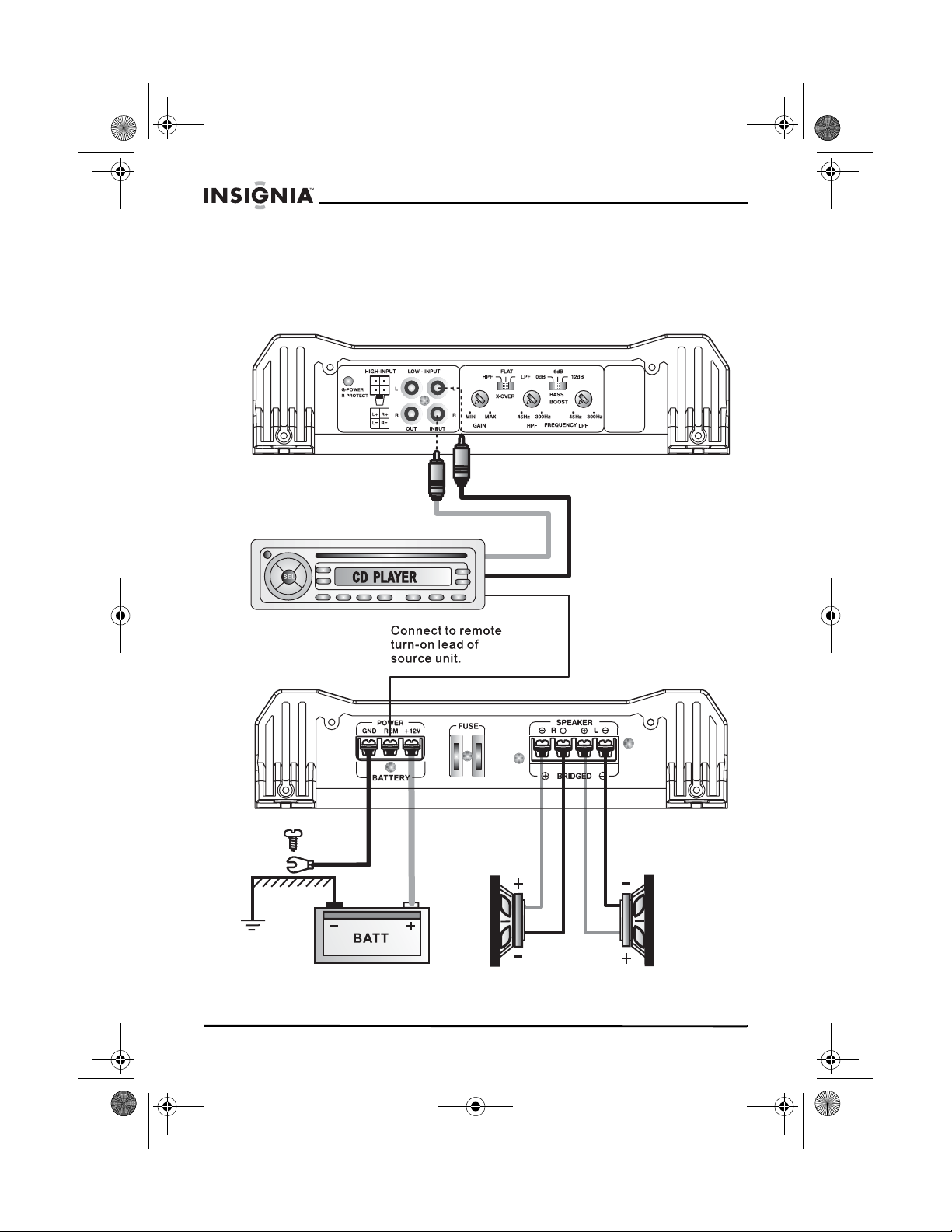
Wiring diagrams
2-CHANNEL STEREO CONFIGURATION
PY-2E10 Car Power Amplifier
Connect to
chassis ground
of vehicle
2
Speaker impedance 2 to 4 Ohm
www.insignia-products.com
Page 4
Insignia-PY-2E10-Car Amplifier.fm Page 3 Tuesday, May 3, 2005 2:19 PM
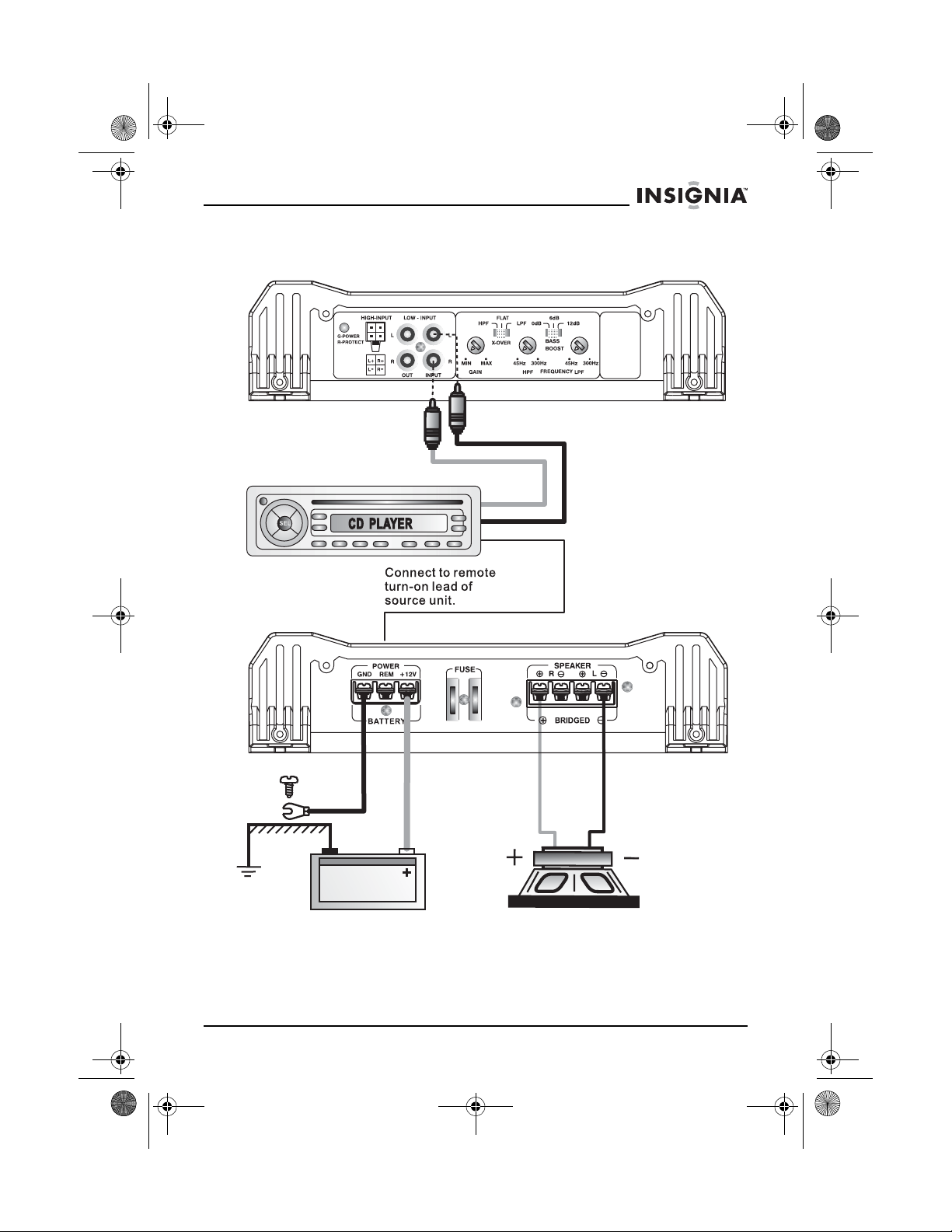
PY-2E10 Car Power Amplifier
BRIDGED-MODE CONFIGURATION
Connect to
chassis ground
of vehicle
Speaker impedance 4 to 8 Ohm
www.insignia-products.com
3
Page 5
Insignia-PY-2E10-Car Amplifier.fm Page 4 Tuesday, May 3, 2005 2:19 PM
Using your amplifier
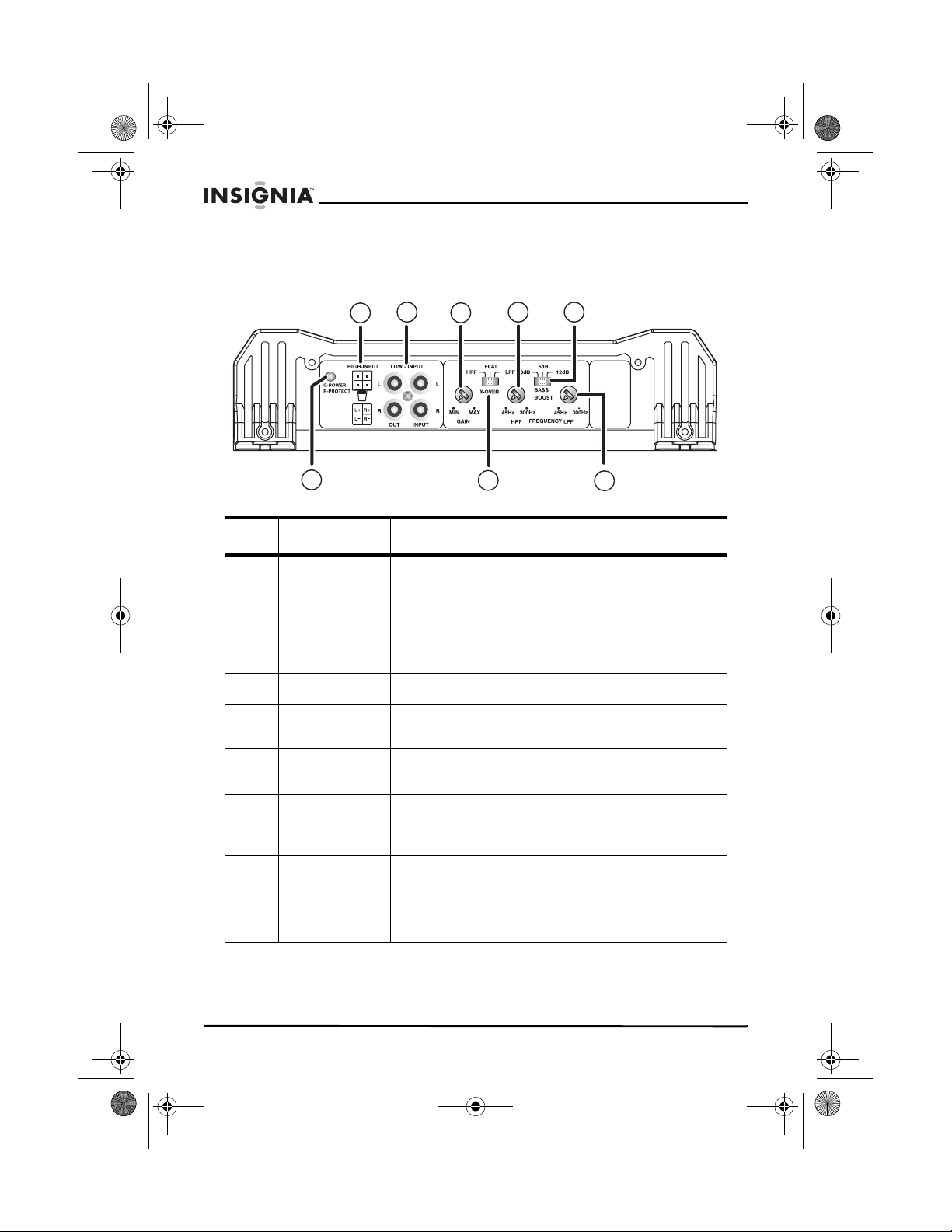
Functions and controls
PY-2E10 Car Power Amplifier
A
B
C
F
D E
G
Item Name Function or Control
AHIGH -
INPUT
BLOW -
INPUT
CGAIN
DHPF
EBASS
BOOST
Left and right high level inputs to the amplifier.
Connect high level inputs here.
Left and right channel inputs to the amplifier
system. Connect preamplifier outputs from a
source (such as a head unit, CD player, or DAT) or
from an external electronic crossover here.
Set for volume range adjustment.
Set for High Pass Filter frequency (45 Hz to
300 Hz).
Set for amount of bass boost required (0dB, +6dB,
or +12dB).
H
F Indicator
LED
GX-OVER
HLPF
4
Green LED lit—Amplifier is on and functioning
correctly.
Red LED lit—Amplifier is in self-protect mode.
Switch for setting high pass filter (HPF), full pass
filter (FULL), or Low Pass Filter (LPF).
Set for Low Pass Filter frequency (45 Hz to
300 Hz).
www.insignia-products.com
Page 6
Insignia-PY-2E10-Car Amplifier.fm Page 5 Tuesday, May 3, 2005 2:19 PM
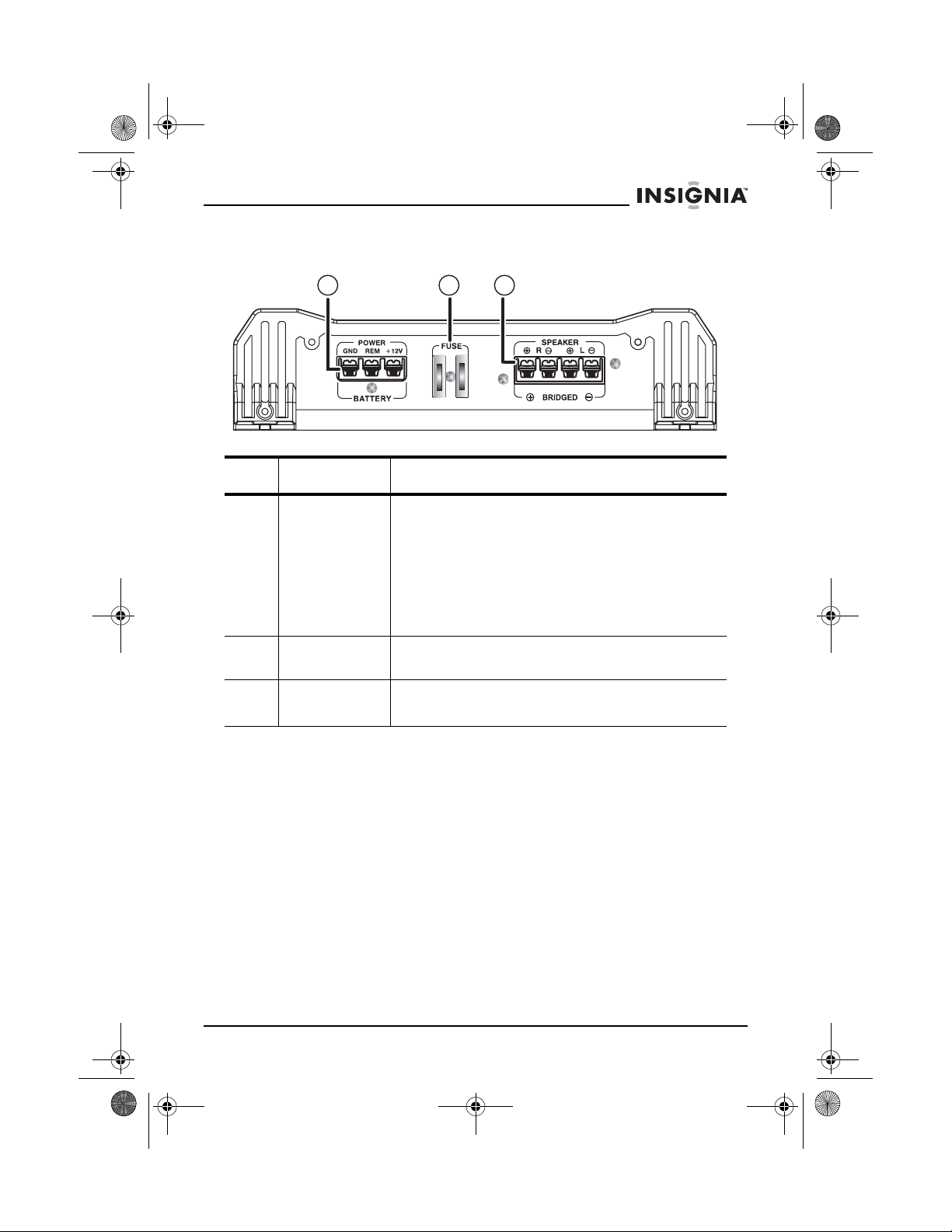
PY-2E10 Car Power Amplifier
Electrical connections
A
B
C
Item Name Function or Control
APOWER/
BATTERY
BFUSE
C SPEAKER/
• +12 Volts - Connect to positive (+) battery
terminal.
• REM - Connect to the Remote cable from the
signal source to control amplifier switching.
Applied voltage must be between 7 and
15VDC.
• GND - Connect to good ground, such as the
car frame or grounded metal body. Keep
ground cable length as short as possible.
Amplifier protection fuse. Replace with the same
type and capacity.
Connect the speakers to these terminals.
BRIDGED
www.insignia-products.com
5
Page 7
Insignia-PY-2E10-Car Amplifier.fm Page 6 Tuesday, May 3, 2005 2:19 PM
Specifications
RMS power @13.8VDC
Power @ 4 Ohms............................... 120W × 2
Power @ 2 Ohms............................... 200W × 2
Bridged power @ 4 Ohms ................. 360W × 2
Minimum speaker impedance.............. 2 Ohms
THD distortion ....................................... 0.08%
IMD distortion ........................................ 0.08%
Frequency response............................. 20 Hz to 20 KHz
Input sensitivity..................................... 200mV to 6V
Input impedance ................................... 15K
Signal-to-noise ratio ............................. 90dB
Channel separation............................... 50dB
Remote bass control ............................ 0dB to +12dB
Crossover network
Low pass filter .................................... 45 Hz to 300 Hz
Bass boost ......................................... 0dB to +12dB
High pass filter ................................... 45 Hz to 300 Hz
Fuse rating............................................. 20A × 2
Size L × W × H ....................................... 15.67 × 10.16 × 2.56 inches
................................................................ (398 × 258 × 65 mm)
PY-2E10 Car Power Amplifier
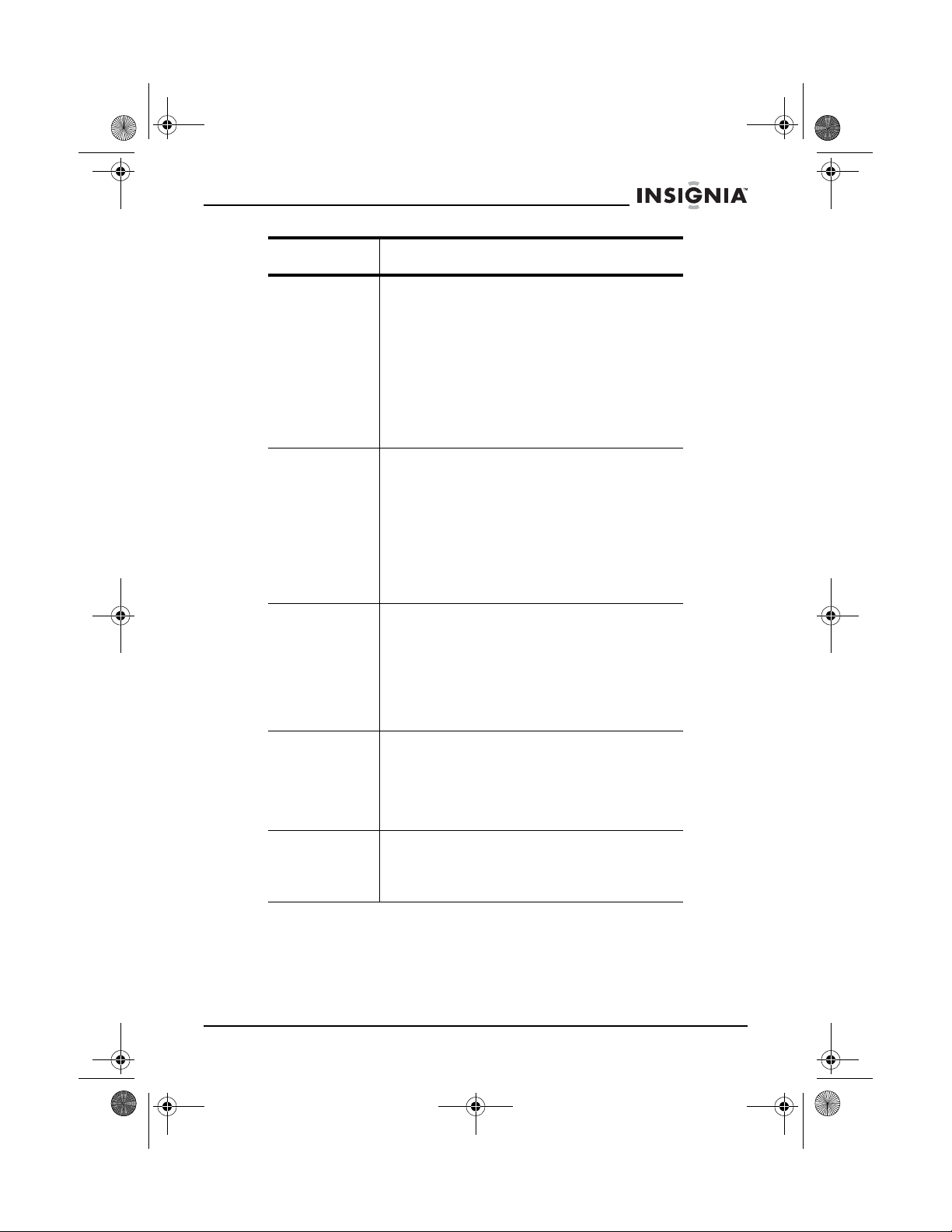
Troubleshooting
Before removing your amplifier, locate the problem in the following
table. Always test the speakers and speaker wires before
troubleshooting the amplifier.
Symptom Solution
The amplifier
will not turn on.
6
• Make sure that the amplifier has a good
ground connection.
• Make sure that the power at the remote
DC terminal is at least 7VDC.
• Make sure that there is battery power at
the positive (+) terminal.
• Make sure that all fuses are good.
• Make sure that the indicator LED is not
red. If the indicator LED is red, turn off
the amplifier briefly, then turn it back on.
www.insignia-products.com
Page 8
Insignia-PY-2E10-Car Amplifier.fm Page 7 Tuesday, May 3, 2005 2:19 PM
PY-2E10 Car Power Amplifier
Symptom Solution
A high hiss or
engine noise
(alternator
whine) is
audible in the
speakers
The indicator
LED turns red
when the
amplifier is
turned on.
The amplifier
gets very hot.
Disconnect all RCA inputs to the amplifier. If
the hiss or noise goes away, plug in the
component driving the amplifier and unplug its
inputs. If the noise goes away, start plugging
in the inputs until the noisy component is
found.
We recommend that you set the amplifier
input sensitivity as low as possible. This will
result in the best possible S/N ratio. Also, try
to drive as high a signal level as possible from
the head unit.
• Make sure that there are no shorts on
the speaker leads.
• Make sure that the volume control on the
head unit is turn down low.
• Remove the speaker leads and reset the
amplifier. If the indicator LED is still red,
the amplifier is faulty.
Note: To protect the amplifier from damage, it
will shut down automatically when its
temperature reaches 176°F (80°C).
• Make sure that the minimum speaker
impedance is correct.
• Make sure that there are no speaker
shorts.
• Make sure that there is good airflow
around the amplifier. In some situations,
a fan may be required for proper cooling
of the unit.
The sound is
distorted.
There is a high
squeal noise
coming from
the speakers.
Copyright
© 2005 Insignia. Insignia and the Insignia logo are trademarks of Best Buy Enterprise
Services, Inc. Other brands and product names are trademarks or registered
trademarks of their respective holders. Specifications and features are subject to
change without notice or obligation.
• Make sure that the level control(s) is set
to match the signal level of the head unit.
• Make sure that the crossover
frequencies have been correctly set.
• Make sure that there are no shorts on
the speaker leads.
Make sure that the RCA patch cords are
correctly grounded.
www.insignia-products.com
7
Page 9

Insignia-PY-2E10-Car Amplifier.fm Page 8 Tuesday, May 3, 2005 2:19 PM
PY-2E10 Car Power Amplifier
8
www.insignia-products.com
Page 10

Distributed by Insignia™ Products
Distribué par Insignia™ Products
Distribuido por Insignia™ Products
7601 Penn Avenue South,
Richfield, MN USA 55423-3645
www.Insignia-Products.com
All rights reserved. All other products and brand names aretrademarks of their respective owners.
Tous droits réservés. Tous les autres produits ou nomsde marques sont des marques de commerce qui appartiennent à leurs propriétaires respectifs.
Todos los derechos reservados. Todos los demás productos y marcas son marcas comerciales registradas de sus respectivos dueños.
© 2005 Insignia™ Products
© 2005 produits Insignia™
© 2005 productos Insignia™
 Loading...