

Page 1
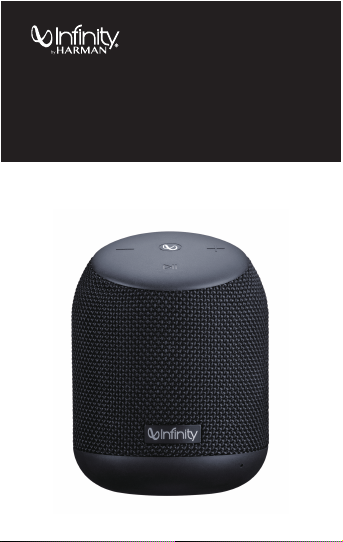
User Manual
Warning!
Warranty Card
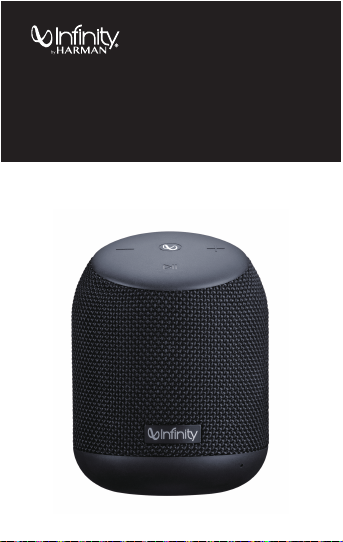
CLUBZ 250
PORTABLE BLUETOOTH SPEAKER
Page 2

Page 3

WELCOME TO HARMAN's FAMILY OF LEGENDARY BRANDS
01 EN
Page 4
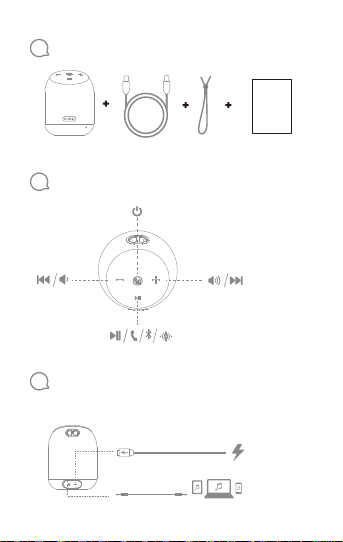
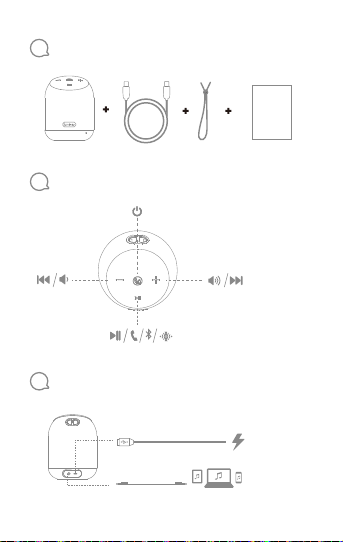
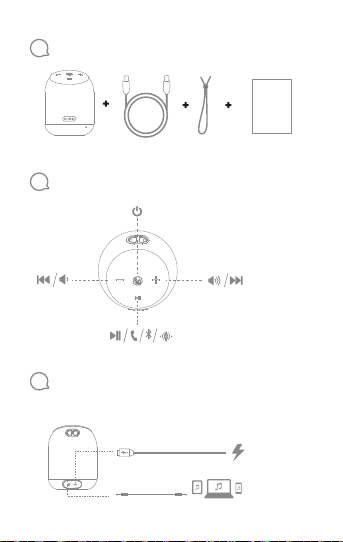
1
What’s in the box
2
Buttons
3
Connections
02 EN
QSG
Input: 5V/1A
Page 5
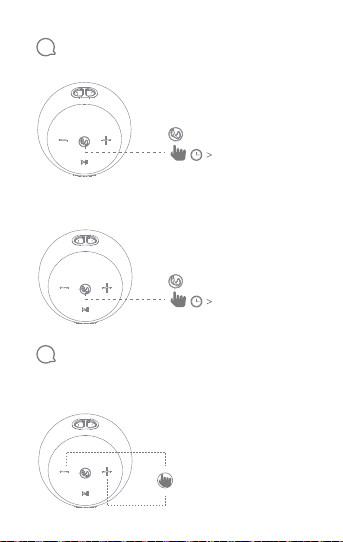
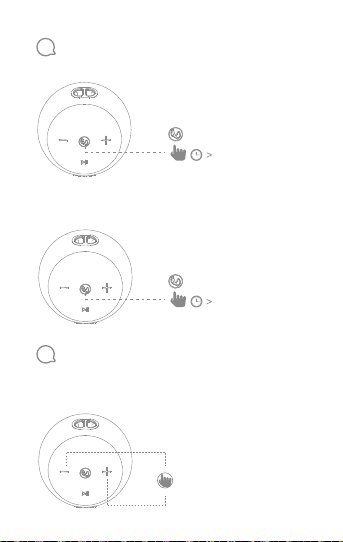
4
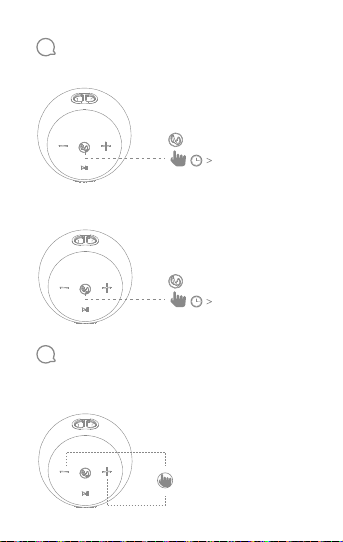
Power on / Power off
1. Turn on the bluetooth speaker
2.0s
2. Turn off the bluetooth speaker
2.0s
5
EQ switching
This speaker comes with dual EQ to enter into various
personal preference, to swtich EQ, short press "+" and "-"
buttons to switch.
03 EN
Page 6
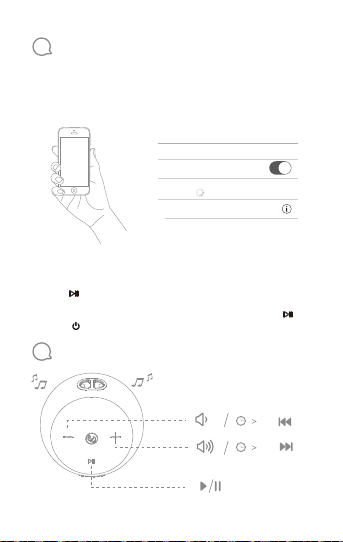
6
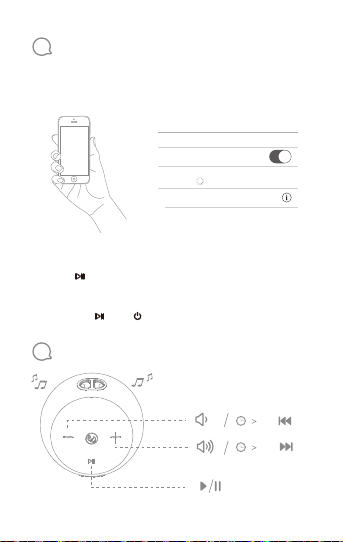
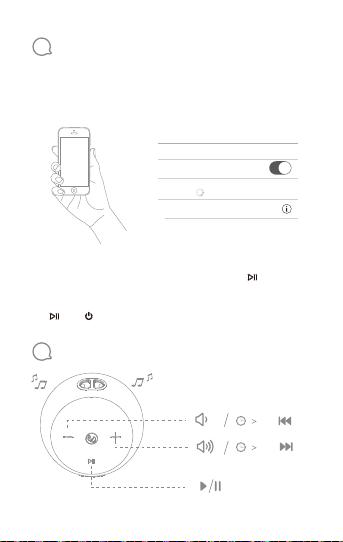
Bluetooth connection
1. The speaker will automatically enter into pairing mode
when power on and wait for the device to connect.
2. Connect to bluetooth device
Settings Bluetooth
<
Bluetooth
DEVICES
Infinity CLUBZ 250
Now Discoverable
Connected
Choose ”Infinity CLUBZ 250” to connect
3. When turn on, the speaker will automatically connect to
the last connected device if available. If not, short press
the " " button to re-enter the pairing.
4. Clean up the pairing information by long press the " "
and " " buttons in the same time.
7
Music
04 EN
2.0s
2.0s
Page 7
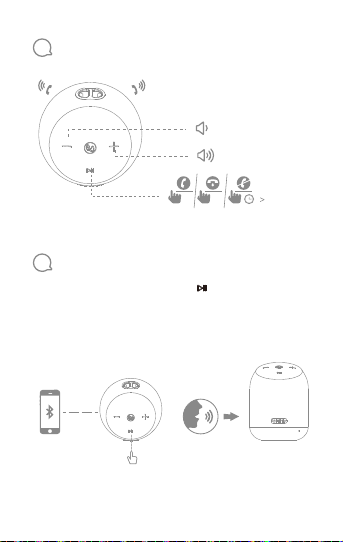
8
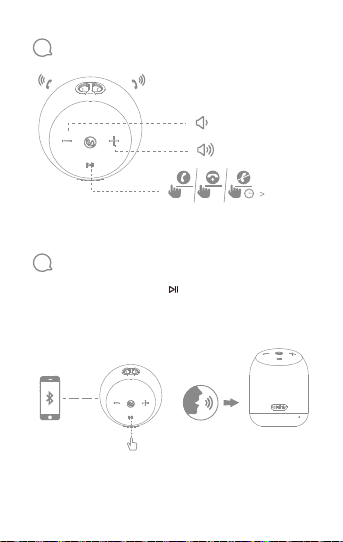
Phone call
x 1 x 1
9
Voice assistant
Bluetooth mode, double press the " " button on the
speaker to activate Siri or Google Now on your phone. Please
make sure the Siri or Google Now is enabled on you r phone.
x 2
3.0s
05 EN
Page 8
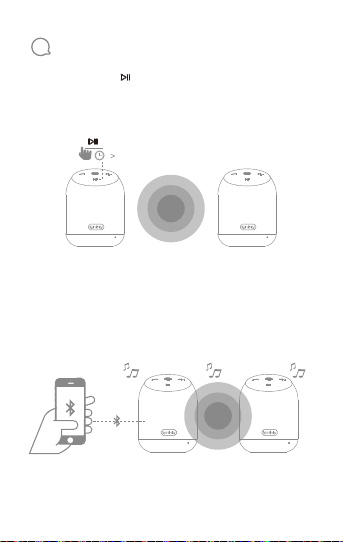
10
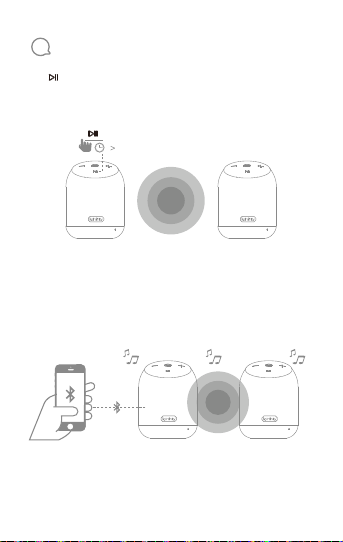
True wireless stereo pairing
1. Long press the " " button to enter into the true wireless
stereo pairing mode as a master speaker. If one of them
fails, clean up the pairing information.
3.0s
Speaker A
2. Enable bluetooth on your device and connect to
"Infinity CLUBZ 250", stereo sound will play from both
speakers.
Speaker A
06 EN
Speaker B
Speaker B
Page 9
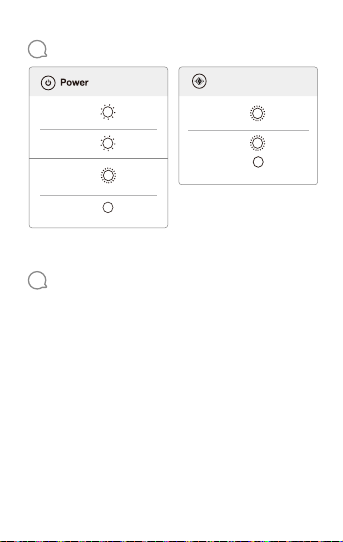
11
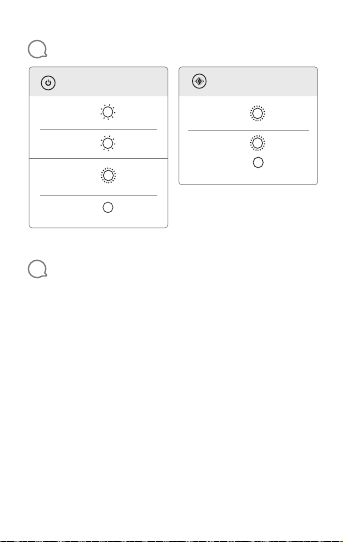
LED Behavior
Dual speaker connect
true wireless
stereo pairing
mode
true wireless
stereo
connected
A
White
Flash
White
Slow flash
White
Fast flash
White
On
On
Stand by
Bluetooth
pairing mode
Bluetooth
connected
12
Specifications
Bluetooth version: 4.2
Support: A2DP V1.2; GAVDP V1.3; AVRCP V1.6; HFP V1.7
Transducer: 2 x 45mm
Output power: 7.5W *2
Frequency response:75Hz - 20KHz
Signal-to-noise ratio: >70dB
Battery type: Lithium-ion polymer (3.7V, 2500mAh)
Battery charge time: 4 hour @ 5V 1A
Music playing time: up to 10 hours(50% volume level)
Bluetooth transmitter power: -6 ~ 4dBm
Bluetooth transmitter frequency range: 2.402 — 2.480GHz
Bluetooth transmitter modulation: GFSK, 1/4-DQPSK, 8DPSK
Dimensions: Φ88*116(mm)
Weight: 421g
A
B
White
Fast flash
White
Fast flash
White
On
07 EN
Page 10
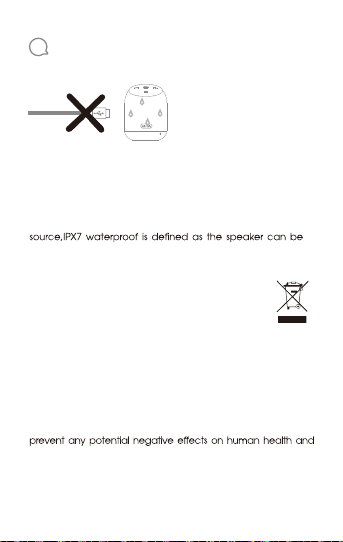
13
Warning
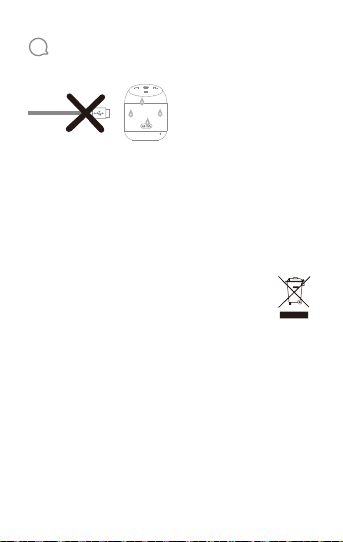
CLUBZ 250 is IPX7 waterproof.
IMPORTANT: To ensure that the CLUBZ 250 is waterproof,
please remove all cable connections and tightly close the
cap; exposing the CLUBZ 250 to liquids without doing so
may result in permanent damage to the speaker. And do
not expose CLUBZ 250 to water while charging, as doing so
may result in permanent damage to the speaker or power
immersed in water up to 1m for up to 30 minutes.
INFORMATION ON DISPOSAL FOR USERS OF
WASTE ELECTRICAL &ELECTRONIC EQUIPMENT
(PRIVATE HOUSHOLD)
This symbol on the products and/or accompanying documents
means that used electrical and electronic products should not
be mixed with general household waste. For proper treatment,
recovery and recycling, please take these products to
designated collection points, where they will be accepted on a
free of charge basis. Alternatively, in some countries you may be
able to return your products to your local retailer upon the
purchase of an equivalent new product. Disposing of this
product correctly will help to save valuable resources and
the environment which could otherwise arise from inappropriate
waste handling. Please contact your local authority for further
details of your nearest designated collection point. Penalties
may be applicable for incorrect disposal of this waste, in
accordance with national legislation.
08 EN
Page 11

INFORMATION ON DISPOSAL IN OTHER COUNTRIES
OUTSIDE THE EUROPEAN UNION
This symbol is only valid in the European Union. If you wish to
discard this product, please contact your local authorities or
dealer and ask for the correct method of disposal.
SET UP INFORMATION & PRODUCT REGISTRATION
Congratulations with the purchase of your new Product. We
have done our utmost to make your experience the best one
possible. If you have any questions when setting up your Product
and would like some helpful hints, we recommend that you
visit the relevant country specic support website for your
Product. There you will also nd relevant contact information. If
you cannot nd the information you are looking for, please
contact the vendor that sold the Product to you or contact
the relevant HARMAN customer support center by electronic
mail or phone.
We recommend that you register your Product via the relevant
country specic website for your Product. Your registration will
allow us to inform you about updates for certain products,
possible new oers and new Products and/or applications.
Registering is easy; just follow the instructions on the relevant
country specic website for your Product.
NOTE: IF YOU PURCHASED PRODUCTS IN INDIA, PLEASE
VISIT WWW.HARMANWARRANTY.IN TO REGISTER FOR
WARRANTY
09 EN
Page 12
10 EN
Page 13
11 EN
Page 14
HOW TO OBTAIN WARRANTY SERVICE
For a seamless experience please register your product at
www.HarmanWarranty.in.(if you purchased products in India)
Information on service centers can be found on the registration
page. Contact the dealer who sold you this Product, or contact
HARMAN customer support using the contact information on the
request warranty service. To validate your right to this Limited
Warranty, you must provide the original sales invoice or other proof of
ownership and date of purchase. Do not return your Product without
prior authorization from the corresponding dealer or HARMAN.
Warranty repair of the HARMAN Product must be carried out by
Harman authorized service center. Unauthorized warranty repair
will void the warranty and is performed at your sole risk.
HARMAN support website for your Product for helpful hints.
12 EN
Page 15
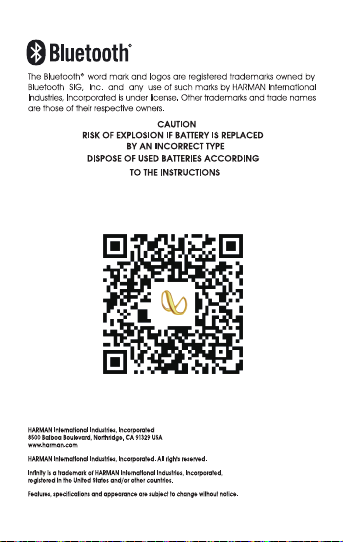
To register for warranty in India, scan QR
www.HarmanWarranty.in
13 EN
Page 16
使用者手冊
警告!
保固卡
CLUBZ 250
可攜式藍牙喇叭
Page 17

歡迎使用 HARMAN 傳奇品牌系列
15 TW
Page 18
1
2
3
16 TW
包裝盒內物品
QSG
按鈕
連接
輸入: 5V/1A
Page 19
4
開機/關機
1. 開啟藍牙喇叭
2.0S
2. 關閉藍牙喇叭
2.0S
5
EQ 開關
本喇叭帶有雙 EQ,以迎合不同的個人喜好;如欲開關 EQ,
請短按「+」及「-」按鈕以進行切換。
17 TW
Page 20
6
藍牙連接
1. 開啟電源後,喇叭將自動進入配對模式,然後等待裝置連接。
2. 連接至藍牙裝置
Settings Bluetooth
<
Bluetooth
DEVICES
Infinity CLUBZ 250
Now Discoverable
Connected
選擇「Infinity CLUBZ 250」以進行連接
3. 開啟時,喇叭將自動連接到最後連接的裝置(如有)。否則,
短按「 」按鈕以重新進入配對模式。
4. 同時長按「 」和「 」按鈕,清除配對資訊。
7
音樂
2.0s
2.0s
18 TW
Page 21
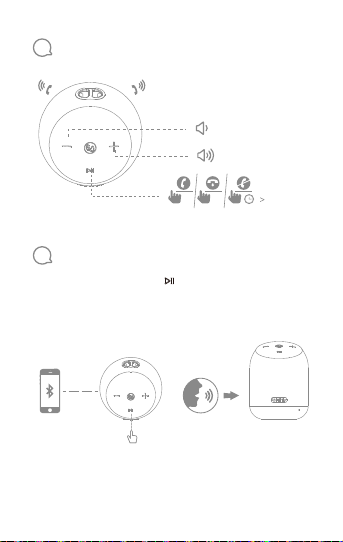
8
通話
x 1 x 1
9
語音助理
藍牙模式,按兩下喇叭上的「 」按鈕以啟用手機上的 Siri 或
Google Now。請確保您的手機上已啟用Siri 或 Google Now。
x 2
3.0s
19 TW
Page 22
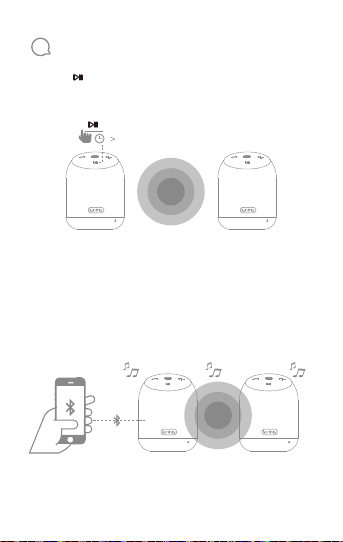
10
真無線立體聲配對
1. 長按「 」按鈕,作為主喇叭進入無線立體聲配對模式。如果
其中之一失敗,清理配對資訊。
3.0s
喇叭 A 喇叭 B
2. 在裝置上啟用藍牙並連接到「Infinity CLUBZ 250」, 兩個喇
叭都將播放立體聲。
喇叭 A 喇叭 B
20 TW
Page 23
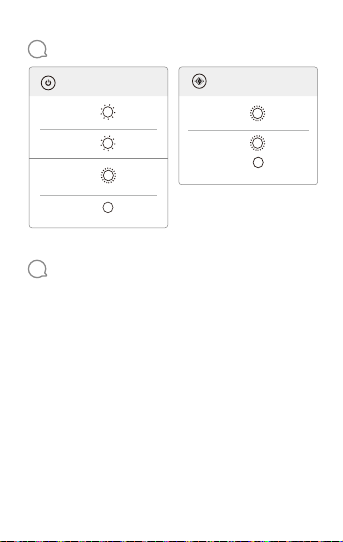
11
LED 狀態
雙喇叭連接電源
A
B
快速閃
爍白光
快速閃
爍白光
亮起白光
無線立體聲
配對模式
無線立體聲
已連接
A
閃爍白光
緩慢閃
爍白光
快速閃
爍白光
亮起白光
開啟
待命
藍牙配
對模式
藍牙已
連接
12
規格
藍牙版本:4.2
支援:A2DP V1.2;GAVDP V1.3;AVRCP V1.6;HFP V1.7
轉換器:2 x 45mm
輸出功率:7.5W *2
頻率回應:75Hz - 20KHz
雜訊比:>70dB
電池類型:鋰聚合體 (3.7V, 2500mAh)
電池充電時間:4 小時(5V 1A)
音樂播放時間:長達 10 小時(50% 音量)
藍牙發射機功率:-6 ~ 4dBm
藍牙發射機頻率範圍:2.402 — 2.480GHz
藍牙發射機調變:GFSK、1/4-DQPSK、8DPSK
尺寸:Φ88*116(mm)
重量:421g
21 TW
Page 24
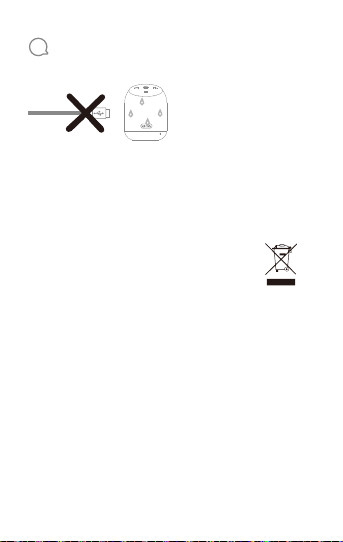
13
警告
CLUBZ 250 具備 IPX7 防水等級。
重要事項:為了確保 CLUBZ 250 能夠防水,請移除所有連接
線並緊閉封蓋;否則讓 CLUBZ 250 暴露於液體中可能對喇叭
產生永久性損壞。請勿在充電時讓 CLUBZ 250 接觸水,因為
這會導致喇叭或電源永久性損壞。IPX7 防水等級定義為喇叭
可以在深達 1 公尺的水中浸泡長達 30 分鐘。
適用於廢棄電氣及電子設備(私人住宅)使用者
之棄置須知
產品及/或隨附文件上的此符號表示舊電氣及電子產品不應與
一般生活垃圾混在一起。為了進行妥善的處理、回收和再利用
,請將這些產品帶到指定的回收地點。另外,在某些國家/地
區,您或許可以在購買同等新產品後將產品退還給當地零售商
。正確棄置本產品將有助於節省寶貴的資源,並防止因不當的
廢物處理而對人體健康和環境造成任何潛在負面影響。請與地
方當局聯絡,以獲取附近指定回收地點的更多詳情。根據國家
法律,不當處置此類廢物可能遭受處罰。
有關歐盟以外其他國家的棄置須知
該符號僅在歐盟有效。如果您想丟棄該產品,請聯絡您當地的
主管部門或經銷商,並詢問正確的棄置方法。
22 TW
Page 25
依據低功率電波輻射性電機管理辦法
第十二條
※經型式認證合格之低功率射頻電機,非經許可,公司、商號或使
用者均不得擅自變更頻率、加大功率或變更原設計之特性及功能。
第十四條
※低功率射頻電機之使用不得影響飛航安全及干擾合法通信;經發
現有干擾現象時,應立即停用,並改善至無干擾時方得繼續使用。
-前項合法通信,指依電信法規定作業之無線電通信。
-低功率射頻電機須忍受合法通信或工業、科學及醫療用電波輻射性
電機設備之干擾。
Bluetooth® 文字標記和標誌是 Bluetooth SIG, Inc. 的註冊商標。
HARMAN International Industries, Incorporated 使用這些標記
須遵循授權。其他商標和商品名稱歸其各自擁有者所有。
警示
若電池更換為不正確的類型,
可能發生爆炸危險
根據說明棄置
舊電池
HARMAN International Industries, Incorporated
8500 Balboa Boulevard, Northridge, CA 91329 USA
www.harman.com
HARMAN International Industries, Incorporated。保留一切
權利。
Infinity 是 HARMAN International Industries, Incorporated
在美國及/或其他國家/地區註冊的商標。
功能、規格和外觀如有變更,恕不另行通知。
23 TW
Page 26
사용자설명서
경고!
품질보증서
CLUBZ 250
휴대용 Bluetooth 스피커
Page 27

전설적인 HARMAN 브랜드계열사소개
25 KO
Page 28
26 KO
1
2
3
구성품
QSG
버튼
연결
입력: 5V/1A
Page 29
4
전원켜기/끄기
1. Bluetooth 스피커켜기
2.0초
2. Bluetooth 스피커끄기
2.0초
5
EQ 전환
이스피커에는다양한개인취향에맞출수있는듀얼 EQ가함께제
공됩니다. EQ를전환하려면 "+" 및 "-" 버튼을짧게눌러전환
합니다.
27 KO
Page 30
6
Bluetooth 연결
1. 스피커전원이켜지면자동으로페어링모드에진입하여장치가
연결될때까지대기합니다.
2. Bluetooth 장치연결
Settings Bluetooth
<
Bluetooth
DEVICES
Infinity CLUBZ 250
Now Discoverable
Connected
"Infinity CLUBZ 250"을선택하여연결
3. 스피커전원이켜지면마지막으로연결된장치에자동으로연결됩
니다(사용가능한경우). 그렇지않은경우에는 " " 버튼을짧게
눌러다시페어링에진입합니다.
4. " " 및 " " 버튼을동시에길게눌러페어링정보를정리합니다.
7
음악
2.0초
2.0초
28 KO
Page 31
8
통화
x 1 x 1
9
음성비서
Bluetooth 모드에서스피커의 " " 버튼을두번누르면휴대폰에
서 Siri 또는 Google Now
는 Google Now 가활성화되어있는지확인하십시오.
가활성화 됩니다. 휴대폰에서 Siri또
x 2
3.0초
29 KO
Page 32
10
TWS(True Wireless Stereo) 페어링
1. " " 버튼을길게누르면마스터스피커로 TWS(True Wireless
Stereo) 페어링모드로진입합니다. 그중하나가실패할경우페
어링정보를삭제합니다.
3.0초
스피커 A 스피커 B
2. 장치에서 Bluetooth를활성화하고 "Infinity CLUBZ 250"에연
결하면두스피커에서스테레오사운드가재생됩니다.
스피커 A 스피커 B
30 KO
Page 33
11
LED 동작
듀얼스피커연결전원
TWS(True
Wireless Stereo)
페어링모드
TWS(True
Wireless Stereo)
연결됨 흰색켜짐
A
B
A
흰색깜
박임
흰색느리
게깜박임
흰색빠르
게깜박임
흰색켜짐
켜짐
대기
Bluetooth
페어링모드
Bluetooth
연결됨
12
사양
Bluetooth 버전: 4.2
지원: A2DP V1.2; GAVDP V1.3; AVRCP V1.6; HFP V1.7
변환기: 2 x 45mm
출력: 7.5W *2
주파수응답: 75Hz~20KHz
신호대잡음비: >70dB
배터리유형: 리튬이온폴리머(3.7V, 2500mAh)
배터리충전시간: 4시간 @ 5V 1A
음악재생시간: 최대 10시간(볼륨레벨 50%)
Bluetooth 송신기출력: -6~4dBm
Bluetooth 송신기주파수범위: 2.402~2.480GHz
Bluetooth 송신기변조: GFSK, 1/4-DQPSK, 8DPSK
치수: Φ88*116(mm)
중량: 421g
흰색빠르
게깜박임
흰색빠르
게깜박임
31 KO
Page 34
13
경고
CLUBZ 250 은 IPX7 방수입니다.
중요: CLUBZ 250 의방수기능을제대로사용하려면모든연결된
케이블을제거하고캡을확실하게닫으십시오.스피커에영구적인
손상이발생할수있으니 CLUBZ 250 이액체에잠기지않도록하
십시오. 충전중에는CLUBZ 250 을물에노출시키지마십시오.
이로 인해스피커또는전원소스에영구적인손상이발생할수있습
니다. IPX7 방수란스피커가최대1m 수심에서 30분동안방수가
가능하다는의미입니다.
폐전기또는전자장비에대한사용자용폐기정보(일반가정)
제품및/또는동봉된문서의이기호는사용한전기및전자
제품을일반가정폐기물과같이버려서는안된다는것을뜻
합니다.적절하게처리,회수및재활용할수있도록해당제
품을무료수거지정장소로가져가십시오.또는일부국가
의경우해당하는새제품구매시현지판매점으로제품을반
납할수도있습니다.이제품을제대로폐기하면귀중한자
원을절약하고사람의건강과환경에있을수있는부정적인
영향을방지하는데도움이됩니다.이렇게하지않을경우
적절하지못한폐기물처리가발생할수있습니다.가장가
까운지정수거장소에대한자세한내용은해당지역당국에
문의하십시오.국가규정에따라폐기물을적절히버리지
않으면벌금이부과될수있습니다.
유럽연합이외국가에서의폐기정보
이기호는유럽연합에서만유효합니다.
이제품을폐기하려면해당지역당국이나대리점에연락하여올바
른폐기방법을문의하십시오.
32 KO
Page 35

설치정보및제품등록
제품구입을축하드립니다.
저희는고객님께최고의경험을드리고자최선을다하고있습니다.
설치시궁금한점이나유용한정보가필요하시면해당제품의관련
국가별지원웹사이트(www.HarmanWarranty.in)를방문하는것
이좋습니다.
웹사이트에서관련문의처정보도확인하실수있습니다.
원하는정보를찾을수없는경우제품판매회사에문의하거나관련
HARMAN 고객지원센터에이메일또는전화로문의하십시오.
해당제품의관련국가별웹사이트를통해제품을등록하시는것이
좋습니다. 등록하시면특정제품의최신정보,
이용가능한새로운혜택및신규제품및/또는응용프로그램에대
한정보를알려드릴수있습니다. 등록방법은간단합니다.
제품의관련국가별웹사이트에있는안내에따르십시오.
제품보증서
서비스에대하여
•저희삼성전자에서는품목별소비자분쟁해결기준(공정거래위원
회고시)에따라아래와같이제품에대한
보증을실시합니다.
•제품에고장이발생하면하만오디오전문서비스센터(☎
02-553-3494) 로전화주세요.
•전국삼성전자서비스㈜에서접수가능하며,
접수이후서비스과정은하만오디오전문서비스센터
(시머스주식회사)에서진행합니다.
•수리교체후불량부품은재사용방지및안전을위해전량회수하는
것을원칙으로하고있습니다.
33 KO
Page 36

제품명
구입일
구입처
※제품의품질보증기간은구입후 12개월, 부품보유기간은 3
년이며, 유통과정에따라늘어날수있습니다.
•수리한날로부터 1
년이내에교체한부품/제품에대하여고장이재발할경우무상으로수
리합니다.
•수리가능여부등은요구일로부터 7일이내에통보해드리며,
실제수리및환불등의보상은통보일로부터 14
일이내에해결해드립니다.
무상서비스
•품질보증기간이내에정상적인사용상태에서발생한고장의경우
무상서비스를받을수있습니다. (비고장성, 과실은제외됨)
•이제품을영업용도로전환하여사용할경우보증기간은절반(6
개월)으로단축됩니다.
* 환급 : 구입가환급(구입증빙서류필요)
34 KO
년월일
모델명
Serial No.
판매금액
Page 37
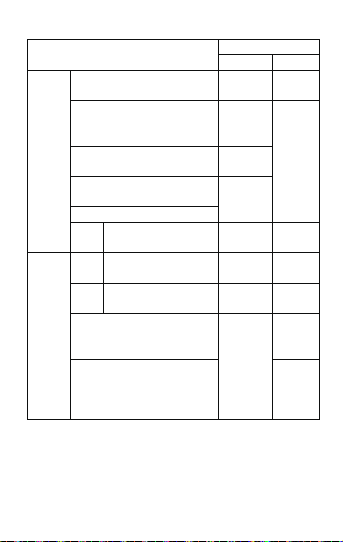
보상내용
보증기간내 보증기간후
제품교환
해당없음
또는환급
제품교환
또는
무상수리
제품교환
해당없음
환급
무상수리 유상수리
제품교환
유상수리
또는환급
정액감가상각
금액에 10%
가산하여환급
제품교환
정액감가상각
또는환급
금액에
구입가의 5%
가산하여환급
소비자피해유형
구입후 10일이내에중요한수리를해야할경우
구입후 1개월이내에중요한수리를해야할경우
부품보유기간
내정상적인
제품구입시운송과정및제품설치중피해가
사용조건에서
발생한경우
성능,기능상의
고장발생
부품보유기간
내정상적인
사용조건에서
성능,
기능상의
고장발생
* 제품을분해하여부품교체를하여야정상적인사용을할수있는상태
일경우
교환된제품이 1개월이내에중요한수리(*)를
해야하는고장이발생한경우
제품교환이불가능한경우
수리
동일한원인으로고장이 2회까지
가능
발생한경우
수리
동일한원인으로고장이 3회째
가능
발생한경우
서로다른원인으로고장이 4회째
발생한경우
소비자가수리의뢰한제품을사업자가분실한
경우
부품보유기간이내수리용부품을보유하고있
지않아수리가불가능한경우
35 KO
Page 38

유상서비스
•정상적인사용상태에서발생한제품의고장이아닌경우서비스를
요청하면보증기간에관계없이요금이발생될수있으므로사용설명
서를먼저확인하세요.
소비자피해유형
소비자의
고의과실로
인한
고장발생
1. 소비자과실로고장난경우
사용상의부주의(침수, 파손, 손상)로고장이발생한경우
당사에서유통하지않은소모품,
액세서리사용에의해고장이발생한경우(충전기, 배터리등)
사용설명서의주의사항을지키지않아고장이발생한경우
2. 그밖의경우
천재지변(화재, 염해, 수해, 낙뢰등)에의한고장이발생한경우
소모성부품의수명이다한경우(배터리, 헤드셋, 메모리,
케이블/부착물등)
※아래와같은경우서비스가거부될수있습니다.
임의로개조, 변조, 복제하거나사제(모조)부품을사용한경우
소비자가회수해간미반납부품으로재수리를요구하는경우
동일제품의반복수리요구등수리외다른목적의수리요구로추정되
는경우
구입(또는 A/S) 당시부품이아닌다른부품으로교체된상태인경우
이보증서는대한민국에서만사용가능하며, 해외에서는사용할수
없습니다.
수리불가능한
경우
수리가능한
경우
보상내용
보증기간내
유상수리에해당하는금액
징구후제품교환
유상수리
보증기간후
유상수리금액징구후
감가상각적용제품교환
유상
수리
36 KO
Page 39

Bluetooth®워드마크와로고는 Bluetooth SIG,
Inc.가소유한등록상표이며 HARMAN International Industries,
Incorporated는사용허가를받고이러한마크를사용합니다.
다른상표및상표명은해당소유자의재산입니다.
배터리를잘못된유형으로교체할경우
HARMAN International Industries, Incorporated
8500 Balboa Boulevard, Northridge, CA 91329 USA
www.harman.com
HARMAN International Industries, Incorporated. All rights
reserved.
Infinity는미국및기타국가에등록된 HARMAN International
Industries, Incorporated의상표입니다.
기능, 사양및외관은예고없이변경될수있습니다.
주의
폭발위험이있습니다.
사용한배터리는지침에따라
폐기하십시오.
37 KO
Page 40

 Loading...