

Page 1

MODEL CODE/S
PRODUCT
DOCUMENT
IDW6S
60CM
FREE—
USER
MANUAL
STANDING
DISHWASHER
Page 2
USER MANUAL
PAGE 02
Dear Customer, Congratulations on purchasing your new dishwasher.
The Residentia brand is proudly distributed within
Australia by Residentia Group Pty Ltd.
Please refer to the warranty card at the rear of this
manual for information regarding your product’s
parts and labour warranty, or visit us online at
www.residentiagroup.com.au.
At Residentia Group, we are customer obsessed and
our Support Team are there to ensure you get the most
out of your appliance. Should you want to learn more
about the various washing functions when cleaning or
even the preferred dishwashing powder/tablets, our
Support Team are here to help.
You can use our online Support Centre at anytime by
visiting http://support.residentiagroup.com.au, or you
can contact us via phone by dialling 1300 11 HELP (4357).
It is important that you read through the following use
and care manual thoroughly to familiarise yourself with
the installation and operation requirements of your
appliance to ensure optimum performance.
Again, thank you for choosing a Residentia appliance
and we look forward to being of service to you.
Kind Regards,
The Residentia Team
600 546 656
Residentia Group
PO Box 581
Stanhope Gardens
NSW Australia 2768
Page 3

PAGE 03
PAGE CONTENT
04 SAFETY
INSTRUCTIONS
06 YOUR INALTO
DISHWASHER
07 INSTALLATION
INSTRUCTIONS
08 OPERATING
YOUR DISHWASHER
16 CLEANING &
MAINTENANCE
18 TROUBLESHOOTING
& TECHNICAL DATA
21 PURCHASE
DETAILS
22 WARRANTY
INFORMATION
Page 4

USER MANUAL
SAFETY INSTRUCTIONS
PAGE 04
This dishwasher is intended to be used in domestic
environments only, including:
► household kitchen;
► staff/office kitchen;
► hotel/motel kitchens; or
► bed and breakfast type environments.
It has not been designed for use in commercial kitchen
environments.
WARNING
Please ensure that you carefully read this user manual
before installing and using the dishwasher, as it will help
you to use and maintain the dishwasher properly.
► Keep it as a reference for the future as it also contains
your product warranty card.
► Pass this user manual on to any subsequent owners of
the appliance.
IMPORTANT!
The electricity supply to the dishwasher must be cut off
before any adjustments or maintenance work is undertaken.
► This dishwasher must be grounded. In the event of a
malfunction or product failure, grounding will reduce
the risk of an electric shock by providing a path of least
resistance of electric current.
► The plug must be plugged into an appropriate outlet
that is installed and grounded in accordance with all
local codes.
WARNING
Improper connection of the equipment-grounding
conductor can result in the risk of an electric shock. Check
with a qualified electrician or service representative if you
are in doubt as to whether your dishwasher is grounded
properly. Never modify the plug supplied with the
appliance. If the plug doesn't fit the outlet, have a licenced
and suitably qualified electrician install the correct outlet.
► Do not abuse, sit on, or stand on the door or dish rack
of the dishwasher.
► Do not touch the heating element during or
immediately after use. (This instruction is only
applicable to machines with a visual heating element.)
► Do not operate your dishwasher unless all enclosure
panels are properly in place. Open the door very
carefully if the dishwasher is operating, there is a risk of
water squirting out.
► Do not place any heavy objects on or stand on the door
when it is open. The appliance could tip forward.
► When loading items to be washed:
1) Locate sharp items so that they are not likely to
damage the door seal;
2) Warning: Knives and other utensils with sharp points
must be loaded in the basket with their points down
or placed in a horizontal position.
► When using your dishwasher, you should prevent
plastic items from coming into contact with the heating
element.(This instruction is only applicable to machines
with a visual heating element.)
► Check that the detergent compartment is empty after
completion of the wash cycle.
► Do not wash plastic items unless they are marked
dishwasher safe or the equivalent. For plastic
items not so marked, check the manufacturer's
recommendations.
► Use only detergent and rinse additives designed for an
automatic dishwasher.
► Never use soap, laundry detergent, or hand-washing
detergent in your dishwasher. Keep these products out
of the reach of children.
► Keep children away from detergent and rinse. Always
be sure to keep the dishwasher door closed with
children around, as there may still be residual detergent
inside.
Page 5

PAGE 05
► This appliance is not intended for use by persons
(including children with reduced physical, sensory
or mental capabilities, or lack of experience and
knowledge, unless they have been given supervision or
instruction concerning use of the appliance by a person
responsible for their safety.)
► Children should be supervised to ensure that they do
not play with the appliance.
► The door should not be left open, since this could
increase the risk of tripping.
► If the supply cord is damaged, it must be replaced by
the manufacturer or its service agent or a similarly
qualified person in order to avoid a hazard.
► Remove the door to the washing compartment when
removing an old dishwasher from service or discarding
it.
► During installation, the power supply must not be
excessively or dangerously bent or flattened.
► The appliance is to be connected to the water mains
using new hose sets and that old hose-sets should not
be reused.
► The maximum number of place settings to be washed is
14.
► The maximum permissible inlet water pressure is 1Mpa.
► The minimum permissible inlet water pressure is
0.04Mpa.
► Never use an extension cord.
► It's recommended to provide a separate circuit to serve
your dishwasher alone and you should use the required
10 amp fuse.
► An extension hose can be used but should be no longer
than 4 meters, otherwise the performance of the
dishwasher will be effected.
UNPACKING
During transportation, protective packaging was used to
protect the appliance against any damage. After unpacking,
please dispose of all elements of packaging in a way that will
not cause damage to the environment. All materials used for
packaging the appliance are environmentally friendly; they
are 100% recyclable and are marked with the appropriate
symbol.
► During unpacking, the packaging materials (polythene
bags, polystyrene pieces, etc.) should be kept out of
reach of children.
DISPOSAL OF THE APPLIANCE
Old appliances should not simply be disposed of with
normal household waste, but should be delivered to a
collection and recycling centre for electric and electronic
equipment. A symbol shown on the product, the instruction
manual or the packaging shows that it is suitable for
recycling.
Materials used inside the appliance are recyclable and are
labelled with information concerning this. By recycling
materials or other parts from used devices you are
making a significant contribution to the protection of our
environment.
Information on appropriate disposal centres for used
devices can be provided by your local authority.
DECLARATION OF CONFORMITY
The manufacturer declares that the dishwasher is built using
certified materials and requires the appliance to be installed
in accordance with the standards currently in force. This
appliance must be used by a trained person for domestic
purposes only.
Page 6
USER MANUAL
YOUR INALTO DISHWASHER
SPECIFICATIONS
PAGE 06
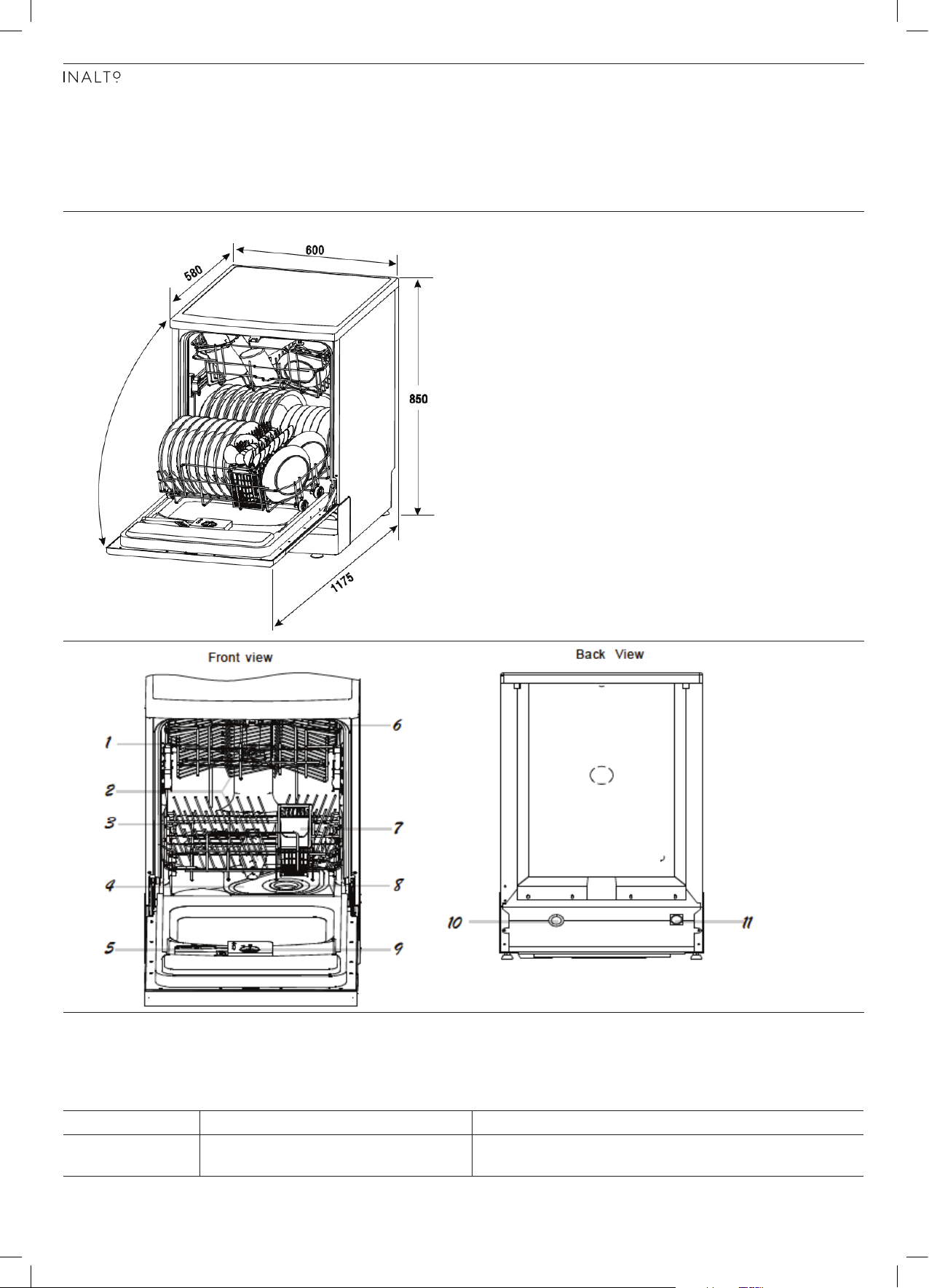
1 Upper Basket 2 Spray Arms 3 Lower Basket
4 Main Filter 5 Detergent Dispenser 6 Cup Shelf
7 Cutlery Basket 8 Coarse Filter 9 Rinse Aid Dispenser
10 Drain Pipe 11 Inlet pipe connector
MODEL PRODUCT DIMENSIONS (W×D×H) PRODUCT FEATURES
IDW6S 600mm, 580-1175mm, 850mm ► 12 Place Setting capacity
► Removable cutlery basket
Page 7
PAGE 07
INSTALLATION INSTRUCTIONS
It’s important to carefully read the following installation instructions before beginning the installation of your dishwasher.
IMPORTANT! The installation of the pipes and electrical outlets should be
completed by suitably licensed and qualified persons.
POSITIONING The installation position of the dishwasher should be near the existing inlet,
drainage wastepipe and power outlet.
► Choose a position near your sink to facilitate the installation of inlet and drain
hoses (refer to figure one).
► If the dishwasher is installed in the corner of your kitchen cabinetry, make
sure an allowance is made to ensure your dishwasher door can freely open
without obstruction from other cabinetry/door handles.
► The dishwasher back should rest against the wall behind, whilst the sides
should rest against the adjacent cabinets or walls.
► The dishwasher is equipped with water supply and drain hoses that can be
positioned either to the right or left hand sides, dependent on your required
installation.
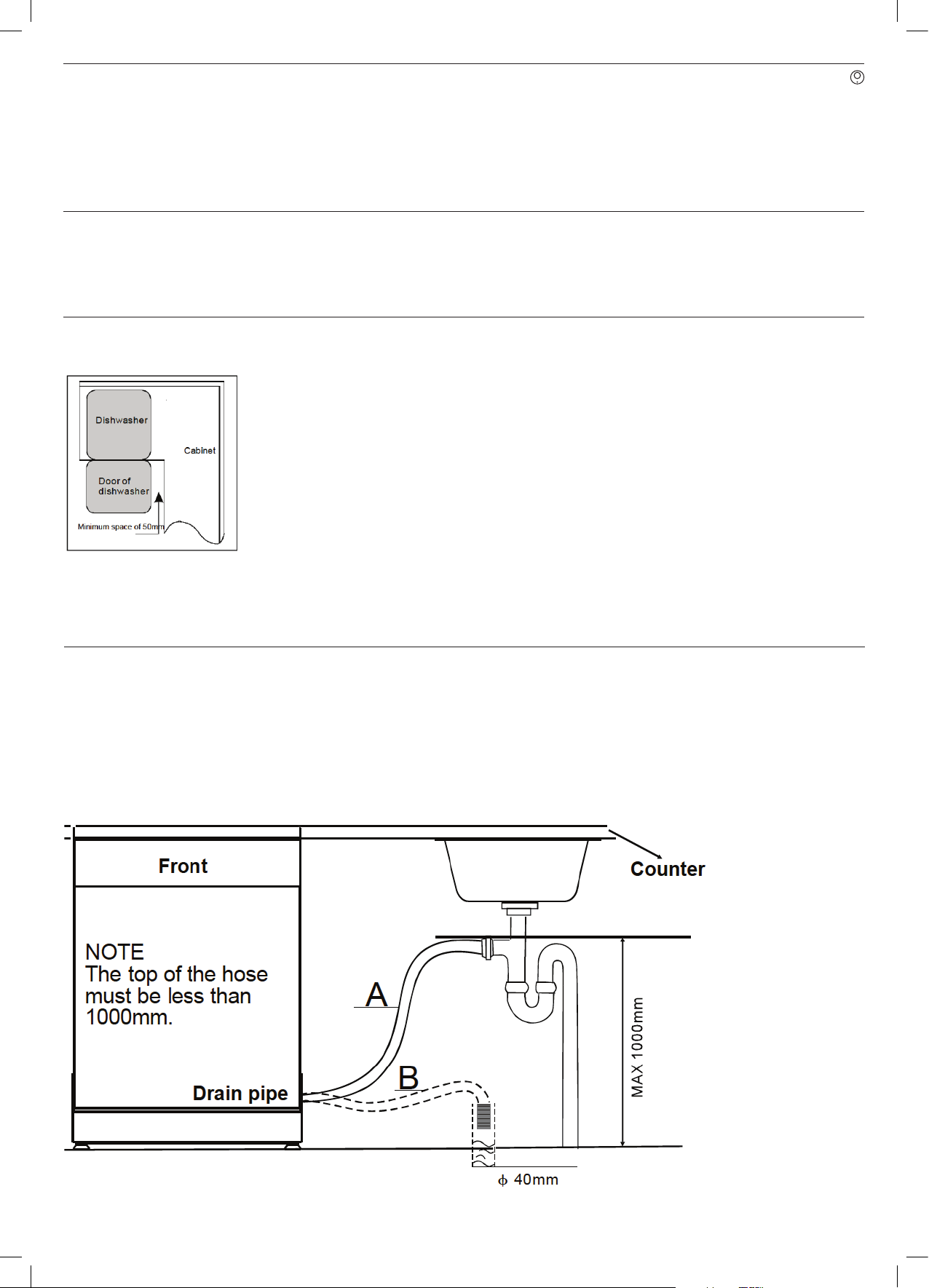
► As per the diagram (left), ensure that when you are installing your dishwasher
in a corner situation, adequate space is left to allow the door to open without
hitting other cabinetry or handles.
DRAIN HOSE CONNECTION
Insert the drain hose into a drain pipe with a minimum diarmeter of 40mm, or connect it onto the trap of your sink
where a dishwasher connection is present.
IMPORTANT! The top of the hose must be less than 1000mm high, as
illustrated below.
Page 8
USER MANUAL
PAGE 08
INSTALLATION INSTRUCTIONS
LEVELLING THE DISHWASHER Once you have positioned the dishwasher in your desired location, it needs to be
levelled correctly. Using a spirit level, you can wind each of the feet to ensure the
dishwasher is stable and level.
IMPORTANT! Your dishwasher must be level for it's proper operation and
wash performance. Use a spirit level to ensure this is the
case.
DISHWASHER INSTALLATION STEPS Now that your dishwasher is level and in position, you can finalise the installation
of the dishwasher.
► Connect the inlet hose to the cold water supply .
► Connect the drain hose as per the instructions on page 9 of this user manual.
► Plug in the power cord to your desired outlet.
OPERATING YOUR DISHWASHER
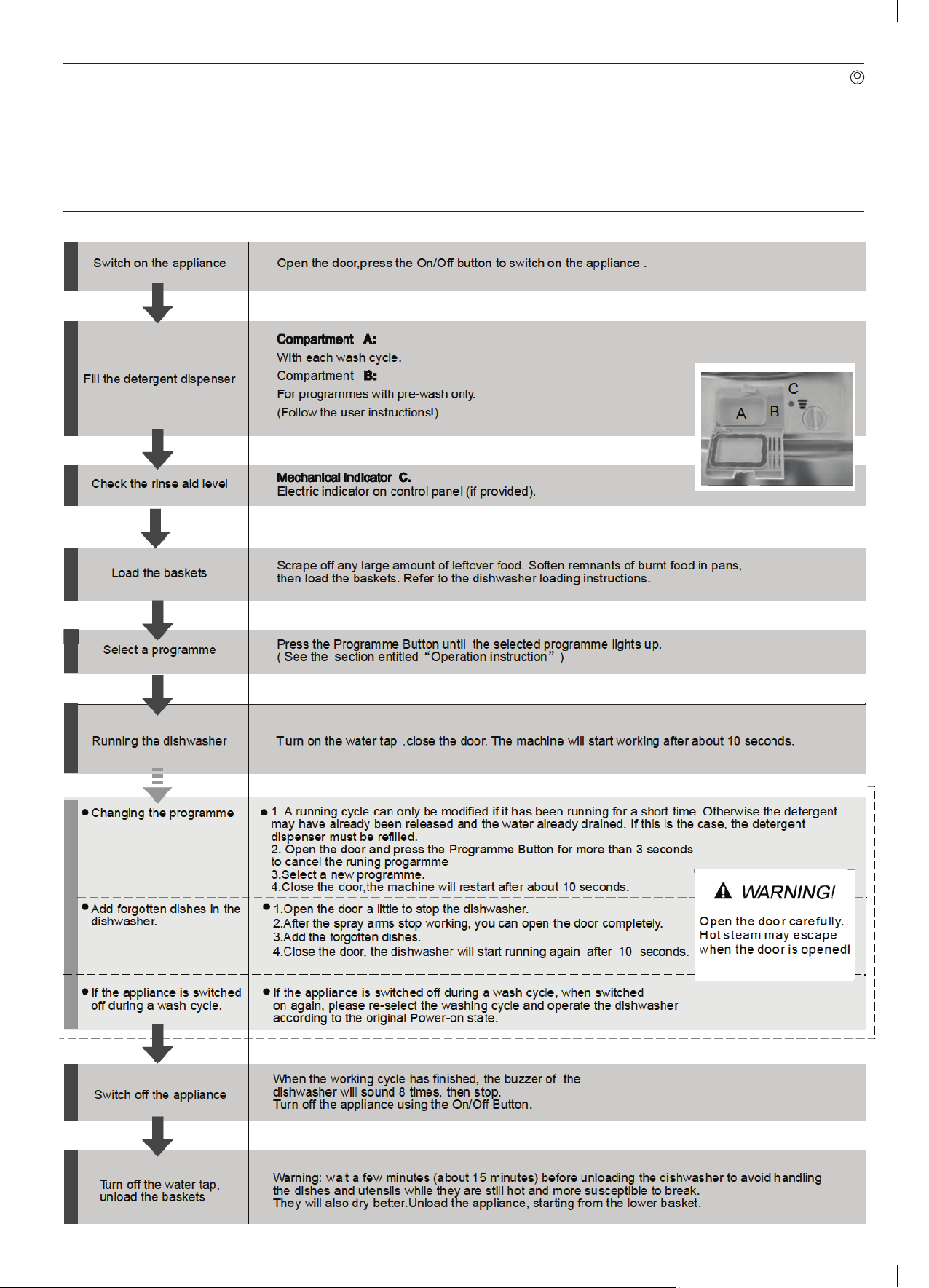
Starting a washing program
Page 9
PAGE 09
OPERATING YOUR DISHWASHER
QUICK OPERATION GUIDE
Page 10
USER MANUAL
PAGE 10
OPERATING YOUR DISHWASHER
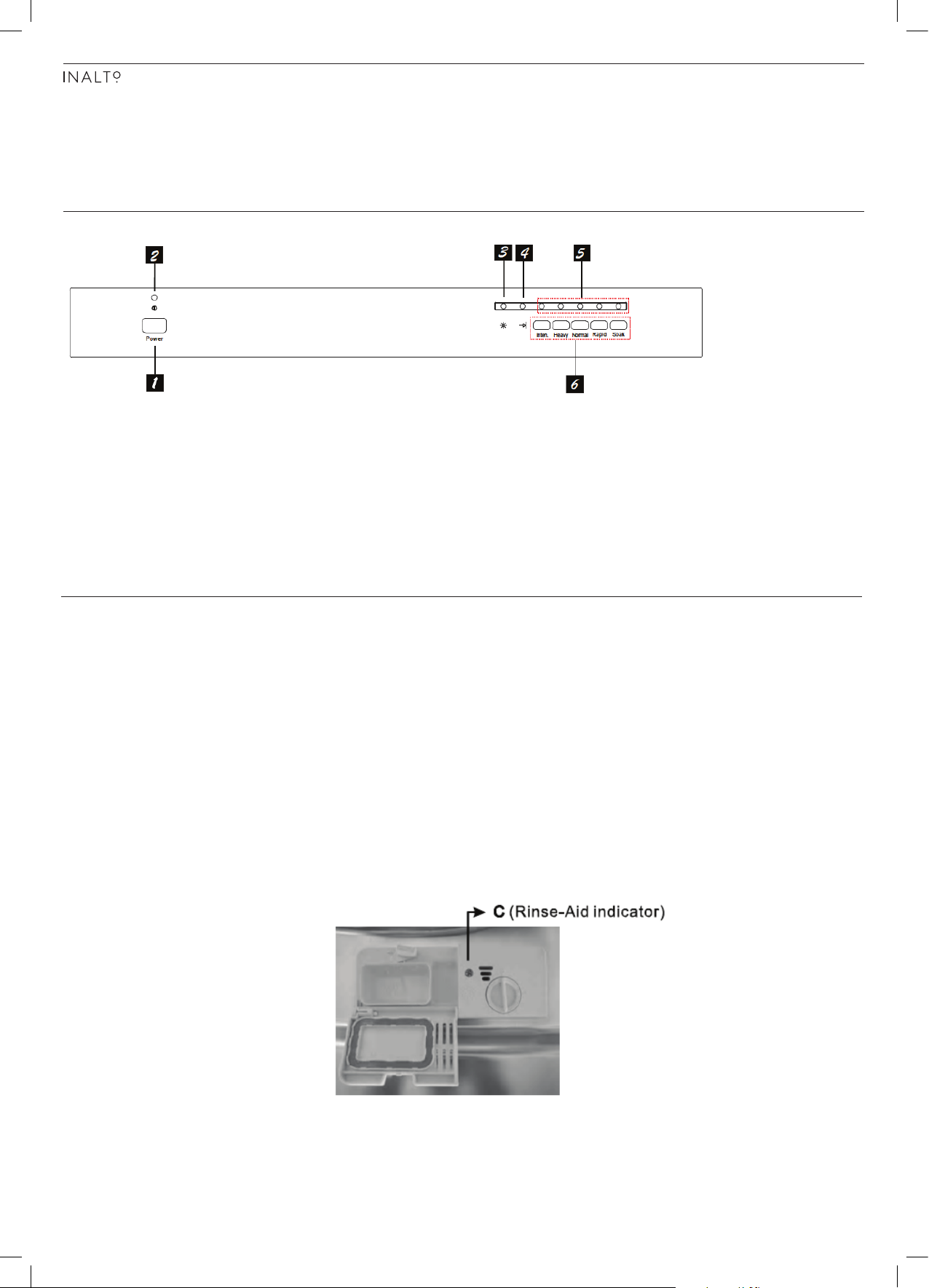
CONTROL PANEL
1. Power Button: To turn the dishwasher on/off.
2. Power Indicator: Indicates when the power is switched on.
3. Rinse Aid Indicator: Indicates when the rinse aid dispenser needs refilling.
4. End Cycle Indicator: Indicates when the washing program has finished.
5. Program Indicators: Displays which wash program you have selected.
6. Program Buttons: Use these buttons to select your desired wash program
(i.e. Heavy, Normal, Rapid, etc). After selecting your washing program, the
dishwasher will begin it's cycle after 10 seconds.
FILLING THE RINSE AID DISPENSER The rinse aid is released during the final rinse to prevent water from forming
droplets on your dishes, which can leave spots and streaks. It also improves
drying by allowing water to roll off the dishes. Your dishwasher is designed to use
liquid rinse aids. The rinse aid dispenser is located inside the door next to the
detergent dispenser. To fill the dispenser, open the cap and pour the rinse aid
into the dispenser until the level indicator turns completely black. The volume of
the rinse aid container is about 110ml.
WARNING! Only use specific "Rinse Aid" branded products and never
fill the rinse aid dispenser with other substances and they
may damage the dishwasher.
► If there is no rinse-aid warning light in the control panel, you can judge the
amount of rinse-aid by the color of the optical level indicator "C" located
next to the cap. When the rinse-aid container is full, the whole indicator will
be dark. As the rinse-aid diminishes, the size of the dark dot decreases. You
should never let the rinse aid get below 1/4 full.
Page 11
PAGE 11
OPERATING YOUR DISHWASHER
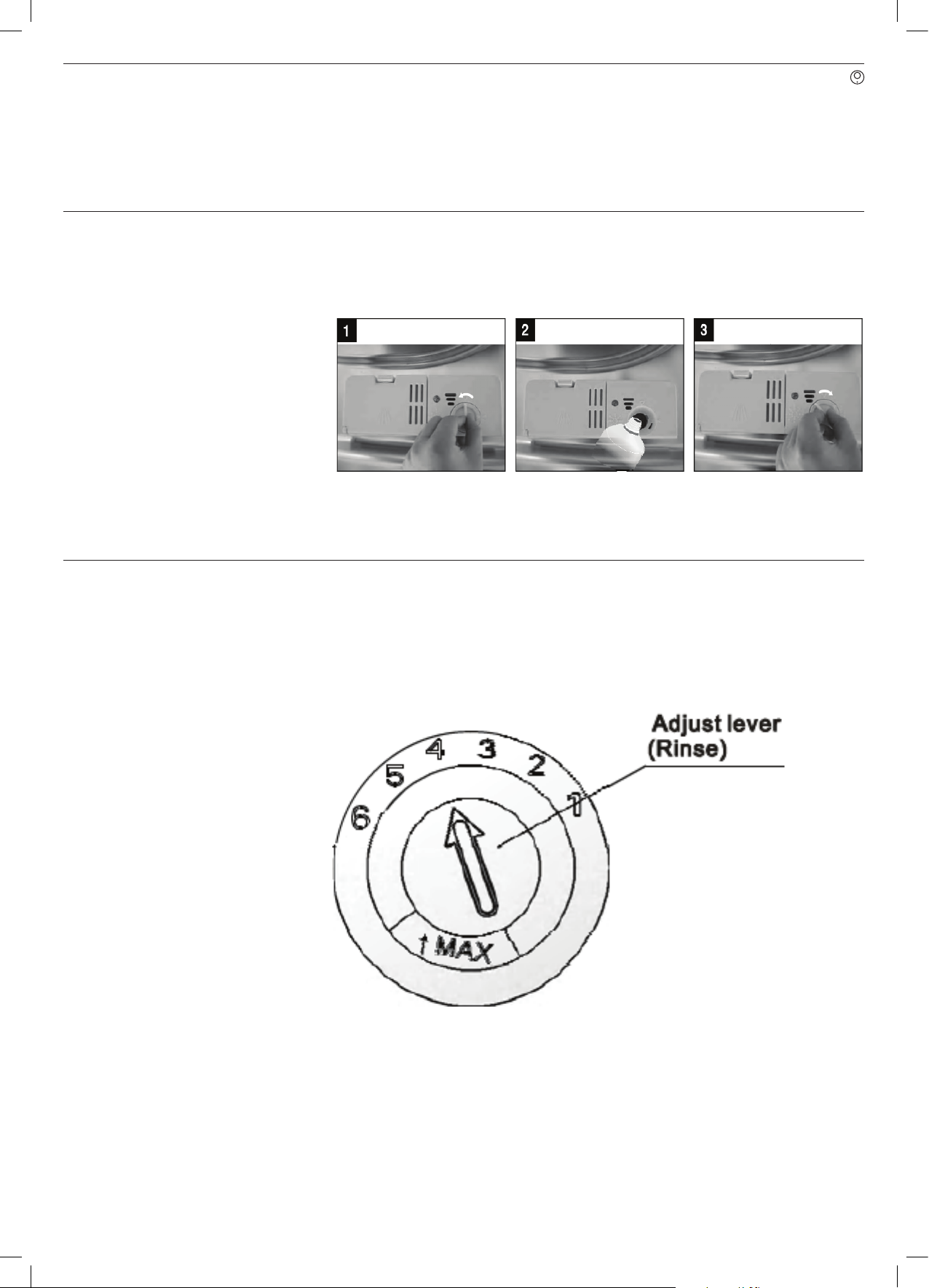
► To open the dispenser, turn the cap to the "open" arrow, anti-clockwise, and
lift out. (1)
► Pour the rinse aid into the dispenser, being careful not to overfill. (2)
► Replace the cap by inserting it aligned with the "open" arrow and turn
clockwise. (3)
Warning! Be careful not to overfill the dispenser and wipe up any
excess spilt with a damp cloth. Any residual rinse aid can
cause excess foaming during the next wash.
ADJUSTING THE RINSE AID DISPENSER
The rinse aid dispenser has six or four settings. Always start with the dispenser
set on "4". If spots and poor drying are a problem, increase the amount of rinse
aid dispensed by removing the dispenser lid and rotating the dial to "5". If the
dishes are still not drying properly or are showing spots, adjust the dial to the
next higher lever until your dishes are spot-free. The recommended setting is
"4". (Factory value is "4".)
► Increase the dose of rinse aid if there are drops of water or lime spots on the
dishes after washing. Reduce it if there are sticky whitish stains on your dishes
or a film on your glassware or cutlery.
Page 12
USER MANUAL
PAGE 12
OPERATING YOUR DISHWASHER
DETERGENTS Detergents with its chemical ingredients are necessary to remove dirt, crush dirt
and transport it out of the dishwasher. Most of the commercial quality detergents
are suitable for this purpose.
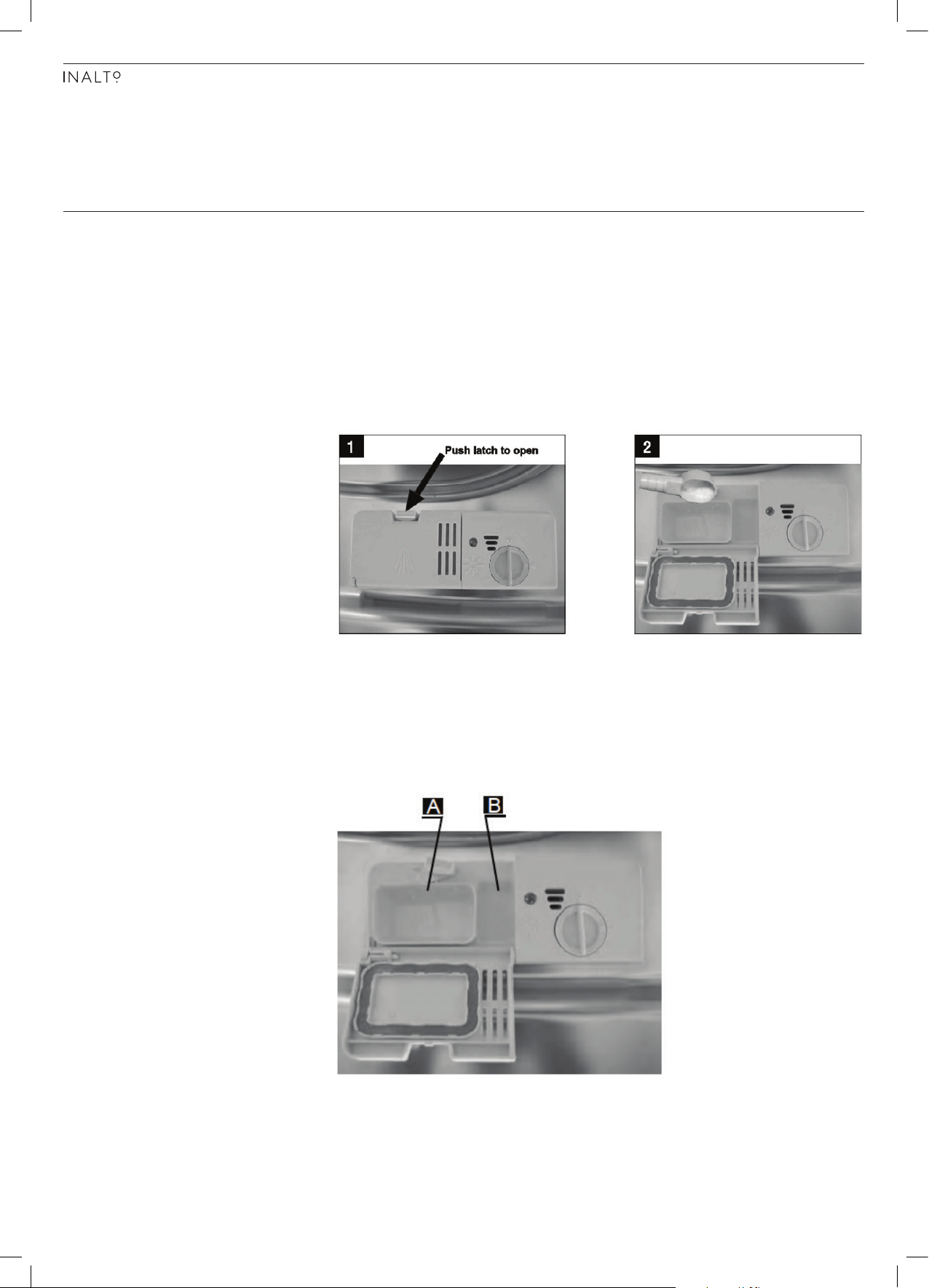
► If the lid is closed, press the release button and the lid will spring open.
► Always add the detergent just before starting each wash cycle.
► Only use branded detergent and rinse aid with your dishwasher.
WARNING! Dishwasher detergent is corrosive! Take care to keep it out
of reach of children.
FILLING YOUR DETERGENT DISPENSER
► Compartment A (below) is for the main wash cycle detergent.
► Compartment B is for the pre-wash cycle detergent. This can be used for
heavily soiled dishes.
► In regards to dosage, follow the instructions of the detergent manufacturer.
► Close the lid by pressing until it locks into place.
Page 13
PAGE 13
OPERATING YOUR DISHWASHER
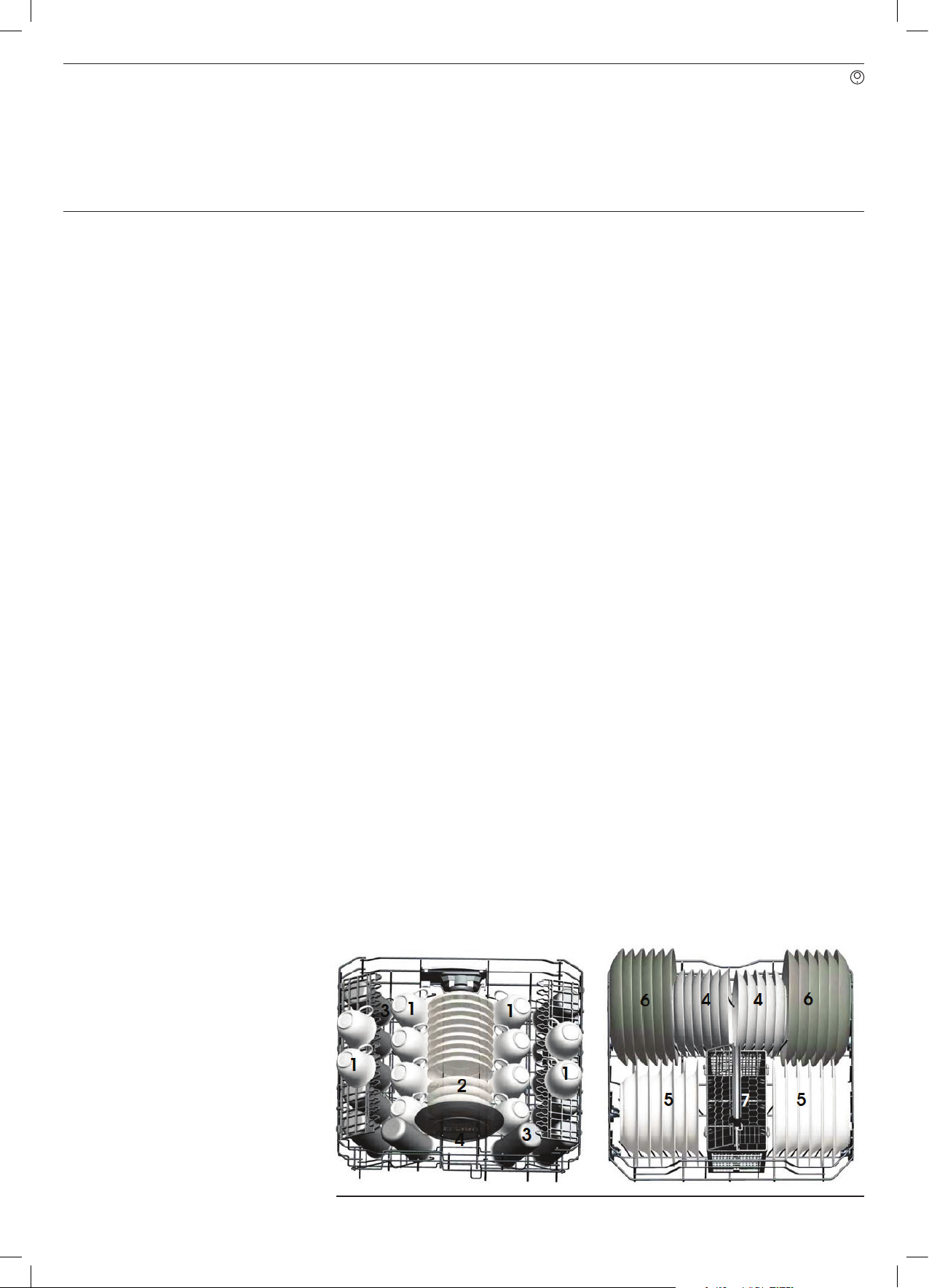
LOADING THE DISHWASHER ► Only use utensils and dishes that are identified as dishwasher safe or proof.
► To prevent damage to your dishes and glassware, do not remove them from
the dishwasher immediately after the program has ended.
ITEMS THAT ARE NOT SUITABLE FOR THE DISHWASHER:
► Cutlery with wooden, china, or mother of pearl handles
► Plastic items that are not heat resistant
► Older cutlery with glued parts
► Pewter or copper items
► Crystal glass
► Steek items that are subject to rusting
► Wooden platters
► Items made from synthetic fibres
ITEMS THAT ARE OF LIMITED SUITABILITY FOR THE DISHWASHER:
► Some types of glassware can become dull after a large number of washes
► Silver and aluminium parts have a tendency to discolour during washing
► Glazed patterns may fade after a large number of washes
► Scrape off any residual food and soften remnants of burnt food in pans,
before placing in your dishwasher.
► Whilst it is not necessary to rinse the dishes under running water, heavily
soiled dishes are recommended to be rinsed first.
► Items such as cups, glasses, pots/pans etc are faced downwards.
► Curved items, or ones with recesses, should be loaded on an angle so that
water can run off.
► Ensure that no dishes interfere in the operation of the spray arms, and that
they can freely rotate during washing.
WARNING! Very small items should never be washed in the dishwasher
as they could easily fall out of the baskets/racks.
► Place large items which are most difficult to clean, in the bottom rack.
► Place delicate and lighter dishwasher (such as glasses, mugs, etc) into the
upper rack.
► Ensure that glasses are not touching to prevent damage.
Upper Rack Example Lower Rack Example
Page 14
USER MANUAL
PAGE 14
OPERATING YOUR DISHWASHER
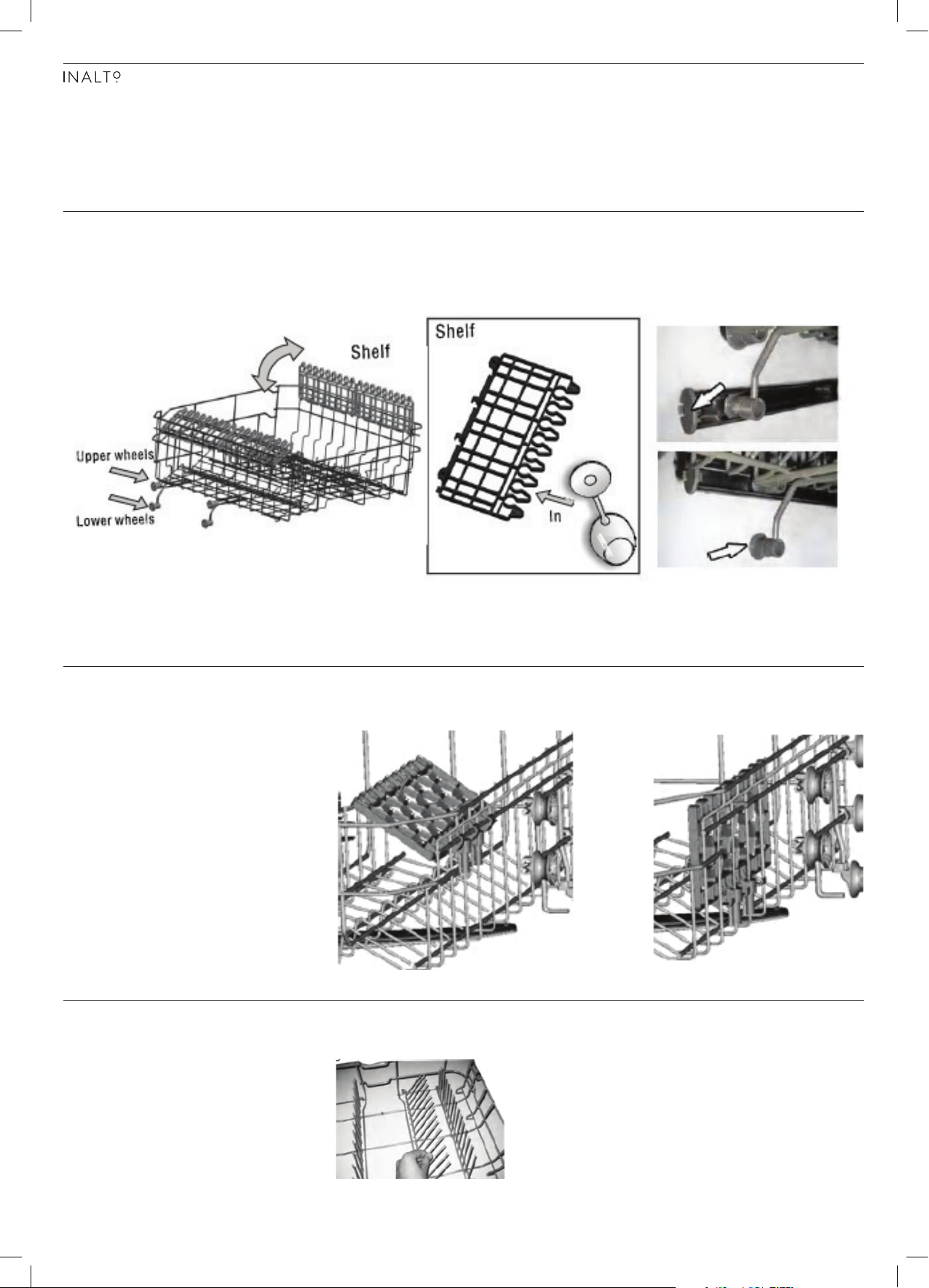
ADJUSTING THE UPPER BASKET The height of the upper basket can be adjusted in order to create more space for
large dishes both for the upper and lower basket racks. The height of the upper
basket rack can be adjusted by lifting up the basket for the upper position, and
lifting up the handle to lower the upper basket, see the picture below:
FOLDING BACK THE CUP SHELVES For better stacking of pots and pans, the spikes can be folded down as shown in
the picture below.
FOLDING SPIKES OF LOWER BASKET For improved stacking of pots or pans, the spikes can be folded down as shown
in the picture below.
Page 15
PAGE 15
OPERATING YOUR DISHWASHER
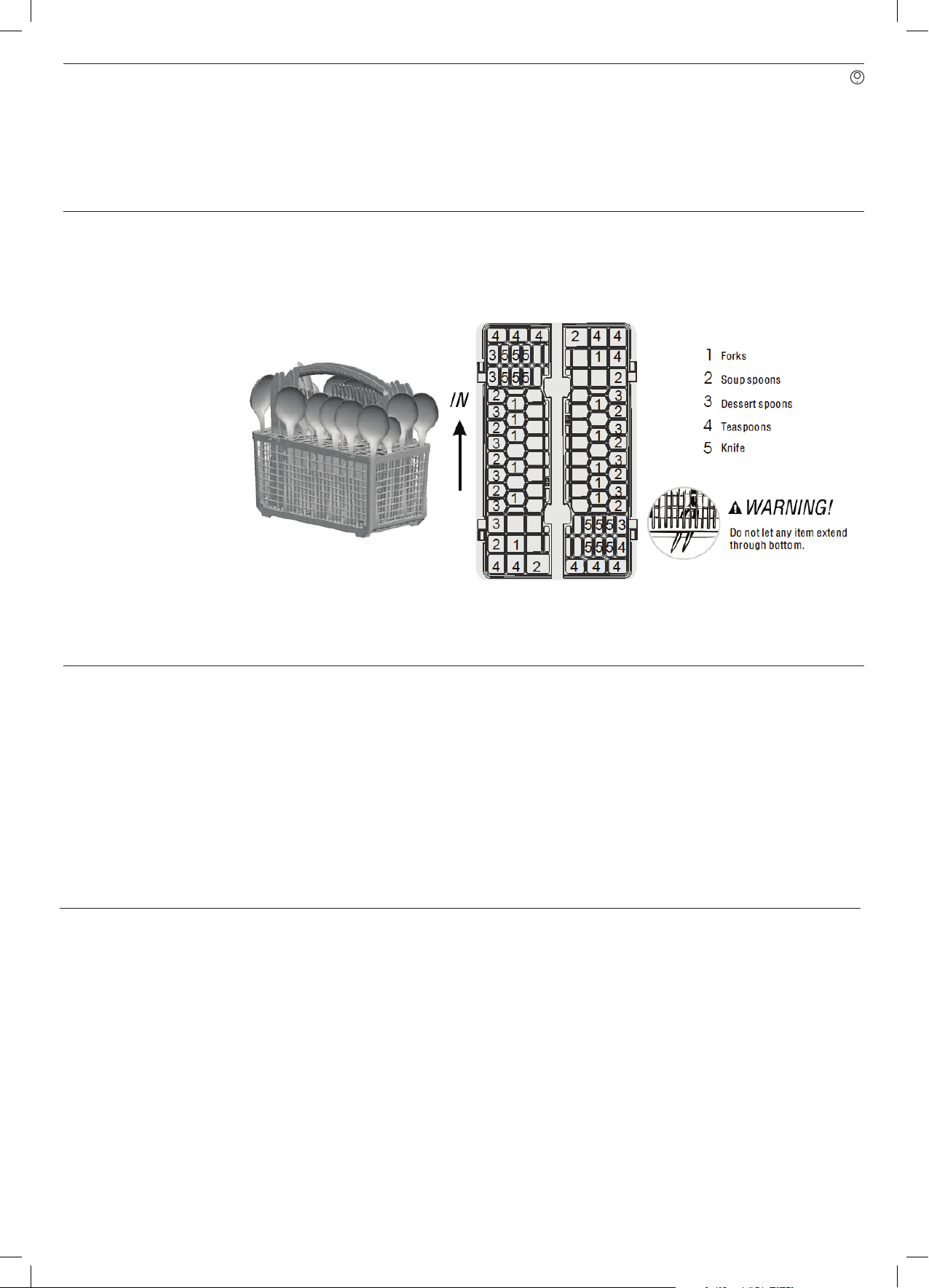
CUTLERY BASKET Cutlery should be placed in the cutlery rack separately from each other in the
appropriate positions, and do make sure the utensils do not nest together.
STARTING A WASH CYCLE ► Load the cutlery and dish basket racks.
► Add your detergent and rinse aid if required.
► With the dishwasher door open, press the Power Button and the Power
Indicator light will turn on.
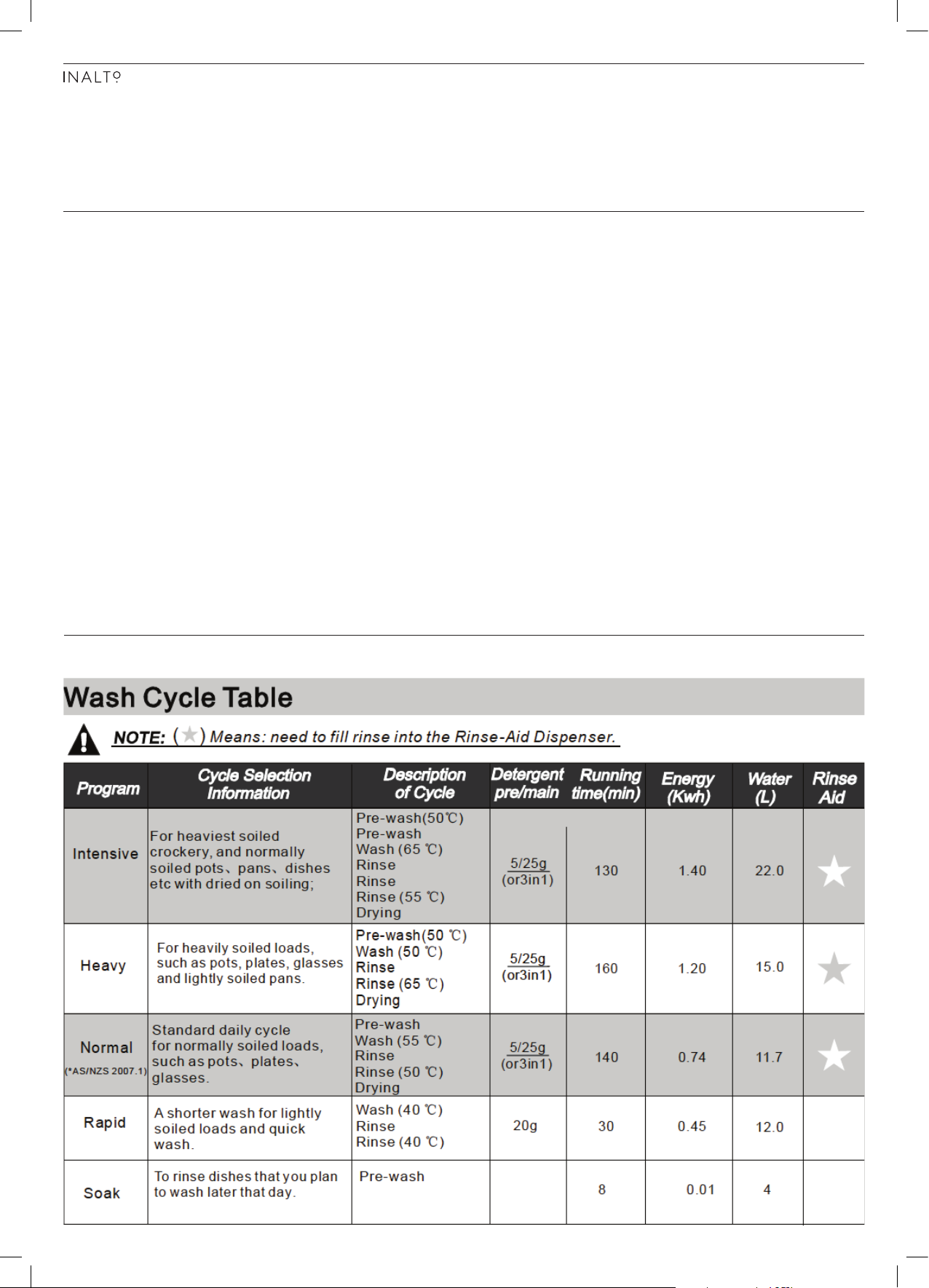
► Select your desired wash program from the options: Intensive, Heavy,
Normal, Rapid or Soak.
► Once your desired wash program is selected, the cycle will begin with 10
seconds.
NOTE: A cycle that is underway can only be modified if it has only
been running for a short time. Press the start/reset button
for 3 seconds and the machine will enter standby mode.
You can now select your new desired wash program.
AT THE COMPLETION OF A WASH CYCLE
Once the dishwasher cycle has finished, the dishwasher willl make an audible
tone for 8 seconds, before stopping.
► Turn off the dishwasher using the Power Button.
► Open the dishwasher door and wait a few minutes before unloading the
dishwasher. This will allow the dishes to climatise and return to a cool state
for handling.
Page 16
USER MANUAL
PAGE 16
CLEANING & MAINTENANCE
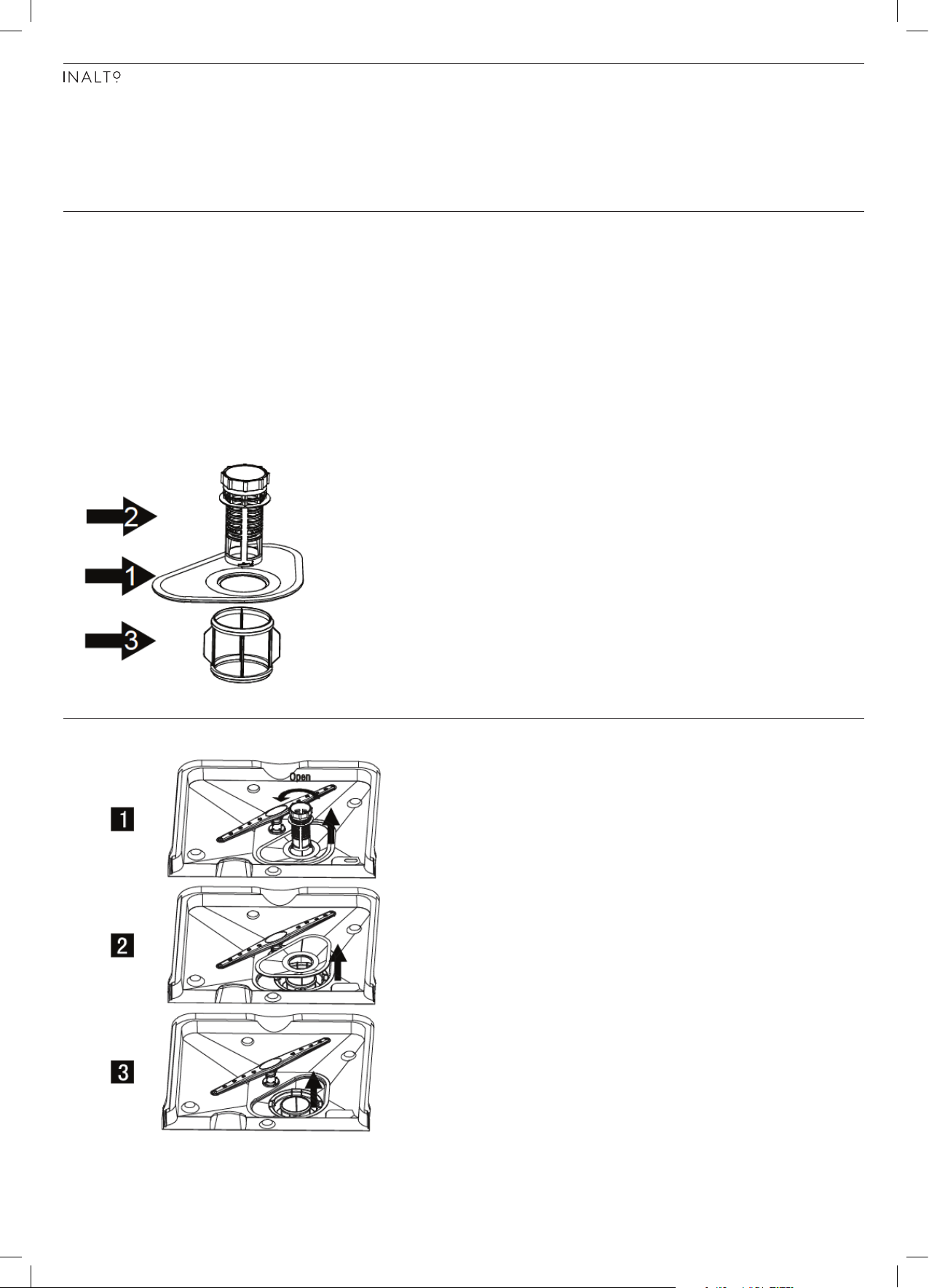
FILTERING SYSTEM The filter prevents larger remnants of food or other objects from getting inside
the pump. The residues may block the filter, in this case they must be removed.
The filter system consists of a coarse filter, a flat (main filter) and a microfilter
(fine filter).
► Main Filter (1): Food and soil particles trapped in this filter are pulverised by a
special jet on the lower spray arm and washed down to the drain.
► Coarse Filter (2): Larger items, such as pieces of bones or broken glass that
could block the drain are trapped in the coarse filter. To remove the items
caught by the filter, gently squeeze the tap on the top of this filter and lift out.
► Fine Filter (3): This filter holds soil and food resideues in the sump area and
prevents it from being redeposited on to the dishes during the wash cycle.
FILTER ASSEMBLY IMPORTANT! The dishwasher must never be used without the filters.
Improper replacement of the filter may reduce the
performance of the dishwasher and could damage dishes
and utensils.
Step 1.
Turn the filter in anti-clockwise
direction and then lift it up
Step 2.
Lift the main filter up
Step 3.
Life the fine filter up
► Inspect the filter assembly after each use of the dishwasher, for any blocks.
Remove the filter system and clean the filters under running water, removing
any food remnants.
Page 17
PAGE 17
CARING FOR THE DISHWASHER ► The control panel of the dishwasher can be cleaned using a slightly dampened
cloth. After cleaning, ensure it is dryed thoroughly.
► To clean the internal edge of the door, you should only use a soft, damp cloth
with warm water. Avoid using any spray cleaners as these can penetrate into
the door lock and electrical components.
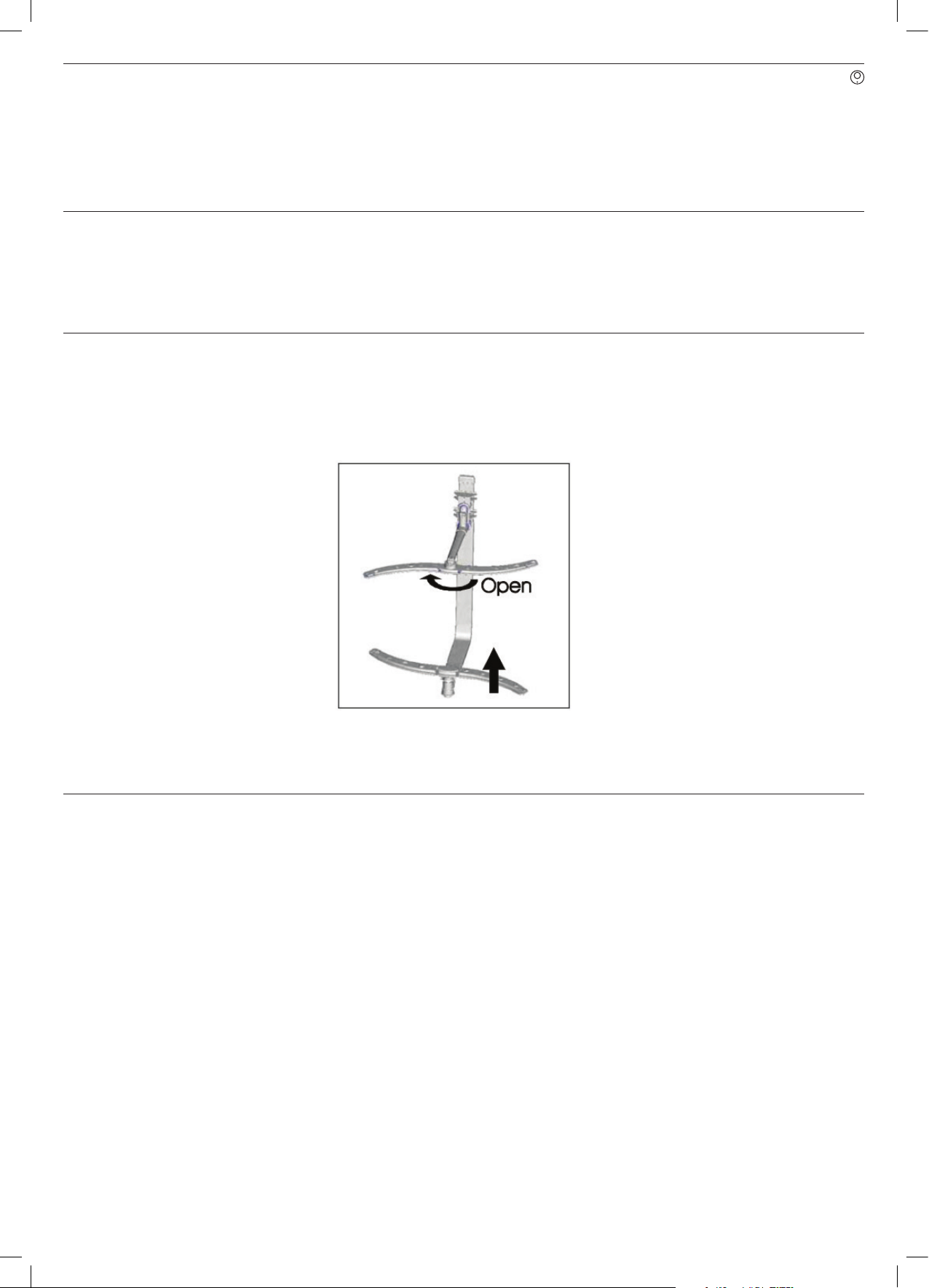
CLEANING THE SPRAY ARMS ► It is necessary to clean the spray arms regularly for hard water chemicals will
clog the spray arm jets and bearings.
► To remove the upper spray arm, hold the nut and rotate the arm clockwise to
remove.
► To remove the lower spray arm, pull the spray arm upwards (as per the
diagram below).
► Wash the arms in warm soapy water and use a brush to clean the jets. Replace
the spray arms after rinsing thoroughly.
GENERAL CARE INSTRUCTIONS FOR YOUR DISHWASHER
► After every wash, leave the door slightly open so that moisture and odours
are not trapped inside.
► Before performing maintenance or cleaning, always switch off at the power
outlet and remove the plug.
► To clean the exterior and rubber door seals of the dishwasher, never use
solvents or abrasive cleaning products. Warm soapy water should always
be sufficient, or for stubborn stains only use specialty cleaning products
specifically made for dishwashers.
► When your dishwasher won't be used for a long period of time, it is
recommended that you run a wash cycle with the dishwasher empty and then
leave the dishwasher door slightly open. Also unplug the dishwasher from the
power socket.
► When moving the appliance, always try to ensure it is kept in the vertical
position. If absolutely necessary, it can be positioned on it's back.
► One of the factors that can cause odours to form is residual food that remains
trapped in the seals. Periodic cleaning with a soft damp cloth (as described
above) will prevent this from occuring.
Page 18
USER MANUAL
PAGE 18
TROUBLESHOOTING
& TECHNICAL DATA
OPERATION IN CASE OF EMERGENCY
IMPORTANT! If your dishwasher appears to be operating incorrectly, then
you should disconnect it from the power outlet and then
contact the Residentia Group Support team on 1300 11 HELP
(4357).
In the event of an emergency you should:
— Switch off the dishwasher at the controls.
— Switch off the dishwasher at the power outlet and remove the plug.
— Isolate the water supply from the dishwasher.
— Call the Residentia Support Team on 1300 11 HELP (4357).
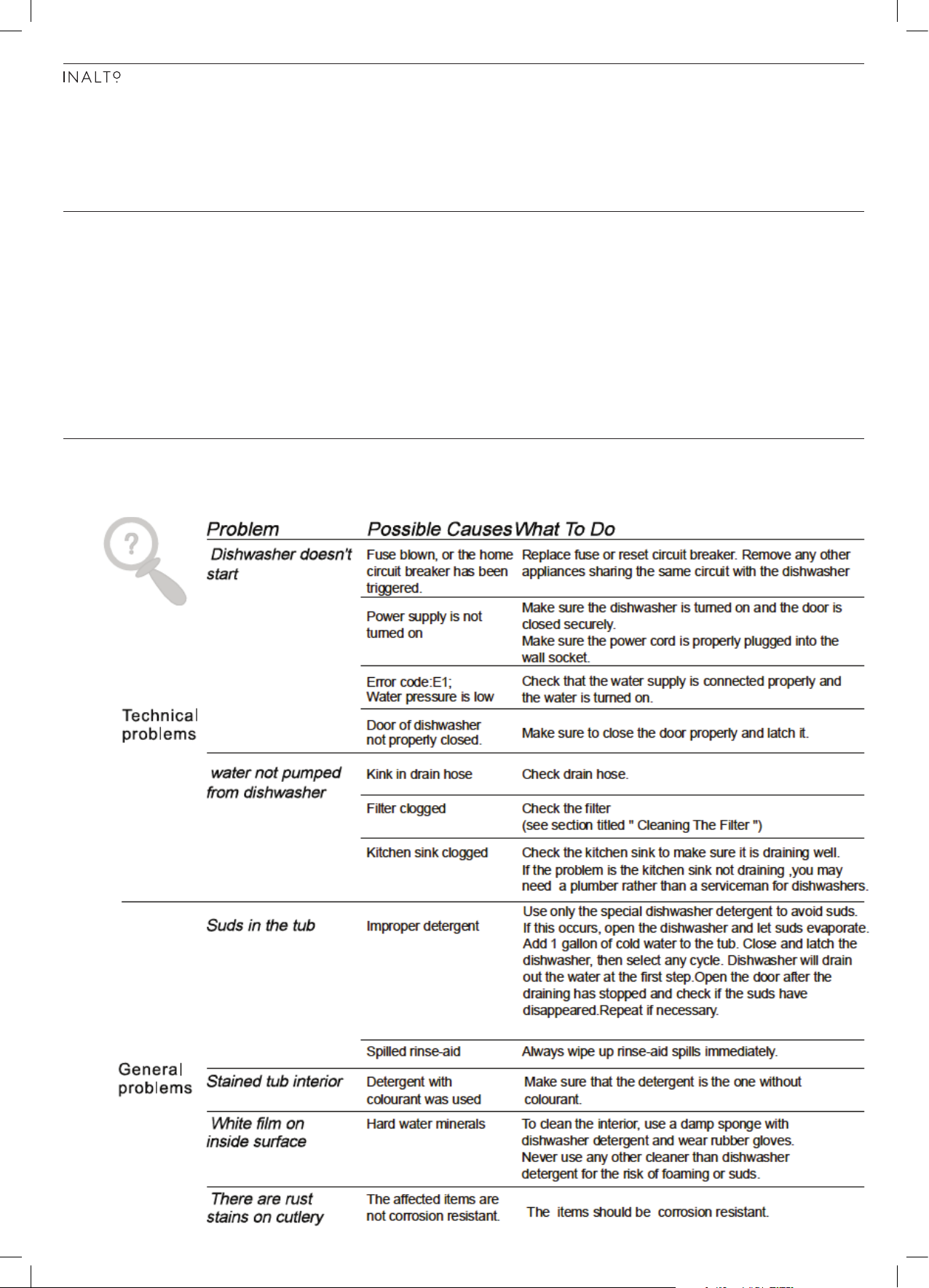
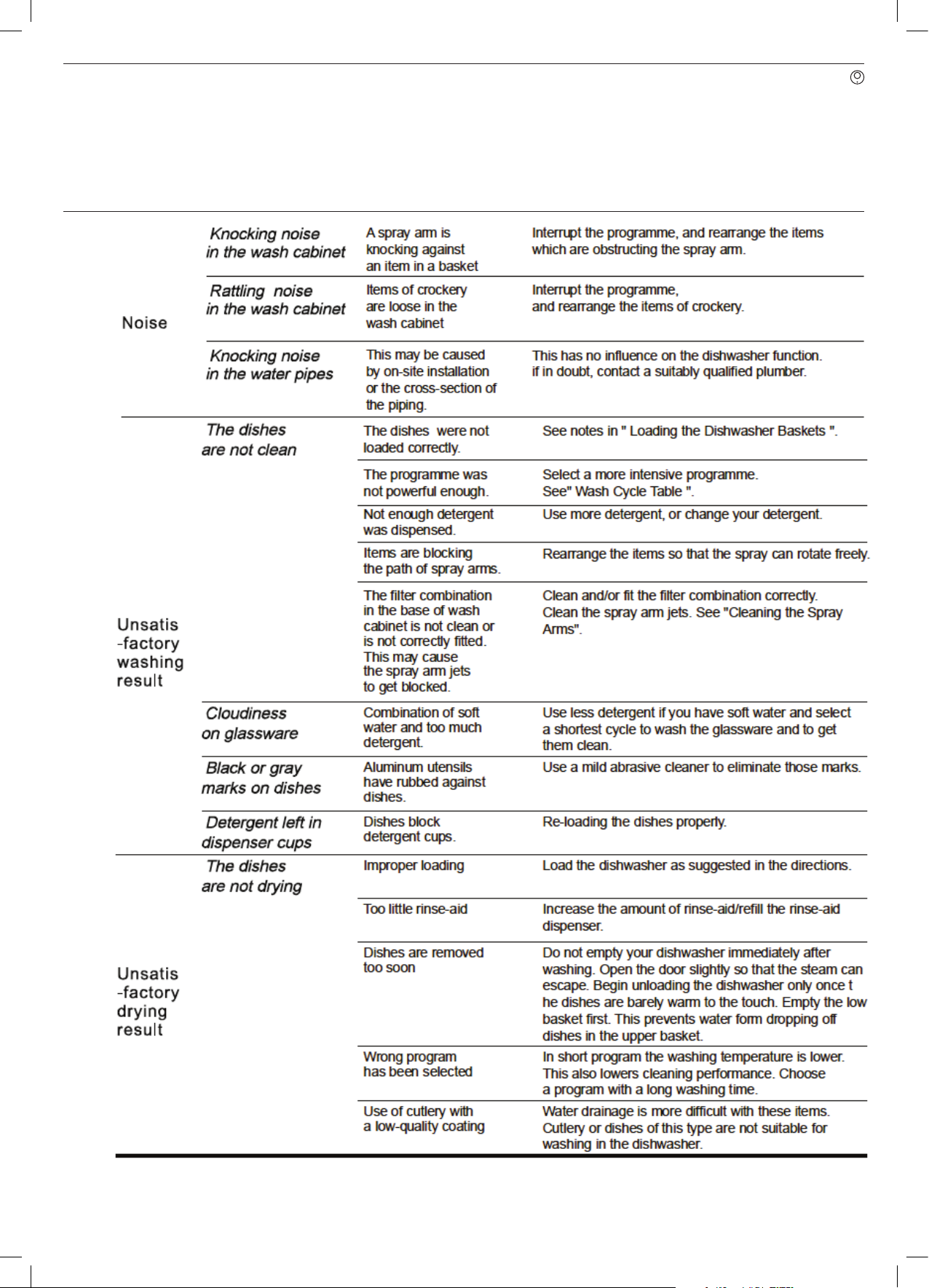
TROUBLESHOOTING Some minor faults can be fixed by referring to the instructions given below.
There is also a self-help section online at http://www.residentiagroup.com.au.
Page 19
PAGE 19
Page 20
USER MANUAL
PAGE 20
TROUBLESHOOTING & TECHNICAL DATA
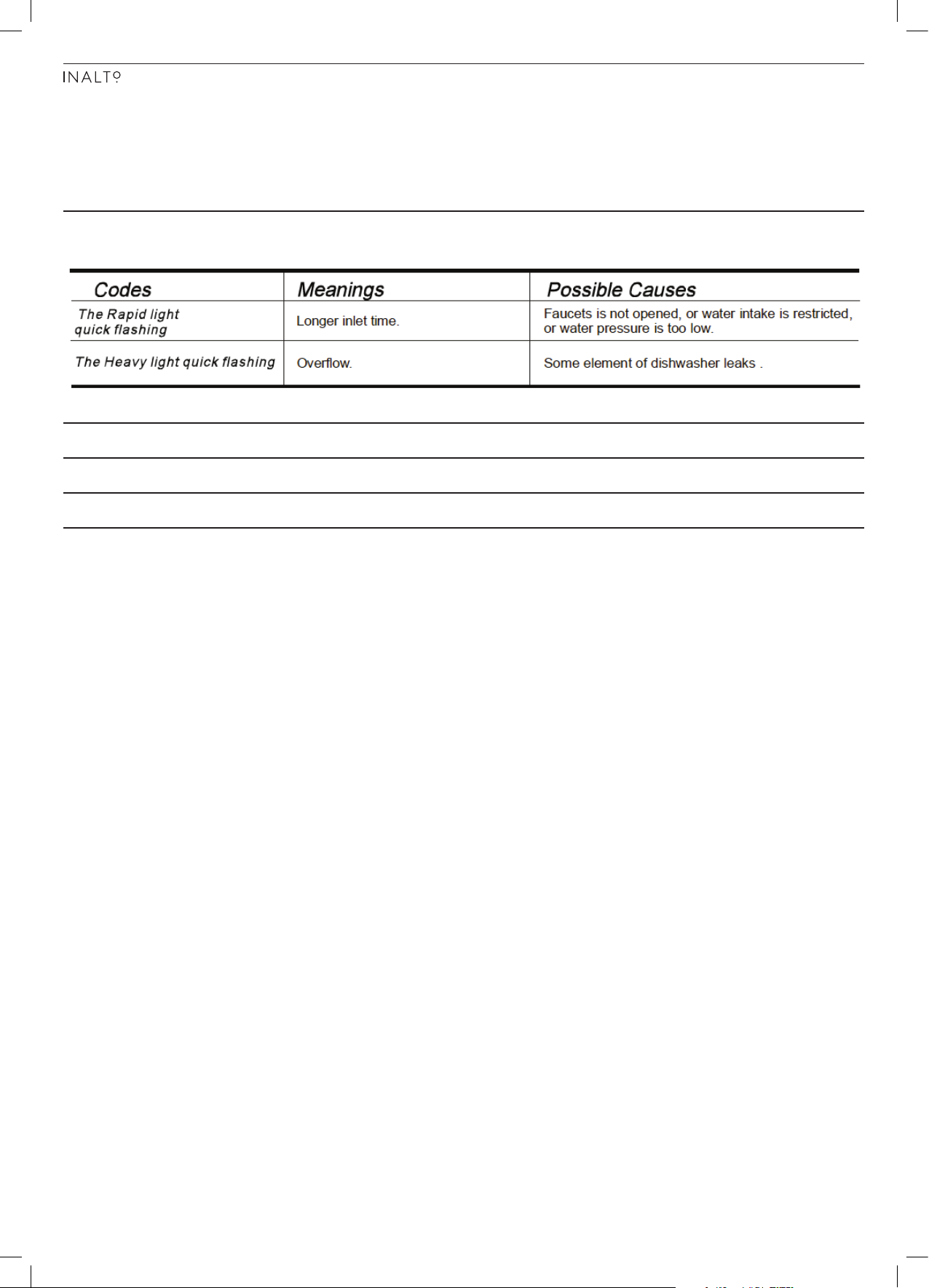
ERROR CODES When some malfunctions occur, the dishwasher may display some error
codes to warn you of an issue.
TECHNICAL DATA Electrical details Rated Voltage: 220 - 240 Volts, 50 Hz
Capacity: 12 Place Settings
Water Pressure: 0.04-1.0 MPa
Page 21
PAGE 21
RECEIPT
PURCHASE DETAILS
For your records, please record details of your purchase below and staple your receipt to this page.
STORE DETAILS
STORE NAME
ADDRESS
TELEPHONE
PURCHASE DATE
PRODUCT DETAILS
MODEL NO.
SERIAL NO.*
|
|
|
|
|
|
* Note. Your serial number can be found on the inside panel of the dishwasher.
Page 22

USER MANUAL
WARRANTY INFORMATION
PAGE 22
WARRANTY TERMS & CONDITIONS
DISHWASHERS (FREESTANDING, INTEGRATED)
This document sets out the terms and conditions of the
product warranties for Residentia Group Appliances. It is
an important document. Please keep it with your proof of
purchase documents in a safe place for future reference
should you require service for your Appliance.
1. In this warranty
(a) ‘acceptable quality’ as referred to in clause 10 of
this warranty has the same meaning referred to
in the ACL;
(b) ‘ACL’ means Trade Practices Amendment
(Australian Consumer Law) Act (No.2) 2010;
(c) ‘Appliance’ means any Residentia Group
product purchased by you accompanied by this
document;
(d) ‘ASR’ means Residentia Group authorised service
representative;
(e) ‘Residentia Group’ means Residentia Group Pty
Ltd of 20 Yaltara Avenue, Bundoora Victoria
3083, ACN 600 546 656 in respect of Appliances
purchased in Australia;
(f ) ‘major failure’ as referred to in clause 10 of
this warranty has the same meaning referred
to in the ACL and includes a situation when an
Appliance cannot be repaired or it is uneconomic
for Residentia Group, at its discretion, to repair
an Appliance during the Warranty Period;
(g) ‘Warranty Period’ means:
(i) where the Appliance is used for
personal, domestic or household
use (i.e. normal single family use)
as set out in the instruction manual,
the Appliance is warranted against
manufacturing defects for 24 months,
following the date of original purchase
of the Appliance;
(h) ‘you’ means the purchaser of the Appliance not
having purchased the Appliance for re-sale, and
‘your’ has a corresponding meaning.
2. This warranty only applies to Appliances purchased
and used in Australia and is in addition to (and does
not exclude, restrict, or modify in any way) any nonexcludable statutory warranties in Australia.
3. During the Warranty Period Residentia Group or its
ASR will, at no extra charge if your Appliance is readily
accessible for service, without special equipment
and subject to these terms and conditions, repair or
replace any parts which it considers to be defective.
Residentia Group or its ASR may use remanufactured
parts to repair your Appliance. You agree that any
replaced Appliances or parts become the property
of Residentia Group. This warranty does not apply
to light globes, batteries, filters or similar perishable
parts.
4. Parts and Appliances not supplied by Residentia Group
are not covered by this warranty.
Page 23

PAGE 23
5. You will bear the cost of transportation, travel and
delivery of the Appliance to and from Residentia
Group or its ASR. If you reside outside of the service
area, you will bear the cost of:
(a) travel of an authorised representative;
(b) transportation and delivery of the Appliance
to and from Residentia Group or its ASR, in all
instances, unless the Appliance is transported
by Residentia Group or its ASR, the Appliance is
transported at the owner’s cost and risk while in
transit to and from Residentia Group or its ASR.
6. Proof of purchase is required before you can make a
claim under this warranty.
7. You may not make a claim under this warranty unless
the defect claimed is due to faulty or defective parts
or workmanship. Residentia Group is not liable in the
following situations (which are not exhaustive):
(a) the Appliance is damaged by:
(i) accident
(ii) misuse or abuse, including failure to
properly maintain or service
(iii) normal wear and tear
(iv) power surges, electrical storm damage
or incorrect power supply
(v) incomplete or improper installation
(vi) incorrect, improper or inappropriate
operation
(vii) insect or vermin infestation
(viii) failure to comply with any additional
instructions supplied with the
Appliance;
(b) the Appliance is modified without authority from
Residentia Group in writing;
(c) the Appliance’s serial number or warranty seal
has been removed or defaced;
(d) the Appliance was serviced or repaired by
anyone other than Residentia Group, an
authorised repairer or ASR.
9. To the extent permitted by law, Residentia Group
excludes all warranties and liabilities (other than as
contained in this document) including liability for any
loss or damage whether direct or indirect arising from
your purchase, use or non use of the Appliance.
10. For Appliances and services provided by Residentia
Group in Australia, the Appliances come with a
guarantee by Residentia Group that cannot be
excluded under the Australian Consumer Law.
You are entitled to a replacement or refund for a
major failure and for compensation for any other
reasonably foreseeable loss or damage. You are also
entitled to have the Appliance repaired or replaced
if the Appliance fails to be of acceptable quality and
the failure does not amount to a major failure. The
benefits to you given by this warranty are in addition
to your other rights and remedies under a law in
relation to the Appliances or services to which the
warranty relates.
11. At all times during the Warranty Period, Residentia
Group shall, at its discretion, determine whether
repair, replacement or refund will apply if an
Appliance has a valid warranty claim applicable to it.
12. To enquire about claiming under this warranty, please
follow these steps:
(a) carefully check the operating instructions, user
manual and the terms of this warranty;
(b) have the model and serial number of the
Appliance available;
(c) have the proof of purchase (e.g. an invoice)
available;
(d) telephone the numbers shown below.
13. You accept that if you make a warranty claim,
Residentia Group and its ASR may exchange
information in relation to you to enable Residentia
Group to meet its obligations under this warranty.
8. This warranty, the contract to which it relates and the
relationship between you and Residentia Group are
governed by the law applicable where the Appliance
was purchased.
The Australian Consumer Law requires the
inclusion of the following statement with
this warranty:
Our goods come with guarantees that cannot be excluded under the Australian Consumer Law.
You are entitled to a replacement or refund for a major failure and for compensation for any other
reasonably foreseeable loss or damage. You are also entitled to have the goods repaired or replaced if
the goods fail to be of acceptable quality and the failure does not amount to a major failure.
IMPORTANT
Before calling for service, please ensure that the steps in
point 12 have been followed.
Telephone contacts
► Service: Please call 1300 11 HELP (4357)
► Spare Parts: Please call 1300 11 SPARE (7727)
Page 24

MODEL CODE/S
IDW6S
 Loading...