

Page 1
Quick guide
EN
THANK YOU FOR BUYING OUR PRODUCT.
FIRST TIME USE
After installation, wait at least two hours before connecting the
appliance to the power supply. Once connected, it will start working
automatically. The ideal temperature settings are preset from the
factory.
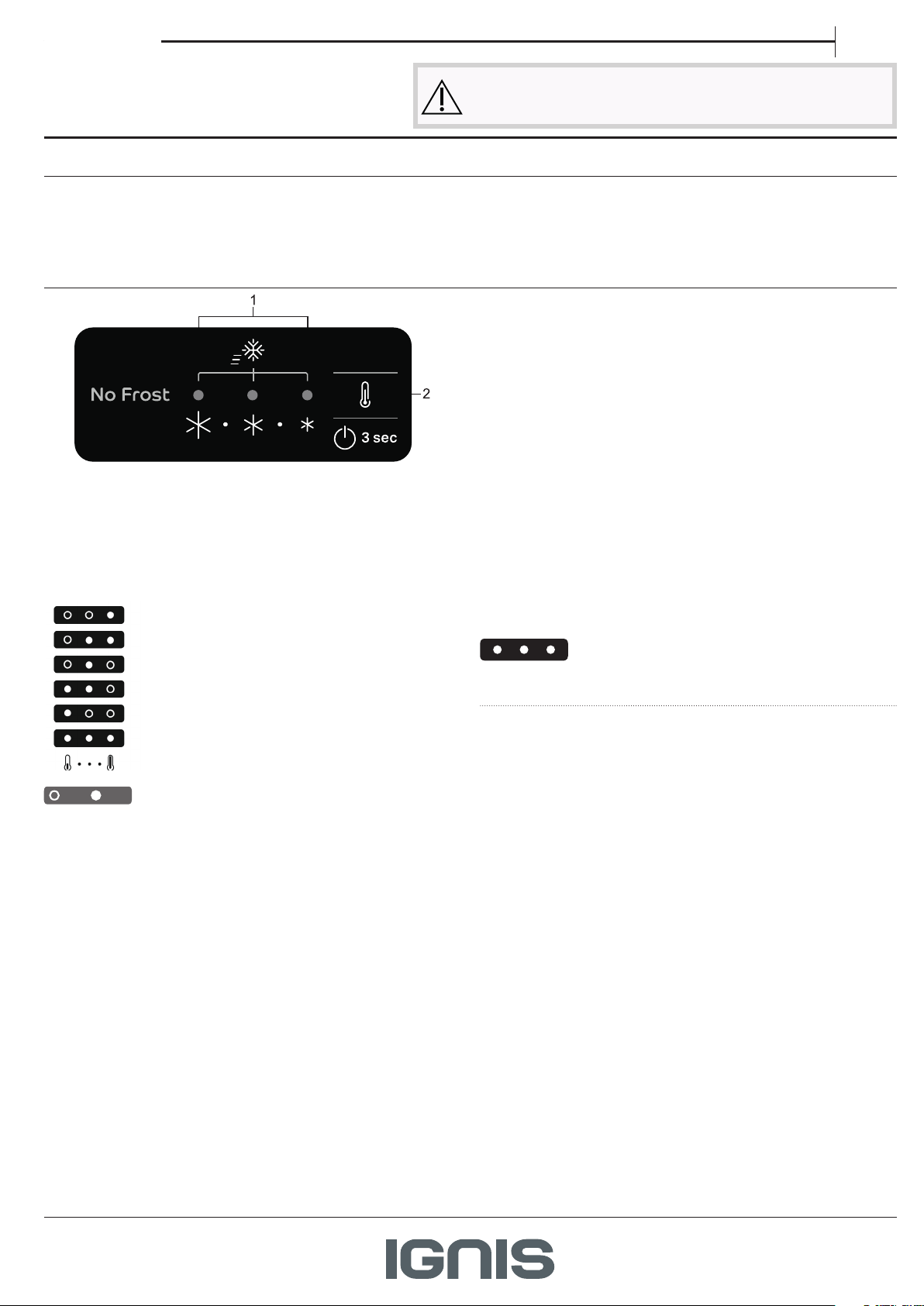
CONTROL PANEL
TEMPERATURE SETTING
Press the Temperature button on the control panel to adjust the
temperature from the warmest through the lower to the coldest
level. Pressing the Temperature button, the temperature setting will
change cyclically. At rst plug-in of appliance temperature setpoint is
present at medium position (factory setting). Following table shows
temperature setpoints:
High temp.
Med-high temp.
Medium temp.
Med-low temp.
Low temp.
Super cooling
OFF ON
Recommended setting:
• Refrigerator compartment: +4°C or MED
• Freezer compartment: -18°C or -20°C
Note: Displayed set points correspond to the average temperature
throughout the whole refrigerator.
Before using the appliance carefully read the Safety Instruction.
After turning the appliance on, wait 4-6 hours for it to reach the correct
food storage temperature.
1. Indicator Leds (to display the current temperature set point or the
Super Freezing function)
2. Super Freezing Button / Temperature Button
SUPER FREEZING
The use of this function is recommended when placing a very high
quantity of food to be frozen in the freezer compartment.
24 hours before freezing fresh food, press and hold for 3 seconds the
Super Freezing button / Temperature button on the control panel till
all the 3 LEDs will turn on, to activate the Super Freezing function.
After 24 hours place the food to be frozen in the freezing zone drawer
of freezer compartment.
The function is automatically deactivated after 48 hours and return to
previous selected set point.
The function can be manually deactivated by pressing and holding for
3 seconds the Temperature button on the control panel.
LED LIGHT
This product contains a light source of energy eciency class A.
If the LED light system does not work, please contact the Service to
replace it.
Important: The refrigerator compartment light switches on when
the refrigerator door is opened. If the door is kept open for more than
8 minutes the light will be automatically switched o.
* Available only on certain models
Page 2
HOW TO STORE FRESH FOOD AND BEVERAGES
REFRIGERATION COMPARTMENT
Refrigerator compartment defrosting is completely automatic.
Droplets of water on the rear wall inside the refrigerator compartment
indicate that the automatic defrost phase is in progress.
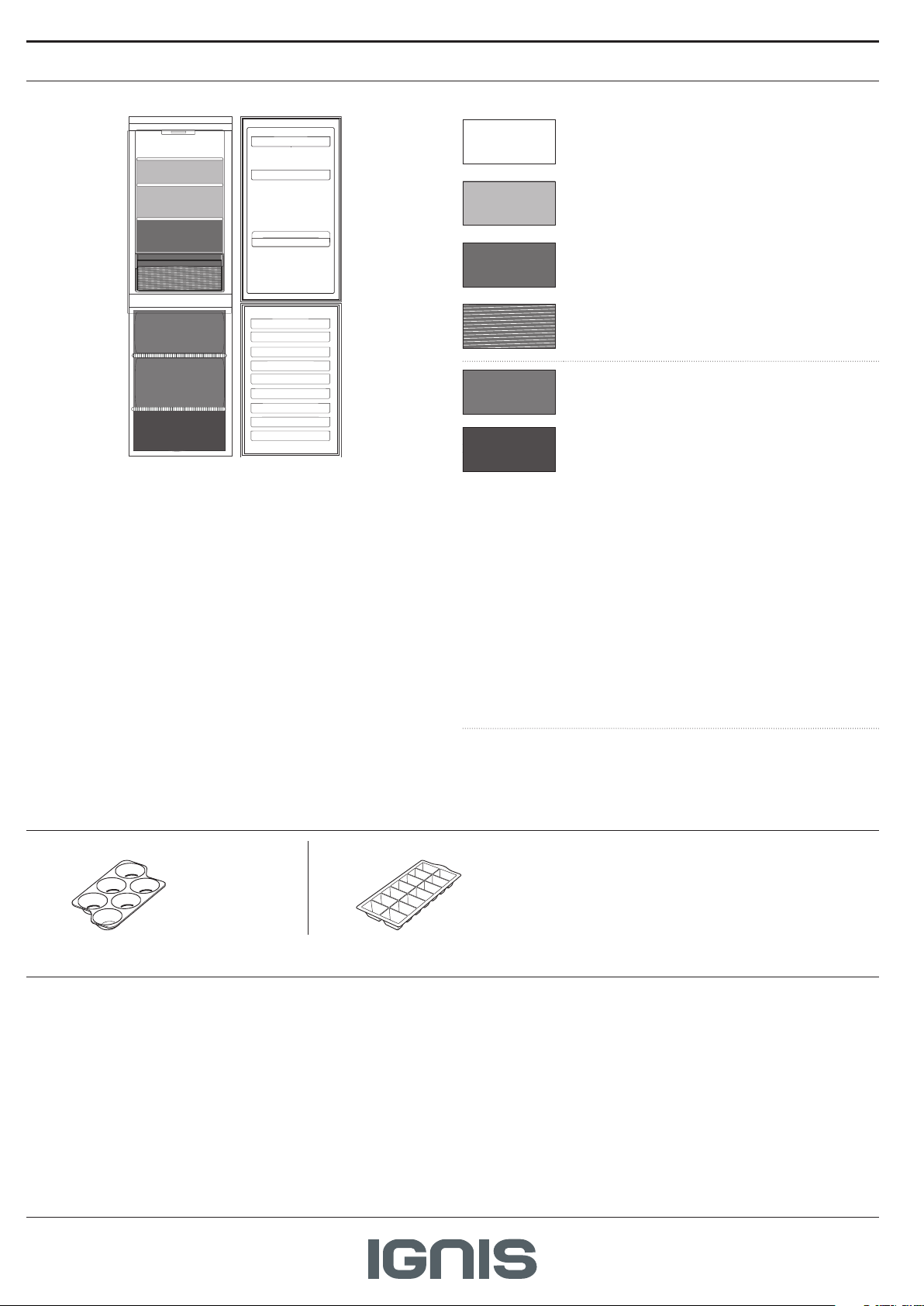
Legend
TEMPERATE ZONE
Suggested for storage of tropical fruit, cans, drinks,
eggs, sauces, pickles, butter, jam
COOL ZONE
Suggested for the storage of cheese, milk, daily food,
delicatessen, yogurt
COOLEST AREA
Suggested for storage of cold cuts, desserts, meat
and sh
FRUIT & VEGETABLE DRAWER
FREEZER DRAWERS
(One drawer in models lower than 1,7m)
FREEZING ZONE DRAWER
(Max cool zone)
Suggested to freeze fresh / cooked food
The defrost water is automatically run into a drain hole and collected in
a container, where it evaporates.
FREEZER COMPARTMENT
No Frost freezers provide chilled air circulation around the storage
areas, and prevent the formation of ice, thereby completely eliminating
the need for defrosting.
Frozen items don’t stick to the walls, labeling stays legible and storage
space remains neat and clear.
The freezer compartment allows for the storage of frozen food and the
freezing of fresh food. The quantity of fresh food that can be frozen
in a specic time period is indicated on the rating plate. Arrange the
fresh food in the freezing area inside the freezer compartment, leaving
enough space around it to allow air to circulate freely. Avoid allowing
fresh food to come into direct contact with frozen food. Load limits are
determined by baskets, aps, drawers, shelves etc..
ACCESSORIES*
EG G TR AY ICE TRAY
GENERAL INFORMATION
The drawers, baskets, and shelves should be kept in their current
position unless otherwise specied in this quick guide.
The light system inside the refrigerator compartment uses LED lights,
which provide better lighting and use less energy than traditional
bulbs.
Make sure that these components can still close easily after loading.
The freezing zone's drawer/compartment is shown in the picture
above. To optimize freezing speed and get more storage space, the
freezer compartment can be used without the freezer drawers and
the food can be placed directly on the bottom of the compartment.
To avoid food waste, please refer to the recommended setting and
storage found in the online user manual.
Ice cubes
Fill 2/3 of the ice tray with water and place it back in the freezer
compartment. Do not use sharp or pointed objects to remove the ice.
Doors and lids of the refrigerator should be removed before disposal,
to avoid children or animals getting trapped inside.
* Available only on certain models
Page 3
TROUBLESHOOTING
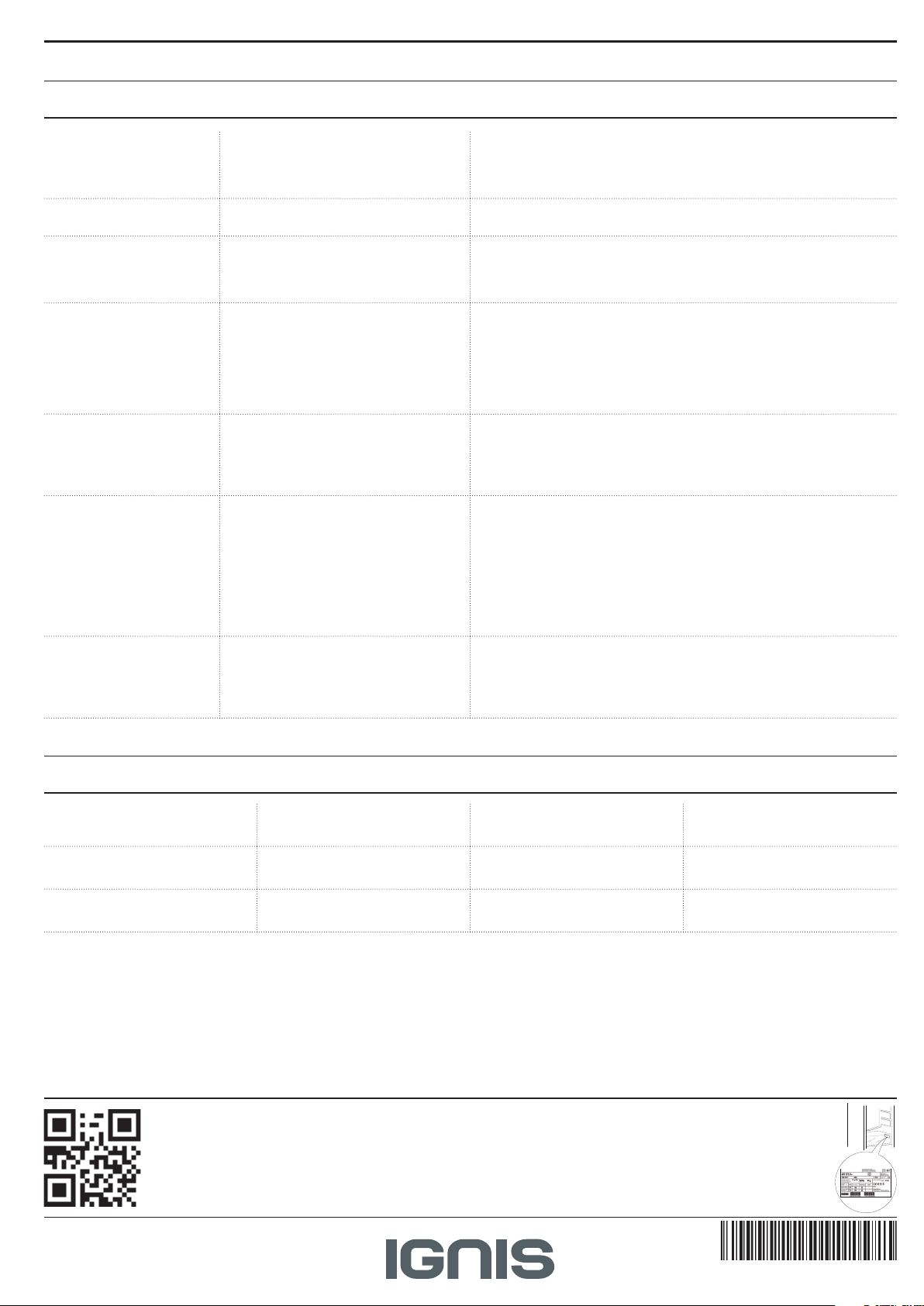
What to do if... Possible reasons Solutions
The appliance is not
working.
There is water in the defrost
pan.
The edges of the appliance
cabinet, which come in
contact with the door seal,
are warm to the touch.
The light does not work. The light may need replacing.
The motor seems to run too
much.
The appliance temperature
is too high.
The doors do not open and
close properly.
There may be an appliance power
supply problem.
This is normal in hot, damp weather. The
pan can even be half full.
This is not a defect. This is normal in hot
weather and when the compressor is
running.
The appliance may be in On/ Stand-by
model.
Motor running time depends on
dierent things: number of door
openings, amount of food stored,
temperature of the room, setting of the
temperature controls.
There could be various causes (see
“Solutions”).
There could be various causes (see
“Solutions”).
• Check if power cable plugged into a live socket with the proper
voltage.
• Check if the protection devices and fuses of the electrical system
in your home
• Make sure the appliance is level so that the water does not
overow.
• Make sure if the protection devices and fuses of the electrical
system in your home work well.
• Check if the power cable is plugged into a live socket with the
proper voltage
• In case the LEDs are broken the user must call the Service for
exchange of the same type available only at our Aftersales Service
Centers or authorized dealers.
• Make sure that the appliance controls are correctly set.
• Check if there is not a large amount of food been added to the
appliance.
• Check that the door is not opened too often.
• Check that the door close properly.
• Make sure that the condenser (back the appliance) is free of dust
and u.
• Make sure that the door properly closed.
• Make sure that the door seals properly tted.
• On hot days or if the room is warm, the motor naturally runs
longer.
• If the appliance door has been left open for a while or if large
amounts of food have been stored, the motor will run longer in
order to cool down the interior of the appliance.
• Check that food packages are not blocking the door.
• Check that the internal parts or automatic ice maker are not out of
position.
• Check that the door seals are not dirty or sticky.
• Ensure the appliance is level.
ALARM TABLE
Alarm type Signal Cause Cure
Door open alarm. Refrigerator Light blinks. The door has remained open for
Door open alarm. Refrigerator Light OFF. The door has remained open for
Malfunction. Any temperature indicators
blinks.
* Available only on certain models
Policies, standard documentation and additional product information can be found by:
• Visiting our website docs . whirlpool . eu
• Using QR Code
• Alternatively, contact our After-sales Service (See phone number in the warranty booklet). When
contacting our After-sales Service, please state the codes provided on your product's identication plate.
The model information can be retrieved using the QR-Code indicated on the energy label. The label also includes
the model identier that can be used to consult the https://eprel.ec.europa.eu database portal.
more than 3 minutes.
more than 4 minutes.
Product malfunction. Contact the After-sales Service.
Close the door.
Close the door.
400011498920
 Loading...