

Page 1
INSTRUCTIONS
TIME ADJUSTMENT SOFTWARE
ST-4003W
ST-4003W is an Windows software that enables you to
easily set the internal clock of the various Icom products
by connecting the PC and the product with a USB cable.
System requirements (As of May 2023)
Operating system
Microsoft Windows 11 (64 bit)
Microsoft Windows 10 (32/64 bit)
L Except for Windows on ARM
L This instruction document is based on ST-4003W version
1.00 and Windows 10.
Display indications may dier, depending on the PC’s
OS.
Compatible radios and cables
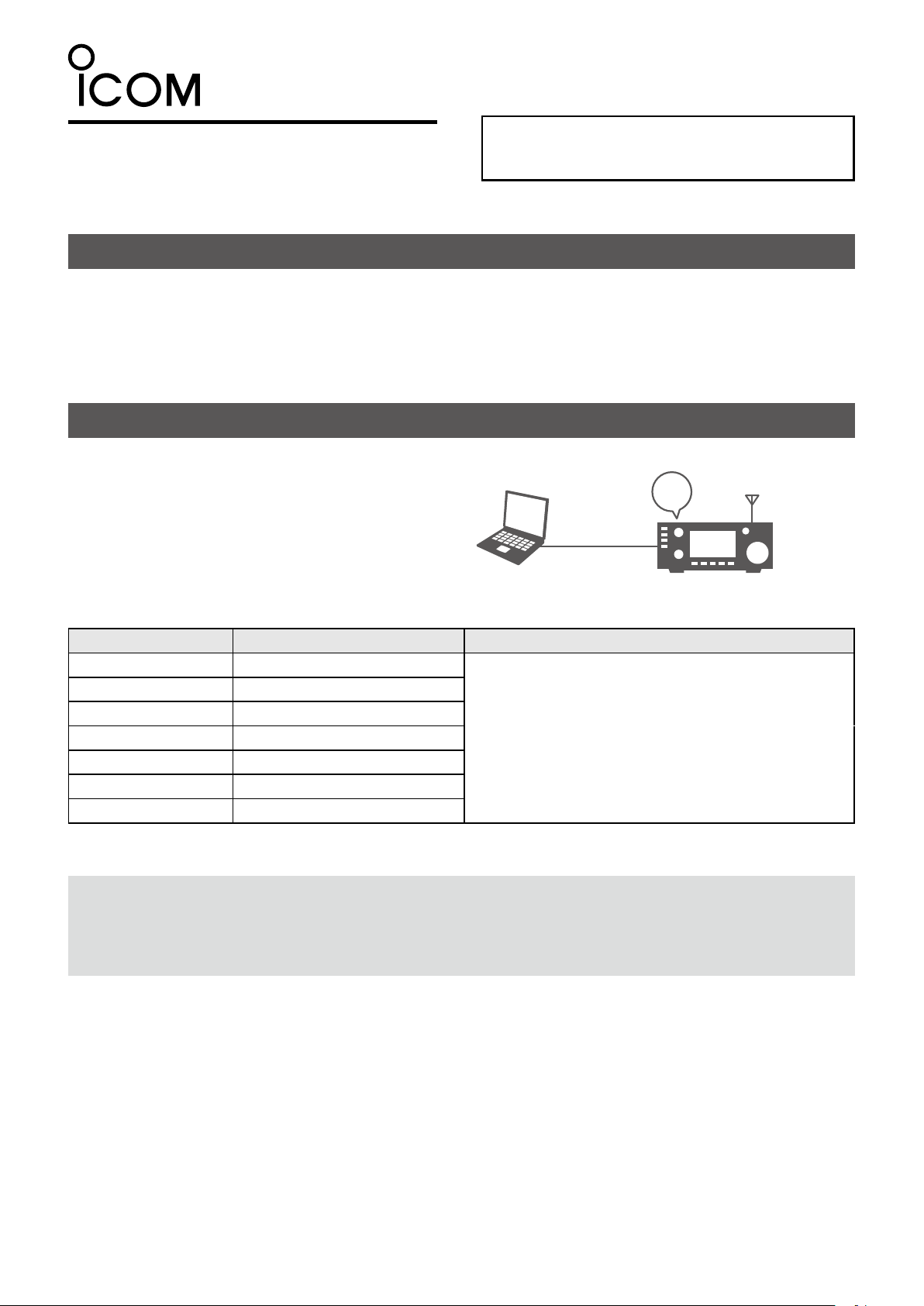
With this software, you can set the internal clock of
the Icom radios listed below. Connect your PC to
your radio through a USB cable.
12:00
USB cable
12:00
RadioPC
Compatible radio Radio’s USB port type Required item
IC-705 Micro-B
IC-7100* Mini-B
IC-7300 Type-B
IC-7600 Type-B
IC-7610 Type-B
IC-7850/IC-7851 Type-B
IC-9700 Type-B
NOTE: Download the USB driver and the installation guide from the Icom website.
Enter the radio’s model name into the Search box in the site.
Icom website
https://www.icomjapan.com/support/
Purchase the proper USB cable that matches your
device’s USB port.
*You can also use the supplied USB cable.
Icom and the Icom logo are registered trademarks of Icom Incorporated (Japan) in Japan, the United States, the United Kingdom, Germany,
France, Spain, Russia, Australia, New Zealand, and/or other countries.
Microsoft and Windows are trademarks of the Microsoft group of companies.
All other products or brands are registered trademarks or trademarks of their respective holders.
- 1 -
Page 2
Installation
Before the installation:
• Conrm Windows has completed its startup.
• Sign in as an administrator.
• Be sure no other applications are running.
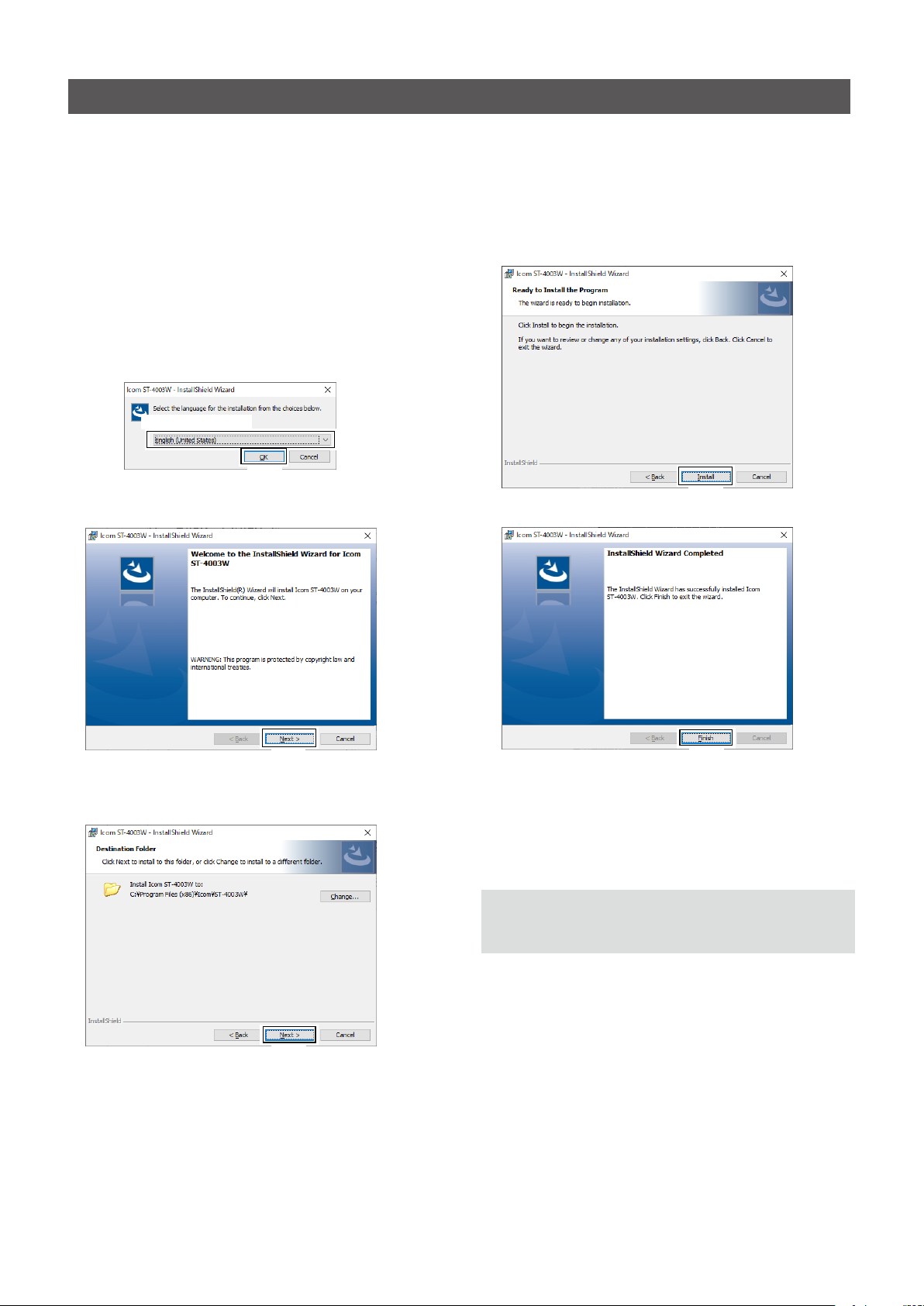
1. Unzip the file downloaded from the Icom website.
(https://www.icomjapan.com/support/rmware_driver/)
2. Double click the executable file in the unzipped
fo lder.
L When “User Account Control” is displayed, click
<Yes> to continue.
3. Select a language, and then click <OK>.
Select a language
Click
4. Click <Next >>.
6. Click <Install>.
Click
7. Click <Finish>.
Click
5. Click <Next >>.
L To select another destination folder, click <Change...>
before clicking <Next >>.
Click
Click
L “Icom ST-4003W Time Adjustment” is added to the
Windows Start menu, and a shortcut icon is created
on the desktop.
NOTE: To uninstall the application, use the “Apps &
features” in the “System” menu.
(Start > Settings > Apps > Apps & features)
- 2 -
Page 3
Operating screen
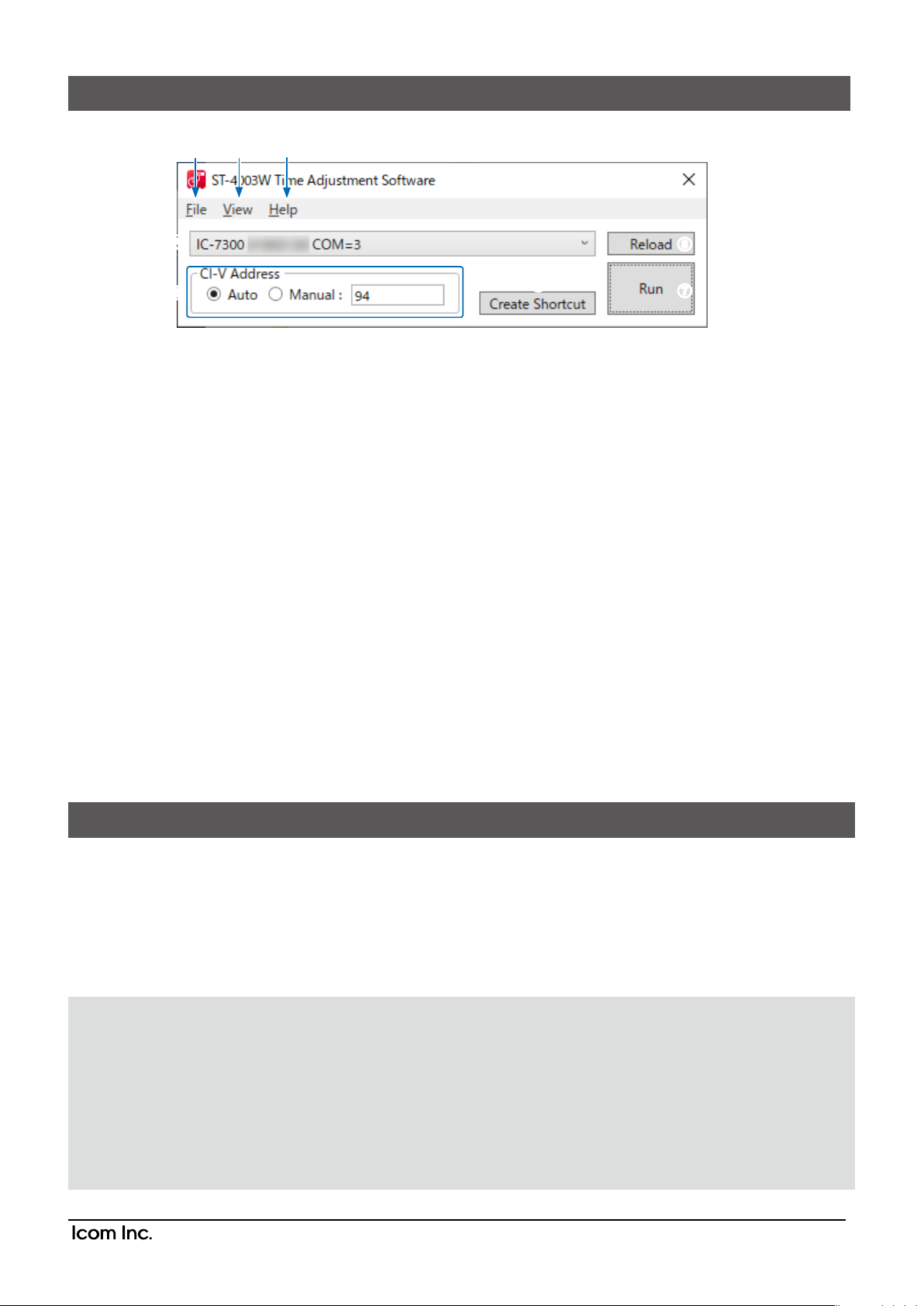
1 2 3
4
5
1File
Exit: Click to close the software.
2View
Language: Click to select the language to be
displayed on the Language list screen.
3Help
About: Click to open the About window and
display the version number.
4Radio list
Select the radio for which you want to set the time.
L The radio model name, the serial number, and the
COM port number are displayed.
8
6
7
5CI-V Address
Select whether to automatically detect the CI-V
address or manually set it.
L When the CI-V address of the radio is the default
setting, or the Transceive function is set to ON, the
CI-V address is automatically detected.
L If you select “Manual,” enter the CI-V address into
the text box.
Selectable range: 01 to DF
6Create Shortcut
Click to create a shortcut icon on the desktop.
You can launch the software with the following
presettings from the created shortcut.
Preset items:
Radio model name
Serial number
CI-V Address (If selected “Manual”)
7Run
Click to set the radio time to match your PC.
8Reload
Click to reload the radio list.
Operation
1. Open the ST-4003W.
2. Click <Run>.
• The date and time are sent from your PC to the radio.
• When successful, “The date and time settings have been completed.” is displayed.
L Depending on the radio, it may take about 1 minute to set the date and time. Even if you cancel the setting while “Sets
the seconds.” is displayed, the radio’s approximate time (± 1 minute) has been set.
3. Click <OK> to close the window.
NOTE: You cannot make the date and time settings under the following conditions.
For the radio:
• Turning OFF the radio.
• In the Standby mode.
• Programming the setting data.
• Updating the rmware.
• Importing or exporting a CSV format le.
• Saving the settings.
• Measuring the antenna SWR.
For the PC:
• If the CI-V address for the radio is not correct.
• The USB driver is not installed properly.
• The USB cable is not rmly connected.
1-1-32 Kamiminami, Hirano-ku, Osaka 547-0003, Japan
May 2023
- 3 -
A7659-3EX-1a
© 2021–2023 Icom Inc.
 Loading...