

Page 1
A VERY CAPABLE TRANSCEIVER
●
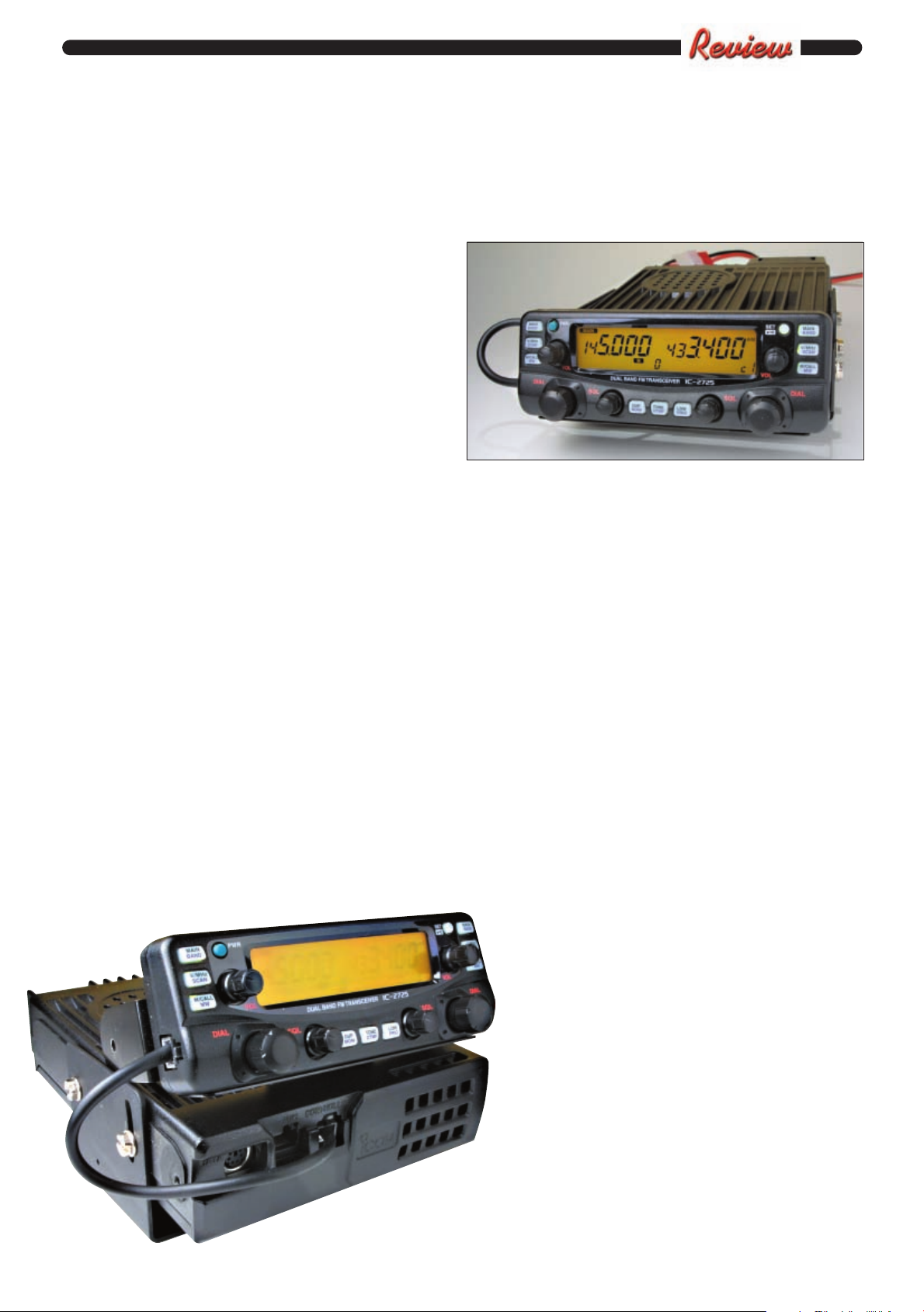
● IC-2725E ready for
mounting with main
Icom IC-2725E
control panel attached
(see text).
Neill Taylor
G4HLX takes a
look at the Icom
IC-2725E dualband f.m. mobile
transceiver. It
turns out the
transceiver is
versatile, proving
useful both in the
car and shack.
● The IC-2725E control head, where
basic functions are easy to control,
shown detached (see text).
T
market in recent years. So, in
what way is this one different what makes it stand out from the
others? I was interested to find
out, giving the IC-2725E a good
trial at home in the shack and
also out on the road mobile.
I found that while the
transceiver offers no outstanding
new features, it does provide all
the facilities that you need for
v.h.f. and u.h.f. f.m. mobile
operation, and is easy to use once
you have configured it for your
preferences. It provides 50W
output on 144MHz and 35W on
430MHz (switchable to 5W or
15W on each band), and seems to
have a good receiver, so in terms
of performance it’s certainly ups
the requirements of n.b.f.m.
simplex or repeater operation.
Removable Front Panel
The removable front panel or
control head is attached to the
main unit by a bracket that can
be adjusted to different angles so
that when mounted in a vehicle a
convenient viewing angle can be
set. The head is connected to the
main unit by a 200mm cable
that’s easily unplugged at either
end if required. An optional 3.5m
he latest dual-band
v.h.f./u.h.f. mobile
transceiver from Icom is
the IC-2725E. At first sight
it appears to be rather
similar to other dual-band
rigs that have been on the
cable is available (OPC-1155)
which allows the main unit to be
mounted under a seat or in the
boot, so the control head alone
can be sited on the dashboard or
wherever a suitable space can be
found.
Other optional brackets are
available for mounting the
control head. This arrangement
has become almost essential in
modern vehicles where it can be
so hard to find space to tidily
install our essential Amateur
Radio gear!
A nice feature of the IC-2725E
is that the microphone can be
plugged into either the main unit
or the control head. So, if you
have the main unit mounted in
the boot - right under the
antenna maybe, with a short
feeder run - you don’t need a long
microphone cable running all the
way back to your operating
position.
Main Display
The main l.c.d. display
on the control head
shows exactly what you
would expect - the
operating frequencies on
the two bands, signal
strength/power output
bar graph, and all the
usual status information
(e.g. repeater shift,
memory numbers, etc.).
Either amber or green
back-lighting can be
selected.
There’s also a
completely separate
tuning dial, volume
control and squelch
control for each band, as
well as buttons to select
memory or v.f.o. mode and to
control scanning. So the main
functions of each band can be
controlled completely
independently, and there is one
button for each, at the top, that
selects it as the band for
transmitting when the
microphone push-to-talk (p.t.t.) is
pressed. (I found that this made
it easy to do the basic operations
needed, and when mobile it is
essential to have straightforward
control of these things, without
the need for multiple button
presses).
The other buttons on the
control head select repeater shift,
CTCSS tone facilities (for
repeater access) and power
output level (low/mid/high), for
the currently selected Main
band. Finally there’s the On/Off
button and a Set button
providing access to the menu
system for setting a wide range of
parameters.
All the buttons on the control
head have an alternative function
if you hold them for one second
instead of a momentary press.
These give access to all the
memory programming facilities,
which are extensive, and various
scanning modes.
Quite a few button presses are
needed to perform some of the
actions, and it would be hard to
remember how to do things that
are done infrequently. So, a much
better alternative is to use the
keys on the HM-133 microphone,
which is supplied as standard.
Microphone Keys
As well as the p.t.t., the
microphone has 25 keys,
resembling somewhat the keys
Practical Wireless, March 2003 33
Page 2
A VERY CAPABLE TRANSCEIVER - ICOM IC-2725E
●
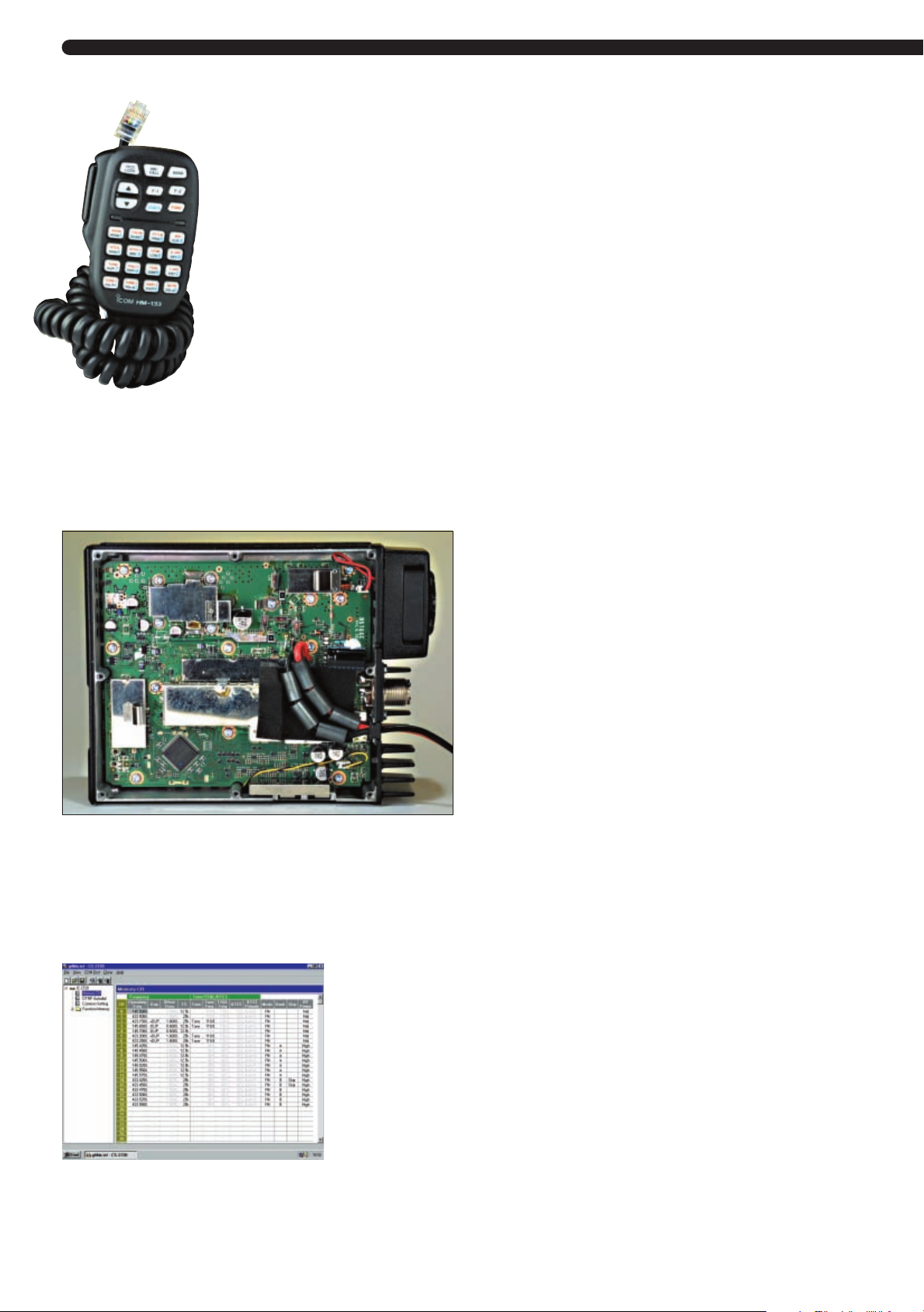
● The microphone with its
comprehensive keypad,
which facilitates the setting
up of the rig and
programming the memories
(see text).
● Inside view of main chassis,
showing the large ferrite feedthrough bead filters on the d.c.
power supply input.
● The optional CS-2720 cloning
software, making the management of
all the memory functions much more
straightforward.
on a hand-held transceiver. All
the settings of the rig can be
made here (even the volume and
squelch can be turned up and
down), and I found this much
more straightforward and
intuitive than using the front
panel buttons for the
programming of memories and
other settings. It’s even possible
to key in a frequency directly
using the numeric keypad.
There are a staggering 200
memory channels available on
the IC-2725E, each storing not
only the frequency but also
repeater offset, CTCSS tone
frequency and other settings. I
can’t imagine how anyone could
want to store 200 different
channels within the ranges 144146 and 430-440MHz, so I have
to regard the memory size as
effectively unlimited!
There are also two Call
channels that can be recalled
rapidly, which I set to the f.m.
calling frequencies on each band.
Although it might be natural to
regard the band on the left of the
display as 144MHz and the band
on the right as 430MHz, in fact
all memory channels are
available on both
displays. So you
can, for example,
listen to two
frequencies
within the same
band
simultaneously if
desired, and
easily select
either for
transmitting.
To help
manage so many
memories, you
can, if you wish, organise them
into banks, labelled A - J. So, for
instance, I put some popular
145MHz simplex frequencies into
bank A, and 433MHz simplex
frequencies into bank B. Then I
could set the left-display band to
use bank A and the right-display
band to use bank B. Another
way of using this facility would
be to set up repeater channels for
different geographic areas that
you visit into different banks.
Of course, you’d set the
appropriate CTCSS access tones,
too. Then, for example, I might
have bank C for visits to the
Midlands and bank D for visits to
the south coast, and so on.
Cloning Software
Well, even using the keypad on
the microphone, setting up all the
memories could be quite a chore.
And that’s where the optional CS2720 cloning software becomes
really valuable.
The software can be installed
on a PC running Windows (98 or
later), and communicates with
the IC-2725E transceiver using
the optional OPC-478 cable
which connects from the rig’s
loudspeaker socket to the PC’s
RS232 serial port (an alternative
version for USB ports is also
available). It then shows all the
memory settings on the screen as well as every other setting in
the rig - and I found that it is
really simple to set-up the
memory contents, assignment to
memory banks, etc., etc.
Having got everything set the
way you like it, the you can save
it to disk as well as loading it
back into the transceiver. So, of
course you can then have several
different set-ups stored in your
PC in different files, for easy
retrieval and loading back into
the IC-2725E.
I was, for example, thinking,
that if I travelled abroad often
with the rig in the car, I might
have different set-ups stored for
different countries, and load one
into the rig before departing.
When the ‘French settings’ are
selected, for instance, I might
have the repeaters in Provence in
memory bank C and those of the
Paris region in bank D.
Scanning Capabilities
The scanning capabilities of the
IC-2725E are everything that you
would expect. Five sets of
programmable band limits are
available for defining the range of
frequencies to be checked, for
example I set one to 433.000 -
433.375MHz, which covers the
u.h.f. repeaters channels when
scanned with 25kHz steps.
memories, either the whole lot or
one of the memory banks A - J.
Different scans can be running on
left and right bands, allowing
some pretty comprehensive
scouring of the possible activity.
There’s also a Priority Watch
scan, which checks the current
v.f.o. frequency every 5 seconds
(set to the calling channel maybe,
or your local Raynet channel)
while other memories are
scanned.
that I don’t have space to discuss
fully. These include a data
connector for 1200 or 9600bps
packet operation, a.m. receive
capability, and the F1 and F2
buttons on the microphone which
can store almost all the settings
of the rig.
tuning steps on each band, from 5
to 50kHz - of course I chose
12.5kHz on 144MHz and 25kHz
on 430MHz. Also, on the leftdisplay band only, the transmit
deviation and receive
intermediate frequency (i.f.)
bandwidth can be set to values
suitable for either 12.5 or 25kHz
channel spacing. On the rightdisplay band only the wider
setting is available.
from the microphone keypad
directly. Alternatively they can be
programmed into one of 14
DTMF memories, up to 24 digits
each.
Actual Performance?
So, with all these capabilities for
choosing the operating
parameters on the IC-2725E, how
does the rig actually perform?
Well, at home in the shack,
connected to my dual-band
collinear antenna, I was very
satisfied with the performance.
conditions, I could access no less
than 12 repeaters, equal to any
other rig I’ve tried. I was
particularly pleased by the
receiver blocking characteristics I found that listening to my local
repeater I could easily hear
myself through the repeater
while transmitting on a handheld in the shack, with no
apparent desense on the IC2725E receiver. (Not bad - other
rigs with which I’ve tried this, in
the same conditions, have been
blocked badly by the enormous
local signal).
Alternatively you can scan
There are many other features
There are eight options for the
The DTMF tones can be sent
On 430MHz, in flat
But it was when working
34 Practical Wireless, March 2003
Page 3
mobile that the transceiver
needed to be put through its
paces. Since I was installing it in
my car only temporarily, I did not
detach the control head from its
bracket on the front of the main
unit. Despite this, the swivelling
bracket was useful to give me
clear vision of the display.
For the mobile tests I used a
dual-band antenna
that’s mounted
permanently on my
car. I then ran the IC2725E at its full rated
power output.
Manufacturer’s Specifications
General
Frequency Coverage (Europe): 144-146, 430-440MHz
Received Audio
An important aspect of
a mobile rig
performance is the
received audio. The
audio output (rated at
2.4W in the
Type of emission: f.m., a.m. (a.m. receive only)
Number of memory channels: 212 (inc. 10 scan edges and two calls)
Frequency resolution: 5, 10, 12.5, 15, 20, 25, 30, 50kHz.
Operating temp. range: -10°c to +60°C
Freq. stability: ±10 ppm (-10°C to =°60C).
Power supply: 13.8V d.c. ±15%.
Current drain @ 13.8V
d.c. (approx.): Transmit 12A (50W)
specifications) was
certainly enough, even
using the small built-in
loudspeaker in the
main unit.
However, this unit
Antenna connection: SO-239
Dimensions (Main unit): 140 x 40 x 187mm (W, H, D).
Remote control head: 140 x 50 x 24.5mm (W, H, D).
Weight: Main unit 1.25kg
Remote control head: 150g.
is likely to be mounted
out of the way, so a
separate loudspeaker
will probably be used
Transmitter
Modulation system: Variable reactance
Output power: (v.h.f) 50, 15, 5W (approx.).
in most mobile
installations. I tried
Max. freq. deviation: ±5kHz (wide)
the optional SP-10
mobile speaker, which
had a very good full
Spurious emissions: < than -60dB
Microphone connector: 8-pin modular (600Ω).
sounding audio
response. It was very
comfortable to listen to
even with a high level
of background road
noise.
The transmit audio
quality was also good,
according to those who
Receiver
Receiver design: Double conversion superhet.
Intermediate frequencies:
(Left band) 1st: 38.85MHz, 2nd. 450kHz.
(Right band): 1st 46.05MHz, 2nd. 455kHz.
Sensitivity:
(f.m. at 12dB SINAD
a.m. at dB 10dB S/N): 144MHz band < 0.18µV/0.45µV typical.
gave me reports, with
several favourable
comments being given.
Selectivity (Typical)
Wide: >12kHz/6dB
This was using the
standard HM-133
Narrow: > 6kHz/6dB
microphone supplied,
although personally I
don’t like using a hand-
Spurious & Image rejection: >60dB
Audio output power: >2.4W @ 10%THD (13.8V d.c.) into 8Ω
held microphone while
driving (and this may
become legally
outlawed soon, anyhow),
preferring a hands-free
arrangement.
Also, I found a couple of times
that I accidentally pressed one of
the many keys on the
microphone, with unpredictable
consequences! But it should be
straightforward to use different
microphones, especially since a
socket is readily accessible on the
side of the control head.
Easy To Use
Overall, after spending some
time getting things set up, I
found the IC-2725E easy-to-use
in the mobile environment. The
controls give easy access to the
basic functions that are needed
while on the road, while the more
complex settings can be done
Receive (standby) 1.2A
(u.h.f.) 35, 15, 5W (approx.).
±2.5kHz (narrow: left band only).
430MHz < 0.18µV
< 20kHz/60dB.
< 20kHz/60dB
easily using the microphone
keypad or through the optional
CS-2720 cloning software
(although, of course, I’d have to
either remove the rig from the
vehicle, or take a laptop into the
car, to do this).
I also found that the
transceiver is equally at home as
an f.m. rig for use in the shack at
home. It has a performance that
is at least as good as any other
v.h.f./u.h.f. f.m. transceiver that
I’ve tried. It’s a very capable
transceiver, with good
performance in both the mobile
environment and in the shack.
With its many features, after
setting up the configuration to
suit your preferences, it is also
easy-to-use.
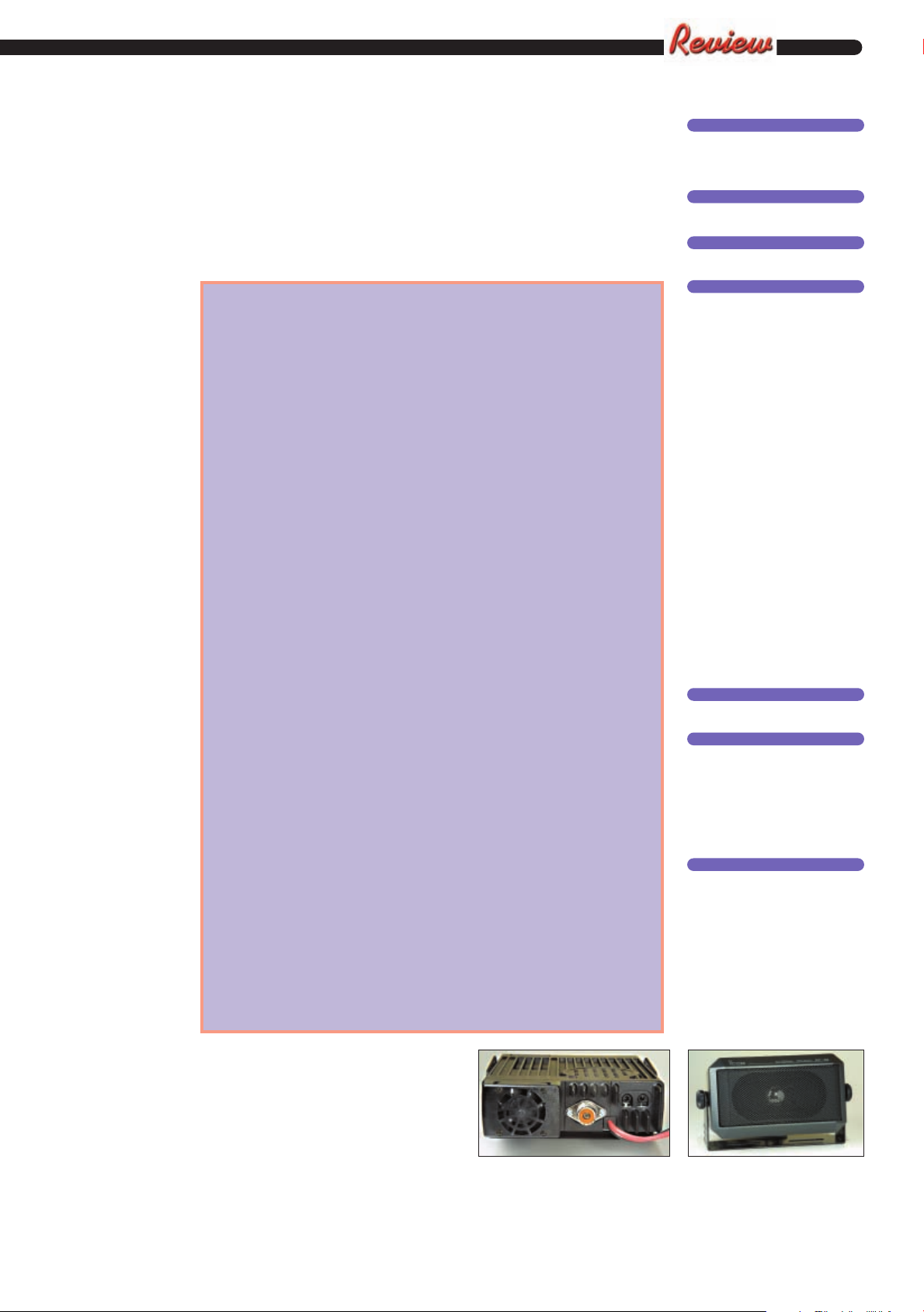
● Rear view of the transceiver, showing
centrally-placed antenna socket.
PPrroodduucctt
●
Icom IC-2725E
CCoommppaannyy
●
Icom (UK) Ltd.
CCoonnttaacctt
●
PPWW
Tel: (01227) 741741
PPrrooss aanndd CCoonnss
●
Pros .....I also found that the
transceiver is equally at
home as an f.m. rig for use
in the shack at home. It has
a performance that is at least
as good as any other
v.h.f./u.h.f. f.m. transceiver
that I’ve tried.....With its
many features, after setting
up the configuration to suit
your preferences, it is also
easy-to-use
Cons ....a couple of times that I
accidentally pressed one of
the many keys on the
microphone, with
unpredictable consequences!
But it should be
straightforward to use
different microphones,
especially since a socket is
readily accessible on the side
of the control head.
PPrriiccee
●
£399.95
SSuummmmaarryy
●
A very capable transceiver, with good
performance in both the mobile
environment and in the shack. With
its many features, after setting up the
configuration to suit your
preferences, it is also easy-to-use.
SSuupppplliieerr
●
Icom (UK) Ltd.
Sea Street
Herne Bay
Kent CT6 8LD
Tel: (01227) 741741
FAX: (01227) 741742
E-mail: [email protected]
● The loudspeaker unit, available as an
optional item for use with the
transceiver.
Practical Wireless, March 2003 35
 Loading...