

Page 1
Page 2 Welcome to the DUAL-Play Experience
Page 3 Included with Your DUAL-Play
Page 3 PC System Requirements
Page 4 DUAL-Play Hardware Overview
Page 6 Software CD Contents
Page 7 Installing the M •ANY Loader
Page 9 Getting Started with DUAL-Play
Page 10 Using the M •ANY Loader
Page 13 How to download files to DUAL-Play
Page 14 Operating the DUAL-Play(Stand-alone with headphones)
Page 15 Inserting the DUAL-Play into a Cassette Deck
Page 16 DUAL-Play Cassette Deck Operation
Page 17 Audible.com Content Playback Operation
Page 19 Handling and Storing Instructions
Page 20 Battery and Charger (AC and DC charger) Usage
Page 22 Troubleshooting Problems
Page 24 Installing the USB Drive
Page 25 Warranty Service
Page 26 Voice Recording, Music Encoding
CONTENTS 1
Page 2
Congratulations on your purchase of the DUAL-Play portable digital player - the only player
on the market specifically designed to play digital music on any standard analog cassette deck
with high fidelity sound and without the need for cumbersome and inconvenient wired
adapters. The DUAL-Play contains 32 / 64 / 128MB of on-board memory that is easily
expandable to via the MultiMediaCard (MMC) flash memory slot. The DUAL-Play was
designed with a programmable, upgradeable Digital Signal Processor (DSP) to support new
audio formats and digital rights management systems. Please check the Hyan Won website at
www.m-any.com for the latest software upgrades and accessories. You are now ready to enjoy
the world of digital audio with the most versatile digital audio player on the market today.
WELCOME TO THE DUAL-Play EXPERIENCE 2
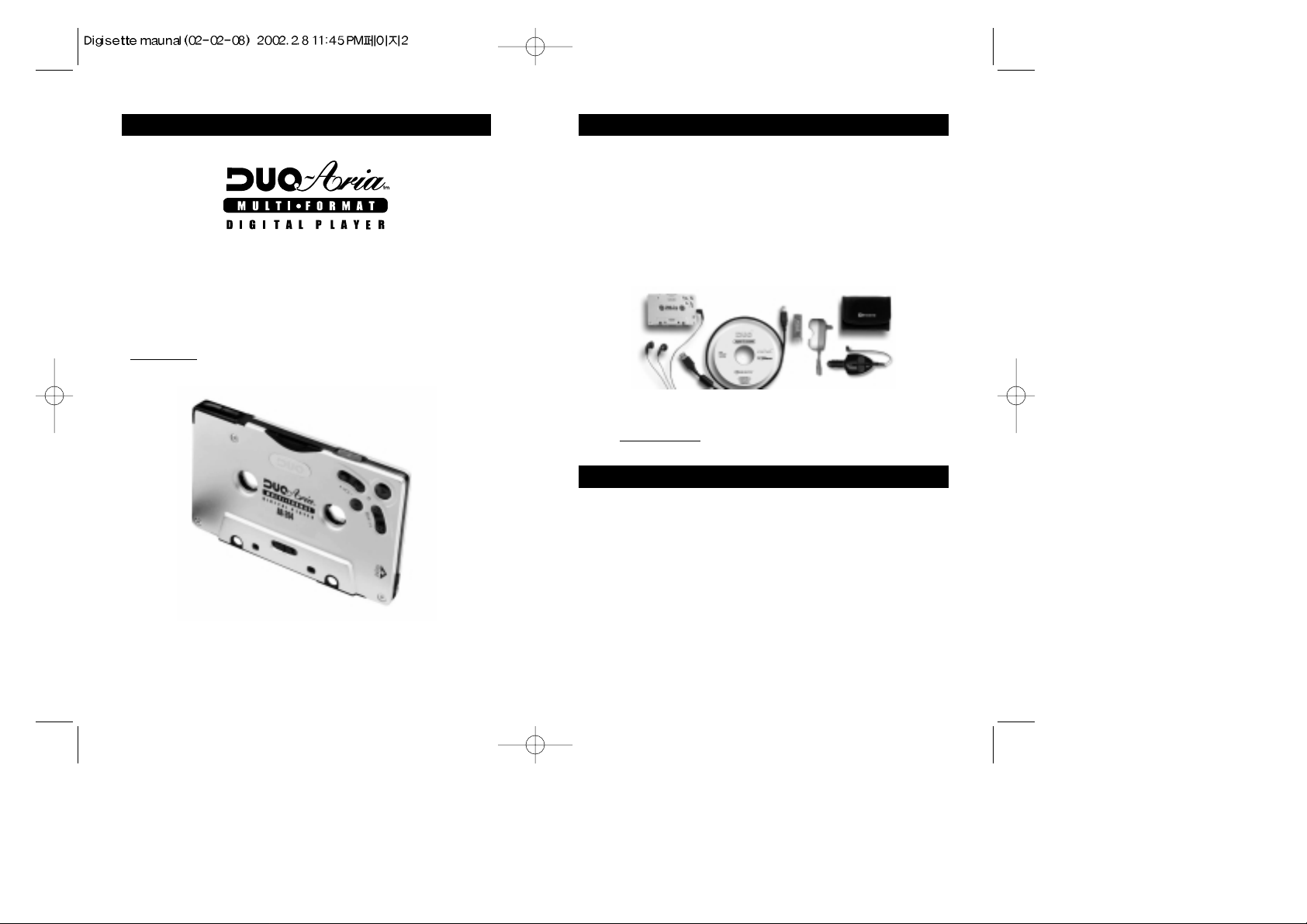
The following components are included with your DUAL-Play:
A. AC Battery Charger
B. DC Car Battery Charger / Charger Connection Cable (Option)
C. 2 Ni-MH Rechargeable Batteries
D. Software CD
E. USB Connection Cable
F. Carrying Case
G. Earphones
H. Owner's Manual
Note : Accessories and optional items are subject to change. Please check
www.m-any.com for the latest in DUAL-Play accessories and
software upgrades.
INCLUDED WITH YOUR DUAL-Play
The following PC specifications are required for DUAL-Play
compatibility:
Microsoft®Windows®98, ME or 2000 Operating System
CD-ROM Drive with digital audio extraction support
Pentium (or compatible) 200MHz or higher processor
32MB RAM (64MB for Windows®ME or 2000) or greater
32MB free Hard Disk Space (more for digital audio file storage)
Sound card
USB port capability
PC SYSTEM REQUIREMENTS
3
AC Battery Charger
Ni-MH Rechargeable
Batteries
DC Car Battery Charger
(Option)
Software CD
Carrying Case
Earphones
USB Connection Cable
Page 3
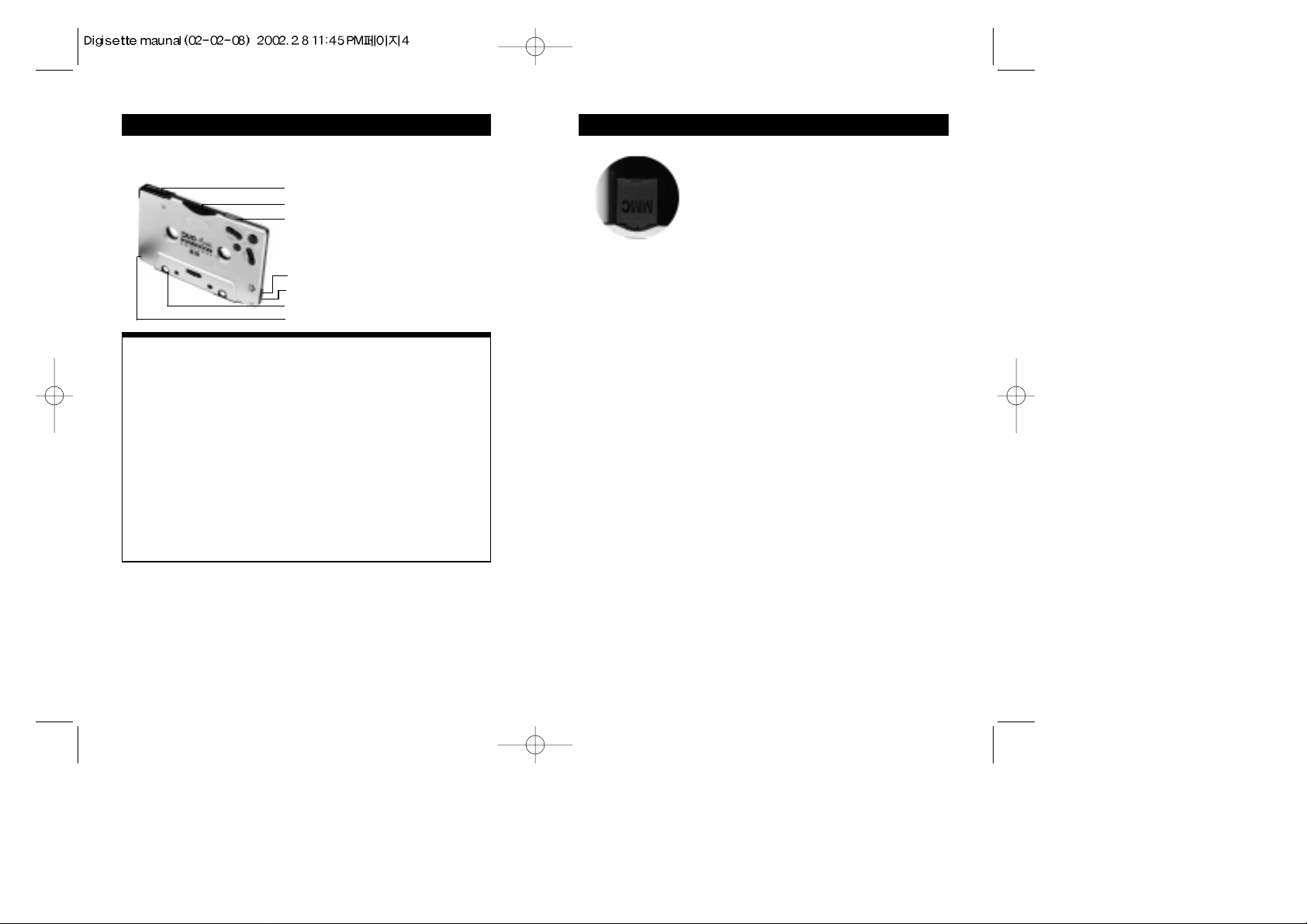
Your DUAL-Play has the following hardware features :
Top and side panel
Top and Side Panel
A. Battery Cover : Slide the cover on top of the unit away from the control buttons to open,
and then insert your rechargeable DUAL-Play battery.
B. Memory Card Slot : A removable MultiMediaCardTM(MMC) flash memory card (sold
separately) enables your DUAL-Play to expand its memory capacity
and store more audio files. MMC memory cards are inserted
completely into the unit with the gold contacts facing downward and
positioned facing the back of the player.
C. Power Switch : Powers your DUAL-Play on and off as well as enabling the Hold feature,
which disables the on-board controls.
D. Earphones Audio Output : Connects your earphones for stereo output.
E.
Remote Control Slot:
Connects remote control.
F. USB Port Connector : Connects your DUAL-Play to your computer for fast, efficient file
transfers at speeds up to 2.5 Mbps.
G. Charger Connector : The DC/AC charger and cable allow users to play DUAL-Play
when battery is discharged.
* In case of voice or MP3 encoding models the power switch has
REC/ON/OFF position. The REC position disables button control like a
HOLD function.
DUAL-Play HARDWARE OVERVIEW 4
Removable Memory Card
The DUAL-Play is compatible with MultiMediaCardTM(MMC) removable flash
memory (sold separately), which enables your DUAL-Play to expand its memory
capacity and store more audio content. When inserting or removing a MMC card,
make sure the DUAL-Play is OFF or the memory card may be damaged. MMC
flash memory cards are inserted completely into the unit with the gold contacts
facing downward and positioned facing the back of the player.
Note :
When an MMC card is not used, the MMC cover that comes with the unit must be
used and fully inserted into the player to prevent damage to the internal MMC slot.
If there is an error reading the MMC card (such as error code 4), briefly remove the
MMC card, check that it is oriented properly (gold contacts facing the back of the
player and down) and then re-insert it into the player while the player is still
connected to the PC.
DUAL-Play HARDWARE OVERVIEW 5
A. Battery Cover
G. Charger Connector
F. USB Port Connector
D. Earphones Audio Output
E. Remote Control Slot
C. Power Switch(HOLD/ON/OFF) *
B. Memory Card Slot
Page 4
INSTALLING THE M •ANY Loader
7
In order for the DUAL-Play and your PC to communicate and transfer
digital files, you must first install the M •ANY Loader by completing the
following steps:
1. Insert the M •ANY Loader CD into the CD-ROM drive. The following
screen should display:
Note : If the setup file is executed automatically, follow the install program instructions.
If the setup file is not executed automatically, browse the installation CD and
double click on the install.exe file on the CD-ROM file directory. (Example
"D:\install.exe", where D: is your CD-ROM drive) You can locate these files by
going to your Windows Start menu, and then Run.
2. Click on the M•ANY Loader button. The following page will display.
3. Click on the Next button. The following page will display.
6
Application Function
M•ANY Loader Transfer digital audio files to/from DUAL-Play
Windows Media Player Manage audio files
Audible Manager Download, playback of and transfer of
Audible.com content to DUAL-Play*
* Requires latest version Audible Manager software downloaded via included
software CD and Internet download. Connect to the Internet, insert the
Software CD, then select "Audible Manager" from the software installation
menu.
SOFTWARE CD CONTENTS
Front Panel
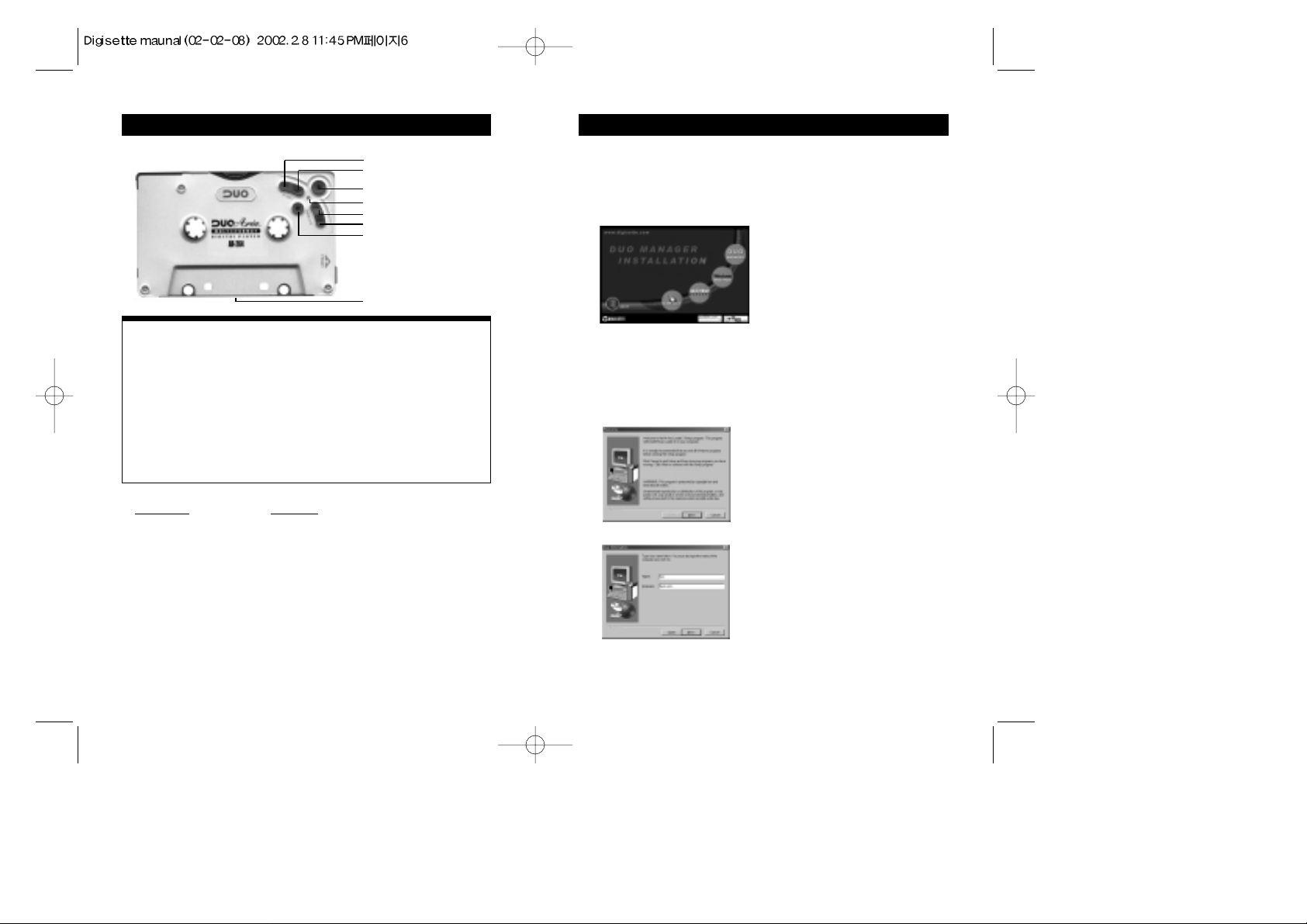
G. Volume + Button: Press once to increase Play Volume one step.
H. Volume - Button: Press once to decrease Play Volume one step.
I. Play/ EQ Setting Button: Press to start Play. Press again to change EQ setting when playing.
J. LED Indicator: When LED is flashing green, this indicates unit is playing. Amber LED indicates
initial booting or USB communication.
K. Rew Button: Press to select previous file or Search.
L. F.F. Button: Press to select next file or Search.
M. Stop/Bookmark Button : Press to Stop, Pause Play/Bookmark or Power Save Mode.
N. Head Control: Slide control to adjust tape head alignment for optimal sound quality and
compatibility in cassette decks.
J. LED Indicator
K. Rew Button
L. F.F. Button
M. Stop/Bookmark Button
G. Vol + Button
H. Vol - Button
I. Play/EQ Setting Button
N. Head Control
Front Panel
Page 5
9GETTING STARTED WITH DUAL-Play
Complete the following steps to get started with your DUAL-Play:
1. Make sure the battery is fully charged and insert it into your DUAL-Play. It is
recommended to charge the battery for 4 hours before its first use.
2. Initialize the DSP on the DUAL-Play by moving the power switch from Off to the On
position. The LED should automatically illuminate an amber color for approximately 2
seconds, and then turn off. If the amber LED does not turn on automatically after the
power is switched On, press the Play button once and it should initialize properly.
3. Alternatively, if the battery is removed from the player, such as when charging in the
charger, move the power switch to the On position.
4. Connect the USB port cable to the DUAL-Play and then to the PC USB port.
5. Launch the M•ANY Loader. When using the M•ANY Loader for the first time, please
select the model to be connected as the product and choose the server location closest to
you on the "Preferences" menu.
6. Using the included software, download music to your computer from the Internet (or convert it
to digital audio format from an existing CD). Using the M•ANY Loader, navigate to the folder
that contains your music files. Select the files you wish to transfer and drag them to the bottom
portion of the window. Click on the transfer button located in the bottom right hand corner of the
window. The files will transfer individually and the progress will be displayed in the Memory
Contents Window.
7. Disconnect the DUAL-Play from the USB cable, and re-initialize the DSP as in step 2 by
turning the power switch Off then On again. The amber LED will illuminate for
approximately 2 seconds and then turn off.
8. Press play with headphones inserted or insert into a cassette deck to enjoy digital audio
from your DUAL-Play.
Note :
If the DUAL-Play indicator LED stays on and there is no audio output after disconnecting
the USB cable, open the battery door briefly take the battery out then reinsert it, close the
battery door and press Play with the power switch on. Doing this will fully "reboot" the
DSP and restore normal operation. Please do not attempt to use any other USB peripheral,
such as a digital camera or scanner simultaneously with the DUAL-Play and Windows
Media Player, Audible Manager or M •ANY Loader software as communication errors
may result.
INSTALLING THE M •ANY Loader
8
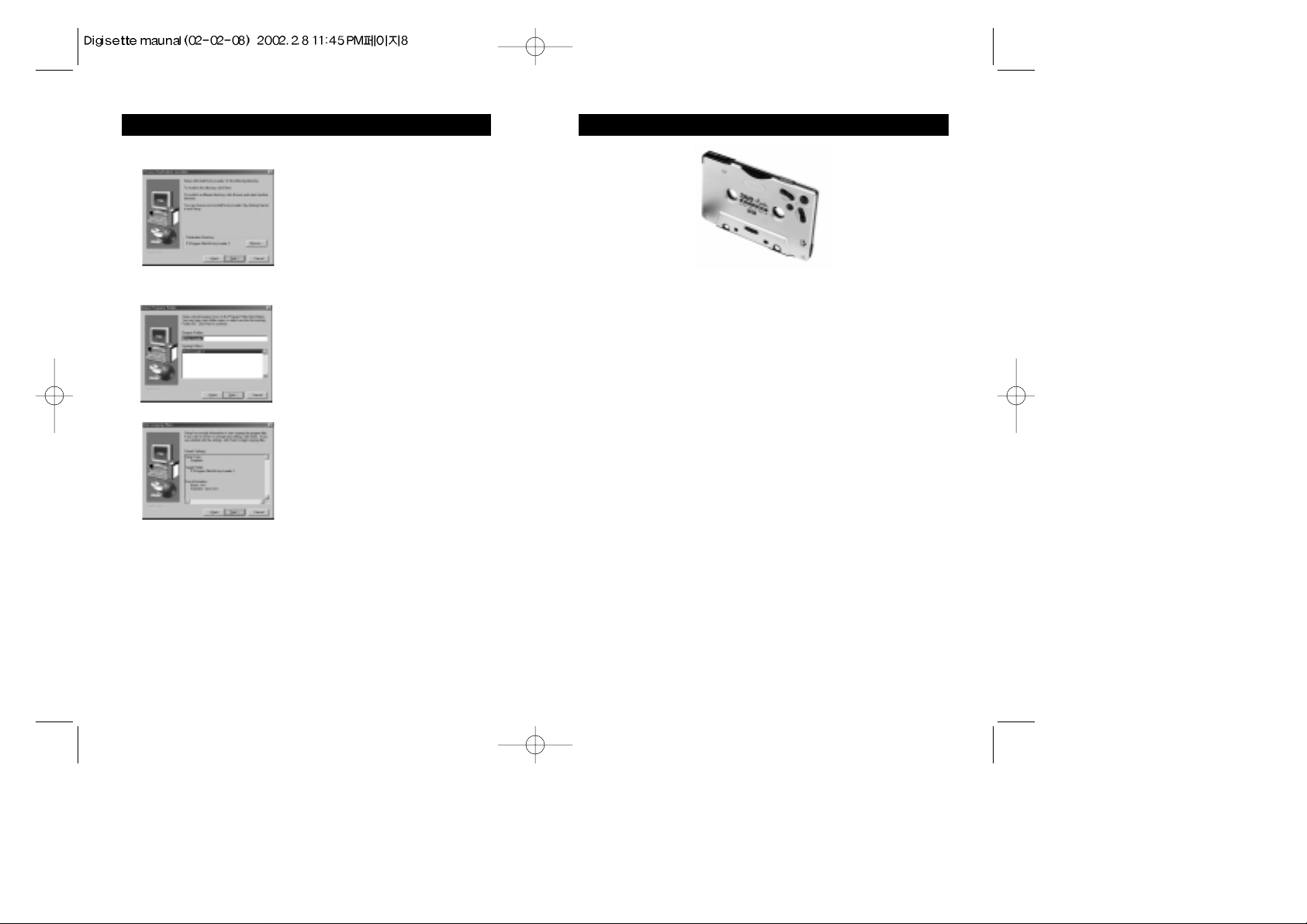
4. Enter your Name and the Company name and click on the Next button.
The following page will display.
5. Choose the directory for the M•ANY Loader and click on the Next
button. The following page will display.
6. Select the program folder and click on the next button.
7. Verify the Setup details and click on the next button. Once you have
done these steps, it will complete the installation and bring you back to
the main page displayed in number 1.
8. Once the installation of the M•ANY Loader finishes, click the shortcut
icon on the desktop or click on the Windows Start menu, then
Programs, then the shortcut to run the M•ANY Loader.
Note : If a rebooting message displays during setup, install again
after rebooting the computer.
Page 6
11
USING THE M•ANY Loader
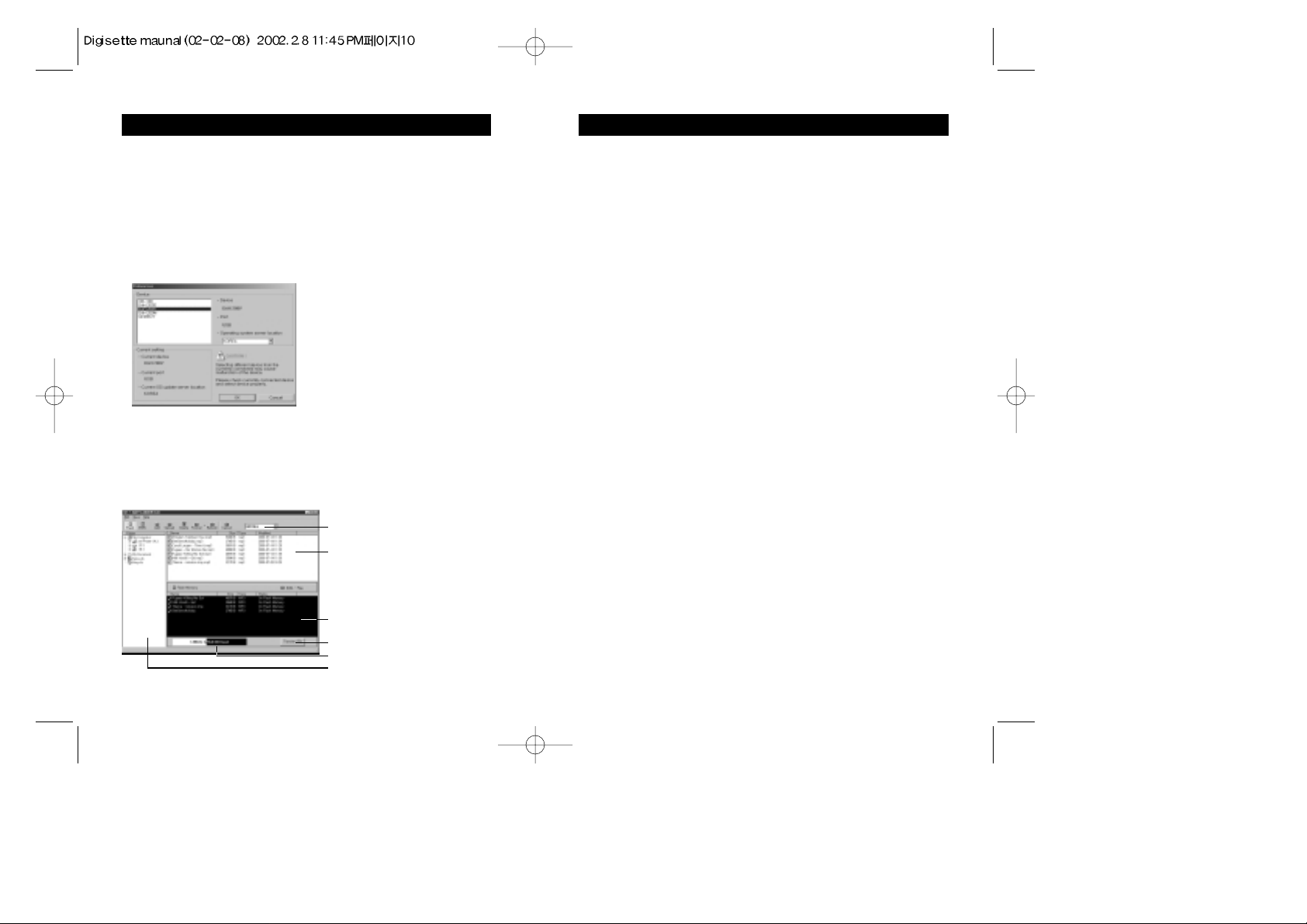
A. File Selector
This enables you to view files by type.
B. File List Window
This window displays the files contained in the given folder enabling
you to selectively download files to flash memory and/or MMC
memory.
C. Memory Contents Window
This window enables you to check the file title, size, type and download
status of the MMC and on-board flash memories.
File order change
1) Select a file to be moved.
2) Drag & Drop the selected file to the desired position.
Note : File order can only be changed by moving 1 file at a time.
D. Transfer Files Button
This button begins transferring selected audio files to the player.
E. Memory Status
This indicates the amount of memory available, the amount of total
memory and memory connection status. This window may indicate "No
Memory Found" in the following cases:
- The DUAL-Play is not connected or the power is switched off.
- MMC memory is selected when a MMC memory card is not inserted
into the player.
F. Folder Window
This window enables you to select audio files more easily by allowing
you to browse specific folders. The selected folder contents are
displayed in the File List Window to the right.
10
USING THE M •ANY Loader
Important Notice:
Please install program PRIOR TO connecting the device with the PC. If the
device is connected without installing the M •ANY Loader program,
the device will not be recognized since the device driver has not been
installed on the machine properly.
Preferences
Open the M •ANY Loader and select the appropriate model device
(DAH-200V, DAH-200M, etc.) to be used and the server location closest
to you to access operating system updates via the Internet.
Note : If you use a device different from the model you select at this point,
the device could work abnormally. If this happens, uninstall the
software, re-install it and make the appropriate selection.
Main Screen
The main screen of the M •ANY Loader controls music file downloading
and uploading.
A. File Selector
B. File List Window
D. Transfer Files Button
E. Memory Status
F. Folder Window
C. Memory Contents Window
Page 7
13HOW TO DOWNLOAD FILES TO DUAL-Play
When downloading to player using the M•ANY Loader:
1. Select the player memory to download and store audio files onto (either on-board
Flash memory or MMC when using removable MMC flash memory cards).
2. Highlight files to be downloaded in the File List Window using the Folder
Window to browse for folders containing audio. You may select files one of 3
ways:
a. You may drag & drop individual files from the File List window to the
Memory Contents Window
b. You may select multiple audio files by holding down the CTRL key while
clicking the left-mouse button on each file you wish to download to the player
then drag and drop the selection of files as above
c. You may press the "F5" key or "Add" icon after highlighting each file.
The selected files will appear in the Memory Contents Window with "Ready to
transfer" listed under the status column.
3. Click the "Transfer" icon to start downloading selected files to player memory.
4. To cancel a download in progress click the "Cancel" icon.
5. Close the M•ANY Loader before disconnecting the USB cable.
Note :
If the DUAL-Play indicator LED stays on and there is no audio output after disconnecting
the USB cable, open the battery door briefly to expose the battery, then close the battery
door and press Play with the power switch on. Doing this will fully "reboot" the DSP and
restore normal operation. The M•ANY Loader and the Audible Manager can not be open
at the same time, a communication error will result. If this occurs, close both software
managers unplug the device. Re-initialize the device by turning it off then on again, and
after the amber light illuminates and then turns off, re-connect the device via the USB cable
and select ONE of the software managers to run. The Windows Media Player and Audible
Manager software included with the DUAL-Play have online instruction manuals that may
be printed out once they are installed.
12
USING THE M•ANY Loader
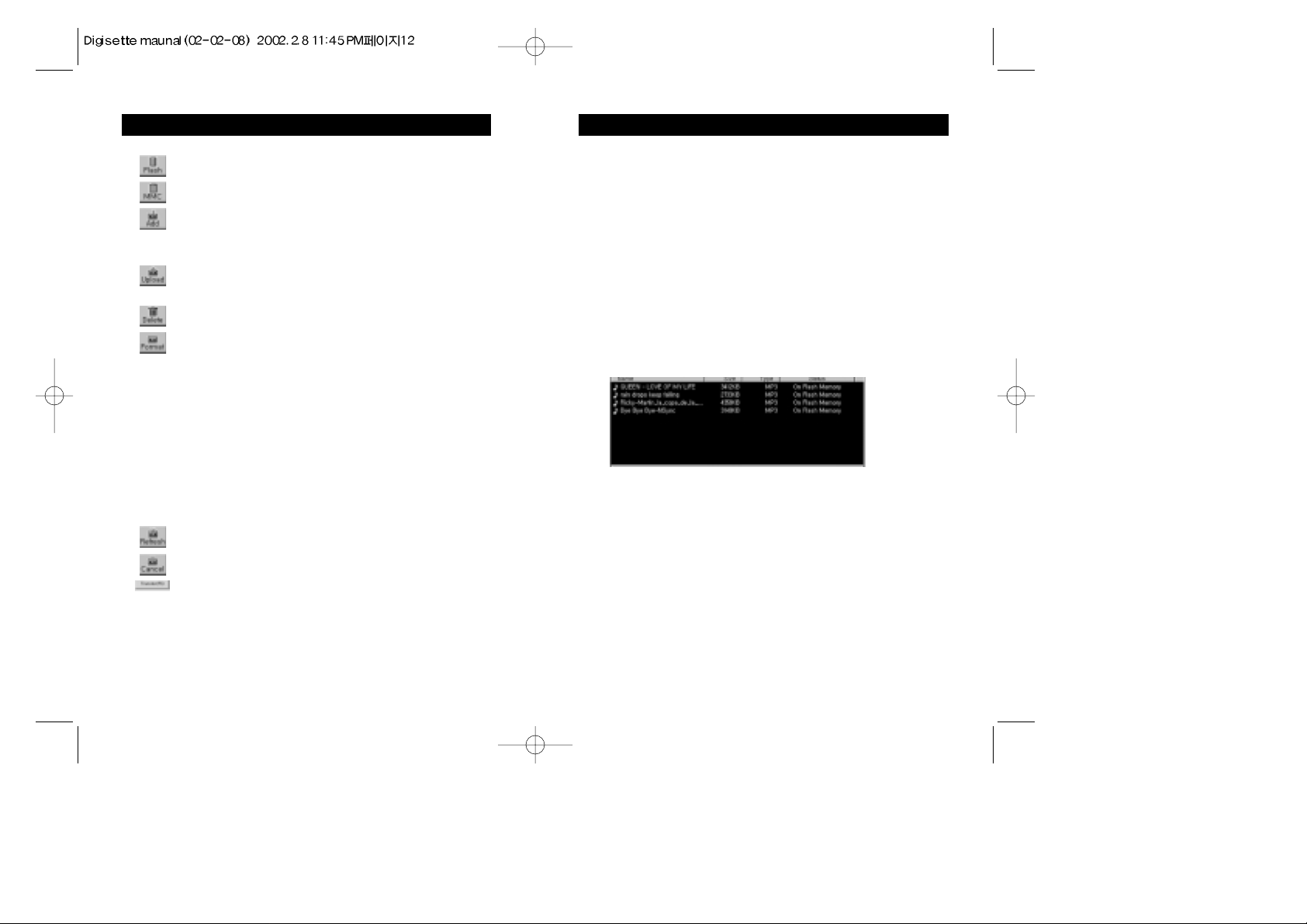
G. Functional Icons
Flash : Selects the on-board memory (flash memory) to display.
MMC : Selects the removable memory (MMC memory) to
display.
Add : Adds the selected files to the selected memory. Selected
files are placed in "Ready to Transfer" status in the
memory contents window.
Upload : Uploads the selected files from the on-board memory to
the selected PC folder.
Delete : Deletes selected files on the selected memory.
Format : Formats selected memory.
Note: This will erase all files on the selected memory.
a. Normal Format : The "Normal Format" is, in essence, a quick
'clearing' of all the data on the memory card.
It accomplishes the same thing as selecting all
songs and deleting them.
b. Low-level Format : A "Low Level Format" is a longer
procedure as it checks the disk sector by
sector for any problems and repairs them if
it finds them. This is somewhat similar to
the 'Scandisk' program and requires that no
other applications are opened during the
formatting procedure.
Refresh : Refreshes view of selected memory.
Cancel : Cancels file transfer between player and PC.
Transfer : Transfers files from the memory contents window onto
the player.
Page 8
15
OPERATING THE DUAL-Play (Stand-alone with
INSERTING THE DUAL-Play INTO A CASSETTE DECK
The following is the correct way to insert the DUAL-Play into a cassette deck.
1. Turn the DUAL-Play by moving the power switch on top of the unit to the "On' position.
2. Due to potential variances in the volume of encoded audio files, the cassette audio output of
the DUAL-Play is adjustable. When the unit is first turned on, the volume is set to a
medium level of output. You may adjust the output to a cassette deck by pressing Play (note
that the indicator lamp should be flashing), then adjusting the volume either up (+) or down
(-) to suit the desired output to the cassette deck.
Note : It is possible to adjust the output volume high enough to cause distortion during
cassette audio playback on some cassette decks. Avoid distorted output by matching
the volume of the DUAL-Play playback with the FM tuner volume, such as on a car
cassette deck.
3. Insert the DUAL-Play into the cassette deck, making sure the side marked Front (the side
with the operating buttons) is inserted upward or forward.
4. You may adjust head control switch to ensure optimal tape head alignment. Typical
indications of improper tape head alignment is audio playing only on one side, significantly
reduced volume, or significant extraneous noise coming from player.
5. If no sound is played from the cassette deck or if adjusting tape head control does not
improve audio quality significantly, change the play direction with the auto-reverse button
(if applicable) and flip the DUAL-Play cassette so it is facing down.
14
OPERATING THE DUAL-Play (Stand-alone with
OPERATING THE DUAL-Play (Stand-alone with headphones)
FOR EQUALIZER FUNCTIONS (while audio is
Desired Operation Buttons Function When Pressed
Turn power on Slide power switch to on Powers the player on.
Turn power off Slide power switch to off Powers the player off.
Play audio file Press Play Begins to play audio/Restarts
from pause.
Pause audio file
Stop (press stop for < 1 sec)
Pauses audio playback.
Increase Volume Vol + Increases the audio Volume.
Decrease Volume Vol - Decreases the audio Volume.
Previous Track Rew Plays previous audio file.
Next Track F.F. Plays next audio file.
Rewind audio
Rew (hold Rew for > 2 sec)
Rewinds audio at 4X speed as
long as the button is
depressed.
Fast Forward Audio F.F. (hold F.F. for > 2 sec)
Advances audio at 4X speed
as long as the button is
depressed.
Key Lock
Slide power switch to HOLD
Locks the button functions
when power is on.
Desired Operation
Buttons Function When Pressed
Change Equalizer Play/EQ
Toggles equalizer mode while
audio Mode is playing. (Flat,
Rock, Jazz, Dance, Latin, Flat)
The DUAL-Play functions can also be controlled by a remote control with an LCD
display.(optional item)
Pause/Power Save Mode
The DUAL-Play features a Power Save mode that allows the player to automatically conserve
its battery power when not in use. When the user presses the Stop button for less than 5
seconds, and/or if the player senses it is not used for 5 minutes, it will automatically enter
Power Save mode. To resume play if the power switch is left in the "On" position, press the
Play button twice.
Note
: The DUAL-Play will resume play from the exact point in the audio track that was
playing when the stop button was pressed. The volume and EQ setting are also
memorized. To delete the previously set Bookmark press VOL+ and PLAY buttons
simultaneously while power switch is in the "HOLD" (or "REC")
position.
Page 9
17
OPERATING THE DUAL-Play (Stand-alone withAUDIBLE.COM CONTENT PLAYBACK OPERATION
The DUAL-Play is AudibleReadyTM, enabling you to enjoy a world of
spoken audio content available from Audible.com. The Audible Manager,
contained on the DUAL-Play software CD, must be installed on your PC
to download Audible.com content and transfer it to the player.
If you have not installed the Audible Manager and wish to access
Audible.com content, please insert the software installation CD, follow the
on-screen instructions to install the Audible Manager software.
1. Stand-alone DUAL-Play Operation
Desired Operation
Buttons Function When Pressed
Skip to next/previous Press F.F./Rew Skips a track.
Track < 2.5 sec
Skip to next/previous Press and Hold Skips a section within
Section
F.F./Rew for 2.5~4 sec
the current track.
Search Through Press and Hold Searches within a section
a Track F.F./Rew > 4 sec at 4X normal play speed as
long as the button is
depressed.
16
OPERATING THE DUAL-Play (Stand-alone withDUAL-Play CASSETTE DECK OPERATION
Desired Operation
Buttons Function When Pressed
Turn power on
Slide power switch to on
Powers the player on,
enabling it to be inserted
for use in a cassette deck.
Play Music
Use cassette deck Play control
Begins audio playback.
Pause Music
Use cassette deck Pause control
Pauses audio playback.
Stop/Bookmark
Use cassette deck Stop control
Stops playback and then
bookmarks audio.
Increase Volume
Use cassette deck Volume control
Increases audio volume.
Decrease Volume
Use cassette deck Volume control
Decreases audio volume.
Next Track
Press cassette deck F.F. for
Skips forward to the next
less than 2 second
track.
Previous Track
Press cassette deck Rew for
Begins audio playback of
less than 2 second
the previous track.
Rewind audio
Press and hold Rew for Rewinds
audio at 4X speed
more than 2 second
as long as depressed.
Fast Forward audio
Press and hold F.F. for
Advances audio at 4X
more than 2 second
speed as long as button is
depressed.
Power Save Mode in Cassette Deck Playback
The DUAL-Play features a Power Save mode that allows the player to
automatically conserve its battery power when not in use. When the player senses
it is not use for 5 minutes, it enters a Power Save mode. To resume play when in a
cassette deck, eject the DUAL-Play from the deck and press the play button. Reinsert the DUAL-Play into the deck and the unit will resume play from the exact
point in the audio track that it was last stopped. This will also occur if the battery
is replaced during play.
Note
: The DUAL-Play will resume play from the exact point in the audio track
that was playing when the stop button was pressed. The volume and EQ
setting are also memorized. To delete a previously set Bookmark press the
VOL+ and PLAY buttons simultaneously while the power switch is in the
"HOLD" (or "REC") position.
Page 10
19HANDLING AND STORING INSTRUCTIONS
The DUAL-Play was designed for everyday use with its aluminum casing and its
solid-state design provides for skip-free audio playback under most active situations.
Please note the following information when using the DUAL-Play :
Unit may be damaged if struck or crushed.
Use a carrying case when carrying and using your DUAL-Play.
Keep out of direct sunlight.
Keep away from dust and dirt.
Clean with a dry, soft cloth.
Store in a cool dry place.
Do not store your DUAL-Play around a television set due to the magnetic field
interference that may result with the TV.
Do not squeeze the DUAL-Play body. Excessive pressure on the body could cause
damage to the internal parts and cause malfunctions.
Do not touch or handle the tape simulator belt in the bottom of the unit, doing so
may
cause malfunctions when used in a cassette deck.
Do not expose the DUAL-Play to extreme temperatures, such as leaving it in a car in
hot weather.
18
OPERATING THE DUAL-Play (Stand-alone withAUDIBLE.COM CONTENT PLAYBACK OPERATION
2. Cassette Deck DUAL-Play Operation
Desired Operation
Buttons Function When Pressed
Skip to next/previous Press and hold Skips a track.
track
F.F./Rew for 1~2.5 sec
then resume Play
Skip to next/previous Press and hold Skips a section within a
section
F.F./Rew for 2.5~4 sec
track.
then resume Play
Search forward Press and hold Searches within a section at
/backward F.F./Rew > 4 sec 4X Speed for as long as
then resume Play F.F./Rew button is
depressed.
Note :
The Power Save operation instructions also apply when playing back
Audible.com content.
3. Bookmark Function
Depending upon the content being listened to, there may be a need to stop
the unit and resume play at the point where the player was stopped. To
accomplish this with the DUAL-Play there are three options:
1) While listening to audio, press the Stop button once quickly to enter
Pause/Power Save mode with the unit still on. To resume play at the
exact point the audio was stopped, press the Play button once.
2) While listening to audio, press the Stop button for more than 3 seconds
to completely power down the unit. To resume play at the exact point
the audio was stopped, briefly slide the Power Switch to the “Off”
position and then back to the “On” position, then press the Play button.
3) When playing in a cassette deck, press Stop or eject the DUAL-Play.
To resume play at the exact point the audio was
stopped , re-insert the DUAL-Play into cassette deck and/or press Play.
Page 11
21
BATTERY AND CHARGER(AC AND DC CHARGER) USAGE
Note :
1. Do not play DUAL-Play in a car cassette deck when charging the battery with
the DC charger and charging cable, noise and other interference may result
during playback.
2. If the battery is not used for a week or longer, it may lose part or all of its
charge.
3. If the battery is repeatedly recharged before being discharged completely, its
total playing time may be reduced.
4. If the battery playing time is significantly shorter than when you purchased the
unit, you may need to purchase a new battery.
5. You may charge the battery for an additional 30 minutes after the charge lamp
has turned off to ensure a full charge.
20
BATTERY AND CHARGER (AC AND DC CHARGER) USAGE
Normal playing time is about six hours when playing the DUAL-Play as a stand-alone
player and 8 hours for Audible content playback. Playing time may vary depending on
usage conditions. Due to extra sensors used during cassette deck playback, playtime
when used in a cassette deck only is slightly reduced.
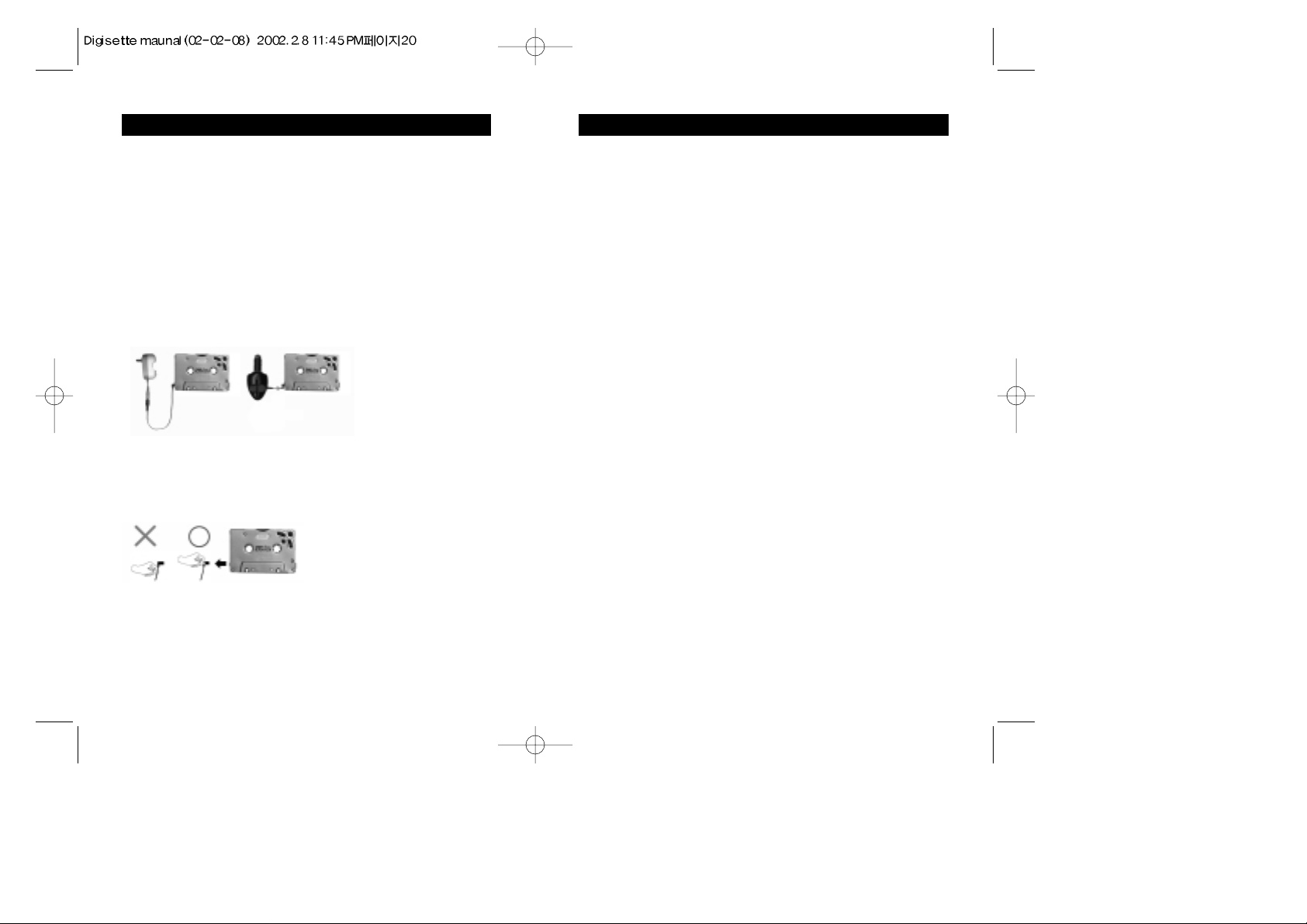
1. Charging the battery only (AC or DC charger):
Remove the battery and insert it into the charger, charge the battery for two or three
hours until the charge lamp is off. It is recommended to charge the battery for 4
hours before its first use. When the battery is fully charged, the charger lamp goes
out immediately. Unplug the charger when it is not in use.
2. Using the DUAL-Play when the battery is discharged
(power supplied from AC or DC charger):
The DUAL-Play can be used while the battery is fully discharged by using the
charger cable.
3. Using the charger cable:
Connect the DUAL-Play (with the battery inserted) and charger with the connection
cable provided. It is VERY IMPORTANT when using the charger cable with the
DUAL-Play to insert it AND remove it from the on-board power jack by holding
the connector end. Pulling only on the cord to remove it from the jack or inserting it
in an improper manner can result in permanent damage to the jack.
When initially charging the battery, it is recommended to leave the battery in the
charger for more than 2 hours, even if the charger LED stops illuminating. Under
certain conditions, the charger LED may falsely turn off before the battery is fully
charged. Leaving the battery in the charger for at least 2.5 hours will ensure a full
charge.
Page 12
23TROUBLESHOOTING PROBLEMS
Note :
Please disconnect the device from PC, turn power off and on after inserting a
charged battery. After LED flickers in amber color one time connect the device
with a USB cable.
If "No memory found" is shown again;
- Check if the USB cable is connected to device and the PC properly.
- Connect the USB cable to another USB port.
- Check if there is "USB Flash Memory Controller Driver" in My computer ->
Control Panel -> System -> Device Manager.)
If there is "!(or?) USB Driver" or "!(or?) Untitled Device", the USB driver may
not have installed correctly or is not properly recognized. In this case it is
necessary to reinstall the USB driver. To install of USB drivers, please refer to
"The inability to get access to Memory" in the Help menu of the program.
- If there are no contents related to USB in My computer -> Control Panel ->
System-> Device Manager, you may have to check if your computer is
compatible with the USB driver.
- Check if there is a conflict between hardware devices in My computer -> Control
panel -> System -> Device Manager. (Hardware conflicts between hardware
devices show a "!" or "?" mark in front of the device name.) If you can find
conflict between hardware, Delete the conflicted hardware and reboot computer.
The DUAL-Play does not respond to cassette deck controls(Play, FF and/or Rew)
when first used in a cassette deck.
Rotate the DUAL-Play cassette wheels manually using a finger in a clockwise and
counter clockwise motion 4~5 times. Re-insert the DUAL-Play into the cassette
deck.
Please visit theHyan Won website at www.m-any.com
for the latest updates and
software upgrades for the DUAL-Play.
22TROUBLESHOOTING PROBLEMS
The DUAL-Play will not download digital files from the PC.
➪ Verify that the unit is switched "On".
➪ Check to see if the battery is fully charged.
➪ Check the cable connection to the USB port.
➪ Verify that the battery has been inserted correctly.
The DUAL-Play will not play.
➪ Verify that the unit is switched "On".
➪ Verify that the battery has been inserted correctly.
➪ Check to see if the battery is fully charged.
➪ Verify that the player is inserted correctly into the tape deck.
➪ If used in a cassette deck, check tape player direction
(DUAL-Play will only play properly in one tape direction).
➪ Verify that the MMC card is inserted properly, if applicable.
The DUAL-Play sound is not clear in a cassette deck, or sound comes only from
the left or right speakers.
➪ Verify that the unit is on.
➪ Adjust the tape head control position for optimal alignment with the tape deck
head.
➪ Reposition the DUAL-Play with the front side down and press auto-reverse to
play bottom side.
The M•ANY Loader does NOT recognize the hardware connection.
➪ Verify that the unit is switched "On".
➪ Verify that the battery has been inserted correctly.
➪ Check to see if the battery is fully charged.
➪ Check the cable connection to the USB port.
➪ You may need to re-install the software.
Page 13
25WARRANTY SERVICE
Customers are entitled to warranty service for a period of one (1) year from the date
of purchase. Warranty service does not apply to defects resulting from customer
fault or acts of God.
Non-warranty service shall apply to defects resulting from:
1. Infiltration of foreign matter, such as water, liquid, or sand.
2. Breakage due to dropping or severe impact.
3. Damage to or deformation of the outer case caused by organic solvents, such as
benzene.
4. Use of parts other than those certified by the manufacturer.
5. Loss or breakage of any parts or components caused by unauthorized
disassembly.
6. Repair or modification done by any persons other than manufacturer authorized
personnel.
7. Acts of God, such as lightning, storm or flood.
For more warranty information and service options, please visit the Hyun Won web
site at http//:www.m-any.com.
Specifications
Cassette Tape Type Digital Audio Player
- Size (WxHxD) : 100.4x63.8x12mm
- Weight (w/o battery) : 55 g
- Memory(on-board) : 32 / 64 / 128 MB
- Memory Expandible with MMC Card
- Power Supply : 1.2V Rechargeable Ni-MH Battery
- Earphone Output : 5 mW
- S/N Ratio : 90 dB
- Frequency Response : 20Hz ~ 20 KHz
- PC Interface : USB Port
- Required PC OS : Windows 98, ME, 2000
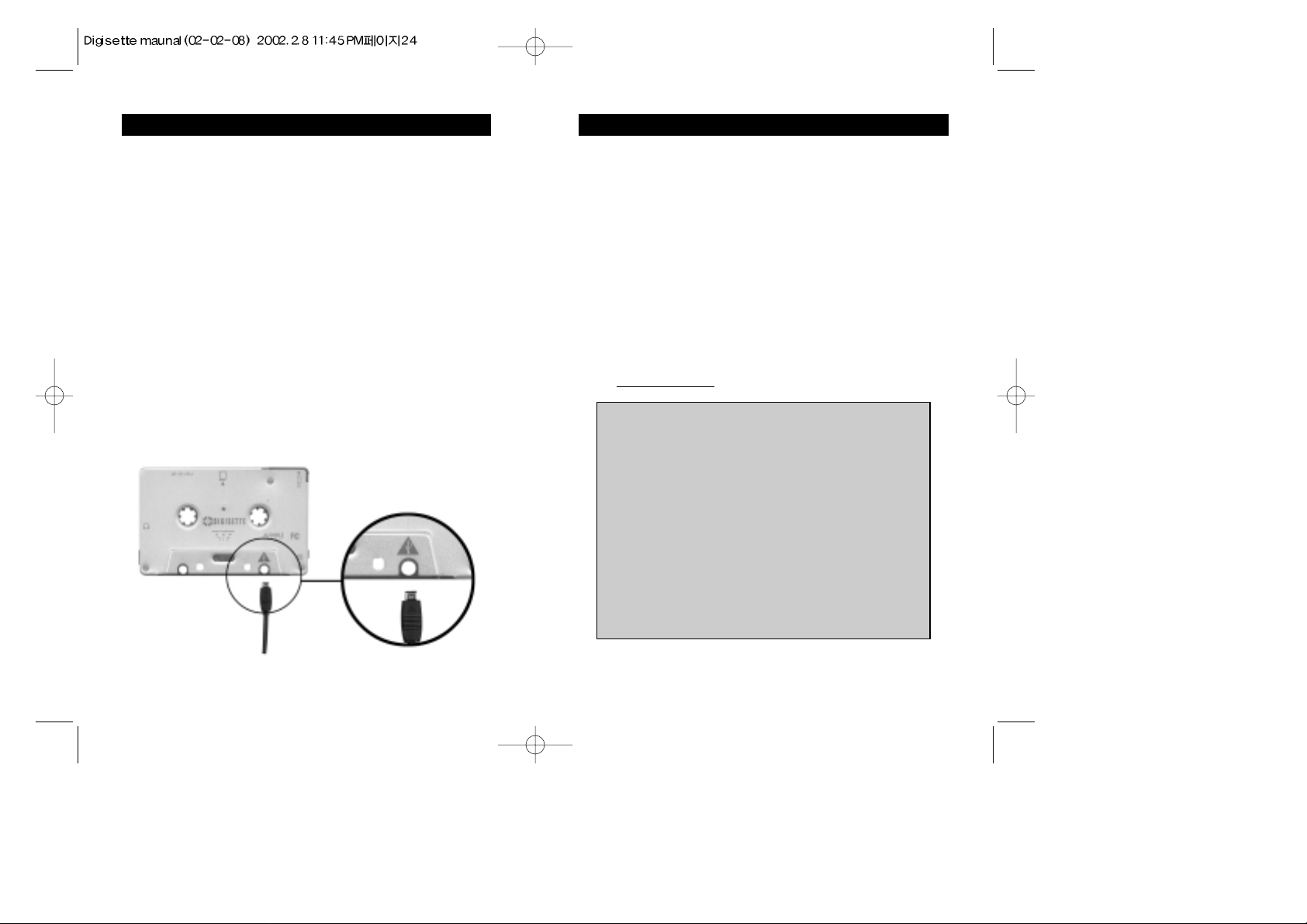
24INSTALLING THE USB DRIVER
If a USB driver to control the DUAL-Play already exists on the PC, there is no
need to install a new driver.
Insert Software CD into CD-ROM Drive (Do not execute the installation
program.) Connect the DUAL-Play to PC with the USB cable.(If there is no USB
driver to communicate between the DUAL-Play and the PC, the"New Hardware
Wizard" will appear on the screen.)
Proceed the installation following the on-screen instructions.
When the location of the drive is asked, select the folder of your CD-ROM. (When
the installation finishes once, The New Hardware Wizard will appear on screen
again.)
Follow the on-screen instructions to complete the installation of the USB driver.
Important Note:
When connecting the cable with DUAL-Play, ensure the correct orientation of the connector
end, and do not force the connector. Improper connection with the USB cable can cause
damage to the computer and/or the DUAL-Play.
Page 14
26VOICE RECORDING, MUSIC ENCODING 27VOICE RECORDING, MUSIC ENCODING
Recording time
1) Direct MP3 recording : about 30 minutes based on 32 MB memory
2) Voice Recording : 130 minutes based on 32 MB memory
Recording format
1) Direct MP3 recording : MP3
2) Voice recording : ADPCM
Recorded files display
1) Direct MP3 recording : MP3_###.MPE
2) Voice recording : ADP_###.ADP
Recording is not possible in following Cases
1) Battery charge is not enough.
2) The free memory is not enough
Recording stops automatically in following cases
1) Battery gets discharged.
2) Memory becomes full during recording
1. VOICE RECORDING
1) Slide the power switch to “REC”(HOLD) position.
2) Press the “PLAY’ button for more than two seconds
Voice Recording will be in progress while LED is flashing between amber
and green colors.
3) Press “STOP” button to stop recording.
Then LED turns off and recording is finished.
2. DIRECT MP3 RECORDING
1) Slide the power switch to “REC”(HOLD) position
2) Follow next steps for recording in recording deck;
a. Insert device to a recording deck.
b. Press “Record’ button on the deck player while other device
connected to the recording deck player is working.
( Recording method could be different depending on deck player.)
c. Press “STOP” button of deck player to stop recording.
3) Follow next steps for recording through encoding cable;
a. Connect audio output port of normal audio player and earphone port of
DAH-200M with encoding cable
b. Press FF and Play buttons simultaneously for more than 2 seconds.
c. Recording will be in progress while LED is flashing between amber
and green colors.
d. Press “STOP” button of DAH-200M to stop recording.
Then LED turns off and recording is finished.
3. REPLAY
1) Slide power switch to “ON “ position
2) Press “PLAY” button.
4. DELETING(directly from device)
1) Press “STOP” button while the selected file is being played.
2) Slide power switch to “REC”(HOLD) position.
3) Press the “STOP” and “PLAY” buttons simultaneously for more than two
seconds.
4) Then LED turns on and off in a green color for indicating that the selected
4) file is deleted.
NOTE
1) Recording can be done on on-board flash memory only, not on MMC
memory
2) All ADPCM and MP3 files can be deleted directly form device by abovedescribed
method.
3) The REC position of power switch also functions as a HOLD switch,
disabling
the function of the on-board control buttons.
Page 15
28
FCC RF
INTERFERENCE STATEMENT
NOTE :
This equipment has been tested and found to comply with the limits for a Class B
digital device, pursuant to Part 15 of the FCC Rules. These limits are designed to
provide reasonable protection against harmful interference in a residential installation.
This equipment generates, uses and can radiate radio frequency energy and, if not
installed and used in accordance with the instructions, may cause harmful interference
to radio communications. However, there is no guarantee that interference will not
occur in a particular installation.
If this equipment does cause harmful interference to radio or television reception
which can be determined by turning the equipment off and on, the user is encouraged
to try to correct the interference by one or more of the following measures.
- Reorient or relocate the receiving antenna.
- Increase the separation between the equipment and receiver.
- Connect the equipment into an outlet on a circuit different from that to which the
receiver is connected.
- Consult the dealer or an experienced radio, TV technical for help.
- Only shielded interface cable should be used.
Finally, any changes or modifications to the equipment by the user not expressly
approved by the grantee or manufacturer could void the users authority to operate such
equipment.
THIS DEVICE COMPLIES WITH PART 15 OF THE FCC RULES. OPERATION IS
SUBJECT TO THE FOLLOWING TWO CONDITIONS: (1) THIS DEVICE MAY NOT
CAUSE HARMFUL INTERFERENCE, AND (2) THIS DEVICE MUST ACCEPT ANY
INTERFERENCE RECEIVED INCLUDING INTERFERENCE THAT MAY CAUSE
UNDESIRED OPERATION.
Page 16
 Loading...