

Page 1
Personal Space Air CleanerPersonal Space Air CleanerPersonal Space Air Cleaner
SO
30030, 30031,
L
Owner’s Guide
MODELS
30033, 30034
O
2
English
Form# 43057-01
20100609
©2010 Hunter Fan Co.
©2008 Hunter Fan Co. 43051-01 06/06/2008
Page 2
Table of Contents
Safety Instructions .................................................................2
Introduction ............................................................................2
Air Filtration System ..............................................................3
Solo
Operation ...............................................................................4
Adjusting the Solo
Air Cleaner Maintenance .......................................................4
Technical Support ..................................................................5
Troubleshooting .....................................................................6
Filter Ordering........................................................................6
Warranty ................................................................................6
Other Home Comfort Products From Hunter .........................7
How the HEPAtech® System Works 3
2
Components .................................................................3
Touch Sensitive 4
Areas 4
2 ................................................................................................................ 4
Cleaning 4
Changing the Filter 5
4. DO NOT immerse the SOLO
because permanent damage will occur. To properly clean
your SOLO2, follow the instructions in the Maintenance
section of this manual (page. 4).
5. This equipment should be inspected frequently and
collected dirt removed from it regularly to prevent
excessive accumulation that could result in flashover or
risk of fire.
in water at any time
2
INTRODUCTION
Thank you for purchasing the SOLO2 Personal Space Air
Cleaner from Hunter Fan Company. You have purchased our
latest development in portable air cleaning which has been
designed to improve the quality of the air that you breathe.
The following innovative features are included in your Hunter
Air Cleaner.
• Touch Sensitive Controls: Your SOLO2 Air Cleaner
utilizes a touch control interface for operation. The touch
sensitive pads on the front of the unit only need to be
touched with your finger tips to activate. Finger nails,
pens, or pencils will not activate the fields for the touch
control.
SAFETY INSTRUCTIONS
IMPORTANT!
READ ALL INSTRUCTIONS
BEFORE USING THIS AIR CLEANER!
1. This Air Cleaner is designed for use on a flat level surface
and may not work properly otherwise. ALWAYS place the
SOLO2 on a firm level surface. ALWAYS ensure the
SOLO2 is at least six (6) inches away from walls or
computers, and 3 ft. heat sources such as stoves,
radiators, or heaters.
2. Before using the SOLO2, extend the cord and inspect for
any signs of damage. DO NOT use the product if the cord
has been damaged.
3. ALWAYS UNPLUG the SOLO
while it is being cleaned.
©2010 Hunter Fan Co. 43057-01 20100609
from your power source
2
• Switchable Power Supply: Your SOLO2 power
adapter meets with all State and Local guidelines for
power consumption. With your power adapter being
“Switchable”, your SOLO2 can be taken anywhere, even
overseas.
• High Particulate Efficiency: The HEPAtech® filter will
remove micron particles from the air that pass through
the filter. The back side of the HEPAtech® filter includes a
carbon filter which will also help illiminate odors.
• Filter Counters: Filter maintenance is critical to the
performance of the SOLO2. To help you determine when
to change the HEPAtech® filter, the unit has a built in
life counter to keep track of the life remaining on the
filter.
2
Page 3
AIR FILTRATION SYSTEM
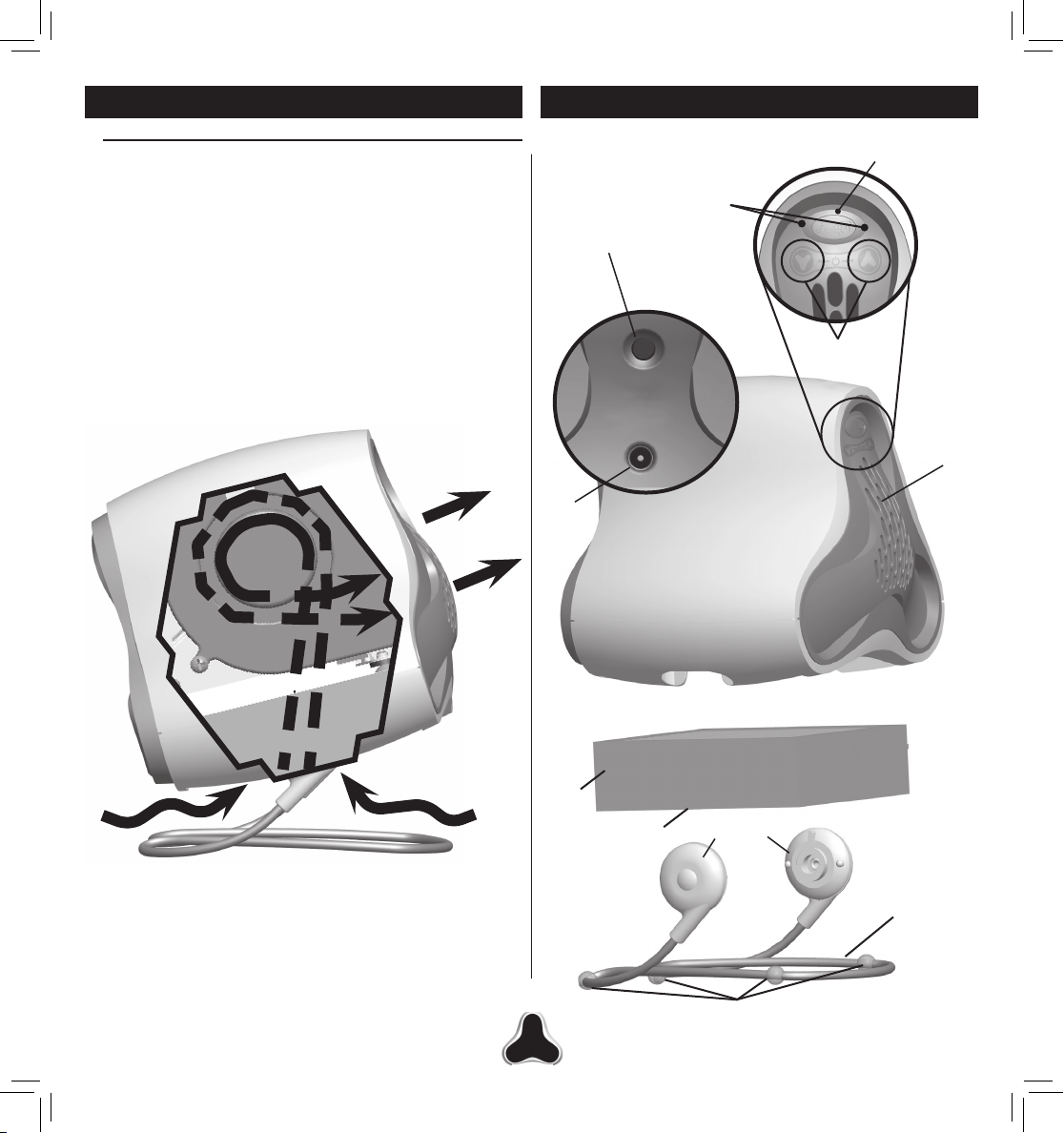
How the HEPAtech® System Works
Air is pulled in through the bottom of the unit where particles
such as dust, dander, and pollen collect on the HEPAtech
filter, leaving the air emitted from the front of the SOLO2
cleaner and healthier for your personal space. Figure 1.
The carbon pre-filter on the back of the filter also helps to
eliminate odors from the air. The fan within the unit ensures
that air is pulled into the unit and forced through the filter to
provide fresh air wherever SOLO2 is setup. Refer to Figure
2. for parts breakdown.
®
SOLO2 COMPONENTS
FILTER CHECK
(AMBER LED)
TOUCH INDICATOR
(BLUE LED)
FILTER RESET
TOUCH
CONTROLS
Figure 1.
AC
ADAPTER
PLUG
FILTER
FILTER
CARBON PRE-FILTER
12VDC
500mA
HINGES
EXHAUST
VENT
WIRE FRAME
WIRE BASE
WIRE STABILIZERS
©2010 Hunter Fan Co. 43057-01 20100609
3
Figure 2.
Page 4
OPERATION
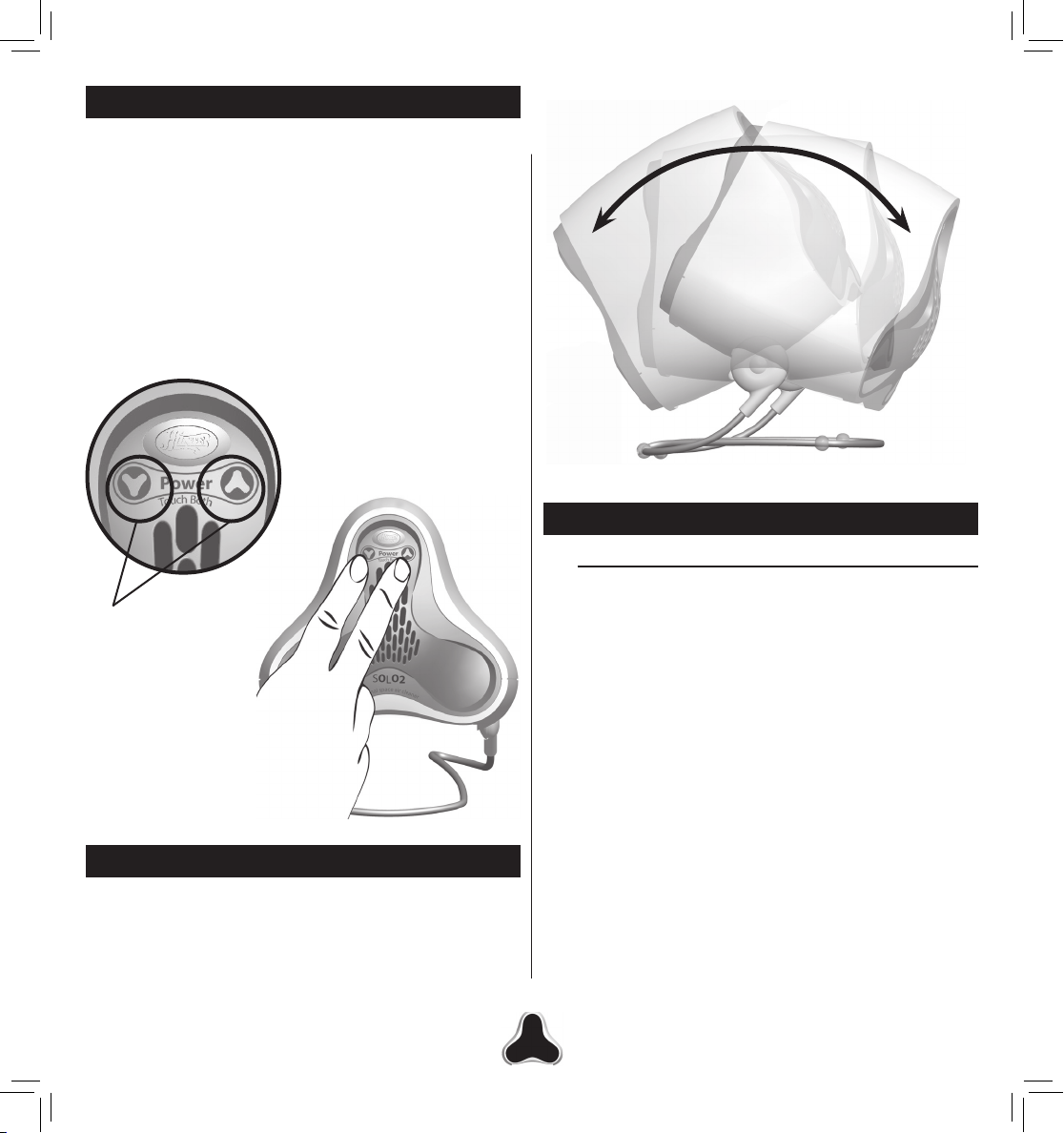
To turn your SOLO2 unit on, press the up and down touch
pads on the unit simultaniously. Once on, press the up or
down arrow buttons to adjust fan speed. To turn your SOLO2
unit back off, press both touch pads on the front of the unit
again. Figure 3. There are ten fan speeds on your Solo2
unit. Once set, your SOLO2 unit will remember your last
setting when it is turned back on.
NOTE: When using the touch panel on the front of the
SOLO2, you must use your fingertips to operate the controls.
Finger nails, pens, pencils, etc will not work to activate or
control the unit.
Touch
Sensitive
Areas
Figure 4.
AIR CLEANER MAINTENANCE
Cleaning
Proper maintenance of your Hunter Air Cleaner will help
ensure years of trouble free service. Follow these steps to
properly maintain your air purifier:
1. Approximately every 90 days, the outside of the unit
should be cleaned with a soft, damp cloth.
2. Follow the instructions for Changing the Filter on this
page to determine how to replace the filter. The Hunter
Logo on the front of the SOLO2 will flash amber when
it is time to change the filter.
Figure 3.
ADJUSTING THE SOLO
Now that the SOLO2 is functional, you will need to adjust
it to direct the air flow towards you. Holding the top of the
SOLO2, tilt the unit back or forth until you find the angle that
will provide the best comfort level. Figure 4.
©2010 Hunter Fan Co. 43057-01 20100609
2
NOTES:
• The air cleaner must be unplugged from the power outlet
during the cleaning process.
• Be sure the unit is completely dry before plugging in and
using.
• Never immerse unit in water or use harsh chemicals to
clean.
4
Page 5
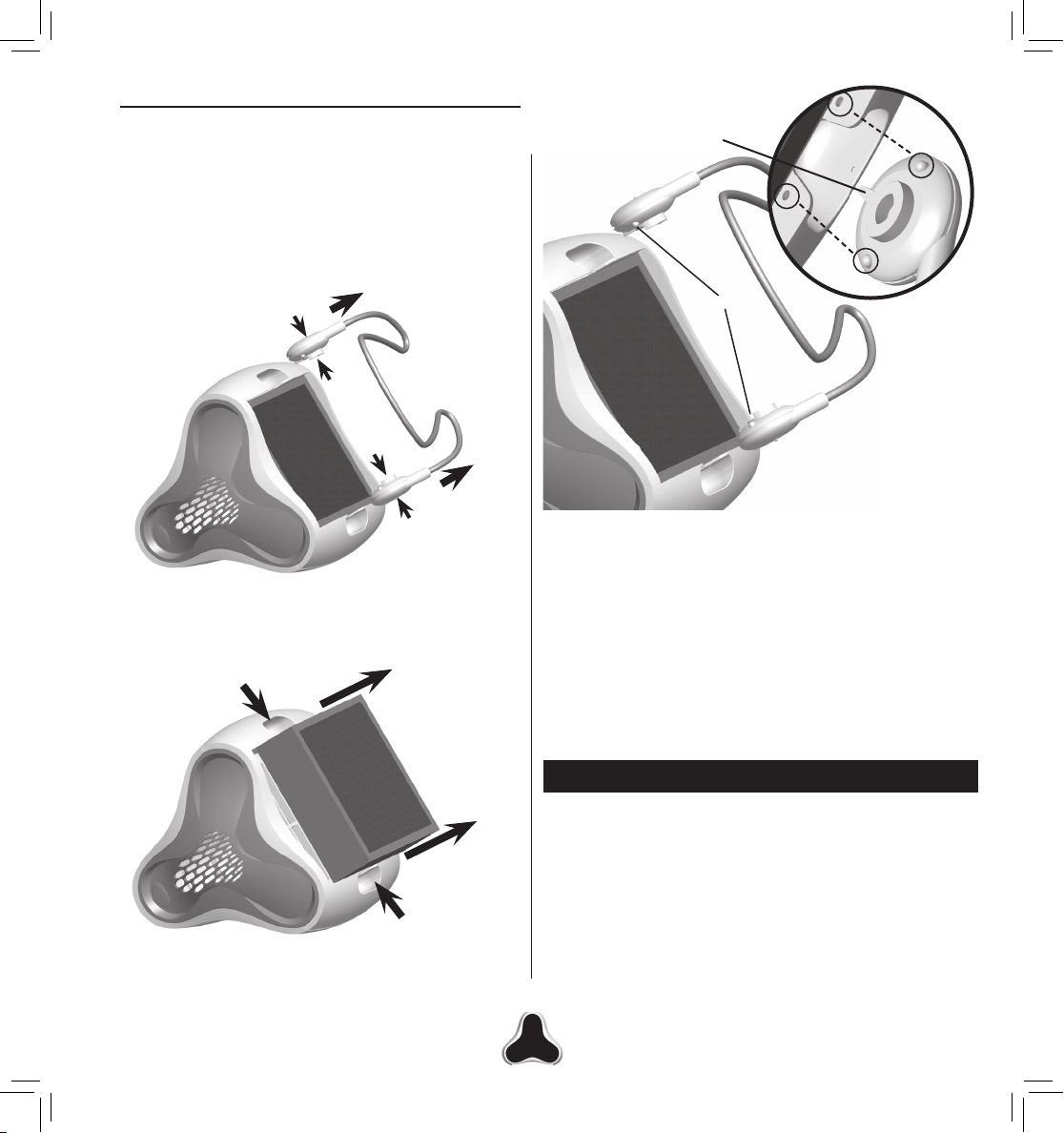
Changing the Filter
1. To change the filter in your SOLO2, turn the unit off and
unplug the power cord.
2. Turn the SOLO2 on it’s side and remove the wire base
from the bottom of the unit by compressing the hinges on
either side of the wire base (a) and gently pulling each out
of the bottom of the SOLO2 unit (b) . Figure 5.
Hinge Guide
b. Pull to remove
a. Pinch
Figure 5.
3. Place your fingers in the slots the hinges came out of on
either side of the unit and pull the filter out. Figure 6.
Figure 6.
Bumps
Figure 7.
5. Align the bumps on the hinges on the wire base with the
holes on the bottom of the unit and snap into place. Ensure
once seated that the bumps on the hinges are seated
securely in the holes on the bottom of the SOLO
6. Set your SOLO
7. If the filter light on the front of the unit continues to blink,
press the filter reset button on the back of the unit for 3
seconds to reset.
upright again and reconnect the power.
2
Figure 7.
.
2
TECHNICAL SUPPORT
If you have any additional questions or problems with your
Hunter Solo
am to 7:00 pm Monday - Friday and 8:00 am to 5:00 pm on
Saturday, Central Time. You may also contact us over the
Internet at www.hunterfan.com.
unit, please call 1-888-830-1326 from 7:00
2
4. Install the filter into the unit, using the arrows on the side
of the filter, indicating the direction the filter should be
placed into the unit (black side out).
©2010 Hunter Fan Co. 43057-01 20100609
5
Page 6
WARRANTYTROUBLESHOOTING
1. I cannot operate SOLO2 from the controls on the product.
Unplug the power adapter from the wall and allow it to
set for one minute. Plug the power adapter back into the
wall and press the up and down arrows on the front of the
unit at the same time to turn it on.
2. How do I clean the SOLO
Please refer to the cleaning instructions on page 4 of your
owner’s manual.
3. I need to replace the power adapter.
Please contact our technical support department for
replacement parts.
unit?
2
FILTER ORDERING
Depending on usage and the environment, your Hepatech
lter should be replaced every 6 months.
Replacement lters are available at most retailers that
carry Hunter Air Puriers. You may also purchase directly
from Hunter Fan Company by:
Phone: 1-888-830-1326
Website: www.hunterfan.com
* Applicable state and local taxes may apply.
* Prices are subject to change without notice.
* All orders will be shipped USPS or UPS Ground, allow
12-15 working days for delivery.
Filter# Type
30811 Hepatech
Hunter Fan Company
SOLO2 Air Cleaner System
5 YEAR LIMITED WARRANTY
The Hunter Fan Company makes the following limited
warranty to the original residential user or consumer
purchaser of the SOLO2 Air Cleaner System:
If any part of your SOLO
motor fails during the first five (5) years from the date of
installation due to a defect in material or workmanship,
we will provide a replacement Air Cleaner free of charge.
Installation is deemed to occur at the date of purchase.
If the Air Cleaner cord or wire base fails any time within
one (1) year after installation due to a defect in material or
workmanship, we will replace or, at our option, repair the unit
free of charge at our nearest service center or at our Service
Department in Memphis, Tennessee. You will be responsible
for all parts and labor costs after this one-year period.
IF THE ORIGINAL RESIDENTIAL USER OR CONSUMER
PURCHASER CEASES TO OWN THE AIR PURIFIER,
THIS WARRANTY AND ANY IMPLIED WARRANTY
WHICH THEN REMAINS IN EFFECT, INCLUDING
BUT NOT LIMITED TO ANY IMPLIED WARRANTY OF
MERCHANTABILITY OR FITNESS FOR A PARTICULAR
PURPOSE, ARE VOIDED.
NO WARRANTY, EXPRESSED OR IMPLIED, INCLUDING
ANY WARRANTY OF MERCHANTABILITY OR FITNESS
FOR A PARTICULAR PURPOSE, IS MADE IN RESPECT
TO THE FILTER MATERIAL OR CARBON FILTER.
THIS WARRANTY IS IN LIEU OF ALL OTHER EXPRESS
WARRANTIES. THE DURATION OF ANY IMPLIED
WARRANTY, INCLUDING BUT NOT LIMITED TO ANY
IMPLIED WARRANTY OF MERCHANTABILITY OR
FITNESS FOR A PARTICULAR PURPOSE, IN RESPECT
TO THE MOTOR IS EXPRESSLY LIMITED TO THE
PERIOD OF THE EXPRESS WARRANTY SET FORTH
ABOVE.
Air Cleaner System (“Air Cleaner”)
2
This warranty is voided if the air cleaner is not purchased
and used in the USA or Canada.
©2010 Hunter Fan Co. 43057-01 20100609
6
Page 7
This warranty excludes and does not cover defects,
malfunctions or failures of the Air Cleaner which were
caused by repairs by persons not authorized by us, use
of parts or accessories not authorized by us, mishandling,
modifications, or damage to the Air Cleaner while in your
possession, or unreasonable use, including failure to provide
reasonable and necessary maintenance. This warranty does
not cover Air Cleaners used in commercial applications.
There are no express or implied warranties as to commercial
purchasers or users.
To obtain service, contact the nearest Hunter authorized
service center or the Hunter Fan Company Service
Department, 2500 Frisco Avenue, Memphis, Tennessee
38114, 1-888-830-1326. For the name of our nearest
authorized Hunter Fan Company Service Center, write
to the Hunter Fan Company at the preceding address.
You will be responsible for insurance and freight or other
transportation to our factory service center. We will return
the Air Cleaner freight prepaid. The Air Cleaner should
be properly packaged to avoid damage in transit since
we will not be responsible for any such damage. Proof of
purchase is required when requesting warranty service. The
purchaser must present sales receipt or other document that
establishes proof of purchase.
LIMITATION MAY NOT APPLY TO YOU.
THIS WARRANTY GIVES YOU SPECIFIC LEGAL RIGHTS,
AND YOU MAY ALSO HAVE OTHER RIGHTS WHICH
VARY FROM STATE TO STATE OR PROVINCE TO
PROVINCE.
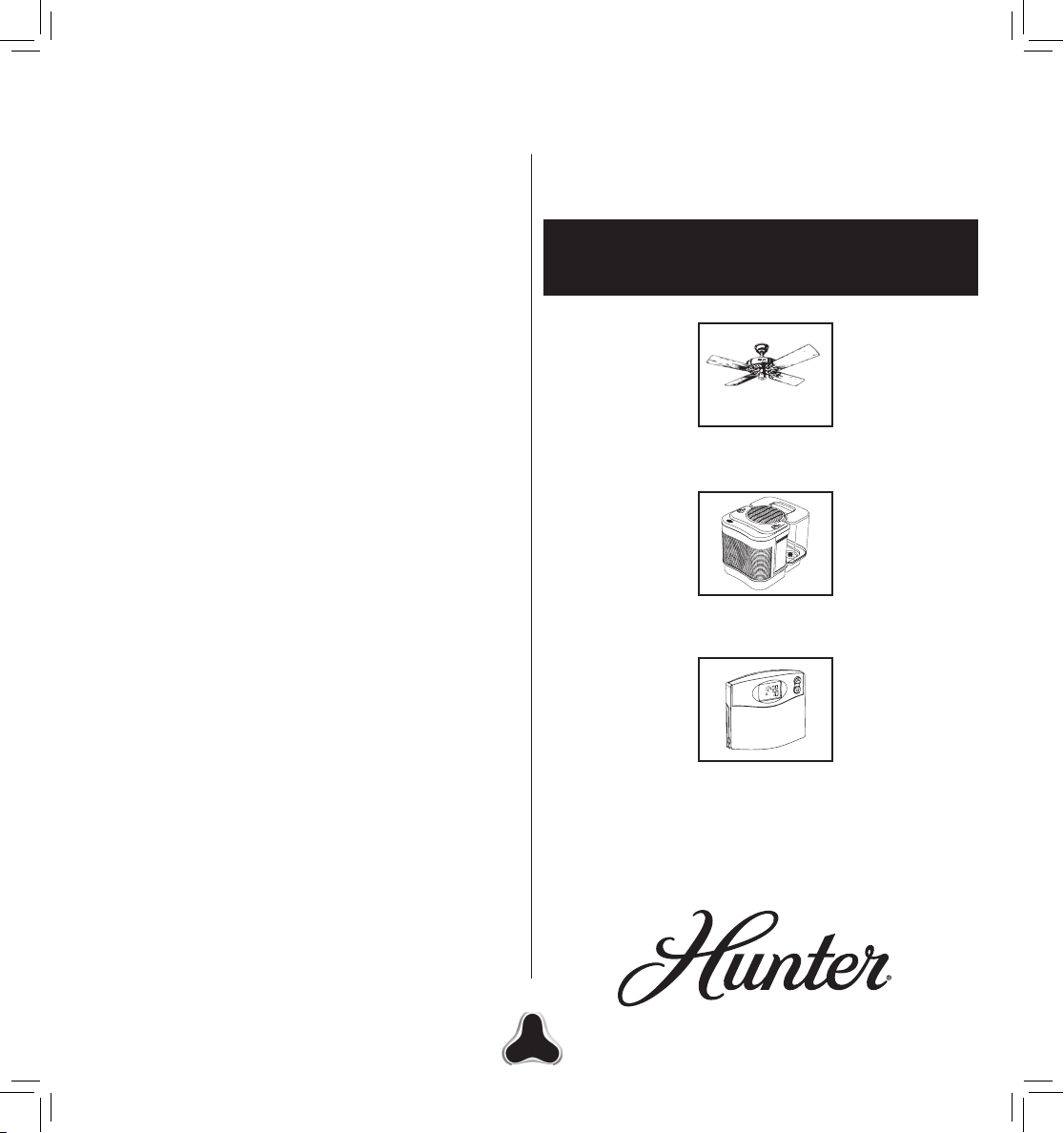
OTHER HOME COMFORT
PRODUCTS FROM HUNTER
Hunter Original®
Fans
IN NO EVENT SHALL HUNTER FAN COMPANY
BE LIABLE FOR DIRECT, INDIRECT, SPECIAL
CONSEQUENTIAL OR INCIDENTAL DAMAGES IN
The Care-Free
Humidifier
™
EXCESS OF THE PURCHASE PRICE OF THE AIR
M
CLEANER. YOUR SOLE REMEDY WILL BE REPAIR OR
REPLACEMENT AS PROVIDED ABOVE.
AM
4
TEMP
SOME AMERICAN STATES AND CANADIAN PROVINCES
DO NOT ALLOW LIMITATIONS ON HOW LONG
AN IMPLIED WARRANTY LASTS, SO THE ABOVE
LIMITATION MAY NOT APPLY TO YOU.
Programmable
Thermostat
SOME AMERICAN STATES AND CANADIAN PROVINCES
DO NOT ALLOW THE EXCLUSION OR LIMITATION
OF DIRECT, INDIRECT SPECIAL, INCIDENTAL OR
CONSEQUENTIAL DAMAGES, SO THE ABOVE
LIMITATION MAY NOT APPLY TO YOU.
To learn more about Hunter Fan Company products,
please see our Web page at:
www.hunterfan.com
SOME AMERICAN STATES AND CANADIAN PROVINCES
DO NOT ALLOW THE EXCLUSION OR INVALIDITY OF
EXPRESS OR IMPLIED WARRANTIES IF THE USER
CEASES TO OWN THE AIR PURIFIER, SO THE ABOVE
©2010 Hunter Fan Co. 43057-01 20100609
7
FAN COMPANY
2500 FRISCO AVENUE
MEMPHIS, TN 38114, USA
Page 8
©2010 Hunter Fan Co. 43057-01 20100609
8
 Loading...