

Page 1
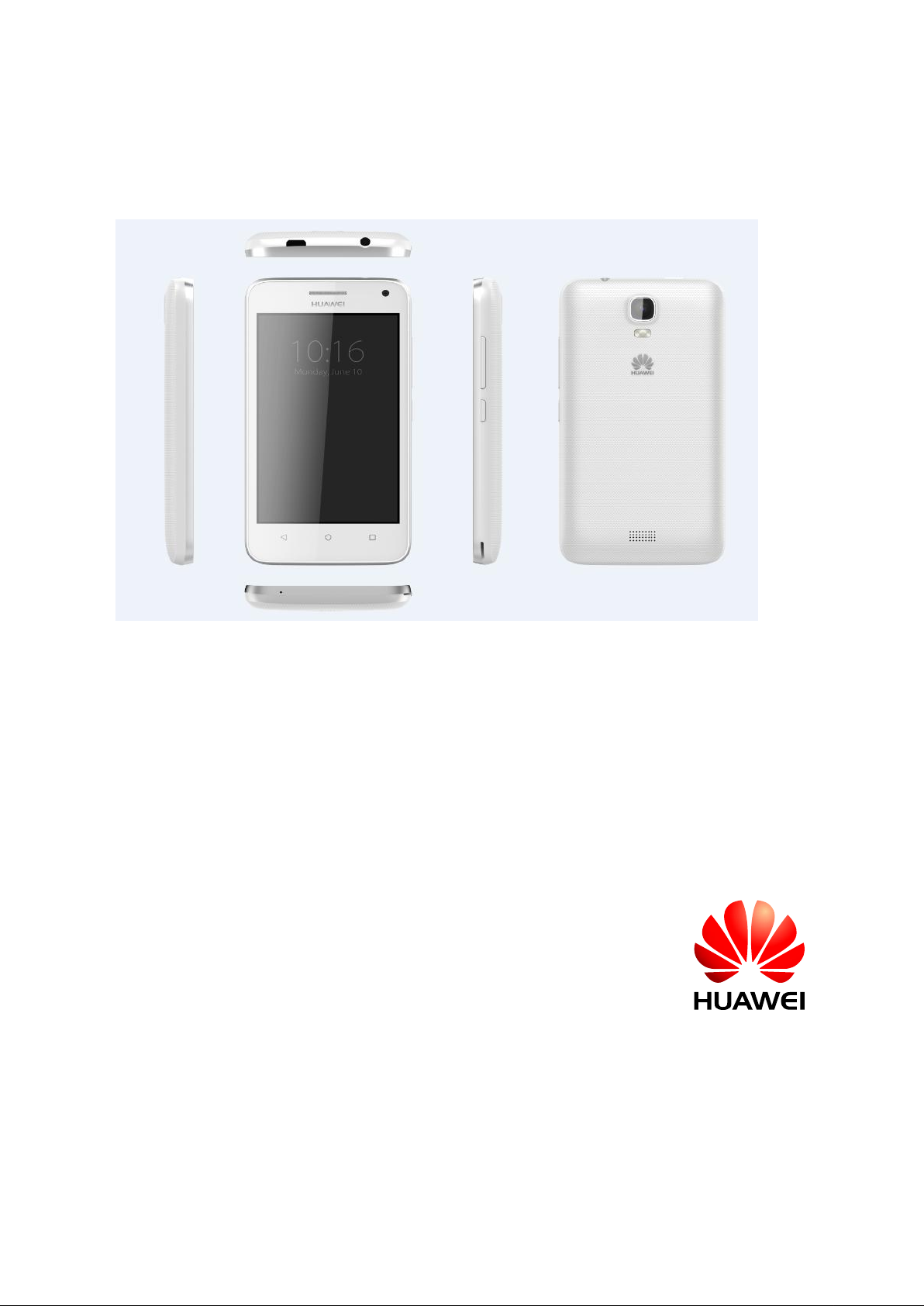
HUAWEI Y336-02 intelligent
mobile phone FAQ
Issue
01
Date
2013-01-27
Page 2

HUAWEI T8833 智能手机 FAQ
version 01 (2012-11-30)
2/79
Directory
1 The basic function ...................................................................................................... 7
1.1 what color the color scheme support ............................................... Error! Bookmark not defined.
1.2 products selling point information ..................................................... Error! Bookmark not defined.
1.3 mobile phone keys introduced ......................................................... Error! Bookmark not defined.
1.4 installation phone ............................................................................. Error! Bookmark not defined.
1.4.1 open the battery back cover .................................................... Error! Bookmark not defined.
1.4.2 installed SIM card (optional) .................................................... Error! Bookmark not defined.
1.4.3 microSD card 10 installation .................................................... Error! Bookmark not defined.
1.4.4 install batteries ......................................................................... Error! Bookmark not defined.
1.5 introduction of the main screen ........................................................ Error! Bookmark not defined.
1.5.1 quick add/remove the main screen ......................................... Error! Bookmark not defined.
1.5.2 the main menu profile .............................................................. Error! Bookmark not defined.
1.5.3 edit main menu ........................................................................ Error! Bookmark not defined.
1.5.4 how to add a shortcut icon to the desktop ............................... Error! Bookmark not defined.
1.6 contact .............................................................................................. Error! Bookmark not defined.
1.6.1 new contacts and build calls photo .......................................... Error! Bookmark not defined.
1.6.2 contacts by SIM card import, export ........................................ Error! Bookmark not defined.
1.6.3 How many contacts most support ........................................... Error! Bookmark not defined.
1.6.4 set group contact ..................................................................... Error! Bookmark not defined.
1.6.5 how to manage your contacts (copy, backup) ....................................................................... 15
1.7 SMS .................................................................................................. Error! Bookmark not defined.
1.7.1 How to switch the handwritten input text ................................. Error! Bookmark not defined.
1.7.2 deleted or locking a certain text in the same session, batch delete ...................................... 16
1.7.3 SMS messages/mass and save drafts method, maximum mass number ............................ 17
1.7.4 length letter support chinese-english word number .............................................................. 17
1.7.5 How many message phone support save the most ................ Error! Bookmark not defined.
1.7.6 how to set up the SMS center number .................................... Error! Bookmark not defined.
1.8 phone ............................................................................................... Error! Bookmark not defined.
1.8.1 version voice recording and storage path ............................................................................. 18
1.8.2 how three sides in the process of call on the phone? Calls to switch? ................................. 18
1.8.3 double card double pass single/dual sim card phone, one cartoon words, a replacement card
any prompts the caller? .................................................................................................................. 18
1.9 MMS ................................................................................................. Error! Bookmark not defined.
Page 3

HUAWEI T8833 智能手机 FAQ
version 01 (2012-11-30)
3/79
1.9.1 send MMS ............................................................................................................................. 19
1.9.2 MMS to send/receive the possible cause of the failure, solution to ...................................... 19
1.9.3 MMS is affected by factors such as the file size/video format/resolution limit of .................. 20
1.9.4 MMS attachments to save position........................................................................................ 20
1.10 music ............................................................................................................................................ 21
1.10.1 music menu interface .......................................................................................................... 21
1.10.2 Establish music playlist ........................................................................................................ 21
1.10.3 Introduction toplay mode ..................................................................................................... 22
1.10.4 background with the lyrics synchronization ......................................................................... 22
1.11 camera/camera function ............................................................................................................. 22
1.11.1 with SD card can not use photo/camera .............................................................................. 22
1.11.2 some photos/video file could not be opened ....................................................................... 22
1.11.3 camera/video file save path and change the method of by default ..................................... 23
1.11.4 photo/video file editor, give photo frame .............................................................................. 23
1.11.5 support hd video playback ................................................................................................... 23
1.11.6 photo shutter sound can be set to silent .............................................................................. 23
1.11.7 Switch and rear-facing cameras? ........................................................................................ 23
1.11.8 video format? The size of the video image support? ........................................................... 23
1.11.9 The format of the photo is cell phone? The size of the photo images to support? .............. 24
1.12 streaming ...................................................................................................................................... 24
1.12.1 streaming media in the process of call can the background? Whether can restore
automatically? ................................................................................................................................. 24
1.12.2 why some streaming media phone unable to play? ............................................................ 24
1.12.3 online streaming effect 24 the likely cause of the poor ....................................................... 24
1.12.4 when they play online video won't play while downloading in phone memory less than .... 25
1.13 bluetooth ....................................................................................................................................... 25
1.13.1 bluetooth support to transmit data file format ...................................................................... 25
1.13.2 how to transfer data via bluetooth file .................................................................................. 25
1.13.3 bluetooth effective transmission distance ............................................................................ 26
1.13.4 connect to other bluetooth devices not on May ................................................................... 27
1.13.5 bluetooth connection with computer to the Internet and bluetooth transfer files ................. 27
1.14 GPS navigation ............................................................................................................................ 28
1.14.1 device's navigation software? .............................................................................................. 28
1.14.2 navigation software data loss how to deal with? License file or activation code is missing?
........................................................................................................................................................ 28
1.14.3 navigation software search star search less than how should handle? .............................. 28
1.15 support FM radio? The radio how to save search manually to channel? .................................... 28
1.16 phone support themes download? Whether to support dynamic wallpaper? .............................. 29
1.17 phone support video calls or video chat? ..................................................................................... 30
1.18 supports screenshots (screenshot), screenshots way? ............................................................... 30
1.19 support Flash? Download the flash software is available? .......................................................... 30
1.20 cables order .................................................................................................................................. 30
Page 4

HUAWEI T8833 智能手机 FAQ
version 01 (2012-11-30)
4/79
1.21 software product delivery preset name/version listing ................................................................. 30
1.22 SD card 30 compatibility test list .................................................................................................. 31
1.23 The basic function of summary of ................................................................................................ 31
2 Two commonly used set up ................................................................................................. 32
2.1 email ............................................................................................................................................... 32
2.1.1 email Settings ........................................................................................................................ 32
2.1.2 support offline viewing mailbox mail ...................................................................................... 35
2.1.3 Version Gmail (China is not preset, for reference only) ........................................................ 35
2.1.4 synchronize contacts, calendar, how to operate the 34 when unable to sync ...................... 35
2.2 WLAN feature set ........................................................................................................................... 36
2.2.1 using WLAN connection ........................................................................................................ 36
2.2.2 support WLAN what agreement, the agreement of the transfer rate is how much? ............. 37
2.2.3 through WLAN connection network sometimes can't open web page .................................. 38
2.2.4 cannot search to 36 WLAN signal ......................................................................................... 38
2.2.5 how to determine the use of a SIM or 36 WLAN access the Internet ................................... 38
2.2.6 The reasons for the failure of WLAN connection ................................................................... 38
2.2.7 WLAN standby time will automatically disconnect, how to solve, mobile phone what is the
default Settings? ............................................................................................................................. 38
2.3 network shares and portable hot .................................................................................................... 39
2.4 to use static IP WLAN online ............................................................ Error! Bookmark not defined.
2.5 surfing after connecting PC as modem .......................................................................................... 40
2.6 ring tone setting .............................................................................................................................. 41
2.6.1 Its own ringtone Settings ......................................................... Error! Bookmark not defined.
2.6.2 calls/messages vibration Settings ......................................................................................... 42
2.6.3 how to set up the group tone ................................................... Error! Bookmark not defined.
2.6.4 How to cancel the sound of cell phone .................................................................................. 45
2.7 language and keyboard Settings .................................................... Error! Bookmark not defined.
2.7.1 what kinds of languages can support? How to change language? ....................................... 46
2.7.2 Why it can't be used after install other input methods ........................................................... 46
2.7.3 if able to debug the system font size? ..................................... Error! Bookmark not defined.
2.7.4 what kinds of imputs it has ...................................................... Error! Bookmark not defined.
2.7.5 how to switch strokes input method ...................................................................................... 48
2.7.6 How to close imput vibration ................................................................................................ 48
2.8 Settings relates to surfing ................................................................. Error! Bookmark not defined.
2.8.1 mobile browser to clear the cache and history ...................................................................... 49
2.8.2 full-screen browser and bookmarks Settings ........................................................................ 49
2.8.3 log in web E-mail from mobile ............................................................................................... 49
2.8.4 if support in the bank service on the net ................................................................................ 50
2.8.5 save Pictures from web page ................................................................................................ 51
2.8.6 modify page Settings ............................................................................................................. 51
2.8.7 Save my favourite page ......................................................................................................... 52
2.8.8 network parameter setting method if mobile phone can't get to the Internet ........................ 52
Page 5

HUAWEI T8833 智能手机 FAQ
version 01 (2012-11-30)
5/79
2.8.9 how to shut down and enable data business ........................................................................ 53
2.8.10 check and disconnection the present connection ............................................................... 55
2.8.11 support visiting interenet while talking? ............................................................................. 55
2.8.12 restriction of data ( eg.CDMA dual card phone not support GSM interenet visiting) ........... 55
2.8.13 what's the function of virtual private network VPN setup, how to set up? ........................ 55
2.9 set up screen lock .......................................................................................................................... 57
2.9.1 how to enable PIN lock screen? .......................................................................................... 57
2.9.2 how to set up a face unlock ................................................................................................... 58
2.9.3 how to enable the screen unlock pattern? ........................................................................... 58
2.9.4 graphics mistyped a few times in a row after the lock phone will be locked? Forget to design
how to unlock, whether through GMAIL unlock .............................................................................. 59
2.9.5 how to lock and unlock the screen ........................................................................................ 60
2.10 clock function ................................................................................................................................ 60
2.10.1 add/cancell clock ................................................................................................................. 60
2.10.2 support to shut off the alarm clock? ................................................................................... 60
2.11 application .................................................................................................................................... 61
2.11.1 support what format software,support JAVA or not? ....................................................... 61
2.11.2 how to obtain third-party applications?............................................................................... 61
2.11.3 support installation position preferred Settings? ................................................................ 61
2.11.4 How to installation, management and uninstall program? ................................................. 61
2.11.5 program installation failure reason and solutions ................................................................ 61
2.11.6 default what sw?What is operator customization? What is a cell phone comes with
software? can delete? ................................................................................................................ 61
2.12 common third-party application question ..................................................................................... 61
2.12.1 QQ relate ............................................................................................................................. 62
2.12.2 third-party application software installed on the SD card,may occupy system memory ... 62
2.12.3 reason of part number does not display the belonging ....................................................... 62
2.12.4 online banking transactions (ali wangwang taobao, pay treasure, choi tenpay, net-bank)62
2.13 the data backup and recovery ...................................................................................................... 62
2.13.1 Backup and restore the contacts ......................................................................................... 62
2.13.2 support backup group contact directory or not? .................................................................. 64
2.13.3 how to use the cloud backup, backup, restore .................................................................... 64
2.13.4 phone support backup what data backup? ........................................................................ 64
2.14 task manager .................................................................................. Error! Bookmark not defined.
2.14.1 task manager function ......................................................................................................... 65
2.14.2 How to open the task manager ........................................................................................... 65
2.14.3 task manager interface introduction .................................................................................... 65
2.14.4 task manager function ......................................................................................................... 65
2.15 cloud services functions? ........................................................................................................... 65
2.16 HUAWEI SecurityGuard ............................................................................................................... 66
2.16.1 safeguard funtion ................................................................................................................. 66
Page 6

HUAWEI T8833 智能手机 FAQ
version 01 (2012-11-30)
6/79
2.16.2 how to use huawei security guard ....................................................................................... 66
2.16.3 mobile security guards encryption problem ......................................................................... 66
2.17 use huawei security guards blacklist ............................................................................................ 66
2.18 the weather clock ......................................................................................................................... 66
2.19 developers options ....................................................................................................................... 67
2.20 time synchronization .................................................................................................................... 68
2.21 connected to the computer U disk................................................................................................ 69
2.22 release the phone internal storage space .................................................................................... 70
2.23 adjust the screen brightness ........................................................................................................ 70
2.24 phone button back light power saving function ............................................................................ 71
2.25 set the flight mode ........................................................................................................................ 71
2.26 recover factory setting .................................................................................................................. 71
2.27 how to enter and exit the security model ..................................................................................... 71
2.28 HiSuite .......................................................................................................................................... 71
2.29 Support HDMI 2.29? How to use? .............................................................................................. 72
2.30 support TV - OUT? How to use? ................................................................................................ 72
2.31 support OTG function? How to use? .......................................................................................... 72
2.32 status indicators light .................................................................................................................... 72
2.33 the charger can mix of using ........................................................................................................ 72
2.34 new features of phone .................................................................................................................. 72
3 others ................................................................................... Error! Bookmark not defined.
3.1 save electricity tips ......................................................................................................................... 73
3.2 network traffic to save tip................................................................................................................ 73
3.3 how could we do mobile phones run slow ..................................................................................... 73
3.4 set will automatically stretch the wallpaper on your own, whether it does not stretch wallpaper. .. 73
Not supported, but some third-party desktop support, such as 360 Desktop, GO Desktop. ............... 74
3.5 entered RECOVERY mode and recovery factory set . .................................................................. 74
3.6 supports snapshot QR codes? ....................................................................................................... 74
3.7 support for 3D acceleration? .......................................................................................................... 74
3.8 How to judge whether the phone is user root ? ............................................................................. 74
3.9 after pulling out the battery time is zero, the time is set to automatically sync network traffic will go
.............................................................................................................................................................. 75
3.10 having recorder or not .................................................................................................................. 75
3.11 shipped with screen protector? .................................................................................................... 75
3.12 support for mobile TV? How to set up? ........................................................................................ 75
3.13 supports Word,Excel,ppt,PDF editing and browsing? ................................................................ 75
3.14 division cell phone memory .......................................................................................................... 75
3.15 phone internal storage space and microSD card remaining storage space ................................ 79
Page 7
HUAWEI T8833 智能手机 FAQ
version 01 (2012-11-30)
7/79
1 Basic functions
2 Color scheme which colors are supported
Black, white 2 Colors are supported.
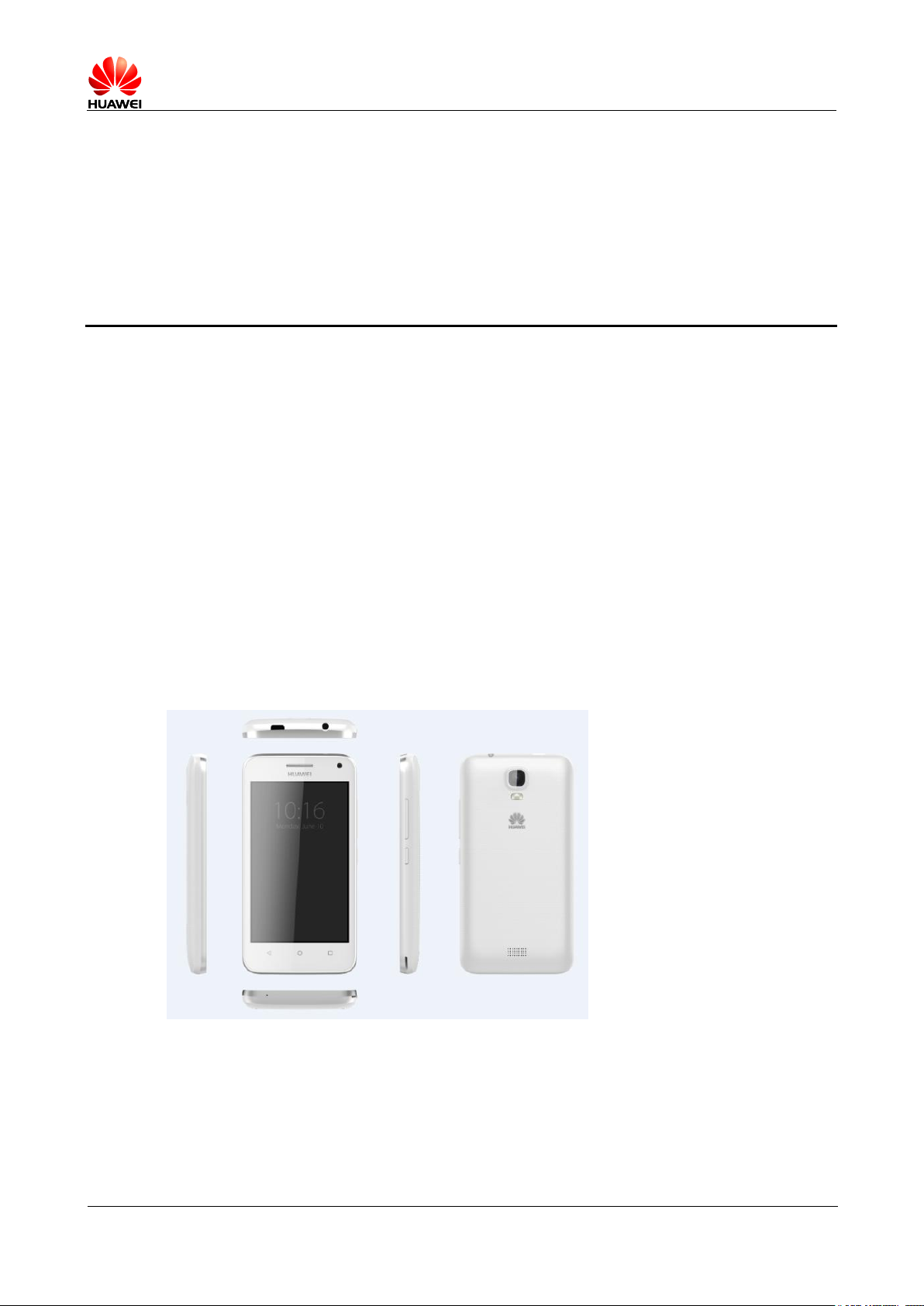
2.1 Selling point
Y336-02 is a support of WCDMA/GSM/GPRS/EDGE,while Only supports downlink, uplink GPRS
Digital mobile phones, above Android 4.4 system, SC7731 4 Nuclear 1.2GHz , 4.0 Inch TN Display,
GF Capacitive 2 Touch screen, 500 W AF Back camera, 200W Front-facing camera, USB Hi-speed
ports, support g-sensor, dual SIM dual standby, 1730mAH External battery. Support FM,
Bluetooth,WIFI, andGPS ;
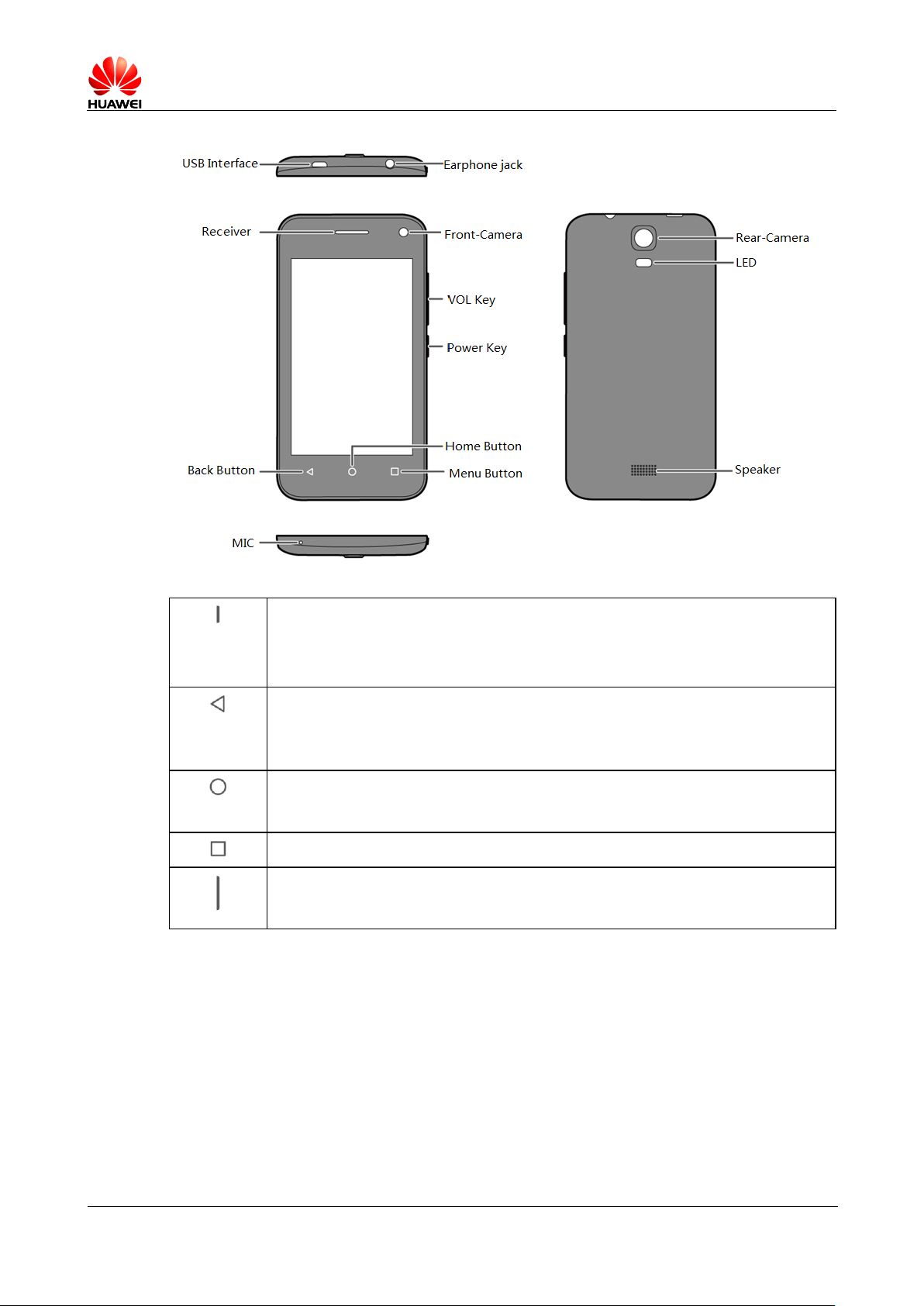
2.2 Mobile phone keypad introduction
Page 8
HUAWEI T8833 智能手机 FAQ
version 01 (2012-11-30)
8/79
long press this button to open the phone while phone is switched off.
long press this button to open the options menu at boot mode。
press this button to open or close the screen at boot mode。
Press this button to return to the superior interface, or exit the
application.
Press this button to close the on-screen keyboard.
Press this button to return to the main screen.
Long press this button opens the list of recently used programs.
Press this key to open the menu of the current interface.
Press this key to adjust the volume.
Pressing this key calls off ring tone.
Page 9
HUAWEI T8833 智能手机 FAQ
version 01 (2012-11-30)
9/79
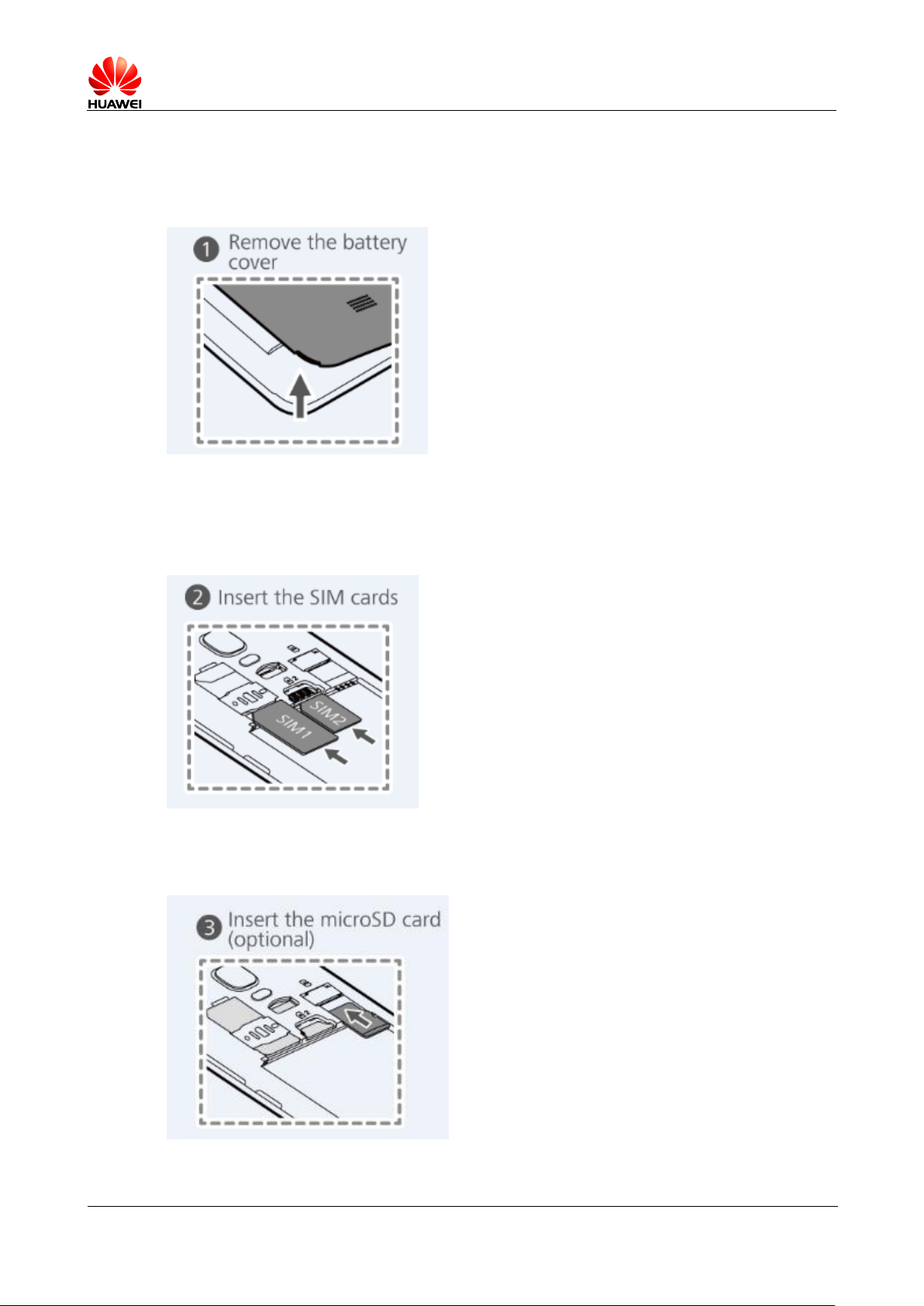
2.3 Phone Installment
2.3.1 Open the battery cover
2.3.2 install SIM (Optional)
2.3.3 microSD installment
Page 10
HUAWEI T8833 智能手机 FAQ
version 01 (2012-11-30) 10/79
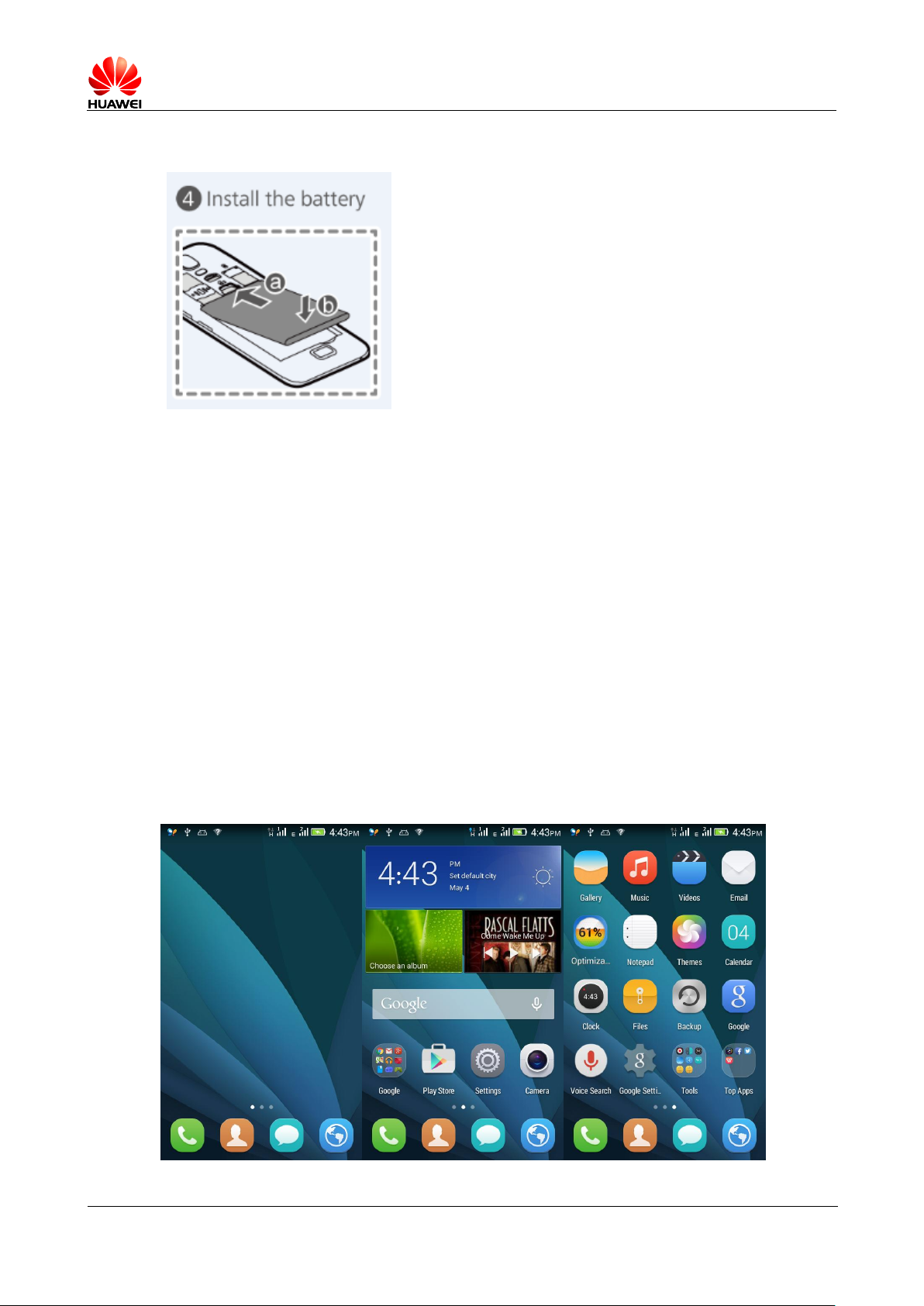
2.3.4 Battery installment
1.5 Introduction of main screen
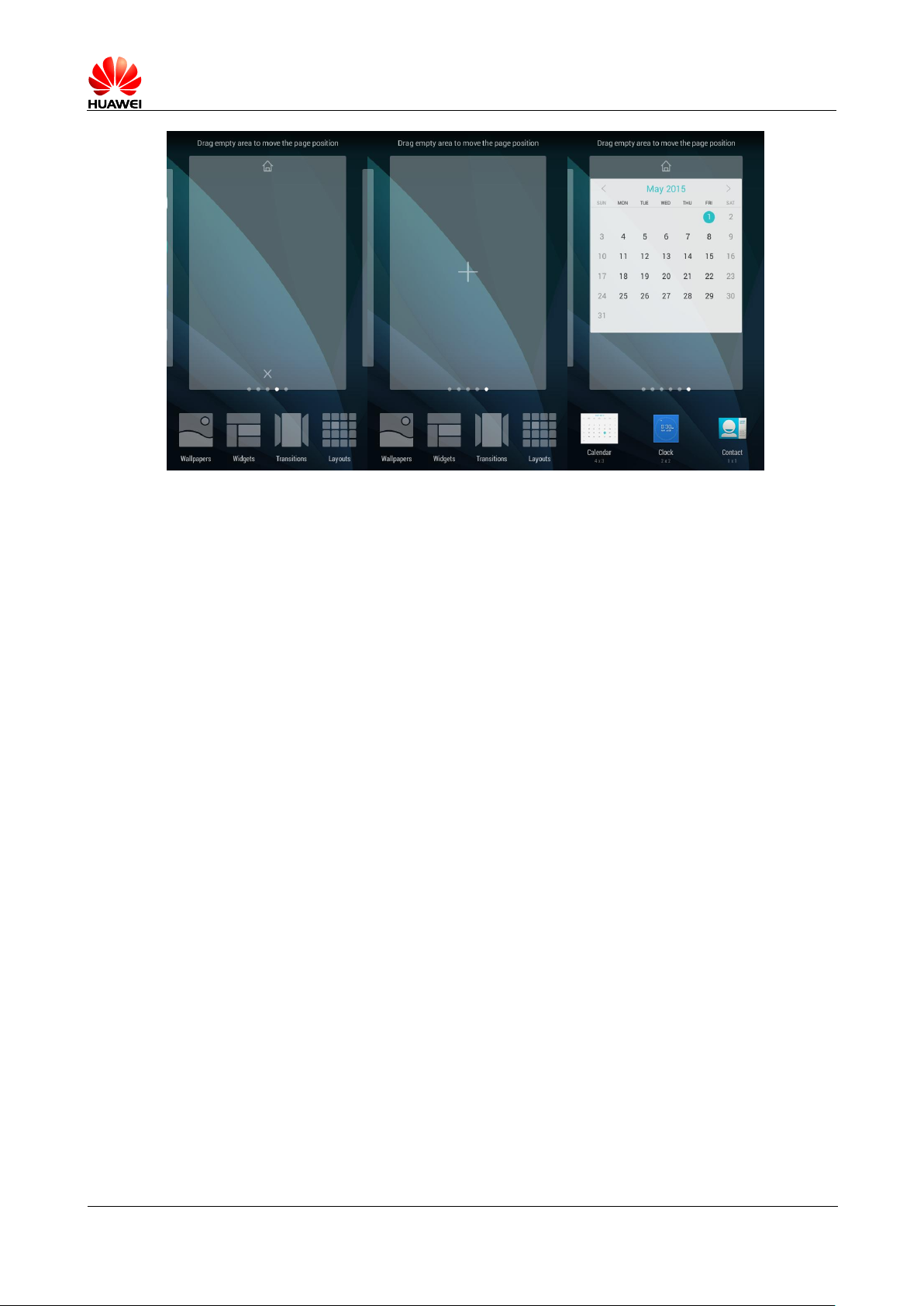
1.5.1 to add / Delete home screens quickly
Add / Delete home screens Quickly: long press the home screen at blank spot and click
" + "" X "Add or delete home screens.
Switch 2D/3D Interface: this product does not support 3D Desktop, so switching is not
supported.
1.5.2 Brief introduction of main menu
Mobile phones main menu, desktop main menu, click on the icon to access the corresponding
applications.
Switch to the Widget, long press it and then it can be added to the desktop.
Page 11
HUAWEI T8833 智能手机 FAQ
version 01 (2012-11-30) 11/79
1.5.3 main menu Editting
Desktop is the principal menu, kneading your two-finger to manage your desktop.
1.5.4 How to add a shortcut icon to the desktop
Long press the Windows gadget, then drag it to the desktop space
2.4 Contact
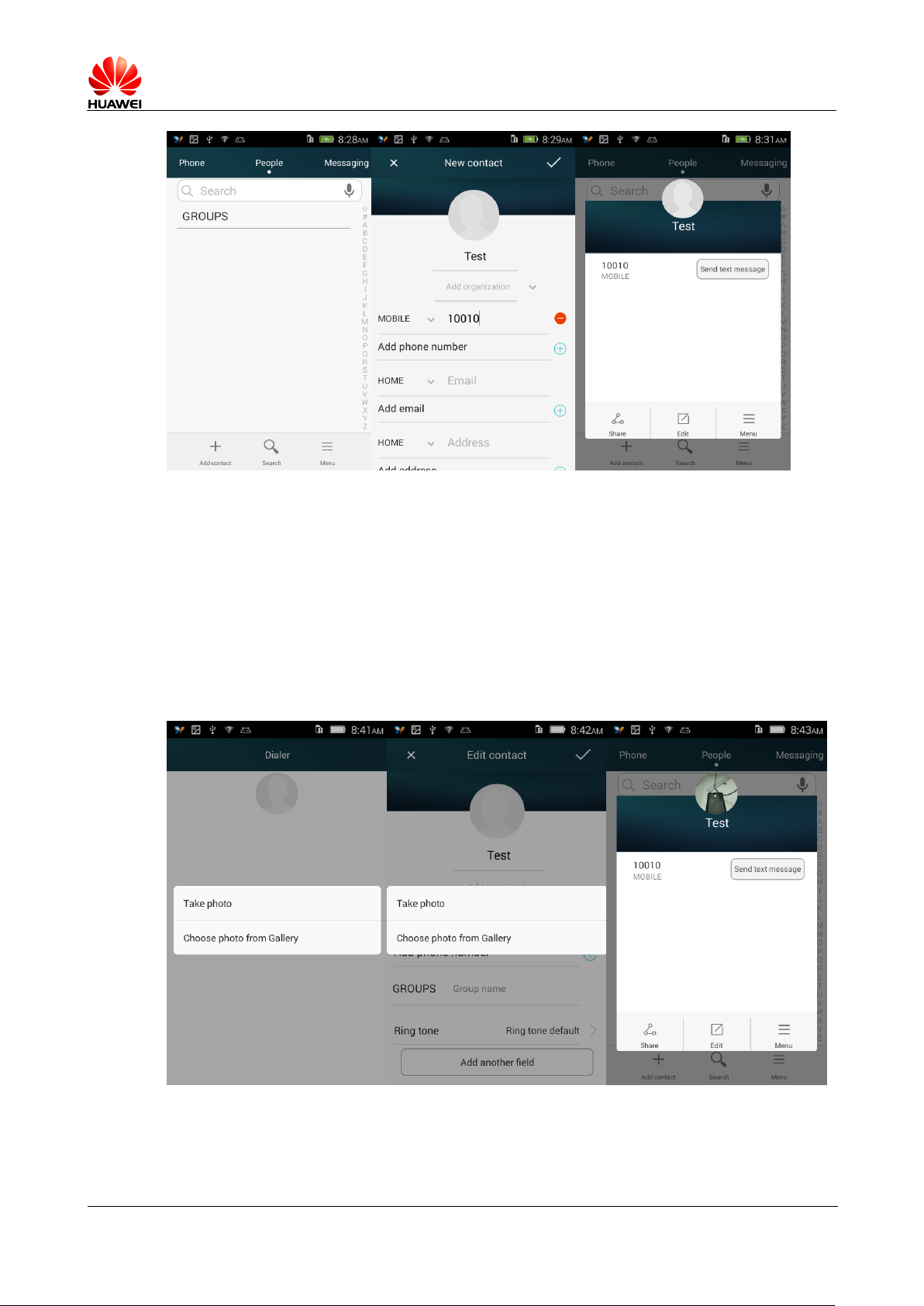
2.4.1 A new contact, set up sticker calls
1 a new contact
Open the address book > Add Contacts icon in the lower-left > Select the storage type,
enter the contact edit screen > Enter your contact information > Complete
Page 12
HUAWEI T8833 智能手机 FAQ
version 01 (2012-11-30) 12/79
2 Sticker set up call
Note: not supporte SIM Sticker calls from contacts
Method one: contact list > Open the contact details screen > Click the contact picture >
Photos or select a photo from the Gallery;
Method two: open the contact details screen > Edit, enter the editing interface > Click
the contact picture > Photos or select a photo from the Gallery;
Page 13
HUAWEI T8833 智能手机 FAQ
version 01 (2012-11-30) 13/79
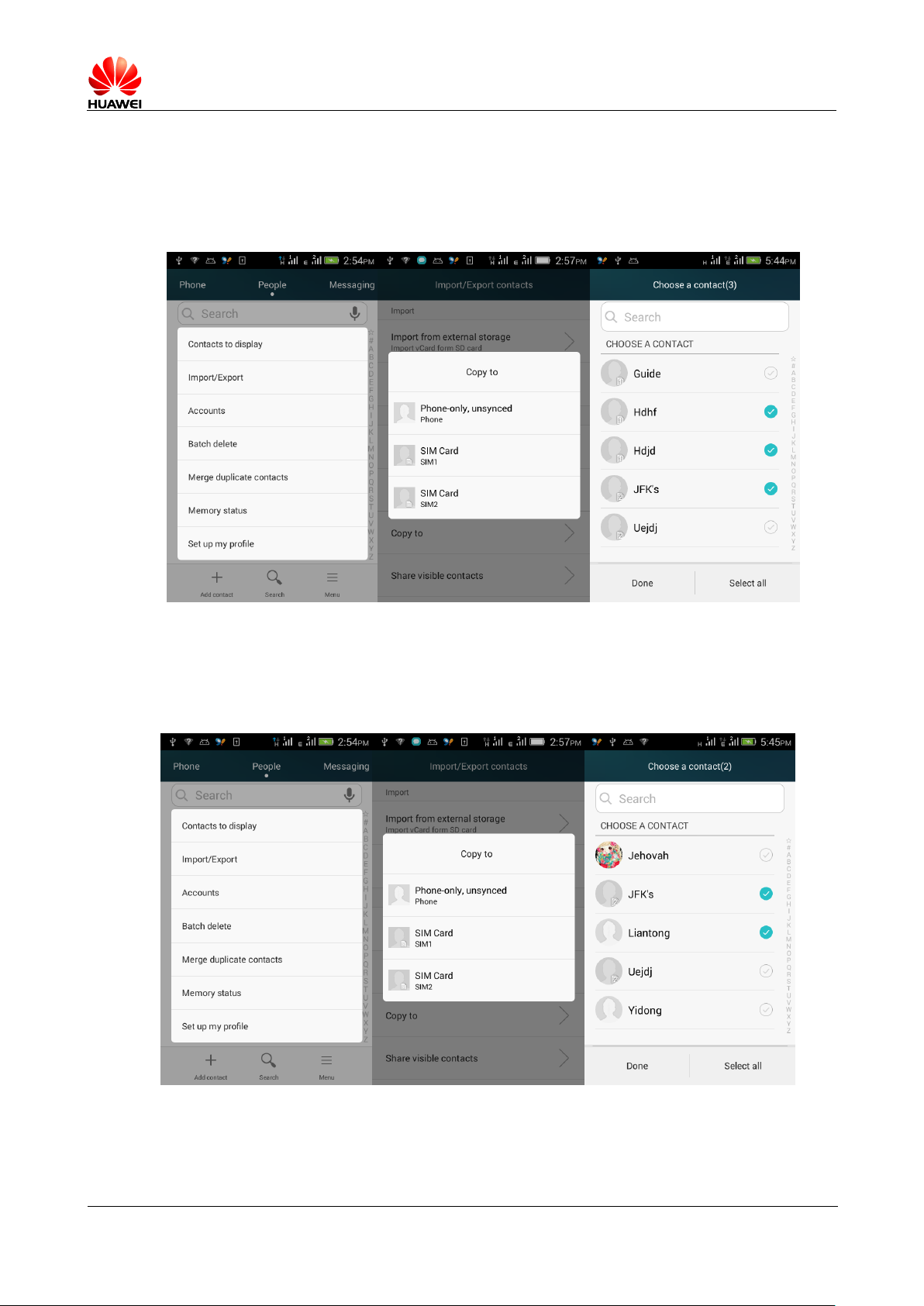
2.3.5 get contacts via SIM Import, export
Import SIM contacts to your phone
Contact > Set > Import / Export > Copy to account > Mobile phone > Select to copy The SIM contacts
on the card > Click the "OK" button.
1. Export contacts to the phone SIM
Contact > Set > Import / Export > Copy to account > Select SIM1/SIM2 > Select
the contacts from the phone > Click the "OK" button.
Page 14
HUAWEI T8833 智能手机 FAQ
version 01 (2012-11-30) 14/79
2.3.6 Supports up to how many contacts
3 Support for mobile contacts, announced not less than 2000 ,SIM Card contacts relates to
the card.
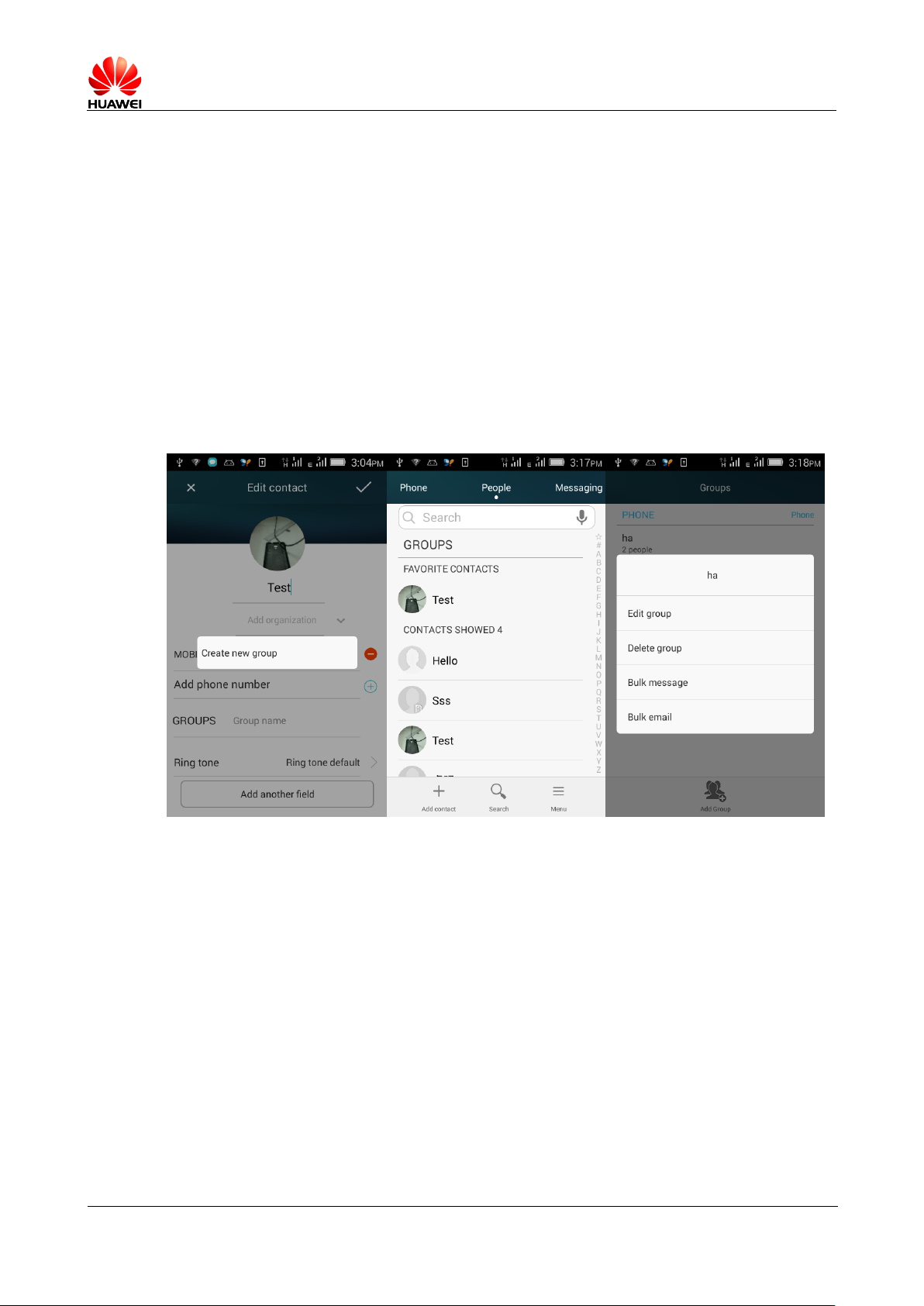
3.1.1 Set the Group contact
There are two ways to join contacts into the contact group:
First: in the edit contact interface, in the "clusters" of entries, select group
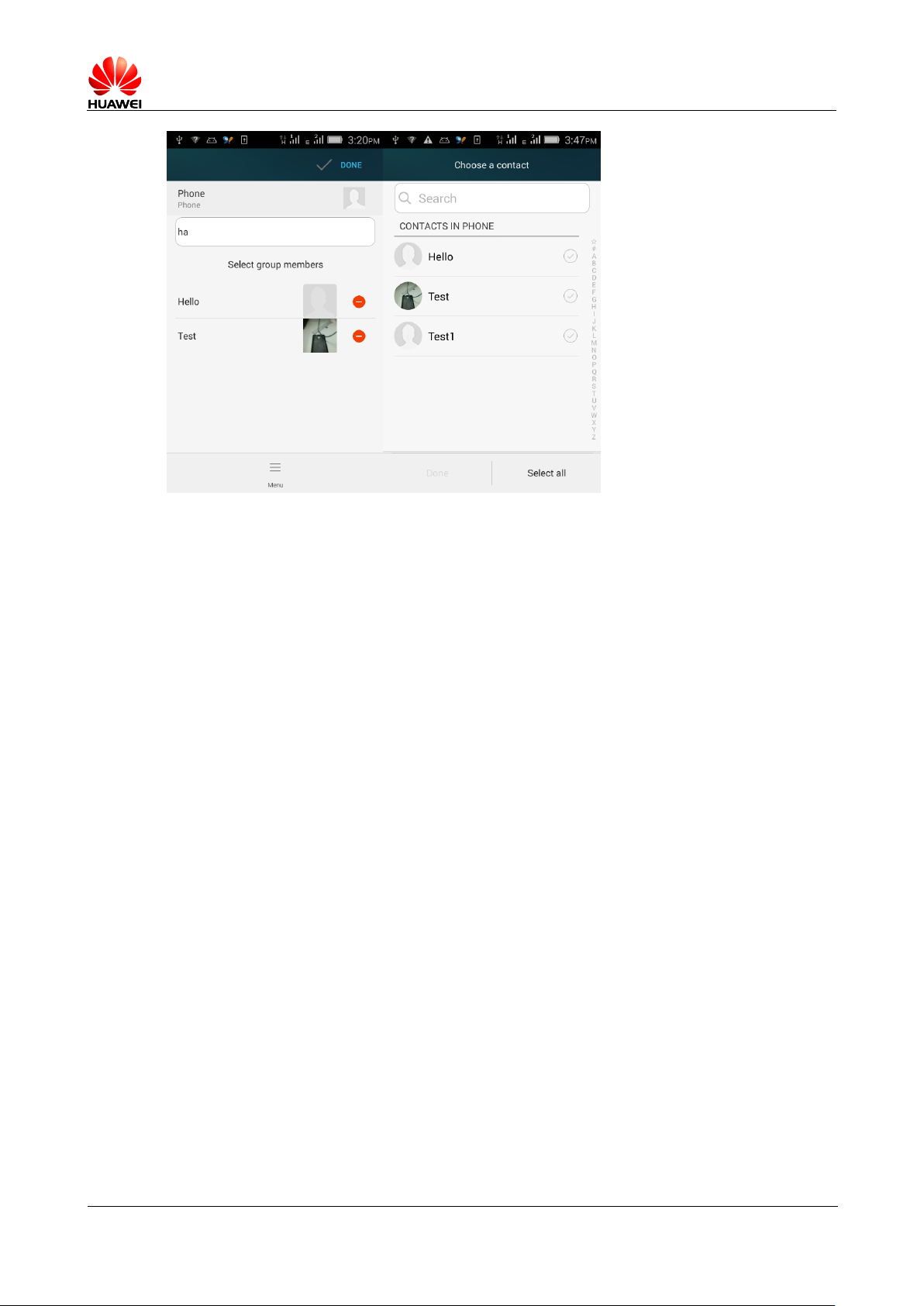
Second: contact > Group > Select a group > menu > Modify > Group editing interface, click on the
select members of the group.
Page 15
HUAWEI T8833 智能手机 FAQ
version 01 (2012-11-30) 15/79
3.1.2 How to manage contacts ( Copy, backup)
Backup: contact list >menu > Import / Export > Export to internal ( or External) storage device >
Select the contact you want to copy > Click the "OK" button
4.1.1 SMS
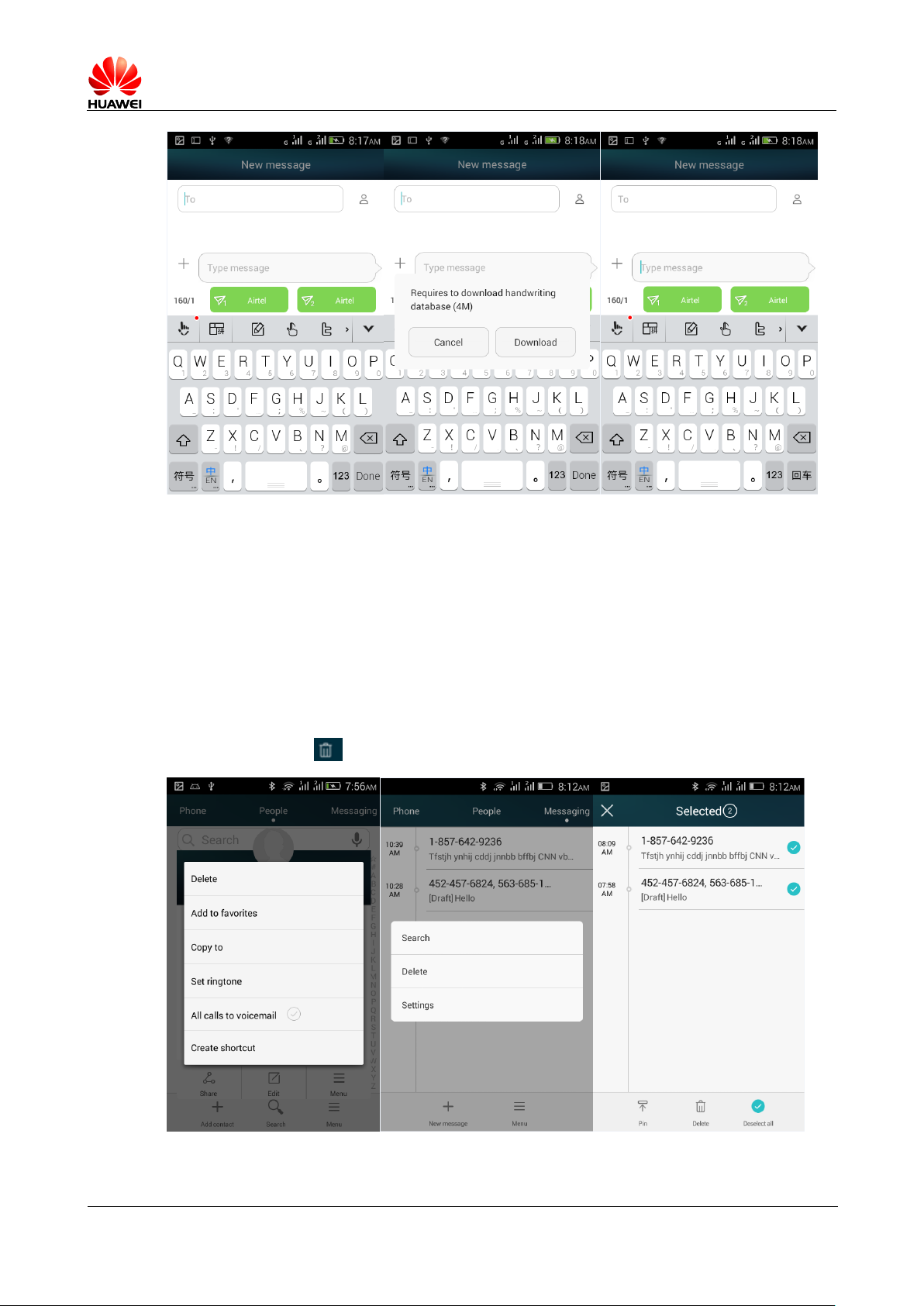
4.1.2 Edit text how to switch a handwriting input method
4.1.4 Creates a new message, click on the input box, the following pop up soft keyboard, default
to Bao input methods, touch, click on the top left of the keyboard You can choose to use
handwriting input method ( used for the first time need to download handwritten data file ).
Page 16
HUAWEI T8833 智能手机 FAQ
version 01 (2012-11-30) 16/79
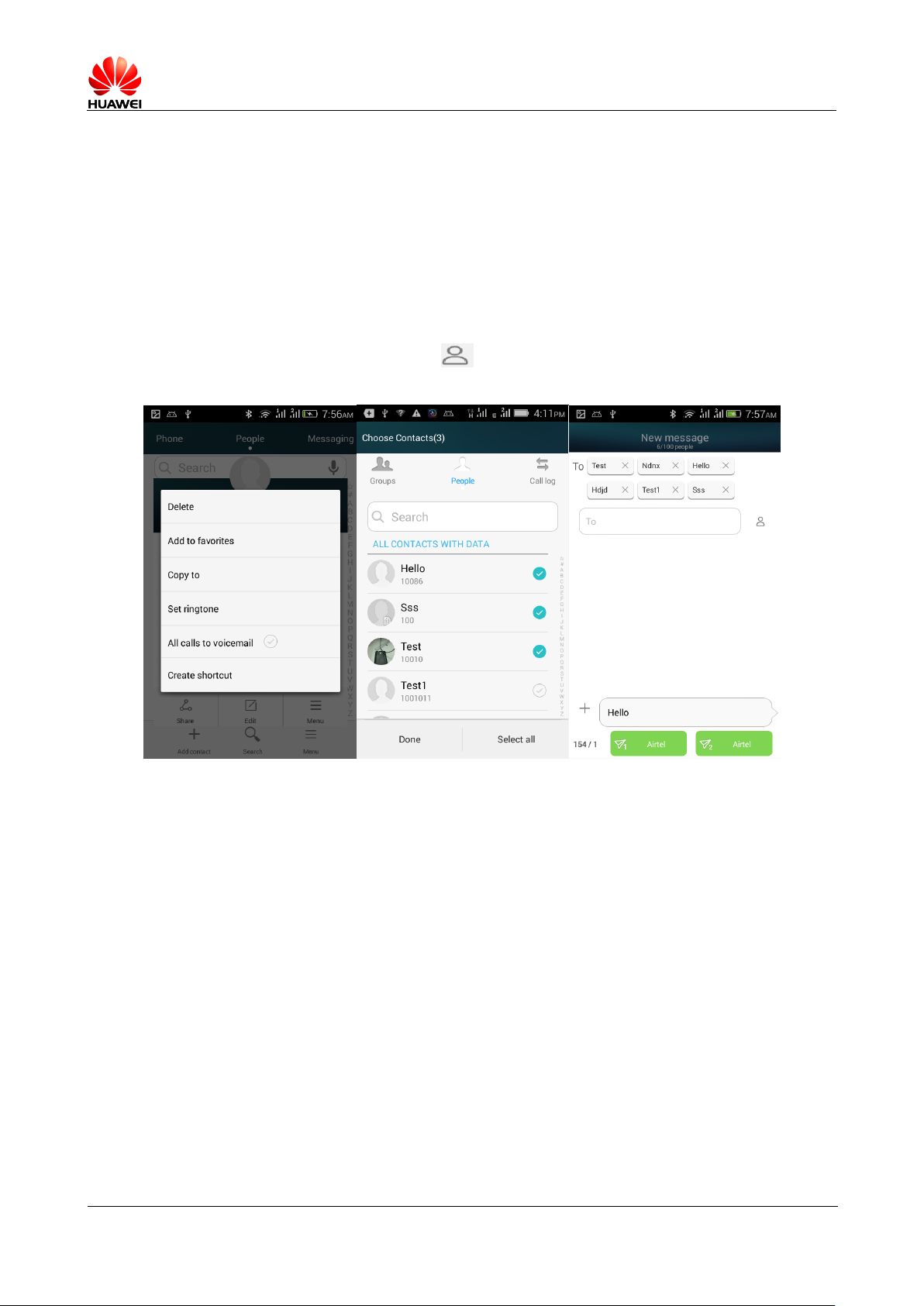
4.1.3 Remove or lock a specific message in the same session, and
bulk delete
4.1.5 Session mode, the reading interface, press the message you want to lock , select the
lock , you can lock the message.
Session mode, long press information > To delete, click Delete, deleted successfully.
Message list mode, click on the menu> To delete, select the information you want to delete,
and press the bottom Bulk delete.
Page 17
HUAWEI T8833 智能手机 FAQ
version 01 (2012-11-30) 17/79
4.1.4
5 text messages transferred / Bulk and save draft method,
maximum number of mass
6 Text messages transferred: session mode, the reading interface, click on the need to forward
a text message, select forward, forwarded to the specified contact.
7 SMS: create a new message, click on the Enter the add contacts screen, select Add
contacts, click Finish , and sending a text message to the selected contact.
7.1.2 How many Chinese and English words can be supported I a
long messages
English max up to 1440 , Chinese 630 。
7.1.3 how many text messages can be saved at Mobile phone
A session inside the text messaging supports 500 Or multimedia messages 50 (The user can change
in the settings).
No limit to the number of short multimedia messages for cellphones, but it relates to mobile
storage space remaining.
7.1.4 How to set up SMS centers Number
SMS >menu > Set > Senior > Management (SIM1 or SIM2) setting > SIM1 (or SIM2) SMS Centre number
Page 18
HUAWEI T8833 智能手机 FAQ
version 01 (2012-11-30) 18/79
Call function
1.8.1 Call recording and storage path
Does not support call recording
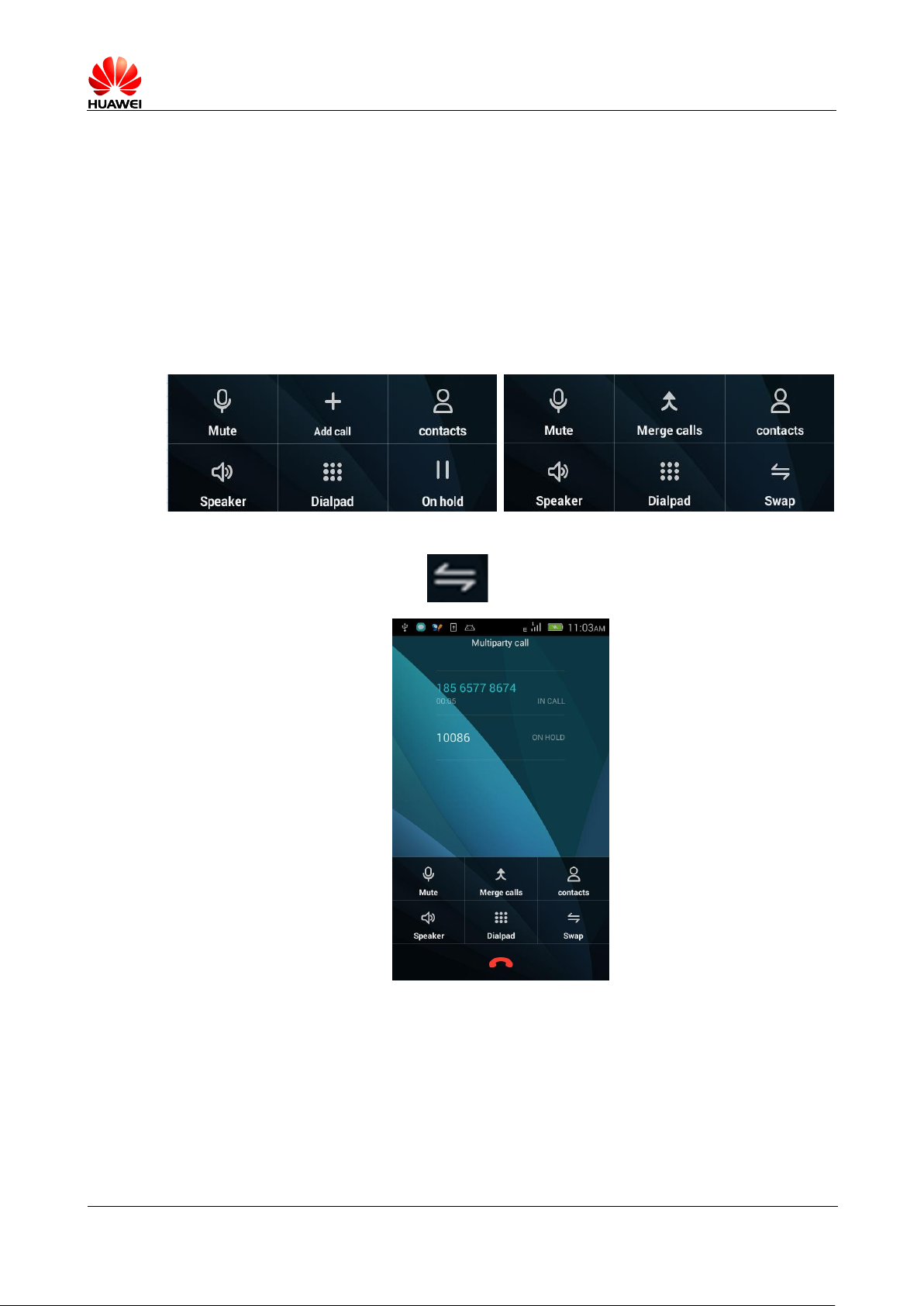
1.8.2 How to three way Conference calls during a call?
Call switch?
During a call, you can call interface below to other operations:
In more than one call, click on Can switch between calls
1.8.3 Dual SIM card, dual pass / dual SIM single-cell ,
one of the cards the call, another card calls when
prompted?
Dual SIM card, dual-cell phone, another card tips call reminder feature is enabled.
Page 19
HUAWEI T8833 智能手机 FAQ
version 01 (2012-11-30) 19/79
1.9 MMS
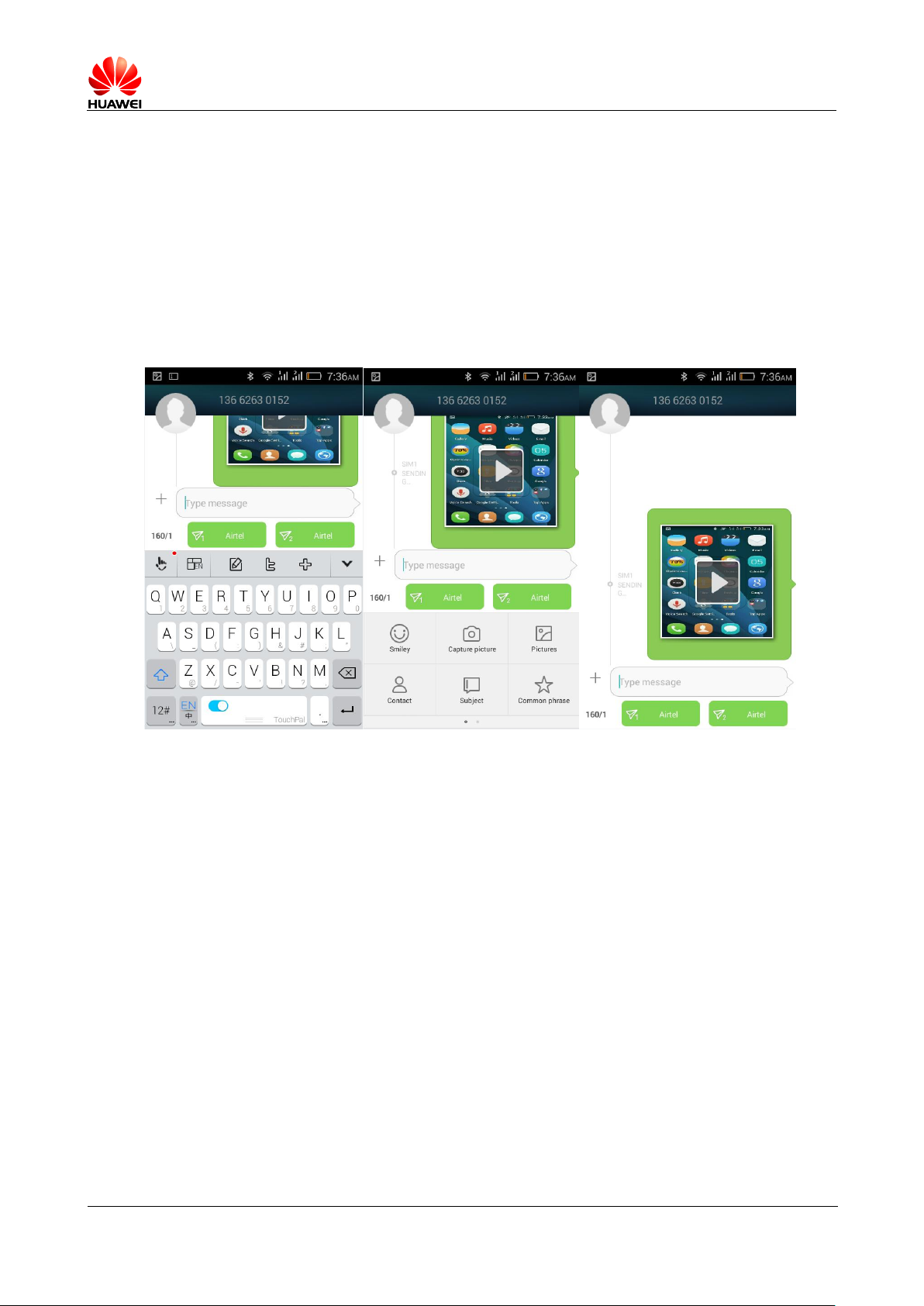
1.9.1 Send a multimedia message
1. Go to the message menu, choose new message , compose a new message;
2. Enter and edit the message content;
3. Click the text box on the left Add Attachment button, you can add images,
audio or video (add multimedia files are automatically converted to MMS);
4. When you are done editing, click on send .
1.9.2 MMS sending / Receive failure possible cause solve
solution
Normal version: network status or signal is not good, leading to failed to send MMS.
Workaround: retry sending.
Network (MMS Center) rejected, could lead to failed to send MMS.
Normal version: because the network is busy and so on, can not send MMS. Cause sending
failure
Workaround: retry sending.
Network (MMS Center) rejected, could lead to failed to send MMS.
Normal version 1: Recipient number information write incorrectly, led to failure.
Solutions 1 : Check the correct recipient number, if wrong, please correct it and
re-send the MMS.
Normal version 2 : Editing multimedia message exceeds the 300KB Led cannot send.
Page 20
HUAWEI T8833 智能手机 FAQ
version 01 (2012-11-30) 20/79
Solutions 2 : Removing some of the MMS, MMS is less than 300KB , Try sending it again.
Whether arrearage.
Normal version: arrearage led to failure.
Workaround: after recharge, send it again.
When the phone is out of memory, cannot receive MMS
Normal version: phone memory free space is less than 300K 。
Workaround: free up phone memory, free space is greater than 300K 。
1.9.3 MMS file is restricted by size / Video format /
resolution and so on factors
Video and audio files exceeding a specified size (usually 300k ) cannot added as an
attachment. Big picture files are automatically compressed picture resolution, and then
add it as an attachment to a multimedia message, the recipient receives the picture
file is also of low resolution pictures
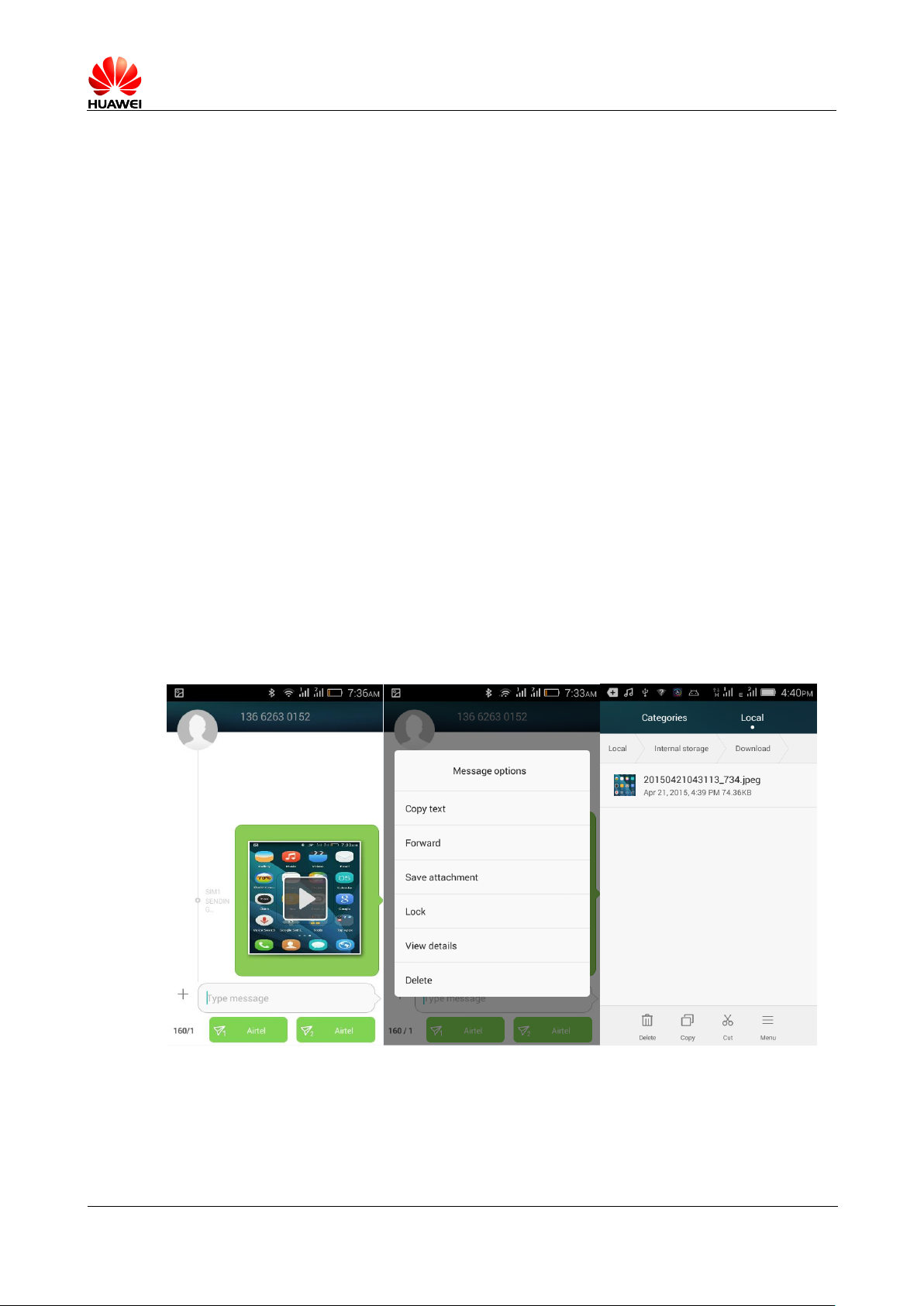
1.9.4 Save MMS attachments
After a user receives an MMS, MMS attachments are save under the/data path, users will not be visible.
When the user after save the attachments, the attachments storage location:
Phone internal store/Download
Page 21
HUAWEI T8833 智能手机 FAQ
version 01 (2012-11-30) 21/79
1.10 Music
1.10.1 Music menu
All songs: phone numbers & All the music files in the Tcard
I like: according to their own like, and add songs
My playlist: custom playlists
Set Home: music set
Album: classification by album name, belong to the same album songs in a directory.
Singer: according to the singer, belong to the same singer in a directory.
Song: according to the naming conventions sorted in one big directory.
Folder: according to scan music belongs to a storage location classification
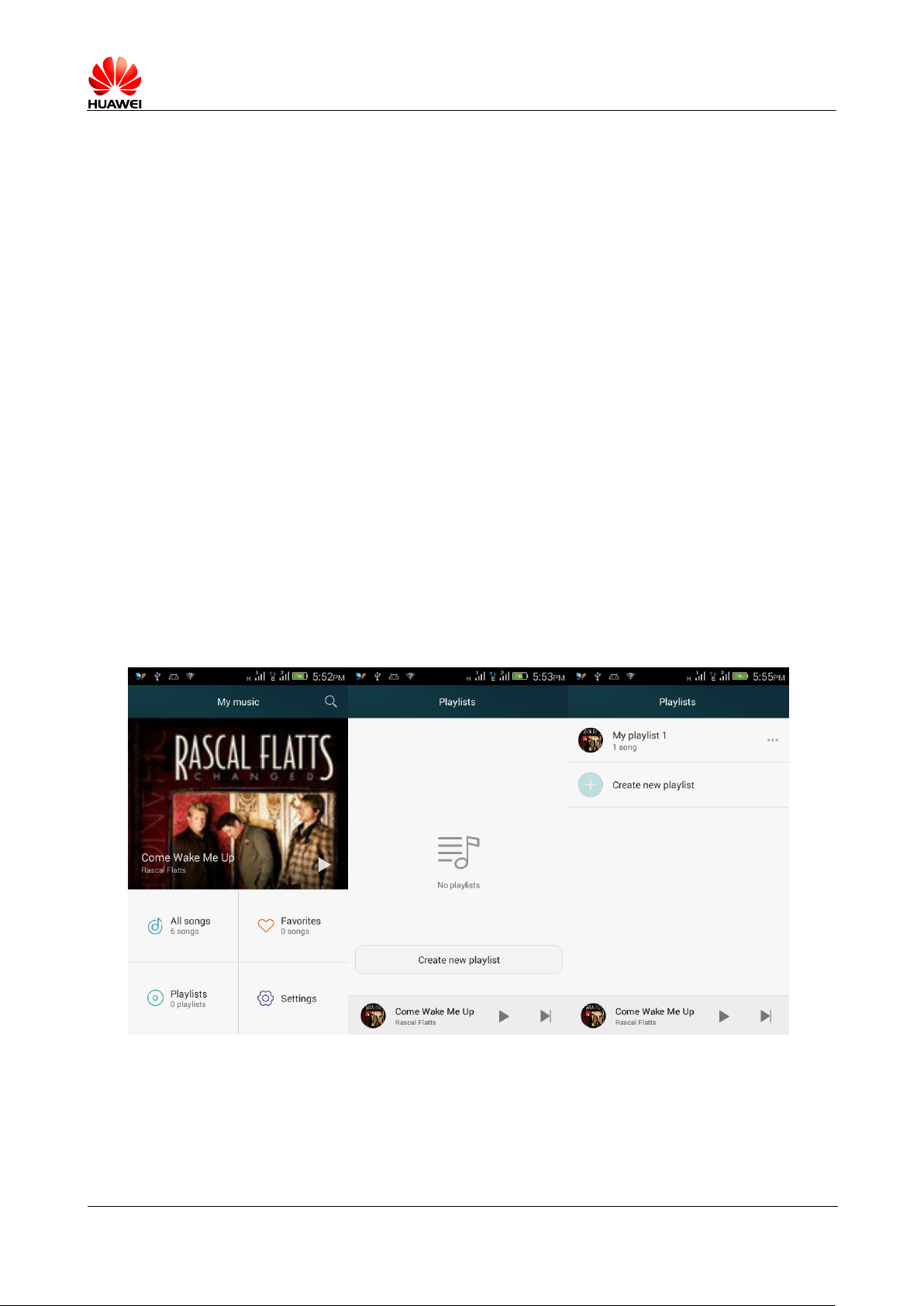
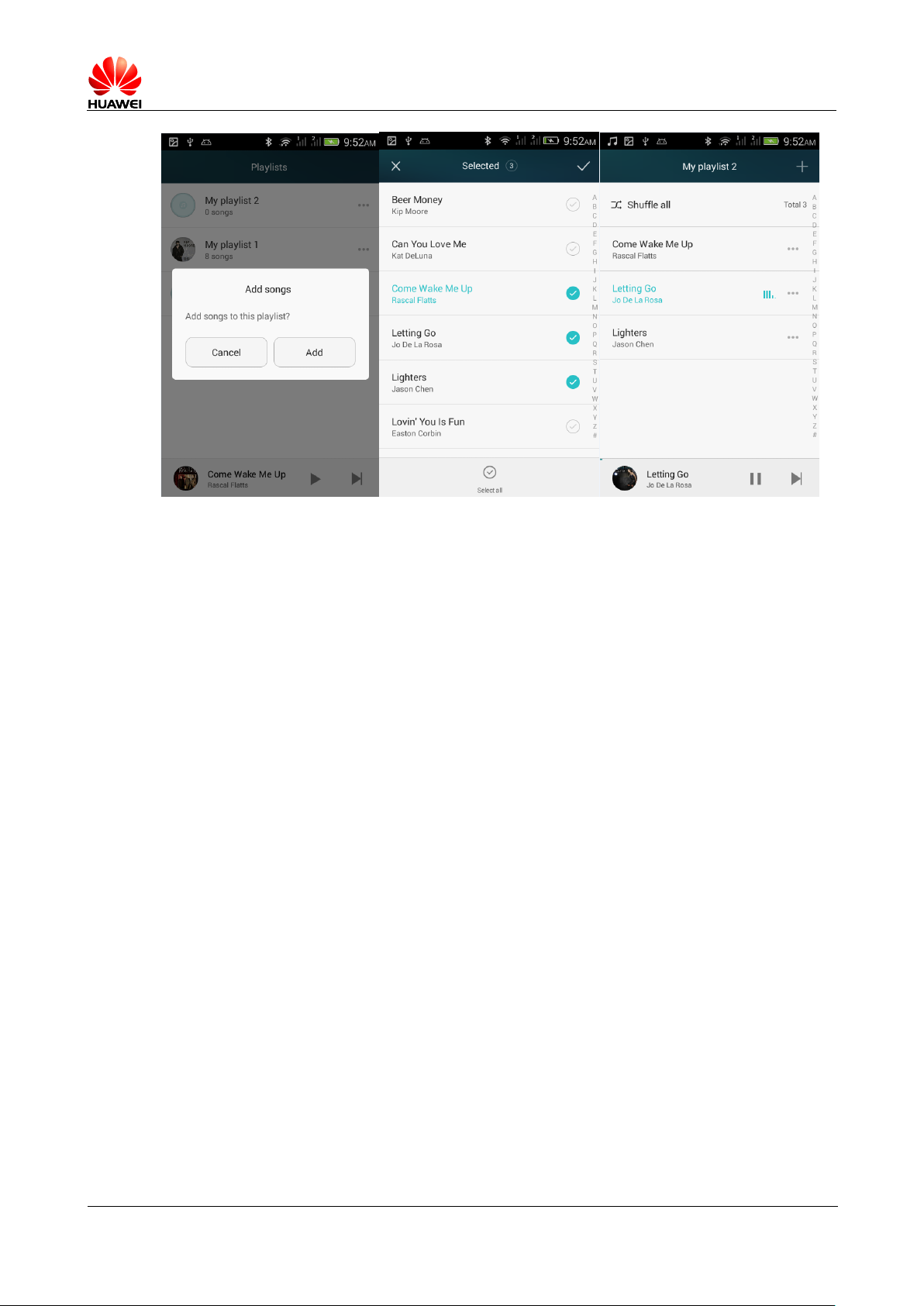
1.10.2 Create music playlists
1. The music into my playlist, click new playlist.
2. Enter a playlist name in the pop-up interface, input and click Save.
3. Next will pop up the reminder box, reminding adding songs to the playlist,
click on the identify . Then select the songs you want to add, select finished,
click Finish.
Page 22
HUAWEI T8833 智能手机 FAQ
version 01 (2012-11-30) 22/79
1.10.3 Play mode introduction
Random playback (default): shuffle the songs in the playlist.
List loop: a playlist of songs played in sequence from beginning to end, finished
first after then playing again.
Single loop: the currently playing song is repeatedly played.
1.10.4 Background playing with synchronized lyrics
1. background playback: enter the music player, play any audio file, during playback,
press back or home keys.
2. the lyrics synchronization: when and corresponds to the words of songs stored on the
phone the same directory, the users to play this song, lyrics are automatically loaded.
Playback interface, slide right interface, you can open the lyric interface. In the
lyric interface, click on the lyrics, you can fast forward / Rewind a song.
1.11 photography / Camera features
1.11.1 without SD Cards can use the photo / video
Mobile phone without SD Card can use photos / Camera functions.
1.11.2 some photos /video files cannot be opened reason
1. mobile phone does not support file formats
Page 23

HUAWEI T8833 智能手机 FAQ
version 01 (2012-11-30) 23/79
2. insufficient phone memory space
3. the file is damage
4. copyrighted files (in the format DCF file)
5. mobile phone resources, close some open third-party applications that use mobile
phone resources
6. very few cases mobile application or an unknown error has occurred, try reboot the
phone
1.11.3 photography / Video file default save path and
change method
Y336-02 Set the default save path for the camera in SD Card.
When phone memory is default storage location, camera store path for document
management: internal storage \DCIM\Camera
When the default storage location for SD Card, camera store path for document
management: SD \DCIM\Camera
1.11.4 photos / Video edit, add a photo frame to photo
Photo editing: when browsing the photo, touch pictures pop-up options select Edit,
select to rotate, filter, regulate, and trim.
Video cannot be edit
Add photo frames are not supported.
1.11.5 Supports HD video playback
Supports HD video playback, support 1080P HD playback support 30fps 。
1.11.6 Camera shutter sound can be set to silent
Support Silent camera.
1.11.7 Front and Back camera how to switch?
Viewing interface at the top a row of tap Switch set
1.11.8 camera format is ? The size of the video image
support?
Video format is 3gp 、 mp4 。
The size of the video image support: FDH1080P (16:9 stereo ) 、 HD 720P (16:9 stereo ) 、
MMS 176X144
Page 24

HUAWEI T8833 智能手机 FAQ
version 01 (2012-11-30) 24/79
1.11.9 mobile phone camera format ? The size of photo
images support?
Picture format is jpg
Photo image size supported is as follows:
5M 2592*1944 ( 4:3 )、 3.7M 2560*1440 ( 16:9 )、 1.9M 1600*1200 ( 4:3 )
0.9M 1280*720 ( 16:9 )
1.12 Streaming media
1.12.1 Streaming media plays in the background during
the call? Can automatically recover?
When play streaming media during the calling, streaming media automatically stops;
After the end of the call, you need to manually click the play;
1.12.2 Why some streaming mobile cannot play
Phone does not support file formats
Streaming media support audio and video encoding as following file formats:
-- Video encoding: MP4 , H.264 , H.263, DIVX , XVID , MKV, WebM
-- Audio encoding: WAV , MP3 , MP2 , AMR , MIDI , Vorbis , AAC , AAC+ , FLAC,
OGG
-- Video recording format: 3gp , mp4
Network is not stable.
Phone is out of memory.
1.12.3 Possible reasons for less effective during an
online streaming
Effects of source file is not good.
Network is not good.
Mobile phone hardware problems, such as a broken monitor, compare your local video.
Phone memory space.
Mobile phone CPU Use is high.
Too many programs in currently running.
Page 25
HUAWEI T8833 智能手机 FAQ
version 01 (2012-11-30) 25/79
1.12.4 When playing online video will or will not caused
cell phone insufficient memory for play and download
Streaming downloading files won't occupy storage space, it occupied by RAM, And does
not result phone insufficient memory.
1.13 Bluetooth
1.13.1 Support Bluetooth transfer data file formats
Commonly used such as pictures, audio, video, and Web data can be sent via Bluetooth.
1.13.2 How to transfer data files via Bluetooth
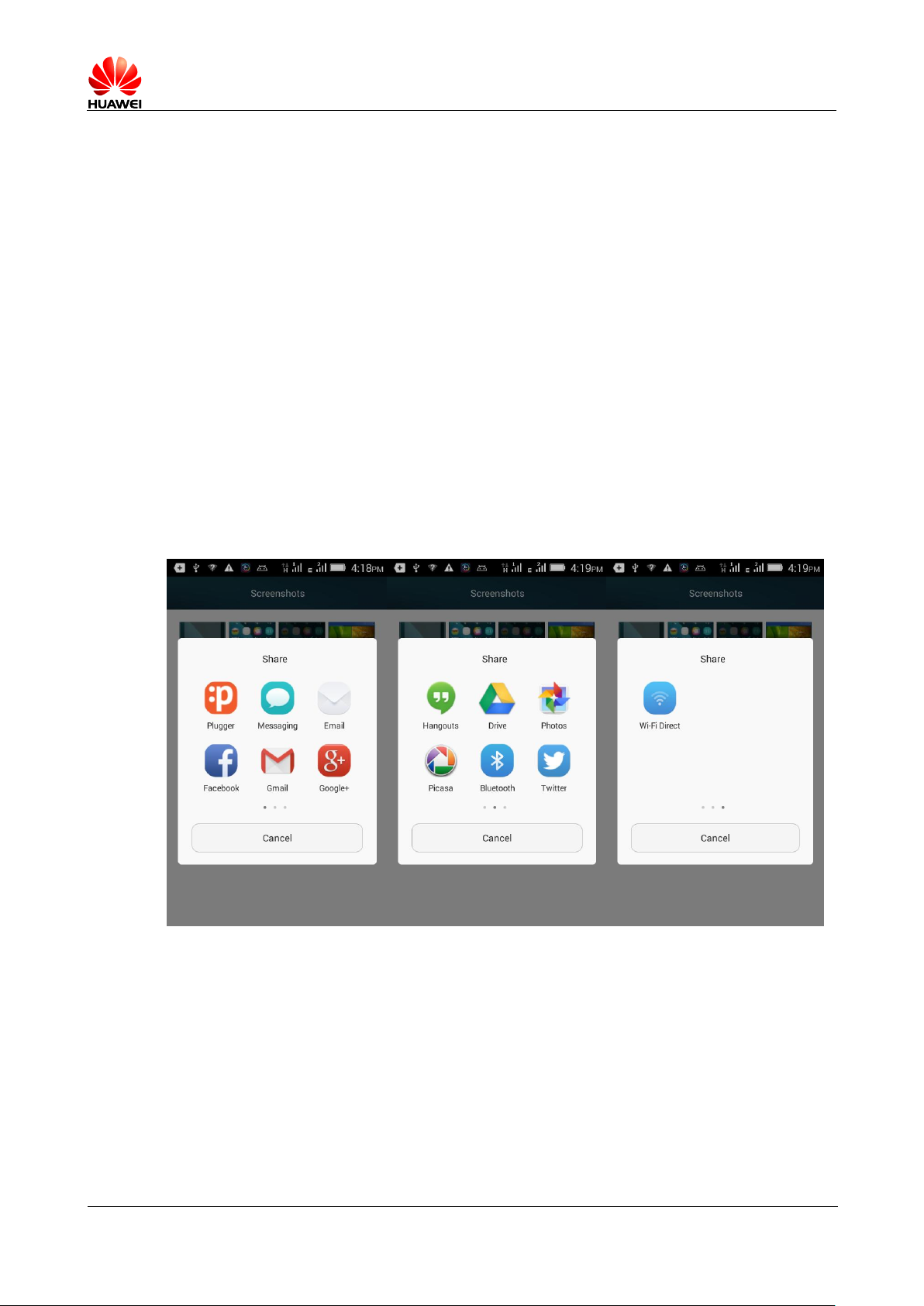
Enter Gallery or music player to select any file you want to send, long press the file,
in the pop-up menu select sharing > Bluetooth , You can transfer files.
Open a browser and enter any page, press menu > Share Web pages > Bluetooth 。
Mobile phones cannot be searched by other Bluetooth mobile
Does not turn on Bluetooth
Workaround: press set > Wireless and network , Open the " Bluetooth ".
Page 26
HUAWEI T8833 智能手机 FAQ
version 01 (2012-11-30) 26/79
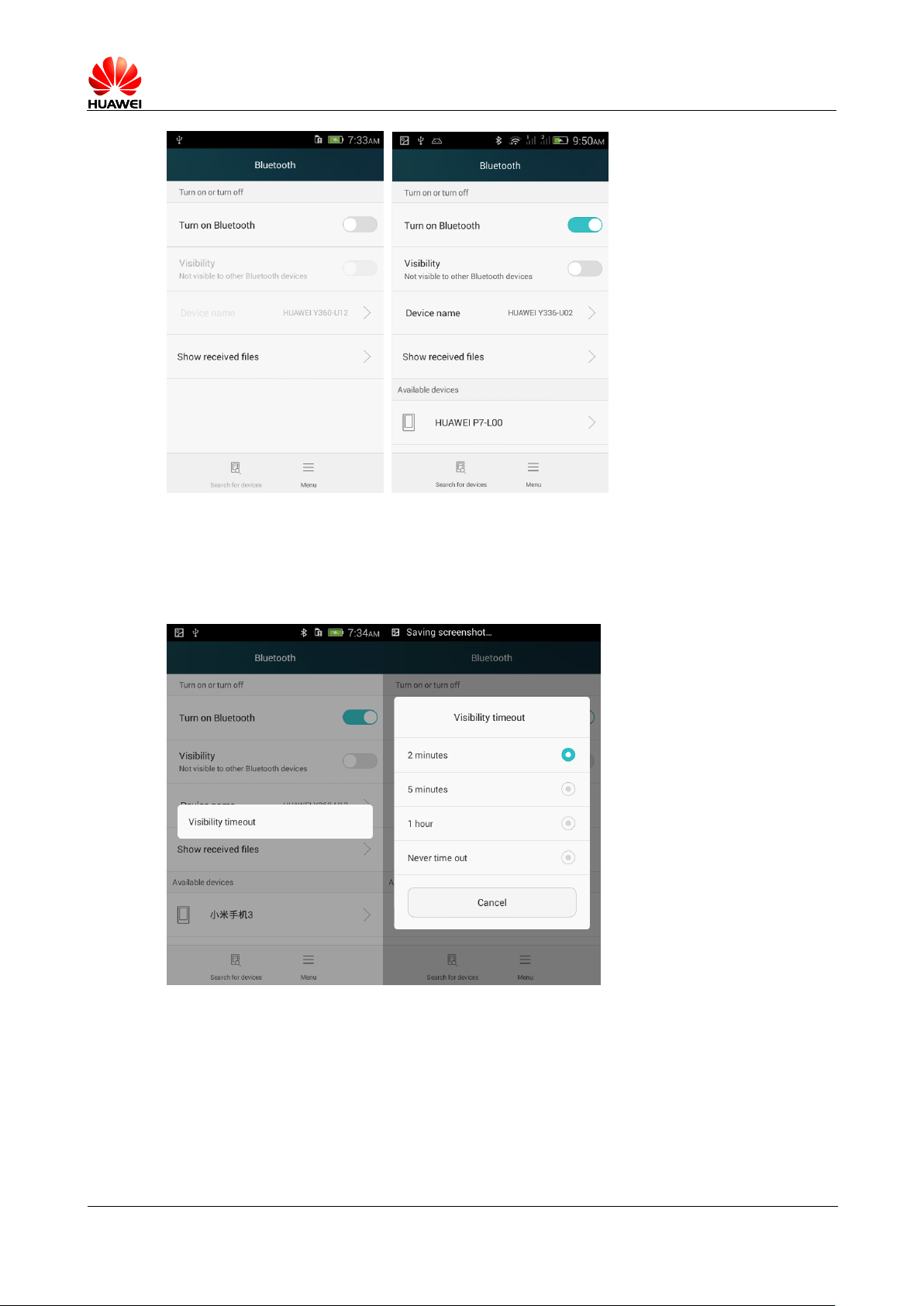
Bluetooth turned on invisible status
Solution: press set > Wireless and network > Bluetooth , Click on the menu, change
detection timeout settings.
1.13.3 Effective transmitting distance of Bluetooth
10 Meters.
Page 27
HUAWEI T8833 智能手机 FAQ
version 01 (2012-11-30) 27/79
1.13.4 Possible reasons for not to connect with other
Bluetooth devices
Mobile phones can support A2DP,HSP,HFP,PAN,HIDH,OPP,PBAP profile, If confirm the
connected device also supports these profile, But still cannot connect, please refer to
the following situations:
Cannot easily search for other phones
Solution: mobile phone Bluetooth is turned on, and already in a discoverable State.
Cannot search Bluetooth headset
Solution: make sure that the headset is discoverable State, settings refer to the
headset's user manual.
Send files cannot connected with other mobile phone
Solution: make sure that the other phone does support receiving files, or whether or
not to support the reception of the file type.
1.13.5 Bluetooth connection with computer Internet
access, Bluetooth file transfer
Support shared with computer networks, Bluetooth games.
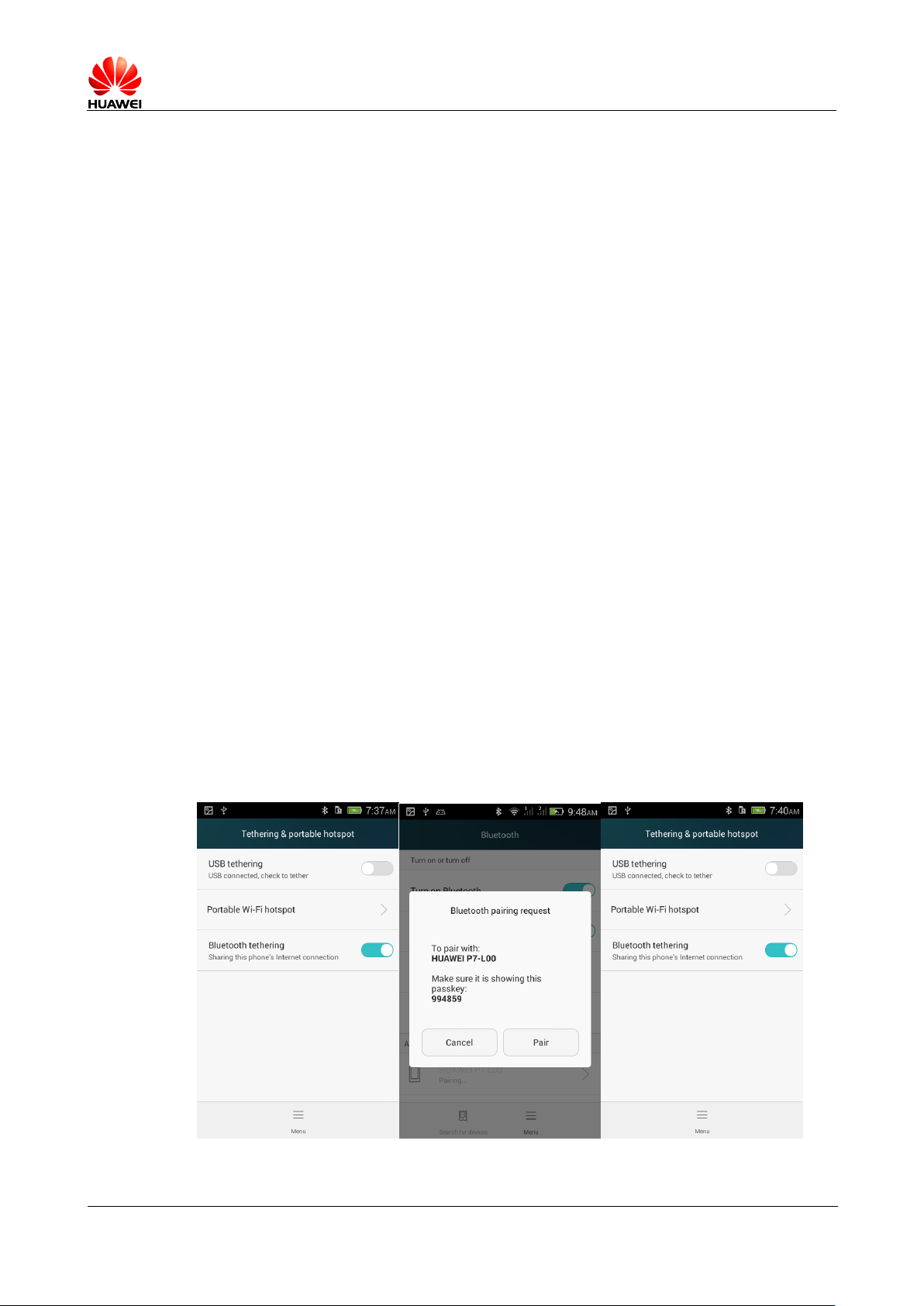
1. Mobile phone support PAN ( Personal Area Network Profile ), Support for other devices to
share mobile network resources.
In settings -> More ... -> Network sharing and portable hot spots, check the Bluetooth
sharing network; after you accept each other, you can build your own personal area
network.
Page 28

HUAWEI T8833 智能手机 FAQ
version 01 (2012-11-30) 28/79
2. Mobile phone supports Bluetooth game. The design of this feature depends more on
third-party applications (such as: kēng kēng Bluetooth landlords), general steps:
a. Choose to search for other Bluetooth devices in the game;
b. Find your paired Bluetooth devices connected to the preset OK ;
c. To start the game;
1.14 GPS Navigation
1.14.1 What mobile phone comes with a navigation
software?
Map
1.14.2 How to solve the navigation software data lost?
How to solve the license file or activation code is lost?
If mapping data, because it is online, can be downloaded again online, it does not affect
the use, without authorization and activation code
1.14.3 How to solve the navigation software cannot
Search satellite ?
If you are indoors, due to GPS cannot be locate indoors, please step outside to Search
satellite.
If you are outdoors, check around whether there are tall buildings and other shelters,
shelter of tall buildings can cause the satellite signals cannot be received, please
try to choose an outdoor open space GPS to search satellite.
1.15 Support FM radio or not? Radio how do I save
a manual search for channels?
Support FM The radio.
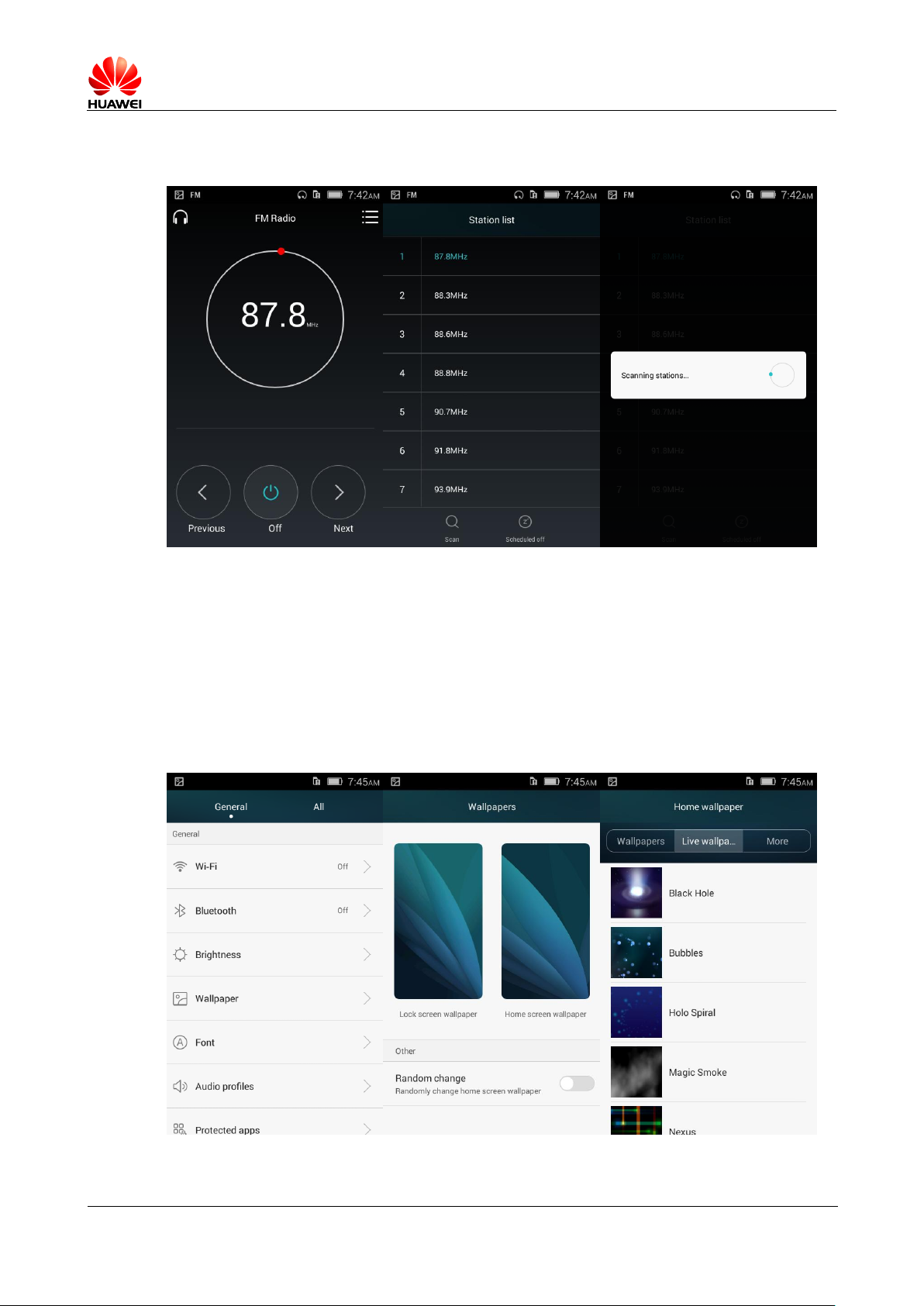
Plug in headphones first enters FM , The radio automatically searches;
Enter the radio interface, clicking on a channel / The next channel, radio channel search
channel switching;
Page 29
HUAWEI T8833 智能手机 FAQ
version 01 (2012-11-30) 29/79
Click the radio menu icon in the upper right corner, click on a station, start channel
search and save the radio channel.
1.16 whether the phone supports themes download ?
Supports dynamic wallpaper?
Do not support themes download
Supports dynamic wallpapers. Set the wallpaper as follows:
Page 30

HUAWEI T8833 智能手机 FAQ
version 01 (2012-11-30) 30/79
1.17 Whether the phone supports video calls or
video chat?
Mobile video calls are not supported; but the phone has a front-facing camera, cell
phones might be installed QQ ( 2012 And above) and other third-party software for video
chat.
1.18 Support screenshot (screen capture),
screenshots?
Method one: non-standby mode, enter the screen interface, press the volume underkey
and power key 2 Second, you can screenshot.
Method two: via HiSuite Software screenshot.
Way three: drop down the notification bar, switch interfaces, click on the screenshots.
1.19 can support Flash ? Download Flash software
available?
This phone does not preset flash 。
For need flash Supported video websites should be provided flash to download, users can
download in MM , Android market, 91 Software market, 360 Assistant, peas clip.
1.20 headphones Linear order
Linear order of standard headphones are LRGM Linear order, currently the mainstream
line sequence.
Standard headphones have hook Key, press the key to answer or hang up the phone, you
can also play / Pause music, without volume control keys, but support users using other
headphones on the up and down keys, press the call volume can be adjusted, when listening
to music that can control advertisements and stop and adjust the volume.
1.21 products shipped prefab software name /
version list
Lists the preset lists of software and version number
Page 31

HUAWEI T8833 智能手机 FAQ
version 01 (2012-11-30) 31/79
1.22 SD Card compatibility list
SD Card
compatibility list.xls
Basic features
summary.xlsx
1.23 Basic features summary
Page 32
HUAWEI T8833 智能手机 FAQ
version 01 (2012-11-30) 32/79
2 Common settings
2.1 Email
2.1.1 Mailbox settings
Add Email Account
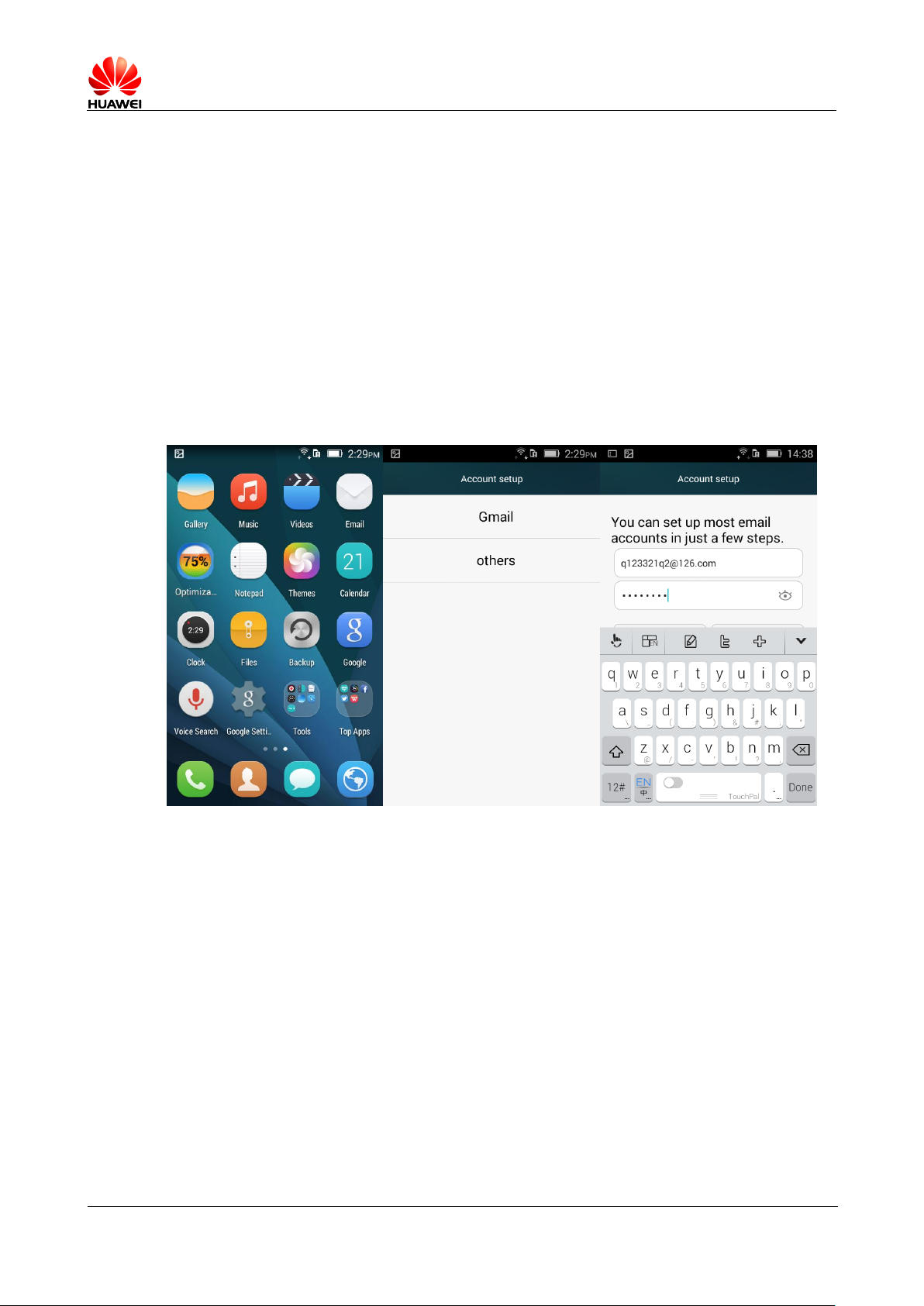
Main menu > Email 。 Select the type of mailbox, if no selection in the options, after
entering the login screen, there will be manual and automatic settings for login.
Page 33
HUAWEI T8833 智能手机 FAQ
version 01 (2012-11-30) 33/79
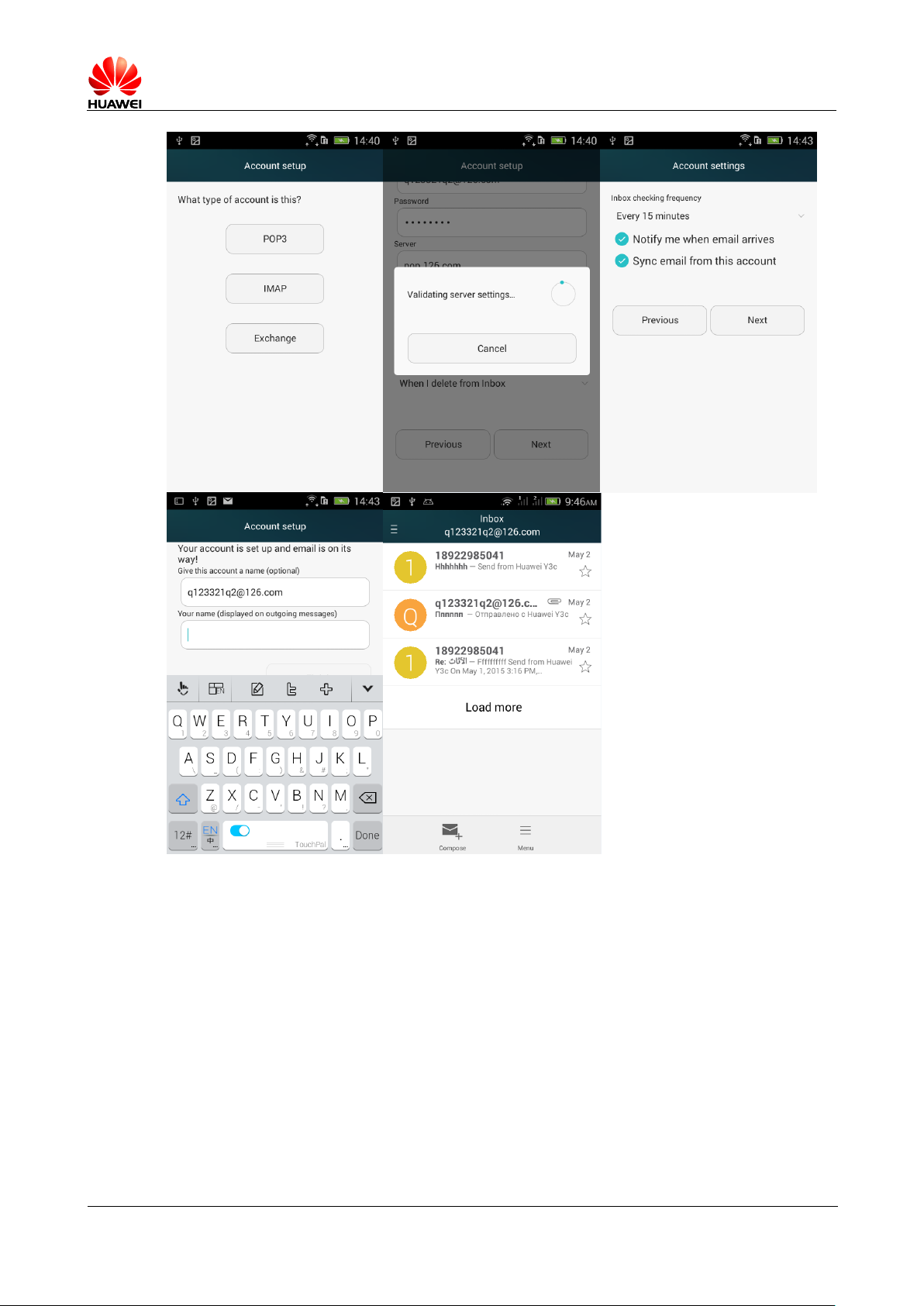
-- Manual settings:
1. Account settings interface > Enter your account number and password.
2. Click on manual settings.
3. Click on the POP3 , and enter into the receiving server settings interface.
4. Click Next and enter into the outgoing server settings interface.
5. Click Next and enter the incoming mail settings screen, select the Inbox check
6. Click Next and enter the set up e-mail interface created for the account name
7. Click Next and complete the login and enter the Inbox interface.
frequency.
and your name.
Page 34

HUAWEI T8833 智能手机 FAQ
version 01 (2012-11-30) 34/79
-- Automatically (automatic settings need to preset the type of mobile phone email
parameters):
1. account settings > enter your account number and password.
2. click Next.
3. click Next and enter the incoming mail settings screen to select the Inbox check
frequency.
4. click Next and enter the set up e-mail interface to create for the account name and
your name.
5. click Next and complete the login and enter the Inbox interface.
Those are not preset Email Account settings for the logon process, users can log on to
your e-mail service provider's Website to check.
Send e-mail
The Inbox interface, press menu key > Write message Enter the email interface, edit
the recipient and the subject and the content , and then click send mail .
View/delete email
The Inbox interface, click on a message, you can view the message; click on menu>
Delete , you could delete the message.
The Inbox interface, to the left / Slide right to a message, you can delete the message.
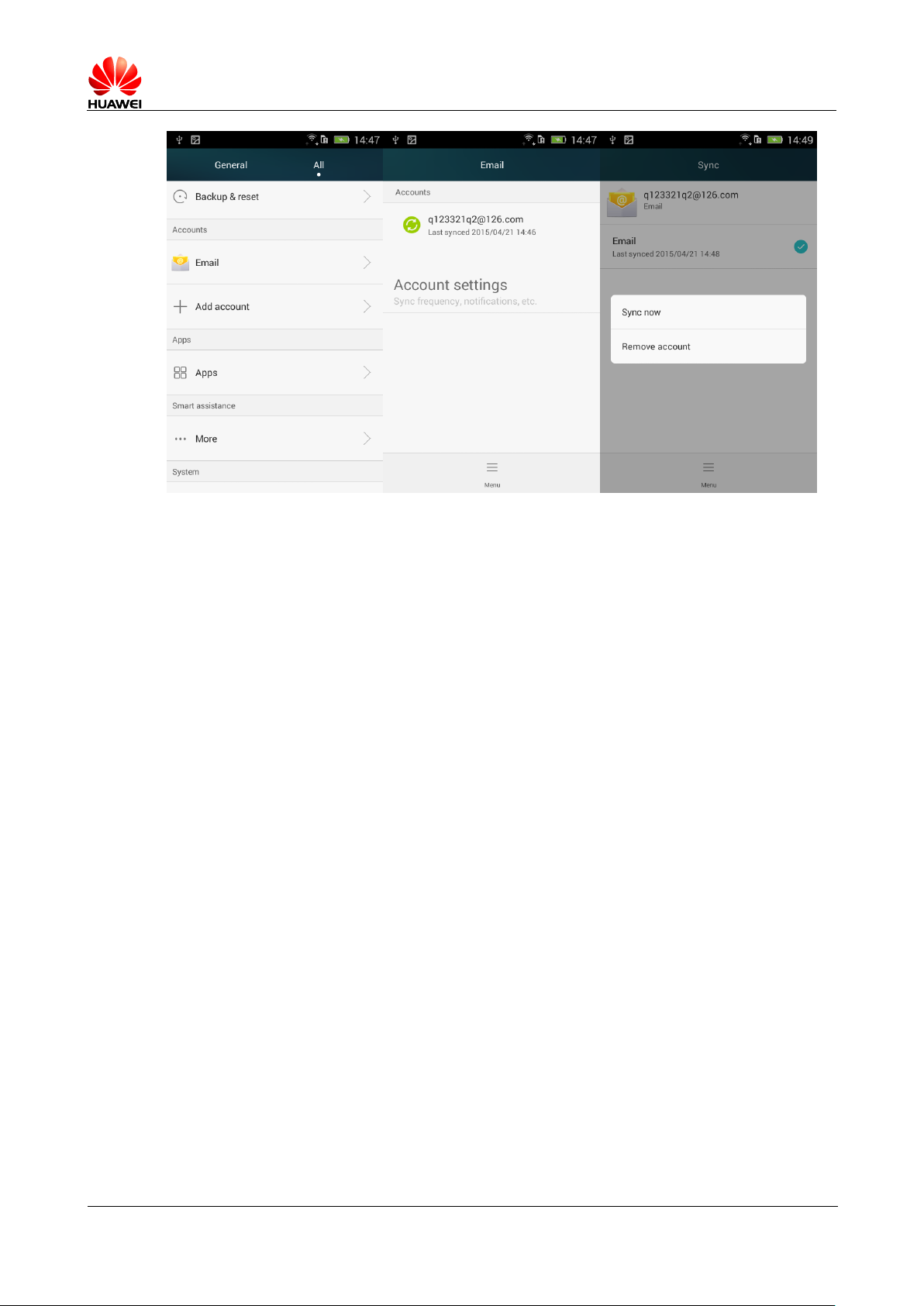
Delete Email Account
Enter settings > All settings > Account ,click the account that you want to delete, and
press the menu key and select delete account.
Page 35
HUAWEI T8833 智能手机 FAQ
version 01 (2012-11-30) 35/79
2.1.2 If supports off-line viewing email messages
For downloaded messages, support offline viewing email messages.
2.1.3 Gmail (Version in China do not preset, for
reference only)
Enter the account settings screen to enter Gmail Email address and password > Click next
to automatically log on.
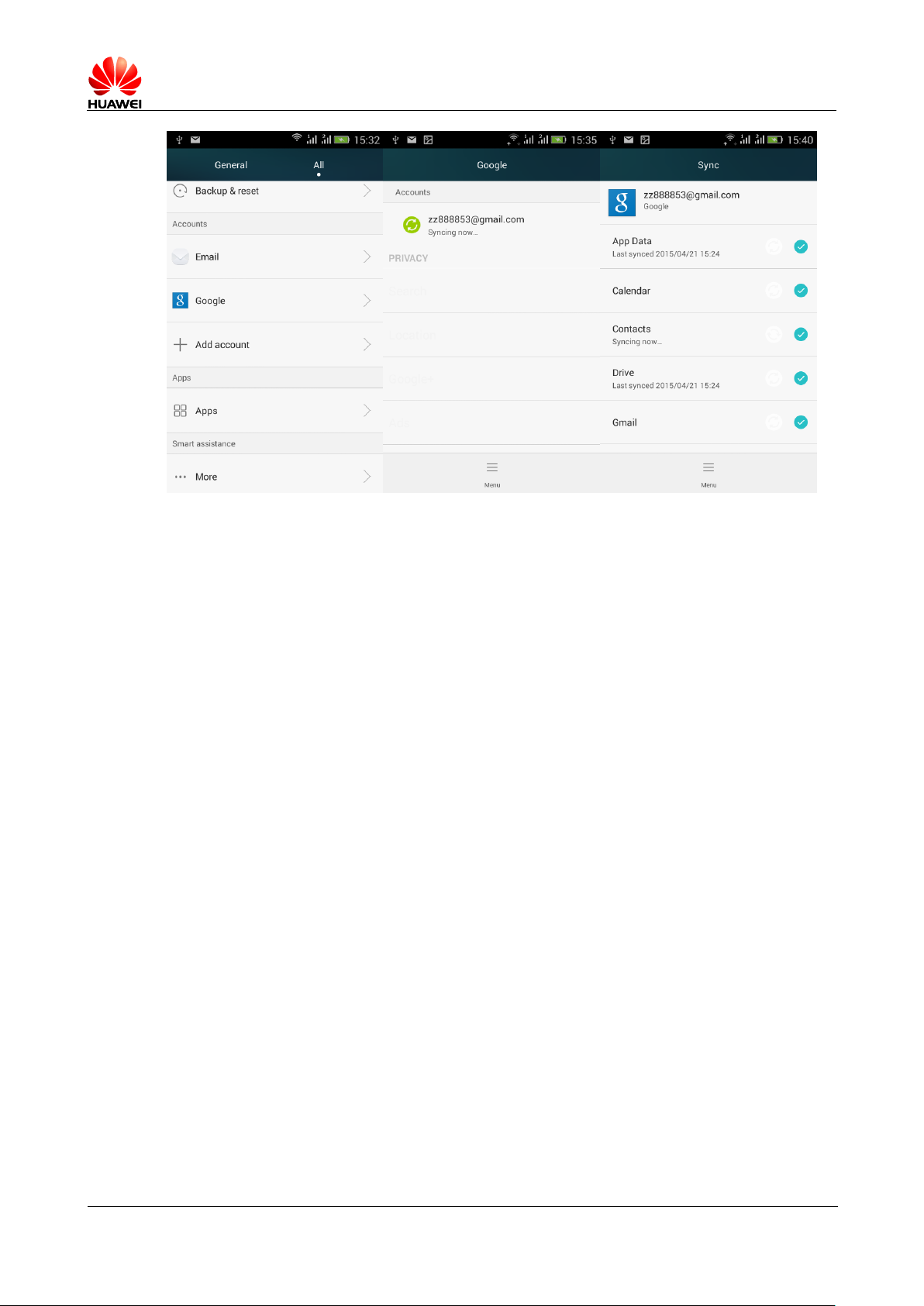
2.1.4 Synchronize contacts, calendar, and what to do
when cannot be synchronized
Sync contacts must log at least one Exchange Account.
Set > Account > Add account > E-mail, enter your account number, password, click
manually, select Exchange From email service providers Website to check the mailbox
server configuration, complete the configuration and land successfully.
Access the main menu, select settings > Company , Select Synchronize account and tick
the options need to be synchronized; then click the menu button > Sync now , Sync content
selected from the server to your mobile phone.
If you sync contacts failed, then check if your cellular data connection is turned on,
and if the mailbox server supports contact synchronization.
Page 36
HUAWEI T8833 智能手机 FAQ
version 01 (2012-11-30) 36/79
2.2 W LAN features
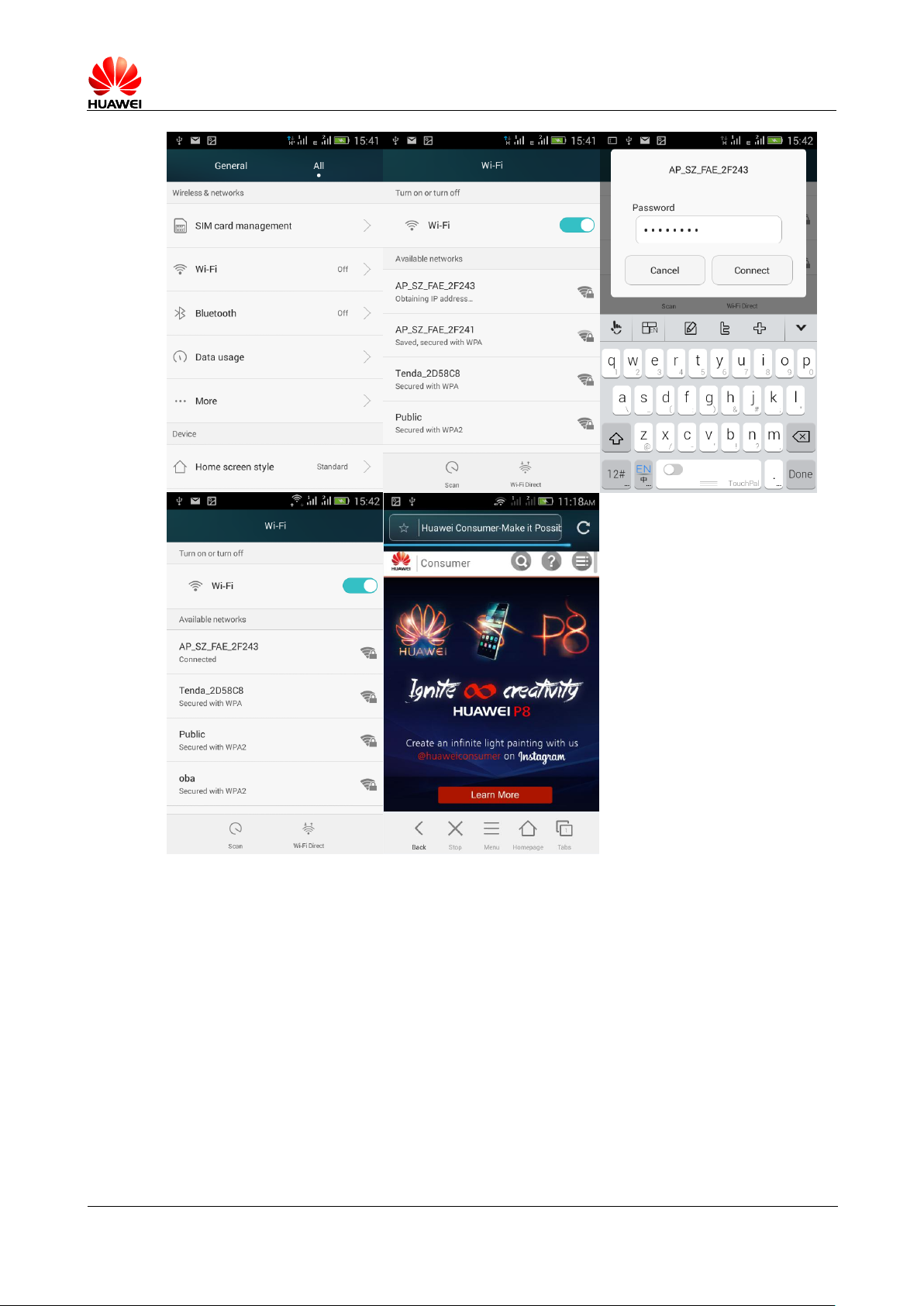
2.2.1 use WLAN
1.
on the home screen, tap settings > setting all
2.
If the
3.
If it is turned on, the phone will automatically scan for available nearby hotspots.
Click to connect the hotspot, if hotspot was encrypted, enter the correct password in
the pop-up dialog box, then click the link; if hotspots are without encryption, then
users can connect directly; users can search Internet via WLAN after connection hotspot
successfully.
WLAN
switch is turned off, dragging the button to turn on;
>
Wireless and networking
> WLAN
.
Page 37
HUAWEI T8833 智能手机 FAQ
version 01 (2012-11-30) 37/79
2.2.2 support for WLAN agreements,what’s trandfer
rate for agreements?
Supported protocols are 802.11b/g/n 。
802.11 b Agreed maximum transfer rate: 11Mbps ;
802.11 g Agreed maximum transfer rate: 54Mbps ;
802.11 n Agreed maximum transfer rate: MCS9 96 mbps(Turbo-QAM) ;
Page 38

HUAWEI T8833 智能手机 FAQ
version 01 (2012-11-30) 38/79
2.2.3 via WLAN Connect networks sometimes can not open
Web pages
The following reasons:
xDSL Dial failed. When connected to a hotspot (wireless router), xDSL connection
Internet,xDSL dialing fails, will result cannot surf the internet. Ensure xDSL after
successful dial-up and then try again.
DNS Domain name resolution problems. If cannot open a Web page,QQ can log in,
description DNS name resolution problems. (To verify you can configure DNS).
WLAN Hotspot access restrictions. if the current connection hotspot is access
restricted State, cell phones will not be able to access the page.
2.2.4 cannot easily search for WLAN Signal
When open WLAN , Cannot easily search for wireless router WLAN Signals, other devices
search WLAN Good signal , How to deal with?
Determine if the wireless router SSID Whether to hide.
Power down and then power up again WLAN 。
Reboot your phone.
2.2.5 How to determine whether using a SIM or WLAN
Internet access
After Connection
data services, see the upper right corner of the screen
Icon
Representatives can use the
WLAN
, do not use charge on USIM card,
WLAN
Internet access.
WLAN
WLAN
Higher priority than
Icon, if there is
WLAN
2.2.6 connect WLAN The reason for the failure
wrong password entered by the user, so please pay attention to caps and lower letters
are opened.
Suddenly signal weakens or hot spots no signal, causes the connection to fail.
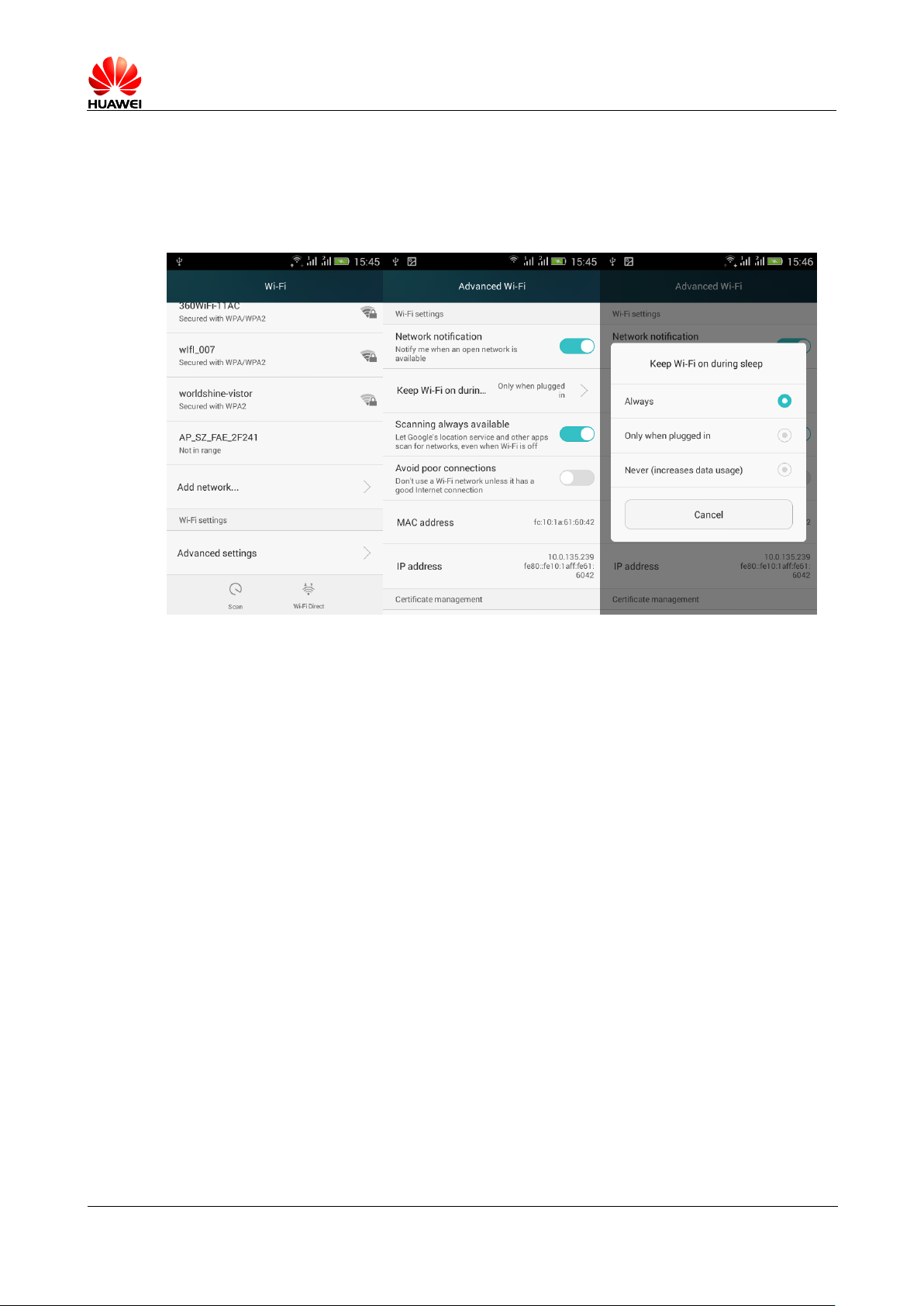
2.2.7 WLAN
Standby time will be automatically
disconnected, how to solve it, what is the handset
default settings?
This is hibernation strategy problems. Entry method: on the home screen, tap settings >
settings > Wireless and networking > WLANand into Senior > Maintained in a dormant
WLAN Connection set to "always".
Note: the handset default settings are always, or can connect fine. If you adjust the
sleep policy is automatically disconnected when in standby. 3 options have the
following meanings:
Page 39
HUAWEI T8833 智能手机 FAQ
version 01 (2012-11-30) 39/79
Always: stay WLAN Connection.
Only when charging: permanently connected only when charging, if not charging after
standby 15 Minutes to disconnect.
Never (will increase network traffic): after standby 15 Minutes to disconnect.
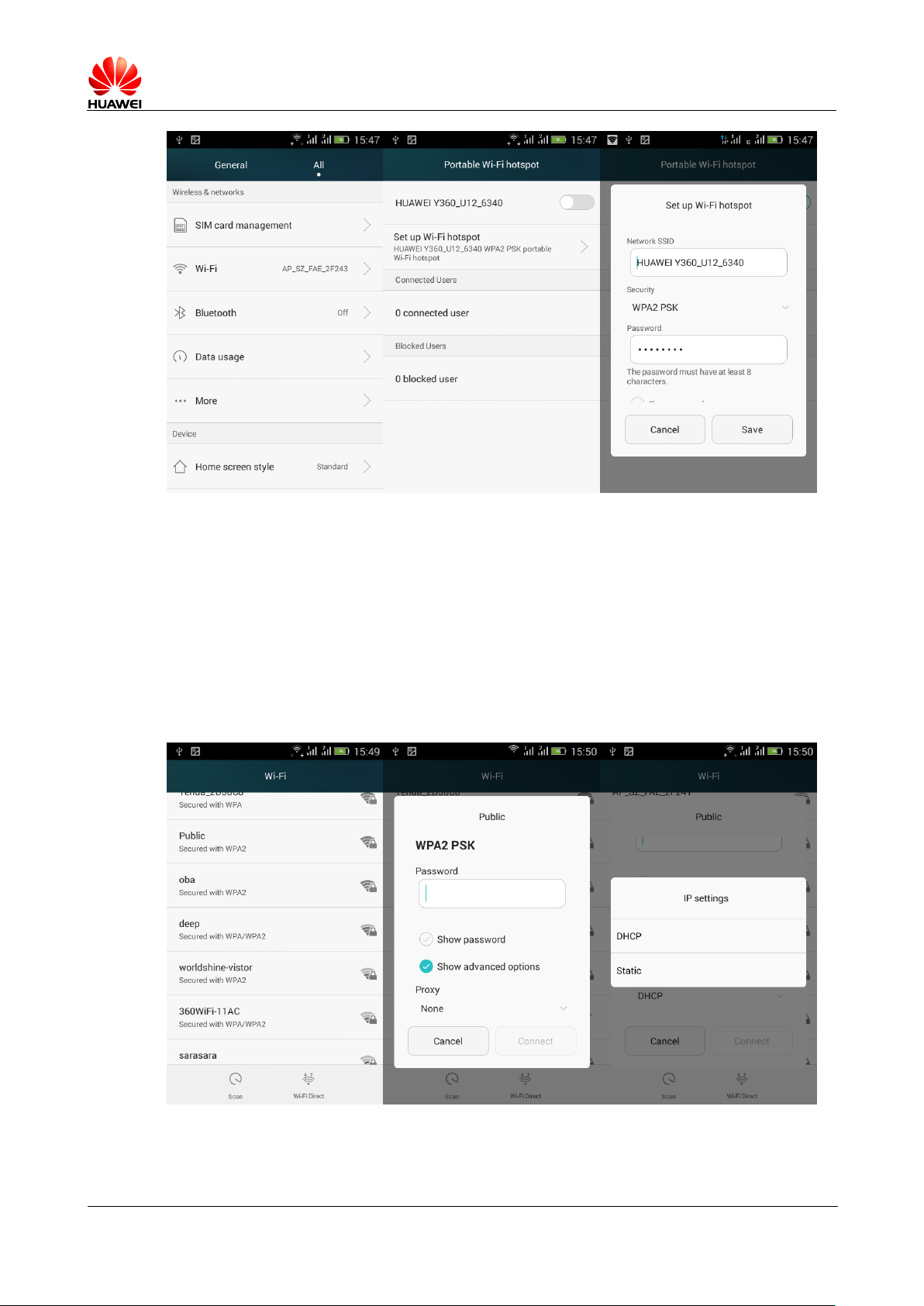
2.3 Network shared with the portable hotspot
Mobile phone WLAN Open hotspot is a test machine, aided by connecting the test
Internet.
Open method: set > All settings > Wireless and network > More ... > Network shared with
the portable hotspot > Portable WLAN Hot 。
After opening, auxiliary machine WLAN After the search to the test machine to connect
to Internet.
You can also Setting WLAN Hot Configuring hotspot name and encryption functions.
Page 40
HUAWEI T8833 智能手机 FAQ
version 01 (2012-11-30) 40/79
2.4 static IP to use WLAN Internet access
Set > Wireless and network > WLAN , Click the hotspots to connect, in the pop-up dialog
box, check the Advanced options , IP Settings, select static , sequentially fill in
IP Address (For the most part is set to 192.168.1.*** ), Gateway (mostly 192.168.1.1 ),
Subnet mask, or netmask ( 255.255.255.0 ) And domain name ( dns Address) is OK.
WLAN Into the network's biggest problem is not able to wait for a connection-free
network, mobile device connected to the router gets a dynamic IP Address, a
time-consuming process. Using a static IP for WLAN Internet access, you can achieve
rapid Internet access
Page 41
HUAWEI T8833 智能手机 FAQ
version 01 (2012-11-30) 41/79
2.5 As modem connection with your computer Internet
accessing
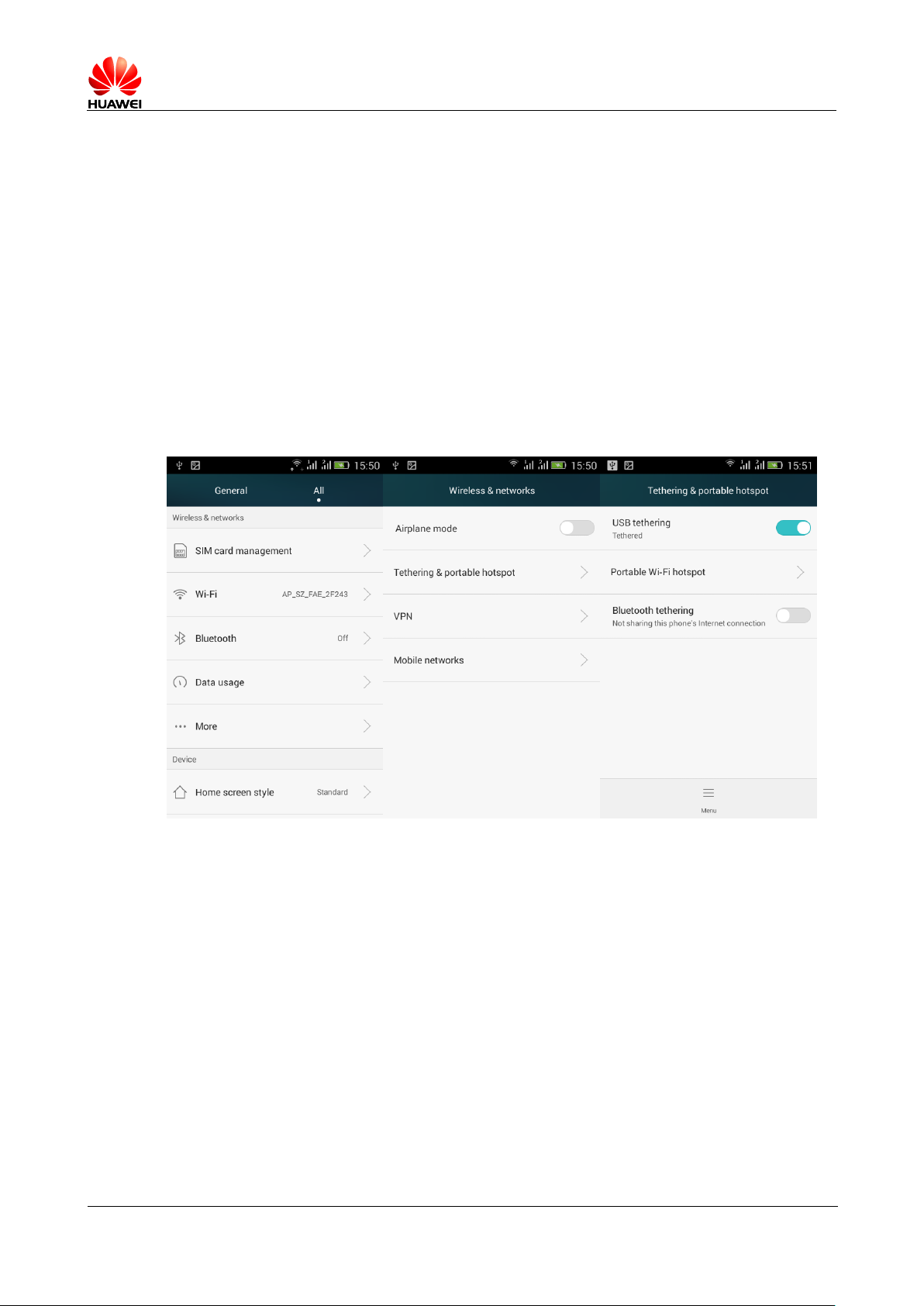
1. In the main screen, click settings > All settings .
2. In " wireless network " area, click on the " more ... > Network shared with the
portable hotspot "。
3. Select " USB Shared network "。
4. After you installed the driver (the driver can Hisuite Installation), PC Side, right
click on " my computer " in the pop-up menu, choose " Manage " interface will display
a new network card device.
Notes : If PC On the wireless card, you can open with your mobile phone WLAN Hot
spots, PC By WLAN Connect to the mobile Internet (currently supports Windows The
operating system)
2.6 Ringtone Setting
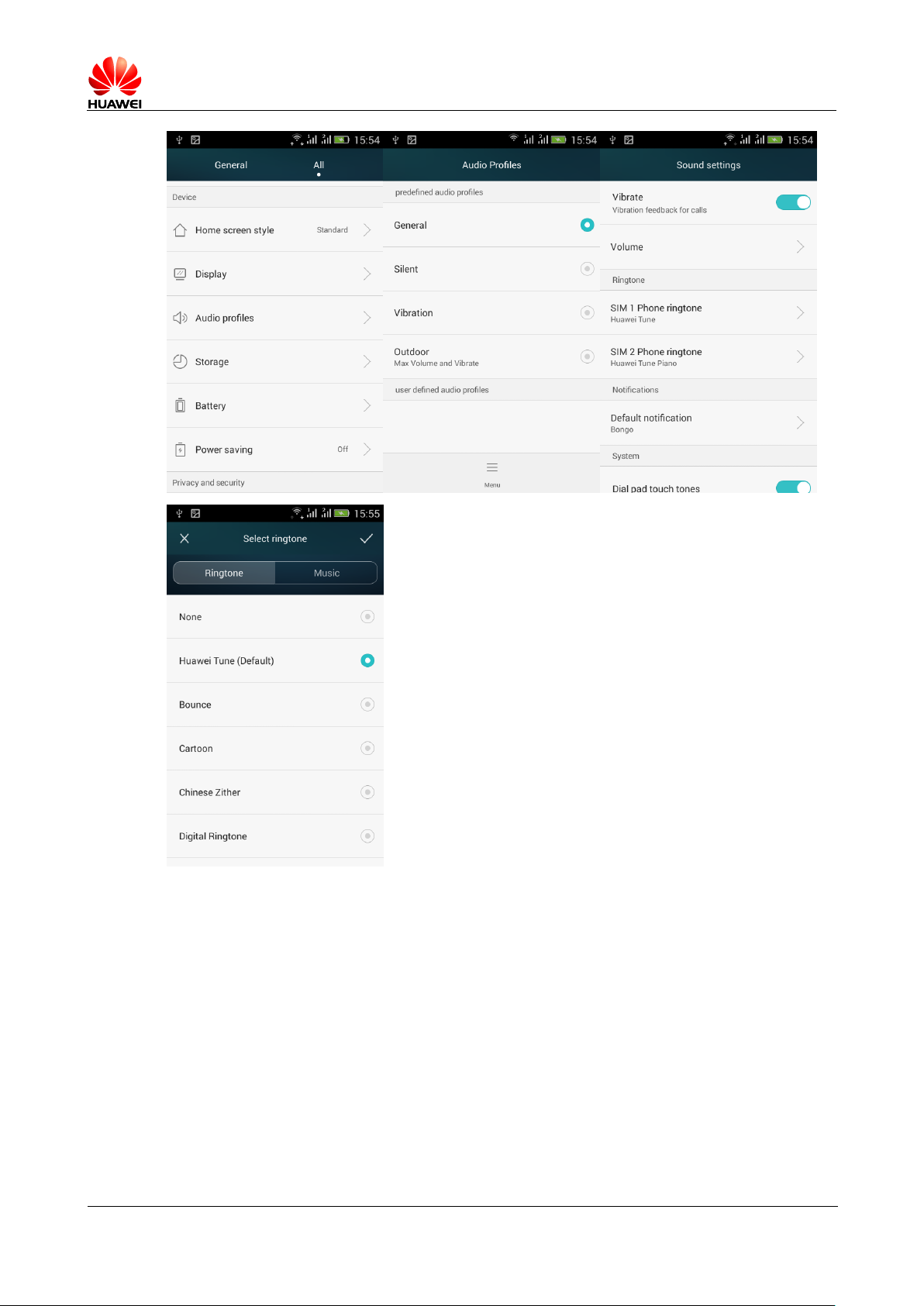
2.61 Income call ringtone setting.
Go to settings -> Profile -> Standard -> Edit ->SIM1 Cell phone ringtones / SIM2 Cell
phone ringtones -> Select the ringtone
Page 42
HUAWEI T8833 智能手机 FAQ
version 01 (2012-11-30) 42/79
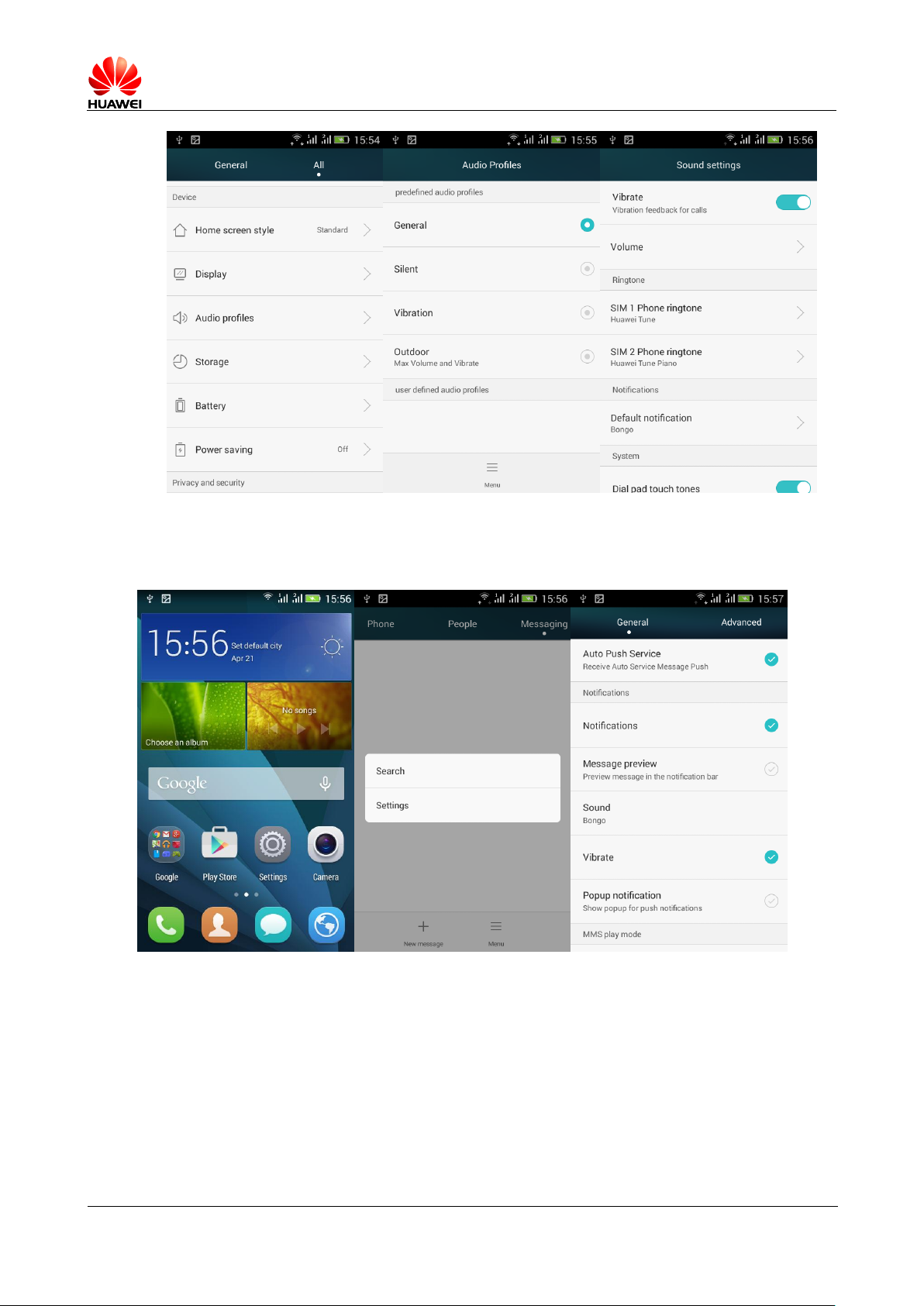
2.6.2 calls / Text message vibration setting method
income Calls vibration : Profile -> standard -> open vibration switch
Page 43
HUAWEI T8833 智能手机 FAQ
version 01 (2012-11-30) 43/79
SMS vibration: enter SMS -> menu Pop-up menu, select settings —> General -> check
vibration
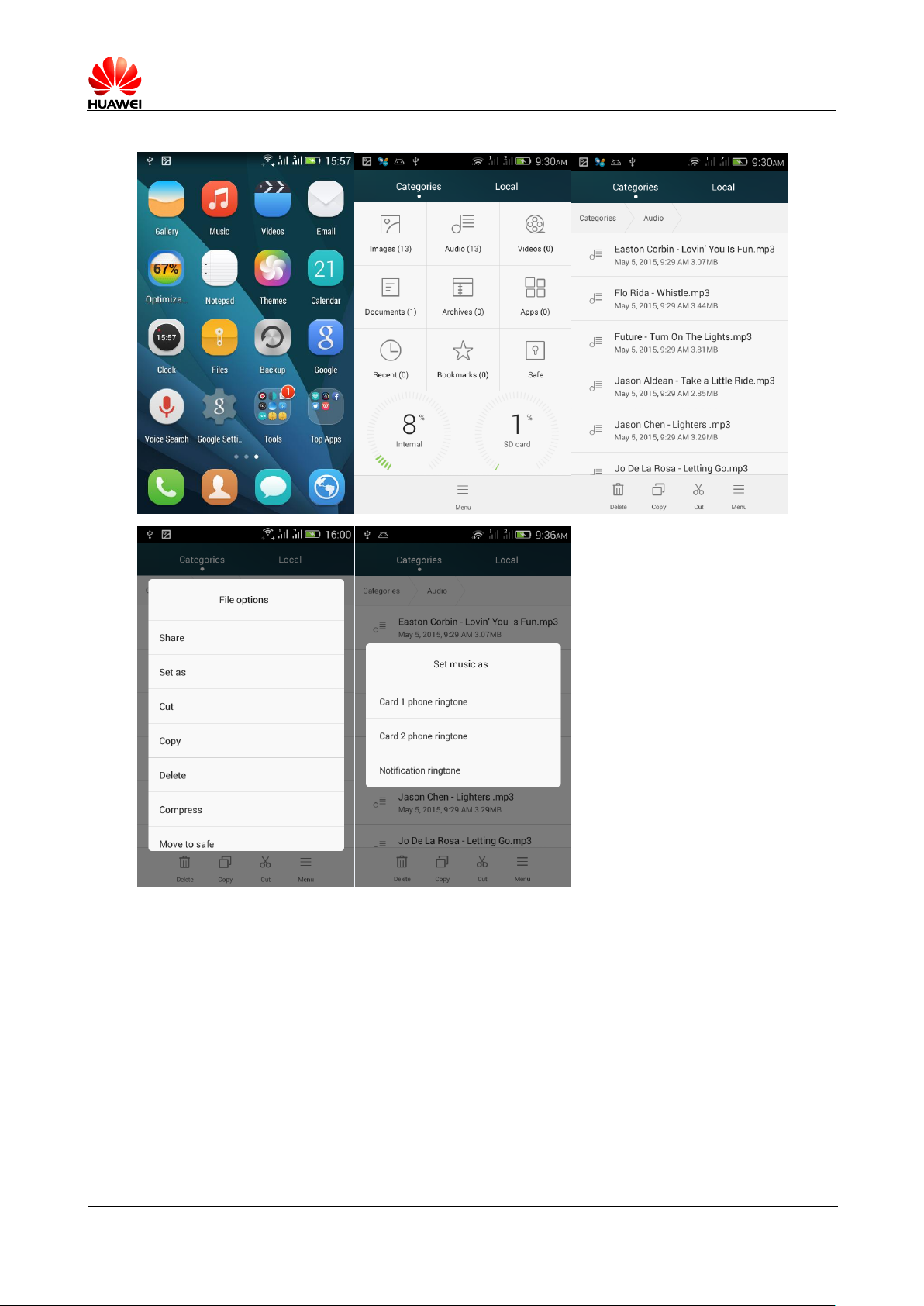
How to set up a selected music for the call / message tone?
Page 44
HUAWEI T8833 智能手机 FAQ
version 01 (2012-11-30) 44/79
File Manager, choose your music file long press on, pop-up menu, select set as ringtone
Enter profile > standard > SIM1/SIM2 ringtones / default notification
Page 45
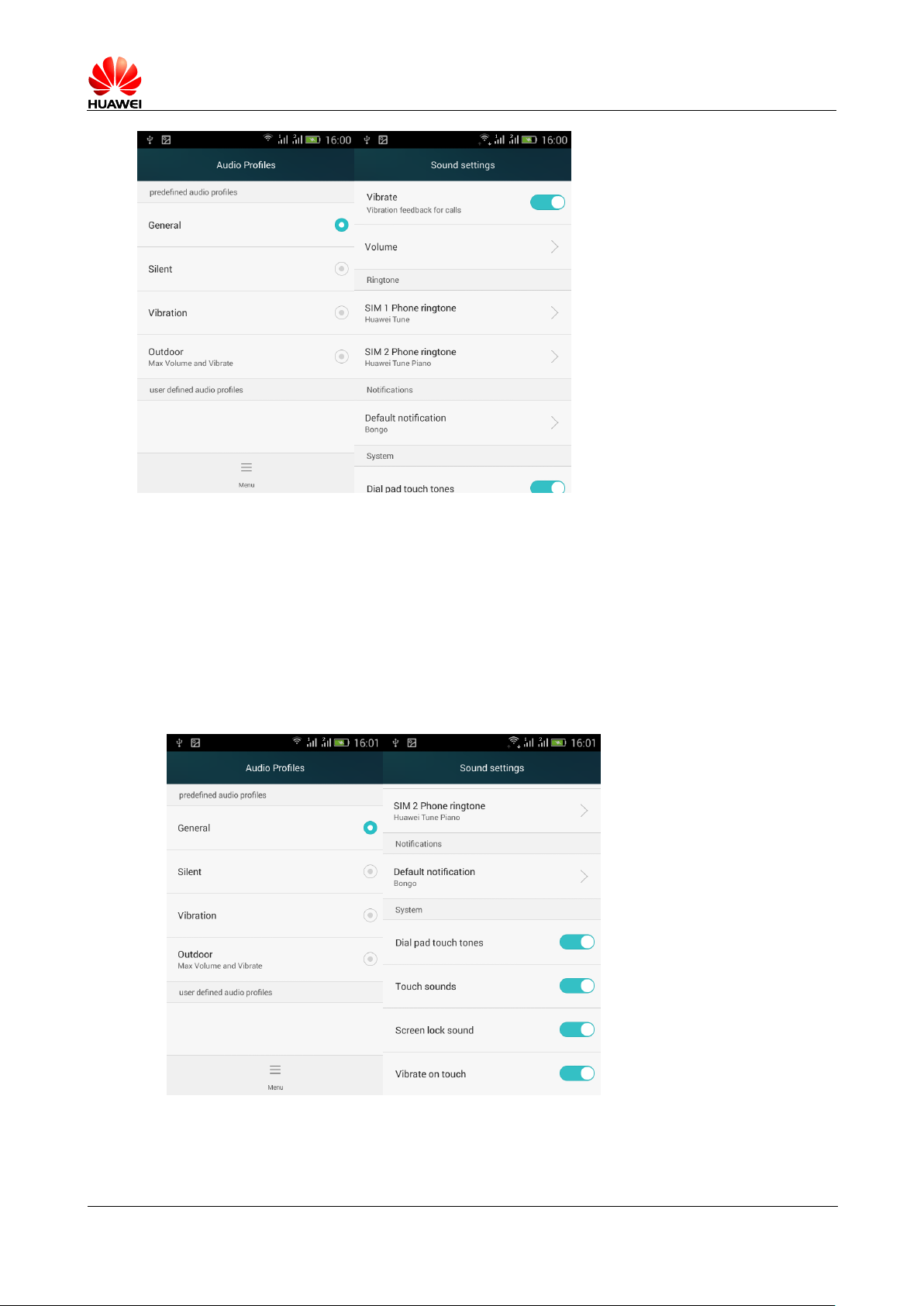
HUAWEI T8833 智能手机 FAQ
version 01 (2012-11-30) 45/79
How to set up a group ring tone
Does not support
2.6.4 Cell phone how to cancel the key tone?
Enter profile > Select standard mode > Ticking off dial pad touch audio, touch tone
Page 46
HUAWEI T8833 智能手机 FAQ
version 01 (2012-11-30) 46/79
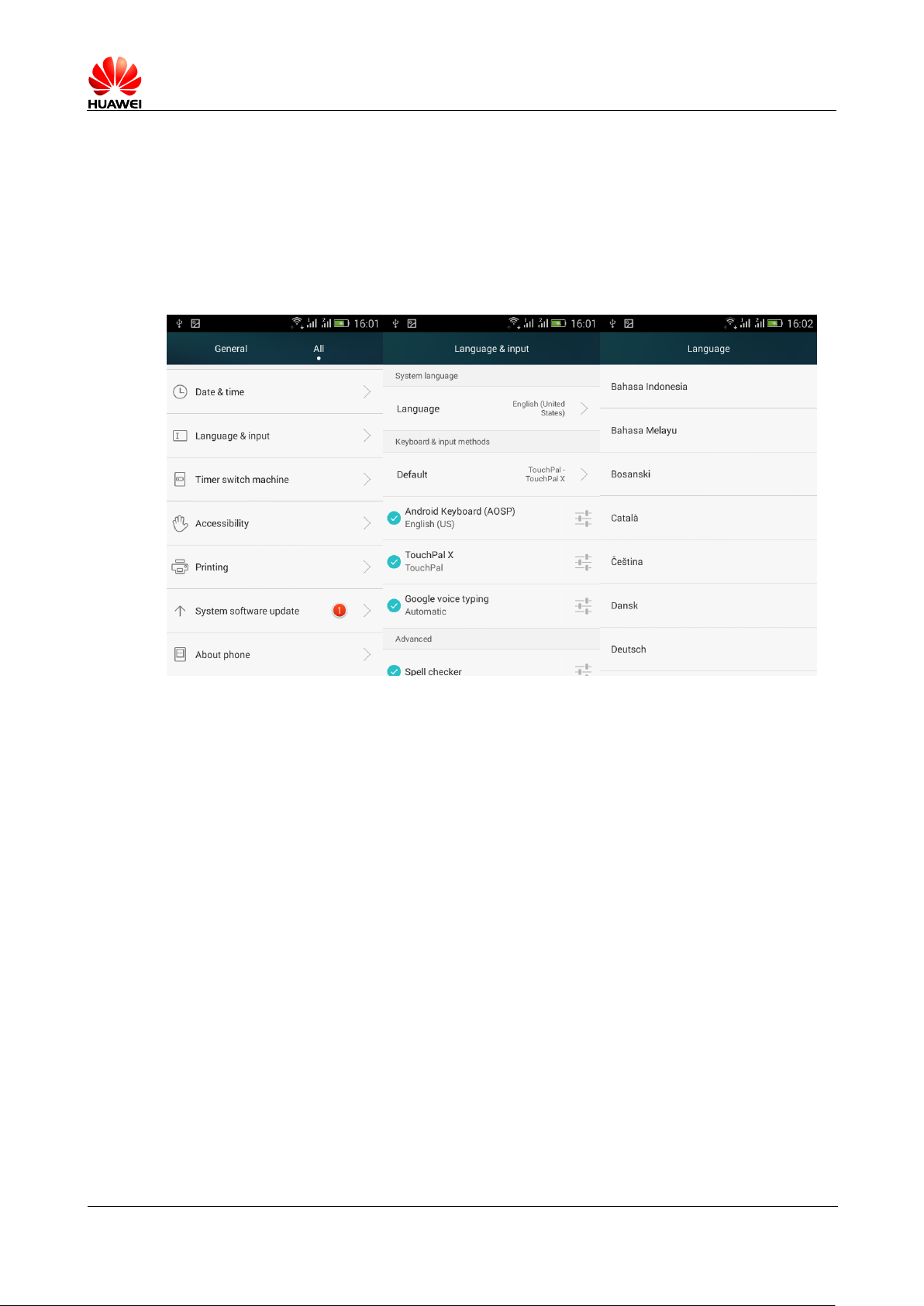
Language and keyboard settings
2.7.1 Supports those languages? How do I change phone
language?
In the main screen, click settings > Select all settings > Languages and input methods >
Language . select In the language list
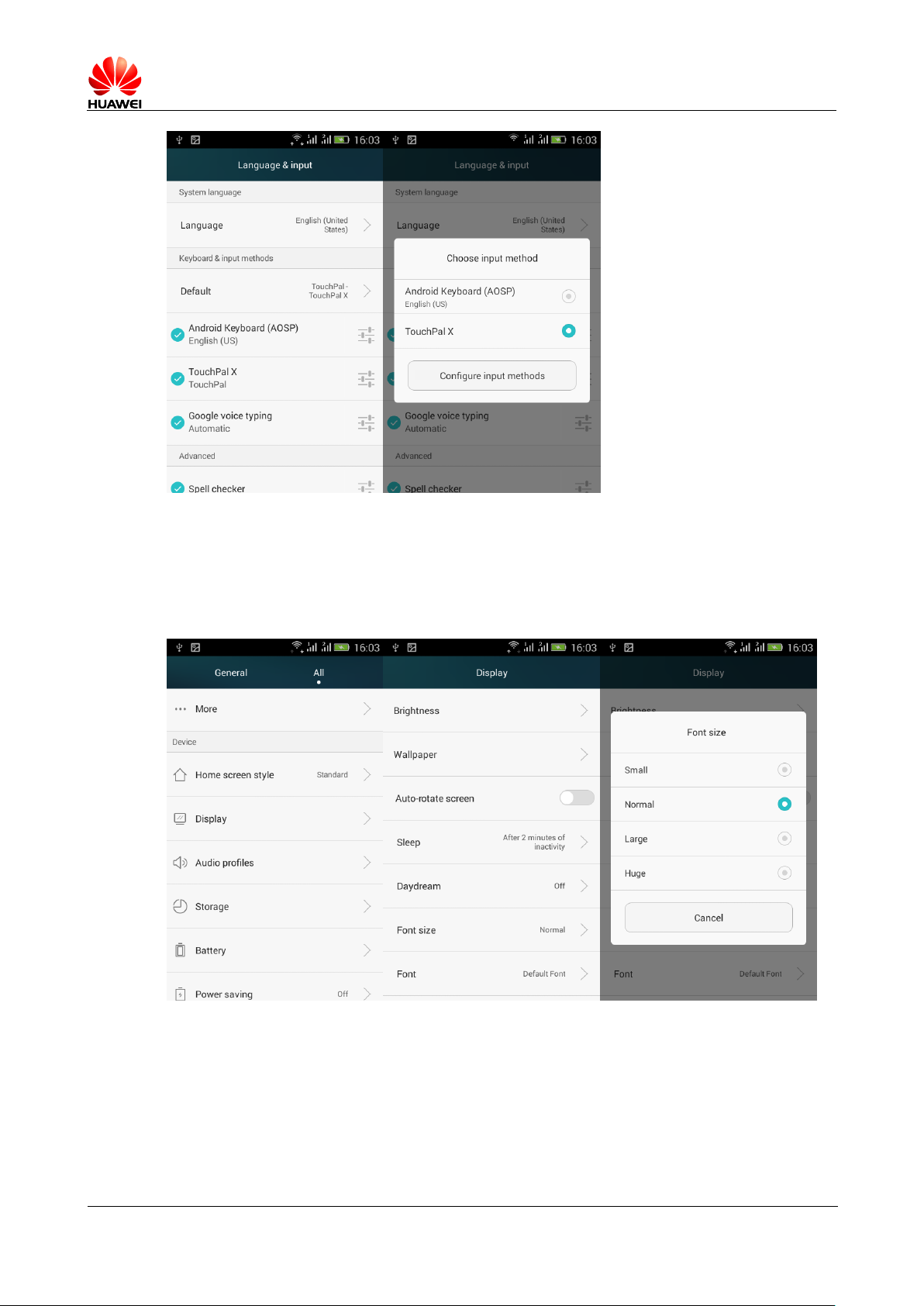
2.7.2 Why cannot use after you install other input
methods
In the main screen, click settings > Select all settings > Languages and input methods ,
First check the installed input method, and then click default , selected in the input
list.
Page 47
HUAWEI T8833 智能手机 FAQ
version 01 (2012-11-30) 47/79
2.7.3 Whether or not be able to debug the system font
size?
Click on the settings > Select all settings > Display > Font size , Can be selected in
the font list.
2.7.4 Default what imput method
Android Keyboard ( AOSP ), Contact Po input method
Page 48
HUAWEI T8833 智能手机 FAQ
version 01 (2012-11-30) 48/79
2.7.5 How to switch the input method of the strokes
Touch-Pal input method input method interface, press , You can bring up the language
and strokes input mode selected, select strokes input
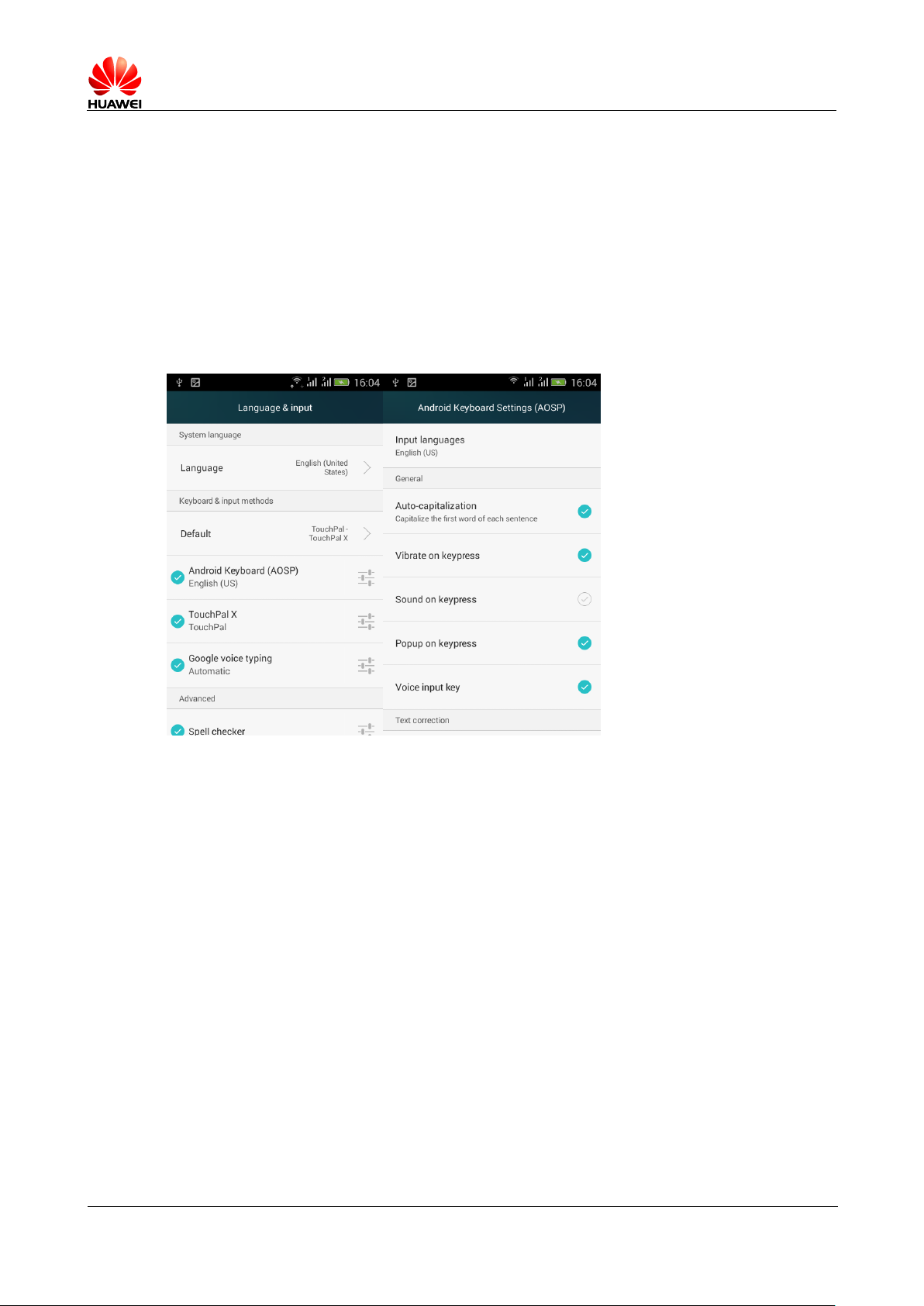
2.7.6 How to turn off the input method of vibration
Android The keyboard, turn off the vibration method is as follows: click on settings >
Select all settings > Languages and input methods , Click on the Android Keyboard
Behind the Button to close button vibration can be.
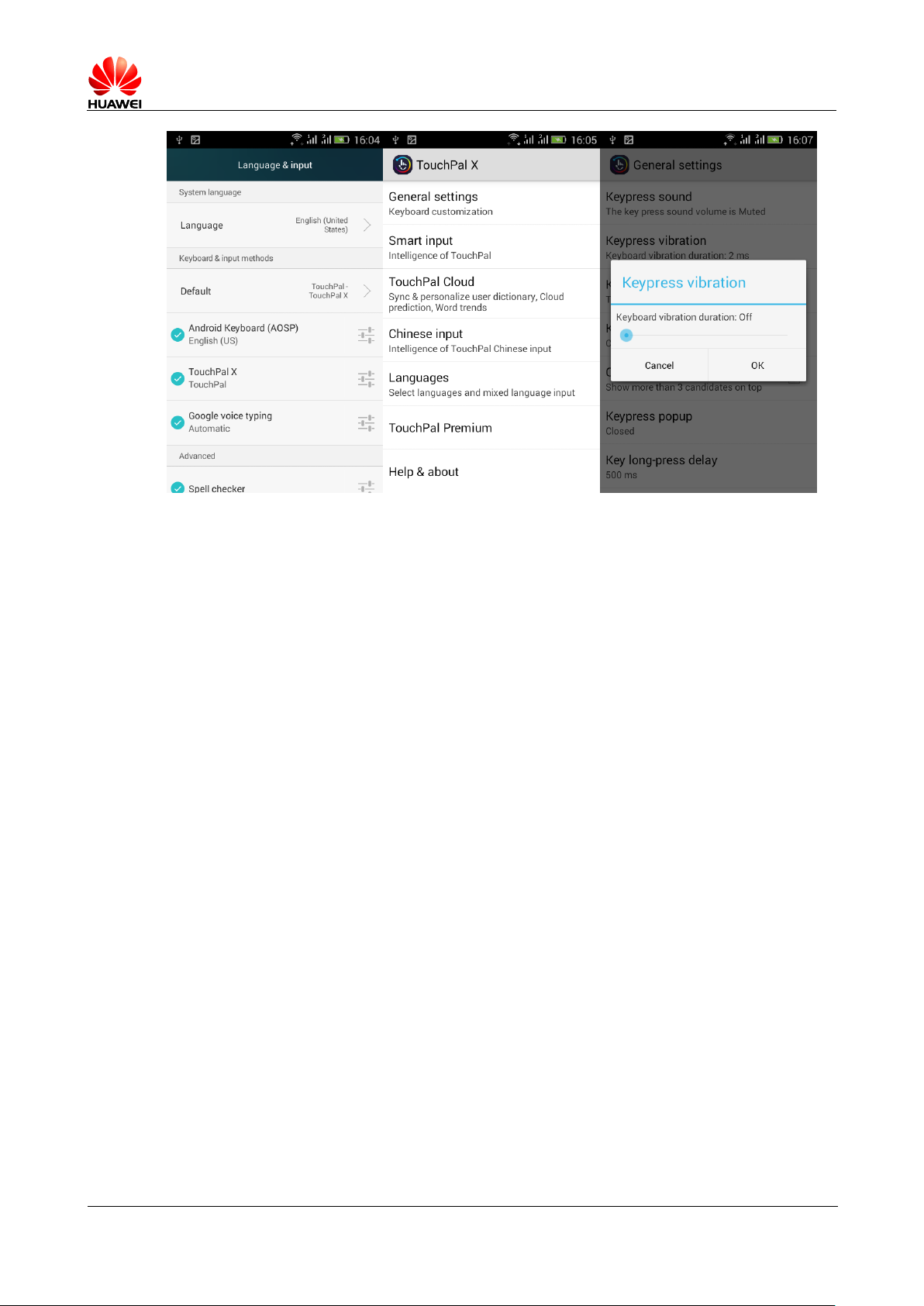
Touch- pal input methods, touch, turn off the vibration method is as follows: click on
settings > Select all settings > Languages and input methods , Click on the contact Po
input behind the Button, enter touch-Po input settings > common settings > button
vibration , You can drag the progress bar to the left
Page 49
HUAWEI T8833 智能手机 FAQ
version 01 (2012-11-30) 49/79
Internet access settings
2.8.1 Cell phone browser to clear the cache and history
On your screen, click the menu button, select settings > Privacy and security , Then
click the clear cache , and clear history .
2.8.2 Browser full screen and bookmark sets
Full screen: in the browser interface, click on the menu
button , select settings > Click on the full screen 。
Bookmark: browser interface, tap the link left of the pentacle symbol, a pop-up will
bookmark this page , then click the determined , add bookmarks to success.
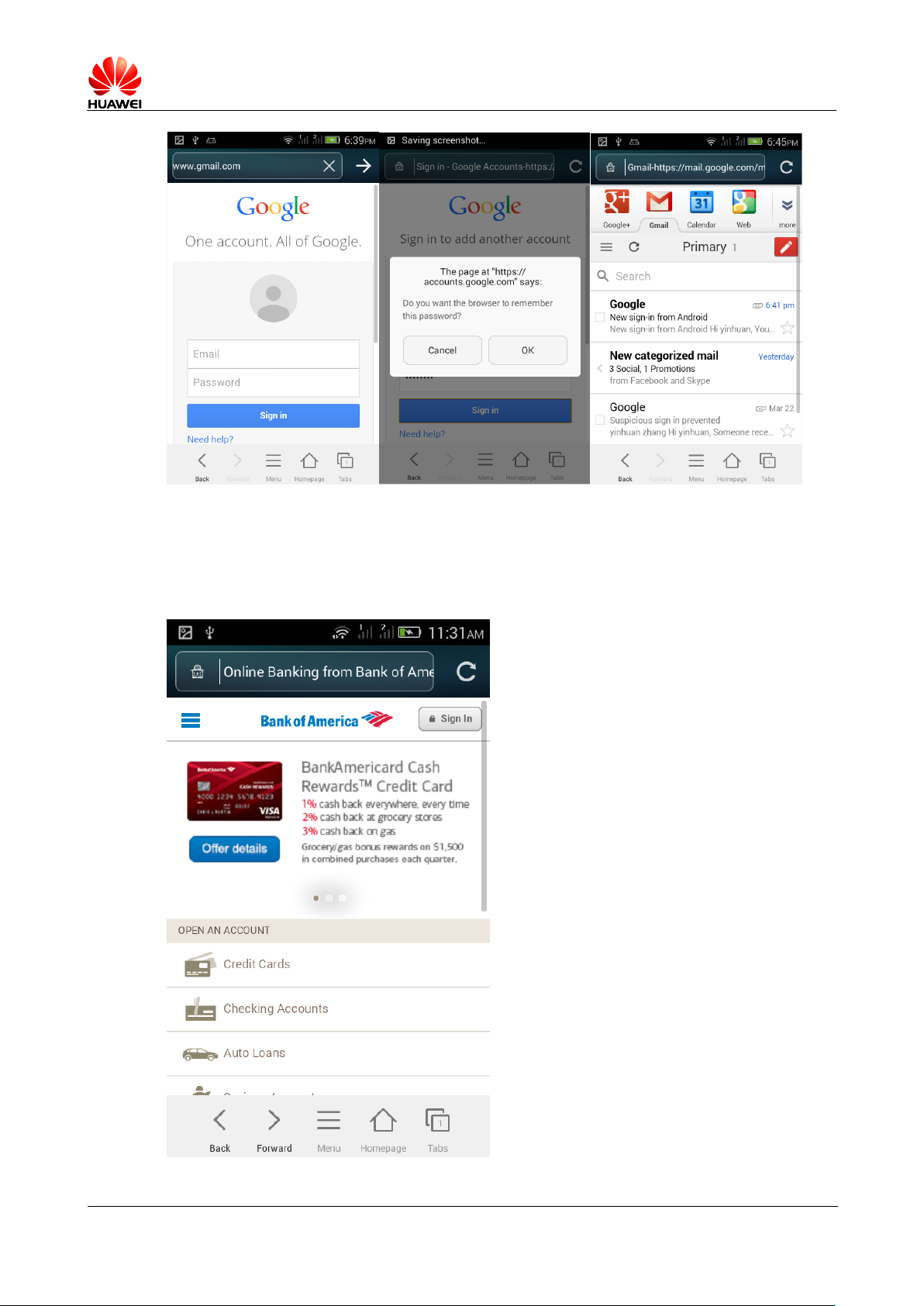
2.8.3 visit email From the mobile Web
Support, enter in the address bar, enter the mailbox URL to login screen.
Page 50
HUAWEI T8833 智能手机 FAQ
version 01 (2012-11-30) 50/79
2.8.4 Support sign up for online banking
Supports. Need to install network Internet banking clients can be. May be accessed via
a browser problem, because some banks logins plugin requires Microsoft IE operating
environment
Page 51
HUAWEI T8833 智能手机 FAQ
version 01 (2012-11-30) 51/79
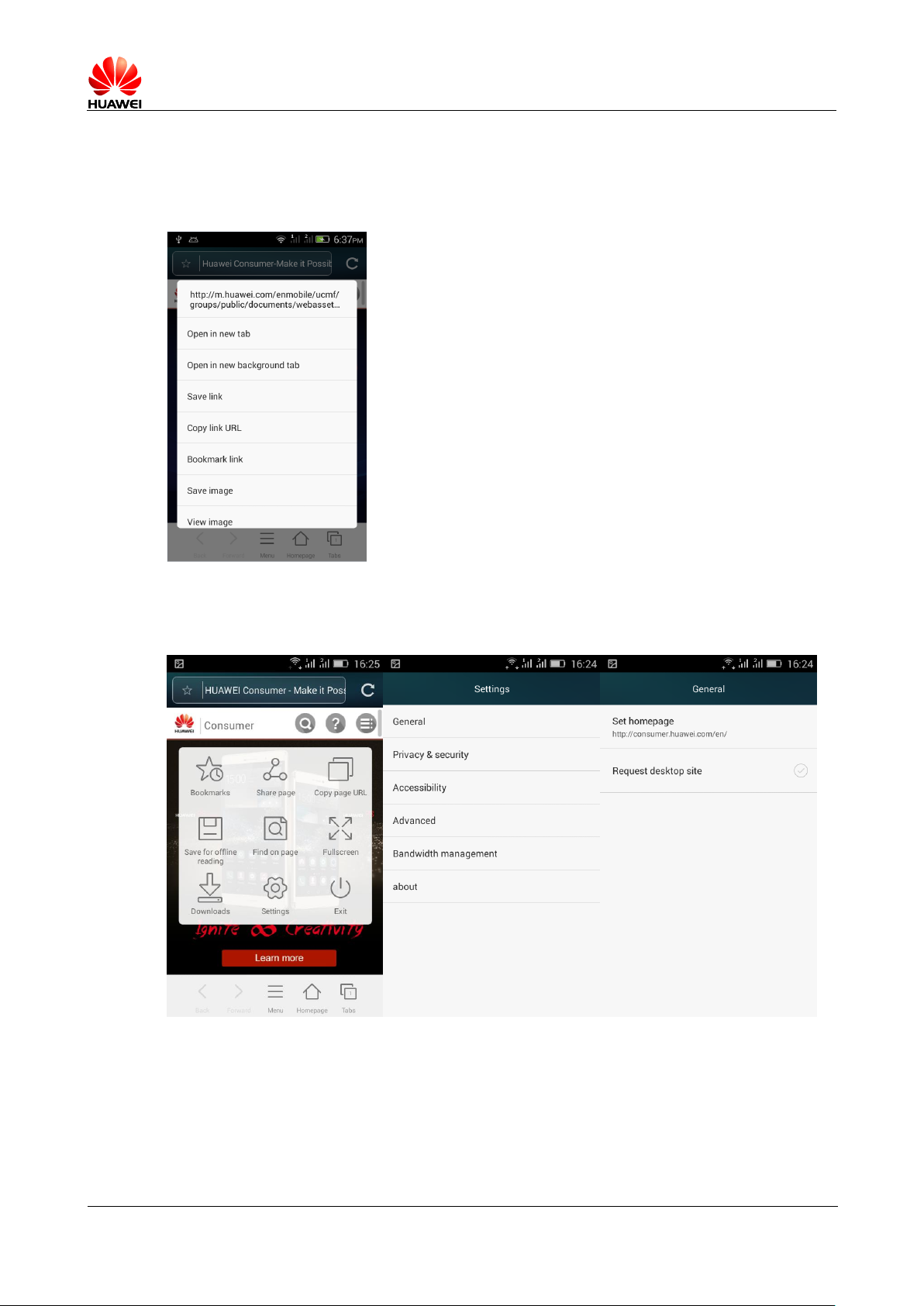
2.8.5 Save pictures on a Web page
On your screen, long press pictures in a Web page, in the pop-up dialog box, select
Save picture
2.8.6 Settings to modify the home page
On your screen, click the menu button, select settings > General > To set the home page
Page 52
HUAWEI T8833 智能手机 FAQ
version 01 (2012-11-30) 52/79
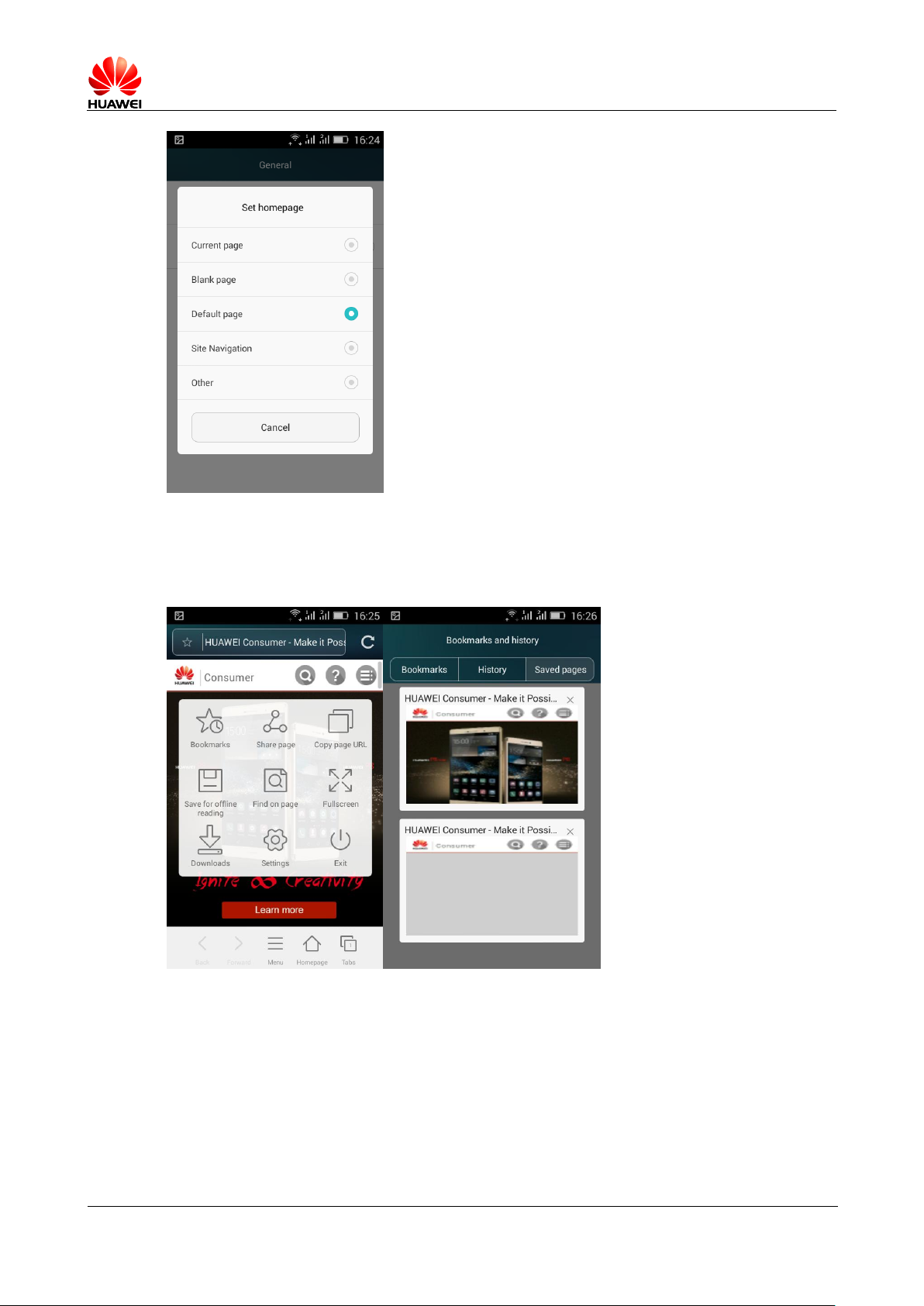
2.8.7 Save my favorite website
On your screen, click on the menu button , then click the Save articles for offline
reading
2.8.8 Phone cannot access network parameter setting
method
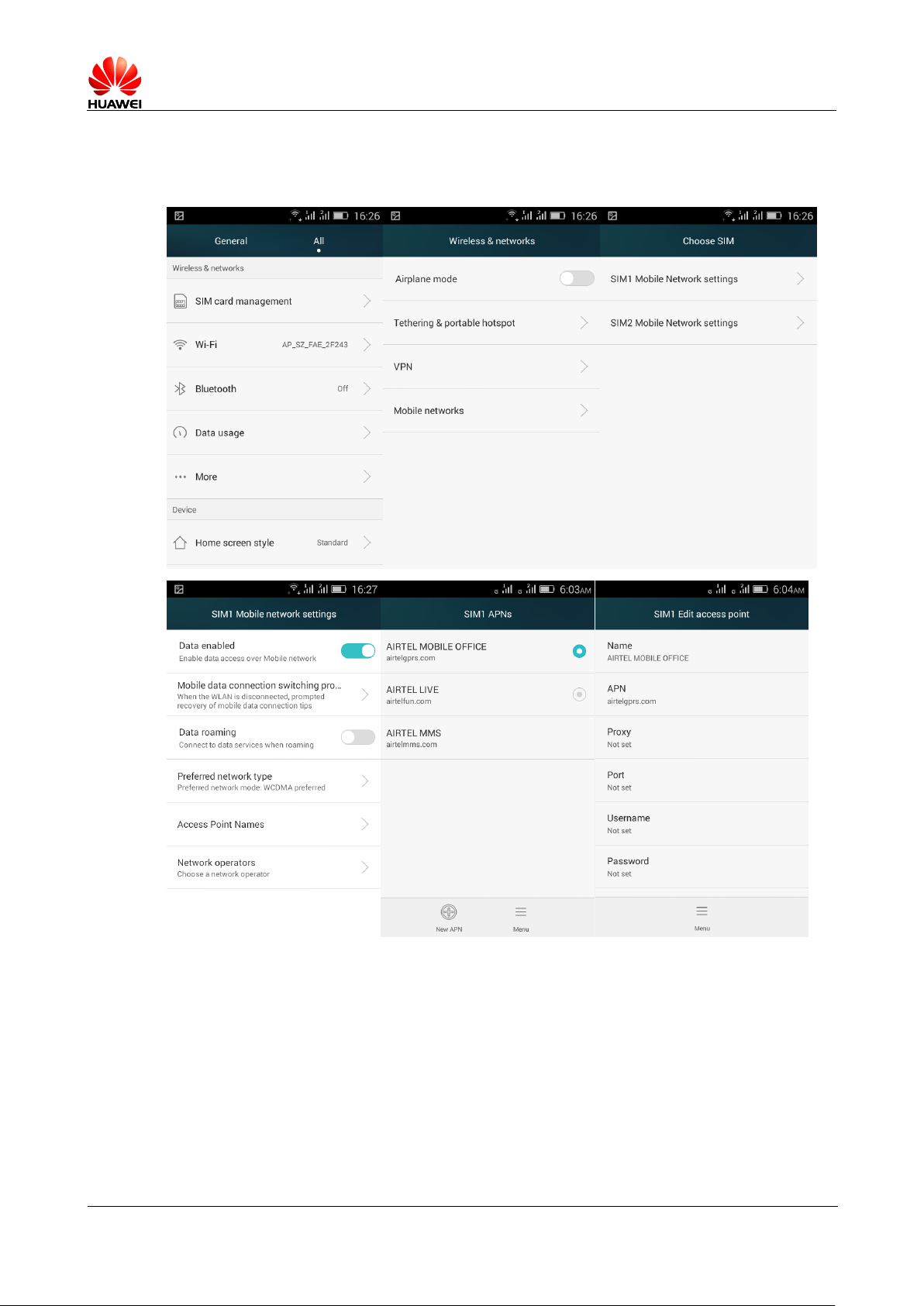
Insert SIM Card, APN Automatically configures the network parameters.
Page 53
HUAWEI T8833 智能手机 FAQ
version 01 (2012-11-30) 53/79
View: in the home screen, select settings > Settings > Wireless and networking >
more ... > Mobile network >SIM1 Mobile network settings /SIM2 Mobile network settings >
Access point name (APN )
When parameters are not set correctly, when available by clicking apn Interface's menu key, select the
reset to defaults to restore.
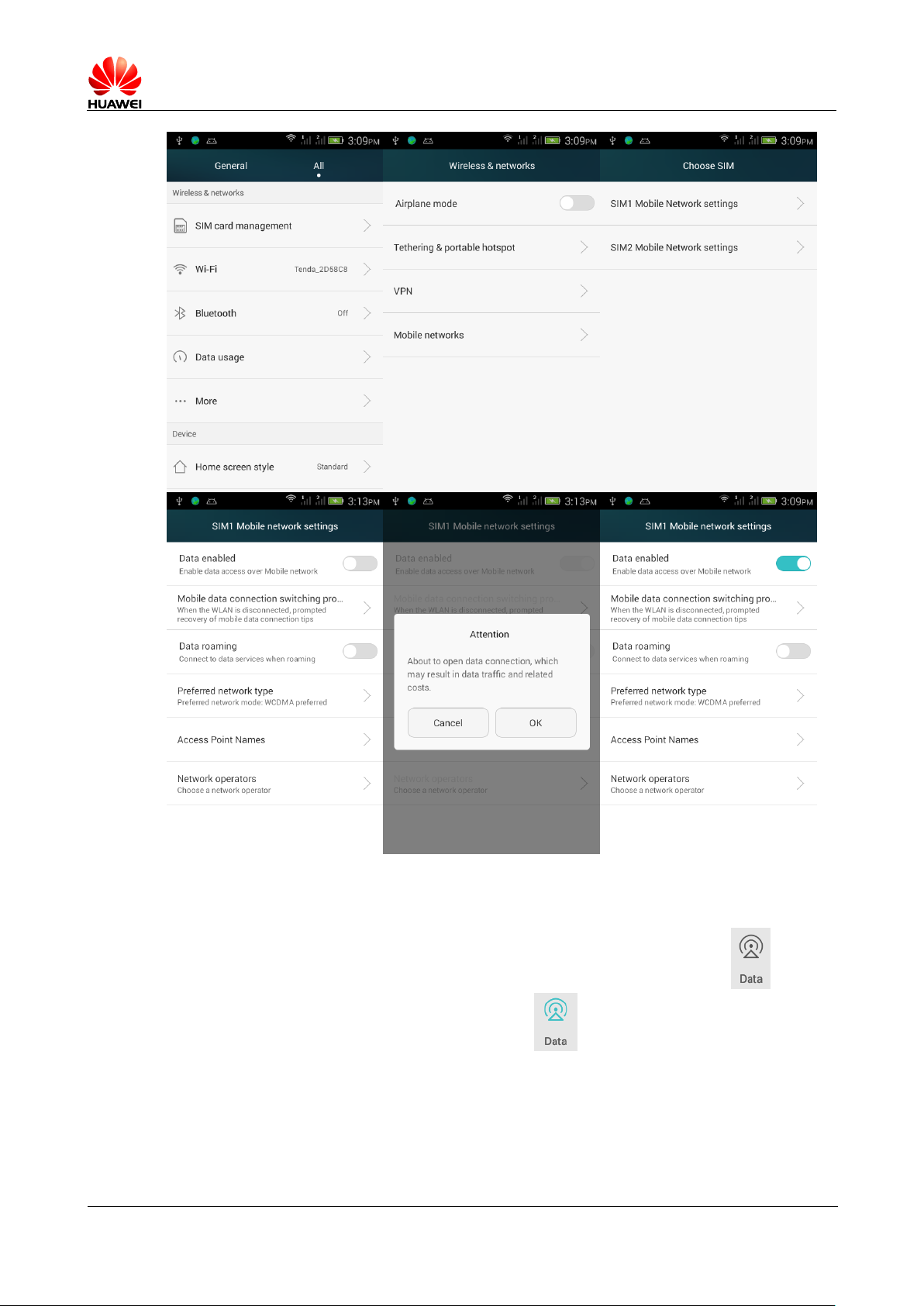
2.8.9 How to turn off and enable data services
Method of closed and open data services:
On the main screen, select settings > Settings > Wireless and networking > more ... >
Mobile network >SIM1 Mobile network settings /SIM2 Mobile network settings, open the
/ Close data enabled network switch.
Page 54
HUAWEI T8833 智能手机 FAQ
version 01 (2012-11-30) 54/79
In the dropdown in the notification bar to open data services:
From the screen saver drop down the notification bar, click on the data switch ,You
can open data services, open status is highlighted 。
Page 55

HUAWEI T8833 智能手机 FAQ
version 01 (2012-11-30) 55/79
If high light ,Then open; click on the grayed out ,you can disconnect the
3G Network and Internet on the telephone, 3G Protocol support, phone and Internet
access.
2G Does not support 2G Protocol does not support this
feature.
2.8.10 View and disconnect the current data
connection
The drop down status bar, view the data switch is highlighted or not.
data link.
2.8.11 Phone also supports Internet access?
2.8.12 data services are there any restrictions ( such as
CDMA dual SIM mobile phone does not support GSM
Internet)
Currently our phones do not support CDMA2000 Data
services. Support SIM cards (2G,3G business ) and USIM
cards (2G, 3G business )
2.8.13 virtual private network VPN Settings what is the
purpose of and How to set up?
Virtual private networks (Virtual Private Network , known as VPN) refers to a to implement
a private network across a public network, data through a secure "encrypted pipe" spreads
over public networks.
VPN Protocol there are three commonly used,PPTP,L2TP and IPSec, we generally
use PPTP .
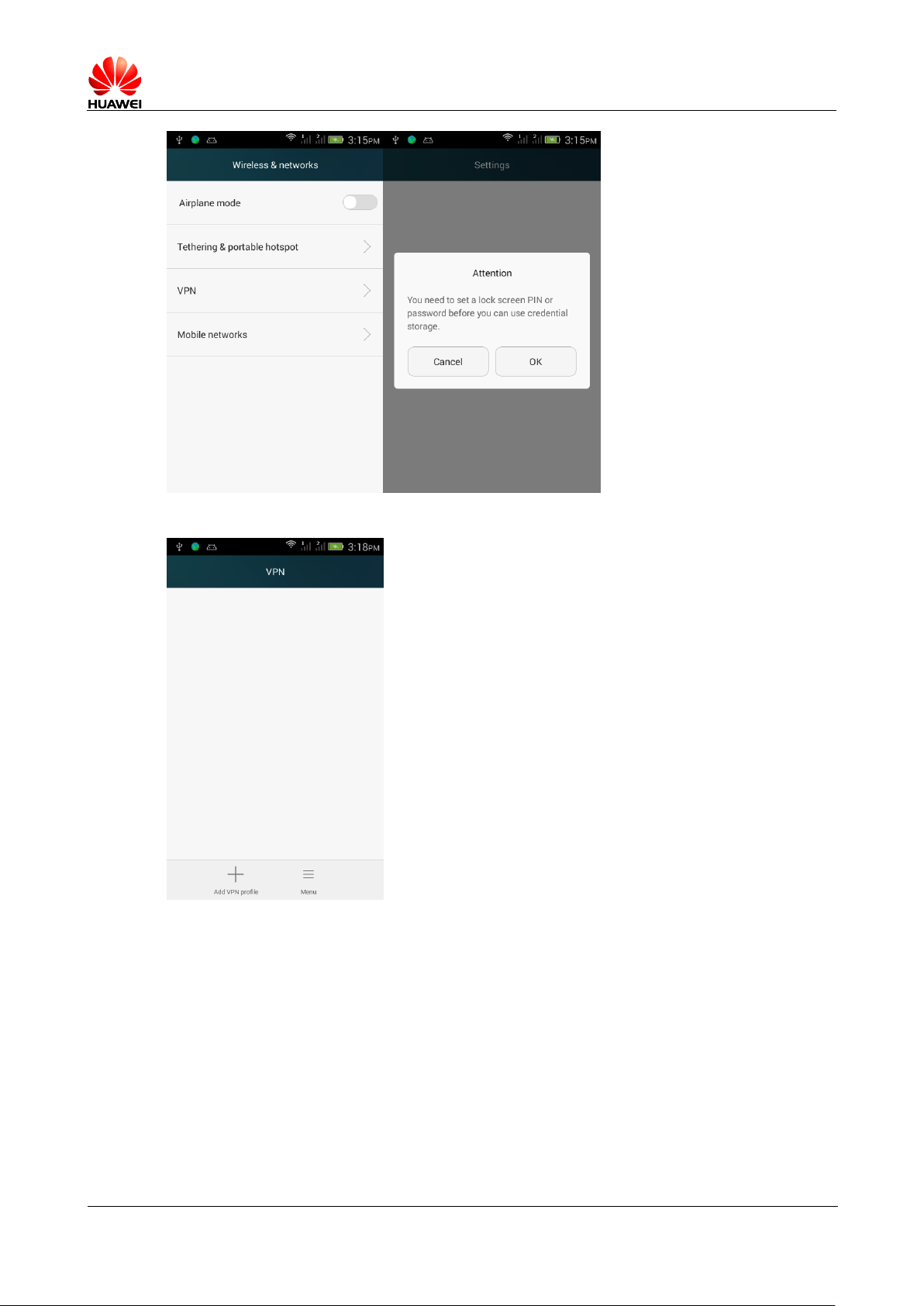
PPTP Operate as follows:
The first step, enter the select VPN menu interface, click on VPN into the add
interface
Page 56
HUAWEI T8833 智能手机 FAQ
version 01 (2012-11-30) 56/79
The second step, in the following screen, click on the "add VPN networks"
The third step, in the following screen, enter the VPN name and server address, enter
is complete click "Save", it will return to the following screen, just added the name
"VPN" option
Page 57
HUAWEI T8833 智能手机 FAQ
version 01 (2012-11-30) 57/79
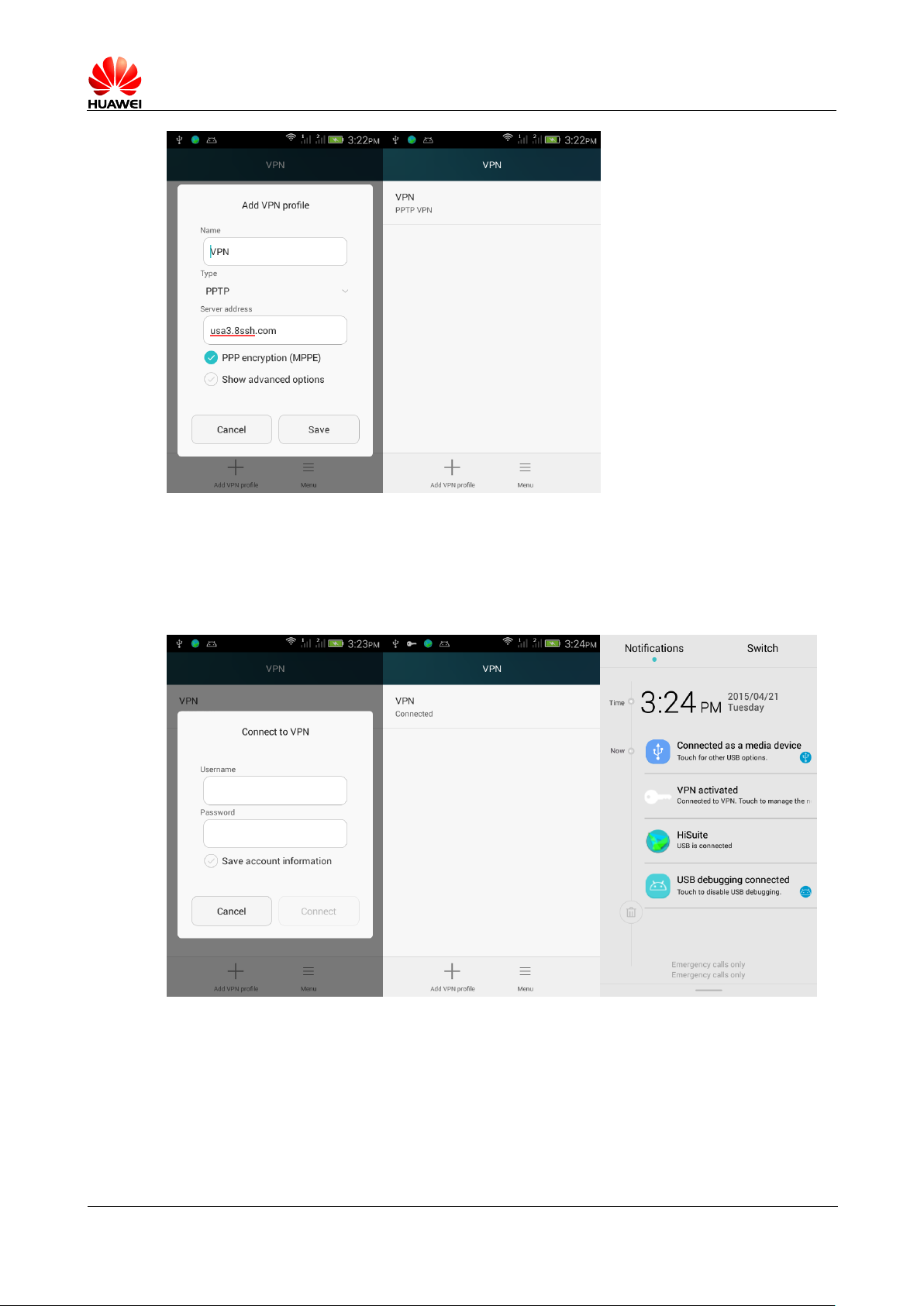
The fourth step, click the "VPN", in the following screen, enter the user name and
password, click on the link, it appears if the connection is successful, the "VPN
connections", and if that fails, check your WIFI connection, enter the VPN server
address, username and password are correct?
2.9 Screen locked settings
2.9.1 How to enable PIN Code lock screen?
Page 58
HUAWEI T8833 智能手机 FAQ
version 01 (2012-11-30) 58/79
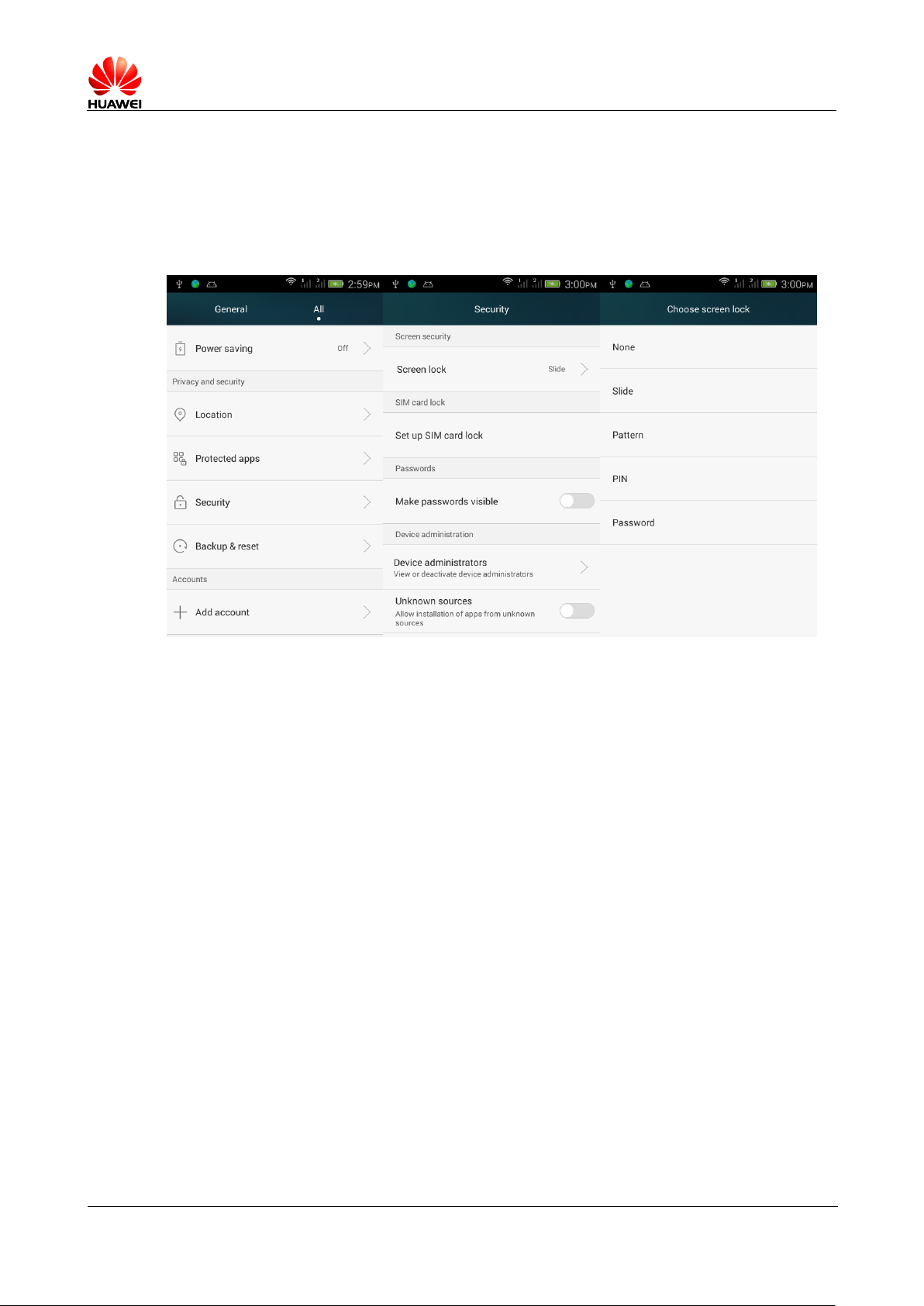
1. Click on the settings > Settings > Security > screen lock > PIN 。
2. In the " Choose your PIN " In the boxes below, type PIN Code.
3. Enter again to enter PIN Code, click on the identify completed PIN Code setting
When the power button or switch machine, phone will default into the PIN Codes to unlock
the interface, enter set PIN Code and click " OK "Lifting PIN Code lock.
2.9.2 How to set up a human face to unlock
Unlock mobile phone does not support persons face.
。
2.9.3 How to enable a screen unlock pattern?
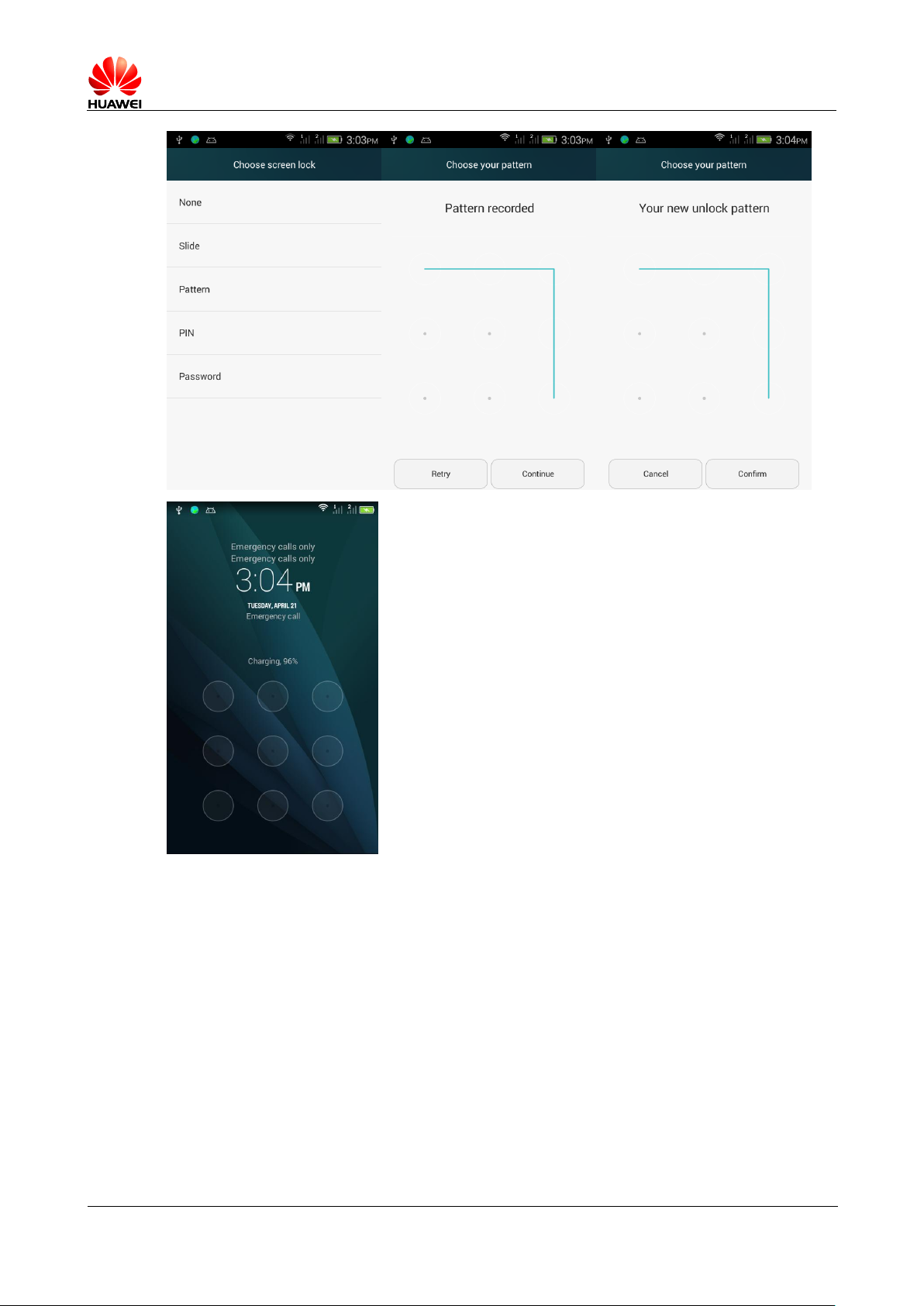
1. Click on the settings > All settings > Security > Screen lock > Pattern 。
2. In the " Select your pattern " interface, through the finger across the screen
continuously circle Center set with which to unlock graphic style, then click
"continue".
3. Once again across the screen just the style, click on the " confirm " completing the
unlocked picture settings.
4. When the power button or switch machine, unlock the phone will default into the pattern
interface, the interface across the pattern style, unlock.
Page 59
HUAWEI T8833 智能手机 FAQ
version 01 (2012-11-30) 59/79
2.9.4 mismatched graphics lock several times in a row
over whether mobile phones can be locked? Forgot pattern
how to unlock, whether through GMAIL mail unlock
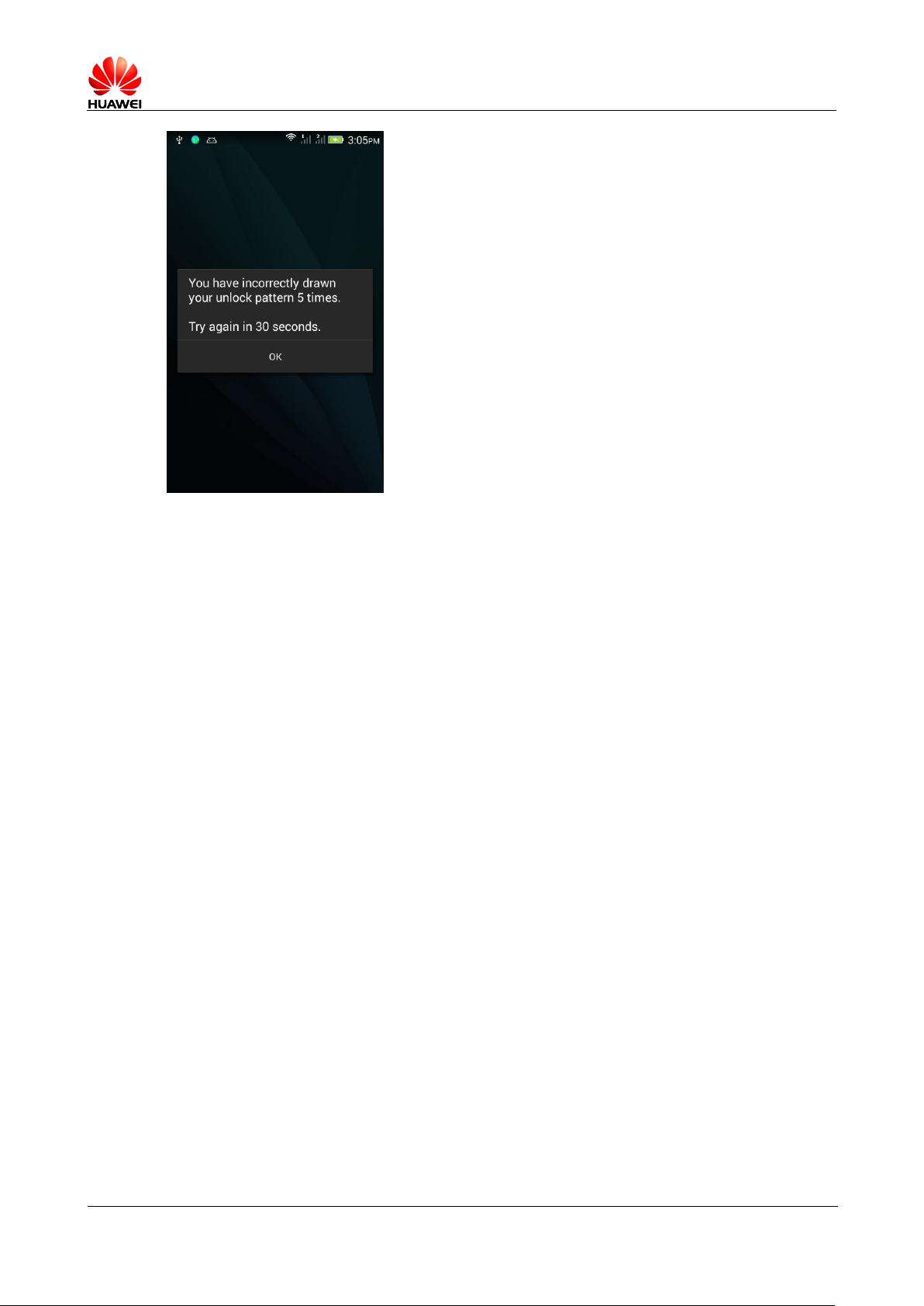
Mismatched graphic five times will lock the phone in a row prompted, not locked, but
will attempt to delay next time.
Forgot pattern sent to the customer service department, Please unlock or repaint version
cannot be passed at this phone Gmail Unlock the message.
Page 60
HUAWEI T8833 智能手机 FAQ
version 01 (2012-11-30) 60/79
2.9.5 How to lock and unlock the screen
Lock on: press the power key to lock the screen.
Unlock: press the power key to wake up the screen, then follow the onscreen display, drag, input
PIN , Input methods, such as unlocking.
2.10 Alarm clock function
2.10.1 the Add / Cancel alarm clock
Click on the Clock .
Then click the clock Enter the alarm interface.
Choose new alarm , and enter the alarm interface, you can do the following:
Click on the time set time the alarm clock rang.
Click duplicate , select the alarm you want to repeat the cycle.
Click on the ringtone , and select alarm clock.
Check the vibration , set the phone on vibration when the alarm rang.
Click on the label, enter the alarm time name.
Click on the , Complete alarm added.
In the alarm interface, you can see a list of all current alarms, you can open the / Off set alarm
clock. Long press an alarm recording in the pop-up menu, select " delete alarm " Remove alarm
of your choice.
Page 61

HUAWEI T8833 智能手机 FAQ
version 01 (2012-11-30) 61/79
2.10.2 Supports the shutdown alarm clock?
Turn off the alarm clock
2 2.11 Application
3 2.11.1 what format to support software that supports JAVA ?
Support java Written language apk Application, if you want to install .jar , .jad Program needs to
be installed java Simulator (Jbed.apk,GZL-signed-Jbed.apk ) 。
2.11.2 How to obtain third-party applications?
1、 Login Play Store to download third-party applications;
2、 Go online to download .apk Documents;
3、 By PC Tool to download and install, such as the "pea pod".
2.11.3 Supports the preferred installation location settings?
Supports.
2.11.4 How to install, manage and uninstall programs?
The uninstall program:1, main menu long press will need to uninstall the application, move the
application can be uninstalled on the delete icon at the top of;
2, enter all settings-settings-applications-downloaded open-select uninstall to uninstall
programs.
2.11.5 Program install problem and solution
Not enough space, please uninstall unused applications, delete unneeded files from the file
manager.
Incompatible version of the software before Android2.3 Now the application is installed Android4.4
Version.
2.11.6 Phone preset on which software? What is customized
operator? What is the mobile phone comes with software? Are you
able to delete?
Is subject to the sales area. (For example, navigation software, if system comes with
a navigation software, simple to use guide, if the user is using online update or
reinstall you still can continue to use, mobile embedded software needs to do some more
detailed instructions)
D1Quad Map navigation instructions for use should be given
Page 62

HUAWEI T8833 智能手机 FAQ
version 01 (2012-11-30) 62/79
4 2.12 Common problems of third-party applications
2.12.1 QQ
Support for QQ Background ? Support QQ Video? Whether to support sending pictures, download chat
logs? How to clean up in phone log in QQ chat transcript of account number information?
Mobile phones are not preset QQ Need online download QQ After installation, support QQ The
back-end. QQ video, send picture chat downloads QQ application functionality on your own, the
latest version supports more features. QQ2013 version, for example, in the account management
interface, click Edit, click to clear the records of QQ numbers the minus sign on the left, select
Remove, clearing account dialog box pops up, check also delete related chat .
2.12.2 third party apps install to SD Tab, may account for the
phone system memory
Phone support for third-party applications installed directly on microSD On the card. These
applications are running at the time, some provisional data will be saved in the phone store,
phone system and memory occupied, this is normal behavior.
2.12.3 Reasons for partial phone numbers do not appear to belong
Calls attribution queries are not supported.
2.12.4 Online banking transactions (Taobao, Ali wangwang, PayPal,
tenpay, online banking)
Support, you need to download the appropriate client for the provision of services.
Data backup and recovery
2.13.1 Backup and restore your contacts in the address
book
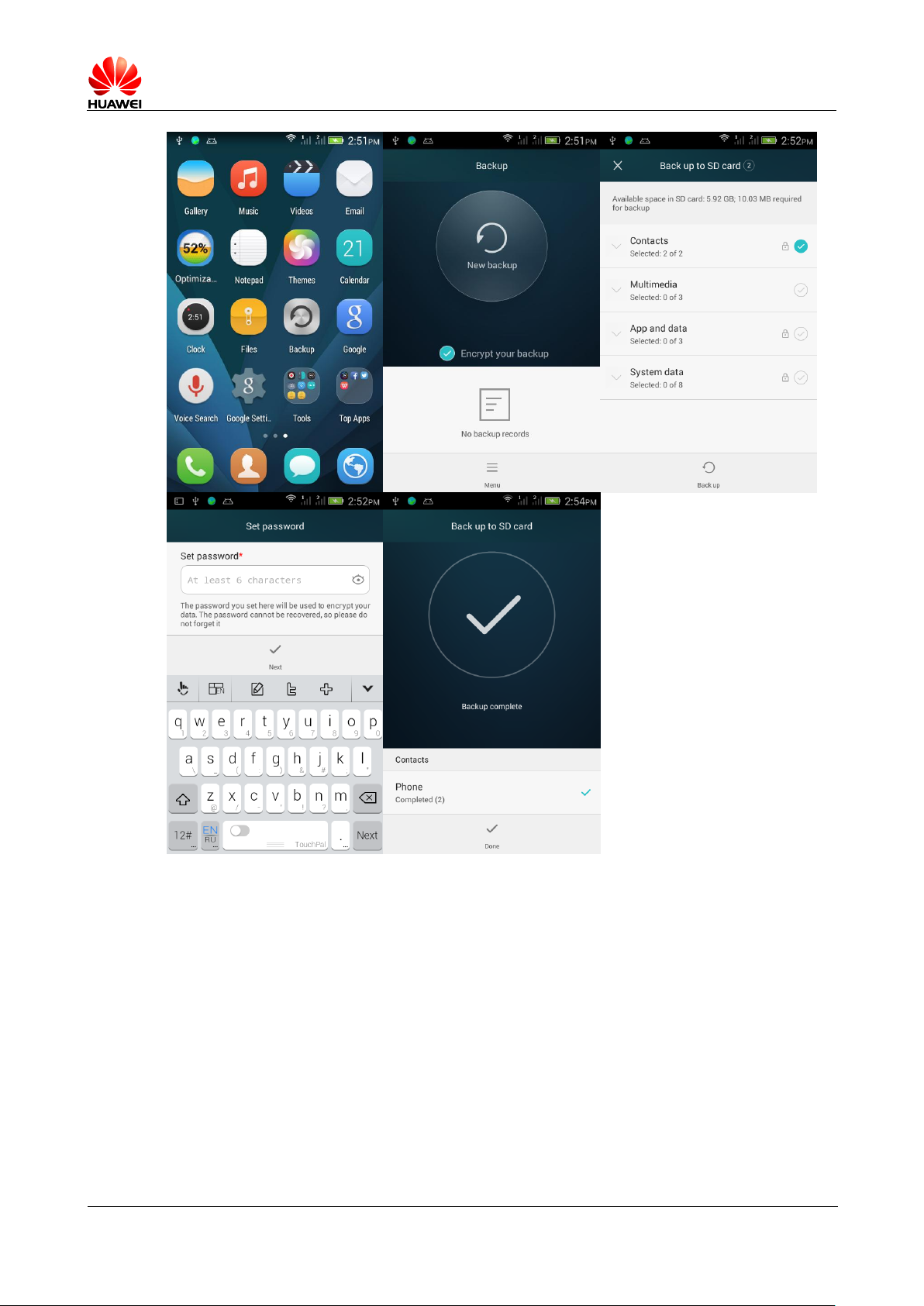
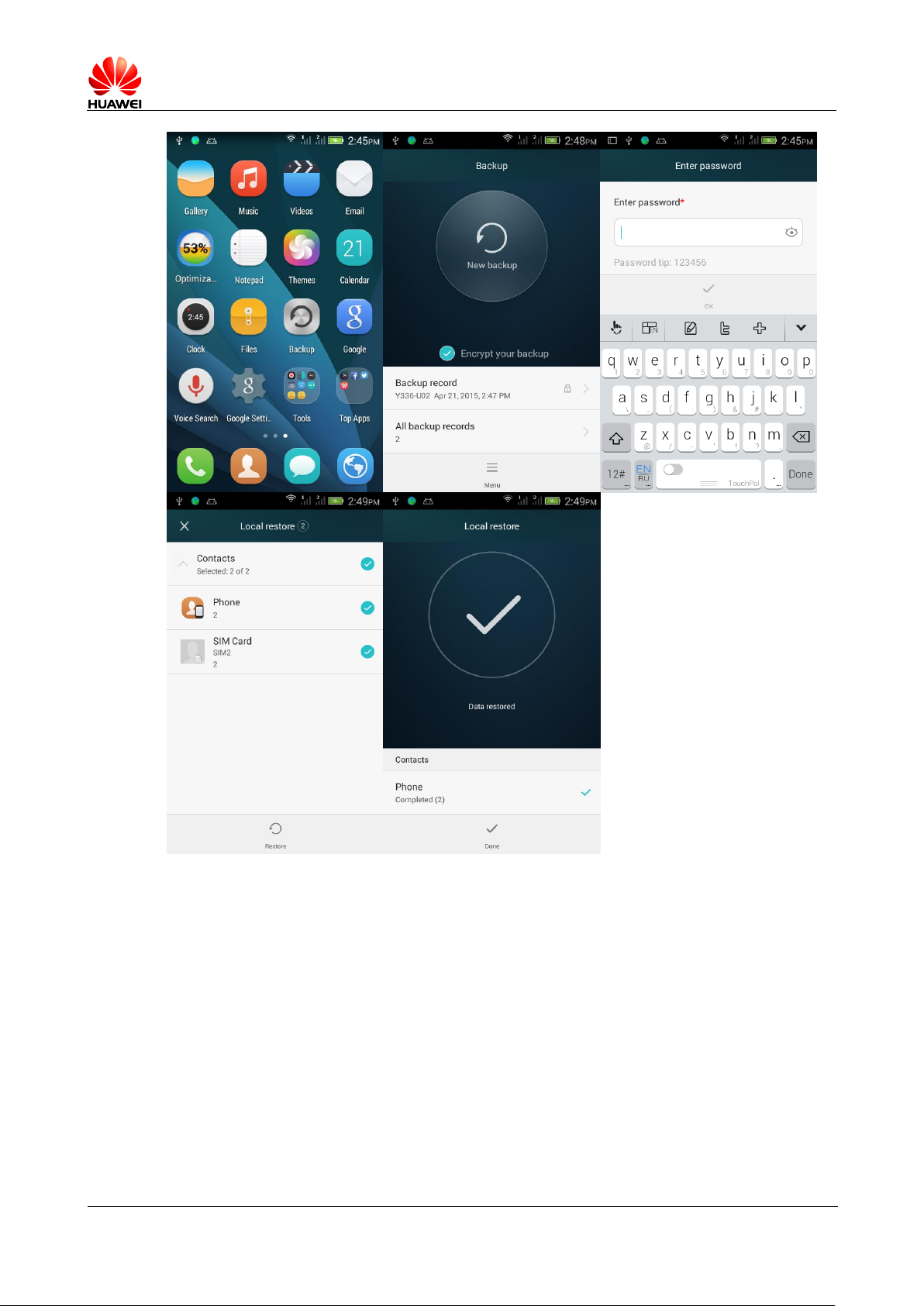
Click backup , backup and restore your contacts.
Backup
Click on the Desktop backup > Click new backup, check the address book , click on the
Start Backup , set the password, it will back up contacts
If you have an external microSD Card, the backup data microSD Under this directory
HuaweiBackup Folder. If there is no external microSD cards, the backup data is stored
internally under the root directory HuaweiBackup folder.
Page 63
HUAWEI T8833 智能手机 FAQ
version 01 (2012-11-30) 63/79
Recovery
Click on the Desktop backup > Click on any backup records > Select the packets to
recover > Enter the password > Check address book , click start restore .
Prior to the resumption of the contacts make sure to backup the contacts.
Page 64
HUAWEI T8833 智能手机 FAQ
version 01 (2012-11-30) 64/79
2.13.2 Supports backup group contacts directory
Does not support.
2.13.3 the How to use the cloud – Backup and restore
The phone does not currently support the cloud backup and recovery.
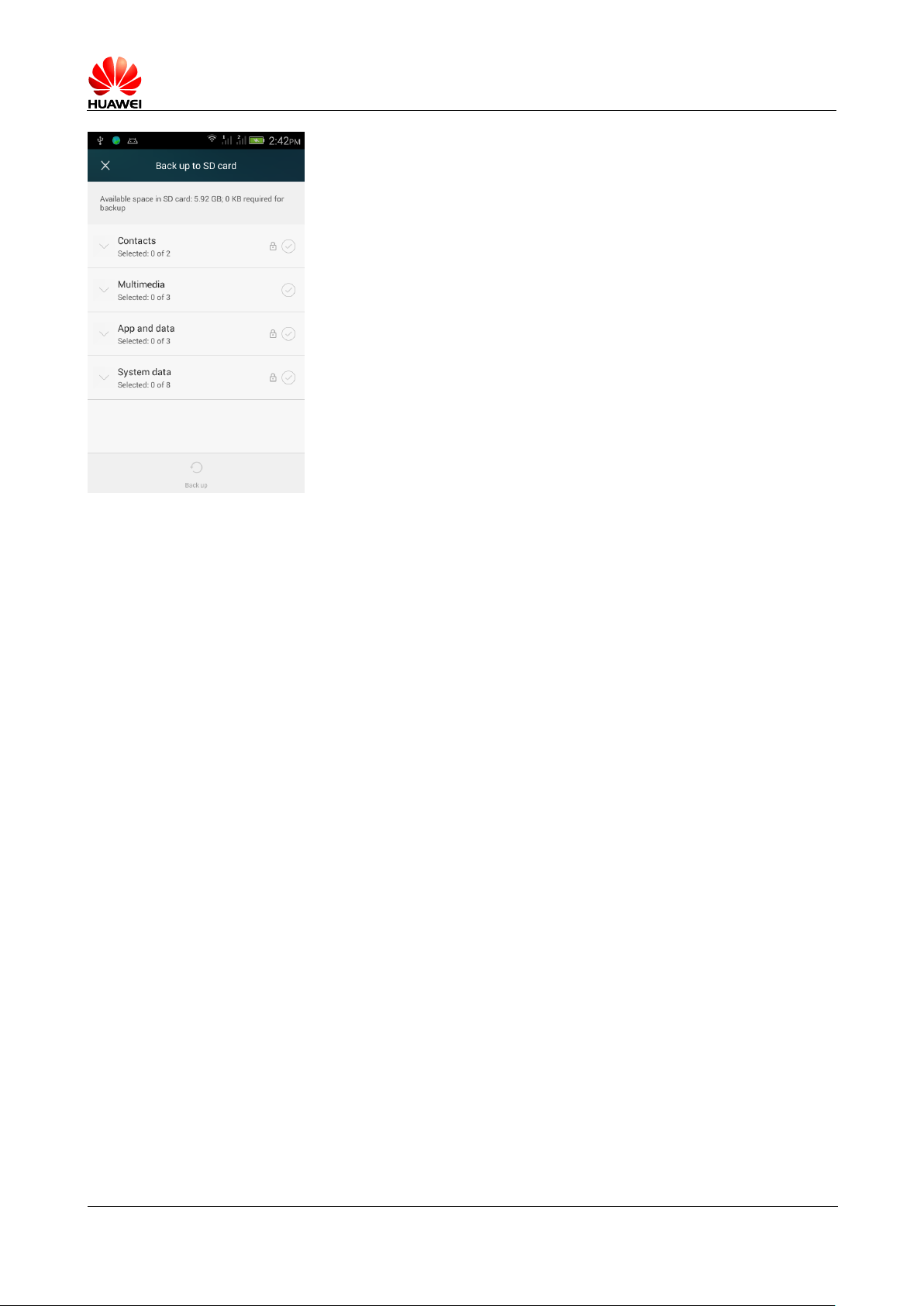
2.13.4 Mobile phone supporting backup what data?
Phone supporting backup your contacts, multimedia, applications, system data
Page 65
HUAWEI T8833 智能手机 FAQ
version 01 (2012-11-30) 65/79
Task Manager
2.14.1 Task Manager role
No preset task manager
2.14.2 How to open Task Manager
No preset task manager
2.14.3 Introduction of Task Manager interface
No preset task manager
2.14.4 Task Manager related operation
No preset task manager
2.15 What’s cloud services feature?
Don’t support Cloud services feature.
Page 66
HUAWEI T8833 智能手机 FAQ
version 01 (2012-11-30) 66/79
2.16 Huawei SecurityGuard
2.16.1 The role of security guards
No preset security guards.
2.16.2 How to use Security guards
No preset security guards.
2.16.3 Mobile security guard encryption problems
No preset security guards.
2.17 Security guards blacklist
No preset security guards.
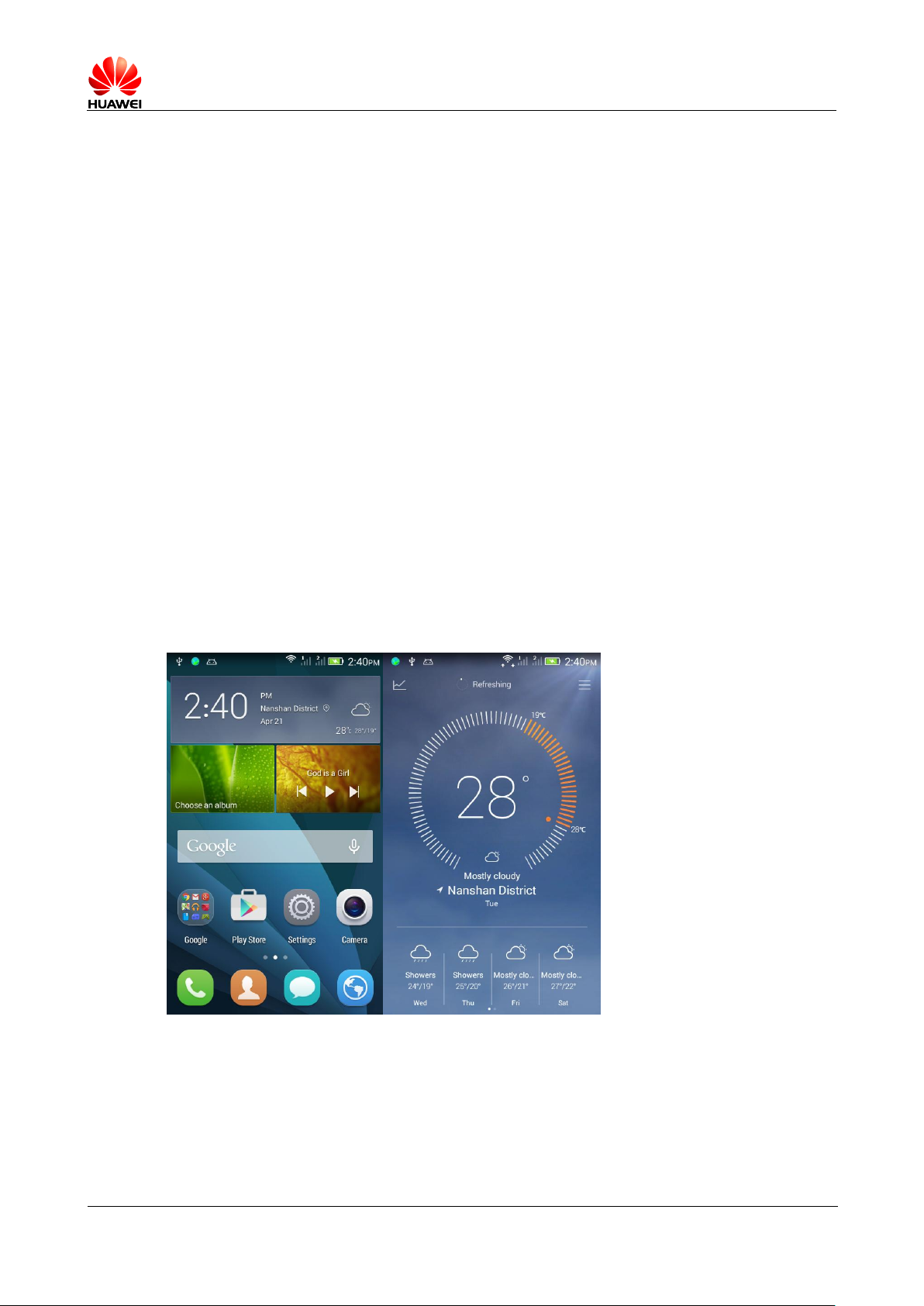
2.18 Weather clock
1、 Home screen-weather- dropdown interface to update current weather
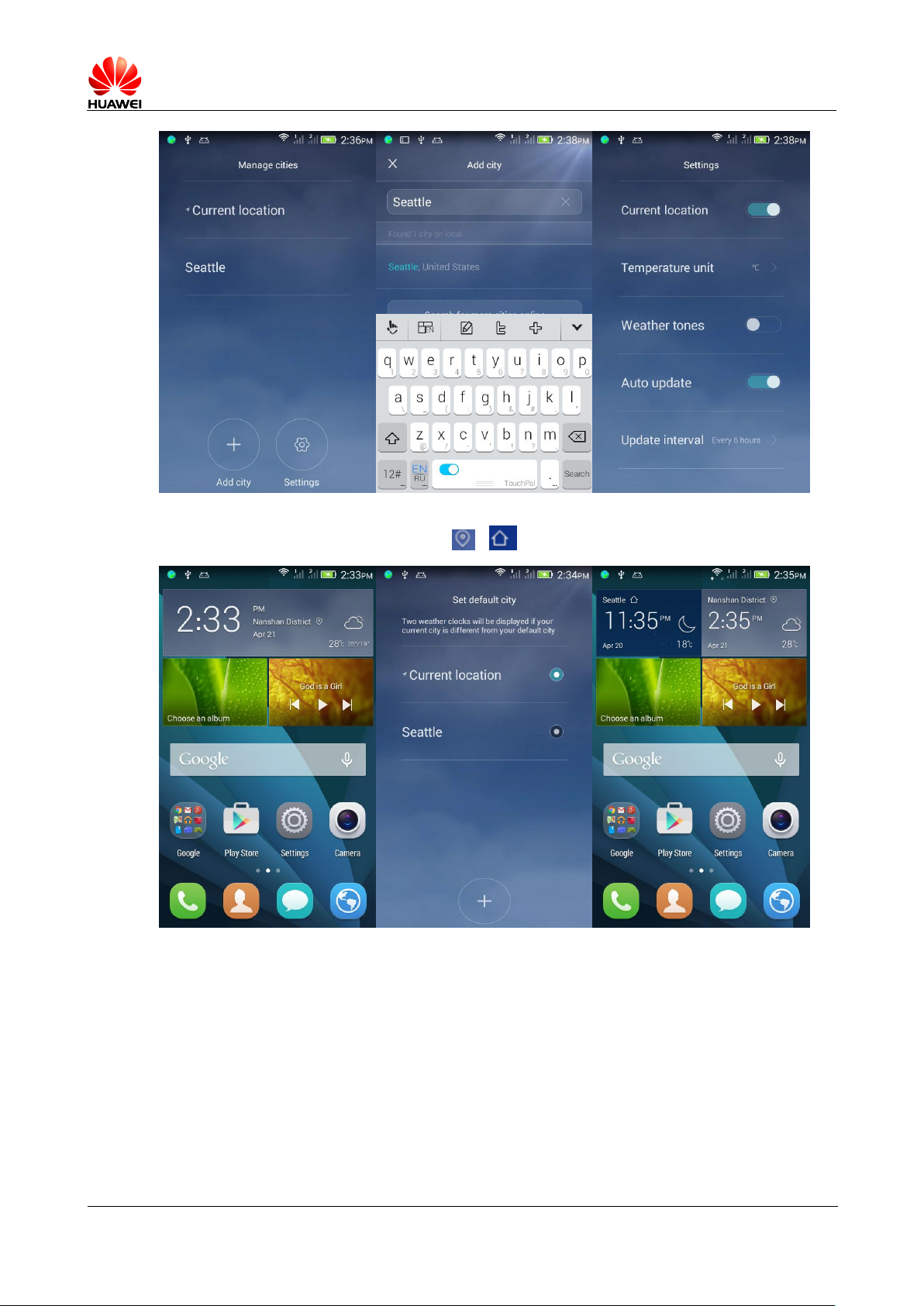
2、 Weather interface — Click the options — Can add cities, set the default City, delete
cidy, set the temperature unit, sounds, opening / Turn off automatic updates
Page 67
HUAWEI T8833 智能手机 FAQ
version 01 (2012-11-30) 67/79
3、 If current position and the default position are not same, will show both position
weather clock. Click weather widget or icon,go to set default City.
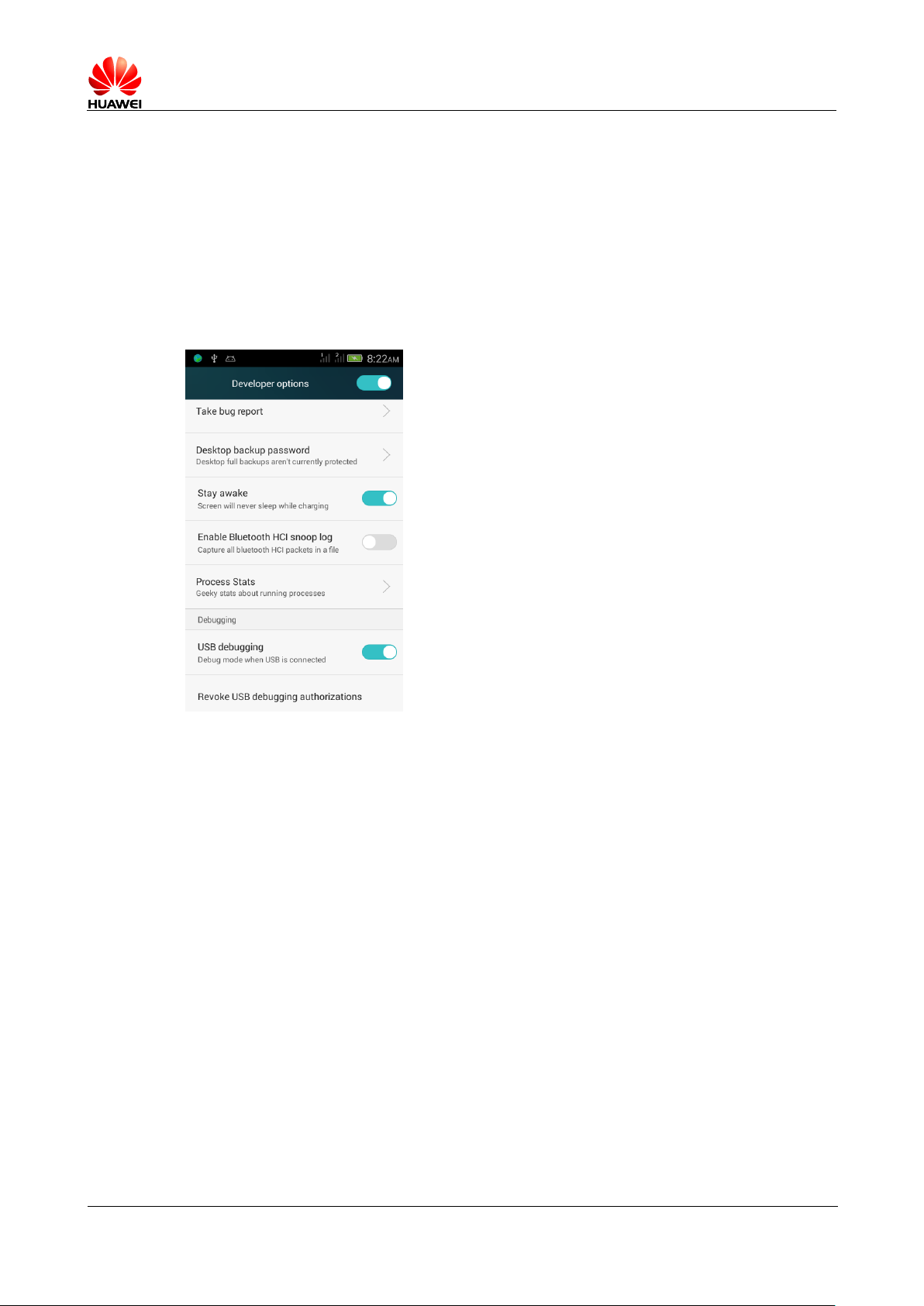
2.19 Developer options
Users can touch switches, Open / Close The developer option.
1.USB Debugging: to enable debug mode, you can adb Command to debug the phone
2. Unlock screen: the screen won’t hibernate when charging
3. Allow mock location: enable simulation location feature.
Page 68
HUAWEI T8833 智能手机 FAQ
version 01 (2012-11-30) 68/79
4. Desktop backup password: desktop full backup current password protection .
5. The cursor position: display the current touch screen overlay data.
6. Touch controls: provides Visual cues for touch operation.
7. Display CPU usage: Displays current CPU usage.
8. GPU rendering mandatory: force to use of GPU 2D drawing.
9. Animated zoom: control the zoom speed.
10. Background processes limit: limits the number of background processes.
11. Show all: display background "application no responding" dialogs.
2.20 Time synchronization
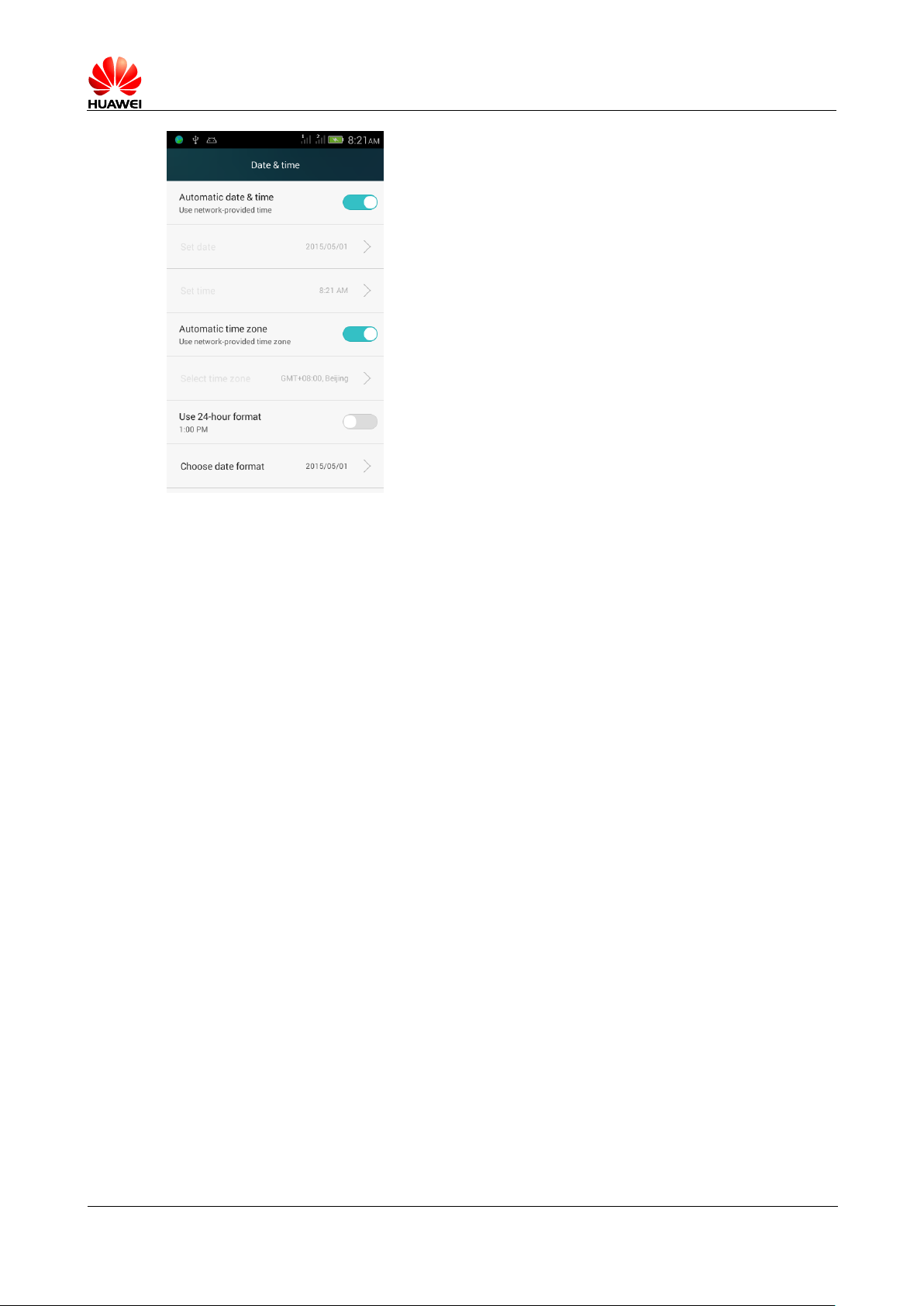
Support time synchronization.
In the home screen, click settings > Select All Setting > Date and time, select date and
time and time zone is automatically.
Page 69
HUAWEI T8833 智能手机 FAQ
version 01 (2012-11-30) 69/79
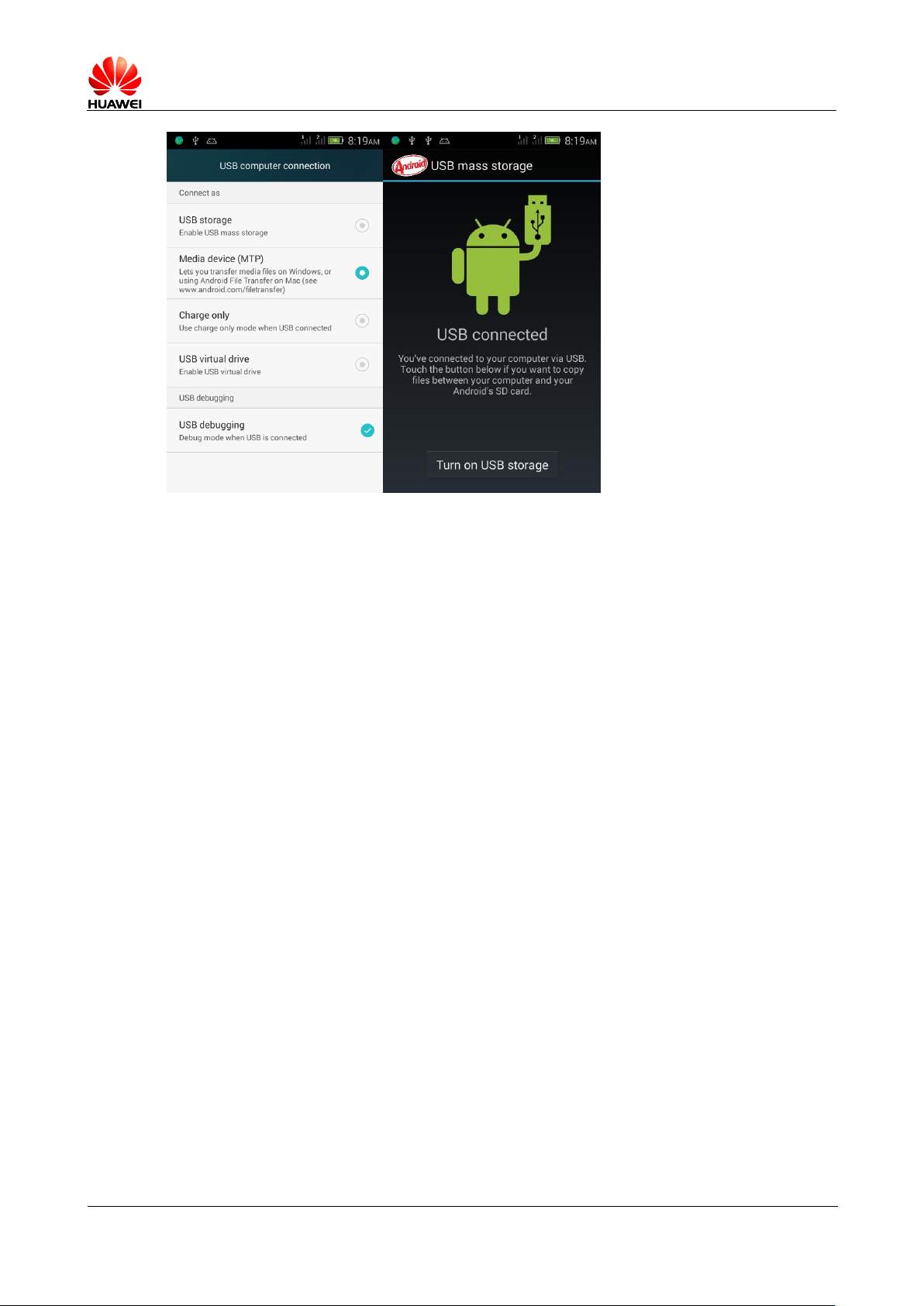
2.21 connect to computer as USB flash disk
Connected phone and computer USB, identify microSD Card, but it does not identify the
phone memory.
USB Storage device : XP System, let phone as U Disks for file replication.
Media devices (MTP ) : Allows you upload mediafiles in windows or transfer files in
Mac system
Charging only : Deactivates all other USB Features and speed up USB Charge and reduced
power consumption
Virtual driver : As a virtual disc, contains commonly software
Page 70
HUAWEI T8833 智能手机 FAQ
version 01 (2012-11-30) 70/79
2.22 Release storage space
Delete unused files: go to the file management > Internal storage > Click delete icon >
Select the file or folder that you want to delete;
Long press the file or folder you want to delete in the pop-up menu, select delete .
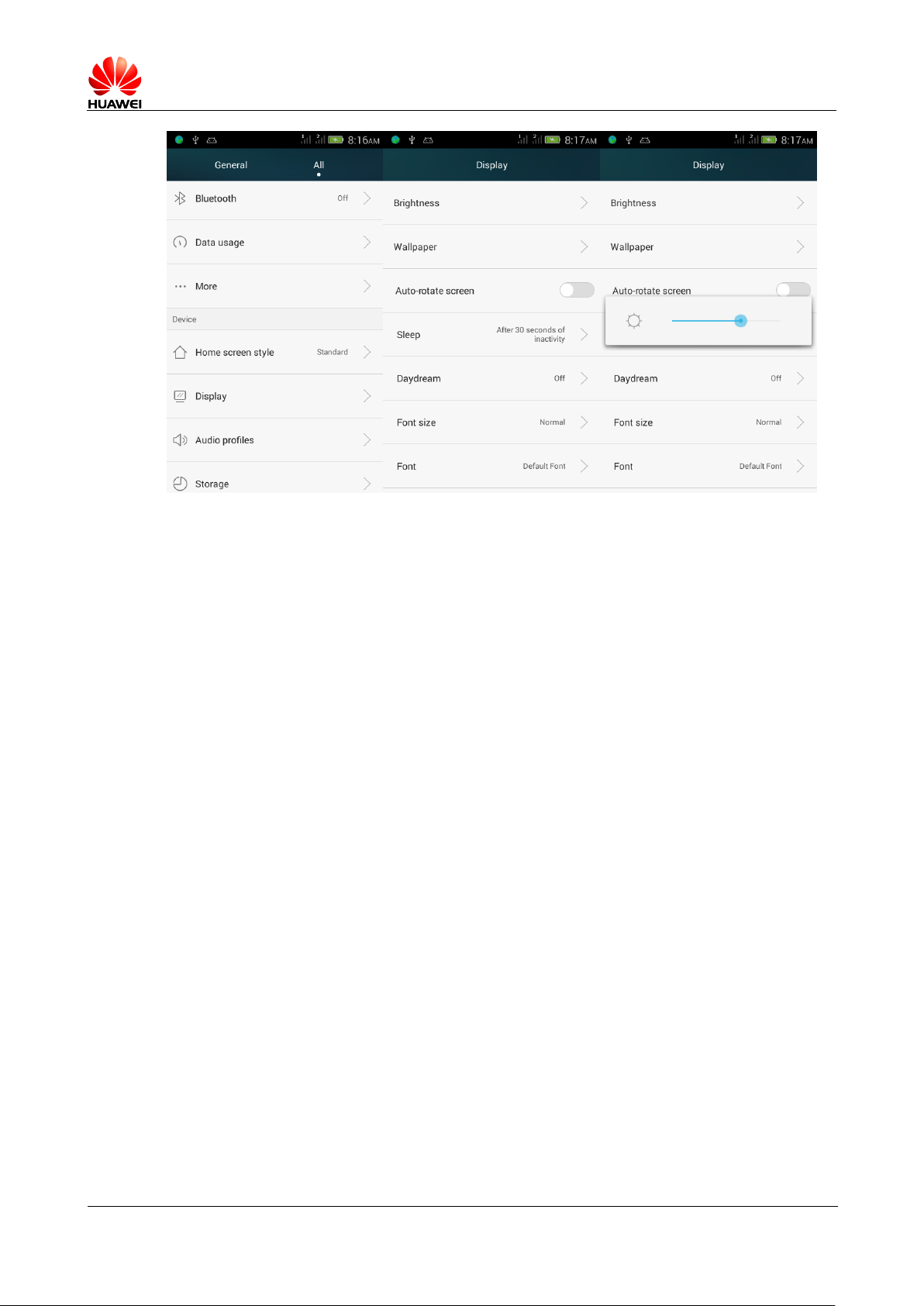
2.23 Adjust the screen brightness
In the main screen, click settings > All settings > Display > Brightness You can
manually slide the slider to set the brightness
The drop down status bar > slide the brightness adjustment.
Page 71
HUAWEI T8833 智能手机 FAQ
version 01 (2012-11-30) 71/79
2.24 Phone keypad backlight power saving function
Don’t support this function
2.25 Setting flight mode
1 , In the main screen, click setting > All setting > More ... , Check the flight mode , turn on
flight mode; uncheck to turn off airplane mode.
2 , Shortcut switches turn on flight mode .
3 , Long press power Key to open flight mode.
2.26 Restore factory settings
1 , In the main screen, click on " settings > All settings > Backing up and resetting > Restore
factory settings "。
2 , And click the " reset phone ", to restore factory settings.
2.27 How to enter and exit safe mode
Don’t support safe mode
Page 72

HUAWEI T8833 智能手机 FAQ
version 01 (2012-11-30) 72/79
2.28 HiSuite
Don’t support HiSuite 。
2.29 supports HDMI? How is it used?
Does not support
2.30 supports TV-OUT? How is it used?
Does not support
2.31 does support OTG function? How is it used?
Does not support
Notes : OTG Is a new USB Transmission technology, you can use OTG connect to mobile
access U Disk, digital camera, or a keyboard, mouse, external devices, operation of
HD video output mode.
2.32 Status indicator light
Does not support
2.33 Chargers standard configuration
No, cell phone has charging protection circuit. However, users are advised to use as
standard charger , long-term useing high current charger will affect mobile phone and
the battery life. Use the trickle charge, will prolong the charging life.
2.34 New machine features
Y336-02 Is kind of WCDMA/GSM/GPRS/EDGE Only supports downlink, uplink GPRS
Digital mobile phones, Android 4.4 And or above, SC7731 4 1.2GHz , 4.0 Inch TN Display,
GF Capacitive 2 Touch screen, 500 W AF rear camera, 200W Front camera, USB Hi-speed
ports, support g-sensor, dual SIM dual standby, 1730mAH External battery. Support FM,
Bluetooth,WIFI, and GPS functions.
Page 73

HUAWEI T8833 智能手机 FAQ
version 01 (2012-11-30) 73/79
4 Others
3.1 Power saving tips
When Mobile phone idle, press the power key to turn off the screen saver.
Shortened screen sleep time: on the home screen, click on the Settings > All settings > Display >
Hibernate Set screen sleep time.
Reduce screen brightness: in the home screen, click on the Setting > All settings > Display >
Brightness, And set the screen brightness.
Turn off Bluetooth and WLAN : On the home screen, click on the Setting > All settings , Wireless
and network areas off Bluetooth and WLAN 。
Turn off data service: on the home screen, click on the Setting > All settings > More ... > Mobile
network >SIM1 Mobile network settings /SIM1 Mobile network settings, Close enabled data
networks .
Close GPS : On the home screen, click on the Setting > All settings > Location information Close
access my location information .
3.2 Network traffic saving tips
When Data services idle, turn off data service features.
WLAN idle , turn off data service.
Login wap Web site is more saving traffic than login www Site less
Turn off data service: on the home screen, click on the Set > All settings > More ... > Mobile
network , Close the enabled data networks .
3.3 How to do when mobile phones running slowly
More programs running currently, close some programs running in the background. On the home
screen, click settings > settings > applications > running, Select an application and select
stop .
Many installed applications, system is low on disk space, resulting in slower mobile, you can
uninstall some applications, freeing up system disk space, increasing the running memory.
Page 74

HUAWEI T8833 智能手机 FAQ
version 01 (2012-11-30) 74/79
CPU Occupy highly, and background processes to run more, will cause running slowly, reboot
the phone, background processes will shut down useless applications
Click the one-click Cleanup, free up phone memory.
3.4 Set the wallpaper will automatically stretch, whether
it does not stretch wallpaper.
Not supported, but some third-party desktop
support, such as 360 Desktop, GO Desktop.
3.5 entering RECOVERY Mode and restore the factory
settings
In power off mode, press the power key and up volume key to recovery Mode after entering,
you can press the up / down volume keys to select, when selected, press the menu key
to enter the corresponding functions.
Restore factory settings: on the home screen, Click on the Setting > All settings >
Backing up and resetting > Restore factory settings , And then tap reset phone 。
3.6 Supports snapshot QR codes?
Support larger QR code scanning ( 3*3 Or more), for a small QR code image support is
limited.
3.7 support for 3D acceleration?
Supports. On the home screen, click settings > all settings > options for developers ,
check the " force a GPU Rendering ".
Open 3D Acceleration allows game screen more smoothly, but will consumes more memory;
while playing game, consuming more memory is generally not affected, but if cell phones
running a lot of applications, and may cause the phone running slowly.
3.8 How to judge whether the phone has been root ?
adb shell Command to view the show $ Indicates that there is no root Before, appear as
# root Now.
Page 75
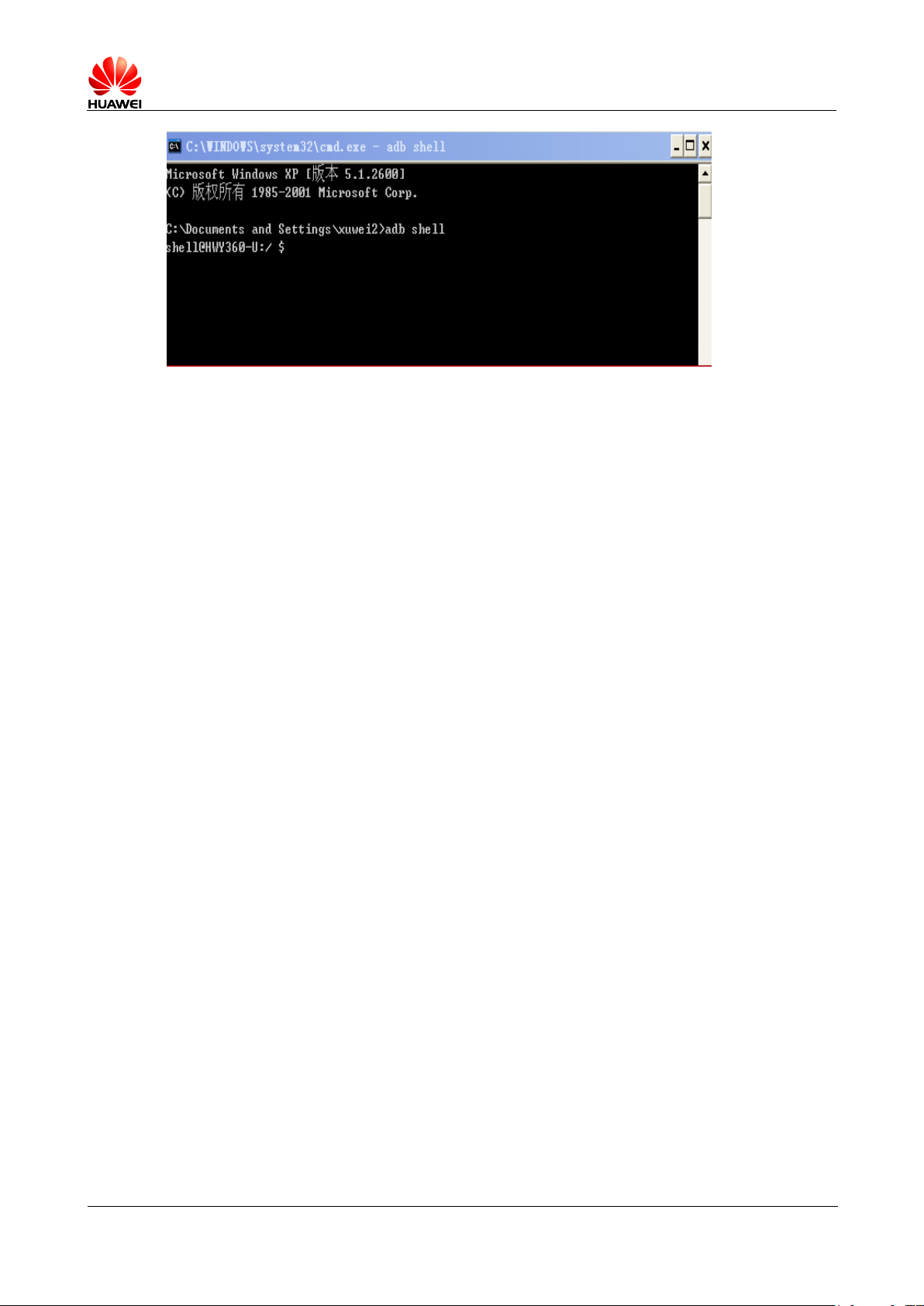
HUAWEI T8833 智能手机 FAQ
version 01 (2012-11-30) 75/79
3.9 After pulling out the battery, need reset time, does
time automatically sync will consume network traffic?
Phone remove battery over 20 Seconds, time will reset to zero. If phone is powered on and register
your network from an operator, then will not updated time by Internet and do not take up network
traffic.
If power on and no access time setting from operator, and turn on time automatic updates in the
set time, can take up a very small part of the network traffic.
3.10 Support sound recorder?
Yes.
3.11 Does phone has screen film?
No.
3.12 Support for mobile TV? How to set up?
Don’t supported.
3.13 does phone support Word ,Excel,ppt,PDF editing and
browsing ?
Does not support. Need to download third-party applications to work out it.
Page 76

HUAWEI T8833 智能手机 FAQ
version 01 (2012-11-30) 76/79
3.14 Phone memory divide details
Flash (ROM) factory partition table (Note: ROM is equivalent to a
desktop computer's hard drive)
4G
Partition
Size
Usage
How users
In fact, cell phones and computers, PAD Such devices, the actual physical ROM,RAM
Is consistent with the specifications, but will use part of the system. For questions,
you also need further explanation. Y336-02 specification is 4G ROM + 512M RAM.
Different users something different may be 4G ROM, or 512M RAM
4G ROM
Program and file systems, databases, etc are all occupied this part of space,
occupies a total of about 1.5G About this part of space is not displayed to the user.
Displayed to the user, it is space that users can use the 1.84G, and t- card function
similarly, can in this part of space to store all kinds of files.
ROM Comparison of mobile information, detailed data is as follows :
Galaxy III Specifications 16G Free space 11.35G
Galaxy Note Specifications 4G Free space 1.51G
G520 Specifications 4G Free space 1.84G
T8950 Specifications 4G Free space 1.82G
512M RAM
Because android Part of the memory used by the system to hide the, this memory mainly
assigned to the kernel Run, but the memory is not displayed, leading to see actual size
of memory do not comply with specifications. G520 total available RAM for 460M. As
the market 512M less 1G RAM compare list.
On the market 1G RAM Mobile comparison of specifications, detailed data is as
follows :
Galaxy III A total of 763M
Galaxy Note A total of 713M
C8950 A total of 627M
T9200 A total of 656M
T9510E A total of 713M
T8950 A total of 980M
Divide details as below:
Page 77

HUAWEI T8833 智能手机 FAQ
version 01 (2012-11-30) 77/79
Phone
boot
operating
system
and data
backup
About
64M
System boot (startup) core data storage area;
as well as the operating system backup, users
can choose "restore factory settings" system
that is used when this part of data recovery
A special partition
cannot be queried.
Third-party system
software cannot be
queried.
HOTA
Upgrade
pre
assigned
areas
About
126M
The partition reserved for remote wireless
system upgrades, equipment manufacturers or
operators to promote important patches to the
user using this partition
A special partition
cannot be queried.
Third-party system
software cannot be
queried.
system
partition
About
650M
Google Android The partition that the operating
system uses
A special partition
cannot be queried.
Third-party system
software cannot be
queried.
Virtual
SD card
partition
About
1.84G
Google Operating system requirements for
photos, Bluetooth transmission, PC functions
such as file backups must be in SD on a virtual
SD card is for the convenience of users are not
configured the expansion SD card case and
took pictures, Bluetooth file transfer, or through
a PC to phone copy music, video files, and so
on. That is to say, users no longer have to
purchase extra SD cards that can use the
Android system's full functionality.
Users can "set ---
store ---SD cards" to
query.
Data
partitionin
About
0.98G
Required operating system or applications
running in the data store. User installed
Users can use the
third system
Page 78
HUAWEI T8833 智能手机 FAQ
version 01 (2012-11-30) 78/79
g
application files will also be put into this space,
such as when a user downloads an angry bird,
choose to install, the installation file is placed to
this space
software queries
Other
scattered
storage
space
About
128M
This section contains files partition table's own
storage space, Flash bad block flag factory
items list, as well as the loss of formatting the
space.
Special space
cannot be queried.
Third-party system
software cannot be
queried.
Total
4G
The partition table above is only for reference, specific partition
sizes with differ with the customized version
memory(RAM)distribution (mark:RAM equal to PC memory)
Partition
Size
Usage
How to user
The
underlyin
g partition
About
42M
Display cache, the underlying wireless protocol
stacks
Special partitions cannot query.The
third party system software can
query。
Operating
systems
and user
partitions
About
460M
Android Operating systems and applications
Using a third-party software can query,
but due to the different way of statistical
software to check the value may be
different
Total
512M
Partition table above is only for reference, the difference in partition
sizes with various customized version specific
Page 79
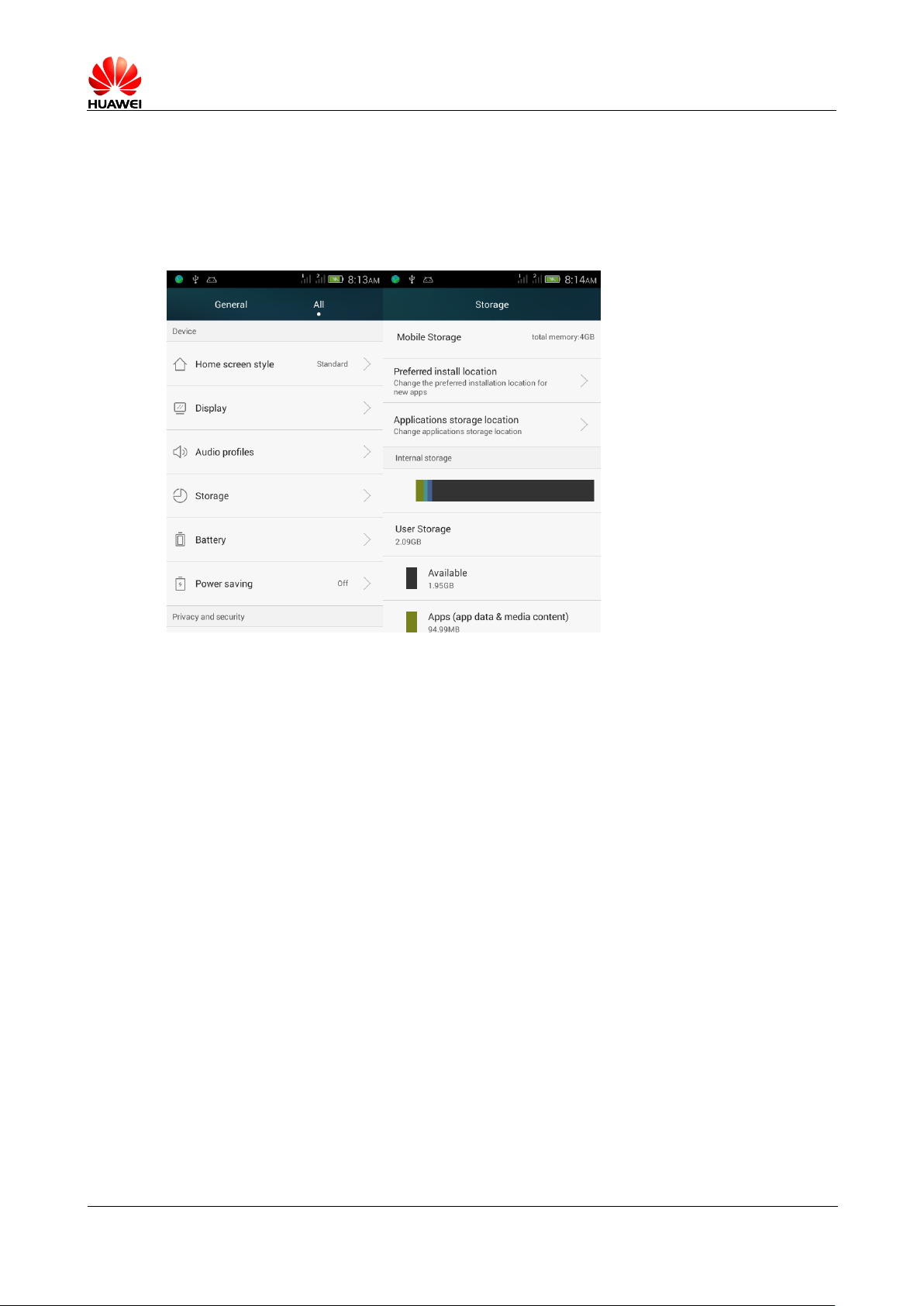
HUAWEI T8833 智能手机 FAQ
version 01 (2012-11-30) 79/79
3.15 the phones internal memory and microSD card storage
space remaining
To access the main menu, select settings > Storage, respectively, in "internal storage"
and " SD Card "area to view the storage space.
 Loading...