

Page 1
Error! Reference source not found.
Issue
Error! Reference source not found.
Date
2013-07-9
ERROR! REFERENCE SOURCE NOT FOUND.
HUAWEI TERMIANAL CORPORATION
Page 2

Error! Reference source not
found.6
HUA WEI Confidentia
2/ 39
Contents
1 Basic Function ................................................................................................................ 7
1.1 Color schemes, and which color would be supported...................................................................... 7
1.2 Products selling points ..................................................................................................................... 7
1.3 Cell phone Keyboard Introduction .................................................................................................... 8
1.4 Assemble the phone ......................................................................................................................... 9
1.5 Main menu brief introduction ............................................................................................................. 10
1.5.1 Add/ delete main menu quickly ................................................................................................. 10
1.5.2 Main menu brief introduction .................................................................................................... 10
1.5.3 Edit main menu .......................................................................... Error! Bookmark not defined.
1.5.4 How to add a shortcut icon to the desktop................................................................................... 10
1.6 Ccontacts ......................................................................................................................................... 10
1.6.1 New contact, Establish Caller ID ............................................................................................... 10
1.6.2 Import \ export contacts from SIM ............................................................................................. 10
1.6.3 Maximum contacts can be supported ........................................................................................... 11
1.6.4 setting group contacts ................................................................................................................ 11
1.6.5 How to manage contacts ............................................................................................................ 11
1.7 SMS ................................................................................................................................................. 11
1.7.1 How to switch handwriting input method during edit messages ..................................................... 11
1.7.2 Delete or lock specific SMS of a conversation, bulk delete ........................................................... 11
1.7.3 Forwarding SMS/group sending and save draft method, maximum number of group sending .......... 11
1.7.4 How many English words or chinese characters does long message support. ................................. 12
1.7.5 How many SMS does cell phone support.................................................................................... 12
1.7.6 How to set up number of SMS center ......................................................................................... 12
1.8 Call Function .................................................................................................................................... 12
1.8.1 Call recording, and storage path. ................................................................................................ 12
1.8.2 During a call, how to conference call? Switch the call? ................................................................ 12
1.9 MMS ............................................................................................................................................... 12
1.9.1 Send MMS .............................................................................................................................. 12
1.9.2 MMS Send/ receive possible causes of failure, and solution ......................................................... 13
1.9.3 MMS is affected by file size / video format / resolution ratio and other factors limit ...................... 13
1.9.4 Where is attachment saved in location ........................................................................................ 14
1.10 Music ............................................................................................................................................. 14
1.10.1 Artists、Albums、Songs、Playlists meaning introduction ........................................................ 14
1.10.2 Bulit music playlist................................................................................................................. 14
1.10.3 Play mode introduction ........................................................................................................... 14
1.10.4 Background play music and exit .............................................................................................. 14
1.11 Take photo/video function ............................................................................................................... 15
1.11.1 whether can use take photo/ camera function without SD card ................................................... 15
Page 3

Error! Reference source not
found.6
HUA WEI Confidentia
3/ 39
1.11.2 What is the cause that can’t open some pictures/videos files? ..................................................... 15
1.11.3 Camera / video file, the default save path and change method .................................................... 15
1.11.4 Photo / video editing files, to add photo frames ......................................................................... 15
1.11.5 whether support HD video play ............................................................................................... 15
1.11.6 whether camera shutter sound can be set to silent ...................................................................... 15
1.11.7 How to switch Front and back camera? .................................................................................... 16
Does not support the front camera ...................................................................................................... 16
1.11.8 What is camera format? How big size does video image support? ............................................... 16
1.11.9 What is format of phone camera? How big size does photo image support? ................................. 16
1.12 Streaming media ............................................................................................................................. 16
1.12.1 During a call, whether support streaming media background play? Can restore automatically? ..... 16
1.12.2 Why can’t play some streaming media ..................................................................................... 16
1.12.3 what is the possible causes ? when Online play streaming media less effective ............................ 16
1.12.4 Playing online video , whether will cause the phone run out of memory because of the while
downloading while downloading. ....................................................................................................... 17
1.13 Bluetooth ....................................................................................................................................... 17
1.13.1 Bluetooth support transmission data of file formats ................................................................... 17
1.13.2 How to transmit data files via Bluetooth ................................................................................... 17
1.13.3 Phone can’t be searched by other phones Bluetooth ................................................................... 17
1.13.4 Bluetooth effective transmission distance ................................................................................. 17
1.13.5 what is the possible causes that can’t connect with other Bluetooth devices ................................. 18
1.13.6 Bluetooth with the computer connect to the Internet, Bluetooth transfer files. .............................. 18
1.14 GPS Navigation .............................................................................................................................. 18
1.14.1 What is phone’s own GPS Navigation software? ....................................................................... 18
1.14.2 How to deal with the Navigation lost data? How to deal with authority documentation or activation
code missing? ................................................................................................................................. 18
1.14.3 How to deal with navigation software can’t search satellite? ...................................................... 19
1.15 Whether support FM radio? How to save the manual search radio channels? ........................................ 19
1.16 The phone Whether support theme download? Or whether support dynamic wallpaper? ....................... 19
Does not support theme download ............................................................................................................ 19
1.17 Whether the phone supports video calls or video chat? ....................................................................... 20
Does not support ..................................................................................................................................... 20
1.18 Whether supports screenshot (screen capture), screen mode? .............................................................. 20
Does not support ..................................................................................................................................... 20
1.19 Whether supports Flash?is download flash software available? ....................................................... 20
Does not support ..................................................................................................................................... 20
1.20 Headset line order ........................................................................................................................... 20
2 Common Setting .............................................................................................................. 20
2.1 E-mail .............................................................................................................................................. 21
2.1.1 E-mail setting .......................................................................................................................... 21
2.1.2 Whether supports check email off line. ....................................................................................... 22
2.1.3 G mail(China area version does not preset, just provide reference) .......................................... 22
Page 4

Error! Reference source not
found.6
HUA WEI Confidentia
4/ 39
Does not support ............................................................................................................................... 22
2.1.4 synchronize contacts, calendar, when you can not synchronize, how to operate? ............................ 22
2.2 WLAN Function setting .................................................................................................................... 22
2.2.1 Use WLAN connect internet ..................................................................................................... 22
2.2.2 Which WLAN’s protocol does the phone support? How much is different protocol transmission rate?
........................................................................................................................................................ 22
2.2.3 Connection networks unable open pages via WLAN sometimes ................................................... 22
2.2.4 Unable search WLAN signal ..................................................................................................... 23
2.2.5 How to identify using SIM for log in internet, or using WLAN log in internet? ............................. 23
2.2.6 The cause of connection WLAN failure ...................................................................................... 23
2.2.7 WLAN sleep time is disconnected automatically, how to solve, what is the phone default setting? .. 23
2.3 Networks sharing and portable hotspot ............................................................................................... 23
2.4 Static IP for a WLAN access internet .................................................................................................. 24
2.5 As a modem to connect computer access internet ................................................................................. 24
2.6 Ringtone setting ................................................................................................................................ 24
2.6.1 Incoming call own ringtone setting method ................................................................................ 24
2.6.2 Incoming call/message vibrate setting way. ................................................................................ 25
2.6.3 How to set optional music for incoming call/SMS ringtone? ........................................................ 25
2.6.4 How to set up group ringtone? ................................................................................................... 25
Does not support ............................................................................................................................... 25
2.6.5 How to cancel phone’s keytone? ................................................................................................ 25
2.7 Language & Keyboard ...................................................................................................................... 25
2.7.1 Which language does it support? How to change cell phone language? ......................................... 25
2.7.2 After installed other input method, why can not use it? ................................................................ 25
2.7.3 Whether support adjust system font size? ................................................................................... 25
2.7.4 what kind of input method the phone own has? ........................................................................... 25
2.7.5 How to switch stroke input method .............................................. Error! Bookmark not defined.
2.7.6 How to switch off input method vibration ................................................................................... 25
2.8 Internet setting .................................................................................................................................. 26
2.8.1 Cell phone browser clear cached and history. .............................................................................. 26
2.8.2 Browser full screen and bookmarks settings ............................................................................... 26
2.8.3 Login email box from cellphone webpage .................................................................................. 26
2.8.4 whether support login internet banking. ...................................................................................... 26
2.8.5 Save picture from webpage ....................................................................................................... 26
2.8.6 Set to modify homepage ........................................................................................................... 26
2.8.7 Save my favourite webpage....................................................................................................... 26
Does not support ............................................................................................................................... 26
2.8.8 Cell phone unable connect network, network parameter setting method. ....................................... 26
2.8.9 How to turn off and turn on data business ................................................................................... 27
2.8.10 Check or disconnect current data connection. ........................................................................... 27
2.8.11 When the phone, whether it supports the Internet?..................................................................... 27
Page 5

Error! Reference source not
found.6
HUA WEI Confidentia
5/ 39
2.8.12 What are the limitaion of data service( for example CDMA dual SIM card phone does not support
GSM network) .................................................................................................................................. 27
2.9 Screen lock setting ............................................................................................................................ 27
2.9.1 How to start PIN code to lock screen? ...................................................................................... 27
2.9.2 How to set up the face unlock. ................................................................................................... 27
2.9.3 How to start screen unlock pattern? ........................................................................................... 28
2.9.4 After continue inputed wrong unlock pattern several times, whether the phone will be dead lock?
Forget the pattern, how to unlock? Whether through the GMAIL mail to unlock? ................................... 28
2.9.5 How lock and unlock screen ...................................................................................................... 28
2.10 Alarm clock Function ...................................................................................................................... 28
2.10.1 Add/cancel alarm clock ........................................................................................................... 28
2.10.2 Whether support alarm clock when the cell phone power off? .................................................. 29
support ............................................................................................................................................. 29
2.11 Application program........................................................................................................................ 30
2.11.1 Which kind soft format does the phone support, whether support JAVA?................................... 30
2.11.2 How to get third-part application program? ............................................................................ 30
2.11.3 Whether support first choise installation location setting? ........................................................ 30
Does not support ............................................................................................................................... 30
2.11.4 How to install, manage, and uninstall program? ........................................................................ 30
2.11.5 Program install failure cause and solution ................................................................................. 30
2.11.6 What kind of softwares does the cell phone preset? What kind of them is operator customizing?
What kind of them belong to the phone own software? Whether enable delete? ....... Error! Bookmark not
defined.
2.12 Common third-part application problem ............................................................................................ 31
2.12.1 QQ relevance ......................................................................................................................... 31
2.12.2 The third-part application software installed locate into SD card, perhaps would occupy cell phone
system Memory. ................................................................................................................................ 31
2.12.3 The reason why Part of phone number does not show attribution ................................................ 31
2.12.4 Internetbank deal(taobao, Alitalk, Alipay, tenpay,E-bank) ..................................................... 31
2.13 Data backup and restore .................................................................................................................. 31
2.13.1 Address book,back up and restore contacts ............................................................................... 31
2.13.2 Whether support backup group contacts directory...................................................................... 32
2.13.3 How to use cloud backup—backup, restore ................................ Error! Bookmark not defined.
2.13.4 Which data does The cell phone support backup? ...................................................................... 32
2.14 Management application .................................................................................................................. 32
2.14.1 Role of task manager .............................................................................................................. 32
2.14.2 How to run task manager ........................................................................................................ 32
2.14.3 Task manager interface brief introduction ................................................................................. 32
2.14.4 Relevant operation of task manager ......................................................................................... 32
2.15 What function does the cloud service have? ...................................................................................... 33
Does not support ..................................................................................................................................... 33
2.16 HUAWEI Security Guard ................................................................................................................ 33
Does not support ..................................................................................................................................... 33
Page 6

Error! Reference source not
found.6
HUA WEI Confidentia
6/ 39
2.17 Use HUAWEI Security Guard blacklist ............................................................................................. 33
Does not support ..................................................................................................................................... 33
2.18 Weather ............................................................................................ Error! Bookmark not defined.
2.18.1 、Enter main menu > weather> at below can process corresponding setting. Error! Bookmark not
defined.
2.19 Developer options ........................................................................................................................... 33
2.20 Time synchronization ...................................................................................................................... 33
2.21 Connect with computer as USB flash disk ......................................................................................... 33
2.22 Release internal storage space of cell phone ...................................................................................... 34
2.23 Adjust bright of screen .................................................................................................................... 34
2.24 The cell phone keypad light’s save power function............................................................................. 34
2.25 Setting airplane mode ...................................................................................................................... 34
2.26 How to factory data reset ................................................................................................................. 34
2.27 How to enter and exit safety mode .................................................................................................... 34
2.28 Hi Suite .......................................................................................................................................... 34
2.29 Whether support HDMI?How to use it? ........................................................................................ 35
Does not support ..................................................................................................................................... 35
2.30 Whether support TV-OUT?How to use it? ..................................................................................... 35
Does not support ..................................................................................................................................... 35
2.31 Whether support OTG function?how to use it? .............................................................................. 35
Does not support ..................................................................................................................................... 35
2.32 Status light ..................................................................................................................................... 35
Does not support ..................................................................................................................................... 35
2.33 Whether charger can be mix used ..................................................................................................... 35
2.34 New cell phone characteristic ........................................................................................................... 35
3 Other ............................................................................................................................... 36
3.1 Power saving tips .............................................................................................................................. 36
3.2 Network traffic saving tips ................................................................................................................. 36
3.3 How to deal with the cell phone is running slowly ............................................................................... 37
3.4 Setting up its own wallpaper which will be stretched automatically, whether can set up un-stretching
wallpaper? .............................................................................................................................................. 37
Does not support, but has some third-part desktop support, for example 360 desktop, GO desktop. ................ 37
3.5 Enter RECOVERY mode and Factory data reset .................................................................................. 37
3.6 Whether support snapshot two-dimension code? .................................................................................. 37
3.7 Whether support 3D acceleration? .................................................................................................... 37
Does not support ..................................................................................................................................... 37
3.8 After remove battery, whether clock return 0? the colse setting as automatic clock, whether spend network
flow? ..................................................................................................................................................... 37
3.9 Whether has its own sound recorder? .................................................................................................. 39
3.10 Whether has sticking film when cell phone leave from factory? .......................................................... 39
3.11 Whether support handset TV? How to set up? ................................................................................... 39
3.12 Whether support word,excel,ppt,pdf editing and browse? ........................................................... 39
Page 7

Error! Reference source not
found.6
HUA WEI Confidentia
7/ 39
3.13 Cell phone internal storage space and micro SD remaining storage space. ............................................ 39
1 Basic Function
1.1 Color schemes, and which color would be supported
Handset supports black, white 2 kind colors.
1.2 Products selling points
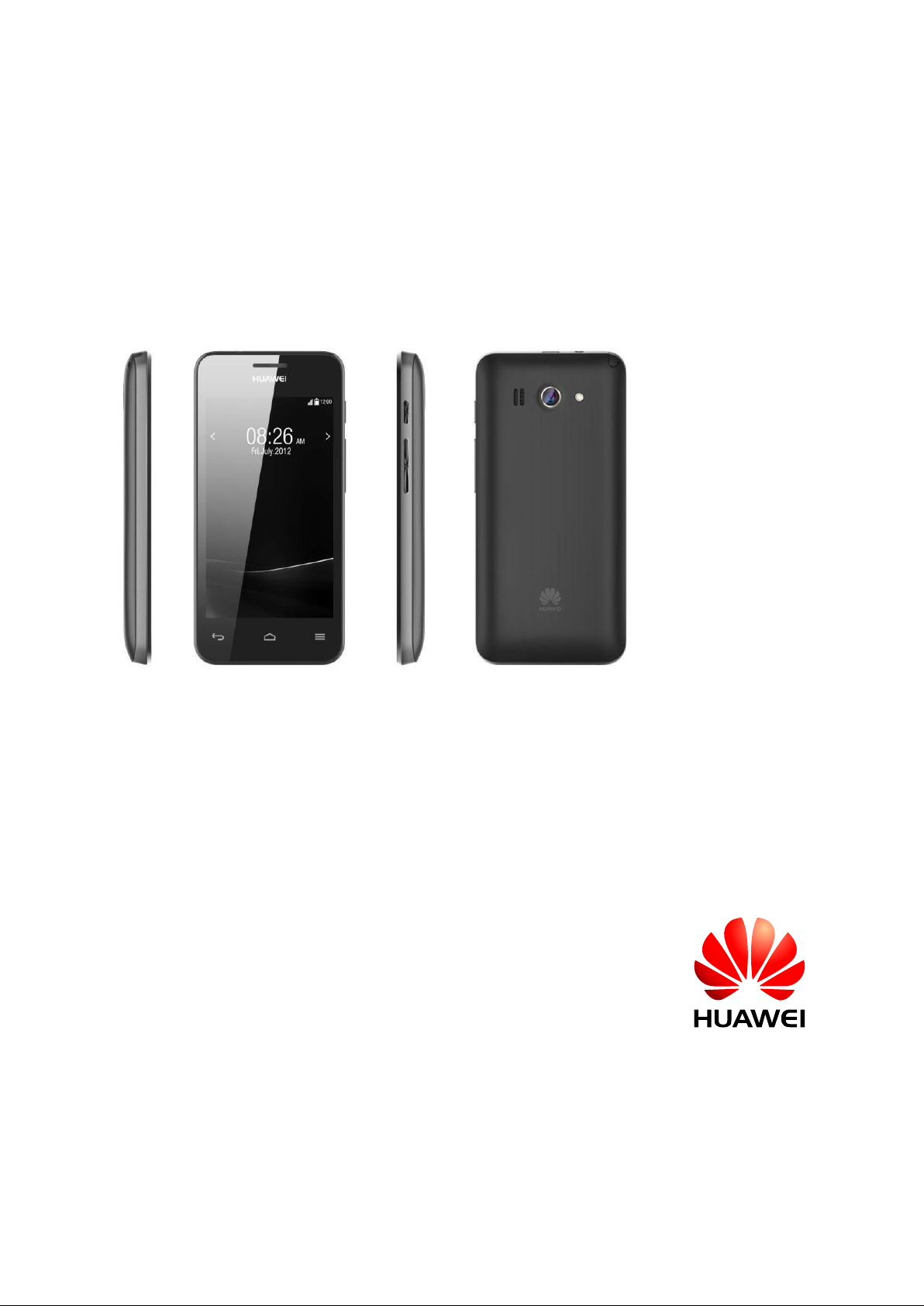
Y320U is a great looking straight full touch phone. Using MediaTek MT6572 dual core 1.2G professional
processor ship。 MT6572 is highly integration 3G ship. Integrate advanced function, such as modem, high
definition 720P video decoder, and so on. Multi-media is strong performance, smooth music processing, support
3.5mm audio connection, support WIFI, DTV, 64 chord ringtones and MP4 player and so on. Holding this
product, just like a professional portable stereo player, is a good companion for end users entertainment.
Page 8
Error! Reference source not
found.6
HUA WEI Confidentia
8/ 39
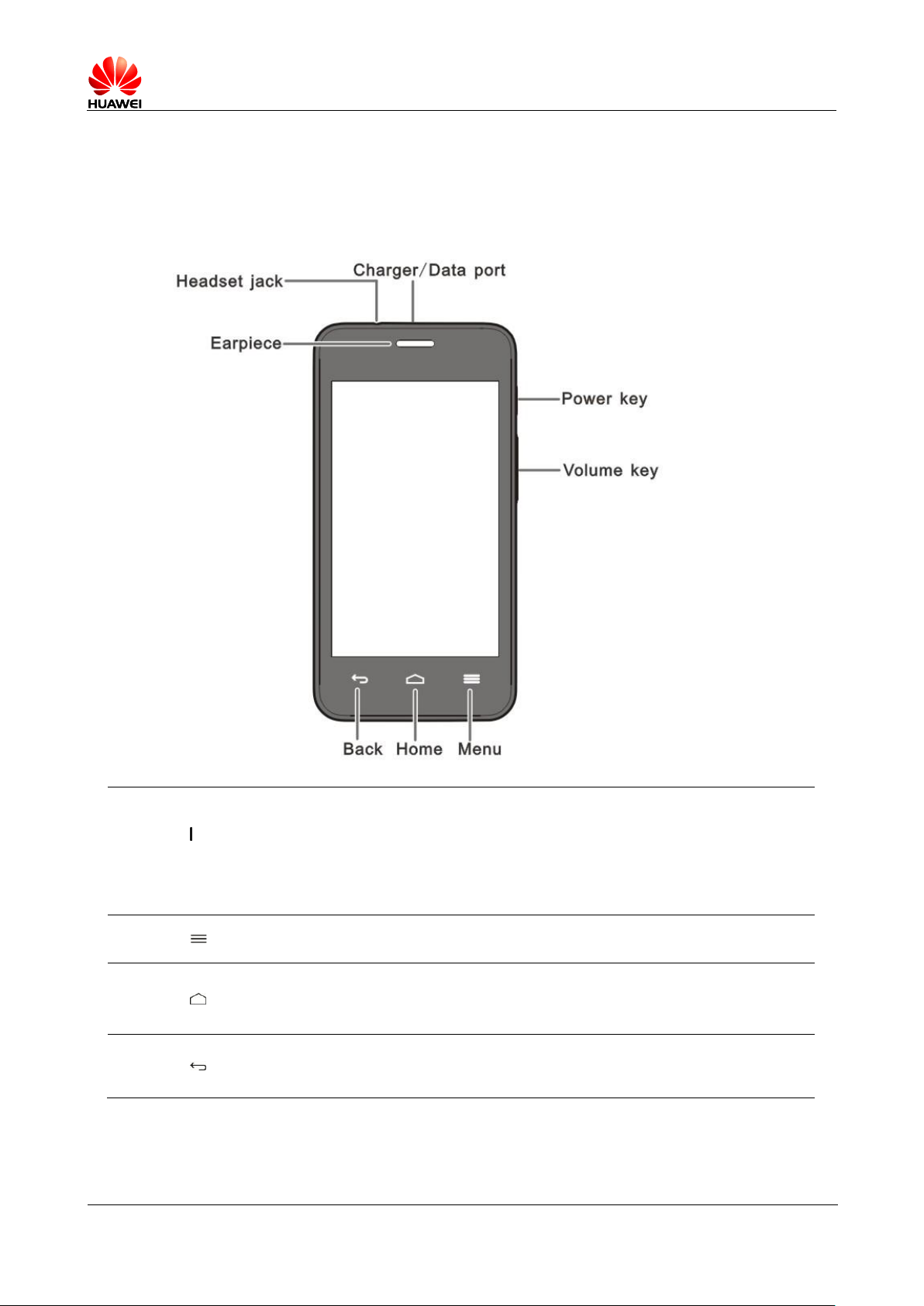
1.3 Cell phone Keyboard Introduction
(power key)
Power off status, long press this key for starting phone.
Power on statues, short press this key for lock screen.
Power on statues,long press this key open corresponding
menu.
Press this key open current interface menu.
Press this key for return main menu.
Long press this key to open Google Search
Press this key to return previous screen
Press this key to exit running program.
Page 9
Error! Reference source not
found.6
HUA WEI Confidentia
9/ 39
(volume key)
On the standby interface,press this key turn down or increase
volume
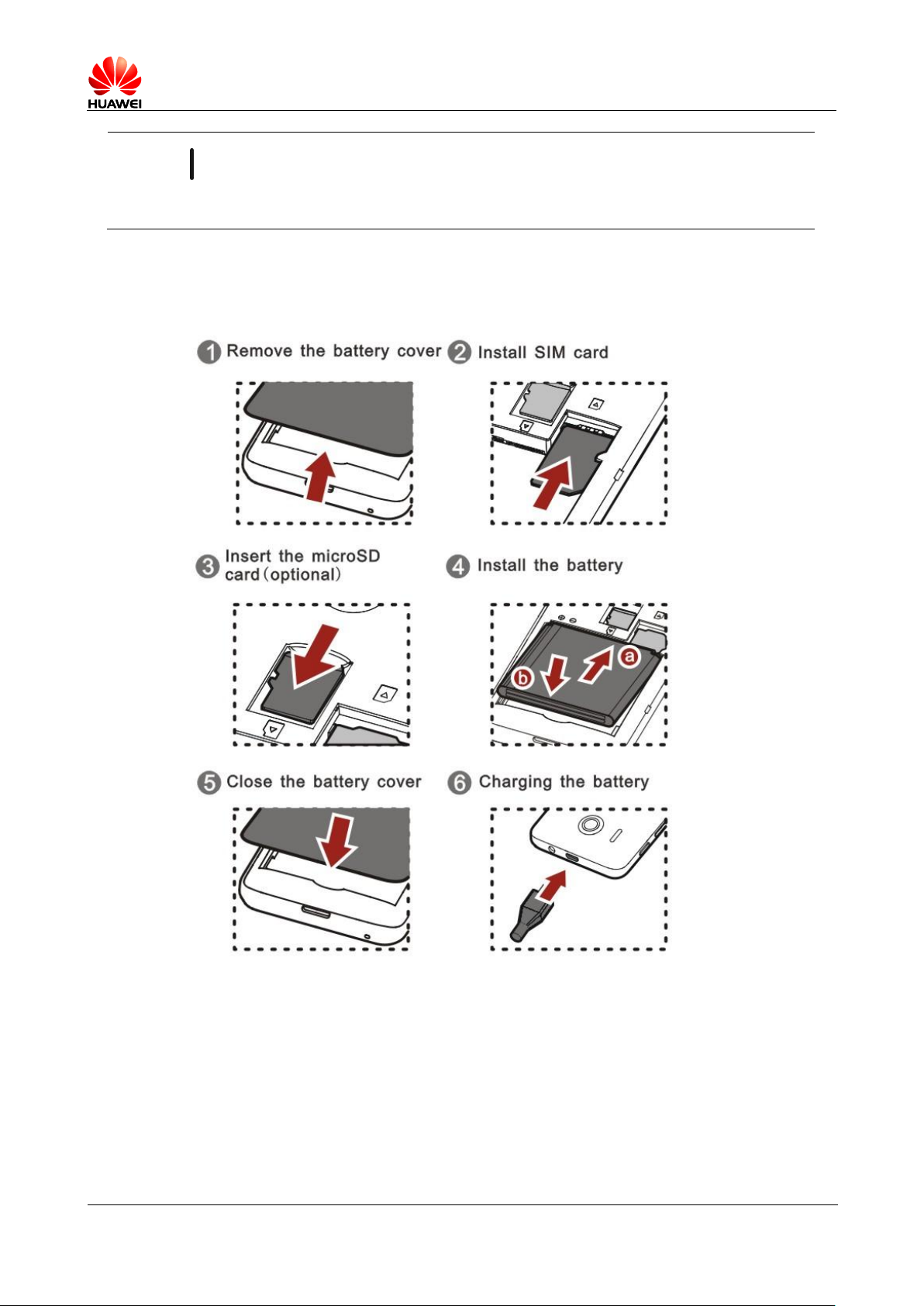
1.4 Assemble the phone
Page 10

Error! Reference source not
found.6
HUA WEI Confidentia
10/ 39
1.5 Main menu brief introduction
1.5.1 Add/ delete main menu quickly
Does not support
Change 2D/3D interface:The product doesn’t support 3D desktop, so can’t change 2D into 3D
desktop.
1.5.2 Main menu brief introduction
Enter main screen, click on icon , and then enter corresponding application.
1.5.3 How to add a shortcut icon to the desktop
Enter main menu, long press an application and move it to blank place of desktop.
1.6 Ccontacts
1.6.1 New contact, Establish Caller ID
1 new contact
Open contacts > press right down corner add new contact icon > select save type, enter
contacts edit interface > input contacts’ information > Done
2 Establish Caller ID
Attention: Does not support SIM contacts setting up Caller ID
Open contacts information interface > menu > edit contacts, enter edit interface > click contacts
icon > Take phone or Choose photo from Gallery.
1.6.2 Import \ export contacts from SIM
1. Import from SIM card to phone
contacts > Menu key >import/export>select “China Unicom”(it is China Unicom’s SIM
card) > Next> phone contact > select contacts which you want to copy > click “ok”
button。
2. Export contacts from phone to SIM card
Contacts > Menu key> import/export > phone contact> next > select “China Unicom”
Page 11
Error! Reference source not
found.6
HUA WEI Confidentia
11/ 39
(it is China Unicom’s SIM card)> select contacts which you want to copy from the cell
phone >click on “OK” button.
1.6.3 Maximum contacts can be supported
Support phone’s contacts more than 3500PCS, SIM card’s contacts number depend on the SIM card.
1.6.4 Setting group contacts
Contacts > Contacts group > right down corner “add contacts group” icon > select save
type> add contacts into group.
1.6.5 How to manage contacts
You can use other software application back up management contacts.
1.7 SMS
1.7.1 How to switch handwriting input method during edit messages
New SMS, click input frame, will pop up soft keyboard, default is Andriod keyboard,and enter
Settings >change language and input method
1.7.2 Delete or lock specific SMS of a conversation, bulk delete
Under conversation mode,read information interface, long press a message which you want to lock,
choose lock message, and can lock message.
SMS interface, check up a conversation, press Menu>select Message>select message which you need
to delete > bulk delete
1.7.3 Forwarding SMS/group sending and save draft method,
maximum number of group sending
Forwarding SMS:Under conversation mode, read message interface, click on a message which you
need to forward, and select “forward”, forward it to the designated contact.
Group SMS sending:new message,click enter contacts interface, select the contacts which
you need to add, click OK, group send the SMS to selecting contacts.
Page 12
Error! Reference source not
found.6
HUA WEI Confidentia
12/ 39
1.7.4 How many English words or chinese characters does long
message support.
Long message supports maximum 3000 English words, and supports maximum 1000 Chinese
characters.
1.7.5 How many SMS does cell phone support
Text message limit: 500 messages per conversation, or Multimedia message limit: 50 messages per
conversation(user can modify it in the setting)
For the SMS and MMS limit, it is not limit in the phone. It depends on the remaining in the storage
space associated with the phone.
1.7.6 How to set up number of SMS center
Enter message read interface,touch setting menu, select SMS setting items. Select SMS
service center from items, and then edit number.
1.8 Call Function
1.8.1 Call recording, and storage path.
It doesn’t support call recording function
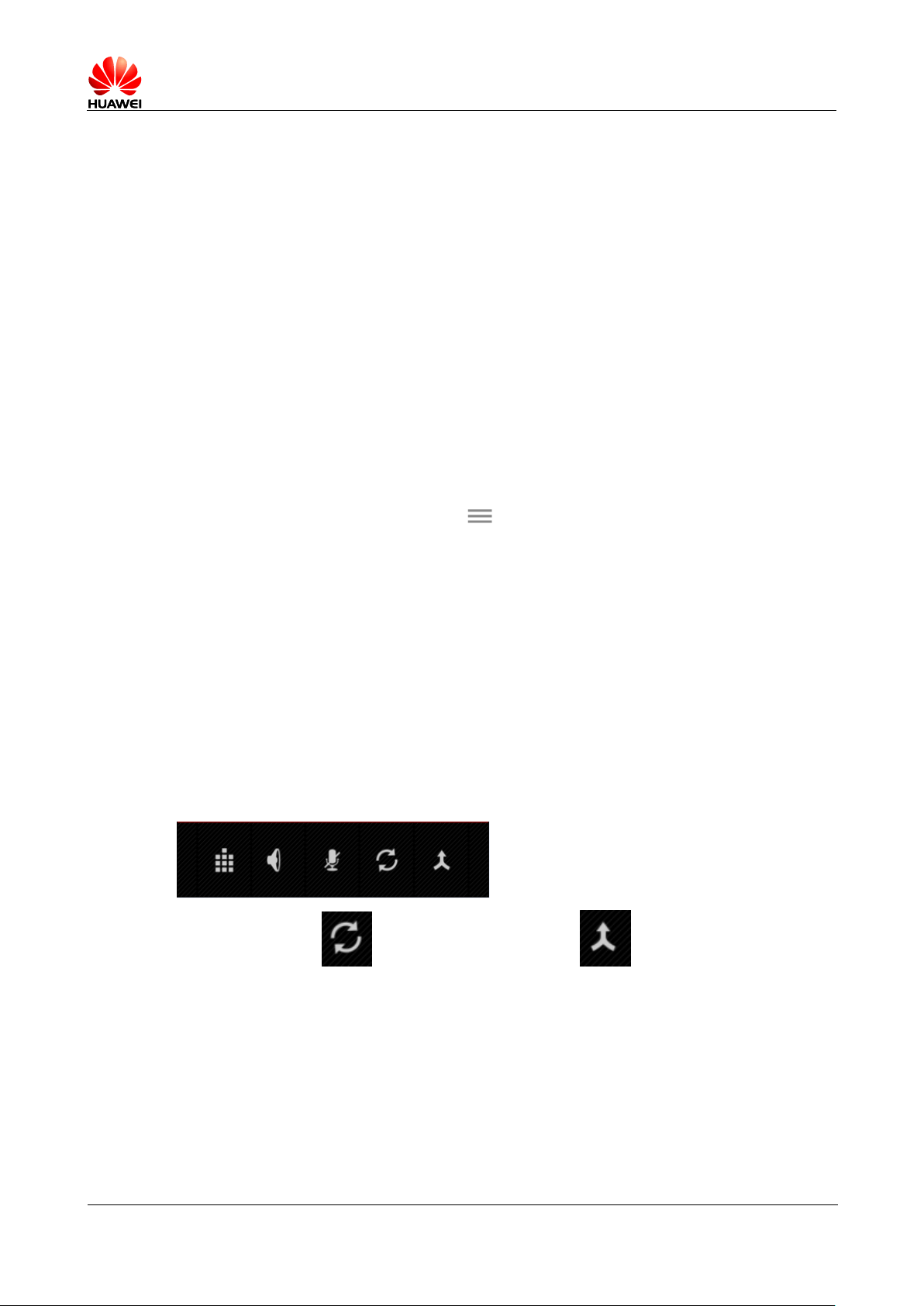
1.8.2 During a call, how to conference call? Switch the call?
During a call, you can run other operation under the calling interface as below.
At multi-calling,click and can switch call; Click icon and can make conference call.
1.9 MMS
1.9.1 Send MMS
1. Enter message menu, select new message, compose new message
2. Input recipient and edit message;
Page 13

Error! Reference source not
found.6
HUA WEI Confidentia
13/ 39
3. Press menu key, select add subject(after add subject, and switch to MMS
automatically);
4. Press menu, select icon can add picture、audio, and video(add multi-media file
become MMS automatically);
5. After message edit, and click on send.
1.9.2 MMS Send/ receive possible causes of failure, and solution
Common cause:Network status or signal is not good, cause MMS sending failure.
Solution: Re-send MMS later.
It is rejected by network(MMS Center), cause sending MMS failure.
Common cause: Because network side busy or other reason, can’t deal with MMS sending, cause
MMS sending failure.
Solution: Re-send MMS later.
It is rejected by network(MMS Center), cause sending MMS failure.
Common cause1:Recipient’s number is not correct, cause MMS sending failure.
Solution1:Inspect recipient’s number is correct, if it is not correct, please correct it, and re-send the
MMS.
Common cause2:Edit MMS over 300KB, cause can’t send out.
Solution2:Delete some information of MMS, made it less than 300KB, and try to send again.。
Whether arrearage
Common: Arrearage, cause MMS sending failure.
Solution: after pay the fee, and re-sending again.
Cell phone runs out of memory. Unable receive MMS successfully
Common cause::Run out of memory, unable receive MMS successfully.
Solution: release cell phone memory space, the remaining space over 300K.
1.9.3 MMS is affected by file size / video format / resolution ratio
and other factors limit
If video and audio file over side limitation (normally, the file limitation is 300K), can’t add file as
attachment. If picture file over size limitation, will be compressed the picture resolution rate
automatically, and then add to MMS as attachment, receiver also receive low resolution rate file
picture.
Page 14

Error! Reference source not
found.6
HUA WEI Confidentia
14/ 39
1.9.4 Where is attachment saved in location
After user received MMS, MMS attachment is saved in /data path, user can’t see it.
When user save attachment, the attachment save location:
Phone’s internal memory or SD card/Download
1.10 Music
1.10.1 Artists、Albums、Songs、Playlists meaning introduction
Albums: Classified by album name, song of the same name in a directory
Artists: Classified according to the singer, is a singer with a song in a directory.
Songs: Sort by naming rules stored in a large directory.
Playlists: You can definition list to add your favorite music files.
1.10.2 Bulit music playlist
1. At music + application above label page, slide the bar to playlist, click on press menu
key, and then select save as playlist.
2. In the pop-up interface, enter the name of the playlist, and then click Save after input
the playlist name.
3. Long press a song in the music list interface, and then pop up a prompt, select add song
to playlist, and select playlist which you want to add.
1.10.3 Play mode introduction
Order of play (default): playlist of songs from the first one to the last one, the order of play,
play finished and stopped.
Shuffle play: the songs of Playlist were shuffle play, after every song play once, play is
stopped
Whole songs Repeat pay: songs of playlist play in order from the first one to the last one, and
then re-play again.
Repeat Play: the currently playing song is repeatedly played back.
Shuffle play+ Whole songs Repeat pay: the songs of Playlist were shuffle play, when after
played songs list and still repeat.
1.10.4 Background play music and exit
1.Background play:Enter music + player, play any audio file, press back or home button.
2.Exit music:at music player, click ,and then press back or home button, can exit music and
application.
Page 15

Error! Reference source not
found.6
HUA WEI Confidentia
15/ 39
1.11 Take photo/video function
1.11.1 whether can use take photo/ camera function without SD card
The cell phone can use take photo/camera function without SD card
1.11.2 What is the cause that can’t open some pictures/videos files?
1. The cell phone does not support file format
2. The cell phone memory space is not enough
3. The file is damaged
4. Copyright protection file (format is dcf file)
5. Mobile resource is low, turn off some third-party applications which already opened and
consume the phone’s resources
6. Rarely mobile application or system unknown error occurred, try to restart the phone
1.11.3 Camera / video file, the default save path and change method
Y320 camera can’t set default save path automatically,it save path and setting >save >default save
location keep the same.
When default save location setting is for the phone, the camera file saving path is file management:
internal storage\DCIM\Camera
When the default storage location is for the SD card,the camera file saving path is file
management: SD card\DCIM\Camera
1.11.4 Photo / video editing files, to add photo frames
Edit photo:browse photo,press menu key, more, select rotate left, rotate right, pruning or editing.
Can’t edit video.
Does not support add photo frames
1.11.5 Whether support HD video play
support HD video play, support 108P HD play, support 360 fps
1.11.6 Whether camera shutter sound can be set to silent
Can’t set to silent
Page 16

Error! Reference source not
found.6
HUA WEI Confidentia
16/ 39
1.11.7 How to switch Front and back camera?
Does not support the front camera
1.11.8 What is camera format? How big size does video image
support?
Format:3GPP
1.11.9 What is format of phone camera? How big size does photo
image support?
format:JPEG image pixel: 2 mega、1.3 mega、1 mega、VGA、QVGA
1.12 Streaming media
1.12.1 During a call, whether support streaming media background
play? Can restore automatically?
playing streaming media, when connect the call, streaming media stop automatically ;
After hang up the phone, streaming media continue play automatically.
1.12.2 Why can’t play some streaming media
the phone does not support file format
Streaming media support audio/video coded and file format as below:
-- Video Coding: MPEG4,H263,H264
-- Audio Coding: AAC,AMR-NB/WB
-- support file format: 3gp,mp4
-- Maximum coding rate:4Mbps
Network is instability。
Phone memory space is not enough
1.12.3 what is the possible causes ? when Online play streaming
media less effective
Source file itself effect on playing streaming
Network is not good
Cell phone hardware problem, such as LCD damaged, please compare with local video.
The phone memory space is not enough
The phone CPU usage rate is high.
Running currently too many programs
Page 17
Error! Reference source not
found.6
HUA WEI Confidentia
17/ 39
1.12.4 Playing online video , whether will cause the phone run out
of memory because of the while downloading while downloading.
Playing online video, downloading file will not occupy storage space, it occupy space of RAM, so
will not cause running out of memory.
1.13 Bluetooth
1.13.1 Bluetooth support transmission data of file formats
picture、audio、video、webpage、address book and common data, all of them can be transmission by
Bluetooth.
1.13.2 How to transmit data files via Bluetooth
Enter file management or Gallery, select any file which you need to send, long press the file, will pop
up menu, and choose sharing > Bluetooth , and then can transmit file.
Open browser, enter any page, press menu key >more>share page >Bluetooth .
Enter address book, press menu key> share visible contacts > Bluetooth .
1.13.3 Phone can’t be searched by other phones Bluetooth
Bluetooth is not turned on
Solution:Enter main menu >setting > wireless and network, and turn on “Bluetooth”.
After Bluetooth turned on, Bluetooth status is invisible
Solution:Enter main menu > setting > wireless and network > Bluetooth setting >
detect over time setting.
1.13.4 Bluetooth effective transmission distance
10 meter。
Page 18

Error! Reference source not
found.6
HUA WEI Confidentia
18/ 39
1.13.5 what is the possible causes that can’t connect with other
Bluetooth devices
The phone support A2DP,HSP,HFP,PAN,HIDH,OPP,PBAP and so on profile;if confirm connecting
devices also support those profile, but still can’t connect, please refer below situation:
Can’t search other phone
Solution: other phone whether is turned on, and is available for searching status.
Can’t search Bluetooth headset.
Solution:Please confirm headset is available for searching status, related setting, please refer headset
manual.
Sending file, can’t connect with other phone
Solution: Please confirm other phone whether support to receive file, or support to receive the type
file.
1.13.6 Bluetooth with the computer connect to the Internet,
Bluetooth transfer files.
Support sharing internet with computer, support Bluetooth game.
1. The phone can’t support PAN(Personal Area Network Profile),support other device sharing internet
resource of phone.
At setttings -> more... -> network sharing and portable hotspot, select Blue sharing network, and
accept opposite after connection initiated.,
Then can create your own personal area network
2. The phone support Bluetooth game. This function is depend on third-part application design, generally,
setting up as below:
a. During the game, select to search other Bluetooth devices.
b. Find your connecting Bluetooth device, and preset to pair OK;
c. Start game;
1.13 GPS Navigation
1.13.1 What is phone’s own GPS Navigation software?
Has own GPS Navigation software, user also can install others.
1.13.2 How to deal with the Navigation lost data? How to deal with
authority documentation or activation code missing?
Please contact with navigation software after sale.
Page 19

Error! Reference source not
found.6
HUA WEI Confidentia
19/ 39
1.13.3 How to deal with navigation software can’t search satellite?
If you are inside the building, because can’t fix position in the room inside, please move to outside
for searching satellite.
If you are in outside of building, please inspect whether any high-rise or other shelter around you,
the high-rise shield cause can’t receive satellites signal, please select outside of the building and
open place for searching satellite.
1.14 Whether support FM radio? How to save the manual search
radio channels?
Support FM radio.
Support input channel manually.
1.15 The phone Whether support theme download? Or whether
support dynamic wallpaper?
Does not support theme download
The phone’s dynamic wall paper setting:
1、At standby interface, press menu >wallpaper>dynamic wallpaper, and after select the wallpaper,
and click “setting wallpaper”.
2、Enter main menu >click >display>wallpaper>dynamic wallpaper, and select the
wallpaper, and click “setting wallpaper”.
Page 20

Error! Reference source not
found.6
HUA WEI Confidentia
20/ 39
1.16 Whether the phone supports video calls or video chat?
Does not support
1.17 Whether supports screenshot (screen capture), screen mode?
Does not support
1.18 Whether supports Flash?is download flash software
available?
Does not support
1.19 Headset line order
Standard configuration line order is American standard, it is line order of current mainstream
industry.
Standard headset has hook key, the key can receive and hand up the call, also can play or pause music
without volume key, but support user use other headsets up and down key adjust volume, When
listening to music , playback ,stop and volume adjustment can be controlled.
2 Common Setting
Page 21

Error! Reference source not
found.6
HUA WEI Confidentia
21/ 39
2.1 E-mail
2.1.1 E-mail setting
Add Email account
Enter main menu> Email. Log in account by automatically setting or manually setting.
-- Manually setting:
-- Automatic setting (automatic setting need the phone preset the parameter of the Email);
1. Account setting interface > input account and password.
2. Click manually setting
3. Click POP3, enter receive serve setting interface
4. Click next, enter the outgoing server settings interface。
5. Click next, enter setting Email interface, and create this account’s name and your name.
6. Click next, finish log in and enter Inbox interface
1. Account setting interface >input account and password
2. Click next
3. Click next, enter setting Email interface, and create name and your name for this account.
4. Click next, and finish log in, and enter inbox interface.
For those didn’t preset parameter Email account, log in process setting, user can log in email
service website inquire.
send Email
Inbox interface, press right down corner icon , enter write mail interface, edit recipient, theme,
detail, and click send .
Check, delete Email
Inbox interface, click any email, and then can check it, click right down corner icon , and then
delete that email.
Enter email, enter menu key > account, click account for check, and can delete account.
Delete email account
Page 22
Error! Reference source not
found.6
HUA WEI Confidentia
22/ 39
2.1.2 Whether supports check email off line.
For those already had been downloaded eamail, support check them off line.
2.1.3 G mail(China area version does not preset, just provide
reference)
Does not support
2.1.4 Synchronize contacts, calendar, when you can not synchronize,
how to operate?
Synchronize contacts, need to log in an Exchange account.(change into google account)
Account setting interface, select Exchange,check setting of email box serve from email service
provider’s website, after finish setting up and log in successfully.
Enter main menu , select setting > account and synchronize, select an account and options
which you need to synchronize; and click menu key> synchronize immediately. synchronize the
contents from the server to the phone.
If synchronize contacts failure, please check that whether the phone data connection open, and whether
email box serve support contacts synchronize.
2.2 WLAN Function setting
2.2.1 Use WLAN connect internet
1. At main menu interface, click main menu > setting >wireless and network >
WLAN
2. If WLAN is off, please turn it on;
3. If it is on, the phone will scan nearby available hotspot, please click to connect hotspot which you
need, will pop up dialogue box, input correct password, click connect, after connect hotspot successfully, and can
log in internet via WLAN.
2.2.2 Which WLAN’s protocol does the phone support? How much
is different protocol transmission rate?
Support 802.11b/g/n protocol
2.2.3 Connection networks unable open pages via WLAN sometimes
The reason as below:
XDSL dial failure. If connect hotspot(for example wireless router),use XDSL way to connect
Internet,XDSL dial failure, cause can’t connect network. Please ensure XDSL dial success,
and then try again.
Page 23

Error! Reference source not
found.6
HUA WEI Confidentia
23/ 39
DNS problem. If can’t open webpage, QQ can log in normally, illustrate that DNS has some
problem.(please verify that whether can be setting up DNS).
WLAN hotspot visit limitation. If current connection hotspot is limitation status which can’t be
visited, the phone can’t visit website.
2.2.4 Unable search WLAN signal
After turned on WLAN, unable search signal of wireless router WLAN, other devices can normally
search WLAN signal, how to deal with?
Please confirm that whether wireless router SSID is hide
Turn off WLAN and then turn it on again
Restart the phone。
2.2.5 How to identify using SIM for log in internet, or using WLAN
log in internet?
After connected WLAN, does not use USIM card charge,
check WLAN icon in the upper right corner,
access the internet.
if WLAN icon on, that means that using WLAN
WLAN higher priority than data service,
2.2.6 The cause of connection WLAN failure
User input wrong password, so user need to pay attention to open uppercase and lowercase letters.
The signal turn weak suddenly, or hotspot does not have signal. cause connection failure.
2.2.7
WLAN sleep time is disconnected automatically, how to solve,
what is the phone default setting?
This is sleep policy's problem. Enter way: at main screen, click main menu > setting >
network and wireless > WLAN,click menu key , enter advanced > when screen turn of, keep
WLAN connection,set “always”.
Attention:the cell phone default setting is always,it means that always enable connect normally. If
adjust sleep policy, will make the phone disconnect automatically at standby. 3 options meaning as
below:
Always: Always keep WLAN connection.
Not sleep When plugged in: keep connection when plugged in, if does not charge, will disconnect
after standby 3 minutes.
Never(will increase network traffic data): The phone will disconnect after standby 3 minutes.
2.3 Networks sharing and portable hotspot
Cell phone WLAN’s hotspot, after testing phone turned on hotspot, auxiliary phone connects
network via testing phone.
Page 24
Error! Reference source not
found.6
HUA WEI Confidentia
24/ 39
Start way: setting >More>networks and wireless > network sharing and portable hotspot >
WLAN hotspot.
After turned on,auxiliary phone using WLAN search testing phone, and then enable connect
network.
You also can set up portable WLAN hotspot name and way of encryption function and so on
2.4 Static IP for a WLAN access internet
setting >wireless and networks > WLAN setting>checking networks can be searched>choose
show advance options, select static at IP setting, and then input IP address(most setting is
192.168.1.***)、 gateway(most setting is 192.168.1.1)、 Subnet mask or netmask(255.255.255.0)
and realm name(DNS address).
The biggest problem of using WLAN is unable implement connection networks without waiting. It
takes some time when mobile devices connect wireless router and get a dynamic IP address. Using
static IP connect WLAN network, it implement connect network quickly.
2.5 As a modem to connect computer access internet
1. At main screen, click main menu > setting .
2. More> click “networks sharing and portable hotspot”.
3. choose“USB binding”。
4. after driver installation(driver software install Via Hi suite), at PC ,click right key“my
computer”,and will pop up menu, choose “management” interface will show new
network adaptor device.
Attention: Using USB sharing network way connect network, have to turn on data connection,
otherwise, can’t access internet.
If PC has wireless modem and so on, can be used cell phone turn on WLAN hotspot, PC can
connect the phone access internet via WLAN. (at present, support Windows operation system).
2.6 Ringtone setting
2.6.1 Incoming call own ringtone setting method
Enter main menu —> open —> Ringtone—> Choose corresponding ringtone
Page 25
Error! Reference source not
found.6
HUA WEI Confidentia
25/ 39
2.6.2 Incoming call/message vibrate setting way.
Enter main menu —>Open —>Contextual mode—> Standard—> Vibrate
2.6.3 How to set optional music for incoming call/SMS ringtone?
Enter music, long press optional music. and then popup menu, choose as ringtone.
2.6.4 How to set up group ringtone?
Does not support
2.6.5 How to cancel phone’s keytone?
Enter main menu —>open —>Contextual mode—>Standard—>play tones when using
dial pad
2.7 Language & Keyboard
2.7.1 Which language does it support? How to change cell phone
language?
Enter main menu > select setting > language & keyboard > language, you can select it
from language list.
2.7.2 After installed other input method, why can not use it?
Enter main menu > choose setting > language and input method, first select installed
input method, and then click default, and can select it from the input method.
2.7.3 Whether support adjust system font size?
Does not support
2.7.4 what kind of input method the phone own has?
Has Android keyboard input method, HAWEI input method.
2.7.5 How to switch off input method vibration
HUAWEI input method, close vibration way: Enter main menu > setting > language &
input method, click on HUAWEI input method, select keyboard setting, does not select vibrate on key
press, will be OK.
Page 26
Error! Reference source not
found.6
HUA WEI Confidentia
26/ 39
Android keyboard, close vibration way: Enter main menu > setting > language & keyboard,
click Android keyboard setting,
Does not select vibrate on key press, will be OK.
2.8 Internet setting
2.8.1 Cell phone browser clear cached and history.
At browser interface, click menu key, settings > privacy & security,click on Clear cache、clear
history.
2.8.2 Browser full screen and bookmarks settings
Full screen:At browser interface, Click menu settings > Labs> choose Full screen.
Bookmarks: at browser interface, click menu key,choose “Save to bookmarks”, click Add to
Bookmarks..., and click OK, and then add to bookmarks.
2.8.3 Login email box from cellphone webpage
Support,input email address in URL address bar, enter log in interface.
2.8.4 Whether support login internet banking.
Support, need to install corresponding on-line banking client-side. If visit via Brower, perhaps exist
problem, part of the bank's login plugin needs to run under Microsoft IE.
2.8.5 Save picture from webpage
At browser interface, long press picture in the webpage, will pop up dialog box, and select save
picture.
2.8.6 Set to modify homepage
At brower interface, click menu key, set>home。
2.8.7 Save my favourite webpage
Does not support
2.8.8 Cell phone unable connect network, network parameter setting
method.
Insert SIM card, APN will set up network parameter automatically.
Check way: Enter main menu , choose settings > wireless and networks > Mobile
networks > Access Point Names(APN).
Page 27
Error! Reference source not
found.6
HUA WEI Confidentia
27/ 39
When appear parameter incorrect, can click APN interface menu key , choose reset default
setting to restore.
2.8.9 How to turn off and turn on data business
Turn off and turn on data business method:
Pull-down notification bar in the screen, click data switch , and then can open data business,
and after turned on, the status is highlight .
2.8.10 Check or disconnect current data connection.
Pull-down status bar, check data switch whether highlight.
If highlight ,means that it is on;click it turn grey ,it will be disconnected data
connection.
If show grey ,means that it is off, click it turn highlight ,it will be turned on data
connection.
2.8.11 When the phone, whether it supports the Internet?
When the phone in 3G network and internet, 3G protocol support the phone and internet
2.8.12 What are the limitaion of data service( for example CDMA
dual SIM card phone does not support GSM network)
At present, our cellphone does not support WCDMA and CDMA2000 data service. Support China
Mobile SIM card (2G,3G service) and USIM card (2G, 3G service), and China Unicom SIM card (2G
service and USIM card (2G service);
2.9 Screen lock setting
2.9.1 How to start PIN code to lock screen?
1. Enter main menu > settings > security > Screen Lock > PIN 。
2. At “Choose your PIN” prompt dialog box input PIN code
3. Input the same PIN code as step 2, click OK, and finish PIN code setting.
When press power key or power on/off, the phone will enter default PIN code unlock interface,
input setting PIN code, and then click “OK”, remove PIN code lock.
2.9.2 How to set up the face unlock.
The phone does not support face unlock.
Page 28
Error! Reference source not
found.6
HUA WEI Confidentia
28/ 39
2.9.3 How to start screen unlock pattern?
1. Enter main menu > settings > security > Screen lock > Pattern.
2. At “Choose your pattern” interface, use finger continue draw through several the center of circle
setting an unlock pattern, and click to continue.
3. Please draw the same unlock pattern again at screen, click “OK”, finish unlock pattern setting.
4. When press power key and power on/off, the phone will default enter pattern unlock interface,
please draw the setting unlock pattern to unlock.
2.9.4 After continue inputed wrong unlock pattern several times,
whether the phone will be dead lock? Forget the pattern, how to
unlock? Whether through the GMAIL mail to unlock?
After continue input wrong unlock pattern, it will prompt, will not be dead lock, but will delay next
time retry time.
Forget pattern, please send to customer service department for unlock, or flash version, this phone
can’t unlock through G mail.
2.9.5 How lock and unlock screen
Lock: Press power key lock screen.
Unlock: press power key wake up screen, and then depend on screen display, via drag, input PIN,
input pattern and so on ways for unlock.
2.10 Alarm clock Function
2.10.1 Add/cancel alarm clock
Enter main menu > Clock
And click left bottom , enter Alarms interface.
Select add alarms , enter setting alarm interface, and can set up as below:
Click on time, set up alarm ring time.
Click Repeat,select alarm repeating cycle.
Click Ringtones, select alarm ringtone.
Choose VIBRATE, set the phone vibrate when alarm clock ring.
Page 29

Error! Reference source not
found.6
HUA WEI Confidentia
29/ 39
Choose ASCENDING MODE, The alarm sound will gradually become larger
Click Label, input alarm clock name.
Click OK, finish adding alarm clock.
At alarm clock interface, you can check all alarm clocks in list. Remove a tick in front of the alarm
clock, means that delete this alarm clock. Or long press an alarm clock record, and will pop up menu,
and then choose “delete alarm clock”, delete your optional alarm clock.
2.10.2 Whether support alarm clock when the cell phone power off
?
Support
Page 30
Error! Reference source not
found.6
HUA WEI Confidentia
30/ 39
2.11 Application program
2.11.1 Which kind soft format does the phone support, whether
support JAVA?
Support APK application program which was written by java language, if need to install .JAR, .JAD
program require to install JAVA stimulator (Jbed.apk,GZL-signed-Jbed.apk and so on)。
2.11.2 How to get third-part application program?
Can via the third-part software installation
2.11.3 Whether support first choise installation location setting?
Does not support
2.11.4 How to install, manage, and uninstall program?
Install: 1. Enter main menu > settings >Apps>APK application,choose install;
2. Select to install from file management
Management: enter main menu > settings >Apps> manage application program,
management of program.
Uninstall: 1. Enter main menu > setting > Apps> manage application program, uninstall
program.
2.11.5 Program install failure cause and solution
Space is not enough, please uninstall some unused application program, delete some unused file from
file manager.
Software version is incompatible, previous Android2.3 application software was installed into current
Android4.1 version.
Wo.3G、Wo store, mobile phone business hall, mobile phone mailbox and so on are Unicom operator
customization preset in software, Wo.3G can be uninstalled, after uninstalled, restore factory setting, can
find micro-blog, Sohu news belong to third-part preset software, can be uninstalled, after uninstalled,
restore factory setting, can be found back.
Page 31
Error! Reference source not
found.6
HUA WEI Confidentia
31/ 39
2.12 Common third-part application problem
2.12.1 QQ relevance
The phone support but with new version of app.
2.12.2 The third-part application software installed locate into SD
card, perhaps would occupy cell phone system Memory.
The cell phone support third-part application install into SD card directly. When those application are
running, a part of temporary data will be stored at the phone storage area, will occupy cell phone
system RAM, this situation is normal.
2.12.3 The reason why Part of phone number does not show
attribution
input the phone number, and then can inquire. Because incoming call attribution data store in the
phone, will not update automatically, but operator number continue update, so part of phone numbers
will not be showed attribution.
2.12.4 Internetbank deal(taobao, Alitalk, Alipay, tenpay,E-bank)
Support, need to download corresponding client, and service will be provided
2.13 Data backup and restore
2.13.1 Address book,back up and restore contacts
Enter main menu > Backup
Backup
Enter main menu > Backup , Back up to SD card,select contacts, click Backup, will
backup contacts.
If there is an external micro SD card, will backup data in micro SD directory: sd card/Huawei backup
folder. If there is not external micro SD card, will backup data in internal storage root directory: sd
card/Huawei backup folder.
Restore
Before restore contacts, please ensure that already backup contacts data.
Enter main menu > Backup , Restore from SD card, click restore data package, select
contacts, click restore, will restore contacts.
Page 32
Error! Reference source not
found.6
HUA WEI Confidentia
32/ 39
2.13.2 Whether support backup group contacts directory.
Does not support
2.13.3 Which data does The cell phone support backup?
The cell phone support backup contacts, message, call records, system settings, browser bookmark,
email account, agenda, weather clock.
2.14 Management application
2.14.1 Role of task manager
The third-part running software
2.14.2 How to run task manager
Enter main menu > Settings >APPS >management application program
2.14.3 Task manager interface brief introduction
Downloaded, SD card, Running, ALL
2.14.4 Relevant operation of task manager
You can close all application in the interface.
Enter detail application program, and then can uninstall, stop, clear data and so on.
Page 33
Error! Reference source not
found.6
HUA WEI Confidentia
33/ 39
2.15 What function does the cloud service have?
Does not support
2.16 HUAWEI Security Guard
Does not support
2.17 Use HUAWEI Security Guard blacklist
Does not support
2.18 Developer options
User can turn on/off Developer option via touch switch.
1. USB debugging: for start debugging mode, can through ADB order adjust cell phone
2. Not lock screen: will not sleep when it is charging.
3. Allow mock location: for start to allow mock locations function.
2.19 Time synchronization
Support time synchronization
At main screen, enter main menu > select setting > Date & time>Automatic date &
time > Use network-provided time.
2.20 Connect with computer as USB flash disk
Cell phone Connect computer with USB cable, can recognize micro SD card and phone internal
storage space, but can not recognize the phone RAM.
Page 34
Error! Reference source not
found.6
HUA WEI Confidentia
34/ 39
2.21 Release internal storage space of cell phone
Delete useless file: enter main menu > File manager , check file and file folder, long
press file or folder which you need to delete, will pop up menu, and choose delete from the
menu options.
2.22 Adjust bright of screen
Enter main screen, enter main menu > settings > Display > Brightness, slide bar
manually for setting brightness.
2.23 The cell phone keypad light’s save power function
Does have this function, does not support.
2.24 Setting airplane mode
At main screen, enter main menu > settings > WIRELESS & NETWORKS, Select
Airplane mode to open airplane mode; Cancel select, and close airplane mode.
Under the airplane mode, wireless and networks function is not available.
2.25 How to factory data reset
1. At main screen, enter main menu > Settings > Backup & input > Factory
data reset.
2. Click “Reset phone”. Factory data reset
2.26 How to enter and exit safety mode
Does not support
2.27 Hi Suite
Does not support
Page 35

Error! Reference source not
found.6
HUA WEI Confidentia
35/ 39
2.28 Whether support HDMI?How to use it?
Does not support
2.29 Whether support TV-OUT?How to use it?
Does not support
2.30 Whether support OTG function?how to use it?
Does not support
2.31 Status light
Does not support
2.32 Whether charger can be mix used
OK, the phone has charge protective circuit. But advice that user use the standard charger, use large
current charge long term, it is not good for the phone and battery life. Charging in small current, will
postpone charging time.
2.33 New cell phone characteristic
HUAWEI Y320U (Y320U) is a great looking straight full touch phone. Using MediaTek MT6572 dual core
1.2G professional processor ship。 MT6572 is highly integration 3G ship. Integrate advanced function, such as
modem, high definition 720P video decoder, and so on. Multi-media is strong performance, smooth music
processing, support 3.5mm audio connection, support WIFI, DTV, 64 chord ringtones and MP4 player and so on.
Holding this product, just like a professional portable stereo player, is a good companion for end users
entertainment.
Page 36
Error! Reference source not
found.6
HUA WEI Confidentia
36/ 39
3 Other
3.1 Power saving tips
When do not use cell phone, please press power key to turn off screen
Shorten the screen sleep time: enter main menu > Settings > Display > when screen
overtime, setting screen sleep time.
Reduce screen brightness: enter main menu > setting > Display > Brightness, setting
screen brightness.
Turn off Bluetooth and WLAN: enter main menu > settings , at wireless and networks,
turn off WLAN and Bluetooth.
Turn off background data synchronization: Enter main menu > settings > Account
and sync, turn off account and sync.
Turn off data service: Enter main menu > Setting > Wireless and networks> Mobile
networks, not select data enable.
Turn off GPS function: Enter main menu > Settings > Location access, not select
Access to my location, turn off GPS satellite.
3.2 Network traffic saving tips
When do not use data service, turn off data service function.
When connect WLAN, please turn off data service.
Login wap webpage save more network traffic than login www webpage.
Turn off data service: Enter main menu > Settings > wireless and networks> Mobile
networks, cancel enable data selection.
Turn off background data synchronization: Enter main menu > Settings > Account
and sync, turn off account and sync.
Page 37
Error! Reference source not
found.6
HUA WEI Confidentia
37/ 39
3.3 How to deal with the cell phone is running slowly
There are too many current programs running, and please turn off some background running
programs. At main screen, click > Settings > Apps > Running, select corresponding
program, and select stop.
Installed too many application program, system disk space is not enough, made the phone run
slowly. Please unload some application program, release space of system disk, add more running
RAM.
If CPU usage rate is high. There too many background programs are running, appear running very
slowly, please restart the phone, irrelevant background progress and application program will be
closed.
3.4 Setting up its own wallpaper which will be stretched
automatically, whether can set up un-stretching wallpaper?
Does not support, but has some third-part desktop support, for example 360 desktop, GO desktop.
3.5 Enter RECOVERY mode and Factory data reset
If SD has upgrade patch, or upgrade online, already finish download, can be power off status, press
power key and upper volume key at the meantime, enter recovery mode, after enter recovery mode,
can use upper/lower volume key to select, and then press menu key enter corresponding function.
3.6 Whether support snapshot two-dimension code?
Support, need to download two-dimension code application.
3.7 Whether support 3D acceleration?
Does not support
3.8 After remove battery, whether clock return 0? the colse
setting as automatic clock, whether spend network flow?
After remove battery in 20 second, the clock will not return 0.
If when the cell phone power on beginning and register network, then get the time from operator
network, will not update time through the internet, so also not occupy the network flow.
If when the cell phone power on beginning, did not get the time from operator network, and clock
setting as automatic clock, will occupy a little network flow.
Page 38

Error! Reference source not
found.6
HUA WEI Confidentia
38/ 39
,
Page 39
Error! Reference source not
found.6
HUA WEI Confidentia
39/ 39
3.9 Whether has its own sound recorder?
Has its own sound recorder
3.10 Whether has sticking film when cell phone leave from
factory?
Does not support
3.11 Whether support handset TV? How to set up?
Support handset TV. Enter main menu, choose “ISDBT” enter , and then will search channel
automatically.
3.12 Whether support word,excel,ppt,pdf editing and browse?
Support, need to download third-part software
3.13 Cell phone internal storage space and micro SD remaining
storage space.
Enter main menu, select Settings > Storage, separately in “INTERNAL STORAGE” and “SD
card” region check the situation of storage space.
 Loading...