

Page 1
ETS8521
Cordless Phone
Copyright © 2007 Huawei Technologies Co., Ltd.
and other Huawei trademarks are the tra demarks or registered trademarks of Huawei Technologies Co., Ltd.
in the People’s Republic of China and c ertain other countries. All other trademarks mentioned i n this manual are the
property of their respective holders. T he information in this manual is subject to chan ge without notice. Every effort
has been made in the preparation of this manual to ensure accuracy of the contents, but all statements, information,
and recommendations in this manual do not constitute the warranty of any kind, express or implied.
Huawei Technologies Co., Ltd.
Address: Huawei Industrial Base, Bantian, Longgang, Shenzhen 518129, People's Republic of China
Tel : +86-755-28780808 Global Hotline: +86-755-28560808
E-mail: [email protected] Website : www.huawei.com
Page 2
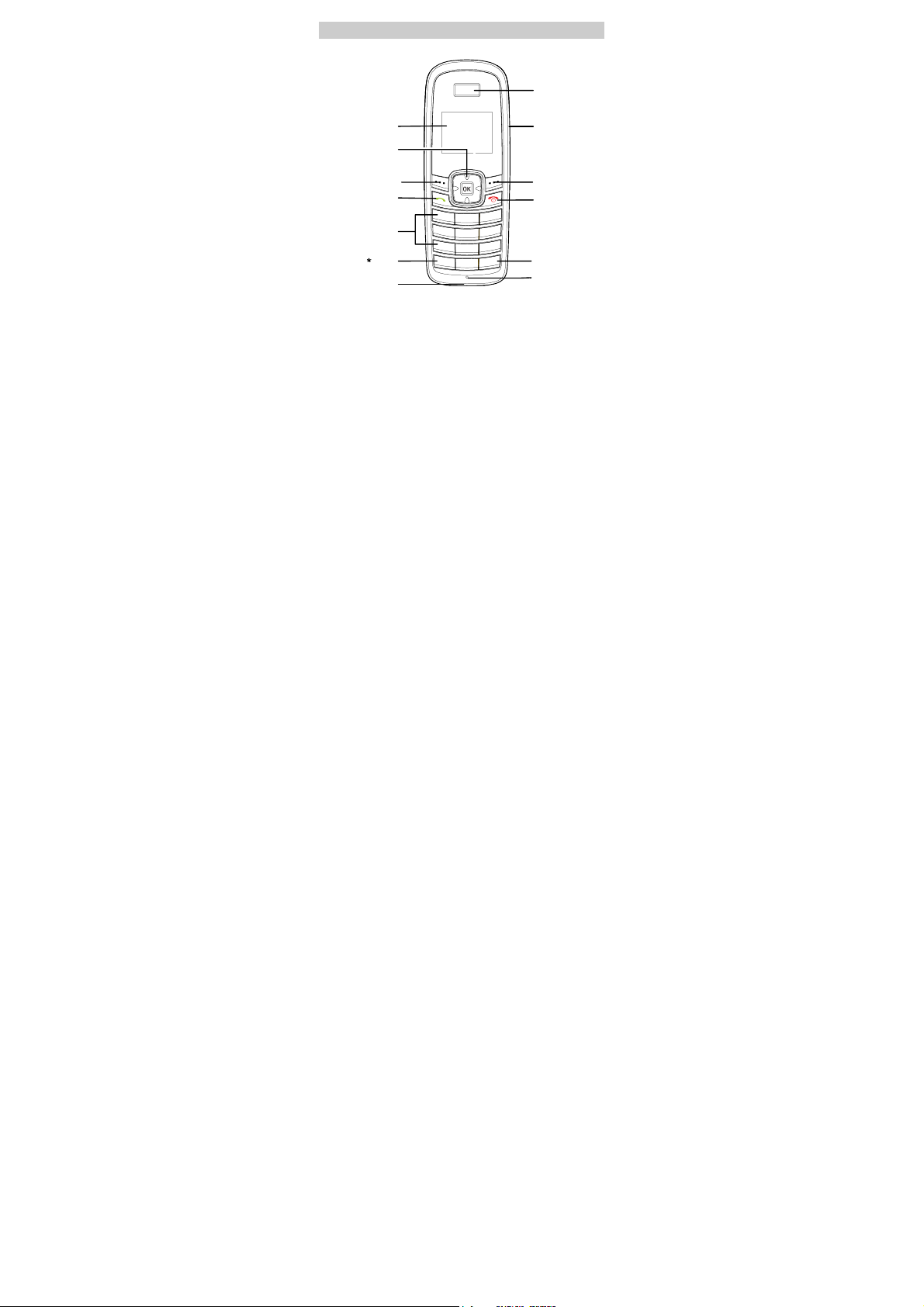
Your Cordless Phone
Earpiece
Screen
Navigation Key
Left Soft Key
Send Key
Number Keys
Key
Charger Interface
Headset Jack
Right Soft Key
End/Power Key
# Key
Microphone
1
Page 3

Note
z This is a sketch. Your cordless phone may be different.
It is subject to your actual one.
z To achieve the optimal effect, use the cordless phone
away from the charger stand.
z FCC Class B Statement:
z This equipment has been tested and found to comply
with the limits for a Class B digital device, pursuant to
part 15 of the FCC Rules. These limits are designed to
provide reasonable protection against harmful
interference in a residential installation. This equipment
generates, uses and can radiate radio frequency energy
and, if not installed and used in accordance with the
instructions, may cause harmful interference to radio
communications. However, there is no guarantee that
interference will not occur in a particular installation. If
this equipment does cause harmful interference to radio
or television reception, which can be determined by
turning the equipment off and on, the user is encouraged
to try to correct the interference by one or more of the
following measures:
z —Reorient or relocate the receiving antenna.
z —Increase the separation between the equipment and
receiver.
z —Connect the equipment into an outlet on a circuit
different from that to which the receiver is connected.
z —Consult the dealer or an experienced radio/ TV
technician for help.
2
Page 4
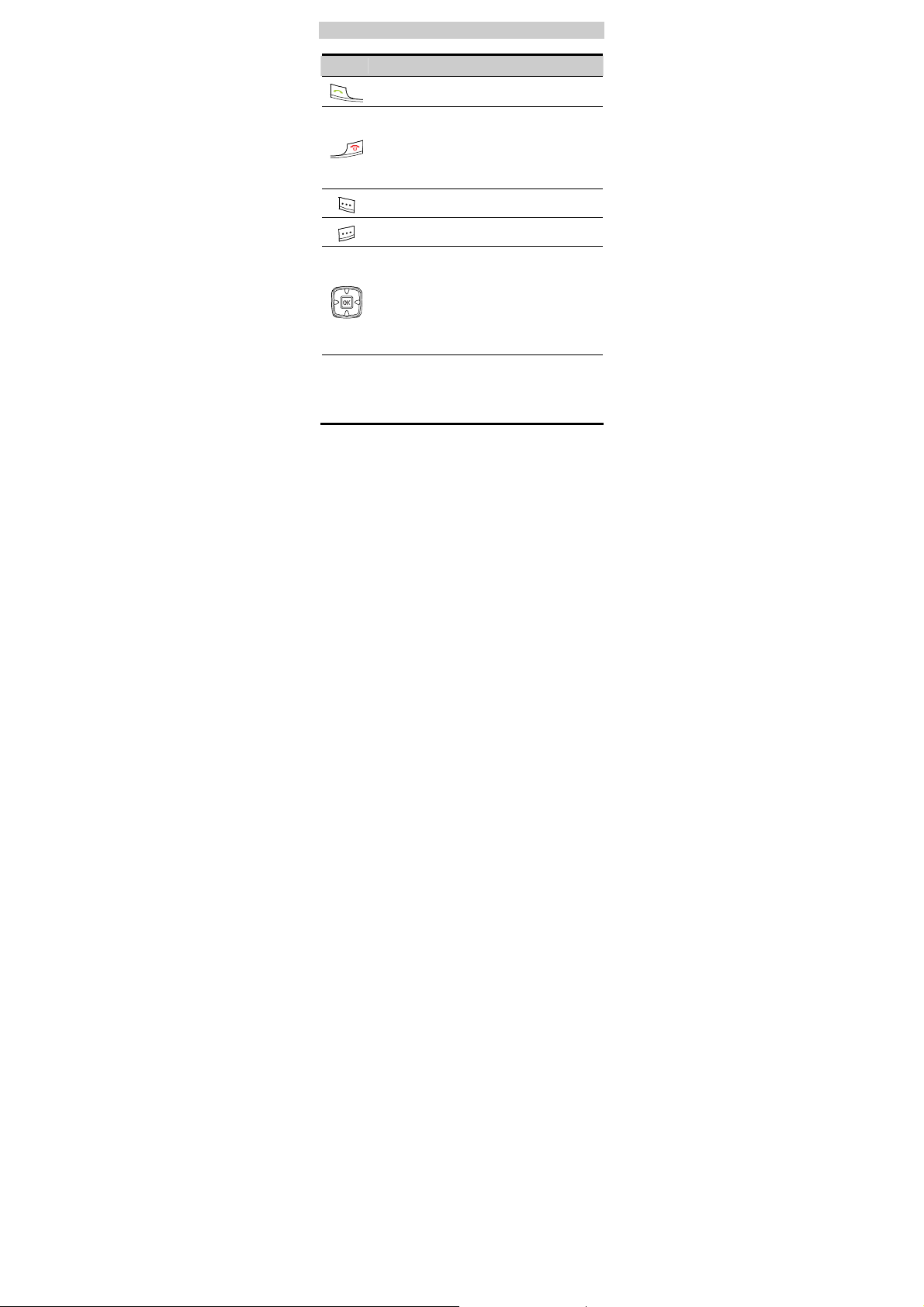
Keys and Functions
Press… To…
z
View the dialed calls in the standby mode.
z
Make or answer a call.
z
Power on the cordless phone by pressing and holding
it.
z
Power off the cordless phone by pressing and
holding it in standby mode.
z
End a call or reject an incoming call.
z
Return to the home screen.
Select the option displayed on the lower left corner of
the screen.
Select the option displayed on the lower right corner of
the screen.
z
Display the Schedule interface (up key ), the FM
Radio interface (down key), the Call History
interface (left key), and the Message Edit interface
(right key) in the standby mode.
z
During a call, press left key or right key to adjust the
volume of the earpiece, or press up key or down key
to adjust the volume of the microphone.
z
Enter numbers and characters.
z
Number
Speed-dial cordless phone numbers in the standby
mode (by pressing and holding the 1-9 keys).
Keys
z
Select a submenu item labeled with the
corresponding number.
3
Page 5
Press… To…
Perform different operations for different functions of
* key
the cordless phone.
z
Lock the keypad in the standby mode (by pressing
and holding it).
# key
z
Perform different operations for different functions
of the cordless phone.
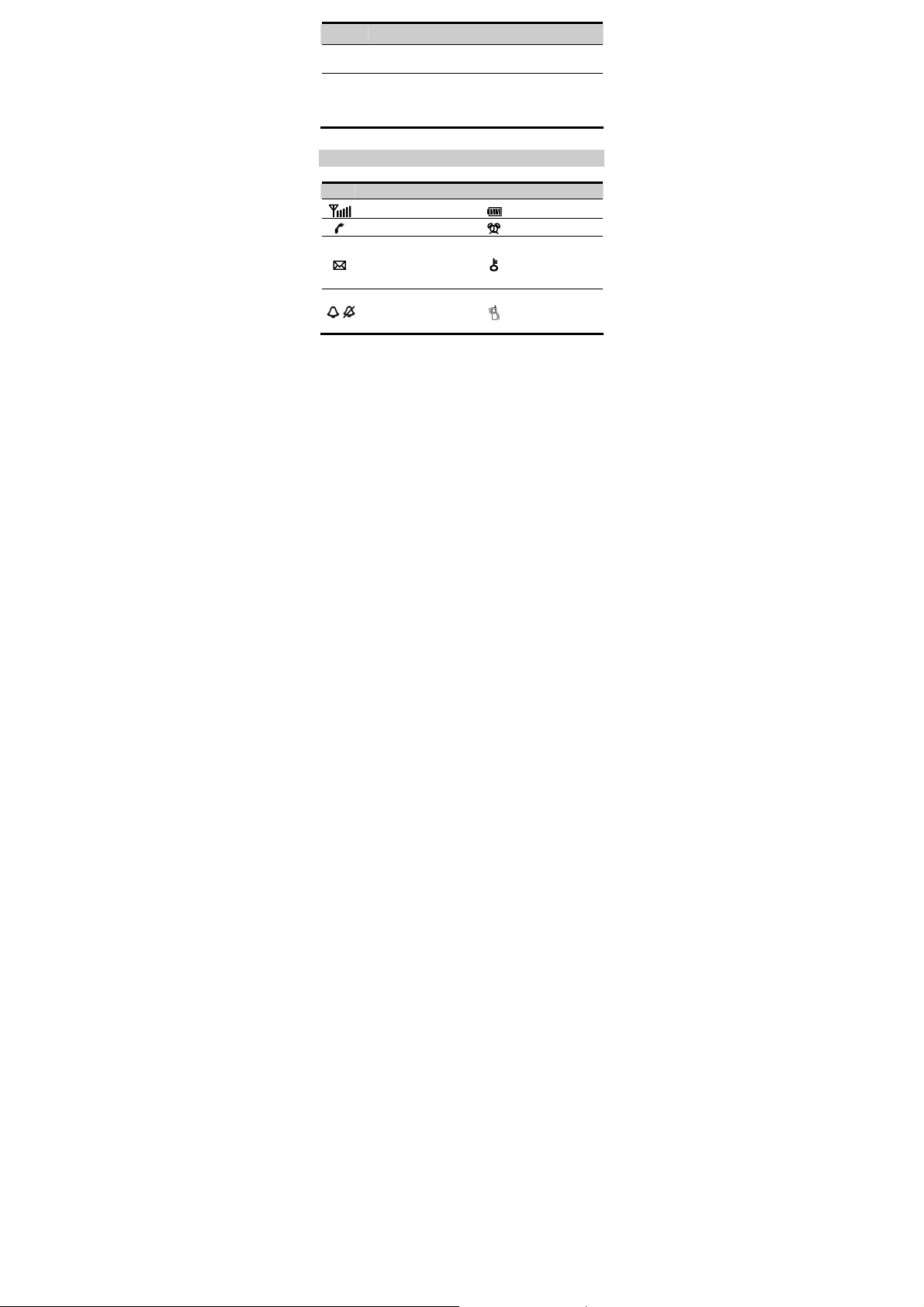
Screen Icons
Icon Description Icon Description
Network signal strength
Calling
z
Message received
z
Memory for messages is
full, when the icon is
blinking
Remind by sound /
/
Without sound remind
4
Battery power level
Alarm clock is on
Keypad is locked
Remind by vibration
Page 6

Menu Tree
Phone Book Messages CallHistory
1. Search
2. Add New
3. Groups
4. Speed Dial
5. Copy All(*)
6. Delete All
7. My Phone Num
8. Memory Status
Fun&Utility Profiles Settings
1. Alarm
2. Schedule
3. Calculator
4. Sto pwat ch
5. Wo rld Cloc k
6. Line Game
7. Smash Game
FM Radio (*)
1. Write Message
2. Inbox
3. Outbox
4. Draft
5. Voice Mail
6. Message
Settings
7. Delete All
1. General
2. Silent
3. Outdoor
4. Headset
5. Quiet
Copy All(*):
If the UIM card is available, the Copy All
Sub-item is displayed under the Phone Book
item.
5
1. Missed Calls
2. Received Calls
3. Dialed Calls
4. Call Duration
5. Delete All
1. Display
2. Call Settings
3. Phone Settings
4. Security
Page 7

Note
z FM Radio function is optional. Whether your cordless
phone has this function, please contact your network
operator.
z Please use a headset compatible with your cordless phone
when enjoying the FM Radio function.
z The USB connector is used only for charging.
6
Page 8
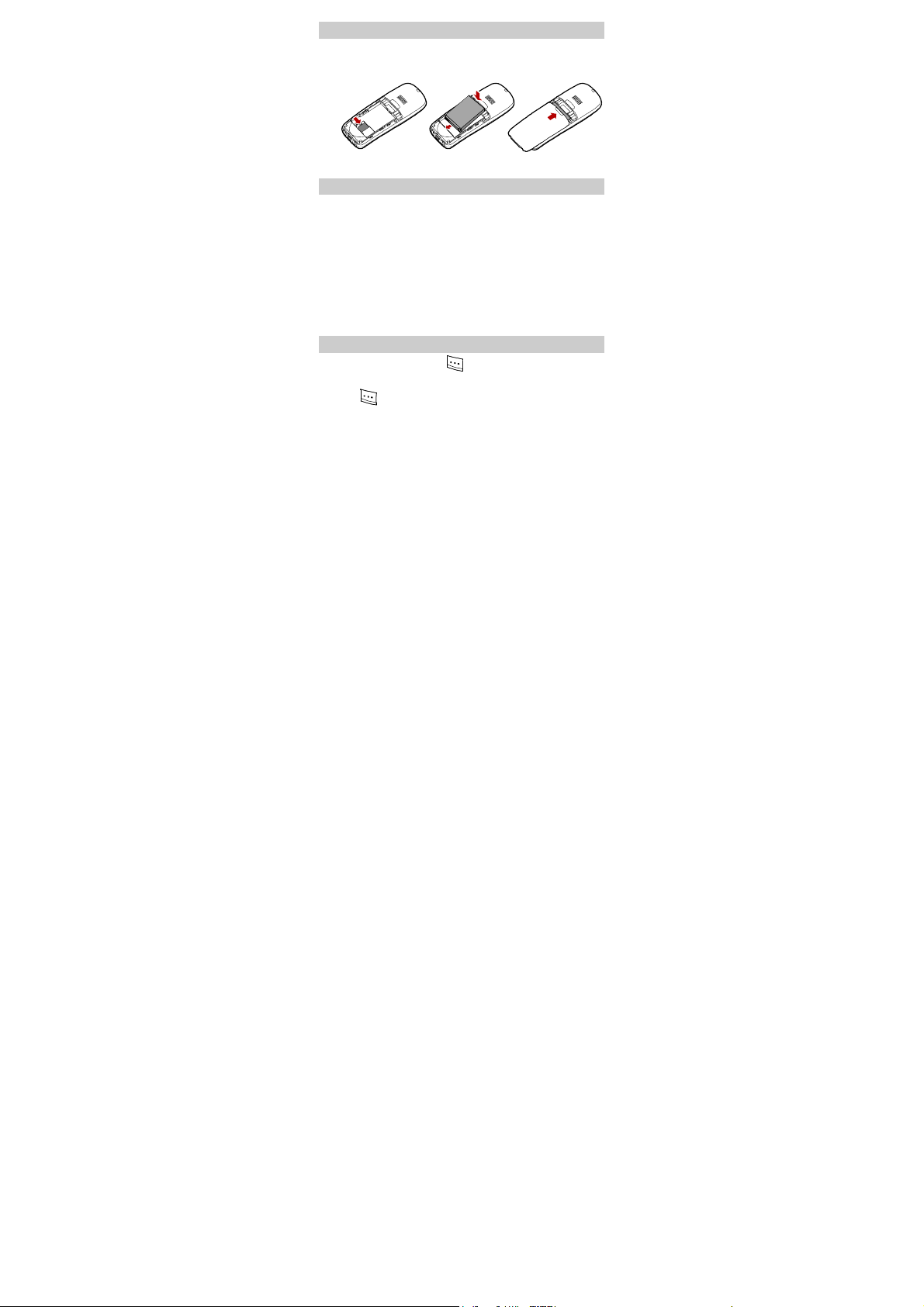
Installing the UIM Card and Battery
Consult the network operator if a UIM card is needed.
Make sure that the golden area on the UIM card is facing downwards
and the cut-off edge is correctly fit to that of the card holder.
Charging the Battery
1. Connect the cordless phone to the charger stand.
2. Connect one power adapter connector to the charger stand.
3. Connect the charger to an AC power socket. During the charging,
the animation of charging icon is displayed.
4. When the cordless phone is fully charged, disconnect the charger
from the AC power socket first. Then disconnect the charger stand
from the charger.
5. When the charging icon becomes static, the cordless phone is
fully charged.
Using the Function Menu
1. In the standby mode, press to display the Menu interface.
2. Press Up or Down key to scroll in the menu.
3. Press to display the menu.
4. Display the submenu in either of the wa ys:
7
Page 9

z
Press Up or Down key to scroll to a submenu item and press
to select the submenu.
z
Press the Number key corresponding to the number of a submenu
to select it.
5. Press to return to the previous menu or return to the home
screen.
6. Press to return to the home screen.
Making a Call
1. In the standby mode, enter a phone number.
2. Press to dial the number.
3. Press to end the call.
Note
z When the cordless phone is locked, enter the lock code to
unlock the cordless phone first; otherwise, you can only
make emergency calls or answer calls.
z In the standby mode, press to view the dialed
calls. Select a record and press
to dial this
number.
z Select a contact from the cordless phonebook and press
to call this contact.
Answering a Call
When there is an incoming call, you can press
answer it, or press
to reject it.
If the any-key answer function is enabled, you can press any key
except
and to answer an incoming call.
8
or
to
Page 10

Cordless phone Lock
The cordless phone lock protects your cordless phone from
unauthorized use. The default cordless phone lock code is 000000.
You can change it into any numeric string of 4 to 8 digits.
If the cordless phone lock is enabled, you need to enter the correct
cordless phone lock code when you power on the cordless phone.
PIN and PUK
The personal identity number (PIN) protects your UIM card from
unauthorized use. The PIN unblocking key (PUK) can unblock the
blocked PIN. Both the PIN and PUK are delivered with the UIM card.
For details, consult your service provider.
If you enter wrong PINs three times consecutively, the cordless
phone asks you to enter the PUK code.
If you enter wrong PUKs ten times, the UIM card is invalidated
permanently. Contact your service provider for a new card.
Locking the Keypad
In the standby mode, press and hold
When the keypad is locked, you can press
answer an incoming call or make emergency calls.
You can press
When the keyguard function is enabled, if there is no operation on
the cordless phone for a preset period, the keypad is locked
automatically.
and to unlock the keypad.
9
to lock the keypad.
or
to
Page 11

Changing the Text Input Modes
The indicator of the current text input mode is displayed on the
screen. In the editing mode, press
Note
z In the editing mode, press once to delete the
letter on the left of the cursor. Press and hold
to change the input mode.
to
delete all the entered letters.
z In the "eZiEn" input mode, press to enter a
space. In the "ABC" or "abc" input mode, press
once to enter a space, twice to enter "0", and three times
to move the cursor to the next line.
z In the "ABC" or "abc" input mode, press
repeatedly to select and enter the commonly used
punctuations. In the "eZiEn" input mode, press
repeatedly to enter a full stop.
Entering English (eZiEn)
In the "eZiEn" input mode, do the follows to enter the English letters:
1. Press each desired key once corresponding to the sequence of the
word. Then the cordless phone displays the commonly used words
according to the numeric sequence of key presses.
2. Press Up or Down key to scroll to the desired word.
3. Press Left or Right key to select the word.
Press
to enter the word and a space.
Entering English (ABC or abc)
In the "ABC" or "abc" input mode, you can press a key labeled with
the desired letters once to enter the first letter on the key, twice to
enter the second letter on the key, and so on.
10
Page 12

Note
If the letter you want to enter is on the same key as the
previous one, you can enter the latter one only after the
cursor appears again or after you press the Right key to
move the cursor to the next space.
Entering Numbers
1. In the "123" input mode, press a key labeled with the desired
number.
2. In the "ABC" or "abc" input mode, press a key continuously or
press and hold it until the desired number appears on the screen.
3. In the "eZiEn" input mode, press a key and then press the Down
navigation key to select desired number.
Entering Symbols
1. In any input mode, press to display a symbol list.
2. Press Up or Down Key to select the desired symbol.
3. Press the corresponding number key to enter the symbol.
11
Page 13

Warnings and Precautions
Electronic Device
z Power off your cordless phone near high-precision electronic devices.
The cordless phone may affect the performance of these devices.
z Such devices include hearing aids, pacemakers, fire alarm systems,
automatic gates, and other automatic-control devices. If you are using
an electronic medical device, consult the device manufacturer to
confirm whether the radio wave affects the operation of this device.
z Pacemaker manufacturers recommend that a minimum separation of
15cm be maintained between a mobile cordless phone and a
pace-maker to avoid potential interference with the pace-maker. To
achieve this use the cordless phone on the opposite ear to your
pacemaker and do not carry it in a breast pocket.
Hospital
Pay attention to the following points in hospitals or health care facilities:
z Do not take your cordless phone into the operating room (OR),
intensive care unit (ICU), or coronary care unit (CCU).
z Do not use your cordless phone at places for medical treatment where
cordless phone use is prohibited.
z When using your cordless phone near someone who is suffering from a
heart disease, turn down the ring tone volume properly so that it does
not affect the person.
Area with Inflammables and Explosives
In any area with inflammables and explosives, power off your cordless
phone and do not take out, install or charge the battery, to avoid explosion
and fire. Areas with inflammables and explosives include, but are not
limited to:
z Gas station
z Area for storing fuels (such as the bunk under the deck of a ship)
z Device/Vehicle for transporting and storing fuels or chemical products
z Area with chemical substances and particles (such as: granule, dust,
metal powder) in the air
z Area with the sign of "Explosives"
z Area with the sign of "Power off bi-direction wireless equipment"
12
Page 14

z Area where it is generally suggested to stop the engine or a vehicle
Traffic Safety
z Please observe local laws and regulations on cordless phone use. Do
not use your cordless phone while driving to avoid traffic accident.
z Secure the cordless phone on its holder. Do not place the cordless
phone on the seat or other places where it can get loose in a sudden
stop or collision.
z Use the cordless phone after the vehicle stops at a safe place.
z If your cordless phone supports the hands-free function, or the cordless
phone can be used with earphones, or there is any vehicle-mounted
equipment with hands-free function, use them in emergency.
z Do not place the cordless phone over the air bag or in the air bag
outspread area. Otherwise, the cordless phone may hurt you owing to
the strong force when the air bag inflates.
z Observe the rules and regulations of airline companies. When boarding
or approaching a plane, power off the cordless phone and take out the
battery. In areas where cordless phone use is prohibited, power off the
cordless phone. Otherwise, the radio signal of the cordless phone may
disturb the plane control signals. Power off your cordless phone before
boarding an aircraft.
Storage Environment
z Do not place magnetic storage media such as magnetic cards and
floppy disks near the cordless phone. Radiation from the cordless
phone may erase the information stored on them.
z Do not put your cordless phone, battery, or other accessories in
containers with strong magnetic field, such as an induction cooker and
a microwave oven. Otherwise, circuit failure, fire, or explosion may
occur.
z Do not leave your cordless phone, battery, or charger in a very hot or
cold place. Otherwise, malfunction of the products, fire, or explosion
may occur.
z Keep the ambient temperature between 0℃ and 45 while the battery ℃
is being charged. Keep the ambient temperature between –20℃ and
60 for storing the battery. If the ambient temperature is too low ℃
(especially below 0 ) or too high, the capacity and life of the bat℃ tery
will be reduced.
13
Page 15

z Do not place sharp metal objects such as pins near the earpiece. The
earpiece may attract these objects and hurt you when you are using the
cordless phone.
z Do not subject your cordless phone, battery, and charger to serious
collision or shock. Otherwise, battery leakage, cordless phone
malfunction, overheat, fire, or explosion may occur.
z Do not put your cordless phone in the back pocket of your trousers or
skirt, to avoid cordless phone damage while seated.
Children Safety
z Put your cordless phone, battery, and charger in places beyond the
reach of children. Do not allow children to use the cordless phone,
battery, or charger without guidance.
z Do not allow children to put the battery in mouth, for electrolyte in the
battery is poisonous.
z Do not allow children to touch the small fittings. Otherwise, suffocation
or gullet jam can be caused if children swallow the small fittings.
Operating Environment
z The cordless phone, battery, and charger are not water-resistant. Keep
them dry. Protect the cordless phone, battery and charge from water or
vapor. Do not touch the cordless phone with a wet hand. Otherwise,
short-circuit and malfunction of the product or electric shock may occur.
z Do not use the cordless phone in dusty, damp and dirty places or places
with magnetic field. Otherwise, malfunction of the circuit may occur.
z Do not power on or off the cordless phone when it is near your ears to
avoid negative impact on your health.
z When carrying or using the cordless phone, keep the antenna at least
one inch (2.5 centimeters) away from your body, to avoid negative
impact on your health caused by radio frequency leakage.
z If you feel uncomfortable (such as falling sick or qualm) after playing
games on your cordless phone for a long time, please go to see a
doctor immediately.
z On a thunder stormy day, do not use your cordless phone outdoors or
when it is being charged.
z Do not touch the antenna when a call is going on. Touching the antenna
may affect call quality and cause the cordless phone to operate with
more power. As a result, the talk time and standby time are shortened.
14
Page 16

z The cordless phone may interfere with nearby TV sets, radios and PCs.
z In accordance with international standards for radio frequency and
radiation, use cordless phone accessories approved by the
manufacturer only.
z While using the mobile cordless phone, observe the local laws and
regulations, and respect others' privacy and legal rights.
Clearing and Maintenance
z Before you clean or maintain the cordless phone, power off the cordless
phone and disconnect it from the charger. Otherwise, electric shock or
short-circuit of the battery or charger may occur.
z Do not use any chemical detergent, powder, or other chemical agent
(such as alcohol and benzene) to clean the cordless phone and the
charge. Otherwise, part damage or a fire can be caused. You can clean
the cordless phone and the charger with a piece of soft antistatic cloth
that is a little wet.
z Do not scratch the shell of the cordless phone. Otherwise, the shed
coating may cause skin allergy. Once it happens, stop using the
cordless phone at once and go to see a doctor.
z Keep the plug dry when you clean it, to prevent fire.
z If the cordless phone or any of its fittings does not work, turn to the local
authorize service center for help.
z Do not dismantle the mobile cordless phone or accessories. Only an
authorized service center is allowed to maintain the mobile cordless
phone.
Environment Protection
z Please observe the local regulations regarding the disposal of your
packaging materials, exhausted battery and old cordless phone and
please promote their recycling. Do not dispose of exhausted battery or
old cordless phone in municipal waste or fire. Otherwise, explosion may
occur.
z This HUAWEI device complies with Directive 2002/95/EC on the
restriction of the use of certain hazardous substances in electrical and
electronic equipment.
15
Page 17

Emergency Call
You can use your cordless phone for emergency calls. However,
connections in all conditions cannot be guaranteed. You should never rely
solely on the cordless phone for essential communications.
Battery
z Use the battery approved by the manufacturer only. Otherwise,
explosion may occur.
z Do not dispose of the battery in fire. Otherwise, the battery may ignite or
explode.
z Do not connect two poles of the battery with conductors such as cables,
jewelries or any other metal material. Otherwise, the battery is
short-circuited and it may burn your body.
z Do not disassemble the battery or solder the battery poles. Otherwise
fluid leakage, overheat, fire, or explosion may occur.
z If there is battery leakage, smoke, or strange smell, stop using the
battery and keep it away from open flame to avoid fire or explosion.
Then turn to an authorized maintenance engineer for help.
z If the battery fluid contacts your skin or cloth, wash with clean water
immediately to avoid irritation to the skin.
z If the battery fluid gets into eyes, do not rub your eyes. Otherwise, your
eyes can be hurt. Wash with clean water and go to see a doctor
immediately.
z If there is battery deformation, color change or abnormal heating while
you charge or store the battery, take it out immediately and stop using it.
Otherwise, battery leakage, overheat, explosion, or fire may occur.
z When installing the battery, do not push the battery by force lest battery
fluid leak out or the battery crack.
z Do not take out the battery when the cordless phone is turned on.
z If you do not use the battery for a long time, store it in normal
temperature after charging.
Charger
z Use the charger approved by the cordless phone manufacturer only.
Any violation of this rule may result in fire or malfunction of the charger.
z The socket-outlet shall be installed near the equipment and shall be
easily accessible.
16
Page 18

z Do not short-circuit the charger. Short-circuiting the charger may cause
fire or malfunction of the charger.
z If the power cord is damaged (for example, the lead is exposed or
broken), or the plug becomes loose, stop using the cable at once.
Otherwise, electric shock, short-circuit of the charger, or fire may occur.
z Keep the charger dry. Once water or other liquid leaks into the charger,
electrical leakage or other faults may occur.
z Do not use the charger in a dusty and damp environment. Keep the
power cord away from any heating appliance.
z Ensure the charger is properly plugged into the power socket properly
when charging the battery. Improper insertion may result in electric
shock, fire, or explosion. To unplug the charger, pull the plug off rather
than tear the power cord.
z Use the AC power supply defined in the specifications of the charger.
An improper power voltage can cause fire or malfunction of the charger.
z Do not place any heavy object on the power cord of the charger. Do not
damage, change, or pluck the power cord. Otherwise electric shock or
fire may occur.
z When you are charging the battery with the charger, do not touch the
plug, power cord or the charger with a wet hand. Otherwise, electric
shock can be caused.
z Once the liquid such as water leaks into the charger, remove the plug of
the charger from the socket immediately. Otherwise, overheating, fire
and other malfunction may occur.
Certification Information (SAR)
THIS DEVICE MEETS THE GOVERNMENT'S REQUIREMENTS FOR
EXPOSURE TO RADIO FREQUENCY ELECTROMAGNETIC FIELD.
Your cordless phone is a low-power radio transmitter and receiver. When it
is turned on, it emits low levels of radio frequency energy (also known as
radio waves or radio frequency fields).
Governments around the world have adopted comprehensive international
safety guidelines, developed by scientific organizations, e.g. ICNIRP
(International Commission on Non-Ionizing Radiation Protection) and IEEE
(Institute of Electrical and Electronics Engineers Inc.), through periodic and
thorough evaluation of scientific studies. These guidelines establish
permitted levels of radio wave exposure for the public. The levels include a
17
Page 19

safety margin designed to assure the safety of all persons, regardless of
age and health, and to account for any variations in measurements.
Specific Absorption Rate (SAR) is the unit of measurement for the amount
of radio frequency energy absorbed by the body when using a cordless
phone. The SAR value is determined at the highest certified power level in
laboratory conditions, but the actual SAR level of the cordless phone while
operating can be well below the value. This is because the cordless phone
is designed to use the minimum power required to reach the network.
All models of Huawei's cordless phone are designed to meet radio
frequency exposure guidelines. Before a phone model is available for sale
to the public, it must be tested according to the technical standard-EN
50361 and does not exceed the limit established by the European Council
Recommendation: 1999/519/EC for safe exposure. The tests are
performed in using positions (that is, at the ear) as required by the
EN50361 for each model.
The SAR limit adopted by the 1999/519/EC is 2.0 watts/kilogram (W/kg)
averaged over ten gram of tissue. The highest SAR value for this device
type when tested at the ear is 0.777 W/kg, and when properly worn on the
body is 0.376 W/kg.
All models of Huawei's cordless phone are designed to meet radio
frequency exposure guidelines. Before a phone model is available for sale
to the public, it must be tested and certified to the FCC that it does not
exceed the limit established by the government-adopted requirement for
safe exposure. The tests are performed in positions and locations (that is,
at the ear and worn on the body) as required by the FCC for each model.
For body worn operation, this phone has been tested and meets FCC RF
exposure guidelines when the handset is positioned a minimum of 15 mm
from the body with an accessory that contains no metal part. Use of other
accessories may not ensure compliance with FCC RF exposure
guidelines.
The SAR limit adopted by the USA and Canada is 1.6 watts/kilogram (W/kg)
averaged over one gram of tissue. The highest SAR value reported to the
FCC and IC for this device type when tested for use at the ear is
1.370W/kg, and when properly worn on the body is 0.593W/kg.
This device complies with Part 15 of the FCC Rules. Operation is subject to
the condition that this device does not cause harmful interference.
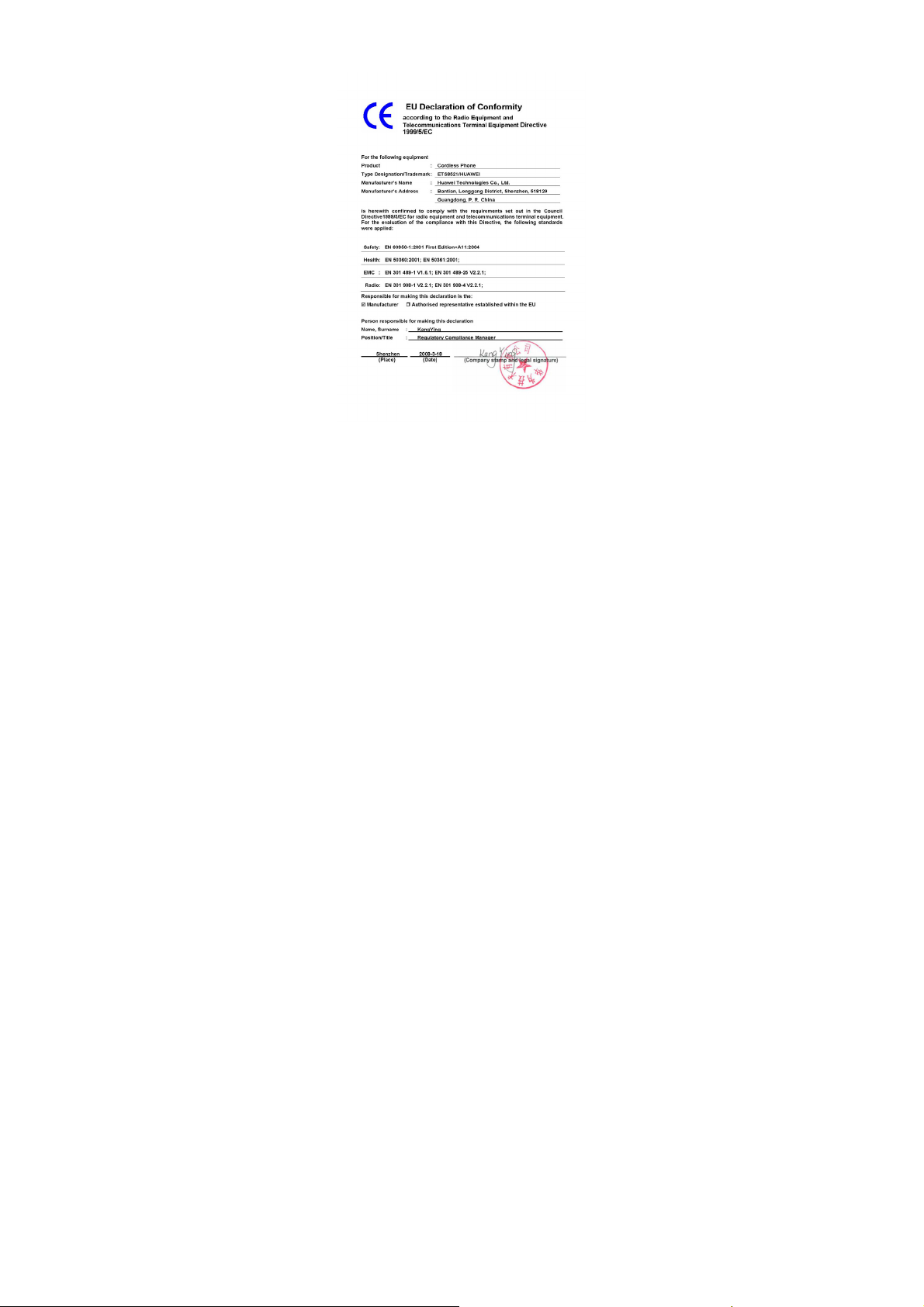
EU Declaration of Conformity
According to the Radio Equipment and Telecommunications Terminal
Equipment Directive 1999/5/EC
18
Page 20

For the following equipment
Product: CDMA Cordless phone
Type Designation/Trademark: HUAWEI/ETS8521
Manufacturer's Name : Huawei Technologies Co.,Ltd.
Manufacturer's Address : Bantian, Longgang District, Shenzhen, 518129,
Guangdong, P. R. China.
is herewith confirmed to comply with the requirements set out in the
Council Directive1999/5/EC for radio equipment and telecommunications
terminal equipment. For the evaluation of the compliance with this
Directive.
FCC Statement
This equipment has been tested and found to comply with the limits for a
Class B digital device, pursuant to Part 15 of the FCC Rules. These limits
are designed to provide reasonable protection against harmful interference
in a residential installation. This equipment generates, uses and can
radiate radio frequency energy and, if not installed and used in accordance
with the instructions, may cause harmful interference to radio
communications. However, there is no guarantee that interference will not
occur in a particular installation. If this equipment does cause harmful
interference to radio or television reception, which can be determined by
turning the equipment off and on, the user is encouraged to try to correct
the interference by one or more of the following measures:
Reorient or relocate the receiving antenna.
Increase the separation between the equipment and receiver.
Connect the equipment into an outlet on a circuit different from that to
which the receiver is connected.
Consult the dealer or an experienced radio/TV technician for help.
This device complies with Part 15 of the FCC Rules and with RSS-210 of
Industry Canada.
Operation is subject to the following two conditions:
(1) This device may not cause harmful interference, and
(2) This device must accept any interference received, including
interference that may cause undesired operation.
Warning: Changes or modifications made to this equipment not expressly
approved by HUAWEI may void the FCC authorization to operate this
equipment.
19
Page 21
Warning: This is a Radio Frequency Device! Please check the local
regulations before importing the product in any particular country.
DOC Statement
Version: V100R001_02 Part Number: 31018374
20
 Loading...