

Page 1

Copyright © Huawei Technologies Co., Ltd. 2009.
All rights reserved.
No part of this document may be reproduced or transmitted in any form or by any
means without prior written consent of Huawei Technologies Co. , Ltd.
The product described in this manual may include copyrighted softw are of Huawei
Technologies Co., Ltd and possible licensors. Customers shall not in any manner
reproduce, distribute, modify, decompile, disassemble, decrypt, extract, reverse
engineer, lease, assign, or sublicense the said software, unless suc h restrictions
are prohibited by applicable laws or such actions are approved by respective
copyright holders under licenses.
Trademarks and Permissions
, HUAWEI, and
Technologies Co., Ltd.
Other trademarks, product, service and company names mentioned are the
property of their respective owners.
are trademarks or registered trademarks of Huawei
Notice
Some features of the product and its accessories described herein rely on the
software installed, capacities and settings of local network, and may not be
activated or may be limited by local netwo rk operators or network service
providers, thus the descriptions herein may not exactly match the product or its
accessories you purchase.
Page 2

Huawei Technologies Co., Ltd reserves the right t o change or modify any
information or specifications contained in this manual without p rior notice or
obligation.
NO WARRANTY
THE CONTENTS OF THIS MANUAL ARE PROVIDED “ AS IS”. EXCEPT AS REQUIRED
BY APPLICABLE LAWS, NO WARRANTIES OF ANY KIND, EITHER EXPRESS OR
IMPLIED, INCLUDING BUT NOT LIMITED TO, THE IMPLIED WARRANTIES OF
MERCHANTABILITY AND FITNESS FOR A PARTICULAR PURPOSE, ARE MADE IN
RELATION TO T HE ACCURACY, RELIABILITY OR CONTENTS OF THIS MANUAL.
TO THE MAXIMUM EXTENT PERMITTED BY APPLICABLE LAW, IN NO CASE SHALL
HUAWEI TECHNOLOGIES CO., LTD BE LIABLE FOR ANY SPECIAL, INCIDENTAL,
INDIRECT, OR CONSEQUENTIAL DAMAGES, OR LOST PROFITS, BUSINESS,
REVENUE, DATA, GOODWILL OR ANTICIPATED SAVINGS.
Import and Export Regulations
Customers shall co mply with all applicable expo rt or im p or t laws and regulations
and will obtain all necessary governmental permits and licenses in order to ex port,
re-export or imp o r t t h e p ro d u c t m en tioned in this manual includ ing the software
and technical data therein.
Page 3

Table of Contents
What Is in Your Package ......................................................................... 1
Getting to Know Y o ur E1612.................................................................... 2
Preparation........................................................................................... 5
Installation/Rem o val Guide...................................................................... 6
Safety Information................................................................................. 9
i
Page 4

Thank you for choosing Huawei E1612 HSDPA USB
Stick (hereinafter referred to as the E1612). With
the E1612, you can access the Internet through
wireless network at a high speed.
Note:
This manual describes the appearance, installation and removal of the E1612. For
the operation of the management program, refer to the User Manual.
What Is in Your Package
The package of your E1612 contains the following items:
One E1612
One Quick Start
One USB cable
1
Page 5

Getting to Know Your E1612
The following figure shows the appearance of the E1612. It is only for your
reference. The actual product may differ.
1
4
3
2
n USB Interface
It connects the E1612 to a computer.
o Indicator
It indicates the status of the E1612.
5
6
2
Page 6

Colour Status Meaning
Green Blinking (on for 100ms and
off for 100ms; then on for
100ms and off for
2700ms)
Green Blinking (on for 100ms and
off for 2900ms)
Blue Blinking (on for 100ms and
off for 2900ms)
Green On The E1612 is connected to a GPRS/EDGE
Blue On The E1612 is connected to a WCDMA
Cyan On The E1612 is connected to a HSDPA
- Off The E1612 is removed.
The E1612 is powered on.
The E1612 is registered to a
GSM/GPRS/EDGE network.
The E1612 is registered to a UMTS
network.
network.
network.
network.
p Earphone Interface
Connect the earphone.
q SIM/USIM Card Slot
It is where you insert the subscriber identity module/UMTS subscriber identity
module (SIM/USIM) card.
3
Page 7

r Micro SD Card Slot
It is where you insert the Micro Secure Digital Memory (SD) card
s Strap Hole
4
Page 8
Preparation
Requirements for the Computer
To use the E1612, the computer should meet the following requirements:
USB T ype A Receptacle, Compatible with USB 2. 0 High Speed.
Windows 2000 SP4, Windows XP SP2, Windows Vista.
Your computer’s hardware system should meet or exceed the recommended
system requirements for the installed version of OS.
Resolution for the display: 800 × 600 or above.
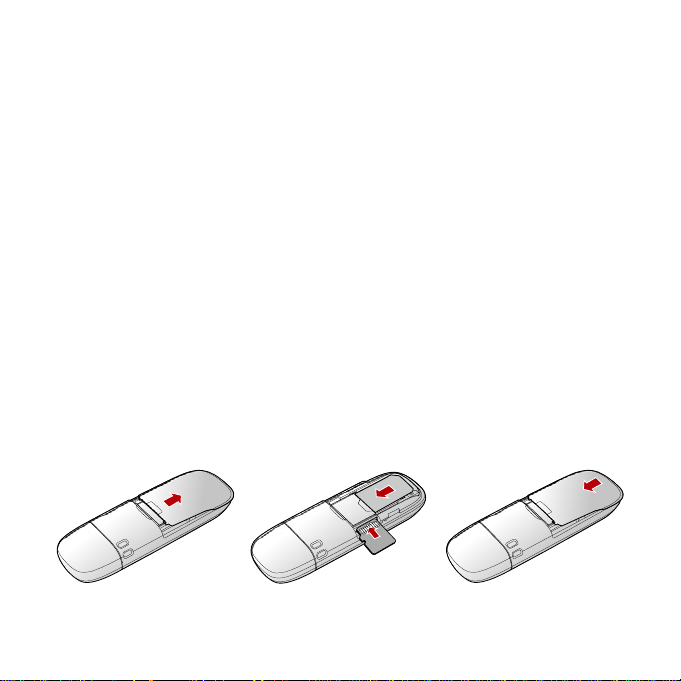
Getting Your E1612 Ready
1. Remove the back cover of the E1612.
2. Insert the USIM/SIM card and the micro SD card into the card slots . Make sure
that the cards are properly inserted.
3. Install the back cover of the E1612.
5
Page 9

Note:
Do not remove the Micro SD card when it is being used. Remo ving the card during
an operation may damage the Micro SD card as well as the device, and data stored
on the card may be corrupted.
Installation/Removal Guide
On different operating systems (OSs), the installation and removal procedures
may differ. Follow the system prompts during operation.
Connecting the E1612 with a Computer
Note:
First, power on the computer. Then connect the E1612 with the computer.
Otherwise, the E1612 cannot be installed as normal.
1. Plug the E1612 into the USB interface of the laptop or desktop computer.
6
Page 10
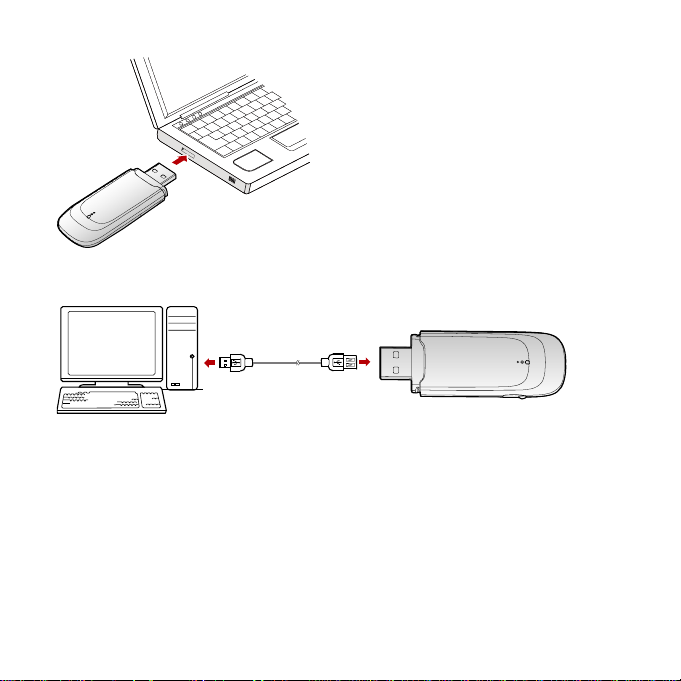
You can connect the E1612 to a laptop or desktop computer using the USB cable
for better signals.
2. The OS automatically detects and recognises new hardware and starts the
installation wizard.
3. Follow the prompts of the installation wizard.
4. After the program is installed, a shortcut icon for the E1612 management
program is displayed on the desktop.
Starting the Management Program
After the E1612 is installed, the management program is launched automatically .
Then every time the E1612 is connected to the PC, the management program is
7
Page 11

launched automatically.
You can also double-click the shortcut icon on the desktop to launch the
management program.
Removing the E1612
Exit the management program and then remove the E1612 directly.
Removing the Management Program
1. Click Start Menu.
2. Click Control Panel.
3. Click Add/Remove Program to remove the management program of the
E1612.
Note:
Before removing the management program, exit the management program.
8
Page 12

Safety Information
Read the safety information carefully to ensure the correct and safe use of your
wireless device.
Interference
Do not use your wireless device if using the dev ice is prohib ited or when it caus e
danger or interference with electric devices.
Medical Device
Do not use your wireless device and follow the ru les and regulations set forth
by the hospitals and health care facilities.
Some wireless devices may affect the performance of the hearing aids. For
any such problems, consult your service provider.
If you are using an electronic medical device, consult the doctor or device
manufacturer to confirm whether the radio wav e affects the ope rat ion of this
device.
Area with Inflammables and Explosives
To prevent explosions and fires in areas that are stored with inflammable and
explosive devices, do not use your w ireless device and observe the rules. Areas
stored with inflammables and explosives include but are not limited to the
following:
Gas station
Fuel depot (such as the bunk below the deck of a ship)
Container/Vehicle for stor ing or transporting fuels or chemical products
9
Page 13

Area where the air contains chemical substances and particles (such as
granule, dust, or metal powder)
Area indicated with the "Explosives" sign
Area indicated with the "Power off bi-direction wireless equipment" sign
Area where you are generally suggested to stop the engine of a vehicle
Traffic Security
Observe local la ws and regulat ions while using th e wireless device. To prevent
accidents, do not use your wireless device while driving.
RF signals may affect electronic systems of motor vehicles. For more
information, consult the vehicle manufacturer.
In a motor vehicle, do not place the wireless device o ver the air bag or in th e
air bag deployment area. Otherwise, the wireless device may hurt y ou owing
to the strong force when the air bag inflates.
Observe the rules and regulations of airline companies. When boarding,
switch off your wireless device. Otherwise, the radio signal of the wireless
device may interfere with the plane control signals.
Safety of Children
Do not allow children to use the wireless device without guidance. Small and
sharp components of the wireless device may cause danger to children or cause
suffocation if children swallow the components.
Environment Protection
Observe the local regulations regarding the d isposal of your packag ing materials,
used wireless device and accessories, and promote their recycling.
10
Page 14

WEEE Approval
The wireless device is in compliance with the essential requirements and other
relevant provisions of the Waste Electrical and Electronic Equipment Directive
2002/96/EC (WEEE Directive).
RoHS Approval
The wireless device is in compliance with the restriction of the use of certain
hazardous substances in electrical and electronic equipment Directive
2002/95/EC (RoHS Directive).
Laws and Regulations Observance
Observe laws and regulations when using your wireless device. Respect the
privacy and legal rights of the others.
Care and Maintenance
It is normal that your wireless device gets hot whe n y ou us e or cha rge it . Bef ore
you clean or ma intain the w ireless dev ice, stop al l applicat ions and dis connect th e
wireless device from your PC.
Use your wireless device and accessories with care and in clean en vironment.
Keep the wireless device from a fire or a lit cigarette.
Protect your wireless device and accessories from w ater a n d vapor and keep
them dry .
Do not drop, throw or bend your wireless dev ice.
Clean your wireless device with a piece of damp and soft antistatic cloth. Do
not use any chemical agents (such as alcohol and benzene), chemical
detergent, or powder to clean it.
Do not leave your wireless device and accessories in a place with a
11
Page 15

considerably low or high temperature.
Use only accessories of the wireless device appro ved by the manufacture.
Contact the authorized service center for any abnormit y of the wireless device
or accessories.
Do not dismantle the wireless device or accessories. Otherwise, the wireless
device and accessories are not covered by the warranty.
Emergency Call
This wireless device functions through receiving and transmitting radio signals.
Therefore, the connection cannot be guaranteed in all conditions. In an
emergency, you should not rely solely on the wireless device for essential
communications.
Specific Absorption Rate (SAR)
Your wireless device is a radio transmitter and receiver. It is designed not to
exceed the limits for exposure to radio waves recommended by international
guidelines. These guidelines were develo ped by the independent scientific
organization ICNIRP and include safety marg ins designed to assure the protect ion
of all persons, regardless of age and health.
Regulatory Information
The following approvals and notices apply in specific regions as noted.
CE Approval (European Union)
The wireless device is approved to be used in the member states of the EU. The
wireless device is in compliance with the essential requ irements and other
relevant pro visions of the Radio and Telecommunications Terminal Equipment
Directive 1999/5/EC (R&TTE Directive).
In Europe, the SAR limit for mobile devices used by the public is 2.0 watts/kg
12
Page 16

(W/kg) averagedover 10 gr ams of tissue for the body or head (4.0 W/kg aver aged
over 10 grams of tissue for theextremities - hands, wrists, ankles and feet). The
standard incorporates a substantial margin ofsafety to give addition a l protection
for the public and to account for any variations inmeasurements.
Federal Communications Com mission Notice (United States): Before a wireless
device model is available for sale to the public, it must be tested and certified to
the FCC that it does not exceed the limit establ ished by th e gov ernment - adopted
requirement for safe exposure.
FCC Statement
In the United States and Canada, the SAR lim it for mobile devices used by the
public is 1.6watts/kg (W/kg) aver aged ov er 1 gram of tissue for the body or head
(4.0 W/kg averaged over10 grams of tissue for the extremities - hands, wrists,
ankles and feet). The standard incorporatesa substantial margin of safety to giv e
additional protection for the public and to account for anyvariations in
measurements.
SAR compliance has been established in typical laptop computer(s) with USB slot,
and product could be used with typical laptop computer. Other application like
handheld PC or co-transmitting with other high power tr ansmitter(s) within 20cm
have not been verified and may not comply with relevant RF exposure rules.
Please consult manufacture(s) before such use.
15.19
NOTICE:
This device complies with Part 15 of the FCC Rules [and with RSS-210 of Industry
Canada].
Operation is subject to the following two conditions:
(1) this device may not cause harmful interference, and
(2) this device must accept any interfer ence rece ived, i ncludin g inter ference t hat
may cause undesired operation.
13
Page 17

15.21
NOTICE:
Changes or modifications made to this equipment not expr essly approved by
(HUAWEI)
may void the FCC authorization to operate this equipment.
15.105
NOTE: This equipment has been tested and found to comply with the limits for a
Class B digital device, pursuant to Part 15 of the FCC Rules. The se limits are
designed to provide reasonable protection against harmful interference in a
residential installation. This equipment generates, uses and can radiate rad io
frequency energy and, if not installed and used in accordance with the instructions,
may cause harmful interference to radio communications. However, there is no
guarantee that interference will not occur in a particular installat ion . If this
equipment does cause harmful interference to radio or telev ision reception, which
can be determined by turning the equipment off and on, the user is encouraged to
try to correct the interference by one or more of the following measures:
• Reorient o r relocate the receiving antenna.
• Increase the separation between the equ ipment and receiver.
• Connect the equipment into an outlet on a circuit different from tha t to which the
receiver is conn e ct ed.
• Consult the dealer or an experienced radio/TV technician for help.
rsion: V100R001_01 Part Number: 3101xxxx
14
 Loading...