

Page 1
1
Page 2
②
Earpiece
①Optical
Sensor
③
Power Key
④
Notification
LED
⑤
Touchscreen
Display
⑥
Home Key
⑦
Menu Key
⑧
Back Key
⑨
Search Key
Getting Started
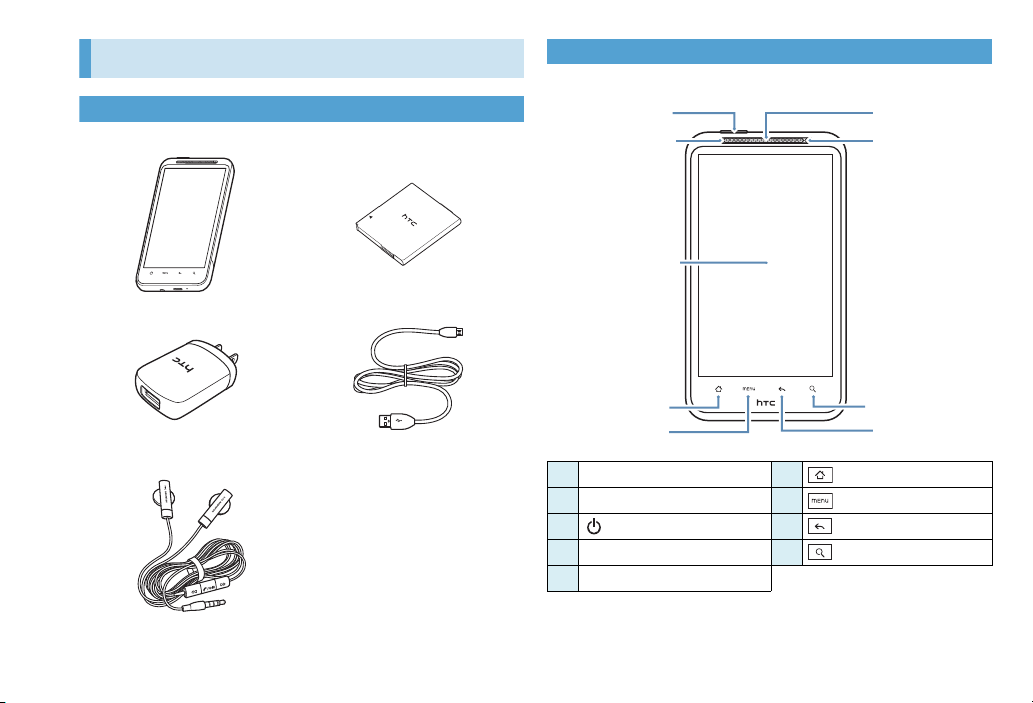
Package Contents
■001HT Handset ■Battery (HTBAH1)
■AC Adapter (HTCAG1) ■Micro USB Cable (HTDAF1)
■Headset with Microphone
(HTLAF1)
microSD Memory Card (Sample)
■
■Battery Cover
■Back Cover (USIM/Memory
Card)
■Quick Start Guide (Japanese)
■Safety Precautions (Japanese)
Parts & Functions
■Front
Optical Sensor
①
Earpiece
②
Power Key
③
Notification LED
④
Touchscreen Display
⑤
Home Key
⑥
Menu Key
⑦
Back Key
⑧
Search Key
⑨
2
Page 3
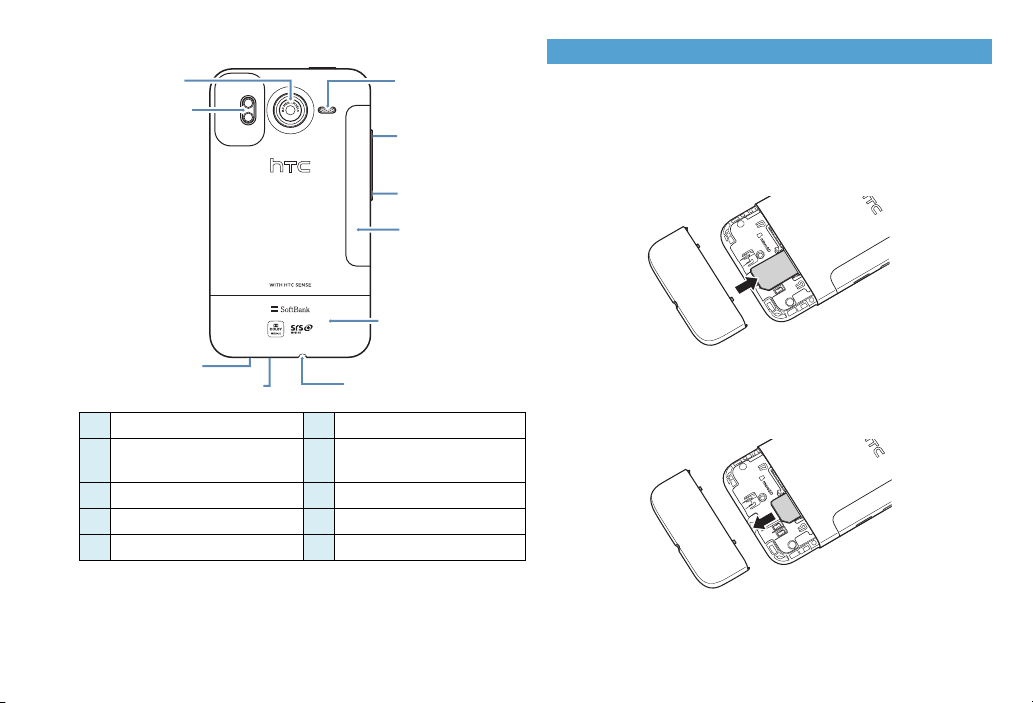
■Back
⑫Speaker
⑬Volume
Up
⑭
Volume
Down
⑩Camera
⑯Back Cover
(USIM/Memory
Card)
⑮Battery
Cover
⑪
LED Flash
⑲
Microphone
⑱
External Device Terminal
⑰
3.5 mm Audio Jack
USIM Card Installation
Turn off handset before inserting/removing USIM Card.
■Inserting USIM Card
1. Insert USIM Card
With IC chip down, insert USIM Card into slot on the right.
⑩
⑪
⑫
⑬
⑭
Camera
LED Flash
Speaker
Volume U p
Volume Down
Battery Cover
⑮
Back Cover
⑯
(USIM/Memory Card)
3.5 mm Audio Jack
⑰
External Device Terminal
⑱
Microphone
⑲
■Removing USIM Card
1. Slide USIM Card out
3
Page 4
Memory Card Installation
Turn handset power off before inserting/
removing Memory Card.
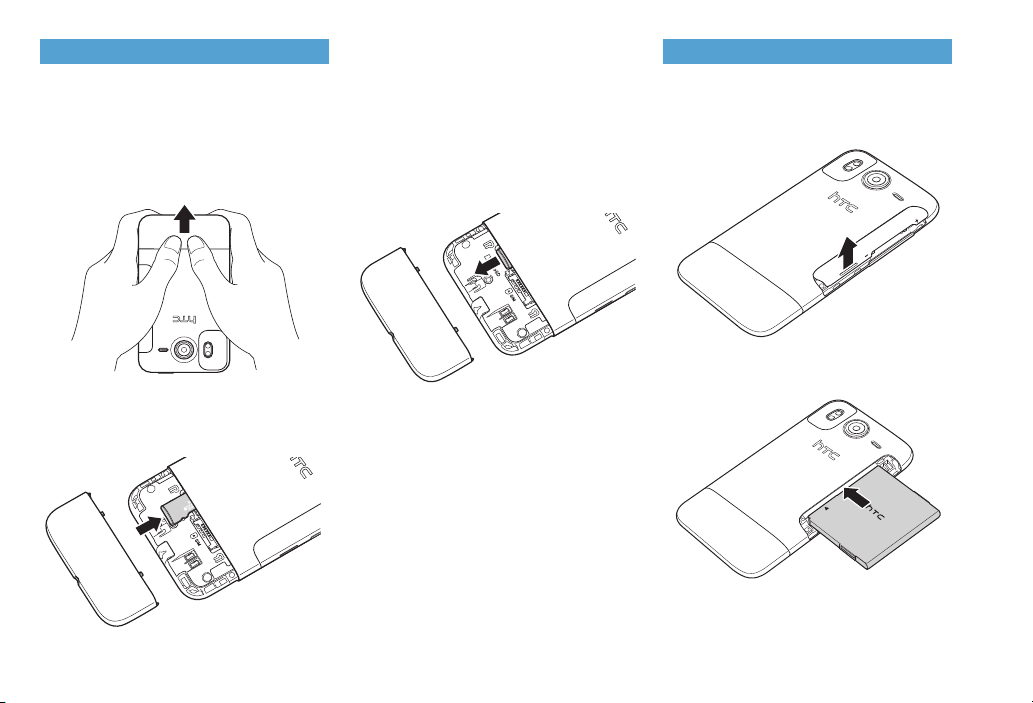
■Inserting Memory Card
1. Remove Back Cover
Slide Back Cover off to remove it.
2. Insert Memory Card
With contacts down, push Memory Card
into slot on the left until it clicks.
3. Replace Back Cover
■Removing Memory Card
1. Remove Back Cover
2. Push Memory Card in to eject it
Memory Card pops out slightly.
3. Carefully remove Memory Card
4. Replace Back Cover
Battery Installation
■Inserting Battery
1. Remove Battery Cover
Use fingernail to lift Battery Cover up.
2. Insert battery
With
htc
logo up, insert battery.
4
Page 5
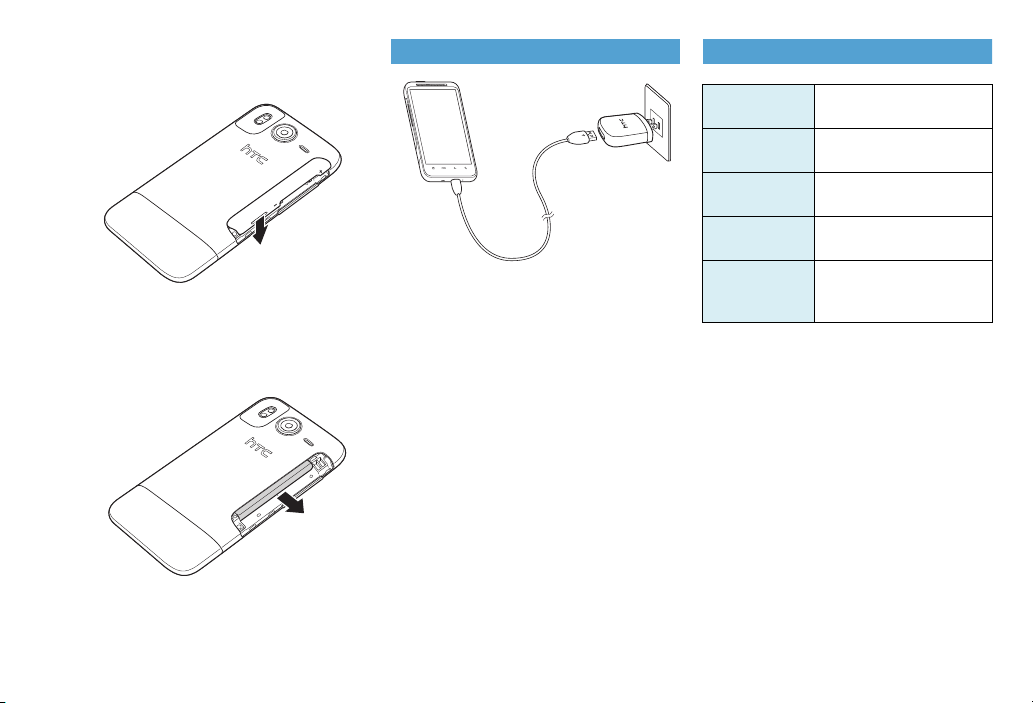
3. Replace Battery Cover
Put back Battery Cover, pushing battery
all the way in.
■Removing Battery
1. Remove Battery Cover
2. Remove battery
3. Replace Battery Cover
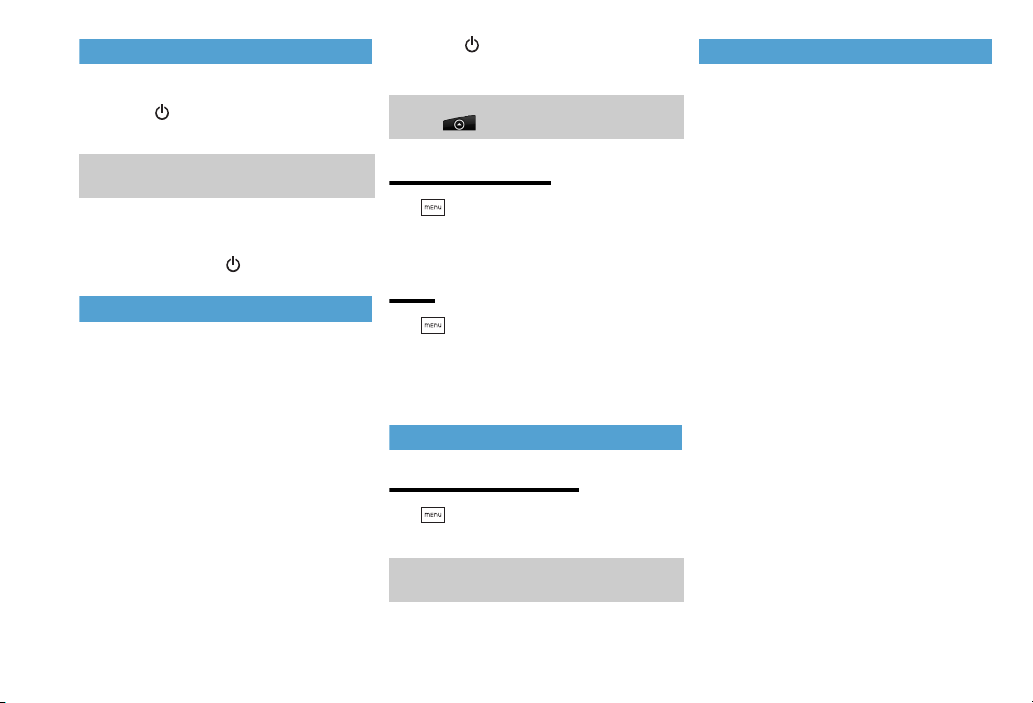
Charging Battery
1. Insert USB plug into AC Adapter
2. Insert microUSB plug into External
Device Terminal
3. Plug AC Adapter into 100V AC
outlet
As battery charges, Notification LED
lights solid orange. When battery is fully
charged, LED lights solid green.
4. When battery is fully charged,
disconnect AC Adapter
5. Unplug AC Adapter, then
disconnect handset
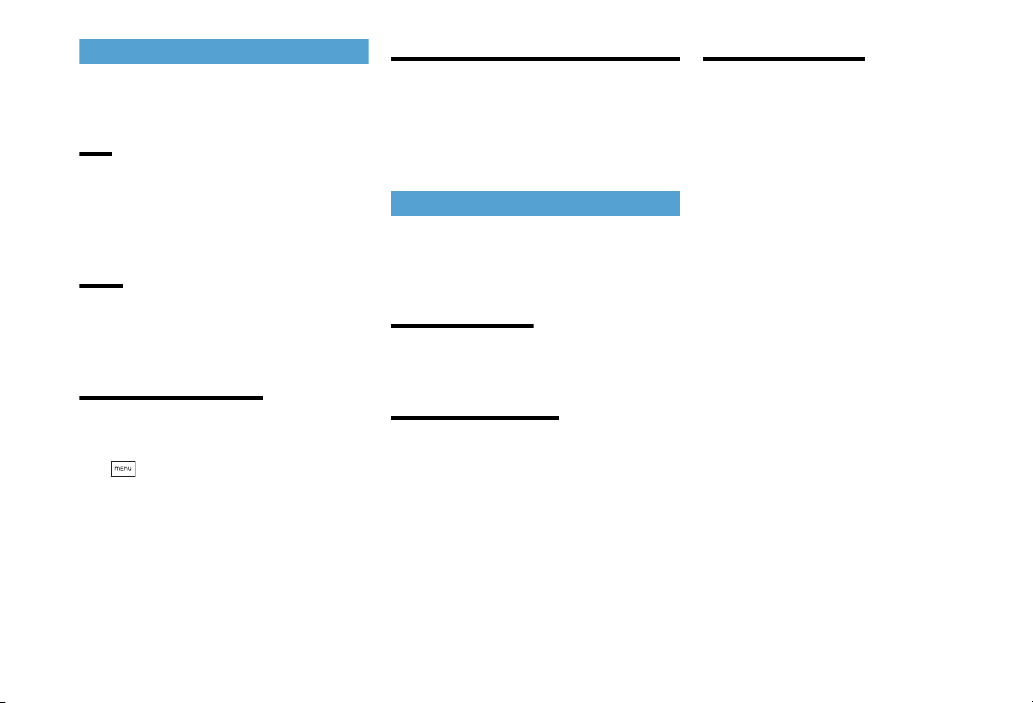
Specifications
Charging Time
(AC Adapter)
Continuous
Standby Time
Continuous
Tal k Ti me
Dimensions
Weight
(including
battery)
*Approximate Value
*
*
*
150 minutes
3G: 401 hours
GSM: 384 hours
3G: 320 minutes
GSM: 371 minutes
123 mm (H) x 68 mm (W) x
11.8 mm (D)
164 g
5
Page 6
Handset Power On/Off
■Power ON
1. Press
Home Screen appears.
・ The first time handset powers on, handset
setup prompt appears.
■Power OFF
1. Press and hold >Power off
Initial Handset Setup
The first time handset powers on, tutorials/
guides appear for the following items:
・ Handset language
・ Internet connection type
・ Scheduled sync type
・ Wi-Fi Access point
・ Google location option
・ HTC Sense account
・ Email accounts
・ Social network accounts
・ Current time
1. Press
2. Follow onscreen instructions
・ Alternatively, complete setup later:
Tap then tap Setup.
Handset Language
1. > Settings > Language &
keyboard > Select language >
English or 日本語
Clock
1. > Settings > Date & time
2. Set automatic/manual option, date
and time, time zone, and date or
time format
Sound Profile
Vibration/Silent Mode
1. > Settings > Sound > Sound
profile > Select a profile
・ Alternatively, press Volume Down Key to
set Vibrate mode.
Touchscreen Operations
● Tap
Tap application/settings icons, or onscreen
buttons to select them.
● Press and Hold
To open available options for an item, simply
press and hold the item.
● Flick
Swipe finger vertically to view webpages,
Contacts, or lists, etc.
● Pan
Touch and hold Display, then drag finger to see
a zoomed photo, webpage, or document.
● Rotate
In most applications, rotating the handset
automatically changes Display orientation.
● Pinch
When viewing images or webpages, pinch
your fingers together/apart to zoom in/out.
6
Page 7
USIM PINs
USIM Card has two 4- to 8-digit security
codes.
PIN
Use PIN to prevent unauthorized use.
・ It is set to 9999 by default.
・ Set handset to require PIN entry at power on to
prevent unauthorized use.
PIN2
PIN2 provides personal authentication for
online services.
・ PIN2 cannot be changed on handset.
Set Up SIM Card Lock
Require PIN entry at power on for handset
use.
1. > Settings > Security > Set
up SIM card lock
2. Check “Lock SIM card” box
3. Enter default USIM PIN > OK
Canceling PIN Lock (PUK/PUK2 Code)
Entering an incorrect PIN three consecutive
times activates PIN Lock. Enter PUK (Personal
Unblocking Key) code to cancel PIN Lock.
・ For details about PUK code, contact SoftBank
Mobile Customer Service.
Security Codes
Phone Password, Center Access Code and
Network Password are required to use
handset.
Phone Password
4-digit number required to use or change
handset functions.
Center Access Code
4-digit number specified at subscription; use
to subscribe to fee-based information/access
Voice Mail via landline.
Network Password
4-digit number specified at subscription; use
for Call Barring, etc. Entering it incorrectly
three consecutive times locks Call Barring
settings. To resolve, Network Password and
Center Access Code must be changed.
・ For details, contact SoftBank Mobile Customer
Center, General Information.
7
Page 8
Phone Calls
My Phone Number
1. > Settings
2. About phone > Phone identity
Handset number appears in Owner
Information.
Making Voice Calls
1. Phone
2. Use Keypad to enter a phone
number
3. Call
4. To end call, End call
Emergency Call (110, 119, 118)
When calling is barred, follow these steps to
call emergency numbers:
1. Phone > Emergency phone
number > Call
Adding a new Contacts Entry
1. > People > Add contact
2. Select Contact type
3. Enter each item > Save
Receiving Calls
1. When a call arrives, Answer
2. To end call, End call
1. > Settings > Wireless &
networks > Mobile networks >
Network Mode
2. Select network type
■Setting Carriers
If there are multiple carriers in the region,
handset automatically selects a carrier.
Alternatively, select a carrier manually.
1. > Settings > Wireless &
networks > Mobile networks >
Network operators
2. Search networks or Select
automatically
Making Calls while Overseas
International Call
1. Phone > Tap and hold “0”
2. Enter Country Code → Recipient’s
phone number (omitting first “0”
*Include 0 when calling landlines in Italy
(Country Code: 39)
3. Call
4. To end call, End call
8
Overseas Handset Use
Global Roaming
*
)
■Setting Network Type
Select Network and Band type for overseas
carriers if necessary.
Landlines & Handsets Anywhere
1. Phone > Tap and hold “0”
2. Enter Country Code → Recipient’s
phone number (omitting first “0”
*Include 0 when calling landlines in Italy
(Country Code: 39)
3. Call
*
)
Page 9
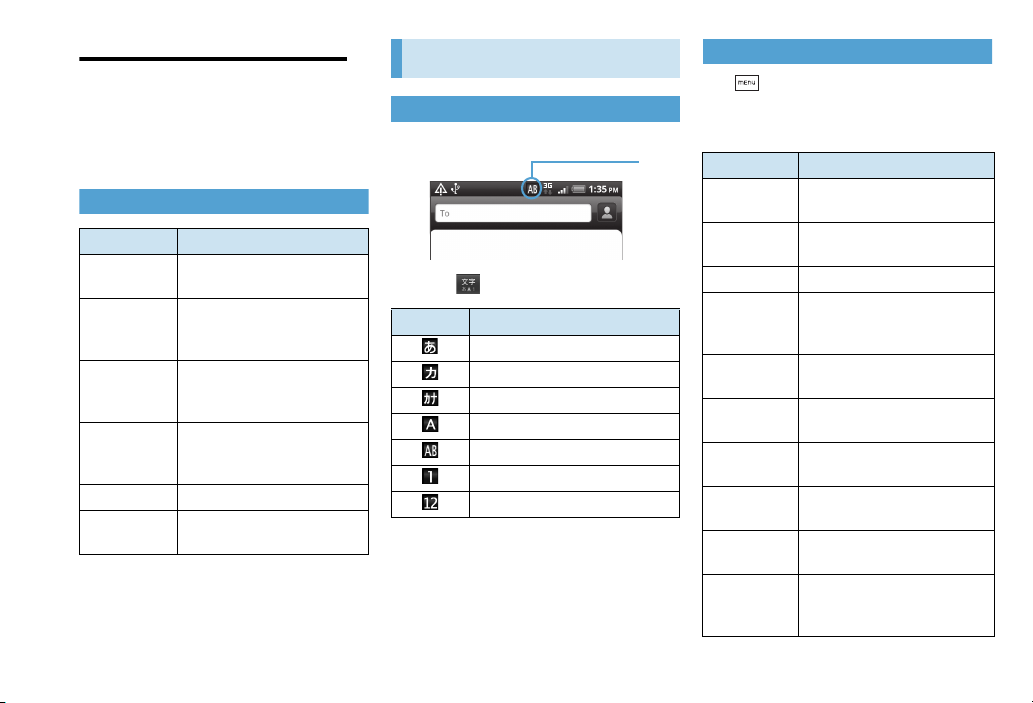
Domestic Landlines & Handsets
Input
mode
Enter phone number, including first 0; do
not enter Country Code.
1. Phone > Enter phone number
2. Call
Optional Services
Service Description
Call
Forwarding
Voic email
Call Waiting
Conference
Calls (Merge
*
Call)
Call Barring Block incoming/outgoing calls
Caller ID
*Requires a separate subscription.
Forward incoming calls to
specified phone number
Forward calls to Voicemail
Center; callers can leave
messages
Answer calls while line is
*
engaged; switch between
lines
Use up to six lines
simultaneously; switch
between lines
Show or hide your number
when making calls
Text Entry
Using Onscreen Keyboard
1. Tap and hold Text Entry window
2. Tap to toggle Input mode
Indicator Input Mode
Hiragana/kanji
Double-byte katakana
Single-byte katakana
Double-byte alphabets
Single-byte alphabets
Double-byte numbers
Single-byte numbers
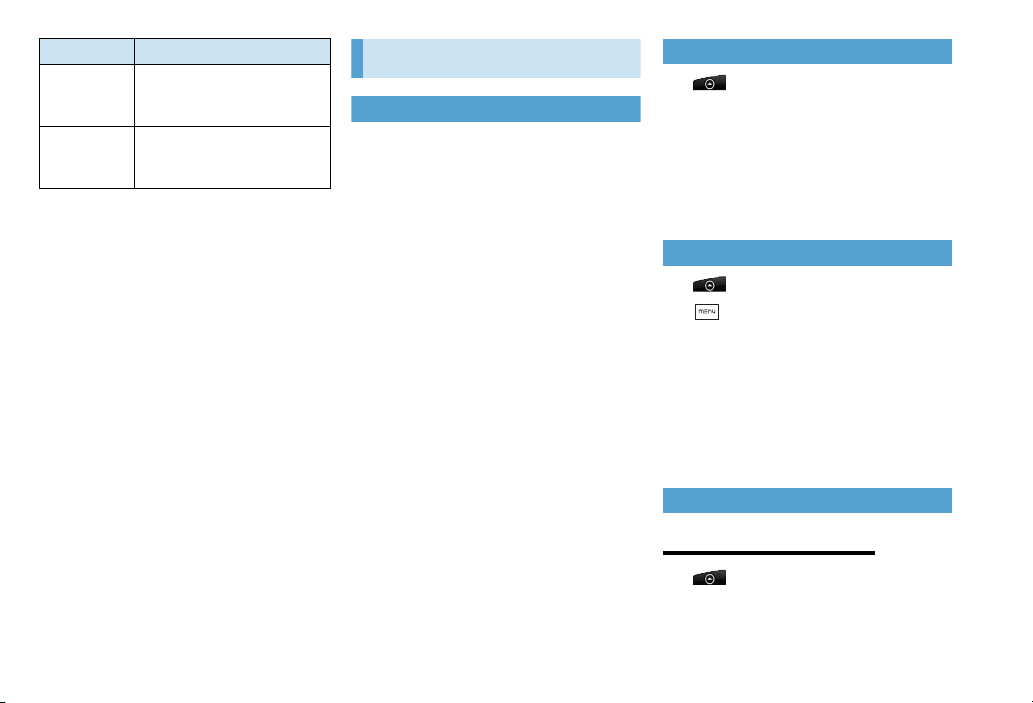
Adjusting Touch Input Settings
1. > Settings > Language &
keyboard > iWnn IME
2. Set the followings:
Item Description
Sound on
Key Press
Vibrate on
Key Press
Key Preview Enable key preview
Auto
Capitalization
Keyboard
Image
Input Word
Learning
Word
Prediction
Typing Error
Correction
Wildcard
Prediction
Japanese
User
Dictionary
Enable key click sound
Enable key click vibration
Automatically capitalize first
character of sentences in
Alphabet mode
Change keypad layout
Learn input words
Show predicted words as
conversion candidates
Show predicted words to
correct typing errors
Use Wildcard prediction
function
Add words to the predictive
text dictionary in Hiragana/kanji
mode
9
Page 10
Item Description
English User
Dictionary
Clear
Learning
Dictionary
Add words to the predictive
text dictionary in the Singlebyte alphabets mode
Reset learning dictionary
Messaging
Mail Type
■SMS (Short Message Service)
Send short text messages to SoftBank
handsets. Enter up to 140 single-byte (70
double-byte) characters.
Using SMS
1. > Messages
2. Compose message
3. Tap “To” (Recipient field) > Enter
recipient
4. Tap Text field > Enter message
5. Send
10
■Gmail
Gmail (Google Mail) is Google’s web-based
mail service. Handset Gmail automatically
synchronizes with one or more Gmail
accounts on the web.
■Internet Mail (POP3/IMAP4)
Exchange messages the same way as on PC.
・ Set up a mail account.
Using Gmail
1. > Gmail
2. > Compose
3. Tap “To” (Recipient field) > Enter
recipient
4. Tap Subject > Enter subject
5. Tap Compose Mail > Enter
message
6. Send
Using Internet Mail
Setting Up Internet Mail
1. >Mail
2. Microsoft Exchange ActiveSync or
Other (POP3/IMAP)
Page 11
3. Enter mail address and password
> Next
4. Enter account name and your
name > Finish setup
Composing/Sending Internet Mail
1. > Mail
2. Select mail account
3. Compose mail
4. Tap “To” (Recipient field) > Enter
recipient
5. Tap Subject > Enter subject
6. Tap Text field > Enter message
7. Send
Internet
Network Settings
Unless changed, handset uses 3G packet
communications for Internet connections by
default.
To use Wi-Fi, access a wireless access point or
hotspot.
Checking 3G Data Connection
1. > Settings > Wireless &
networks
2. Mobile networks > Access Point
Names or Network operators
Activating Wi-Fi & Connecting
1. > Settings > Wireless &
networks
2. Check “Wi-Fi” box
3. Wi-Fi settings > Select Wi-Fi
network
Using Browser
Launching Browser
1. > Internet
Entering URLs
1. > Internet
2. Enter URL address in Address bar
Bookmarking Webpages
1. In a webpage > > Add
bookmark
Opening Bookmarks
1. > Internet
2. > Bookmarks > Select
bookmark to open
11
Page 12
Camera
Using Camera
Taking Photos
1. > Camera
2. Frame subject in Viewfinder >
Recording Videos
1. > Camcorder
2. Frame subject in Viewfinder >
3. to stop recording
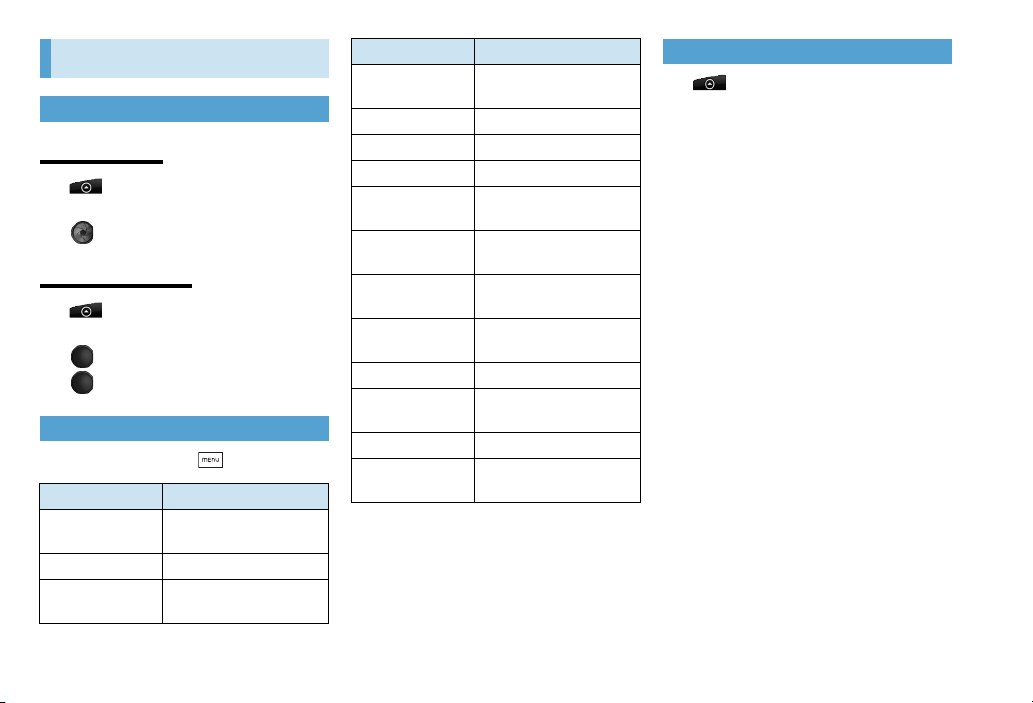
Camera Settings
1. In Viewfinder >
Item Description
Select the number of
Self-portrait
Self-timer
Image
adjustments
1
faces in a frame
1
Set timer duration
Adjust contrast, saturation
and sharpness
Item Description
White balance
Resolution
1
ISO
Video quality
Review duration
Widescreen
Record with
2
audio
Geo-tag photos
Auto focus Enable/cancel auto focus
Face detection
1
Grid
Reset to default
1 Appears only in Photo mode.
2 Appears only in Video mode.
Adjust color balance for
current lighting
1
Select photo resolution
Choose ISO level
2
Select video resolution
Set review time for
captured images
Set Widescreen (5:3) or
1
Standard photo size (4:3)
Check box to record audio
Check box to record
1
location for photos
Recognize faces and
1
automatically adjust focus
Show grid in Viewfinder
Restore Camera default
settings
Viewing Photos & Videos
1. > Gallery
2. Select photo/video album
12
Page 13
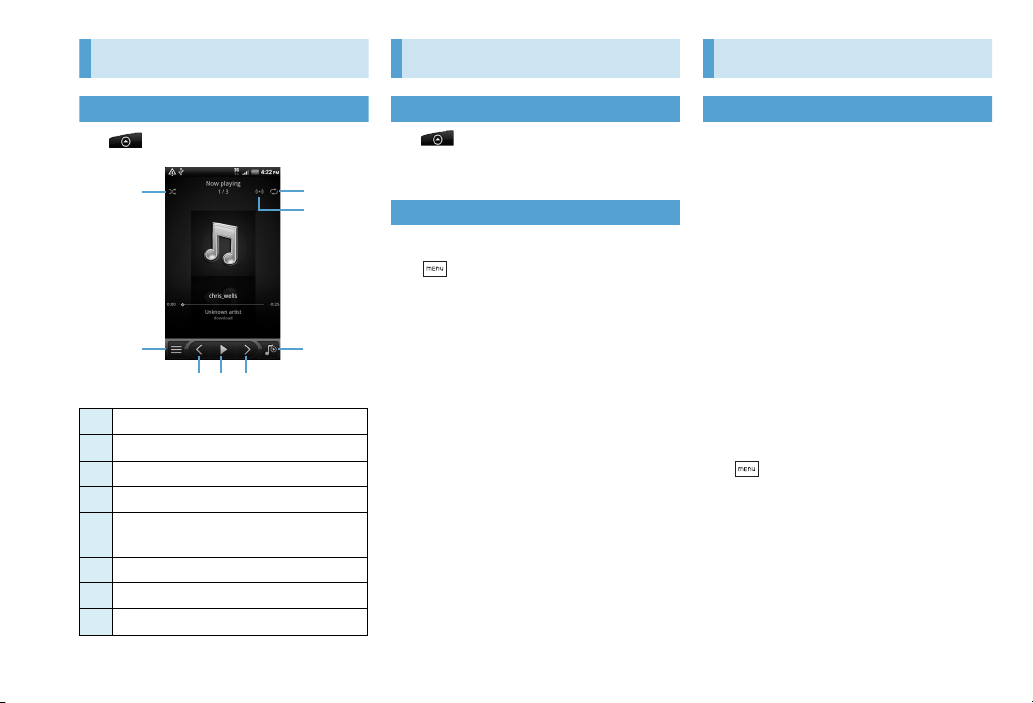
Music
① ③
④
⑤
⑧⑦⑥
②
Applications
Appendix
Playing Music
1. > Music
Shuffle ON/OFF
①
Go to Library
②
Repeat mode
③
Sound enhancer
④
Switch between Play back screen and
⑤
Now playing list
Go to previous song
⑥
Play, pause, or resume playing song
⑦
Go to next song
⑧
Opening Applications
1.
2.
Select application
Deleting Applications
1. Open Android Market
2. > Downloads
3. Select application to uninstall
4. Uninstall > OK
Software Update
Check for firmware updates and download
as required.
・ Handset is designed to automatically perform
communications for software updates, and to
maintain a connection with the server, etc.
Therefore, the use of packet flat-rate services
such as “Unlimited Packet Discount” is highly
recommended.
・ Fully charge battery beforehand.
・ Select a place where signal is strong and stable.
・ Other functions are not available during
software update.
・ Do not remove battery during the update.
Update will fail.
・ Software update failure may disable handset.
Contact Customer Service.
1. > Settings > About phone
2. System software updates > Check
“Scheduled check” box
3. When system update message, OK
13
Page 14

Checking for System Software
Updates Manually
1. > Settings > About phone
2. System software updates > Check
now
14
Page 15
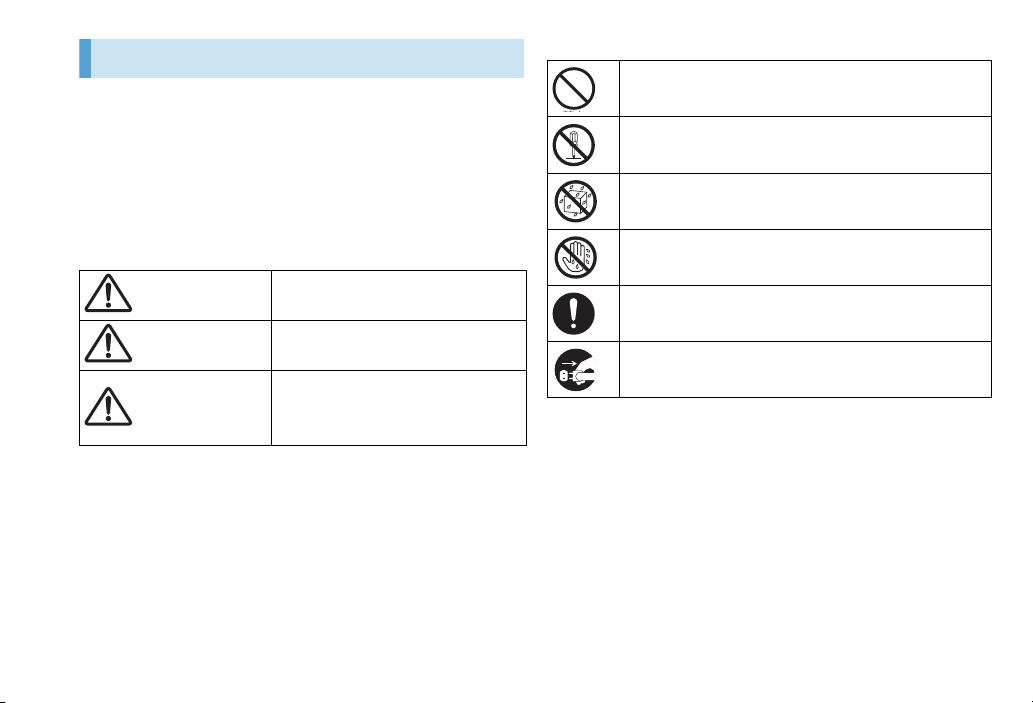
Safety Precautions
DANGER
WARNING
CAUTION
● Before using handset, read the Safety Precautions carefully, and keep this
guide in a safe place for future reference.
● The Safety Precautions contain information intended to prevent bodily
injury to the user and others, as well as damage to property. Observe
these guidelines.
● Handset malfunction or failure may hinder voice or data transmissions;
SoftBank Mobile is not liable for damages to the user or third parties.
● These symbols indicate level of harm from failure to observe cautions or
improper usage. Make sure to understand these symbols and
precautions before reading this guide.
Great risk of death or serious
1
from improper use
injury
Warning Risk of death or serious
1
from improper use
injury
Caution Risk of minor injury
damage to property
improper use
1
Serious injury includes loss of sight, wounds, high temperature burns,
low temperature burns (burns causing reddish areas, blistering and other
damage to the skin as a result of heat exceeding the body temperature
contacting your skin for a prolonged time), electric shock, fractures and
poisoning requiring hospitalization or long-term medical treatment.
2
Minor injury includes wounds, burns and electric shock not requiring
hospitalization or long-term medical treatment.
3
Damage to property includes extensive damage to homes and household
property, as well as livestock and pets.
3
from
2
or
■Symbols
Prohibited Action
Disassembly Prohibited
Avoid Moisture
Always Dry Hands First
Compulsory Action
Disconnect Power Source
15
Page 16
■ Handset, Battery, USIM Card,
DANGER
WARNING
Headset with Microphone,
microUSB Cable (sample), Memory
Card, and Charger
Do not disassemble or
modify.
Do not disassemble handset,
Charger or battery. Doing so may
result in injury, electric shock or
fire, or cause battery to leak,
overheat, rupture or ignite.
Contact SoftBank Mobile for
testing, adjustment or repair. Do
not modify handset or Charger.
Doing so may result in electric
shock or fire.
Keep away from water.
Do not expose handset to liquids.
Doing so may result in
overheating, electric shock or fire,
or cause damage or injury, or may
damage battery, hinder
performance or shorten battery
life.
Do not force battery/
Charger into handset.
Check the direction and retry.
Battery may leak, overheat, burst,
ignite, etc.
Do not use or leave in
extreme temperatures.
Avoid using or leaving handset
near fire or another heat source, in
direct sunlight, or in cars exposed
to sunlight.
Extreme temperatures may cause
warping, failure, leakage,
overheating, rupture or fire; or
may reduce performance or
shorten battery life. Handling a hot
handset may cause burns.
Use only specified
accessories.
Using non-specified accessories
may result in leakage,
overheating, rupture or fire, or
cause handset, battery or
other device failure.
Do not place near liquidfilled containers, etc.
Keep handset and Charger away
from vases, cups, cosmetics,
chemicals, etc. Spilled liquids may
cause fire or electric shock.
Do not put battery,
handset, Charger or USIM
Card in cooking appliances
such as a microwave or
pressure cooker.
Doing so may result in battery
leakage, overheating, rupture or
fire; or handset or the Charger to
heat, smoke or catch fire causing
damage to circuitry.
Keep handset off and
Charger disconnected at
gasoline stations or other
places with fire/explosion
risk.
Use may lead to fire or explosion.
16
Page 17
Do not drop or subject
CAUTION
handset to impacts.
Do not subject handset or Charger
to sudden impacts. Doing so may
cause injuries or malfunctions. If
outer case is damaged, remove
battery and contact SoftBank
Mobile Customer Service.
Continued use may cause fire or
electric shock.
Keep USIM Card out of
children’s reach.
Small parts may be swallowed.
If foreign matter gets inside
handset
Turn handset power off, remove
battery, unplug Charger and contact
SoftBank Mobile Customer Service.
Continued use may cause fire or
electric shock.
If abnormalities occur
If you detect abnormal smells,
heat, discoloration, warping, etc.
while using, charging or storing
handset, take these actions
immediately:
1. Unplug Charger.
2. Turn handset power off.
3. Remove battery from handset.
4. Contact SoftBank Mobile
Customer Service. Continued
use may cause overheating,
rupture, fire or battery leak.
Do not place handset on
unstable/uneven surfaces.
Doing so may lead to handset
damage, injuries or malfunction.
Do not store in places with
high temperatures,
humidity or dust.
Doing so may cause malfunction.
Do not place handset under
air conditioners.
Doing so may cause condensation,
leakage or fire.
Do not leave handset in
extreme cold.
Doing so may cause malfunction
or accidents.
17
Page 18
Usage Environment
DANGER
・ Do not use in sandy locations
(beaches or sandlots). Doing so
may cause malfunction or
accidents.
・ Keep handset away from
magnetic cards. Data may be
erased from debit/credit cards,
telephone cards, floppy disks,
etc.
A parent/guardian should
supervise use by children
and insure handset is used
as instructed.
Failure to do so may lead to
injuries.
Be careful when inserting or
removing USIM Card.
Avoid pinching your fingers
between parts.
■ Battery
See battery label for battery type.
Label Battery Type
Li-ion Lithium ion polymer battery
Refrain from these actions
when using battery.
Failure to do so may result in
leakage, overheating, rupture or
fire.
・ Do not puncture, subject to
strong impacts or solder.
・
Do not use a damaged or warped
battery.
・ If battery does not insert
smoothly, do not apply force.
Do not throw battery into
fire.
Battery may leak, explode or catch
fire.
Do not expose terminals to
metal or short circuit them.
Avoid carrying or storing with
metal straps, pens, jewelry or pins,
etc. that may touch the terminals.
Doing so may result in leakage,
overheating, fire or electric shock
causing burns or injuries.
If battery fluid gets in your
eyes, do not rub them.
Rinse with clean water and
consult a doctor
immediately.
Failure to do so may cause
blindness.
18
Page 19
Stop charging if it does not
WARNING
complete within normal
charging time.
Failure to do so may cause
leakage, overheating, rupture or
fire.
If battery emits fluid or an
abnormal smell, stop use
immediately and stay away
from sources of fire.
Battery fluid may catch fire and
battery may rupture.
If battery fluid gets on skin
or clothing, stop using
handset immediately and
rinse skin or clothing with
clean water.
Battery fluid may burn skin.
If you detect an abnormal
smell during use, charging
or storage, or overheating,
discoloration or warping,
stop use and remove
battery from handset.
Continued use may cause battery
to leak, overheat, rupture or catch
fire.
CAUTION
Do not throw or subject to
impacts.
Doing so may cause overheating,
rupture or fire.
Do not use or leave battery
in high temperatures such
as in direct sunlight or
inside a vehicle.
Doing so may cause overheating
or fire, lower performance, or
shorten battery life.
Do not dispose of battery
with ordinary household
garbage.
Always tape over the terminals
before disposal.
Follow local disposal rules or take
to a SoftBank shop.
19
Page 20
Other
WARNING
・ Charge battery in an
environment between 5°C and
35°C.
・ Avoid storing handset with an
exhausted battery installed.
■ Handset
Do not use while driving.
Handset use while driving is illegal.
Stop your vehicle in a safe place
before using handset, even with
the Headset with Microphone.
Do not place handset in
path of a vehicle airbag.
Handset may strike a person
causing injury, malfunction or
damage.
Do not use Flash Light near
people’s faces.
Do not point Flash Light at
people or look at it directly.
Doing so may cause vision
impairment or accident by
dazzling eyes or surprising.
Especially, do not take a photo to
children at close range.
Be careful while walking.
Use while walking distracts your
attention. Be extra cautious at
crosswalks or railroad crossings.
Power off handset near
electronic devices or
equipment operating on
high precision control or
weak signals.
Failure to do so may interfere with
the operation of electronic devices
or equipment.
* The followings are some
electronic devices or equipment
that you should be careful of:
Hearing aids, implantable cardiac
pacemaker, implantable
cardioverter defibrillator, other
electronic medical equipment, fire
detector, automatic door, and
other automatically controlled
devices or equipment.
20
Page 21
Turn handset power off
CAUTION
aboard aircraft.
Radio waves may affect aircraft
electronics. Power off aboard
aircraft, however using Airplane
mode to disable transmissions may
be allowed.
If you have a heart
condition, reduce ringer
volume and turn vibration
off.
A loud ringer volume or sudden
vibration may affect a heart
condition.
During thunderstorms,
power off immediately and
seek shelter.
Lightning strikes or electric shock
may occur.
Do not use inside a vehicle
if handset use may affect
vehicle’s electronics.
Handset use may affect devices
and lead to unsafe driving.
Keep handset away from IC
cards, magnetic cards, etc.
Data on bank cards, credit cards,
telephone cards, floppy disks, etc.
may be lost.
Handset temperature
(overheating)
Handset may feel warm when
recording or playing video, or
during long, continuous use with
Charger. Extended contact may
cause redness, itching or irritation
depending on physical condition.
Be careful during extended use
with Charger.
Be aware of current volume
settings.
Unexpectedly high volume may
affect hearing. Set appropriately.
Hold handset away from
ear when using
Speakerphone.
Speakerphone volume should be
sufficiently high to hear without
placing Speaker to ear. Placing
Speaker to ear may affect hearing.
Handset use may cause
itchiness, irritation or
eczema depending on ones
physical condition. If such
an abnormality occurs, stop
use immediately and
consult a medical
professional.
Metals are used in the following
parts:
21
Page 22
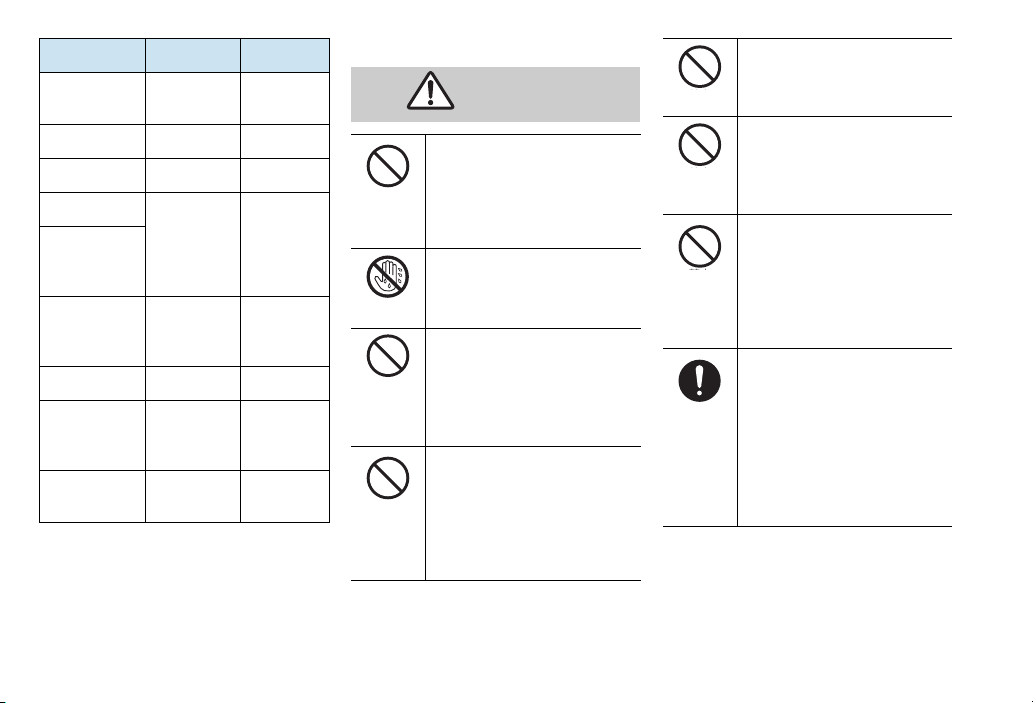
Part Material Surfacing
WARNING
Handset (Front)
Handset (Back) Aluminum Alloy coating
Camera Plate Aluminum Alloy coating
Battery Cover
USIM Card/
Memory Card
Cover
USB Cable
Screws Iron Metal plating
Headset Cable
AC Charger
Plug
Polycarbonate
/Stainless
Polycarbonate Coating
Polycarbonate
/Stainless/
Copper
Rubber/
Stainless/
Copper
Polycarbonate
/Stainless
Gold plate
―
―
―
■ Charger
Do not use transformers.
Using AC Charger with a
transformer designed for overseas
trips may cause fire, electric shock
or malfunction.
Do not plug/unplug
Charger with wet hands.
Doing so may cause electric shock.
Do not overload power
outlet with multiple
devices.
Overload may cause overheating
resulting in fire.
Do not short-circuit
charging terminals.
Avoid touching or exposing
terminals to metal. A short-circuit
may cause fire, malfunction,
electric shock or injury.
Do not cover or wrap.
Doing so may cause overheating,
fire or accidents.
Do not handle AC Charger
during thunderstorms.
Doing so may cause lightning
strikes or electric shock.
Use the specified voltage
only.
Non-specified voltages may cause
fire or malfunction.
AC Charger: 100 to 240V AC
(household outlet only)
Do not place electrically
conductive objects (pencil
lead, metallic strip, metal
jewelry, etc.) in contact
with the plug or charging
terminals.
May cause short circuit, resulting
in fire, malfunction.
22
Page 23
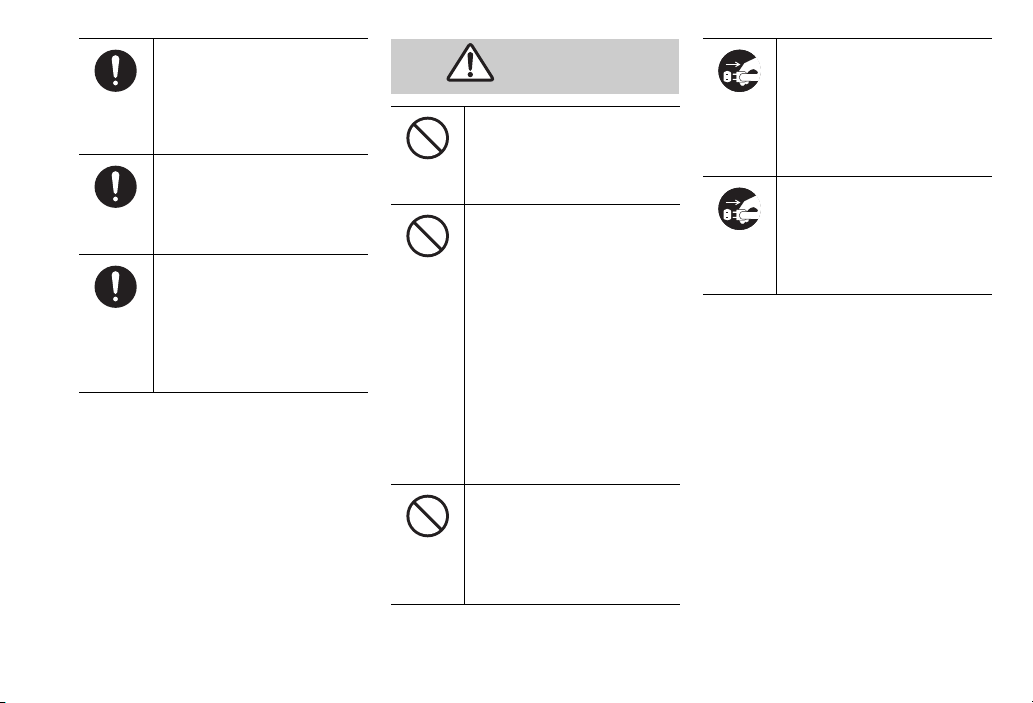
If Charger cord is damaged
CAUTION
(wire exposed, etc.)
Stop use immediately. Continued
use may cause fire or electric
shock.
If plug is dusty, grasp it and
disconnect Charger, then
clean with dry cloth.
Fire may result.
If liquids (water, pet urine,
etc.) seep inside Charger,
grasp plug and disconnect
it immediately.
May cause electric shock, smoke
or fire.
Do not place heavy objects
on Charger cord.
Doing so may cause electric shock
or fire.
Handling Charger cord
・ Do not pull cord to disconnect
plug. Pulling cord may stretch it
resulting in fire or electric shock.
To disconnect, pull plug, not
cord.
・ Do not place cord close to
heating appliances. Doing so
may melt cord sheathing
resulting in fire or electric shock.
・ Stop use if AC outlet is loose, or
if cord or plug becomes hot.
Continued use may cause fire or
electric shock.
Do not subject Charger to
strong shocks or impacts
while it is plugged into the
outlet.
May cause malfunction or injury.
Unplug Charger, then
disconnect handset if you
are not going to use it for
long periods.
Failure to do so may lead to
electric shock or injury.
Before cleaning, unplug AC
Charger from AC outlet,
then disconnect handset.
Failure to do so may lead to
electric shock or injury.
23
Page 24
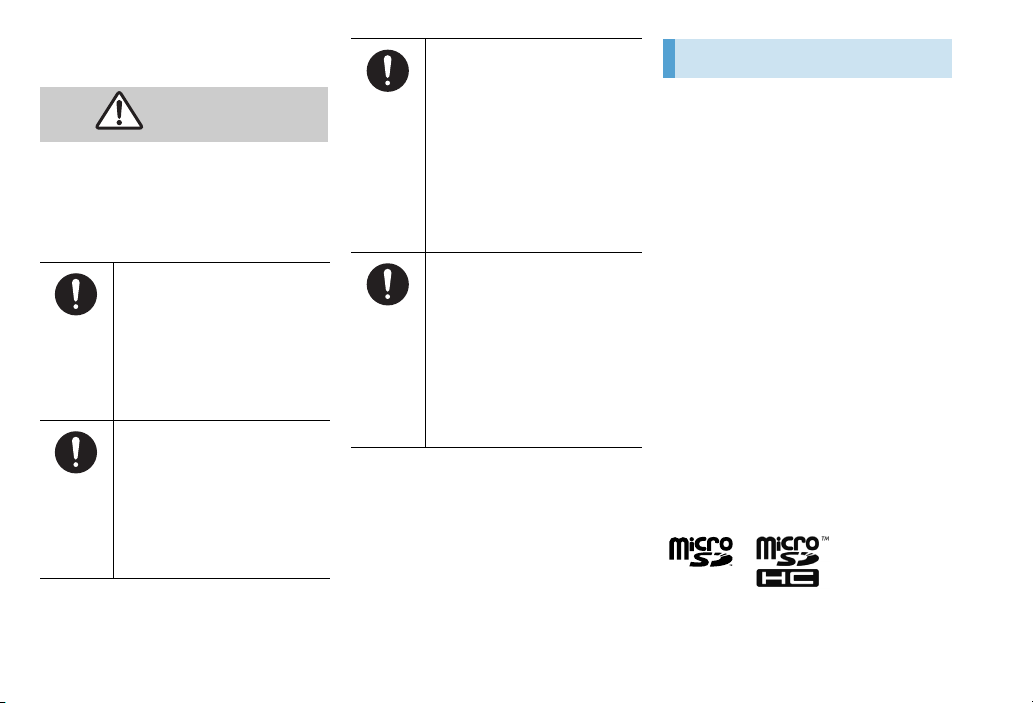
■ Use Near Electronic Medical
WARNING
Equipment
This section is based on “Guidelines on the
Use of Radio Communications Equipment
Such as Cellular Telephones and Safeguards
for Electronic Medical Equipment”
(Electromagnetic Compatibility Conference
Japan).
Persons with an implanted
pacemaker or defibrillator
should keep handset at
least 22 cm away from the
device.
Handset radio waves may affect
such devices.
Turn handset off in
crowded places such as
trains. People with
implanted pacemakers or
defibrillators may be near.
Handset radio waves may affect
such devices.
Inside medical facilities:
・ Do not take handset into
operating rooms, or intensive or
coronary care units.
・ Keep handset turned off in
hospital wards.
・ Keep handset turned off in
lobbies, since medical
equipment may be near.
・ Follow medical facility rules on
handset use.
When using electronic
medical equipment outside
medical facilities, check
with the equipment vendor
or distributor for
information about the
effects of radio waves.
Handset radio waves may affect
electronic medical equipment.
Copyrights & Trademarks
Copyrights
The rights of copyright holders to literary
works, music, still images, video, computer
programs, databases, etc. are protected by
copyright laws. You may copy these
materials for private use only. Copying these
without the consent of the rights holder for
purposes other than the above (including
data format conversion), modifying,
transferring copies, distributing on networks
are subject to compensation for losses or to
prosecution for “copyright infringement” or
“copyright holder rights infringement”. If
copying using this product, observe
copyright laws.
This handset is equipped with cameras.
Observe copyright laws when shooting with
these cameras.
Trademarks
● microSDTM and microSDHCTM and their logos
are trademarks of the SD Association.
24
Page 25
● Bluetooth word mark is
owned by the Bluetooth
SIG, INC.
● QR Code is a registered trademark of Denso
Wave Incorporated.
● Microsoft, Windows, Outlook, PowerPoint,
Excel, ActiveSync, Windows Vista are
trademarks or registered trademarks of
Microsoft Corporation in the United States
and other countries.
● Microsoft Windows Operating System is
indicated in abbreviated form as Windows.
®
● Adobe
● 3G High Speed is a registered trademarks of
● SOFTBANK name and logo are trademarks or
● “Yahoo!” and the “Yahoo” and “Y!” logos
● The Twitter name and logo are registered
● The names of companies, products and
, Acrobat®, Adobe Reader® and their
logos are trademarks or registered trademarks
of Adobe Systems Incorporated in the United
States and other countries.
SOFTBANK MOBILE Corp.
registered trademarks of SOFTBANK MOBILE
Corp. in Japan and other countries.
are trademarks or registered trademarks of
Yahoo! Inc of the United States.
trademarks of Twitter, INC.
services used in this manual are registered
trademarks or trademarks of the respective
companies.
● This product is licensed based on the MPEG-4
Patent Portfolio License. This refers to a license
only for the following applications for
individual or personal use by the customer,
and other applications are not authorized.
• Recording video conforming to the MPEG-4
Visual standards (hereafter MPEG-4 video)
• Playback of MPEG-4 video recorded by the
consumer for individual and/or personal
activities
• Playback of MPEG-4 video by a provider
licensed by MPEG-LA
• Contact MPEG LA. LLC in the United States
for more information.
● Copyright 2010 Google Inc. Used with
permission.
Google, Google logo, Android, Android logo,
Android Market, Android Market logo, Gmail,
Gmail logo, Google Apps, Google Calendar,
Google Checkout, Google Earth, Google
Earth logo, Google Latitude, Google Maps,
Google Maps logo, Google buzz, Google Buzz
logo, Google Talk, Google Talk logo, Picasa,
Picasa logo, YouTube, YouTube logo, Google
Voice Search, and Google Voice Search logo
are trademarks of Google Inc. All other
company and product names may be
trademarks of the companies with which they
are associated.
About Bluetooth
● To secure the Bluetooth® communication
security, handset supports the security
function compliant with Bluetooth
standards, but the security may not be
sufficient depending on the setting. Concern
about the communication using the
®
Bluetooth
● Please be aware that SoftBank Mobile is not
responsible for data leak when making data
communications using Bluetooth
● You can use a headset, handsfree, audio,
keyboard, object push and serial port on
handset. The audio/video remote control may
be available for audio.
function.
®
®
®
.
Wireless Frequencies &
Modulations
Bluetooth® and WLAN frequency
information appears on battery cavity label:
・ Frequency Band: 2.4GHz
・ Modulations: FHSS, DS-SS, OFDM Frequency
25
Page 26
・ Estimated Range of Radio Frequency
Interference
FH1: FHSS RFI up to 10 m
DS4: DSSS RFI up to 40 m
・ Utilizes 2.4 - 2.4835 GHz band with mobile
device bandwidth differentiation
* Available channels vary depending on the
country. For use aboard aircraft, contact the
airline beforehand.
Bluetooth® Cautions
1. Before handset use, be sure “other radio
stations” are not in use nearby.
2. In the event of handset causing harmful radio
wave interference with “another radio
station”, promptly change the operating
frequency or stop radio wave emission by
turning off the power, etc.
3. For further information, contact Customer
Service (P.29).
● Handset Bluetooth
radio standards and is certified. Outside
Japan, confirm national laws regarding use.
®
complies with Japan
About Wireless LAN
Do not use wireless LAN near magnetic
devices such as electrical appliances or AV/
OA devices, or in radio waves.
● Magnetism or radio waves may increase
noises or disable communications (especially
when using a microwave oven).
● When used near TV, radio, etc., reception
interference may occur, or channels on the TV
screen may be disturbed.
● If there are multiple Wi-Fi access points nearby
and the same channel is used, search may not
work correctly.
2.4 GHz Device Cautions
The operating frequency band of the WLAN
device is used by industrial, scientific,
consumer and medical equipment including
microwave ovens, premises radio stations for
identifying mobile units used in the
manufacturing lines of plants (radio stations
requiring a license), specified low power
radio stations (radio stations requiring no
license) and amateur radio stations (radio
stations requiring a license).
1. Before using the device, confirm that premises
radio stations for identifying mobile units,
specified low power radio stations and
amateur radio stations are not being operated
nearby.
2. If the device causes harmful radio interference
to premises radio stations for identifying
mobile units, immediately change the
frequency band or stop use, and contact
Customer Service (P.29) for crosstalk
avoidance, etc. (e.g. partition setup).
3. If the device causes radio interference to
specified low power radio stations or amateur
radio stations, contact Customer Service
(P.29).
● Use the wireless (WLAN) function only in
Japan. The wireless LAN function of handset
complies with radio standards of Japan and is
certified. You may be punished if you use it
overseas.
26
Page 27
Specific Absorption Rate (SAR)
001HT conforms to technical standards
related to the body’s absorption of radio
waves set forth by the government.
These technical standards are prescribed in
accordance with scientific principles to
prevent radio waves transmitted from radio
equipment such as mobile phones used near
a person’s head from affecting their health.
The Specific Absorption Rate (SAR) expresses
the average amount of energy from radio
waves absorbed by a person’s head and shall
not exceed the permissible value of 2 W/kg*.
This permissible value has a sufficient safety
margin regardless of age or body size of the
user, and is identical to the international
guidelines indicated by the International
Commission on Non- Ionizing Radiation
Protection (ICNIRP) in partnership with the
World Health Organization (WHO). All
mobile phones, prior to product launch,
must be certified as compliant with
government requirements as stipulated by
the Radio Law. 001HT has been granted
Technical Regulations Conformity
Certification by TELECOM ENGINEERING
CENTER. Its highest SAR value is 1.42 W/kg.
This value was obtained by TELECOM
ENGINEERING CENTER as part of the
certification process. This is the maximum
value measured at the maximum
transmission power of mobile phones
according to the method specified by the
government. Although SAR varies among
individual handsets, all handsets are within
permissible values. Also, mobile phones are
designed to use minimum transmission
power required for communicating with
mobile phone base stations; therefore,
normal SAR in use is even lower than rated
values. For details about SAR, see the
following Websites:
Ministry of Internal Affairs
Communications Radio Wave Utilization
http://www.tele.soumu.go.jp/j/ele/
index.htm
Radio Industries and Businesses
http://www.arib-emf.org/
* Requirements are stipulated in Radio
Law (Ordinance Regulating Radio
Equipment, Article 14-2).
SoftBank Body SAR Policy
*Body SAR refers to the Specific Absorption
Rate (SAR) at the maximum transmission
power with an earphone/Microphone
attached to the mobile phone and
continuously talking while the mobile phone
unit is placed next to the body.
**Specific Absorption Rate (SAR) values
were measured under talking continuously
for 6 minutes.
For technical standards on body SAR,
SoftBank lists information from Europe. See
“Information on the Effects of Radio Wave
Exposure from the Federal Communications
Commission (FCC)” and “Information on the
Effects of Radio Wave Exposure from
Europe” for details.
***When placed next to the body:
Measurement tests are conducted with the
back of the mobile phone facing the body at
a distance of 1.5 cm as the ordinary
placement to the body. In order to satisfy the
radio wave exposure regulations, use an
accessory that fixes the mobile phone at a
distance of 1.5 cm from the body. Choose a
belt clip or holster without metal parts.
For more information, access the following
Website:
http://www.softbankmobile.co.jp/ja/info/
public/emf/emf02.html
27
Page 28

Effects of Radio Wave Exposure
per the FCC
The guidelines of the United States Federal
Communications Commission are based on
standards developed from results of regular
and careful scientific research conducted by
independent scientific institutions. These
permissible values are sufficiently safe values
regardless of the age or health of the user.
For the effect of radio waves transmitted by
mobile phones on the human body, Specific
Absorption Rate (SAR) units are used for
measurements. The permissible value of SAR
prescribed by the FCC is 1.6 W/kg.
Measurement tests are conducted using
standards set forth by the FCC for each
model, and when placed next to the human
body according to the descriptions in this
Instruction Manual as shown in the
following, the permissible value of S AR is
0.836 W/kg.
When placed next to the body:
Measurement tests are conducted with the
back of the mobile phone facing the body at
a distance of 1.5 cm as the ordinary
placement to the body. In order to satisfy the
radio wave exposure regulations set by FCC,
use an accessory that fixes the mobile phone
at a distance of 1.5 cm from the body.
28
Choose a belt clip or holster without metal
parts.
The regulations set by FCC may not be
satisfied with accessories that do not fulfill
the above conditions. Avoid using them.
For details about the Specific Absorption
Rate (SAR), access the following Web site.
Cellular Telecommunication & Internet
Association (CTIA)
http://www.phonefacts.net
Effects of Radio Wave Exposure
per the EU
This handset is a radio transmitting/receiving
device. This product has been verified to not
exceed the permissible value of radio waves
recommended by international guidelines.
These guidelines are developed by the
International Commission on Non-Ionizing
Radiation Protection (ICNIRP), an
independent scientific institution, and the
permissible value is a sufficiently safe value
regardless of the age or health of the user.
For the effect of radio waves transmitted by
mobile phones on the human body, Specific
Absorption Rate (SAR) units are used for
measurements. The SAR permissible value
for mobile devices is 2 W/kg, and the
maximum value for SAR when placed next to
the body is 0.96 W/kg*.
SAR measurements are conducted at the
maximum transmission power; therefore,
the normal SAR is even smaller in actual
talking conditions. This is because mobile
phones are designed for the minimum
transmission power required for
communicating with base stations.
The World Health Organization (WHO)
states that adverse effects on the human
body have not been confirmed from current
scientific data on the use of mobile devices.
The WHO also recommends shortening the
talk time or using a handsfree device that
allows use of a mobile phone away from the
head or body to reduce the effects of radio
waves. For details, acc
http://www.who.int/emf
* Measurement tests when placed next to
the human body are conducted according
to standards prescribed by the FCC. Values
are based on conditions in Europe.
ess the WHO Web site.
Page 29
Customer Service
For information about SoftBank handsets or services, call General Information. For repairs, call Customer Assistance.
■ SoftBank Mobile Customer Center
General Information
・ From a SoftBank handset, dial toll free at 157
・ From a landline/IP phone, dial toll free at 0800-919-0157
If you cannot reach a toll free number, use the number (charges apply) below for your service area:
Hokkaido Area
Tohoku Area
Hokuriku Area
Kanto, Koshinetsu Area
022-380-4380 Tokai Area 052-388-2002
・ From a SoftBank handset, dial toll free at 113
・ From a landline/IP phone, dial toll free at 0088-240-113
Customer Assistance
Kansai Area 06-7669-0180
■ Smartphone Technical Support Center
・ From a SoftBank handset, dial toll free at 151
・ From a landline/IP phone, dial toll free at 0800-1700-151
■ SoftBank Mobile Global Call Center
From outside Japan, dial +81-3-5351-3491(toll free from SoftBank handsets)
If handset is lost/stolen, call this number immediately (international charges apply)
Chugoku, Shikoku Area
Kyushu, Okinawa Area
092-687-0010
29
Page 30
30
 Loading...