

Page 1
ProCurve Switch zl
Internal Power Supply
Installation Guide
www.procurve.com
Page 2

Page 3

ProCurve Switch zl
Internal Power Supplies
Installation Guide
Page 4

© Copyright 2005-2007, Hewlett-Packard Development
Company, L.P.
Publication Number
5991-8553
August 2007
Disclaimer
HEWLETT-PACKARD COMPANY MAKES NO WARRANTY
OF ANY KIND WITH REGARD TO THIS MATERIAL,
INCLUDING, BUT NOT LIMITED TO, THE IMPLIED
WARRANTIES OF MERCHANTABILITY AND FITNESS
FOR A PARTICULAR PURPOSE. Hewlett-Packard shall not
be liable for errors contained herein or for incidental or
consequential damages in connection with the furnishing,
performance, or use of this material.
The information contained herein is subject to change
without notice. The only warranties for HP products and
services are set forth in the express warranty statements
accompanying such products and services. Nothing herein
should be construed as constituting an additional warranty.
HP shall not be liable for technical or editorial errors or
omissions contained herein.
Hewlett-Packard assumes no responsibility for the use or
reliability of its software on equipment that is not furnished
by Hewlett-Packard.
Applicable Products
ProCurve Switch zl Internal
Power Supply
ProCurve Switch zl 220V Internal
Power Supply
ProCurve Switch 5406zl (J8697A)
ProCurve Switch 5406zl-48G (J8699A)
ProCurve Switch 5412zl (J8698A)
ProCurve Switch 5412zl-96G (J8700A)
ProCurve Switch 8212zl (J8715A)
ProCurve Switch zl Power Supply Shelf (J8714A)
(J8712A)
(J8713A)
War ranty
See the Customer Support/Warranty booklet included with
the product.
A copy of the specific warranty terms applicable to your
Hewlett-Packard products and replacement parts can be
obtained from your HP Sales and Service Office or
authorized dealer.
Safety
Before installing and operating these products, please read
the “Installation Cautions” on page 4, and the safety information on page 11.
Hewlett-Packard Company
8000 Foothills Boulevard, m/s 5552
Roseville, California 95747-5552
http://www.procurve.com
Page 5

Contents
Description. . . . . . . . . . . . . . . . . . . . . . . . . . . . . . . . . . . . . . . . . . . . . . . . . . . . . . 1
Installing the Power Supply . . . . . . . . . . . . . . . . . . . . . . . . . . . . . . . . . . . . . . . . 4
Installation Cautions: . . . . . . . . . . . . . . . . . . . . . . . . . . . . . . . . . . . . . . . . . 4
Installation Steps . . . . . . . . . . . . . . . . . . . . . . . . . . . . . . . . . . . . . . . . . . . . . 5
Troubleshooting. . . . . . . . . . . . . . . . . . . . . . . . . . . . . . . . . . . . . . . . . . . . . . . . . . 8
Customer Support Services . . . . . . . . . . . . . . . . . . . . . . . . . . . . . . . . . . . . . . . . 8
Specifications. . . . . . . . . . . . . . . . . . . . . . . . . . . . . . . . . . . . . . . . . . . . . . . . . . . . 9
Physical . . . . . . . . . . . . . . . . . . . . . . . . . . . . . . . . . . . . . . . . . . . . . . . . . . . . . 9
Electrical . . . . . . . . . . . . . . . . . . . . . . . . . . . . . . . . . . . . . . . . . . . . . . . . . . . 9
Environmental . . . . . . . . . . . . . . . . . . . . . . . . . . . . . . . . . . . . . . . . . . . . . . . 9
Safety . . . . . . . . . . . . . . . . . . . . . . . . . . . . . . . . . . . . . . . . . . . . . . . . . . . . . 10
Safety Information. . . . . . . . . . . . . . . . . . . . . . . . . . . . . . . . . . . . . . . . . . . . . . . 11
Informations concernant la sécurité. . . . . . . . . . . . . . . . . . . . . . . . . . . . . . . . 12
Hinweise zur Sicherheit . . . . . . . . . . . . . . . . . . . . . . . . . . . . . . . . . . . . . . . . . . 13
Considerazioni sulla sicurezza. . . . . . . . . . . . . . . . . . . . . . . . . . . . . . . . . . . . . 14
Consideraciones sobre seguridad . . . . . . . . . . . . . . . . . . . . . . . . . . . . . . . . . . 15
Safety Information (Japan) . . . . . . . . . . . . . . . . . . . . . . . . . . . . . . . . . . . . . . . 16
Safety Information (China) . . . . . . . . . . . . . . . . . . . . . . . . . . . . . . . . . . . . . . . 17
EMC Regulatory Statements . . . . . . . . . . . . . . . . . . . . . . . . . . . . . . . . . . . . . . 18
U.S.A. . . . . . . . . . . . . . . . . . . . . . . . . . . . . . . . . . . . . . . . . . . . . . . . . . . . . . 18
Canada . . . . . . . . . . . . . . . . . . . . . . . . . . . . . . . . . . . . . . . . . . . . . . . . . . . . 18
Australia/New Zealand . . . . . . . . . . . . . . . . . . . . . . . . . . . . . . . . . . . . . . . 18
Japan . . . . . . . . . . . . . . . . . . . . . . . . . . . . . . . . . . . . . . . . . . . . . . . . . . . . . . 18
Korea . . . . . . . . . . . . . . . . . . . . . . . . . . . . . . . . . . . . . . . . . . . . . . . . . . . . . . 19
Taiwan . . . . . . . . . . . . . . . . . . . . . . . . . . . . . . . . . . . . . . . . . . . . . . . . . . . . 19
European Community Declaration of Conformity . . . . . . . . . . . . . . . . 19
Recycle Statements. . . . . . . . . . . . . . . . . . . . . . . . . . . . . . . . . . . . . . . . . . . . . . 20
Waste Electrical and Electronic Equipment (WEEE) Statements . . . 20
iii
Page 6

Page 7

Description
ProCurve Switch zl Internal Power Supplies
Description
The ProCurve Switch zl Internal Power Supply (J8712A or J8713A) is a
redundant power supply that you can add to any of the ProCurve Series zl
switches to provide additional switch reliability. These power supplies can
also be added to the ProCurve Power Supply Shelf (J8714A) to provide
additional PoE power to any of the zl switches.
Features:
■ power redundancy—if any one of the power supplies should fail, the
remaining supply or supplies provide the power to con tinue running a fully
loaded Series 5400zl or 8200zl Switch.
■ power load sharing—with two supplies installed, each shares the power
load, which increases the life of both of the power supplies.
■ “hot swap” operation—you can add or replace one of the Power
Supplies without having to shut down or reboot the switch.
■ automatic fault detection—if the power supply encounters a problem,
the Switch can immediately detect the condition and report it by way of
the Power Status and Fault LEDs on the switch and the Fault LED on the
power supply. Event messages will also be displayed in the switch console
event log and the web browser interface Alert log.
■ Power and Fault LEDs—The Power LED (green) is lit when power is
supplied to the power supply. The Fault LED (orange) is lit when there is
a fault condition with the power supply.
The two power supplies are different in there input and output power
specifications. Any combination of the J8712A and J8713A Power Supplies can
be used. However, be sure to verify the specific power requirements necessary
for your network.
1
Page 8
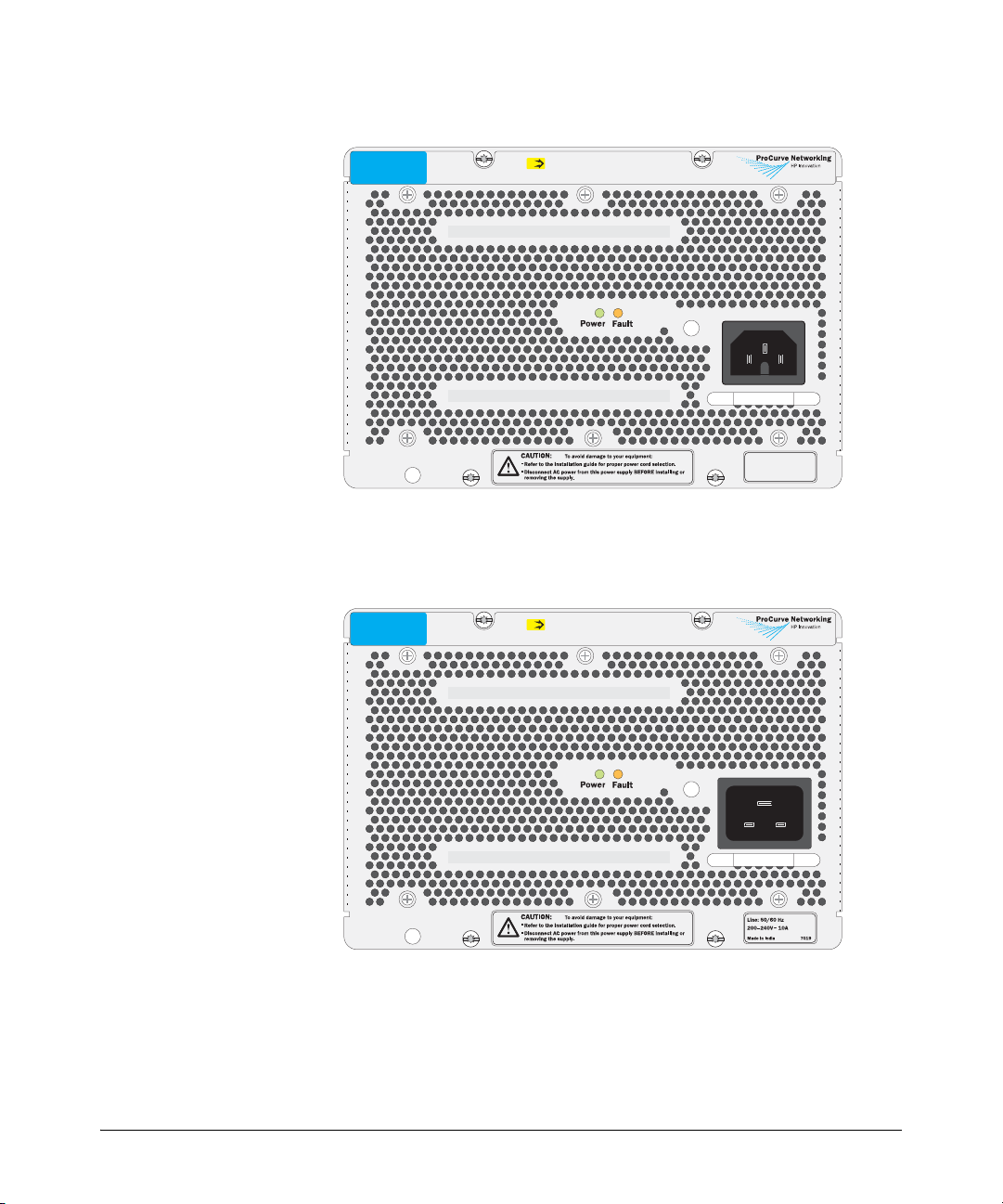
Description
ProCurve Switch zl
875W Power Supply
J8712A
PoE
Unit provides 273 W for PoE
Figure 1. The J8712A power supply
ProCurve Switch zl
1500W Power Supply
J8713A
PoE
Unit provides 900 W for PoE
Line: 50/60 Hz
100127V~ 11.5A (11,5A)
200240V~ 5.7A (5,7A)
Made in India 7019
Figure 2. The J8713A power supply
2
Page 9
Description
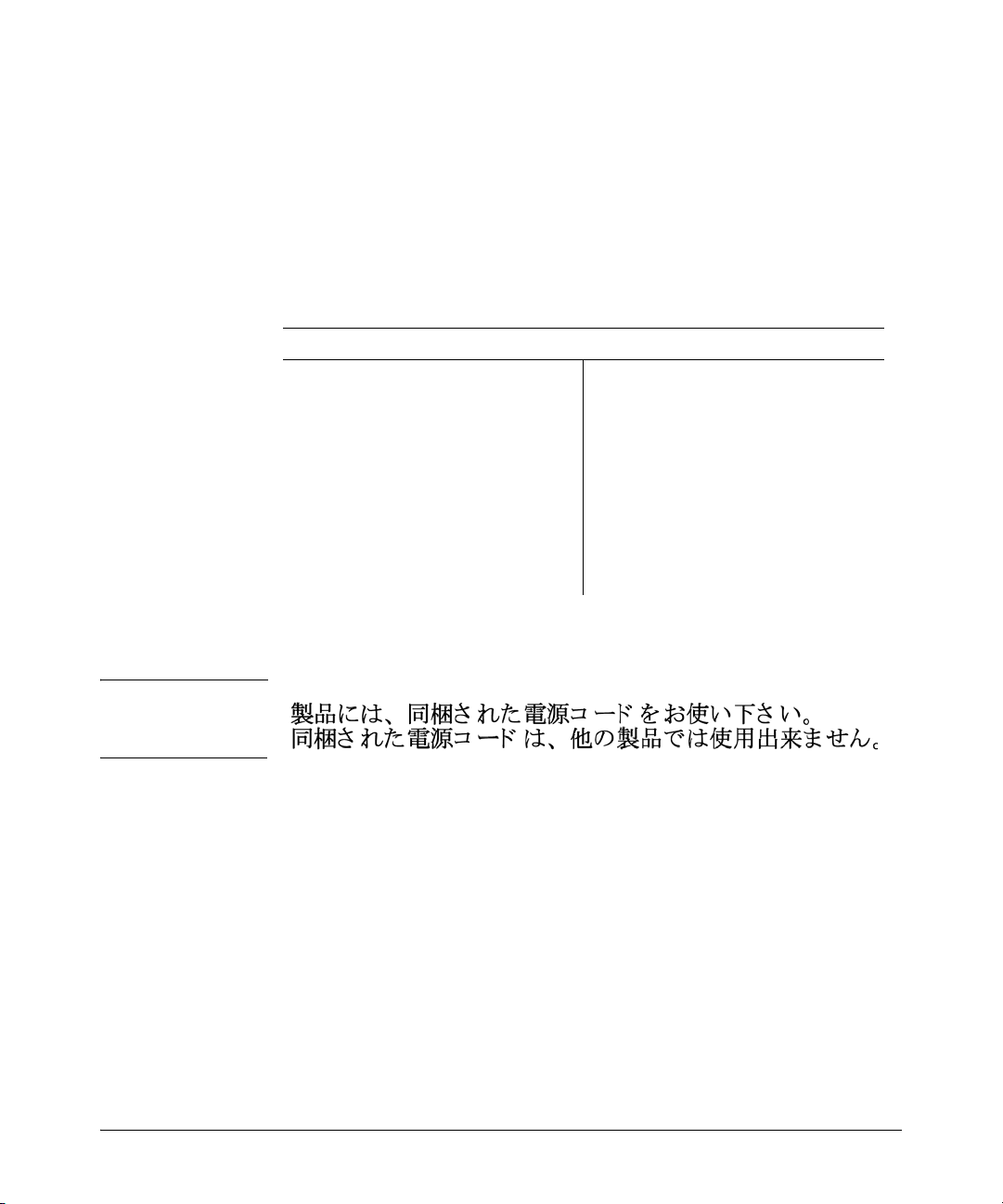
Included Parts. The Switch zl Internal Power Supply has the following
components shipped with it:
■ ProCurve Switch zl Internal Power Supply Installation Guide
(5991-8553), this manual
■ Customer Support/Warranty booklet
■ Power cord, one of the following:
J8712A Power Supply J8713A Power Supply
Region Cable Region Cable
Australia/New Zealand
China
Continental Europe
Denmark
Japan
Switzerland
United Kingdom/
Hong Kong/Singapore
United States/Canada/
Mexico
South Africa
Ta iw a n
8120-5335
8121-1034
8120-5336
8120-5340
8120-5342
8120-5339
8120-5334
8121-0973
8120-5341
8121-0941
Australia/New Zealand
China
Continental Europe
Denmark
Japan
Switzerland
United Kingdom/
Hong Kong/Singapore
United States/Canada/
Mexico
South Africa
Tai wa n
8121-0871
8121-0924
8120-6899
8120-6897
8120-6903
8120-6897
8120-6898
8120-6903*
8121-0915
8120-6903
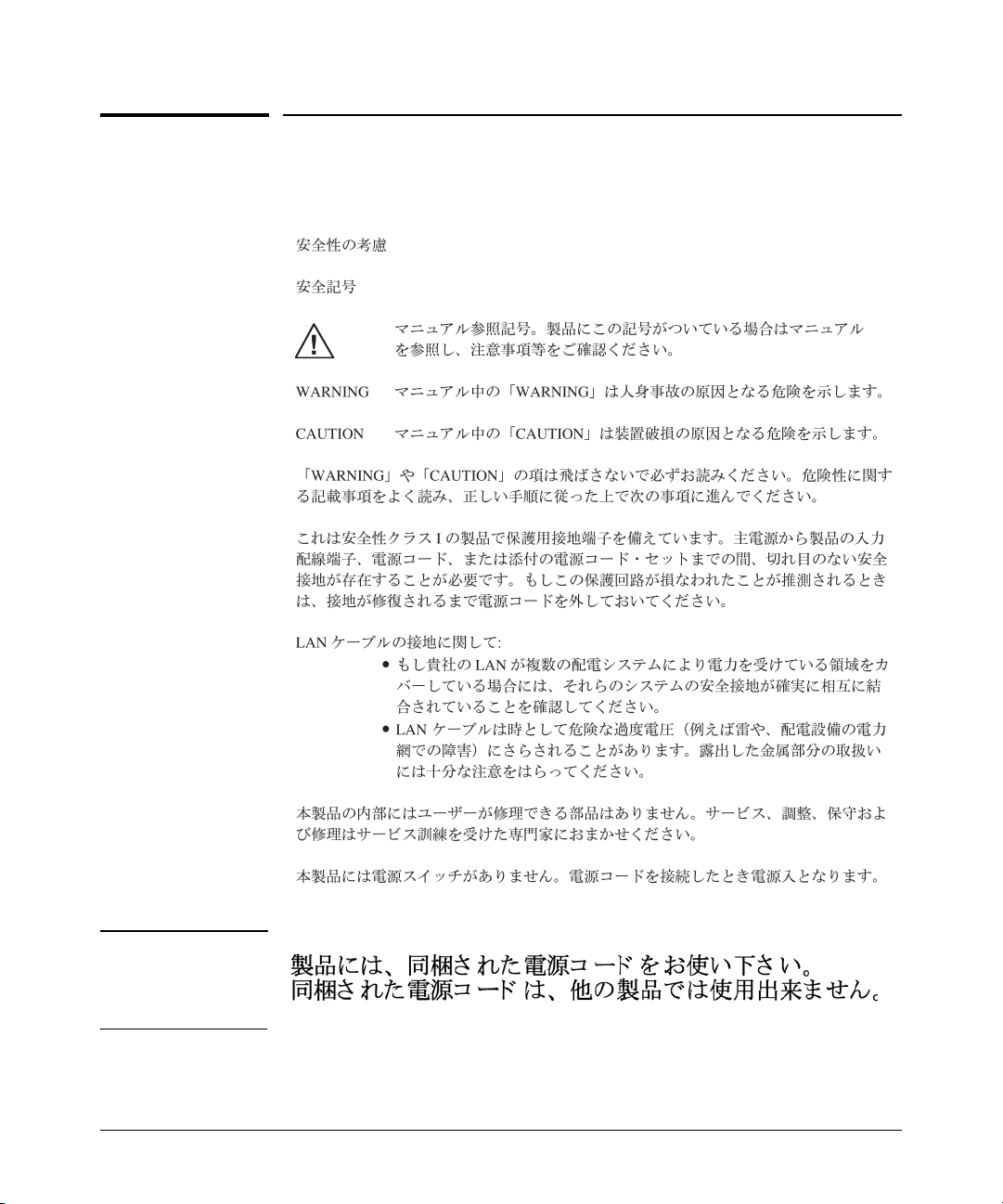
Japan Power
Cord Warning
* A non-locking power cord is also available. Order part number 8120-6893. To order
go to http://www.hp.com/buy/parts.
3
Page 10
Installing the Power Supply
Installing the Power Supply
Installation Cautions:
■ Make sure the power source circuits are properly grounded, then use the power cord
supplied with the power supply to connect it to the power source.
If your installation requires a different power cord than the one supplied with the power supply,
be sure the cord is adequately sized for the switch’s current requirements. In addition, be sure
to use a power cord displaying the mark of the safety agency that defines the regulations for
power cords in your country. The mark is your assurance that the power cord can be used safely
with the power supply.
■ When installing the switch, note that the AC outlet should be near the switch and should be
easily accessible in case the switch must be powered off.
■ Ensure the power supply does not overload the power circuits, wiring, and over-current
protection. To determine the possibility of overloading the supply circuits, add together the
ampere ratings of all devices installed on the same circuit as the switch with this power
supply and compare the total with the rating limit for the circuit. The maximum ampere
ratings are usually printed on the devices near their AC power connectors.
■ Do not install the power supply into a switch that is in an environment where the operating
ambient temperature might exceed 55°C (131°F)
8200zl chassis, the ambient temperature must not exceed 40°C (104°F).
■ Make sure the air flow around the sides and back of the switch is not restricted.
■ Make sure that for any switch power supply slot into which a power supply is not installed,
the cover plate is installed to cover the slot. A cover plate is required for safe operation,
and to ensure proper switch cooling.
■ The switch power supplies are hot swappable; they can be installed or removed while the switch
is receiving power from the supply in the other slot. But, as indicated by the caution statement
on the power supply, the supply must not be connected to AC power before being installed
or removed.
CAUTION:
.
Refer to the installation guide for proper power cord selection
.
Disconnect AC power from the power supply BEFORE installing or
removing the supply. Otherwise, damage to the equipment may result.
1
. If the power supply is installed in an
.
1
If you are installing any of the X2 transceivers the operating ambient temperature should not exceed 40°C
(104°F). See transceiver specifications in Appendix A, of the ProCurve Sereis 8200zl Swtich Installation and
Getting Started Guide.
4
Page 11
Installing the Power Supply
Installation Steps
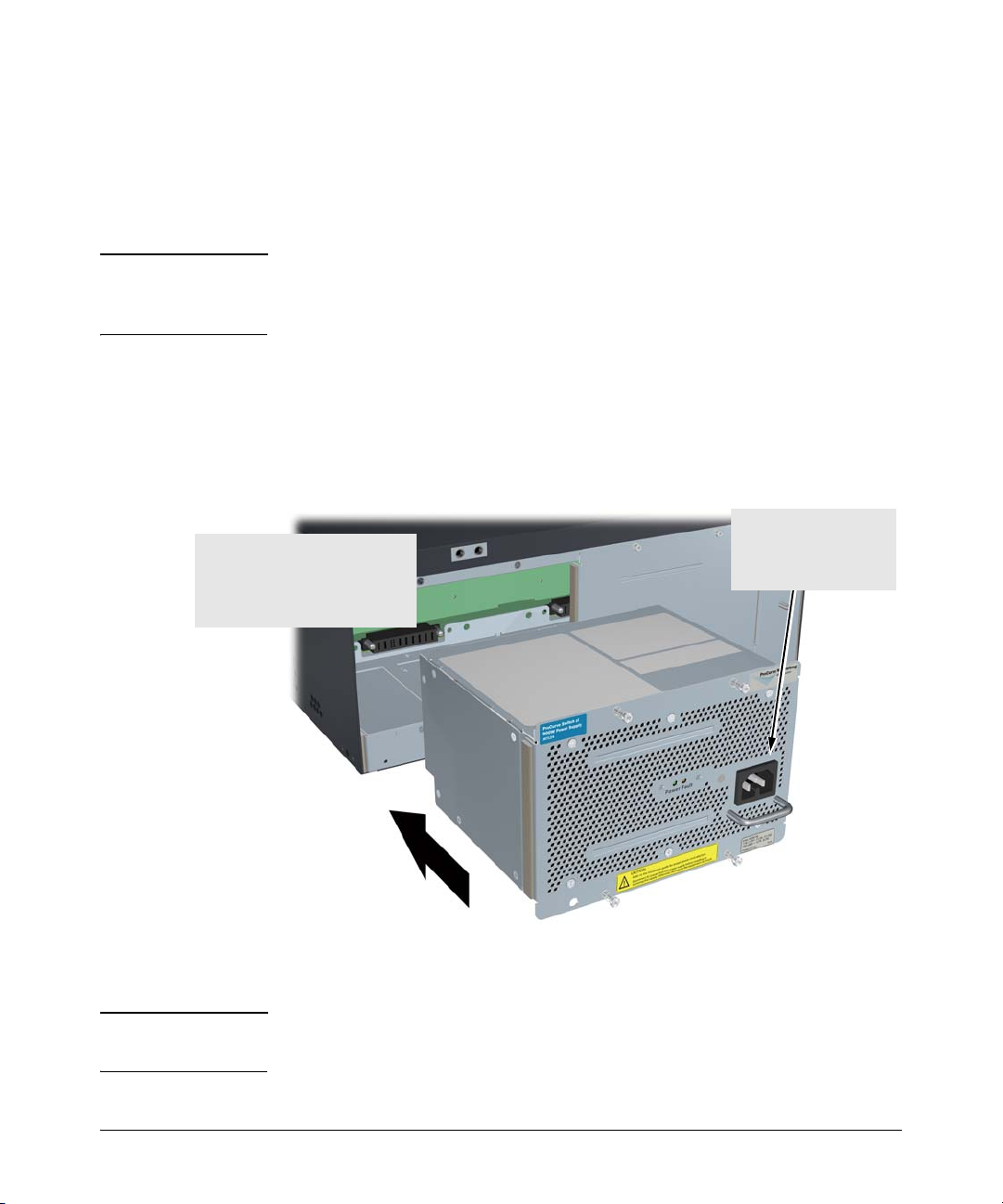
Follow these steps to install the power supply into the back of the switch:
1. Remove the power supply slot cover with either a flat-bladed or
Torx T-10 screwdriver. Retain the slot cover for future use.
Caution Make sure the AC p ower is not connected to the power supply being installed
before installing the power supply into the switch. The switch can be receiving
power from the other power supply during the installation of the second unit.
2. Insert the power supply into the opening making sure it is centered
in the opening. This will assure that the guide rails on the bottom of the
power supply engage the rails on the bottom of the switch. Then, slide the
power supply all the way in until its bulkhead contacts the back face of
the switch.
During the installation,
Center the power supply in the
opening and push it all the w ay back
until the bulkhead on the power
supply makes cont act with the back
face of the switch.
make sure that AC power
is NOT connected to the
unit being installed.
Figure 3. Installing a power supply
Note Although the illustration shows a 5406zl switch, the installation procedure is
the same for all zl switches.
5
Page 12
Installing the Power Supply
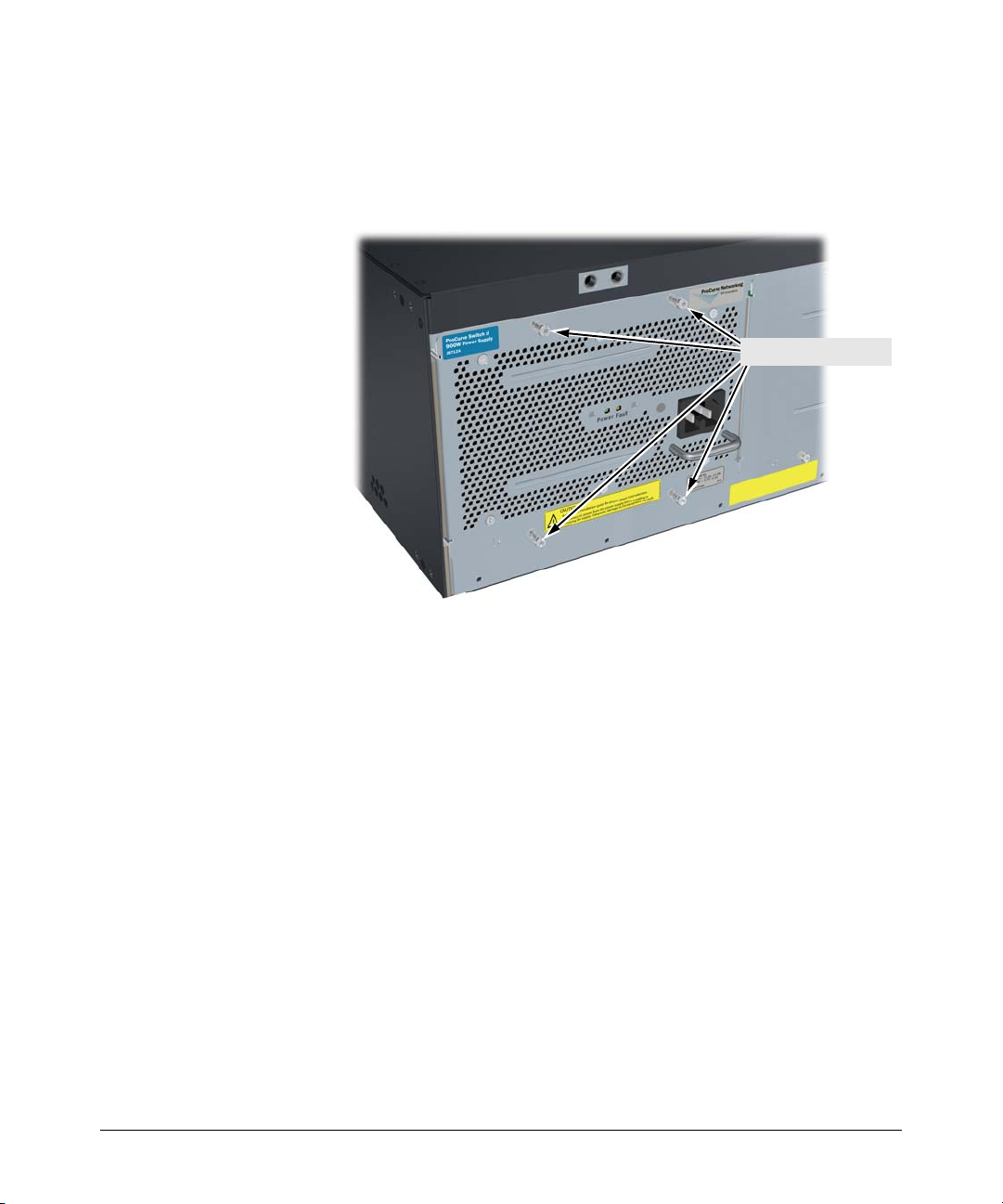
3. Tighten the four retaining screws that hold the power supply in place
until the screws are secure, as shown in the next illustration. The screws
can be tightened with either a flat-bladed or Torx T-10 screwdriver. Be
careful not to overtighten the screws.
Tighten the four screws
Figure 4. Fully installed power supply
4. Connect the power cord supplied with the power supply to the power
connector, and then into a properly grounded electrical outlet. To provide
true redundancy, the second power supply should be connected to a
different AC power source from the other supply. Then, if one AC power
source fails, the switch will continue to run.
6
Page 13
Installing the Power Supply
Note The Switch zl Internal Power Supply does not have a power switch. It is
powered on when the power cord is connected to the supply and to a power
source.
Please see the “Installation Cautions” on page 4.
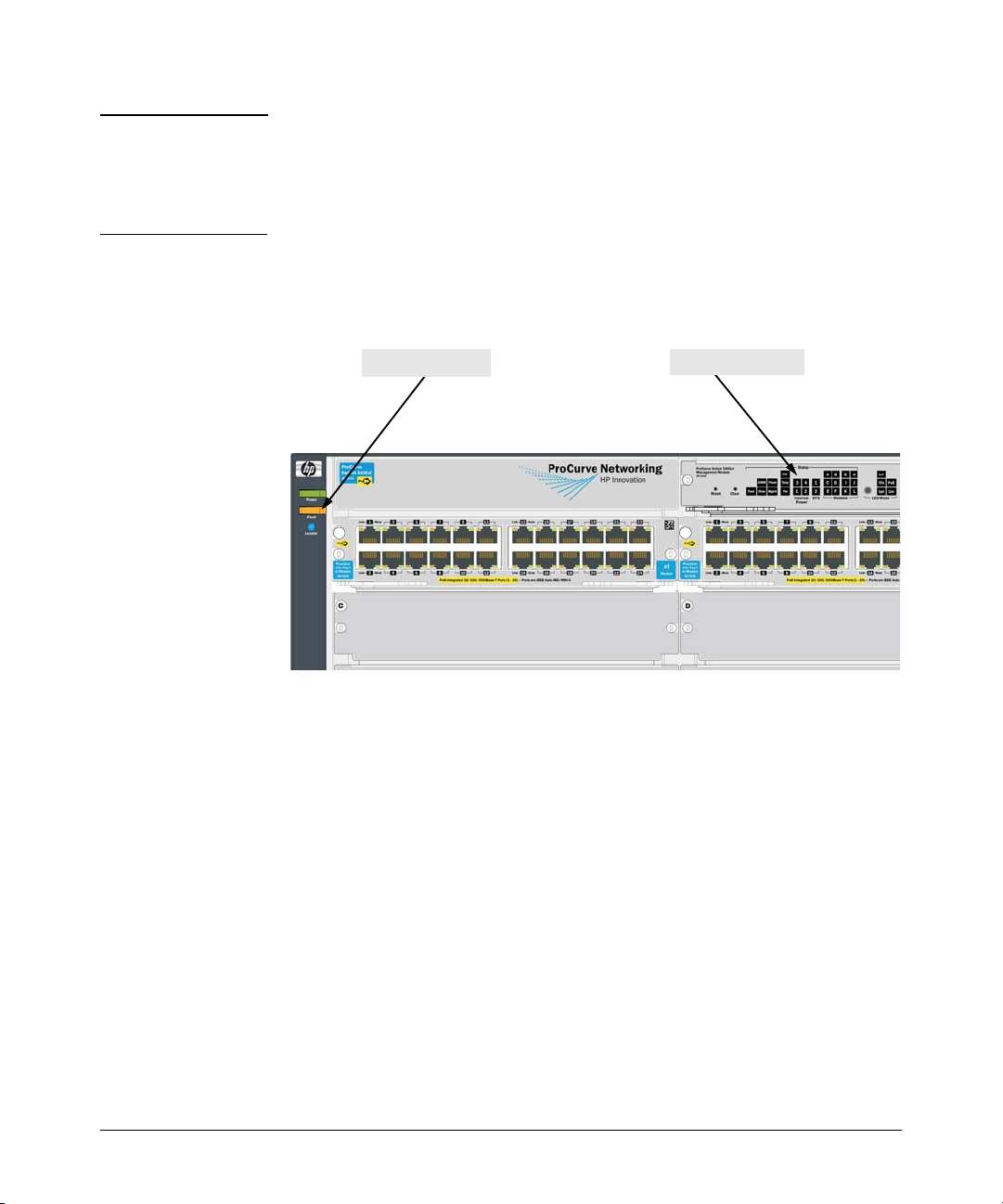
5. Verify the power supply is installed correctly by checking the LEDs
on the front of the switch. The following example shows a Series 5400zl
Switch.
Power Status LEDsSwitch Fault LED
A
B
Figure 5. Switch Power Status and Fault LEDs
The Power Status LED for the power supply you have just installed will be
flashing simultaneously with the Fault LED until that new power supply is
connected to an AC power source. Once it is connected to AC power, the
Power Status LED will be on continuously and not flashing, and the Fault LED
will stop flashing.
If the Power Status LED and the switch Fault LED continue flashing after the
power supply is connected to AC power, see “Troubleshooting” on the next
page.
7
Page 14

Troubleshooting
Troubleshooting
If the Power Status LED and the switch Fault LED are flashing, either the
power supply is not connected to an active AC power source, the power supply
is not properly installed, or a fault condition has been detected on the power
supply.
1. Verify the power cord is plugged into an active power source and to the
power supply. Make sure these connections are secure. You can verify that
the AC power source is active by plugging a different device into the outlet
and verify that it is receiving power.
2. If the Power Status LED continues to flash, verify that the fan in the power
supply is working. If it is, you can feel air being blown out of the vent
holes. If it is not, try plugging the power supply into a different outlet,
and/or try a different power cord.
3. If the previous steps do not resolve the problem, try removing and
reinstalling the power supply.
Caution Make sure the AC power cord is disconnected from the supply before
removing and reinstalling the supply.
If the power source and power cord are OK and this condition persists, the
switch power supply may be faulty. Call your HP-authorized LAN dealer, or
use the electronic support services from ProCurve to get assistance. See the
Customer Support/Warranty booklet supplied with the power supply for more
information.
Customer Support Services
If you are having any trouble with your power supply or switch, HewlettPackard offers support 24 hours a day, seven days a week through the use of
a number of automated electronic services. See the Customer Support/
Warranty booklet that came with your switch or power supply for information
on how to use these services to get technical support. The ProCurve
networking products Web site, www.procurve.com also provides up-to-date
support information.
Additionally, your ProCurve authorized network reseller can also provide you
with assistance, both with services that they offer and with services offered
by ProCurve.
8
Page 15

Specifications
Specifications
Physical
Width: 20.1 cm (7.9 in)
Depth: 15.0 cm (5.9 in)
Height: 12.8 cm (5.1 in)
Weight: 1.5 kg (3.3 lbs)
Electrical
The ProCurve Switch zl Internal Power Supply automatically adjusts to any
voltage between 100-127, and 200-240 (J8712A) and 200-240 (J8713A) volts and
either 50 or 60 Hz.
J8712A J8713A
AC voltage: 100-127 volts 200-240 volts 200-240 volts
Maximum current: 12 A max 5 A max 10 A max
Frequency range: 50/60 Hz 50/60 Hz 50/60 Hz
PoE output wattage: 273 W 273 W 900 W
Environmental
Operating Non-Operating
Temperature:
Relative humidity:
(non-condensing)
Maximum altitude:
J8712A 4.6 km (15,000 ft) 4.6 km (15,000 ft)
J8713A 3.0 km (10,000 ft) 4.6 km (15,000 ft)
1
Operating ambient temperature is limited to 40°C (104°F) under certain
1
configurations. For more information, refer to Switch Installation and
Getting Started Guide for your switch.
0°C to 55°C (32°F to 131°F) -40°C to 70°C (-40°F to 158°F)
15% to 95% at 40°C (104°F) 15% to 90% at 65°C (149°F)
9
Page 16

Specifications
Safety
■ EN60950
■ CSA 22.2 No. 60950
■ IEC 60959
■ UL 60950
10
Page 17

Safety Information
Documentation r eference symbol. If the product is marked with this
!
symbol, refer to the product documentation to get more information
about the product.
Safety Information
WARNING A WARNING in the manual denotes a hazard that can cause injury
Caution A Caution in the manual denotes a hazard that can damage equip-
Grounding
These are safety class I products and have protective earthing terminals. There
must be an uninterruptible safety earth ground from the main power source
to the product's input wiring terminals, power cord, or supplied power cord
set. Whenever it is likely that the protection has been impaired, disconnect
the power cord until the ground has been restored.
For LAN cable grounding:
■ If your LAN covers an area served by more than one power
distribution system, be sure their safety grounds are securely
interconnected.
■ LAN cables may occasionally be subject to hazardous transient
voltages (such as lightning or disturbances in the electrical utilities
power grid). Handle exposed metal components of the network with
caution.
or death.
ment.
Do not proceed beyond a WARNING or Caution notice until you
have understood the hazardous conditions and have taken appropriate steps.
Servicing
There are no user-serviceable parts inside these products. Any servicing,
adjustment, maintenance, or repair must be performed only by service-trained
personnel.
These products do not have a power switch; they are powered on when the
power cord is plugged in.
11
Page 18

Informations concernant la sécurité
Informations concernant la sécurité
Symbole de référence à la documentation. Si le produit est marqué de
!
ce symbole, report ez-vous à la documentation du p roduit afin d'obtenir
des informations plus détaillées.
WARNING Dans la documentation, un WARNING indique un danger susceptible
Caution Un texte de mise en garde intitulé Caution indique un danger suscep-
Cet appareil est un produit de classe I et possède une borne de mise à la terre. La source
d'alimentation principale doit être munie d'une prise de terre de sécurité installée aux
bornes du câblage d'entrée, sur le cordon d'alimentation ou le cordon de raccordement
fourni avec le produit. Lorsque cette protection semble avoir été endommagée,
débrancher le cordon d'alimentation jusqu'à ce que la mise à la terre ait été réparée.
Mise à la terre du câble de réseau local:
■ si votre réseau local s'étend sur une zone desservie par plus d'un système de
distribution de puissance, assurez-vous que les prises de terre de sécurité
soient convenablement interconnectées.
■ Les câbles de réseaux locaux peuvent occasionnellement être soumis à des
surtensions transitoires dangereuses (telles que la foudre ou des
perturbations dans le réseau d'alimentation public). Manipulez les
composants métalliques du réseau avec précautions.
Aucune pièce contenue à l'intérieur de ce produit ne peut être réparée par l'utilisateur.
Tout dépannage, réglage, entretien ou réparation devra être confié exclusivement à un
personnel qualifié.
d'entraîner des dommages corporels ou la mort.
tible de causer des dommages à l'équipement.
Ne continuez pas au-delà d'une rubrique WARNING ou Caution avant
d'avoir bien compris les conditions présentant un danger et pris les
mesures appropriées.
12
Cet appareil ne comporte pas de commutateur principal ; la mise sous tension est
effectuée par branchement du cordon d'alimentation.
Page 19

Hinweise zur Sicherheit
Symbol für Dokumentationsverweis. Wenn das Produkt mit diesem
!
Symbol markiert ist, schlagen Sie bitte in der Produktdokumentation
nach, um mehr Informationen über das Produkt zu erhalten.
Hinweise zur Sicherheit
WARNING Symbol für Dokumentationsverweis. Wenn das Produkt mit diesem
Caution Symbol für Dokumentationsverweis. Wenn das Produkt mit diesem
Dies ist ein Gerät der Sicherheitsklasse I und verfügt über einen schützenden
Erdungsterminal. Der Betrieb des Geräts erfordert eine ununterbrochene
Sicherheitserdung von der Hauptstromquelle zu den Geräteingabeterminals, den
Netzkabeln oder dem mit Strom belieferten Netzkabelsatz voraus. Sobald Grund zur
Annahme besteht, daß der Schutz beeinträchtigt worden ist, das Netzkabel aus der
Wandsteckdose herausziehen, bis die Erdung wiederhergestellt ist.
Für LAN-Kabelerdung:
■ Wenn Ihr LAN ein Gebiet umfaßt, das von mehr als einem
Stromverteilungssystem beliefert wird, müssen Sie sich vergewissern, daß
die Sicherheitserdungen fest untereinander verbunden sind.
■ LAN-Kabel können gelegentlich gefährlichen Übergangsspannungen
ausgesetzt werden (beispielsweise durch Blitz oder Störungen in dem
Starkstromnetz des Elektrizitätswerks). Bei der Handhabung exponierter
Metallbestandteile des Netzwerkes Vorsicht walten lassen.
Symbol markiert ist, schlagen Sie bitte in der Produktdokumentation
nach, um mehr Informationen über das Produkt zu erhalten.
Symbol markiert ist, schlagen Sie bitte in der Produktdokumentation
nach, um mehr Informationen über das Produkt zu erhalten.
Fahren Sie nach dem Hinweis WARNING oder Caution erst fort,
nachdem Sie den Gefahrenzustand verstanden und die entsprechenden Maßnahmen ergriffen haben.
Dieses Gerät enthält innen keine durch den Benutzer zu wartenden Teile. Wartungs-,
Anpassungs-, Instandhaltungs- oder Reparaturarbeiten dürfen nur von geschultem
Bedienungspersonal durchgeführt werden.
Dieses Gerät hat keinen Netzschalter; es wird beim Anschließen des Netzkabels
eingeschaltet.
13
Page 20

Considerazioni sulla sicurezza
Considerazioni sulla sicurezza
Simbolo di riferimento alla documentazione. Se il prodotto è contras-
!
segnato da questo simbolo, fare riferimento alla documentazione sul
prodotto per ulteriori informazioni su di esso.
WARNING La dicitura WARNINGdenota un pericolo che può causare lesioni o
Caution La dicituraC aution denota un perico lo che può danneggiare le attrez-
Questo prodotto è omologato nella classe di sicurezza I ed ha un terminale protettivo
di collegamento a terra. Dev'essere installato un collegamento a terra di sicurezza, non
interrompibile che vada dalla fonte d'alimentazione principale ai terminali d'entrata,
al cavo d'alimentazione oppure al set cavo d'alimentazione fornito con il prodotto.
Ogniqualvolta vi sia probabilità di danneggiamento della protezione, disinserite il cavo
d'alimentazione fino a quando il collegaento a terra non sia stato ripristinato.
Per la messa a terra dei cavi LAN:
■ se la vostra LAN copre un'area servita da più di un sistema di distribuzione
elettrica, accertatevi che i collegamenti a terra di sicurezza siano ben collegati
fra loro;
■ i cavi LAN possono occasionalmente andare soggetti a pericolose tensioni
transitorie (ad esempio, provocate da lampi o disturbi nella griglia
d'alimentazione della società elettrica); siate cauti nel toccare parti esposte
in metallo della rete.
Nessun componente di questo prodotto può essere riparato dall'utente. Qualsiasi
lavoro di riparazione, messa a punto, manutenzione o assistenza va effettuato
esclusivamente da personale specializzato.
morte.
zature.
Non procedere oltre un avviso di WARNING o di Cautionprima di
aver compreso le condizioni di rischio e aver provveduto alle misure
del caso.
14
Questo apparato non possiede un commutatore principale; si mette scotto tensione
all'inserirsi il cavo d'alimentazione.
Page 21

Consideraciones sobre seguridad
Consideraciones sobre seguridad
Símbolo de referencia a la documentación. Si el producto va
!
marcado con este símbolo, consultar la documentación del
producto a fin de obtener mayor información sobre el producto.
WARNING Una WARNING en la documentación señala un riesgo que podría
Caution Una Caution en la documentación señala un riesgo que podría
Este aparato se enmarca dentro de la clase I de seguridad y se encuentra protegido por
una borna de puesta a tierra. Es preciso que exista una puesta a tierra continua desde
la toma de alimentación eléctrica hasta las bornas de los cables de entrada del aparato,
el cable de alimentación o el juego de cable de alimentación suministrado. Si existe la
probabilidad de que la protección a tierra haya sufrido desperfectos, desenchufar el
cable de alimentación hasta haberse subsanado el problema.
Puesta a tierra del cable de la red local (LAN):
■ Si la LAN abarca un área cuyo suministro eléctrico proviene de más de una
red de distribución de electricidad, cerciorarse de que las puestas a tierra
estén conectadas entre sí de modo seguro.
■ Es posible que los cables de la LAN se vean sometidos de vez en cuando a
voltajes momentáneos que entrañen peligro (rayos o alteraciones en la red
de energía eléctrica). Manejar con precaución los componentes de metal de
la LAN que estén al descubierto.
Este aparato no contiene pieza alguna susceptible de reparación por parte del usuario.
Todas las reparaciones, ajustes o servicio de mantenimiento debe realizarlos
solamente el técnico.
resultar en lesiones o la muerte.
resultar en averías al equipo.
No proseguir después de un símbolo de WARNING o Caution hasta
no haber entendido las condiciones peligrosas y haber tomado las
medidas apropiadas.
Este producto no tiene interruptor de potencia; se activa cuando se enchufa el cable
de alimentación.
15
Page 22
Safety Information (Japan)
Safety Information (Japan)
Japan Power
Cord Warning
16
Page 23
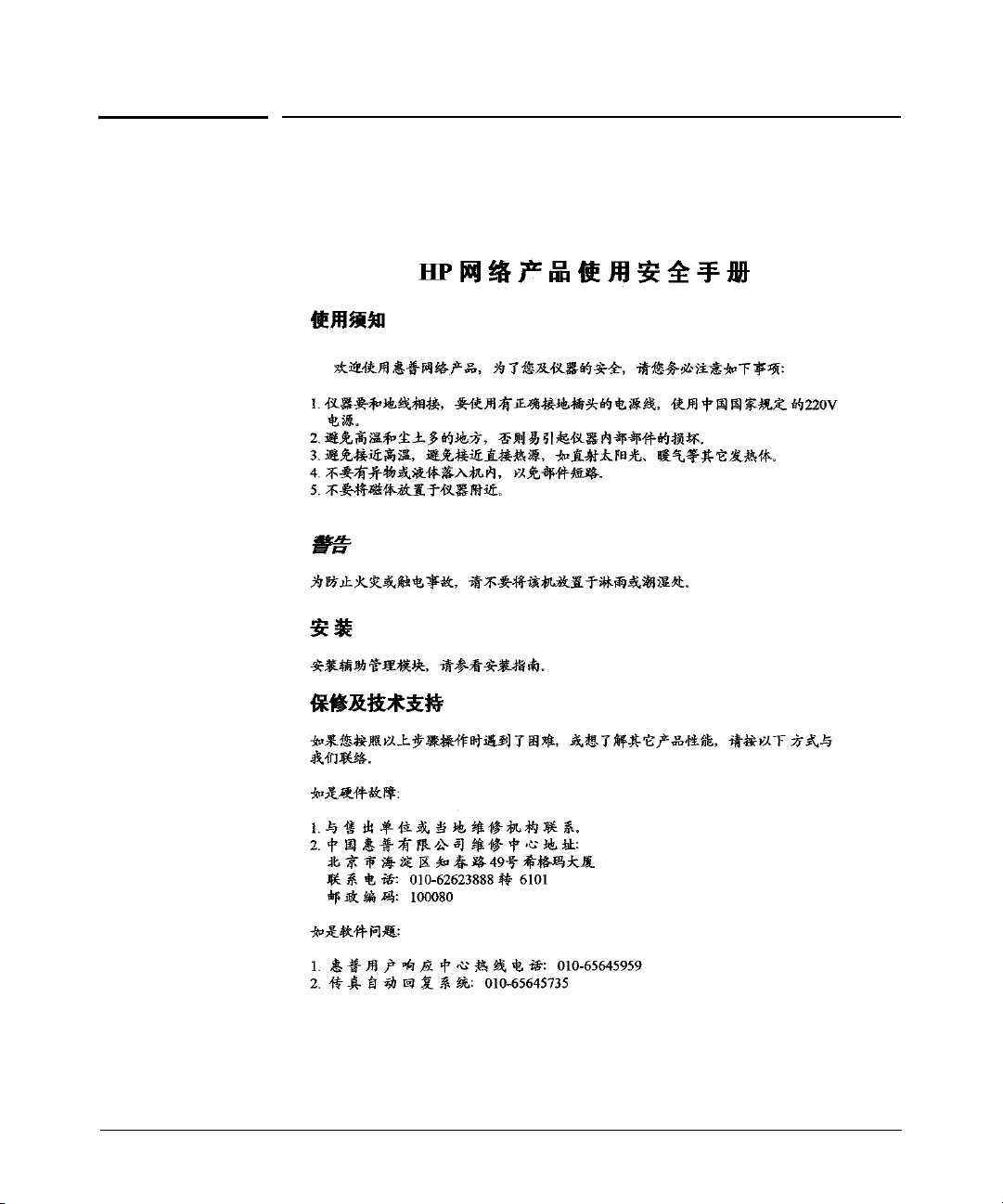
Safety Information (China)
Safety Information (China)
17
Page 24
EMC Regulatory Statements
EMC Regulatory Statements
U.S.A.
FCC Class A
This equipment has been tested and found to comply with the limits for a Class
A digital device, pursuant to Part 15 of the FCC Rules. These limits are
designed to provide reasonable protection against interference when the
equipment is operated in a commercial environment. This equipment
generates, uses, and can radiate radio frequency energy and, if not installed
and used in accordance with the instruction manual, may cause interference
to radio communications. Operation of this equipment in a residential area
may cause interference in which case the user will be required to correct the
interference at his own expense.
Canada
This product complies with Class A Canadian EMC requirements.
18
Australia/New Zealand
This product complies with Australia/New Zealand EMC Class A
requirements.
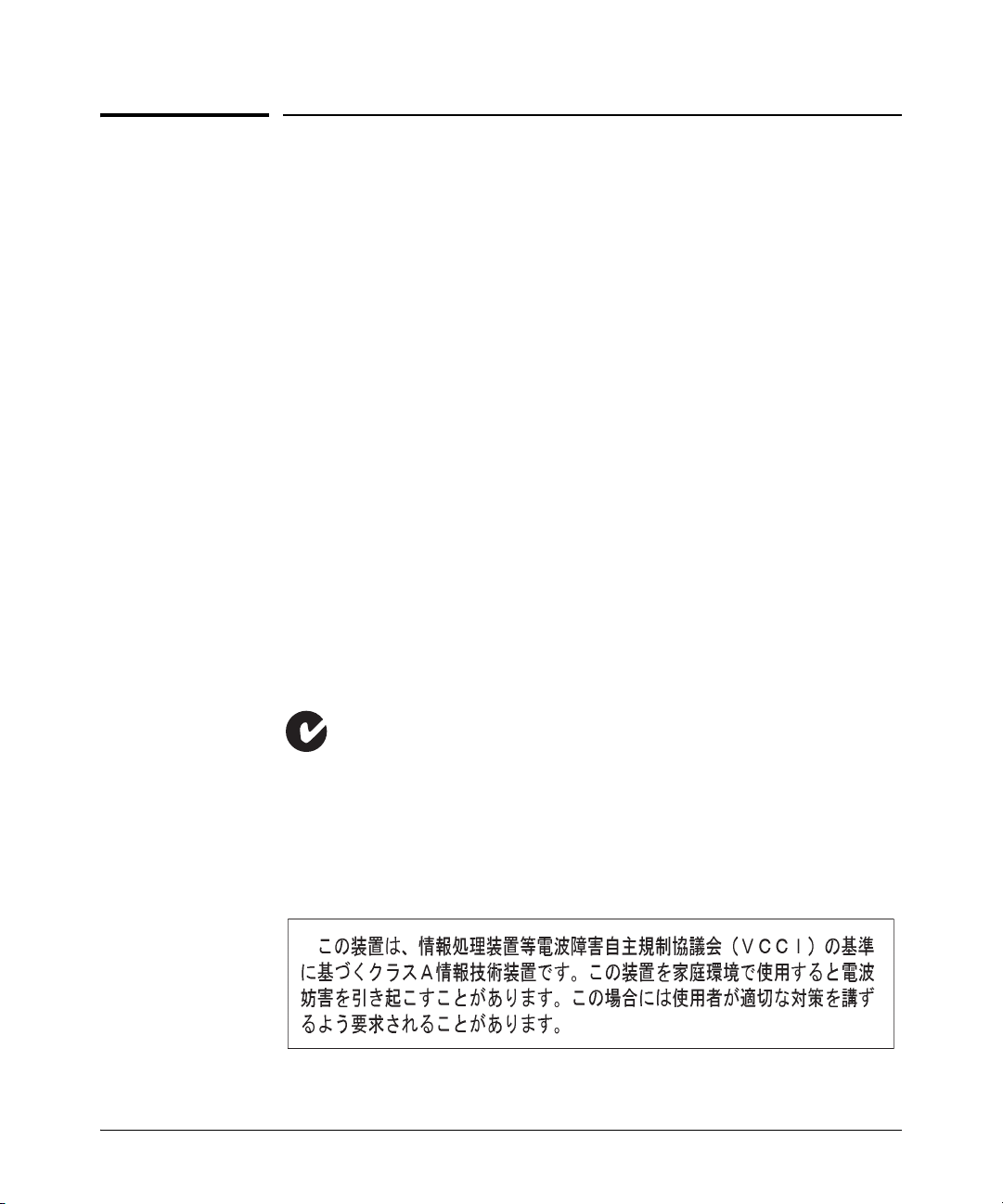
Japan
VCCI Class A
Page 25
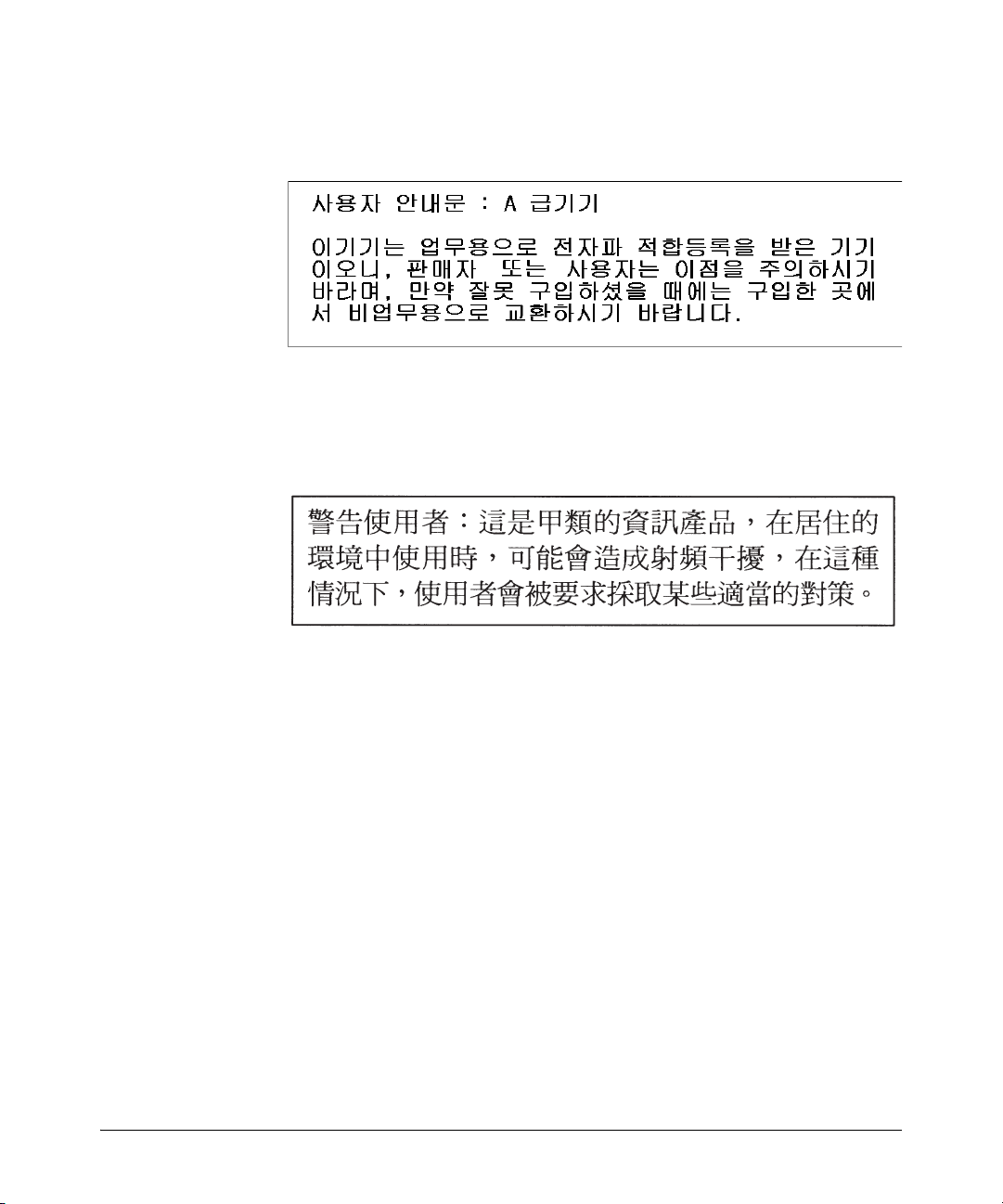
Korea
Taiwan
EMC Regulatory Statements
European Community Declaration of Conformity
This product is designed for operation with the ProCurve zl Switches. Please
see the Declaration of Conformity included in the Installation and Getting
Started Guide included with the switch.
19
Page 26
Recycle Statements
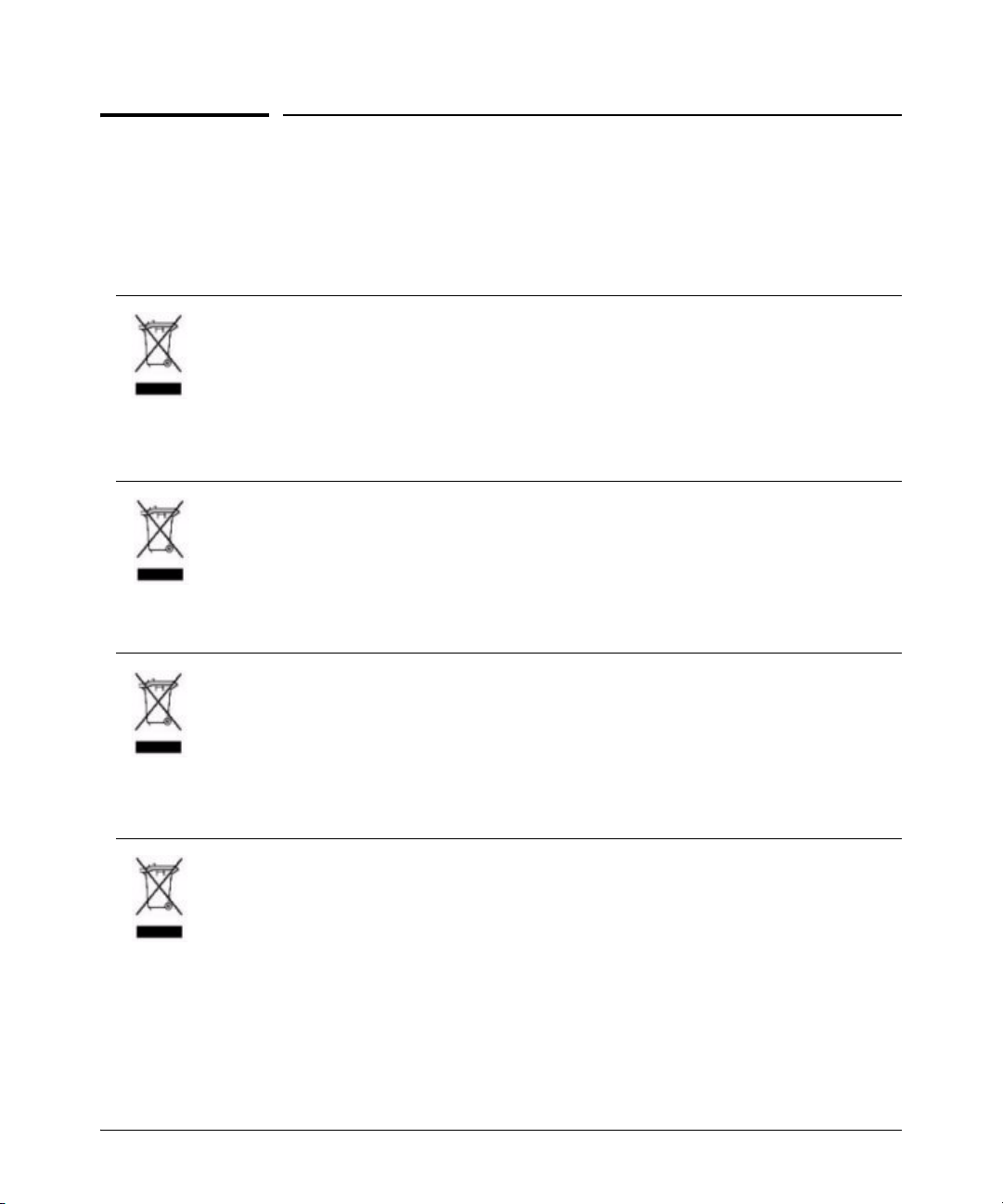
Disposal of Waste Equipment by Users in Private Household in the European Union
This symbol on the product or on its packaging indicates that this product must not be disposed of with
your other household waste. Instead, it is your responsibility to dispose of your waste equipment by
handing it over to a designated collection point for the recycling of waste electrical and electronic
equipment. The separate collection and recycling of your waste equipment at the time of disposal will
help to conserve natural resources and ensure that it is recycled in a manner that protects human health
and the environment. For more information about where you can drop off your waste equipment for
recycling, please contact your local city office, your household waste disposal service or the shop where
you purchased the product.
Likvidace zařízení soukromými domácími uživateli v Evropské unii
Tento symbol na produktu nebo balení označuje výrobek, který nesmí být vyhozen spolu s ostatním
domácím odpadem. Povinností uživatele je předat takto označený odpad na předem určené sběrné
místo pro recyklaci elektrických a elektronických zařízení. Okamžité třídění a recyklace odpadu
pomůže uchovat přírodní prostředí a zajistí takový způsob recyklace, který ochrání zdraví a životní
prostředí člověka. Další informace o možnostech odevzdání odpadu k recyklaci získáte na
příslušném obecním nebo městském úřadě, od firmy zabývající se sběrem a svozem odpadu nebo v
obchodě, kde jste produkt zakoupili.
Recycle Statements
Waste Electrical and Electronic Equipment (WEEE) Statements
20
Bortskaffelse af affald fra husstande i den Europæiske Union
Hvis produktet eller dets emballage er forsynet med dette symbol, angiver det, at produktet ikke må
bortskaffes med andet almindeligt husholdningsaffald. I stedet er det dit ansvar at bortskaffe kasseret
udstyr ved at aflevere det på den kommunale genbrugsstation, der forestår genvinding af kasseret
elektrisk og elektronisk udstyr. Den centrale modtagelse og genvinding af kasseret udstyr i forbindelse
med bortskaffelsen bidrager til bevarelse af naturlige ressourcer og sikrer, at udstyret genvindes på en
måde, der beskytter både mennesker og miljø. Yderligere oplysninger om, hvor du kan aflevere kasseret
udstyr til genvinding, kan du få hos kommunen, den lokale genbrugsstation eller i den butik, hvor du købte
produktet.
Seadmete jäätmete kõrvaldamine eramajapidamistes Euroopa Liidus
See tootel või selle pakendil olev sümbol näitab, et kõnealust toodet ei tohi koos teiste majapidamisjäätmetega kõrvaldada. Teie kohus on oma seadmete jäätmed kõrvaldada, viies need elektri- ja elektroonikaseadmete jäätmete ringlussevõtmiseks selleks ettenähtud kogumispunkti. Seadmete jäätmete eraldi
kogumine ja ringlussevõtmine kõrvaldamise ajal aitab kaitsta loodusvarasid ning tagada, et ringlussevõtmine toimub viisil, mis kaitseb inimeste tervist ning keskkonda. Lisateabe saamiseks selle kohta, kuhu
oma seadmete jäätmed ringlussevõtmiseks viia, võtke palun ühendust oma kohaliku linnakantselei,
majapidamisjäätmete kõrvaldamise teenistuse või kauplusega, kust Te toote ostsite.
Page 27
Recycle Statements
Έ
A
A
Laitteiden hävittäminen kotitalouksissa Euroopan unionin alueella
Jos tuotteessa tai sen pakkauksessa on tämä merkki, tuotetta ei saa hävittää kotitalousjätteiden mukana.
Tällöin hävitettävä laite on toimitettava sähkölaitteiden ja elektronisten laitteiden kierrätyspisteeseen.
Hävitettävien laitteiden erillinen käsittely ja kierrätys auttavat säästämään luonnonvaroja ja
varmistamaan, että laite kierrätetään tavalla, joka estää terveyshaitat ja suojelee luontoa. Lisätietoja
paikoista, joihin hävitettävät laitteet voi toimittaa kierrätettäväksi, saa ottamalla yhteyttä jätehuoltoon tai
liikkeeseen, josta tuote on ostettu.
Élimination des appareils mis au rebut par les ménages dans l'Union européenne
Le symbole apposé sur ce produit ou sur son emballage indique que ce produit ne doit pas être jeté avec
les déchets ménagers ordinaires. Il est de votre responsabilité de mettre au rebut vos appareils en les
déposant dans les centres de collecte publique désignés pour le recyclage des équipements électriques
et électroniques. La collecte et le recyclage de vos appareils mis au rebut indépendamment du reste
des déchets contribue à la préservation des ressources naturelles et garantit que ces appareils seront
recyclés dans le respect de la santé humaine et de l'environnement. Pour obtenir plus d'informations
sur les centres de collecte et de recyclage des appareils mis au rebut, veuillez contacter les autorités
locales de votre région, les services de collecte des ordures ménagères ou le magasin dans lequel vous
avez acheté ce produit.
Entsorgung von Altgeräten aus privaten Haushalten in der EU
Das Symbol auf dem Produkt oder seiner Verpackung weist darauf hin, dass das Produkt nicht über den
normalen Hausmüll entsorgt werden darf. Benutzer sind verpflichtet, die Altgeräte an einer Rücknahmestelle für Elektro- und Elektronik-Altgeräte abzugeben. Die getrennte Sammlung und ordnungsgemäße Entsorgung Ihrer Altgeräte trägt zur Erhaltung der natürlichen Ressourcen bei und garantiert
eine Wiederverwertung, die die Gesundheit des Menschen und die Umwelt schützt. Informationen dazu,
wo Sie Rücknahmestellen für Ihre Altgeräte finden, erhalten Sie bei Ihrer Stadtverwaltung, den örtlichen
Müllentsorgungsbetrieben oder im Geschäft, in dem Sie das Gerät erworben haben
Απόρριψη άχρηστου εξοπλισμού από χρήστες σε ιδιωτικά νοικοκυριά στην Ευρωπαϊκή
νωση
Το σύμβολο αυτό στο προϊόν ή τη συσκευασία του υποδεικνύει ότι το συγκεκριμένο προϊόν δεν
πρέπει να διατίθεται μαζί με τα άλλα οικιακά σας απορρίμματα. Αντίθετα, είναι δική σας ευθύνη να
απορρίψετε τον άχρηστο εξοπλισμό σας παραδίδοντάς τον σε καθορισμένο σημείο συλλογής για την
ανακύκλωση άχρηστου ηλεκτρικού και ηλεκτρονικού εξοπλισμού
ανακύκλωση του άχρηστου εξοπλισμού σας κατά την απόρριψη θα συμβάλει στη διατήρηση των
φυσικών πόρων και θα διασφαλίσει ότι η ανακύκλωση γίνεται με τρόπο που προστατεύει την
ανθρώπινη υγεία και το περιβάλλον. Για περισσότερες πληροφορίες σχετικά με το πού μπορείτε να
παραδώσετε τον άχρηστο εξοπλισμό σας
γραφείο, την τοπική υπηρεσία διάθεσης οικιακών απορριμμάτων ή το κατάστημα όπου αγοράσατε το
προϊόν.
Készülékek magánháztartásban történő selejtezése az Európai Unió területén
készüléken, illetve a készülék csomagolásán látható azonos szimbólum annak jelzésére szolgál,
hogy a készülék a selejtezés során az egyéb háztartási hulladéktól eltérő módon kezelendő. A
vásárló a hulladékká vált készüléket köteles a kijelölt gyűjtőhelyre szállítani az elektromos és
elektronikai készülékek újrahasznosítása céljából. A hulladékká vált készülékek selejtezéskori
begyűjtése és újrahasznosítása hozzájárul a természeti erőforrások megőrzéséhez, valamint
biztosítja a selejtezett termékek környezetre és emberi egészségre nézve biztonságos feldolgozását.
begyűjtés pontos helyéről bővebb tájékoztatást a lakhelye szerint illetékes önkormányzattól, az
illetékes szemételtakarító vállalattól, illetve a terméket elárusító helyen kaphat.
για ανακύκλωση, επικοινωνήστε με το αρμόδιο τοπικό
. Η ξεχωριστή συλλογή και
21
Page 28
Recycle Statements
A
V
Smaltimento delle apparecchiature da parte di privati nel territorio dell'Unione Europea
Questo simbolo presente sul prodotto o sulla sua confezione indica che il prodotto non può essere
smaltito insieme ai rifiuti domestici. È responsabilità dell'utente smaltire le apparecchiature consegnandole presso un punto di raccolta designato al riciclo e allo smaltimento di apparecchiature elettriche ed
elettroniche. La raccolta differenziata e il corretto riciclo delle apparecchiature da smaltire permette di
proteggere la salute degli individui e l'ecosistema. Per ulteriori informazioni relative ai punti di raccolta
delle apparecchiature, contattare l'ente locale per lo smaltimento dei rifiuti, oppure il negozio presso il
quale è stato acquistato il prodotto.
Šis simbolis ant gaminio arba jo pakuotės rodo, kad šio gaminio šalinti kartu su kitomis namų ūkio
atliekomis negalima. Šalintinas įrangos atliekas privalote pristatyti į specialią surinkimo vietą elektros ir
elektroninės įrangos atliekoms perdirbti. Atskirai surenkamos ir perdirbamos šalintinos įrangos atliekos
padės saugoti gamtinius išteklius ir užtikrinti, kad jos bus perdirbtos tokiu būdu, kuris nekenkia žmonių
sveikatai ir aplinkai. Jeigu norite sužinoti daugiau apie tai, kur galima pristatyti perdirbtinas įrangos
atliekas, kreipkitės į savo seniūniją, namų ūkio atliekų šalinimo tarnybą arba parduotuvę, kurioje
įsigijote gaminį.
Nolietotu iekārtu iznīcināšanas noteikumi lietotājiem Eiropas Savienības privātajās
mājsaimniecībās
Šāds simbols uz izstrādājuma vai uz tā iesaiņojuma norāda, ka šo izstrādājumu nedrīkst izmest kopā ar
citiem sadzīves atkritumiem. Jūs atbildat par to, lai nolietotās iekārtas tiktu nodotas speciāli iekārtotos
punktos, kas paredzēti izmantoto elektrisko un elektronisko iekārtu savākšanai otrreizējai pārstrādei.
tsevišķa nolietoto iekārtu savākšana un otrreizējā pārstrāde palīdzēs saglabāt dabas resursus un
garantēs, ka šīs iekārtas tiks otrreizēji pārstrādātas tādā veidā, lai pasargātu vidi un cilvēku veselību.
Lai uzzinātu, kur nolietotās iekārtas var izmest otrreizējai pārstrādei, jāvēršas savas dzīves vietas
pašvaldībā, sadzīves atkritumu savākšanas dienestā vai veikalā, kurā izstrādājums tika nopirkts.
artotojų iš privačių namų ūkių įrangos atliekų šalinimas Europos Sąjungoje
Verwijdering van afgedankte apparatuur door privé-gebruikers in de Europese Unie
Dit symbool op het product of de verpakking geeft aan dat dit product niet mag worden gedeponeerd bij
het normale huishoudelijke afval. U bent zelf verantwoordelijk voor het inleveren van uw afgedankte
apparatuur bij een inzameling spunt voor het recyclen van o ude elektrische en elektronische apparatuur.
Door uw oude apparatuur apart aan te bieden en te recyclen, kunnen natuurlijke bronnen worden
behouden en kan het materiaal worden hergebruikt op een manier waarmee de volksgezondheid en het
milieu worden beschermd. Neem contact op met uw gemeente, het afvalinzamelingsbedrijf of de winkel
waar u het product hebt gekocht voor meer informatie over inzamelingspunten waar u oude apparatuur
kunt aanbieden voor recycling.
Pozbywanie się zużytego sprzętu przez użytkowników w prywatnych gospodarstwach
domowych w Unii Europejskiej
Ten symbol na produkcie lub jego opakowaniu oznacza, że produktu nie wolno wyrzucać do zwykłych
pojemników na śmieci. Obowiązkiem użytkownika jest przekazanie zużytego sprzętu do
wyznaczonego punktu zbiórki w celu recyklingu odpadów powstałych ze sprzętu elektrycznego i
elektronicznego. Osobna zbiórka oraz recykling zużytego sprzętu pomogą w ochronie zasobów
naturalnych i zapewnią ponowne wprowadzenie go do obiegu w sposób chroniący zdrowie człowieka
i środowisko. Aby uzyskać więcej informacji o tym, gdzie można przekazać zużyty sprzęt do
recyklingu, należy się skontaktować z urzędem miasta, zakładem gospodarki odpadami lub sklepem,
w którym zakupiono produkt.
22
Page 29
Recycle Statements
Descarte de Lixo Elétrico na Comunidade Européia
Este símbolo encontrado no produto ou na embalagem indica que o produto não deve ser descartado
no lixo doméstico comum. É responsabilidade do cliente descartar o material usado (lixo elétrico),
encaminhando-o para um ponto de coleta para reciclagem. A coleta e a reciclagem seletivas desse
tipo de lixo ajudarão a conservar as reservas naturais; sendo assim, a reciclagem será feita de uma
forma segura, protegendo o ambiente e a saúde das pessoas. Para obter mais informações sobre locais
que reciclam ess e tipo de material, entre e m contato com o escritório da HP em sua cidade, com o s erviço
de coleta de lixo ou com a loja em que o produto foi adquirido.
Likvidácia vyradených zariadení v domácnostiach v Európskej únii
Symbol na výrobku alebo jeho balení označuje, že daný výrobok sa nesmie likvidovať s domovým
odpadom. Povinnosťou spotrebiteľa je odovzdať vyradené zariadenie v zbernom mieste, ktoré je
určené na recykláciu vyradených elektrických a elektronických zariadení. Separovaný zber a
recyklácia vyradených zariadení prispieva k ochrane prírodných zdrojov a zabezpečuje, že recyklácia
sa vykonáva spôsobom chrániacim ľudské zdravie a životné prostredie. Informácie o zberných
miestach na recykláciu vyradených zariadení vám poskytne miestne zastupiteľstvo, spoločnosť
zabezpečujúca odvoz domového odpadu alebo obchod, v ktorom ste si výrobok zakúpili.
Odstranjevanje odslužene opreme uporabnikov v zasebnih gospodinjstvih v Evropski uniji
Ta znak na izdelku ali njegovi embalaži pomeni, da izdelka ne smete odvreči med gospodinjske
odpadke. Nasprotno, odsluženo opremo morate predati na zbirališče, pooblaščeno za recikliranje
odslužene električne in elektronske opreme. Ločeno zbiranje in recikliranje odslužene opreme
prispeva k ohranjanju naravnih virov in zagotavlja recikliranje te opreme na zdravju in okolju neškodljiv
način. Za podrobnejše informacije o tem, kam lahko odpeljete odsluženo opremo na recikliranje, se
obrnite na pristojni organ, komunalno službo ali trgovino, kjer ste izdelek kupili.
Eliminación de residuos de equipos eléctricos y electrónicos por parte de usuarios particulares en la
Unión Europea
Este símbolo en el producto o en su envase indica que no debe eliminarse junto con los desperdicios
generales de la casa. Es responsabilidad del usuario eliminar los residuos de este tipo depositándolos
en un "punto limpio" para el reciclado de residuos eléctricos y electrónicos. La recogida y el reciclado
selectivos de los residuos de aparatos eléctricos en el momento de su eliminación contribuirá a
conservar los recursos naturales y a garantizar el reciclado de estos residuos de forma que se proteja
el medio ambiente y la salud. Para obtener más información sobre los puntos de recogida de residuos
eléctricos y electrónicos para reciclado, póngase en contacto con su ayuntamiento, con el servicio de
eliminación de residuos domésticos o con el establecimiento en el que adquirió el producto.
Bortskaffande av avfallsprodukter från användare i privathushåll inom Europeiska Unionen
Om den här symbolen visas på produkten eller förpackningen betyder det att produkten inte får
slängas på samma ställe som hushållssopor. I stället är det ditt ansvar att bortskaffa avfallet genom att
överlämna det till ett uppsamlingsställe avsett för återvinning av avfall från elektriska och elektroniska
produkter. Separat insamling och återvinning av avfallet hjälper till att spara på våra naturresurser och
gör att avfallet återvinns på ett sätt som skyddar människors hälsa och miljön. Kontakta ditt lokala
kommunkontor, din närmsta återvinningsstation för hushållsavfall eller affären där du köpte produkten
för att få mer information om var du kan lämna ditt avfall för återvinning.
23
Page 30

Page 31

Page 32

© Copyright Hewlett-Packard Company, 2005-
2007.
Printed in Singapore
August 2007
Manual Part Number
5991-8553
*5991-8553*
 Loading...