

Page 1
ProductSheet
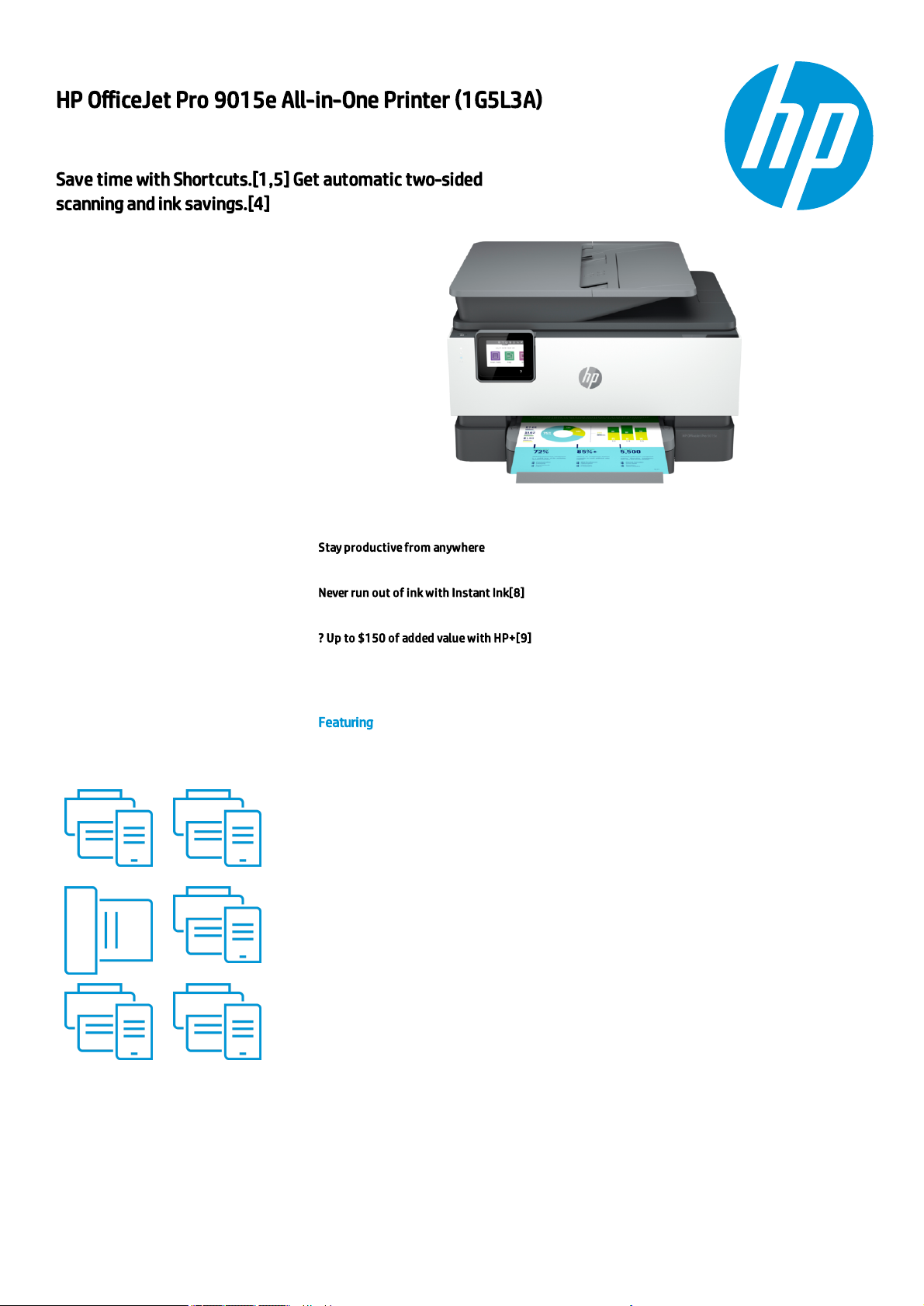
HP OfficeJet Pro 9015e All-in-One Printer (1G5L3A)
Save time with Shortcuts.[1,5] Get automatic two-sided
scanning and ink savings.[4]
Designed for shared home offices doing a
range of print tasks, including
professional color documents. Count on
the fast print speeds up to to 22 ppm[7],
automatic two-sided printing, reliable WiFi connectivity,[2] and a large 250-sheet
paper tray.
Stay pro ducti ve from anywhere
We make printing from anywhere easy with HP Smart, our best-i n-class print app.[1,3]
Never run out of ink with Instant Ink[8]
Enroll to Instant Ink to get ink, plus hassle-free delivery and recycling whi le saving up to 50% .[4]
? Up to $150 of added value with HP+[9]
With 6 months of free ink with In stant Ink,[ 6] extended 2-year HP warranty, and new HP Smart
app features.[1]
Featuring
Customizable shortcuts on your phone or printer
[1]
Create editable, searchable doc uments
[1]
Two-sided. Hands-free. Auto-fed
Ready when you are
[1]
Printing just got more productive
[1]
Amazing scanning , now on your smartphone
[1]
Generated by Dynamic Collateral Tool – (ww-en) – Feb 26, 2021 10:02 PM UTC+0000
Page 2
ProductSh eet | HP Offi ceJet Pro 9015e All-in-One Printer (1G5L3A)
Specications
Print Resolution Technologies HP Thermal Inkjet
Print quality black (best) 1200 x 1200 rendered dpi
Print quality color (best) Up to 4800 x 1200 optimized dpi on HP Advance Photo Paper 1200 x 1200 dpi input
Print speed black (ISO, A4) Up to 22 ppm
Print speed black (ISO, letter) Up to 22 ppm
Print Speed Color (ISO) Up to 18 ppm
Print speed color (ISO) Up to 18 ppm
Print speed Print speed up to 22 ppm (black) and 18 ppm (color)
Functions Print, copy, scan, fax
Duplex printing Automatic (standard)
Duty cycle (monthly, A4) Up to 25,000 pages
Duty cycle (monthly, letter)
Up to 25,000 pages
[7]
Printer smart software features
Ori entation: Portrait/Landscape; Print on Both Si des: None/Flip on Long Edge/Flip on Short Edg e; Page Order: Front
to Back/Back to Front; Pages per Sheet: 1, 2, 4, 6, 9, 16; Quality Settings: Draft/Norm al/Best; Printing Shortcuts;
Print in Grayscale: Off/High Qu ality Grayscale/Black Ink Only; Pages per Sheet Layout: Right then Down/Down then
Right/Left then Down/Down then Left; Pri nt in Max DPI: No/Yes; HP Real Life Technologies: Off/On; Booklet:
Non e/Booklet-Left Binding/Booklet-Right Binding; Pages to Print: Pri nt All Pages/Print Odd Pages Only/Print Even
Pages Only; Borderless Printing: Off/On; Page Borders: Off/On ;
Scanner advanced features
OCR (Opti cal Character Recognition); Sm art Taks shortcuts: 1-click customizable scan to cloud destinations, email,
and print, create editable, searchable documents by scanning from phone or printer; Smart Tasks desti nations:
Dropbox, Google Drive, One dri ve, email reci pients, pri nt
Fax smart software features
Digital Fax - Fax to PC is available wi th Windows (Please use: Visi t http://www.hp.com/su pport to download th e
latest software.
Energy savings feature
technology
Schedule On and Schedule Off
Replacement cartridges
HP 962 Black Original Ink Cartrid ge (~1,000 pages) 3HZ99A; HP 962 Cyan Orig inal Ink Cartridge (~700 pages)
3HZ96A; HP 962 Magenta Original Ink Cartri dge (~700 pages) 3HZ97A; HP 962 Yellow Ori ginal Ink Cartridge (~700
pages) 3HZ98A; HP 962XL Black Orig inal Ink Cartridge (2,000 pages) 3JA03A; HP 962XL Cyan Original Ink Cartridge
(1,600 pages) 3JA00A; HP 962XL Magenta Original Ink Cartridge (1,600 pages) 3JA01A; HP 962XL Yellow Ori ginal Ink
Cartridge (1,600 pages) 3JA02A; HP 966XL Black Original Ink Cartridge (3,000 pages) 3JA04A. Actual yield varies
con siderably based on content of printed pages and other factors. For details see
http://w ww.hp.c om/go/learnaboutsupplies.
Supplies feature HP Instant Ink eligible
Connectivity, standard 1 U SB 2.0; 1 Host USB; 1 Ethernet; 1 Wireless 802.11a/b/g/n; 2 RJ-11 modem ports
Connectivity, optional No
Network capabilities Yes, via built-in Ethernet; Wireless 802.11a/b/g/n
Wireless capability Yes, built-in Wi Fi 802.11a/b/g/n
Mobile printing capability Chrome OS; HP Smart app; Apple AirPrint™; Wi-Fi® Direct Pri nting ; Mopri a™ Certi ed
Network protocols, supported 9100; LPR; SNMP; SLP; Internet Printing Protocol (IPP); WS-Pri nt, Wireless
Software included HP Pri nter Software, Shop for Supplies Online
Compatible Operating Systems
Windows 10, 8.1, 8, 7,Windows Server 2008 R2 64-bit, Windows Server 2008 R2 64-bit (SP1), Windows Server 2012
64-bit, Windo ws Server 2012 R2 64-bit, Windows Server 2016, Chrome OS
(Windows XP and Windows Vista not s upported)
Sustainable impact specications
With the HP Off iceJet Pro 9000 series and Original HP supplies, hardware is desi gned to help reduce energy use,
paper is responsi bly sourced, and ink cartri dges are easily recycled. [10]
Energy star certied Yes
Ecolabels EPEAT® Silver
Copy speed black (best, A4) Up to 5 cpm
Copy speed black (best, letter) Up to 5 cpm
Copy speed color (best, A4) Up to 4 cpm
Copy speed color (best, letter) Up to 4 cpm
Digital sending standard features Scan-to E-mail; Scan to netw ork folder; scan to SharePoint; Scan to thu mb drive
Fax Resolution Black (best) Up to 300 x 300 dpi
Generated by Dynamic Collateral Tool – (ww-en) – Feb 26, 2021 10:02 PM UTC+0000
2
Page 3
ProductSh eet | HP Offi ceJet Pro 9015e All-in-One Printer (1G5L3A)
Faxing Yes, color
Scan speed (normal, A4) Up to 8 ipm (200 ppi, b&w); Up to 8 ipm (200 ppi, color)
Scan speed (normal, letter) Up to 8 ipm (200 ppi, b&w); Up to 8 ipm (200 ppi, colo r)
Scan le format JPG, BMP, TIFF, PDF, RTF, TXT, PNG
Scan input modes Front-panel scan, co py, HP Software, EWS, Mobi le apps
Scan technology C ontact Image Sensor (CIS)
Scanner type Easy sli de-off glass, dual pass 2-sided AD F
Display 2.7" (6.86 cm) Capacitive Touchscreen CGD
Minimum dimensions (W x D x H) 439.3 x 342.5 x 278 mm
Minimum dimensions (W x D x H) 17.3 x 13.48 x 10.94 in
Weight 9.29 kg
Weight 20.43 lb
Power consumption
Up to 30 watts (printing), 5.80 watts (ready), 1.20 watts (sleep), 0.08 watts (manual-off)
[3]
Power supply type Internal (Built-in) Un iversal Power Supp ly
What's in the box
HP OfficeJet Pro 9015e All-i n-One Printer; HP 962 Setup Black Ink Cartridge; HP 962 Setup Cyan Ink Cartridge; HP
962 Setup Magenta Ink Cartri dge; HP Setup 962 Yellow Original Ink Cartri dge; Regulatory Flyer; Ink Caution Flyer;
Power Cord; Setup Poster; Reference Guide [For more information about ll and yield, see
http://w ww.hp.c om/go/learnaboutsupplies]
[8]
Warranty
One-year limited hardw are warranty; 24-hour, 7 days a week Web support; bu siness hour phone support within
warranty period.
Generated by Dynamic Collateral Tool – (ww-en) – Feb 26, 2021 10:02 PM UTC+0000
3
Page 4

ProductSh eet | HP Offi ceJet Pro 9015e All-in-One Printer (1G5L3A)
Top Recommended Displays, Accessories and Services
No Top Recommended Displays, Accessories and Services
Generated by Dynamic Collateral Tool – (ww-en) – Feb 26, 2021 10:02 PM UTC+0000
4
Page 5
ProductSh eet | HP Offi ceJet Pro 9015e All-in-One Printer (1G5L3A)
Messaging Footnotes
[1] Requires the HP Smart app download. For details on local printing requirements see www.hp.com/go/mobileprinting. Certain features/software are available in English language only, and
differ between d esktop and mobile applications. Instant Ink subscription may be req uired. Instant Ink not available in all countries. See details at www.hpinstantink.com. Internet access
required and must be purchased separately. HP account required for full functionality. List of supported operating systems available in app stores. Fax capabilities are for sending a fax only,
and may require additional purchase. For more information, see www.hpsmart.com/mob ile-fax.
Added value is calculated based on 6 months of any Instant Ink plan, up to $24.99/month. See Instant Ink off er details on box [1] or at www.hpinstantink.com. With HP+, customers will also
receive additional value in the form of one extra year of HP Carepack-based warranty and access to advanced HP Smart app features.
[2] Wireless operations are compatible with 2.4 GHz and 5.0 GHz operations only. Learn more at hp.com/go/mobileprinting. Wi-Fi is a registered trademark of Wi-Fi Alliance®.
[3] Compared to OE M printing apps for the majority of top-selling inkjet/laser printers and all-in-ones for the home and office, priced less than or equal to $449.99 USD. Market share as
reported by IDC CYQ4 2019 Hardcopy Peripherals Tracker. C laim based on research of printer manufacturer’s print apps and Keypoint Intelligence - Buyers Lab hands-on testing and study
commissioned by HP. For details, please see: www.keypointintelligence.com/HPSmartApp.
[4] Based on monthly subscription cost of Instant Ink 700-page plans without purchase of additional sets of pages compared to cost per page to print ISO/IEC 24711 pages on most inclass, traditional A4 color inkjet cartridge printers & MFPs using original standard capacity cartridges priced for: Australia <299 AUD; New Zealand <349 NZD; Canada <=399 CAD & United
States <399 USD. Sale prices not considered for this study. HP Ink Advantage printers excluded due to non-standard hardware & supplies model. Buyers Lab July 2020 study commissioned
by HP, based on publicly available information as of June 1, 2020. Printers selected by market share in IDC Quarterly Hardcopy Peripherals Tracker - Final Historical 2020Q1. For details:
www.keypointintellig ence.com/HPInstantInk.
[5] Based on internal HP testing. Average timing estimate based on: 1) downloaded HP Smart app on mobile or desktop device, 2) setting up Shortcut, 3) scan ning jobs which have more
than 2-3 tasks associated with them (scan to email, save and rename, store to cloud, etc.). Average timing savings comparison based on using printer and desktop scan software to complete
similar scanning tasks. Requires the HP Smart app download and supported HP printer. For details on local printing requirements see http://www.hp.com/go/mobileprinting.
[6] Instant Ink sign up required. Instant Ink not available in all countries. Subject to monthly page limit of plan selected. Must complete Instant Ink signup within 7 days of setting up the
printer with the HP-recommended setup process as indicated in the instructions that came with your printer. Use of in-box ink cartridge is included in period of offer. One offer redeemable
per printer. Free months offer with Instant Ink subject to change after 10.31.2021. Offer cannot be redeemed for cash. Setup Offer may be combined with other offers; see terms and
conditions of the other offer for more details. Requires a valid cred it/debit card, an email address, and Internet connection to printer. Unless service is cancelled within the promotional period
online at www.hpinstantink.com, a monthly service fee, based on the plan chosen, plus tax and overage fees will be charged to your credit/debit card. Customer will be charged for any
overage fees and applicable taxes at the end of each month in the promotional period. See additional offer information available during online signup process. For service details, see
http://www.hpinstantink.com.
Technical Specications Footnotes
[3] Power requirements are based on the country/region where the printer is sold. Do not convert operating voltages. This will damage the printer and void the product warranty.
[7] HP recommends that the number of printed pages per month be within the stated range for optimum device performance, based on factors including supplies replacement
[8] For more information about page yields for replacement cartridges see http://hp.com/go/learnaboutsupplies for setup cartridges click on Setup supplies link on the same page.
© Copyright 2020 HP Development Company, L.P. The information contained herein is subject to change without notice. The only warranties for HP
products and services are set forth in the express warranty statements accompanying such products and services. Nothing herein should be
construed as constituting an additional warranty. HP shall not be liable for technical or editorial errors or omissions contain ed herein.
Generated by Dynamic Collateral Tool – (ww-en) – Feb 26, 2021 10:02 PM UTC +0000
5
 Loading...