

Page 1

Quick Start Guide &
End-User License Agreements
HP Neoware c50 Quick Start Guide
IMPORTANT safety information
To reduce the risk of serious injury, read the Safety & Comfort Guide. It describes
Å
proper workstation setup, posture, and health and work habits for computer users,
and provides important electrical and mechanical safety information. This guide
is located on the Web at www.hp.com/ergo and on the Thin Client
Documentation CD that is included with the product.
To reduce the risk of electric shock or damage to your equipment:
■ Do not disable the power cord grounding plug. The grounding plug is
an important safety feature.
■ Plug the power cord in a grounded (earthed) outlet that is easily
accessible at all times.
■ Disconnect power from the thin client by unplugging the power cord
from the electrical outlet.
This equipment has been tested and found to comply with the limits for a Class B
digital device, pursuant to part 15 of the FCC Rules. For more information, refer
to the documentation provided with your product.
Many PC products and accessories contain cords, cables or wires, such as
power cords or cords to connect the accessory to a PC. If this product has
such a cord, cable or wire, then the following warning applies:
WARNING: Handling the cord on this product will expose you to lead, a
chemical known to the State of California to cause cancer, and birth defects or
other reproductive harm. Wash hands after handling.
Perchlorate Material – special handling may apply.
This computer’s real-time clock battery may contain perchlorate and may
require special handling when recycled or disposed in California.
Page 2
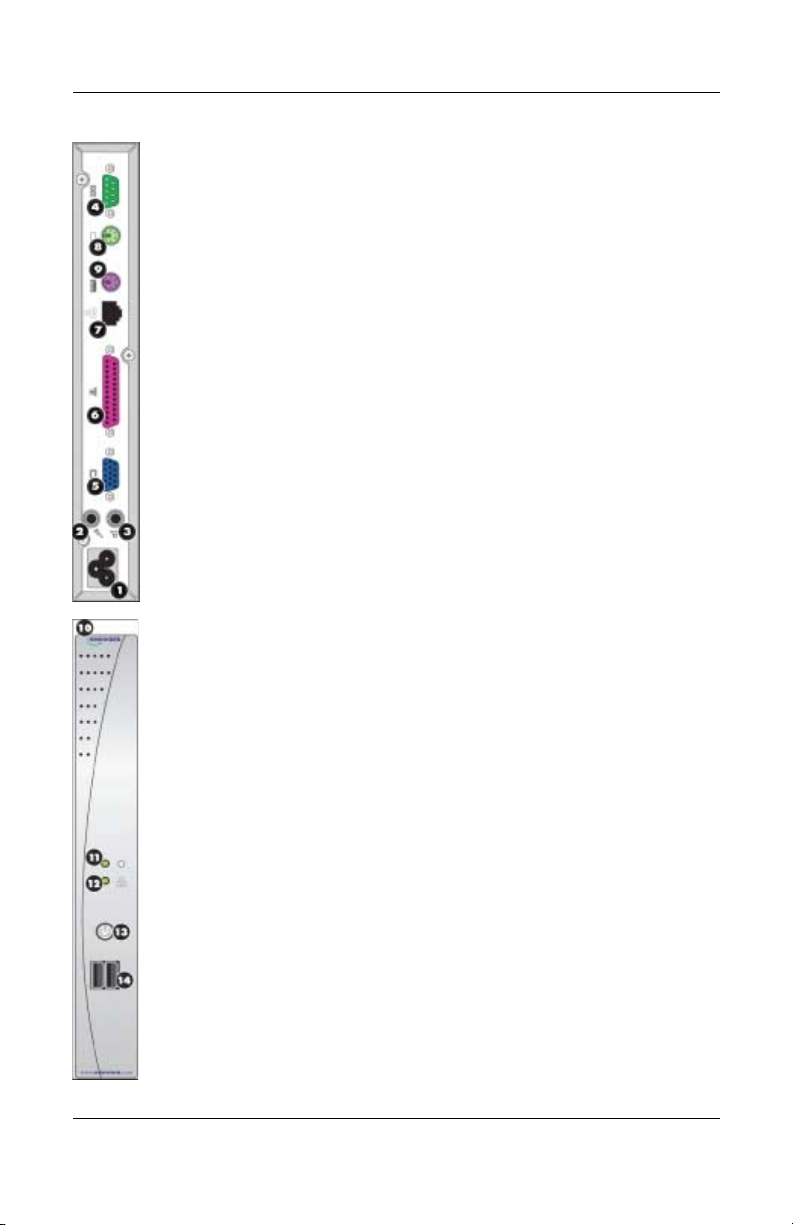
1. UNPACK—Your HP Neoware thin client is typically shipped with the
following items:
❏ A mouse
❏ A power cable
❏ A stand for stabilizing your thin client in a vertical orientation
(attached)
❏ This Quick Start Guide
2. SETUP—Your thin client is designed to be installed in vertical
orientation.
a. Connect the keyboard to the keyboard port.
b. Connect the mouse to the mouse port.
c. Depending on your configuration, connect your printer to the parallel
port.
d. Connect the LAN cable to the 10/100 Based T Ethernet port.
e. Connect the AC cable to the power cord connector.
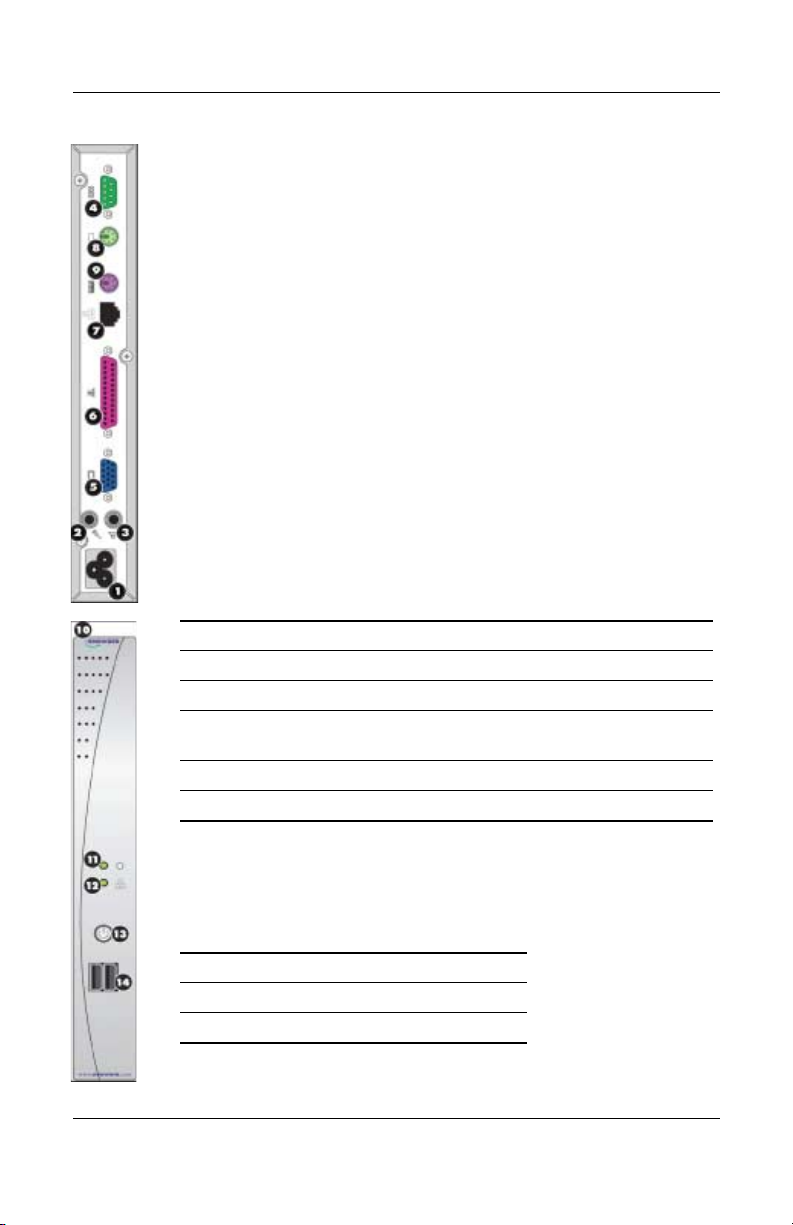
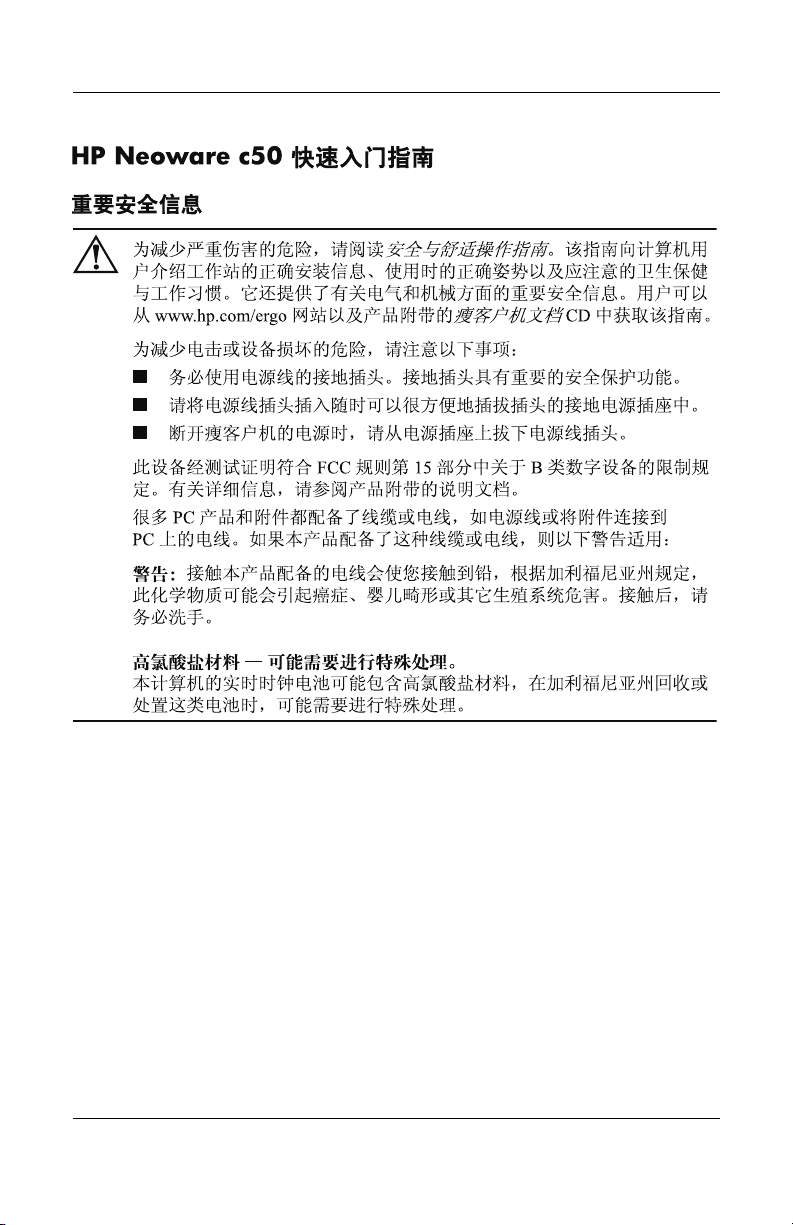
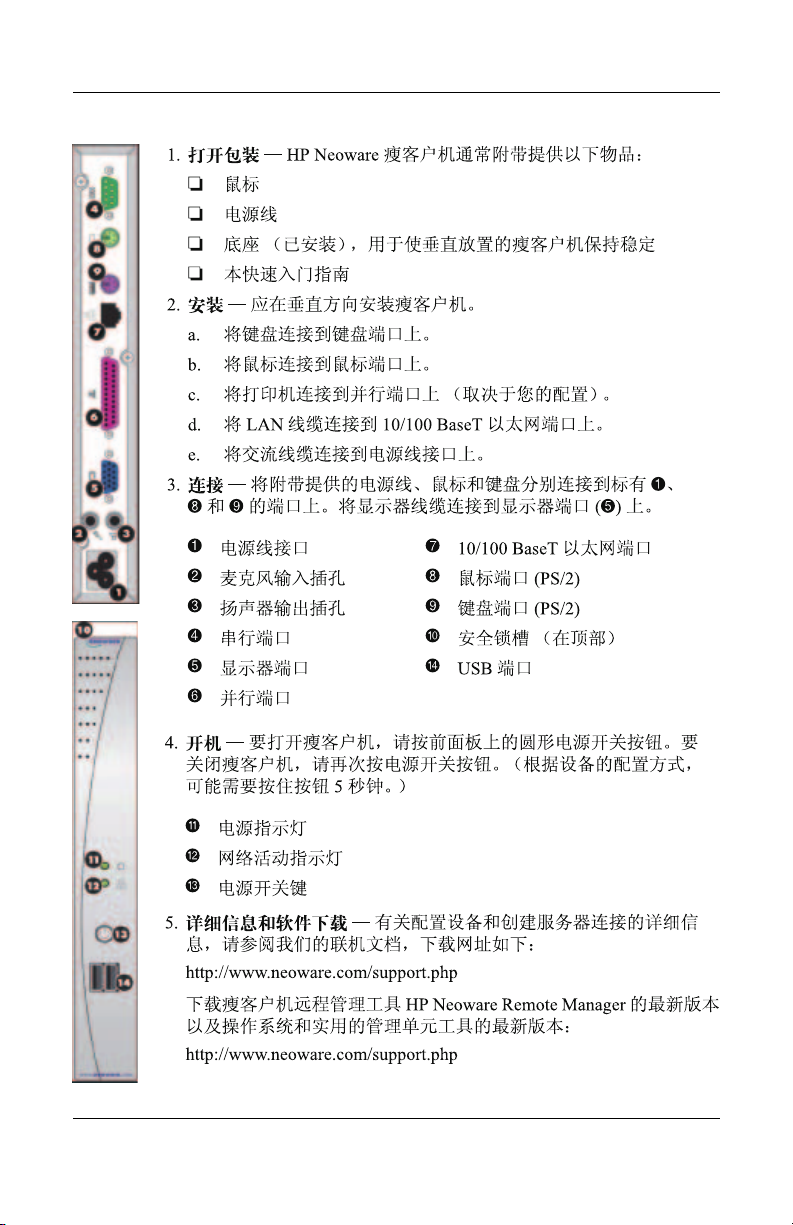
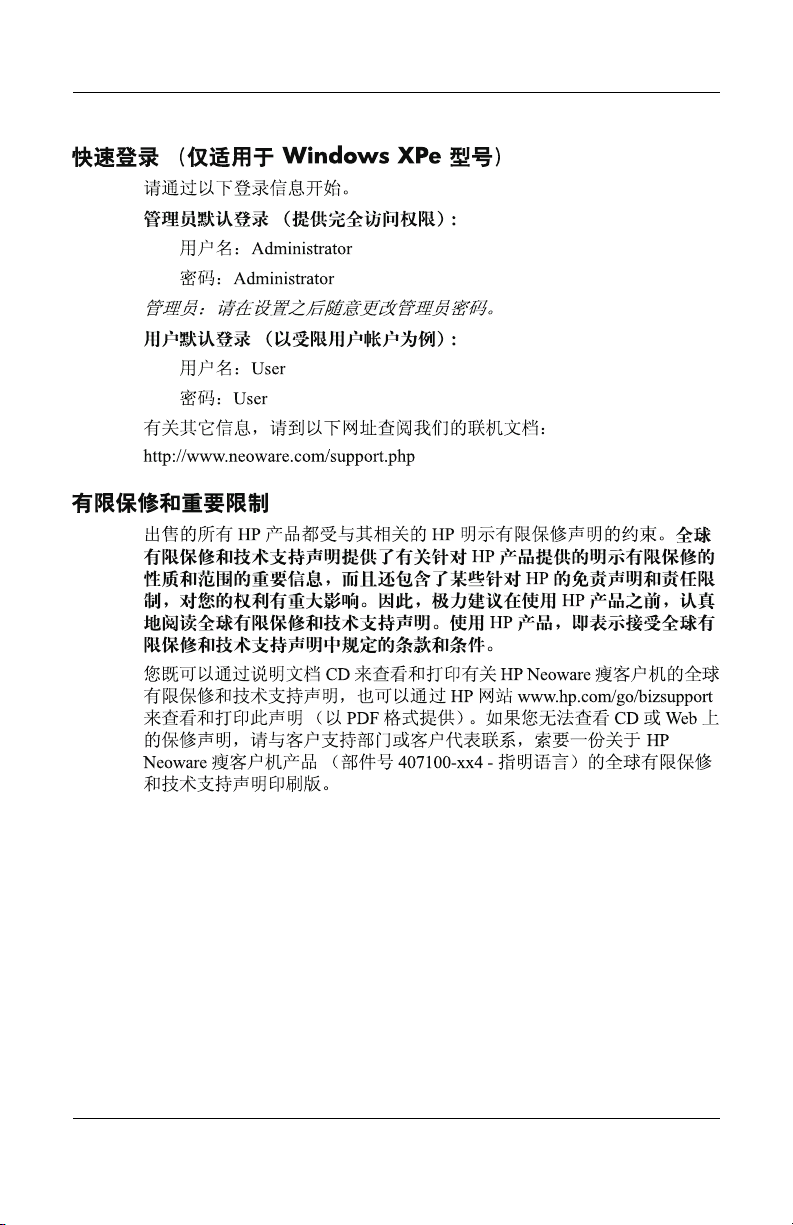
3. CONNECTIONS—Connect the supplied power cord, mouse, and
keyboard to the ports labeled 1, 8, and 9, respectively. Connect your
monitor’s cable to the monitor port (5).
1 Power cord connector 7 10/100 BaseT Ethernet port
2 Microphone in jack 8 Mouse port (PS/2)
3 Speaker out jack 9 Keyboard port (PS/2)
4 Serial port : Security lock slot (on top)
5 Monitor port > USB ports
6 Parallel port
4. POWER UP—In order to turn on your thin client, push in the circular
on/off button on its front panel. To turn off your thin client, push the
on/off button again. (You may need to hold the button in for 5 seconds,
depending upon how the appliance is configured).
; Power indicator
< Network Activity Indicator
= ON / OFF switch
5. MORE INFORMATION AND SOFTWARE DOWNLOADS—For
detailed information on configuring your appliance and creating
connections to servers, please consult our online documentation, which
can be downloaded at:
http://www.neoware.com/support.php
2
Page 3

Download the latest version of the thin client remote management
tool—HP Neoware Remote Manager—as well as the latest release of your
operating system and useful snap-in tools at:
http://www.neoware.com/support.php
QUICK LOG-IN (for Windows XPe models only)
Below is login information to help you get started.
DEFAULT LOGIN FOR ADMINISTRATOR (PROVIDES FULL
ACCESS):
Username: Administrator
Password: Administrator
Administrator: Feel free to change the administrator password after set-up.
DEFAULT LOGIN FOR USER (EXAMPLE OF A RESTRICTED USER
ACCOUNT):
Username: User
Password: User
Please consult our online documentation for additional information at:
http://www.neoware.com/support.php
Limited warranty and material limitations
Each HP product is sold subject to the HP express limited warranty statement
relating to that product. THE WORLDWIDE LIMITED WARRANTY AND
TECHNICAL SUPPORT STATEMENT PROVIDES IMPORTANT
INFORMATION ABOUT THE NATURE AND SCOPE OF THE EXPRESS
LIMITED WARRANTY PROVIDED FOR THE HP PRODUCT, AND ALSO
CONTAINS CERTAIN DISCLAIMERS AND LIMITATIONS OF
LIABILITY BY HP, WHICH MATERIALLY IMPACT YOUR RIGHTS.
ACCORDINGLY, YOU ARE STRONGLY ADVISED TO CAREFULLY
READ THE WORLDWIDE LIMITED WARRANTY AND TECHNICAL
SUPPORT STATEMENT BEFORE USING YOUR HP PRODUCT. YOUR
USE OF THE HP PRODUCT IS DEEMED TO BE ACCEPTANCE OF THE
TERMS AND CONDITIONS SET FORTH IN THE WORLDWIDE LIMITED
WARRANTY AND TECHNICAL SUPPORT STATEMENT.
You can view and print the Worldwide Limited Warranty and Technical
Support statement for your HP Neoware thin client on the Documentation CD or
from the HP Web site at www.hp.com/go/bizsupport, where it is provided in
PDF format. If you are not able to access the warranty on CD or the Web,
3
Page 4

contact Customer Support or your account representative for a printed copy of
the Worldwide Limited Warranty and Technical Support statement for the HP
Neoware thin client products (part number 407100-xx4 - specify language).
4
Page 5

Kurzanleitung zum HP Neoware c50
Wichtige sicherheitshinweise
Hinweise zur Vermeidung von Verletzungen erhalten Sie im Handbuch für
Å
sicheres und angenehmes Arbeiten. Das Handbuch enthält Erläuterungen zur
richtigen Einrichtung des Arbeitsplatzes und zur korrekten Körperhaltung,
Gesundheitstipps für die Arbeit am Computer sowie wichtige Hinweise zur
elektrischen und mechanischen Sicherheit. Dieses Handbuch finden Sie im
Internet unter www.hp.com/ergo sowie auf der zusammen mit dem Produkt
gelieferten Thin Client-Dokumentations-CD.
So verringern Sie das Risiko von Stromschlägen oder einer Beschädigung der
Geräte und Komponenten:
■ Deaktivieren Sie auf keinen Fall den Erdungsleiter des Netzkabels. Der
Erdungsleiter erfüllt eine wichtige Sicherheitsfunktion.
■ Schließen Sie das Netzkabel an eine geerdete Steckdose an,
die jederzeit leicht erreichbar ist.
■ Trennen Sie den Thin Client von der Stromversorgung, indem Sie das
Netzkabel entweder aus der Steckdose oder aus dem Computer ziehen.
Dieses Gerät wurde getestet und entspricht den Grenzwerten für digitale Geräte
der Klasse B (siehe Abschnitt 15 der FCC-Bestimmungen). Weitere
Informationen finden Sie in der dem Produkt beiliegenden Dokumentation.
Viele PC-Produkte und Zubehörteile enthalten Kabel, Leitungen oder Drähte,
wie z. B. Stromkabel oder Kabel zur Verbindung des Zubehörs mit einem
PC.Wenn dieses Produkt solche Kabel, Leitungen oder Drähte enthält, gilt der
folgende Warnhinweis:
WARNHINWEIS: Bei der Berührung der Anschlussleitung dieses Produktes
kommen Sie in Kontakt mit Blei, einer Chemikalie, von der im Bundesstaat
Kalifornien angenommen wird, dass sie krebserregend und für das
ungeborene oder neugeborene Leben schädigend ist.Waschen Sie sich nach
dem Berühren die Hände.
Perchlorathaltiges Material – Eventuell gelten besondere
Handhabungsvorschriften.
Die Batterie der Echtzeituhr dieses Computers enthält unter Umständen
Perchlorat und kann daher besonderen Handhabungsvorschriften hinsichtlich
Recycling oder Entsorgung in Kalifornien unterliegen.
5
Page 6
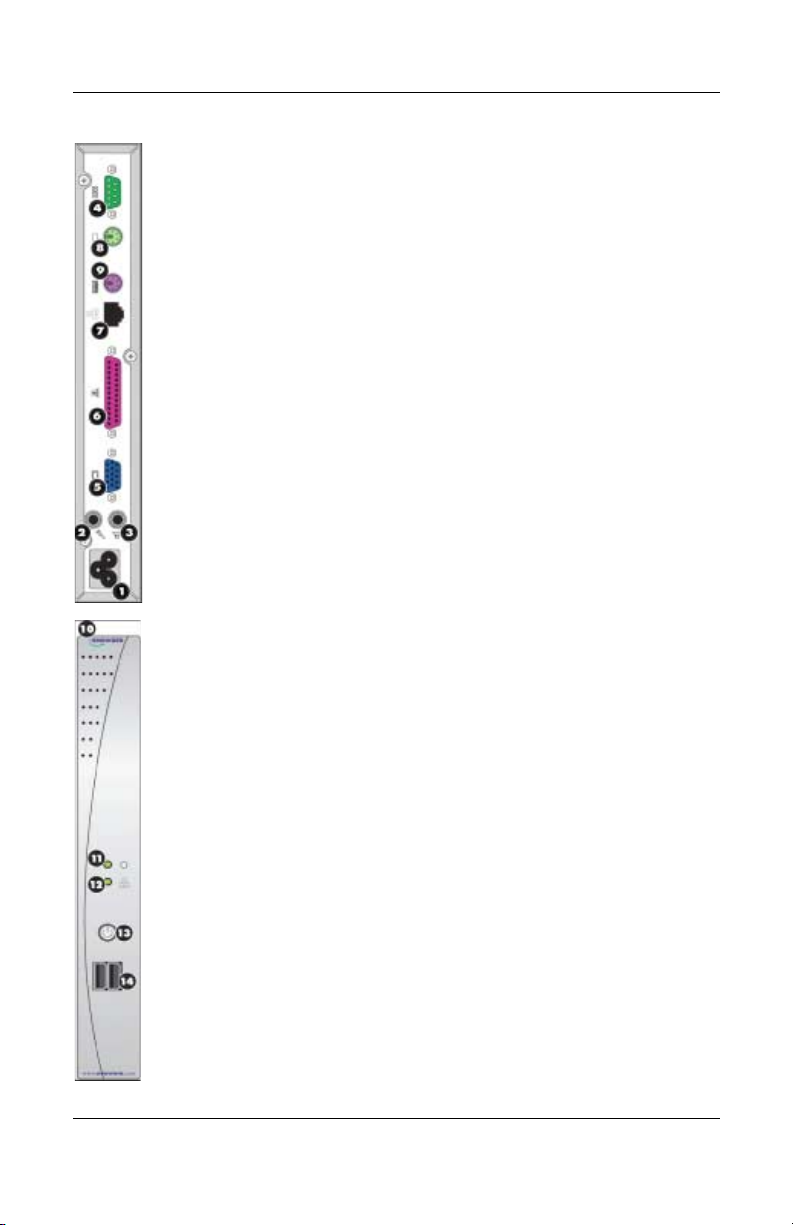
1. LIEFERUMFANG—Zum Lieferumfang Ihres HP Neoware Thin Clients
gehört üblicherweise folgendes Zubehör:
❏ Eine Maus
❏ Ein Stromkabel
❏ Ein Standfuß für den vertikalen Betrieb des Thin Client
❏ Diese Kurzanleitung für die sofortige Inbetriebnahme
2. AUFSTELLEN—Der HP Neoware c50 Thin Client ist für den Betrieb in
senkrechter Position ausgelegt.
3. ANSCHLÜSSE—Schließen Sie das mitgelieferte Stromkabel, die Maus
und die Tastatur an die entsprechenden Anschlüsse mit den Nummern 1,
8 und 9 an. Schließen Sie das Kabel Ihres Monitors an den
Monitoranschluss (5)an. Verbinden Sie das LAN Kabel mit dem
Netzwerkanschluss (7). Schließen Sie abhängig von Ihrer Konfiguration
Ihren Drucker an den Parallelport an (6).
1 Gleichstromeingang 7 Netzwerkanschluss (Ethernet,
2 Mikrofoneingang
3 Lautsprecherausgang 8 Mausanschluss (PS/2)
4 Serieller Anschluss 9 Tastaturanschluss (PS/2)
5 Monitoranschluss (VGA) : Sicherheitsschloss (Oberseite)
6 Druckeranschluss
(Parallelport)
4. STROMSCHALTER UND SIGNALANZEIGEN—Drücken Sie zum
Einschalten des HP Neoware c50 den Ein-/Aus-Schalter (=) an der
Vorderseite. Um den Thin Client auszuschalten, halten Sie den Schalter
fünf Sekunden lang gedrückt.
10/100 BaseT)
> 2 USB-Anschlüsse (Vorderseite)
; LED-Stromanzeige
< LED-Netzwerkanzeige
= Ein-/Ausschalter
5. WEITERE INFORMATIONEN UND
SOFTWARE-DOWNLOADS—Weitere Informationen darüber, wie Sie
Ihren Thin Client richtig konfigurieren und die Verbindung zu Servern
herstellen, entnehmen Sie bitte unserer Online-Dokumentation. Diese
können Sie unter folgender Adresse herunterladen:
http://www.neoware.com/support.php
6
Page 7

Die neueste Version des Remote-Management-Tools für Thin Clients, HP
Neoware Remote Manager, die neueste Version Ihres Betriebssystems
sowie nützliche Tools stehen Ihnen unter folgender Adresse zum
Download zur Verfügung:
http://www.neoware.com/support.php
EXPRESS-ANMELDUNG (nur für Modelle mit Windows XPe)
Nachfolgend finden Sie Informationen zur Anmeldung.
STANDARDANMELDUNG FÜR SYSTEMVERWALTER (FÜR
UNBEGRENZTEN ZUGANG):
Benutzername: Administrator
Passwort: Administrator
Systemverwalter: Sie können das Passwort nach dem Einrichten gern ändern.
STANDARDANMELDUNG FÜR BENUTZER (BEISPIEL FÜR EIN
KONTO MIT BEGRENZTEM ZUGANG):
Benutzername: User
Passwort: User
Für weitere Informationen besuchen Sie unsere online Dokumentation unter:
hhttp://www.neoware.com/support.php
Garantieerklärung und einschränkungen
Der Verkauf jedes HP Produkts unterliegt der ausdrücklichen Garantieerklärung
von HP für das betreffende Produkt. DIE ERKLÄRUNG ZUR WELTWEIT
GÜLTIGEN HERSTELLERGARANTIE UND ZUM TECHNISCHEN
SUPPORT ENTHÄLT WICHTIGE INFORMATIONEN ZU ART UND
UMFANG DER AUSDRÜCKLICHEN HERSTELLERGARANTIE FÜR DAS
HP PRODUKT SOWIE BESTIMMTE HAFTUNGSAUSSCHLÜSSE UND
HAFTUNGSBEGRENZUNGEN SEITENS HP, DIE SICH IN
ERHEBLICHEM MASSE AUF IHRE RECHTE AUSWIRKEN.
DEMENTSPRECHEND EMPFIEHLT ES SICH, DASS SIE VOR DER
VERWENDUNG IHRES HP PRODUKTS DIE ERKLÄRUNG ZUR
WELTWEIT GÜLTIGEN HERSTELLERGARANTIE UND ZUM
TECHNISCHEN SUPPORT SORGFÄLTIG LESEN. MIT VERWENDUNG
DES HP PRODUKTS ERKLÄREN SIE SICH MIT DEN BEDINGUNGEN IN
DER ERKLÄRUNG ZUR WELTWEIT GÜLTIGEN
HERSTELLERGARANTIE UND ZUM TECHNISCHEN SUPPORT
EINVERSTANDEN.
7
Page 8

Sie können die Erklärung zur weltweit gültigen Herstellergarantie und zum
technischen Support für Ihren HP Neoware Thin Client auf der
Dokumentations-CD oder auf der HP Website unter www.hp.com/go/bizsupport
im PDF-Format anzeigen und ausdrucken. Wenn Sie keinen Zugriff auf die
Garantieerklärung auf der CD oder im Internet haben, wenden Sie sich an die
Kundenunterstützung oder Ihren Ansprechpartner bei HP, um ein
Druckexemplar der Erklärung zur weltweit gültigen Herstellergarantie und zum
technischen Support für die HP Neoware Thin Client-Produkte zu erhalten
(Teilenummer 407100-xx4 – bitte Sprache angeben).
8
Page 9

Guide de démarrage rapide du HP Neoware c50
Informations importantes relatives à la sécurité
Pour éviter tout risque de blessure grave, lisez le manuel Sécurité et ergonomie du
Å
poste de travail. Ce manuel explique comment agencer correctement un poste de
travail et comment s'installer confortablement devant un ordinateur. Il contient
également d'importantes informations sur la sécurité électrique et mécanique. Ce
manuel est disponible sur le Web à l'adresse www.hp.com/ergo et sur le CD
Documentation du client léger fourni avec le produit.
Afin d'éviter tout risque d'électrocution ou de détérioration de l'équipement :
■ Utilisez toujours la fiche de terre du cordon d'alimentation. La fiche de
terre est un élément de sécurité important.
■ Branchez le cordon d'alimentation sur une prise secteur avec conducteur
de terre, accessible facilement.
■ Déconnectez l'alimentation du client léger en débranchant le cordon
d'alimentation de la prise secteur.
Cet équipement a été testé et trouvé conforme aux limitations relatives
aux appareils numériques de classe B, en accord avec l'article 15 des règles de la
FCC. Pour plus d'informations, consultez la documentation qui accompagne le
produit.
De nombreux produits et accessoires d'ordinateur contiennent des cordons,
des câbles ou des fils, comme des cordons d'alimentation ou des rallonges
pour brancher l'accessoire à un ordinateur. Si ce produit a un tel cordon, câble
ou fil, l'avertissement suivant s'applique :
AVERTISSEMENT : La manipulation du cordon électrique de ce produit
vous exposera au plomb, produit chimique qui, d'après l'État de Californie,
cause le cancer et des anomalies congénitales ou d'autres dangers pour la
reproduction. Lavez-vous les mains après l'avoir touché.
Perchlorate, une manipulation spéciale peut s'appliquer.
La pile de l'horloge temps réel de cet ordinateur peut contenir du perchlorate
et nécessiter une manipulation spécifiée lors du recyclage ou de la mise au
rebut en Californie.
9
Page 10
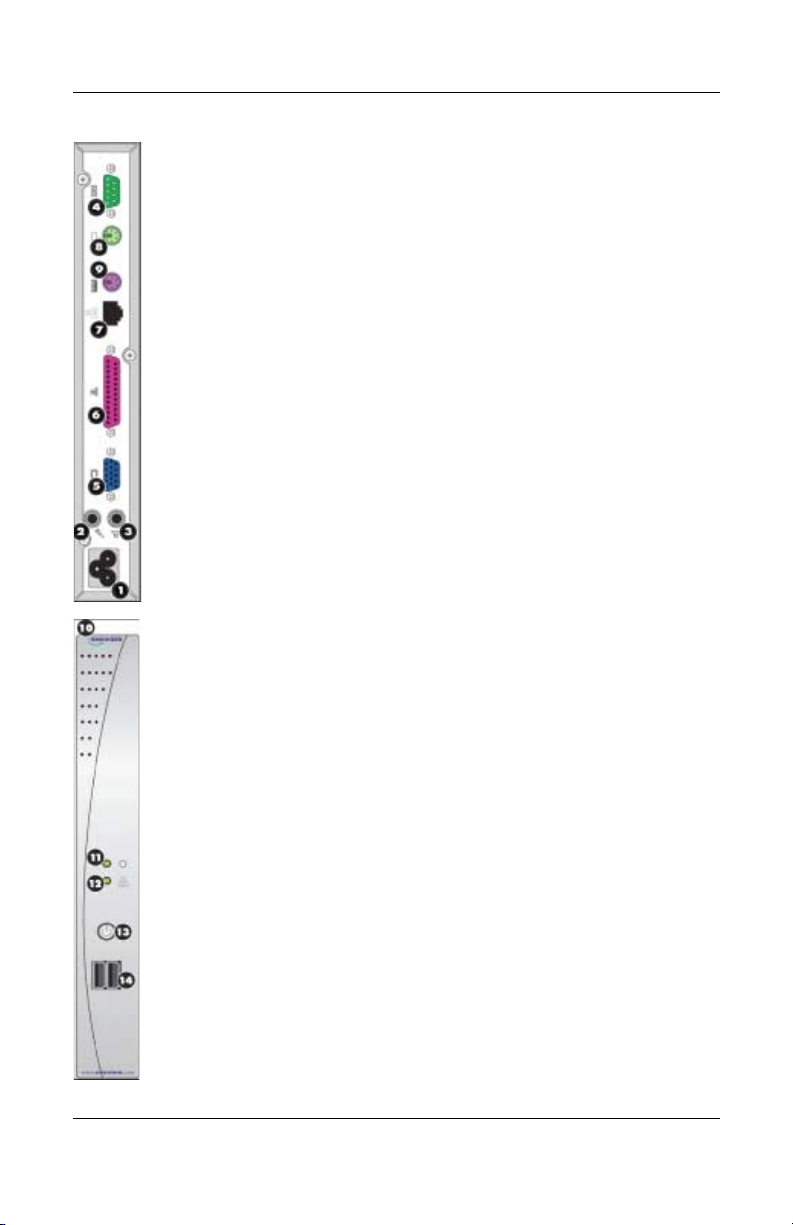
1. DÉBALLAGE—Le client léger HP Neoware est généralement livré avec
les éléments suivants :
❏ Une souris
❏ Un câble d'alimentation
❏ Un support de stabilisation du client léger en position verticale
(installé)
❏ Le présent Guide de démarrage rapide
2. INSTALLATION—Le client léger est conçu en vue d'une installation en
orientation verticale.
a. Connectez le clavier au port du clavier.
b. Connectez la souris au port de la souris.
c. Selon la configuration, connectez l'imprimante au port parallèle.
d. Branchez le câble de réseau local sur le port Ethernet 10/100 Base T.
e. Branchez le câble secteur sur le connecteur d'alimentation.
3. CONNEXIONS—Connectez le cordon d'alimentation, la souris et le
clavier aux ports portant respectivement les références 1, 8 et 9.
Branchez le câble du moniteur sur le port du moniteur (5).
10
1 Connecteur du cordon
d'alimentation
2 Prise du microphone 8 Port de souris—PS/2
3 Connecteur de sortie pour
haut-parleurs
5 Port du moniteur > Ports USB
4. MISE SOUS TENSION—Pour mettre l'appareil sous tension, appuyez sur
l'interrupteur circulaire situé sur le panneau avant. Pour mettre le client
léger hors tension, appuyez de nouveau sur l'interrupteur.Vous devrez
éventuellement maintenir l'interrupteur enfoncé pendant 5 secondes, selon
la configuration de l'appareil.
; Voyant d'alimentation
< Voyant d'activité réseau
= Interrupteur MARCHE / ARRÊT
6 Port parallèle
7 Port Ethernet 10/100 BaseT
9 Port de clavier—PS/2
: Fente pour câble antivol (sur la
partie supérieure)4 Port série
Page 11

5. POUR PLUS D'INFORMATIONS ET POURTÉLÉCHARGER DES
LOGICIELS—Pour obtenir des informations détaillées sur la configuration
du client léger et la création de connexions au serveur, consultez la
documentation en ligne pouvant être téléchargée sur le site suivant :
http://www.neoware.com/support.php
Téléchargez la dernière version de l'outil de gestion à distance de client
léger HP Neoware Remote Manager ainsi que la dernière version de votre
système d'exploitation et des outils pratiques à l'adresse :
http://www.neoware.com/support.php
OUVERTURE DE SESSION RAPIDE (uniquement pour les modèles WindowsXPe)
Les informations ci-dessous relatives à l’ouverture de session vous aideront à
vous connecter.
OUVERTURE D’UNE SESSION ADMINISTRATEUR PAR DÉFAUT
(ACCESSIBILITÉ TOTALE) :
Nom d’utilisateur : Administrator
Mot de passe : Administrator
Administrateur : Vous pouvez changer le mot de passe administrateur une fois la
session ouverte.
OUVERTURE DE SESSION UTILISATEUR PAR DÉFAUT (EXEMPLE
D’UN COMPTE UTILISATEUR À ACCÈS LIMITÉ) :
Nom d’utilisateur : User
Mot de passe : User
Pour de plus amples informations, veuillez consulter notre documentation en
ligne sur :
http://www.neoware.com/support.php
Garantie limitée et limitations matérielles
Chaque produit HP est régi par la déclaration de garantie limitée express HP
relative à ce produit. LA DÉCLARATION DE GARANTIE LIMITÉE ET
D'ASSISTANCE TECHNIQUE INTERNATIONALE PROPOSE DES
INFORMATIONS IMPORTANTES SUR LA NATURE ET LA PORTÉE DE
LA GARANTIE LIMITÉE EXPRESS ACCORDÉE POUR LE PRODUIT HP
ET CONTIENT ÉGALEMENT CERTAINS DENIS ET LIMITATIONS DE
RESPONSABILITÉ DE HP QUI AFFECTENT MATERIELLEMENT VOS
DROITS. EN CONSÉQUENCE, IL VOUS EST VIVEMENT CONSEILLÉ DE
LIRE ATTENTIVEMENT LA DÉCLARATION DE GARANTIE LIMITÉE
11
Page 12

ET D'ASSISTANCE TECHNIQUE INTERNATIONALE AVANT
D'UTILISER VOTRE PRODUIT HP. VOTRE UTILISATION DU PRODUIT
HP EST LIÉE A L'ACCEPTATION DES TERMES ET CONDITIONS
STIPULÉS DANS LA DÉCLARATION DE GARANTIE LIMITÉE ET
D'ASSISTANCE TECHNIQUE INTERNATIONALE.
Vous pouvez afficher et imprimer la déclaration de garantie limitée et
d'assistance technique internationale relative à votre client léger HP Neoware se
trouvant sur le CD de la documentation ou au format PDF sur le site Web de HP
à l'adresse www.hp.com/go/bizsupport. Si vous ne pouvez accéder à la garantie
sur le CD ou le Web, contactez l'assistance technique ou votre représentant pour
obtenir une version papier de la déclaration de garantie limitée et d'assistance
technique internationale relative aux clients légers HP Neoware (référence
407100-xx4, spécifiez la langue).
12
Page 13

HP Neoware c50 Guía de inicio rápido
Información IMPORTANTE sobre seguridad
Para reducir el riesgo de lesiones serias, lea la Guía de Seguridad y Ergonomía.
Å
Esta guía describe la configuración apropiada de la workstation, la postura y los
hábitos laborales y de salud recomendados para los usuarios de computadoras, así
como información importante sobre seguridad eléctrica y mecánica. Esta guía está
ubicada en la Web en www.hp.com/ergo y en el Thin Client Documentation CD
(CD de documentación Thin Client ) que viene con el producto.
Para reducir el riesgo de una descarga eléctrica o de daños en el equipo, haga lo
siguiente:
■ No deshabilite el enchufe de conexión a tierra del cable
de alimentación. El enchufe de conexión a tierra es una medida de
seguridad muy importante.
■ Enchufe el cable de alimentación a tomacorriente de CA con conexión a
tierra que pueda alcanzar fácilmente en todo momento.
■ Desconecte la alimentación del Thin Client desenchufando el cable de
alimentación del tomacorriente de CA.
Las pruebas efectuadas en este equipo han servido para determinar que cumple los
límites exigidos para los dispositivos digitales de Clase B, especificados en la
Parte 15 de las normas de la Comisión Federal de Comunicaciones - FCC. Para
obtener más información, consulte la documentación suministrada con el
producto.
Muchos productos y accesorios de computación contienen diferentes tipos de
cable, tales como cables de alimentación o cables para conectar el accesorio a
una computadora. La siguiente advertencia se aplica si este producto incluye
un cable de tal tipo:
ADVERTENCIA: Manipular el cable de este producto lo expondrá al plomo,
un químico reconocido en el Estado de California como posible causa de
cáncer, defectos congénitos u otros daños al sistema reproductor. Lávese las
manos luego de manipularlo.
Material Preclorato – es posible que aplique manipulación especial.
La batería del reloj en tiempo real de la computadora’puede contener
perclorato y es posible que necesite manipulación especial cuando se recicla o
descarta en el estado de California, Estados Unidos.
13
Page 14
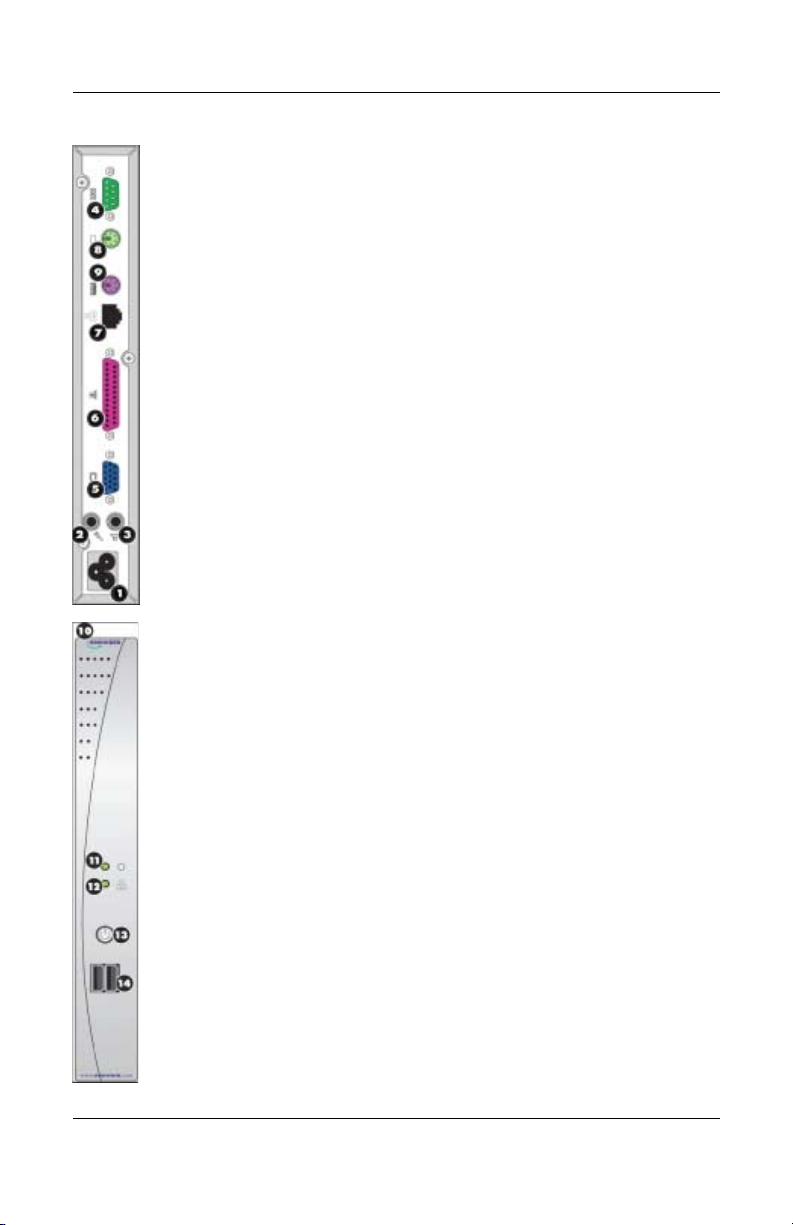
1. DESEMBALE: su cliente liviano HP Neoware se despacha generalmente
con los siguientes elementos:
❏ Un mouse
❏ Un cable de alimentación
❏ Un pie para poder colocar su cliente liviano en posición vertical
(adjunto)
❏ Esta Guía de inicio rápido
2. CONFIGURACIÓN: su cliente liviano está diseñado para ser instalado en
posición vertical.
a. Conecte el teclado al puerto del teclado.
b. Conecte el mouse al puerto del mouse.
c. Según sea su configuración, conecte su impresora al puerto paralelo.
d. Conecte el cable de LAN al puerto de Ethernet 10/100 BaseT.
e. Conecte el cable de CA al conector del cable de alimentación.
3. CONEXIONES: conecte el cable de alimentación, el mouse y el teclado
suministrados a los puertos rotulados 1, 8 y 9, respectivamente. Conecte
el cable de su monitor al puerto del monitor (5).
14
1 Conector del cable de
alimentación
2 Conector hembra de
entrada de micrófono
3 Conector hembra de salida
de parlante
4 Puerto serie > Puertos USB
5 Puerto del monitor
4. ENCENDIDO: para encender su cliente liviano, presione el botón circular
de encendido/apagado situado en el panel frontal. Para apagar su cliente
liviano, presione de nuevo el botón de encendido/apagado. (Podría tener
que mantener presionado el botón durante 5 segundos, según cómo
estuviera configurado el aparato).
; Indicador de encendido = Interruptor de
< Indicador de actividad de red
6 Puerto paralelo
7 Puerto Ethernet 10/100 BaseT
8 Puerto del mouse (PS/2)
9 Puerto del teclado (PS/2)
: Ranura para bloqueo de seguridad
(en la parte superior)
ENCENDIDO/APAGADO
Page 15

5. MÁS INFORMACIÓN Y DESCARGAS DE SOFTWARE: para obtener
información detallada sobre la configuración de su dispositivo y la creación
de conexiones a servidores, consulte nuestra documentación en línea, que
puede descargarse en:
http://www.neoware.com/support.php
Descargue la versión más reciente de la herramienta de administración
remota tipo cliente liviano, HP Neoware Remote Manager, así como
también la última versión de su sistema operativo y útiles herramientas
complementarias en:
http://www.neoware.com/support.php
INICIO RÁPIDO DE SESIÓN (para modelos Windows XPe solamente)
A continuación se suministra información de inicio de sesión para ayudarlo a
comenzar.
INICIO DE SESIÓN PREDETERMINADO PARA ADMINISTRADOR
(BRINDA ACCESO PLENO):
Nombre de usuario: Administrator
Contraseña: Administrator
Administrador: luego de la configuración puede cambiar su contraseña.
INICIO DE SESIÓN PREDETERMINADO PARA USUARIO (EJEMPLO
DE UNA CUENTA DE USUARIO RESTRINGIDA):
Nombre de usuario: User
Contraseña: User
Para obtener información adicional consulte nuestra documentación en línea en:
http://www.neoware.com/support.php
Garantía limitada y limitaciones materiales
Cada producto HP es vendido sujeto a las declaraciones expresas de garantía
limitada relacionadas a ese producto. ESTA DECLARACIÓN DE GARANTÍA
MUNDIAL LIMITADA Y SOPORTE TÉCNICO PROVEE IMPORTANTE
INFORMACIÓN ACERCA DE LA NATURALEZA Y EL RANGO DE LA
GARANTÍA LIMITADA EXPRESA PROVISTA PARA EL PRODUCTO HP,
Y TAMBIÉN CONTIENE CIERTAS RENUNCIAS DE
RESPONSABILIDAD Y LIMITACIONES POR PARTE DE HP,
QUE PODRÍAN MATERIALMENTE IMPACTAR SUS DERECHOS.
CONSECUENTEMENTE, LE RECOMENDAMOS ENFÁTICAMENTE QUE
LEA CUIDADOSAMENTE LA DECLARACIÓN DE GARANTÍA
15
Page 16

MUNDIAL LIMITADA Y SOPORTE TÉCNICO ANTES DE UTILIZAR EL
PRODUCTO HP. LA UTILIZACIÓN DEL PRODUCTO HP SE CONSIDERA
QUE USTED ACEPTA LOS TÉRMINOS Y CONDICIONES
ESTABLECIDOS EN LA DECLARACIÓN DE GARANTÍA MUNDIAL
LIMITADA Y SOPORTE TÉCNICO.
Es posible visualizar e imprimir la declaración de Garantía Limitada Mundial y
Soporte Técnico para el Thin Client HP Neoware en el Documentation CD (CD
de documentación) o desde el sitio Web de HP en www.hp.com/go/bizsupport,
donde se suministra en formato PDF. Si no es posible acceder la garantía en el
CD o la Web, haga contacto con Soporte al Cliente o su representante de cuentas
para obtener una copia impresa de la declaración de Garantía Mundial Limitada
y Soporte Técnico para productos Thin Client HP Neoware (número de
referencia 407100-xx4 – especifique el idioma).
16
Page 17

HP Neoware c50クイック スタート ガイ ド
安全に関する重要な情報
警告 : 操作する人の健康を損なわないようにするため、『快適に使用していた
Å
だくために』をお読みください。正しい作業環境の整え方や、作業をする際
の姿勢、および健康上/作業上の習慣について説明しており、さらに、重要な
電気的/物理的安全基準についての情報も提供しています。『快適に使用してい
ただくために』は、HPのWebサイト、http://www.hp.com/ergo/から [日本語] を
選択して参照できます。また、製品に付属のThin Client Documentation CD(Thin
ClientドキュメンテーションCD)にも収録されています。
感電や装置への損傷を防ぐため、必ず以下の注意事項をお守りください。
■ 安全に使用するため、電源コードをコンセントに差し込む前に、必ず電
源コードのアース端子を使用して接地してください。また、接地を解除
する場合は、必ずコンセントから電源コードを抜いてから作業を行って
ください。
■ 電源コードは、製品の近くの手が届きやすい場所にある接地された電源
コンセントに差し込んでください。
■ 製品への外部電源の供給を完全に遮断するには、電源を切った後、コン
セントから電源コードのプラグを抜いてください。
この装置は、情報処理装置等電波障害自主規制協議会(VCCI)の基準に基づ
くクラスB情報技術装置です。詳しくは、製品に付属の説明書を参照してくだ
さい。
多くのコンピュータ製品およびオプション製品には、電源コードやオプショ
ン製品をコンピュータに接続するためのコードなど、コード、ケーブル、ま
たはワイヤが含まれます。この製品にそのようなコード、ケーブル、または
ワイヤが含まれている場合は、以下の点にご注意ください。
警告 : この製品を取り扱うと鉛が付着する場合があります。カリフォルニア
州では、鉛は発癌性があり、先天性欠損症またはその他の生殖障害を引き起
こす化学物質として認識されています。製品を取り扱った後は、必ず手を洗っ
てください。
過塩素酸塩が使用 さ れてい るた め、 特別な処理が必要に な る 可能性が あ り ま
す。
このコンピュータのリアル タイム クロック用バッテリには過塩素酸塩が含
まれている可能性があり、カリフォルニア州でリサイクルまたは廃棄する場
合に特別な処理が必要になる可能性があります。
17
Page 18
1. 梱包を開 く : 通常、HP Neoware Thin Clientには以下のコンポーネントが
付属しています。
❏ マウス
❏ 電源コード
❏ Thin Clientを縦置きで固定するためのスタンド(取り付け済み)
❏ 『クイック スタート ガイド』(本書)
2. セッ トアップ :Thin Clientは縦置きで設置されるように設計されていま
す。
a. キーボードをキーボード コネクタに接続します。
b. マウスをマウス コネクタに接続します。
c. お使いのプリンタをパラレル コネクタに接続します(デバイスの
構成により異なります)。
d. LANケーブルを10/100ベースT Ethernetコネクタに接続します。
e. 電源ケーブルを電源コード コネクタに接続します。
3. 接続 : 付属の電源コード、マウス、およびキーボードを、それぞれ 1、
8、および9 の番号のコネクタに接続します。お使いのモニタのケーブ
ルをモニタ コネクタ5に接続します。
18
1
電源コード コネクタ
2
マイク入力コネクタ
3
スピーカ出力コネクタ
4
シリアル
5
モニタ コネクタ
6
パラレル コネクタ
4. 電源投入 : Thin Clientの電源をオンにするには、Thin Clientのフロント
パネルにある丸いオン/オフ ボタンを押します。Thin Clientの電源をオフ
にするには、再度オン/ オフ ボタンを押します(デバイスの構成によっ
ては、ボタンを5秒程度押したままにする必要がある場合があります)。
q
電源ランプ
w
ネットワーク アクティビティ ランプ
e
オン/オフ ボタン
コネクタ
7
10/100ベースT Ethernetコネクタ
8
マウス コネクタ(PS/2)
9
キーボード コネクタ(PS/2)
-
セキュリティ ロック ケーブル用
スロット(最上部)
r
USBコネクタ
Page 19

5. 詳細情報お よ び ソ フ ト ウ ェ アのダウ ン ロー ド : デバイスの構成および
サーバへの接続の確立について詳しくは、オンライン上の説明書を参照
してください。説明書は、以下のWebサイトからダウンロードできます。
http://www.neoware.com/support.php(英語サイト)
Thin Clientリモート管理ツール([HP Neoware Remote Manager])および
お使いのオペレーティング システムや便利なスナップイン ツールの最
新版をダウンロードするには、以下のWebサイトを参照してください。
http://www.neoware.com/support.php(英語サイト)
クイック ログイン (Windows XPeモデルのみ)
使用開始時に役立つログイン情報を以下に示します。
管理者向けロ グ インの初期設定 ( フル ア クセ スが可能) :
ユーザ名:Administrator
パスワード:Administrator
管理者:管理者パスワードは、セットアップ後に変更できます。
ユーザ向け ログ イ ンの初期設定 (制限付き ユーザ アカウン トの例) :
ユーザ名:User
パスワード:User
ログイン情報についてさらに詳しくは、以下のWebサイトで提供されている
オンラインの説明書を参照してください。
http://www.neoware.com/support.php(英語サイト)
保証規定お よび物質的制限
各HP製品は、当該製品に関連するHP 保証規定に基づき販売されます。保証
規定およびテクニカル サポート情報には、HP 製品に対する明示的保証規定
の性質および適用範囲に関する重要な情報が記載されています。また、お客
様の権利に物質的な影響を与える、HPによる特定の保証の否認および保証
制限が含まれています。したがって、HP 製品を使用する前に、保証規定お
よびテクニカル サポート情報をよくお読みになることを強くおすすめしま
す。HP 製品を使用することによって、お客様は、保証規定およびテクニカ
ル サポート情報に記載されている内容および条件を受け入れたものと見な
されます。
19
Page 20

お使いのHP Neoware Thin Clientの保証規定およびテクニカル サポート情報
は、Documentation CD(ドキュメンテーションCD)またはHPのWebサイト、
http://www.hp.com/go/bizsupport/(英語サイト)から、PDF形式で提供されて
いるファイルを表示および印刷できます。CDまたはWeb上の保証規定を表示
できない場合は、サポート窓口にお問い合わせください。各種サポート情報
については、http://welcome.hp.com/country/jp/ja/support.htmlで確認してくださ
い。
20
Page 21
212223
Page 22
Page 23
Page 24

END-USER LICENSE AGREEMENT
PLEASE READ CAREULLY BEFORE USING THIS EQUIPMENT: This End-User
license Agreement ("EULA") is a legal agreement between (a) you (either an individual or
a single entity) and (b) Hewlett-Packard Company ("HP") that governs your use of any
Software Product, installed on or made available by HP for use with your HP computer
product ("HP Hardware"), that is not otherwise subject to a written license agreement
between you and HP or its suppliers. The term "Software Product" means computer
software and may include associated media, printed materials and "online" or electronic
documentation. An amendment or addendum to this EULA may accompany
the Product.
RIGHTS IN THE SOFTWARE PRODUCT ARE OFFERED ONLY ON THE
CONDITION THAT YOU AGREE TO ALL TERMS AND CONDITIONS OF
THIS EULA. BY INSTALLING, COPYING, DOWNLOADING, OR
OTHERWISE USING THE SOFTWARE PRODUCT, YOU AGREE TO BE
BOUND BY THE TERMS OF THIS EULA. IF YOU DO NOT AGREE TO
THESE EULA TERMS, YOU MUST NOT INSTALL, COPY, DOWNLOAD,
OR OTHERWISE USE THE SOFTWARE PRODUCT; YOU MAY RETURN
THE UNUSED SOFTWARE PRODUCT, ALONG WITH YOUR HP
HARDWARE (IF THE COMPUTER SOFTWARE IS INSTALLED ON YOUR
HP HARDWARE) , WITHIN 20 DAYS OF PURCHASE TO YOUR PLACE
OF PURCHASE FOR A FULL REFUND.
1. GRANT OF LICENSE. HP grants you the following rights provided you comply with
all terms and conditions of this EULA:
a. Use. You may use the Software Product on a single computer ("Your Computer"). You
may not separate component parts of the Product for use on more than one computer. You
do not have the right to distribute the Product. You may load the Software Product into
Your Computer's temporary memory (RAM) for purposes of using the Software Product.
b. Storage. You may copy the Product into the local memory or storage device of HP
Hardware.
c. Copying. You may make archival or back-up copies of the Software Product, provided
the copy contains all of the original Software Product's proprietary notices and that it is
used only for back-up purposes.
d. Reservation of Rights. HP reserves all rights not expressly granted to you in this
EULA.
e. Freeware. Notwithstanding the terms and conditions of this EULA, all or any portion of
the Software Product which constitutes non-proprietary HP software or software provided
under public license by third parties ("Freeware"), is licensed to you subject to the terms
and conditions of the software license agreement accompanying such Freeware whether in
the form of a discrete agreement, shrink wrap license or electronic license terms accepted
at time of download. Use of the Freeware by you shall be governed entirely by the terms
and conditions of such license.
2. UPGRADES. To use a Software Product identified as an upgrade, you must first be
licensed for the original Software Product identified by HP as eligible for the upgrade.
After upgrading, you may no longer use the original Software Product that formed the
basis for your upgrade eligibility.
24
Page 25

3. ADDITIONAL SOFTWARE. This EULA applies to updates or supplements to the
original Software Product provided by HP unless HP provides other terms along with the
update or supplement.
4. TRANSFER.
a. Third Party. The initial user of the Software Product may make a one-time transfer of
the Software Product to another end user. Any transfer must include all component parts,
media, printed materials, this EULA, and if applicable, the Certificate of Authenticity.
The transfer may not be an indirect transfer, such as a consignment. Prior to the transfer,
the end user receiving the transferred product must agree to all the EULA terms. Upon
transfer of the Software Product, your license is automatically terminated.
b. Restrictions. You may not rent, lease or lend the Software Product or use the Software
Product for commercial timesharing or bureau use. You may not sublicense, assign or
transfer the license or Software Product except as expressly provided in this EULA.
5. PROPRIETARY RIGHTS. All intellectual property rights in the Software Product and
user documentation are owned by HP or its suppliers and are protected by law, including
but not limited to United States copyright, trade secret, and trademark law, as well as other
applicable laws and international treaty provisions. You shall not remove any product
identification, copyright notices or proprietary restrictions from the Software Product. HP
and its suppliers retain all rights not expressly granted.
6. LIMITATION ON REVERSE ENGINEERING. You may not reverse engineer,
decompile, or disassemble the Software Product, except and only to the extent that (a) the
right to do so is mandated under applicable law notwithstanding this limitation or (b) it is
expressly provided for in this EULA.
7. TERM. This EULA is effective unless terminated or rejected. If you reject the terms of
this EULA do not use the HP Hardware and Software Product. Instead, promptly contact
HP or its authorized reseller for instructions on the return of the HP Hardware and
Software Product together with all copies, modifications, and merged portions of the
Software Product, in any form, in accordance with HP's return policies. This EULA will
also terminate upon conditions set forth elsewhere in this EULA or if you fail to comply
with any term or condition of this EULA.
8. CONSENT TO USE OF DATA. You agree that HP and its affiliates may collect and
use technical information you provide in relation to support services related to the
Software Product. HP agrees not to use this information in a form that personally
identifies you except to the extent necessary to provide
such services.
DISCLAIMER OF WARRANTIES. TO THE MAXIMUM EXTENT
9.
PERMITTED BY APPLICABLE LAW, HP AND ITS SUPPLIERS PROVIDE
THE SOFTWARE PRODUCT AS IS AND WITH ALL FAULTS, AND
HEREBY DISCLAIM ALL OTHER WARRANTIES AND CONDITIONS,
EITHER EXPRESS, IMPLIED, OR STATUTORY, INCLUDING, BUT NOT
LIMITED TO, TITLE, NON-INFRINGEMENT, ANY IMPLIED
WARRANTIES, DUTIES OR CONDITIONS OF MERCHANTABILITY, OF
FITNESS FOR A PARTICULAR PURPOSE, AND OF LACK OF VIRUSES
ALL WITH REGARD TO THE SOFTWARE PRODUCT.
states/jurisdictions do not allow exclusion of implied warranties or limitations on the
duration of implied warranties, so the above disclaimer may not apply to you in its
entirety.
Some
25
Page 26

10. LIMITATION OF LIABILITY. Notwithstanding any damages that you might incur,
the entire liability of HP and any of its suppliers under any provision of this EULA and
your exclusive remedy for all of the foregoing shall be limited to the greater of the amount
actually paid by you for the Software Product or U.S. $5.00.
TO THE MAXIMUM
EXTENT PERMITTED BY APPLICABLE LAW, IN NO EVENT SHALL HP
OR ITS SUPPLIERS BE LIABLE FOR ANY SPECIAL, INCIDENTAL,
INDIRECT, OR CONSEQUENTIAL DAMAGES WHATSOEVER
(INCLUDING, BUT NOT LIMITED TO, DAMAGES FOR LOSS OF
PROFITS OR CONFIDENTIAL OR OTHER INFORMATION, FOR
BUSINESS INTERRUPTION, FOR PERSONAL INJURY, FOR LOSS OF
PRIVACY ARISING OUT OF OR IN ANY WAY RELATED TO THE USE
OF OR INABILITY TO USE THE SOFTWARE PRODUCT, OR OTHERWISE
IN CONNECTION WITH ANY PROVISION OF THIS EULA, EVEN IF HP
OR ANY SUPPLIER HAS BEEN ADVISED OF THE POSSIBILITY OF
SUCH DAMAGES AND EVEN IF THE REMEDY FAILS OF ITS
ESSENTIAL PURPOSE.
limitation of incidental or consequential damages, so the above limitation or exclusion
may not apply to you.
11. U.S. GOVERNMENT CUSTOMERS. Consistent with FAR 12.211 and 12.212,
Commercial Computer Software, Computer Software Documentation, and Technical Data
for Commercial Items are licensed to the U.S. Government under HP's standard
commercial license.
12. COMPLIANCE WITH LAW. You shall comply with all laws and regulations of the
United States and other countries ("Export Laws") to assure that the Software Product is
not (1) exported, directly or indirectly, in violation of Export Laws, or (2) used for any
purpose prohibited by Export Laws, including, without limitation, nuclear, chemical, or
biological weapons proliferation.
13. CAPACITY AND AUTHORITY TO CONTRACT. You represent that you are of the
legal age of majority in your state of residence and, if applicable, you are duly authorized
by your employer to enter into this contract.
14. APPLICABLE LAW. This EULA is governed by the laws of the State of California,
U.S.A.
15. ENTIRE AGREEMENT. This EULA (including any addendum or amendment to this
EULA which is included with the Product) is the entire agreement between you and HP
relating to the Software Product and it supersedes all prior or contemporaneous oral or
written communications, proposals and representations with respect to the Software
Product or any other subject matter covered by this EULA. To the extent the terms of any
HP policies or programs for support services conflict with the terms of this EULA, the
terms of this EULA shall control.
Some states/jurisdictions do not allow the exclusion or
NOT FAULT TOLERANT. This software is not fault tolerant.
NOTICE REGARDING THE MPEG-4 VISUAL STANDARD. The software
installed on this device may include MPEG-4 visual decoding technology.
MPEG LA, L.L.C. REQUIRES THE FOLLOWING NOTICE: USE OF THIS
PRODUCT IN ANY MANNER THAT COMPLIES WITH THE MPEG-4
VISUAL STANDARD IS PROHIBITED, EXCEPT FOR USE DIRECTLY
RELATED TO (A) DATA OR INFORMATION (I) GENERATED BY AND
OBTAINED WITHOUT CHARGE FROM A CONSUMER NOT THEREBY
26
Page 27

ENGAGED IN A BUSINESS ENTERPRISE, AND (II) FOR PERSONAL USE
ONLY; AND (B) OTHER USES SPECIFICALLY AND SEPARATELY
LICENSED BY MPEG LA, L.L.C.
If you have questions regarding this Notice, please contact MPEG LA, L.L.C., 250 Steele
Street, Suite 300, Denver, Colorado 80206; Telephone 303 331.1880; FAX 303 331.1879
NOTE ON JAVA SUPPORT
The SOFTWARE may contain support for programs written in Java. Java technology is
not fault tolerant and is not designed, manufactured, or intended for use or resale as online
control equipment in hazardous environments requiring fail-safe performance, such as in
the operation of nuclear facilities, aircraft navigation or communication systems, air traffic
control, direct life support machines, or weapons systems, in which the failure of Java
technology could lead directly to death, personal injury, or severe physical or
environmental damage. Sun Microsystems, Inc. has contractually obligated HP to make
this disclaimer,
AND HP AND ITS SUPPLIERS SHALL HAVE NO LIABILITY
OR FAULT FOR ANY JAVA technology failures.
FOR NEOLINUX USERS ONLY
You have acquired a Device that includes licensed software subject to the GNU General
Public License ("GPL"). This software is delivered with the Device in object code format.
Subject to the GPL, you are entitled to obtain a complete machine readable copy of the
source code of the GPL software for a period of three (3) years after purchase of the
Device. A copy of the text of the GPL is included with the source code. To receive a copy
of the source code, contact Hewlett-Packard Company, 3200 Horizon Drive, King of
Prussia, PA 19406. As permitted by the GPL, HP charges a handling fee to cover the costs
of copying and transferring the source code to you.
27
Page 28

© Copyright 2007 Hewlett-Packard Development Company, L.P. The information contained
herein is subject to change without notice. Microsoft and Windows are trademarks of
Microsoft Corporation in the U.S. and other countries. The only warranties for HP products
and services are set forth in the express warranty statements accompanying such products and
services. Nothing herein should be construed as constituting an additional warranty. HP shall
not be liable for technical or editorial errors or omissions contained herein. This document
contains proprietary information that is protected by copyright. No part of this document may
be photocopied, reproduced, or translated to another language without the prior written
consent of Hewlett-Packard Company. Printed in
465656-B21
 Loading...