

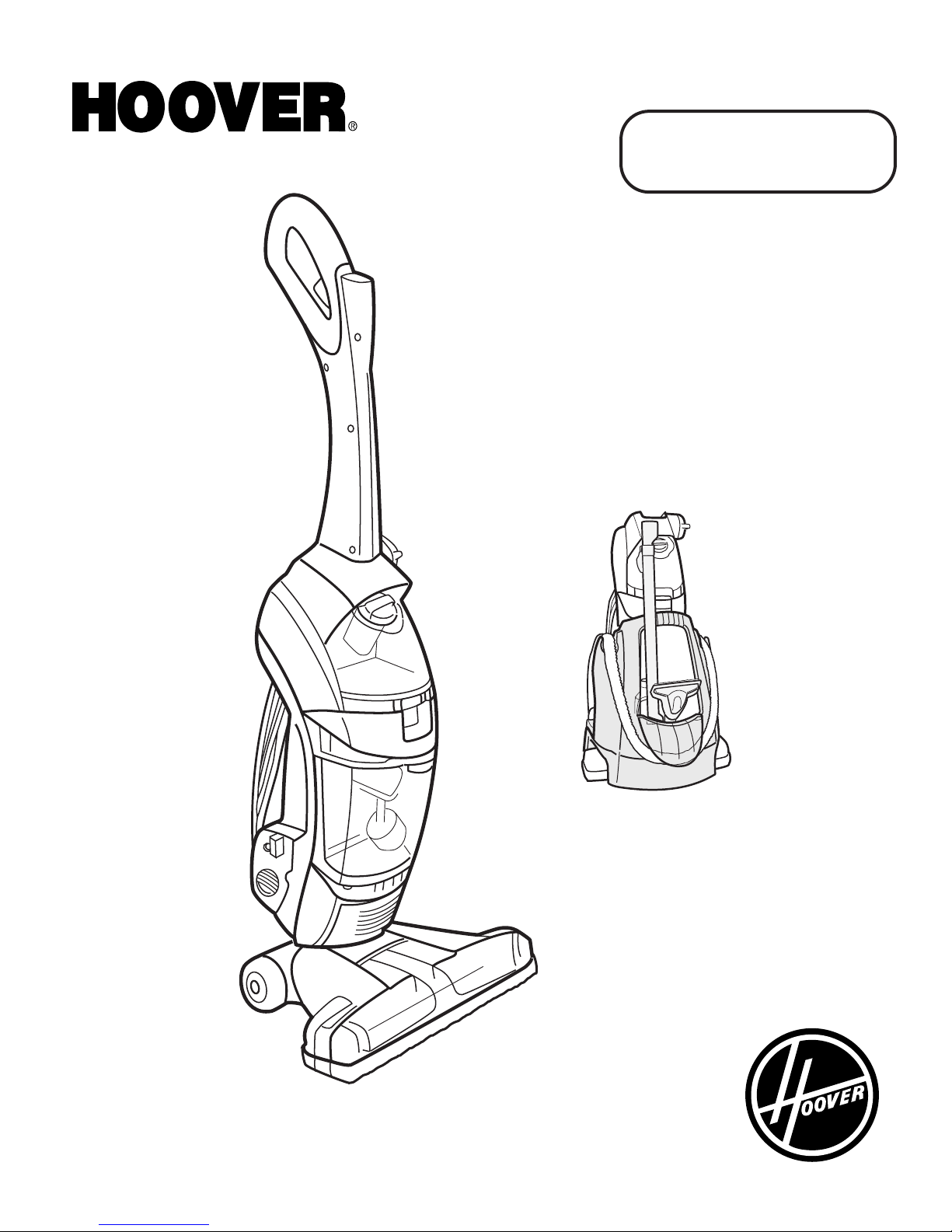
Hoover FloorMate Floor Mate SpinScrub Hard Floor Cleaner with portable tool kit, H3050010, H3050 Owner's Manual
Page 1
ENGLISH ➜ pp. 1-20
ESPAÑOL ➜ pág. 21-36
www.hoover.com
®
FloorMate™
SpinScrub™
Hard Floor Cleaner
with portable tool kit
Page 2
2
Important Safeguards!
When using an electrical appliance, always follow basic precautions,
including the following:
WARNING:
To reduce the risk of fire, electric
shock, or injury:
• Use indoors only.
• Use only on surfaces moistened
by the cleaning process or small
spills. Do not immerse product.
• For use on bare floors or sealed
wood floors. NOT for use on
carpets.
• Always install float before any
wet pick up operation.
• Close supervision is necessary
when any appliance is used by or
near children. Do not allow cleaner
to be used as a toy or to run unattended at any time.
• Keep hair, loose clothing, fingers,
feet and all parts of body away from
openings and moving parts.
• Do not pick up anything that is
burning or smoking, such as cigarettes, matches, or hot ashes.
• Do not pick up or use flammable
or combustible materials such as
gasoline or fine wood sandings or
use in areas where they may be present.
• Avoid picking up hard, sharp
objects with the cleaner. They may
damage the machine.
• Do not put any object into openings. Do not use with any opening
blocked; keep free of dust, lint, hair,
and anything that may reduce air
flow.
• Do not pull or carry by cord, use
cord as a handle, close door on cord
or pull cord around sharp edges or
corners. Do not run appliance over
cord. Keep cord away from heated
surfaces.
• Always disconnect cord from electrical outlet before servicing the cleaner.
• Unplug cleaner when not in use.
Turn off all controls before unplugging.
• Do not unplug by pulling on
cord. To unplug, grasp the plug, not
the cord.
• Never handle plug or appliance
with wet hands.
• Connect to a properly grounded
outlet only. See “Grounding
Instructions”.
• Do not clean over floor electrical
outlets.
• Do not use without tanks in
place.
• Use extra care when cleaning on
stairs. Do not place cleaner on
stairs.
• The use of an extension cord is
not recommended. If an extension
cord is absolutely necessary, use at
least a 16 gauge 3-wire cord which
has a 3-prong grounding type plug
and a 3-pole receptacle that accepts
the machine plug.
• Keep detergents and other cleaners out of children's reach.
• Do not pick up chlorine bleach,
drain cleaner, gasoline or any other
toxic material with this appliance.
• When using recommended chemicals with this machine, be certain
area is well ventilated.
• Follow manufacturer’s instructions for all chemicals used with
this machine. Do not exceed recommended mixing ratios.
• Store in a dry place. Do not expose machine to freezing temperatures.
• Do not use with damaged cord or
plug. If appliance is not working as
it should, has been dropped, damaged, left outdoors, or dropped into
water, take it to a Hoover Sales and
Service Center or Authorized
Hoover Warranty Service Dealer.
• Use cleaner only for its intended
use as described in the instructions.
WARNING:
This product contains chemicals
known to the State of California to
cause cancer. WASH HANDS AFTER
HANDLING.
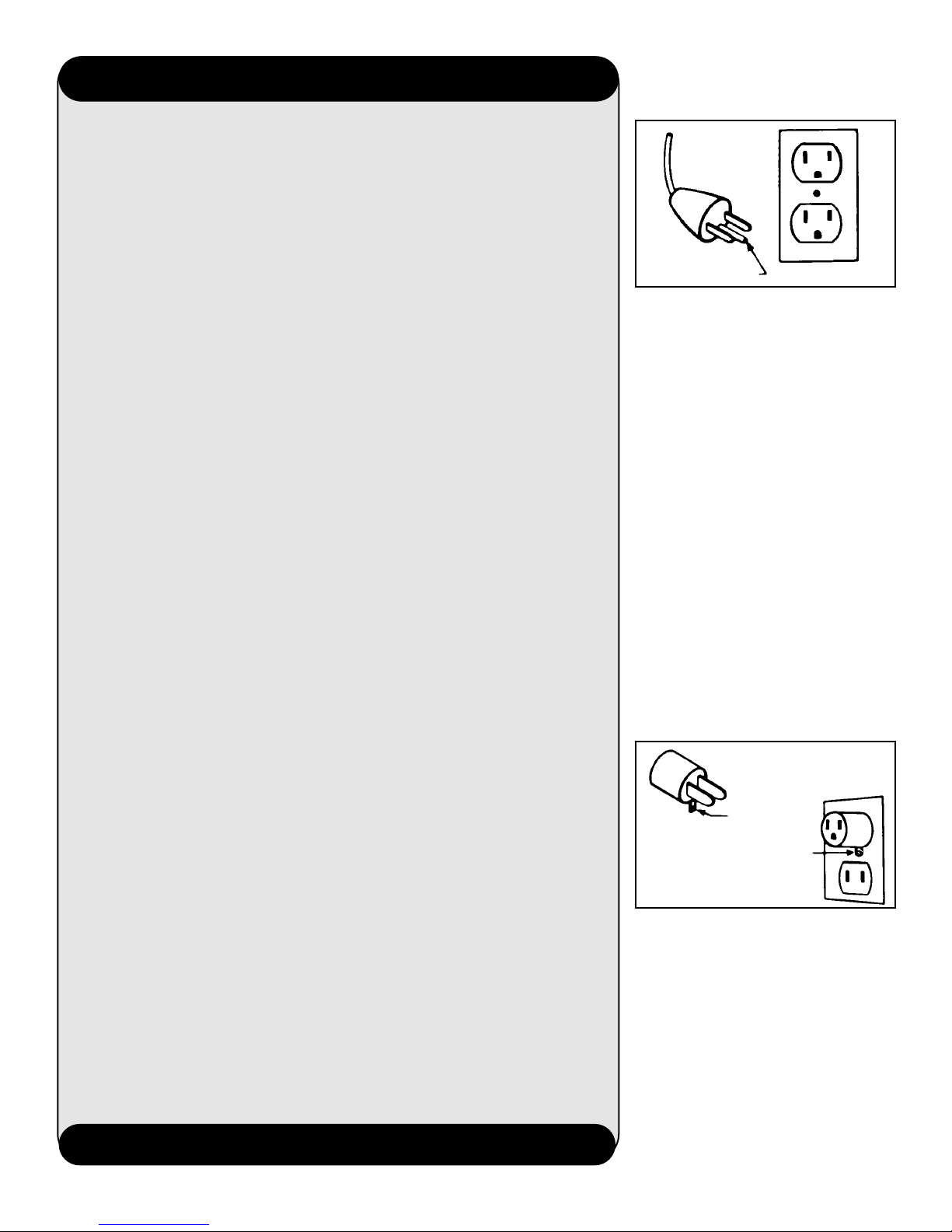
This appliance must be grounded. If it
should malfunction or breakdown,
grounding provides a path of least resistance for electrical current to reduce the
risk of electric shock. This appliance is
equipped with a cord having an equipment-grounding conductor (C) and
grounding plug (A). The plug must be
plugged into an appropriate outlet (B)
that is properly installed and grounded
in accordance with all local codes and
ordinances.
DANGER-
Improper connection of the equipmentgrounding conductor can result in the
risk of electric shock. Check with a qualified electrician or service person if you
are in doubt as to whether the outlet is
properly grounded. Do not modify the
plug provided with the appliance - if it
will not fit the outlet, have a proper outlet installed by a qualified electrician.
This appliance is for use on a nominal
120 volt circuit and has a grounding
plug that looks like the plug illustrated
in sketch (A).
A temporary adapter (D) may be used to
connect this plug to a 2-pole receptacle
(E) if a properly grounded outlet is not
available. The temporary adapter should
be used only until a properly grounded
outlet (B) can be installed by a qualified
electrician. The green colored rigid ear,
lug, or the like (F) extending from the
adapter must be connected to a permanent ground (G) such as a properly
grounded outlet box cover. Whenever
the adapter is used, it must be held in
place by a metal screw. NOTE: In
Canada, the use of a temporary adapter
is not permitted by the Canadian
Electrical Code.
A
B
C
D
F
G
E
READ ALL INSTRUCTIONS BEFORE USING APPLIANCE.
Save these instructions!
Grounding
Instructions
Page 3
3
Fill in and Save
For your records, enter the model number and
serial numbers in the spaces provided. These
numbers are located on the data label on the back
of the cleaner body.
Model No. ____________________________
Serial No. _____________________________
Save your sales receipt and attach it to this
manual. Proof of date of purchase may be
required for warranty service of your cleaner.
Important safeguards . . . . . . . . 2
Carton contents . . . . . . . . . . . . . 3
Cleaner description . . . . . . . . . . 4
Assembly
Handle assembly. . . . . . . . . . . 5
Brush/nozzle assembly . . . . 5-6
General Operation
Mode selector dial. . . . . . . . . . 8
Solution tank . . . . . . . . . . . 9-10
Recovery tank. . . . . . . . . . 10-11
Automatic shut-off . . . . . . . . 10
To clean filters . . . . . . . . . 11-12
How to clean
Recommended cleaning
sequence. . . . . . . . . . . . . . . . . 12
Cleaning floors . . . . . . . . . . . 13
Picking up spills . . . . . . . . . . 13
Using the hose and tools
Select tool . . . . . . . . . . . . . . . . 14
Attach hose and tool. . . . . . . 14
Storage. . . . . . . . . . . . . . . . . . . . 15
Maintenance
Cleaning the nozzle . . . . . . . 16
Cleaning the brushes . . . . . . 17
Troubleshooting. . . . . . . . . . . . 18
Service. . . . . . . . . . . . . . . . . . . . 19
Warranty . . . . . . . . . . . . . . . . . . 20
Parts & accessories mail order
form . . . . . . . . . . . . . . . . . . . . . 37
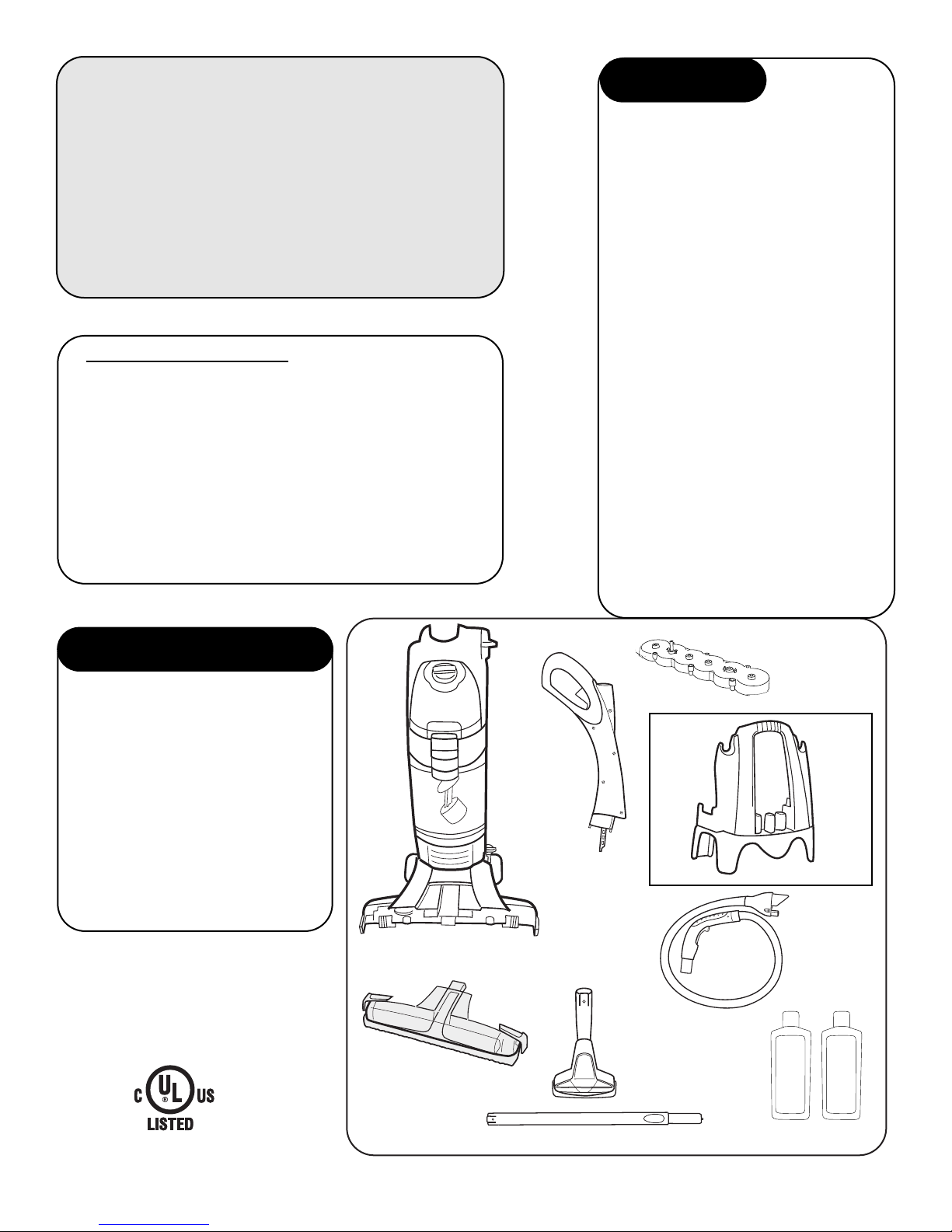
A. Hard floor cleaner
B. Nozzle
C. Upper handle
D. Brush assembly
E. Tool caddy
F. Floor swivel tool
G. Telescoping wand
H. Hose
I. Floor cleaning
concentrates
©2004 The Hoover Company
www.hoover .com
Continued
➜
To contact us:
• www.hoover.com
• 1-800-944-9200 - automated service
dealer locator
• 1-330-499-9499 - our Consumer
Response Center (8 AM to 5 PM
Monday - Friday)
Contents
Carton Contents
A
E
F
G
H
D
C
B
I
Page 4
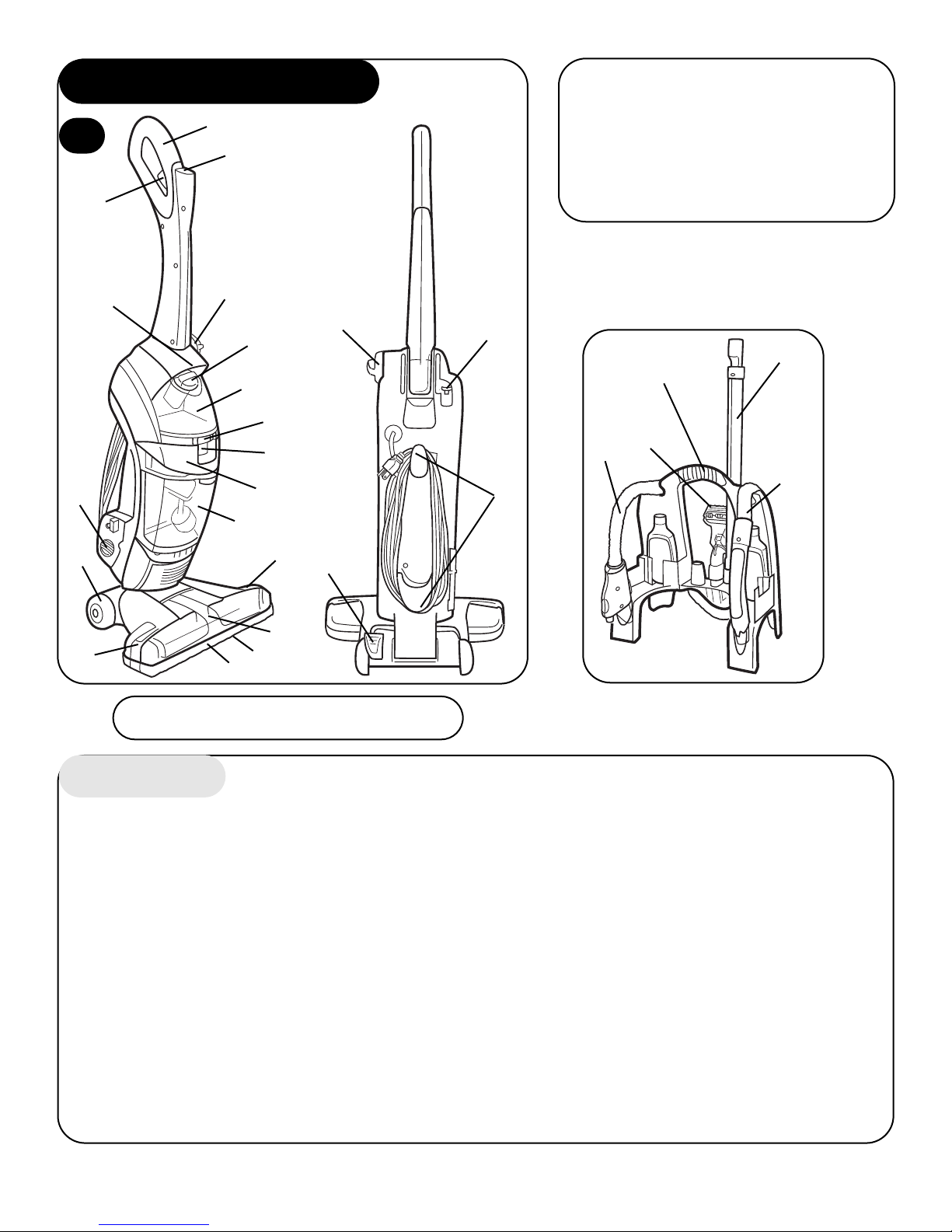
1. Soft hand grip
2. ON/OFF switch 13. Squeegee (underneath nozzle)
3. Solution trigger: squeeze to release 14. Bumper
cleaning solution 15. Soft-tread wheels
4. Mode selector dial: turns brushes 16. Hose connector door
ON for wet cleaning and OFF for wet 17. Carrying handle
pickup and dry vacuuming 18. Upper handle release button
5. Clean solution tank cap/measuring cup 19. Cord hooks: top hook rotates
6. Clean solution tank for quick cord release
7. Clean solution tank release 20. Handle release pedal
8. Recovery tank release 21. Tool caddy
9. Recovery tank lid and filter 22. Hose
10. Recovery tank: collects dry debris as 23. Telescoping wand
well as dirty cleaning solution 24. Floor swivel tool
11. Nozzle release buttons: release
nozzle for easy clean-up (located behind nozzle)
12. Nozzle
Cleaner Description
Features
20
12
14
13
18
19
15
11
10
11
9
16
7
8
17
23
21
22
24
22
4
5
6
4
1
2
3
1
This cleaner is intended for house-
hold use.
Operate cleaner only at voltage speci-
fied on data plate on back of cleaner.
Plug cleaner into a properly grounded
outlet.
4
This user manual applies to models
with either 6 or 7 brushes.
Page 5
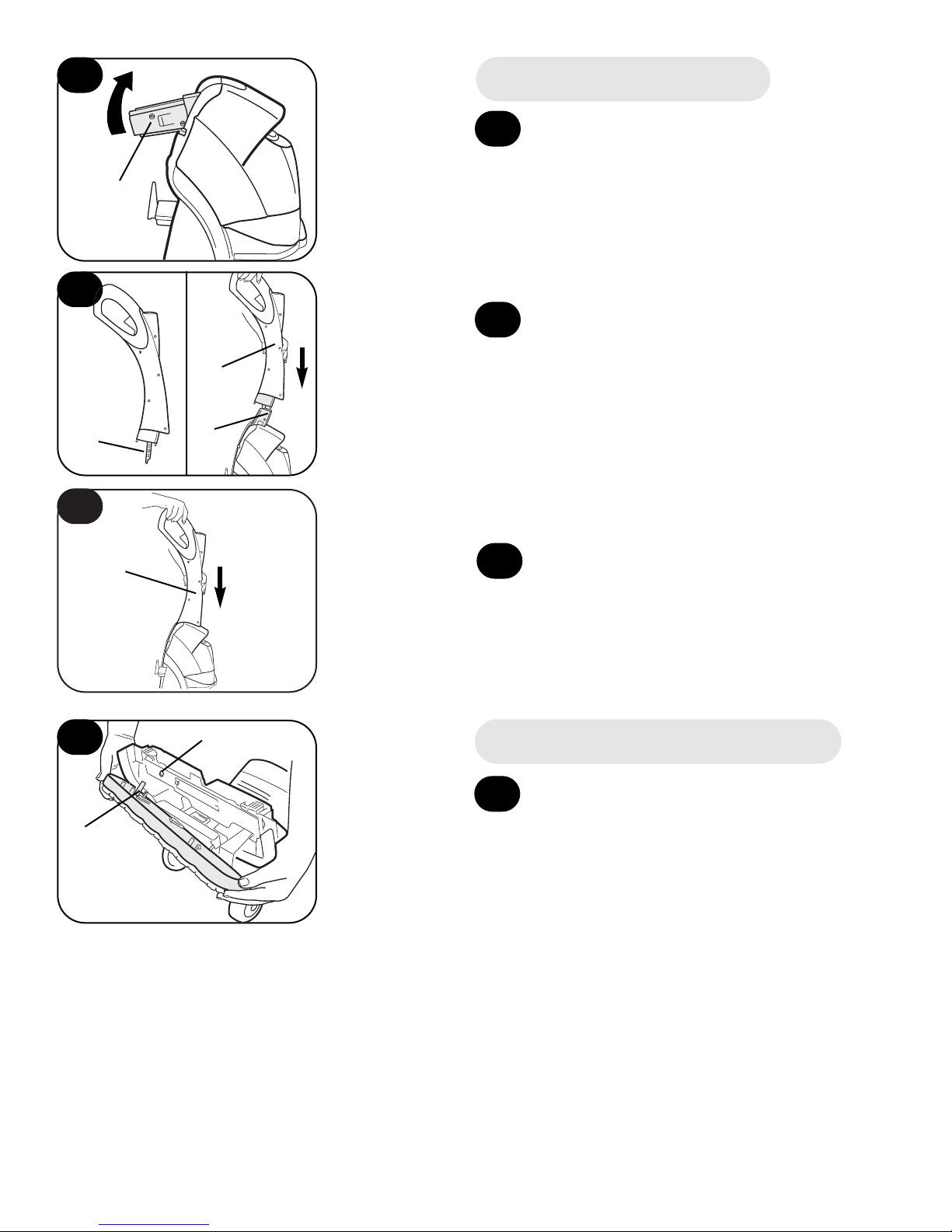
Rotate bottom handle support (A) up
to the upright position until a snap is
felt.
Align control rod (B) on upper
handle (C) with slot in bottom
handle support (D).
Push upper handle (C) all the way
down until you hear it snap in
place.
5
4
2
3
4
2
3
Assemble handle
Continued
➜
C
C
A
D
B
To install brushes, place handle in
upright position. Tilt cleaner back so
that it rests on the floor.
Align post (A) on brush block with hole
(B) on bottom of cleaner. Turn brushes
slightly until post fits easily into hole.
5
Install brushes and nozzle
5
B
A
Page 6
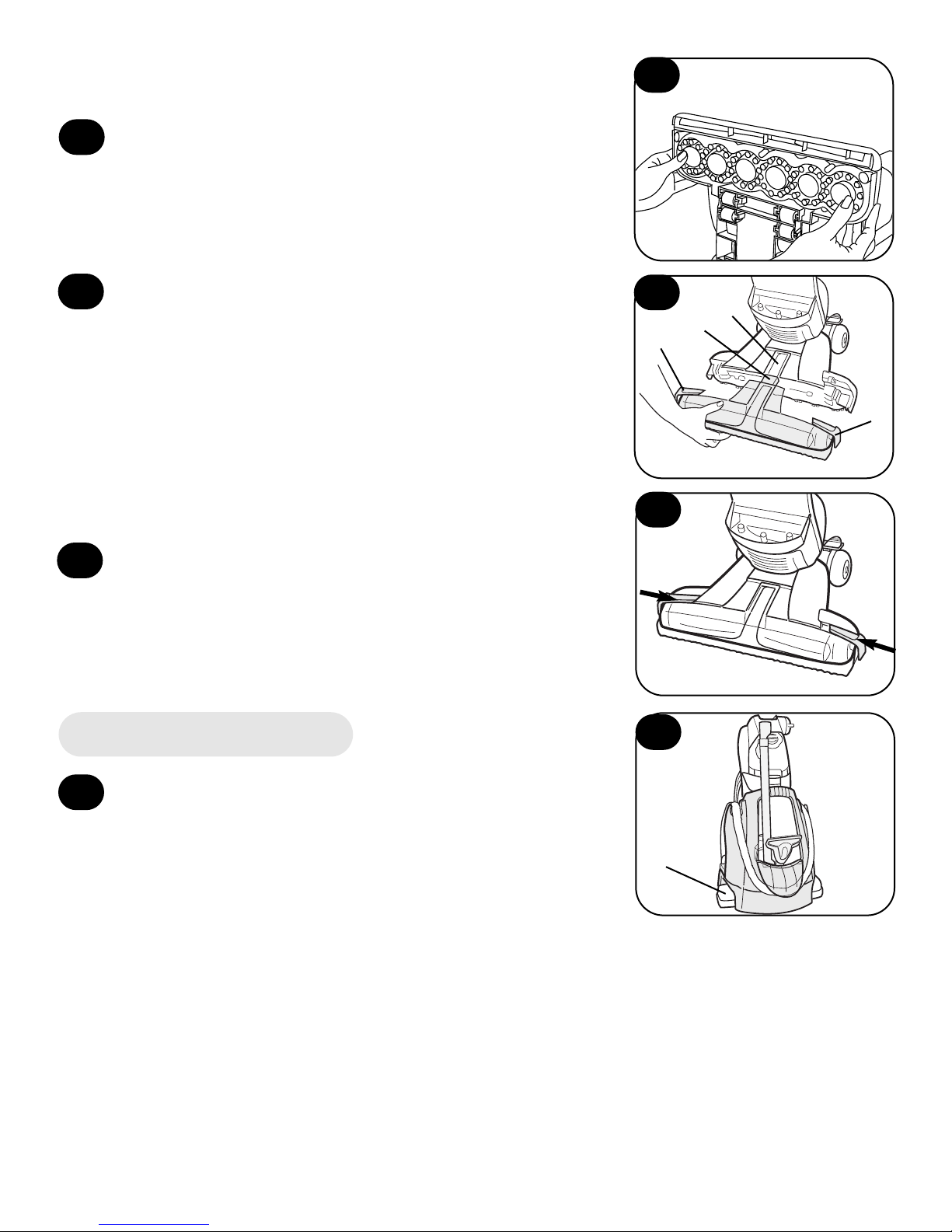
The caddy conveniently fits over the top
of the cleaner nozzle (A) for storage.
9
9
Tool caddy
A
C
C
D
E
8
While holding nozzle in place, slide
latches inward to lock in place.
6
Press brush assembly firmly to snap into
place.
7
To install nozzle, make sure latches (C) are
out. For easier installation, place cleaner in
upright position.
Align middle section (D) of nozzle with opening
(E) on cleaner.
Remove cardboard packing insert from squeegee
area on underside of nozzle.
6
7
8
6
Page 7

7
Push switch (A) once to turn cleaner
ON. Push switch again to turn
cleaner OFF.
A
14
ON/OFF switch
A
13
Handle release pedal
Step on pedal (A) to lower handle
to operating position. Handle does
not lock into a single position, but
“floats” to allow convenient operation.
B
B
E
J
J
I
H
F
G
D
C
A
A
12
Unfold handle
Raise upper handle (A) to upright
position until it locks in place.
11
How to fold handle
Press upper handle release button
(B) to fold handle to storage position.
11
12
13
14
To store hose: Place the hose grip (A) into
slot (B) on back of caddy. Pull hose up and
press into cut-out area (C). Continue wrapping hose down, underneath tongue (D), and
back up, pressing into second cut-out area (E).
Place hose end (F) into slot (G) on back of caddy.
Place floor swivel tool (H), telescoping wand (I)
and detergent (J) into caddy as shown.
10
10
Store hose, tools and accessories
Page 8

8
17
The Mode selector dial (A) turns the brushes on and off.
Your HOOVER FloorMate™ SpinScrub™ Cleaner can be used to both vacuum dry debris
and wet clean non-carpeted floor surfaces such as vinyl, tile, marble and sealed wood. It is
not intended for use on carpet or rugs.
CAUTION: To prevent damage to wood floors, follow the flooring manufacturer’s clean-
ing recommendations.
If using cleaner on sealed wood floors, inspect floor surface for worn finish, bare wood or
separated joints. Do not use FloorMate™ SpinScrub™ Cleaner to wet clean sealed wood
floors if any of these conditions exist.
General operation
Mode selector dial
For dry debris pickup, turn the dial to the
DRY VAC position. In this position, the
brushes will not rotate and are raised off the
floor surface.
To wet clean with brushes turned ON, turn the
dial to the WASH position.
For wet pickup, turn the dial to the WET PICK-
UP position.
Refer to “How to clean” section for complete
cleaning instructions.
To move your cleaner from room to
room, put handle in upright posi-
tion, tilt cleaner back on rear wheels
and push forward.
Transporting
15
16
The cleaner may also be lifted using the carrying handle (A) on the front of the cleaner.
A
15
16
17
18
18
A
Page 9

9
Pour cleaning concentrate into tank (B). Fill tank to
fill line (C) (1 quart) with warm water.
B
C
22
DO NOT use cleaning concentrates that contain solvent based ingredients.
CAUTION: HOOVER® Floor to Floor™ Cleaning Concentrate cannot be used in Hoover
SteamVac™ products. Doing so could damage your SteamVac™ Cleaner.
21
Turn cap (A) upside down to serve as a measuring cup.
For hard surface floors such as ceramic tile, vinyl, linoleum,
laminate wood, polyurethane sealed wood or other wood floors
that can normally be cleaned using water, use one cap (2 oz.)
HOOVER® Floor to Floor™ Cleaner.
Check for worn spots or joint separations before using, as these
conditions could lead to damaged flooring when using water to
clean floor.
A
A
To remove tank, squeeze release button and pull tank
straight out.
20
Carry tank to a sink.
Rotate tank cap counter-clockwise and lift up to remove cap
(A).
Solution (upper) tank
The solution tank holds detergent and water that is to be
dispersed onto the surface being cleaned.
How to fill
Disconnect cleaner from electrical outlet.
Place cleaner handle in upright, locked position.
The tanks
19
20
21
22
19
Continued
➜
Page 10

Recovery (lower) tank
Automatic shut-off
An automatic suction shut-off is built into the recovery
tank to prevent the tank from overflowing.
When the shut-off activates, the cleaner will not pick up
debris and the sound of the motor will change. The recovery tank is full and must be emptied.
10
D
E
23
24
Slide tank straight into position until latch snaps in
place.
If rubber ring (D) on cap has become dislodged, reposition it with uneven side against ledge (E) as shown.
Replace cap. Rotate cap clockwise until it locks in place.
Cap must be locked in place for proper performance
and to prevent leaking.
23
24
25
25
Page 11

11
29
Reposition filter.
Replace filter lid. Press down firmly until snapped
in place.
NOTE: The filter, filter lid and tanks must
be
replaced, or the unit will not work properly.
The tank lid contains a washable, reusable filter. Clean
this pleated filter when suction is low or reduced.
Turn cleaner OFF and disconnect from electrical outlet.
Remove recovery tank and lid (Figs. 26 & 27).
Remove filter lid (A), then remove filter (B).
Remove loose debris from filter by tapping the filter or
gently brushing using your hand. The filter may also be
rinsed for additional cleaning. Allow filter to air dry
between uses.
A
B
28
To clean filters
26
C
B
27
How to empty
Turn cleaner off and disconnect from electrical outlet.
Although not necessary for satisfactory performance, it
is recommended that the recovery tank be emptied after
dry vacuuming and before wet operation.
Check the solution tank also. It may need to be refilled
at this time.
To remove tank, press down on release button (B)
and pull tank straight out.
Remove tank lid (C). Empty tank.
26
27
28
29
Continued
➜
Page 12

Use your HOOVER® FloorMate™ SpinScrub™ Cleaner to:
• Dry Vacuum to remove loose dirt, hair and debris.
• Wet Clean the floor surface. The brushes will provide light agitation to help loosen dirt.
• Wet Pickup reduces drying time of the floor surface.
The Mode selector dial turns the brushes on and off.
For dry debris pickup, turn the dial to the DRY VAC position (A). In this position, the brushes will not rotate and are
raised off the floor surface.
To wet clean with brushes turned ON, turn the dial to the WASH
position (B).
For wet pickup, turn the dial to the WET PICKUP position (C).
30
31
How to clean
Recommended cleaning sequence
12
Dry or loose debris will also collect on the filter screen
located in the tank lid.
To remove debris from screen, remove the pleated filter from
the lid. Remove debris from screen (D).
The filter screen may also be cleaned by rinsing it under
running water.
Reposition pleated filter in lid. Replace lid onto recovery tank,
pressing down firmly until snapped in place.
To replace recovery tank, place bottom of tank behind
ledge (E) and push tank straight into cleaner body until it is
locked in place.
D
E
30
31
32
B
C
A
32
Page 13

Set Mode selector dial to DRY VAC position and vacuum floor.
Turn cleaner off and disconnect from electrical outlet. Empty recovery tank (see Figs. 26
and 27). Determine the type of brushes to be used (either gray for ceramic and other tiles or
white for vinyl and sealed wood floors). See “Cleaning the brushes” for removing and
replacing brushes.
Fill solution tank with Floor to Floor™ Cleaning Concentrate and water (see Figs. 19
through 25).
Do not use solvent based cleaning concentrates in your cleaner. Do not use any type of
wax in your cleaner.
Turn Mode selector dial to WASH position.
Dry hands and plug cleaner into a properly grounded outlet.
Step on handle release pedal and lower handle to operating position. Turn cleaner ON.
To release solution, squeeze trigger (A) (Fig. 33). Slowly
move cleaner forward and backward over area to be cleaned.
Squeeze trigger to release solution as needed.
Overlap strokes by one inch to help prevent streaking. The
cleaner ’s suction will pick up the dirty solution throughout
cleaning.
To greatly enhance drying of the floor surface, release trigger
and turn Mode selector dial to the WET PICKUP position. Continue to move cleaner over the
area to pick up the dirty solution.
To continue cleaning another area, turn Mode selector dial to WASH position. Repeat steps 7
through 9.
Note: When cleaning sealed wood floors, make sure all areas are completely dry. Ensure
that no water remains on the floor.
Note: When switching between wet cleaning and wet pickup, it is not necessary to turn the
cleaner off. Simply move the Mode selector dial between the two settings.
Empty recovery tank or clean the filter when the motor sound becomes higher in pitch and
there is a loss of suction (see “Automatic shut-off” section).
Picking up spills
Your cleaner may also be used to pick up small liquid spills (1 quart or less, never to
exceed 1/4 inch in depth) on non-carpeted floors. Turn Mode selector dial to the WET PICK-
UP position and release the trigger. Continue to move cleaner over the area to pick up the
spill.
Do not use the cleaner to pick up flammable or combustible liquids or chemicals. do not
use the cleaner to pick up detergents that contain solvent based ingredients.
NOTE: Your HOOVER® FloorMate™ SpinScrub™ cleaner may be used to clean wood floors that
have been sealed with a polyurethane coating and can be cleaned with water.
CAUTION: To prevent damage to wood floors, follow the flooring manufacturer’s cleaning recommendations.
If using cleaner on sealed wood floors, inspect floor surface for worn finish, bare wood or separated joints. Do not use FloorMate™ SpinScrub™ cleaner to wet clean sealed wood floors if any
of these conditions exist.
13
Cleaning floors
1
2
3
4
5
6
7
8
9
10
33
A
Continued
➜
Page 14

14
Floor swivel tool
Attach hose and tool
• Swivel head
• 2 rows of brushes
• Use to clean small, tight areas
Unplug cleaner from electrical outlet.
How to connect hose
✓Open hose door (A) on side of cleaner.
✓Align hose connector (B) with hose and solution ports (C).
✓ Insert hose connector (B) until it snaps in place.
✓ To disconnect hose: Squeeze the hook (D) on bottom of hose
connector. Remove hose from port.
✓ Close hose door tightly.
How to connect telescoping wand
✓ Slide wand (A) onto hose end (B). Snap wand over tab
(C) on hose.
✓ To extend telescoping wand, pull button (D) toward
you and pull wand away from you to the desired length. The full
extension of the wand is indicated by a ‘MAX’ line. It is recommended you do not extend the wand past this line.
✓ To remove wand: Push forward and up on latch (E).
Slide wand off hose.
How to connect tool
✓ Tool may be attached directly to the hose or onto the
telescoping wand.
✓ Slide tool onto hose or wand. Snap tool over tab (A)
on hose or wand.
✓ To remove tool: Push forward and up on latch (B).
Slide tool off hose or wand.
34
36
Using the tools
A
B
C
D
E
34
35
36
37
A
B
D
35
C
37
A
A
B
B
Page 15

Before storing cleaner:
Turn cleaner OFF and disconnect from electrical outlet.
• Empty and rinse solution and recovery tanks. Allow to air
dry.
• Press on upper handle release button to lower handle for
storage.
• Make sure that nothing is pressing on the nozzle squeegee.
• Do not store cleaner on a wood surface unless cleaner is
completely dry.
For your convenience, the HOOVER® FloorMate™
SpinScrub™ tool caddy (A) is provided for storing the
hose, tool, telescoping wand, set of brushes and detergent.
The caddy conveniently fits over the top of the cleaner nozzle
(B) for storage.
To store hose: Place the hose grip (C) into slot (D) on
back of caddy. Pull hose up and press into cut-out area
(E). Continue wrapping hose down, underneath tongue
(F), and back up, pressing into second cut-out area (G). Place
hose end (H) into slot (I) on back of caddy.
Place floor swivel tool (J), telescoping wand (K) and
detergent (L) into caddy as shown.
15
Using the tool
Storing the cleaner
Tool caddy
38
39
40
41
The handle must be in the upright position in order
to get cleaning solution through the hose.
✓ Squeeze and hold trigger (A) in hose grip to release
cleaning solution.
✓ Let go of trigger and pull tool over same area to pick
up dirty solution without putting down more solution.
38
39
40
41
A
A
B
NOTE: It may be necessary to remove air from the system
(prime the pump) so the clean solution will flow to the tool.
After attaching the tool to the hose, turn the cleaner ON. Put the
tool against your hand to block off the suction. Wait a few sec-
onds, then squeeze the trigger and begin cleaning.
D
H
I
F
J
K
L
L
G
E
C
Continued
➜
Page 16

16
Maintenance
Cleaning the nozzle
Turn cleaner OFF and disconnect from electrical outlet.
The cleaner ’s nozzle can be removed for easy cleaning.
Slide the two nozzle release latches (A) outward.
Remove nozzle (B) by pulling straight out.
Rinse nozzle under running water. Remove debris from
squeegee (C) and wipe with a damp cloth.
To replace nozzle, make sure latches (D) are out.
Cleaner should be in the upright position for easier assem-
bly of the nozzle.
Align middle section (E) of nozzle with opening (F) on cleaner.
While holding nozzle in place, slide latches inward to lock
in place.
42
43
45
46
42
43
45
44
46
A
A
B
D
E
F
D
C
44
Page 17

47
48
49
50
Cleaning the brushes
The brush assembly can be removed for easy cleaning.
Turn cleaner OFF and disconnect from electrical outlet.
Place handle in the upright position.
Remove tanks to prevent leaking. Set aside.
Pull the two nozzle release buttons (A) out. Remove nozzle.
Tilt cleaner back so handle rests on floor.
Push two brush release buttons (B) and remove the brush
assembly.
The brushes can be washed with a mild detergent and rinsed. Do
not use a solvent based detergent.
To replace brushes, align post (C) on brush block with hole
(D) on bottom of cleaner. Turn brushes slightly until post
fits easily into hole. Press brush assembly firmly to snap into
place.
Return cleaner to upright position. Replace nozzle, making
sure latches (E) are out.
Align middle section (F) of nozzle with opening (G) on cleaner.
47
48
49
50
A
B
A
F
G
C
D
E
E
17
While holding nozzle in place, slide latches inward to lock
in place.
Replace tanks.
51
51
Continued
➜
Page 18

Troubleshooting
What’s the problem? What to do
Cleaner won’t run ✓ Make sure the cleaner is
plugged in firmly.
✓ Check the fuse or breaker.
Low suction ✓ Empty the recovery tank; it may be full
and the automatic shut-off engaged.
✓ Make sure filter and filter lid are properly
positioned.
✓ Make sure tanks are locked in place.
✓ Check the filter and clean if dirty.
✓ Make sure nozzle is replaced properly
and locked.
✓ Make sure the hose door is closed tightly
when not using the hose.
Water puddling behind cleaner ✓ Use recommended detergents to reduce
excess foaming.
✓ Make sure solution tank is installed
properly.
✓ Empty recovery tank.
Won’t pick up dirty solution ✓ Check Mode selector dial to ensure it is
set for WET PICKUP.
✓ Make sure recovery tank is installed
properly.
✓ Empty recovery tank.
✓ Make sure filter and filter lid are properly
positioned.
Cleaner pushes a line of dry debris ✓ Check Model selector dial to ensure it is
in front of it set for DRY VAC.
✓ Tip nozzle off floor by pushing down on
handle to pick up debris that is too large
to clear the squeegee.
Cleaning solution won’t dispense ✓ Make sure solution tank is locked in
position.
✓ Refill the solution tank if it is empty.
✓ Pump needs to be primed (when using
tool). See page 15.
Brushes won’t rotate ✓ Check Mode selector dial to ensure it is
set for WASH.
✓ Reset circuit breaker.
(1) Push ON/OFF switch to turn cleaner
OFF.
(2) Unplug the cleaner.
(3) Wait one minute.
(4) Plug the cleaner into electrical outlet.
(5) Push the ON/OFF switch again to
turn cleaner ON.
If the brushes continue to stall and the
breaker trips again, clean the brushes to
remove debris.
18
Use the list below to help solve minor problems.
Page 19

19
To obtain approved HOOVER service and genuine HOOVER parts, locate the nearest Hoover Sales
and Service Center or Authorized Hoover Warranty Service Dealer (Depot) by:
✓ Checking the Service Section of Hoover on-line at www.hoover.com OR
✓ Checking the list of Sales and Service Centers provided with this cleaner OR
✓ Checking the Yellow Pages under “Vacuum Cleaners - Household” OR
✓ Calling 1-800-944-9200 for an automated referral of authorized service outlet locations
(U.S. only)
Do not send your cleaner to Hoover in Newton, Iowa for service; this will only result in delay.
If further assistance is needed, contact the Hoover Consumer Response Center,
Phone: 330-499-9499.
In Canada, contact Hoover Canada, Burlington, Ontario L7R 4A8; Phone: 1-800-263-6376.
Always identify your cleaner by the complete model number when requesting information or ordering parts. (The model number appears on the back of the cleaner.)
Lubrication
Service
The motor is equipped with bearings which contain sufficient lubrication for the life of the motor.
The addition of lubricant could cause damage. Do not add lubricant to motor bearings.
Page 20

20
Full One Year
Warranty
(Domestic Use)
Your HOOVER® appliance is warranted in normal household use, in
accordance with the Owner’s
Manual against original defects in
material and workmanship for a
period of one full year from date of
purchase. This warranty provides, at
no cost to you, all labor and parts to
place this appliance in correct operating condition during the warranted
period. This warranty applies when
the appliance is purchased in the
United States including its territories
and possessions, or in Canada or
from a U. S. Military Exchange.
Appliances purchased elsewhere are
covered by a limited one year warranty which covers the cost of parts
only. This warranty does not apply if
the appliance is used in a commercial
or rental application.
This warranty only applies when the
product is in use in the country or
territory in which it is purchased.
Warranty service can only be
obtained by presenting the appliance
to one of the following authorized
warranty service outlets. Proof of
purchase will be required before service is rendered.
1. Hoover Sales and Service
Centers.
2. Hoover Authorized Warranty
Service Dealers (Depots).
For an automated referral of authorized service outlets in the U.S.A.,
phone 1-800-944-9200 OR
visit Hoover on-line at
www.hoover.com
This warranty does not cover pick
up delivery, or house calls; however,
if you mail your appliance to a
Hoover Sales and Service Center for
warranty service, transportation will
be paid one way.
While this warranty gives you specific legal rights, you may also have
other rights which vary from state to
state.
If further assistance is needed, or if
there are questions concerning this
warranty or the availability of warranty service outlets, write or phone
the Consumer Response Center,
Phone 1-330-499-9499.
In Canada, contact Hoover Canada,
Burlington, Ontario L7R 4A8,
1-800-263-6376.
 Loading...