

Page 1
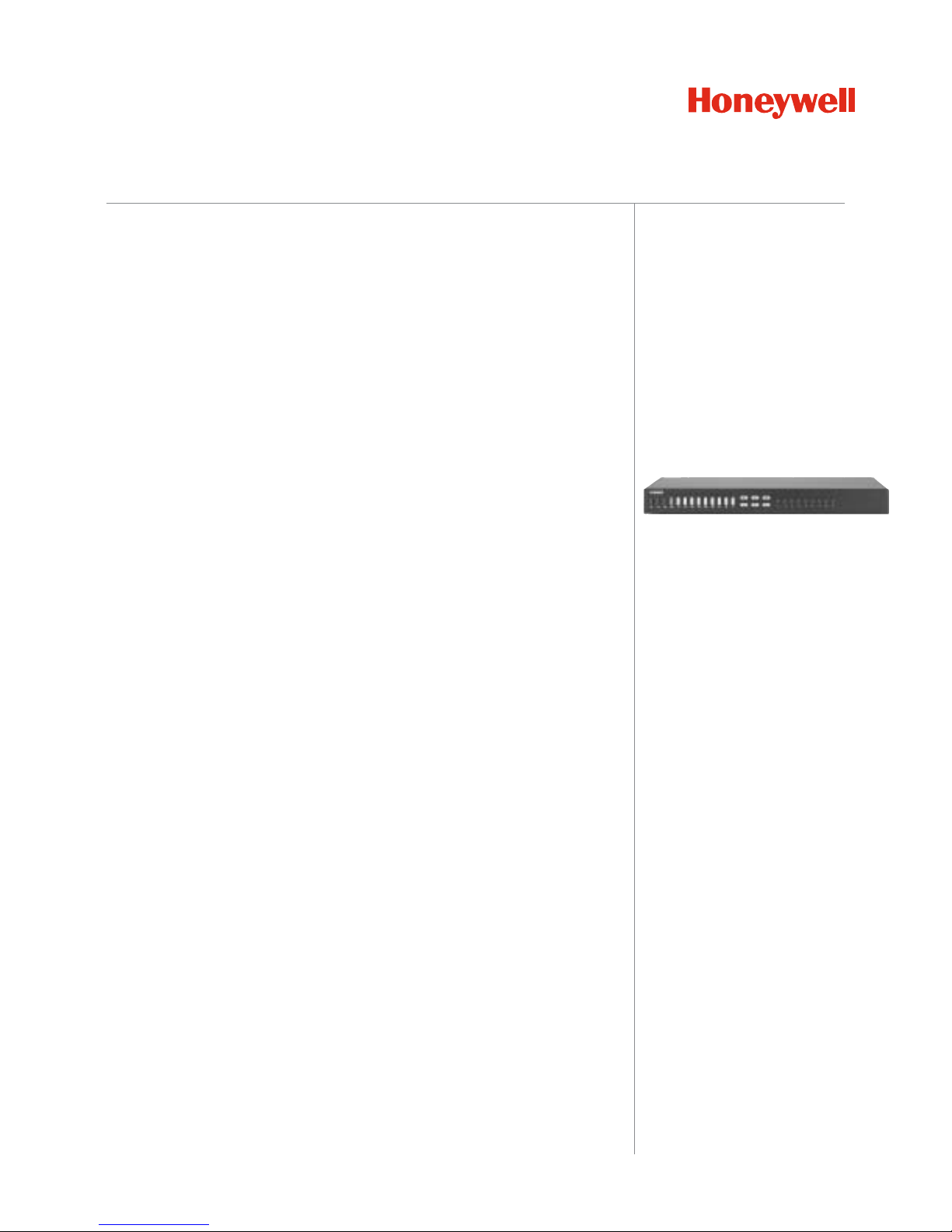
9-CAMERA COLOR MULTIPLEXER
Honeywell Video’s HXCT9 Color Multiplexer combines the best of today’s technology
with superior functionality to bring you a versatile multiplexer that can easily be
configured to meet your specific installation requirements.
The HXCT9 will simultaneously view, record and play back 9-camera inputs. The
multiplexer displays the cameras in a variety of views as well as four user-definable
formats. In addition to the main monitor, the HXCT9 supports four separate spot
monitors, which can be selected to display a specific camera, the entire sequence of
cameras, or a user sequence.
In addition to the unit’s convenient front panel controls, the HXCT9’s user-friendly,
mouse-driven, on-screen menus make setup and operation quicker and easier than
ever before. Easy to program features, such as video motion detection, alarm
detection, day/night settings for each camera, and processing of alarm events can
be set up on screen using a standard PS2 mouse (included). The familiar mouse-
driven functionality also allows changes, such as display formats, to be made easily.
The HXCT9’s advanced features bring powerful, integrated solutions to your video
system. Features like video motion detection, time synchronization of multiple
multiplexers, flexible alarm processing and enhanced picture processing provides
unparalleled image quality and unsurpassed performance.
The HXCT9 can be controlled remotely with a PC, or the RapidView AKJX8A
Dome/Multiplexer Controller. The HXCT9 is part of Honeywell Video’s e-Series,
featuring products of exceptional value and performance for everyday use.
HXCT9
Features:
• Convenient operation using a PS2
mouse (included) or front panel
controls
• User-friendly menu structure for
simplified operation and
programming
• Main monitor plus four individual spot
(auxiliary) monitor outputs
• Simultaneous recording, playback
and viewing
• Programmable vector base motion
detection with 256 target (16x16) grid
per camera
• RS232 or RS485 control
• Alarm input per camera, selectable
polarity
• Supervisor code plus four user codes
• Programmable day and night motion
detection schedules
• Multilingual setup menus
• Digital zoom, (1x – 32x)
• Capable of decoding tapes from
many multiplexers
• On-screen display includes time,
date, alarm status, video loss and
camera title
www.honeywellvideo.com
Page 2

FEATURES
HXCT9
Mouse Control
In addition to the front panel controls, the multiplexer can be
operated using a mouse (included with unit). Everyday
functions are greatly simplified through use of familiar
computer-type functions such as pop up screens, easy to
understand menu screens and toggle options. Simply point
and click and you can perform all multiplexer operations using
this extremely user-friendly user interface.
Four Spot Monitors
The multiplexer supports four independent auxiliary spot
monitors. These monitors supplement the main output
monitor. Each spot monitor can be used to display a specific
camera image, scroll through the entire sequence of cameras,
or user sequence of cameras. The spot monitor view can be
changed at any time with a simple click of the mouse. This
provides extreme flexibility and eliminates the need for a
separate matrix switch system.
System Security Features
The multiplexer contains four different user passwords as well
as a supervisor code. These four digit codes provide secure
access to the various multiplexer functions. Each camera has
programmable options to determine which users can view the
camera, which spot monitors can display the camera, and if
the camera can be recorded.
Motion Detection
The e-Series multiplexer has a sophisticated motion detection
scheme, which can be set up to detect motion change from
any direction. The motion detection area, and sensitivity can
be selected to suit the requirements. In addition both day and
night schedules can be established for motion detection.
Electronic Zoom
Camera images can be electronically enlarged up to a zoom
factor of 32. In the zoom mode a screen appears displaying
the area of the screen impacted. Simply select the portion of
the image to be enhanced, then use the zoom button to
enlarge to the desired value. The selected image can then be
frozen.
Alarm Processing
The multiplexer was an alarm input camera as well as two
programmable alarm outputs. The system provides
customized alarm response for specific security areas. Up to
nine e-Series multiplexers can be linked together.
Three-Way Operation
The system permits simultaneous recording, playback, and live
viewing.
Flexible Display Options
The main monitor can display either a full-screen camera view,
2x2, 3x3, PIP or PIP4 (Picture in Picture) display. In addition,
there are four user-definable display modes that allow
selection of various screen formats and the cameras to appear
in each customized view.
Software Management
Bi-directional RS232 or RS485 communications allows
software control of multiplexer features. Remote control the
unit through Honeywell Video’s AKJX8A or HJZTP
Keyboard/Controller or a PC with third party software
management tools.
High Resolution Display
With 720 x 480 pixel output to a VCR and up to 648 x 448 output
to the monitor, the e-Series multiplexer provides high- resolution,
true-to-life images for live and recorded events. This performance
results in superior surveillance and easier identification.
Alarm History Log
A time-stamped event log displays the last 256 alarm events;
including the source of the event, camera number, time, date
and user number.
Multilingual Option
The multiplexer’s screens and menus can appear in English,
French, Italian, German and Spanish. Languages can be
selected from the setup menu without the need for additional
model numbers.
www.honeywellvideo.com
Page 3
FEATURES
HXCT9
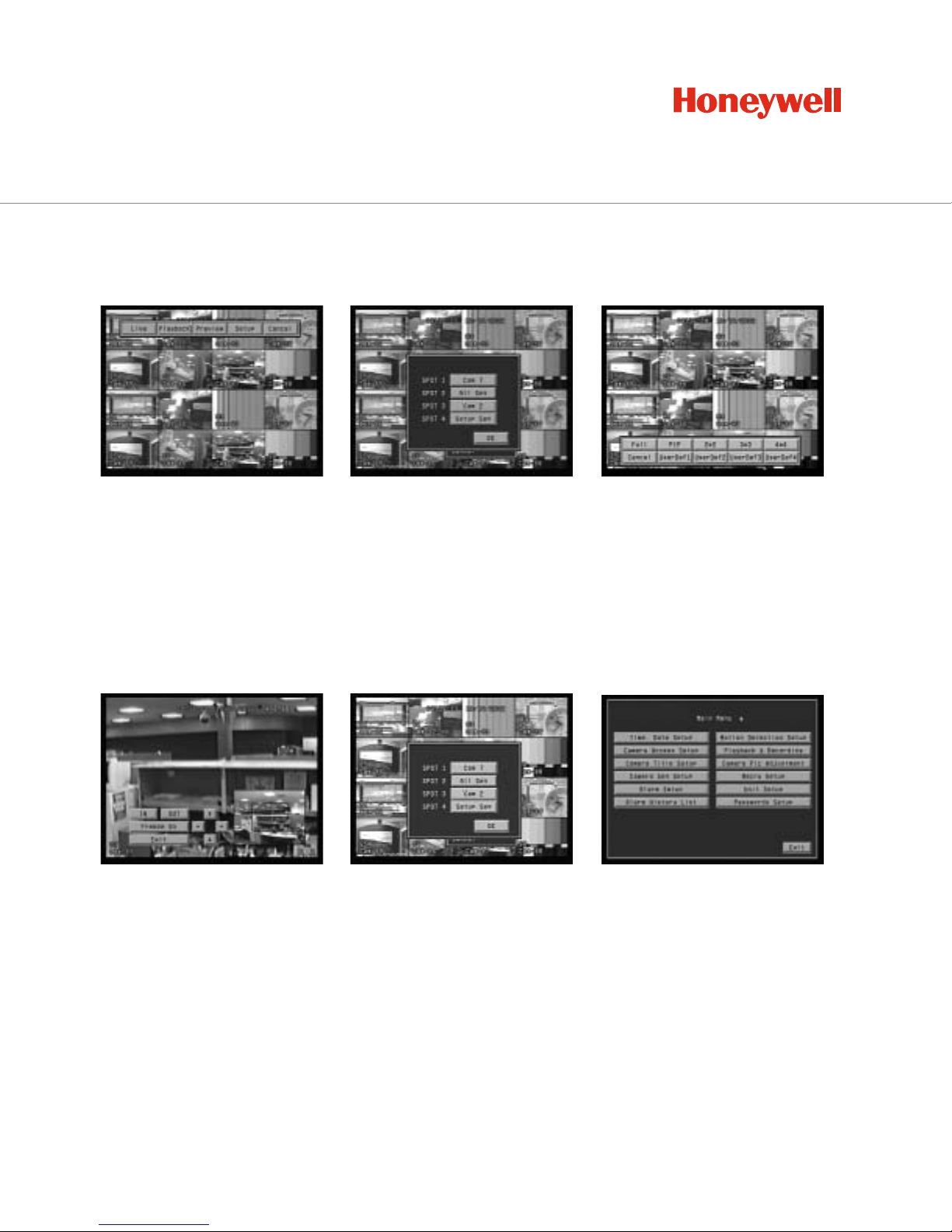
Multiplexer Operations
Spot Monitors
Zoom Mode
Functional Operations
Simply move the mouse to the top of
the screen and you are presented
with the operational modes for the
multiplexer. Select between Live
mode, Playback, Preview or System
Setup. Optional password protection
exists for certain functions.
Upon selecting a camera image, a
zoom screen will appear. An inset
area allows you to select the
portion of the image to zoom (up
and down arrows), and the in/out
buttons control the zoom factor.
The HXCT9 provides an electronic
zoom up to 32 times normal.
It’s easy to change the contents of
any of the four spot monitors.
Simply select the desired spot
monitor and select a specific
camera, the entire sequence, or a
user sequence.
Right click the mouse and select
functions such as live camera
change, zoom, freeze mode or
sequence type.
System Programming Main Menu
System programming is simplified
through an efficient menu structure.
Simply point and click with the
mouse to select the desired
category, and you will be presented
with the appropriate programming
options.
Display View Mode
Simply move the mouse to the bottom
of the main monitor screen and the
various display options are shown.
Choose between a full screen view,
PIP4, PIP(Picture in Picture), 2x2,
3x3,or any of the four customizable
user-definable views.
www.honeywellvideo.com
Page 4
SPECIFICATIONS
HXCT9
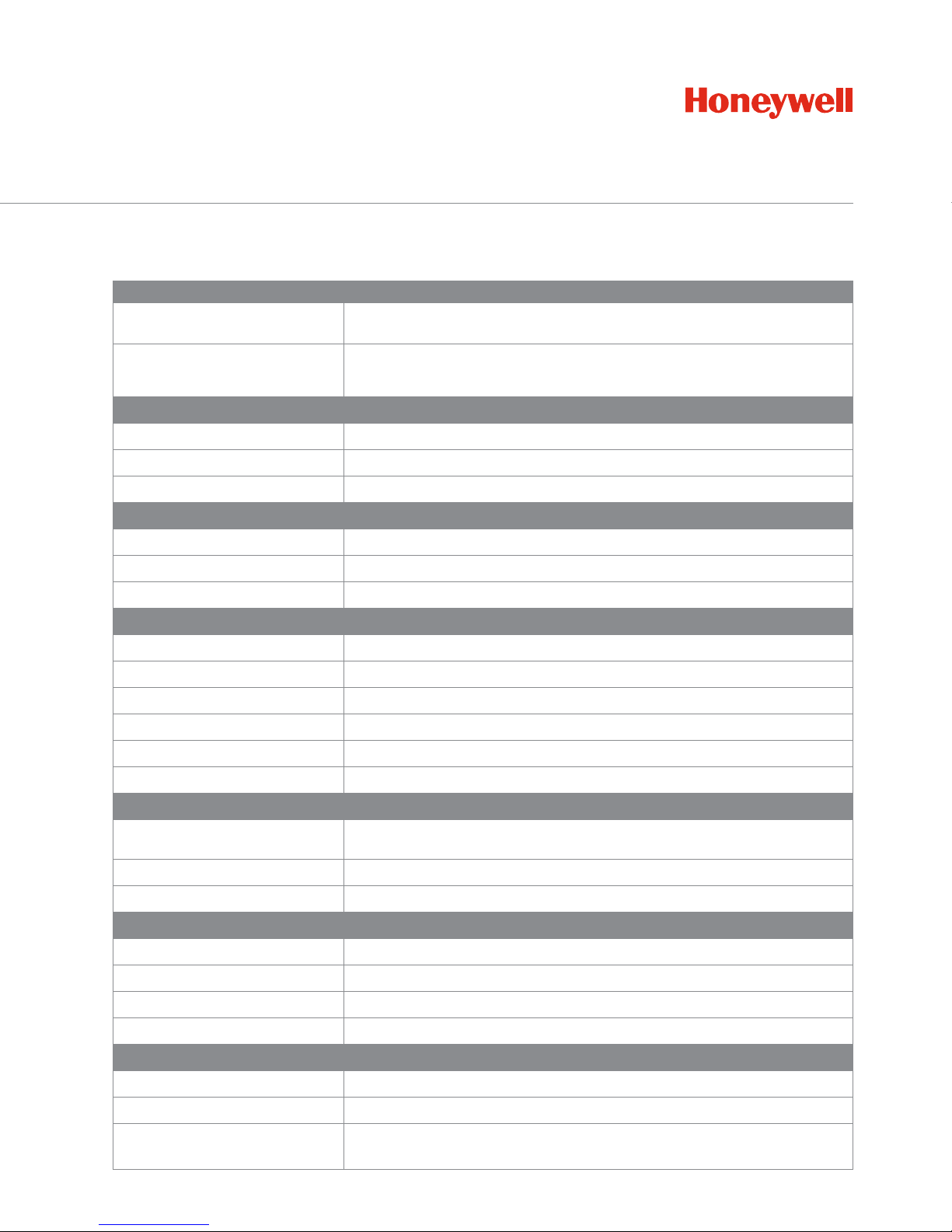
Operational
Video Standard
NTSC (525 lines, 60 fields/second) or PAL (625 lines, 50 fields/second)
Digital Memory
720 x 480 pixels full screen to VCR, 648 x 448 full active screen, 256 shades of
gray– scale,16 million colors
Video Levels
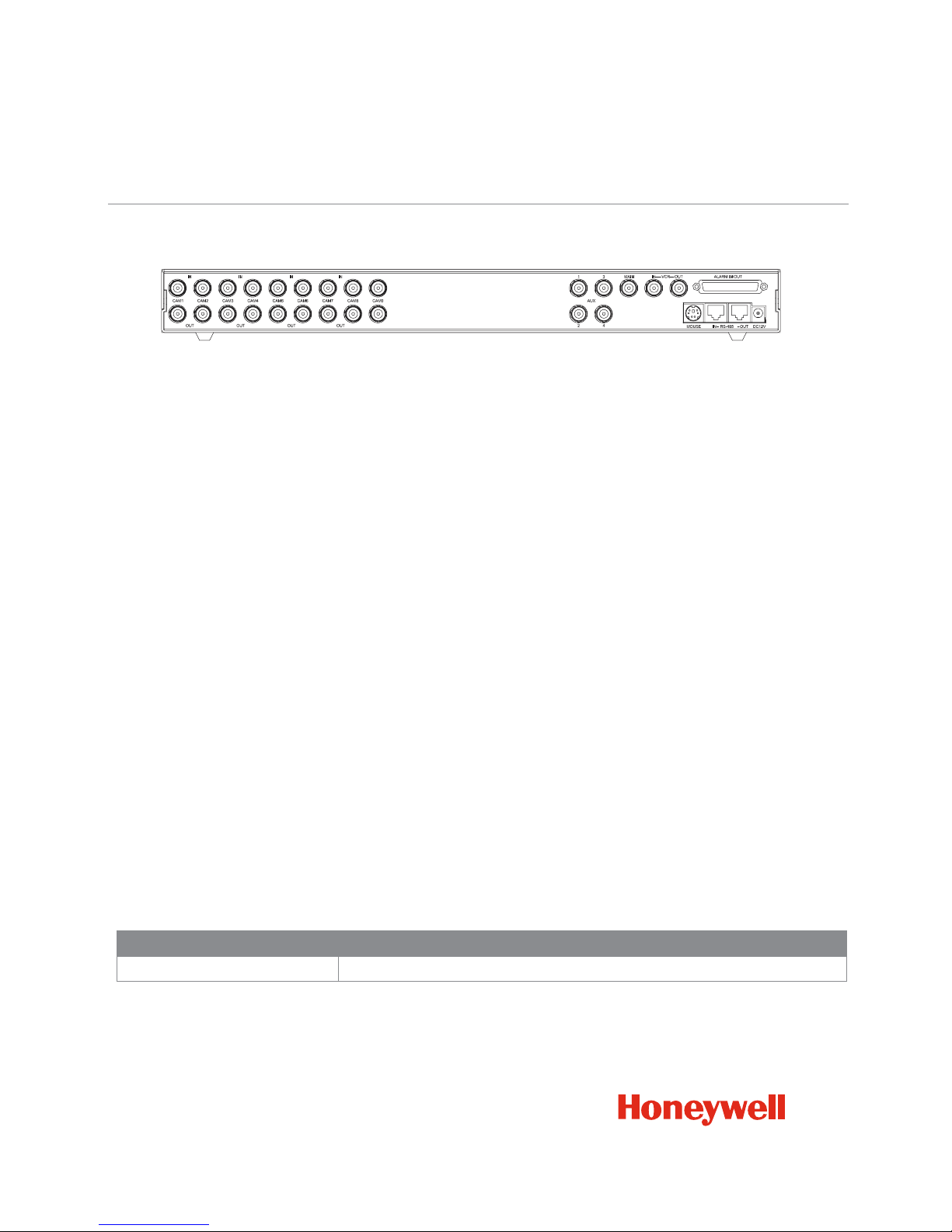
Camera Inputs (9)
1.0 Vp-p, 75 Ohms
Camera Looping Outputs (9)
1.0 Vp-p, 75 Ohms
Loop Through Outputs (9)
1.0 Vp-p, 75 Ohms
VCR Input
Composite
1.0 Vp-p, 75 Ohms
S-Video
Luma 1.0 Vp-p, 75 Ohms Chroma (burst) .286 Vp-p, 75 Ohms
Spot Monitor Output
1.0 Vp-p, 75 Ohms (4 outputs)
Motion Detection
Activity Grid
16 horizontal x 16 vertical (256 total)
Sensitivity Levels
16
Activity Detection
Intrusion (all motion) or Vector (directional)
Motion Delay Time
0 to 5 seconds
Motion Hold Time
1 to 99 seconds
Modes
Day and night timers, start and stop, selectable for each day of the week.
Alarm Operation
Alarm Inputs
9 inputs with polarity selection activated by contact closure or TTL/CMOS signal
Alarm Relays
2 NO and NC contacts with shared common,1.0A 24VDC (resistive)
Alarm Outputs
One output per camera, TTL/CMOS Active high or low selection
Alarm Displays
Associated Alarm
Screens up to 4 cameras
Alarm Dwell Times
1 to 99 seconds
Alarm Hold Time
1 to 99 seconds
Alarm Buzzer
On/Off
Screen Display Options
Camera Title
24 Characters
Time and Date
US, Asian, European 12/24 hour formats
Screen Indicators
Alarm, Motion, Video Loss, Zoom mode, Freeze mode, Sequence mode,
Camera number, Setup menu
www.honeywellvideo.com
Page 5

SPECIFICATIONS
HXCT9
Other Features
Password Protection
1 supervisor, 4 users
Daylight Savings Time
Selectable
Sequence Dwell Time
1 to 99 seconds, OFF
Time Lapse VCR Setup Delay
2 hr. real time to 960 hr. time lapse
Unit ID Selection
1 to 255
Camera Number offset
1 to 256
Language Selections
English, German, French, Italian, Spanish
Upgradable Flash Memory
RS232 Control
1200 – 19200 baud RX/TX
RS485 Control
1200 – 19200 baud RX/TX
Mouse
Two-button PS2 mouse
Power
Power Requirements
12VDC, 2.5 Amps
Power Adapter
120/230VAC Universal Adapter
Mechanical
Unit Size
17" W x 1.73" H x12.2" D (432mm x 44mm x 310mm)
Unit Weight
5.3 lbs (2.4 Kgs)
Shipping Weight
9.5 lbs (4.3 Kgs)
Operating Environment
Ambient Temperature
32° to 95° F (0° to 35° C)
Ambient Humidity
10 to 90% non-condensing
www.honeywellvideo.com
Page 6
AV05053
L/HXCT9/D
October 2005
©2005 Honeywell International Inc.
HXCT9
Honeywell Security
Honeywell Video Systems
2700 Blankenbaker Pkwy, Suite 150
Louisville, KY 40299
1.800.796.CCTV
www.honeywell.com
NOTE: Honeywell reserves the right, without notification, to make changes in product design or specifications.
www.honeywellvideo.com
Ordering
HXCT9
9-Camera Color Multiplexer, Triplex Operation
HXCT9
 Loading...