

Page 1

S
Files & Storage
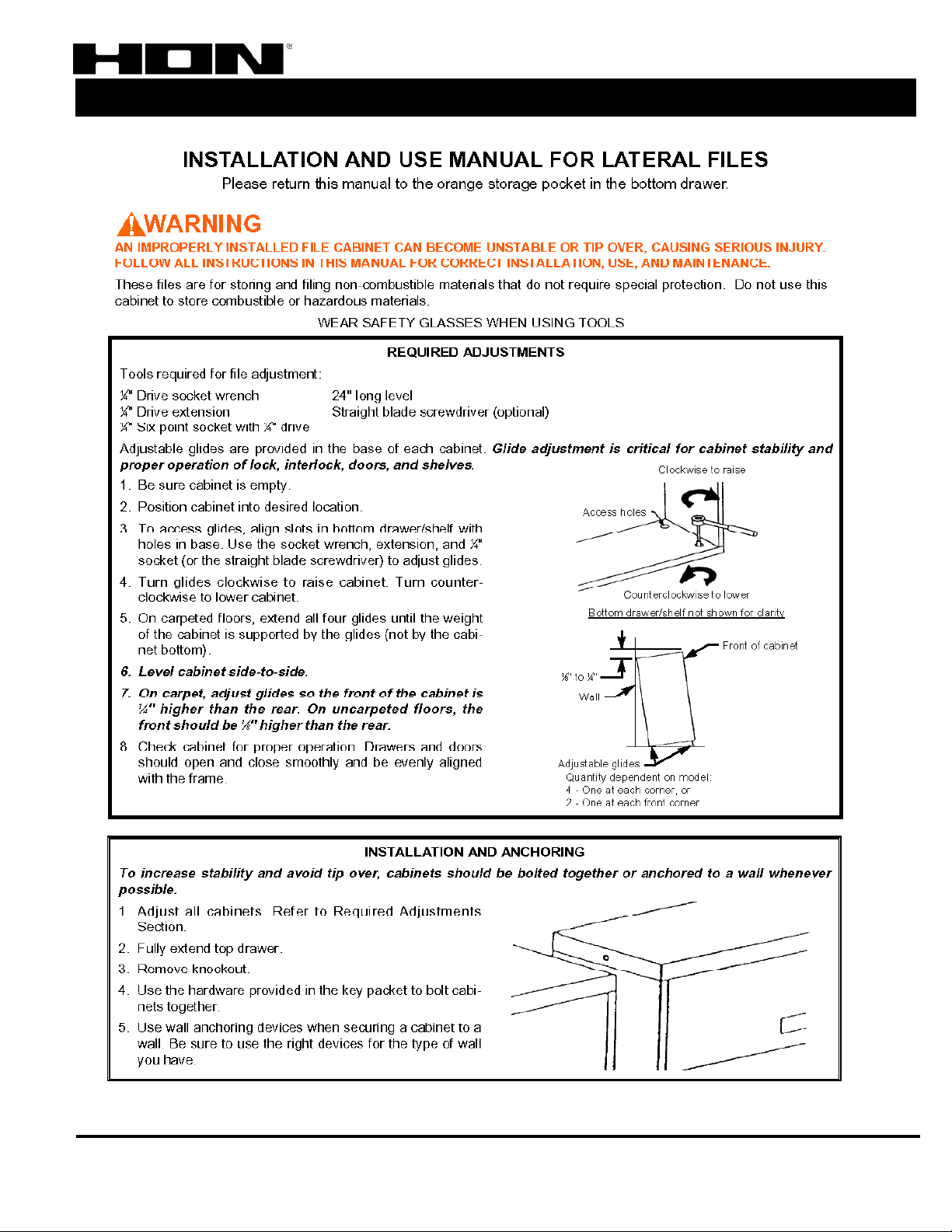
There are three areas to look at first when solving problems with lateral files. Those areas are
Leveling, Locking, and Loading. About 95% of all lateral file issues are related to leveling. We
will cover some of the most common issues that occur with these files.
QUESTIONS & ANSWER
LEVELING- TROUBLESHOOTING GUIDE
Most people think of leveling as making something completely even or straight. That is
not quite true when it comes to leveling a lateral file. In “Lateral Lingo” Leveling is being
sure the unit is even from left to right. However the unit, when properly installed, is ¼” to
1/8” higher in the front than in the back. Some issues to consider when installing the unit:
Is the unit being installed on carpet? Old or new?
Is the unit being installed on tile?
Is the floor level?
How was the lateral file loaded?
Leveling Test
A good test to see if your lateral file is leveled properly (“leveled” from front to
back) is to place a round pen or pencil on the top front edge of the file. It the pen
rolls to the back, the unit is installed correctly. If it stays in place or rolls off the
front edge, the unit is not leveled correctly from front to back. The first solution to
try is leveling the unit from front to back. Follow the leveling instructions included
at the end of this document.
PROBLEM: Drawer sticks about two-thirds of the way open.
1. Check to see if the unit is level from front to back. See Leveling test at the
beginning of this document.
2. Be certain that all the drawers are completely closed.
3. It is possible that the interlock mechanism has ridden up the interlock ramp and is
catching on the drawer slide. Close all drawers and be sure the unit is leveled.
4. Be certain there are no papers or other stored materials that are getting caught in
the drawer.
5. If the drawers still will not fully close, contact your purchasing dealer.
PROBLEM: Drawers do not align
1. Check to see if the unit is level from front to back. See Leveling test at the
beginning of this document.
2. If the drawers still do not align, contact your purchasing dealer.
Lateral Troubleshooting Guide
Created: 10/24/03 Lateral File- Troubleshooting Guide The HON Company
Rev 1.0 PAGE 1 OF 8 800.336.8398 / www.hon.com
Page 2

S
Files & Storage
PROBLEM: The drawer will not shut all the way. It stops about 1”-2”
from closing
1. Be certain there are no papers or other stored materials that are getting caught in
the drawer.
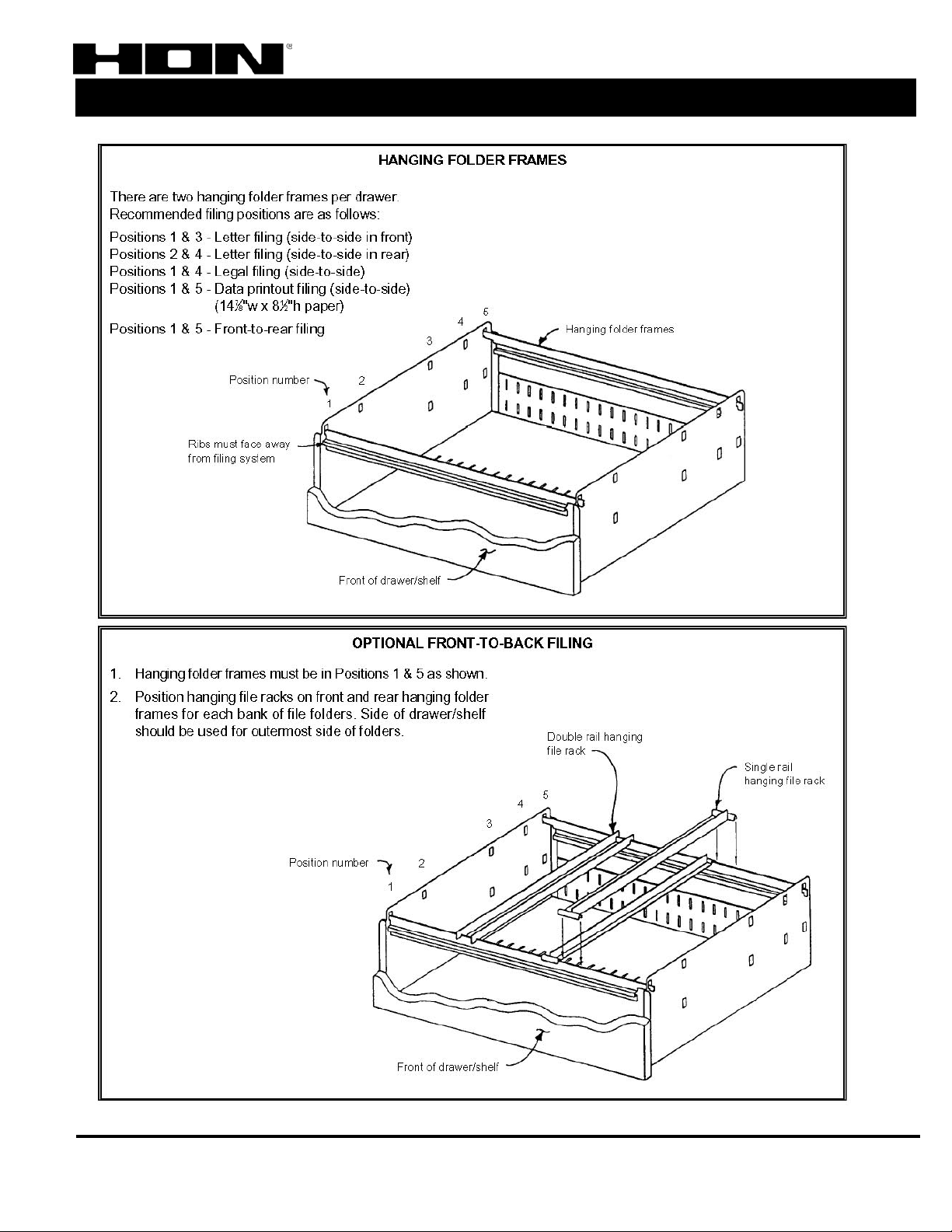
2. Check the catch clips to see if either of them is bent. These are the “J” shaped clips
on the left and right sides of the front of the cabinet. (Visible when the drawers are
open.)
3. If the catch clip is bent, bend it back into place. The catch clip needs to fit into the
slot for it on the back of the drawer front.
4. If the drawers still will not fully close, contact your purchasing dealer.
PROBLEM: One side of the drawer will not release.
1. Check to see if the unit is level from front to back. See Leveling test at the
beginning of this document.
2. Check the catch clips to see if either of them is bent. These are the “J” shaped clips
on the left and right sides of the front of the cabinet. (Visible when the drawers are
open.)
3. If the catch clip is bent, bend it back into place. The catch clip needs to fit into the
slot for it on the back of the drawer front.
4. A bent lock bar could also cause the problem. If the lock bar is bent, bend it back
to the original position.
5. If the drawers still will not fully close, contact your purchasing dealer.
QUESTIONS & ANSWER
Lateral Troubleshooting Guide
LOCKING- TROUBLESHOOTING GUIDE
PROBLEM: Keys locked in the cabinet or lost.
Locking problems can sometimes occur in lateral files. To unlock a lateral file when you
do not have the keys:
1. Get two letter openers or putty knives.
2. Place them in the space between the drawer and the lateral case. (Just above the
lock bar tabs, about 2/3’s of the way down the face of the drawer.)
3. Using equal pressure push down on both sides forcing the lock bars down.
4. Have a second person pull the drawer open while you are still pushing down on the
lockbars. The drawer should open about halfway. You can then remove the keys
and unlock the file.
5. CAUTION!! Damage to the unit or locking system may occur using this method.
Use it only in the event of an emergency.
Created: 10/24/03 Lateral File- Troubleshooting Guide The HON Company
Rev 1.0 PAGE 2 OF 8 800.336.8398 / www.hon.com
Page 3

S
Files & Storage
PROBLEM: Cannot get the unit unlocked
1. Especially in new units, check to see if the number stamped on the side of the key
matches the number stamped in the face of the lock. I they do not match, please
contact your purchasing dealer.
2. In the event of an emergency, use the unlocking method described above or
contact Hon Customer Service at 800-336-8398.
PROBLEM: The lock spins when the key is turned
1. The cam follower is missing from the back of the cam lock causing disengagement
of the actuator rod. This is a white plastic clip that resembles a tuning fork.
2. If this clip is missing or broken, contact your purchasing dealer.
3. In the event of an emergency, use the unlocking method described above or
contact Hon Customer Service at 800-336-8398.
LOADING- TROUBLESHOOTING GUIDE
PROBLEM: The drawer grinds when opening
1. Check to see if the black lock bar boot is missing. This a small black square
located between the drawer side and lateral case.
2. If this boot is missing, contact your purchasing dealer.
3. The drawer being over loaded could also cause this problem. Unload the drawer to
decrease the weight in the drawer.
4. In the event of an emergency, use the unlocking method described above or
contact Hon Customer Service at 800-336-8398.
QUESTIONS & ANSWER
Lateral Troubleshooting Guide
Created: 10/24/03 Lateral File- Troubleshooting Guide The HON Company
Rev 1.0 PAGE 3 OF 8 800.336.8398 / www.hon.com
Page 4

S
Files & Storage
QUESTIONS & ANSWER
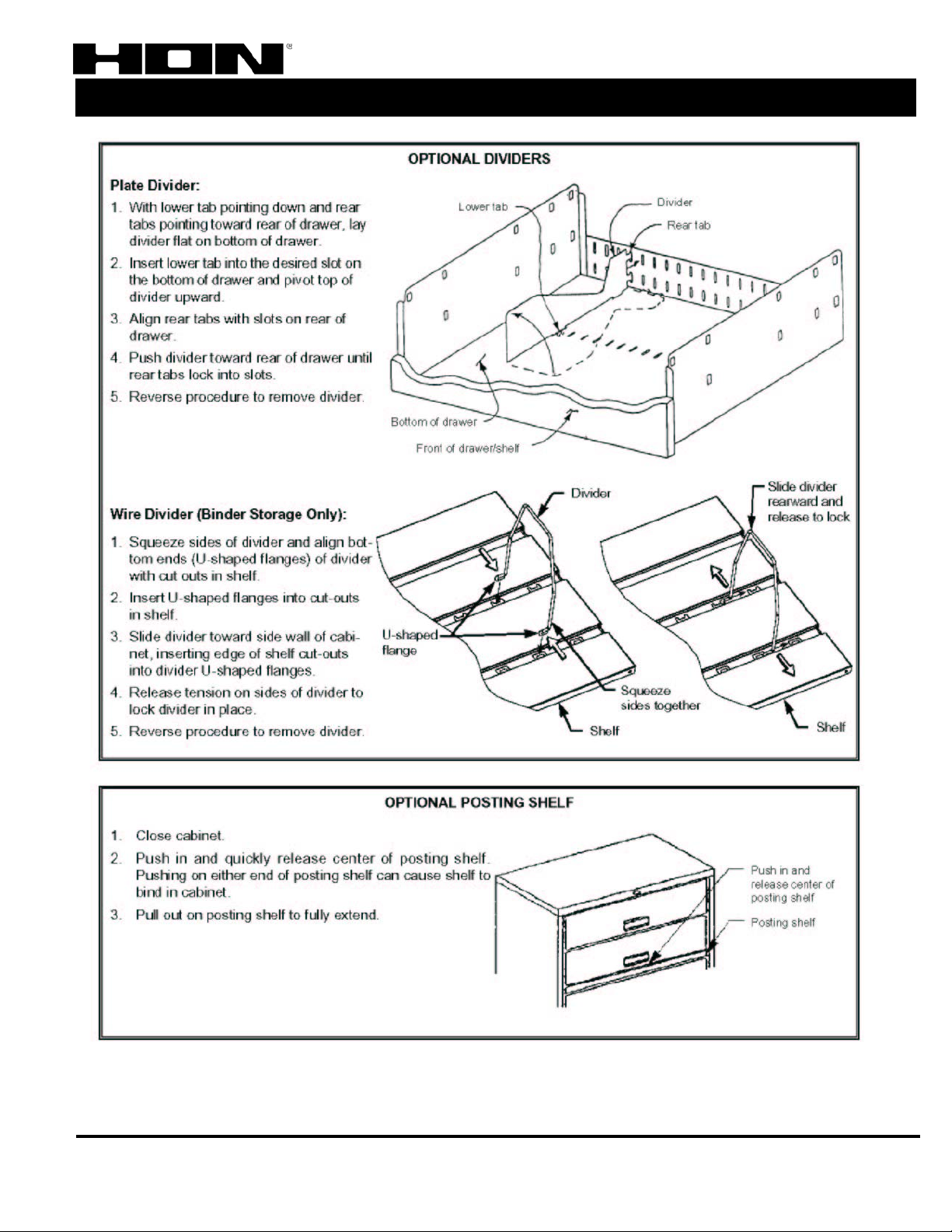
DRAWER REMOVAL
NOTE: Before attempting to remove a drawer, make sure you have an
additional person to help, as this is a two-person operation.
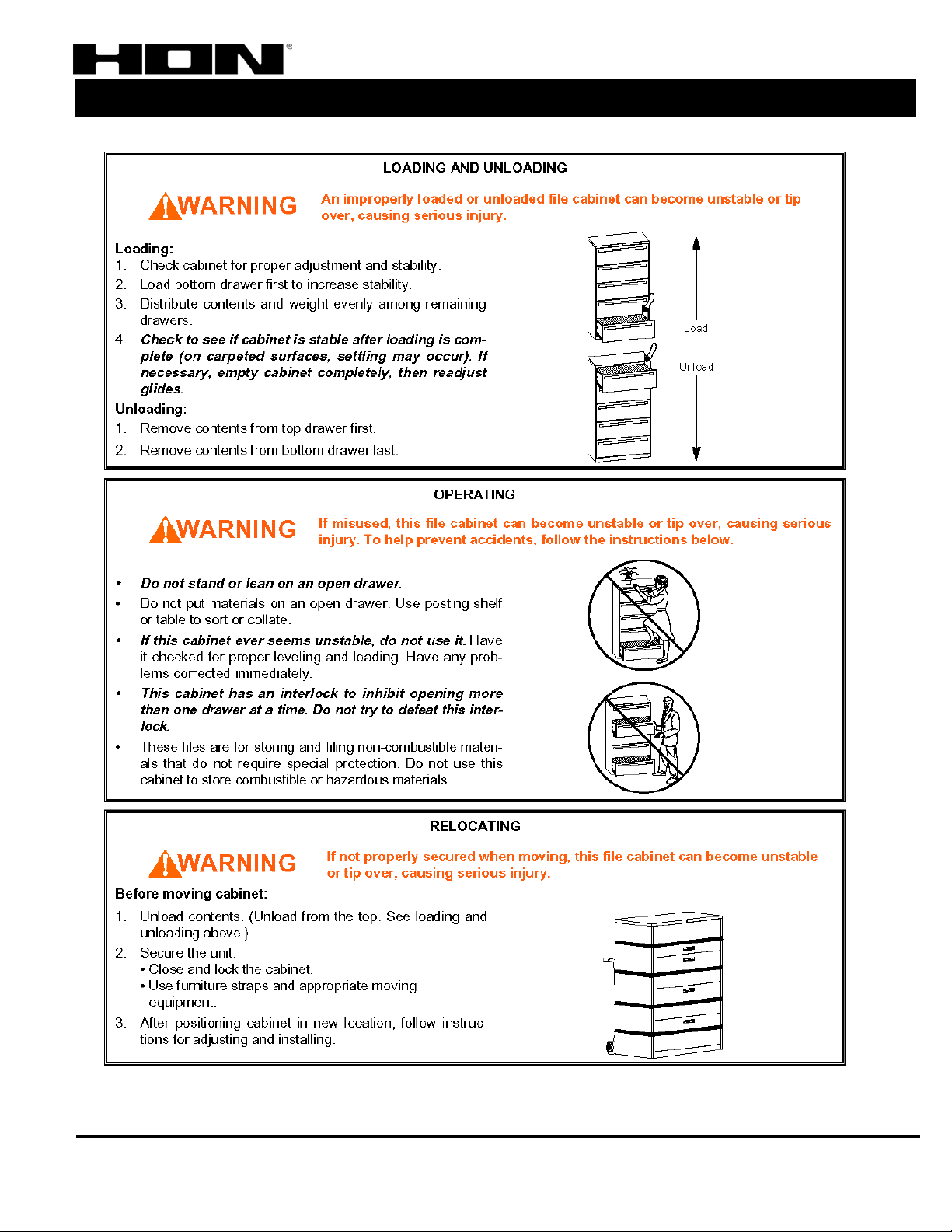
1. Remove all items from the drawer; this includes hangrail bars (the bars the
hanging folders rest on.) Remember, when unloading drawers, always start with
the top drawer and work your way from top to bottom. When reloading, start at the
bottom and work your way to the top.
2. Fully extend the drawer.
3. You need to push in on the exterior side of the drawer side with the palm of your
left hand. At the same time, pop up on the bottom of the drawer with your right
hand. You are pushing up at the same time you are popping the drawer up. (If hand
force is not enough, you may need to use a flat screwdriver to release the drawer
side from the suspension.)
4. Once you have released the first side, have your partner support the drawer side
that has been released while you repeat the process for the other side.
5. If you are moving the cabinet, please follow the loading/unloading instructions.
Remember to re-level the unit once it has been relocated.
Lateral Troubleshooting Guide
Created: 10/24/03 Lateral File- Troubleshooting Guide The HON Company
Rev 1.0 PAGE 4 OF 8 800.336.8398 / www.hon.com
Page 5
S
Files & Storage
QUESTIONS & ANSWER
Lateral Troubleshooting Guide
Created: 10/24/03 Lateral File- Troubleshooting Guide The HON Company
Rev 1.0 PAGE 5 OF 8 800.336.8398 / www.hon.com
Page 6
S
Files & Storage
QUESTIONS & ANSWER
Lateral Troubleshooting Guide
Created: 10/24/03 Lateral File- Troubleshooting Guide The HON Company
Rev 1.0 PAGE 6 OF 8 800.336.8398 / www.hon.com
Page 7
S
Files & Storage
QUESTIONS & ANSWER
Lateral Troubleshooting Guide
Created: 10/24/03 Lateral File- Troubleshooting Guide The HON Company
Rev 1.0 PAGE 7 OF 8 800.336.8398 / www.hon.com
Page 8
S
Files & Storage
QUESTIONS & ANSWER
Lateral Troubleshooting Guide
Created: 10/24/03 Lateral File- Troubleshooting Guide The HON Company
Rev 1.0 PAGE 8 OF 8 800.336.8398 / www.hon.com
 Loading...