

Page 1

Safety Precautions
Please read the safety precautions carefully to ensure the
correct use of your mobile phone.
Do not crash, throw, or puncture your mobile phone. Avoid the
falling, squeezing, and bending of your mobile phone.
Do not use your mobile phone in a moist environment, such as
the bathroom. Prevent your mobile phone from bei ng soa ked or
washed in liquid.
Do not switch on your mobile phone when it is prohibi ted to use
or when the phone may cause interference or danger.
For driving safety, only a passenger should operate the device
when the car is in motion and not the driver. Laws governing the
use of electronic devices by the driver may be applicable in your
country and/or jurisdiction.
Follow any rules or regulations in hospitals and health care
facilities. Switch off your mobile phone near medical apparatus.
Switch off your mobile phone in aircraft. The phone may cause
interference to control equipment of the aircraft.
Switch off your mobile phone near high-precision electronic
devices. The phone may affect the performance of these
devices.
Do not attempt to disassemble your mobile phone or its
accessories. Only qualified personnel are all owed to service or
repair the phone.
Do not place your mobile phone or its acc essori es i n contai ners
with a strong electromagnetic field.
Do not place magnetic storage media near your mobi le phone.
Radiation from the phone may era se the informati on stored on
them.
Keep the product away from direct sunlight. Do not put your
FR-1
Page 2

mobile phone in a high-temperature place or use it i n a place
with flammable gas such as a gas station.
Keep your mobile phone and its accessories away from children.
Do not allow children to use your mobile phone without
guidance.
Use only approved batteries and chargers to avoi d the risk of
explosion.
Observe any laws or regulations on the use of wireless devices.
Respect others’ privacy and legal rights when using your
wireless device.
Strictly follow the relevant instructions of this manual while using
the USB cable. Otherwise your mobil e phone or PC may be
damaged.
This manual is for reference only, please refer to the material
object as standard.
Use a dry soft cloth to clean the produ ct; do not use water,
alcohols, detergent or any chemicals.
Please backup any important data, repair or other causes may
result in data loss.
Do not disconnect the product during me mory formatting or file
transfer operations. Otherwise, it may cause program failure or
files damage.
Power supply & Charging
Only use the accessories supplied with the appli ance. The use
of incompatible accessories may have seri ous consequences
and permanently damage your phone.
Only use the adapter supplied with the product.
This adapter is intended for indoor use only.
The mains cable is used as a connecting device. The wall outlet
should remain readily accessible and access to the outlet
FR-2
Page 3
should not be blocked during use. To fully disconnect the
appliance from the mains, unplug the AC/DC cable from the wall
outlet. The wall outlet should be l ocated near t he appl i ance a nd
should remain readily accessible.
The ventilation should not be impeded by covering the
ventilation openings with items, such as newspapers,
tablecloths, curtains, etc. to avoid overheating and malfunction.
Maintain a clearance of at least 10cm around the appliance.
The apparatus should be used in a moderate climate.
The pho ne i s b ui lt wit h an i nte r nal rechargeable battery: do not
expose the product to excessive heat such as suns hine, fire or
the like.
Battery contains materials which are hazardous and harmful for
the environment.
Do not plug or unplug USB port with wet hands – risk of electric
shock.
Medical device
Implanted medical device such as pacemaker may be affected
by the product.
Avoid potential interference emitted from the product to the
implanted medical device, keeping the product at least 20 cm
away from the medical device.
Do not carry the product in the breast pocket.
Turn off the product immediately if you suspect any interference.
Hearing protection
This phone respects the current regulations
for limiting the maximum output volume.
Prolonged earphone listening at high
volume could lead to hearing damage!
FR-3
Page 4
Stop using the product or lower the volume i f you feel yo ur ears
ringing.
Do not turn up the volume too high, doctors warn against
prolonged exposure to high volume.
Excessive sound pressure from earphones and headphones
can cause hearing loss.
To prevent possible hearing damage, do not
listen at high volume levels for long periods.
Please only use Hisense headphones with
your phone.
Copyright
This product is for private use only. Copying CDs or
downloading music, video or picture files for sale or other
business purposes may be a violation of copyright law.
Copyrighted materials, works of art and/or presentations may
require authorization to be fully or partially copi ed or recorded.
Please be aware of all such applicable laws concerning the
recording and use of such contents for your country and
jurisdiction.
Maintainence
Take care of the screen. The screen is covered with a glass
layer that may be scratched or broken.
To clean fingerprints or dust from the screen, it is recommended
to use a soft, non-abrasive cloth such as a camera l e ns clot h to
clean the screen.
FR-4
Page 5
The package included
• Smartphone U688
• USB cable
• AC/DC Adaptor
• Battery
• Warranty Card
• Earphone
• Manual
Getting Started
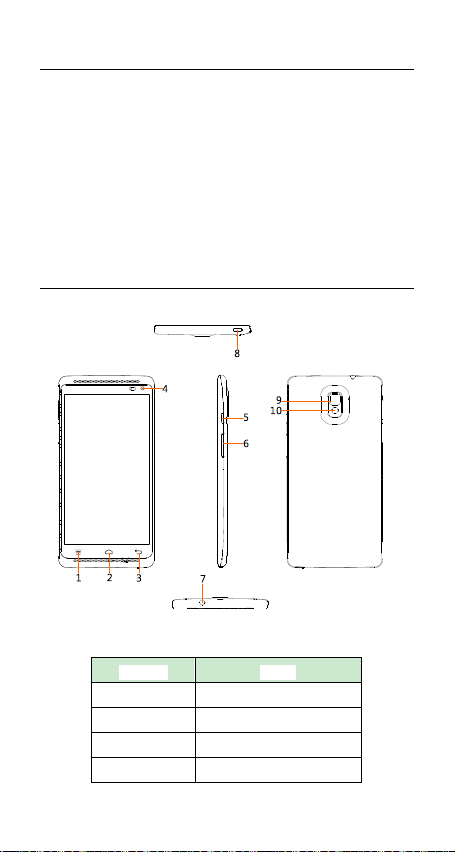
Number Name
1 Menu Key
2 Home key
3 Back Key
4 Front camera
FR-5
Page 6
5 Power key
6 Volume key
7 3.5mm Headset Jack
8 USB Connector
9 Rear camera
10 Flash
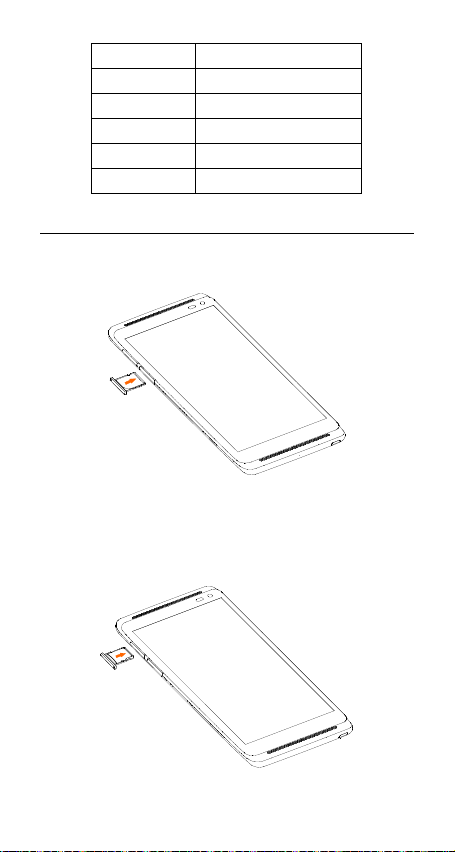
Inserting the SIM card, Battery and SD Card
1. Inset the sim card
2. Insert SD card
Y ou may also insert a micro SD card (up to 32GB) to expand the
storage memory of your phone.
FR-6
Page 7

Charging the battery
You must install and charge the battery to use your phone.
Connect data cable and charger, plug one end into your phone’s
USB port.
Plug the other end of the charger into the appropriate elect rical
outlet (100~240V AC).
For first time use, charge the battery for at l east 5 hours before
use. When your phone indicates that the battery is fully charged,
remove the charger.
Turn your device on/off
Turn on the phone: Press and hold Power key for more than
3 seconds to turn on your phone.
Unlock the screen: Press and hold the lock icon and slide the
unlock icon to unlock the screen.
FR-7
Page 8

Turn off the phone: Press and hold Power key to pop up
option menu, select “power off”.
FR-8
Page 9

Access the status bars
Hold the status bars with your finger, and drag it downwards to
view notification page.
From the notification page you can access the shortcut menu:
From the shortcut menu, you can quickly access to Bluetooh,
Wifi, Data connection, battery status, etc.
FR-9
Page 10

Access the application page
To access the application list, on the Home screen, touch .
From the application list, you can:
• Touch an icon to open an application.
• Touch the WIDGETS tab to switch to the widget list.
• Hold on the icon for 1 sec to drag the icon to home page.
Manage recently used applications
Press and hold the Home key for 2 seconds to view the recently
used applications.
FR-10
Page 11

T ap on a recently used application to launch it or tap and slide to
left or right to remove it from the list.
Answering a call
The phone icon will appear when there is an incoming call.
Press and hold the phone icon and sli de to gree n phone i con to
answer a call.
FR-11
Page 12

Making a call
From the home screen, tap phone icon.
Enter a phone number or name of a contact. Tap the contact
and then tap phone icon to place the call.
FR-12
Page 13

Adding contacts
From the Home screen, tap contact icon.
Click , you can add a new contact to the phone or card.
Changing Ringtone
1. From your Home screen Tap Settings.
2. Tap sound phone ringtone
3. Tap the desired ringtone
4. Tap ok
Sending Message
From the home screen, tap message icon.
Click CREATE MESSAGE to create a message. Input receiver’s
phone number and name to search in contacts.
Click “Type message” to edit the message.
When you are ready to send the message, click “ ”
Get Connected
1. From your Home screen Tap Setting.
2. Tap Wi-Fi and select ON.
3. Touch the desired network you wish to connect.
4. If the network is secured, enter the password.
FR-13
Page 14

Specification
OS Android OS V4.4
CPU quad-core 1.2GHz
Internal
Memory
FEATU
RES
BODY Dimensions 85.4x170.4x8.45
DISPL
AY
SOUN
D
DATA
External
Memory
2G Network GSM 850/1800/1900MHz
3G Network
SIM Card Single
Type TFT
Size 6 Inches
Resoution HD
Color 16.77 million color
Multitouch Yes
Alert Types Vibration, Ringtone
Loudspeaker Yes
3.5mm jack Yes
GPRS Yes
EDGE YES
Speed
WLAN WiFi 802.11b/g/n
Bluetooth V4.0
USB
8GB(ROM)+1GB(RAM)
MicroSD, Max. 32GB
WCDMA/HSPA+, 3GPP
WCDMA850/1900/2100
HSPA+ 21Mbps;
HSUPA 5.76Mbps
Micro USB v2.0, Support
charging and data transfer
FR-14
Page 15

Imagin
g
Multim
edia
Battery
Connec
tion
Main Camera 8.0Mpix AF
Second
Camera
Flash Yes
Video Support
Supported
memory card
Music support
Video
Streaming
MP3 Ringtone Yes
FM Radio Yes
Stero Speaker No
Type 3.8 V Lithium-ion
Capacity 3000mAh
Talk Time
Standby Time
Interface MICRO USB 2.0
Yes
MP4, 3G2, 3GP, MPEG4, H264,
H263
Max. 32GB T-Flash
MIDI, MP3, AAC, AAC+, OGG,
AMR-NB
Yes
WCDMA approximately 360
minutes
GSM approximately 500
minutes
WCDMA approximately 500
Hours
GSM approximately 600 Hours
FR-15
Page 16

FCC statements:
This device complies with part 15 of the FCC
rules. Operation is subject to the following two
conditions: (1) this device may not cause harmful
interference, and (2) this device must accept any
interference received, including interference that
may cause undesired operation.
NOTE: The manufacturer is not responsible for
any radio or TV interference caused by
unauthorized modifications or changes to this
equipment. Such modifications or changes could
void the user’s authority to operate the
equipment.
NOTE: This equipment has been tested and
found to comply with the limits for a Class B
digital device, pursuant to part 15 of the FCC
Rules. These limits are designed to provide
reasonable protection against harmful
interference in a residential installation. This
equipment generates uses and can radiate radio
frequency energy and, if not installed and used
in accordance with the instructions, may cause
harmful interference to radio communications.
However, there is no guarantee that interference
will not occur in a particular installation. If this
equipment does cause harmful interference to
radio or television reception, which can be
determined by turning the equipment off and on,
the user is encouraged to try to correct the
interference by one or more of the following
measures:
‐ Reorient or relocate the receiving antenna.
‐ Increase the separation between the
FR-16
Page 17

equipment and receiver.
‐Connect the equipment into an outlet on a
circuit different from that to which the receiver
is connected.
‐Consult the dealer or an experienced radio/TV
technician for help.
RF
The SAR limit of USA (FCC) is 1.6 W/kg averaged
over one gram of tissue. Device
types HS-U688 (FCC ID: 2ADOBU688) has also
been tested against this SAR limit.
The highest SAR value reported under this
standard during product certification for use
when properly worn on the body is 1.304 W/kg
and for head is 0.727 W/kg. Simultaneous RF
exposure is 1.540W/Kg.
. This device was tested for
typical body‐worn operations with the back of
the handset kept 10mm from the body.
To maintain compliance with FCC RF exposure
requirements, use accessories that
maintain a 10mm separation distance between
the user's body and the back of the
handset. The use of belt clips, holsters and
similar accessories should not contain
metallic components in its assembly. The use of
accessories that do not satisfy these
requirements may not comply with FCC RF
exposure requirements, and should be
avoided.
FR-17
 Loading...