

Page 1
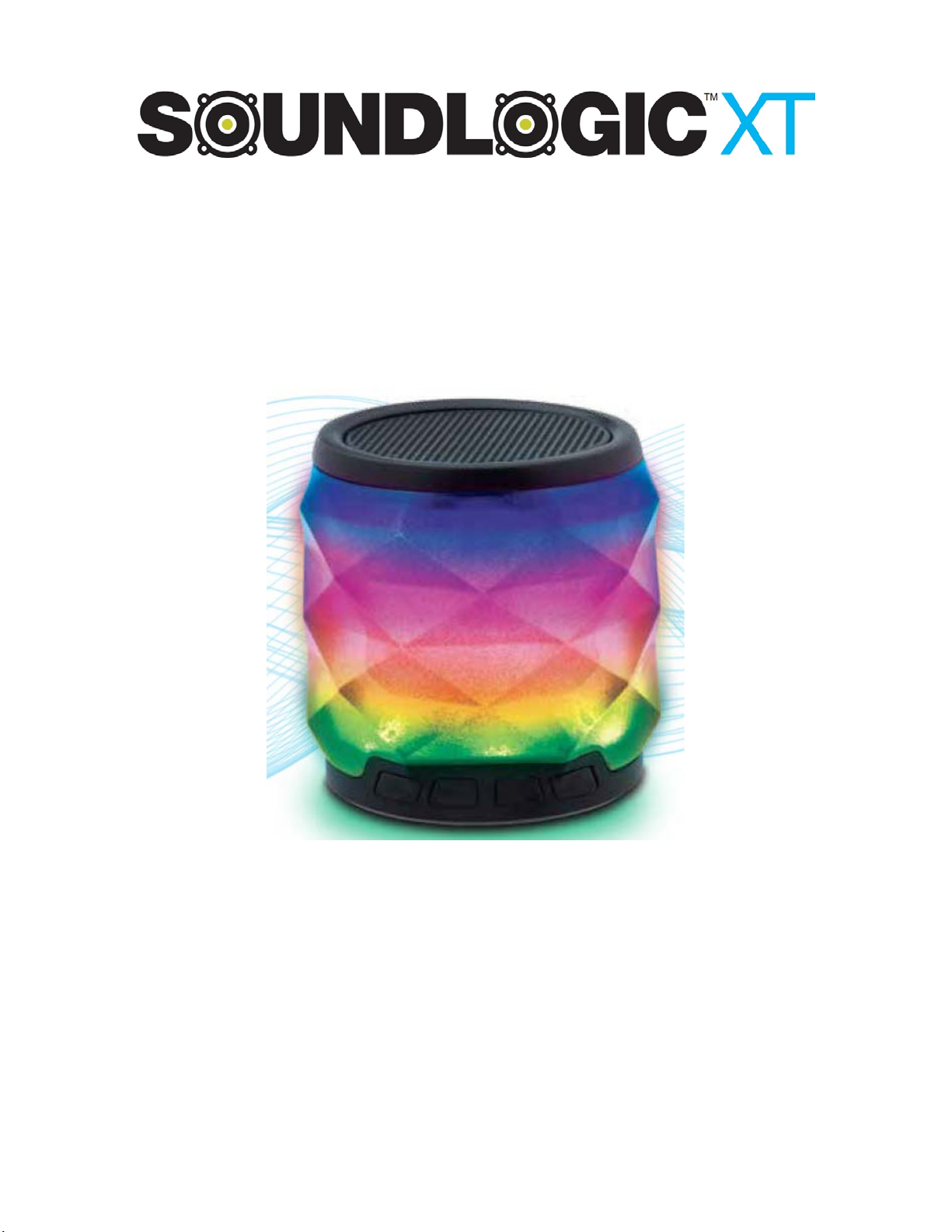
PRYSM
WIRELESS SPEAKER
PTCS-12/1107
INSTRUCTION MANUAL
PLEASE READ ALL INSTRUCTIONS CAREFULLY
AND RETAIN FOR FUTURE USE
1
Page 2

Getting Started
• Remove the speaker from the box.
• Please retain all packaging until you have checked and counted all the parts and the contents
against the parts list.
Package Contents
• Prysm light-up wireless speaker
• USB charging cable
• Auxiliary cable
• Instruction Manual
Key Features
Prysm light-up wireless speaker
•
Built-in Bluetooth - connect & stream wireless music anytime, anywhere
•
Great for use at home or work
•
Built-in rechargeable battery, micro SD card input & aux jack
•
USB recharge cable (included)
•
SAFETY INSTRUCTIONS
• Read these instructions.
• Keep these instructions.
• Heed all warnings.
• Follow all instructions.
• Do not use this apparatus near water.
• Clean only with dry cloth.
• Do not block any ventilation openings. Install in accordance with the manufacturer’s instructions.
• Do not install near any heat sources such as radiators, heat registers, stoves, or other apparatus
(including amplifiers) that produce heat.
• Protect the power cord from being walked on or pinched particularly at plugs, convenience
receptacles, and the point where they exit from the apparatus.
• Only use attachments/accessories specified by the manufacturer.
• Use only with the cart, stand, tripod, bracket, or table specified by the manufacturer, or sold
with the apparatus. When a cart is used, use caution when moving the cart/apparatus
combination to avoid injury from tip-over.
• Unplug this apparatus during lightning storms or when unused for long periods of time.
• Refer all servicing to qualified service personnel. Servicing is required when the apparatus has
been damaged in any way, such as power-supply cord or plug is damaged, liquid has been
spilled or objects have fallen into the apparatus, the apparatus has been exposed to rain or
moisture, does not operate normally, or has been dropped.
2
Page 3
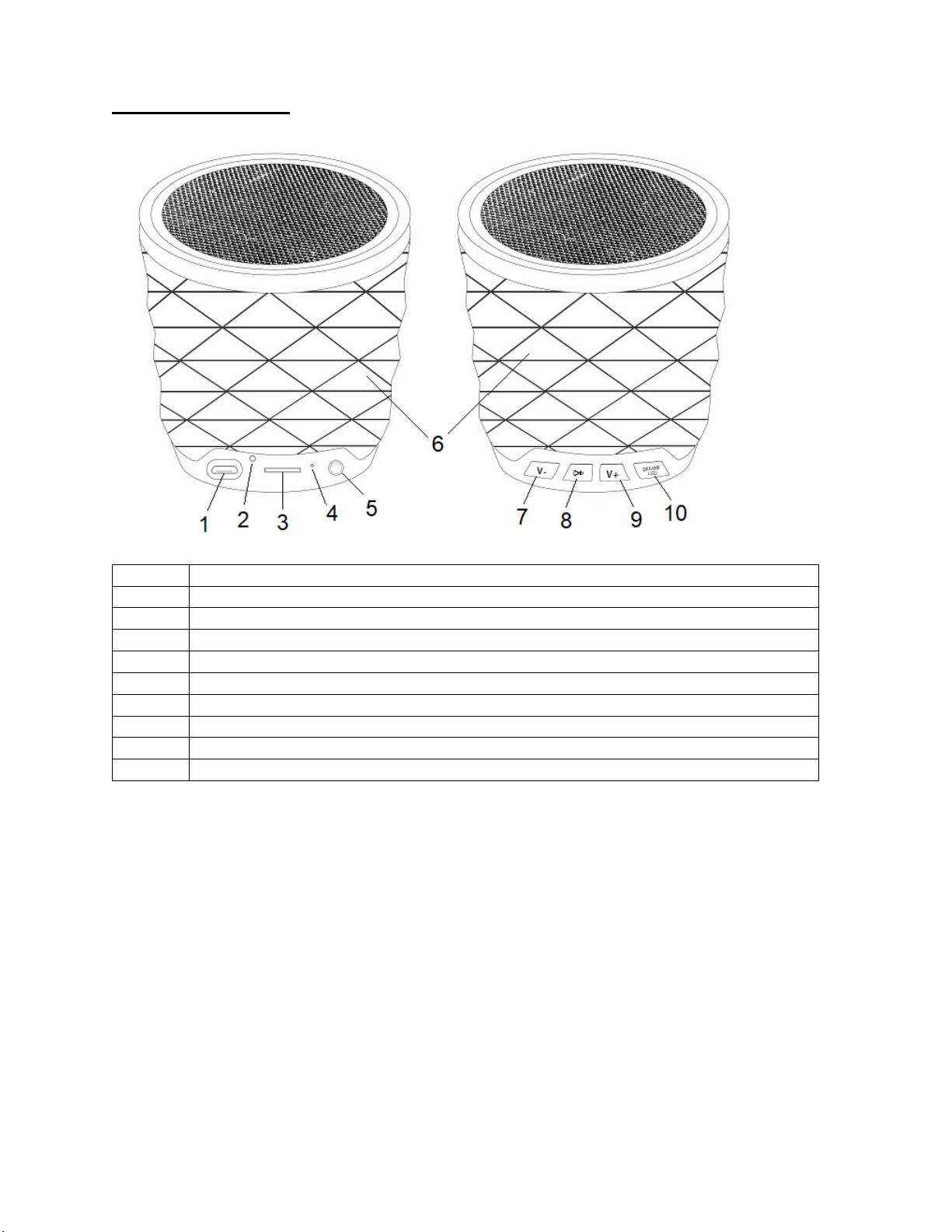
Description of Parts
1
Charging Port
2
Reset
3
Micro SD (TF) Card Slot
4
LED Indicator
5
Auxiliary Port
6
Multi-colored LED Lights
7
Skip Backward/Volume Decrease Button
8
Play/Pause Button
9
Skip Forward/Volume Increase Button
10
ON/OFF/LED Light Button
INSTRUCTIONS FOR USE
Charging the speaker
The speaker has built-in rechargeable battery. When the battery is drained out, speaker would turn OFF
automatically. Please recharge the battery every time it drains out.
Plug the Micro USB end of the included USB charging cable into the charging port. Plug the other end
into a USB port on your computer or other devices made for USB charging. Red LED Light illuminates
indicating that the device is being charged.
It takes 2 - 3 hours to fully charge the speaker. Once the speaker is fully charged, LED Light would turn
OFF.
It is recommended to fully charge the speaker before its first use.
3
Page 4
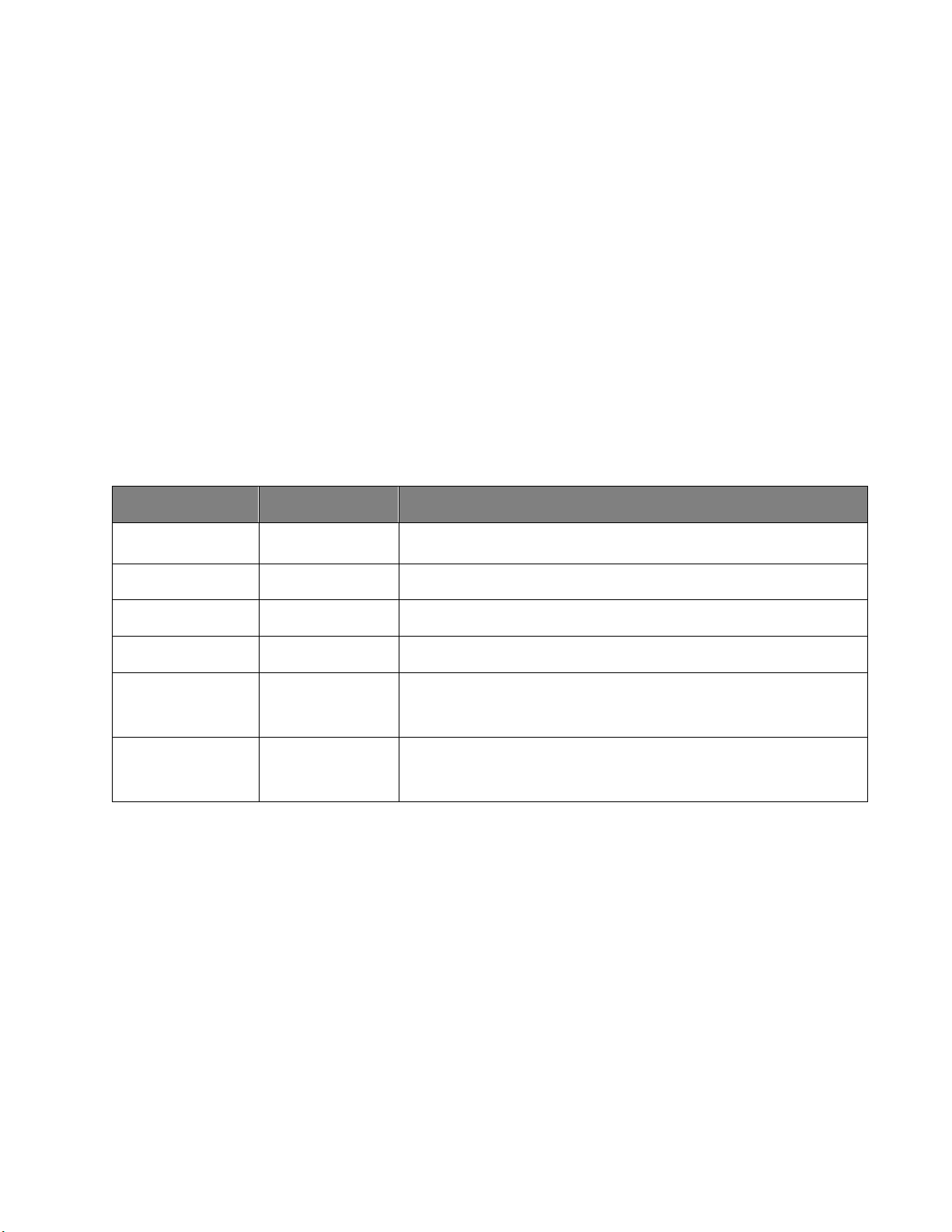
Turning ON/OFF the Speaker –
Increase Volume
Playing music
Press and hold the + button to increase the volume
Decrease Volume
Playing music
Press and hold the - button to decrease the volume
Pause
Playing music
Short press the Play/Pause button will pause the music
Play
Pausing
Short press the Play/Pause button will resume the music
Previous track
Playing music
Short press the Skip Backward button will return you to the
Next track
Playing music
Short press the Skip Forward button will take you to the next
Before Turning ON the speaker, please ensure that it is fully charged.
Press and hold the ON/OFF button to for 2-3 seconds to turn on/off the unit.
Connect using Bluetooth Technology
Press and hold the ON/OFF button to for 2-3 seconds to turn on. You would hear an indication
tone and Blue LED flashes rapidly, indicating that you are now in Bluetooth Pairing Mode.
Activate the Bluetooth function on your source device (Mobile Phone or Tablet). Please refer to
manufacturer’s instructions for instructions on enabling Bluetooth on your device.
Search for available Bluetooth devices and you would find “SL PRYSM” – Pair it with this device.
If required, enter the password “0000” to pair with the device.
Once paired successfully, you will hear another indication tone and Blue LED turns off.
You can now stream wireless music on your speaker through your source device.
Listening to Music Wirelessly
Please ensure that your device (iPhone, Tablet or Other Smart Phone) is paired with the
Bluetooth Speaker to stream music wirelessly. Once it is paired, play music from your device.
Function Operation Button
previous track
track
(Note: The above functions only can be used in Bluetooth mode only. An indication tone will alert you
when the volume is adjusted to the minimum or maximum level. In Aux mode, besides the volume
increase/decrease, you will need to control through your source device.)
Stream music from Micro SD (TF) Card –
Turn ON the speaker.
Insert the Micro SD (TF) Card preloaded with songs, into the Micro SD (TF) Card Slot of the
speaker. Speaker would automatically start playing songs from the Micro SD (TF) Card.
Note: Micro SD (TF) Card is not included.
To Skip Track Forward – Short press the Skip Forward button.
To Skip Track Backwards – Short press the Skip Backward button.
To Pause the Track – Short press the Play/Pause button.
To Play the Track – Short press the Play/Pause button.
Long press + to increase the volume or - to decrease the volume.
4
Page 5
Play music through “Auxiliary” mode
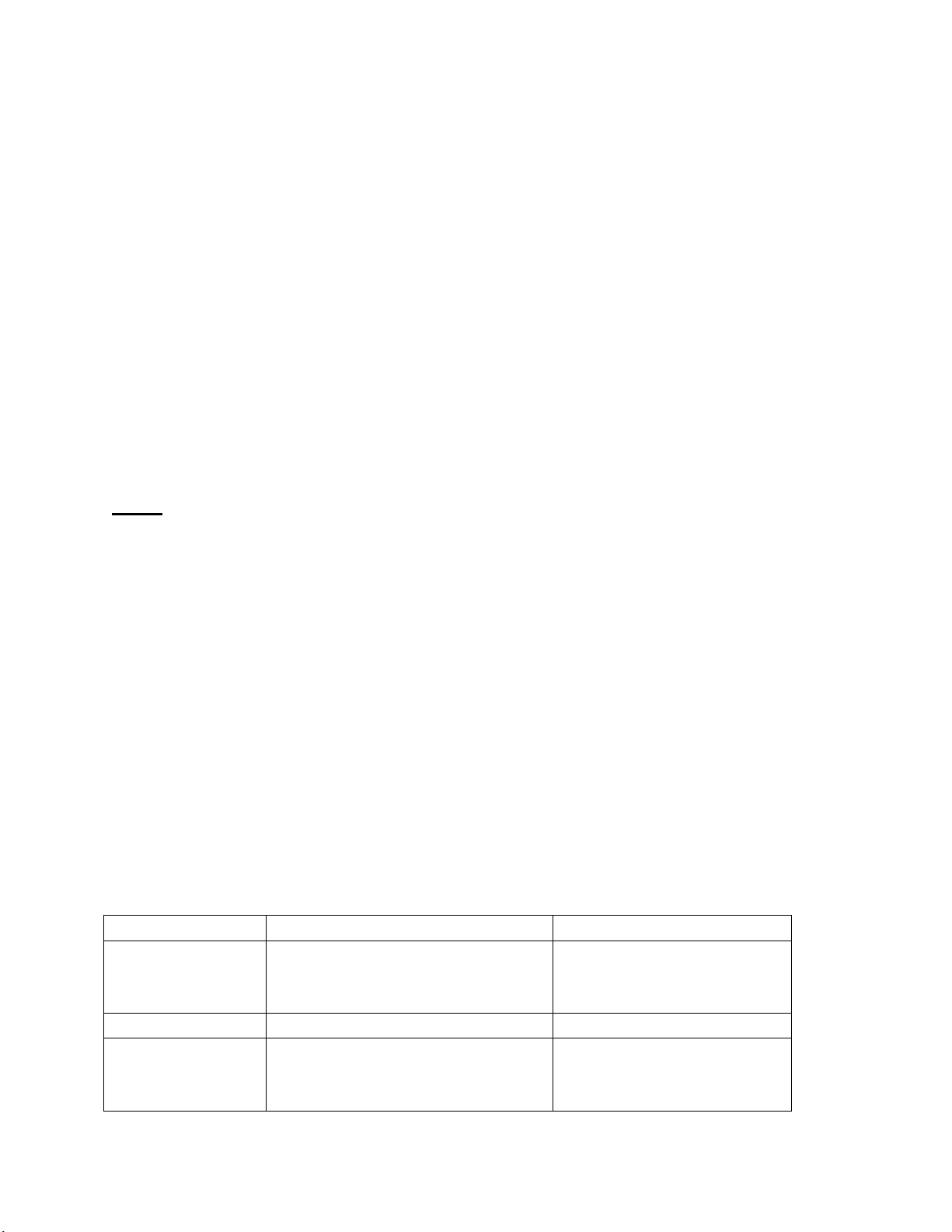
Problem
Possible Cause
Solution
Low sound level
Source (Tablet, Mobile Phone, Laptop,
Adjust source volume.
Sound distorted
Battery nearly dead
Charge Battery.
No sound at all.
Source (Tablet, Mobile Phone,
Turn the source on.
Turn ON the speaker.
Insert one end of the Auxiliary cable (included) into the Auxiliary port, and the other end to the
audio device (such as phone / MP3 Player / computer / tablet / …..etc.).
Select your favourite song at the source device to play.
Long press + to increase the volume or - to decrease the volume.
Note: Play, Pause, Skip Forward, Skip Backward etc can only be controlled through the source devices,
while playing music in Auxiliary mode.
Multi-colored LED Lights
Turn ON the speaker.
Short press the LED Light Button each time to change the LED Light color pattern:
Color changing -> Red -> Green -> Blue -> Cyan -> Purple -> Pale Blue -> Light Yellow White ->
Flash color changing -> off (but it is Dynamic LED Light with playing music) -> off
Short press the button twice to warm light, and then short press once to increase the light
brightness (low -> medium -> high -> off)
Tips!!
When the speaker is not in use, turn it OFF in order to save the battery power.
Specifications –
Bluetooth® Version: 4.2
Wireless Streaming Range Distance: 26-33 Feet
Speaker output: 3W
Size: 3-1/8” (L) x 3-1/8” (D) x 3-1/8” (H)
Weight: 6.8 Oz approx.
Power Input: DC 5V
Charging Time: about 2 - 3 hours
Play time (with either LED Light pattern on): up to 1 hour (max. volume)
Built-In Rechargeable Battery: 3.7V / 500mAh
Micro SD (TF) Card/USB Drive: Supports up to 32GB
(Note: Battery life & charging time may vary based on usage, types of devices connected & wireless
distance.)
Troubleshooting
etc.) volume too low.
Battery dead
Charge Battery.
Laptop.) turned off.
Speaker turned off.
Turn the speaker on.
5
Page 6

Volume turned down source.
Media paused on source.
Adjust volume source.
Play media from source.
Care and maintenance
Read the following recommendations before using the Bluetooth Speaker. Following these you will be
able to enjoy the product for many years.
• Do not expose the unit to liquid, moisture or humidity to avoid the product’s internal circuit being
affected.
• Don’t use abrasive cleaning solvents to clean the unit.
• Do not expose the unit to extremely high or low temperature as this will shorten the life of
electronic devices, destroy the battery or distort certain plastic parts.
• Don’t dispose of the unit in fire as it will result in an explosion.
• Don’t expose the unit to contact with sharp objects as this will cause scratches and damage.
• Don’t let the unit fall down onto the floor. The internal circuit might get damaged.
• Don’t attempt to disassemble the unit as it may get damaged if you are not professional.
FCC Instructions
Changes or modifications not expressly approved by the party responsible for compliance could void the
user’s authority to operate the product.
NOTE: This product has been tested and found to comply with the limits for a Class B digital device,
pursuant to Part 15 of the FCC Rules. These limits are designed to provide reasonable protection against
harmful interference in a residential installation. This product generates, uses and can radiate radio
frequency energy and, if not installed and used in accordance with the instructions, may cause harmful
interference to radio communications. However, there is no guarantee that interference will not occur
in a particular installation. If the product does cause harmful interference to radio or television
reception, which can be determined by turning the equipment off and on, the user is encouraged to try
to correct the interference by one or more of the following measures :
- Reorient or relocate the receiving antenna.
- Increase the separation between the product and receiver.
- Connect the product into an outlet on a circuit different from that to which the receiver is connected.
- Consult the dealer or an experienced radio/TV technician for help.
This device complies with part 15 of the FCC Rules. Operation is subject to the following two conditions:
(1) This device may not cause harmful interference, and (2) this device must accept any interference
received, including interference that may cause undesired operation.
Limited Warranty
This manufacturer's product warranty extends to the original consumer purchaser of the product. Neither the
retailer nor any other company involved in the sale or promotion of this product is a co-warrantor of this
manufacturer warranty.
WARRANTY DURATION: All materials and workmanship are warranted to the original consumer purchaser
for a period of ninety (90) days from the original purchase date.
WARRANTY COVERAGE: This product is warranted against defective materials or workmanship. This warranty
is void if the product has been damaged by accident, in shipment, unreasonable use, misuse, neglect,
improper service, commercial use, repairs by unauthorized personnel or other causes not arising out of
6
Page 7

defects in materials or workmanship. This warranty is effective only if the product is purchased and
operated in USA, and does not extend to any units which have been used in violation of written instructions
furnished by manufacturer or to units which have been altered or modified or, to damaged products or parts
thereof which have had the serial number removed, altered, defaced or rendered illegible.
WARRANTY DISCLAIMERS: This warranty is in lieu of all warranties expressed or implied and no representative or
person is authorized to assume for manufacturer any other liability in connection with the sale of our products.
There shall be no claims for defects or failure under any theory of tort, contractor commercial law including but
not limited to, negligence, gross negligence, strict liability, breach of warranty and breach of contract. Under no
circumstances will Manufacturer’s / Distributor’s maximum liability exceed the retail value of the product.
WARRANTY PERFORMANCE: During the above 90 day warranty period, a product with a defect will be either
repaired or replaced with a reconditioned comparable model (at manufacturer's option). The repaired or
replacement product will be in warranty for the balance of the 90 day warranty period and an additional
one-month period. No charge will be applicable for such repair or replacement.
SERVICE AND REPAIR: If service is required for this product, you should first contact Midwest Trading Group
Customer Service at
EST.
NOTE: Manufacturer cannot assume responsibility for loss or damage during incoming shipment. As a
precautionary measure, carefully package the product for shipment, and insure it with the carrier. Be sure to
enclose the following details with the product: your full name, return address and daytime phone number, a
note describing the problem you experienced, a copy of your sales receipt or other proof of purchase to
determine warranty status. C.O.D. shipments cannot be accepted.
[email protected] or by calling 1 (866) 815-4714, Monday to Friday 10am to 6pm
7
 Loading...