

Page 1
Visit http://www.balances.com for your next Healthometer Scale
http://scaleman.com/health-o-meter.html offers the complete line of Healthometer Medical Scales
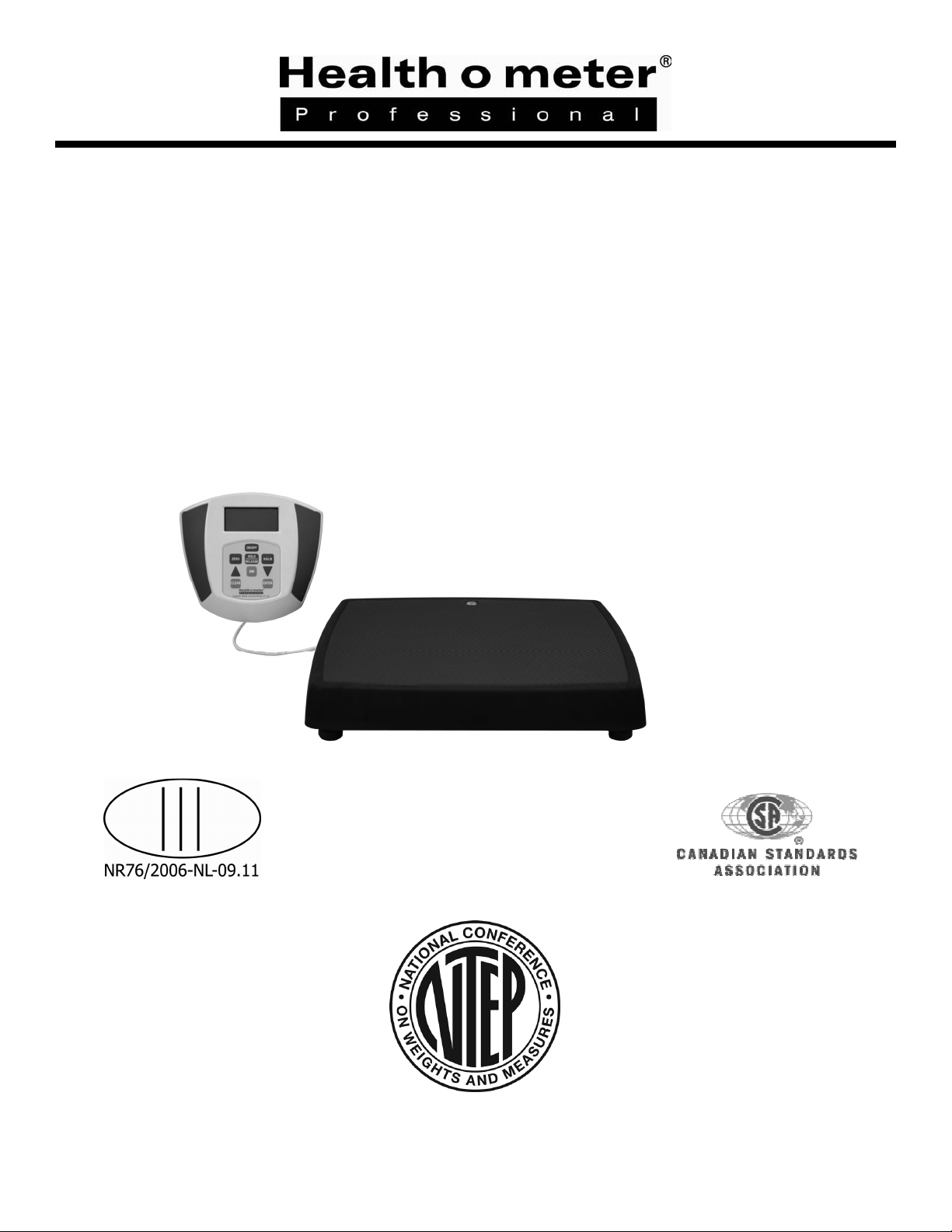
753KL
DIGITAL LEGAL FOR TRADE SCALE
WITH REMOTE DISPLAY
BALANZA ELECTRONICA PROFESIONAL
CON LECTOR REMOTO
BALANCE ELECTRONIQUE PROFESSIONNEL
AVEC AFFICHAGE À DISTANCE
USER INSTRUCTIONS
INSTRUCCIÓNES DE USO
MODE D'EMPLOI
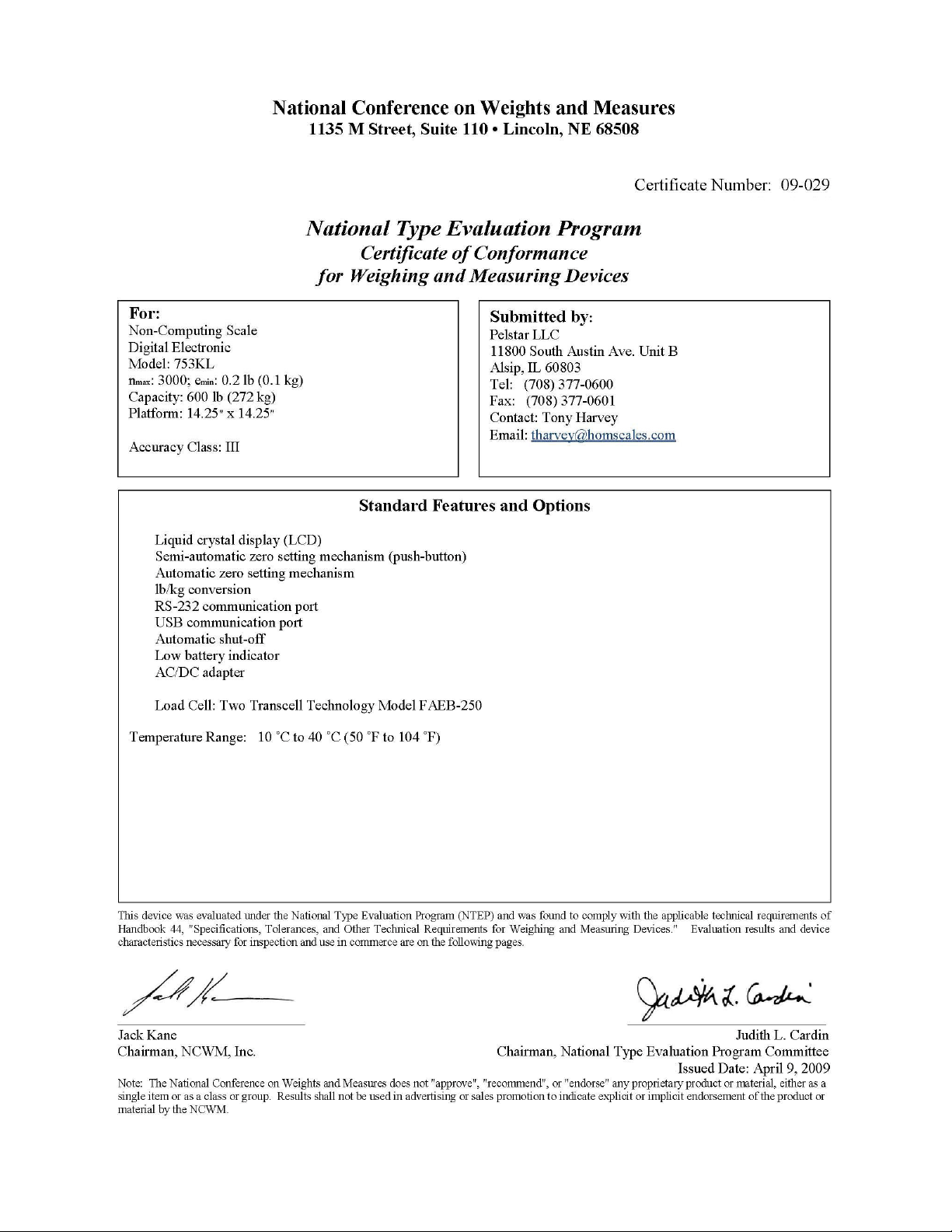
NTEP CC 09-029
Rev. 20100618
3
Page 2

753KL
Visit http://www.balances.com for your next Healthometer Scale
http://scaleman.com/health-o-meter.html offers the complete line of Healthometer Medical Scales
Thank you for your purchase of this Health o meter® Professional product.
Please read this manual carefully and keep it for easy reference or training.
Gracias por su compra de éste producto Health o meter® Profesional. Lea éstas instrucciónes
con cuidado, y mantenga el manual disponible para futuras consultas y también para su uso a la
hora de orientar o formar al nuevo personal que la utilizará.
Merci d’avoir acheté ce produit Health o meter® Professionnelle. Veuillez lire attentivement
ce manuel et le garder à portée de main pour pouvoir le consulter à tout moment.
TABLE OF CONTENTS
ENGLISH.
ESPAÑOL........................................................................................................................... 11
FRANÇAIS ......................................................................................................................... 18
CAUTION AND WARNING .................................................................................................2
SPECIFICATIONS FOR THIS SCALE................................................................................ 2
QUICK START INSTRUCTIONS ........................................................................................3
ASSEMBLY INSTRUCTIONS ............................................................................................. 4
SET UP INFORMATION / BATTERIES............................................................................... 4
MAINTENANCE..................................................................................................................5
TROUBLESHOOTING........................................................................................................5
CALIBRATION.................................................................................................................... 6
EXPLODED VIEW OF SCALE............................................................................................ 7
PARTS LIST FOR MAINTENANCE .................................................................................... 8
NTEP CERTIFICATE OF CONFORMANCE ....................................................................... 9
WARRANTY ....................................................................................................................... 10
........................................................................................................................... 2
PLEASE REGISTER YOUR SCALE FOR WARRANTY COVERAGE AT:
http://www.homscales.com/customers/registration.aspx
POR FAVOR REGISTRE SU BÁLANZA PARA OBTENER COBERTURA DE LA GARANTIA EN:
http://www.homscales.com/customers/registration.aspx
MERCI D'ENREGISTRER LA BALANCE AFIN DE LA GARANTIE SUR LE:
http://www.homscales.com/customers/registration.aspx
- 1 -
Page 3
753KL
Visit http://www.balances.com for your next Healthometer Scale
http://scaleman.com/health-o-meter.html offers the complete line of Healthometer Medical Scales
AUTION AND WARNING
C
To prevent injury and damage to your scale, please follow these instructions very carefully:
• Do not transport the scale while the platform is loaded.
• For accurate weighing the scale must be placed on a flat, stable surface.
• For accurate weighing, verify proper operation according to the procedure described in this
manual before each use.
• Do not use in the presence of flammable materials.
• Operating at other voltages and frequencies than specified could damage the equipment.
• If the “LOW BAT” indicator activates, for accurate weighing, replace the batteries or connect
the scale to an AC power source as soon as possible.
SPECIFICATIONS
GENERAL
The Health o meter® Professional Digital NTEP Certified Scale with Remote Display, Model 753KL, uses
sophisticated microprocessor technology. This scale is a precision weighing instrument that has undergone
independent quality testing and is Certified by NTEP to applicable requirements of NIST Handbook 44, for
commercial or professional use.
Your precision scale is designed to provide accurate, reliable and repeatable measurements, can transmit
information to a computer, network or printer and offers features that make the weighing process simple, fast
and convenient.
The 753KL scale is set up to determine the weight of a stationary person, standing still on the platform.
Weight can be displayed in pounds or in kilograms.
The unit can be operated using its AC adaptor, or by 6 standard C-cell batteries (not included).
SCALE SPECIFICATIONS
Capacity and resolution
Power Requirements
Environmental
Platform Dimensions
Scale Dimensions
600lb x 0.2lb / 272kg x 0.1kg
Adapter 120V AC – 6V DC – 300m-A or 6 C-cell 1.5V batteries
Operating temperatures: 10ºC to 40ºC (50ºF to 104ºF)
Storage temperatures: - 1ºC to +52ºC (30ºF to 125ºF)
Humidity: 85% RH (Storage Humidity: 85% H)
14 ¼” x 14 ¼”
753KL – Two Pieces
14 ¼” x 14 ¼”
- 2 -
3
Page 4
753KL
Visit http://www.balances.com for your next Healthometer Scale
http://scaleman.com/health-o-meter.html offers the complete line of Healthometer Medical Scales
QUICK START INSTRUCTIONS
Certification of this Scale
This is a NTEP Certified scale, certified to applicable requirements of NIST Handbook 44. State
weights and measures jurisdictions have adopted Handbook 44. This scale meets all
requirements of NIST Handbook 44 and is deemed to be suitable for "legal for trade" or
commercial applications. For professional inspection, please contact your distributor for local
information.
Obtaining Weight
1. Press the ON/OFF button to turn the scale on.
2. Wait until “0.0” and “ZERO” appear on the left side of the remote display.
3. Ask the person to be weighed to step onto the scale and to stand still—the person’s
weight will be displayed.
Notes: The scale will always default to the setting last used (lb or kg), when it is turned on.
Weight of the person is displayed in real time, meaning that the weight shown on the display may
fluctuate if that person is not standing still while on the scale.
Obtaining a Body Mass Index (BMI) Reading
1. Obtain a weight, as explained above.
2. Press the BMI button on the keypad—the scale will prompt you to enter the person’s height.
Use the arrow keys to select the correct height (default starts at 5 feet, 6 inches / 168cm).
3. Once the correct height is selected, press the ENTER button—the display will show the
person’s BMI.
Note: Body Mass Index is another name for Quetelet Index, a formula that is a convenient and
reliable indicator of obesity.
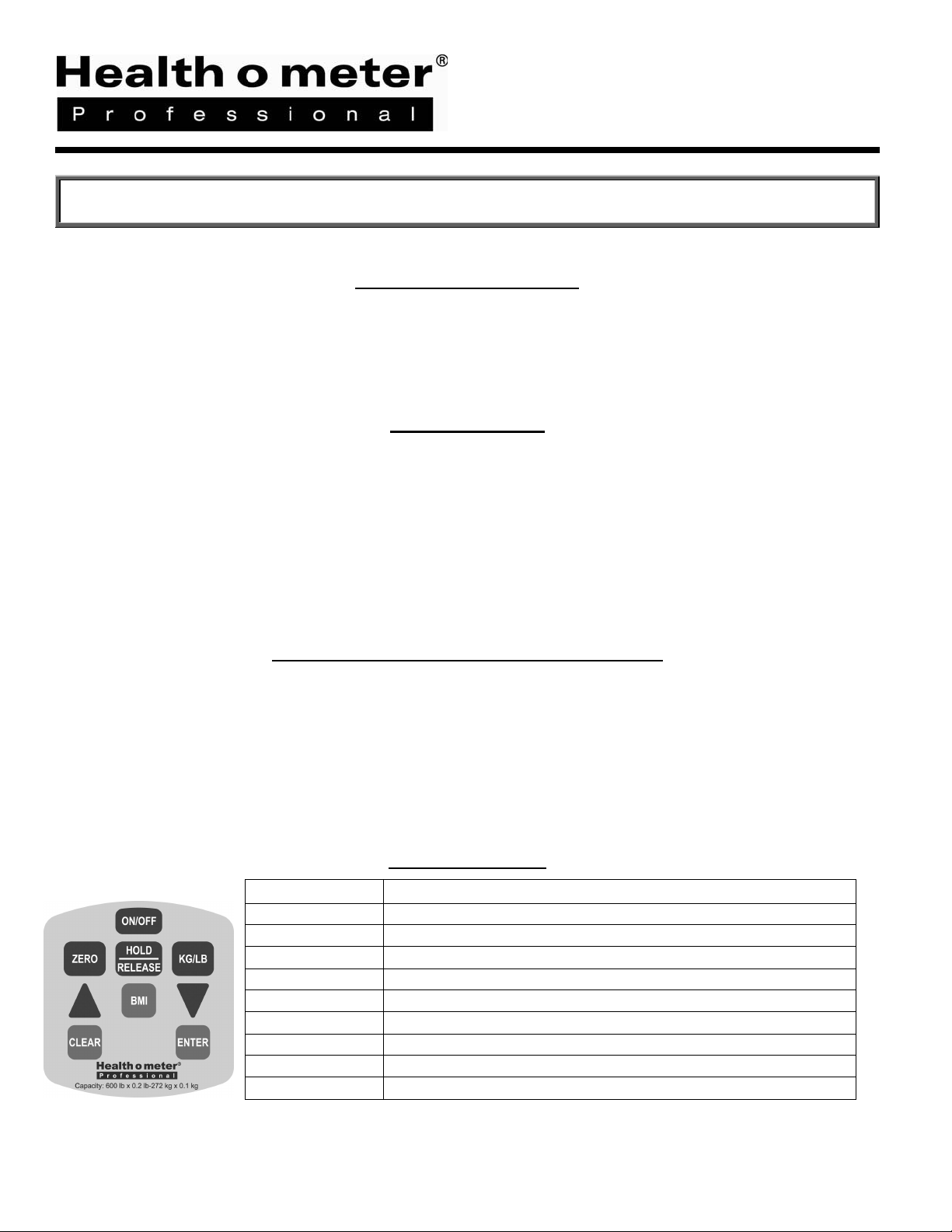
Using the Keypad
KEY
ON/OFF
ZERO
HOLD/RELEASE
KG/LB
▲
BMI
▼
CLEAR
ENTER
FUNCTION
Turns scale ON and OFF.
Zeros the scale prior to weighing.
Does not function on this NTEP (legal for trade) scale.
Toggles between kilograms or pounds.
Scrolling method for entering height
Prompts entry of height to calculate the Body Mass Index (BMI).
Scrolling method for entering height
Functions as menu escape in BMI mode
Used to accept height in BMI mode
- 3 -
3
Page 5
Visit http://www.balances.com for your next Healthometer Scale
http://scaleman.com/health-o-meter.html offers the complete line of Healthometer Medical Scales
ASSEMBLY INSTRUCTIONS
Remove the display head and base from their respective cartons and packaging.
Model 753KL requires no assembly.
SET UP
Remove the protective film from the display window on the display head, then place the display module on a
table, desk or other flat surface. Place the base on the floor nearby.
Make certain that the base is on a stable, flat surface and that the sides of the base are clear of any
obstacles.
Preparing the Scale for Use
1. Place batteries in the battery holder (see “Replacing Batteries” information, below).
2. For AC operation – plug adapter into base of scale and into power source, or use the DC IN plug on
the back of the display module.
3. Turn scale on by pressing the ON/OFF button. The entire LCD display will light up, followed by the
version number, and then 0.0.
NOTE: If the set up procedure failed, refer to the troubleshooting instructions. If the
problem is not corrected, call Health o meter® Professional technical support at 1-800638-3722.
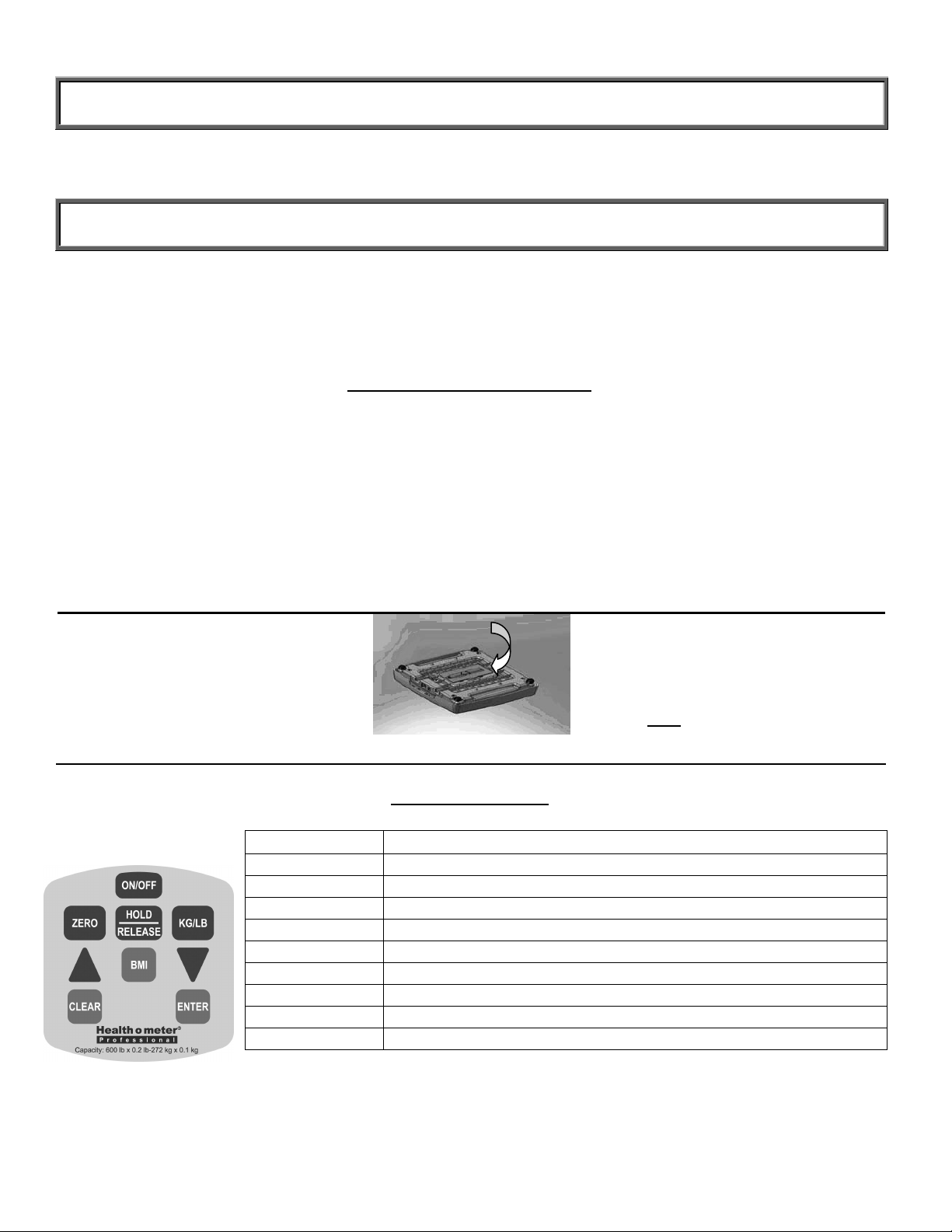
1. Turn the scale base upside
down. The battery holder is
located in the center of the
bottom of the base.
2. Slide the battery cover in the
direction of the “open” arrow.
Figure 1 – Replacing Batteries
3. Place the batteries into the
battery holder.
4. Replace the battery cover.
Note: We recommend
Energizer® e2™ batteries.
Using the Keypad
KEY
ON/OFF
ZERO
HOLD/RELEASE
KG/LB
▲
BMI
▼
CLEAR
ENTER
FUNCTION
Turns scale ON and OFF.
Zeros the scale prior to weighing.
Does not function on this NTEP (legal for trade) scale.
Toggles between kilograms or pounds.
Scrolling method for entering height
Prompts entry of height to calculate the Body Mass Index (BMI).
Scrolling method for entering height
Functions as menu escape in BMI mode
Used to accept height in BMI mode
- 4 -
3
Page 6
Visit http://www.balances.com for your next Healthometer Scale
http://scaleman.com/health-o-meter.html offers the complete line of Healthometer Medical Scales
MAINTENANCE
GENERAL
This section provides instructions for maintenance and cleaning for the 753KL scale.
Maintenance operations other than those described in this section should be performed by
qualified service personnel.
MAINTENANCE
Before first use and after periods of non-use, check the scale for proper operation and function.
If the scale does not operate correctly, refer to qualified service personnel.
1. Check overall appearance of the total scale for any obvious damage, abuse, etc.
2. Inspect condition of AC adapter cord and prongs, replace if needed.
CLEANING
Proper care and cleaning is essential to ensure a long life of accurate and effective operation.
Disconnect the scale from the AC power source.
1. Clean all external surfaces with a clean damp cloth or tissue.
Mild antibacterial soap and water solution may be used. Dry with a clean soft cloth.
2. Do not immerse the scale into cleaning or other liquid solution.
3. Do not use Isopropyl Alcohol, other solutions or sanitizing wipes to clean the display surface.
4. Do not
use abrasive cleaners.
TROUBLESHOOTING
Refer to the following instructions to check and correct any failure before contacting service personnel.
SYMPTOM POSSIBLE CAUSE CORRECTIVE ACTION
Scale does not turn on 1. Dead Battery
2. Faulty electrical outlet
3. Bad Power Supply (Check
LED light at back of display
module to determine if
adapter cord is working)
Questionable weight or
the scale does not zero
The display shows
“OVER”
The display shows “LO
Bat” message
1. External object interfering
with the scale
2. The display did not show
‘000.00 before weighing
3. Scale is not place on a level
floor
4. Scale is out of calibration
The load on the scale exceeds the
capacity (600lbs)
The batteries are dead Replace batteries according to instructions
- 5 -
3
1. Replace batteries
2. Use a different outlet
3. Replace adapter
1. Remove interfering object from
the scale
2. Ask the patient to get off the
scale, zero the scale and begin
weighing process again
3. Place the scale on a level floor
and begin weighing process again
4. Check weight with known weight
value
Remove the excess weight and use the
scale according to its limits
Page 7
Visit http://www.balances.com for your next Healthometer Scale
http://scaleman.com/health-o-meter.html offers the complete line of Healthometer Medical Scales
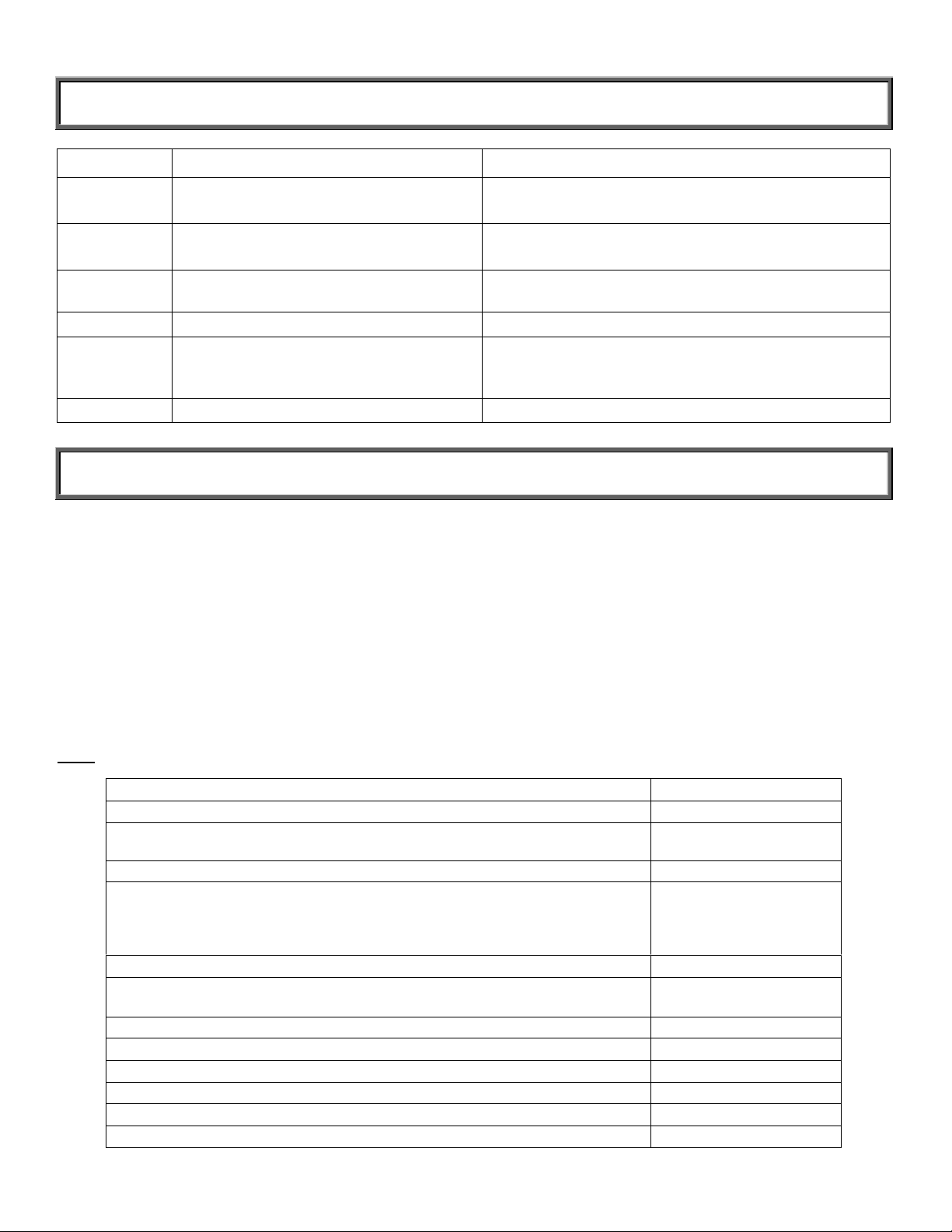
TROUBLESHOOTING (CONTINUED)
ERROR ID DEFINITION CHECK/REPLACE
Err 1 Mathematical mistake; division by zero.
Cannot calculate calibration factor.
Err 2 Weight loaded too low.
Cannot calibrate.
Err 3 Unstable weight. Cannot calibrate Check the load cells mechanical surroundings and see
Err 5 Calibration disabled Toggle the calibration switch to enable
Err 6 High saturation state (high A/D) The load cell is not connected correctly. Check the
Err 7 Low saturation state (low A/D) See Err 6
The calibration is performed with no calibration weight
While in calibration procedure add more weight in load
mode
nothing touches them and the cables are well connected
connection, cables, and mechanical connection. If the
problem persists, replace the set of load cells
CALIBRATION OF THE 753KL
This scale has been factory calibrated and does not require calibration prior to use, but
requires official inspection prior to use as a legal for trade scale.
On the back of the display module, to the left of the DC IN power jack, is a small access cover plate.
The cover plate is held on by a hex sealing screw. Removing the cover plate exposes the Calibration
Enable / Disable or push off / push on switch. The scale is shipped with the switch in the calibration
disable position (push on).
The calibration procedure may be performed using a known weight in either pounds or kilograms. The
default is in pounds, but calibration can be done according to the unit of measure used upon entering into
the calibration path. The following instructions assume the scale is set to measure lbs. If you prefer to
calibrate in kilograms, please call Health o meter® Professional Technical Support at 800-638-3722.
Note
: Calibration weight must be no less than 60 lb (27kg) and no more than 300 lb (150 kg).
ACTION DISPLAY SHOWS
Enable scale calibration by toggling the Calibration push switch off.
While display module is turned on and “START’ is displayed on the LCD (for
3 seconds); Press ZERO-kg/lb-kg/lb-ZERO
Press ENTER “Load/300.0”
Press ENTER to calibrate with 300lb. Press BMI to change the weight and
then the arrows to change the flashing digit, BMI to move to the next digit,
until you reach the required weight (no less than 60lb /27kg and no more
than 300lb / 150kg)
Clear the platform and press ENTER “-----------”
Wait without touching or shaking the scale until the zero calibration process
is finished
Load the platform with the required weight and press ENTER “-----------”
Press ENTER “DONE”/“CLEAR”
Remove weight from the platform “START”
Wait until the scale resumes normal operation “0.0”
Disable scale calibration by toggling the Calibration push switch on.
Replace the access cover plate.
“CAL”
“CLEAR”
“Put XXX.X”
3
Page 8
Visit http://www.balances.com for your next Healthometer Scale
http://scaleman.com/health-o-meter.html offers the complete line of Healthometer Medical Scales
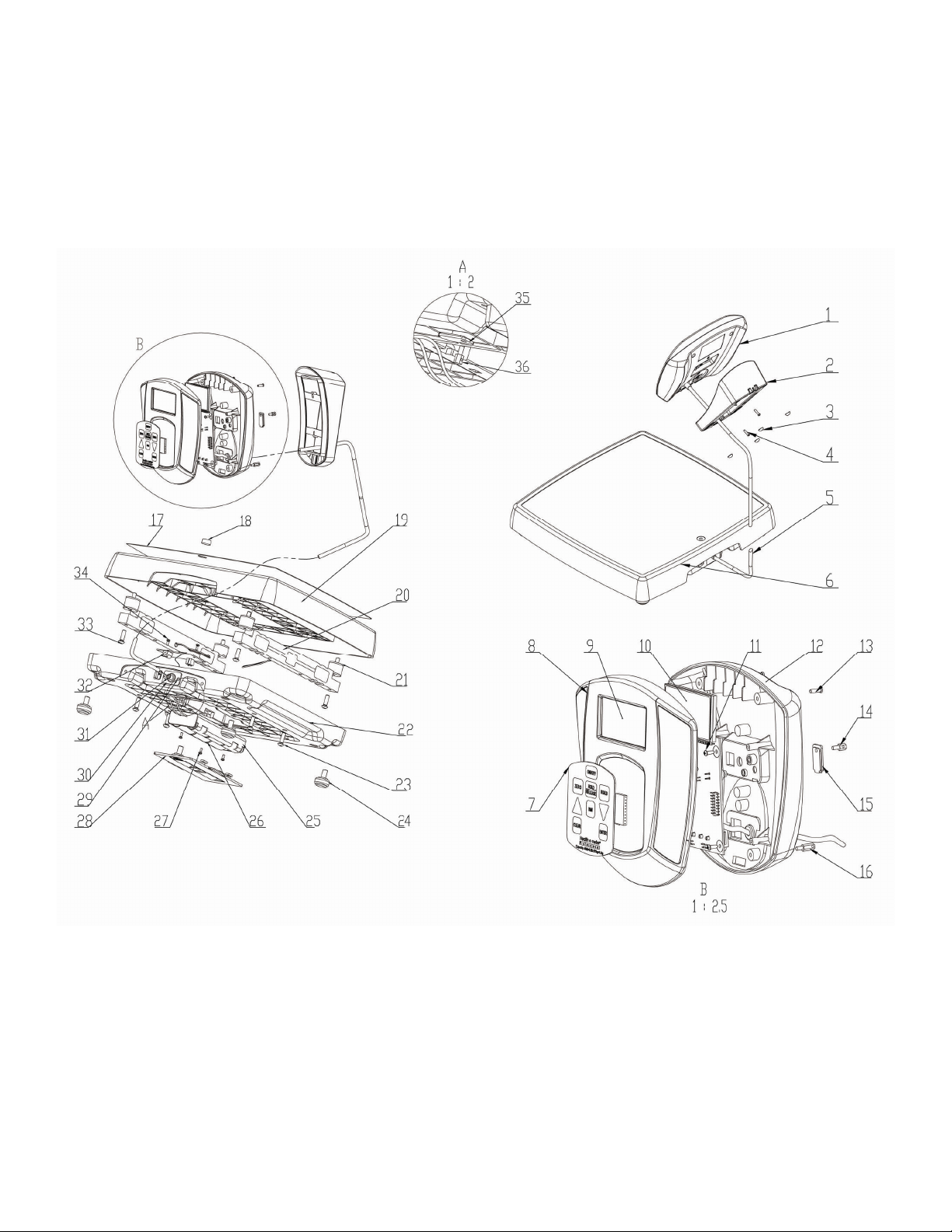
EXPLODED VIEW OF 753KL SCALE
- 7 -
3
Page 9
Key#
Part No.
Description
Qty.
Visit http://www.balances.com for your next Healthometer Scale
http://scaleman.com/health-o-meter.html offers the complete line of Healthometer Medical Scales
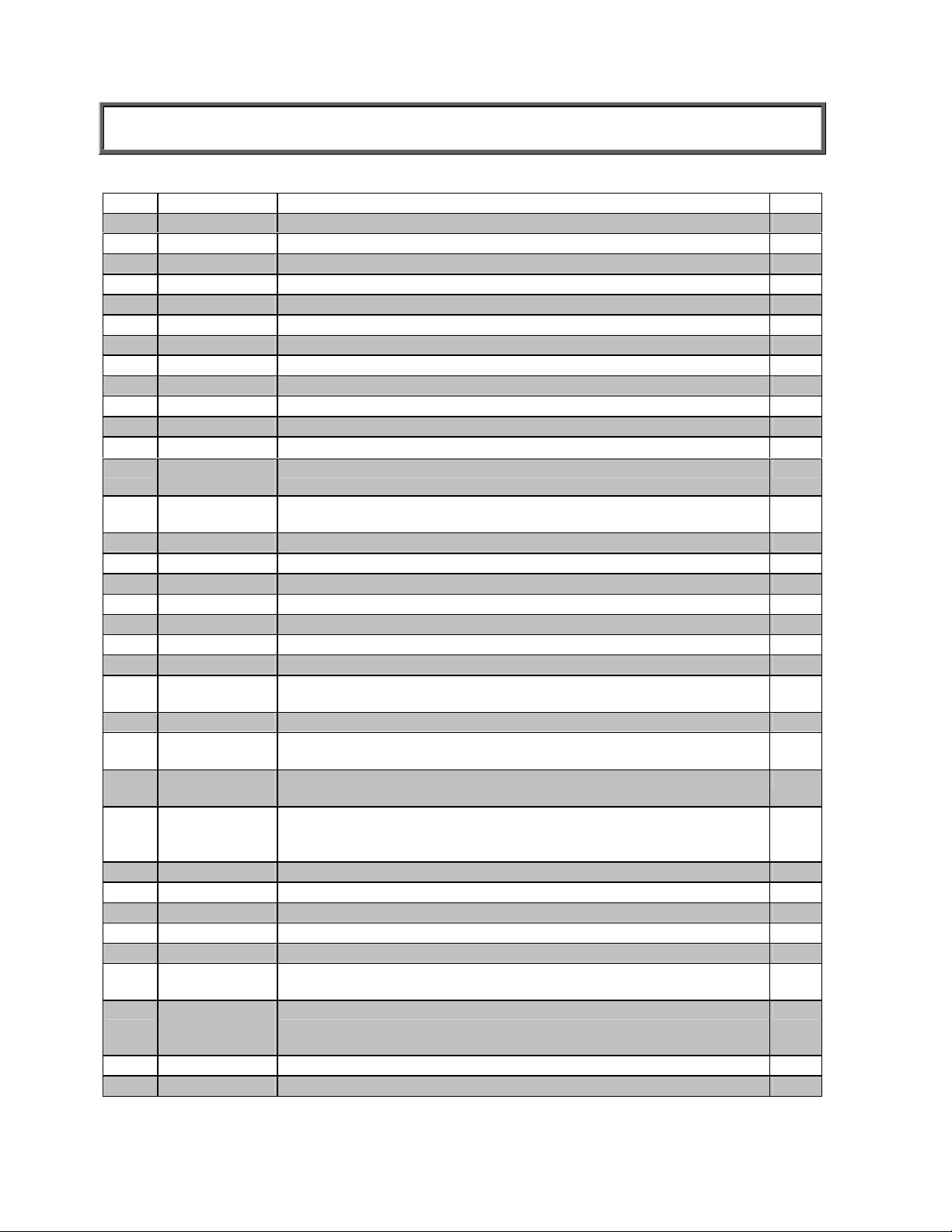
753KL PARTS LIST FOR MAINTENANCE
1 753KL SCALE DISPLAY HEAD 1
2 T16-088521-00
3 WALL AND TABLE ADAPTOR FOOT-3M_SJ-5306 4
4 T19-022851-00
5 T18-005000-00
6 753KL PLATFORM ASSEMBLY 1
7 T42-014900-00
8 T16-088121-00
9 LCD WINDOW 1
10 T63-004400-00
11 T19-019051-00
12 753KL HEAD BACK 1
13 T19-024051-00
14 HEX SEALING
SCREW
15 ACCESS
COVER PLATE
16 HEX STANDOFF SCREW M3X8, 5X10 (IF USED) 1
17 T42-014611-00
18 GRADIENTER
19 T16-087121-00
20 FAE-250LB * 2 LOAD CELL 2
21 T16-087211-00
22 BASE OF 753KL 1
23 FLAT HEAD
SCREW
24 T16-087011-00
25 C-BATTERY
HOLDER
26 C-CELL
BATTERIES
27 5MM ZINC
PLATED
SCREW
28 T16-087311-00
29 RIVET 2.9 2
30 BASE OUTLET HOLE COVER 1
31 RUBBER CABLE JACKET 2
32 T63-004300-00
33 FLAT
HEADSCREW
34 8MM ZINC
PLATED
SCREW
35 ACCESS COVER PLATE 1
36 HEX STANDOFF SCREW M3X5, 5X6 1
WALL AND TABLE MOUNT BRACKET 1
PAN HEAD SCREW- M3X12 2
CABLE 753KL 1
KEYPAD 4
HEAD FRONT 1
753KL MAIN PCB W/LCD DISPLAY 1
CROSS HEAD SCREW 3X10 4
PAN SCREW M3X12 4
HEX STANDOFF SCREW M3X5, 5X6 1
ACCESS COVER PLATE 1
MAT 1
LEVEL FOR L.F.T. 1
STANDING PLATFORM 1
RUBBER BUMPER D25X25 4
SOCKET BUTTON HEAD SCREW M6X22 4
RUBBER FOOT 90SHOR 4
C BATTERY HOLDER ASSEMBLY 1
C BATTERIES (NOT INCLUDED) 6
PAN HEAD SCREW 3
BATTERY COVER 1
BASE PCB ASSEMBLY 1
SOCKET BUTTON HEAD SCREW M6X22 4
PAN SCREW M3X8 2
3
Page 10
Visit http://www.balances.com for your next Healthometer Scale
http://scaleman.com/health-o-meter.html offers the complete line of Healthometer Medical Scales
3
 Loading...