

Page 1
1
550KL
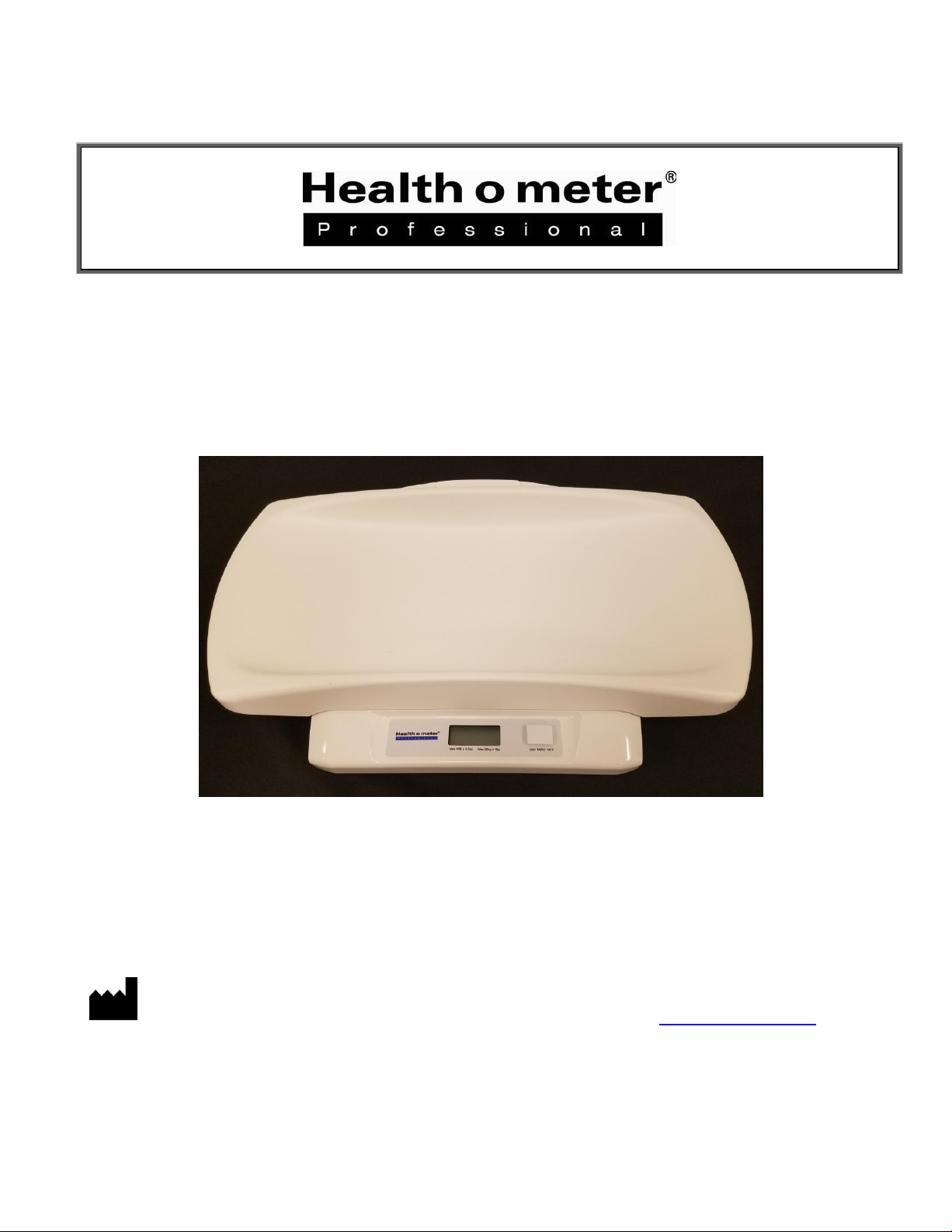
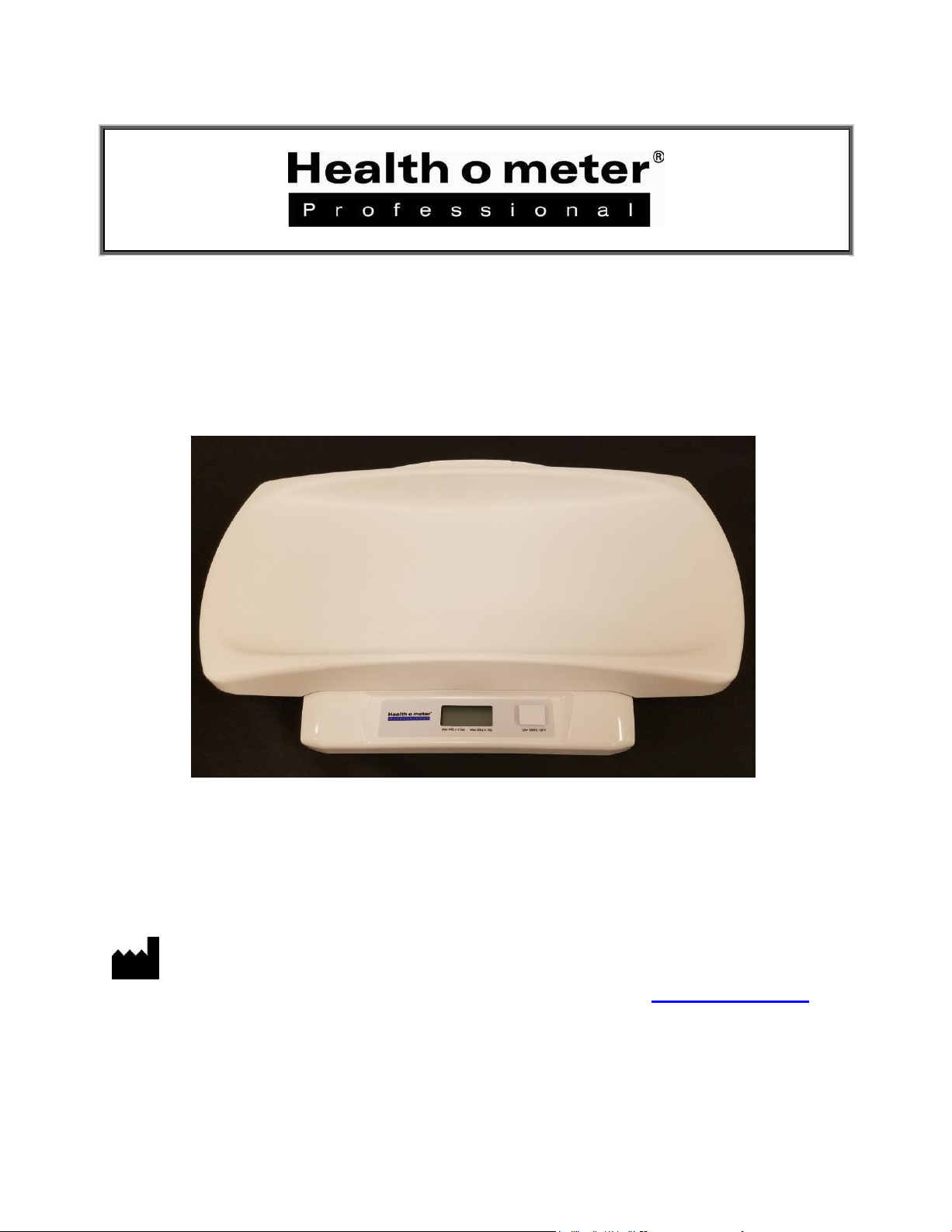
Infant / Toddler Scale
P/N UM550KL REV20180206_web
PELSTAR, LLC 9500 West 55
User Instructions
th
St. McCook, IL 60525-7110 USA www.homscales.com
© Pelstar, LLC 2018
Page 2
2
Model 550KL
Thank you for purchasing this Health o meter® Professional product. Please read this manual carefully,
and keep it for easy reference or training.
TABLE OF CONTENTS
Cautions and Warnings ............................................................................................ 3
Specifications ............................................................................................................ 4
Certifications / Disposal ............................................................................................ 4
Powering the Scale / Set Up .................................................................................... 5
Operating Instructions ............................................................................................... 7
Maintenance ............................................................................................................. 8
Calibration ................................................................................................................ 9
Troubleshooting ........................................................................................................ 10
Warranty ................................................................................................................... 11
Note: This scale has been factory calibrated, and does not require
calibration prior to use.
Please register your scale for warranty coverage at:
www.homscales.com/product-support/technical-support/product-warranty-registration
For User Instructions updates and revisions please go to:
www.homscales.com
Page 3

3
CAUTIONS AND WARNINGS
Intended use
The Health o meter® Professional 550KL scale is intended to be used in a professional medical environment by
trained medical staff. This product was designed to weigh infants that are laying on the tray. The scale can also
be used for weighing toddlers by removing the tray and having the patient stand on the platform. Do not modify
the product or use it for anything other than its intended purpose.
To prevent injury and damage to your scale, please follow these instructions very carefully.
Assemble and operate the scale per the enclosed user instructions.
For accurate weighing, this scale must be placed on a flat, stable surface.
For accurate weighing, verify before each use the proper operation according to the procedure
described in this manual.
Do not transport the scale with a patient or object on the tray or platform.
Do not exceed the weight capacity specified for the scale.
Do not use in the presence of flammable or explosive materials.
Ensure that the scale does not come in contact with liquids, excessive temperature, or excessive
humidity.
If the scale becomes damaged, it should not be operated until properly serviced.
Avoid stacking any materials or placing any weight on top of the scale when not in use.
Patient/caregiver safety
This scale is designed for static weighing of patients only. No scale should be used for patient
transfer.
To prevent patient injury, the patient must be attended throughout the entire weighing event.
When operating the scale with batteries:
If the scale will not be used for a long period of time, remove the batteries.
When replacing / inserting batteries, be sure to use all new batteries.
In no event whatsoever shall Pelstar, LLC be liable for damages or injuries arising out of or
connected with the assembly, use, or misuse of this product.
Page 4
4
SPECIFICATIONS
Capacity and Resolution
550KL: 44 lb x 0.5 oz / 20 kg x 10 g
Power Requirements
9V battery (included)
Environmental
Operating temperatures: 50°F to 104°F (10°C to 40°C)
Storage Specifications: -22°F to 158°F/ -30°C to 70°C
Physical Dimensions
Tray Size:
Width:23 1/2” (597 mm)
Depth: 8” (203 mm)
Height: 2” (51 mm)
Platform Size:
Width: 12 1/2” (318 mm)
Depth: 8 5/8” (219 mm)
Height: 1 1/4” (32 mm)
Product Footprint with Tray:
Width: 23 1/2” (597 mm)
Depth: 13 1/4” (337 mm)
Height: 3 5/8” (92 mm)
Product Footprint Platform Only:
Width: 13 1/2” (343 mm)
Depth: 11 1/2” (292 mm)
Height: 1 3/4” (44 mm)
Pelstar, LLC has been officially certified as the manufacturer
of Health o meter® Professional medical devices. The Pelstar,
LLC quality assurance system covers the development,
production, sales and service of medical scales and
measuring systems.
General
Health o meter® Professional 550KL scales use highly sophisticated microprocessor technology. Each
precision scale is designed to provide accurate, reliable and repeatable weight measurements. In
addition, each scale is designed to provide the user with features that make the weighing process simple,
fast, and convenient.
Scale Specifications
CERTIFICATIONS / DISPOSAL
Certification Descriptions
Scale Disposal
This Health o meter® Professional scale must be disposed of properly as electronic waste. Follow the
national, regional or local regulations that apply to you for disposal of electronic waste or batteries. Do
not dispose of this device in the domestic waste stream.
Page 5
5
POWERING THE SCALE / SET UP
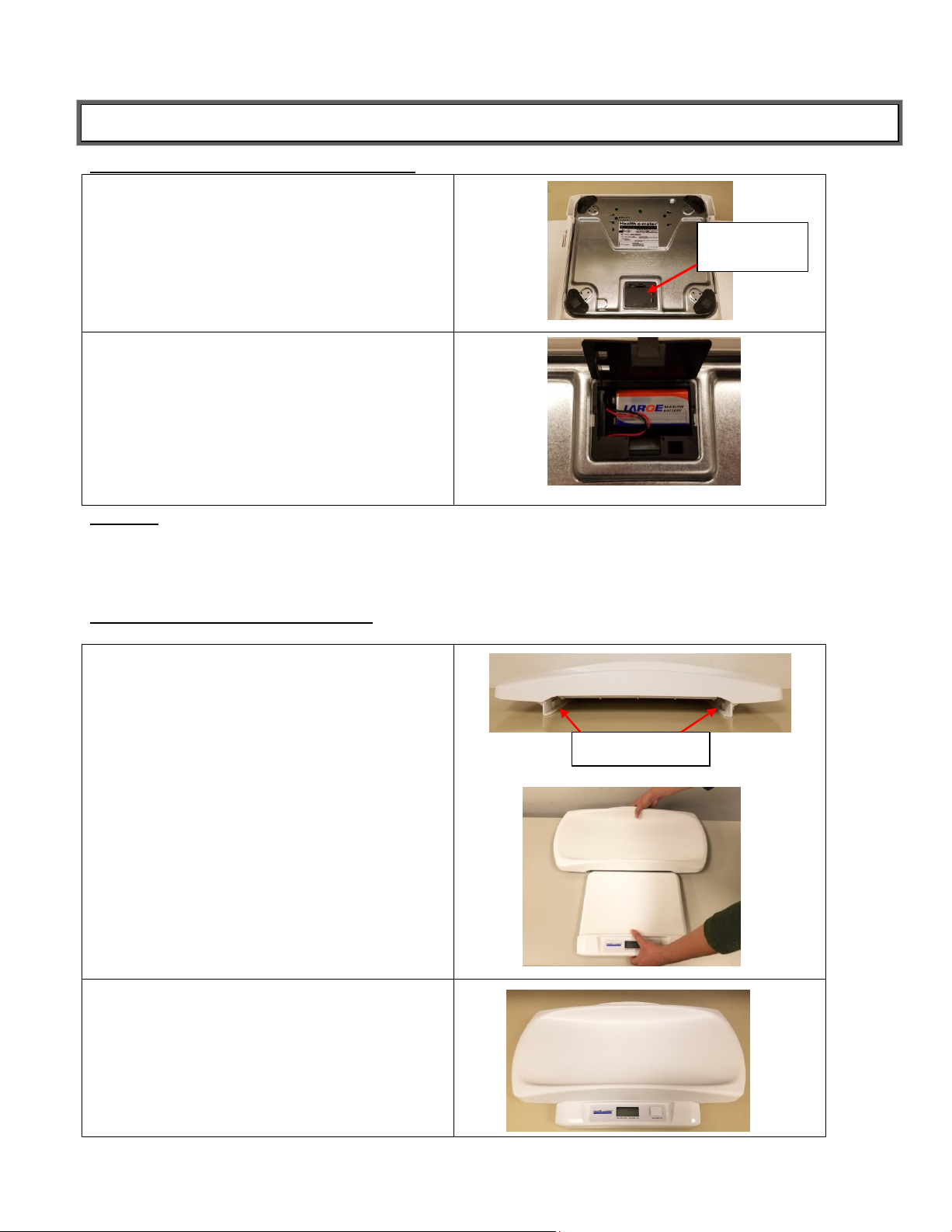
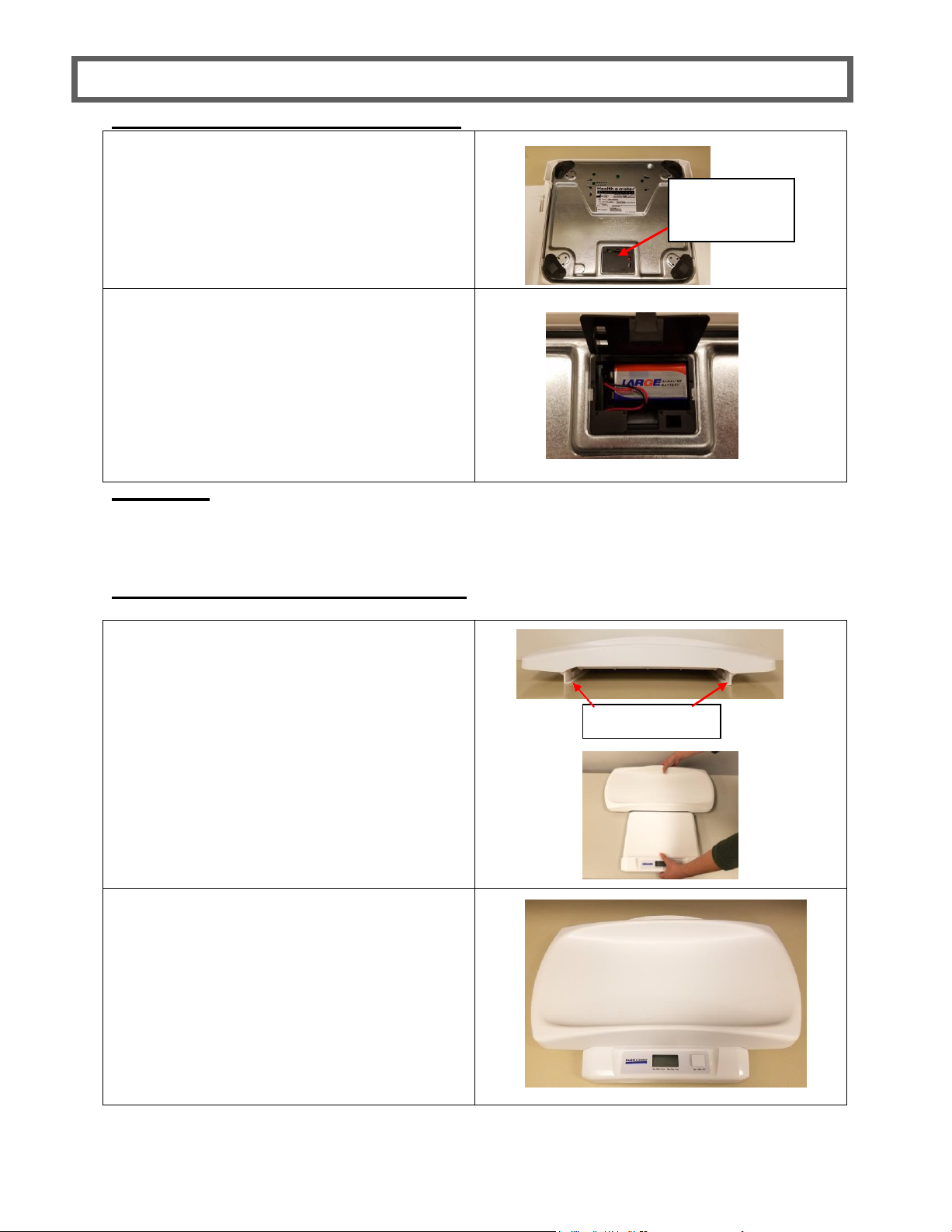
1. Locate the battery compartment
underneath the scale base and open the
battery compartment cover.
2. Place a new 9V battery into the battery
compartment. Make sure the ‘+’ and ‘-’ are
positioned correctly. Use only zinc-/coaland alkaline/manganese batteries or
nickel-cadmium and nickel-metal-hydride
rechargeable batteries. Replace the
compartment cover.
1. Align the platform with the guide rails on
the underside of the tray. Slide the tray
completely onto the platform until it snaps
into place.
2. Ensure the tray is snapped into place and
does not move.
Battery
Compartment
Guide rails
Powering the Scale – Inserting Batteries
Warning: If the scale will not be used for some time, remove the batteries to avoid a safety hazard.
Disposal of batteries must be performed in accordance with the prevailing national, regional or
local regulations that apply to you.
Attaching the Infant Weighing Tray
Follow these instructions to attach the tray and use as an infant scale.
Page 6
6
SET UP (CONT.)
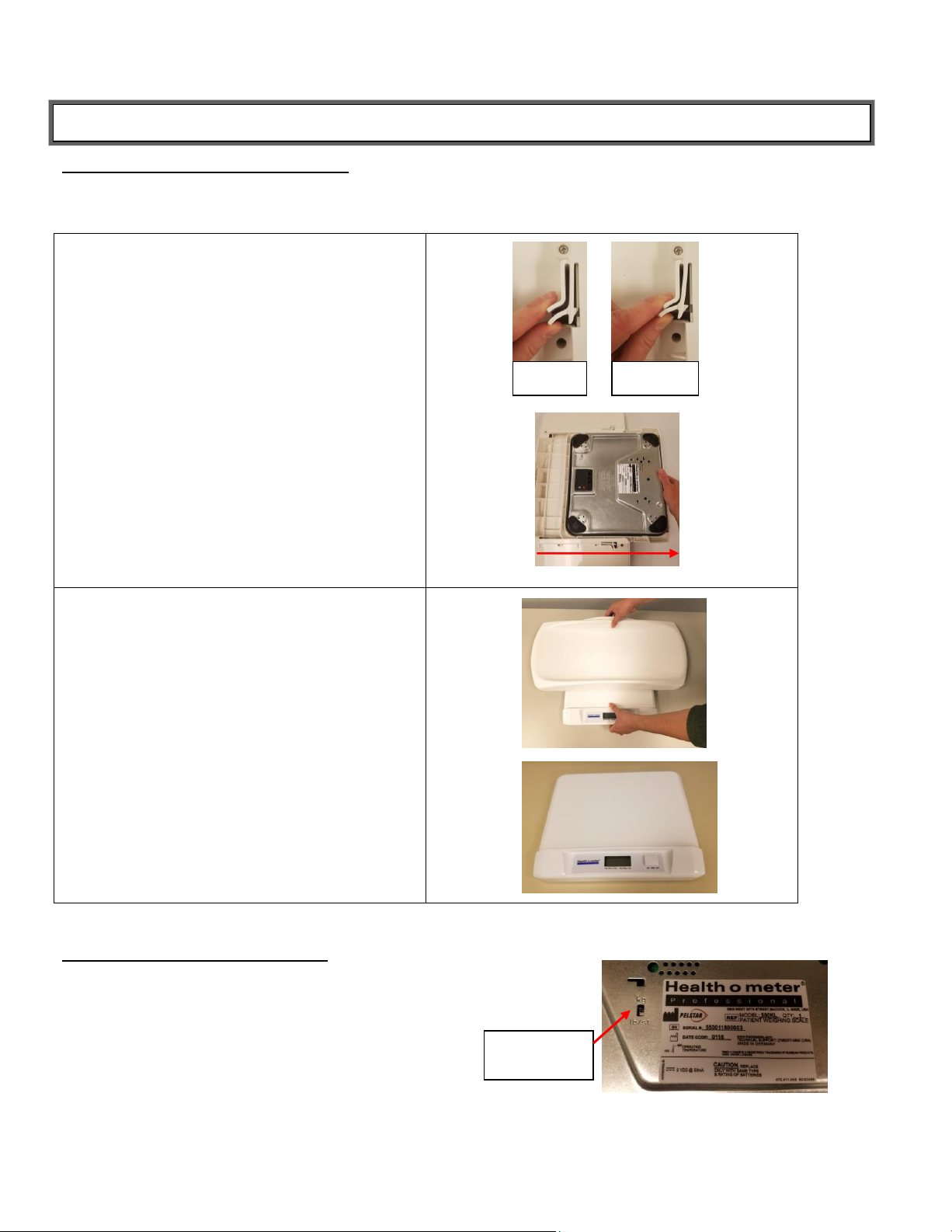
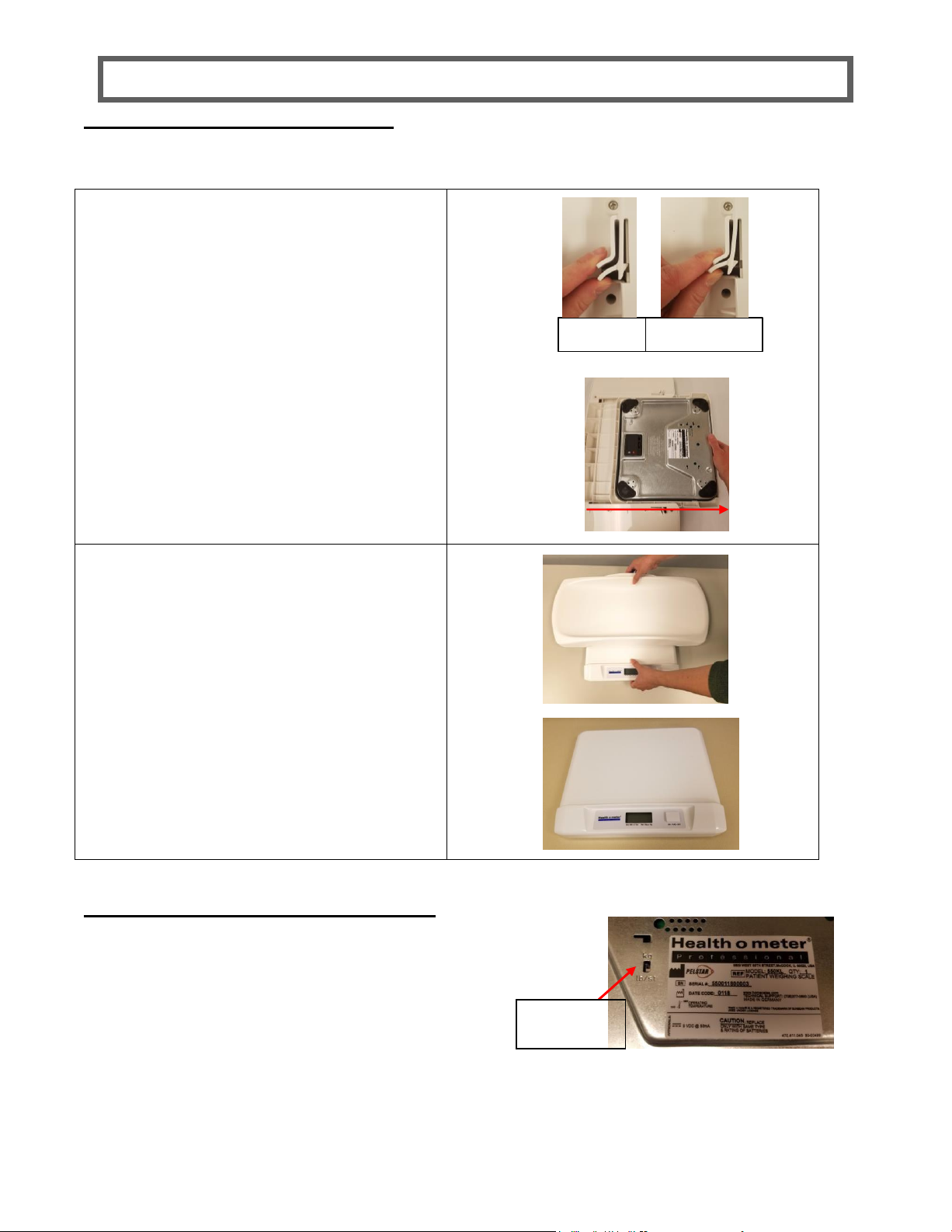
1. Turn the scale over to access the locking
hooks on each side of the tray. Squeeze
both hooks to unlock the tray and start to
slide the tray out of the guiderails.
2. Turn the scale over and slide the tray
completely out of the guide rails.
Locked
Unlocked
kg/lb/st
switch
Removing the Infant Weighing Tray
Follow these instructions to remove the infant weighing tray and use the platform as a toddler step-on
scale.
Selecting Weight Measuring Unit
To select the desired weighing measuring unit, turn the scale over to
access the kg/lb/st switch. Move the tab to the desired weighing
measuring unit.
Page 7
7
OPERATING INSTRUCTIONS
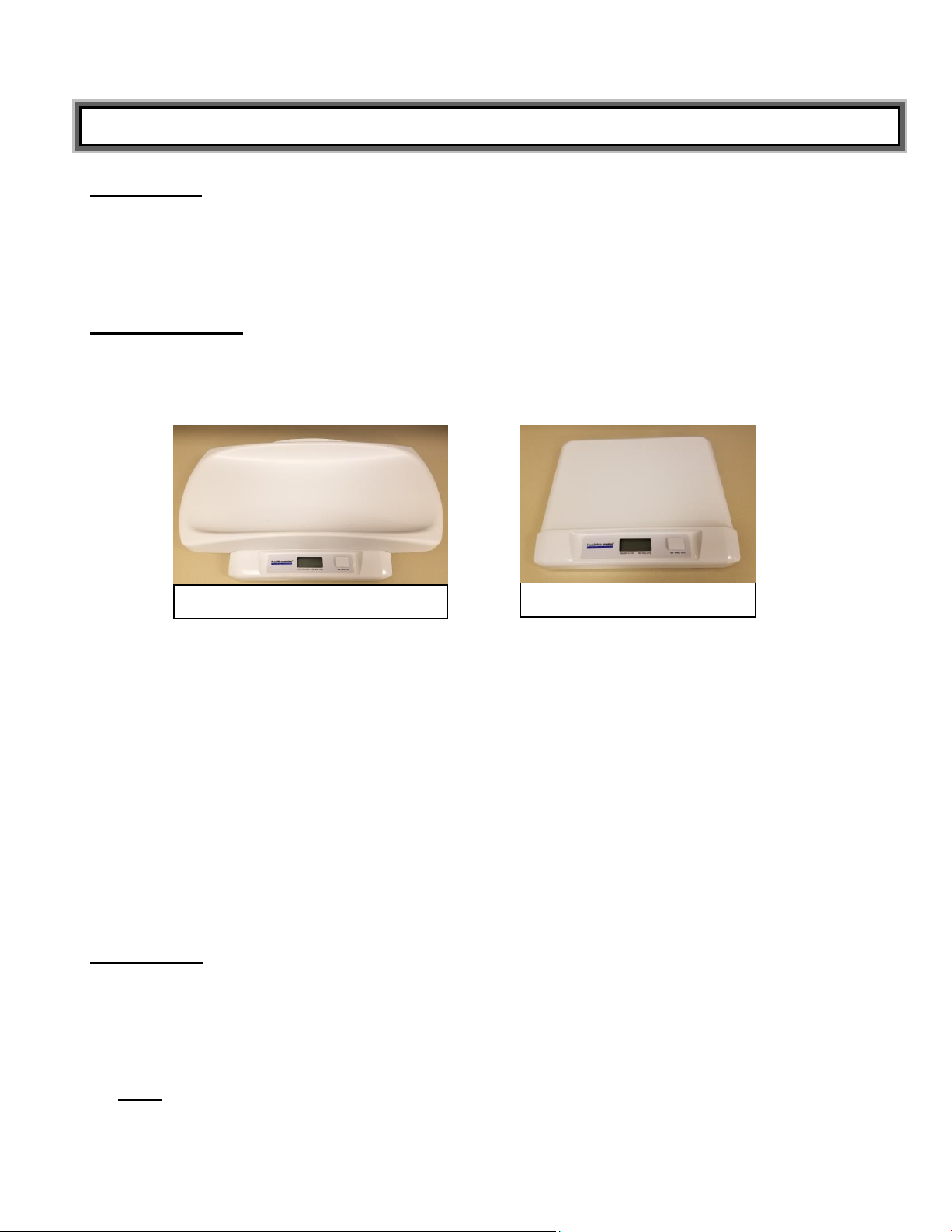
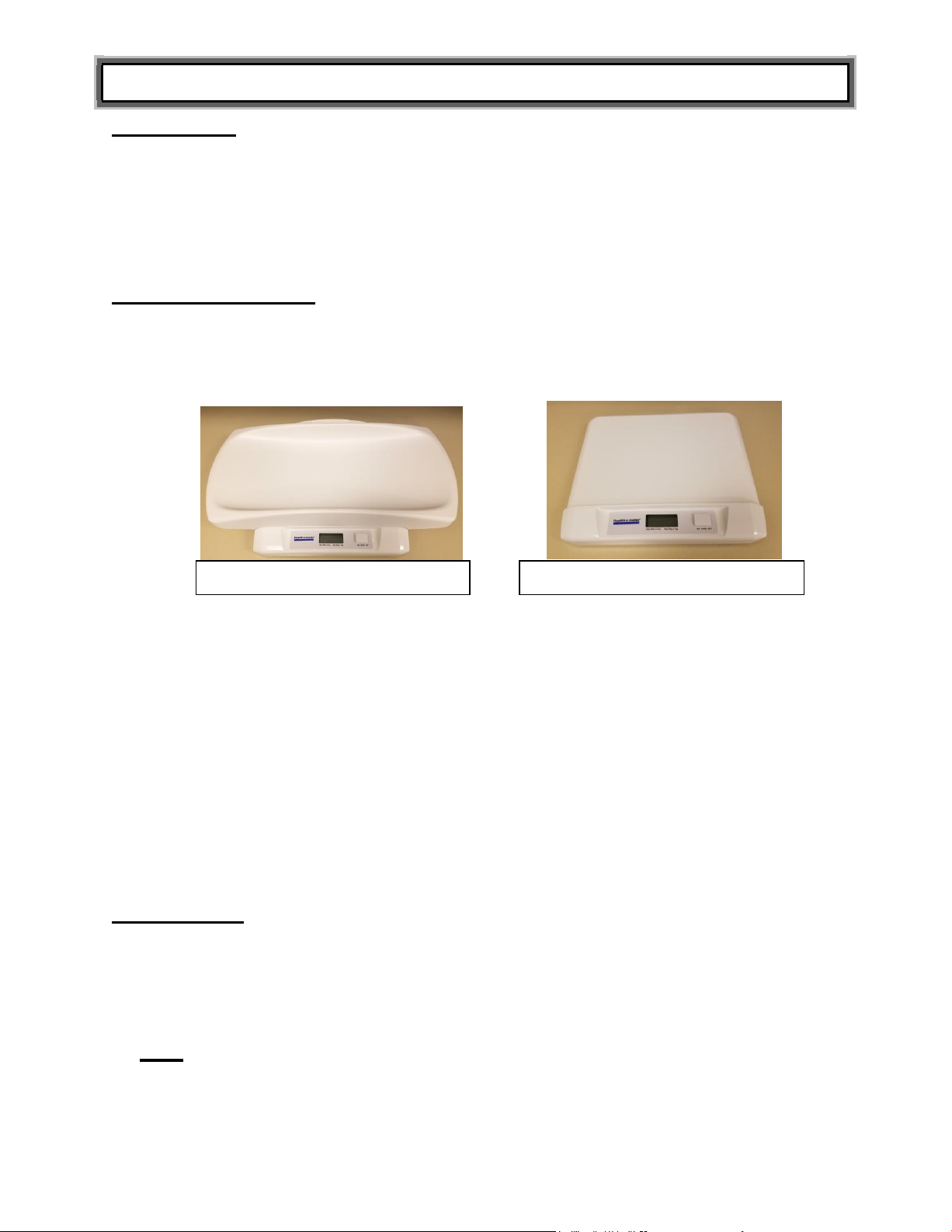
Infant Tray Scale
Toddler Step-On Scale
IMPORTANT: To prevent injury when utilizing the scale with the weighing tray, place the scale in a
secure location, far from the edge of the flat surface used to hold the scale. Do not let the scale
touch the wall or any other object while it is in use.
When using the scale to weigh toddlers who will stand on the scale, place the scale on the floor.
NEVER WEIGH A STANDING CHILD ON A COUNTER OR TABLE.
Weighing a Patient
This scale is dual-purpose and can be used with the infant weighing tray or toddler step-on platform. If
using the product as an infant scale, ensure the tray is completely attached to the scale platform. If using
the product as a toddler step-on scale, follow the instructions to remove the tray and have the patient step
onto the platform.
1. Make sure there is nothing on the tray or platform.
2. Press the ON • TARE • OFF button to turn on the scale. “88:8:8.8” will appear on the display followed
by “u XX” (XX refers to the version number) then “0:00” or “0.0” depending on the weight measuring
unit selected.
3. Place the baby on the tray or have the child step onto the scale platform. Ensure that the child’s
weight is evenly distributed on the tray or platform. The scale will begin to display weight information
and will lock on the patient’s weight when the stable weight of the patient is determined. The weight is
locked when lb/oz or kg appears on the display along with the patient’s weight.
Note: If dashes “-----------” appear at the top of the display you have exceeded the capacity of the
scale. (44 lb / 20 kg)
Caution: To prevent patient injury, the patient must be attended throughout the entire
weighing event.
4. Remove the child from the scale. If the child’s weight is more than 4.4 lb / 2 kg, the scale will continue
to display the weight for approximately 10 seconds.
Tare Function
The tare function allows you to place other items on the scale while weighing a baby, without affecting the
baby’s weight reading.
1. Place the item you want to tare on the weighing tray. When the scale locks onto item’s weight, press
ON • TARE • OFF. The scale will return to zero.
2. Place the patient on the scale with the tared object. The scale will automatically deduct the tared
weight and the display will show only the patient’s weight.
Note: If you remove the tared item from the scale before weighing the patient, the display will show
the tare value as a negative value.
3. To remove the Tare, press ON • TARE • OFF. The scale will resume normal operation.
Page 8

8
MAINTENANCE
Maintenance
The following pages provide instructions for maintenance, cleaning, calibrating, and troubleshooting of
your scale. Maintenance operations other than those described in this manual should be performed by
qualified service personnel.
Caution: Before first use, or after long periods of non-use, check the scale for proper operation
and function. If the scale does not operate correctly, refer to qualified service personnel.
1. Check overall appearance of the total scale for obvious damage, wear, and tear.
2. Do not store the scale on its side.
3. This scale contains electronic parts. Use it carefully. Do not drop, kick or jump on it.
4. Do not store near chemicals, heaters or radiators.
Note: This scale is an extremely sensitive weighing device. Items such as clothing or towels place or
dropped on the scale may cause it to activate. To prevent run down of the batteries, do not store or leave
anything on the scale.
Cleaning
Proper care and cleaning is essential to ensure a long life of accurate and effective operation.
1. Clean all external surfaces with a clean damp cloth. Mild antimicrobial soap and water solution may
be used. Dry with a clean soft cloth.
2. Do not immerse the scale into cleaning or other liquid solutions.
3. Do not use abrasive cleaners.
4. Do not spray the scale with liquid. Never place the scale in water.
Page 9
9
CALIBRATION
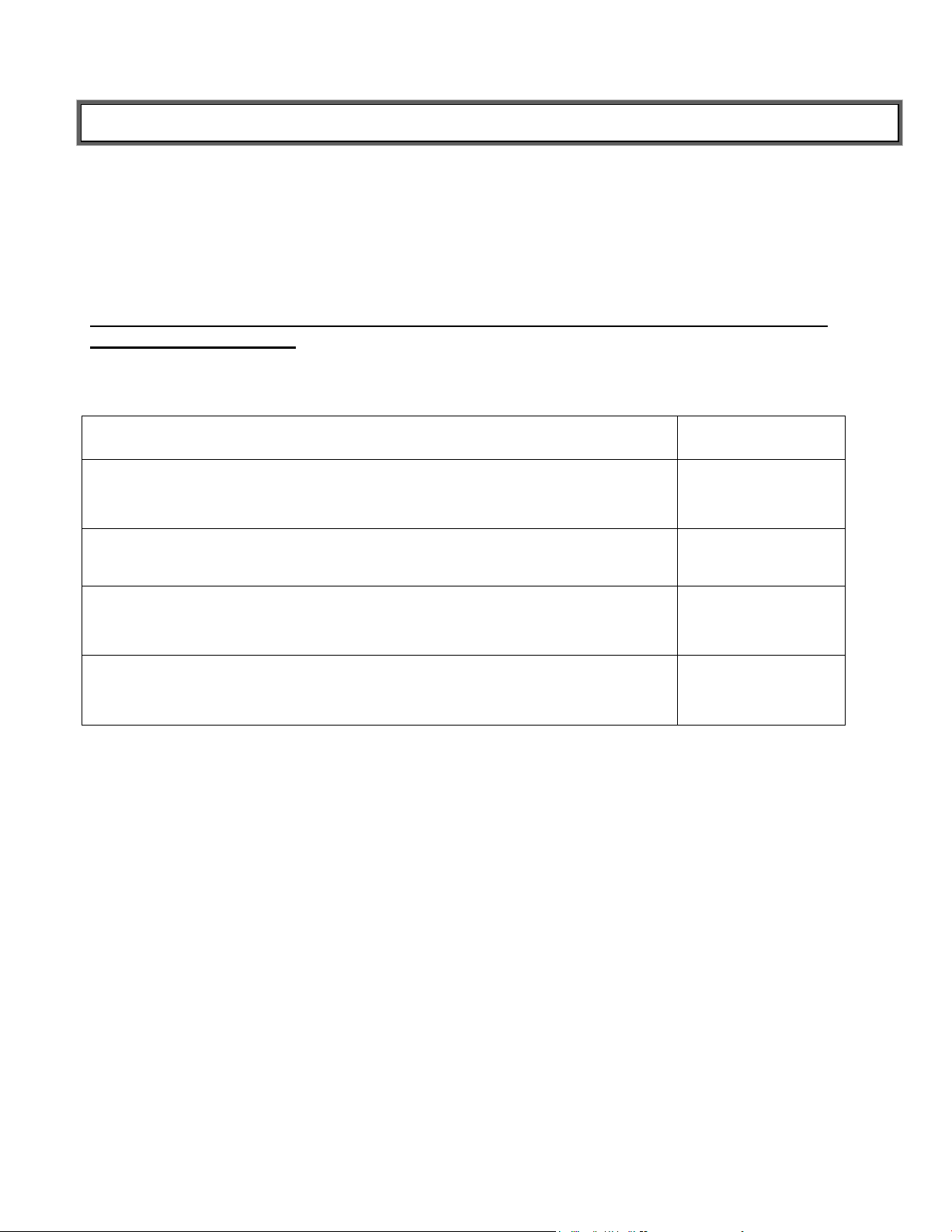
ACTION
DISPLAY
SHOWS
Press ON • TARE • OFF to turn on the scale. “88:8:8.8” will appear on the
display, quickly tap ON • TARE • OFF twice, then hold down the button until
“CAL” appears in the display. Release the button when “CAL” appears.
“88:8:8.8”
followed by “CAL”
Press and hold ON • TARE • OFF until 5 digits appear in the display.
Release the button when the 5 digits appear.
“XXXXX”
Ensure there is no weight on the scale, then press ON • TARE • OFF again.
“20.00” will appear in the display.
“20.00”
Place 20 kg on the scale, then press ON • TARE • OFF. “PASS” will appear
in the display. Remove the 20 kg. The scale will restart and return to “0.0”
“PASS”, then the
scale will restart.
This scale has been factory calibrated, and does not require calibration prior to use. If
required, the scale can be calibrated. Calibration of your scale is performed using kilograms
(KG). Twenty (20) kilograms are required for calibration. Calibration is performed in kilograms
even if the scale is set in weigh in pounds (LB).
Note: Only weights certified and traceable to national standards should be used for
calibration procedures.
Page 10
10
TROUBLESHOOTING
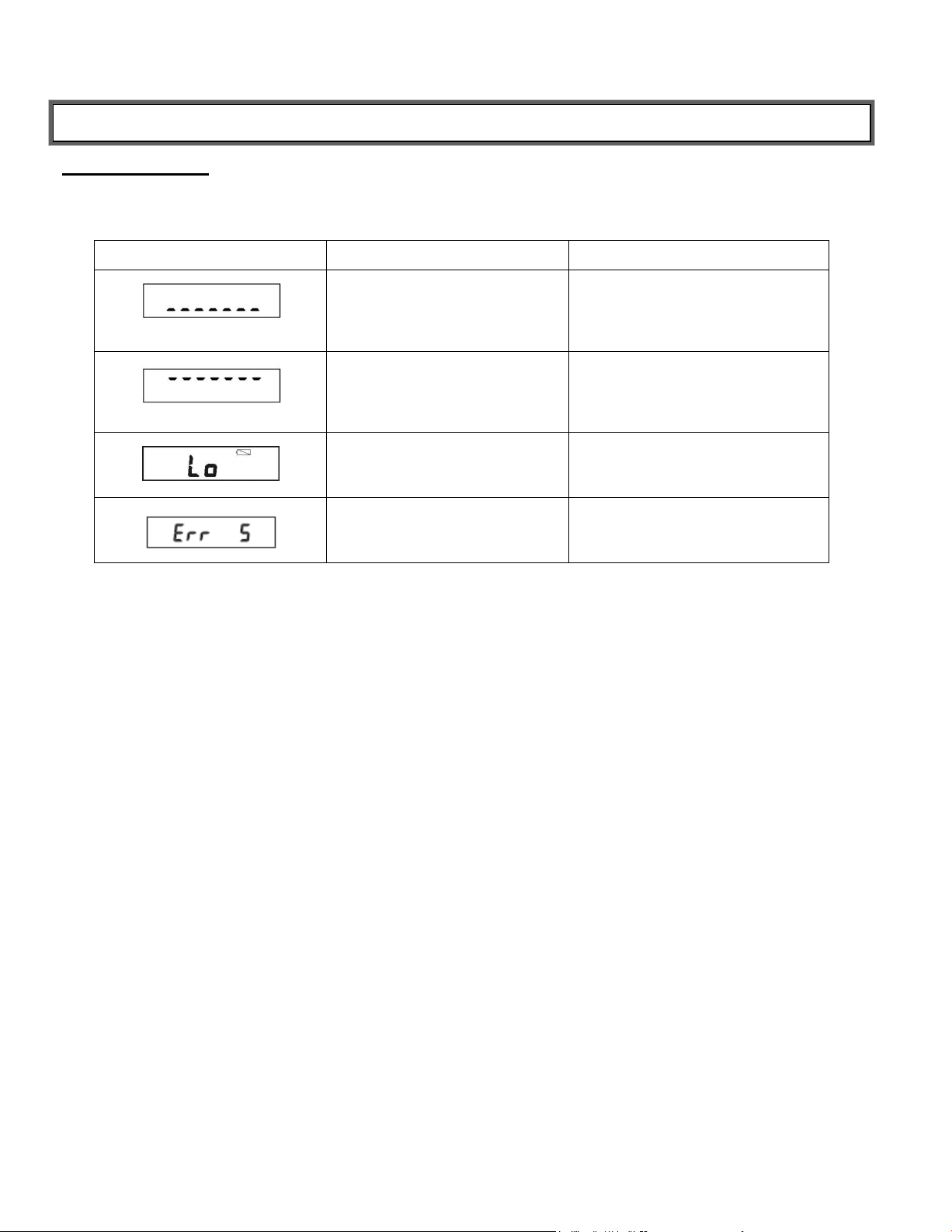
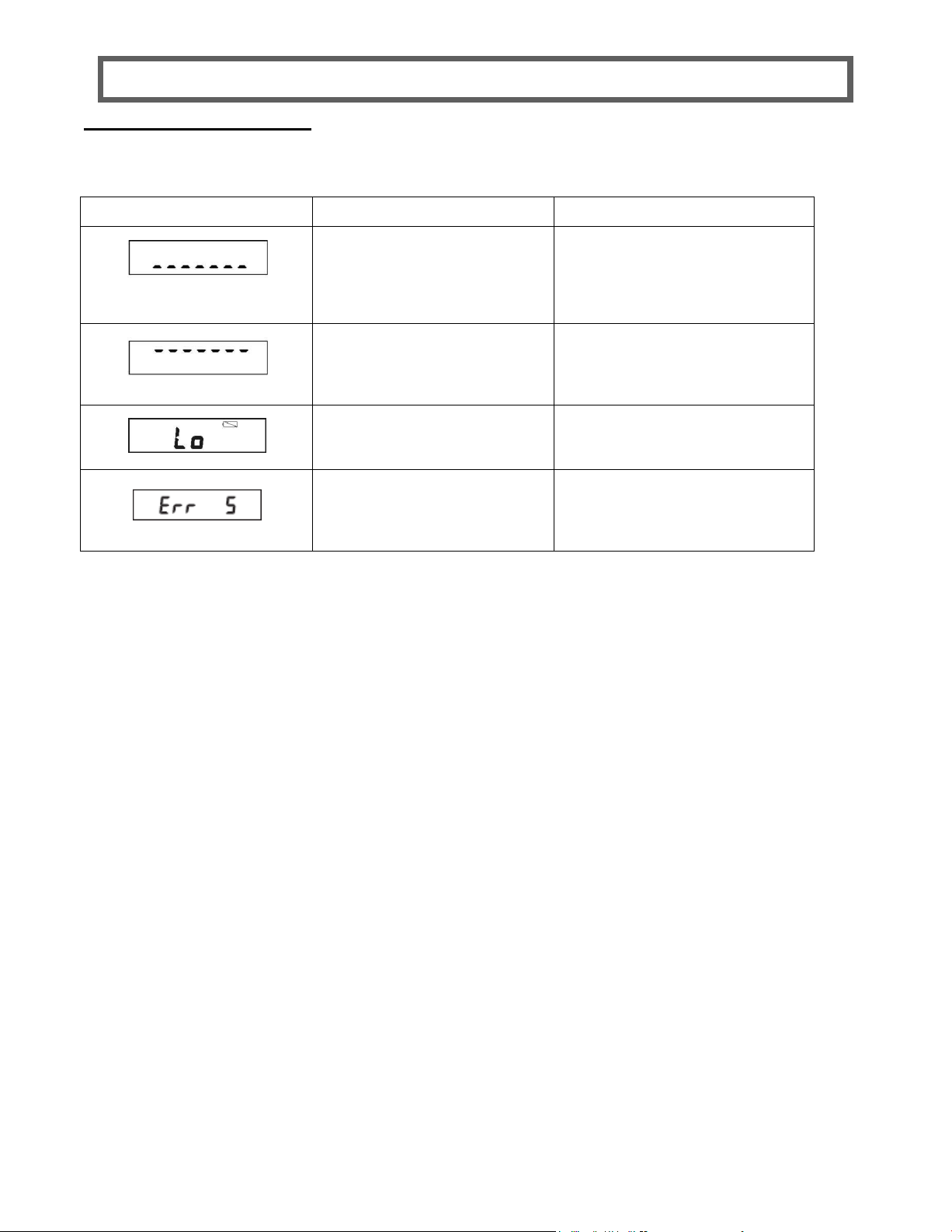
Display
Causes
Corrective Action
Underload: The scale is not on a
level surface or a tare value was not
cleared.
Ensure the scale is on a flat surface.
Switch the scale off and on again. If
the error occurs again, please contact
Technical Support at 1-800-638-3722.
Overload: Maximum weighing range
is exceeded.
Unload the scale, or switch them off
and on again. Check the maximum
weighing range.
The batteries are depleted.
Replace the batteries.
The scale is not level.
Ensure the scale is on a flat surface. If
the error message persists after
realignment, contact your service
provider.
Troubleshooting
Before contacting service personnel, refer to the following instructions to check and correct any
failures.
Page 11

11
WARRANTY
P/N UM550KL_REV20180206_web
Limited Warranty
What does the Warranty Cover?
This Health o meter® Professional scale is warranted from date of purchase against defects of materials or in workmanship for a
period of two (2) years. If product fails to function properly, return the product, freight prepaid and properly packed to Pelstar, LLC
(see “To Get Warranty Service”, below, for instructions). If the manufacturer determines that a defect of material or in workmanship
exists, the customer’s sole remedy will be replacement of the scale at no charge. Replacement will be made with a new or
remanufactured product or component. If the product is no longer available, replacement may be made with a similar product of equal
or greater value. All replaced parts are covered only for the original warranty period.
Who is Covered?
The original purchaser of the product must have proof of purchase to receive warranty service. Please save your invoice or receipt.
Pelstar dealers or retail stores selling Pelstar products do not have the right to alter, or modify or in any way change the terms and
conditions of this warranty.
What is Excluded?
Your warranty does not cover normal wear of parts or damage resulting from any of the following: negligent use or misuse of
the product, use on improper voltage or current, use contrary to the operating instructions, abuse including tampering, damage in
transit, or unauthorized repair or alternations. Further, the warranty does not cover natural disasters, such as fire, flood, hurricanes
and tornadoes. This warranty gives you specific legal rights, and you may also have other rights that vary from country to country,
state to state, province to province or jurisdiction to jurisdiction.
To get Warranty Service make sure you keep your sales receipt or document showing proof of purchase. Call (+1) 800-6383722 or (+1) 708-377-0600 to receive a return authorization (RA) number, which must be included on the return label. Attach your
proof of purchase to your defective product along with your name, address, daytime telephone number and description of the
problem. Carefully package the product and send with shipping and insurance prepaid to:
Pelstar, LLC
Attention R/A#_____________
Return Department
9500 West 55th Street
McCook, IL 60525
Extended Warranty Available
This scale is eligible for Health o meter® Professional ScaleSurance Extended Warranty Program. ScaleSurance extends the
warranty period for an additional two years. This extension to the standard Limited Warranty can be purchased with new scales or
for a facility’s existing scale before its current warranty has expired. To learn more, visit www.homscales.com/scalesurance/ or
contact your medical supply distributor.
PELSTAR, LLC
9500 West 55th Street • McCook, IL 60525 • USA
1-800-638-3722 or 1-708-377-0600
PLEASE REGISTER YOUR SCALE FOR WARRANTY COVERAGE AT:
www.homscales.com
Health o meter® is a registered trademark of Sunbeam Products, Inc. used under license.
Health o meter® Professional products are manufactured, designed, and owned by Pelstar, LLC.
We reserve the right to improve, enhance, or modify Health o meter® Professional product features or specifications without
notice.
© Pelstar, LLC 2018
Page 12

Page 13
1
550KL
Báscula para Bebés y Niños Pequeños
PELSTAR, LLC 9500 West 55
P/N UM550KL REV20180206_web
Instrucciones del Usuario
th
St. McCook, IL 60525-7110 USA www.homscales.com
© Pelstar, LLC 2018
Page 14
2
TABLA DE CONTENIDOS
Gracias por su compra de este producto Health o meter® Professional. Lea por favor este
manual cuidadosamente, y consérvelo para pronta referencia o capacitación.
Precauciones y Advertencias ................................................................................... 3
Especificaciones ....................................................................................................... 4
Certificaciones / Disposición ..................................................................................... 4
Encender la Báscula / Instalación ............................................................................. 5
Instrucciones de Funcionamiento ............................................................................. 7
Mantenimiento .......................................................................................................... 8
Calibración ................................................................................................................ 9
Solución de Problemas ............................................................................................. 10
Modelo 550KL
Garantía .................................................................................................................... 11
Nota: Esta báscula ha sido calibrada de fábrica, y no requiere
calibración antes de su uso.
Por favor registre su báscula para cobertura de garantía en:
www.homscales.com/product-support/technical-support/product-warranty-registration
Para Instrucciones del Usuario y revisiones, ingrese a:
www.homscales.com
Page 15

3
PRECAUCIONES Y ADVERTENCIAS
Uso previsto
Esta báscula® Health o meter Professional 550KL se prevé que sea usada en un entorno médico por
personal médico capacitado. Este producto fue diseñado para pesar a bebés sobre la bandeja. La
báscula se puede utilizar también para pesar a niños pequeños quitando la bandeja y colocando al
paciente de pie sobre la plataforma. No modifique el producto ni lo utilice para cualquier propósito
fuera de su función prevista.
Para prevenir lesiones y daño a su báscula, por favor siga estas instrucciones muy
cuidadosamente.
Ensamble y opere la báscula según las instrucciones del usuario anexas.
Para pesajes exactos, se debe colocar esta báscula sobre una superficie plana y estable.
Para pesajes exactos, verifique antes de cada uso el funcionamiento apropiado según el
procedimiento descrito en este manual.
No transporte la báscula con un paciente u objeto sobre la bandeja o la plataforma.
No exceda la capacidad de peso especificada para la báscula.
No se utilice en presencia de materiales inflamables o explosivos.
Asegúrese de que la báscula no entre en contacto con líquidos, o altas temperaturas o
humedad.
Si la báscula se daña, no debe utilizarse hasta que se le dé el servicio adecuado.
Evite apilar cualquier material o poner cualquier peso encima de la báscula cuando no se
utilice.
Seguridad del paciente/cuidador
Esta báscula está diseñada exclusivamente para pesaje estático de pacientes. Ninguna
báscula debe de ser usada para trasladar pacientes.
Para prevenir lesiones al paciente, el mismo debe estar atendido durante todo el evento de
pesado.
Cuando ponga a funcionar la báscula con baterías:
Si la báscula no se utiliza durante mucho tiempo, quite las baterías.
Cuando se reemplacen / se inserten las baterías, asegúrese de usar solamente baterías
nuevas.
En ningún caso Pelstar, LLC será responsable por daños o lesiones causados por, o en
relación a, el ensamblaje, uso o uso incorrecto de este producto.
Page 16
4
Capacidad y Resolución
550KL: 44 lb x 0.5 oz / 20 kg x 10 g
Requerimientos de
Energía
Batería de 9V (incluida)
Ambiente
Temperaturas de funcionamiento: 50°F a 104°F (10°C a 40°C)
Especificaciones de Almacenaje -22°F a 158°F / -30°C a 70°C
Dimensiones Físicas
Tamaño de la Bandeja:
Ancho: 23 1/2” (597 mm)
Largo: 8” (203 mm)
Altura: 2” (51 mm)
Tamaño de la Plataforma:
Ancho: 12 1/2” (318 mm)
Largo: 8 5/8” (219 mm)
Altura: 1 1/4” (32 mm)
Espacio Ocupado con
Bandeja:
Ancho: 23 1/2” (597 mm)
Largo: 13 1/4” (337 mm)
Altura: 3 5/8” (92 mm)
Espacio que Ocupa Sólo la
Plataforma:
Ancho: 13 1/2” (343 mm)
Largo: 11 1/2” (292 mm)
Altura: 1 3/4” (44 mm)
Pelstar, LLC se ha certificado oficialmente como el fabricante
de los dispositivos médicos Health o meter® Professional. El
sistema de aseguramiento de calidad de Pelstar LLC cubre el
desarrollo, producción, ventas y servicio de básculas médicas
y sistemas de medición.
CERTIFICACIONES / DISPOSICIÓN
ESPECIFICACIONES
Generales
Health o meter® Professional 550KL básculas usa tecnología de microprocesadores altamente
sofisticada. Cada báscula está diseñada para proporcionar medidas exactas, confiables y
repetibles del peso. Además, cada báscula se diseña para proveer al usuario de características
que hacen el proceso de pesaje simple, rápido y conveniente.
Especificaciones de la Báscula
Descripciones de la Certificación
Disposición de la Báscula:
Esta báscula Health o meter® Professional debe ser eliminada apropiadamente como desecho
electrónico. Siga las regulaciones nacionales, regionales o locales que apliquen a usted para la
elminación de desechos electrónicos o baterías. No se deshaga de este dispositivo como
desecho doméstico.
Page 17
5
1. Localice el compartimiento de la batería
por debajo de la báscula y abra la tapa del
compartimiento.
Compartimient
o para Baterías
2. Coloque una batería de 9V nueva en el
compartimiento para baterías. Asegúrese
de que el ‘+’ y el ‘-’ están en la posición
correcta. Use sólo baterías de zinc/carbón- y alcalinas/de manganeso o bien
de niquel-cadmio y niquel-metalhidruro
recargables. Vuelva a colocar la cubierta
del compartimiento.
1. Alinee la plataforma con los rieles guía en
la parte inferior de la bandeja. Deslice la
bandeja totalmente sobre la plataforma
hasta que encaje en su lugar.
Rieles guía
2. Asegúrese que la bandeja encaja a
presión en su lugar y que no se mueve.
ENCENDER LA BÁSCULA / INSTALACIÓN
Encender la Báscula – Insertar las Baterías
Advertencia: Si la báscula no va a ser utilizada por cierto tiempo, retire las baterías para
evitar riesgos de seguridad. Para la disposición de las baterías, se debe seguir las
regulaciones nacionales, regionales o locales que apliquen a usted.
Colocación de la Bandeja para Pesar Bebés
Siga estas instrucciones para colocar la bandeja y utilizarla como una báscula para bebés.
Page 18
6
control
kg/lb/st
1. Voltee la báscula para acceder a los
seguros a cada lado de la bandeja. Oprima
ambos seguros para liberar la bandeja y
empiece a deslizar la bandeja fuera de los
rieles guía.
Bloqueado Desbloqueado
2. Voltee la báscula y deslice la bandeja
completamente fuera de los rieles guía.
INSTALACIÓN (CONT.)
Retirar la Bandeja de Pesaje de Bebés
Siga estas instrucciones para retirar la bandeja de pesaje de bebés y usar la plataforma como
una báscula vertical para niños pequeños.
Seleccionar la Unidad de Medición de Peso
Para seleccionar la unidad de medición deseada, voltee la
báscula para acceder al control kg/lb/st. Mueva el control a la
unidad de pesaje deseada.
Page 19
7
IMPORTANTE: Para prevenir lesiones cuando se use la báscula con la bandeja, coloque
Báscula Vertical para Niños Pequeños
Báscula de Bandeja para Bebés
INSTRUCCIONES DE FUNCIONAMIENTO
la báscula en una ubicación segura, lejos de la orilla de la superficie que soporta la
báscula. No deje que la báscula toque la pared o cualquier objeto mientras está
funcionando.
Cuando se use la báscula para pesar a niños pequeños que se pueden parar sobre la
misma, coloque la báscula sobre el piso. NUNCA PESE A UN NIÑO DE PIE SOBRE UNA
BARRA O MESA.
Para Pesar a un Paciente
Esta báscula es de doble propósito y puede ser usada con la bandeja para bebés o la
plataforma vertical para niños pequeños. Si se usa el producto como báscula para bebés,
asegúrese de que la bandeja está completamente acoplada a la plataforma de la báscula. Si se
usa el producto como báscula vertical para niños pequeños, siga las instrucciones para retirar
la bandeja y guiar al paciente a subir a la plataforma.
1. Cerciórese de que no haya nada en la bandeja o plataforma de pesado.
2. Presione el botón ON • TARE • OFF para encender la báscula. “88: 8: 8.8” aparecerá en la
pantalla, seguido por “u XX” (XX se refiere al número de versión); luego “0: 00” o “0.0”
dependiendo de la unidad de peso seleccionada.
3. Coloque al bebé sobre la bandeja o guíe al pequeño a subir a la plataforma de la báscula.
Asegúrese de que el peso del niño esté distribuido uniformemente en la bandeja o la
plataforma. La báscula comenzará a exhibir información del peso y se bloqueará en el peso
del paciente cuando se determine el peso estable del paciente. El peso queda bloqueado
cuando aparece lb/oz o kg en la pantalla junto con el peso del paciente.
Nota: Si aparece guiones “-----------” en la parte superior de la pantalla, usted ha excedido la
capacidad de la báscula. (44 lb / 20 kg)
Precaución: Para prevenir lesiones al paciente, el mismo debe estar atendido durante
todo el evento de pesaje.
4. Retire al niño de la báscula. Si el peso del niño es de más de 4.4 lb / 2 kg, la báscula
seguirá mostrando el peso por aproximadamente 10 segundos.
Función de Tara
La función de Tara le permite colocar otros objetos sobre la báscula cuando se pesan bebés,
sin afectar la lectura del peso del bebé mismo.
1. Coloque el objeto que desea pesar sobre la bandeja de pesado. Cuando la báscula se
bloquee en el peso del objeto, presione ON • TARE • OFF. La báscula regresará a cero.
2. Coloque al paciente sobre la báscula con el objeto tarado. La báscula sustraerá
automáticamente el peso del objeto tarado y exhibirá solamente el del paciente.
Nota: Si retira el objeto tarado de la báscula antes de pesar al paciente, la pantalla
mostrará el valor de la tara como un número negativo.
3. Para remover la Tara, presione ON • TARE • OFF. La báscula continuará su funcionamiento
normal.
Page 20

8
MANTENIMIENTO
Mantenimiento
Las páginas siguientes proporcionan las instrucciones para el mantenimiento, la limpieza, la
calibración, y la resolución de problemas de su báscula. Las operaciones de mantenimiento
fuera de las descritas en este manual se deben realizar por personal de servicio calificado.
Precaución: Antes del primer uso, o después de períodos largos de falta de uso, revise la
operación y funciones apropiadas de la báscula. Si la báscula no funciona
correctamente, consulte al personal de servicio calificado.
1. Compruebe el aspecto general de toda la báscula para saber si hay daño o desgaste
evidentes por su uso.
2. No almacene la báscula de lado.
3. Esta báscula contiene componentes electrónicos. Úsela cuidadosamente. No permita que
se caiga, ni le de puntapiés ni salte sobre ella.
4. No la almacene cerca de productos químicos, calefacciones o radiadores.
Nota: Esta báscula es un dispositivo de pesaje extremadamente sensible. Objetos tales como
ropa o toallas colocadas o que caigan sobre la báscula pueden provocar que ésta se active.
Para prevenir cualquier deterioro de las baterías, no almacene o deje objetos sobre la báscula.
Limpieza
El cuidado apropiado y la limpieza son esenciales para asegurar una larga vida de
funcionamiento exacto y efectivo.
1. Limpie todas las superficies externas con un paño húmedo y limpio. Se puede usar una
solución suave de agua y jabón antibacterial o antimicrobiano. Seque con un paño suave y
limpio.
2. No sumerja la báscula en soluciones limpiadoras u otros líquidos.
3. No utilice limpiadores abrasivos.
4. No rocíe la báscula con líquido. Nunca exponga la báscula al agua.
Page 21
9
ACCIÓN
EL DISPLAY
MUESTRA
Presione el botón ON • TARE • OFF para encender la báscula. “88:8:8.8”
aparecerá en la pantalla, rápidamente presione ON • TARE • OFF dos
veces, luego mantenga presionado el botón hasta que aparezca “CAL” en la
pantalla. Libere cuando aparezca “CAL”.
“88:8:8.8” seguido
por “CAL”
Presione y mantenga ON • TARE • OFF hasta que aparezcan 5 dígitos en
la pantalla. Libere el botón cuando aparezcan los 5 dígitos.
“XXXXX”
Asegúrese de que no hay peso sobre la báscula, entonces presione ON •
TARE • OFF nuevamente. “20.00” aparecerá en la pantalla
“20.00”
Coloque 20 kg sobre la báscula, luego presione ON • TARE • OFF. “PASS”
aparecerá en la pantalla Quite los 20 kilogramos. La báscula se reiniciará y
volverá a “0.0”
“PASS”, entonces
la báscula se
reiniciará.
CALIBRACIÓN
Esta báscula ha sido calibrada de fábrica, y no requiere calibración antes de su
uso. Si es necesario, la báscula puede ser calibrada. La calibración de su báscula se
realiza usando kilogramos (KG). Veinte (20) kilogramos se requieren para la
calibración. La calibración se realiza en kilogramos, aunque la báscula esté dispuesta
para pesar en libras (LB).
Nota: Sólo se deben usar pesos certificados y rastreables según los estándares
nacionales para los procedimientos de calibración.
Page 22
10
Pantalla:
Causas
Acción Correctiva
Carga Baja: La báscula no está
sobre una superficie nivelada o el
valor de tara no ha sido borrado.
Asegúrese de que la báscula está
sobre una superficie plana. Apague y
encienda la báscula. Si el error ocurre
otra vez, entre en contacto con
Soporte Técnico al 1-800-638-3722.
Exceso de Carga: El rango máximo
de pesaje se ha excedido.
Libere la báscula de carga, o apague y
encienda de nuevo. Revise el rango
máximo de pesaje.
Las baterías están agotadas.
Reemplace las baterías.
La báscula no está nivelada.
Asegúrese de que la báscula está
sobre una superficie plana. Si el
mensaje de error persiste después de
la realineación, entre en contacto con
su proveedor de servicios.
RESOLUCIÓN DE PROBLEMAS
Resolución de Problemas
Antes de entrar en contacto con el personal de servicio, consulte las instrucciones
siguientes para comprobar y corregir cualquier falla.
Page 23

GARANTÍA
P/N UM550KL_REV20180206_web
Garantía Limitada
¿Qué Cubre la Garantía?
Esta báscula Health o meter® Professional está garantizada desde la fecha de compra contra defectos de materiales o de
fabricación por un periodo de dos (2) años. Si el producto no funciona correctamente, regrese el producto con flete
prepagado y apropiadamente empacado a Pelstar, LLC (vea la sección “Conseguir Servicio de Garantía”, abajo, para
obtener instrucciones.) Si el fabricante determina que existe un defecto en los materiales o en la fabricación, el único recurso
del cliente será el reemplazo de la báscula sin costo alguno. El reemplazo será hecho con un producto o componente nuevo
o remanufacturado. Si el producto no está disponible ya, el reemplazo puede realizarse con un producto similar de valor
igual o mayor. Todas las partes reemplazadas se cubren sólo por el periodo de garantía original.
¿Quién Tiene Cobertura?
El comprador original del producto debe tener un comprobante de compra para recibir el servicio de garantía. Por favor
guarde su factura o recibo. Los distribuidores de Pelstar o las tiendas al menudeo que venden los productos de Pelstar no
tienen el derecho de alterar o modificar o en forma alguna cambiar los términos y condiciones de esta garantía.
¿Qué Se Excluye?
Su garantía no cubre el desgaste normal de partes como resultado de cualquiera de las siguientes condiciones: uso
negligente o uso incorrecto del producto, uso de voltaje o corriente incorrectos, uso contrario a las instrucciones de
operación, abuso incluyendo manipulación, daño en el transporte, o la reparación o alteraciones no autorizadas. Además, la
garantía no cubre desastres naturales, tales como incendios, inundaciones, huracanes y tornados. Esta garantía le concede
derechos legales específicos, y usted podría tener otros derechos que varían de país a país, de estado a estado, de
provincia a provincia o de jurisdicción a jurisdicción.
Para obtener Servicio de Garantía, asegúrese de guardar su recibo de compra o documento que pruebe la compra.
Llame al (+1) 800-638-3722 o al (+1) 708-377-0600 para recibir un número de autorización de devolución (RA), lo cual debe
incluirse en la etiqueta de devolución. Incluya su comprobante de compra a su producto defectuoso junto con su nombre,
dirección, número telefónico diurno y la descripción del problema. Empaquete cuidadosamente el producto y envíelo con el
envío y el seguro prepagados a:
Pelstar, LLC
Attention (Atención) #R/A
Return Department (Departamento de Devoluciones)
9500 West 55
McCook, IL 60525
Garantía Extendida Disponible
Esta báscula es elegible para el Programa de Garantía Extendida ScaleSurance de Health o meter® Professional.
ScaleSurance prolonga el período de la garantía por dos años adicionales. Esta extensión a la Garantía Limitada estándar
se puede comprar con las básculas nuevas o para la báscula existente en un establecimiento antes de que haya expirado su
garantía actual. Para aprender más, visite www.homscales.com/scalesurance/ o póngase en contacto con su distribuidor de
suministros médicos.
Health o meter® es una marca registrada de Sunbeam Products, Inc. usada bajo licencia.
Los productos Health o meter® Professional son fabricados, diseñados, y de propiedad de Pelstar, LLC.
Nos reservamos el derecho de mejorar, realzar, o modificar las características de los productos Health o meter® Professional
sin previo aviso.
th
Street
9500 West 55
th
Street • McCook, IL 60525 • USA 1-800-638-3722 o 1-708-377-0600
POR FAVOR REGISTRE SU BÁSCULA PARA COBERTURA DE GARANTÍA EN:
PELSTAR, LLC
www.homscales.com
© Pelstar, LLC 2018
11
 Loading...