

Page 1
User’s Manual of AL8010F
Controller
1PCS
Fasteners
2PCS
Sensor
1PCS
Manual
1PCS
Waterproof Cover
1PCS
Input Power
220V AC ± 10% 50/60HZ; (12V/24/110V Option)
Maximum current
10A (Default) under 220V AC
Sensor
NTC, 25°C /10 KΩ, sensor cable 200cm
Protection Class
IP65 to front panel
Storage
-10°C ~ 60°C, RH<90%, without condensation
Meas. & Control:
-50°C ~ +120°C
Precision:
0.1°C
Accuracy:
± 1°C
Rated Power:
≤ 3W
The packages material is 100% recyclable; Just dispose it through
specialized recyclers.
The electro component s can be recycled or reused if it is disassembled
for specialized companies.
Please do not burn or throw the controllers in domestic garbage, observe
the respectively law in your region concerning the environmental
responsible manner of dispose its devices.
Under normal status
light on the screen.
Working status of load
Load Working
Stop
Delay
Setting status
On Set
Non-setting
N/A
Heating or Cooling Controller (TC1-1412-1006)
1. Features
Within adjustable Aim Temperature Value, Temp. Difference Value, Compressor Delay
Time and calibration value; Higher and Lower te mperature limit exceed which range will
trigger alarms.
It will change the room temperature by turn on / off the load automatically.
Auto me mo r y exist data if electric off, need not to configure it agai n once power back.
With 0.1°C precision and ±1.0°C accurac y;
The voltage of input electric for the load need not to same as the voltage of this controller
and it is also working if th ey are same.
The output relay for load max bear 30A current under 220V, allow 6600W load.
2. Application
Suit to place where need constant temperature, like beer fermentation chamber / pool, brewing
hardware, boiler, fridge, freezer, Incubators, Aquariums, Hatchers, terrariums etc.
3. Package
4. Specification
5. Environmental Information
Package:
Product:
Disposal:
www.thermo-hygro.com
6. Interface & Operation
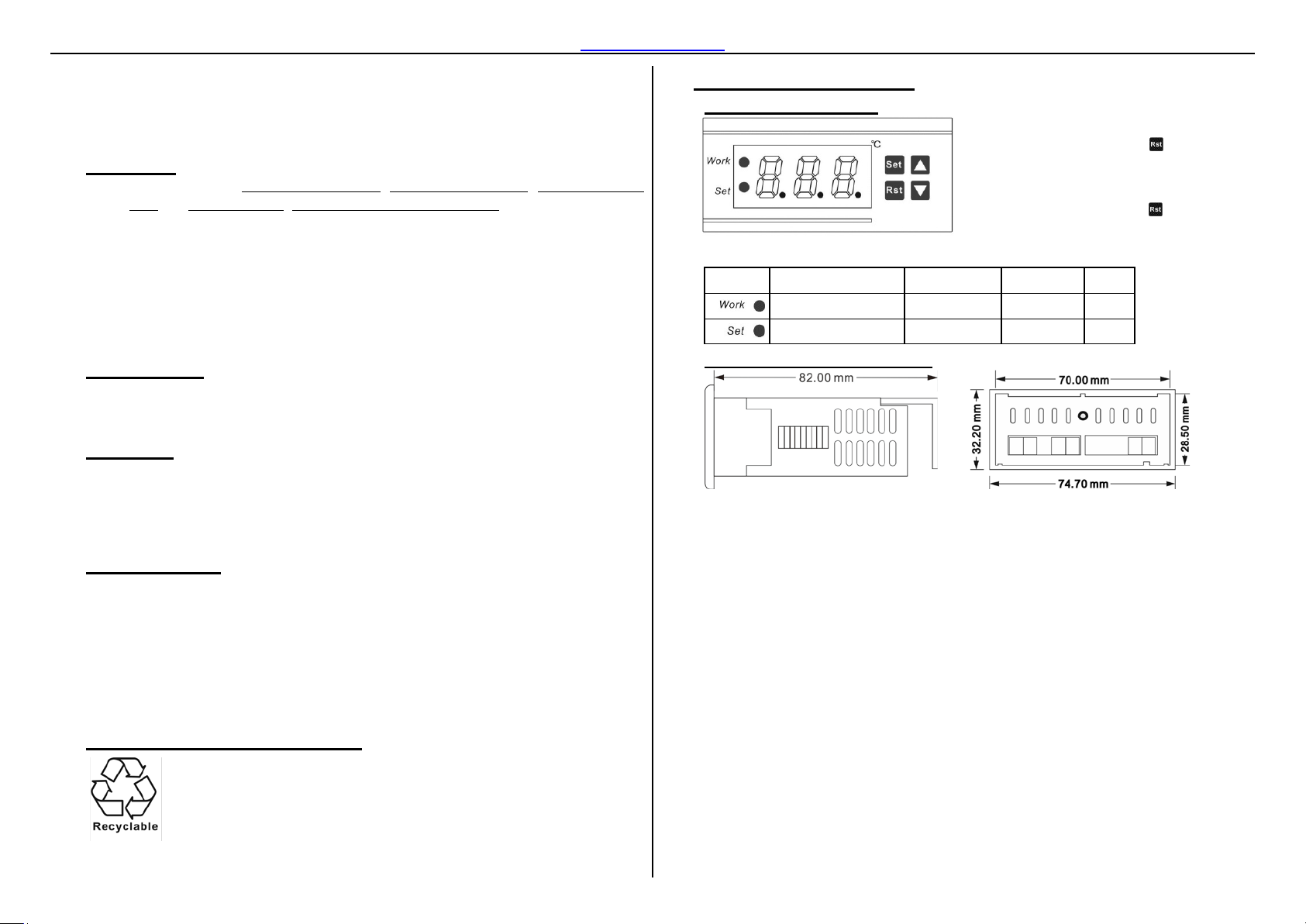
6.1. Front Panel & Icon
Indicator / Character in Display
Indicator Meaning On Hide Wink
6.2. Dimensions & Installat io n
A. Suggested amount dimension: 71.0*29.0*85.0mm (W*H*D)
B. Detach the slide fasteners, put the controller into the hole, wiring follow diagram;
C. Install the fasteners, and the waterproof cover.
D. Please avoid installing in the b elow environments:
1 / 2
When screen light, Press and hold on
3s to turn off the display, attention it is turn
off controller not just dim the screen;
When s cr een dark, Press and release, to
Relative humidity > 90%, have condensation
The places that temperature <-10°C or >60°C;
The places that have inflammables and explosives;
Strong vibration or struck
Exposed to the continuous water mist spraying;
Exposed to the dust;
Exposure to corrosive and pollution gas (for example: The gas, smoke or salt
fog that contain sulfur or ammonia;
Wireless electromagnetic interference or strong magnetic fields (near to
transmitting antenna or switch board room);
Page 2
www.thermo-hygro.com
CA
-5
+5 0 1
PT
0
10 1 1
Assure power on, Press and release key once times you will find display
blink a data which is changeable.
Now press the or keys to get you aim value;
, or Room
Temperature > HS, Press any key to stop screaming if you want to.
Step3
Waiting for 10s the device will save data automatically or pr ess to save it.
HC = C
HC = H
Step1
Press and hold on until appears the code HC (nearly 3s).
Step2
Now press the or keys to select the code you want to update;
Step3
Press and release to see exi st value; then press the or to get your aim value;
Step4
Press key to memorize the configured value and return to the menu.
Repeat operation from Step 2 / 3 / 4 to adjust other parameters;
Step5
P
alone, the modified value will be saved automatically if without operation in 10s
necessary.
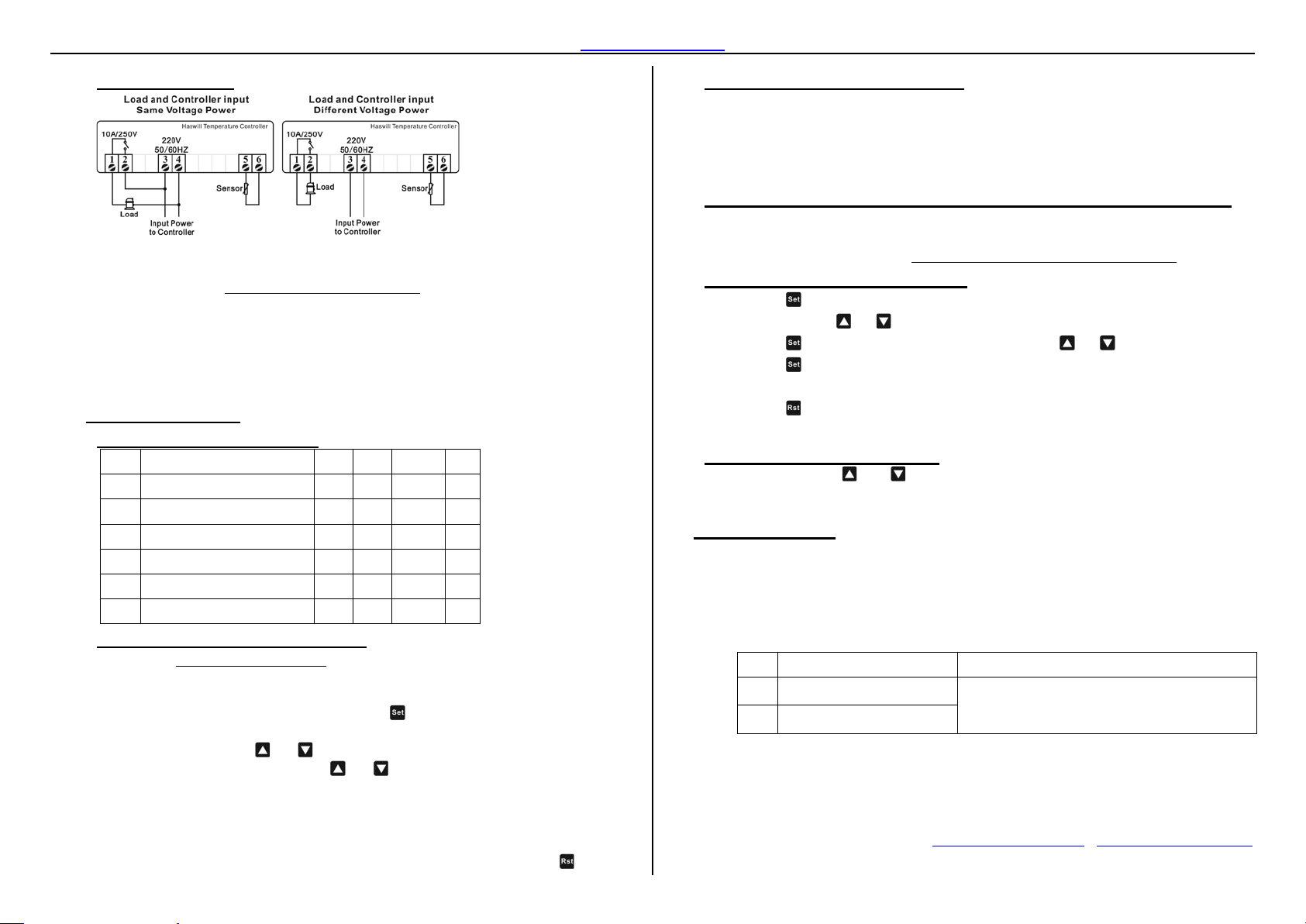
6.3. Wiring Diagram
A. 10K NTC sensor, Need not to distinguish + or - when wiring it.
B. The input voltage must within the voltage value marked in diagram ±10% value.
C. Load Power ≤
Voltage of load ∗ Max current of Relay
Factor
The factor for Inductive Load like compressor, heating pump, usually be 5~8;
The factor for Resistive Load like Electric heati ng rod, Electric blanket
usually is 1.5~2;
The factor for Incandescent lamp usually is 15.
7. Configurations
7.1. Code and Function Menu
Code Function Min Max Default Step
Heating or Cooling
HC
Return Difference (°C)
D
Lowest set Limit (°C)
LS
Highest Limit (°C) ATV
HS
Temperature Calibration (°C)
Dela y T ime (Min)
7.2. What is ATV and how to set it?
ATV means Aim Temperature Value which is the ideal temperature you wish to reach,
once exceed this value (if difference value = 0) the status of load will be changed,
Details of setting as follow
Step1
C H C
1 15 5 1
ATV
-50
120 120 1
-50 1
7.3. When will the load working?
Firstly of all, the instant time passed the delay time (PT), and then matches one of the following
A. In heating mode (
Measured Temperature Value ≤ ATV - Temp. Differential (D)
B. In cooling mode (
Measured Temperature Value ≥ ATV + Temp. Differential (D)
), the relay will turn on heater when
), the relay will turn on cooler
7.4. How to correct measured temperature if found it not right?
Exist gap/distance between the measured temperature and t he real temperature is normal
especially the first time launch this controller; the gaps could be corrected by setting the value in
CA, and please follows the formula: CA = Real Temperature-Measured Temperature.
7.5. How to set other parameters?
ress to save data and quit from setting mode back to normal monitor status. r let it
7.6. How to get Factory Reset?
In normal status, press and keys in same time, do not release them until screen shows
YS which means success, nearly 3s.
8. Error & A la rm
When alarm occur, if the readout flash --- and buzzer sounds,
A. Press any key to stop buzz scream;
B. Check the room temperature and then change the compressor / heater working
status manually if necessary,
C. fix or replace the sensor; after that screen will back to normal state
D. And other code please, reference below content to fix problem.
Code Reason Troubleshooting
Measured temperature > HS Check the room temperatu r e and then change the
HHH
Measured temperature < LS
LLL
compressor / heater workin g st atus manually if
Step2
press and hold on the or is fast fo rward function;
the steps length is 0.1°C;
The editable range between lower (LS) and higher (HS) limit.
The buzzer will scream once Room Temperature < LS
2 / 2
XUZHOU HASWILL ELECTRONICS CO., LTD.
www.thermo-hygro.com ;
Copyright 2016 Haswill-Haswell All Rights Reserved
 Loading...