

Page 1
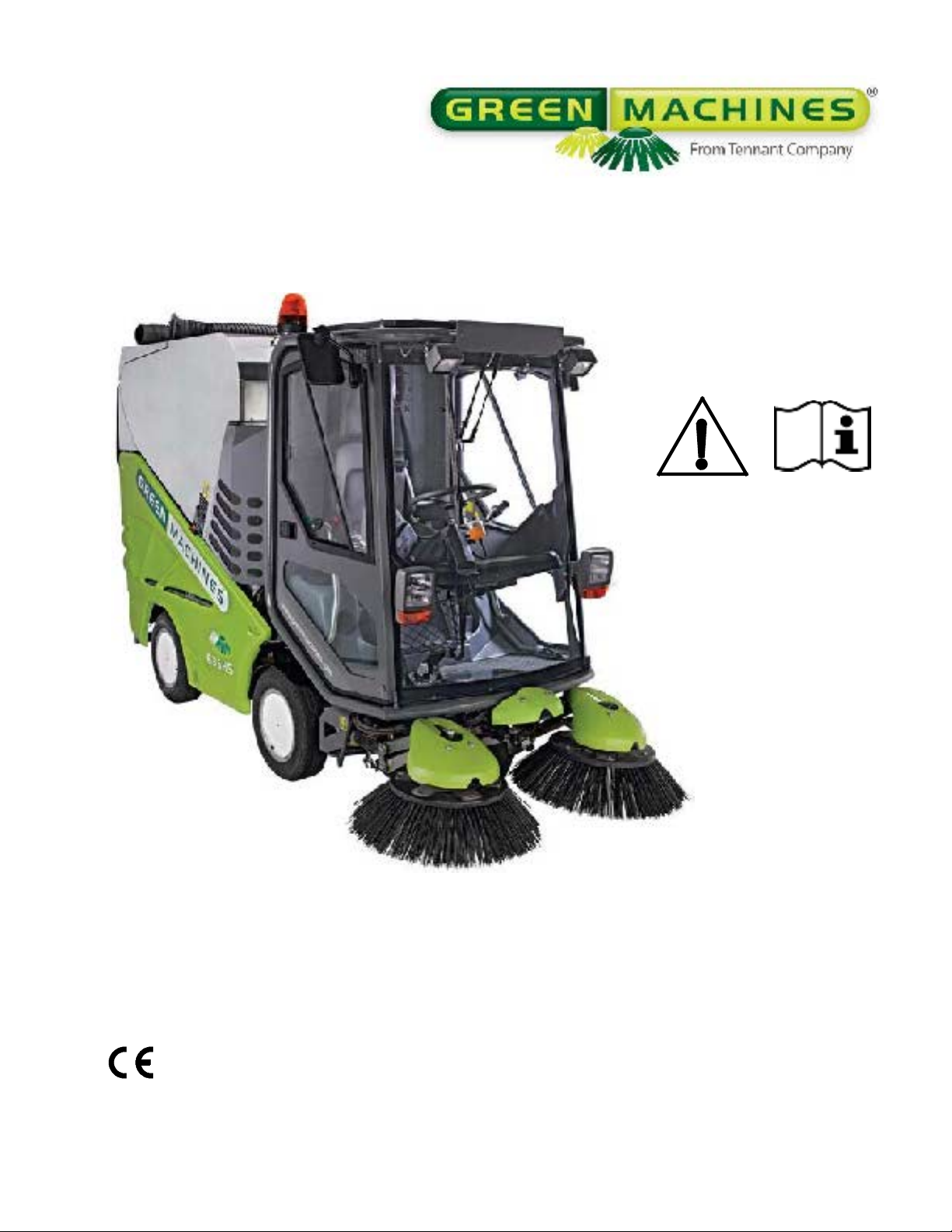
636
Home
Find...
Go To..
Air Sweeper
Operator Manual
CloudMaker®Technology
Vari- tracktTechnology
Global
www.greenmachines.com
9006280
Rev. 04 (10-2011)
*9006280*
Page 2
This manual is furnished with each new model. It provides necessary operation and maintenance instructions.
Home
Find...
Go To..
Read this manual completely and understand
the machine before operating or servicing it.
Read this manual completely and understand the machine before operating or servicing it.
This machine will provide excellent service. However, the best results will be obtained at minimum costs if:
S The machine is operated with reasonable care.
S The machine is maintained regularly - per the machine maintenance instructions provided.
S The machine is maintained with manufacturer supplied or equivalent parts.
PROTECT THE ENVIRONMENT
Please dispose of packaging materials,
old machine components such as
batteries, hazardous fluids, including
antifreeze and oil, in an environmentally
safe way according to local waste
disposal regulations.
Always remember to recycle.
MACHINE DAT A
Please fill out at time of installation for future reference.
Model No. --
Serial No. --
Machine Options --
Sales Rep. --
Sales Rep. phone no. --
Customer Number --
Installation Date --
Green Machines
Bankside, Falkirk FK2 7XE
Scotland, United Kingdom
Phone: (+44) 1324--611666
www.greenmachines.com
Tennant Company
PO Box 1452
Minneapolis, MN 55440
Phone: (800) 553--8033 or (763) 513--2850
www.tennantco.com
The following publications are included with this
machine:
Operators Manual
Service Schedule
Parts Catalog
Kubota Engine Manual
The following optional publications can be purchased
separately:
Kubota Engine Workshop Manual
Kubota Engine Parts Catalog
Please contact a local Green Machines distributor to
order additional publications.
CALIFORNIA PROPOSITION 65 WARNING:
Engine exhaust from this product contains chemicals known to the State of California to cause cancer,
birth defects, or other reproductive harm.
Vari--track Technology is a US registered and unregistered trademark of Green Machines Company.
Specifications and parts are subject to change without notice.
Copyright E 2009, 2010, 2011 Green Machines Company, Printed in U.S.A.
Page 3

CONTENTS
Home
Find...
Go To..
CONTENTS
Safety Precautions 3.......................
Operation 7...............................
Machine Components 7..................
Controls And Instruments 8...............
Symbol Definitions 10.....................
Operation Of Controls 1 1..................
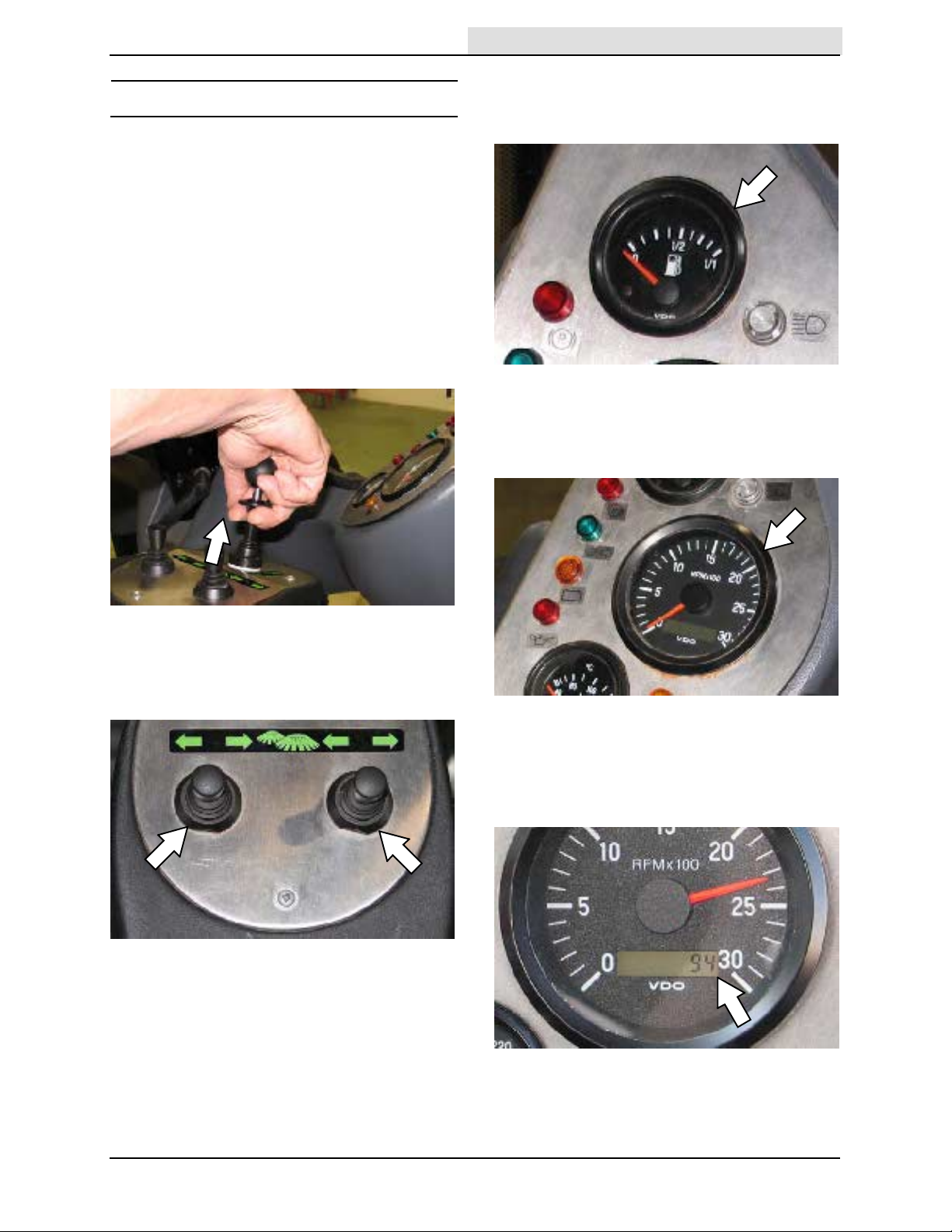
Drive Lever
(Forward / Neutral / Reverse) 11......
Brush Levers 1 1.......................
Fuel Gauge 1 1........................
Tachometer 11........................
Hour Meter 11........................
Engine T emperature Gauge 12..........
Parking Brake Indicator (Red) 12........
Turn Signal / 4--Way Warning Light
Indicator (Green) 12................
Charging System Malfunction
Indicator (Amber) 12................
Engine Oil Indicator (Red) 12...........
Headlight High Beam Indicator 12.......
Glow Plug Indicator (Amber) 13.........
Hopper Drain Switch 13................
Transit / Work Modes Switch 14.........
Brush Speed Knob 14..................
Vacuum Fan Speed Knob 15............
Vacuum Fan Speed Boost 15...........
Windshield Defroster Switch 15.........
Master Light Switch 16.................
Overhead Work Light Switch 16.........
Rear Fog Light Switch 16...............
Cab Temperature Control Knob 16.......
Heater Fan Switch 17..................
Air Conditioner (Option) 17.............
4--Way Warning Light Switch 17.........
Warning Beacon / Audible
Alarm Switch 17....................
Water Switch (Dust Suppression) 18.....
Water Flow Control Knob 18............
Brush Pressure Adjustment Knob 19.....
Parking Brake Lever 19................
Accelerator Pedal 19...................
Brake Pedal 19.......................
Steering Wheel Height
Adjustment Handle 20...............
Headlight And Multifunctional Switch 20..
Windshield Wiper / Washer Switch 20....
Horn Button 20........................
Operator Seat 21......................
Seat Belts 21.........................
Door Locks 21........................
Brush Information 22.....................
How The Machine Works 22...............
Pre--operation Checklist 23................
Post Operation Cleaning 23................
Page
Starting The Machine 24..................
Turning Off The Machine 25...............
While Operating The Machine 25...........
Sweeping 26............................
Driving Over Curbs 27....................
Raising / Lowering The Hopper 28..........
Engaging The Hopper Safety Arm 29.......
Disengaging The Hopper Safety Arm 30.....
Using The Wander Hose 30...............
Emptying The Hopper 32..................
Cleaning The Machine 33.................
Cleaning The Vacuum Fan Assembly 37....
Checking / Filling The Water Tank 37.......
Using The Machine Display
Module (MDM) System 38..............
Adjusting The Engine Speed 38............
Using The Engine Speed Boost 39.........
Machine Display Module (MDM)
Fault Screens 40......................
Options 42..............................
Pressure Washer (Option) 42...........
Rear View Camera (Option) 43..........
Radio And Compact Disk
Player (Option) 43..................
Automatic Greasing (Option) 43.........
Filling The Automatic Greasing
System Reservoir 43.............
Winter Equipment (Option) 44...........
Snow Brush (Option) 44.............
Snow Plows (Option) 45.............
Grit (Sand / Road Salt)
Dispenser (Option) 46............
Machine Troubleshooting 47...............
Conditions Table 49.......................
Maintenance 50.............................
Maintenance Chart 50....................
Lubrication 55...........................
Lubrication Points 55...................
Hydraulics 56............................
Hydraulic Hoses 57....................
Hydraulic Fluid 57.....................
Engine 58...............................
Engine Oil 58.........................
Cooling System 58....................
Engine Belt 58........................
Air Filter 59..........................
Fuel Filters 60........................
Fuel Lines 60.........................
Priming The Fuel System 60............
Valve Clearances 60...................
Battery 61
Fuses 62................................
...............................
Replacing The Fuses 62................
Page
636 9006280 (10-- 11)
1
Page 4

CONTENTS
Home
Find...
Go To..
Brushes 63..............................
Replacing The Brushes 63..............
Adjusting The Brush Angle 63...........
Brush Linkage 64......................
Dust Suppression / Vacuum 65.............
Adjusting / Replacing The Nozzle Flap 65.
Vacuum Nozzle Skid 66................
Cast Iron Skid 66......................
Spray Jets 66.........................
CloudMaker 67........................
Water Tank 67..........................
Drain Cap Filter 67....................
Water Tank Door Retainer Chain 67......
Water Level Sensor 67.................
Hopper 68...............................
Hopper Door, Hopper Inlet, And
Vacuum Fan Access Door Seals 68...
Hopper Drain Seal 68..................
Hopper Cyclones Screens 68...........
Hopper Drain Screen 68................
Hopper External Drain Tube 69..........
Hopper Door Screen 69................
Hopper Raised Safety Switch 69........
Vacuum Fan Door Safety Switch 69......
Vacuum Fan Access Door 69...........
Cab 70..................................
Windshield Wiper Blades 70............
Rear View Camera (Option) 70..........
Windshield Washer Fluid 70...............
Steering And Suspension 71...............
Brakes And Tires 72......................
Service Brakes 72.....................
Parking Brakes 72.....................
Tires 72..............................
Wheel Torque 72......................
Wander Hose 73.........................
Pressure Washer (Option) 73..............
Tilting / Lowering The Cab 74..............
Tilting The Cab 74.....................
Lowering The Cab 74..................
Tilting / Lowering The Hopper Manually 75...
Tilting The Hopper Manually 75..........
Lowering The Hopper Manually 76.......
Towing / Transporting The Machine 77......
Towing The Machine 77................
Transporting The Machine 77...........
Machine Jacking 79......................
Storage And Freeze Protection 80..........
Storing The Machine 80................
Freeze Protection 80...................
Specifications 81............................
General Machine Dimensions/Capacities 81.
General Machine Performance 81..........
Hydraulic System 82......................
Steering 82..............................
Power Type 82...........................
Tires 82.................................
Machine Dimensions 83...................
Page
2
636 9006280 (10-- 11)
Page 5

SAFETY PRECAUTIONS
Home
Find...
Go To..
SAFETY PRECAUTIONS
The following precautions are used throughout
this manual as indicated in their description:
WARNING: To warn of hazards or
unsafe practices that could result in
severe personal injury or death.
CAUTION: To warn of unsafe practices
that could result in minor or moderate
personal injury.
FOR SAFETY: To identify actions that must be
followed for safe operation of equipment.
The machine is suited to sweep disposable
debris. Do not use the machine other than
described in this Operator Manual.
The following information signals potentially
dangerous conditions to the operator or
equipment:
WARNING: Moving belt and fan. Keep
away.
WARNING: Machine emits toxic gases.
Serious injury or death can result.
Provide adequate ventilation.
WARNING: Raised hopper may fall.
Engage hopper support arm.
WARNING: Lift arm pinch point. Stay
clear of hopper lift arms.
WARNING: Flammable materials can
cause explosion or fire. Do not use
flammable materials in tank. Only use
water.
WARNING: Do not spray people or
animals. Severe personal injury can
result. Wear eye protection. Hold
sprayer with two hands.
FOR SAFETY:
1. Do not operate machine:
-- Unless trained and authorized.
-- Unless operator manual is read and
understood.
-- Unless mentally and physically
capable of following machine
instructions.
-- If it is not in proper operating
condition.
-- In flammable or explosive areas.
2. Before starting machine:
-- Check for fuel, oil, and liquid leaks.
-- Keep sparks and open flame away
from refueling area.
-- Make sure all safety devices are in
place and operate properly.
-- Check brakes and steering for proper
operation.
-- Adjust seat and fasten seat belt.
3. When starting machine:
-- Keep foot on brake and place
directional lever in neutral.
4. When using machine:
-- Do not pick up burning or smoking
debris, such as cigarettes, matches or
hot ashes
-- Use brakes to stop machine.
-- Go slow on inclines and slippery
surfaces.
-- Use care when reversing machine.
-- Move machine with care when hopper
is raised.
-- Make sure adequate clearance is
available before raising hopper.
-- Do not make adjustments on Machine
Display Module (MDM) System while
the machine is moving. Always stop
machine before making adjustments.
-- Do not carry passengers on machine.
-- Always follow safety and traffic rules.
-- Report machine damage or faulty
operation immediately.
636 9006280 (10-- 11)
5. Before leaving or servicing machine:
-- Stop on level surface.
-- Place the drive lever in neutral.
-- Set parking brake.
-- Turn off machine.
-- Remove key from ignition.
3
Page 6

SAFETY PRECAUTIONS
Home
Find...
Go To..
6. When servicing machine:
-- Avoid moving parts. Do not wear loose
clothing or jewelry.
-- Block machine tires before jacking
machine up.
-- Jack machine up at designated
locations only. Support machine with
jack stands.
-- Use hoist or jack that will support the
weight of the machine.
-- Wear eye and ear protection when
using pressurized air or water.
-- Disconnect battery connections before
working on machine.
-- Avoid contact with battery acid.
-- Avoid contact with hot engine coolant.
-- Do not remove cap from radiator when
engine is hot.
-- Allow engine to cool.
-- Keep flames and sparks away from
fuel system service area. Keep area
well ventilated.
-- Use cardboard to locate leaking
hydraulic fluid under pressure.
-- Use Tennant supplied or approved
replacement parts.
7. When loading/unloading machine
onto/off truck or trailer:
-- Turn off machine.
-- Use truck or trailer that will support
the weight of the machine.
-- Use winch. Do not drive the machine
onto/off the truck or trailer unless the
load height is 380 mm (15 in) or less
from the ground.
-- Set parking brake after machine is
loaded.
-- Block machine tires.
-- Tie machine down to truck or trailer.
4
636 9006280 (2-- 08)
Page 7
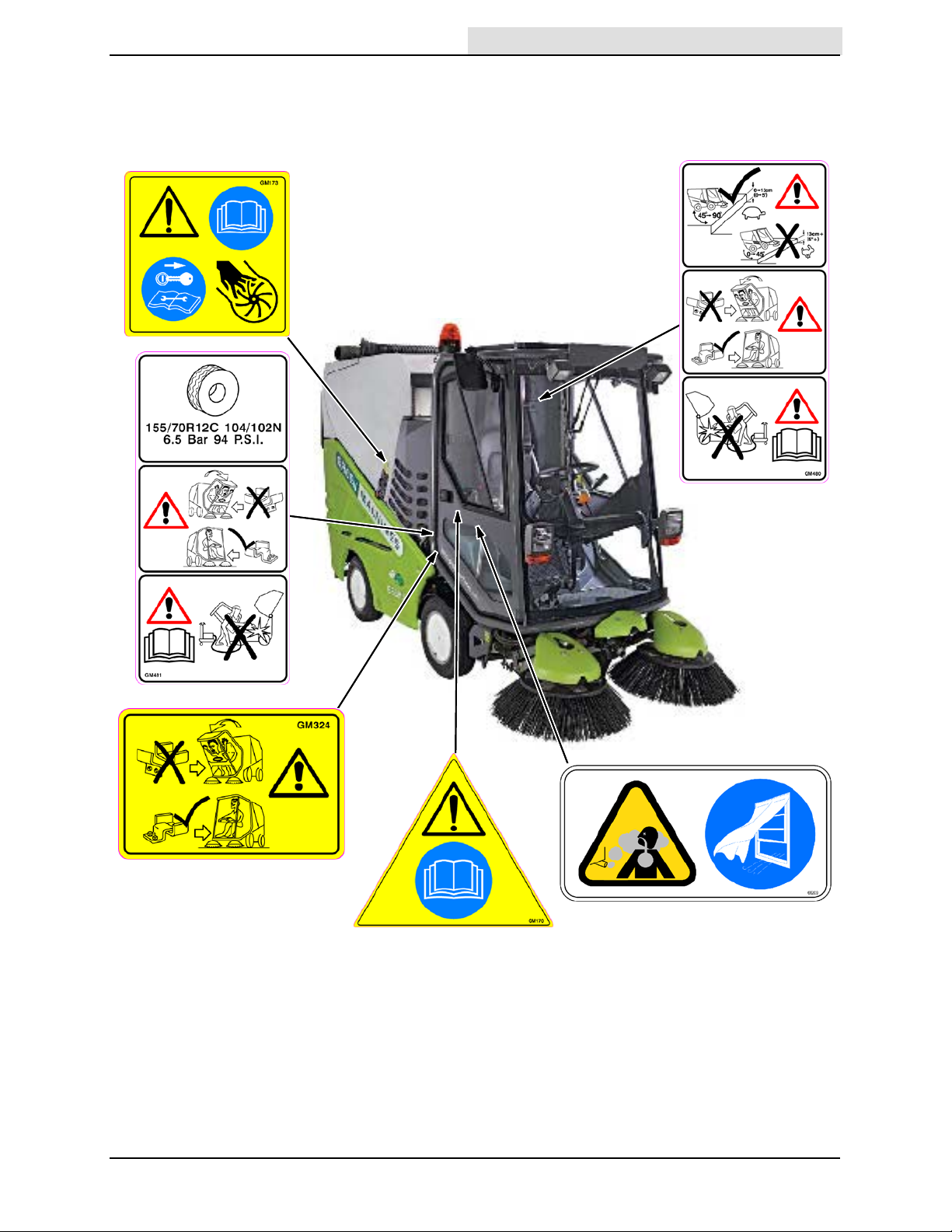
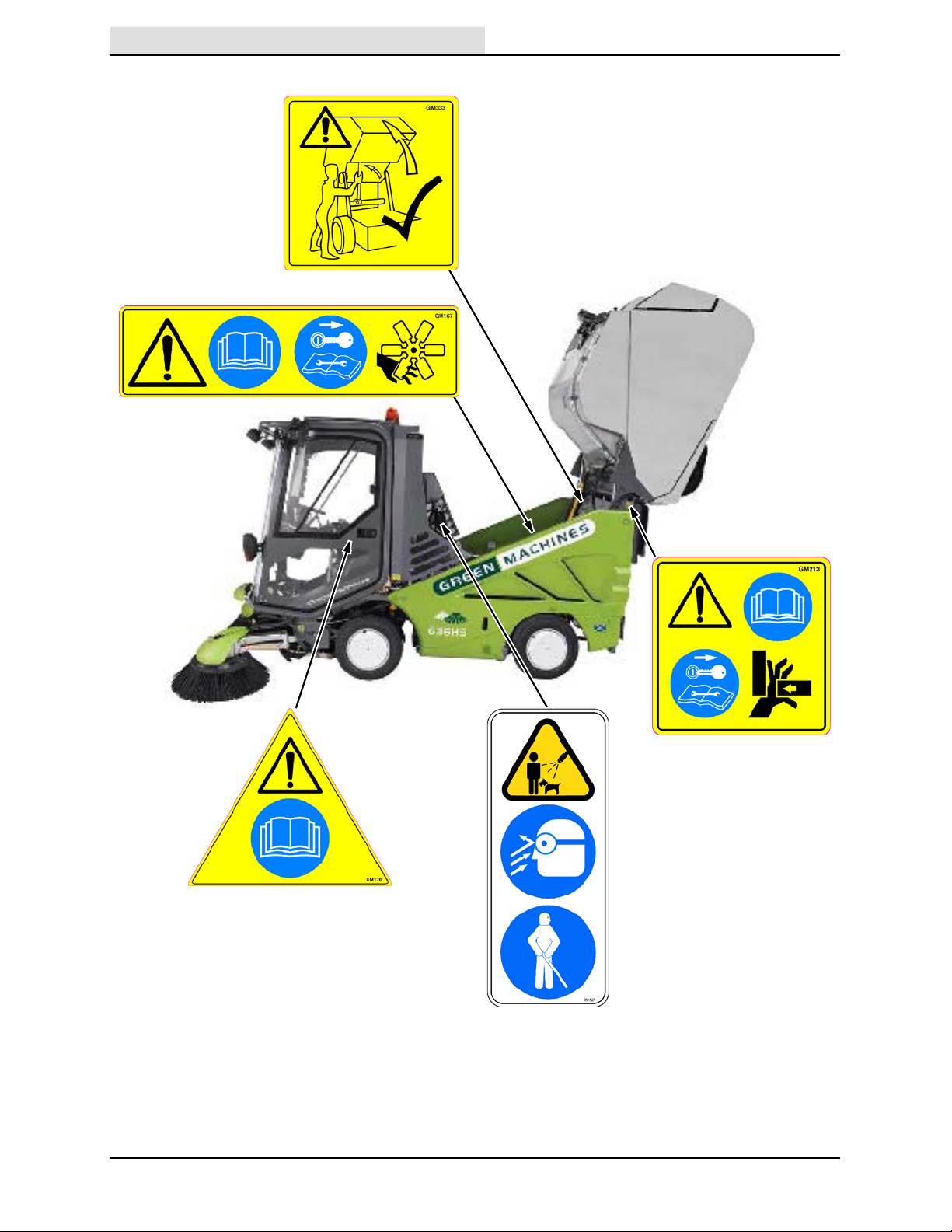
The following safety labels are mounted on the
Home
Find...
Go To..
machine in the locations indicated. If any label
becomes damaged or illegible, install a new label
in its place.
SAFETY PRECAUTIONS
636 9006280 (2-- 08)
5
Page 8
SAFETY PRECAUTIONS
Home
Find...
Go To..
6
636 9006280 (2-- 08)
Page 9
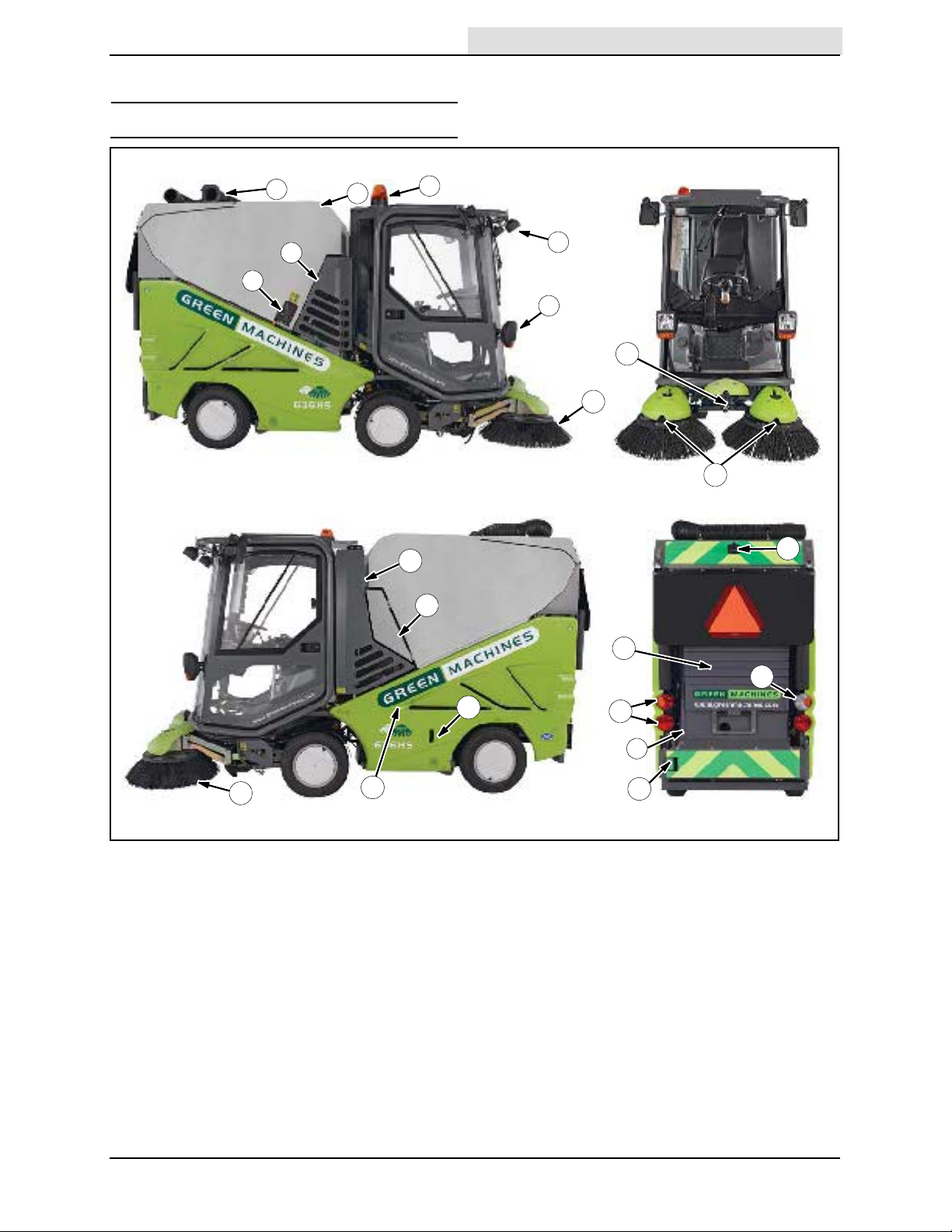
MACHINE COMPONENT S
Home
Find...
Go To..
OPERATION
OPERAT ION
17
3
4
5
9
8
10
11
18
1
6
7
2
21
1. Wander hose
2. Hopper
3. Warning beacon
4. Overhead work lights
5. Headlights / Turn signals
6. Right access door
7. Vacuum fan access door
8. Right brush
9. CloudMaker (dust suppression)
10. Spray jets (dust suppression)
11. Rear view camera (Optional)
20
13
19
12. Rear fog light
13. Water tank
14. Taillights / Turn signals
15. Water tank level tube
16. Water tank door
17. Left access door
18. Wander hose access door
19. Hydraulic fluid level indicator
20. Engine compartment
21. Left brush
14
15
16
12
636 9006280 (2-- 09)
7
Page 10
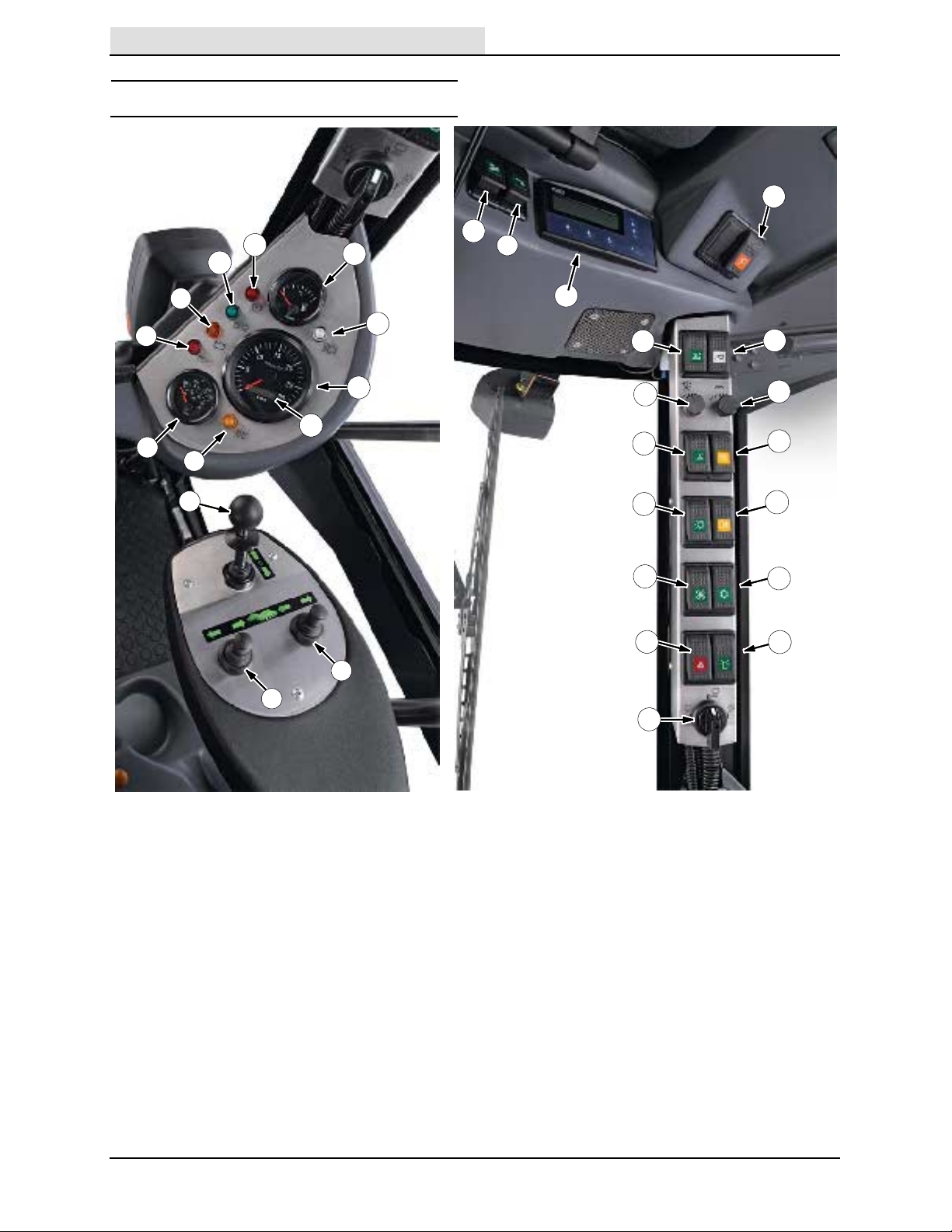
OPERATION
Home
Find...
Go To..
CONTROLS AND INSTRUM ENTS
9
8
10
17
14
15
7
6
13
5
4
3
1
11
12
2
16
19
21
23
25
27
29
18
20
22
24
26
28
30
1. Left Brush Lever
2. Right Brush Lever
3. Drive Lever
(Forward / Neutral / Reverse)
4. Glow Plug Indicator (Amber)
5. Engine Temperature Gauge
6. Engine Oil Indicator (Red)
7. Charging System Malfunction
Indicator (Amber)
8. Turn Signal / 4--Way Warning Light
Indicator (Green)
9. Parking Brake Indicator (Red)
10. Fuel Gauge
11. Headlight High Beam Indicator
12. Tachometer
13. Hour Meter
14. Wander Hose Switch
8
15. Pressure Washer Switch (Optional)
16. Machine Display Module (MDM)
17. Hopper Drain Switch
18. Hopper Raise / Lower Switch
19. Transit / Work Modes Switch
20. Brush Speed Knob
21. Vacuum Fan Speed Knob
22. Windshield Defroster Switch
23. Overhead Work Light Switch
24. Rear Fog Light Switch
25. Master Light Switch
26. Air Conditioner Switch (Optional)
27. Heater Fan Switch
28. Warning Beacon / Audible Alarm Switch
29. 4--Way Warning Light Switch
30. Water Control Knob (Dust Suppression)
636 9006280 (2-- 09)
Page 11
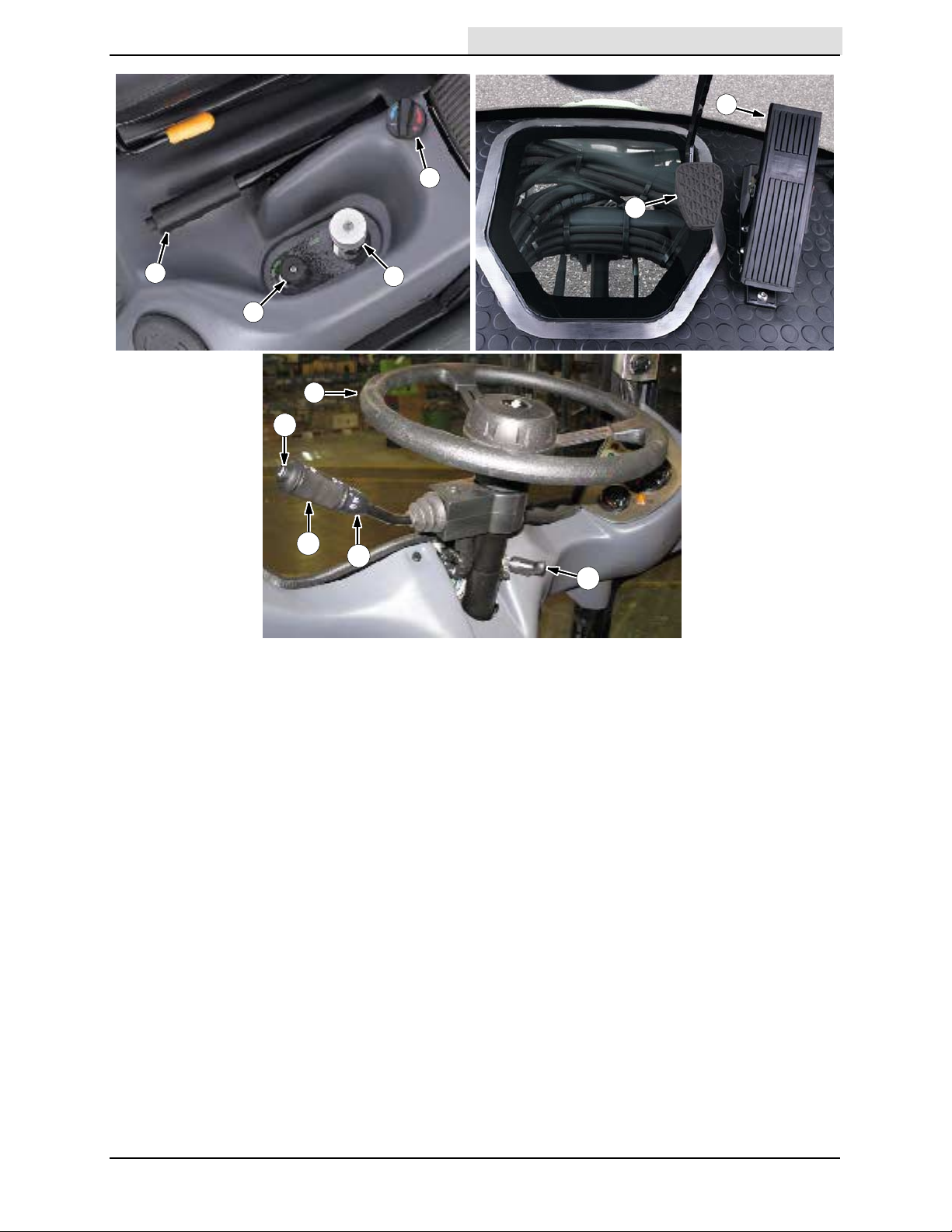
OPERATION
Home
Find...
Go To..
5
2
6
1
4
7
11
10
1. Parking Brake Lever
2. Cab Temperature Control Knob
3. Brush Pressure Adjustment Knob
4. Water Flow Control Knob
5. Accelerator Pedal
6. Brake Pedal
9
3
8
7. Steering Wheel
8. Steering Wheel Height Adjustment
Handle
9. Headlight and Multifunctional Switch
10. Windshield Wiper / Washer Switch
11. Horn Button
636 9006280 (2-- 09)
9
Page 12
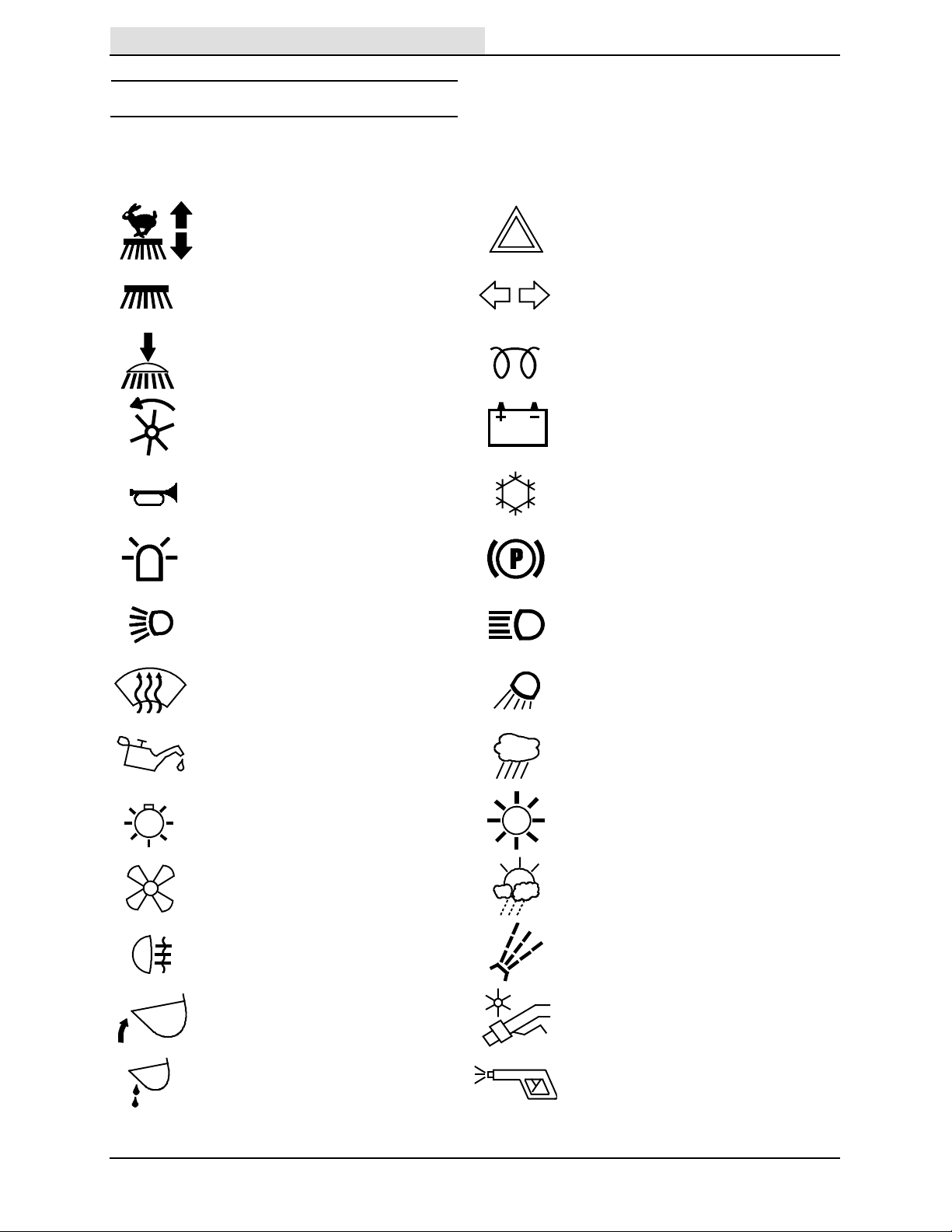
OPERATION
Home
Find...
Go To..
SYMBOL DEFINITIONS
These symbols are used on the machine to
identify controls, displays, and features.
Transit / Work Mode Hazard Lights
Brush Speed Signal Light / 4--Way Hazard Light
Brush Pressure Glow Plug (Preheat)
Vacuum Fan Speed Voltmeter
Horn Air Conditioner (Option)
Warning Beacon Parking Brake
Operating Lights Bright Headlights
Windshield Defroster Overhead Lights
Oil Pressure Dust Suppression 0
Master Lights Dust Suppression 1
Heater Fan Dust Suppression 2
Rear Fog Lights Water Flow Control
10
Raise / Lower Hopper Wander Hose (Option)
Hopper Drain Pressure Washer (Option)
636 9006280 (2-- 09)
Page 13
OPERATION OF CONTROLS
Home
Find...
Go To..
DRIVE LEVER
(FORWARD / NEUTRAL / REVERSE)
NOTE: Lift the lock toward the ball handle before
moving the drive lever to the desired position.
Forward: Place the Drive lever into the forward
position and press the accelerator pedal.
Neutral: Place the Drive lever into the middle
position.
Reverse: Place the Drive lever into the reverse
position and press the accelerator pedal.
OPERATION
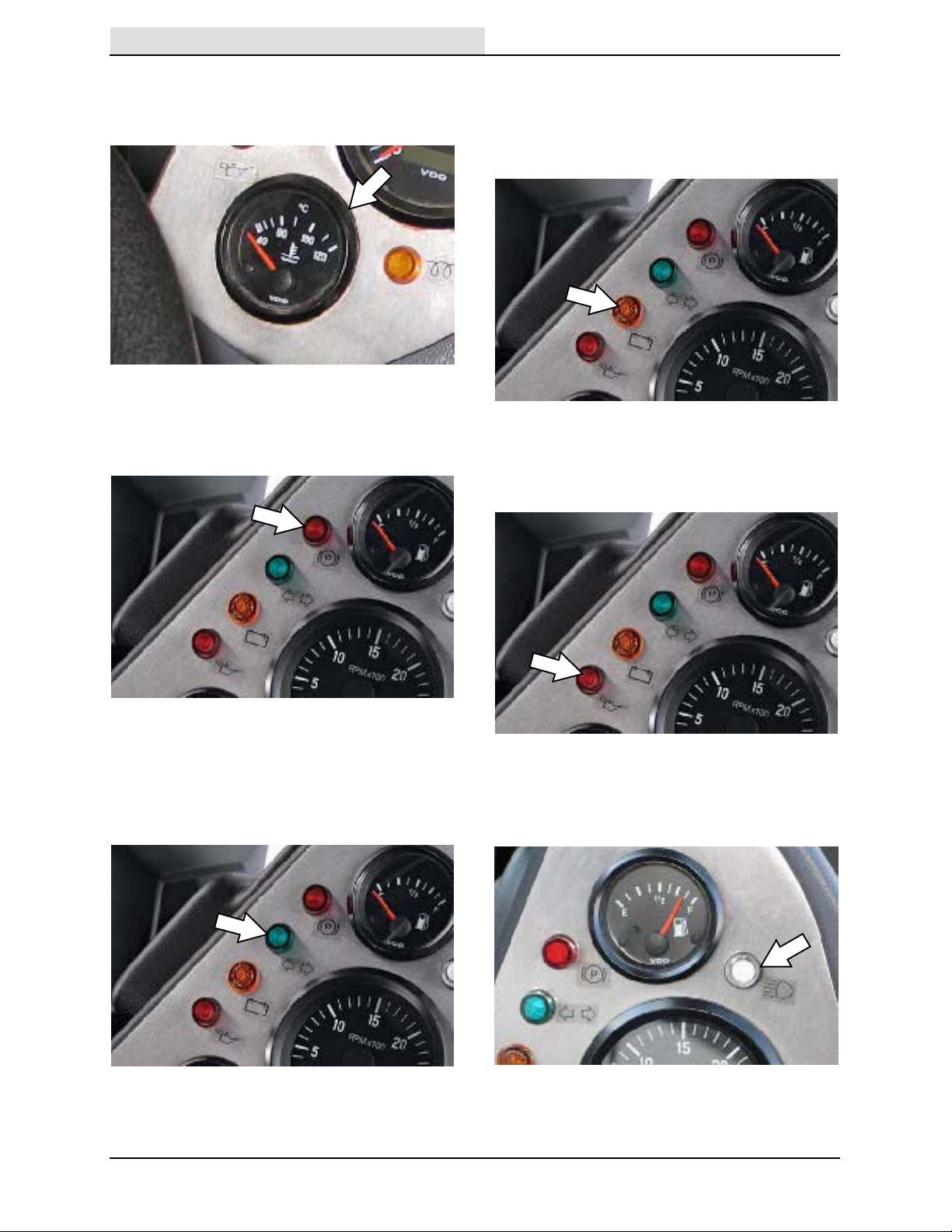
FUEL GAUG E
The Fuel gauge displays the amount of fuel in the
tank. Use diesel fuel only.
TACHOMETER
The Tachometer displays the engine speed in
rotations per minute (rpm).
BRUSH LEVERS
Use the Brush levers to adjust the brush path
width and edge sweep.
HOUR METER
The Hour meter displays the number of hours the
machine was operated. Use this information to
determine machine service intervals.
636 9006280 (2-- 09)
11
Page 14
OPERATION
Home
Find...
Go To..
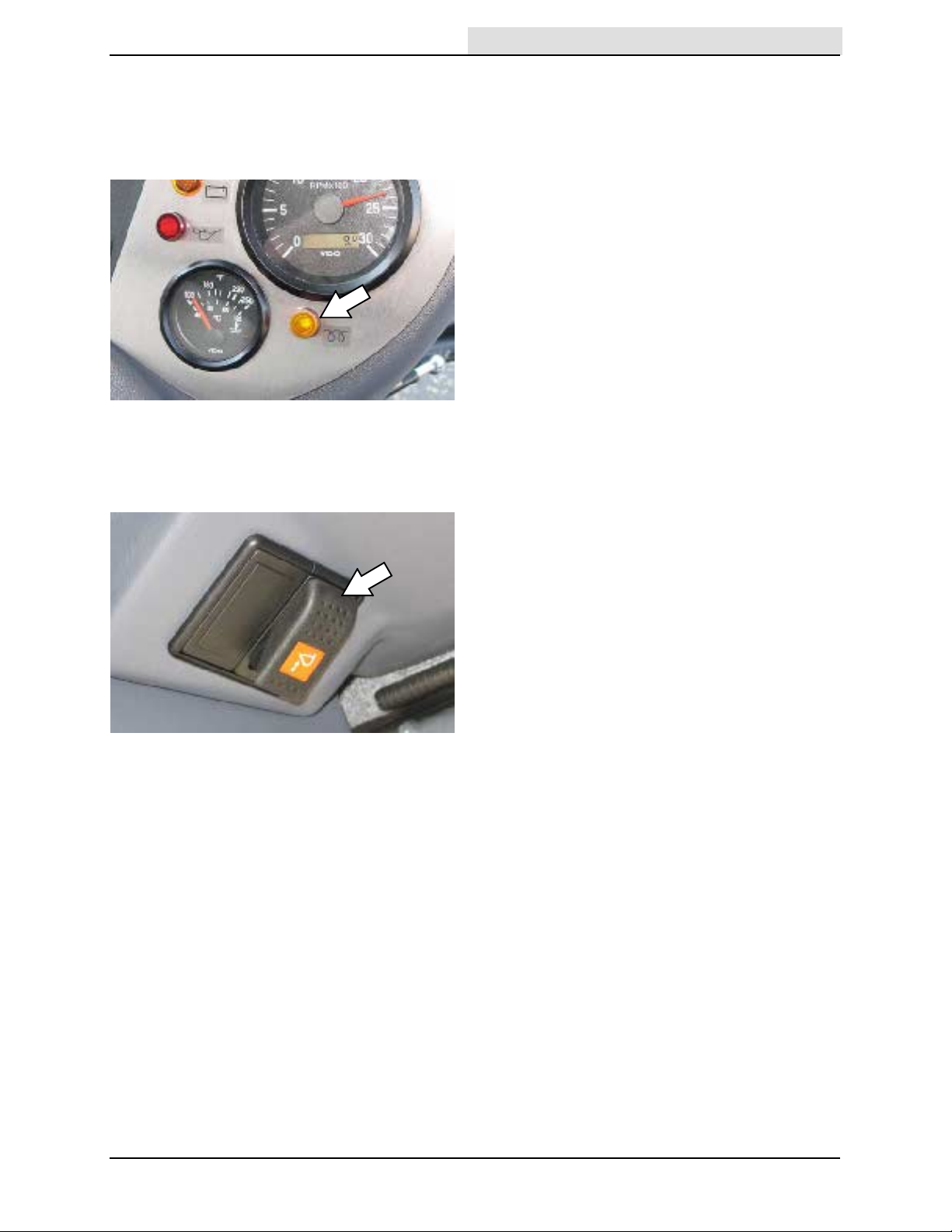
ENGINE TEMPERATURE GAUGE
The Engine temperature gauge indicates the
engine temperature.
PARKING BRAKE INDICATOR (RED)
The Parking brake indicator illuminates when the
parking brake is engaged.
CHARGING SYSTEM MALF UNCT IO N
INDICATOR (AMBE R)
The Charging system malfunction indicator
illuminates when the alternator is not charging the
battery.
ENGINE OIL INDI CATOR (RED)
The Engine oil indicator illuminates when the oil
pressure is low.
TURN SIGNAL / 4--WAY WARNING L IG HT
INDICATOR (GREEN)
The Turn signal /4--way warning light indicator
illuminates when the turn signals or 4--way
warning lights are activated.
12
HEADLIGHT HIG H BEAM INDICATOR
The Headlight high beam indicator illuminates
when the headlight high beams are on.
636 9006280 (2-- 09)
Page 15
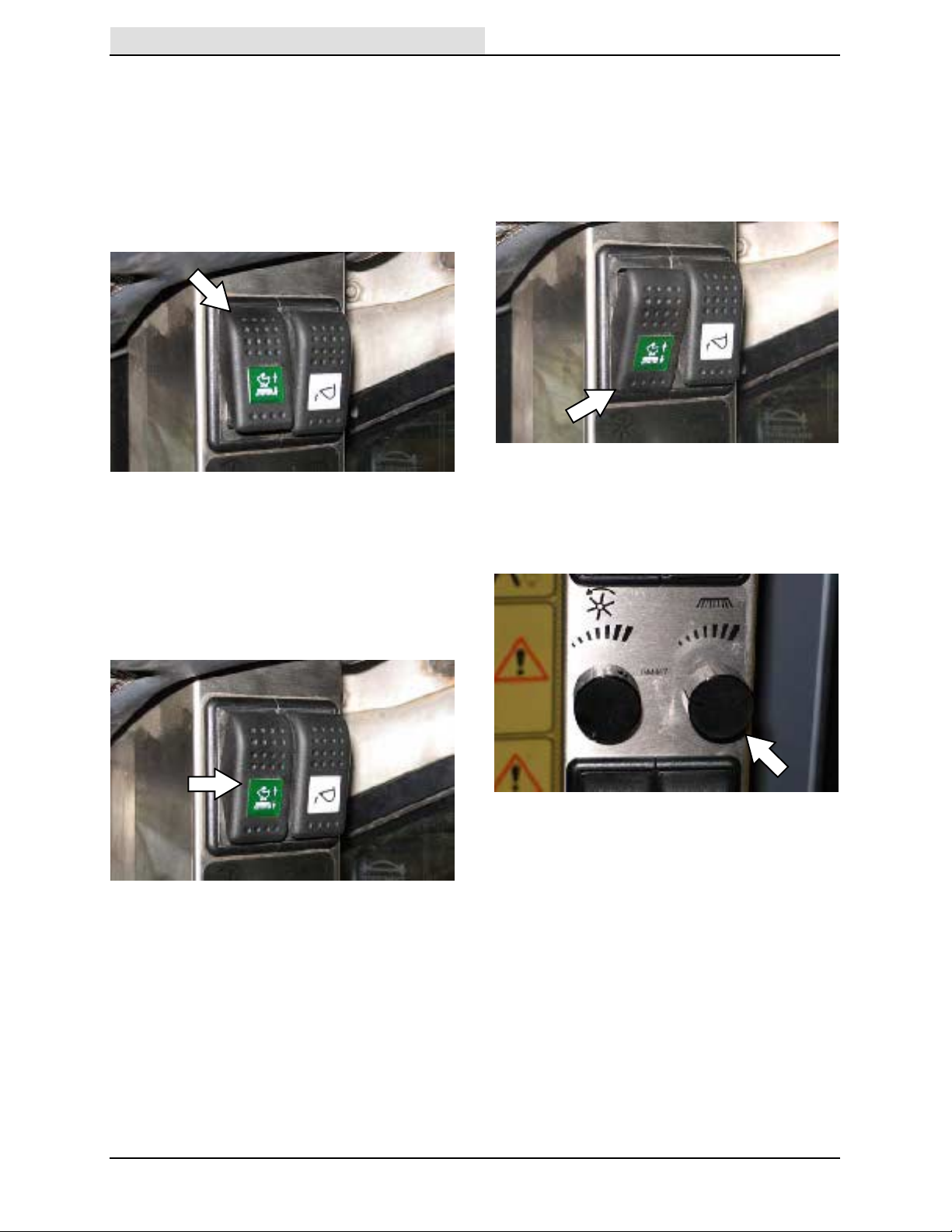
GLOW PLUG INDICATOR (AMBER)
Home
Find...
Go To..
The Glow plug indicator illuminates when the
ignition switch is turned clockwise far enough to
activate light, but not far enough to start the
engine.
HOPPER DRAI N SWITCH
Use the Hopper drain switch to drain excess
water from the hopper.
OPERATION
636 9006280 (2-- 09)
13
Page 16
OPERATION
Home
Find...
Go To..
TRANSIT / WORK MODES SWITCH
Transit Mode (top position) is for moving between
job sites. The machine can reach speeds up to 40
km/h (25 mph) when in this mode. The front
wheels automatically track out to provide more
stability when the machine exceeds 5 km/h
(approximately 3 mph). The brushes raise and
stop rotating, the vacuum head raises, and the
vacuum fan stops operating.
Work Mode 1 (middle position) is for sweeping.
The machine can reach speeds up to 12 km/h
(8 mph) when in this mode. If the front wheels are
in the out position, they will automatically track in
when the machine exceeds 5 km/h (approximately
3 mph). The brushes lower and begin rotating, the
vacuum head lowers, and the vacuum fan begins
operating.
Work Mode 2 (bottom position) is for moving short
distances between work areas and driving over
curbs or speed bumps. The machine can reach
speeds up to16 km/h (9 mph) when in this mode.
The brushes raise and stop rotating, the vacuum
head raises, and the vacuum fan stops operating.
The machine automatically provides increased
traction.
BRUSH SPEED KNOB
Turn the Brush speed knob clockwise to increase
the speed of both brushes and counterclockwise
to decrease the speed of both brushes.
14
636 9006280 (2-- 09)
Page 17
OPERATION
Home
Find...
Go To..
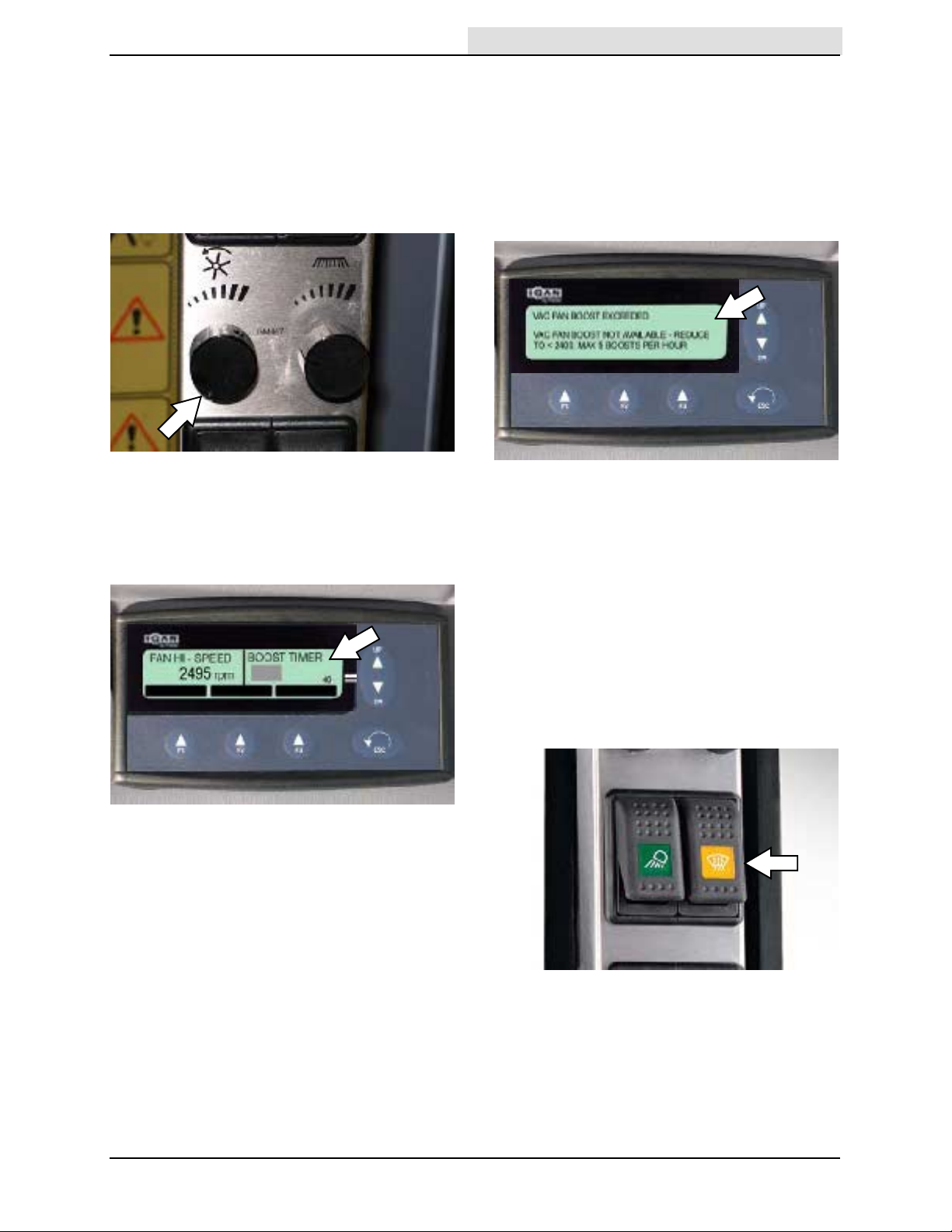
VACUUM FAN SPEED KNOB
Turn the Vacuum fan speed knob clockwise t o
increase the vacuum and counterclockwise to
decrease the vacuum.
NOTE: For normal operating conditions the
vacuum fan speed should be set to below 2400
rpm.
VACUUM FAN SPEED BOOST
The vacuum fan speed can be set to above 2400
rpm (boost) for a short time (5 minutes). A
countdown bar appears on the MDM display.
Reduce the vacuum fan speed to less than 2400
rpm before the countdown bar expires. It must be
reduced for at least 30 seconds or the machine
must be stopped and the drive lever placed in
neutral for five seconds before returning to
vacuum fan speed boost. If not, an audible alarm
will sound at the end of the five minutes, the fan
will shut off, and a warning message will appear
on the MDM display.
To reset the vacuum fan speed boost limiting
system, stop the machine and place the drive
lever in neutral. Restart the machine and turn the
vacuum speed to below 2400 rpm.
This vacuum fan speed boost is available for only
five 5--minute intervals per hour. After five boost
periods, the vacuum fan speed will be limited to
2300 rpm for the rest of the hour
WINDSHIELD DEFROSTER SWITCH
Use the Windshield defroster switch to defrost the
windshield.
636 9006280 (9-- 09)
15
Page 18
OPERATION
Home
Find...
Go To..
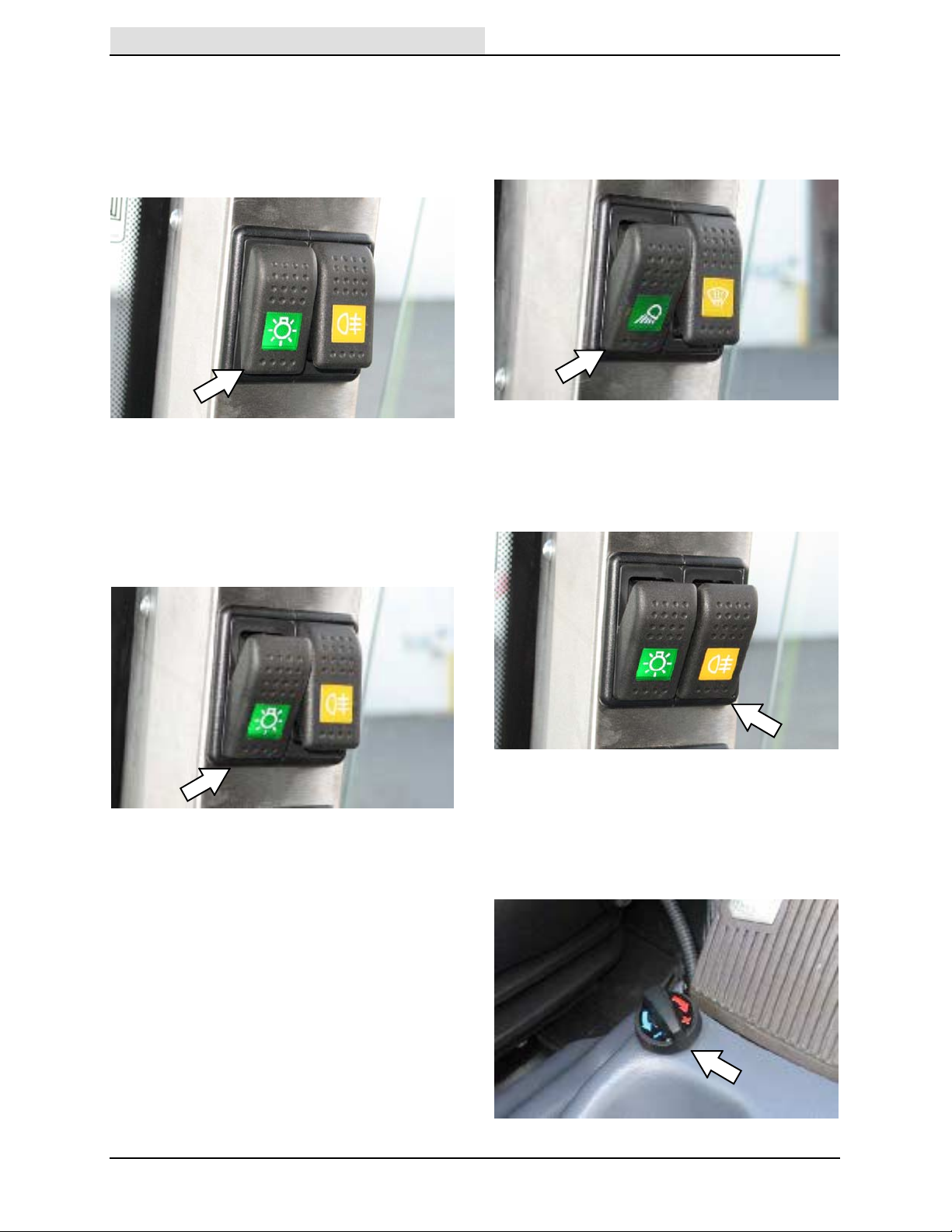
MASTER LIGHT SWITCH
Use the 3--position Master light switch to control
the headlights, overhead work lights, and rear fog
lights. Push the switch to the second position to
operate only the headlights. Push the switch back
to the first position to turn off all lights.
Push the switch to the third position to operate the
headlights and allow use of the overhead work
lights and rear fog lights.
NOTE: The rear fog light and overhead work light
switches must be in the on position for the lights
to function.
OVERHEAD WO RK L I G HT S W I T CH
Use the Overhead work light switch to operate the
overhead work lights. The Master light switch
must be in the third position to operate the
overhead work lights.
REAR F OG LI GHT SWI TCH
Use the Rear fog light switch to operate the rear
fog lights. The Master light switch must be in the
third position to operate the rear fog lights.
16
CAB T EMPERATURE CO NTRO L KNOB
Turn the Cab temperature control knob clockwise
to increase the temperature and counterclockwise
to decrease the temperature inside the cab when
the heater is on.
636 9006280 (2-- 09)
Page 19
OPERATION
Home
Find...
Go To..
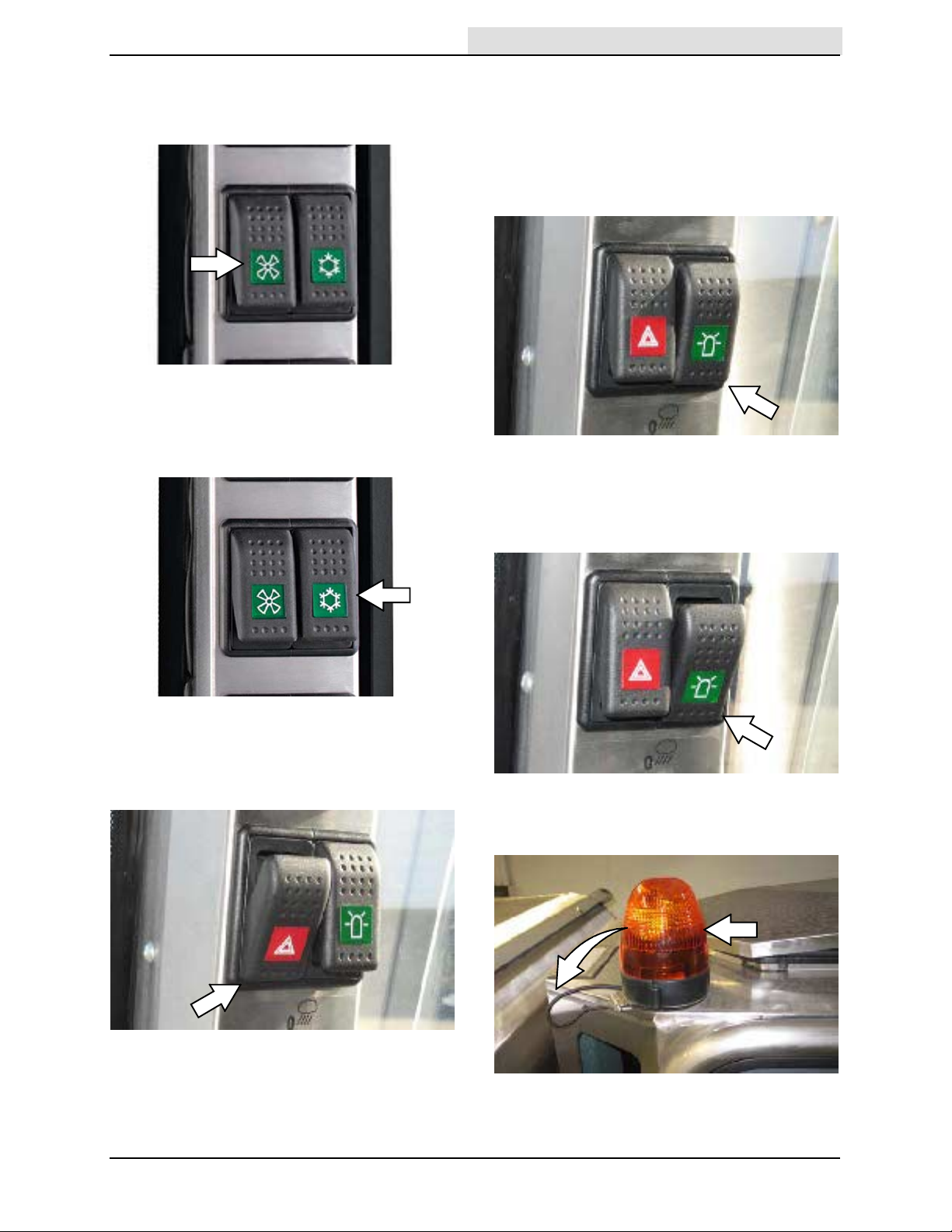
HEATER FAN SWITCH
Use the 2--speed Heater fan speed switch to
operate / adjust the heater fan.
AIR CONDITIONER (OPTION)
Use the 2--speed Air conditioner fan speed switch
to operate / adjust the air conditioner fan.
WARNING BEACON / AUDIBL E AL ARM
SWITCH
Use the 3--position Warning beacon / audible
alarm switch to activate the warning beacon and
audible alarm. Push the switch to the second
(middle) position to operate only the warning
beacon.
Push the switch to the third (lower) position to
operate both the warning beacon and audible
alarm. Push the switch back to the first position to
turn off the warning beacon and audible alarm.
4--WAY WARNING LI GHT SW ITCH
Use the 4--way warning light switch to operate the
4--way warning lights.
636 9006280 (2-- 09)
The warning beacon can be swung back behind
the cab to allow for lower clearances.
17
Page 20
OPERATION
Home
Find...
Go To..
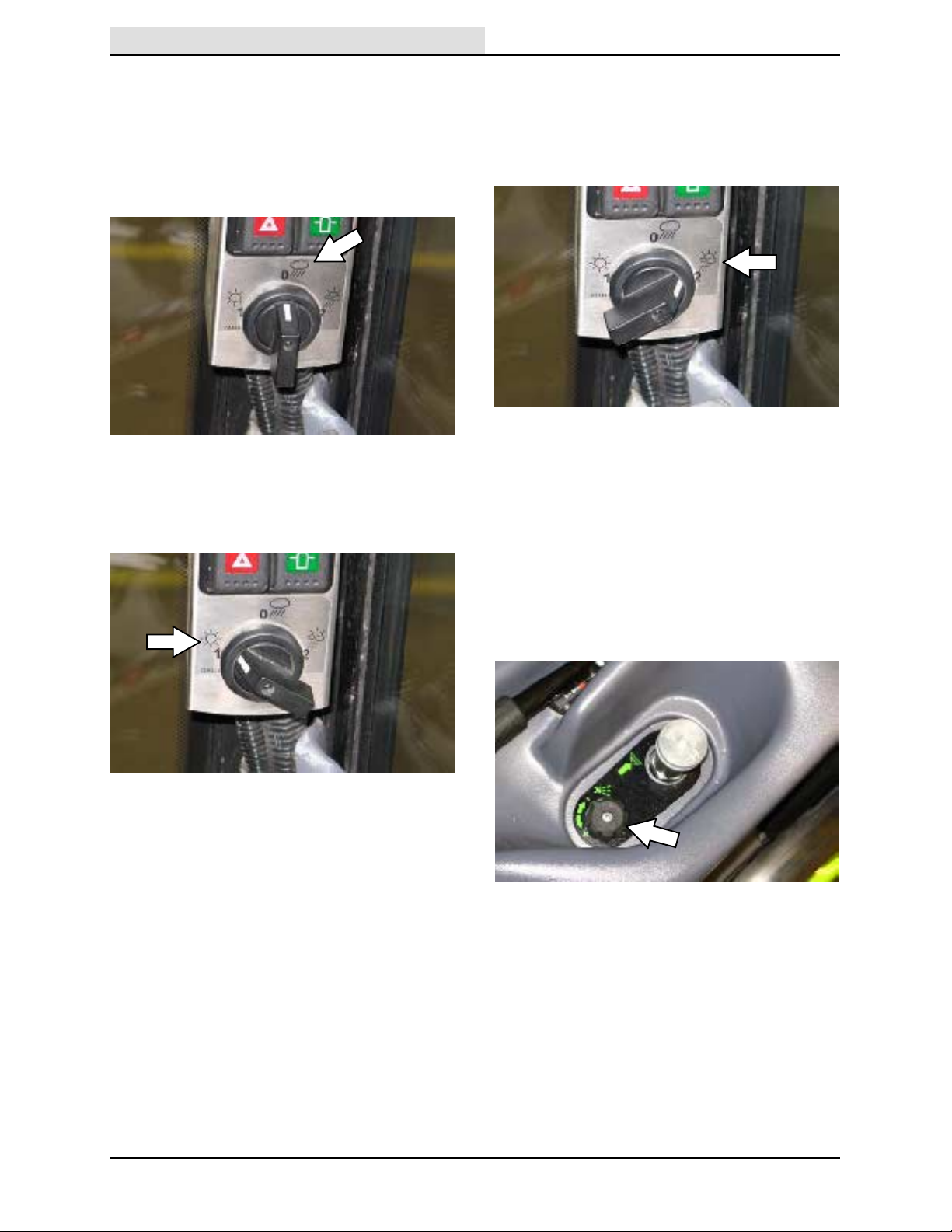
WATER SWITCH (DUST SUPPRESSION)
Turn the water switch to position 0 in areas where
dust suppression is not necessary. Neither the
brush head spray jets nor the vacuum tube spray
jets operate in this mode. The CloudMaker nozzle
continues to rotate to keep the spray head clean,
but does not use water.
Turn the water switch to position 1 for dry areas
where full dust suppression is necessary. The
CloudMaker nozzle, brush head spray jets, and
vacuum tube spray jet operate in this mode.
Turn the water switch to position 2 in areas where
some dust suppression (wet sweeping) is
necessary. Only the brush head spray jets and
vacuum tube spray jets operate in this mode. The
CloudMaker nozzle continues to rotate to keep
the spray head clean, but does not use water.
WATER FLOW CONTROL KNOB
Turn the Water flow control knob clockwise to
decrease the amount of water supplied to the
brush jets and counterclockwise to increase the
amount of water to the brush jets.
NOTE: T o operate only the CloudMaker and
conserve water, turn the water switch to position 1
and the water flow control knob to the minimum
flow setting to turn off the water to the brush
spray jets.
18
636 9006280 (2-- 09)
Page 21
OPERATION
Home
Find...
Go To..
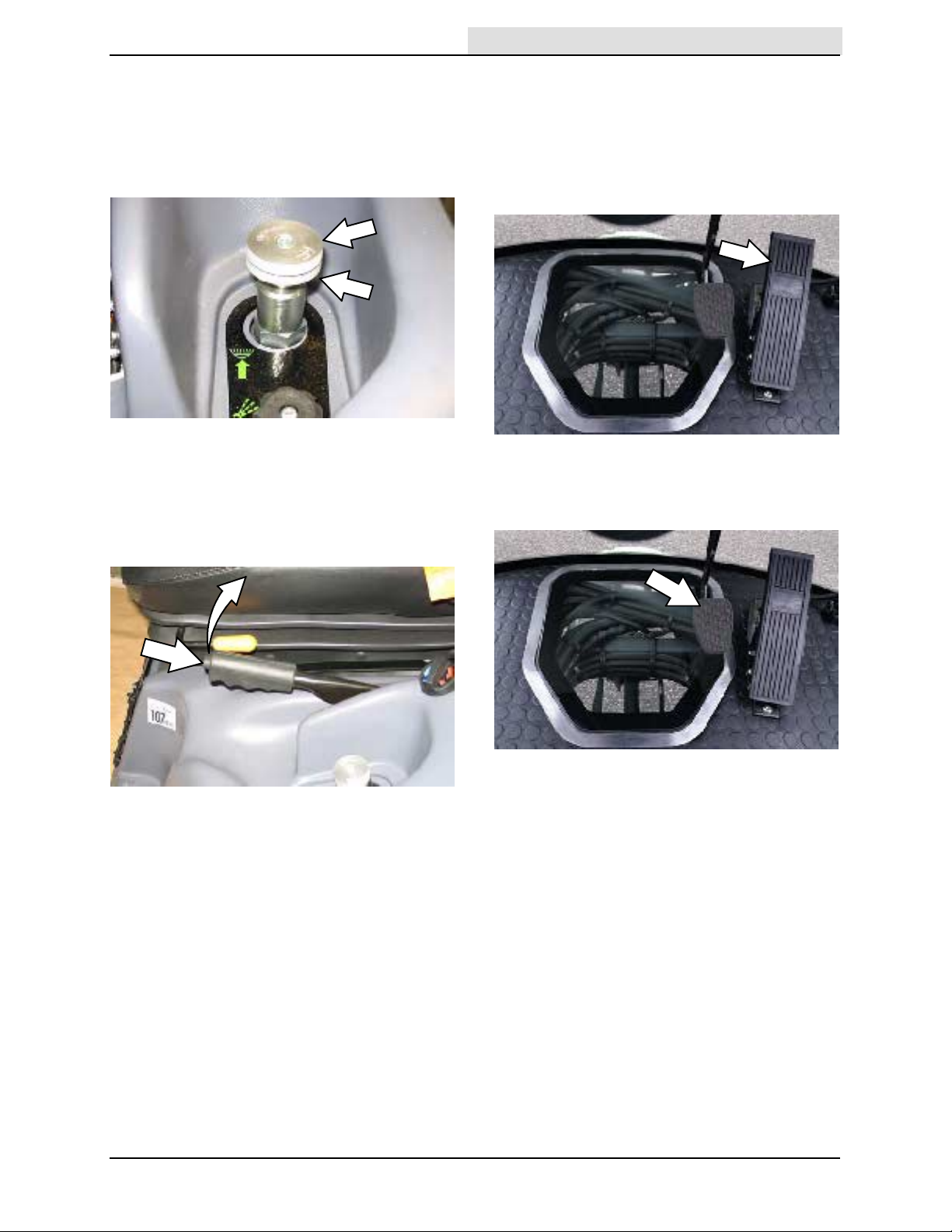
BRUSH PRESSURE ADJUSTMENT KNOB
To adjust the brush pressure, loosen the lock ring
under the Brush pressure adjustment knob.Turn
the knob counterclockwise to decrease the brush
pressure and clockwise to increase the brush
pressure. Retighten the lock ring.
PARKING BRAKE LEVER
Pull the Parking brake lever to engage the parking
brake. Slightly lift the Parking brake lever, press
the button, and completely lower the lever to
disengage the parking brake.
ACCELERATOR PEDAL
Press the Accelerator pedal to move the machine.
NOTE: The accelerator pedal is very responsive
to pressure. Press the pedal slowly to move the
machine. Releasing the pedal will cause the
machine to slow down.
BRAKE P EDAL
Press the Brake pedal to stop the machine.
636 9006280 (1-- 10)
19
Page 22

OPERATION
Home
Find...
Go To..
STEERING WHEEL HEIGHT ADJUSTMENT
HANDLE
1. Loosen the Steering wheel height adjustment
handle and adjust the steering wheel to the
desired height.
2. Tighten the Steering wheel height adjustment
handle to secure the steering column /
steering wheel into place.
HEADLIGHT AND MULTIFUNCTIO NAL
SWITCH
WINDSHIEL D WIPER / WASHER S WIT CH
Turn the outer ring to activate the windshield
wipers. Press the outer ring to active the
windshield washer.
HORN BUTTON
Push the horn button located at the end of the
switch to sound the horn.
Parking and Headlights On: Rotate the knob
clockwise.
Parking Lights On: Rotate the knob to the first
click.
Headlights On: Rotate the knob to the second
click.
Bright Headlights On: Push the lever down.
Bright Headlights Off: Pull the lever up.
Flash Bright Headlights: Pull the lever up, then
release.
Signals: Push the lever forward for the right
signal. Pull the lever back for the left signal.
20
636 9006280 (2-- 09)
Page 23

OPERATION
Home
Find...
Go To..
OPERATOR SEAT
The operator seat has four adjustments: backrest
angle, seat tilt, operator weight, and front to back.
The front--to--back adjustment lever adjusts the
seat position.
The backrest and seat tilt adjustment knobs
adjust the angle of the backrest and seat.
SEAT BELTS
FOR SAFETY: Before starting machine, adjust
seat and fasten seat belt.
DOOR LOCKS
The cab doors can be locked from either inside or
outside the cab.
Outside cab: Use the key to lock and unlock the
door.
The weight adjustment knob controls the firmness
of the operator seat.
636 9006280 (9-- 09)
Inside cab: Move the lever up to lock the door.
Move the lever down to unlock the door.
NOTE: Doors locked from the inside cannot be
unlocked from the outside using a key. Ensure
that the door(s) are unlocked before closing the
cab door.
21
Page 24

OPERATION
Home
Find...
Go To..
BRUSH I NFO RMATION
For best results, use the correct brush type for the
cleaning application.
NOTE: The amount and type of soilage play an
important role in determining the type of brushes
to use. Contact an authorized service
representative for specific recommendations.
Polypropylene Brush -- Best overall general
cleaning brush. The bristles fan out and dig into
cracks to remove debris.
Polypropylene and Wire Brush -Recommended for moving heavy debris. Best
bristle mix for moving large quantities of sand and
heavier debris. The bristles fan out similar to the
polypropylene brush. The wire bristles provide the
ability to move heavier material.
PET (Polyethylene Terephthalate) Heavy Duty
Brush -- Recommended for areas where there is
a heavy build up of debris. The stiffer / thicker
bristles provide more aggressive digging action to
remove compacted debris from along buildings,
curbs, and in corners.
HOW THE MACHI NE WORKS
The two front brushes move debris to the center
of the machine and the vacuum pulls the debris
into the hopper. The airflow must be maintained
through the machine to keep it functioning
properly.
The air and debris swirl in a cyclonic rotation
inside the hopper. The dust and debris drops to
the bottom of the hopper and the air exits through
vents at the rear of the machine. Screens located
in the hopper prevent light debris (leaves, paper,
etc...) from exiting the hopper and the cyclone
assemblies located at the top of the hopper
prevent dust particles from exiting the hopper.
22
636 9006280 (10-- 11)
Page 25

OPERATION
Home
Find...
Go To..
PRE--OPERATION CHECKLIST
Raise the hopper and engage the hopper safety
arm before performing the pre--operation checks.
See the RAISING / LOWERING THE HOPPER
section of this manual.
WARNING: Raised hopper may fall.
Engage hopper safety arm.
FOR SAFETY: Before leaving or servicing
machine, stop on level surface, place drive
lever in neutral, set parking brake, turn off
machine, and remove key from ignition.
NOTE: Do
when raising the hopper for pre--operation checks.
- Check the engine coolant level.
- Check the windshield washer fluid level.
- Check the air filter indicator.
- Check the engine oil level.
Not unlock the hopper lid latches
POST OPERATION CLEANING
Completely clean the machine after every use.
Raise the hopper and engage the hopper safety
arm before cleaning the hopper and the engine
compartment. See the RAISING / LOWERING
THE HOPPER section of this manual.
WARNING: Raised hopper may fall.
Engage hopper safety arm.
FOR SAFETY: Before leaving or servicing
machine, stop on level surface, place drive
lever in neutral, set parking brake, turn off
machine, and remove key from ignition.
- Empty the hopper.
- Clean the interior of the hopper.
- Clean the engine compartment and around
the hydraulic components.
- Clean the area surrounding the water pump
and the bottom corners of the radiator.
- Check the hydraulic fluid level.
- Check the water tank level.
- Check the condition of the brushes. Remove
any string, banding, plastic wrap, or other
debris from the brushes.
- Check the vacuum head height and side
skids.
- Check tire pressure and condition of tires.
- Check operating lights (headlights, taillights,
work lights, rotating beacon, and hazard
warning lights).
- Check safety equipment.
- Ensure all panels are secured in place.
- Check the fuel level.
- Ensure all controls, gauges, and indicators
function properly.
- Clean the brushes and vacuum head area.
- Clean the vacuum fan assembly.
636 9006280 (10-- 11)
23
Page 26
OPERATION
Home
Find...
Go To..
STARTING THE MACHINE
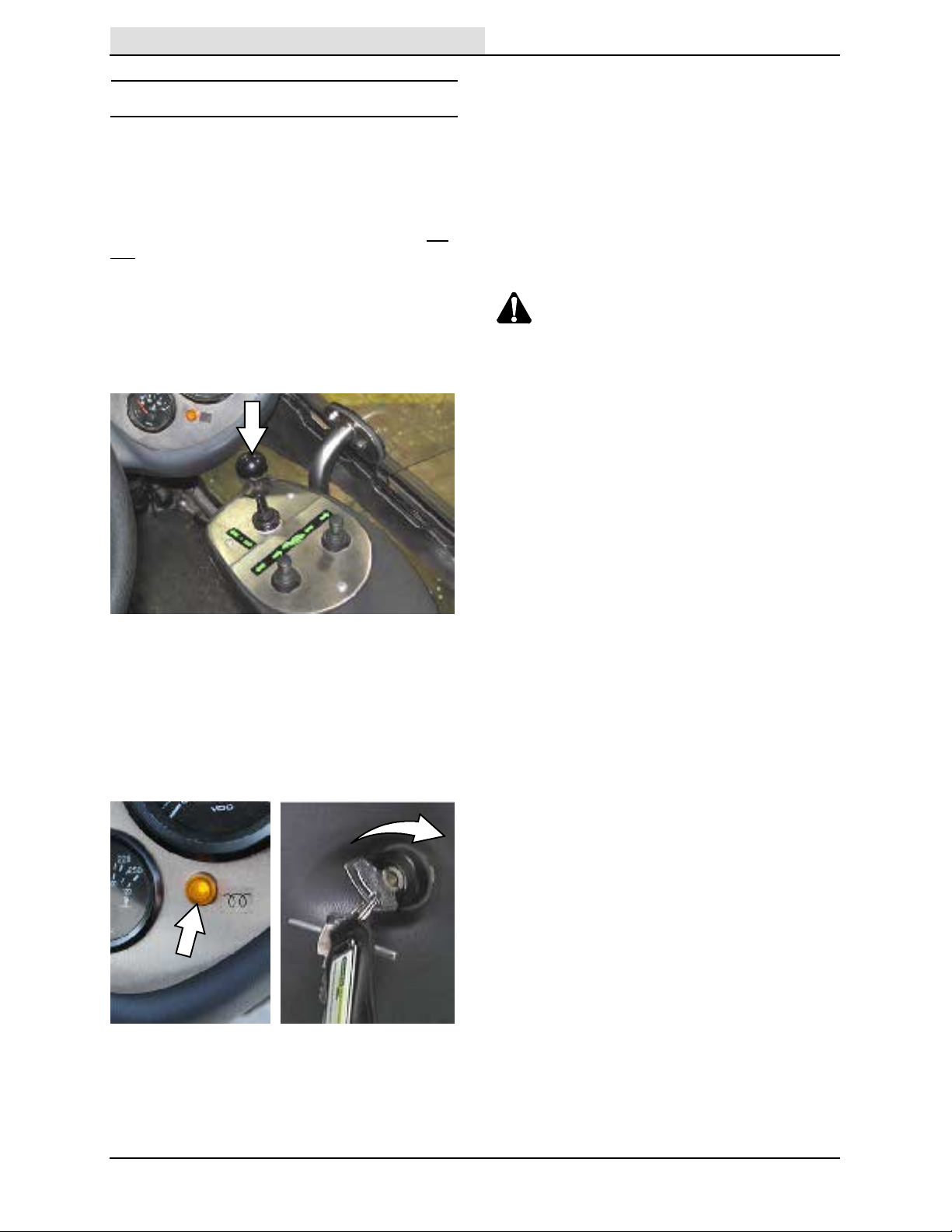
3. Turn the key further clockwise to start the
engine.
FOR SAFETY: Do not operate machine, unless
operator manual is read and understood.
NOTE: Watch / listen for visual and audible
warnings from the MDM (Machine Display
Module) system while operating the machine. Do
not operate the machine until all warnings have
been corrected. See MACHINE DISPLAY
MODULE (MDM) FAULT SCREENS section of
this manual.
1. Sit in the operator seat, press the brake pedal
or set the parking brake, and place the drive
lever into neutral.
NOTE: Do not operate the starter motor for more
than 10 seconds at a time or after the engine has
started. Allow the starter to cool 15--20 seconds
between starting attempts or damage to the
starter motor may occur.
4. Allow the engine and hydraulic system to
warm up for three to five minutes.
WARNING: Machine emits toxic gases.
Severe respiratory damage or
asphyxiation can result. Provide
adequate ventilation. Consult with your
regulatory authorities for exposure
limits. Keep engine properly tuned.
FOR SAFETY: When starting machine, keep
foot on brake and drive lever in neutral.
2. Turn the key clockwise until the glow plug
indicator comes on, but not far enough to start
the engine. Hold the key in this position for 5
seconds, depending on temperature. Colder
temperatures require longer time.
24
636 9006280 (2-- 09)
Page 27

OPERATION
Home
Find...
Go To..
TURNING OF F THE MACHINE
1. Stop the machine, turn off all sweeping
functions, and place the drive lever into the
neutral (middle) position.
2. Wait several seconds for the vacuum fan to
completely stop rotating.
NOTE: If the engine is turned off before the
vacuum fan stops rotating, the vacuum fan brake
will engage and emit a very loud noise as it stops
the fan.
3. Turn the ignition switch key counter clockwise
to turn off the machine. Remain in the
operator seat until the engine is off.
FOR SAFETY: Before leaving or servicing
machine, stop on level surface, place the
drive lever in neutral, set parking brake, turn
off machine, and remove key from ignition.
WHILE O PE RATING THE MACHI NE
Perform the Pre--Operation Procedures before
each use (see MACHINE MAINTENANCE section
of this manual).
Avoid bulky debris such as crates, boxes, tree
branches, and heavy material. Avoid straps,
twine, rope, etc., that could become entangled in
the brushes.
Plan the sweeping in advance. Try to arrange long
runs with minimum stopping and starting. Sweep
as straight a path as possible. Overlap the brush
paths. Use dust suppression in dusty conditions.
Avoid turning the steering wheel too sharply when
the machine is in motion. The machine is very
responsive to the movement of the steering
wheel. Avoid sudden turns, except in
emergencies.
If poor sweeping performance is observed, stop
cleaning and refer to MACHINE
TROUBLESHOOTING section of this manual.
Drive the machine slowly on inclines. Use the
brake pedal to control machine speed on
descending inclines. Sweep with the machine up
inclines rather than down inclines.
Never maneuver over curbs with the brushes and
nozzle down. Always raise the brushes and
nozzle prior to moving over curbs. Never drive
over curbs at a high speed or at a 90_angle.
Approach curbs at approximately a 45_ angle.
In rare circumstances one wheel may lose traction
when moving over curbs due to uneven weight
distribution. The machine automatically provides
traction to prevent the vehicle from coming to a
stop due to one wheel losing traction when the
machine is in work mode 2.
FOR SAFETY: When using machine, go slow
on inclines and slippery surfaces.
Maximum rated climb and descent for a full
hopper is 9_/20%.
636 9006280 (2-- 09)
25
Page 28

OPERATION
Home
Find...
Go To..
SWEEPING
FOR SAFETY: Do not operate machine, unless
operator manual is read and understood.
1. Start the machine.
2. Place the Transit / Work mode switch into
work mode 1 (middle position) for sweeping.
5. Adjust the brush pressure adjustment knob
for sweeping conditions.
6. Place the Drive lever into the forward position.
3. Turn the Water switch to the appropriate
mode for sweeping conditions.
4. Adjust the brush speed and vacuum fan
speed knobs and the brush pressure
adjustment knob for sweeping conditions.
7. Release the parking brake, then press the
Accelerator pedal to begin sweeping.
FOR SAFETY: When using machine, go slow
on inclines and slippery surfaces.
26
636 9006280 (2-- 09)
Page 29
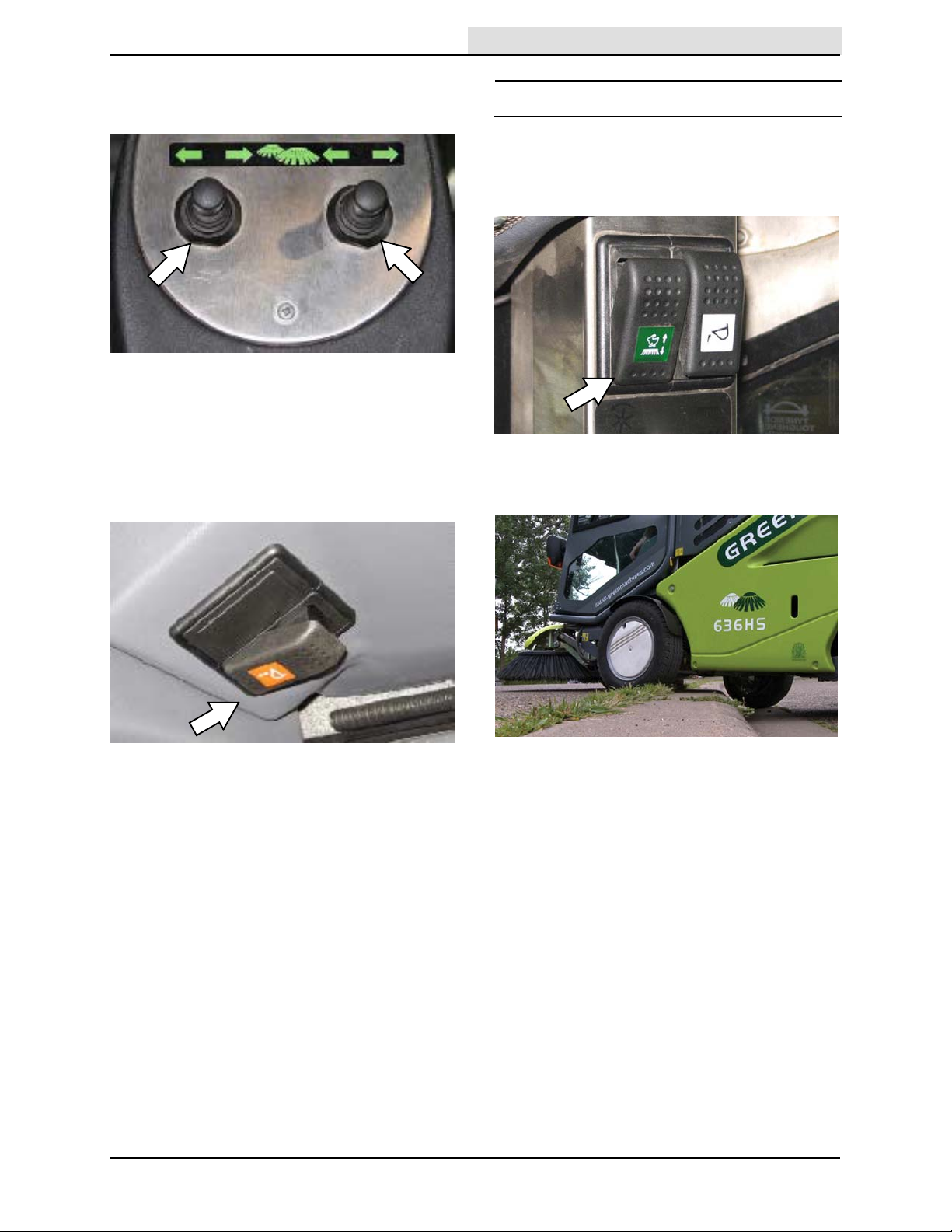
8. Adjust the brush path. If there is a trail of
Home
Find...
Go To..
debris not being picked up by the machine,
narrow the sweeping path.
NOTE: The brush path width can be widened so
the machine can clean along curbs without the
tires rubbing against the curb and narrowed so
the machine can sweep in hard to reach areas.
OPERATION
DRIVING O VE R CURBS
1. Stop the machine.
2. Place the machine into work mode 2 to raise
the brushes and spray nozzle.
9. Activate the hopper drain if sweeping in wet
areas or through standing water.
10. To stop sweeping, press the Brake pedal to
stop the machine.
1 1. Turn off all sweeping functions.
12. Empty the debris hopper at the end of each
shift or as needed. See EMPTYING THE
HOPPER section of this manual.
3. Approach the curb at approximately a 45_
angle and slowly drive over the curb.
4. Return the machine to either work mode 1 or
transit mode.
636 9006280 (2-- 09)
27
Page 30

OPERATION
Home
Find...
Go To..
RAISING / LOWERING THE HOPPER
1. Ensure the rear water tank door is closed.
The water tank could be damaged if the door
is left open.
2. Set the parking brake and place the Drive
lever into neutral.
3. Place the machine into either work mode 1 or
work mode 2 to increase the engine rpm.
FOR SAFETY: When using machine, make
sure adequate clearance is available before
raising hopper.
4. Press and hold the top of the Hopper raise /
lower switch to raise the hopper.
5. Press and hold the bottom of the Hopper
raise / lower switch to lower the hopper.
28
636 9006280 (2-- 09)
Page 31
ENGAGING THE HOPPER SAFETY ARM
Home
Find...
Go To..
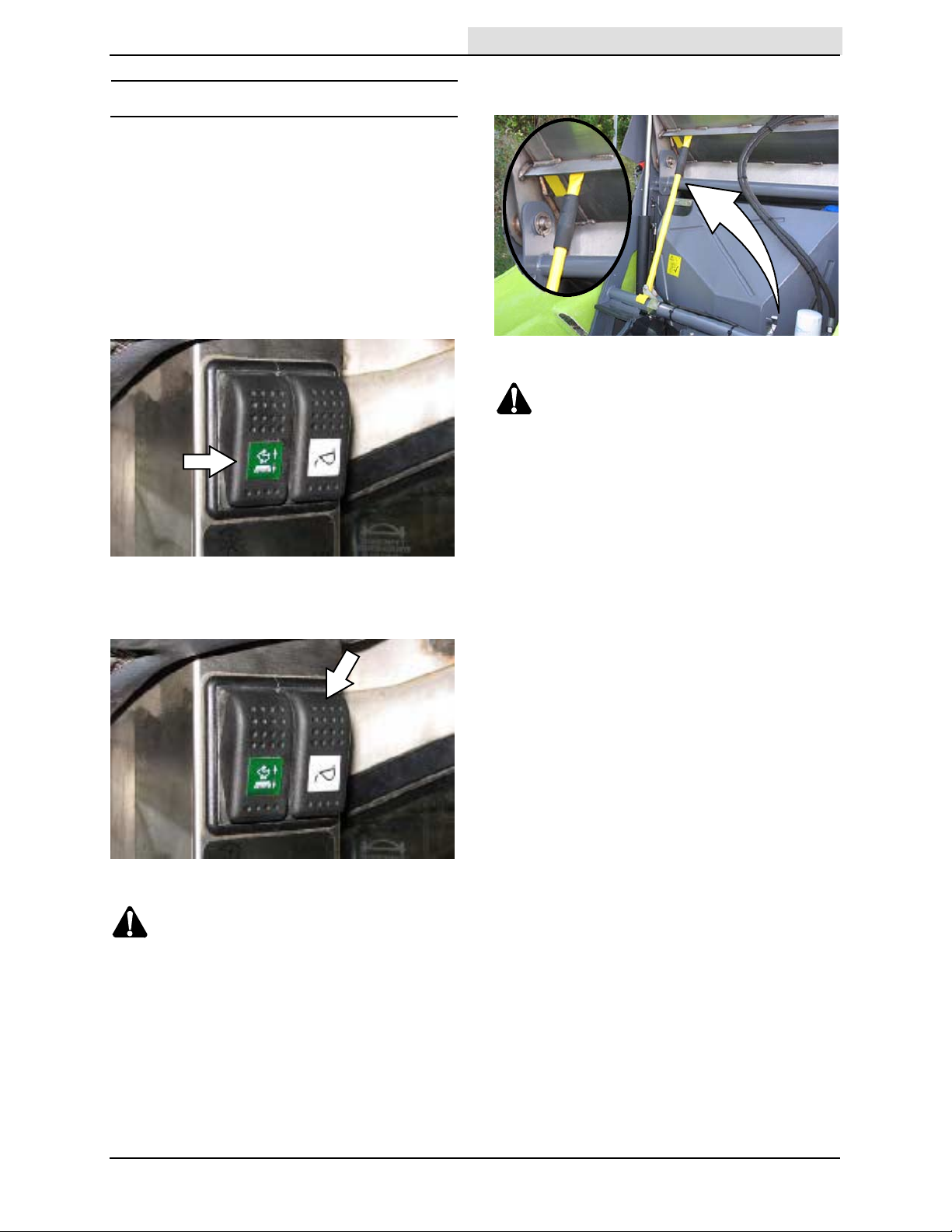
The hopper safety arm prevents the raised hopper
from falling. Always engage the hopper safety arm
whenever leaving the hopper raised.
1. Set the parking brake and place the drive
lever in neutral.
2. Start the machine.
3. Place the machine in work mode 1 or work
mode 2.
OPERATION
5. Lift the hopper safety arm from the storage
clip and prop it up against the hopper.
WARNING: Raised hopper may fall.
Engage hopper safety arm.
6. Turn off the machine.
4. Press and hold the top of the Hopper raise /
lower switch to completely raise the hopper.
WARNING: Lift arm pinch point. Stay
clear of hopper lift arms.
FOR SAFETY: When using machine, make
sure adequate clearance is available before
raising hopper.
636 9006280 (2-- 09)
29
Page 32

OPERATION
Home
Find...
Go To..
DISENGAGING THE HOPPER SAFETY ARM
1. Start the machine.
2. Be sure the machine is in work mode 1 or
work mode 2, the drive lever is in neutral, and
the parking brake is engaged.
3. Lower the hopper safety arm into the storage
clip.
USING THE WANDER HOSE
WARNING: Accident may occur. Do not
operate wander hose while driving.
1. Stop the machine, place the drive lever into
neutral, and set the parking brake.
2. Raise the hopper. See RAISING /
LOWERING THE HOPPER section of this
manual for additional information.
3. Locate the hopper inlet blanking plate and
place on to the vacuum port.
4. Press and hold the bottom of the Hopper
raise / lower switch to lower the hopper.
WARNING: Lift arm pinch point. Stay
clear of hopper lift arms.
4. Remove the wander hose from the top of the
hopper.
5. Lower the hopper and turn off the machine.
See RAISING / LOWERING THE HOPPER
section of this manual for additional
information.
FOR SAFETY: Before leaving or servicing
machine, stop on level surface, place drive
lever in neutral, set parking brake, turn off
machine, and remove key from ignition.
6. Open the wander hose access door to access
the vacuum adapter cover.
30
636 9006280 (7-- 10)
Page 33

OPERATION
Home
Find...
Go To..
7. Open the vacuum adapter cover and attach
the wander hose to the adapter.
NOTE: T ake care when unlatching the wander
hose vacuum adapter cover latches. The latches
are spring loaded.
8. Start the machine.
WARNING: Machine emits toxic gases.
Severe respiratory damage or
asphyxiation can result. Provide
adequate ventilation. Consult with your
regulatory authorities for exposure
limits. Keep engine properly tuned.
10. Press the bottom of the wander hose switch
to start the vacuum.
1 1. Adjust the vacuum fan speed knob for
cleaning conditions.
9. Place the Transit / Work mode switch into the
work mode 1 (middle) position.
12. Use the wander hose for cleaning.
NOTE: If the wander hose becomes blocked,
carefully squeeze along the entire length of hose
until the blockage is found. Carefully squeeze the
blocked area until the obstruction breaks loose.
13. When through using the wander hose, press
the top of the wander hose switch to turn off
the vacuum. Shut off the machine.
14. Remove the wander hose from the adapter.
Secure the vacuum adapter cover over the
adapter opening and close the access doors.
15. Start the machine and raise the hopper.
Secure the wander hose onto the top of the
hopper. Remove the hopper inlet blanking
plate. Lower the hopper.
636 9006280 (7-- 10)
31
Page 34

OPERATION
Home
Find...
Go To..
EMPTYING THE HOPPER
5. Press and hold the top of the Hopper raise/
lower switch to raise the hopper and empty
debris.
1. Drive the machine to the debris site, stop the
machine, place the drive lever into neutral,
and set the parking brake.
FOR SAFETY: Before leaving or servicing
machine, stop on level surface, place drive
lever in neutral, and set parking brake.
2. Ensure the water tank door is closed. The
water tank could be damaged if the door is
left open.
3. Unlock and open both hopper lid latches.
NOTE: If necessary, use the scraper stored inside
the left access door to remove debris from the
hopper. See CLEANING THE MACHINE section
of this manual.
NOTE: Both hopper lid latches must be unlocked
and open to empty debris from the hopper.
4. Place the machine into either work mode 1 or
work mode 2 to increase the engine rpm.
FOR SAFETY: When using machine, make
sure adequate clearance is available before
raising hopper.
6. Press and hold the bottom of the Hopper
raise / lower switch to lower the hopper.
7. Close and secure both hopper lid latches.
32
636 9006280 (7-- 10)
Page 35
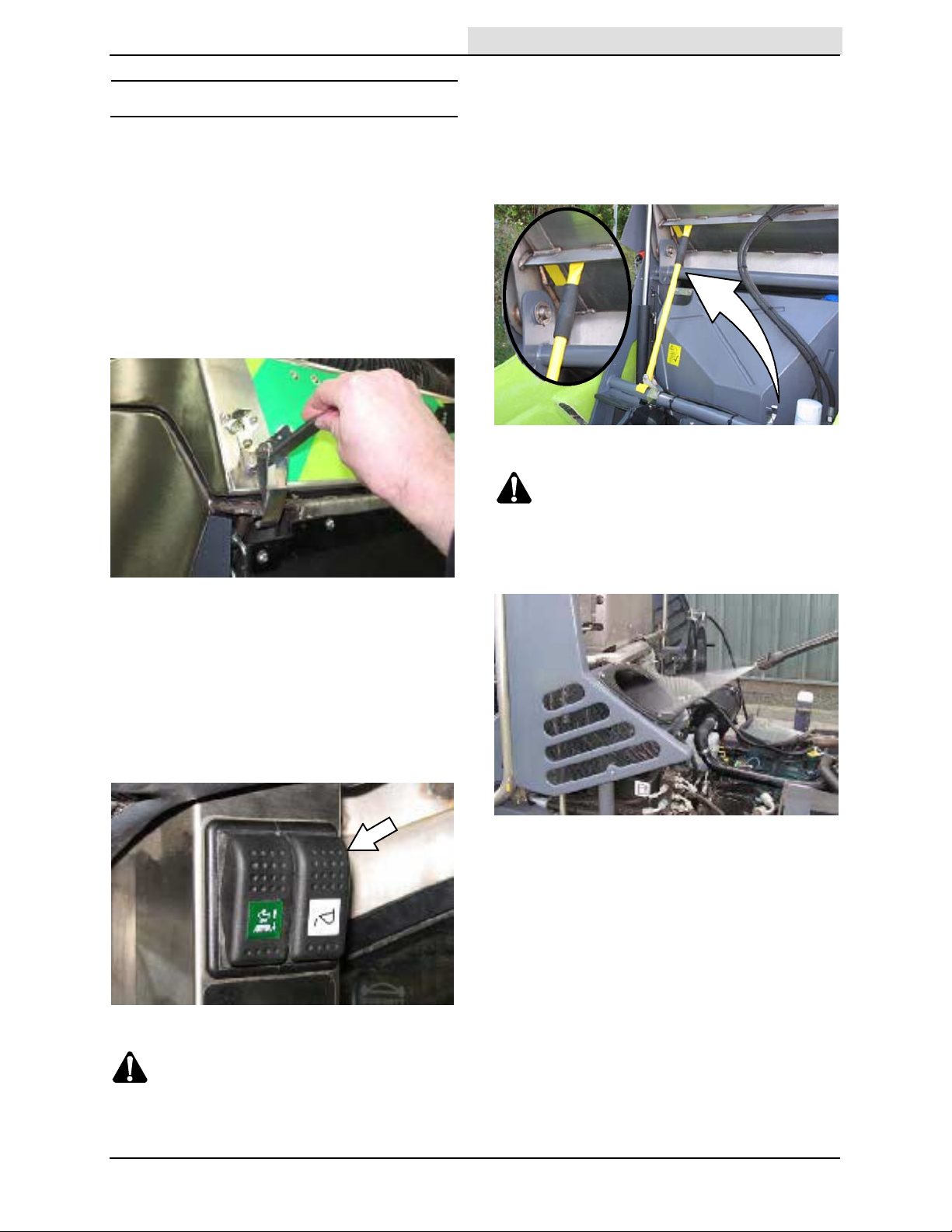
CLEANING THE MACHINE
Home
Find...
Go To..
1. Stop the machine, place the Drive lever into
neutral, and set the parking brake.
FOR SAFETY: Before leaving or servicing
machine, stop on level surface, place drive
lever in neutral, and set parking brake.
2. Ensure the water tank door is closed. The
water tank could be damaged if the door is
left open.
3. Unlock and open hopper lid latches.
OPERATION
6. Turn off the machine and remove the key.
FOR SAFETY: Before leaving or servicing
machine, turn off machine and remove key
from ignition.
7. Engage the hopper safety arm.
WARNING: Raised hopper may fall.
Engage hopper safety arm.
4. Place the machine into either work mode 1 or
work mode 2 to increase the engine rpm.
FOR SAFETY: When using machine, make
sure adequate clearance is available before
raising hopper.
5. Press and hold the top of the Hopper raise /
lower switch to raise the hopper.
8. Remove the side panels from the machine
and set the panels aside in a safe area.
9. Clean the vacuum port.
WARNING: Lift arm pinch point. Stay
clear of hopper lift arms.
636 9006280 (10-- 11)
33
Page 36

OPERATION
Home
Find...
Go To..
10. Clean the radiator screen and engine
compartment.
NOTE: Do
engine and engine compartment with water. The
engine could be damaged if it is left running while
cleaning. The warranty will be invalidated if the
engine is damaged due to water entering it while
cleaning.
Not run the engine when cleaning the
1 1. Carefully clean the area around hydraulic tank
and components.
NOTE: Do
hydraulic system could be damaged if water
enters system while cleaning. The warranty will be
invalidated if hydraulic system is damaged due to
water entering the system while cleaning.
Not spray the hydraulic filter. The
34
636 9006280 (10-- 11)
Page 37

OPERATION
Home
Find...
Go To..
12. Clean the interior of the hopper, hopper
screen, hopper cyclones, and suction tube. If
necessary, use the scraper stored inside the
left access door to to loosen / remove stuck
debris.
WARNING: Do not spray people or
animals. Severe personal injury can
result. Wear eye protection. Hold
sprayer with two hands.
13. Disengage the hopper safety arm.
16. Disconnect the water tank door retainer chain
from the bracket.
17. Pull the safety pin from the rear bumper, pull
the handle, and open the water tank door.
14. Reinstall the side panels onto the machine.
15. Start the machine and press the bottom of the
Hopper raise / lower switch to lower the
hopper.
WARNING:Lift arm pinch point. Stay
clear of hopper lift arms.
18. Clean the area surrounding the water pump
and the bottom corners of the radiator.
NOTE: Do not use excessive water pressure
when cleaning the radiator and areas around the
radiator. Excessive water pressure could damage
the radiator.
636 9006280 (10-- 11)
35
Page 38

OPERATION
Home
Find...
Go To..
19. Close and secure the water tank door. Attach
the water tank door retainer chain to the
bracket.
20. Clean the brushes and vacuum head area.
21. Clean the rest of the machine as necessary.
36
636 9006280 (10-- 11)
Page 39

CLEANING THE VACUUM FAN ASSEMBLY
Home
Find...
Go To..
FOR SAFETY: Before leaving or servicing
machine, stop on level surface, place drive
lever in neutral, set parking brake, turn off
machine, and remove key from ignition.
1. Turn machine off and allow the vacuum fan to
come to a complete stop.
OPERATION
4. Use the scraper to scrape debris from the
vacuum fan assembly.
NOTE: Do
with hands, scraper, or other objects.
2. Use the access key to unlock and open the
vacuum fan access door.
3. Remove the scraper from the storage area
inside the left access door.
Not attempt to stop the vacuum fan
5. Use pressurized water to clean the vacuum
fan assembly.
WARNING: Do not spray people or
animals. Severe personal injury can
result. Wear eye protection. Hold
sprayer with two hands.
6. When through cleaning the vacuum fan
assembly, close and secure the vacuum fan
access door. Return the scraper and access
key to the appropriate storage locations.
NOTE: Do
access key. Return the access key to the
appropriate storage location immediately after
use. The vacuum fan access door cannot be
opened without the access key.
Not lose the vacuum fan access door
636 9006280 (10-- 11)
CHECKING / FILL ING THE WATER TANK
FOR SAFETY: Before leaving or servicing
machine, stop on level surface, place drive
lever in neutral, set parking brake, turn off
machine, and remove key from ignition.
1. Check the water tank level at the water tank
level tube. If necessary, fill the water tank.
37
Page 40

OPERATION
Home
Find...
Go To..
USING THE MACHINE DISPL AY MODULE
(MDM) SYSTEM
The Machine Display Module (MDM) displays the
current machine operating status (operation
mode, drive lever position, engine rpm, fan speed,
and the speed of the machine when it is in the
transit mode).
2. Press the UP or DN (down) buttons to select
the engine speed (between 1200 and
2800 rpm).
3. Press the F1 (OK) button to confirm the new
speed.
If necessary, press the F2 (Cancel) button to
set the engine back to the previous speed.
ADJUSTING THE ENGINE SPEED
NOTE: For normal operating conditions the
engine speed should be set between 2100 and
2300 rpm.
FOR SAFETY: When using machine: Do not
make adjustments on Machine Display
Module (MDM) System while the machine is
moving. Always stop machine before making
adjustments.
1. Press the F1 select button.
If necessary, press the F3 (Reset) button to
reset the engine to the default speed
(2200 rpm).
38
636 9006280 (2-- 09)
Page 41
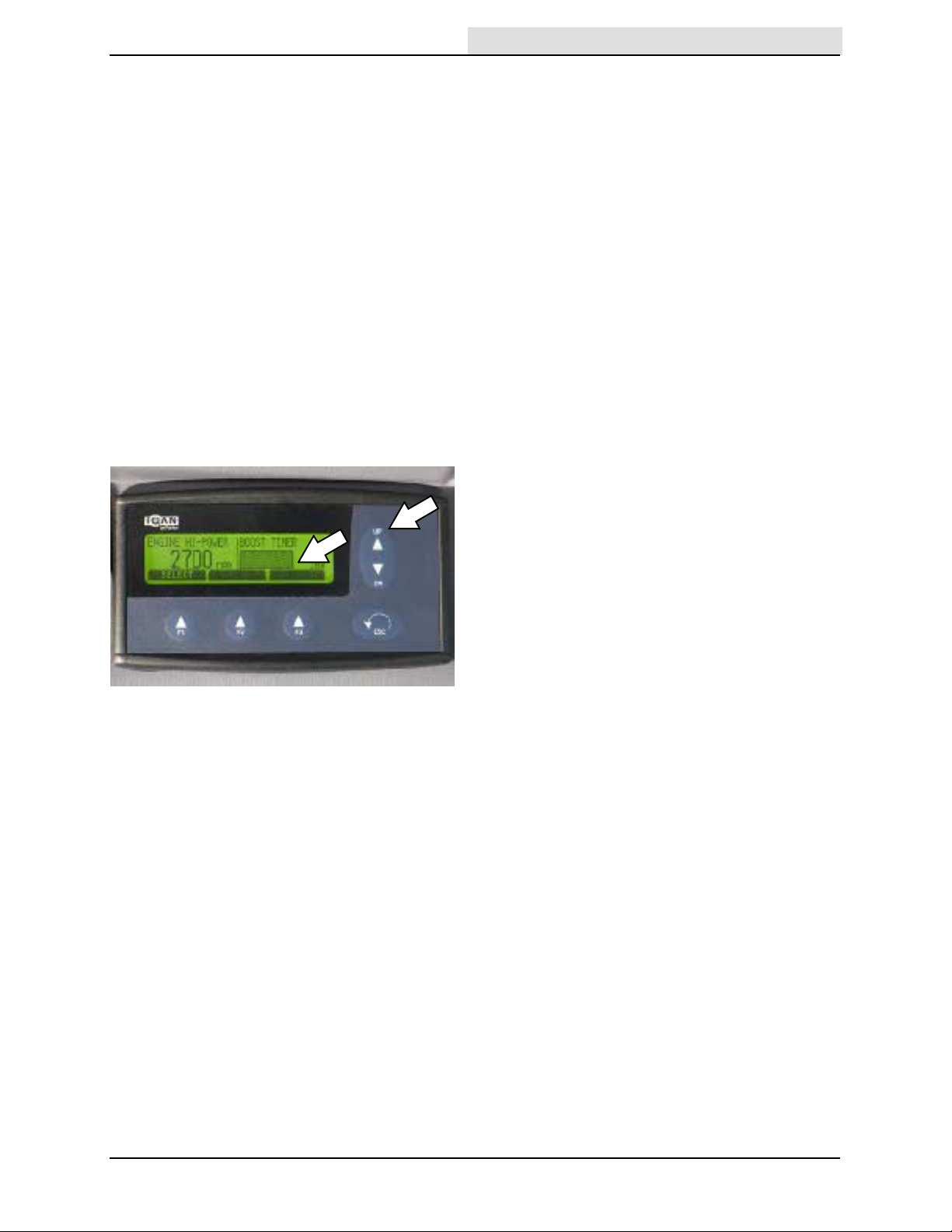
USING THE ENGINE SPEED BOOST
Home
Find...
Go To..
When sweeping uphill it may be necessary to
increase the engine speed to obtain more power.
Engine speed boost (engine speeds above 2600
rpm) is available for only three 10--minute
intervals per hour. An audible alarm will sound at
the end of the ten minutes and the engine will
automatically reset to 2600 rpm.
1. Stop the machine, press and hold the brake
pedal, and place the drive lever into neutral.
FOR SAFETY: When using machine: Do not
make adjustments on Machine Display
Module (MDM) System while the machine is
moving. Always stop machine before making
adjustments.
2. Press the UP button to increase the engine
speed to above 2600 rpm. A countdown bar
appears on the MDM display .
OPERATION
3. Place the drive lever into the forward position
and press the accelerator pedal to continue
sweeping.
4. When finished using the engine speed boost,
stop the machine and place the drive lever
into neutral.
5. Reset the engine to the normal operating
range.
636 9006280 (2-- 09)
39
Page 42

OPERATION
Home
Find...
Go To..
MACHINE DISPLA Y MODULE (MDM) FAULT
SCREENS
Operation faults are also accompanied by an
audible alarm to alert the operator a fault has
occurred.
The Machine Display Module (MDM) displays all
operation faults.
MDM Code
Warning
Fan Running For Whoosh Hose-Caution Required
Warning
Fan Access Door Open
Warning
Liquid Level Sensor, Water Spray
Pump--Check Connection
Warning
Forward Trans Pressure Sensor-Check Connection
Warning
Engine Oil--Low Pressure
Warning
Engine T emperature High--Stop
Engine
Warning
Engine Coolant Level Low-- Stop
Engine
24 Hour Warning
Air Filter Minder-- Maintenance
Required
Warning
Hyd. Oil Temperature High--Stop
Vehicle
Warning
Park Brake On--Release Park Brake
Wander (whoosh) hose fan is
operating.
Fan access safety door is open
or there is a break in switch
circuit.
Electrical Fault. Shut off machine.
Electrical Fault. Shut off machine.
Engine oil pressure is low. Shut off machine.
Engine temperature above
115_ C (239_ F).
Engine coolant level in
expansion tank falls below
minimum level.
Engine air intake problem. Shut off machine.
Hydraulic fluid temperature
reaches 95_ C (203_ F).
Parking brake is engaged. Release parking brake.
Refer to the table below to determine the cause
and remedy for the fault.
Cause(s) Remedy
Shut off wander (whoosh)
hose.
Shut off machine.
Close vacuum fan access
door. Call authorized service
representative if there is a
break in switch circuit.
Call authorized service
representative.
Call authorized service
representative.
Add engine oil.
Shut off machine.
Call authorized service
representative.
Shut off machine.
Add coolant.
Replace air filter and reset
filter minder.
Shut off machine.
Call authorized service
representative.
40
636 9006280 (2-- 09)
Page 43

MDM Code Cause(s) Remedy
Home
Find...
Go To..
Warning
Transmission Disabled-- Return To
Neutral
Fan Hi--Speed
Booster Timer 100
Engine Hi--Speed
Booster Timer 100
Fan Boost 100
Engine Boost 100
Vac Fan Boost Exceeded
Vac Fan Boost Not available--Reduce
To <2400 RPM--Max 5 Boost Per Hour
Engine Boost Exceeded
Engine Boost Not Available--Reduce
To <2600 RPM--Max 3 Boost Per Hour
Warning (Work)
Check Wheel Speed Sensor-- Feed
Back To MDM Not Correct
Warning (Trans)
Check Wheel Speed Sensor--Feed
Back To MDM Not Correct
Warning
Check Wheel Speed Sensor Feed
Back is <800 RPM Or >3100 RPM
Warning
Vacuum Fan Is Off Or The Speed
Sensor is Faulty. Check Vacuum
Speed Sensor
Caution
Speed Restriction Wheel Track
Operating
24 Hour Warning
CloudMaker Running Slow Water
Switch Move To RHS
Warning
Hopper Raised Lower Hopper
Warning
Both Tacking Sensors On Check
Sensors on Axle
Warning
Hydraulic Oil Level--Low Stop Engine
Warning
Track Wheels In For Full. Fan And
Brushes On
OPERATION
Drive lever is in forward or
reverse positions when engine
is started.
Fan speed is above 2400 rpm. Fan automatically shuts off
Engine speed is above
2600 rpm.
Fan speed is above 2400 rpm.
Engine speed is above
2600 rpm.
More than 5 fan boosts
activated per boost period.
More than 3 engine boosts
activated per boost period.
Vehicle speed sensor is outside
normal operating range when
machine is in work mode.
Vehicle speed sensor is outside
normal operating range when
machine is in transit mode.
Frequency input equating to
less than 800 rpm or more than
3100 rpm.
In work mode 1 and forward
drive, but fan speed is less than
100 rpm or more than
3100 rpm.
Tracking has started, but has
not been completed.
CloudMaker maker switched on,
but speed is 1000 rpm or less
(designed speed is 17000 rpm).
Hopper is raised. Lower hopper.
Both tracking sensors are on. Shut off machine.
Not enough hydraulic fluid for
machine to operate safely.
Wheels tracked out when
machineisinworkmode1/
forward.
Return drive lever to neutral
position.
after 5 minutes.
Engine automatically reduced
to under 2600 rpm after 10
minutes.
Fan automatically shuts off
after 5 minutes. Engine
automatically reduced to under
2600 rpm after 10 minutes.
No additional boosts allowed
within hour of first boost.
No additional boosts allowed
within hour of first boost.
Shut off machine.
Call authorized service
representative.
Shut off machine.
Call authorized service
representative.
Shut off machine.
Call authorized service
representative.
Shut off machine.
Call authorized service
representative.
Allow tracking to complete.
Shut off machine.
Call authorized service
representative.
Call authorized service
representative.
Shut off machine.
Add hydraulic fluid.
Shut off machine.
Call authorized service
representative.
636 9006280 (2-- 09)
41
Page 44

OPERATION
Home
Find...
Go To..
OPTIONS
PRESSURE WASHER (OPTION)
FOR SAFETY: When using pressurized air or
water, wear eye and ear protection.
1. Stop the machine, place the drive lever into
neutral, turn off the engine, and set the
parking brake.
NOTE: Pressure washer will not function if the
parking brake is not engaged.
FOR SAFETY: Before leaving or servicing
machine, stop on level surface, place drive
lever in neutral, set parking brake, and turn off
machine.
4. Start the machine.
WARNING: Engine emits toxic gases.
Severe respiratory damage or
asphyxiation can result. Provide
adequate ventilation. Consult with your
regulatory authorities for exposure
limits. Keep engine properly tuned.
5. Place the Work mode switch into the work
mode 1 (middle) position.
2. Check the water tank level. Do Not operate
the pressure washer if the water tank is low or
empty.
3. Remove the pressure washer wand from the
brackets, and pull the pressure washer hose
completely out from the reel.
6. Press the bottom of the Pressure washer
switch to start the pressure washer pump.
42
636 9006280 (2-- 09)
Page 45

OPERATION
Home
Find...
Go To..
7. Hold the wand with both hands, point the
wand towards the ground, and squeeze the
trigger.
WARNING: Do not spray people or
animals. Severe personal injury can
result. Wear eye protection. Hold
sprayer with two hands.
8. Use the wand to clean.
NOTE: Do not run the pressure sprayer pump for
sustained periods if not using the power wand.
The pressure sprayer pump could be damaged
from overheating if allowed to run for sustained
periods when the wand is not in use.
REAR VIEW CAME RA (OP TION)
Use the Rear view camera to watch areas behind
the machine when backing up the machine. Refer
to the rear view camera manual for operation
instructions.
RADIO AND CO MPACT DIS K PLAYER
(OPTION)
The radio and compact disk player is located
above the operator. Refer to the radio/compact
disk player manual for operation instructions.
AUTOMATIC GREASING (OPTION)
The Automatic greasing system automatically
dispenses grease to all grease points. A green
indicator light located on the reservoir top cover
illuminates when the automatic greasing system is
operating.
Press the TEST button daily to ensure the
automatic greasing system is operating. The
motor will start and the paddle will rotate once in
approximately three minutes and then reset to the
default one rotation for every 12 minutes. The
pump cycle time of 12 minutes is not adjustable.
FILLING THE AUTOMATIC GREASING
SYSTEM RESERVOIR
9. Release the trigger when through cleaning
and set the wand down.
10. Press the top of the pressure washer switch
to turn off the pump. Shut off the machine.
1 1. Hold the wand with both hands and point the
wand towards the ground. Squeeze the
trigger to release pressure from the system.
12. Wind the pressure washer hose back onto the
reel. Return the pressure washer wand to the
storage brackets. Close the access door.
FOR SAFETY: Before leaving or servicing
machine, stop on level surface, place drive
lever in neutral, set parking brake, turn off
machine, and remove key from ignition.
1. Remove the cap from the automatic greasing
system reservoir.
2. Pour grease into the automatic greasing
system reservoir.
3. Reinstall the cap onto the automatic greasing
system reservoir.
636 9006280 (2-- 09)
43
Page 46

OPERATION
Home
Find...
Go To..
WINTER EQUIPMENT (O P T I ON)
The 636 can be fitted with a front snow brush,
front straight plow, blade front V plow blade, and a
rear grit dispenser for clearing snow.
SNOW BRUSH (OPTION)
FOR SAFETY: Do not operate machine, unless
operator manual is read and understood.
1. Start the machine.
2. Place the Transit / Work mode switch into
work mode 1 (middle position) for sweeping.
4. Use the vacuum fan speed knob to adjust the
snow brush speed.
5. Place the Drive lever into the forward position.
3. Press the bottom of the Snow brush switch to
start the brush.
6. Release the parking brake, then press the
Accelerator pedal to begin brushing snow.
FOR SAFETY: When using machine, go slow
on inclines and slippery surfaces.
7. To stop brushing snow, press the Brake pedal
to stop the machine.
8. Turn off all snow brush functions.
44
636 9006280 (10-- 11)
Page 47

OPERATION
Home
Find...
Go To..
SNOW PLOWS (OPTION)
FOR SAFETY: Do not operate machine, unless
operator manual is read and understood.
1. Start the machine.
2. Place the Transit / Work mode switch into
work mode 1 (middle position) for sweeping.
3. Use the Brush levers to adjust the path of the
plow.
5. Release the parking brake, then press the
Accelerator pedal to begin plowing snow.
FOR SAFETY: When using machine, go slow
on inclines and slippery surfaces.
6. To stop plowing snow, press the Brake pedal
to stop the machine.
7. Turn off all plow functions.
4. Place the Drive lever into the forward position.
636 9006280 (10-- 11)
45
Page 48

OPERATION
Home
Find...
Go To..
GRIT (SAND / ROAD SALT) DISPENSER
(OPTION)
FOR SAFETY: Do not operate machine, unless
operator manual is read and understood.
NOTE: The rear grit dispenser can be used when
operating the snow brush or plow.
1. Start the machine.
2. Place the Transit / Work mode switch into
work mode 1 (middle position).
5. Place the Drive lever into the forward position.
6. Release the parking brake, then press the
Accelerator pedal to begin dispensing the grit.
FOR SAFETY: When using machine, go slow
on inclines and slippery surfaces.
7. To stop dispensing grit, press the Brake pedal
to stop the machine.
8. Press the top of the Grit dispensing switch to
turn off the grit dispenser.
3. Press the bottom of the Grit dispensing switch
to start dispensing grit.
4. Use the brush speed knob to adjust the rate
at which the grit is being dispensed.
46
636 9006280 (10-- 11)
Page 49

MACHINE TROUBLES HOOT ING
Home
Find...
Go To..
Problem Cause Remedy
Excessive dusting
Poor sweeping
performance
Brushes bouncing
Dust suppression system
not operating (no mist
from CloudMaker)
Vacuum fan speed knob turned off
or set too low
Dust suppression system not on Turn on dust suppression system
Vacuum hose damaged Replace vacuum hose
Vacuum fan seal damaged Replace vacuum fan seal
Vacuum fan failure Call authorized service representative
Vacuum fan speed too low for
conditions
Debris caught in front vacuum
hose
Hopper is full Empty hopper
Front nozzle is set too high Adjust height of front nozzle
Blockage in vacuum fan system Clear debris from vacuum fan system
Machine moving too fast for
conditions
Cyclones blocked Clear debris from cyclones
Worn brush bristles Replace brushes
Brush pressure set too light Increase brush pressure
Brushes not properly adjusted Adjust brushes
Debris caught in brush drive
mechanism
Brush drive failure Call authorized service representative
Improper brushes Refer to Brush Information or call
Brush sweep path is too wide Narrow sweeping path
Brushes set too low Adjust height of brushes
Brush speed too low in relation to
speed of machine
Machine not in work mode 1 Place machine in work mode 1
Pump is not on Turn on pump
Water control knob not set to
correct position for sweeping
conditions
Water liquid level sensor dirty /
inoperable
Water tank is empty Fill water tank
Blocked jet in line filter Clear blockage from jet in line filter
Blocked jet Clear blockage from jet
Pump vacuum tube disconnected
at tank drain tube
Blocked tank vacuum strainer Clear debris from tank vacuum strain-
Defective water pump Call authorized service representative
Adjust vacuum fan speed knob for
sweeping conditions
Increase vacuum fan speed
Clear debris from vacuum hose
Decrease speed
Remove debris from brush drive
mechanism
authorized service representative
Adjust brush speed
Adjust water control knob for sweeping conditions
Clean water liquid level sensor if dirty.
Call authorized service representative
if water liquid sensor is inoperable
Reconnect pump vacuum tube to tank
drain tube
er
OPERATION
636 9006280 (2-- 09)
47
Page 50

OPERATION
Home
Find...
Go To..
Problem Cause Remedy
Excessive vibration while
sweeping
Hydraulic fluid
overheating
Engine will not start / turn
over
Engine overheating
Engine smoking
Front wheel spinning on
uneven surface
Debris caught in / blocking fan
casing
Vacuum fan impeller damaged Call authorized service representative
Hydraulic fluid level is low Add hydraulic fluid to hydraulic system
Incorrect hydraulic fluid in system Drain old hydraulic fluid from system
Radiator dirty or blocked Clean / clear debris from radiator
Radiator screen is blocked Clear debris from radiator screen
Fan belt damaged / incorrectly
adjusted
Dead battery Recharge battery
Battery cable connections loose Tighten battery cable connections
Radiator / coolant system blocked Clear blockage
Radiator fins damaged Call authorized service representative
Engine compartment not
adequately cleaned
Engine coolant level is low Add coolant to reservoir
Incorrect coolant is being used Drain coolant and replace with correct
Radiator screen blocked Remove debris from radiator screen
Fan belt damaged / incorrectly
adjusted
Black smoke -- Dirty air filter Replace air filter
Blue smoke -- Burning oil Call authorized service representative
Whitesmoke/mist/steam-Leaking head gasket
Black or blue smoke, inadequate
power -- Faulty turbo
Incorrect fuel in fuel tank Call authorized service representative
Machineisinworkmode1or
transit mode
Remove debris caught in / blocking
the fan casing
and refill system with correct hydraulic
fluid
Replace / adjust fan belt
Clean engine compartment
coolant / coolant mix
Replace / adjust fan belt
Call authorized service representative
Call authorized service representative
Place machine into work mode 2
48
636 9006280 (10-- 11)
Page 51

OPERATION
Home
Find...
Go To..
CONDITIO NS TABLE
The table below explains conditions that must be
met before certain operational functions will work.
Understanding how the different operational
functions work together will help the operator
more efficiently utilize the machine.
Conditions
Engine
Running
Function Transit Work 1 Work 2 FWD N REV
Hopper RAISE X X X X 50 rpm Hopper Raise / Lower Switc h:
Hopper LOWER X X X X X Hopper Raise / Lower Switch:
Tracking OUT X X X DOWN OFF Accelerator Pedal: Depressed
Tracking IN X X X X DOWN OFF Acc el erator Pedal : Depressed
Work Mode 1 X X X DOWN OFF IN Accelerator Pedal: Depressed
Work Mode 2 X X X DOWN OFF IN Accelerator Pedal: Depressed
Transit Mode X X X DOWN OFF OUT Acc el erator P edal : Depressed
Brushes ON X X X IN (3) (4)
Vacuum Fan ON X X X DOWN IN 2700 rpm Fan Door: CLOSED (12)
Brushes IN/OUT X X X IN
Brushes/NozzleUPX X (5) X (5) (5) (5)
Brushes/Nozzle
DOWN
4- -Wheel
Independent Drive
Front & Rear
Differential Lock
Hopper Drain
OPEN
Fan Brake
ENGAGE
CloudMaker /
Water Je ts ON
CloudMaker ON /
Water J ets OFF
CloudMaker OFF
/ Water Jets ON
Wander Hos e
ON
Brake Lights ON X X X X X (10) (10) Transmission pressure less
Reverse Lights /
Backup Alarm ON
Pressure
Washer ON
Additional Notes:
(1) If hopper is raised, machine speed is limited to 25% of normal speed. Accel erator pedal does not control engine speed i n Work Mode 1 or 2.
(2) Accelerator pedal directly controls engine speed when in Transit Mode.
(3) Also required: Brush Speed Knob must be adjusted to proper level for function to operate. Function will not operate if knob is rotated fully counterclockwise.
(4) The brush motors will continue to rotate for 6 seconds if machine moves out of Forward Work Mode 1
(5) Brushes and Nozzle raise i n Work Mode 1 if Drive Lever is in Neutral or Reverse.
(6) Default engine speed i s 2200 rpm in Work Mode 1 or 2, & 1200 rpm in Transit Mode.
(7) When the k ey is off and the fan brake is engaged, a l oud noise will occur.
(8) Also required: Sufficient supply of water in water tank, In-- cab water flow control knob OPEN, Press ure Washer Switch OFF. CloudMaker rotates in Work Mode 1,
even with Water Swi tc h OFF.
Vacuum tube water jet is ON when Water Switch is in position 1 or 2. In-- cab water flow control k nob controls flow rate to brush jets ONLY.
(9) Also required: Pressure Washer Switch OFF, Fan Door CLOSED.
(10) Also required: Release Accel erator Pedal while travelling more than 6.5 km/h (4 mph). Pressing brake pedal activates Brake Lights.
(11) Also required: Sufficient supply of water in water tank , Wander Hose Switch OFF.
(12) Also required: Adjust Vacuum Fan Speed Knob for conditions.
(13) Also required: Sufficient supply of water in water tank, In-- cab water flow control k nob CLOSED, Pressure Washer Switch OFF. CloudMaker rotates in Work Mode 1,
even with Water Swi tc h OFF.
X X X (5) (5) IN
X X X X X
X X X X IN
X X X IN Hopper Drain Switch: ON
X X IN Fan Door: OPEN (7)
X X X IN Water Switc h in Position 1 (8)
X X X IN WaterSwitchinPosition1(13)
X X X IN Water Switc h in Position 2 (8)
X X X DOWN ON IN Wander Hose Switch: ON
X X X X X
X X X ON IN Pressure Washer Switch: ON
Mode Switch Drive Switch Hopper
Position
Park
Brake
Axle
Tracking
Maximum
Fan
Speed
Additional Conditions Foot--
RAISE
LOWER
Speed: Above 5 km/h (3 mph)
Speed: Above 5 km/h (3 mph)
Speed:Upto12km/h(7.5mph)
Speed:Upto16km/h(10mph)
Speed:Upto32km/h(20mph)
(3) (9)
than 20 bar (295 psi) (10)
(11)
notes
(1)
(2)
636 9006280 (9-- 09)
49
Page 52

MAINTENANCE
Home
Find...
Go To..
6
MAINTENANCE
7
9
5
5
4
8
MAINTENANCE CHART
FOR SAFETY: Before leaving or servicing machine, stop on level surface, place drive lever in
neutral, set parking brake, and turn off machine.
Interval
Daily 1 Engine Check oil level EO 1
Key Description Procedure
1 Hydraulic fluid reservoir Check fluid level HYDO 1
1 Windshield washer
bottle
2 Water tank Check water level -- 1
3 Tires Check pressure and for damage -- 4
4 Brushes Check for wear -- 1
5 Lights Check operation and for damage -- All
Safety equipment
(warning beacon,
audible alarms, seat
belts, exterior side
mirrors, hopper safety
arm, cab lock down
bracket)
Side panels--not shown Check for damage and ensure they
6 Cab Check operation of controls -- All
8
8
Check coolant level in reservoir WG 1
Check air filter indicator 1
Check fluid level -- 1
Check operation and for wear and
damage
are secured to machine
Check fuel level gauge. Fill tank if
necessary
2
1
5
3
Lubricant/
10
Fluid
-- All
-- 2
-- 1
No. of
Service
Points
50
636 9006280 (1-- 10)
Page 53
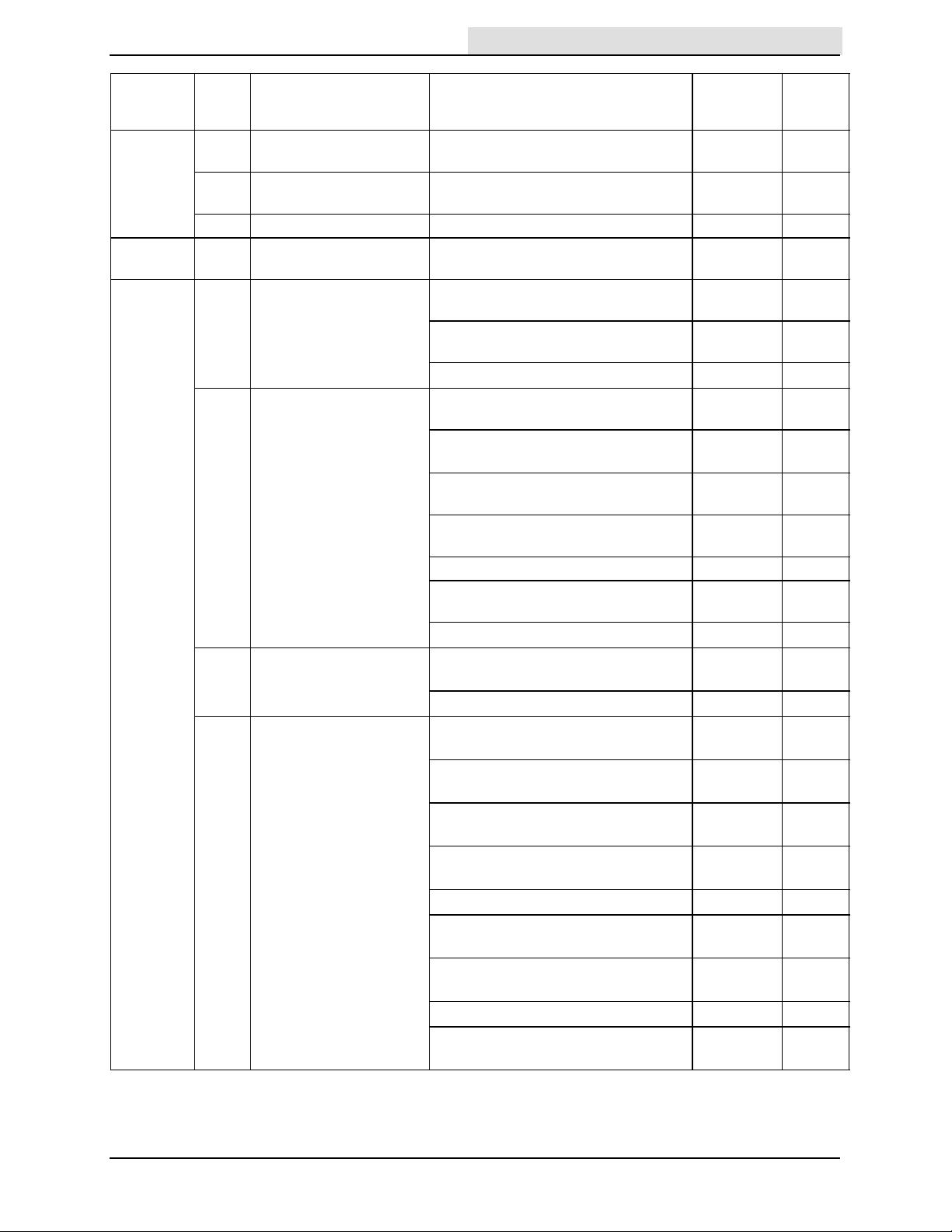
Interval Key Description Procedure
Home
Find...
Go To..
Weekly Wiring and flexible
hoses
7 Hopper Check door, inlet, and fan casing
2 Water tank Clean water tank drain cap filter -- 1
50 Hours 1 Fuel lines Check for wear and damage.
250 Hours 6 Cab Check windshield wiper for wear
4 Dust suppression,
vacuum, and brushes
2 Water tank Check safety chain for wear and
8 Steering and
suspension
Check for damage, wear, and
security
seals for wear and damage
Tighten loose clamp bands
and damage
Check operation of rear view
camera (optional)
Lubricate cab pivots SPL 2
Check nozzle flap for wear and
damage
Check brush arms for wear and
damage. Lubricate
Check brush arm swivels for wear
and damage. Lubricate
Check cast iron skid for wear and
damage. Adjust
Check vacuum nozzle skid for wear -- 2
Check wear plates for wear and
damage
Check operation of spray jets -- 3
damage
Lubricate door hinge SPL 1
Check bell crank levers for wear
and damage. Lubricate
Check front trailing arms for wear
and damage. Lubricate
Check steering arm for wear and
damage
Check steering linkage for wear and
damage
Lubricate front hub top bearing SPL 1
Lubricate axle beam
(upper and lower)
Check tracking cylinder pivots for
wear and damage. Lubricate
Lubricate rear trailing arms SPL 2
Check condition of rear axle conical
stops
MAINTENANCE
No. of
Lubricant/
Fluid
-- All
-- All
-- All
-- 1
-- 1
-- 1
SPL 4
-- 2
-- 2
-- 2
-- 1
SPL 2
SPL 2
-- 1
-- 1
SPL 2
SPL 2
Service
Points
2
636 9006280 (10-- 11)
51
Page 54

MAINTENANCE
Home
Find...
Go To..
No. of
Lubricant/
Interval Key Description Procedure
250 Hours 7 Hopper Lubricate hopper lift cylinders SPL 4
Lubricate hopper door arms SPL 2
Check hopper cyclone screens for
wear and damage
Check hopper drain seal for wear
and damage
Check hopper drain screen for wear
and damage
Check hopper external drain tube
for wear and damage
Check hopper door screen for wear
and damage
Clean cyclone drain holes -- All
Check vacuum fan access door for
damage
1 Engine Change oil and filter EO 1
Replace air filter and clean air filter
housing and relief valve
Check air intake for damage -- 1
Check radiator screen for wear and
damage
1 Hydraulics Check hoses and fittings for leaks,
wear, and damage
Check hydraulic pressure filter
indicator (engine must be running)
1 Battery Check electrolyte level (non--sealed
batteries only)
Clean and tighten battery cable
connections (after initial 250 hours
only)
Electrical Check cables and cable
connections for wear and damage
Check terminals for corrosion -- All
Apply terminal stud protectant -- All
7 Hopper raised safety
switch
7 Fan access door open
safety switch
Clean and lubricate ELE 1
Clean and lubricate ELE 1
Fluid
-- 1
-- 1
-- 1
-- 1
-- 1
-- 1
-- 1
-- 1
-- All
-- 1
-- 1
-- 1
-- All
Service
Points
52
636 9006280 (1-- 10)
Page 55

MAINTENANCE
Home
Find...
Go To..
No. of
Lubricant/
Interval Key Description Procedure
250 Hours 6 Brakes Check adjustment of parking brake -- 1
Check parking brake cables for
wear and damage. Lubricate
3 Tires Check tread depth -- 4
Torque lug nuts (5 each wheel) -- 20
5 Cab mountings Check torque -- All
9 Pressure washer
(option)
750 Hours 4 Dust suppression,
vacuum, and brushes
2 Water tank Check operation of water level
8 Steering and
suspension
1 Engine Replace fuel filter -- 1
1 Battery Clean and grease terminals ELE 1
6 Brakes Check shoes and drums for wear -- 1
10 Wander hose Check hose for wear and damage -- 1
Check manifold filter for wear and
damage
Check hose and wand for for wear
and damage
Check nozzle suspension ball joints
and chains for wear and damage
Check operation of nozzle hydraulic
lift arms and for leaks
Check brush lift cylinders pivots and
hose connections for wear and
damage
Check brush float suspension valve
for wear and damage
Check brush hydraulic cylinders for
leaks and linkage for wear and
damage
Check operation of CloudMaker 1
sensor
Check steering arms and ball joints
for wear and damage
Check front axle for wear and
damage
Check for wear and damage -- 1
Check stub axle torque -- 1
Check suspension plate torque -- 1
Replace inline filter
(000000--002135)
Check fan belt condition and tension -- 1
Check coolant mixture
(50% ethylene glycol)
Check adapter seal on hopper for
wear and damage
Fluid
SPL 2
-- 1
-- 1
-- 2
-- 2
-- 1
-- 1
-- All
-- 2
-- 1
WG 1
-- 1
Service
Points
1
1
636 9006280 (1-- 10)
53
Page 56

MAINTENANCE
Home
Find...
Go To..
Lubricant/
Interval Key Description Procedure
2000
Hours
LUBRICANT/FLUID
EO Turbo Diesel Engine Oil, 15W40 API CF4/ACEA2 only...........
HYDO (European built machines) -- Turbo Diesel Engine Oil, 15W40 API CF4/ACEA2.......
WG 50/50 mix of water and ethylene glycol permanent, --34_ C(--30_ F)..........
SPL Special lubricant, Lubriplate EMB grease (T ennant part number 01433--1).........
ELE Dielectric grease.........
NOTE: More frequent maintenance intervals may be required in extremely dusty conditions.
1 Engine Drain, flush, and refill radiator
(50% ethylene glycol)
Adjust valve clearances -- 4
1 Hydraulics Change hydraulic fluid HYDO 1
Change auxiliary pressure filter 1
Change return line filter 1
Change auxiliary and steering pump
hydraulic strainers
(USA built machines) -- TennantTrue premium hydraulic fluid or equivalent
Fluid
WG 1
No. of
Service
Points
1
NOTE: Refer to the Green Machine 636HS Workshop Manual for additional service requirements.
54
636 9006280 (1-- 10)
Page 57
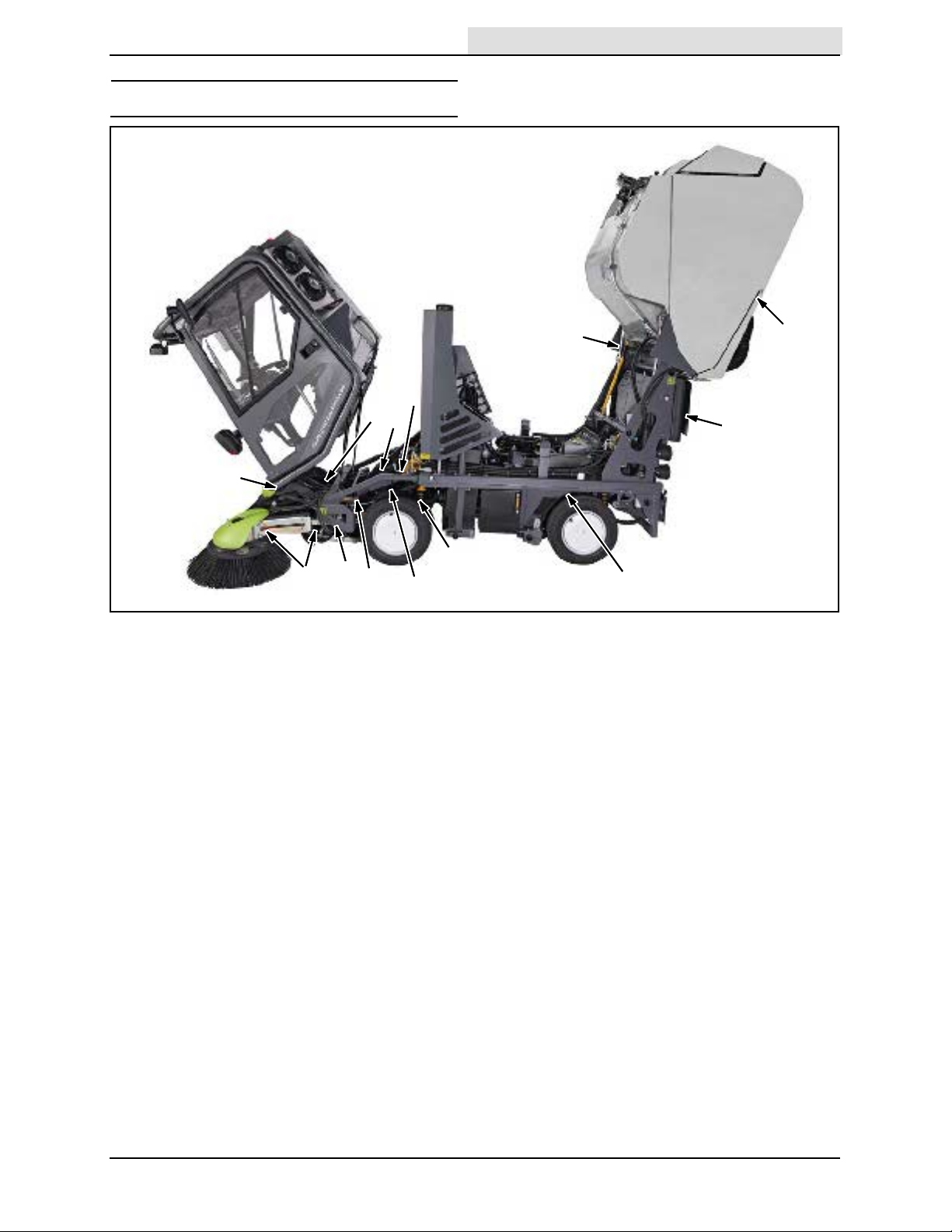
LUBRICATION
Home
Find...
Go To..
MAINTENANCE
12
6
8
5
7
1
LUBRICATION POINTS
Grease and check the condition of the
components listed below at the intervals in the
maintenance chart.
1. Brush arms
2. Front trailing arms
10
11
4
2
6. Brake cables
7. Brush arm swivels
8. Front hub top bearing
9. Water tank door hinge
10. Steering bell crank levers
3
9
13
3. Right and left hopper door arm
4. Right and left hopper lift cylinders
(upper and lower)
5. Cab pivots
636 9006280 (2-- 09)
1 1. Tracking cylinders
12. Axle beam (upper and lower)
13. Rear trailing arms
55
Page 58

MAINTENANCE
Home
Find...
Go To..
HYDRAULICS
Check the hydraulic fluid level daily. The hopper
must be down and the machine at operating
temperature before checking the hydraulic fluid
level.
ATTENTION! Do not overfill the hydraulic fluid
reservoir or operate the machine with a low
level of hydraulic fluid in the reservoir.
Damage to the machine hydraulic system may
result.
Check the hydraulic pressure filter indicator after
every 250 hours of operation. The machine must
be running in order to get an accurate reading
from this indicator.
Replace the auxiliary hydraulic pressure filter after
every 2000 hours of operation or if the pressure
filter indicator arrow is in the yellow/red area of
the indicator with the engine running. The filter is
useable when the indicator arrow is in the green
area of the indicator.
Apply a light film of hydraulic fluid onto the filler
cap gasket before reinstalling the cap onto the
reservoir.
Replace the hydraulic return line filter after every
2000 hours of operation.
56
636 9006280 (2-- 09)
Page 59

MAINTENANCE
Home
Find...
Go To..
Replace the auxiliary and steering pump hydraulic
strainers after every 2000 hours of operation.
Drain and refill the hydraulic fluid reservoir with
new hydraulic fluid after every 2000 hours of
operation.
HYDRAULIC HOSES
Check the hydraulic hoses after every 250 hours
of operation for wear, damage, and leaks.
HYDRAULIC FLUID
Machines use two different type of hydraulic fluids
depending on where the machine was built.
Mixing the fluids is not recommended. Identify
the machine build location by the data plate.
European data plate
European built machines use Turbo Diesel Engine
Oil, 15W40 API CF4/ACEA2.
FOR SAFETY: When servicing machine, use
cardboard to locate leaking hydraulic fluid
under pressure.
High pressure fluid escaping from a very small
hole can almost be invisible, and can cause injury.
Contact appropriate personnel if a leak is
discovered.
A TTENTION: Only use TENNANT supplied
hydraulic hoses or equivalent rated hydraulic
hoses.
USA data plate
USA built machines: There are two fluids
available for different temperature ranges:
TennantTrue premium
hydraulic fluid (Extended Life)
Part
number
1057710 above 7_ C(45_ F) 100 3.8 L
105771 1 above 7_ C(45_ F) 100 19 L
1057707 below 7_ C(45_ F) 32 3.8 L
1057708 below 7_ C(45_ F) 32 19 L
If using a locally--available hydraulic fluid, be sure
the specifications match the Tennant hydraulic
fluid specifications. Substitute fluids can cause
premature failure of hydraulic components.
ATTENTION! Hydraulic components depend
on system hydraulic fluid for internal
lubrication. Malfunctions, accelerated wear,
and damage will result if dirt or other
contaminants enter the hydraulic system.
Ambient
temperature
ISO
Grade
Capacity
(1 gal)
(5 gal)
(1 gal)
(5 gal)
636 9006280 (1-- 10)
57
Page 60

MAINTENANCE
Home
Find...
Go To..
ENGINE
ENGINE OIL
Check the engine oil level daily. Change the oil
and filter after every 250 hours of operation.
Fill the engine with oil until the oil is between the
indicator marks on the dipstick. DO NOT fill past
the top indicator mark. The engine oil capacity is
6 L (6.35 qt) with oil filter.
Check the condition of the radiator and radiator
screen after every 250 hours of operation.
COOLING SYSTEM
FOR SAFETY: When servicing machine, avoid
contact with hot engine coolant.
Check the coolant level in the reservoir daily. The
coolant level must be between the two indicator
marks when the engine is cold.
FOR SAFETY: When servicing machine, do
not remove cap from radiator when engine is
hot. Allow engine to cool.
Check the coolant mixture every 750 hours of
operation.
Flush the radiator and the cooling system after
every 2000 hours of operation.
ENGINE BELT
Check the belt tension after every 750 hours of
operation. Adjust tension as necessary . Proper
belt tension is 7 mm to 9 mm (0.28 to 0.35 in).
58
WARNING: Moving belt and fan. Keep
away.
636 9006280 (1-- 10)
Page 61
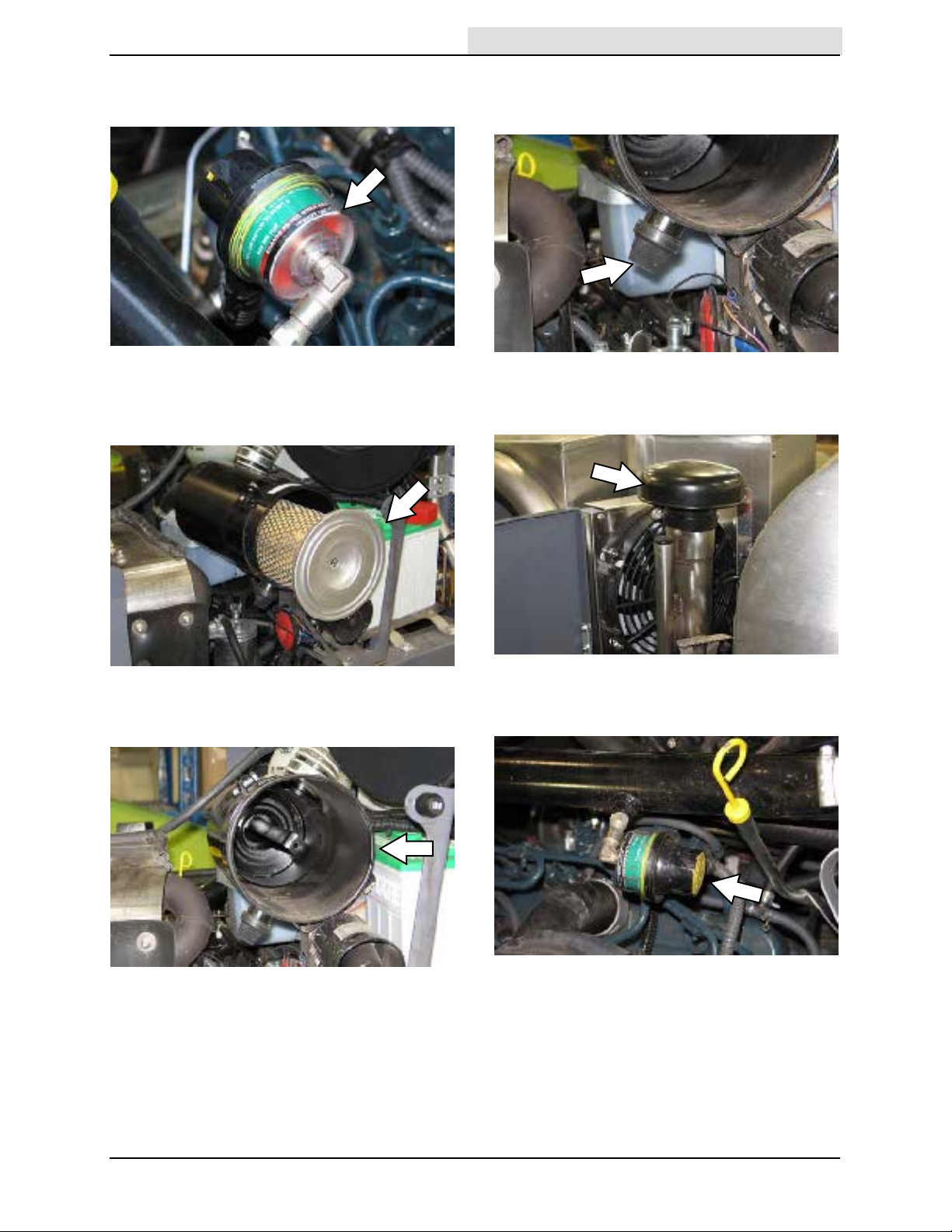
MAINTENANCE
Home
Find...
Go To..
AIR FILTER
Check the air filter indicator daily.
Replace the air filter after every 250 hours or
when the red “CHANGE FILTER WHEN RED”
stripe appears on the indicator.
Check the air filter housing relief valve for wear
and damage after every 250 hours of operation.
Clean dust and debris from the relief valve.
Check condition of and clean the air intake after
every 250 hours of operation.
Clean the interior of the air filter housing after
every 250 hours of operation.
Press the reset button to reset the air filter
indicator after replacing the air filter.
636 9006280 (1-- 10)
59
Page 62

MAINTENANCE
Home
Find...
Go To..
FUEL FILTERS
Replace the fuel filter after every 750 hours of
operation. To avoid extensive bleeding of the fuel
system when replacing the fuel filter, fill the new
filter with as much diesel fuel as possible before
installing the filter.
FOR SAFETY: When servicing machine, keep
flames and sparks away from fuel system
service area. Keep area well ventilated.
On machines below serial number 002135,
replace the inline fuel filter after every 750 hours
of operation.
FUEL LINES
Check the fuel lines every 50 hours of operation.
If the clamp band is loose, apply oil to the screw
of the band and securely tighten the band.
The rubber fuel lines can become worn--out
whether the engine has been used much or not.
Replace the fuel lines and clamp bands every two
years.
FOR SAFETY: When servicing machine, keep
flames and sparks away from fuel system
service area. Keep area well ventilated.
If the fuel lines and clamp bands are worn or
damaged before two years time; replace or repair
them at once. Bleed the fuel system after
replacement of any fuel lines, see PRIMING THE
FUEL SYSTEM. When the fuel lines are not
installed, plug both ends with clean cloth or paper
to prevent dirt from entering the lines. Dirt in the
lines can cause fuel injection pump malfunction.
60
PRIMING THE F UEL SYSTEM
Typical diesel fuel systems require priming to
remove pockets of air from the fuel lines and fuel
components. This is usually required after running
out of fuel, changing fuel filter elements or
repairing a fuel system component. Air in the fuel
prevents smooth engine operation.
This fuel system however is self-priming. The
return line comes from the top of the injector that
allows the air to escape through the return line.
VALVE CLEARANCES
Check and adjust the valve clearances after every
2000 hours of operation.
636 9006280 (1-- 10)
Page 63

BATTERY
Home
Find...
Go To..
Check the electrolyte level in non--sealed batteries
after every 250 hours of operation. Never add
acid to the batteries. Add distilled water only.
Always keep the battery caps on, except when
adding water or taking hydrometer readings.
Using a hydrometer, measure the specific gravity
to determine the charge level and condition of the
batteries. If one or more of the battery cells test
lower than the other battery cells, the cell is
damaged, shorted, or is near failure. Replace the
battery if it is damaged.
MAINTENANCE
Clean the battery terminals after every 750 hours
of operation. Apply a light coat of dielectric grease
onto the terminals after they have been cleaned.
FOR SAFETY: When servicing machine, avoid
contact with battery acid.
If the machine is equipped with a maintenance
free battery, clean and tighten the battery
connections after the first 250 hours of operation
and after every 750 hours after that. Do not
remove the vent plugs from the battery or add
water to the battery.
636 9006280 (2-- 09)
61
Page 64
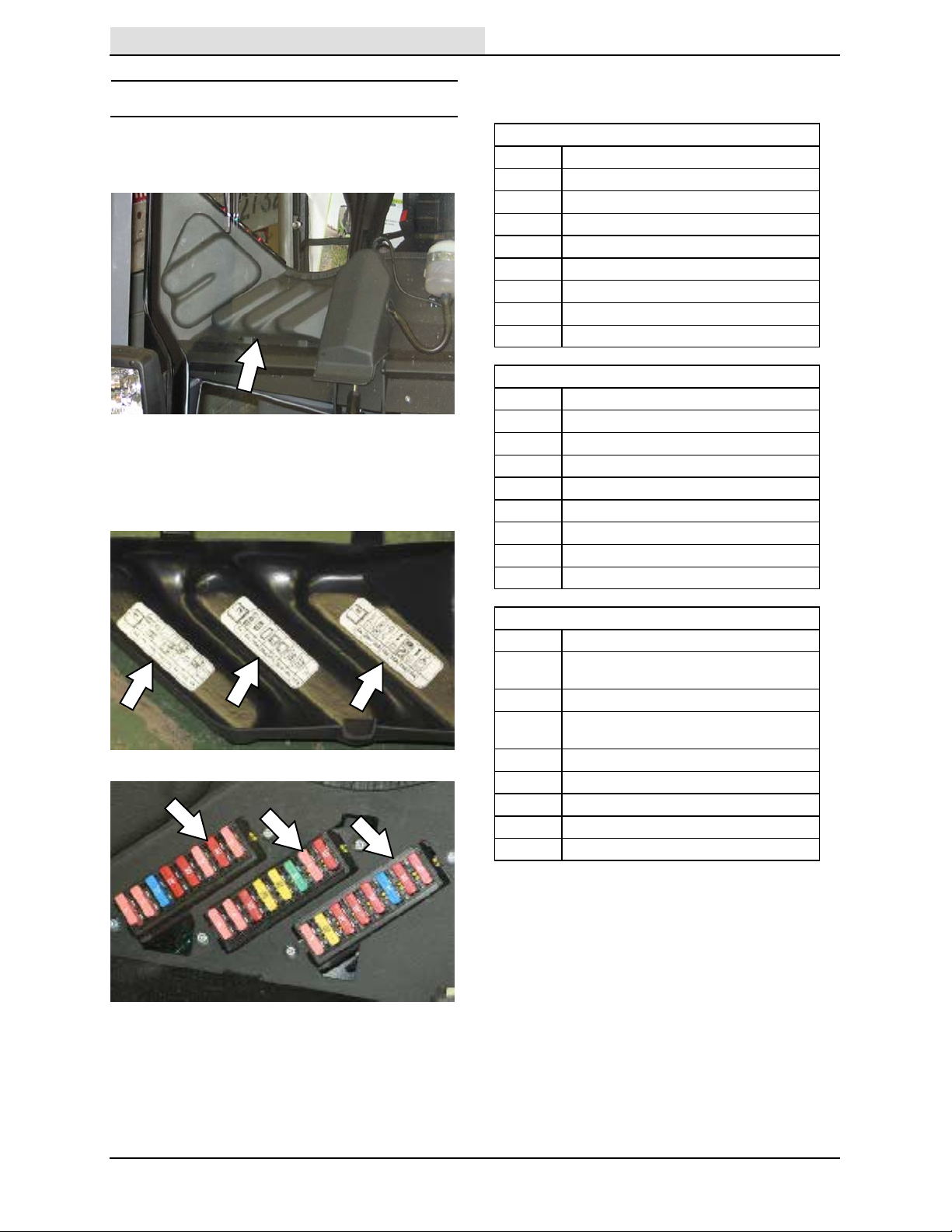
MAINTENANCE
Home
Find...
Go To..
FUSES
Refer to the tables below for the fuses and circuits
protected.
REPLACING THE FUSES
Remove the fuse box cover to access fuses.
Refer to the diagram inside the fuse box cover for
locations of the fuses in the fuse box and the
circuits protected. Always replace a fuse with a
fuse of the same type and amperage rating.
Fuse Box 1
Rating Circuit Protected
4A Left Side Position Lights
4A Right Side Position Lights
15 A Main Beam
10 A Right Side Dipped Beam
10 A Left Side Dipped Beam
4A Fog Lights
10 A Work Lights
4A Main Lights Switch Feed
Fuse Box 2
Rating Circuit Protected
4A IQAN -- MDM RTC
4A IQAN -- MDM
10 A IQAN -- XS -- A0
20 A IQAN -- XT2 -- A0
20 A IQAN -- XT2 -- A1T
30 A Heated Screen Element
4A Heat Screen Timer & Switch
10 A Water Pump Relay
Fuse Box 3
Rating Circuit Protected
4A Alternator, No Charge, Oil Pressure Warning,
20 A Heater, AC Evaporator
10 A T achometer, Water Temperature Gauge, Fuel
10 A Warning Beacon, Voice Box, Indicators
10 A Reverse Camera, Monitor, Radio
15 A Wipers, Modem, Screen Wash, Horn
10 A AC Compressor
10 A Engine Stop Solenoid
Fuel Pump
Gauge, Brake Lights
NOTE: Always replace a fuse with a fuse of the
same type and amperage rating.
62
636 9006280 (2-- 09)
Page 65

BRUSHES
Home
Find...
Go To..
Check the brushes for wear daily. Remove
tangled debris from the brushes and brush drive
motors.
FOR SAFETY: Before leaving or servicing
machine, stop on level surface, place drive
lever in neutral, set parking brake, turn off
machine, and remove key from ignition.
REPLACING THE BRUSHES
Replace the brushes when the bristles are
approximately 76 mm (3 in) in length or when the
brushes no longer adequately sweep.
1. Remove the brush assembly cover.
2. Loosen the six allen screws with the provided
tool.
MAINTENANCE
5. Reinstall the brush assembly cover.
6. Adjust the brush angle. See ADJUSTING
THE BRUSH ANGLE section of this manual.
ADJUSTING THE BRUSH ANGLE
Adjust the angle for each brush so debris is swept
toward the center of the machine. For best
sweeping performance the left brush bristles
should touch the surface between 2 o’clock and 8
o’clock and the right brush bristles should touch
the surface between 10 o’clock and 4 o’clock
when sweeping.
3. Remove the brush from the brush drive.
4. Install the new brush. Rotate the right brush
clockwise and the left brush counterclockwise
until all the allen screws slide into the slots.
Tighten the screws.
1. Remove the brush assembly cover.
636 9006280 (2-- 09)
63
Page 66

MAINTENANCE
Home
Find...
Go To..
2. Adjust the roll (side to side) angle. Loosen the
two nuts. Adjust the angle of the brush
assembly. Tighten the hex nuts.
3. Adjust the pitch (front to rear) angle. Loosen
the four hex screws. Adjust the angle of the
brush assembly. Tighten the hex screws.
BRUSH LINKAGE
Check the brush hydraulic cylinders for leaks and
the linkage for wear and damage every 750 hours
of operation.
4. Reinstall the brush assembly cover.
64
636 9006280 (2-- 09)
Page 67
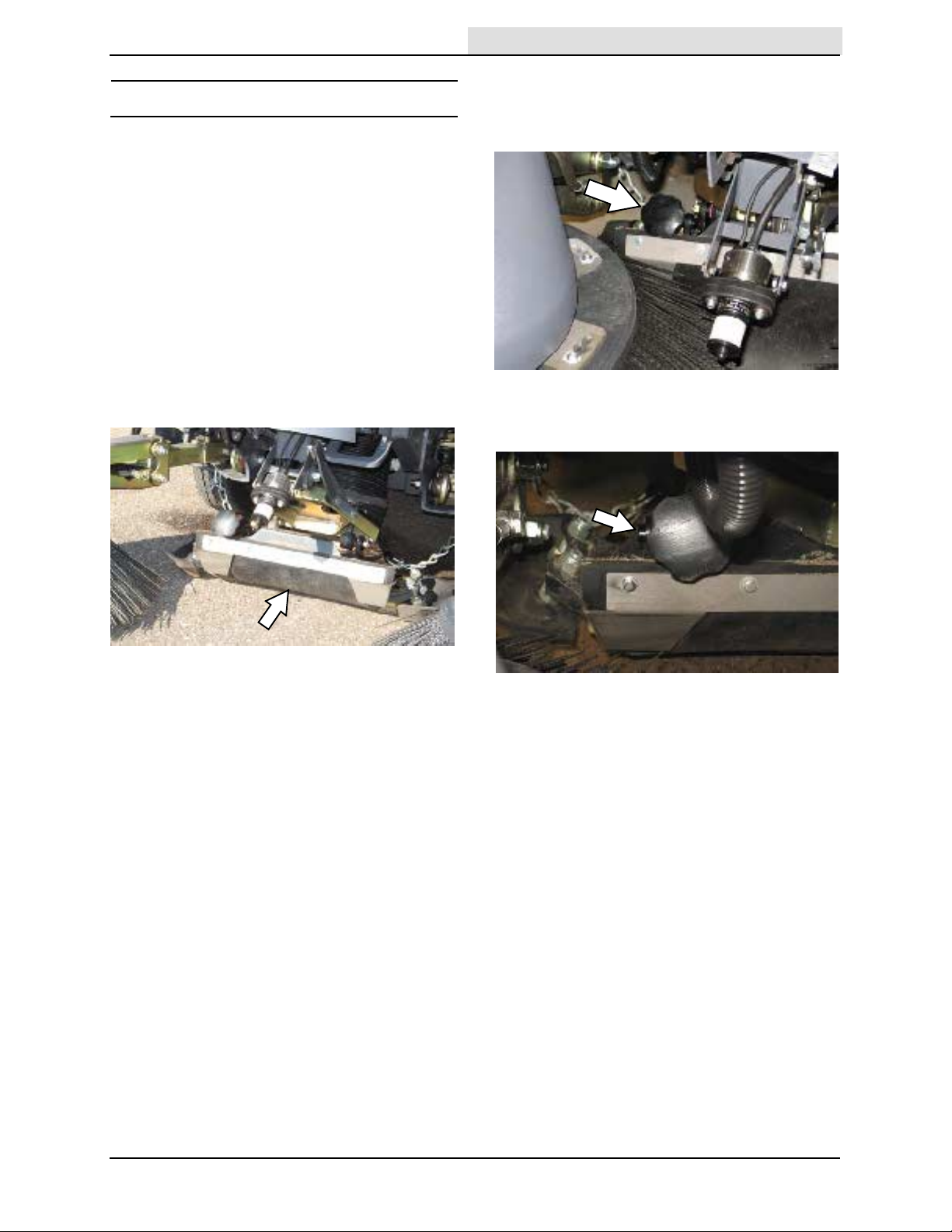
DUST SUPPRESSIO N / VACUUM
Home
Find...
Go To..
FOR SAFETY: Before leaving or servicing
machine, stop on level surface, place drive
lever in neutral, set parking brake, turn off
machine, and remove key from ignition.
ADJUSTING / REPLACING THE NOZZLE
FLAP
Check the nozzle flap and adjustment knob for
wear and damage every 250 hours of operation.
Replace the nozzle flap when it is approximately
12 cm (5 in) in length.
1. Start the machine, place the machine into
Work Mode 1, and set the vacuum fan speed
to 2200 rpm.
MAINTENANCE
3. Turn the adjustment knob clockwise to
increase the flap height and vibration and
counterclockwise to decrease the flap height
and vibration.
4. Lock the adjustment knob when through
making adjustments.
2. Operate the machine and listen for the nozzle
flap vibration. It should be possible to hear the
flap vibration inside the cab, but the noise
should not be so excessive that it disturbs
persons in areas near the machine.
NOTE: Little or no flap vibration is necessary for
light sweeping (light litter). More flap vibration may
be necessary for heavier sweeping (wet sand).
5. Operate the machine and listen for flap
vibration. Repeat procedure if additional
adjustments are necessary.
636 9006280 (2-- 09)
65
Page 68

MAINTENANCE
Home
Find...
Go To..
VACUUM NOZZLE SKID
Check the vacuum nozzle skid for wear every 250
hours of operation. Replace the vacuum nozzle
skid when its thickness is 15 mm (0.60 in) or less.
CAST IRON SKID
Use the hex nut screws to adjust the wear plates
so the bottom edges are 19 mm (0.75 in) from the
ground. Ensure the cast iron skid is level with the
vacuum nozzle skid.
SPRAY JETS
Clean the spray jet filters every 250 hours of
operation. A spray jet is located above each brush
and inside the vacuum tube. Loosen the thumb
screw to remove the spray jet from the vacuum
tube.
Check the cast iron skid for wear and damage
every 250 hours of operation.
66
636 9006280 (10-- 11)
Page 69

MAINTENANCE
Home
Find...
Go To..
CLOUDMAKER
Check the CloudMaker for damage and to ensure
it is functioning every 750 hours of operation.
WATER TANK
DRAIN CAP FILTER
Check the drain cap filter for damage and clean
the filter weekly.
WATER TANK DOOR RETAINER CHAIN
Check the water tank door retainer chain for
damage every 250 hours of operation. Replace
the chain if it is damaged.
WATER LEVEL SENSOR
Check the water tank water level sensor for
damage every 750 hours of operation. Replace
the level sensor if it is damaged or if the wires are
worn or damaged.
636 9006280 (2-- 09)
67
Page 70
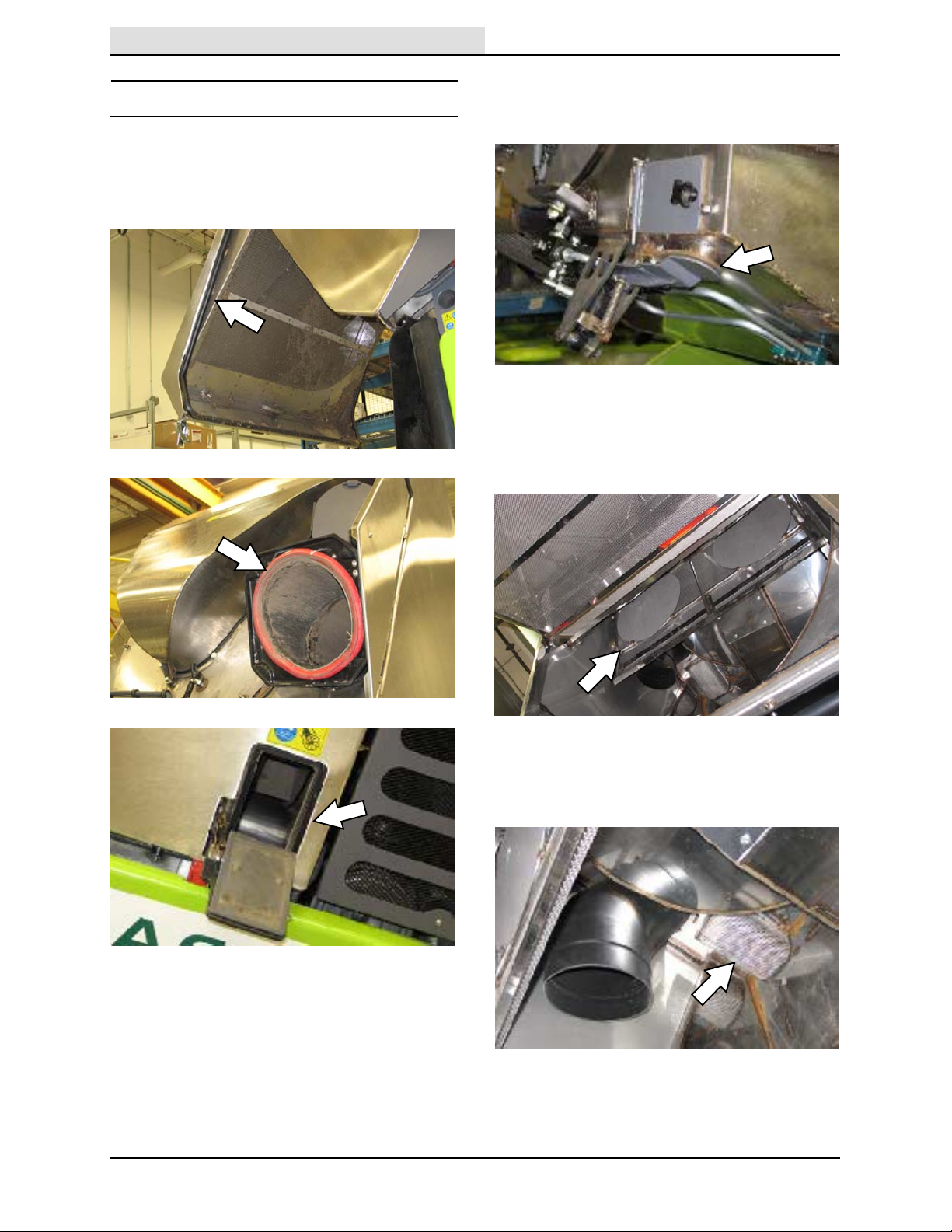
MAINTENANCE
Home
Find...
Go To..
HOPPER
HOPPER DOOR, HOPPER INLET, AND
VACUUM FAN ACCESS DOOR SEALS
Check the hopper door, hopper inlet, and vacuum
fan access door seals weekly for wear or damage.
HOPPER DRAIN SEAL
Check the hopper drain seal for wear and damage
every 250 hours of operation.
HOPPER CYCLONES SCREENS
Check the hopper cyclone screens for wear and
damage every 250 hours of operation. Be sure
the cyclone drain holes are clear.
68
HOPPER DRAIN SCREEN
Check the hopper drain screen for wear and
damage every 250 hours of operation.
636 9006280 (2-- 09)
Page 71

MAINTENANCE
Home
Find...
Go To..
HOPPER EXTERNAL DRAIN TUBE
Check the hopper external drain tube for wear
and damage every 250 hours of operation.
HOPPER DOOR SCREEN
Check the hopper door screen for wear and
damage every 250 hours of operation.
HOPPER RAISED SAFETY SWITCH
Clean the hopper raised safety switch every 250
hours of operation. Apply a light coat of dielectric
grease onto the switch after it is cleaned.
VACUUM FAN DOOR SAFETY SWITCH
Clean the vacuum fan door safety switch every
250 hours of operation. Apply a light coat of
dielectric grease onto the switch after it is
cleaned.
636 9006280 (2-- 09)
VACUUM FAN ACCESS DOOR
Check the vacuum fan access door for wear and
damage every 250 hours of operation.
69
Page 72
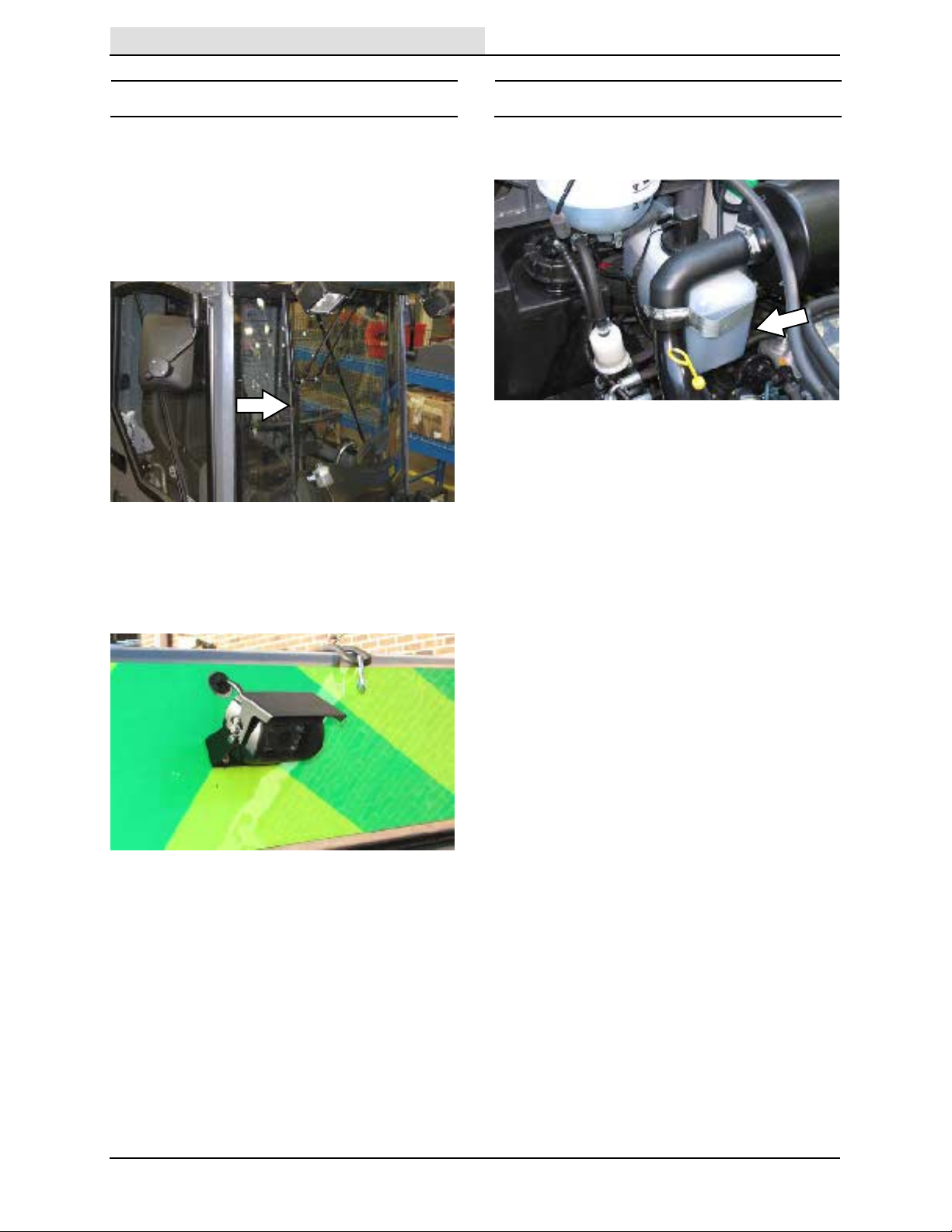
MAINTENANCE
Home
Find...
Go To..
CAB
Check all lights, gauges, controls, and safety
equipment for proper operation daily.
WINDSHIEL D WIPER BLADES
Check the windshield wiper blade for wear and
damage every 250 hours of operation. Replace
when necessary.
WINDSHIEL D WASHER F LUID
Check the windshield washer fluid level daily. Fill
with automotive windshield washer fluid.
REAR V IEW CAMERA (OPT IO N)
Check the rear view camera every 250 hours of
operation. Clean the camera lens with a soft clean
cloth.
70
636 9006280 (2-- 09)
Page 73

STEERING AND SUSPENSION
Home
Find...
Go To..
Check the suspension components every 750
hours of operation. Check the bushings, springs,
conical stops, and pins for wear and damage.
Check the suspension springs for leaks. Replace
worn or damaged components.
MAINTENANCE
Check the front axle components for wear and
damage every 750 hours of operation. Replace all
worn or damaged components.
Check the steering linkage components for wear
and damage every 250 hours of operation.
Replace worn or damaged components.
Check the steering ball joints every 750 hours of
operation. Replace damaged or worn ball joints.
636 9006280 (10-- 11)
71
Page 74

MAINTENANCE
Home
Find...
Go To..
BRAKES AND TI RES
SERVICE BRAKES
Check the service brakes after every 250 hours of
operation.
TIRES
Check the tires for damage and the tire pressure
daily. The proper air pressure is 648 +
5 psi). Check the tread depth, 2 mm
(94 +
(0.08 in), minimum after every 250 hours of
operation.
35 kPa
Check the service brake shoes and drums for
wear after every 750 hours of operation.
Check the brake fluid level at the brake fluid
reservoir after every 250 hours of operation.
PARKING BRAKES
Check the parking brake adjustment after every
250 hours of operation.
WHEEL TORQUE
Torque wheel nuts twice in the pattern shown to
145 to 150 Nm (107 to 110 ft lb) after every 250
hours of operation.
4
1
2
5
3
72
636 9006280 (2-- 09)
Page 75

MAINTENANCE
Home
Find...
Go To..
WANDER HOSE
Check the wander hose and the adapter seal on
the hopper for wear and damage every 750 hours
of operation.
PRESSURE WASHER (OPTION)
Check the pressure washer wand and system
hoses for wear and damage every 250 hours of
operation.
Check the pressure washer manifold filter for
wear and damage every 250 hours of operation.
636 9006280 (1-- 10)
73
Page 76

MAINTENANCE
Home
Find...
Go To..
TILTING / LOWERING THE CAB
LOWERING THE CAB
1. Lower the cab to the frame of the machine.
TILTING THE CAB
FOR SAFETY: Before leaving or servicing
machine, stop on level surface, place drive
lever in neutral, set parking brake, turn off
machine, and remove key from ignition.
1. Remove loose items from inside the cab.
2. Remove the lock down bracket located on the
right rear of the cab from the frame of the
machine.
2. Be sure the safety hook is secure in the
bracket.
3. Place the lock down bracket onto the lock
down hook and reinstall the lock down bracket
onto the frame of the machine.
3. Lift the safety hook handle located on the left
rear side of the cab and tilt the cab.
74
636 9006280 (2-- 09)
Page 77

TILTING / LOWERING THE HOPPER
Home
Find...
Go To..
MANUALLY
FOR SAFETY: Before leaving or servicing
machine, stop on level surface, place drive
lever in neutral, set parking brake, turn off
machine, and remove key from ignition.
TILTING THE HOPPER MANUALLY
Use the hopper pump to manually tilt the hopper if
machine is disabled.
1. Remove right side panel from the machine.
2. Remove the pump handle from the storage
area inside the left access door.
MAINTENANCE
6. Engage the hopper safety arm.
WARNING: Raised hopper may fall.
Engage hopper safety arm.
3. Insert the pump handle into the hopper pump.
4. Confirm the hopper pump needle valve knob
is turned fully clockwise to ensure the needle
valve is closed.
FOR SAFETY: When using machine, make
sure adequate clearance is available before
raising hopper.
5. Use the hopper pump to manually tilt the
hopper.
7. Remove the pump handle from the hopper
pump and return the pump handle to the
storage location inside the left access door.
If the engine is operable, see RAISING /
LOWERING THE HOPPER section of this
manual. If the engine is inoperable, see
LOWERING THE HOPPER MANUALLY section
of this manual.
636 9006280 (2-- 09)
75
Page 78

MAINTENANCE
Home
Find...
Go To..
LOWERING THE HOPPER MANUALLY
1. Disengage the hopper safety arm.
2. Slowly turn the hopper pump needle valve
knob fully counterclockwise and allow the
hopper to completely lower down to the frame
of the machine.
NOTE: Several personnel may be necessary to
push the hopper over the center point so the
weight of the hopper lowers the hopper.
3. Turn the hopper pump needle valve knob fully
clockwise to close the needle valve.
NOTE: The power hopper tilt system will not
operate if the hopper pump needle valve knob is
left open.
WARNING: Lift arm pinch point. Stay
clear of hopper lift arms.
NOTE: Keep personnel clear of the area around
the hopper before manually lowering the hopper.
76
636 9006280 (2-- 09)
Page 79

TOWING / TRANSPO RTING T HE MACHINE
Home
Find...
Go To..
MAINTENANCE
TRANSPORTING THE MACHINE
1. Raise the brushes.
TOWING THE MACHINE
If the machine becomes disabled, it can be only
towed from the tow point located at the front of
the machine.
Use the emergency tow valve locatedonthe
transmission pump to prevent damaging the
hydraulic system when towing t he machine. This
valve allows a disabled machine to be moved for
a very short distance and at a speed to not
exceed 1.6 kp/h (1 mph). The machine is NOT
intended to be towed a long distance or at a high
speed.
NOTE: Empty the hopper and water tank before
transporting.
2. Position the front of the machine at the
loading edge of the truck or trailer.
FOR SAFETY: When loading machine onto
truck or trailer, use winch. Do not drive the
machine onto the truck or trailer unless the
loading surface is horizontal AND is 380 mm
(15 in) or less from the ground.
3. If the loading surface is horizontal and 380
mm (15 in) or less from the ground, drive the
machine up onto the truck or trailer.
ATTENTION! Do not tow machine for a long
distance or damage may occur to the
propelling system.
Turn the emergency tow valve 90_ (either
direction) before towing the machine. Return the
bypass valve to the normal position when finished
towing the machine. Do
tow valve during normal machine operation.
Not open the emergency
636 9006280 (2-- 09)
77
Page 80

MAINTENANCE
Home
Find...
Go To..
4. To winch the machine onto the truck or trailer,
attach the winching chains to the tow point or
tie--down bar.
8. Connect the tie--down straps to the tie down
points.
5. Position the machine as close to the front of
the trailer or truck as possible.
6. Set the parking brake and place a block
behind each wheel to prevent the machine
from rolling.
7. Start the machine, place the machine into
Work Mode 1, and lower the brushes. Turn off
the machine.
9. Route the tie--down straps to the opposite
ends of the machine and hook them to the
brackets on the floor of the trailer or truck.
Tighten the tie--down straps.
NOTE: It may be necessary to install tie-down
brackets to the floor of the trailer or truck.
FOR SAFETY: When unloading machine off
truck or trailer, use winch. Do not drive the
machine off the truck or trailer unless the
loading surface is horizontal AND 380 mm
(15 in) or less from the ground.
10. If the loading surface is horizontal AND is 380
mm (15 in) or less from the ground, drive the
machine off the truck or trailer.
78
636 9006280 (2-- 09)
Page 81
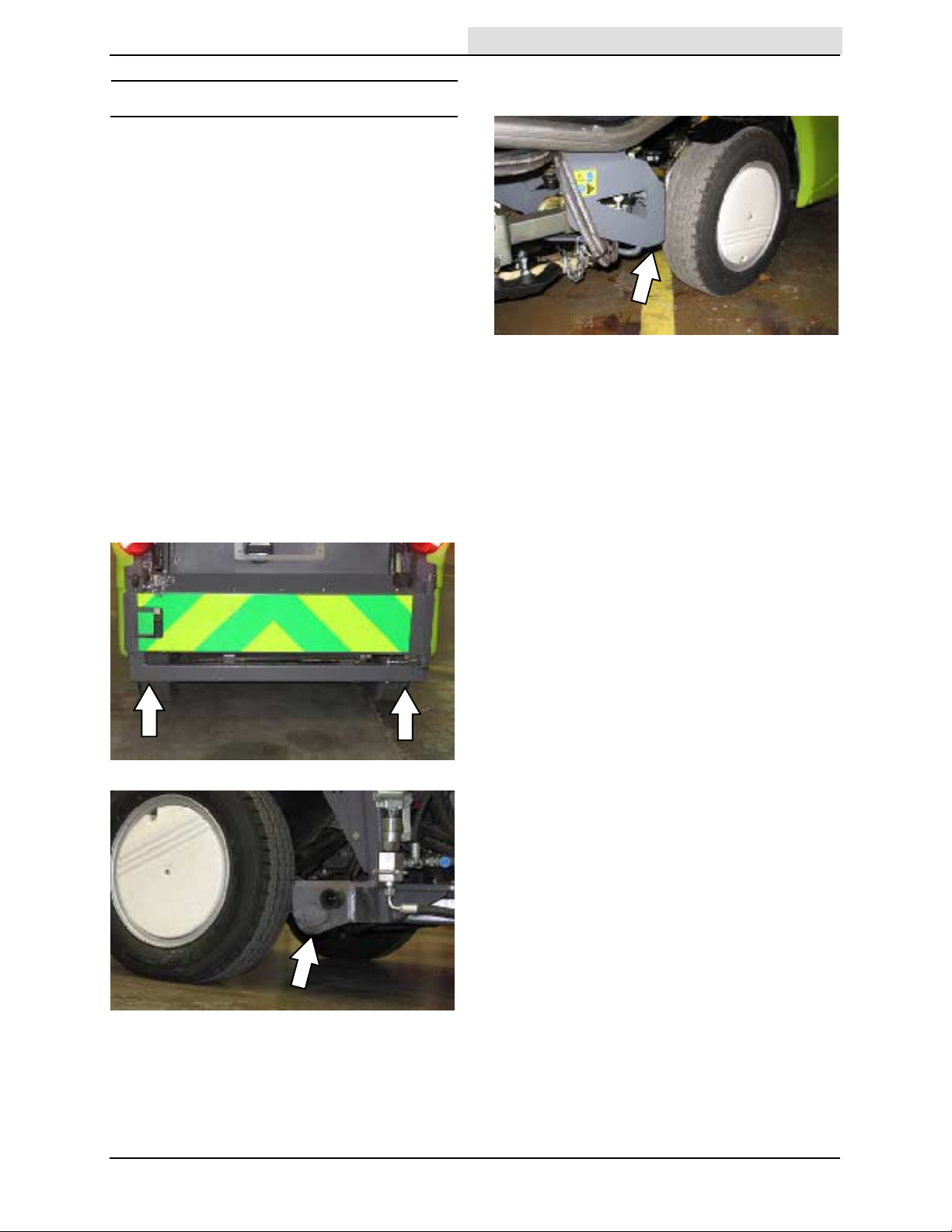
MACHINE JACKING
Home
Find...
Go To..
Empty the hopper and water tank before jacking
up the machine. Jack up the machine at the
designated locations. Use a hoist or jack capable
of supporting the weight of the machine. Use
appropriately rated jack stands to support the
machine.
FOR SAFETY: Before leaving or servicing
machine, stop on level surface, place drive
lever in neutral, set parking brake, turn off
machine, and remove key from ignition.
FOR SAFETY: When servicing machine, block
machine tires before jacking machine up. Use
a hoist or jack that will support the weight of
the machine. Jack machine up at designated
locations only. Support machine with jack
stands.
Rear jacking locations are located directly
beneath the rear bumper and in front of each rear
tire.
MAINTENANCE
Front jacking locations are located on the frame
directly in front of the front tires.
636 9006280 (2-- 09)
79
Page 82

MAINTENANCE
Home
Find...
Go To..
STORAGE AND FREEZE PROTE CTIO N
Before storing the machine for an extended
period, the machine must be prepped to lessen
the chances of being damaged. It is recommend
that a full service be carried out before storing the
machine. Contact an authorized service
representative.
STORING THE MACHINE
The following steps should be taken prior to
storing the machine for extended periods.
FOR SAFETY: Before leaving or servicing
machine, stop on level surface, place drive
lever in neutral, set parking brake, turn off
machine, and remove key from ignition.
1. Empty and clean the hopper.
2. Remove the drain cap and completely drain
both water tanks. Reinstall the drain cap when
the water tanks are empty.
FREEZE PROTECTION
FOR SAFETY: Before leaving or servicing
machine, stop on level surface, place drive
lever in neutral, set parking brake, and turn off
machine.
1. Empty and clean the hopper.
2. Remove the drain cap and completely drain
both water tanks. Reinstall the drain cap when
the water tanks are empty.
3. Park the machine in a cool, dry area. Do not
expose the machine to rain. Store indoors.
3. Pour 3.8 liters (1 gallon) of full strength
Propylene Glycol Based / Recreational
Vehicle (RV) antifreeze into the water tank.
Do not dilute.
4. Start the machine and operate the dust
control system until RV antifreeze is
discharging from the CloudMaker, both brush
spray jets, and the vacuum tube spray jet.
80
636 9006280 (2-- 09)
Page 83

SPECIFICATIONS
Home
Find...
Go To..
SPECIFICATIONS
GENERAL MACHINE DIMENSIONS/CAP ACITIES
Item Dimension/capacity
Length (standard machine) 3450 mm (136 in)
Height (warning beacon folded down) 1980 mm (78 in)
Width/frame 1 140 mm (45 in)
Width (Transit Mode--wheels extended) 1370 mm (54 in)
Width (Work Mode 1 / Work Mode 2--wheels in) 950 mm (37.4 in)
Ground clearance 130 mm (5.25 in)
Cleaning path width (maximum--brushes fully extended) 2050 mm (80.7 in)
Cleaning path width (minimum--brushes completely in) 1200 mm (47 in)
Wheel base 1400 mm (55 in)
Brush diameter 750 mm (29.5 in)
Water tank capacity 190 L (49 gal)
Debris hopper volume capacity 1m3(1.33 yd3)
Debris hopper weight capacity 800 kg (1760 lbs)
Dump height (variable to) 1460mm (57.5 in)
Minimum ceiling dump height 1460mm (57.5 in)
Weight -- empty 1950 Kg (4300 lbs)
GVWR 2800 Kg (6160 lbs)
Operating Sound Level At Operator Ear 80 1.5 dBA
Vibration level at steering wheel does not exceed 2.5 m/s@
Vibration level at operator station does not exceed 0.5 m/s@
GENERAL MACHINE PERFORMANCE
Item Measure
Turning dimension (curb to curb) 3250 mm (128 in)
Turning dimension (wall to wall) 4100 mm (161.5 in)
Travel speed forward (maximum--transit mode) -- maximum
determined by local regulations
Travel speed forward (maximum--work mode 1) 13 Km/h (8 mph)
Travel speed forward (maximum--work mode 2) 16 Km/h (9 mph)
Travel speed reverse (maximum) 6Km/h(4mph)
Vacuum Speed--standard 0--2400 rpm
Vacuum Speed--boosted (maximum) 2700 rpm
Maximum rated climb and descent 9_/20%
40 Km/h (25 mph)
81636 9006280 (10-- 11)
Page 84

SPECIFICATIONS
Home
Find...
Go To..
HYDRAULIC SYSTEM
System Capacity Fluid Type
Hydraulic reservoir 35 L (9.2 gal)
European built Machines: Turbo Diesel Engine Oil,
15W40 API CF4/ACEA2 (or higher)
Hydraulic total 55 L (15 gal)
STEERING
Type Power source
Front wheels, hydraulic cylinder Hydraulic pump
POWER TYPE
Engine Type Compression Cycle Aspiration Cylinders Bore Stroke
Kubota V1505TE
Piston Diesel 4 Turbo 4 78 mm
Displacement Net power, governed Net power, maximum
1498 cc (91.4 cu in) 31.3 kw (42 hp) @ 2400 rpm
Fuel Cooling system Electrical system
Diesel, 45 cetane
minimum, low sulfer
Fuel tank: 55 L (14.5 gal)
Idle speed, no load Valve clearance, cold Engine lubricating oil
1 100 + 25 rpm 6 L (6.35 qt) 15W40
USA built Machines: TennantTrue premium
hydraulic fluid or equivalent
(3.07 in)
27.2 kw (44.2 hp) @
(adjustable to 2800)
50/50 water/ethylene glycol
antifreeze
Total: 13.5 L (3.6 gal)
Radiator: 6 L (1.6 gal)
3000 rpm
12 V nominal
60 A alternator
90 A alternator when
equipped with AC
with filter
API CF4/ACEA2
78.4 mm
(3.08 in)
BRAKING SYSTEM
Type Operation
Service brakes Expanding shoe drums (front and back)
Parking brake
TIRES
Location Type Size
Front / Rear (4) Pneumatic 155/70 R12C -- Rating 104 / 102
82
636 9006280 (9-- 09)
Page 85

1980 mm
Home
Find...
Go To..
78 in
SPECIFICATIONS
MACHINE DIMENSIONS
1140 mm
(45 in)
3450 mm
136 in
83636 9006280 (2-- 09)
 Loading...