

Page 1

2.4GHz RF Wireless Presenter
User’s Manual
Page 2

ABOUT THIS MANUAL
This manual is designed for use with the 2.4GHz RF Wireless Presenter. Information in this document has
been carefully checked for accuracy; however , no guarantee is given to the correctness of the content s. The
information in this document is subject to change without notice. The manufacturer does not make any
representations or warranties (implied o r otherwise) regarding the accuracy and completeness of this
document and shall in no event be liable for any loss of profit or any commercial damage, including but not
limited to special, incidental, consequential, or other damage.
SAFETY INSTRUCTIONS
Always read the safety instructions carefully:
Keep this User’s Manual for future reference
Keep this equipment away from humidity
If any of the following situation arises, get the equipment checked by a service technician:
z The equipment has been dropped and damaged.
z The equipment has obvious sign of breakage.
z The equipment has not been working well or you cannot get it to work according to the User’s Manual.
COPYRIGHT
This document contains proprietary information protected by copyright. All right are reserved. No part of this
manual may be reproduced by any mechanical, electronic or other means, in any form, without prior written
permission of the manufacturer.
TRADEMARKS
All trademarks and registered trademarks are the property of their respective owners or companies.
CAUTION:Laser radiation
Do not stare into beam!
i
Page 3

2.4GHz RF Wireless Presenter User’s Manual
Table of Contents
1. Introduction.......................................................................................................3
Features..............................................................................................................3
Package Contents...............................................................................................4
System Requirement ..........................................................................................4
2. Installation.........................................................................................................5
3. Using the Presenter..........................................................................................6
Step 1. Open the battery cover on the back and insert the battery.....................6
Step 2. Take out the USB receiver attached on the top and plug it into an
available USB port ............................................................................................6
Step 3. The function of the keys.........................................................................7
4. Specifications....................................................................................................8
5. Regulatory Compliance....................................................................................9
FCC Conditions ..................................................................................................9
CE .......................................................................................................................9
WEEE Information ..............................................................................................9
ii
Page 4

2.4GHz RF Wireless Presenter User’s Manual
1. Introduction
This 2.4GHz RF Wireless Presenter will offer you increased control for more
effective presentations. Please read this manual to learn valuable information
about the proper use and installation.
With this Wireless Presenter, you don’t need to st and beside your computer or have
an additional person click the slide for you, nor do you need to aim at the receiver
of the remote control.
It is a special design presentation tool, its USB receiver is designed slim enough to
snap into the main body of the Wireless Presenter.
It is the mixed of RF wireless control of PowerPoint keyboard shortcuts and the
laser point. This device enables the user to control presentation slides wirelessly up
to 100 feet (30 meters) away indoors, while the laser pointer up to over 50 meters
from the target.
It is a USB plug-and-play device with no additional software required. The safety
switch provides protection against unintentional laser beam into human eyes.
Features
USB receiver stores conveniently inside the remote
Up to 100ft of wireless range
Built-in laser pointer
Compatible with most presentation applications including Microsoft PowerPoint
and Apple Keynote
Next slide, previous slide buttons
Screen-hide button
No software required
Plug & play
3
Page 5

2.4GHz RF Wireless Presenter User’s Manual
Package Contents
Before installation, please check the items in the package. The package should
contain the following items:
2.4GHz RF Wireless Presenter x1
(With USB receiver)
AAA Battery x1
User’s Manual x1
System Requirement
Operating Systems: Windows 2000, XP & Vista; Mac OS 9.x and up
The Wireless Presenter interface with the computer hardware is through the
USB dongle
4
Page 6
2.4GHz RF Wireless Presenter User’s Manual
2. Installation
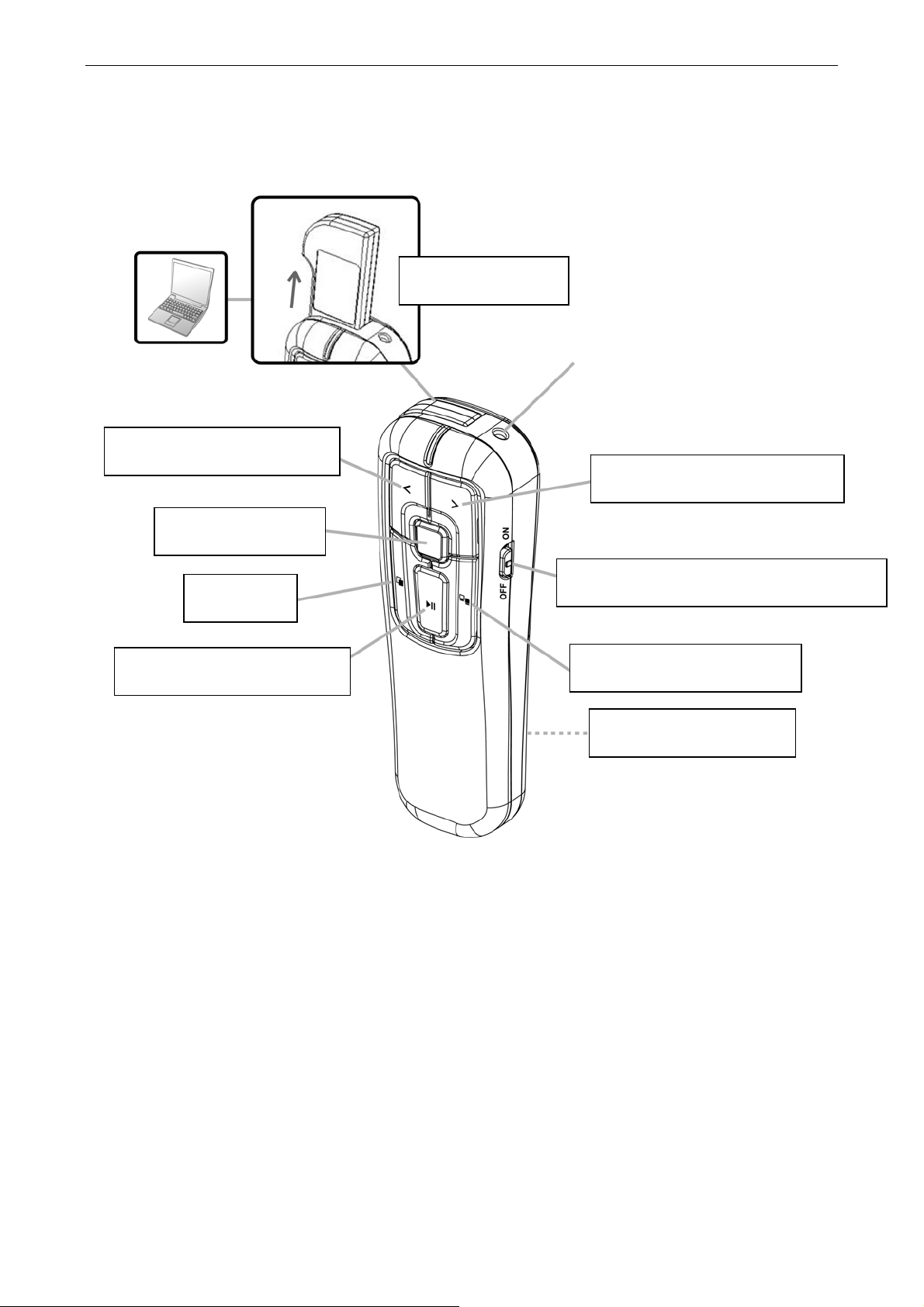
USB Receiver
Next Slide / Page Down
Previous Slide / Page Up
Laser Beam
Alt + Tab
Start Slide (F5) / Esc
Presenter Power On/Off Switch
Black / White Screen
Battery Chamber
5
Page 7

2.4GHz RF Wireless Presenter User’s Manual
3. Using the Presenter
Step 1: Open the battery cover on the back and insert the
battery.
Notes on battery
Do not insert battery into the Mini Presenter in the wrong direction.
Do not leave dead or exhausted battery in the Mini Presenter.
If you do not use the Wireless Presenter for a long period of time, remove the
battery to avoid possible damage from battery corrosion.
If the Wireless Presenter does not function correctly or if the operating range
becomes reduced, try to replace the battery with new one.
Step 2: Take out the USB receiver attached on the top and
plug it into an available USB port.
Plug the USB Receiver into your computer’s USB port. You may also use the spare USB
port on your keyboard or a USB port on a hub connected to your computer.
You do not need to turn off your computer before connecting or disconnecting a USB
device.
The operation system identifies the receiver, prompts” USB Human Interface Device” and
begins installation automatically. Please follow the instruction on the screen to complete the
installation procedure.
6
Page 8
2.4GHz RF Wireless Presenter User’s Manual
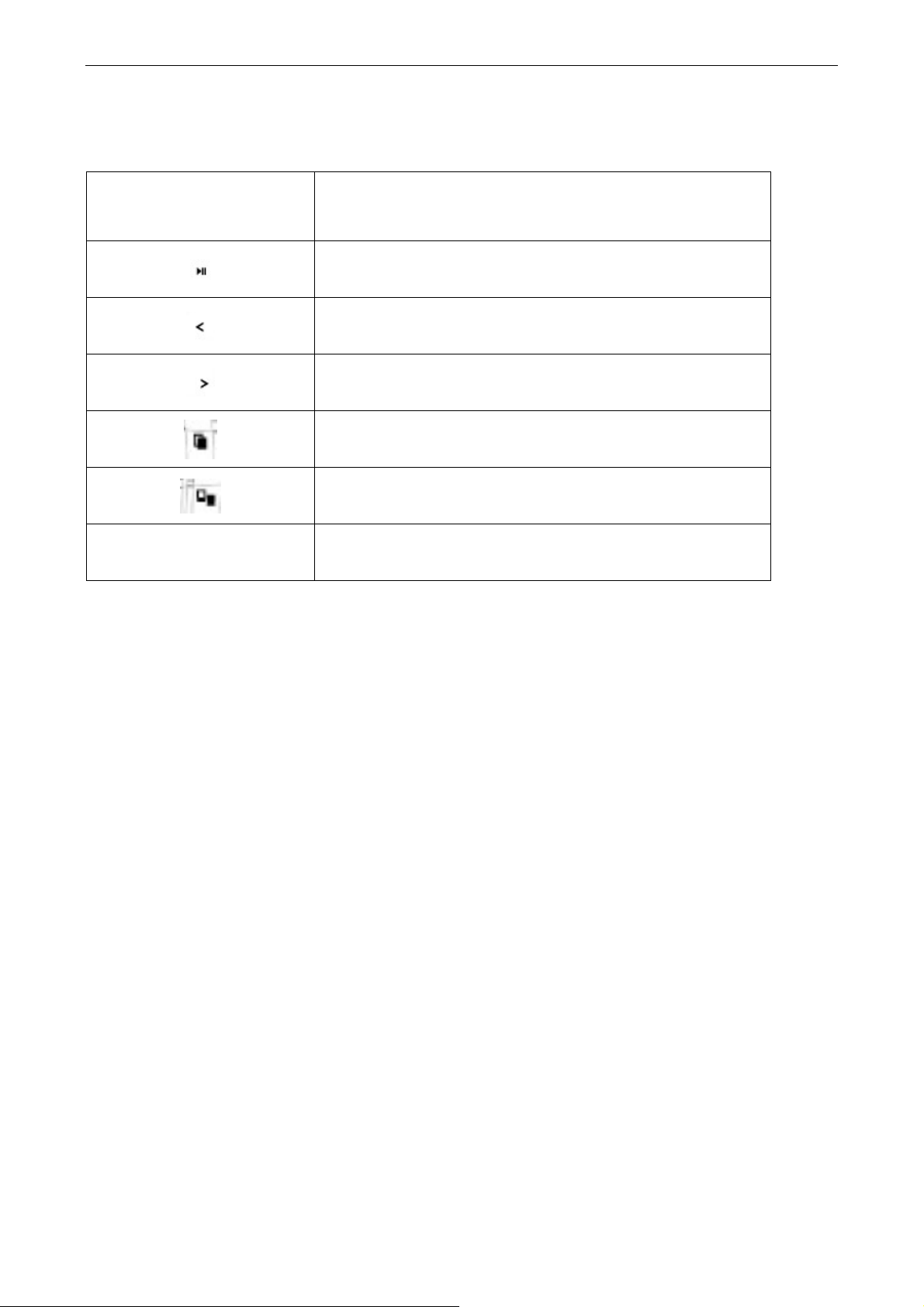
Step 3: The function of the keys
Key Function
□
Click to start the slide show / exit the slide show
Next Slide (Page Down)
Previous Slide (Page Up)
Alt + Tab
Turn the presentation screen to all black
Laser beam
7
Page 9
2.4GHz RF Wireless Presenter User’s Manual
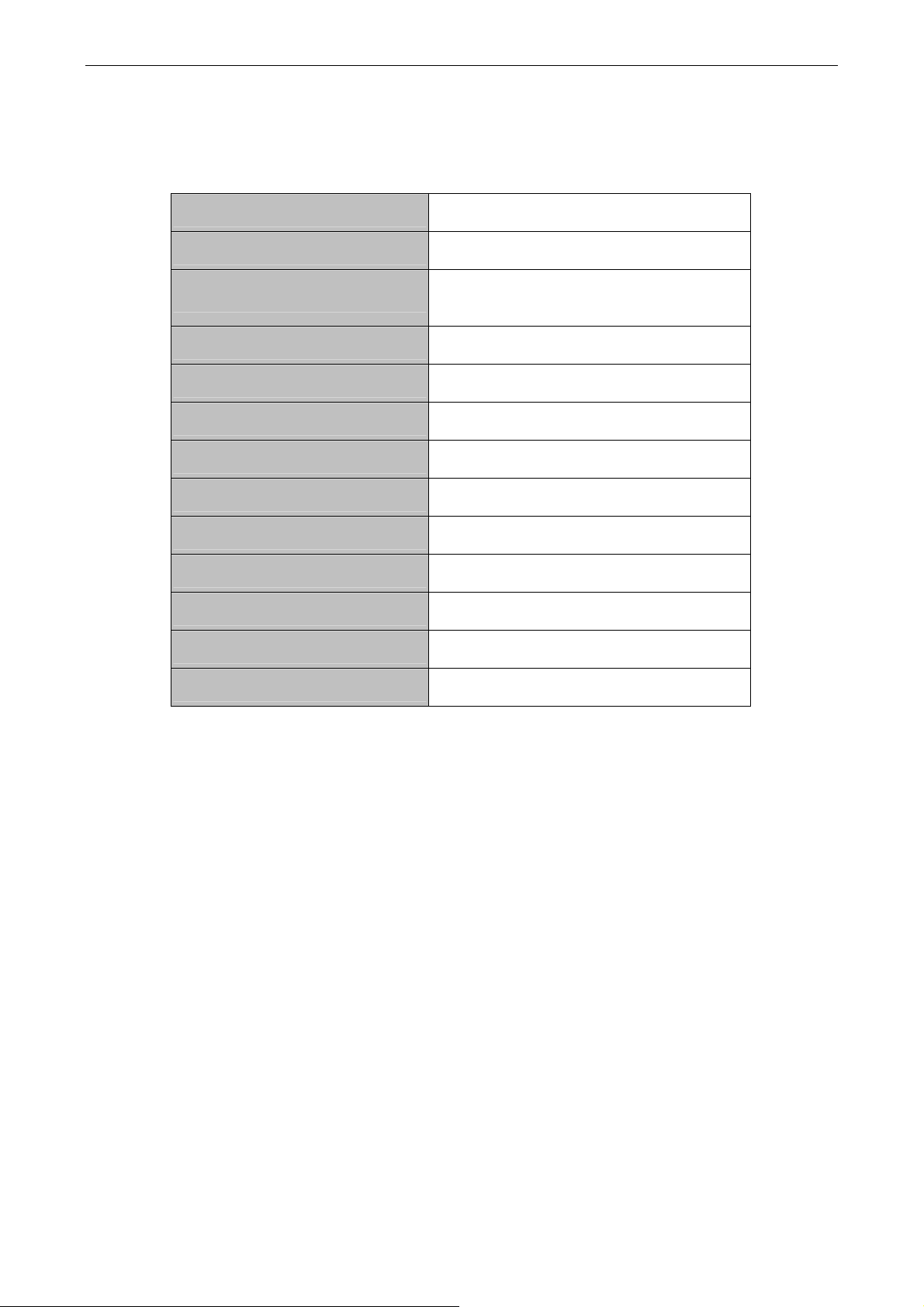
4. Specifications
Programmable Data Rate Up to 500 Kbps
Compliance USB1.1 & USB 2.0
Operating Systems
RF Band 2.4 GHZ
Max Distance 100ft
Power Supply 1 AAA 1.2V battery
USB RF Dongle USB Type A Plug
Size (Lx W x H) 105 x 30 x 19.5 mm
Housing Material Plastic (ABS)
weight 120g
Operation temperature 10 ~ 40 degree
Storage temperature -10 ~ 80 degree
Certification FCC, CE
* Specification is subject to change without notice
Windows 2000, XP & Vista
Mac OS 9.x and up
8
Page 10

2.4GHz RF Wireless Presenter User’s Manual
5. Regulatory Compliance
FCC Conditions
This equipment has been tested and found to comply with Part 15 of the FCC
Rules. Operation is subject to the following two conditions:
(1) This device may not cause harmful interference
(2) This device must accept any interference received. Including interference that
may cause undesired operation.
Important! Changes or modifications not expressly approved by the manufacturer
responsible for compliance could void the user’s authority to operate the equipment.
Use an approved phone set.
CE
This equipment is in compliance with the requirements of the following regulations:
EN 55 022: CLASS B
WEEE Information
For EU (European Union) member users:
According to the WEEE (Waste electrical and electronic equipment) Directive, do not
dispose of this product as household waste or commercial waste.
electronic equipment should be appropriately collected and recycled as required by
practices established for your country.
please contact your local
where you purchased the product.
Waste electrical and
For information on recycling of this product,
authorities, your household waste disposal service or the shop
9
 Loading...