

Page 1

Black plate (1,1)
Acadia/Acadia Denali Owner Manual - 2013 - 1st Edition - 8/20/12
2013 Acadia/Acadia Denali Owner Manual M
In Brief . . . . . . . . . .. . . . . . . . . . .. . . 1-1
Instrument Panel . . . . . . . . . . . . . . 1-2
Initial Drive Information . . . . . . . .1-4
Vehicle Features. . . . . . . . . . . . .1-16
Performance and
Maintenance . . . . . . . . . . . . . . . . 1-21
Keys, Doors, and
Windows . . . . . . . . . . . . . . . . . . . . 2-1
Keys and Locks . . . . . . . . . . . . . . .2-1
Doors . . . . . . . . . . . . . .. . . . . . . . . . . . 2-8
Vehicle Security. . . . . . . . . . . . . .2-11
Exterior Mirrors . . . . . . . . . . . . . . . 2-14
Interior Mirrors . . . . . . . . . . . . ... .2-17
Windows . . . . . . . . . . . . . . . . . . . . . 2-18
Roof . . . . . . . . . . . . . .. . . . . . . . . . . . 2-20
Seats and Restraints . . . . . . . . . 3-1
Head Restraints . . . . . . . . . . . . . . . 3-2
Front Seats . . . . . . . .. . . . . . . . .. . . 3-3
Rear Seats . . . . . . . . . . . . . . . . . . . . 3-9
Safety Belts . . . . . . . . . . . . . . . . . .3-14
Airbag System . . . . . . . . . . . . . . ..3-23
Child Restraints . . . . . . . . . . . . . . 3-36
Storage . . . . . . . . . . . . . .. . . . . . . . . 4-1
Storage Compartments . . . . . . . . 4-1
Additional Storage Features . . . 4-3
Roof Rack System . . . . . . . .. . . . . 4-4
Instruments and Controls . . . . 5-1
Controls . . . . . . . . . . . . . . . . . . . . . . . 5-2
Warning Lights, Gauges, and
Indicators . . . . . . . . . . . . . . . . . . . . 5-9
Information Displays . . . . . . . .. . 5-22
Vehicle Messages.. . . . . . . . . . . 5-31
Vehicle Personalization.. . . . . . 5-40
Universal Remote System . . . . 5-48
Lighting . . . . . . . . . . . .. . . . . . . . . . . 6-1
Exterior Lighting . . . . . . . . . . . . . . . 6-1
Interior Lighting . . . . . . .. . . . . . .. . 6-5
Lighting Features . . . . . . . . . . . . . . 6-6
Infotainment System . . . . . . . . . 7-1
Introduction . . . . . . . . . .. . . . . . . . . . 7-1
Radio . . . . . . . . . . ... . . . . . . . . . . . ..7-6
Audio Players . . . . . . . . . . . . . . . . 7-12
Rear Seat Infotainment . . . . . . . 7-18
Phone . . . . . . . . . .. . . . . . . . . .. . . . 7-20
Settings . . . . . . . . . . . . . . . . . . . .. . 7-28
Trademarks and License
Agreements . . . . . . . . . .. . . . . . . 7-30
Climate Controls . . . . . . . . . . . . . 8-1
Climate Control Systems . . . . . . 8-1
Air Vents.. . . . . . . . . . . . . . . . . . . .8-10
Maintenance . . . . . . . . . . . . . . . . . .8-11
Driving and Operating . . . . . . . . 9-1
Driving Information . . . . . . . . . . . . . 9-2
Starting and Operating . . . . . . . 9-13
Engine Exhaust . . . . . . . . . . . . . . 9-20
Automatic Transmission . . . . . .9-21
Drive Systems . . . . . . . . . . .. . . . . 9-24
Brakes . . . . . . . . . . . . . . . . . . . . . . . 9-25
Ride Control Systems . . . . . . . .9-27
Cruise Control . . . . . . . .. . . . . . . . 9-29
Object Detection Systems . . . . 9-31
Fuel . . . . . . . . . . . . . . . . . . . . . . . . . . 9-38
Towing . . . . . . . . . . . . . . . . . . . . . . .9-42
Conversions and Add-Ons . . . 9-49
Page 2

Black plate (2,1)
Acadia/Acadia Denali Owner Manual - 2013 - 1st Edition - 8/20/12
2013 Acadia/Acadia Denali Owner Manual M
Vehicle Care . . . . . .. . . . . . . . .. . 10-1
General Information . . . . . . . . . .10-2
Vehicle Checks.. . . . . . . . . . . . . . 10-3
Headlamp Aiming . . . . . . . . . . . 10-25
Bulb Replacement . . . . . . . . . . 10-25
Electrical System . . . . . . . . . . . . 10-26
Wheels and Tires . . . . . . . . . . . 10-36
Jump Starting . . . . . . . . . . . . . . . 10-67
Towing . . . . . .. . . . . . . . . . . . . . . .10-70
Appearance Care . . . . . . . . . . .10-74
Service and Maintenance . . . 11-1
General Information . . . . . . . . . . 11-1
Maintenance Schedule . . . . . . .11-2
Special Application
Services . . . . . . . . . . . . . . . . . . . . 11-8
Additional Maintenance
and Care . . . . . . . . .. . . . . . . . . . . 11-9
Recommended Fluids,
Lubricants, and Parts . . . . . . 11-12
Maintenance Records . . . . . . . 11-14
Technical Data . . . . . . ......... 12-1
Vehicle Identification.. . . . . . . . 12-1
Vehicle Data. . . . . . . . . . . . . . . . . . 12-2
Customer Information . . . . . . . 13-1
Customer Information . . . . . . . . 13-2
Reporting Safety Defects . . . . 13-18
Vehicle Data Recording and
Privacy . . .. . . . . . . . . . . . . . . . . 13-19
OnStar . . . . . . . . . . . . . . .. . . . . . . . 14-1
OnStar Overview.. . . . . . . . . . . . 14-1
OnStar Services . . . . . . . .. . . . . . 14-2
OnStar Additional
Information . . . . . . . . . . . . ... . . . 14-5
Index . . . . . . . . . . . . . . . . . . . . . i-1
Page 3
Black plate (3,1)
Acadia/Acadia Denali Owner Manual - 2013 - 1st Edition - 8/20/12
Introduction iii
Please refer to the purchase
documentation relating to your
specific vehicle to confirm each of
the features found on your vehicle.
For vehicles first sold in Canada,
substitute the name “General
The names, logos, emblems,
slogans, vehicle model names, and
vehicle body designs appearing in
this manual including, but not limited
to, GM, the GM logo, GMC, the
GMC Truck Emblem, ACADIA, and
DENALI are trademarks and/or
service marks of General Motors
LLC, its subsidiaries, affiliates,
or licensors.
This manual describes features that
may or may not be on your specific
vehicle either because they are
options that you did not purchase or
due to changes subsequent to the
printing of this owner manual.
Litho in U.S.A.
Part No. 22744237 A First Printing
Motors of Canada Limited” for GMC
wherever it appears in this manual.
Keep this manual in the vehicle for
quick reference.
Canadian Vehicle Owners
Propriétaires Canadiens
A French language copy of this
manual can be obtained from your
dealer or from:
On peut obtenir un exemplaire de
ce guide en français auprès du
concessionnaire ou à l'adresse
suivante:
Helm, Incorporated
Attention: Customer Service
47911 Halyard Drive
Plymouth, MI 48170
Using this Manual
To quickly locate information about
the vehicle, use the Index in the
back of the manual. It is an
alphabetical list of what is in the
manual and the page number where
it can be found.
Danger, Warnings, and Cautions
Warning messages found on vehicle
labels and in this manual describe
hazards and what to do to avoid or
reduce them.
Danger indicates a hazard with a
high level of risk which will result in
serious injury or death.
Warning or Caution indicates a
hazard that could result in injury or
death.
©
2012 General Motors LLC. All Rights Reserved.
Page 4
Black plate (4,1)
Acadia/Acadia Denali Owner Manual - 2013 - 1st Edition - 8/20/12
iv Introduction
WARNING
{
These mean there is something
that could hurt you or other
people.
Notice: This means there is
something that could result in
property or vehicle damage. This
would not be covered by the
vehicle's warranty.
Symbols
The vehicle has components and
labels that use symbols instead of
text. Symbols are shown along with
the text describing the operation or
information relating to a specific
component, control, message,
gauge, or indicator.
M : This symbol is shown when
you need to see your owner manual
for additional instructions or
information.
* : This symbol is shown when
you need to see a service manual
for additional instructions or
information.
Vehicle Symbol Chart
A circle with a slash through it is a
safety symbol which means “Do
Not,” “Do not do this,” or “Do not let
this happen.”
Here are some additional symbols
that may be found on the vehicle
and what they mean. For more
information on the symbol, refer to
the Index.
9 : Airbag Readiness Light
! : Antilock Brake System (ABS)
% : Audio Steering Wheel Controls
or OnStar
®
$ : Brake System Warning Light
" : Charging System
I : Cruise Control
B : Engine Coolant Temperature
O : Exterior Lamps
# : Fog Lamps
. : Fuel Gauge
+ : Fuses
3 : Headlamp High/Low-Beam
Changer
j : LATCH System Child
Restraints
* : Malfunction Indicator Lamp
: : Oil Pressure
g : Outside Power Foldaway
Mirrors
} : Power
/ : Remote Vehicle Start
> : Safety Belt Reminders
Page 5

Black plate (5,1)
Acadia/Acadia Denali Owner Manual - 2013 - 1st Edition - 8/20/12
7 : Tire Pressure Monitor
_ : Tow/Haul Mode
t : Traction Control/StabiliTrak
M : Windshield Washer Fluid
Introduction v
®
Page 6

Black plate (6,1)
Acadia/Acadia Denali Owner Manual - 2013 - 1st Edition - 8/20/12
vi Introduction
2 NOTES
Page 7

Black plate (1,1)
Acadia/Acadia Denali Owner Manual - 2013 - 1st Edition - 8/20/12
In Brief 1-1
In Brief
Instrument Panel
Instrument Panel . . . . . . .. . . . . . . 1-2
Initial Drive Information
Initial Drive Information . . . . . . . . 1-4
Remote Keyless Entry (RKE)
System . . . . . . .. . . . . . . . . . . . . . . 1-4
Remote Vehicle Start . . . . . . . . . 1-4
Door Locks . . . . . . . . . . . . . . . . . . . 1-5
Liftgate . . . . . . . . . . . . . .... . . . . . . . 1-5
Windows . . . . . . . . . . . . . . . . . . . . .. 1-6
Seat Adjustment . . . . . . . . . . . . . . 1-6
Memory Features . . . . . . . . . . . . . 1-7
Second Row Seats . . . . . . . . . . . 1-8
Third Row Seats . . . . . . . . . . . . . . 1-8
Heated and Ventilated
Seats . . . . . . . . .. . . . . . . . . . . . . .. 1-9
Head Restraint Adjustment . . . . 1-9
Safety Belts . . . . . . .. . . . . . . . . . . . 1-9
Passenger Sensing
System . . . . . . . . .. . . . . . . . . . . . 1-10
Mirror Adjustment . . . . . . . . . . . . 1-10
Steering Wheel
Adjustment . . . . . . . . . . . . . . . . . 1-11
Interior Lighting . . . . . . . . . . . . . . 1-12
Exterior Lighting . . . . . . . . . . . . . 1-12
Windshield Wiper/Washer .... 1-13
Climate Controls . . . . . .. . . . . . . 1-14
Transmission . . . . . . . . . . . . . . . . 1-15
Vehicle Features
Radio(s) . . . . . .. . . . . . . . . . . . . . . 1-16
Satellite Radio . . . . . . . . . . . . . . . 1-17
Portable Audio Devices . . . . . . 1-18
Bluetooth
Steering Wheel Controls . . . . . 1-18
Cruise Control . . . . . . . . . . . . . . . 1-19
Infotainment System . . . . . . . . . 1-19
Ultrasonic Parking Assist . . . . 1-19
Power Outlets . . . . . . . . . . . . . . . 1-19
Universal Remote System . . . 1-20
Sunroof . . . . . . . . . . . . . . . . . . . . .. 1-20
®
. . . . . . . . . . . . . . . . . . . 1-18
Performance and Maintenance
StabiliTrak®System . . . . . . . . . 1-21
Tire Pressure Monitor . . . . . . . . 1-21
Engine Oil Life System . . . . . . 1-21
Driving for Better Fuel
Economy .... . . . . . . . . . . . . . . . 1-22
Roadside Assistance
Program . . . . . . . . . . .... . . . . . . 1-22
®
OnStar
. . . . . . . . . . . . . . . . . . . . . 1-23
Page 8
Black plate (2,1)
Acadia/Acadia Denali Owner Manual - 2013 - 1st Edition - 8/20/12
1-2 In Brief
Instrument Panel
Page 9

Black plate (3,1)
Acadia/Acadia Denali Owner Manual - 2013 - 1st Edition - 8/20/12
In Brief 1-3
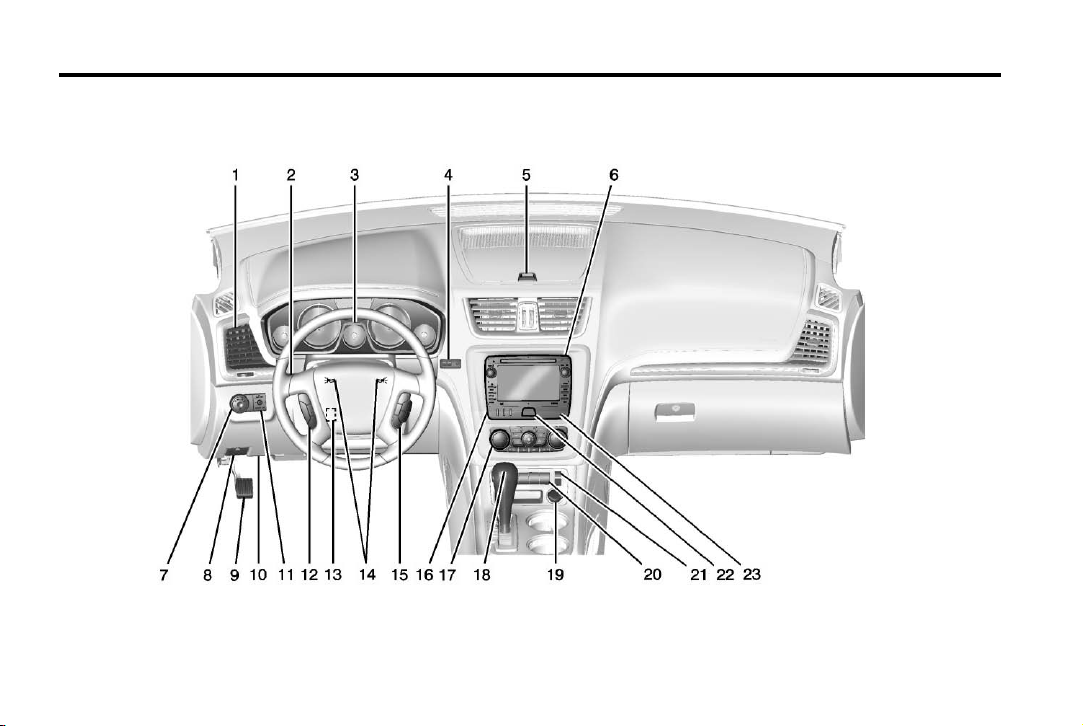
1. Air Vents on page 8‑10.
2. Windshield Wiper/Washer on
page 5‑3 (Out of View).
3. Instrument Cluster on page 5‑10.
4. Head-Up Display (HUD) on
page 5‑27 (If Equipped).
5. Instrument Panel Storage on
page 4‑1.
USB Port (Inside IP Storage)
(If Equipped). See Auxiliary
Devices on page 7‑17.
6. Infotainment on page 7‑1.
Navigation/Radio System (If
Equipped). See the infotainment
manual.
7. Exterior Lamp Controls on
page 6‑1.
8. Hood Release. See Hood on
page 10‑4.
9. Parking Brake on page 9‑26.
10. Data Link Connector (DLC)
(Out of View). See Malfunction
Indicator Lamp on page 5‑15.
11. Dome Lamp Override. See
Dome Lamps on page 6‑5.
Instrument Panel Illumination
Control on page 6‑5.
12. Cruise Control on page 9‑29.
13. Steering Wheel Adjustment on
page 5‑2.
14. Horn on page 5‑3.
15. Steering Wheel Controls on
page 5‑2 (If Equipped).
16. Driver Information Center (DIC)
Buttons. See Driver Information
Center (DIC) on page 5‑22.
17. Climate Control Systems on
page 8‑1 or Dual Automatic
Climate Control System on
page 8‑4 (If Equipped).
18. Shift Lever. See Automatic
Transmission on page 9‑21.
19. Power Outlets on page 5‑7.
20. Rear Window Wiper/Washer on
page 5‑4.
Traction Control System (TCS)
Disable Button. See
StabiliTrak
®
System on
page 9‑27.
Tow/Haul Button (If Equipped).
See Tow/Haul Mode on
page 9‑24.
Power Liftgate Button (If
Equipped). See Liftgate on
page 2‑8.
21. Heated and Ventilated Front
Seats on page 3‑8 (If
Equipped).
22. Hazard Warning Flashers on
page 6‑3.
23. Passenger Airbag Status
Indicator. See Passenger
Sensing System on page 3‑30.
Page 10
Black plate (4,1)
Acadia/Acadia Denali Owner Manual - 2013 - 1st Edition - 8/20/12
1-4 In Brief
Initial Drive Information
This section provides a brief
overview about some of the
important features that may or may
not be on your specific vehicle.
For more detailed information, refer
to each of the features which can be
found later in this owner manual.
Remote Keyless Entry (RKE) System
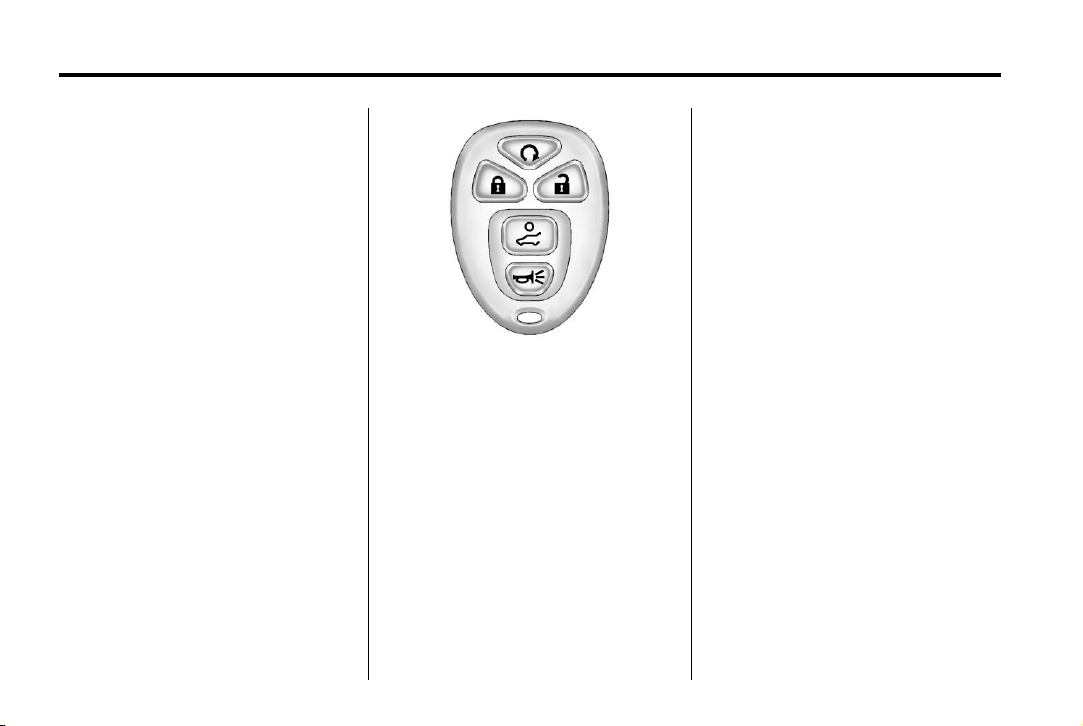
The RKE transmitter is used to
remotely lock and unlock the doors
from up to 60 m (195 ft) away from
the vehicle.
Press K to unlock the driver door.
K again within five seconds
Press
to unlock all remaining doors.
Q to lock all doors.
Press
Lock and unlock feedback can be
personalized.
To open or close the liftgate, press
and hold
begins to move.
Press
vehicle.
8 until the liftgate
L and release to locate the
L and hold for more than
Press
two seconds to sound the panic
alarm.
L again to cancel the panic
Press
alarm.
See Remote Keyless Entry (RKE)
System Operation on page 2‑2.
Remote Vehicle Start
Starting the Vehicle
With this feature the engine can be
started from outside of the vehicle.
1. Aim the RKE transmitter at the
vehicle.
2. Press and release
3. Immediately after completing
Step 2, press and hold
the parking lamps flash.
When the vehicle starts, the parking
lamps will turn on and remain on as
long as the engine is running. The
doors will be locked and the climate
control system may come on.
Q.
/ until
Page 11
Black plate (5,1)
Acadia/Acadia Denali Owner Manual - 2013 - 1st Edition - 8/20/12
The engine will continue to run for
10 minutes. Repeat the steps for a
10-minute time extension. Remote
start can be extended only once.
Canceling a Remote Start
To cancel a remote start:
.
Aim the RKE transmitter at the
vehicle and press and hold
until the parking lamps turn off.
.
Turn on the hazard warning
flashers.
.
Turn the ignition switch on and
then off.
See Remote Vehicle Start on
page 2‑4.
/
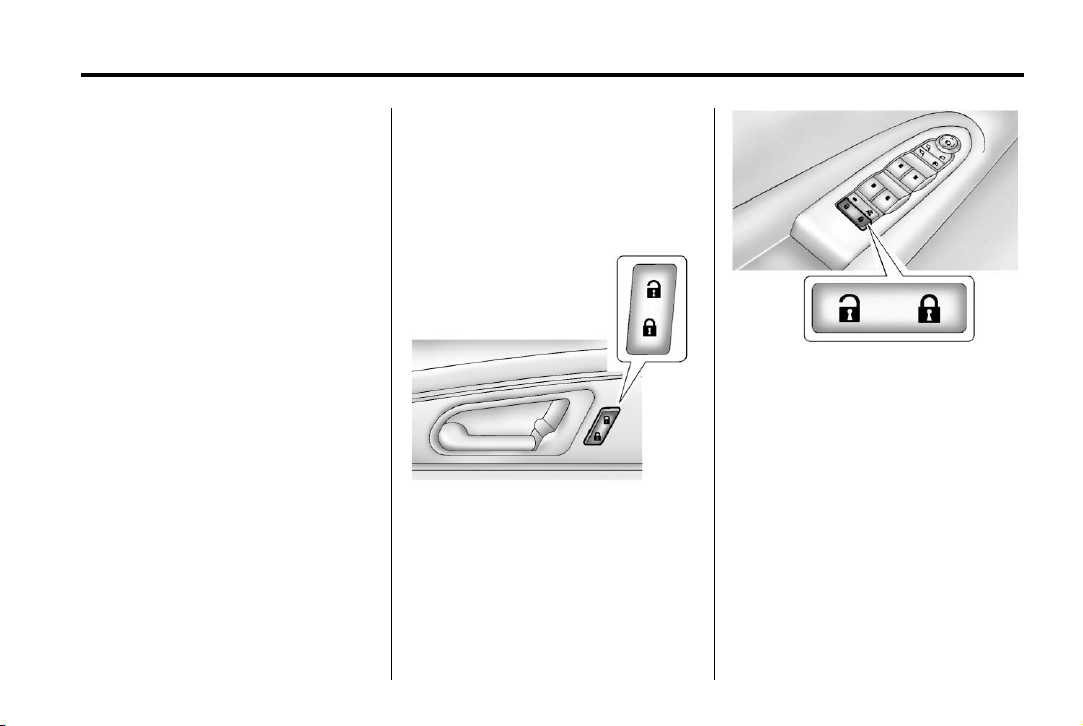
Door Locks
To lock or unlock a door manually:
.
From the inside use the door
lock knob on the window sill.
.
From the outside turn the key
toward the front or rear of the
vehicle, or press the
button on the Remote Keyless
Entry (RKE) transmitter.
K or Q
Power Door Locks
Base Model
In Brief 1-5
Uplevel Model
K : Press to unlock the doors.
Q : Press to lock the doors.
See Power Door Locks on page 2‑7.
Liftgate
To open the liftgate the vehicle must
be in P (Park). Press the touch pad
under the liftgate handle. To close
the liftgate, use the pull cup or pull
strap as an aid.
Page 12
Black plate (6,1)
Acadia/Acadia Denali Owner Manual - 2013 - 1st Edition - 8/20/12
1-6 In Brief
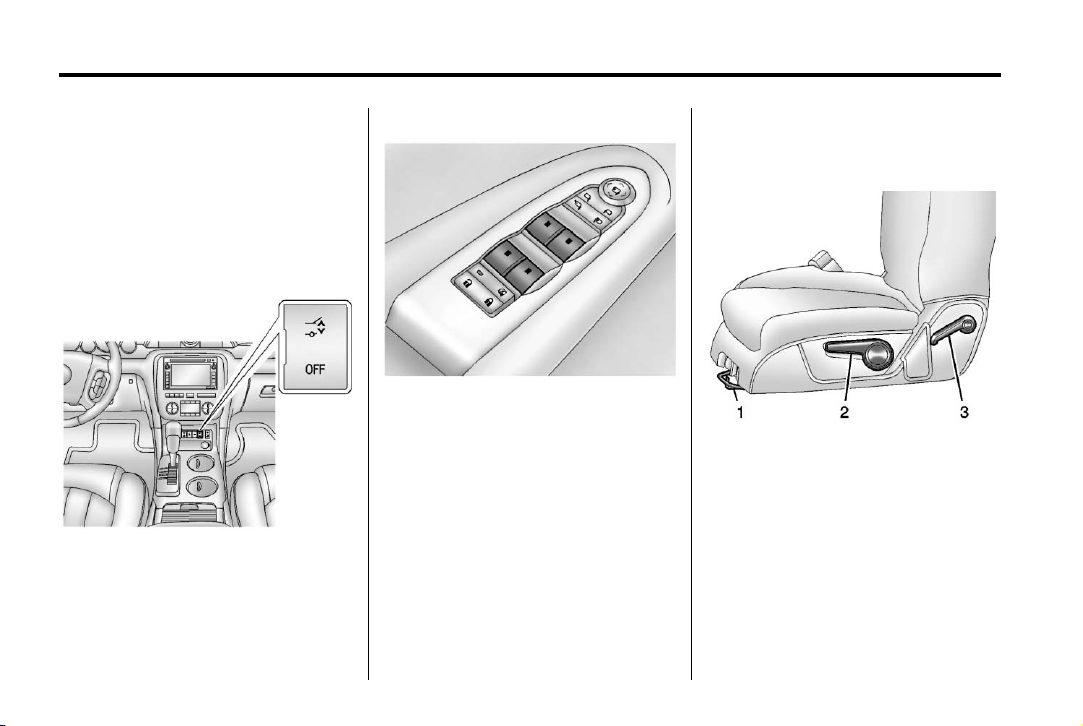
Power Liftgate
Windows
On vehicles with a power liftgate,
the vehicle must be in P (Park) to
operate it.
.
Press and hold 8 on the
Remote Keyless Entry
(RKE) transmitter.
Uplevel Shown, Base Similar
Press the switch to lower the
window. Pull the switch up to
raise it.
For more information, see Power
Windows on page 2‑18.
.
Press O.
.
Press the touch pad on the
outside liftgate handle.
For more information see Liftgate on
page 2‑8.
Seat Adjustment
Manual Seats
1. Seat Adjustment Handle
2. Driver Seat Height Adjustment
Lever
3. Seatback Lever
To adjust a manual seat:
1. Lift the handle (1) under the seat
to unlock it.
2. Slide the seat to the desired
position, and then release the
handle (1).
Page 13
Black plate (7,1)
Acadia/Acadia Denali Owner Manual - 2013 - 1st Edition - 8/20/12
In Brief 1-7
3. Try to move the seat back and
forth to be sure it is locked in
place.
Move the lever (2) up or down to
raise or lower the seat.
Use the lever (3) to adjust the
seatback.
See Seat Adjustment on page 3‑3
and Reclining Seatbacks on
page 3‑5.
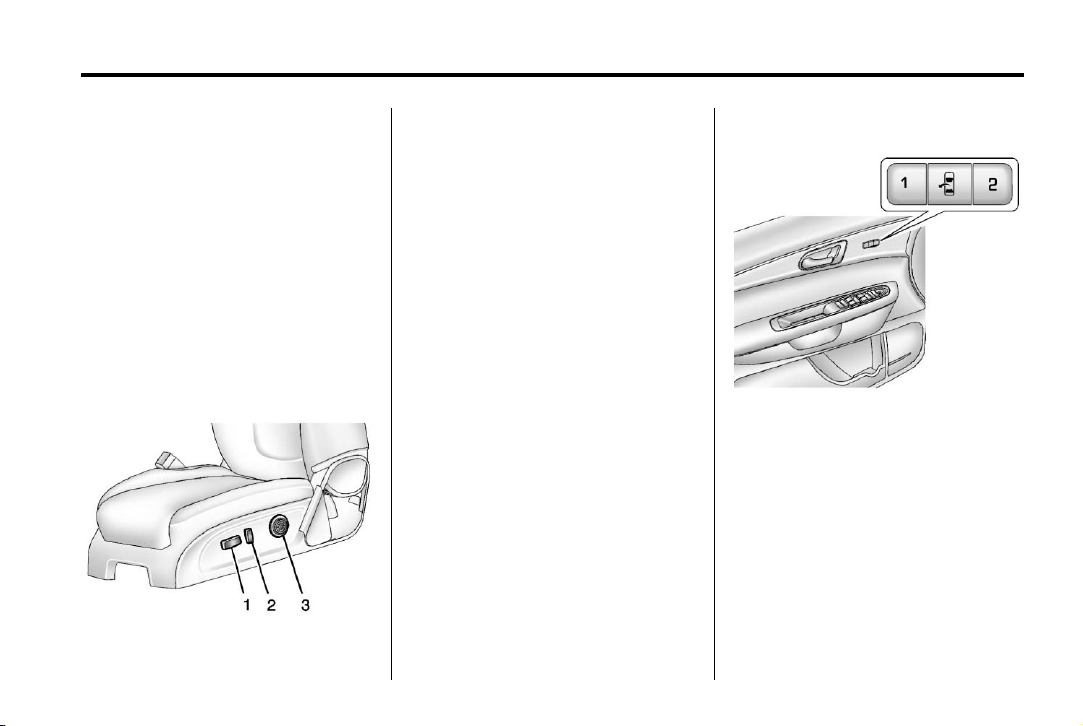
Power Seats
3. Lumbar Control
To adjust a power seat, if equipped:
.
Move the seat forward or
rearward by sliding the
control (1) forward or rearward.
.
Raise or lower the front part of
the seat cushion by moving the
front of the control (1) up
or down.
.
Raise or lower the entire seat by
moving the rear of the control (1)
up or down.
.
Adjust the seatback by tilting the
top of the control (2) forward or
rearward.
See Reclining Seatbacks on
page 3‑5.
.
Increase or decrease lumbar
support by pressing the front or
rear of the control (3).
See Lumbar Adjustment on
page 3‑4.
1. Seat Adjustment Control
See Power Seat Adjustment on
page 3‑4.
2. Seatback Control
Memory Features
If available, the controls on the
driver door are used to program and
recall memory settings for the driver
seat, outside mirrors, and power
steering column (if equipped).
See Memory Seats on page 3‑6 and
Vehicle Personalization on
page 5‑40.
Page 14
Black plate (8,1)
Acadia/Acadia Denali Owner Manual - 2013 - 1st Edition - 8/20/12
1-8 In Brief
Second Row Seats
The second row seat can be folded
to access the third row. Pull the
sliding seat lever forward; the seat
cushion folds, and the seat slides
forward.
See Rear Seats on page 3‑9.
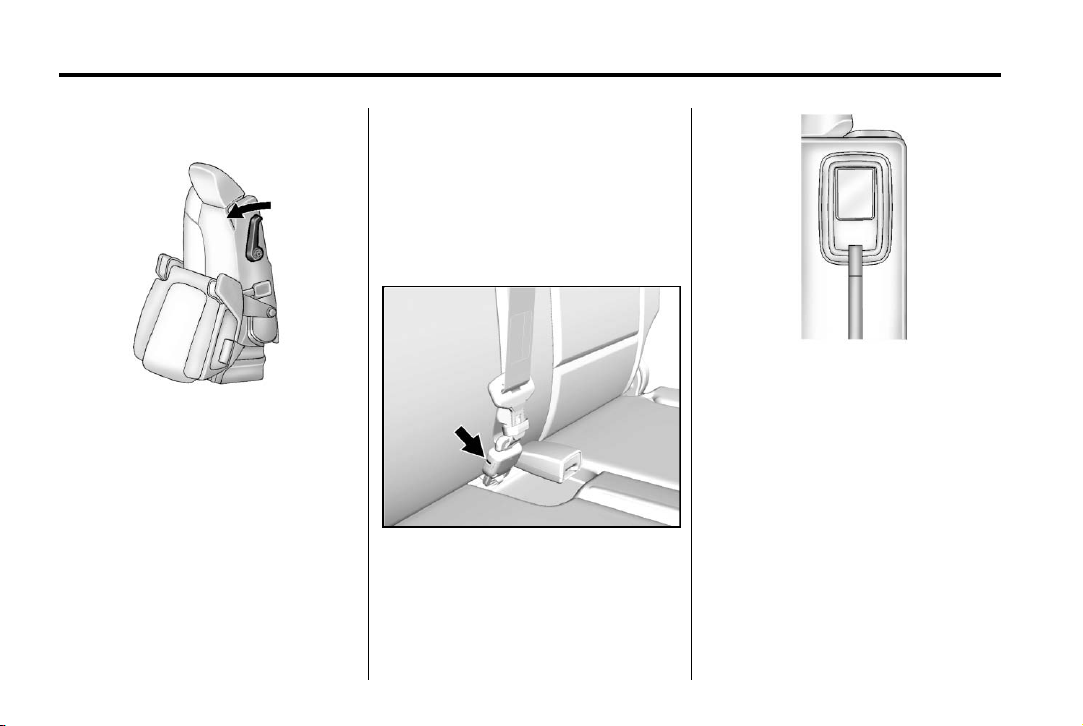
Third Row Seats
The third row seatbacks can be
folded forward, and the seats can
be removed.
To fold the third row seatback:
1. Remove anything on or under
the seat.
2. Disconnect the rear safety belt
mini-latch using a key in the slot
on the mini-buckle, and let the
belt retract into the headliner.
Stow the mini-latch in the holder
in the headliner.
3. Pull up on the release lever on
the back of the seat.
4. Push the seatback forward to
lay flat.
See Third Row Seats on page 3‑11.
Page 15
Black plate (9,1)
Acadia/Acadia Denali Owner Manual - 2013 - 1st Edition - 8/20/12
In Brief 1-9
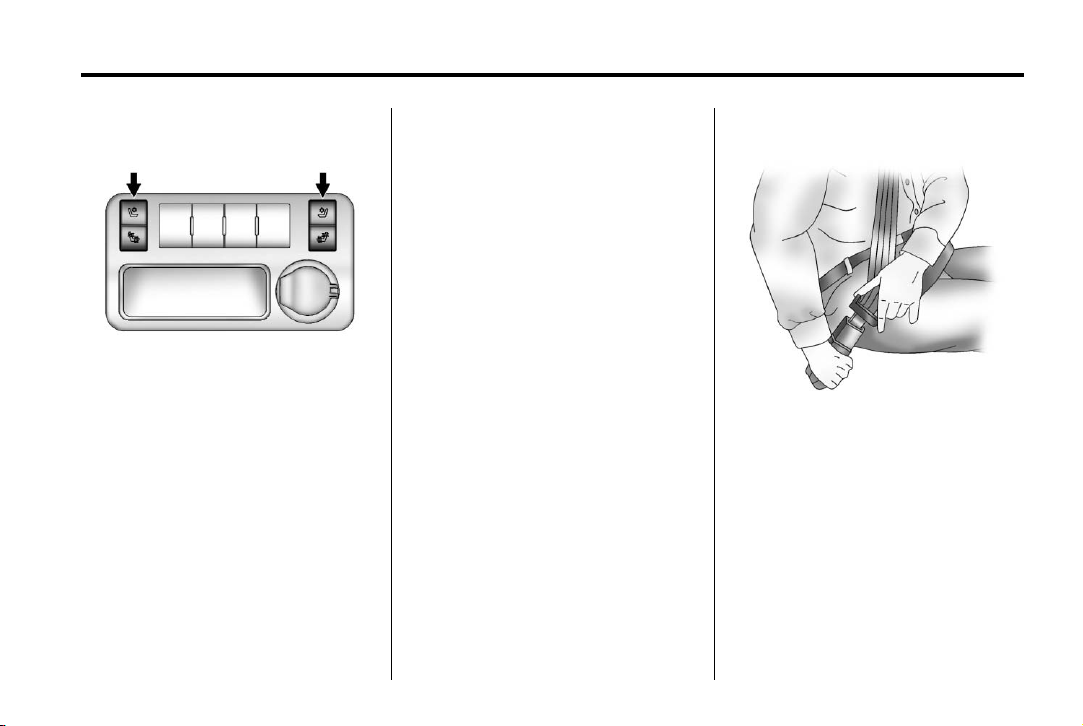
Heated and Ventilated Seats
Heated and Cooled Seat Buttons
Shown, Heated Seat Buttons
Similar
If available, the buttons are on the
center console. To operate, the
engine must be running.
I : If available, press to heat the
seatback only.
H : If available, press to cool the
entire seat.
J : Press to heat the seat and
seatback.
Press the button once for the
highest setting. With each press of
the button, the seat will change to
the next lower setting, and then to
the off setting. The lights indicate
three for the highest setting and one
for the lowest.
See Heated and Ventilated Front
Seats on page 3‑8.
Head Restraint Adjustment
Do not drive until the head restraints
for all occupants are installed and
adjusted properly.
To achieve a comfortable seating
position, change the seatback
recline angle as little as necessary
while keeping the seat and the head
restraint height in the proper
position.
See Head Restraints on page 3‑2
and Seat Adjustment on page 3‑3.
Safety Belts
Refer to the following sections for
important information on how to use
safety belts properly:
.
Safety Belts on page 3‑14.
.
How to Wear Safety Belts
Properly on page 3‑15.
.
Lap-Shoulder Belt on page 3‑16.
.
Lower Anchors and Tethers for
Children (LATCH System) on
page 3‑44.
Page 16
Black plate (10,1)
Acadia/Acadia Denali Owner Manual - 2013 - 1st Edition - 8/20/12
1-10 In Brief
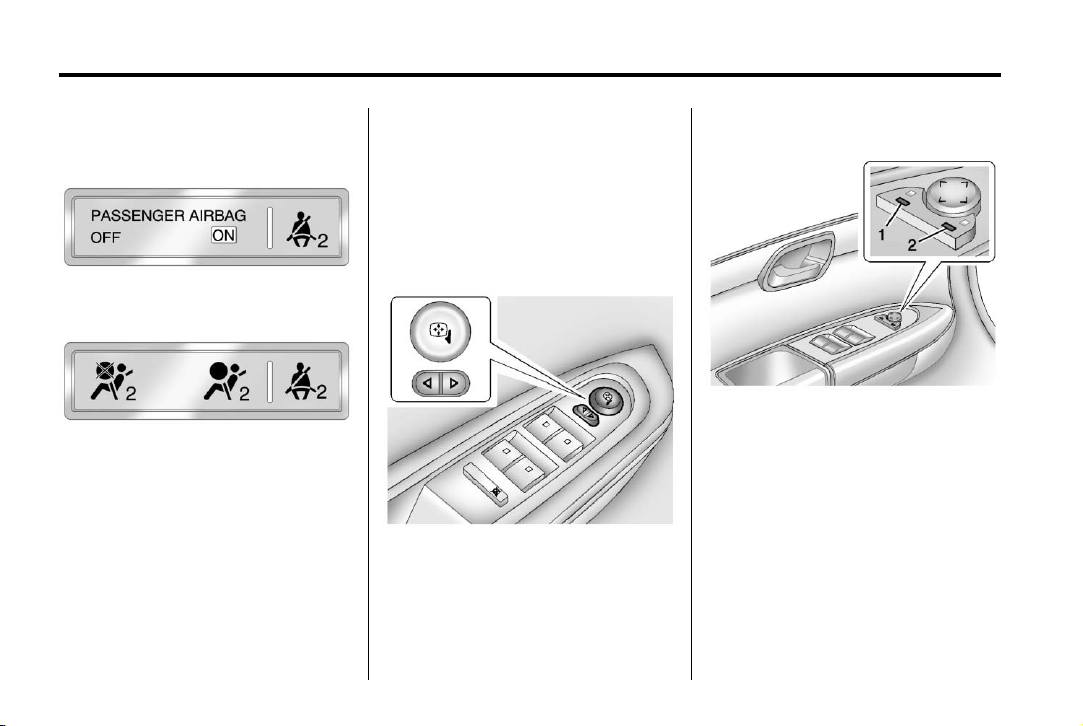
Passenger Sensing System
United States
Canada and Mexico
The passenger sensing system will
turn off the front outboard
passenger frontal airbag under
certain conditions. No other airbag
is affected by the passenger
sensing system.
The passenger airbag status
indicator will light on the instrument
panel when the vehicle is started.
See Passenger Sensing System on
page 3‑30.
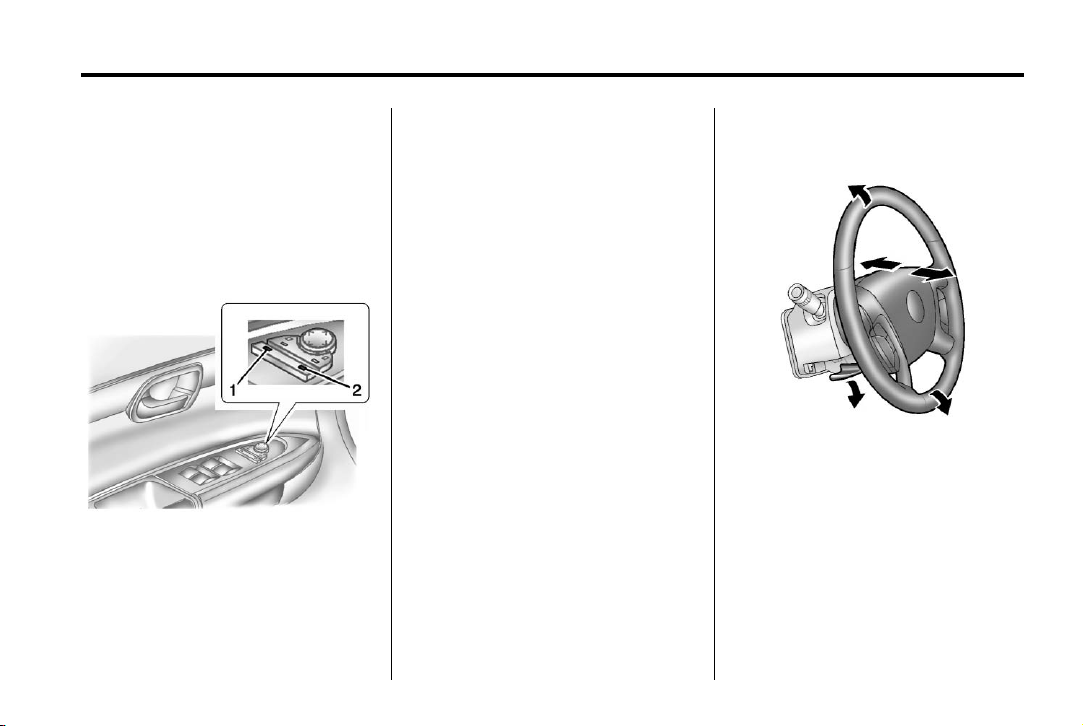
Mirror Adjustment
Exterior Mirrors
Base Model
To adjust the mirrors:
1. Press
2. Press the control pad to adjust
o or p to select a mirror.
the mirror.
3. Return the switch to the center
to deselect the mirror.
Uplevel Model
To adjust the mirrors:
1. Press (1) or (2) to select a
mirror.
2. Press the control pad to adjust
the mirror.
3. Press (1) or (2) again to deselect
the mirror.
Page 17
Black plate (11,1)
Acadia/Acadia Denali Owner Manual - 2013 - 1st Edition - 8/20/12
In Brief 1-11
Folding Mirrors
For vehicles with manual folding
mirrors, push the mirror toward the
vehicle. Pull the mirror out to return
to its original position.
For vehicles with power folding
mirrors:
1. Press (1) to fold the mirrors out
to the driving position.
2. Press (2) to fold the mirrors in to
the folded position.
See Folding Mirrors on page 2‑15.
Interior Mirror
Adjustment
Adjust the rearview mirror to clearly
view the area behind the vehicle.
Manual Rearview Mirror
For vehicles with a manual rearview
mirror, push the tab forward for
daytime use and pull it for nighttime
use to avoid glare from the
headlamps from behind. See
Manual Rearview Mirror on
page 2‑17.
Automatic Dimming Rearview
Mirror
The mirror will automatically reduce
the glare from the headlamps from
behind. The dimming feature comes
on when the vehicle is started. See
Automatic Dimming Rearview Mirror
on page 2‑18.
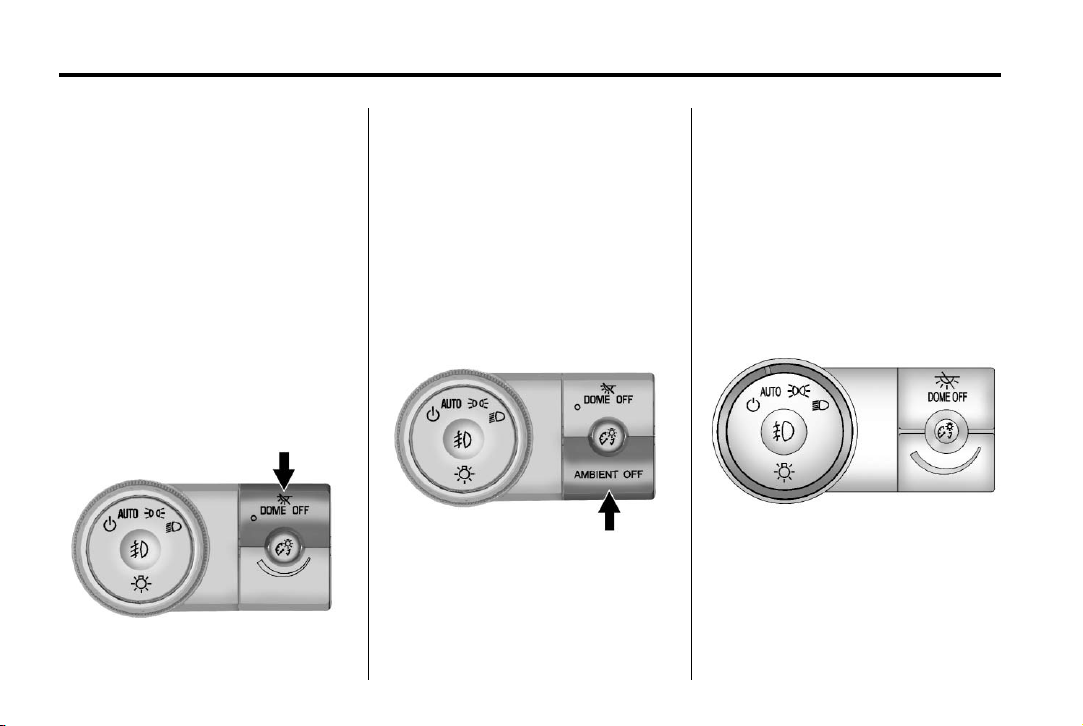
Steering Wheel Adjustment
To adjust the steering wheel:
1. Pull the lever down.
2. Move the steering wheel up
or down.
3. Pull or push the steering wheel
closer or away from you.
4. Push the lever up to lock the
steering wheel in place.
Do not adjust the steering wheel
while driving.
Page 18
Black plate (12,1)
Acadia/Acadia Denali Owner Manual - 2013 - 1st Edition - 8/20/12
1-12 In Brief
Interior Lighting
Dome Lamps
The dome lamps are in the
overhead console and above the
rear seat passengers.
The dome lamps come on when a
door is opened, unless the dome
lamp override button is pressed in.
To manually turn them on, turn the
instrument panel brightness control
clockwise to the farthest position.
Dome Lamp Override
The dome lamp override button is
next to the exterior lamps control.
E DOME OFF: Press the button
and the dome lamps remain off
when a door is opened. An indicator
light on the button comes on to
show that the dome lamps are off.
Press the button again so the dome
lamps come on when a door is
opened.
AMBIENT OFF (If Equipped):
Press the button to turn the ambient
lights off. Press the button again to
turn ambient lights on.
Reading Lamps
Press the button near each lamp to
turn them on or off.
For more information, see:
.
Dome Lamps on page 6‑5.
.
Instrument Panel Illumination
Control on page 6‑5.
Exterior Lighting
The exterior lamp control is on the
instrument panel, to the left of the
steering wheel.
O : Turns the automatic light
control on or off.
Page 19
Black plate (13,1)
Acadia/Acadia Denali Owner Manual - 2013 - 1st Edition - 8/20/12
In Brief 1-13
AUTO: Automatic operation of the
headlamps at normal brightness and
other exterior lamps.
; : Manual operation of the
parking lamps and other exterior
lamps.
5 : Manual operation of the
headlamps and other exterior
lamps.
# : Use to turn on or off the fog
lamps (if equipped).
See:
.
Exterior Lamp Controls on
page 6‑1
.
Daytime Running Lamps (DRL)/
Automatic Headlamp System on
page 6‑2
.
Fog Lamps on page 6‑4
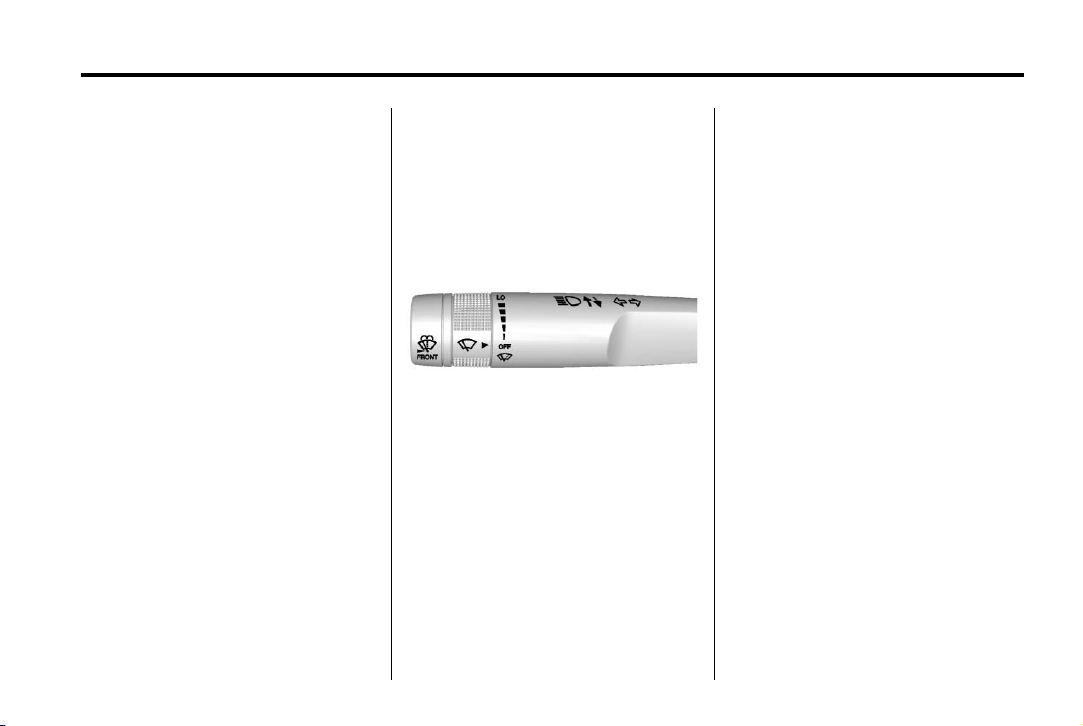
Windshield Wiper/Washer
The windshield wiper/washer lever
is located on the left side of the
steering column.
Turn the band with the wiper symbol
to control the windshield wipers.
8 : Use for a single wiping cycle.
OFF : Use to turn the wipers off.
6 : Delays wiping cycle. Turn the
band up for more frequent wipes or
down for less frequent wipes.
LO: Slow wipes.
HI: Fast wipes.
Windshield Washer
J FRONT : Press the button at
the end of the lever to spray washer
fluid on the windshield.
Rear Window Wiper/Washer
The rear wiper and rear wash button
is located on the instrument panel
below the climate control system.
Z : Press to turn the rear wiper on
and off. The wiper speed cannot be
changed.
Y : Press to spray washer fluid on
the rear window. The window wiper
will also come on.
See Windshield Wiper/Washer on
page 5‑3 and Rear Window Wiper/
Washer on page 5‑4.
Page 20
Black plate (14,1)
Acadia/Acadia Denali Owner Manual - 2013 - 1st Edition - 8/20/12
1-14 In Brief
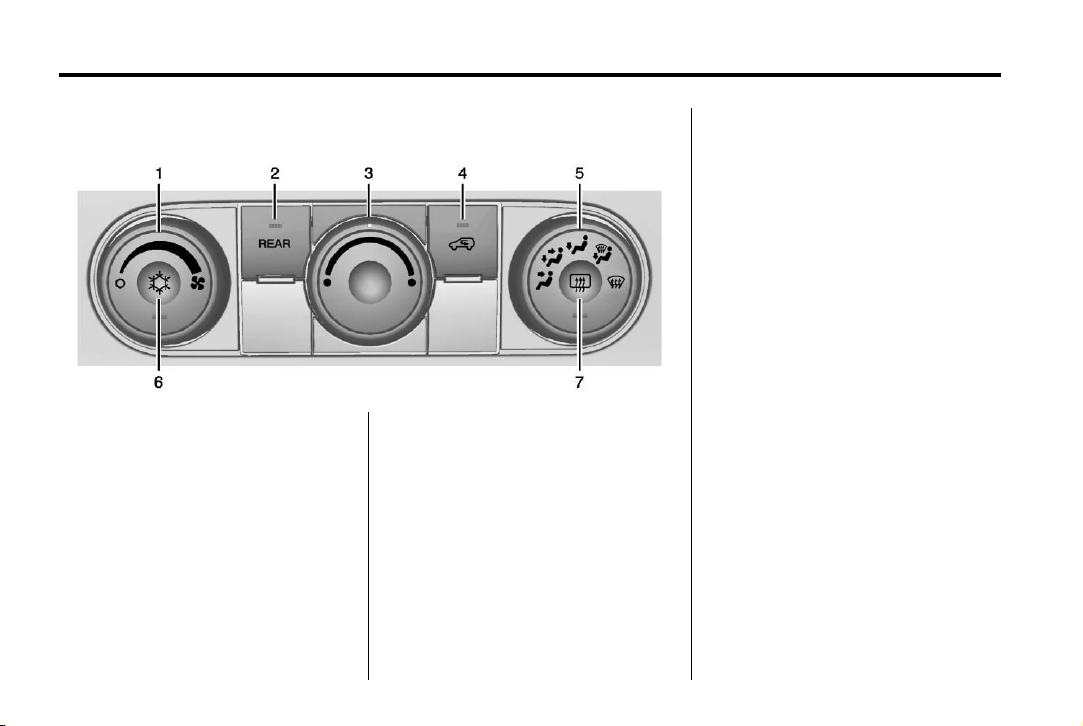
Climate Controls
1. Fan Control
2. REAR (Rear Climate Control)
3. Temperature Control
4. Recirculation
5. Air Delivery Mode Control
6. Air Conditioning
7. Rear Window Defogger
Page 21
Black plate (15,1)
Acadia/Acadia Denali Owner Manual - 2013 - 1st Edition - 8/20/12
In Brief 1-15
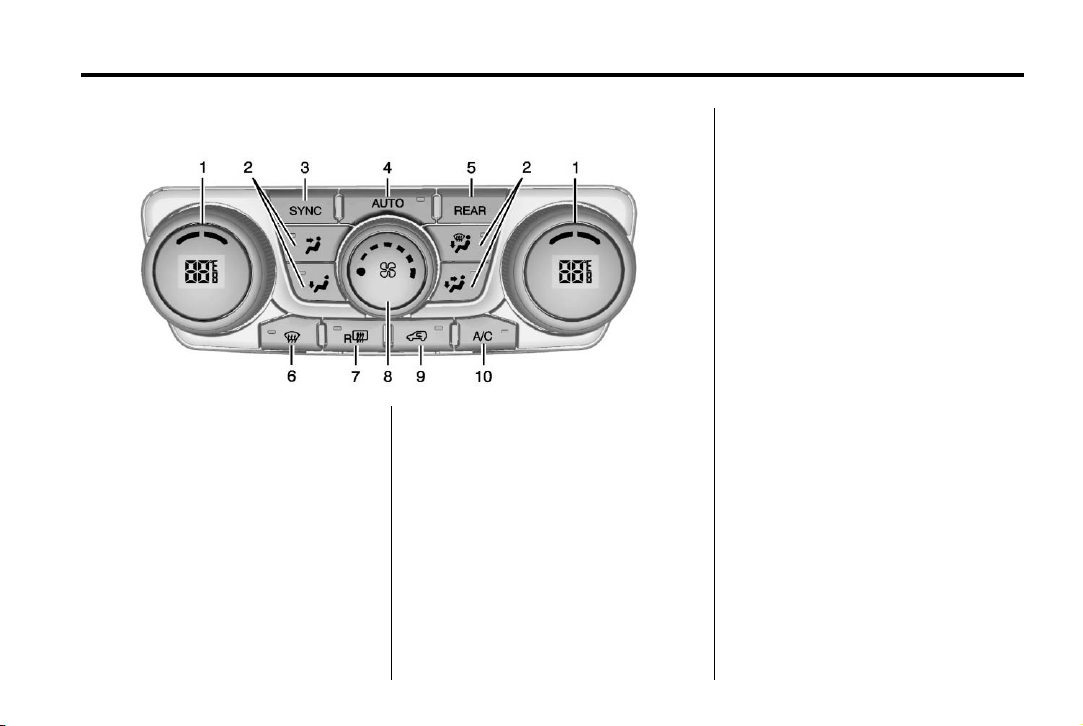
Dual Automatic Climate Control System
1. Driver and Passenger Side
Temperature Controls
2. Air Delivery Mode Controls
3. SYNC (Synchronized
Temperature)
4. AUTO (Automatic Operation)
5. REAR (Rear Climate Control)
6. Defrost
7. Rear Window Defogger
8. Fan Control
9. Recirculation
10. Air Conditioning
See Climate Control Systems on
page 8‑1 or Dual Automatic Climate
Control System on page 8‑4 (If
Equipped). For more information
about the rear climate control, see
Rear Climate Control System on
page 8‑8 or Rear Climate Control
System (with Rear Seat Audio) on
page 8‑9.
Transmission
Electronic Range Select
(ERS) Mode
ERS mode allows you to choose the
top-gear limit of the transmission
and the vehicle's speed while
driving downhill or towing a trailer.
The vehicle has an electronic shift
position indicator within the
instrument cluster. When using the
ERS mode a number will display
next to the L, indicating the current
gear that has been selected.
To use this feature:
1. Move the shift lever to L (Low).
2. Press the plus/minus button on
the shift lever, to increase or
decrease the gear range
available.
See Manual Mode on page 9‑23.
Page 22
Black plate (16,1)
Acadia/Acadia Denali Owner Manual - 2013 - 1st Edition - 8/20/12
1-16 In Brief
Vehicle Features
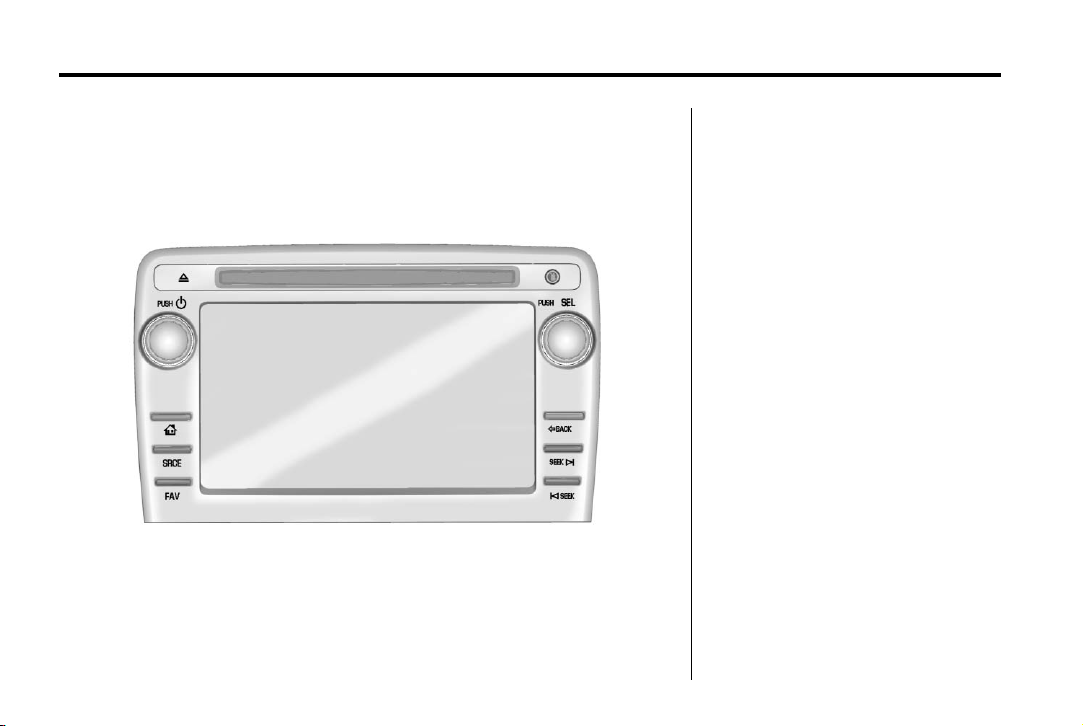
Radio(s)
PUSH/O : Press to turn the system
on and off. Turn to adjust the
volume.
Z : Press to eject a disc from the
CD player. See CD Player on
page 7‑12.
AUX Port: 3.5 mm (1/8 in)
connection for external audio
devices.
PUSH/SEL: Turn to manually find a
station or highlight a menu
selection. Press to select a
highlighted selection.
D : Press to go to the Home Page.
See “Home Page” in Operation on
page 7‑3.
SRCE: Press to change the audio
source to AM, FM, SiriusXM
equipped), CD, USB, iPod
or AUX.
FAV: Press to display the favorite
list or add a favorite. See Operation
on page 7‑3.
®
(if
®
,
Page 23

Black plate (17,1)
Acadia/Acadia Denali Owner Manual - 2013 - 1st Edition - 8/20/12
© SEEK or SEEK ¨ : Seek or scan
stations and tracks. See Operation
on page 7‑3.
/ BACK: Press to return to the
previous screen in a menu.
Storing Radio Station Presets
Up to 30 preset stations can be
stored. AM, FM, and SiriusXM (if
equipped) can be mixed.
1. From the AM, FM, or SiriusXM
main page, press and hold any
1−5 buttons or one of the preset
screen buttons at the bottom of
the screen. After a few seconds,
a beep is heard and the new
preset information displays on
that screen button.
2. Repeat for each preset.
See AM-FM Radio on page 7‑6.
Setting the Clock
Press Settings on the Home Page,
then press the Set Time or Set Date
settings screen button to display the
different options for setting the time
and date.
Set Time:
.
Press the up or down arrows to
increase or decrease the Hours,
Minutes, AM, PM, or 24 hr on
the clock.
.
Press and hold to quickly
increase or decrease the time
settings.
.
Press OK or the Back screen
button to save the adjustments
that were made.
Set Date:
.
Press the up or down arrows to
increase or decrease the Month,
Day, and Year settings.
.
Press and hold to quickly
increase or decrease the date
settings.
In Brief 1-17
.
Press OK or the Back screen
button to save the adjustments
that were made.
Satellite Radio
Vehicles with a SiriusXM®satellite
radio tuner and a valid SiriusXM
satellite radio subscription can
receive SiriusXM programming.
SiriusXM Satellite Radio
Service
SiriusXM is a satellite radio service
based in the 48 contiguous United
States and 10 Canadian provinces.
SiriusXM satellite radio has a wide
variety of programming and
commercial-free music, coast to
coast, and in digital-quality sound.
A fee is required to receive the
SiriusXM service.
Refer to:
.
www.siriusxm.com or call
1-866-635-2349 (U.S.).
.
www.xmradio.ca or call
1-877-209-0079 (Canada).
Page 24
Black plate (18,1)
Acadia/Acadia Denali Owner Manual - 2013 - 1st Edition - 8/20/12
1-18 In Brief
See Satellite Radio on page 7‑9.
Portable Audio Devices
This vehicle may have an auxiliary
input on the radio faceplate and a
USB port in the instrument panel
storage area. External devices such
as iPods, laptop computers, MP3
players, CD changers, USB storage
devices, etc. can be connected to
the auxiliary port using a 3.5 mm
(1/8 in) input jack or the USB port
depending on the audio system.
See Auxiliary Devices on page 7‑17.
Bluetooth
The Bluetooth®system allows users
with a Bluetooth-enabled mobile
phone to make and receive
hands-free calls using the vehicle
audio system and controls.
The Bluetooth-enabled mobile
phone must be paired with the
in-vehicle Bluetooth system before it
can be used in the vehicle. Not all
phones will support all functions.
®
See Bluetooth on page 7‑20.
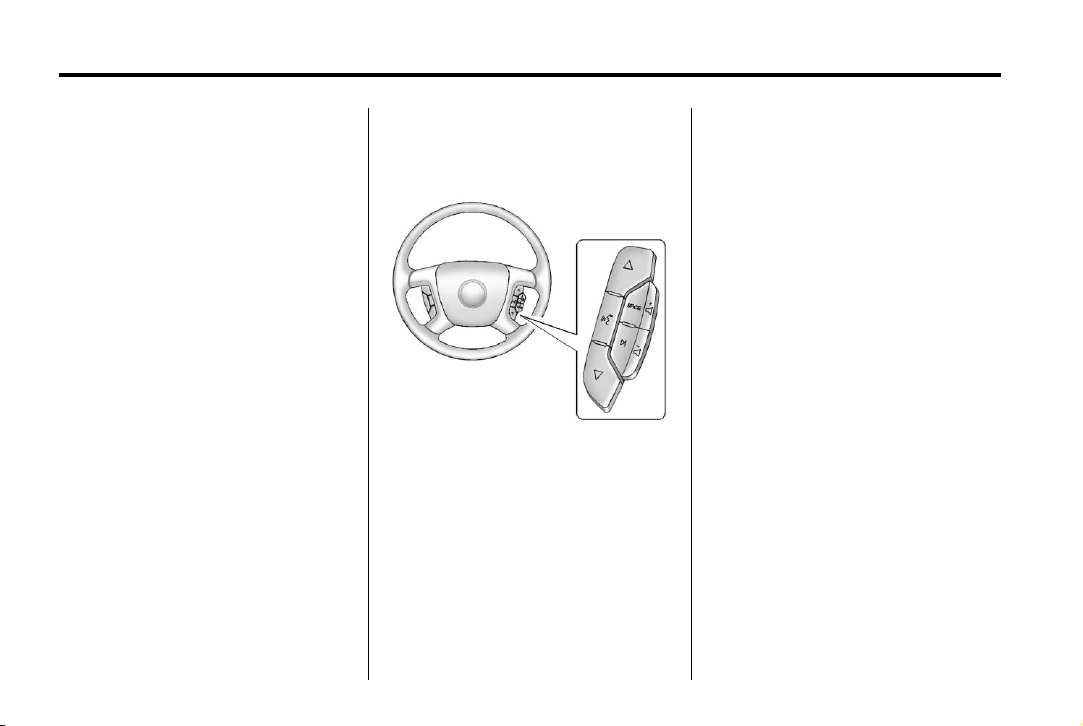
Steering Wheel Controls
w or x : Press to change favorite
radio stations, select tracks on a
CD/DVD, or navigate tracks or
folders on an iPod or USB device.
g : Press to silence the vehicle
speakers only. Press again to turn
the sound on. Press and hold longer
than two seconds to interact with
®
OnStar
or Bluetooth systems.
x : Press to reject an incoming
call, or end a current call.
SRCE: Press to switch between
the radio, CD, and for equipped
vehicles, DVD, front auxiliary, and
rear auxiliary.
¨ : Press to seek the next radio
station, track, or chapter while
sourced to the CD or DVD slot, or to
select tracks and folders on an iPod
or USB device.
+
e or − e : Press to increase or to
decrease the volume.
See Steering Wheel Controls on
page 5‑2.
Page 25
Black plate (19,1)
Acadia/Acadia Denali Owner Manual - 2013 - 1st Edition - 8/20/12
In Brief 1-19
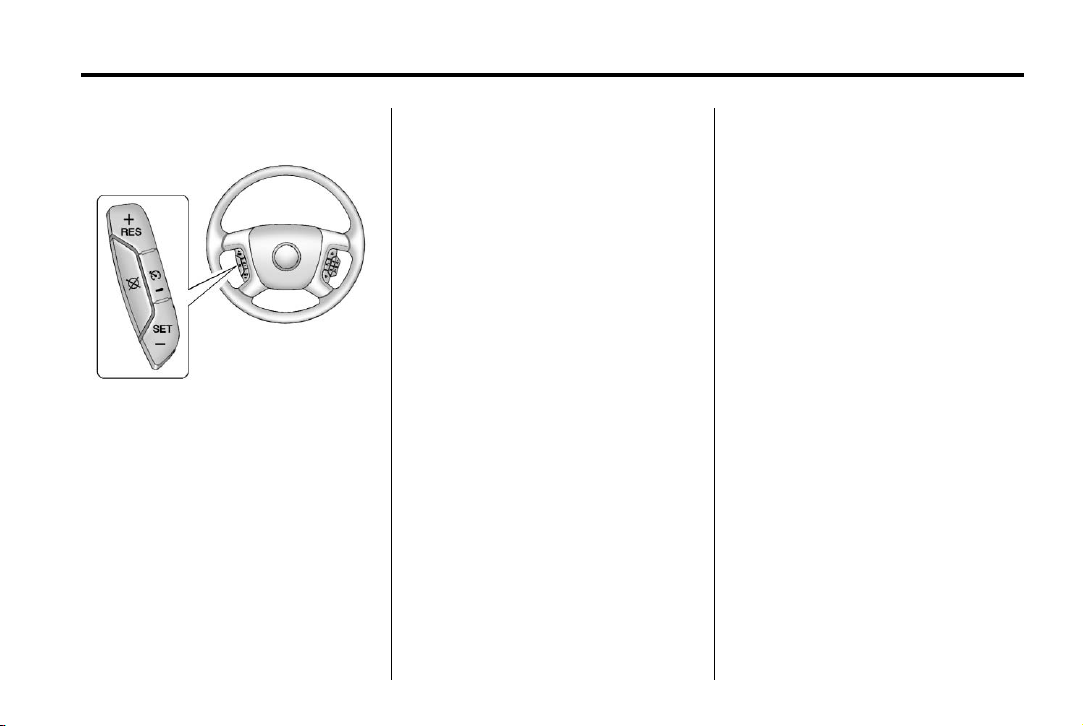
Cruise Control
T : Press to turn cruise control on
and off. The indicator comes on
when cruise control is on.
+ RES: Press briefly to make the
vehicle resume to a previously set
speed, or press and hold to
accelerate.
SET–: Press to set the speed and
activate cruise control or to make
the vehicle decelerate.
[ : Press to disengage cruise
control without erasing the set
speed from memory.
See Cruise Control on page 9‑29.
Infotainment System
The base radio is included in this
manual. See the separate
infotainment manual for information
on the uplevel radios, audio players,
phone, navigation system, and
voice or speech recognition. There
is also information on settings and
downloadable applications (if
equipped).
Ultrasonic Parking Assist
If available, this system uses
sensors on the rear bumper to
assist with parking and avoiding
objects while in R (Reverse).
It operates at speeds less than
8 km/h (5 mph). URPA uses audible
beeps to provide distance and
system information.
Keep the sensors on the vehicle's
rear bumper clean to ensure proper
operation.
See Ultrasonic Parking Assist on
page 9‑31.
Power Outlets
The vehicle has 12-volt accessory
power outlets which can be used to
plug in electrical equipment, such as
a cell phone or MP3 player.
The power outlets are located:
.
On the instrument panel below
the climate controls.
.
Inside the center floor console.
.
At the rear of the center floor
console.
.
In the rear cargo area.
To use the outlets, remove the
cover.
See Power Outlets on page 5‑7.
Page 26
Black plate (20,1)
Acadia/Acadia Denali Owner Manual - 2013 - 1st Edition - 8/20/12
1-20 In Brief
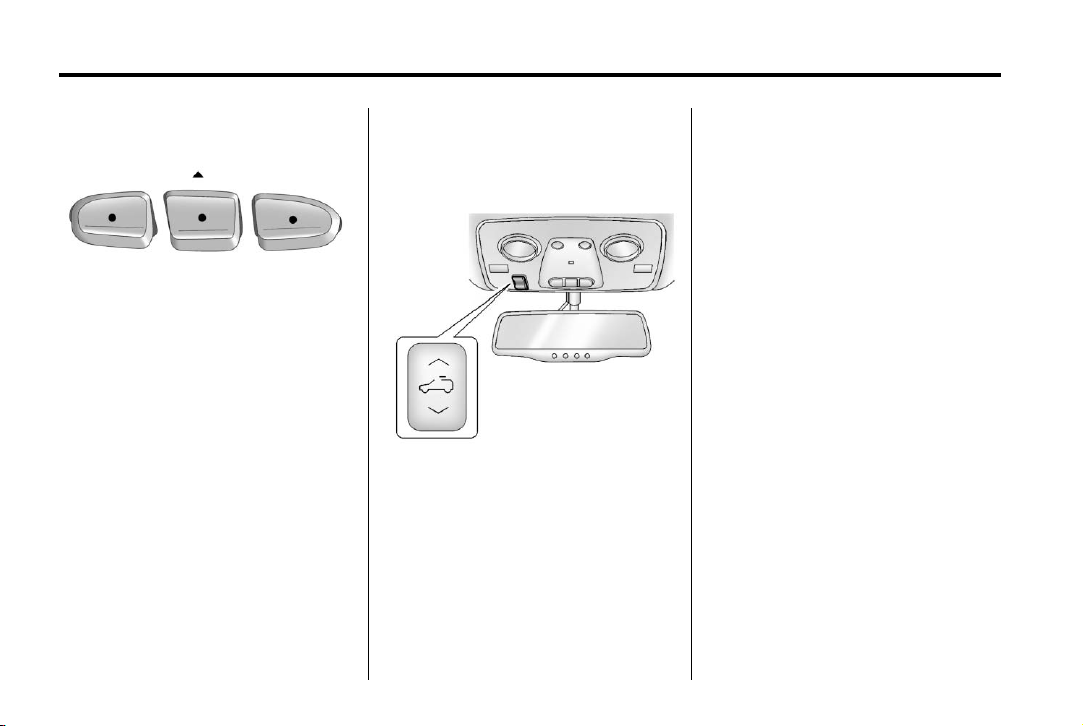
Universal Remote System
The Universal Home Remote
System allows for garage door
openers, security systems, and
home automation devices to be
programmed to work with these
buttons in the vehicle.
See Universal Remote System on
page 5‑48.
Sunroof
The ignition must be in ON/RUN,
ACC/ACCESSORY, or Retained
Accessory Power (RAP) must be
active to operate the sunroof and
power sunshade. See Retained
Accessory Power (RAP) on
page 9‑18.
The vehicle may have a sunroof
over the front seats and a rear
sunroof over the second row seats.
The rear sunroof does not open.
Vent: Press the front or rear of the
switch to vent or close the sunroof.
Express-open/Express-close:
From the closed position, press and
release the rear or front of the
switch to express-open or
express-close the sunroof.
Manual Sunshade
The front sunshade must be opened
and closed manually. To open the
sunshade, press the button on the
sunshade handle to release it and
guide it back. To close the
sunshade, pull the sunshade
forward until it latches.
For more information see Sunroof
on page 2‑20.
Page 27
Black plate (21,1)
Acadia/Acadia Denali Owner Manual - 2013 - 1st Edition - 8/20/12
In Brief 1-21
Performance and Maintenance
StabiliTrak®System
The vehicle has a traction control
system that limits wheel spin, and
the StabiliTrak system that assists
with directional control of the vehicle
in difficult driving conditions. Both
systems turn on automatically every
time the vehicle is started.
.
To turn off traction control, press
and release
instrument panel, and the
appropriate DIC message
displays. See Ride Control
System Messages on page 5‑36.
.
Press and release t again to
turn on the traction control
system. The StabiliTrak system
remains on.
For more information, see
StabiliTrak
t located on the
®
System on page 9‑27.
Tire Pressure Monitor
This vehicle may have a Tire
Pressure Monitor System (TPMS).
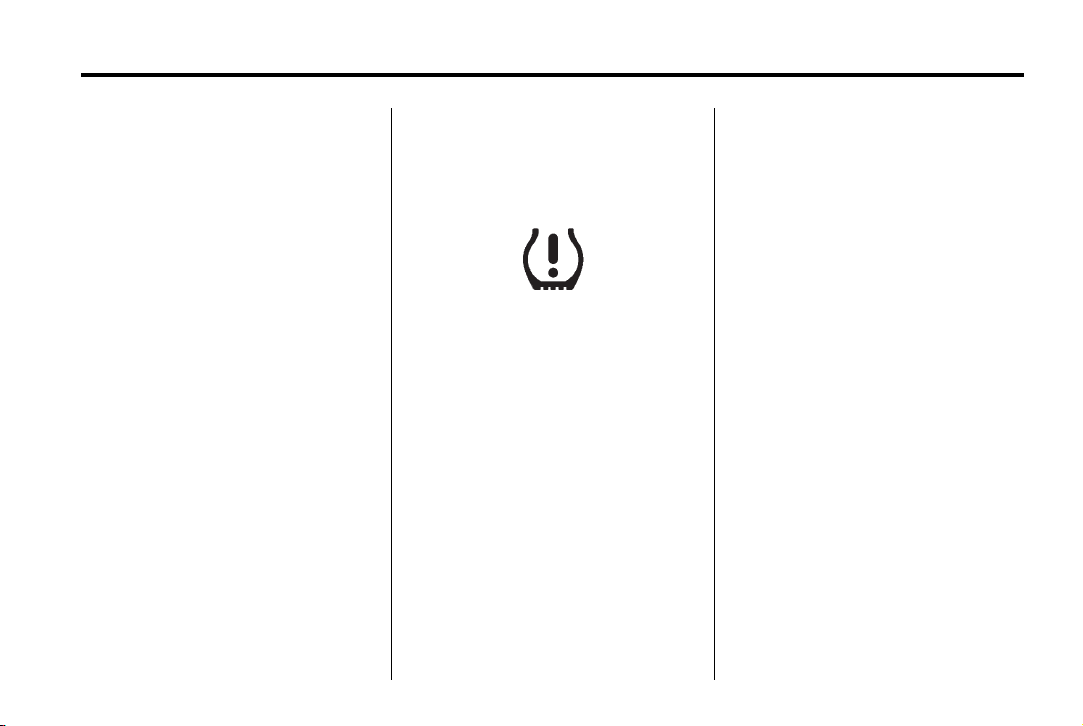
The low tire pressure warning light
alerts to a significant loss in
pressure of one of the vehicle's
tires. If the warning light comes on,
stop as soon as possible and inflate
the tires to the recommended
pressure shown on the Tire and
Loading Information label. See
Vehicle Load Limits on page 9‑9.
The warning light will remain on until
the tire pressure is corrected.
The low tire pressure warning light
may come on in cool weather when
the vehicle is first started, and then
turn off as the vehicle is driven. This
may be an early indicator that the
tire pressures are getting low and
the tires need to be inflated to the
proper pressure.
The TPMS does not replace normal
monthly tire maintenance. Maintain
the correct tire pressures.
See Tire Pressure Monitor System
on page 10‑45.
Engine Oil Life System
The engine oil life system calculates
engine oil life based on vehicle use
and displays the CHANGE ENGINE
OIL SOON message when it is time
to change the engine oil and filter.
The oil life system should be reset
to 100% only following an oil
change.
Resetting the Oil Life System
1. Turn the ignition to ON/RUN,
with the engine off.
Page 28

Black plate (22,1)
Acadia/Acadia Denali Owner Manual - 2013 - 1st Edition - 8/20/12
1-22 In Brief
2. If the vehicle has Driver
Information Center (DIC)
buttons: Press the vehicle
information button until OIL LIFE
REMAINING displays.
If the vehicle does not have
Driver Information Center (DIC)
buttons: The vehicle must be in
P (Park) to access this display.
Press the trip odometer reset
stem until OIL LIFE REMAINING
displays.
3. If the vehicle has Driver
Information Center (DIC)
buttons: Press and hold the set/
reset button until “100%” is
displayed. Three chimes sound
and the CHANGE ENGINE OIL
SOON message goes off.
If the vehicle does not have
Driver Information Center (DIC)
buttons: Press and hold the trip
odometer reset stem until OIL
LIFE REMAINING shows
“100%.” Three chimes sound
and the CHANGE ENGINE OIL
SOON message goes off.
4. Turn the key to LOCK/OFF.
See Engine Oil Life System on
page 10‑9.
Driving for Better Fuel Economy
Driving habits can affect fuel
mileage. Here are some driving tips
to get the best fuel economy
possible.
.
Avoid fast starts and accelerate
smoothly.
.
Brake gradually and avoid
abrupt stops.
.
Avoid idling the engine for long
periods of time.
.
When road and weather
conditions are appropriate, use
cruise control.
.
Always follow posted speed
limits or drive more slowly when
conditions require.
.
Keep vehicle tires properly
inflated.
.
Combine several trips into a
single trip.
.
Replace the vehicle's tires with
the same TPC Spec number
molded into the tire's sidewall
near the size.
.
Follow recommended scheduled
maintenance.
Roadside Assistance Program
U.S.: 1-888-881-3302
TTY Users (U.S. Only):
1-888-889-2438
Canada: 1-800-268-6800
Mexico: 01-800-466-0801
As the owner of a new GMC, you
are automatically enrolled in the
Roadside Assistance program.
See Roadside Assistance Program
(Mexico) on page 13‑7 or Roadside
Assistance Program (U.S. and
Canada) on page 13‑11.
Page 29

Black plate (23,1)
Acadia/Acadia Denali Owner Manual - 2013 - 1st Edition - 8/20/12
Roadside Assistance and OnStar
(U.S. and Canada)
If the vehicle has an active OnStar
subscription, contact OnStar and the
vehicle’s current GPS location will
be sent to an OnStar advisor to
assess the situation, contact
Roadside Assistance, and relay the
exact location to send help.
OnStar
If equipped, this vehicle has a
comprehensive, in-vehicle system
that can connect to a live Advisor
for Emergency, Security, Navigation,
Connection, and Diagnostic
Services. See OnStar Overview on
page 14‑1.
®
In Brief 1-23
Page 30

Black plate (24,1)
Acadia/Acadia Denali Owner Manual - 2013 - 1st Edition - 8/20/12
1-24 In Brief
2 NOTES
Page 31
Black plate (1,1)
Acadia/Acadia Denali Owner Manual - 2013 - 1st Edition - 8/20/12
Keys, Doors, and Windows 2-1
Keys, Doors, and Windows
Keys and Locks
Keys . . . . . . .. . . . . . . . . . .. . . . . . . . 2-1
Remote Keyless Entry (RKE)
System . . . . . . .. . . . . . . . . . . . . . . 2-2
Remote Keyless Entry (RKE)
System Operation . . . . . . . . . . . 2-2
Remote Vehicle Start . . . . . . . . . 2-4
Door Locks . . . . . . . . . . . . . . . . . . . 2-6
Power Door Locks . . . . . . . . . . . . 2-7
Delayed Locking . . . . . . . . . . . . . . 2-7
Automatic Door Locks . . . . . . . . . 2-7
Lockout Protection . . . . . . . . . . . . 2-7
Safety Locks . . . . . . . . . . . . . . . . . . 2-8
Doors
Liftgate . . . . . . . . . . . . . .... . . . . . . . 2-8
Exterior Mirrors
Convex Mirrors . . . . . . . . . . . . . . 2-14
Power Mirrors . . . . . . . . . . . ..... 2-15
Folding Mirrors . . . . . . . . . . . . . . . 2-15
Heated Mirrors . . . . . . . . ... . . . . 2-16
Automatic Dimming Mirror . . . 2-16
Blind Spot Mirrors . . . . . . . . . . . 2-16
Park Tilt Mirrors . . . . . . . . . . ... . 2-17
Interior Mirrors
Manual Rearview Mirror . . . . . . 2-17
Automatic Dimming Rearview
Mirror . . . . . . . . . . . . . . . . . . . . . . . 2-18
Windows
Windows . . . . . . . . . . . . . . . ...... 2-18
Power Windows . . . . . . . . . . . . . 2-18
Sun Visors . . . . . . . . . ... . . . . . . . 2-20
Roof
Sunroof . . . . . . . . . . . . . . . . . . . . .. 2-20
Vehicle Security
Vehicle Security . . . . . .. . . . . . . . 2-11
Vehicle Alarm System . . . . . . . . 2-11
Immobilizer . . . . . . . . . . . . . . . . . . 2-13
Immobilizer Operation . . . . . . . 2-13
Keys and Locks
Keys
WARNING
{
Leaving children in a vehicle with
the ignition key is dangerous and
children or others could be
seriously injured or killed. They
could operate the power windows
or other controls or make the
vehicle move. The windows will
function with the keys in the
ignition, and children or others
could be caught in the path of a
closing window. Do not leave
children in a vehicle with the
ignition key.
Page 32

Black plate (2,1)
Acadia/Acadia Denali Owner Manual - 2013 - 1st Edition - 8/20/12
2-2 Keys, Doors, and Windows
page 13‑7 or Roadside Assistance
Program (U.S. and Canada) on
page 13‑11.
With an active OnStar subscription,
an OnStar Advisor may remotely
unlock the vehicle. See OnStar
Overview on page 14‑1.
.
Check the transmitter's battery.
See “Battery Replacement” later
in this section.
.
If the transmitter is still not
working correctly, see your
dealer or a qualified technician
for service.
Remote Keyless Entry (RKE) System
See Radio Frequency Statement on
The key is used for the ignition and
all door locks.
The key has a bar-coded key tag
that the dealer or qualified locksmith
can use to make new keys. Store
this information in a safe place, not
in the vehicle.
If it becomes difficult to turn the key,
inspect the key blade for debris.
See your dealer if a replacement
key or additional key is needed.
If locked out of the vehicle, call
Roadside Assistance. See Roadside
Assistance Program (Mexico) on
page 13‑21 for information
regarding Part 15 of the Federal
Communications Commission (FCC)
rules and Industry Canada
Standards RSS-GEN/210/220/310.
If there is a decrease in the RKE
operating range:
.
Check the distance. The
transmitter may be too far from
the vehicle.
.
Check the location. Other
vehicles or objects may be
blocking the signal.
Remote Keyless Entry (RKE) System Operation
The Remote Keyless Entry (RKE)
transmitter functions work up to
60 m (195 ft) away from the vehicle.
There are other conditions which
can affect the performance of the
transmitter. See Remote Keyless
Entry (RKE) System on page 2‑2.
Page 33

Black plate (3,1)
Acadia/Acadia Denali Owner Manual - 2013 - 1st Edition - 8/20/12
Keys, Doors, and Windows 2-3
five seconds. See Vehicle
Personalization on page 5‑40 for
additional information.
Pressing
theft-deterrent system. See Vehicle
Alarm System on page 2‑11.
K (Unlock): Press once to unlock
only the driver door. If
again within five seconds, all
remaining doors unlock. The interior
With Remote Start and Power
Liftgate Shown, Without Similar
/ (Remote Vehicle Start): For
vehicles with this feature, see
Remote Vehicle Start on page 2‑4
for additional information.
Q (Lock): Press to lock all the
doors.
If enabled through the Driver
Information Center (DIC), the
parking lamps flash once to indicate
locking has occurred. If enabled
through the DIC, the horn sounds
when
Q is pressed again within
lamps come on and stay on for
20 seconds or until the ignition is
turned on.
If enabled through the DIC, the
parking lamps flash twice to indicate
unlocking has occurred. See Vehicle
Personalization on page 5‑40.
Pressing
disarms the content theft-deterrent
system. See Vehicle Alarm System
on page 2‑11.
8 (Power Liftgate): Press and
hold until the liftgate begins to move
to open or close the liftgate. The
Q may arm the content
K is pressed
K on the RKE transmitter
taillamps flash and a chime sounds
to indicate when the liftgate is
opening or closing.
L (Vehicle Locator/Panic
Alarm): Press and release to
locate the vehicle. The parking
lamps flash and the horn sounds
three times.
Press and hold
two seconds to activate the panic
alarm. The parking lamps flash and
the horn sounds repeatedly for
30 seconds. The alarm turns off
when the ignition is moved to ON/
RUN or
ignition must be in LOCK/OFF for
the panic alarm to work.
L is pressed again. The
Programming Transmitters to
the Vehicle
Only RKE transmitters programmed
to this vehicle will work. If a
transmitter is lost or stolen, a
replacement can be purchased and
programmed through your dealer.
When the replacement transmitter is
programmed to this vehicle, all
L for more than
Page 34

Black plate (4,1)
Acadia/Acadia Denali Owner Manual - 2013 - 1st Edition - 8/20/12
2-4 Keys, Doors, and Windows
remaining transmitters must also be
reprogrammed. Any lost or stolen
transmitters will no longer work
once the new transmitter is
programmed. Each vehicle can
have up to eight transmitters
programmed to it. See your dealer
to program transmitters to this
vehicle.
Battery Replacement
Replace the battery if the REPLACE
BATTERY IN REMOTE KEY
message displays in the DIC.
Notice: When replacing the
battery, do not touch any of the
circuitry on the transmitter. Static
from your body could damage the
transmitter.
1. Separate the transmitter with a
flat, thin object, such as a flat
head screwdriver.
.
Carefully insert the tool into
the notch located along the
parting line of the
transmitter. Do not insert
the tool too far. Stop as
soon as resistance is felt.
.
Twist the tool until the
transmitter is separated.
2. Remove the old battery. Do not
use a metal object.
3. Insert the new battery, positive
side facing down. Replace with a
CR2032 or equivalent battery.
4. Snap the transmitter back
together.
Remote Vehicle Start
This vehicle may have a remote
starting feature that starts the
engine from outside of the vehicle.
/ (Remote Start): This button is
located on the RKE transmitter if the
vehicle has remote start.
Laws in some communities may
restrict the use of remote starters.
For example, some laws may
require a person using the remote
start to have the vehicle in view
when doing so. Check local
regulations for any requirements on
remote starting of vehicles.
Do not use the remote start feature
if the vehicle is low on fuel. The
vehicle could run out of fuel.
Page 35

Black plate (5,1)
Acadia/Acadia Denali Owner Manual - 2013 - 1st Edition - 8/20/12
Keys, Doors, and Windows 2-5
If the vehicle has the remote start
feature, the RKE transmitter range
may be less while the vehicle is
running.
There are other conditions that can
affect the performance of the
transmitter. See Remote Keyless
Entry (RKE) System on page 2‑2 for
additional information.
Starting the Engine Using
Remote Start
To start the vehicle:
1. Aim the RKE transmitter at the
vehicle.
2. Press and release
RKE transmitter.
3. Immediately after completing
Step 2, press and hold
the parking lamps flash. If the
vehicle's lights cannot be seen,
press and hold
four seconds.
Q on the
/ until
/ for at least
When the vehicle starts, the parking
lamps will turn on and remain on as
long as the engine is running. The
doors will be locked and the climate
control system will operate
automatically if the vehicle has the
automatic system, or at the same
setting as when the vehicle was last
turned off.
If the vehicle has an automatic
climate control system and heated
seats, the heated seats turn on
during colder outside temperatures
and shut off when the key is turned
to ON/RUN. See Heated and
Ventilated Front Seats on page 3‑8
for more information.
The rear window defogger and
heated mirrors, if the vehicle has
them, turn on during colder outside
temperatures and turn off when the
key is turned to ON/RUN.
After entering the vehicle during a
remote start, insert and turn the key
to the ON/RUN position to drive the
vehicle.
If the vehicle is left running it
automatically shuts off after
10 minutes unless a time extension
has been done.
Extending Engine Run Time
To extend the engine run time by
10 minutes, repeat Steps 1–3 while
the engine is still running. The
engine run time can only be
extended if it is the first remote start
since the vehicle has been driven.
Remote start can be extended
one time.
If the remote start procedure is used
again before the first 10-minute time
frame has ended, the first
10 minutes will immediately expire
and the second 10-minute time
frame will start.
For example, if
pressed again after the vehicle has
been running for five minutes,
10 minutes are added, allowing the
engine to run for a total of
15 minutes.
Q and then / are
Page 36

Black plate (6,1)
Acadia/Acadia Denali Owner Manual - 2013 - 1st Edition - 8/20/12
2-6 Keys, Doors, and Windows
A maximum of two remote starts or
remote start attempts are allowed
between ignition cycles.
After the vehicle's engine has been
started two times using the remote
start button, the ignition must be
turned on and then back off before
the remote start procedure can be
used again.
Canceling a Remote Start
To manually shut off a remote start:
.
Aim the RKE transmitter at the
vehicle and press
/ until the
Conditions in Which the
Remote Start Will Not Work
The vehicle cannot be started using
the remote start feature if the key is
in the ignition, the hood is open, or if
there is an emission control system
malfunction.
The engine turns off during a remote
start if the coolant temperature gets
too high or if the oil pressure
gets low.
Door Locks
parking lamps turn off.
.
Turn on the hazard warning
flashers.
.
Turn the ignition switch on and
then off.
Unlocked doors can be
dangerous.
.
Passengers, especially
children, can easily open the
doors and fall out of a moving
vehicle. When a door is
locked, the handle will not
open it. The chance of being
thrown out of the vehicle in a
WARNING
{
(Continued)
WARNING (Continued)
crash is increased if the
doors are not locked. So, all
passengers should wear
safety belts properly and the
doors should be locked
whenever the vehicle is
driven.
.
Young children who get into
unlocked vehicles may be
unable to get out. A child can
be overcome by extreme heat
and can suffer permanent
injuries or even death from
heat stroke. Always lock the
vehicle whenever leaving it.
.
Outsiders can easily enter
through an unlocked door
when you slow down or stop
the vehicle. Locking the doors
can help prevent this from
happening.
To lock or unlock a door, use the
key from the outside or the door
lock from the inside.
Page 37

Black plate (7,1)
Acadia/Acadia Denali Owner Manual - 2013 - 1st Edition - 8/20/12
Keys, Doors, and Windows 2-7
Power Door Locks
K (Unlock): Press to unlock the
doors.
Q (Lock): Press to lock the doors.
Delayed Locking
When locking the doors with the
power lock switch and a door or the
liftgate is open, the doors will lock
five seconds after the last door is
closed. You will hear three chimes
to signal that the delayed locking
feature is in use.
Base Model
Uplevel Model
Pressing the power lock switch
twice or the lock button on the RKE
transmitter twice will override the
delayed locking feature and
immediately lock all the doors.
This feature will not operate if the
key is in the ignition.
This feature can be programmed by
using the Driver Information Center
(DIC). See “DELAY DOOR LOCK”
under Vehicle Personalization on
page 5‑40.
Automatic Door Locks
Vehicles with an automatic lock/
unlock feature enable you to
program the vehicle's power door
locks. This feature can be
programmed through the Driver
Information Center (DIC). See
Vehicle Personalization on
page 5‑40 for more information.
Lockout Protection
This feature protects you from
locking the key in the vehicle when
the key is in the ignition and a front
door is open.
If the driver side power door lock
switch is pressed when the driver
door is open and the key is in the
ignition, all of the doors will lock and
then the driver door will unlock.
If the passenger side power door
lock switch is pressed when the
front passenger door is open and
the key is in the ignition, all of the
doors will lock and then the front
passenger door will unlock.
Page 38

Black plate (8,1)
Acadia/Acadia Denali Owner Manual - 2013 - 1st Edition - 8/20/12
2-8 Keys, Doors, and Windows
Safety Locks
The vehicle has rear door security
locks to prevent passengers from
opening the rear doors from the
inside.
Open the rear doors to access the
security locks on the inside edge of
each door.
To set the locks, insert a key into
the slot and turn it to the horizontal
position. The door can only be
opened from the outside with the
door unlocked. To return the door to
normal operation, turn the slot to the
vertical position.
Doors
Liftgate
WARNING
{
Exhaust gases can enter the
vehicle if it is driven with the
liftgate or trunk/hatch open,
or with any objects that pass
through the seal between the
body and the trunk/hatch or
liftgate. Engine exhaust contains
carbon monoxide (CO) which
cannot be seen or smelled. It can
cause unconsciousness and even
death.
If the vehicle must be driven with
the liftgate or trunk/hatch open:
.
Close all of the windows.
.
Fully open the air outlets on
or under the instrument
panel.
(Continued)
Page 39

Black plate (9,1)
Acadia/Acadia Denali Owner Manual - 2013 - 1st Edition - 8/20/12
Keys, Doors, and Windows 2-9
WARNING (Continued)
.
Adjust the climate control
system to a setting that
brings in only outside air and
set the fan speed to the
highest setting. See “Climate
Control Systems” in the
Index.
.
If the vehicle is equipped with
a power liftgate, disable the
power liftgate function.
See Engine Exhaust on
page 9‑20.
(RKE) transmitter twice. See
Remote Keyless Entry (RKE)
System Operation on page 2‑2.
To open the liftgate, press the touch
pad under the liftgate handle and lift
up. The vehicle must be in P (Park)
and the battery must be charged.
Use the pull cup to lower and close
the liftgate.
Always close the liftgate before
driving.
Power Liftgate
On vehicles with a power liftgate,
the vehicle must be in P (Park) to
operate. The taillamps flash and a
Notice: To avoid damage to the
liftgate or liftgate glass, make
chime sounds when the power
liftgate moves.
sure the area above and behind
the liftgate is clear before
opening it.
Manual Liftgate
To unlock the liftgate, press the
power door lock switch or press
on the Remote Keyless Entry
K
You, or others, could be injured if
caught in the path of the power
liftgate. Make sure there is no one
in the way of the liftgate as it is
opening and closing.
WARNING
{
The power liftgate can be power
opened and closed in the
following ways:
.
Press and hold 8 on the
RKE transmitter. See Remote
Keyless Entry (RKE) System
Operation on page 2‑2.
.
Press O.
.
Press the touch pad on the
outside liftgate handle.
Pressing the buttons or touch pad a
second time while the liftgate is
moving reverses the direction.
Page 40

Black plate (10,1)
Acadia/Acadia Denali Owner Manual - 2013 - 1st Edition - 8/20/12
2-10 Keys, Doors, and Windows
Power Liftgate Touch Pad
The liftgate can also be closed by
pressing
latch. Press
during the liftgate operation to
reverse the operation.
The power liftgate may be
temporarily disabled under extreme
temperatures or under low battery
conditions. If this occurs, the liftgate
can be operated manually.
If the vehicle is shifted out of
P (Park) while the liftgate power
function is in progress, it will
l next to the liftgate
l a second time
continue to completion. If the
vehicle is shifted out of P (Park) and
accelerated before the power liftgate
latch closes, the liftgate may
reverse to the open position. Cargo
could fall out of the vehicle. Always
make sure the power liftgate is
closed and latched before
driving away.
If the power liftgate is used and the
liftgate support struts have lost
pressure, the taillamps will flash and
a chime will sound. The liftgate will
stay open temporarily, and then
slowly close. See a dealer for
service before using the liftgate if
this occurs.
Obstacle Detection Features
A warning chime will sound and the
liftgate will automatically reverse
direction to the full closed or open
position if an obstacle is
encountered during a power open or
close cycle. After removing the
obstacle the liftgate will resume
normal operation.
If more obstacles are encountered
on the same power cycle, the power
function deactivates, and the liftgate
must be opened or closed manually.
A message displays on the Driver
Information Center (DIC) to indicate
that the liftgate is open. See Door
Ajar Messages on page 5‑32. After
removing the obstacles, manually
open the liftgate fully or close and
latch the liftgate. The liftgate will
resume normal power operation.
The vehicle has pinch sensors
located on the side edges of the
liftgate. If an object is caught
between the liftgate and the body of
the vehicle and presses against a
sensor, the liftgate will reverse
direction and open fully. The liftgate
will remain open until it is activated
again or closed manually. Do not
force the liftgate open or closed
during a power cycle.
Page 41

Black plate (11,1)
Acadia/Acadia Denali Owner Manual - 2013 - 1st Edition - 8/20/12
Keys, Doors, and Windows 2-11
Manual Operation of Power
Liftgate
To change the liftgate to manual
operation, press OFF on the power
liftgate switch. A message displays
on the DIC indicating manual
operation mode. See Door Ajar
Messages on page 5‑32.
With the liftgate in manual mode
and all of the doors unlocked, the
liftgate can be manually opened and
closed.
To open the liftgate, press the touch
pad on the outside of the liftgate
handle and lift up. Use the pull
handle to lower and close the
liftgate, the liftgate latch will power
close.
Always close the liftgate before
driving.
If
8 on the RKE transmitter or
l on the liftgate is pressed while
in manual operation mode, the
taillamps will flash three times, but
the liftgate will not move.
It is not recommended to drive with
the liftgate open. However, if the
vehicle must be driven with the
liftgate open, the liftgate should be
set to manual operation.
Vehicle Security
This vehicle has theft-deterrent
features; however, they do not make
the vehicle impossible to steal.
Vehicle Alarm System
On vehicles with an anti-theft alarm
system, to activate the system:
.
Press Q on the Remote Keyless
Entry (RKE) transmitter or the
power door lock switch when
any door is open.
Page 42

Black plate (12,1)
Acadia/Acadia Denali Owner Manual - 2013 - 1st Edition - 8/20/12
2-12 Keys, Doors, and Windows
The security light flashes.
When the door is closed, the
security light stops flashing and
stays on solid for approximately
30 seconds. The content
theft-deterrent alarm is not
armed until the security light
goes off.
If the delayed locking feature is
active, the alarm is not activated
until all doors are closed and the
security light goes off.
.
Press Q when the driver door is
closed. The security light comes
on solid for approximately
30 seconds and then goes off.
The content theft-deterrent alarm
is not armed until the security
light goes off.
The theft-deterrent system will not
activate if the doors are locked with
the vehicle's key or the manual
door lock.
If a locked door is opened without
using the RKE transmitter, a
10-second pre-alarm occurs. The
horn chirps and the lights flash.
If the key is not placed in the
ignition and turned to START or the
door is not unlocked by pressing
during the 10-second pre-alarm, the
alarm goes off. The headlamps flash
and the horn sounds for about
30 seconds, then turns off to save
the battery power.
The vehicle can be started with the
correct ignition key if the alarm has
been set off.
To avoid setting off the alarm by
accident:
.
Lock the vehicle with the door
key after the doors are closed.
.
Unlock the door with the RKE
transmitter. Unlocking a door any
other way sets off the alarm if
the system has been armed.
K or place the key in the
Press
ignition and turn it to START to turn
off the alarm.
Testing the Alarm
To test the alarm:
1. From inside the vehicle, lower
Q
the driver side window, and open
the driver door.
2. Press
3. Get out of the vehicle, close the
4. Reach in through the window,
If the alarm does not sound when it
should, but the headlamps flash,
check to see if the horn works. The
horn fuse may be blown. To replace
the fuse, see Fuses and Circuit
Breakers on page 10‑27.
If the alarm does not sound or the
headlamps do not flash, see your
dealer for service.
Q.
door, and wait for the security
light to go out.
unlock the door with the manual
door lock, and open the door.
This should set off the alarm.
Page 43

Black plate (13,1)
Acadia/Acadia Denali Owner Manual - 2013 - 1st Edition - 8/20/12
Keys, Doors, and Windows 2-13
Immobilizer
See Radio Frequency Statement on
page 13‑21 for information
regarding Part 15 of the Federal
Communications Commission (FCC)
rules and Industry Canada
Standards RSS-GEN/210/220/310.
Immobilizer Operation
This vehicle has PASS-Key®III+
(Personalized Automotive Security
System) theft-deterrent system.
PASS-Key III+ is a passive
theft-deterrent system.
The system is automatically armed
when the key is removed from the
ignition.
The system is automatically
disarmed when the key is turned to
ON/RUN, ACC/ACCESSORY,
or START from the LOCK/OFF
position.
You do not have to manually arm or
disarm the system.
The security light comes on if there
is a problem with arming or
disarming the theft-deterrent
system.
When the PASS-Key III+ system
senses an incorrect key, the vehicle
does not start. Anyone using a
trial-and-error method to start the
vehicle will be discouraged because
of the high number of electrical key
codes.
If the engine does not start and the
security light on the instrument
panel comes on when trying to start
the vehicle, there may be a problem
with the theft-deterrent system. Turn
the ignition off and try again.
If the engine still does not start, and
the key appears to be undamaged,
try another ignition key and check
the fuses. See Fuses and Circuit
Breakers on page 10‑27 for
additional information. If the engine
still does not start with the other key,
the vehicle needs service. If the
vehicle does start, the first key may
be faulty. See your dealer who can
service the PASS-Key III+ to have a
new key made. In an emergency,
contact Roadside Assistance. See
Roadside Assistance Program
(Mexico) on page 13‑7 or Roadside
Assistance Program (U.S. and
Canada) on page 13‑11.
It is possible for the PASS-Key III+
decoder to learn the transponder
value of a new or replacement key.
Up to 10 keys may be programmed
to the vehicle. The following
procedure is for programming
additional keys only. If all currently
programmed keys are lost or do not
operate, you must see your dealer
or a locksmith who can service
PASS-Key III+ to have keys made
and programmed to the system.
See your dealer or a locksmith who
can service PASS-Key III+ to get a
new key blank that is cut exactly as
the ignition key that operates the
system.
Page 44
Black plate (14,1)
Acadia/Acadia Denali Owner Manual - 2013 - 1st Edition - 8/20/12
2-14 Keys, Doors, and Windows
To program the new additional key:
1. Verify that the new key has a
stamped on it.
2. Insert the already programmed
key in the ignition and start the
engine. If the engine does not
start, see your dealer for service.
3. After the engine has started, turn
the key to LOCK/OFF, and
remove the key.
4. Insert the key to be programmed
and turn it to the ON/RUN
position within five seconds of
the original key being turned to
the LOCK/OFF position.
The security light turns off once
the key has been programmed.
5. Repeat Steps 1–4 if additional
keys are to be programmed.
1
If the PASS-Key III+ key is lost or
damaged, see your dealer or a
locksmith to have a new key made.
The SERVICE THEFT
DETERRENT SYSTEM message
displays on the Driver Information
Center (DIC) when there is a
problem with the theft-deterrent
system. See Security Messages on
page 5‑37 for additional information.
Do not leave the key or device that
disarms or deactivates the
theft-deterrent system in the vehicle.
Exterior Mirrors
Convex Mirrors
WARNING
{
A convex mirror can make things,
like other vehicles, look farther
away than they really are. If you
cut too sharply into the right lane,
you could hit a vehicle on the
right. Check the inside mirror or
glance over your shoulder before
changing lanes.
The passenger side mirror is convex
shaped. A convex mirror's surface is
curved so more can be seen from
the driver seat.
Page 45
Black plate (15,1)
Acadia/Acadia Denali Owner Manual - 2013 - 1st Edition - 8/20/12
Keys, Doors, and Windows 2-15
Power Mirrors
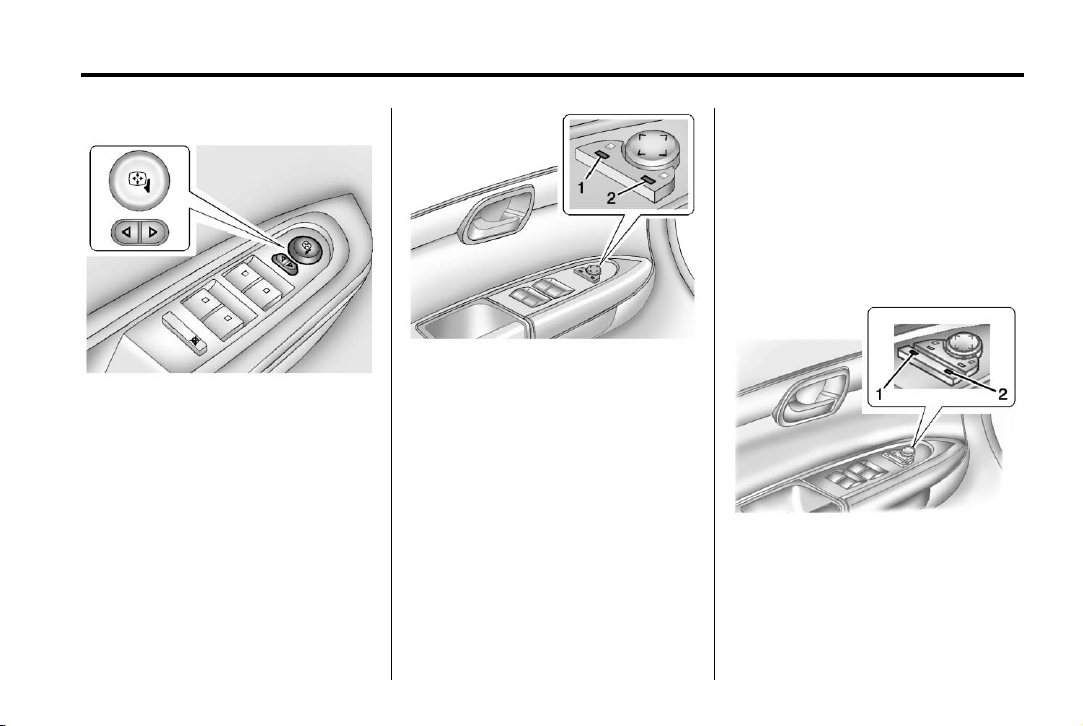
Base Model
To adjust the mirrors:
1. Press
2. Press the control pad to adjust
3. Return the switch to the center
o or p to select a mirror.
the mirror.
to deselect the mirror.
To adjust the mirrors:
1. Press (1) or (2) to select a
mirror.
2. Press the control pad to adjust
the mirror.
3. Press (1) or (2) again to deselect
the mirror.
Side Blind Zone Alert (SBZA)
If the vehicle has the SBZA system,
see Side Blind Zone Alert (SBZA)
on page 9‑32.
Folding Mirrors
For vehicles with manual folding
mirrors, push the mirror toward the
vehicle. Pull the mirror out to return
to its original position.
For vehicles with power folding
mirrors:
Uplevel Model
1. Press (1) to fold the mirrors out
to the driving position.
2. Press (2) to fold the mirrors in to
the folded position.
Page 46

Black plate (16,1)
Acadia/Acadia Denali Owner Manual - 2013 - 1st Edition - 8/20/12
2-16 Keys, Doors, and Windows
Resetting the Power Folding
Mirrors
Reset the power folding mirrors if:
.
The mirrors are accidentally
obstructed while folding.
.
They are accidentally manually
folded/unfolded.
.
The mirrors vibrate at normal
driving speeds.
To reset the mirrors, fold and unfold
the mirrors one time using the
power folding mirror controls.
A popping noise may be heard
during the resetting. This sound is
normal during the reset operation.
Heated Mirrors
For vehicles with heated mirrors:
Automatic Dimming Mirror
If the vehicle has the automatic
dimming mirror, the driver outside
mirror automatically adjusts for the
glare of the headlamps from behind.
This feature is controlled by the on
and off setting on the inside
rearview mirror. See Automatic
Dimming Rearview Mirror on
page 2‑18.
Blind Spot Mirrors
The blind spot mirror is a small
convex mirror built into the upper
and outer corner of both outside
mirrors. It can show objects that
may be in the vehicle's blind zone.
1 (Rear Window Defogger):
Press to heat the mirrors.
See “Rear Window Defogger” under
Dual Automatic Climate Control
System on page 8‑4.
Driving with the Blind Spot
Mirror
Actual Mirror View
Page 47

Black plate (17,1)
Acadia/Acadia Denali Owner Manual - 2013 - 1st Edition - 8/20/12
Keys, Doors, and Windows 2-17
1. When the approaching vehicle is
a long distance away, the image
in the main mirror is small and
near the inboard edge of the
mirror.
2. As the vehicle gets closer, the
image in the main mirror gets
larger and moves outboard.
3. As the vehicle enters the blind
zone, the image transitions from
the main mirror to the blind spot
mirror.
4. When the vehicle is in the blind
zone, the image only appears in
the blind spot mirror.
Using the Outside Mirror with
the Blind Spot Mirror
1. Set the main mirror so that the
side of the vehicle can just be
seen and the blind spot mirror
has an unobstructed view.
2. When checking for traffic or
before changing a lane, look at
the main driver/passenger side
mirror to observe traffic in the
adjacent lane, behind your
vehicle. Check the blind spot
mirror for a vehicle in the blind
zone. Then, glance over your
shoulder to double check before
moving slowly into the
adjacent lane.
Park Tilt Mirrors
If the vehicle has the memory
package, the outside mirrors have a
park tilt feature. This feature tilts the
outside mirrors to a preselected
position when the vehicle is in
R (Reverse). This allows the driver
to view the curb for parallel parking.
The passenger and/or driver mirror
returns to its original position when
the vehicle is shifted out of
R (Reverse), or the ignition is turned
off or to OFF/LOCK.
This feature can be turned on or off
through the Driver Information
Center (DIC). See Vehicle
Personalization on page 5‑40 for
more information.
Interior Mirrors
Manual Rearview Mirror
Adjust the mirror to view the area
behind the vehicle.
For vehicles with a manual rearview
mirror, push the tab forward for
daytime use and pull it for nighttime
use to avoid glare from the
headlamps from behind.
For vehicles with OnStar, center the
twist knob for daytime use and turn
it to the side for nighttime use.
Vehicles with OnStar have three
control buttons at the bottom of the
mirror. See your dealer for more
information about OnStar and how
to subscribe to it. See OnStar
Overview on page 14‑1.
Page 48
Black plate (18,1)
Acadia/Acadia Denali Owner Manual - 2013 - 1st Edition - 8/20/12
2-18 Keys, Doors, and Windows
Automatic Dimming Rearview Mirror
The vehicle may have an automatic
dimming inside rearview mirror.
The mirror automatically reduces
the glare from the headlamps from
behind. The dimming feature and
the indicator light come on when the
vehicle is started. There may be an
on and off setting on the mirror.
O (On/Off): Press to turn the
dimming feature on or off.
Cleaning the Mirror
Do not spray glass cleaner directly
on the mirror. Use a soft towel
dampened with water.
Windows
WARNING
{
Never leave a child, a helpless
adult, or a pet alone in a vehicle,
especially with the windows
closed in warm or hot weather.
They can be overcome by the
extreme heat and suffer
permanent injuries or even death
from heat stroke.
The vehicle aerodynamics are
designed to improve fuel economy
performance. This may result in a
pulsing sound when either rear
window is down and the front
windows are up. To reduce the
sound, open either a front window
or the sunroof, if equipped.
Power Windows
WARNING
{
Children could be seriously
injured or killed if caught in the
path of a closing window. Never
leave keys in a vehicle with
children. When there are children
in the rear seat, use the window
lockout button to prevent
operation of the windows. See
Keys on page 2‑1.
Page 49

Black plate (19,1)
Acadia/Acadia Denali Owner Manual - 2013 - 1st Edition - 8/20/12
Keys, Doors, and Windows 2-19
Uplevel Shown, Base Similar
The driver door also has switches
that control the passenger and rear
windows. The power windows work
with the ignition in ACC/
ACCESSORY, ON/RUN or when
Retained Accessory Power (RAP) is
active. See Retained Accessory
Power (RAP) on page 9‑18.
Press the switch to lower the
window. Pull up on the front edge of
the switch to raise the window.
Express-Up/Express-Down
Windows
A window with the express-up/down
feature allows it to be raised or
lowered without holding the switch.
Press or pull the window switch fully
and release it to activate the
express feature. The express mode
can be canceled by pressing or
pulling the switch.
Programming the Power
Windows
If the battery on the vehicle has
been recharged, disconnected,
or replaced, windows with the
express-up feature need to be
reprogrammed for this feature to
work. To program the window:
1. Close all doors with the ignition
in the ACC/ACCESSORY, ON/
RUN position, or when Retained
Accessory Power (RAP) is
active. See Retained Accessory
Power (RAP) on page 9‑18.
2. Press and continue to hold the
window switch until the window
is fully open.
3. Pull up and hold the window
switch to close the window.
Continue to hold it briefly after
the window is fully closed.
4. Repeat for each window that has
the express-up feature.
Anti-Pinch Feature
The anti-pinch feature is on
windows with the express-up
feature. If an object is in the way of
the window as it is express-closing,
or in certain weather conditions like
severe icing, the window will stop
and open to a factory preset
position. The window functions
normally once the obstruction is
removed.
Page 50

Black plate (20,1)
Acadia/Acadia Denali Owner Manual - 2013 - 1st Edition - 8/20/12
2-20 Keys, Doors, and Windows
Rear Window Lockout
Sun Visors
Pull the sun visor down or unhook it
and move it to the side to reduce
glare.
Visor Vanity Mirror
Lift the cover to use the mirror and
turn the lamps on.
The rear window lockout feature
prevents the rear passenger
windows from operating, except
from the driver position.
v to activate the rear
Press
window lockout switch. The
indicator light comes on when
activated.
Press
v again to deactivate the
lockout switch.
Roof
Sunroof
The ignition must be in ON/RUN,
ACC/ACCESSORY, or Retained
Accessory Power (RAP) must be
active to operate the sunroof and
power sunshade. See Retained
Accessory Power (RAP) on
page 9‑18.
The vehicle may have a sunroof
over the front seats and a rear
sunroof over the second row seats.
The rear sunroof does not open.
Page 51

Black plate (21,1)
Acadia/Acadia Denali Owner Manual - 2013 - 1st Edition - 8/20/12
Keys, Doors, and Windows 2-21
Vent: From the closed position,
press and hold the front of the
switch to vent the sunroof. Press
and hold the rear of the switch to
close the sunroof.
Express-open/Express-close:
From the closed position, press and
release the rear of the switch to
express-open the sunroof. Press
and release the front of the switch to
express-close the sunroof.
Manual Sunshade
The front sunshade must be opened
and closed manually. To open the
sunshade, press the button on the
sunshade handle to release it and
guide it back. To close the
sunshade, pull the sunshade
forward until it latches.
Dirt and debris may collect on the
sunroof seal or in the track. This
could cause an issue with sunroof
operation or noise. It could also plug
the water drainage system.
Periodically open the sunroof and
remove any obstacles or loose
debris. Wipe the sunroof seal and
roof sealing area using a clean
cloth, mild soap, and water. Do not
remove grease from the sunroof.
Page 52

Black plate (22,1)
Acadia/Acadia Denali Owner Manual - 2013 - 1st Edition - 8/20/12
2-22 Keys, Doors, and Windows
2 NOTES
Page 53

Black plate (1,1)
Acadia/Acadia Denali Owner Manual - 2013 - 1st Edition - 8/20/12
Seats and Restraints 3-1
Seats and Restraints
Head Restraints
Head Restraints . . . . . . . . . .... . . 3-2
Front Seats
Seat Adjustment . . . . . . . . . . . . . . 3-3
Power Seat Adjustment . . . . . . . 3-4
Lumbar Adjustment . . . . . . . . . . . 3-4
Reclining Seatbacks . . . . . . . . . . 3-5
Memory Seats . . . . . . . . . . . . . . . . 3-6
Heated and Ventilated Front
Seats . . . . . . . . .. . . . . . . . . . . . . .. 3-8
Rear Seats
Rear Seats . . . . . . . . . . ..... . . . . . 3-9
Third Row Seats . . . . . . . . . . . . . 3-11
Safety Belts
Safety Belts . . . . . . . . . . . . . . . ... 3-14
How to Wear Safety Belts
Properly .... . . . . . . . . . . . . . . .. 3-15
Lap-Shoulder Belt . . . . . . . . . . . 3-16
Safety Belt Use During
Pregnancy .... . . . . . . . . . . . . . . 3-21
Safety Belt Extender . . . . . . . . . 3-21
Safety System Check . . . . . . . . 3-21
Safety Belt Care . . . . . . . . . . . . . 3-22
Replacing Safety Belt System
Parts after a Crash . . . . . . . . . 3-22
Airbag System
Airbag System . . . . . .. . . . . . . .. 3-23
Where Are the Airbags? . . . . . 3-25
When Should an Airbag
Inflate? . . . . . . . . . . . . . . . . . .. . . 3-27
What Makes an Airbag
Inflate? . . . . . . . . . . . . . . . . . .. . . 3-28
How Does an Airbag
Restrain? . . . . . . . . . . . . ..... . . 3-28
What Will You See after an
Airbag Inflates? . . . . . . . . . . . . 3-28
Passenger Sensing
System . . . . . . . . .. . . . . . . . . . . . 3-30
Servicing the Airbag-Equipped
Vehicle . . . . . . . . . . . . . . . . . . . . . 3-34
Adding Equipment to the
Airbag-Equipped Vehicle . . . 3-34
Airbag System Check . . . . . . . . 3-35
Replacing Airbag System
Parts after a Crash . . . . . . . . . 3-35
Child Restraints
Older Children . . . . . . . . . . . . . . . 3-36
Infants and Young
Children . . . . . . . . . . . . . . . . . .. . 3-38
Child Restraint Systems . . . . . 3-40
Where to Put the Restraint . . . 3-42
Lower Anchors and Tethers
for Children (LATCH
System) . . . . . . .. . . . . . . .. . . . . 3-44
Replacing LATCH System
Parts After a Crash . . . . . . . . . 3-50
Securing Child Restraints
(Rear Seat) . . . . . . . . . . . . . . . .. 3-50
Securing Child Restraints
(Front Passenger Seat) . . . . 3-52
Page 54

Black plate (2,1)
Acadia/Acadia Denali Owner Manual - 2013 - 1st Edition - 8/20/12
3-2 Seats and Restraints
Head Restraints
Front Seats
WARNING
{
With head restraints that are not
installed and adjusted properly,
there is a greater chance that
occupants will suffer a neck/
spinal injury in a crash. Do not
drive until the head restraints for
all occupants are installed and
adjusted properly.
The vehicle's front seats have
adjustable head restraints in the
outboard seating positions.
Adjust the head restraint so that the
top of the restraint is at the same
height as the top of the occupant's
head. This position reduces the
chance of a neck injury in a crash.
To raise or lower the head restraint,
press the button located on the side
of the head restraint, and pull up or
push the head restraint down, and
release the button. Pull and push on
the head restraint after the button is
released to make sure that it is
locked in place.
To adjust the head restraint forward,
grasp the head restraint and pull
forward until the desired locking
position is reached.
To adjust the head restraint
rearward, press the button located
on the side of the head restraint,
Page 55

Black plate (3,1)
Acadia/Acadia Denali Owner Manual - 2013 - 1st Edition - 8/20/12
Seats and Restraints 3-3
and push the head restraint
rearward until the desired locking
position is reached. Try to move the
head restraint after the button is
released to make sure that it is
locked in place.
The front seat outboard head
restraints are not designed to be
removed.
Rear Seats
The vehicle's second-row seats
have head restraints in the outboard
seating positions that cannot be
adjusted.
The vehicle's third-row seats have
headrests in the outboard seating
positions that cannot be adjusted.
The second-row head restraints and
third-row headrests are not
designed to be removed.
Front Seats
Seat Adjustment
WARNING
{
You can lose control of the
vehicle if you try to adjust a driver
seat while the vehicle is moving.
Adjust the driver seat only when
the vehicle is not moving.
1. Seat Adjustment Handle
2. Driver Seat Height Adjustment
Lever
3. Seatback Lever
To adjust a manual seat:
1. Lift the handle (1) under the seat
to unlock it.
2. Slide the seat to the desired
position, and then release the
handle (1).
3. Try to move the seat back and
forth to be sure it is locked in
place.
Move the lever (2) up or down to
raise or lower the seat.
Use the lever (3) to adjust the
seatback. See Reclining Seatbacks
on page 3‑5.
Page 56

Black plate (4,1)
Acadia/Acadia Denali Owner Manual - 2013 - 1st Edition - 8/20/12
3-4 Seats and Restraints
Power Seat Adjustment
1. Seat Adjustment Control
2. Seatback Control
3. Lumbar Control
To adjust a power seat, if equipped:
.
Move the seat forward or
rearward by sliding the
control (1) forward or rearward.
.
Raise or lower the front part of
the seat cushion by moving the
front of the control (1) up
or down.
.
Raise or lower the entire seat by
moving the rear of the control (1)
up or down.
.
Adjust the seatback by tilting the
top of the control (2) forward or
rearward.
See Reclining Seatbacks on
page 3‑5.
.
Increase or decrease lumbar
support by pressing the front or
rear of the control (3).
See Lumbar Adjustment on
page 3‑4.
Lumbar Adjustment
Manual Lumbar
If available, move the handle
forward or rearward to increase or
decrease lumbar support.
Page 57

Black plate (5,1)
Acadia/Acadia Denali Owner Manual - 2013 - 1st Edition - 8/20/12
Seats and Restraints 3-5
Power Lumbar
If available, press and hold the front
or rear of control to increase or
decrease lumbar support. Release
the control when the seatback
reaches the desired level of lumbar
support.
Reclining Seatbacks
Sitting in a reclined position when
the vehicle is in motion can be
dangerous. Even when buckled
up, the safety belts cannot do
their job.
The shoulder belt will not be
against your body. Instead, it will
be in front of you. In a crash, you
could go into it, receiving neck or
other injuries.
The lap belt could go up over
your abdomen. The belt forces
would be there, not at your pelvic
bones. This could cause serious
internal injuries.
For proper protection when the
vehicle is in motion, have the
seatback upright. Then sit well
back in the seat and wear the
safety belt properly.
WARNING
{
Do not have a seatback reclined if
the vehicle is moving.
Manual Reclining Seatbacks
WARNING
{
If either seatback is not locked, it
could move forward in a sudden
stop or crash. That could cause
injury to the person sitting there.
Always push and pull on the
seatbacks to be sure they are
locked.
Page 58

Black plate (6,1)
Acadia/Acadia Denali Owner Manual - 2013 - 1st Edition - 8/20/12
3-6 Seats and Restraints
2. Push and pull on the seatback to
make sure it is locked.
Power Reclining Seatbacks
To recline the seatback:
1. Lift the lever.
2. Move the seatback to the
desired position, and then
release the lever to lock the
seatback in place.
3. Push and pull on the seatback to
make sure it is locked.
To return the seatback to the upright
position:
1. Lift the lever fully without
applying pressure to the
seatback, and the seatback will
return to the upright position.
To adjust a power seatback,
if equipped:
.
Tilt the top of the control
rearward to recline.
.
Tilt the top of the control forward
to raise.
Memory Seats
If available, the controls on the
driver door are used to program and
recall memory settings for the driver
seat, outside mirrors, and power
steering column (if equipped).
Page 59

Black plate (7,1)
Acadia/Acadia Denali Owner Manual - 2013 - 1st Edition - 8/20/12
Seats and Restraints 3-7
Storing Memory Positions
To save into memory:
1. Adjust the driver seat and
seatback recliner, both outside
mirrors, and the power steering
column (if equipped).
Not all vehicles will have the
ability to save and recall the
mirror positions.
2. Press and hold “1” until
two beeps sound.
3. Repeat for a second driver
position using “2.”
To recall, press and release “1” or
“2.” The vehicle must be in P (Park).
A single beep will sound. The seat,
outside mirrors, and power steering
column (if equipped) will move to
the positions previously stored for
the identified driver.
Memory Remote Recall
The memory feature can recall the
driver seat, outside mirrors, and
power steering column (if equipped)
to stored positions when entering
the vehicle.
To activate, unlock the driver door
with the Remote Keyless
Entry (RKE) transmitter. The driver
seat, outside mirrors, and power
steering column (if equipped) will
move to the memory positions
associated with the transmitter used
to unlock the vehicle.
This feature is turned on or off using
the vehicle personalization menu.
See Vehicle Personalization on
page 5‑40.
To stop recall movement, press one
of the power seat controls, memory
buttons, power mirror buttons, or the
power steering column control (if
equipped).
If something has blocked the driver
seat and/or steering column while
recalling a memory position, the
recall may stop. Remove the
obstruction; then press and hold the
appropriate manual control for the
memory item that is not recalling for
two seconds. Try recalling the
memory position again by pressing
the appropriate memory button.
If the memory position is still not
recalling, see your dealer for
service.
Easy Exit Driver Seat
The easy exit feature can move the
driver seat rearward and the power
steering column (if equipped) up
and forward to allow extra room to
exit the vehicle.
S (Easy Exit Positions): Press to
activate the recall. The vehicle must
be in P (Park).
If this feature is programmed on in
the vehicle personalization menu,
automatic driver seat and power
steering column movement occur
when the ignition key is removed.
Page 60
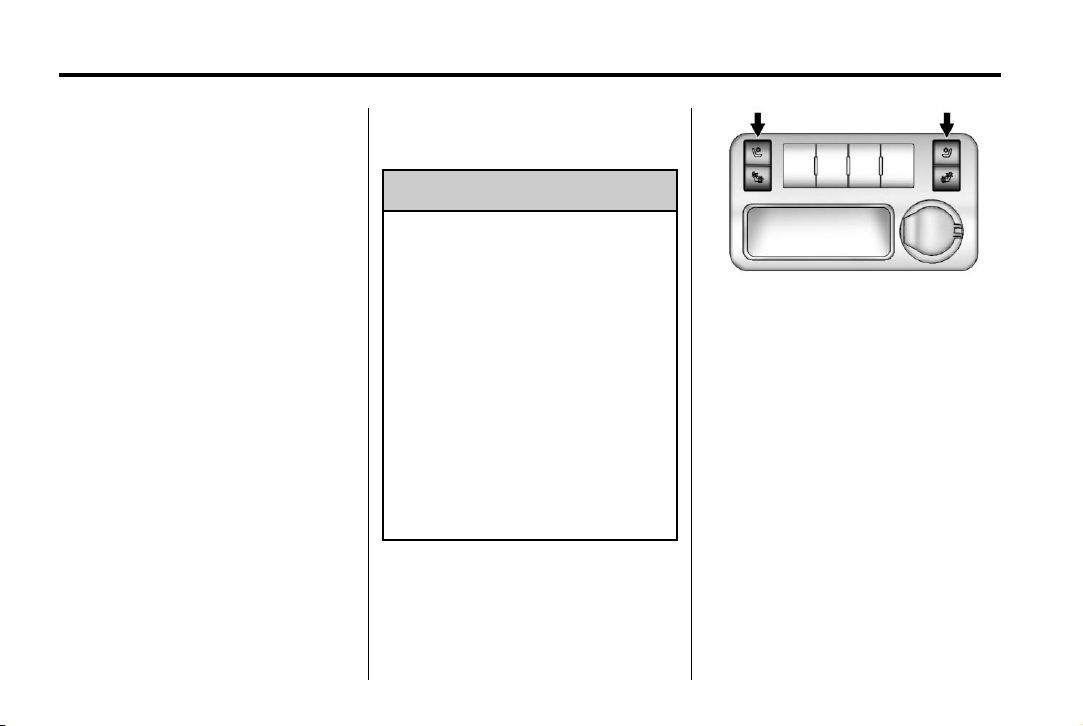
Black plate (8,1)
Acadia/Acadia Denali Owner Manual - 2013 - 1st Edition - 8/20/12
3-8 Seats and Restraints
A single beep sounds. The driver
seat moves back approximately
8 cm (3 in) and the power steering
column (if equipped) moves up and
forward. To move the seat back
farther, press
is all the way back.
If something has blocked the driver
seat while recalling the exit position,
the recall may stop. Remove the
obstruction; then press and hold the
power seat control rearward for
two seconds. Try recalling the exit
position again. If the exit position is
still not recalling, see your dealer for
service.
See Vehicle Personalization on
page 5‑40.
S again until the seat
Heated and Ventilated Front Seats
WARNING
{
If you cannot feel temperature
change or pain to the skin, the
seat heater may cause burns. To
reduce the risk of burns, people
with such a condition should use
care when using the seat heater,
especially for long periods of
time. Do not place anything on
the seat that insulates against
heat, such as a blanket, cushion,
cover, or similar item. This may
cause the seat heater to
overheat. An overheated seat
heater may cause a burn or may
damage the seat.
Heated and Cooled Seat Buttons
Shown, Heated Seat Buttons
Similar
If available, the buttons are on the
center console. To operate, the
engine must be running.
I (Heated Seatback): If available,
press to heat the seatback only.
H (Cooled Seat): If available,
press to cool the entire seat.
J (Heated Seat and Seatback):
Press to heat the seat and
seatback.
Press the button once for the
highest setting. With each press of
the button, the seat will change to
the next lower setting, and then to
Page 61
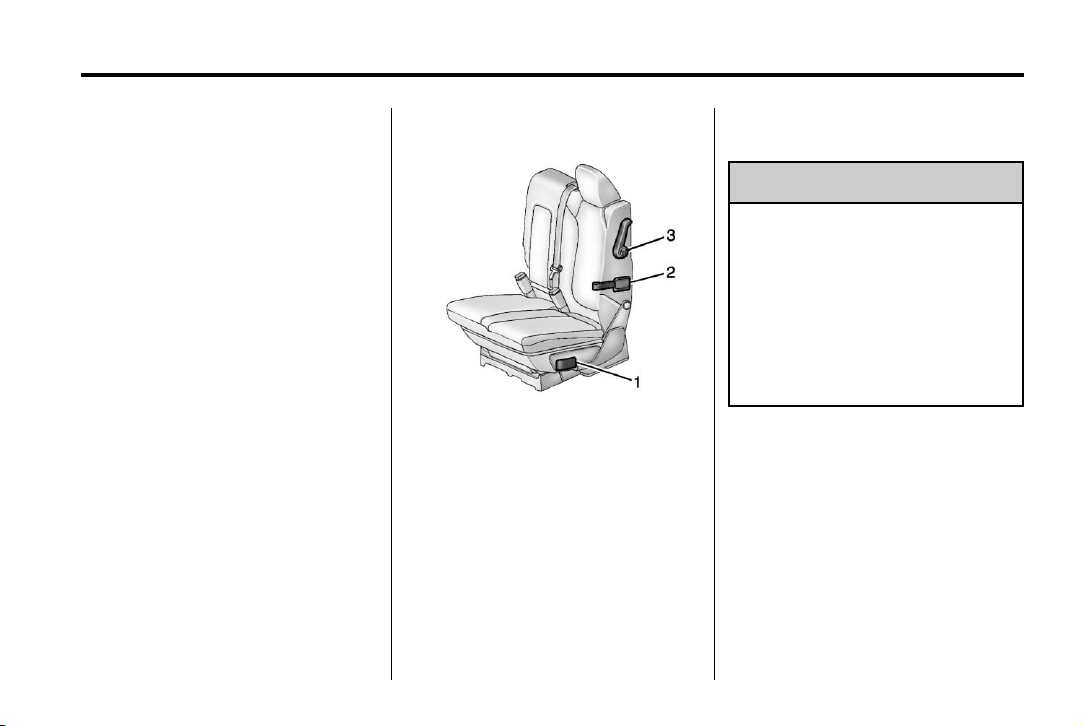
Black plate (9,1)
Acadia/Acadia Denali Owner Manual - 2013 - 1st Edition - 8/20/12
Seats and Restraints 3-9
the off setting. The lights indicate
three for the highest setting and one
for the lowest.
The passenger heated seat may
take longer to heat up.
The heated and/or cooled seats are
canceled after the ignition is
turned off.
Remote Start Heated Seats
When it is cold outside, the heated
seats may turn on automatically
during a remote vehicle start. The
heated seats will be canceled when
the ignition is turned on. Press the
desired heated seat button to use
the heated seats after the vehicle is
started.
The heated seat button lights will
not turn on during a remote start.
The temperature of an unoccupied
seat may be reduced.
See Remote Vehicle Start on
page 2‑4.
Rear Seats
1. Seat Adjustment Handle
2. Reclining Seatback Strap
3. Sliding Seat Lever
Entering and Exiting the
Third Row
WARNING
{
Using the third row seating
position while the second row is
folded, or folded and tumbled,
could cause injury in a sudden
stop or crash. Be sure to return
the seat to the passenger seating
position. Push and pull on the
seat to make sure it is locked into
place.
Notice: Folding a rear seat with
the safety belts still fastened may
cause damage to the seat or the
safety belts. Always unbuckle the
safety belts and return them to
their normal stowed position
before folding a rear seat.
Page 62

Black plate (10,1)
Acadia/Acadia Denali Owner Manual - 2013 - 1st Edition - 8/20/12
3-10 Seats and Restraints
To access the third row:
1. Remove objects on the floor in
front of or on the second row
seat, or in the seat tracks on the
floor.
2. Move the front center console
armrest completely forward. See
Center Console Storage on
page 4‑2.
3. Place the folding armrests in the
upright position.
4. Make sure that the safety belt is
unfastened and in the stowed
position.
5. Pull the sliding seat lever (3)
forward. The seatback will tilt
forward, and the seat will begin
sliding forward. Continue to push
forward on the seatback until the
entire seat moves all the way
forward and the seat cushion is
folded.
Returning the Seat to the
Seating Position
To return the second row seat to its
normal seating position:
1. Remove objects on the floor
behind the second row seat or in
the seat tracks on the floor.
2. Slide the seat rearward by
pushing on the seatback until
the seat is locked into place.
3. Continue pushing the seatback
rearward until the seatback is
locked into place.
4. Push down on the rear of the
seat cushion until it is locked in
place.
5. Push and pull on the seatback
and seat cushion to make sure
they are locked in place.
6. Check that the safety belt is not
under the seat cushion.
Reclining the Seatbacks
To recline the seatback:
1. Leaning rearward in the seat,
pull the reclining seatback
strap (2).
2. Move the seatback to the
desired position, and then
release the strap (2) to lock the
seatback in place.
3. Push and pull on the seatback to
make sure it is locked.
Folding the Seatback
To fold the second row seatbacks:
1. Remove anything on or under
the seat.
2. Place the armrest in the upright
position, and unfasten the
safety belt.
Page 63
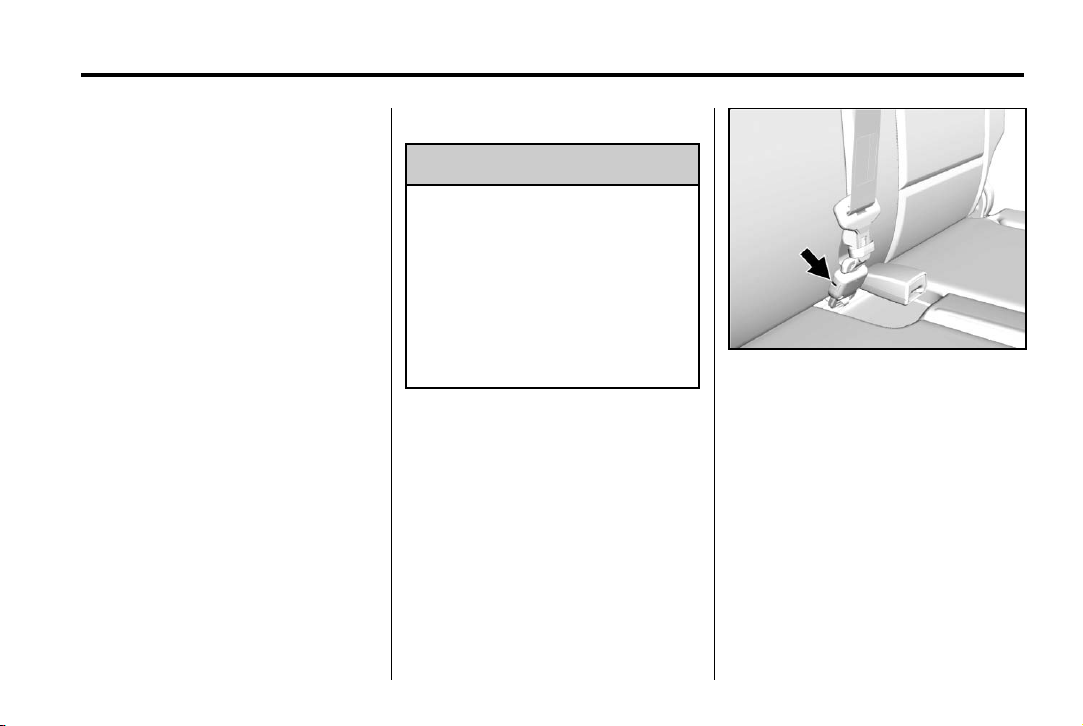
Black plate (11,1)
Acadia/Acadia Denali Owner Manual - 2013 - 1st Edition - 8/20/12
Seats and Restraints 3-11
3. Pull forward on the reclining
seatback strap (2).
The head restraint will fold down
automatically.
To return the seatback to the
seating position, lift the seatback
and push it rearward until it locks
into place. Push and pull on the
seatback to make sure it is locked.
Pull up on the head restraint to
return it to the upright, locked
position.
Adjusting the Seats
To adjust the second row seats, pull
outward on the seat adjustment
handle (1). Slide the seat forward or
rearward to the desired position.
Release the handle (1), and push
and pull on the seat to make sure it
is locked.
Third Row Seats
WARNING
{
Using the third row seating
position while the second row is
folded, or pushed forward in the
entry position, could cause injury
in a sudden stop or crash. Be
sure to return the seat to the
passenger seating position. Push
and pull on the seat to make sure
it is locked into place.
Folding the Seatback
Notice: Folding a rear seat with
the safety belts still fastened may
cause damage to the seat or the
safety belts. Always unbuckle the
safety belts and return them to
their normal stowed position
before folding a rear seat.
To fold the third row seatback:
1. Remove anything on or under
the seat.
2. Disconnect the rear safety belt
mini-latch, using a key in the slot
on the mini-buckle, and let the
belt retract into the headliner.
Stow the mini-latch in the holder
in the headliner.
Page 64

Black plate (12,1)
Acadia/Acadia Denali Owner Manual - 2013 - 1st Edition - 8/20/12
3-12 Seats and Restraints
or lift the seatback and push it
into place from inside the
vehicle.
2. The headrest must be locked
into place before sitting in
the seat.
If either seatback is not locked, it
could move forward in a sudden
3. Pull up on the release lever on
the back of the seat. The
headrest moves forward
automatically.
4. Push the seatback forward to
lay flat.
Returning the Seat to the
stop or crash. That could cause
injury to the person sitting there.
Always push and pull on the
seatbacks to be sure they are
locked.
3. Push and pull on the seatback to
make sure it is locked in place.
Seating Position
To return the seatback to the
seating position:
1. From the rear of the vehicle,
raise the seatback to the upright
position using the pullstrap on
the back of the third row seat,
A safety belt that is improperly
routed, not properly attached,
or twisted will not provide the
WARNING
{
WARNING
{
(Continued)
WARNING (Continued)
protection needed in a crash. The
person wearing the belt could be
seriously injured. After raising the
rear seatback, always check to be
sure that the safety belts are
properly routed and attached, and
are not twisted.
4. Reconnect the center safety belt
mini-latch to the mini-buckle. Do
not let it twist.
5. Pull on the safety belt to be sure
the mini-latch is secure.
Removing the Third Row Seats
To remove a third row seat:
1. Remove the cargo management
system, if available and
installed. See Cargo
Management System on
page 4‑3.
2. Remove anything on or under
the seat.
Page 65

Black plate (13,1)
Acadia/Acadia Denali Owner Manual - 2013 - 1st Edition - 8/20/12
Seats and Restraints 3-13
Notice: Folding a rear seat with
the safety belts still fastened may
cause damage to the seat or the
safety belts. Always unbuckle the
safety belts and return them to
their normal stowed position
before folding a rear seat.
3. Fold the seatback down. See
“Folding the Seatback” earlier in
this section.
4. Remove the rear bolts on the
floor on each side of the seat.
5. Remove the seat by tilting it
slightly upward, and then pulling
it out of the rear of the vehicle in
one motion.
6. Replace the bolts in the floor
holes for storage.
Installing the Third Row Seats
To reinstall a third row seat:
1. Before installing the seat the
seatback must be folded
forward. See “Folding the
Seatback” earlier in this section.
The seats must be placed in the
proper locations to attach
correctly. The wider seat must
be installed on the driver side
and the narrower seat on the
passenger side. Remove the
bolts from the holes in the floor
before installing the seats.
2. Place the seat on the vehicle
floor so that the front seat hooks
are on the vehicle bars.
3. Reinstall the bolts, and torque to
55 Y (41 lb ft). Pull up on the
seat to make sure it is locked in
place.
4. Raise the seatback to its upright
position. Push and pull on the
seatback to make sure it is
locked into place.
5. Push the headrest up into
position. Push and pull on the
headrest to make sure it is
locked into place.
6. Reconnect the center safety belt
mini-latch to the mini-buckle. Do
not let it twist.
Page 66

Black plate (14,1)
Acadia/Acadia Denali Owner Manual - 2013 - 1st Edition - 8/20/12
3-14 Seats and Restraints
Safety Belts
This section of the manual
describes how to use safety belts
properly. It also describes some
things not to do with safety belts.
WARNING
{
Do not let anyone ride where a
safety belt cannot be worn
properly. In a crash, if you or your
passenger(s) are not wearing
safety belts, injuries can be much
worse than if you are wearing
safety belts. You can be seriously
injured or killed by hitting things
inside the vehicle harder or by
being ejected from the vehicle. In
addition, anyone who is not
buckled up can strike other
passengers in the vehicle.
It is extremely dangerous to ride
in a cargo area, inside or outside
of a vehicle. In a collision,
passengers riding in these areas
(Continued)
WARNING (Continued)
are more likely to be seriously
injured or killed. Do not allow
passengers to ride in any area of
the vehicle that is not equipped
with seats and safety belts.
Always wear a safety belt, and
check that all passenger(s) are
restrained properly too.
This vehicle has indicators as a
reminder to buckle the safety belts.
See Safety Belt Reminders on
page 5‑13.
Why Safety Belts Work
When riding in a vehicle, you travel
as fast as the vehicle does. If the
vehicle stops suddenly, you keep
going until something stops you.
It could be the windshield, the
instrument panel, or the safety belts!
When you wear a safety belt, you
and the vehicle slow down together.
There is more time to stop because
you stop over a longer distance and,
when worn properly, your strongest
bones take the forces from the
Page 67
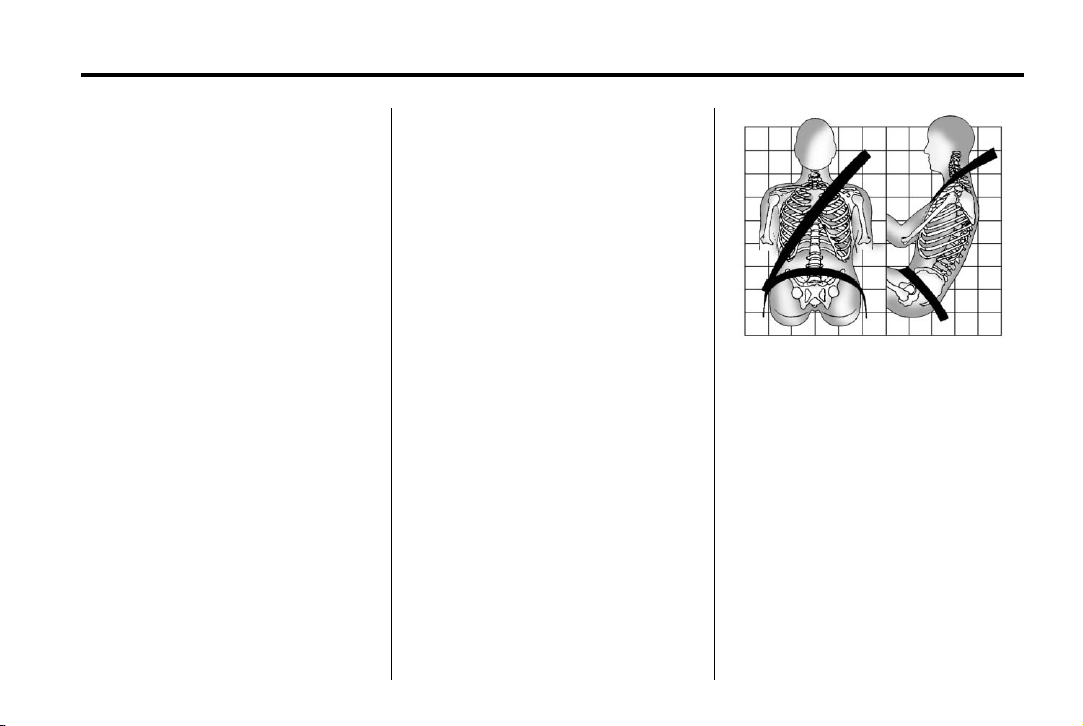
Black plate (15,1)
Acadia/Acadia Denali Owner Manual - 2013 - 1st Edition - 8/20/12
Seats and Restraints 3-15
safety belts. That is why wearing
safety belts makes such good
sense.
Questions and Answers About
Safety Belts
Q: Will I be trapped in the vehicle
after a crash if I am wearing a
safety belt?
A: You could be — whether you are
wearing a safety belt or not.
Your chance of being conscious
during and after a crash, so you
can unbuckle and get out, is
much greater if you are belted.
Q: If my vehicle has airbags, why
should I have to wear safety
belts?
A: Airbags are supplemental
systems only; so they work with
safety belts — not instead of
them. Whether or not an airbag
is provided, all occupants still
have to buckle up to get the
most protection.
Also, in nearly all states and in
all Canadian provinces, the law
requires wearing safety belts.
How to Wear Safety Belts Properly
This section is only for people of
adult size.
There are special things to know
about safety belts and children. And
there are different rules for smaller
children and infants. If a child will be
riding in the vehicle, see Older
Children on page 3‑36 or Infants
and Young Children on page 3‑38.
Follow those rules for everyone's
protection.
It is very important for all occupants
to buckle up. Statistics show that
unbelted people are hurt more often
in crashes than those who are
wearing safety belts.
There are important things to know
about wearing a safety belt properly.
.
Sit up straight and always keep
your feet on the floor in front
of you.
.
Always use the correct buckle
for your seating position.
.
Wear the lap part of the belt low
and snug on the hips, just
touching the thighs. In a crash,
this applies force to the strong
pelvic bones and you would be
less likely to slide under the lap
belt. If you slid under it, the belt
would apply force on your
abdomen. This could cause
serious or even fatal injuries.
Page 68

Black plate (16,1)
Acadia/Acadia Denali Owner Manual - 2013 - 1st Edition - 8/20/12
3-16 Seats and Restraints
.
Wear the shoulder belt over the
shoulder and across the chest.
These parts of the body are best
able to take belt restraining
forces. The shoulder belt locks if
there is a sudden stop or crash.
WARNING
{
You can be seriously injured,
or even killed, by not wearing
your safety belt properly.
.
Never allow the lap or
shoulder belt to become
loose or twisted.
.
Never wear the shoulder belt
under both arms or behind
your back.
.
Never route the lap or
shoulder belt over an
armrest.
Lap-Shoulder Belt
All seating positions in the vehicle
have a lap-shoulder belt.
If you are using a rear seating
position with a detachable safety
belt and the safety belt is not
attached, see “Returning the Seat to
the Seating Position” under Third
Row Seats on page 3‑11 for
instruction on reconnecting the
safety belt to the mini-buckle.
The following instructions explain
how to wear a lap-shoulder belt
properly.
1. Adjust the seat, if the seat is
adjustable, so you can sit up
straight. To see how, see “Seats”
in the Index.
2. Pick up the latch plate and pull
the belt across you. Do not let it
get twisted.
The lap-shoulder belt may lock if
you pull the belt across you very
quickly. If this happens, let the
belt go back slightly to unlock it.
Then pull the belt across you
more slowly.
If the shoulder portion of a
passenger belt is pulled out all
the way, the child restraint
locking feature may be engaged.
If this happens, let the belt go
back all the way and start again.
Page 69

Black plate (17,1)
Acadia/Acadia Denali Owner Manual - 2013 - 1st Edition - 8/20/12
later in this section for
instructions on use and
important safety information.
Seats and Restraints 3-17
3. Push the latch plate into the
buckle until it clicks.
4. Pull up on the latch plate to
make sure it is secure. If the belt
is not long enough, see Safety
Belt Extender on page 3‑21.
Position the release button on
the buckle so that the safety belt
could be quickly unbuckled if
necessary.
5. If equipped with a shoulder belt
height adjuster, move it to the
height that is right for you. See
“Shoulder Belt Height Adjuster”
6. To make the lap part tight, pull
up on the shoulder belt.
It may be necessary to pull the
stitching on the safety belt
through the latch plate to fully
tighten the lap belt on smaller
occupants.
To unlatch the belt, push the button
on the buckle. The belt should
return to its stowed position. Slide
the latch plate up the safety belt
webbing when the safety belt is not
in use. The latch plate should rest
on the stitching on the safety belt,
near the guide loop on the side wall.
Before a door is closed, be sure the
safety belt is out of the way. If a
door is slammed against a safety
belt, damage can occur to both the
safety belt and the vehicle.
Page 70

Black plate (18,1)
Acadia/Acadia Denali Owner Manual - 2013 - 1st Edition - 8/20/12
3-18 Seats and Restraints
Shoulder Belt Height Adjuster
The vehicle has a shoulder belt
height adjuster for the driver and
right front passenger seating
positions.
Adjust the height so the shoulder
portion of the belt is on the shoulder
but not falling off of it. The belt
should be close to but not
contacting the neck. Improper
shoulder belt height adjustment
could reduce the effectiveness of
the safety belt in a crash. See How
to Wear Safety Belts Properly on
page 3‑15.
To move it down, push down on the
release button and move the height
adjuster to the desired position. You
can move the height adjuster up by
pushing up on the shoulder belt
guide.
After the adjuster is set to the
desired position, try to move it down
without pushing the release button
to make sure it has locked into
position.
Safety Belt Pretensioners
This vehicle has safety belt
pretensioners for the front outboard
occupants. Although the safety belt
pretensioners cannot be seen, they
are part of the safety belt assembly.
They can help tighten the safety
belts during the early stages of a
moderate to severe frontal, near
frontal, or rear crash if the threshold
conditions for pretensioner
activation are met. And, for vehicles
with side impact airbags, safety belt
pretensioners can help tighten the
safety belts in a side crash or a
rollover event.
Pretensioners work only once. If the
pretensioners activate in a crash,
they will need to be replaced, and
probably other new parts for the
vehicle's safety belt system. See
Replacing Safety Belt System Parts
after a Crash on page 3‑22.
Page 71

Black plate (19,1)
Acadia/Acadia Denali Owner Manual - 2013 - 1st Edition - 8/20/12
Seats and Restraints 3-19
Rear Safety Belt Comfort
Guides
This vehicle may have rear safety
belt comfort guides. If not, they are
available through your dealer. The
guides may provide added safety
belt comfort for older children who
have outgrown booster seats and
for some adults. When installed and
properly adjusted, the comfort guide
positions the shoulder belt away
from the neck and head.
Here is how to install a comfort
guide to the safety belt:
Outboard Positions
1. For the outboard positions,
remove the guide from its
storage clip on the interior body.
For the third row center position,
locate the comfort guide which is
located in a storage pocket, at
the top of the seat, under the
headrest on the driver side of
the vehicle. To access the
comfort guide, you will first need
to move the headrest forward by
pulling on the handle behind the
seatback. The comfort guide will
now be accessible.
Third Row Center Position
Pull the comfort guide out of its
storage location and then return
the headrest to its upright
position.
Page 72

Black plate (20,1)
Acadia/Acadia Denali Owner Manual - 2013 - 1st Edition - 8/20/12
3-20 Seats and Restraints
WARNING (Continued)
and across the chest. These parts
of the body are best able to take
belt restraining forces.
2. Place the guide over the belt
and insert the two edges of the
belt into the slots of the guide.
3. Be sure that the belt is not
twisted and it lies flat. The
elastic cord must be under the
belt and the guide on top.
A safety belt that is not properly
worn may not provide the
protection needed in a crash. The
person wearing the belt could be
seriously injured. The shoulder
belt should go over the shoulder
WARNING
{
(Continued)
4. Buckle, position, and release the
safety belt as described
previously in this section. Make
sure the shoulder portion of the
belt is on the shoulder and not
falling off of it. The belt should
be close to, but not contacting,
the neck.
Page 73

Black plate (21,1)
Acadia/Acadia Denali Owner Manual - 2013 - 1st Edition - 8/20/12
Seats and Restraints 3-21
To remove and store the comfort
guide, squeeze the belt edges
together so that the safety belt can
be removed from the guide. Slide
the guide into its storage location or
on its storage clip.
Safety Belt Use During Pregnancy
Safety belts work for everyone,
including pregnant women. Like all
occupants, they are more likely to
be seriously injured if they do not
wear safety belts.
A pregnant woman should wear a
lap-shoulder belt, and the lap
portion should be worn as low as
possible, below the rounding,
throughout the pregnancy.
The best way to protect the fetus is
to protect the mother. When a safety
belt is worn properly, it is more likely
that the fetus will not be hurt in a
crash. For pregnant women, as for
anyone, the key to making safety
belts effective is wearing them
properly.
Safety Belt Extender
If the vehicle's safety belt will fasten
around you, you should use it.
But if a safety belt is not long
enough, your dealer will order you
an extender. When you go in to
order it, take the heaviest coat you
will wear, so the extender will be
long enough for you. To help avoid
personal injury, do not let someone
else use it, and use it only for the
seat it is made to fit. The extender
has been designed for adults. Never
use it for securing child seats. To
wear it, attach it to the regular safety
belt. See the instruction sheet that
comes with the extender.
Safety System Check
Now and then, check that the safety
belt reminder light, safety belts,
buckles, latch plates, retractors, and
anchorages are all working properly.
Look for any other loose or
damaged safety belt system parts
that might keep a safety belt system
from doing its job. See your dealer
to have it repaired. Torn or frayed
safety belts may not protect you in a
crash. They can rip apart under
impact forces. If a belt is torn or
frayed, get a new one right away.
Make sure the safety belt reminder
light is working. See Safety Belt
Reminders on page 5‑13.
Keep safety belts clean and dry.
See Safety Belt Care on page 3‑22.
Page 74

Black plate (22,1)
Acadia/Acadia Denali Owner Manual - 2013 - 1st Edition - 8/20/12
3-22 Seats and Restraints
Safety Belt Care
Keep belts clean and dry.
WARNING
{
Do not bleach or dye safety belts.
It may severely weaken them. In
a crash, they might not be able to
provide adequate protection.
Clean safety belts only with mild
soap and lukewarm water.
Replacing Safety Belt System Parts after a Crash
WARNING
{
A crash can damage the safety
belt system in the vehicle.
A damaged safety belt system
may not properly protect the
person using it, resulting in
serious injury or even death in a
crash. To help make sure the
safety belt systems are working
properly after a crash, have them
inspected and any necessary
replacements made as soon as
possible.
After a minor crash, replacement of
safety belts may not be necessary.
But the safety belt assemblies that
were used during any crash may
have been stressed or damaged.
See your dealer to have the safety
belt assemblies inspected or
replaced.
New parts and repairs may be
necessary even if the safety belt
system was not being used at the
time of the crash.
Have the safety belt pretensioners
checked if the vehicle has been in a
crash, or if the airbag readiness light
stays on after you start the vehicle
or while you are driving. See Airbag
Readiness Light on page 5‑14.
Page 75

Black plate (23,1)
Acadia/Acadia Denali Owner Manual - 2013 - 1st Edition - 8/20/12
Seats and Restraints 3-23
Airbag System
The vehicle has the following
airbags:
.
A frontal airbag for the driver.
.
A frontal airbag for the front
outboard passenger.
.
A seat-mounted side impact
airbag for the driver.
.
A seat-mounted side impact
airbag for the front outboard
passenger.
.
A roof-rail airbag for the driver
and for the second and third row
passengers seated directly
behind the driver.
.
A roof-rail airbag for the front
outboard passenger and the
second and third row
passengers seated directly
behind the front outboard
passenger.
The vehicle may have the following
airbag:
.
A front center airbag for the
driver and front outboard
passenger.
All vehicle airbags have the word
AIRBAG on the trim or on an
attached label near the deployment
opening.
For frontal airbags, the word
AIRBAG is on the center of the
steering wheel for the driver and on
the instrument panel for the front
outboard passenger.
For the front center airbag, the word
AIRBAG is on the inboard side of
the driver seatback.
For seat-mounted side impact
airbags, the word AIRBAG is on the
side of the seatback closest to
the door.
For roof-rail airbags, the word
AIRBAG is on the ceiling or trim.
Airbags are designed to supplement
the protection provided by safety
belts. Even though today's airbags
are also designed to help reduce
the risk of injury from the force of an
inflating bag, all airbags must inflate
very quickly to do their job.
Here are the most important things
to know about the airbag system:
WARNING
{
You can be severely injured or
killed in a crash if you are not
wearing your safety belt, even
with airbags. Airbags are
designed to work with safety
belts, not replace them. Also,
airbags are not designed to inflate
in every crash. In some crashes
safety belts are the only restraint.
See When Should an Airbag
Inflate? on page 3‑27.
Wearing your safety belt during a
crash helps reduce the chance of
hitting things inside the vehicle or
being ejected from it. Airbags are
“supplemental restraints” to the
(Continued)
Page 76

Black plate (24,1)
Acadia/Acadia Denali Owner Manual - 2013 - 1st Edition - 8/20/12
3-24 Seats and Restraints
WARNING (Continued)
safety belts. Everyone in the
vehicle should wear a safety belt
properly, whether or not there is
an airbag for that person.
WARNING
{
Because airbags inflate with great
force and faster than the blink of
an eye, anyone who is up
against, or very close to any
airbag when it inflates can be
seriously injured or killed. Do not
sit unnecessarily close to any
airbag, as you would be if sitting
on the edge of the seat or leaning
forward. Safety belts help keep
you in position before and during
a crash. Always wear a safety
belt, even with airbags. The driver
(Continued)
WARNING (Continued)
should sit as far back as possible
while still maintaining control of
the vehicle.
Occupants should not lean on or
sleep against the front center
armrest or console with a front
center airbag.
Occupants should not lean on or
sleep against the door or side
windows in seating positions with
seat-mounted side impact airbags
and/or roof-rail airbags.
Children who are up against,
or very close to, any airbag when
it inflates can be seriously injured
or killed. Airbags plus
lap-shoulder belts offer protection
for adults and older children, but
WARNING
{
WARNING (Continued)
not for young children and infants.
Neither the vehicle's safety belt
system nor its airbag system is
designed for them. Young
children and infants need the
protection that a child restraint
system can provide. Always
secure children properly in the
vehicle. To read how, see Older
Children on page 3‑36 or Infants
and Young Children on
page 3‑38.
There is an airbag readiness light
on the instrument cluster, which
shows the airbag symbol.
(Continued)
Page 77
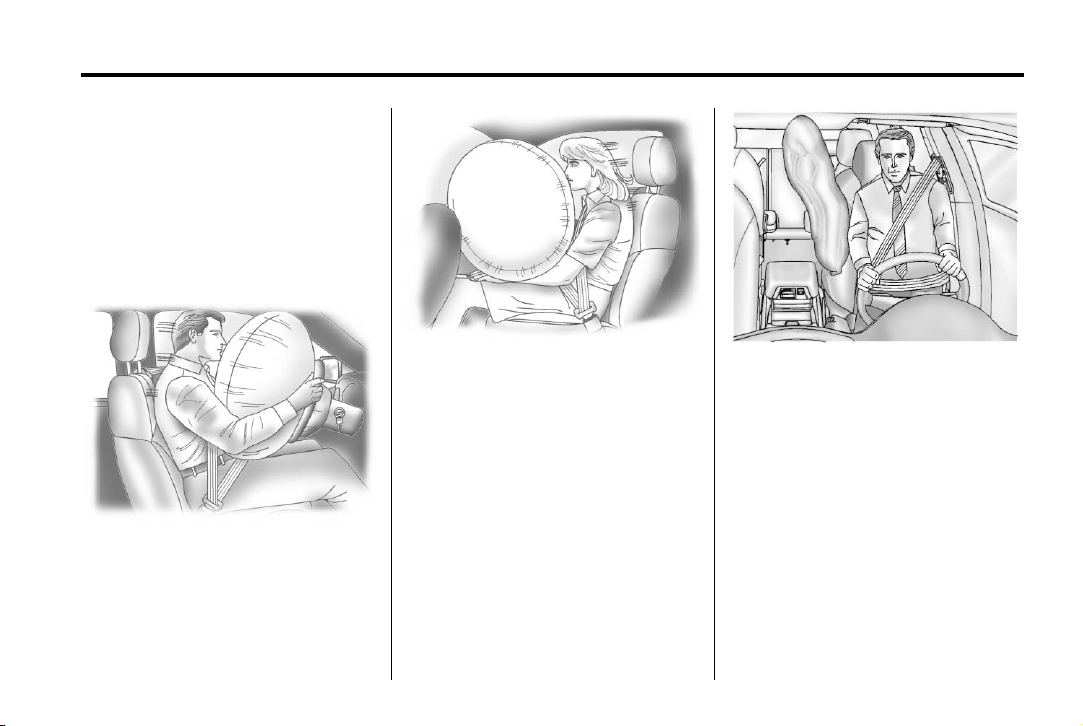
Black plate (25,1)
Acadia/Acadia Denali Owner Manual - 2013 - 1st Edition - 8/20/12
The system checks the airbag
electrical system for malfunctions.
The light tells you if there is an
electrical problem. See Airbag
Readiness Light on page 5‑14 for
more information.
Where Are the Airbags?
Seats and Restraints 3-25
The front outboard passenger
frontal airbag is in the passenger
side instrument panel.
The driver frontal airbag is in the
center of the steering wheel.
If the vehicle has a front center
airbag, it is in the inboard side of the
driver seatback.
Page 78
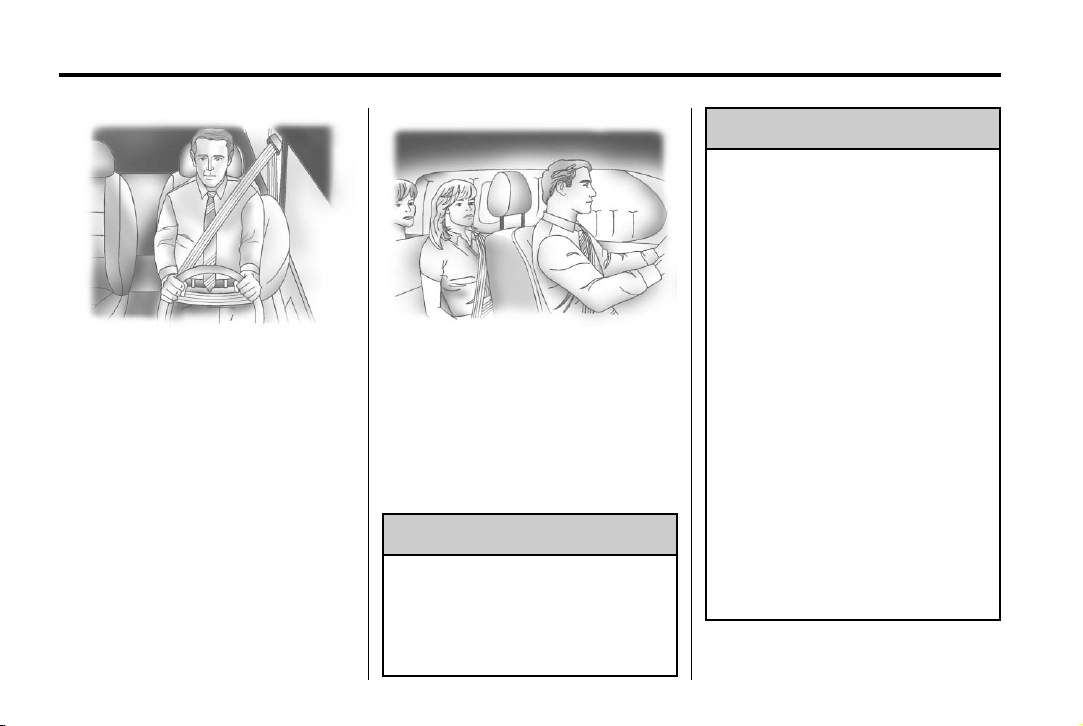
Black plate (26,1)
Acadia/Acadia Denali Owner Manual - 2013 - 1st Edition - 8/20/12
3-26 Seats and Restraints
Driver Side Shown, Passenger
Side Similar
The driver and front outboard
passenger seat-mounted side
impact airbags are in the side of the
seatbacks closest to the door.
Driver Side Shown, Passenger
The roof-rail airbags for the driver,
front outboard passenger, and
second and third row outboard
passengers are in the ceiling above
the side windows.
If something is between an
occupant and an airbag, the
airbag might not inflate properly
or it might force the object into
Side Similar
WARNING
{
WARNING (Continued)
that person causing severe injury
or even death. The path of an
inflating airbag must be kept
clear. Do not put anything
between an occupant and an
airbag, and do not attach or put
anything on the steering wheel
hub or on or near any other
airbag covering.
Do not use seat or console
accessories that block the
inflation path of a seat-mounted
side impact airbag or the front
center airbag, if equipped.
Never secure anything to the roof
of a vehicle with roof-rail airbags
by routing a rope or tie-down
through any door or window
opening. If you do, the path of an
inflating roof-rail airbag will be
blocked.
(Continued)
Page 79

Black plate (27,1)
Acadia/Acadia Denali Owner Manual - 2013 - 1st Edition - 8/20/12
Seats and Restraints 3-27
When Should an Airbag Inflate?
The vehicle has frontal airbags,
seat-mounted side impact airbags,
and roof-rail airbags. The vehicle
may have a front center airbag. See
Airbag System on page 3‑23. These
airbags are designed to inflate if the
impact exceeds the specific airbag
system’s deployment threshold.
Deployment thresholds are used to
predict how severe a crash is likely
to be in time for the airbag to inflate
and help restrain the occupants.
Deployment thresholds can vary
with specific vehicle design.
Frontal airbags are designed to
inflate in moderate to severe frontal
or near frontal crashes to help
reduce the potential for severe
injuries, mainly to the driver's or
front outboard passenger's head
and chest.
Whether the frontal airbags will or
should inflate is not based primarily
on how fast the vehicle is traveling.
It depends on what is hit, the
direction of the impact, and how
quickly the vehicle slows down.
Frontal airbags may inflate at
different crash speeds depending on
whether the vehicle hits an object
straight on or at an angle, and
whether the object is fixed or
moving, rigid or deformable, narrow
or wide.
Frontal airbags are not intended to
inflate during vehicle rollovers, rear
impacts, or many side impacts.
In addition, the vehicle has
dual-stage frontal airbags.
Dual-stage airbags adjust the
restraint according to crash severity.
The vehicle has electronic frontal
sensors, which help the sensing
system distinguish between a
moderate frontal impact and a more
severe frontal impact. For moderate
frontal impacts, dual-stage airbags
inflate at a level less than full
deployment. For more severe frontal
impacts, full deployment occurs.
The front center airbag, if equipped,
seat-mounted side impact airbags,
and roof-rail airbags are intended to
inflate in moderate to severe side
crashes depending on the location
of the impact. A seat-mounted side
impact airbag is intended to inflate
on the side of the vehicle that is
struck. The front center airbag,
if equipped, and both roof-rail
airbags are intended to inflate when
either side of the vehicle is struck.
In addition, the roof-rail airbags and
the front center airbag, if equipped,
are intended to inflate when the
sensing system predicts that the
vehicle is about to roll over on its
side. The roof-rail airbags are also
intended to inflate in a severe frontal
impact.
The front center airbag, if equipped,
is not intended to inflate in frontal
impacts, near frontal impacts,
or rear impacts. Seat-mounted side
impact airbags are not intended to
inflate in frontal impacts, near frontal
impacts, rollovers, rear impacts,
or on the non-struck side of a
Page 80

Black plate (28,1)
Acadia/Acadia Denali Owner Manual - 2013 - 1st Edition - 8/20/12
3-28 Seats and Restraints
vehicle in a side impact. Roof-rail
airbags are not intended to inflate in
rear impacts.
In any particular crash, no one can
say whether an airbag should have
inflated simply because of the
vehicle damage or the repair costs.
What Makes an Airbag Inflate?
In a deployment event, the sensing
system sends an electrical signal
triggering a release of gas from the
inflator. Gas from the inflator fills the
airbag causing the bag to break out
of the cover. The inflator, the airbag,
and related hardware are all part of
the airbag module.
For airbag location, see Where Are
the Airbags? on page 3‑25.
How Does an Airbag Restrain?
In moderate to severe frontal or
near frontal collisions, even belted
occupants can contact the steering
wheel or the instrument panel. In
moderate to severe side collisions,
even belted occupants can contact
the inside of the vehicle.
Airbags supplement the protection
provided by safety belts by
distributing the force of the impact
more evenly over the
occupant's body.
Rollover capable roof-rail airbags
are also designed to help contain
the head and chest of occupants in
the outboard seating positions in the
first, second, and third rows. The
rollover capable roof-rail airbags are
designed to help reduce the risk of
full or partial ejection in rollover
events, although no system can
prevent all such ejections.
But airbags would not help in many
types of collisions, primarily
because the occupant's motion is
not toward those airbags. See When
Should an Airbag Inflate? on
page 3‑27 for more information.
Airbags should never be regarded
as anything more than a supplement
to safety belts.
What Will You See after an Airbag Inflates?
After the frontal airbags and
seat-mounted side impact airbags
inflate, they quickly deflate, so
quickly that some people may not
even realize an airbag inflated. The
front center airbag, if equipped, and
the roof-rail airbags may still be at
least partially inflated for some time
after they inflate. Some components
of the airbag module may be hot for
several minutes. For location of the
airbags, see Where Are the
Airbags? on page 3‑25.
The parts of the airbag that come
into contact with you may be warm,
but not too hot to touch. There may
be some smoke and dust coming
from the vents in the deflated
airbags. Airbag inflation does not
prevent the driver from seeing out of
Page 81

Black plate (29,1)
Acadia/Acadia Denali Owner Manual - 2013 - 1st Edition - 8/20/12
Seats and Restraints 3-29
the windshield or being able to steer
the vehicle, nor does it prevent
people from leaving the vehicle.
WARNING
{
When an airbag inflates, there
may be dust in the air. This dust
could cause breathing problems
for people with a history of
asthma or other breathing trouble.
To avoid this, everyone in the
vehicle should get out as soon as
it is safe to do so. If you have
breathing problems but cannot
get out of the vehicle after an
airbag inflates, then get fresh air
by opening a window or a door.
If you experience breathing
problems following an airbag
deployment, you should seek
medical attention.
The vehicle has a feature that may
automatically unlock the doors, turn
on the interior lamps and hazard
warning flashers, and shut off the
fuel system after the airbags inflate.
You can lock the doors, and turn off
the interior lamps and hazard
warning flashers by using the
controls for those features.
WARNING
{
A crash severe enough to inflate
the airbags may have also
damaged important functions in
the vehicle, such as the fuel
system, brake and steering
systems, etc. Even if the vehicle
appears to be drivable after a
moderate crash, there may be
concealed damage that could
make it difficult to safely operate
the vehicle.
Use caution if you should attempt
to restart the engine after a crash
has occurred.
In many crashes severe enough to
inflate the airbag, windshields are
broken by vehicle deformation.
Additional windshield breakage may
also occur from the front outboard
passenger airbag.
.
Airbags are designed to inflate
only once. After an airbag
inflates, you will need some new
parts for the airbag system.
If you do not get them, the
airbag system will not be there
to help protect you in another
crash. A new system will include
airbag modules and possibly
other parts. The service manual
for the vehicle covers the need
to replace other parts.
.
The vehicle has a crash sensing
and diagnostic module which
records information after a
crash. See Vehicle Data
Recording and Privacy on
page 13‑19 and Event Data
Recorders on page 13‑19.
.
Let only qualified technicians
work on the airbag systems.
Improper service can mean that
Page 82

Black plate (30,1)
Acadia/Acadia Denali Owner Manual - 2013 - 1st Edition - 8/20/12
3-30 Seats and Restraints
an airbag system will not work
properly. See your dealer for
service.
Passenger Sensing System
The vehicle has a passenger
sensing system for the front
outboard passenger position. The
passenger airbag status indicator
will light on the instrument panel
when the vehicle is started.
United States
Canada and Mexico
The words ON and OFF, or the
symbol for on and off, are visible
during the system check. If you use
remote start, if equipped, to start the
vehicle, you may not see the system
check. When the system check is
complete, either the word ON or
OFF, or the symbol for on or off, will
be visible. See Passenger Airbag
Status Indicator on page 5‑14.
The passenger sensing system
turns off the front outboard
passenger frontal airbag under
certain conditions. No other airbag
is affected by the passenger
sensing system.
The passenger sensing system
works with sensors that are part of
the front outboard passenger seat.
The sensors are designed to detect
the presence of a properly-seated
occupant and determine if the front
outboard passenger frontal airbag
should be allowed to inflate or not.
According to accident statistics,
children are safer when properly
secured in a rear seat in the correct
child restraint for their weight
and size.
We recommend that children be
secured in a rear seat, including: an
infant or a child riding in a
rear-facing child restraint; a child
riding in a forward-facing child seat;
an older child riding in a booster
seat; and children, who are large
enough, using safety belts.
Never put a rear-facing child seat in
the front. This is because the risk to
the rear-facing child is so great,
if the airbag inflates.
Page 83

Black plate (31,1)
Acadia/Acadia Denali Owner Manual - 2013 - 1st Edition - 8/20/12
WARNING
{
A child in a rear-facing child
restraint can be seriously injured
or killed if the passenger frontal
airbag inflates. This is because
the back of the rear-facing child
restraint would be very close to
the inflating airbag. A child in a
forward-facing child restraint can
be seriously injured or killed if the
WARNING (Continued)
Secure rear-facing child restraints
in a rear seat, even if the airbag
is off. If you secure a
forward-facing child restraint in
the front outboard passenger
seat, always move the seat as far
back as it will go. It is better to
secure the child restraint in a
rear seat.
passenger frontal airbag inflates
and the passenger seat is in a
forward position.
Even if the passenger sensing
system has turned off the
passenger frontal airbag, no
system is fail-safe. No one can
guarantee that an airbag will not
inflate under some unusual
circumstance, even though the
airbag is off.
(Continued)
The passenger sensing system is
designed to turn off the front
outboard passenger frontal airbag if:
.
The front outboard passenger
seat is unoccupied.
.
The system determines that an
infant is present in a child
restraint.
.
A front outboard passenger
takes his/her weight off of the
seat for a period of time.
Seats and Restraints 3-31
.
There is a critical problem with
the airbag system or the
passenger sensing system.
When the passenger sensing
system has turned off the front
outboard passenger frontal airbag,
the off indicator will light and stay lit
as a reminder that the airbag is off.
See Passenger Airbag Status
Indicator on page 5‑14.
The passenger sensing system is
designed to turn on the front
outboard passenger frontal airbag
anytime the system senses that a
person of adult size is sitting
properly in the front outboard
passenger seat.
When the passenger sensing
system has allowed the airbag to be
enabled, the on indicator will light
and stay lit as a reminder that the
airbag is active.
For some children, including
children in child restraints, and for
very small adults, the passenger
sensing system may or may not turn
off the front outboard passenger
Page 84

Black plate (32,1)
Acadia/Acadia Denali Owner Manual - 2013 - 1st Edition - 8/20/12
3-32 Seats and Restraints
frontal airbag, depending upon the
person’s seating posture and body
build. Everyone in the vehicle
who has outgrown child restraints
should wear a safety belt
properly — whether or not there is
an airbag for that person.
WARNING
{
If the airbag readiness light ever
comes on and stays on, it means
that something may be wrong
with the airbag system. To help
avoid injury to yourself or others,
have the vehicle serviced right
away. See Airbag Readiness
Light on page 5‑14 for more
information, including important
safety information.
If the On Indicator Is Lit for a
Child Restraint
If a child restraint has been installed
and the on indicator is lit:
1. Turn the vehicle off.
2. Remove the child restraint from
the vehicle.
3. Remove any additional items
from the seat such as blankets,
cushions, seat covers, seat
heaters, or seat massagers.
4. Reinstall the child restraint
following the directions provided
by the child restraint
manufacturer and refer to
Securing Child Restraints (Front
Passenger Seat) on page 3‑52
or Securing Child Restraints
(Rear Seat) on page 3‑50.
5. If, after reinstalling the child
restraint and restarting the
vehicle, the on indicator is still lit,
turn the vehicle off. Then slightly
recline the vehicle seatback and
adjust the seat cushion,
if adjustable, to make sure that
the vehicle seatback is not
pushing the child restraint into
the seat cushion.
Also make sure the child
restraint is not trapped under the
vehicle head restraint. If this
happens, adjust the head
restraint. See Head Restraints
on page 3‑2.
6. Restart the vehicle.
The passenger sensing system
may or may not turn off the
airbag for a child in a child
restraint depending upon the
child’s seating posture and body
build. It is better to secure the
child restraint in a rear seat.
If the Off Indicator Is Lit for an
Adult-Size Occupant
Page 85

Black plate (33,1)
Acadia/Acadia Denali Owner Manual - 2013 - 1st Edition - 8/20/12
Seats and Restraints 3-33
If a person of adult-size is sitting in
the front outboard passenger seat,
but the off indicator is lit, it could be
because that person is not sitting
properly in the seat. Use the
following steps to allow the system
to detect that person and enable the
front outboard passenger frontal
airbag:
1. Turn the vehicle off.
2. Remove any additional material
from the seat, such as blankets,
cushions, seat covers, seat
heaters, seat massagers,
laptops, or other electronic
devices.
3. Place the seatback in the fully
upright position.
4. Have the person sit upright in
the seat, centered on the seat
cushion, with legs comfortably
extended.
5. Restart the vehicle and have the
person remain in this position for
two to three minutes after the on
indicator is lit.
Additional Factors Affecting
System Operation
Safety belts help keep the
passenger in position on the seat
during vehicle maneuvers and
braking, which helps the passenger
sensing system maintain the
passenger airbag status. See
“Safety Belts” and “Child Restraints”
in the Index for additional
information about the importance of
proper restraint use.
A thick layer of additional material,
such as a blanket or cushion,
or aftermarket equipment such as
seat covers, seat heaters, and seat
massagers can affect how well the
passenger sensing system
operates. We recommend that you
not use seat covers or other
aftermarket equipment except when
approved by GM for your specific
vehicle. See Adding Equipment to
the Airbag-Equipped Vehicle on
page 3‑34 for more information
about modifications that can affect
how the system operates.
A wet seat can affect the
performance of the passenger
sensing system. Here is how:
.
The passenger sensing system
may turn off the passenger
airbag when liquid is soaked into
the seat. If this happens, the off
indicator will be lit, and the
airbag readiness light on the
instrument panel will also be lit.
.
Liquid pooled on the seat that
has not soaked in may make it
more likely that the passenger
sensing system will turn on the
passenger airbag while a child
restraint or child occupant is on
the seat. If the passenger airbag
is turned on, the on indicator will
be lit.
If the passenger seat gets wet, dry
the seat immediately. If the airbag
readiness light is lit, do not install a
child restraint or allow anyone to
occupy the seat. See Airbag
Readiness Light on page 5‑14 for
important safety information.
Page 86

Black plate (34,1)
Acadia/Acadia Denali Owner Manual - 2013 - 1st Edition - 8/20/12
3-34 Seats and Restraints
The on indicator may be lit if an
object, such as a briefcase,
handbag, grocery bag, laptop or
other electronic device, is put on an
unoccupied seat. If this is not
desired remove the object from
the seat.
WARNING
{
Stowing of articles under the
passenger seat or between the
passenger seat cushion and
seatback may interfere with the
proper operation of the passenger
sensing system.
Servicing the
purchase a service manual, see
Service Publications Ordering
Information on page 13‑17.
For up to 10 seconds after the
vehicle is turned off and the
battery is disconnected, an airbag
can still inflate during improper
service. You can be injured if you
are close to an airbag when it
inflates. Avoid yellow connectors.
They are probably part of the
airbag system. Be sure to follow
proper service procedures, and
make sure the person performing
work for you is qualified to do so.
Airbag-Equipped Vehicle
Airbags affect how the vehicle
should be serviced. There are parts
of the airbag system in several
places around the vehicle. Your
dealer and the service manual have
information about servicing the
vehicle and the airbag system. To
Adding Equipment to the Airbag-Equipped Vehicle
Adding accessories that change the
vehicle's frame, bumper system,
height, front end, or side sheet
metal may keep the airbag system
from working properly.
WARNING
{
The operation of the airbag system
can also be affected by changing
any parts of the front seats, safety
belts, airbag sensing and diagnostic
module, steering wheel, instrument
panel, roof-rail airbag modules,
ceiling or pillar garnish trim,
overhead console, front sensors,
side impact sensors, airbag wiring,
or the front center console if the
vehicle has a front center airbag.
Your dealer and the service manual
have information about the location
of the airbag sensors, sensing and
diagnostic module, and airbag
wiring.
In addition, the vehicle has a
passenger sensing system that
includes sensors as part of the front
outboard passenger seat. The
passenger sensing system may not
operate properly if the original seat
trim is replaced with non-GM
covers, upholstery, or trim, or; with
GM covers, upholstery, or trim
designed for a different vehicle. Any
object, such as an aftermarket seat
heater or a comfort-enhancing pad
Page 87

Black plate (35,1)
Acadia/Acadia Denali Owner Manual - 2013 - 1st Edition - 8/20/12
Seats and Restraints 3-35
or device, installed under or on top
of the seat fabric, could also
interfere with the operation of the
passenger sensing system. This
could either prevent proper
deployment of the passenger
airbag(s) or prevent the passenger
sensing system from properly
turning off the passenger airbag(s).
See Passenger Sensing System on
page 3‑30.
If the vehicle has rollover roof-rail
airbags, see Different Size Tires
and Wheels on page 10‑53 for
additional information.
If your vehicle needs to be modified
because you have a disability and
you have questions about whether
the modifications will affect the
vehicle's airbag system, or if you
have questions about whether the
airbag system will be affected if the
vehicle is modified for any other
reason, call Customer Assistance.
See Customer Assistance Offices
(U.S. and Canada) on page 13‑5 or
Customer Assistance Offices
(Mexico) on page 13‑5.
Airbag System Check
The airbag system does not need
regularly scheduled maintenance or
replacement. Make sure the airbag
readiness light is working. See
Airbag Readiness Light on
page 5‑14.
Notice: If an airbag covering is
damaged, opened, or broken, the
airbag may not work properly. Do
not open or break the airbag
coverings. If there are any
opened or broken airbag covers,
have the airbag covering and/or
airbag module replaced. For the
location of the airbags, see
Where Are the Airbags? on
page 3‑25. See your dealer for
service.
Replacing Airbag System Parts after a Crash
WARNING
{
A crash can damage the airbag
systems in the vehicle.
A damaged airbag system may
not work properly and may not
protect you and your
passenger(s) in a crash, resulting
in serious injury or even death. To
help make sure the airbag
systems are working properly
after a crash, have them
inspected and any necessary
replacements made as soon as
possible.
If an airbag inflates, you will need to
replace airbag system parts. See
your dealer for service.
Page 88

Black plate (36,1)
Acadia/Acadia Denali Owner Manual - 2013 - 1st Edition - 8/20/12
3-36 Seats and Restraints
If the airbag readiness light stays on
after the vehicle is started or comes
on when you are driving, the airbag
system may not work properly. Have
the vehicle serviced right away. See
Airbag Readiness Light on
page 5‑14.
Child Restraints
Older Children
Older children who have outgrown
booster seats should wear the
vehicle safety belts.
The manufacturer instructions that
come with the booster seat state the
weight and height limitations for that
booster. Use a booster seat with a
lap-shoulder belt until the child
passes the fit test below:
.
Sit all the way back on the seat.
Do the knees bend at the seat
edge? If yes, continue. If no,
return to the booster seat.
.
Buckle the lap-shoulder belt.
Does the shoulder belt rest on
the shoulder? If yes, continue.
If no, try using the rear safety
belt comfort guide. See “Rear
Safety Belt Comfort Guides”
under Lap-Shoulder Belt on
page 3‑16. If the shoulder belt
still does not rest on the
shoulder, then return to the
booster seat.
.
Does the lap belt fit low and
snug on the hips, touching the
thighs? If yes, continue. If no,
return to the booster seat.
Page 89

Black plate (37,1)
Acadia/Acadia Denali Owner Manual - 2013 - 1st Edition - 8/20/12
.
Can proper safety belt fit be
maintained for the length of the
trip? If yes, continue. If no,
return to the booster seat.
Q: What is the proper way to
wear safety belts?
A: An older child should wear a
lap-shoulder belt and get the
additional restraint a shoulder
belt can provide. The shoulder
belt should not cross the face or
neck. The lap belt should fit
snugly below the hips, just
touching the top of the thighs.
This applies belt force to the
child's pelvic bones in a crash.
It should never be worn over the
abdomen, which could cause
severe or even fatal internal
injuries in a crash.
Also see “Rear Safety Belt Comfort
Guides” under Lap-Shoulder Belt on
page 3‑16.
According to accident statistics,
children and infants are safer when
properly restrained in a child
restraint system or infant restraint
system secured in a rear seating
position.
In a crash, children who are not
buckled up can strike other people
who are buckled up, or can be
thrown out of the vehicle. Older
children need to use safety belts
properly.
WARNING
{
Never allow more than one child
to wear the same safety belt. The
safety belt cannot properly spread
the impact forces. In a crash, they
can be crushed together and
seriously injured. A safety belt
must be used by only one person
at a time.
Seats and Restraints 3-37
WARNING
{
Never allow a child to wear the
safety belt with the shoulder belt
behind their back. A child can be
seriously injured by not wearing
the lap-shoulder belt properly. In a
crash, the child would not be
restrained by the shoulder belt.
The child could move too far
forward increasing the chance of
head and neck injury. The child
might also slide under the lap
(Continued)
Page 90

Black plate (38,1)
Acadia/Acadia Denali Owner Manual - 2013 - 1st Edition - 8/20/12
3-38 Seats and Restraints
WARNING (Continued)
belt. The belt force would then be
applied right on the abdomen.
That could cause serious or fatal
injuries. The shoulder belt should
go over the shoulder and across
the chest.
Infants and Young Children
Everyone in a vehicle needs
protection! This includes infants and
all other children. Neither the
distance traveled nor the age and
size of the traveler changes the
need, for everyone, to use safety
restraints. In fact, the law in every
state in the United States and in
every Canadian province says
children up to some age must be
restrained while in a vehicle.
WARNING
{
Children can be seriously injured
or strangled if a shoulder belt is
wrapped around their neck and
the safety belt continues to
tighten. Never leave children
unattended in a vehicle and never
allow children to play with the
safety belts.
Airbags plus lap-shoulder belts offer
protection for adults and older
children, but not for young children
and infants. Neither the vehicle's
safety belt system nor its airbag
system is designed for them. Every
time infants and young children ride
in vehicles, they should have the
protection provided by appropriate
child restraints.
Children who are not restrained
properly can strike other people,
or can be thrown out of the vehicle.
WARNING
{
Never hold an infant or a child
while riding in a vehicle. Due to
crash forces, an infant or a child
will become so heavy it is not
possible to hold it during a crash.
For example, in a crash at only
40 km/h (25 mph), a 5.5 kg (12 lb)
infant will suddenly become a
110 kg (240 lb) force on a person's
(Continued)
Page 91

Black plate (39,1)
Acadia/Acadia Denali Owner Manual - 2013 - 1st Edition - 8/20/12
Seats and Restraints 3-39
WARNING (Continued)
arms. An infant should be
secured in an appropriate
restraint.
WARNING
{
Children who are up against,
or very close to, any airbag when
it inflates can be seriously injured
or killed. Never put a rear-facing
(Continued)
WARNING (Continued)
child restraint in the right front
seat. Secure a rear-facing child
restraint in a rear seat.
It is also better to secure a
forward-facing child restraint in a
rear seat. If a forward-facing child
restraint must be secured in the
right front seat, always move the
front passenger seat as far back
as it will go.
If a child restraint is installed in
the second row center seat, move
the second row seat to the
rearward position, whenever
possible, to minimize contact with
the front center airbag,
if equipped.
Q: What are the different types of
add-on child restraints?
A: Add-on child restraints, which
are purchased by the vehicle
owner, are available in four basic
types. Selection of a particular
restraint should take into
consideration not only the child's
weight, height, and age but also
whether or not the restraint will
be compatible with the motor
vehicle in which it will be used.
For most basic types of child
restraints, there are many
different models available. When
purchasing a child restraint, be
Page 92
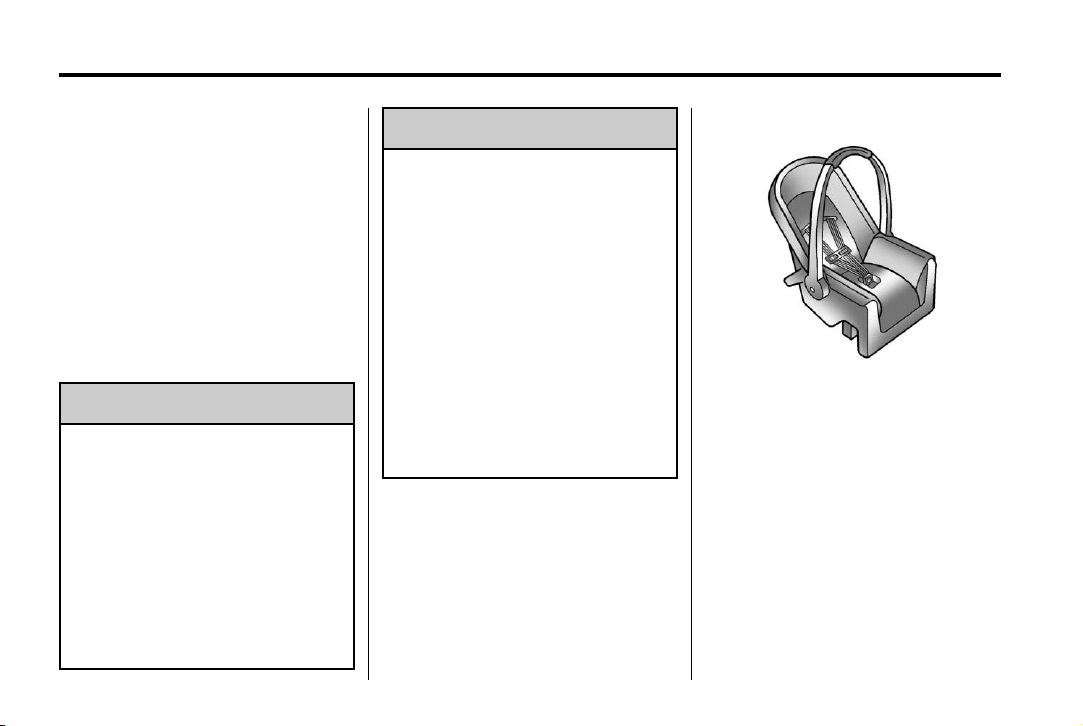
Black plate (40,1)
Acadia/Acadia Denali Owner Manual - 2013 - 1st Edition - 8/20/12
3-40 Seats and Restraints
sure it is designed to be used in
a motor vehicle. If it is, the
restraint will have a label saying
that it meets federal motor
vehicle safety standards.
The restraint manufacturer
instructions that come with the
restraint state the weight and
height limitations for a particular
child restraint. In addition, there
are many kinds of restraints
available for children with
special needs.
WARNING
{
To reduce the risk of neck and
head injury during a crash, infants
need complete support. In a
crash, if an infant is in a
rear-facing child restraint, the
crash forces can be distributed
across the strongest part of an
infant's body, the back and
shoulders. Infants should always
be secured in rear-facing child
restraints.
WARNING
{
A young child's hip bones are still
so small that the vehicle's regular
safety belt may not remain low on
the hip bones, as it should.
Instead, it may settle up around
the child's abdomen. In a crash,
the belt would apply force on a
body area that is unprotected by
any bony structure. This alone
could cause serious or fatal
injuries. To reduce the risk of
serious or fatal injuries during a
crash, young children should
always be secured in appropriate
child restraints.
Child Restraint Systems
Rear-Facing Infant Seat
A rear-facing infant seat provides
restraint with the seating surface
against the back of the infant.
The harness system holds the infant
in place and, in a crash, acts to
keep the infant positioned in the
restraint.
Page 93

Black plate (41,1)
Acadia/Acadia Denali Owner Manual - 2013 - 1st Edition - 8/20/12
Forward-Facing Child Seat
A forward-facing child seat provides
restraint for the child's body with the
harness.
Booster Seats
A booster seat is a child restraint
designed to improve the fit of the
vehicle's safety belt system.
A booster seat can also help a child
to see out the window.
Seats and Restraints 3-41
Securing an Add-On Child
Restraint in the Vehicle
WARNING
{
A child can be seriously injured or
killed in a crash if the child
restraint is not properly secured in
the vehicle. Secure the child
restraint properly in the vehicle
using the vehicle safety belt or
LATCH system, following the
instructions that came with that
child restraint and the instructions
in this manual.
To help reduce the chance of injury,
the child restraint must be secured
in the vehicle. Child restraint
systems must be secured in vehicle
seats by lap belts or the lap belt
portion of a lap-shoulder belt, or by
the LATCH system. See Lower
Anchors and Tethers for Children
(LATCH System) on page 3‑44.
Page 94
Black plate (42,1)
Acadia/Acadia Denali Owner Manual - 2013 - 1st Edition - 8/20/12
3-42 Seats and Restraints
Children can be endangered in a
crash if the child restraint is not
properly secured in the vehicle.
When securing an add-on child
restraint, refer to the instructions
that come with the restraint which
may be on the restraint itself or in a
booklet, or both, and to this manual.
The child restraint instructions are
important, so if they are not
available, obtain a replacement
copy from the manufacturer.
Keep in mind that an unsecured
child restraint can move around in a
collision or sudden stop and injure
people in the vehicle. Be sure to
properly secure any child restraint in
the vehicle — even when no child is
in it.
In some areas, Certified Child
Passenger Safety Technicians
(CPSTs) are available to inspect
and demonstrate how to correctly
use and install child restraints. In
the U.S., refer to the National
Highway Traffic Safety
Administration (NHTSA) website to
locate the nearest child safety seat
inspection station. For CPST
availability in Canada, check with
Transport Canada or the Provincial
Ministry of Transportation office.
Securing the Child within the
Child Restraint
A child can be seriously injured or
killed in a crash if the child is not
properly secured in the child
restraint. Secure the child
properly following the instructions
that came with that child restraint.
Where to Put the Restraint
According to accident statistics,
children and infants are safer when
properly restrained in a child
restraint system or infant restraint
system secured in a rear seating
position.
WARNING
{
We recommend that children and
child restraints be secured in a rear
seat, including: an infant or a child
riding in a rear-facing child restraint;
a child riding in a forward-facing
child seat; an older child riding in a
booster seat; and children, who are
large enough, using safety belts.
The vehicle may be equipped with a
front center airbag in the inboard
side of the driver seat. Even with a
front center airbag, a child restraint
can be installed in any second row
seating position.
Never put a rear-facing child seat in
the front. This is because the risk to
the rear-facing child is so great if the
airbag deploys.
WARNING
{
A child in a rear-facing child
restraint can be seriously injured
or killed if the right front
passenger airbag inflates. This is
because the back of the
(Continued)
Page 95

Black plate (43,1)
Acadia/Acadia Denali Owner Manual - 2013 - 1st Edition - 8/20/12
Seats and Restraints 3-43
WARNING (Continued)
rear-facing child restraint would
be very close to the inflating
airbag. A child in a forward-facing
child restraint can be seriously
injured or killed if the right front
passenger airbag inflates and the
passenger seat is in a forward
position.
Even if the passenger sensing
system has turned off the right
front passenger frontal airbag, no
system is fail-safe. No one can
guarantee that an airbag will not
deploy under some unusual
circumstance, even though it is
turned off. Secure rear-facing
child restraints in a rear seat,
even if the front passenger frontal
airbag is off.
It is also better to secure a
forward-facing child restraint in a
rear seat. If a forward-facing child
(Continued)
WARNING (Continued)
restraint must be secured in the
right front seat, always move the
front passenger seat as far back
as it will go.
See Passenger Sensing System
on page 3‑30 for additional
information.
If a child restraint is installed in a
second row center seat, move the
second row seat to the rearward
position, whenever possible, to
minimize contact with the front
center airbag, if equipped.
When securing a child restraint in a
rear seating position, study the
instructions that came with the child
restraint to make sure it is
compatible with this vehicle.
Child restraints and booster seats
vary considerably in size, and some
may fit in certain seating positions
better than others. Always make
sure the child restraint is properly
secured.
Depending on where you place the
child restraint and the size of the
child restraint, you may not be able
to access adjacent safety belt
assemblies or LATCH anchors for
additional passengers or child
restraints. Adjacent seating
positions should not be used if the
child restraint prevents access to or
interferes with the routing of the
safety belt.
Wherever a child restraint is
installed, be sure to secure the child
restraint properly.
Keep in mind that an unsecured
child restraint can move around in a
collision or sudden stop and injure
people in the vehicle. Be sure to
properly secure any child restraint in
the vehicle — even when no child is
in it.
Page 96

Black plate (44,1)
Acadia/Acadia Denali Owner Manual - 2013 - 1st Edition - 8/20/12
3-44 Seats and Restraints
Lower Anchors and Tethers for Children (LATCH System)
The LATCH system secures a child
restraint during driving or in a crash.
LATCH attachments on the child
restraint are used to attach the child
restraint to the anchors in the
vehicle. This system is designed to
make installation of a child restraint
easier.
Make sure that a LATCH-compatible
child restraint is properly installed
using the anchors, or use the
vehicle's safety belts to secure the
restraint, following the instructions
that came with that restraint, and
also the instructions in this manual.
When installing a child restraint with
a top tether, you must also use
either the lower anchors or the
safety belts to properly secure the
child restraint. A child restraint must
never be attached using only the top
tether and anchor.
In order to use the LATCH system in
your vehicle, you need a child
restraint that has LATCH
attachments. The child restraint
manufacturer will provide you with
instructions on how to use the child
restraint and its attachments. The
following explains how to attach a
child restraint with these
attachments in your vehicle.
Not all vehicle seating positions or
child restraints have lower anchors
and attachments or top tether
anchors and attachments.
Lower Anchors
Lower anchors (1) are metal bars
built into the vehicle. There are two
lower anchors for each LATCH
seating position that will
accommodate a child restraint with
lower attachments (2).
Page 97

Black plate (45,1)
Acadia/Acadia Denali Owner Manual - 2013 - 1st Edition - 8/20/12
Seats and Restraints 3-45
Top Tether Anchor
A top tether (3, 4) anchors the top of
the child restraint to the vehicle.
A top tether anchor is built into the
vehicle. The top tether
attachment (2) on the child restraint
connects to the top tether anchor in
the vehicle in order to reduce the
forward movement and rotation of
the child restraint during driving or in
a crash.
The child restraint may have a
single tether (3) or a dual tether (4).
Either will have a single
attachment (2) to secure the top
tether to the anchor.
Some child restraints with top
tethers are designed for use with or
without the top tether being
attached. Others require the top
tether always to be attached. In
Canada, the law requires that
forward-facing child restraints have
a top tether, and that the tether be
attached. Be sure to read and follow
the instructions for your child
restraint.
Lower Anchor and Top Tether
Anchor Locations
Second Row — Bucket
I (Top Tether Anchor): Seating
positions with top tether anchors.
H (Lower Anchor): Seating
positions with two lower anchors.
Page 98

Black plate (46,1)
Acadia/Acadia Denali Owner Manual - 2013 - 1st Edition - 8/20/12
3-46 Seats and Restraints
To assist in locating the top tether
anchors, the top tether anchor
symbol is near the anchor.
Second Row — 60/40 Bench
I (Top Tether Anchor): Seating
positions with top tether anchors.
I (Top Tether Anchor): Seating
positions with top tether anchors.
H (Lower Anchor): Seating
positions with two lower anchors.
To assist in locating the lower
anchors, each second row anchor
position has a label, near the crease
between the seatback and the seat
cushion.
Third Row
Second Row — Bucket Shown,
Bench Similar
The top tether anchors are at the
bottom rear of the seatback for each
seating position in the second row.
Page 99

Black plate (47,1)
Acadia/Acadia Denali Owner Manual - 2013 - 1st Edition - 8/20/12
Seats and Restraints 3-47
Be sure to use an anchor on the
same side of the vehicle as the
seating position where the child
restraint will be placed.
that the top tether be attached, or if
the instructions that come with the
child restraint say that the top tether
must be attached.
According to accident statistics,
children and infants are safer when
properly restrained in a child
restraint system or infant restraint
system secured in a rear seating
position. See Where to Put the
Restraint on page 3‑42 for
additional information.
Securing a Child Restraint
Designed for the LATCH
System
Third Row
The third row has one top tether
anchor at the bottom rear of the
center seatback. This anchor should
be used for the center seating
position only. Never install two top
tethers using the same top tether
anchor.
Do not secure a child restraint in a
position without a top tether anchor
if a national or local law requires
If a LATCH-type child restraint is
not attached to anchors, the child
restraint will not be able to protect
the child correctly. In a crash, the
child could be seriously injured or
killed. Install a LATCH-type child
restraint properly using the
WARNING
{
(Continued)
WARNING (Continued)
anchors, or use the vehicle safety
belts to secure the restraint,
following the instructions that
came with the child restraint and
the instructions in this manual.
WARNING
{
Do not attach more than one child
restraint to a single anchor.
Attaching more than one child
restraint to a single anchor could
cause the anchor or attachment
to come loose or even break
during a crash. A child or others
could be injured. To reduce the
risk of serious or fatal injuries
during a crash, attach only one
child restraint per anchor.
Page 100

Black plate (48,1)
Acadia/Acadia Denali Owner Manual - 2013 - 1st Edition - 8/20/12
3-48 Seats and Restraints
WARNING
{
Children can be seriously injured
or strangled if a shoulder belt is
wrapped around their neck and
the safety belt continues to
tighten. Buckle any unused safety
belts behind the child restraint so
children cannot reach them. Pull
the shoulder belt all the way out
of the retractor to set the lock,
if the vehicle has one, after the
child restraint has been installed.
Notice: Do not let the LATCH
attachments rub against the
vehicle’s safety belts. This may
damage these parts. If necessary,
move buckled safety belts to
avoid rubbing the LATCH
attachments.
Do not fold the empty rear seat
with a safety belt buckled. This
could damage the safety belt or
the seat. Unbuckle and return the
safety belt to its stowed position,
before folding the seat.
The vehicle may be equipped with a
front center airbag in the inboard
side of the driver seat. Even with a
front center airbag, a child restraint
can be installed in any second row
seating position. If a child restraint is
installed in a second row center
seat, move the second row seat to
the rearward position, whenever
possible, to minimize contact with
the front center airbag.
If you need to secure more than one
child restraint in the rear seat, see
Where to Put the Restraint on
page 3‑42.
This system is designed to make
installation of child restraints easier.
When using lower anchors, do not
use the vehicle's safety belts.
Instead, use the vehicle's anchors
and child restraint attachments to
secure the restraints. Some
restraints also use another vehicle
anchor to secure a top tether.
1. Attach and tighten the lower
attachments to the lower
anchors. If the child restraint
does not have lower
attachments or the desired
seating position does not have
lower anchors, secure the child
restraint with the top tether and
the safety belts. Refer to your
child restraint manufacturer
instructions and the instructions
in this manual.
1.1. Find the lower anchors for
the desired seating
position.
1.2. To access the lower
anchors in the second row,
it may help to recline the
seatback.
Third row seatbacks must
be upright before placing
the child restraint on
the seat.
1.3. Put the child restraint on
the seat.
 Loading...