

Page 1
www.globalsat.com.tw
USGlobalSat Incorporated
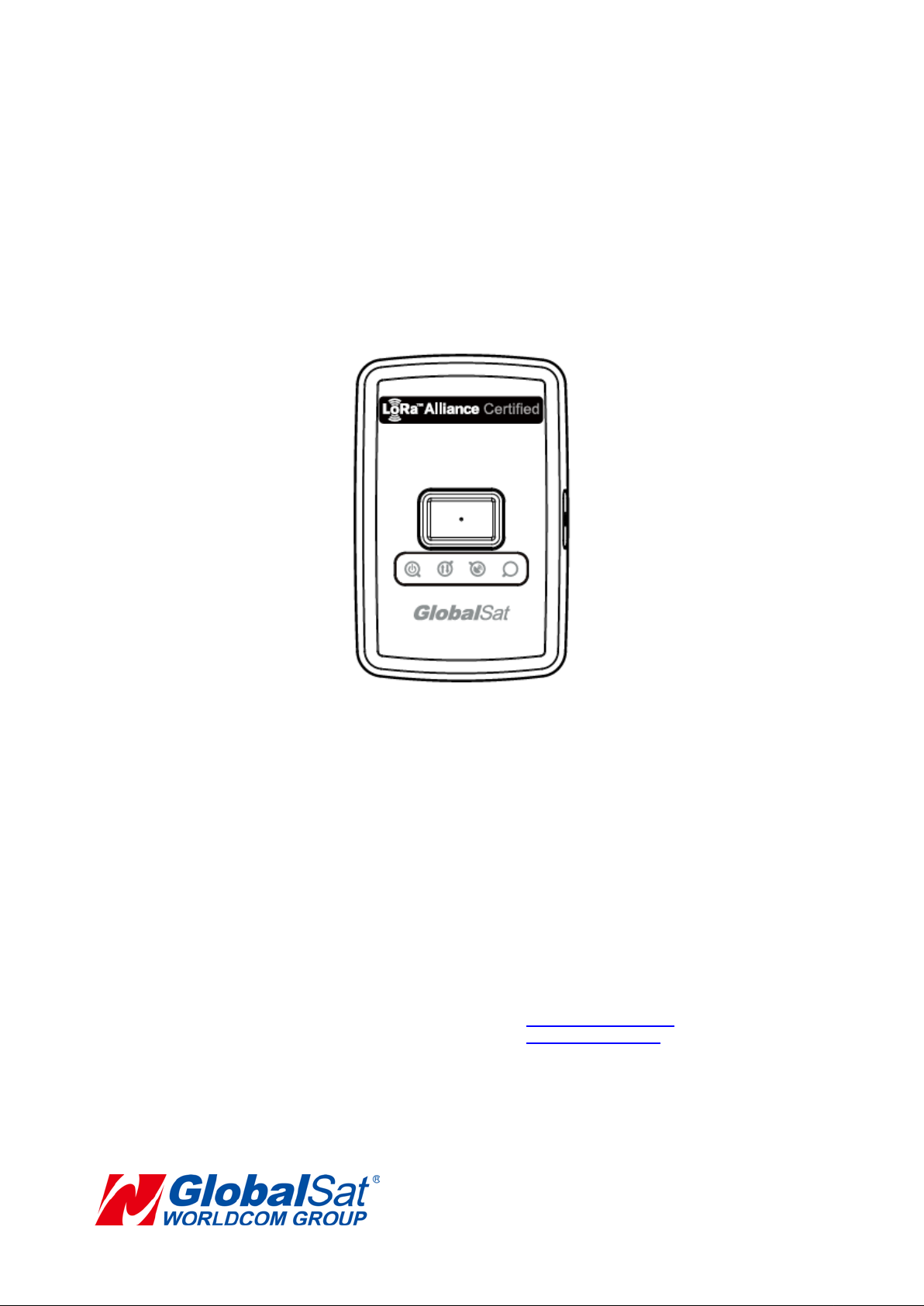
GlobalSat LT-100 Series
User Manual
GlobalSat WorldCom Corporation
16F., No. 186, Jian 1st Rd, Zhonghe Dist.,
New Taipei City 23553, Taiwan
Tel: 886.2.8226.3799/ Fax: 886.2.8226.3899
[email protected]
Version: 1.1
14740 Yorba Court Chino, CA 91710
Tel: 888.323.8720 / Fax: 909.597.8532
1
Page 2

TABLE OF CONTENTS
1. Warning ................................................................................................................................................. 3
2. Welcome ................................................................................................................................................ 4
3. Introduction and Features ................................................................................................................... 5
3.1 Introduction ..................................................................................................................... 5
3.2 LED Indicators ................................................................................................................ 6
4. Device Operation .................................................................................................................................. 7
4.1 Device charging .............................................................................................................. 7
4.2 Power .............................................................................................................................. 8
4.3 Help button...................................................................................................................... 9
5. Contact Information ........................................................................................................................... 10
6. Safety Information .............................................................................................................................. 10
7. Limited Warranty ................................................................................................................................ 11
2
Page 3

1. Warning
USE RESPONSIBLY. RE AD ALL INSTRUCTI ONS AND
SAFETY INFORMATION BEFORE USE.
Globalsat Worldcom Corporation / USGlobalsat, Inc., will not accept any responsibility
whatsoever for accidents or violations of local Laws resulting from failure to observe
common sense precautions and local laws. Your personal judgment, traffic regulations,
and common sense must always take precedence over any directions produced by GPS
receiver or the mapping software.
Indemnification:
User agrees to defend, indemnify and hold harmless GlobalSat WorldCom Corp. and USGlobalsat,
Inc., its officers, directors, employees and agents against and from any third party claims, actions,
damages or demands, including but not limited to, reasonable legal and accounting fees, resulting from
user's use or misuse of this product, violation of these Terms, or any ac tivities related to this produc t, or
from user's violations of the rights of any other user of this product. Use of this Product is at user's own
risk.
3
Page 4

2. Welcome
Thank you for purchasing the GlobalSat LT-100. The LT-100 is a sleek, compact and
feature rich ass et moni tor ing tracking device. The LT-100 unit incorp or at es a wide array of
custom feature, functions and configurations for unique client requirements. We
appreciate your purchase of a Glo balSat Worldcom Product!
4
Page 5
3. Introduction and Feat ure s
3.1 Introduction
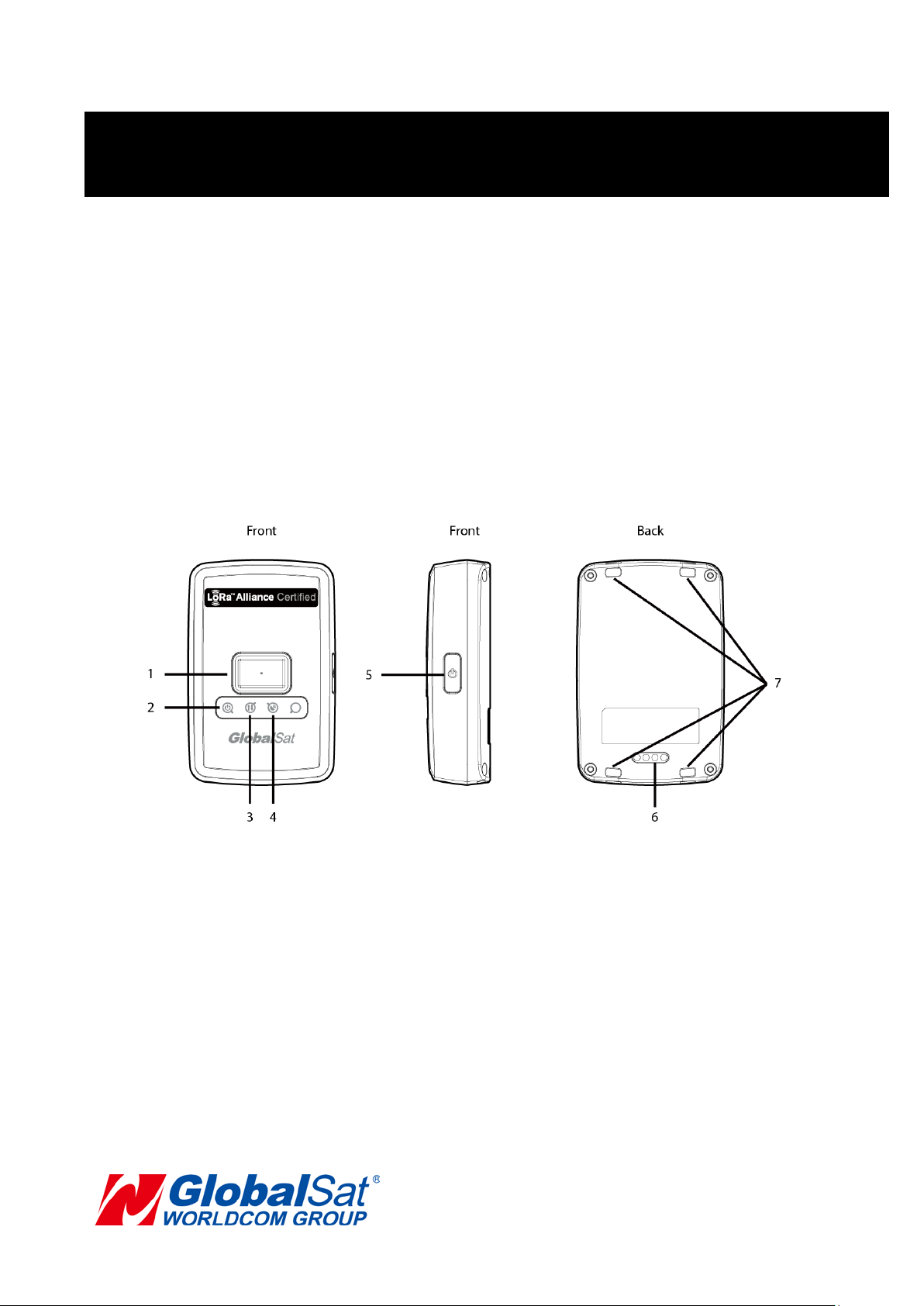
LT-100 is a LoRaWAN compliant RF Tracker which includes Asia’s first LoRaWAN
certified module by Globalsat. It is designed for asset tracking, pet tracking, and personal
monitoring of children and elderly. It has built-in help button for emergency report which
allows immediate notification to the care giver/monitor. It is also equipped with a high
capacity battery which allows up to 4 Weeks (report every 1hr) of usage without charging.
LT-100 is fully compatible with LoRaWAN compliant gateways, making it the #1 choice for
tracking application under the LoRaWAN network.
1 Help Button
2 Power LED
3 LoRa LED
4 GPS LED
5 Power Button
6 Battery Charging Contacts
7 Lanyard Holes
5
Page 6
3. Introduction and Features (Continued)
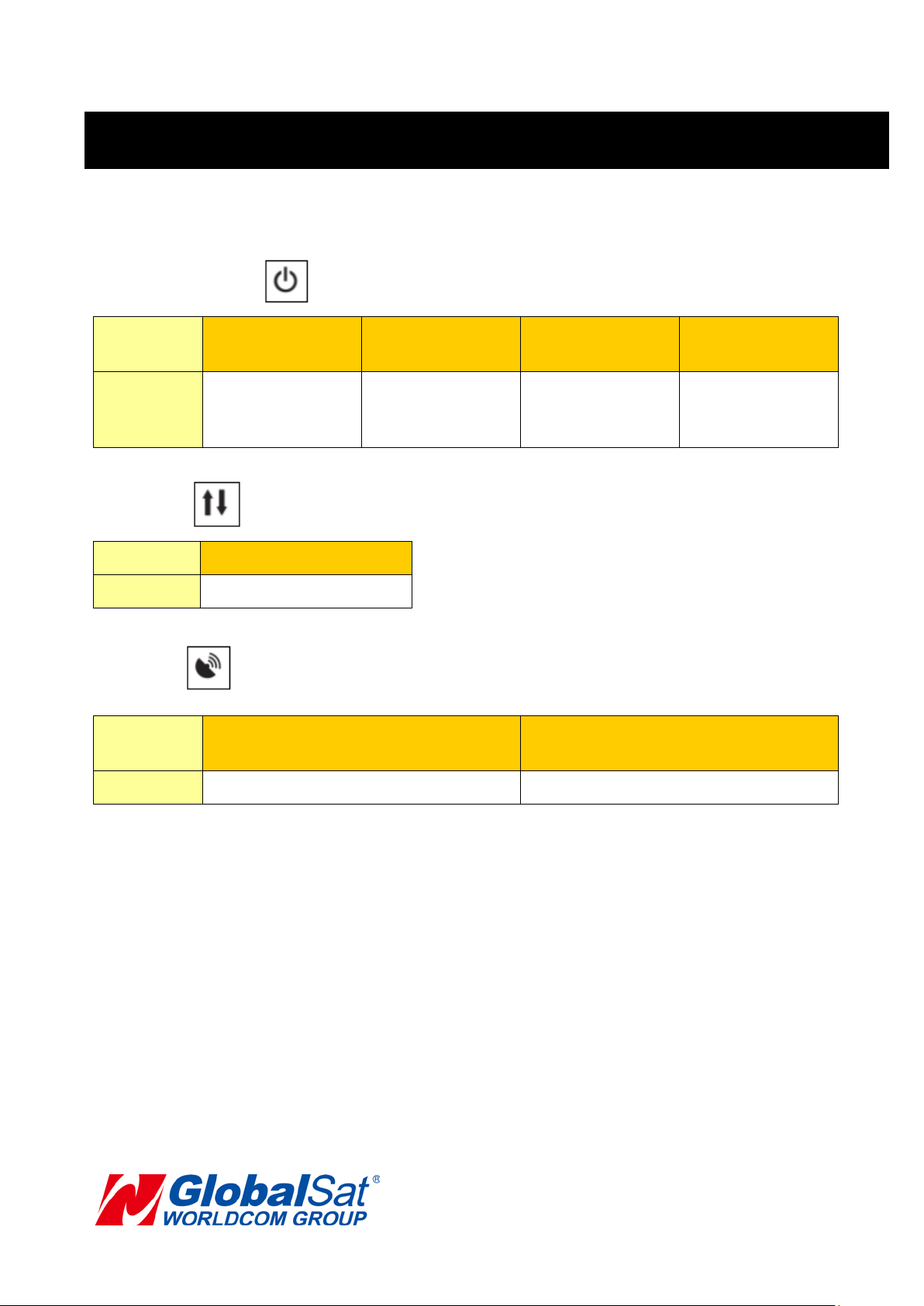
3.2 LED Indicators
Power Status LED
LED
State LT-100 is fully
LoRa LED
LED
State Data transmitting
GPS LED
LED
Orange
Constantly Lit
charged
Blinking Quickly
Blinking Quickly
(Once per second)
Orange
Blinking
LT-100 is being
charged.
Red
Constantly Lit
Battery power is
low
Blinking Slowly
(Once every 3 seconds)
Red Blinking
Quickly
USB
configuration
mode
State LT-100 is searching for GPS fix
6
LT-100 receives GPS fix
Page 7
4. Device Operation
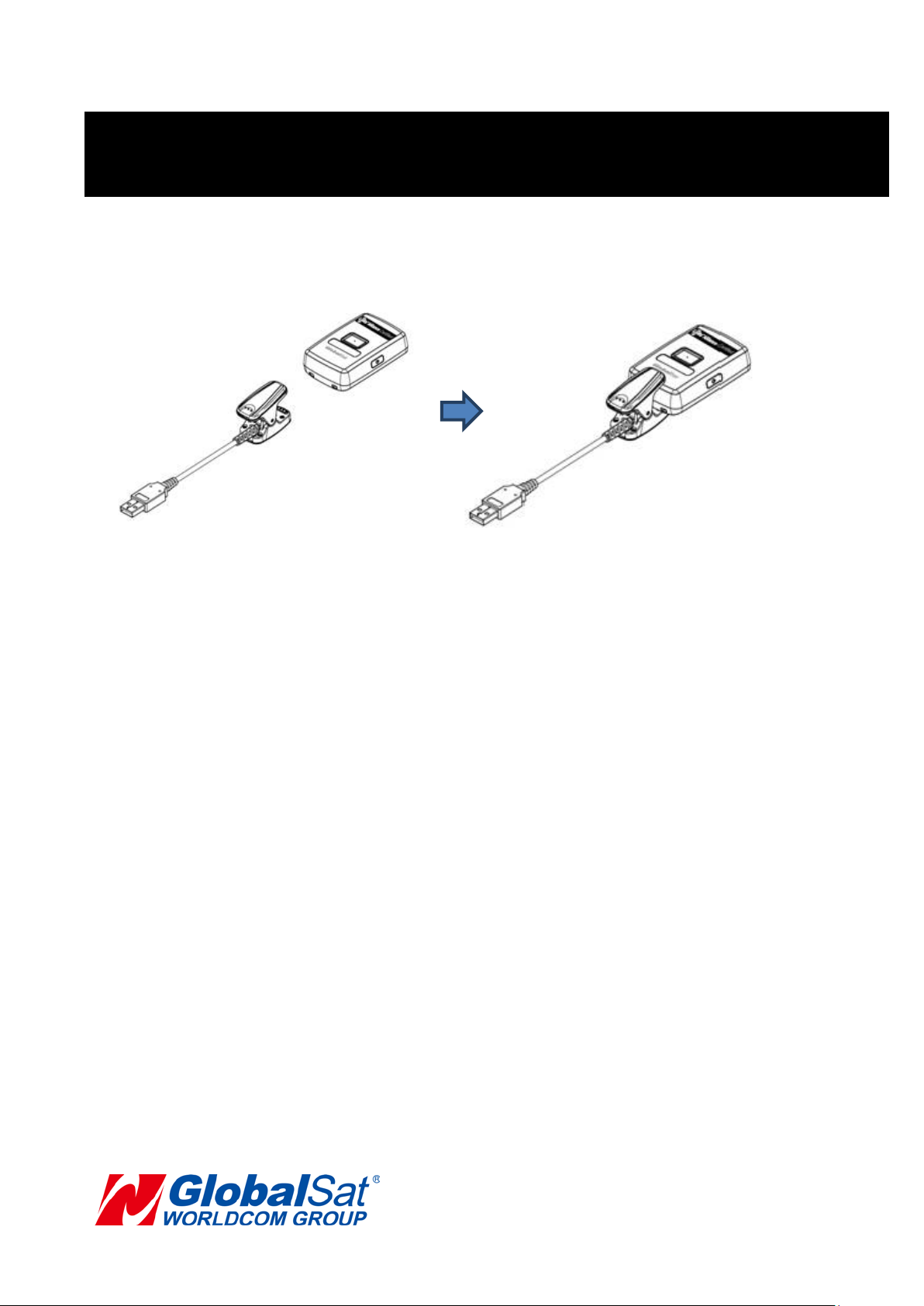
4.1 Device charging
Using the device for the first time, rechargeable battery will require a complete 100%
charge before LT-100 is operable. To maximize your device’s battery life, proceed by
performing the steps listed below.
1. Connect the charging clip to LT-100's battery charging contacts and connect the
USB side to AC adaptor.
2. Allow at least 4 hours of battery charging time.
7
Page 8
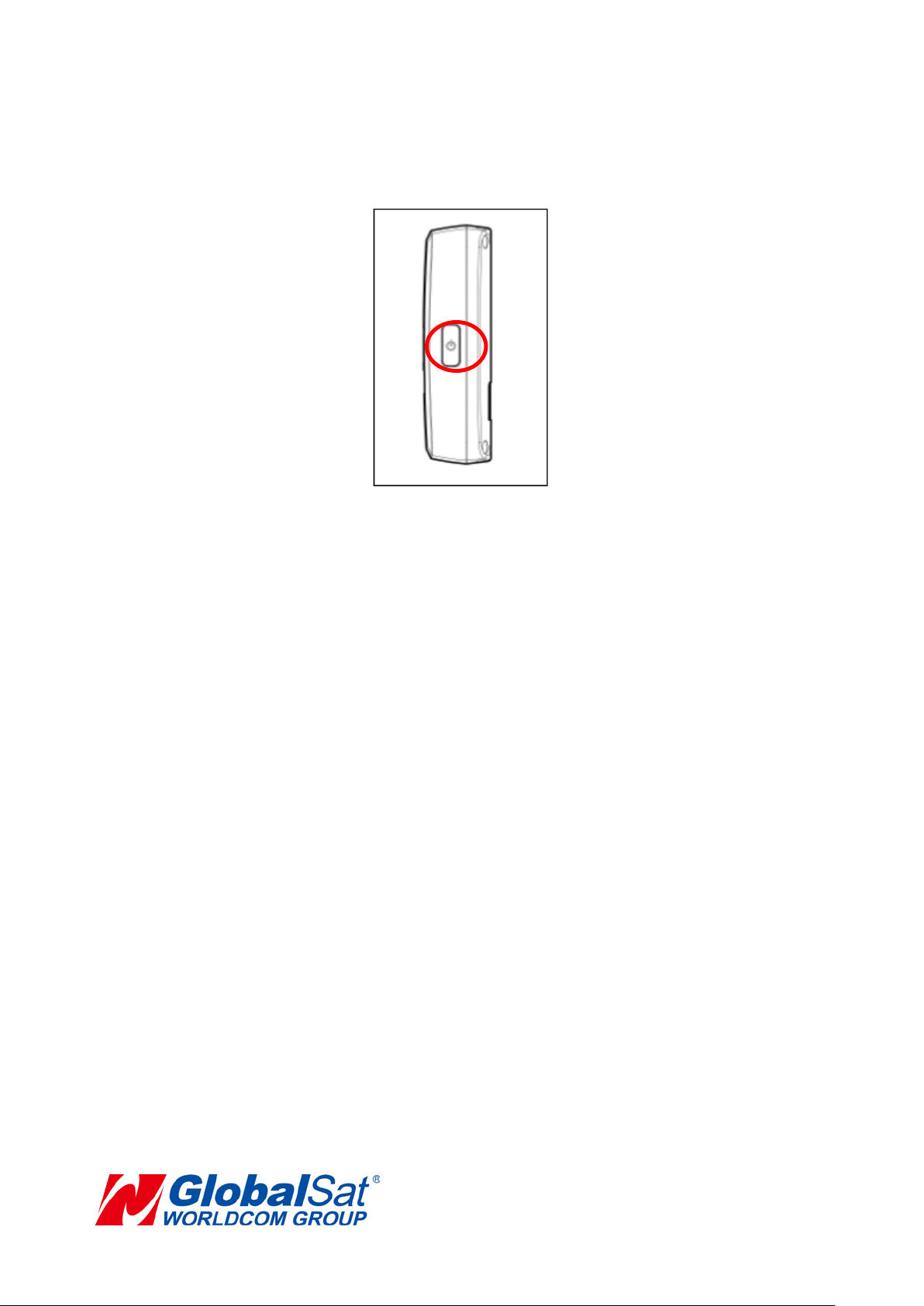
4.2 Power
1. To turn the device “ON”, press and hold the power button until the device vibrates..
2. To turn the device “OFF”, press and hold the power button until the device vibrates.
3. To perform a hard reset, press and hold the power button for 8 to 10 seconds.
Note: Short press pow er button to c heck LT-100 is On or Off.
Device off:red LED on for 3 seconds.
Device on:red LED blink 3 times.
8
Page 9
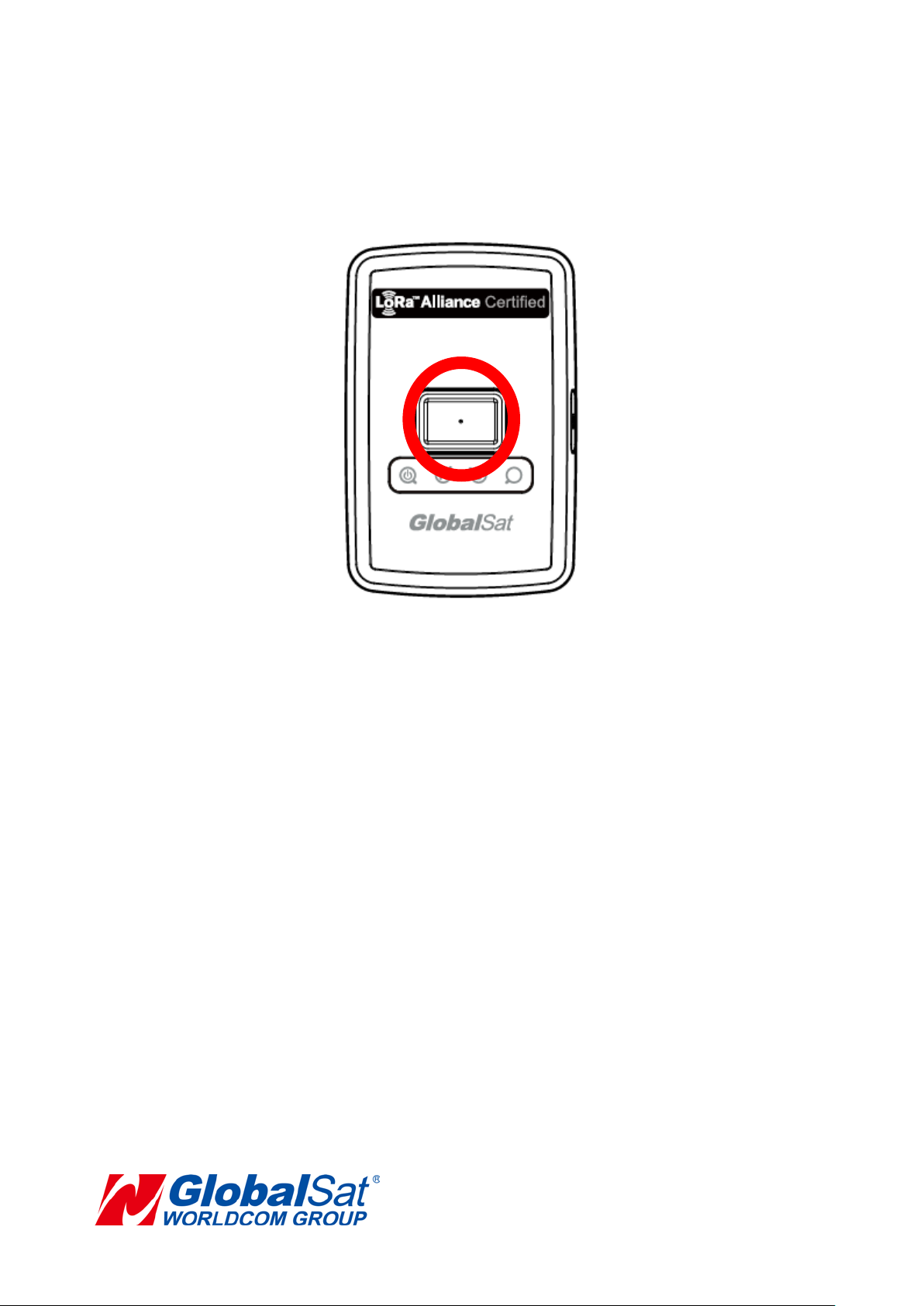
4.3 Help button
.
While pressing and holding the help button for 2 seconds, LT-100 would vibrate and start
to get GPS fix for 15 seconds (default value). It would send 3 pieces of help report to
Application Server via connected Gateway by 15 seconds interval (default value).
Note:
The LoRaWAN requires a 1% transmit duty-cycle lower than the legal limit to avoid
network congestion.
application server via gateway by 5-minute interval minimal.
Abide by EU’s regulation, LT-100 should send help reports to
9
Page 10

5. Contact Information
GlobalSat WorldCom Corporation
Address: 16F., No.186, Jian 1st Rd., Jhonghe Dist., New Taipei City ,
Taiwan TEL: +886-2-82263799 FAX: +886-2-82263899
6. Safety Information
• Please consult your airline prior to the operation of this product in the aircraft. . Operating this
product in environm ents emitting intensive ra dio waves or radiation can affect the oper ation and
functionality of this product.
• Avoid use in hum id or r ainy environm ent. W ater ingress can disable or destro y this pr oduct beyond
repair.
• Avoid using this product in a dusty environm ent. Dust ingress can com promise the produc ts abilit y
to function.
• Avoid situations that include Over-voltage, over charging, power cable damage may cause
overheating or potential fire disaster.
• Never use any chemical or detergent to clean the Personal Tracker to prevent erosion of the surface
or paintwork.
• In order to eliminate the risk of electric shock, make certain the charging cable is completely
inserted / seated, do not touch the power cable plug / connectors with wet or damp hands.
• Do not charge the Device in any extreme cold or hot temperatures, which may cause damage to the
device.
• Keep out of the reach of children during charging.
• Avoid direct prolonged exposure to sunlight and high temperatures to avoid the potential
over-heating of the battery of this product, which may cause damage.
• Please do not attempt to repair this device yourself, contact Globalsat or USGlobalSat for Technical
Support.
• Keep all the wires tidy in order to prevent damage or tangling.
10
Page 11

7. Limited Warranty
Globalsat/USGlobalsat (1) Year Limited Warranty
FOR CONSUMERS, WHO ARE COVERED BY CONSUMER PROTECTION LAWS OR
REGULATIONS IN THEIR COUNTRY OF PURCHASE OR, IF DIFFERENT, IN THEIR CO UNTRY OF
RESIDENCE, THE BENEFITS CONFERRED BY THIS WARRANTY ARE IN ADDITION TO ALL
RIGHTS AND REMEDIES CONVEYED BY SUCH CONSUMER PROTECTION LAWS AND
REGULATIONS. THIS WARRANTY DOES NOT EXCLUDE, LIMIT OR SUSPEND ANY RITGHTS OF
CONSUMERS ARISING OUT OF NONCONFORMITY WITH A SALES CONTRACT. SOME
COUNTRIES, STATES AND PROVINCES DO NOT ALLOW THE EXC LUSION OR LIMITATION OF
INCIDENTAL OR CONSEQUENTIAL DAMAGES OR ALLOW LIMITATIONS ON HOW LONG AN
IMPLIED WARRANTY OR CONDITION MAY LAST, SO THE LIMITATIONS OR EXCLUSIONS
DESCRIBED BELOW MAY NOT APPLY TO YOU. THIS WARRANTY GIVES YOU SPECIFIC LEGAL
RIGHTS, AND YOU MAY ALSO HAVE OTHER RIGHTS THAT VARY BY COUNTRY, STATE OR
PROVIDENCE. THIS LIMITED WARRANTY IS GOVERNED BY AND CONSTRUED UNDER THE
LAWS OF THE COUNTRY IN WHICH PRODUCT PURCHASE TOOK PLACE. GLOBALSAT/
USGLOBALSAT, THE WARRANTOR UNDER THIS LIMITED WARRANTY, IS IDENTIFIED AT THE
END OF THIS DOCUMENT ACCORDING TO THE COUNTRY OR REGION IN WHICH THE
PRODUCT PURCHASE TOOK PLACE.
Globalsat/ USGlobals at’s warranty oblig ations for this hardware product are limited to the terms set forth
below:
Globalsat/ USGlobalsat, as defined below, warrants this hardware product against defects in materials
product hardware against manufacturing defects in materials and workm ans hip under normal use for a
period of ONE (1) year from the date of retail purchase by the original e nd-user purchaser and purchased
from a recognized “authorized dealer” (“Warranty Period”). Products purchased from any unauthorized
source, such as unauthorized e-Bay resellers, will not qualify for free warrant y service/support and m ay
require the end-user t o pre-pay fees assoc iat ed wit h, b ut n ot limited to the suppor t , repair, replacement and
shipping of the product to and from the service center. If a hardware defect arises and a valid claim is
received by Globalsa t/ USG lobalsat w ithin the Warrant y Period, at its opt ion and to the exten t perm itted by
law, Globalsat/ USGlobalsat will either (1) repair the product at no charge, using new parts or parts
equivalent to new in performance and reliability, (2) exchange the product with a product that is ne w or
equivalent to new in per f or mance and reliabilit y and is at least function al l y eq uiva lent to the original product
or, (3) refund the purchase price of the product. Globalsat/ USGlobalsat may request that you replace
defective parts with new or refurbished user-installable parts that Globalsat/ USGlobalsat provides in
11
Page 12

fulfillment of its warra nt y obligation. A replacement produc t or part, inc luding a us er -instal lable par t that has
been installed in acc ordance with instr uctions pro vided by Globalsa t/ USGl obalsat , assum es the rem aining
warranty of the original product or ninety (90) days from the date of replacement or repair, whichever
provides longer covera ge for you. When a product or part is exc hanged, any replacement item becom es
your property and the replaced items becomes Globalsat/ USGlobalsat’s property. Parts provide by
Globalsat/ USGlobals at in fulfillment of its warranty obligat ion must be used in products f or which warrant y
service is claimed. When a refund is given, the prod uc t f or which t he refund is provided m us t be r eturned to
Globalsat/ USGlobalsat and becomes Globalsat/ USGlobalsat’s property.
If a defect arises and a valid claim is received b y Globalsat/ USGlobalsat af ter the first one hundred an d
eighty (180) da ys of Warranty per iod, a shi pping and handling char ge m a y apply to an y repa ir or exchan ge
of the product undertaken by Globalsat/ USGlobalsat.
EXCLUSIONS AND LIMITATIONS
This Limited Warranty appl ies only to the hardwar e product manufactur ed by or for Globalsat th at can be
identified by the “Glo balsat” tradem ark, trade name, or logo annexed to it. The L imited Warranty does not
apply to any non-Globalsat hardware product or an y software, even if pac kaged or sold with the G lobalsat
hardware.
Manufacturers, suppliers, or publishers, other than Globalsat/ USGlobalsat, may provide their own
warranties to the e nd user purchaser, but Globalsat/ USGlobalsat, in so f ar as permitted b y law, provides
their products “as-is” . Software distributed by Globalsat/ USG lobalsat with or without the Globalsat brand
name (including, but not limited to system software) is not covered under this Limited Warranty. Refer to the
licensing agreement ac compan ying the sof tware for details of your rights with respect t o its use. G lobalsat/
USGlobalsat does not warrant that the operation of the product will be uninterrupted or error-free. Globalsat/
USGlobalsat is not responsible for damage arising from failure to follow instructions relating to the product’s
use.
This warranty does not apply: (a) to consumable parts, such as batteries, unless damage has
occurred due to a defect in materials and workmanship; (b) to cosmetic damage, including but not
limited to scratches, dents, a nd broken pl astic on ports; (c) to da mage cause by use acc ident, abu se,
misuse, flood, fire, earthquake or other external causes; (e) to damage caused by operating the
product outside the permitted or intended uses described by Globalsat/ USGlobalsat; (f) to damage
caused by service (including upgrades and expansions) performed by anyone who is not a
representative of Globalsat/ USGlobalsat or an Globalsat/ USGlobalsat authorized service provider;
12
Page 13

(g) to a product or part that has been modified to alter functionality or capability without the written
permission of Globalsat/ USGlobalsat; or (h) if any Globalsat/ USGlobalsat serial number has been
removed or defaced.
IMPORTANT: Do not open the hardware product. Opening the hardware product may cause damage
that is not covered by this warranty. Only Globalsat/ USGlobalsat or an authorized service provider
should perform service on this hardware product.
TO THE EXTENT PERMI TTED BY LAW, THIS WARRANTY AND THE REMEDIES SET FORTH ABOVE
ARE EXCLUSIVE AND IN LIEU OF ALL OTHER WARRANTIES, REMEDIES AND CONDITIONS,
WHETHER ORAL OR WRITTEN, STATUTORY, EXPRESS OR IMPLIED. AS PERMITTED BY
APPLICABLE LAW, GLOBALSAT/ USGLOBALSAT SPECIFICALLY DISCLAIMS ANY AND ALL
STATUTORY OR IMPLIED WARRANTIES, INCLUDING, WITHOUT LIMITATION, WARRANTIES OF
MERCHANTIBILITY AND FITNESS FOR A PARTICULAR PURPOSE AND WARRANTIES AGAINST
HIDDEN OR LATENT DEFECTS. IF GLOBALSAT/ USGLOBALSAT CANNOT LAWFULLY DISCLAIM
STATUTORY OR IMPLIED WARRANTIES THEN TO THE EXTENT PERMITTED BY LAW, ALL SUCH
WARRANTIES SHALL BE LIMITED IN DURA TION OF THE EXPRESS WARRANTY AND TO THE REPAIR
OF REPLACEMENT SERVICE AS DETERMINED BY GLOBALSAT/ USGLOBALSAT IN ITS SOLE
DISCRETION.
No Globalsat/ USGlobalsat reseller, agent, or employee is authorized to make any modifications, extension,
or addition to this war ranty. If any term is held to be i llegal or un enforc eable, the l egalit y or e nfor ceabilit y of
the remaining terms shall not be affected or impaired.\
EXCEPT AS PROVID ED IN THIS WARRANT Y AND TO THE MAXIMU M EXTENT PERMIT TED BY LAW,
GLOBALSAT/ USGLOBALSAT IS NOT RESPONSIBLE FOR DIRECT, SPECIAL, INCIDENTAL OR
CONSEQUENTIAL DAMAGES RESULTING FROM ANY BREACH OF WARRANTY OR CONDITION, OR
UNDER ANY OTHER LE GAL THEORY, INC LUDING BUT NOT LIMITED TO LO SS OF USE; LOSS OF
REVENUE; LOSS OF ACTUAL OR ANTICIPATED PROFITS (INCLUDING LOSS OF PROFITS ON
CONTRACTS); LOSS OF THE USE OF MONEY; LOSS OF ANTICIPATED SAVINGS; LOSS OF
BUSINESS; LOSS OF OPPORTUNITY; LOSS OF GOODWILL; LOSS OF REPUTATION; LOSS OF;
DAMAGE TO OR CORRUPTION OF DATA; OR ANY INDIRECT OR CONSEQUENTIAL LOSS OR
DAMAGE HOWSOEVER CAUSED INCLUDING THE REPLACEMENT OF EQUIPMENT AND
PROPERTY, ANY COSTS OF RECOVERING, PROGRAMMING OR REPRODUCING ANY PROGRAM OR
DATA STORED IN OR USED WITH THE GLOBALSAT/ USGLOBALSAT PRODUCT AND ANY FAILURE
TO MAINTAIN THE CONFIDENTIALITY OF DATA STORED ON THE PRODUCT. THE FOREGOING
LIMITATION SHALL NOT APPLY TO DEATH OR PERSONAL INJURY CLAIMS, OR ANY STATUTORY
LIABILITY FOR INTENTIONAL AND GROSS NEGLIGENT ACTS AND/OR OMISSIONS. GLOBALSAT/
13
Page 14

USGLOBALSAT DISCLAIMS ANY RESPRESENTATION THAT IT WILL BE ABLE TO REPAIR ANY
PRODUCT UNDER THIS WARRANTY OR MAKE A PRODUCT EXCHANGE WITHOUT RISK TO OR
LOSS OF PROGRAMS OR DATA.
OBTAINING WARRANTY SERVICE
Please access and rev iew the online help resources r eferred to in the documentation ac companying this
hardware product before seeking warranty service. If the product is still not functioning properly after making
use of these resourc es, access the online websit e www.usglobalsat.com for inst ructions on how to obtain
warranty service. You must follow Globalsat/ USGlobalsat warranty processes. Globalsat/ USGlobalsat may
provide warranty service (i) by sending the unit to Globalsat/ USGlobalsat location, where service is
performed at the loc ation, or (ii) b y sending the un it to an author ized Globa lsat/ USGloba lsat supplier (ii i)
by sending you new or refurbished customer-installable replacement product or parts to enable you to
service or exchange your own product (“RMA service”). Upon receipt of the replacement product or part, the
original product or part becomes the property of Globalsat/ USGlobalsat and you agree to follow instructions,
including, if requires, arranging the return of the product or part to Globalsat/ USGlobalsat in a timely manner.
When providing RMA service requiring the return of the original product or part, Globalsat/ USGlobalsat may
require credit card authorization as security for the retail price of the replacement product or part and
applicable shipping c osts. If you follow the instructions, Globalsat/ USGlobalsat will cance l the credit card
authorization, so you will not b e charged for th e produc t or part and sh ipping cos ts. If you fail t o return the
replace product or part as instructed, Gl obalsat/ USGl obalsat will charg e the credit card for the authorized
amount. Service options, parts availability and response times may vary according to the country in which
service is requested. Service options are subject to change at any time. You may be responsible for shipping
and handling charges if pr o duc t cannot be serviced in the c oun try in which service is reques te d. If you seek
service in a countr y that is not the country of purcha se, you will comply with applicab le export laws and
regulations and be respon sible for all custom duties, V.A.T. and other associated tax es and charges. For
international service, Globalsat/ USGlobalsat may repair or exchange defective products and parts with
comparable products and parts that comply with local standards. In accordance with applicable law,
Globalsat/ USGlobalsat may require that you furnish proof of purchase details and/ or comply with the
registration requirements before receiving warranty service.
Please refer to the accompanying documentation for more details on this and other matters obtaining
warranty service.
Globalsat/ USGlobalsat will maintain and use customer information in accordance with the Globalsat/
USGlobalsat Pr i vacy Policy.
If your product is capable of storing software programs, data and other information, you should make
periodic backup c opies of the inform ation contained o n the product’s hard driv e or other storage m edia to
14
Page 15

protect the contents and as a precaution against possible operational failures. Before you deliver your
product for warrant y service it is your responsib ility to keep a separate back up copy of the contents, and
disable any security passwords. IT IS POSSIBLE THAT THE CONTENTS OF YOUR HARD DRIVE WILL
BE LOST OR REFORMATTED IN THE COURSE OF WARRANTY SERVICE, AND GLOBALSAT/
USGLOBALSAT AND ITS AGENTS ARE NOT RESPONSIBLE FOR ANY DAMAGE TO OR LOSS OF
PROGRAMS, DATA OR OTHER INFORMATION CONTAINED ON THE MEDIA OR ANY PART OF THE
PRODUCT SERVICED. Your product will be returned to you configure d as originall y purchased, s ubject to
applicable updates. You will be responsible for reinstalling all other software programs, data and passwords.
Recovery and reinstallation of service programs and user data are not covered under this Limited Warranty.
15
Page 16

8. FCC Warning
Federal Communication Commission Interference Statement
This device complies with Part 15 of the FCC Rules. Operation is subject to the following
two conditions: (1) This device may not cause harmful interference, and (2) this device
must accept any interference received, including interference that may cause undesired
operation.
This equipment has been tested and found to comply with the limits for a Class B digital
device, pursuant to Part 15 of the FCC Rules. These limits are designed to provide
reasonable protection against harmful interference in a residential installation. This
equipment generates, uses and can radiate radio frequency energy and, if not installed and
used in accordance with the instructions, may cause harmful interference to radio
communications. However, there is no guarantee that interference will not occur in a
particular installation. If this equipment does cause harmful interference to radio or
television reception, which can be determined by turning the equipment off and on, the
user is encouraged to try to correct the interference by one of the following measures:
- Reorient or relocate the receiving antenna.
- Increase the separation between the equipment and receiver.
- Connect the equipment into an outlet on a circuit different from that
to which the receiver is connected.
- Consult the dealer or an experienced radio/TV technician for help.
FCC Caution: Any changes or modifications not expressly approved by the party
responsible for compliance could void the user's authority to operate this equipment.
This transmitter must not be co-located or operating in conjunction with any other antenna
or transmitter.
16
Page 17

Radiation Exposure Statement:
The product comply with the FCC portable RF exposure limit set forth for an uncontrolled
environment and are safe for intended operation as described in this manual. The further
RF exposure reduction can be achieved if the product can be kept as far as possible from
the user body or set the device to lower output power if such function is available.y
17
 Loading...