

Page 1
GARAGE DOOR TRANSCEIVER
WARNINGS
CAUTION: Do not use the transceiver with
any garage door opener that lacks the
safety stop and reverse feature as required by
safety standards.
CAUTION: When programming the
transceiver to a garage door opener or
entry gate, make sure the area is clear. This will
prevent potential harm or damage as the gate
or garage door will activate during the program.
CAUTION
This device may suffer from interference if
operated in the vicinity of a mobile or fixed
station transmitter. This interference is likely to
affect the hand-held transmitter as well as the
in-car transceiver.
The door transceiver is located in the rear-view
mirror. It can be programmed to transmit the
radio frequencies of up to 3 different
transmitters, which can be used to operate
garage doors, entry gates, home lighting,
security systems or other radio frequency
operated devices.
Although this section mainly describes the
procedures for a garage door opener, it equally
applies to the previously mentioned applications.
In some countries, this feature is also known as
the HomeLink® Universal Transceiver. The
transceiver radio frequency approval numbers
for the USA and Canada are shown below:
USA and Puerto Rico - FCC: K8597R315.
Canada - CAN: 2145 101 790A.
Note: HomeLink® is a registered trademark
owned by the Johnson Controls, Inc. Milwaukee,
Wisconsin.
For further information, see See INFORMATION
AND ASSISTANCE (page 7).
United States of America
This device complies with part 15 of the FCC
rules. Operation is subject to the following two
conditions:
(1) This device may not cause harmful
interference, and
(2) this device must accept any interference
received, including interference that may cause
undesired operation.
Canada
This device complies with Industry Canada
Standard IC - RSS-210. Operation is subject to
the following two conditions:
(1) this device may not cause interference, and
(2) this device must accept any interference,
including interference that may cause undesired
operation of the device.
Note: Changes or modifications not expressly
approved by the manufacturer could void the
user’s authority to use the equipment.
BEFORE PROGRAMMING
CAUTION
When programming a device that may
require you to press and re-press the
hand-held transmitter (cycle), unplug the device
during the cycling process to prevent possible
motor failure.
For best results, fit a new battery to the
hand-held transmitter of the garage door opener
(or other device) before programming. If your
garage door opener receiver (located in the
garage) is equipped with an antenna, make sure
the antenna is hanging straight down.
5
Garage door opener
Page 2
PROGRAMMING
E134838
With the engine switched off;
1. Make sure the ignition system is on.
2. Hold the end of the original garage door
opener hand-held transmitter 2 to 6 inches
(50 to 150 mm) away from the transceiver
in the rear-view mirror, keeping the indicator
lamp in view.
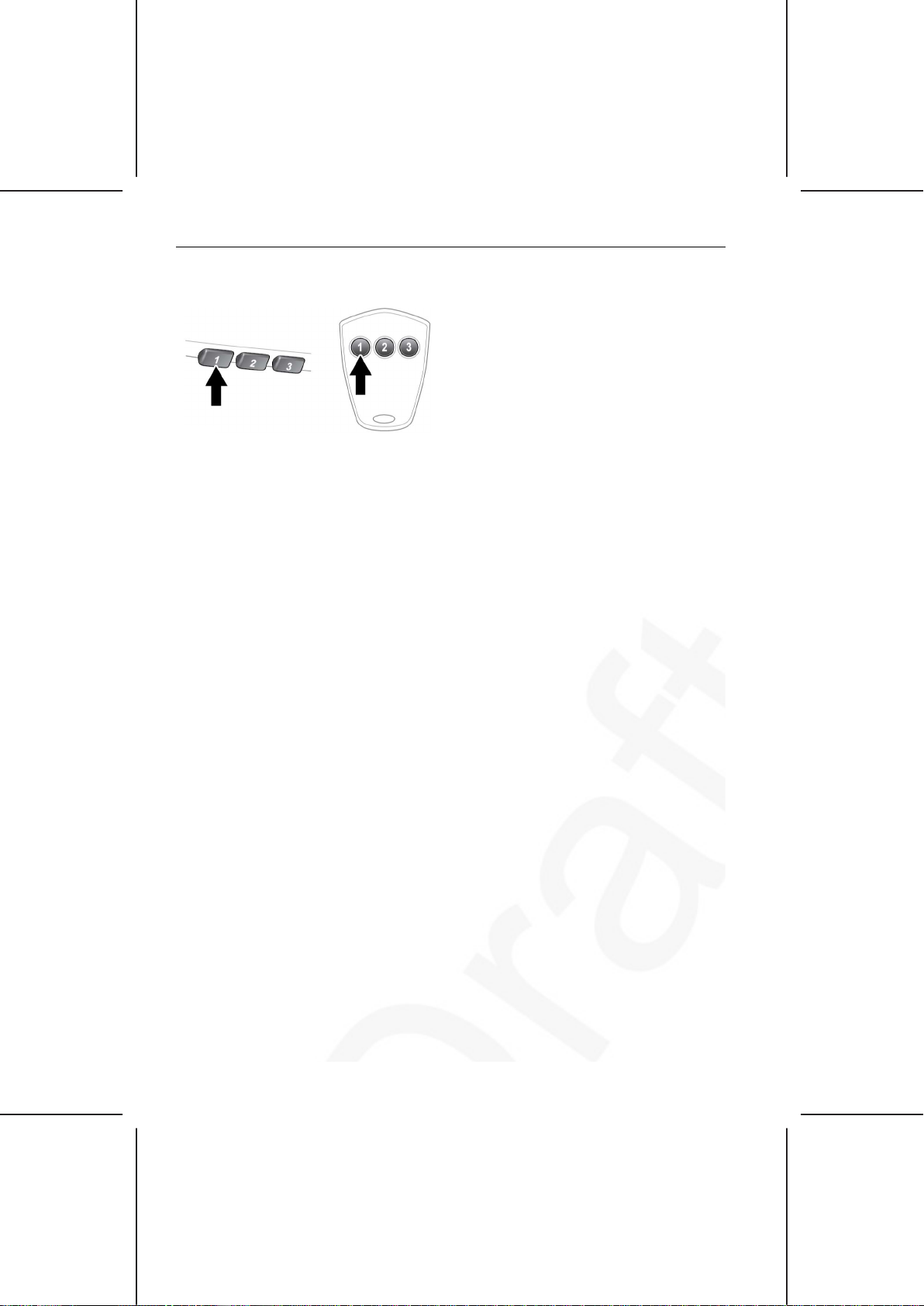
3. Using both hands, simultaneously press and
hold both the chosen transceiver button on
the rear-view mirror, as shown above, and
the hand-held transmitter button. Keep both
buttons pressed. The indicator lamp will
flash slowly at first and then change to a fast
flash. When the indicator lamp flashes
rapidly, release both buttons. The rapid
flashing lamp indicates successful
programming.
4. If, after 60 seconds, the indicator lamp does
not flash rapidly, release both the transceiver
and the hand-held transmitter buttons and
repeat the procedure starting with Step 2.
Position the hand-held transmitter at a
different angle and/or distance.
5. Press and hold the programmed garage
door opener button and observe the
indicator lamp.
• If the indicator lamp illumination is
continuous, programming is complete
and your device should operate when
the garage door opener button is
pressed and held for approximately 1 to
2 seconds and then released.
• If the indicator lamp blinks rapidly for 2
seconds and then illuminates
continuously, proceed with the following
programming instructions for rolling
code device equipment.
TO ERASE ALL PROGRAMMING
For first time programming, make sure the
engine is switched off:
1. Make sure the ignition is on (but with the
engine switched off).
2. Press and hold the 2 outer buttons on the
transceiver in the rear view mirror. Keep the
buttons pressed until the indicator lamp
begins to flash (this will take approximately
20 seconds), then release the buttons.
All memories in the garage door opener have
now been cleared.
Note: Do not perform this procedure when
programming the additional garage door opener
buttons.
ROLLING CODE DEVICE EQUIPMENT PROGRAMMING
Note: The assistance of a second person, may
make the following steps quicker and easier.
Once the button has been pressed there are only
30 seconds in which to complete Step 3.
1. At the garage door opener receiver (motor
head unit) in the garage, locate the learn or
smart button/switch.
• The name of the button or switch may
vary between manufacturers.
2. Press and release the learn or smart button.
3. Return to the vehicle and firmly press and
hold the programmed garage door opener
button for 2 seconds and release.
4. Repeat the press, hold, release sequence
three times to complete the programming
process.
The garage door opener in the rear view mirror
should now activate the rolling code device.
6
Garage door opener
Page 3
REPROGRAMMING A SINGLE GARAGE DOOR OPENER BUTTON
To program a device to a previously
programmed button:
1. Press and hold the desired pre-programmed
garage door opener button for at least 20
seconds, but no longer than 30 seconds,
until the indicator lamp begins to flash.
2. Without releasing the rear-view mirror
button, position the hand-held transmitter
approximately 2 to 6 inches (50 to 150 mm)
away from the transceiver in the rear-view
mirror, keeping the indicator lamp in view.
3.
Carry out Step 3 of Programming.
ENTRY GATE/CANADIAN PROGRAMMING
The technology of some entry gates requires
you to press and re-press (cycle) the hand-held
transmitter button every 2 seconds during
programming.
Continue to press and hold the desired rear-view
mirror button while you cycle your hand-held
transmitter until the indicator lamp flashes
rapidly.
INFORMATION AND ASSISTANCE
CAUTION
We recommend that the programmed
transceiver buttons be erased for security
purposes when you sell or dispose of the
vehicle.
For information on the range of available
compatible products or accessories, or for
assistance, you should contact your Land Rover
Retailer/Authorized Repairer.
If you would like additional information on the
Homelink Universal Transceiver, compatible
products or to purchase other accessories,
contact your Land Rover Retailer/Authorized
Repairer or you can also contact the Homelink
helpline on 1-800-355-3515 or on the internet
at www.homelink.com.
Note: Keep the original transmitter for future
use or programming procedures if, for example,
you purchase a new vehicle.
Note: The manufacturer is not responsible for
any radio or TV interference caused by
unauthorized modifications to this equipment.
Such modifications could void the user’s
authority to operate the equipment.
7
Garage door opener
 Loading...